
M12VC - Router HiKOKI - Free user manual and instructions
Find the device manual for free M12VC HiKOKI in PDF.



| Product Type | Router (plunge) |
| Brand | HiKOKI |
| Model | M12VC |
| Power Supply | AC 120 V~60 Hz, 11 A |
| No-Load Speed | 8,000 - 24,000 rpm (variable) |
| Collet Capacity | 1/4" (6.35 mm) and 1/2" (12.7 mm) |
| Weight | 3.3 kg |
| Motor Type | Single-phase series commutator motor |
| Depth Adjustment | Yes, by graduated ring and locking lever |
| Speed Adjustment | Continuous electronic with 6 positions |
| Overload Protection | Yes, with automatic stop |
| Safety | On/off switch, lever lock |
| Maintenance | Replaceable carbon brushes, regular inspection |
| Included Accessories | 1/4" collet, template guide adapter, centering gauge, 16 mm and 23 mm wrenches |
| Available Options | Straight guide, dust collector, template guide |
| Applications | Woodworking, grooving, cuts, copies, etc. |
Frequently Asked Questions - M12VC HiKOKI
User questions about M12VC HiKOKI
0 question about this device. Answer the ones you know or ask your own.
Ask a new question about this device
Download the instructions for your Router in PDF format for free! Find your manual M12VC - HiKOKI and take your electronic device back in hand. On this page are published all the documents necessary for the use of your device. M12VC by HiKOKI.
USER MANUAL M12VC HiKOKI
SAFETY INSTRUCTIONS AND INSTRUCTION MANUAL
WARNING
IMPROPER OR UNSAFE use of this power tool can result in death or serious bodily injury!
This manual contains important information about product safety. Please read and understand this manual BEFORE operating the power tool. Please keep this manual available for other users and owners before they use the power tool. This manual should be stored in safe place.
INSTRUCTIONS DE SECURITE ET MODE D'EMPLOI
A VERTISSEMENT
INSTALLING AND REMOVING BITS 10
INSTALLING THE MOTOR HOUSING 11
HOW TO USE THE ROOTER 11
MAINTENANCE AND INSPECTION 15
ACCESSIONS 17
STANDARD ACCESSORIES 17
OPTIONAL ACCESSORIES 18
PARTS LIST 51
TABLE DES MATIERES
François
Page
Page
INFORMATIONS IMPORTANTES
DE SECURITE 19
SIGNIFICATION DES MOTS
D'AVERTISSEMENT 19
SECURITE 20
AVERTISSEMENTS DE SECURITE GENÉRAUX
CONCERNANT LES OUTILS ELECTRIQUES .... 20
REGLES DE SECURITE SPECIFIQUES
ET SYMBOLES 21
UTILISATION D'UN CORDON DE RALLONGE ... 23
DESCRIPTION FONCTIONNELLE 24
NOM DES PARTIES 24
SPECIFICATIONS 24
ASSEMBLAGE ET FONCTIONNEMENT 25
APPLICATIONS 25
ACCESSIONS STANDARD 33
ACCESSIONS SUR OPTION 34
LISTE DES PIECES 51
INDICE
Espanol
Pagina
Pagina
INFORMACION IMPORTANTE
SOBRE SEGURIDAD 35
IMPORTANT SAFETY INFORMATION
Read and understand all of the safety precautions, warnings and operating instructions in the Instruction Manual before operating or maintaining this power tool.
Most accidents that result from power tool operation and maintenance are caused by the failure to observe basic safety rules or precautions. An accident can often be avoided by recognizing a potentially hazardous situation before it occurs, and by observing appropriate safety procedures.
Basic safety precautions are outlined in the "SAFETY" section of this Instruction Manual and in the sections which contain the operation and maintenance instructions.
Hazards that must be avoided to prevent bodily injury or machine damage are identified by WARNINGS on the power tool and in this Instruction Manual.
NEVER use this power tool in a manner that has not been specifically recommended by metabo HPT.
MEANINGS OF SIGNAL WORDS
WARNING indicates a potentially hazardous situations which, if ignored, could result in death or serious injury.
CAUTION indicates a potentially hazardous situations which, if not avoided, may result in minor or moderate injury, or may cause machine damage.
NOTE emphasizes essential information.
SAFETY
GENERAL POWER TOOL SAFETY WARNINGS
WARNING:
Read all safety warnings and all instructions.
Failure to follow the warnings and instructions may result in electric shock, fire and/or serious injury.
Save all warnings and instructions for future reference.
The term "power tool" in the warnings refers to your mains-operated (corded) power tool or battery-operated (cordless) power tool.
1) Work area safety
a) Keep work area clean and well lit.
Cluttered or dark areas invite accidents.
b) Do not operate power tools in explosive atmospheres, such as in the presence of flammable liquids, gases or dust.
Power tools create sparks which may ignite the dust or fumes.
c) Keep children and bystanders away while operating a power tool.
Distractions can cause you to lose control.
2) Electrical safety
a) Power tool plugs must match the outlet.
Never modify the plug in any way.
Do not use any adapter plugs with earthed (grounded) power tools.
Unmodified plugs and matching outlets will reduce risk of electric shock.
b) Avoid body contact with earthed or grounded surfaces such as pipes, radiators, ranges and refrigerators.
There is an increased risk of electric shock if your body is earthed or grounded.
c) Do not expose power tools to rain or wet conditions.
Water entering a power tool will increase the risk of electric shock.
d) Do not abuse the cord. Never use the cord for carrying, pulling or unplugging the power tool.
Keep cord away from heat, oil, sharp edges or moving parts.
Damaged or entangled cords increase the risk of electric shock.
e) When operating a power tool outdoors, use an extension cord suitable for outdoor use.
Use of a cord suitable for outdoor user reduces the risk of electric shock.
f) If operating a power tool in a damp location is unavoidable, use a residual current device (RCD) protected supply.
Use of an RCD reduces the risk of electric shock.
3) Personal safety
a) Stay alert, watch what you are doing and use common sense when operating a power tool.
Do not use a power tool while you are tired or under the influence of drugs, alcohol or medication.
A moment of inattention while operating power tools may result in serious personal injury.
b) Use personal protective equipment. Always wear eye protection.
Protective equipment such as dust mask, non-skid safety shoes, hard hat, or hearing protection used for appropriate conditions will reduce personal injuries.
c) Prevent unintentional starting. Ensure the switch is in the off-position before connecting to power source and/or battery pack, picking up or carrying the tool.
Carrying power tools with your finger on the switch or energising power tools that have the switch on invites accidents.
d) Remove any adjusting key or wrench before turning the power tool on.
A wrench or a key left attached to a rotating part of the power tool may result in personal injury.
e) Do not overreach. Keep proper footing and balance at all times.
This enables better control of the power tool in unexpected situations.
f) Dress properly. Do not wear loose clothing or jewellery. Keep your hair, clothing and gloves away from moving parts.
Loose clothes, jewellery or long hair can be caught in moving parts.
g) If devices are provided for the connection of dust extraction and collection facilities, ensure these are connected and properly used.
Use of dust collection can reduce dust-related hazards.
4) Power tool use and care
a) Do not force the power tool. Use the correct power tool for your application.
The correct power tool will do the job better and safer at the rate for which it was designed.
b) Do not use the power tool if the switch does not turn it on and off.
Any power tool that cannot be controlled with the switch is dangerous and must be repaired.
c) Disconnect the plug from the power source and/or the battery pack from the power tool before making any adjustments, changing accessories, or storing power tools.
Such preventive safety measures reduce the risk of starting the power tool accidentally.
d) Store idle power tools out of the reach of children and do not allow persons unfamiliar with the power tool or these instructions to operate the power tool.
Power tools are dangerous in the hands of untrained users.
e) Maintain power tools. Check for misalignment or binding of moving parts, breakage of parts and any other condition that may affect the power tool's operation. If damaged, have the power tool repaired before use.
Many accidents are caused by poorly maintained power tools.
f) Keep cutting tools sharp and clean.
Properly maintained cutting tools with sharp cutting edges are less likely to bind and are easier to control.
g) Use the power tool, accessories and tool bits etc. in accordance with these instructions, taking into account the working conditions and the work to be performed.
Use of the power tool for operations different from those intended could result in a hazardous situation.
5) Service
a) Have your power tool serviced by a qualified repair person using only identical replacement parts.
This will ensure that the safety of the power tool is maintained.
SPECIFIC SAFETY RULES AND SYMBOLS
- Hold power tool by insulated gripping surfaces, because the cutter may contact its own cord.
Cutting a "live" wire may make exposed metal parts of the power tool "live" and shock the operator.
- Use clamps or another practical way to secure and support the workpiece to a stable platform.
Holding the work by your hand or against the body leaves it unstable and may lead to loss of control.
- ALWAYS wear ear protectors when using the tool for extended periods.
Prolonged exposure to high intensity noise can cause hearing loss.
-
Handle the bits very carefully.
-
Check the bit carefully for cracks or damage before operation. Replace cracked or damaged bit immediately.
-
Avoid cutting nails. Inspect for and remove all nails from the workpiece before operation.
-
Hold the tool firmly with both hands.
-
Keep hands away from rotating parts.
-
Make sure the bit is not contacting the workpiece before the switch is turned on.
10.Before using the tool on an actual workpiece, let it run for a while. Watch for vibration or wobbling that could indicate improperly installed bit.
-
Be careful of the bit rotating direction and the feed direction.
-
Do not leave the tool running. Operate the tool only when hand-held.
-
Always switch off and wait for the bit to come to a complete stop before removing the tool from workpiece.
-
Do not touch the bit immediately after operation: it may be extremely hot and could burn your skin.
-
Always lead the power supply cord away from the tool towards the rear.
-
Never run the motor unit when it is not inserted in one of the router bases.
The motor is not designed to be handheld.
- After changing the bits or making any adjustments, make sure the collet nut and any other adjustment devices are securely tightened.
Loose adjustment device can unexpectedly shift, causing loss of control, loose rotating components will be violently thrown. 5
- Definitions for symbols used on this tool
V..... volts
Hz .........hertz
A .amperes
no .no load speed
---/min.....revolutions per minute
≈ ...alternating or direct current
WARNING:
Some dust created by power sanding, sawing, grinding, drilling, and other construction activities contains chemicals known to cause cancer, birth defects or other reproductive harm. Some examples of these chemicals are:
- Lead from lead-based paint.
crystalline silica from bricks and cement and other masonry products. - arsenic and chromium from chemically-treated lumber.
Your risk from these exposures varies, depending on how often you do this type of work. To reduce your exposure to these chemicals: work in a well ventilated area, and work with approved safety equipment, such as those dust masks that are specially designed to filter out microscopic particles.
USE OF EXTENSION CORD
Make sure your extension cord is in good condition. When using an extension cord, be sure to use one heavy enough to carry the current your product will draw.
An undersized cord will cause a drop in line voltage resulting in loss of power and overheating. Table shows the correct size to use depending on cord length and nameplate ampere rating. If in doubt, use the next heavier gage. The smaller the gage number, the heavier the cord.
MINIMUM GAGE FOR CORD SETS
| Total Length of Cord in Feet (Meter) | ||||
| 0 - 25 26 - 50 51 - 100 101 - 150(0 - 7.6) (7.9 - 15.2) (15.5 - 30.5) (30.8 - 45.7) | ||||
| Ampere Rating AWGMore Not MoreThan Than | ||||
| 0 - 6 18 16 | 1 | 6 | 1 | 4 |
| 6 - 10 18 16 14 12 | ||||
| 10 - 12 16 16 14 12 | ||||
| 12 - 16 14 12 Not Recommended | ||||

WARNING:
Avoid electrical shock hazard. Never use this tool with a damaged or frayed electrical cord or extension cord.
Inspect all electrical cords regularly. Never use in or near water or in any environment where electric shock is possible.
SAVE THESE INSTRUCTIONS
AND
MAKE THEM AVAILABLE TO
OTHER USERS
AND
OWNERS OF THIS TOOL!
FUNCTIONAL DESCRIPTION
NOTE:
The information contained in this Instruction Manual is designed to assist you in the safe operation and maintenance of the power tool.
NEVER operate, or attempt any maintenance on the tool unless you have first read and understood all safety instructions contained in this manual.
Some illustrations in this Instruction Manual may show details or attachments that differ from those on your own power tool.
NAME OF PARTS

Fig. 1
SPECIFICATIONS
| Model M12VC M12SC | ||
| Motor Single Phase, Series Commutator Motor | ||
| Power source Single Phase 120V AC 60 Hz | ||
| Collet chuck capacity 1/2" (12.7 mm), 1/4" (6.35 mm) | ||
| Current 11 A | ||
| No-load speed 8000/min | -24000/min 24000/min | |
| Weight (with cord) 7.3 lbs (3.3 kg) | ||
ASSEMBLY AND OPERATION
APPLICATIONS
Woodworking jobs centered on grooving and beveling.
For example, grooving beveling, cutting, copying, engraving, shape cutting, combinations and others.
PRIOR TO OPERATION
- Power source
Ensure that the power source to be utilized conforms to the power source requirements specified on the product nameplate.
- Power switch
Ensure that the switch is in the OFF position. If the plug is connected to a receptacle while the switch is in the ON position, the power tool will start operating immediately and can cause serious injury.
- Extension cord
When the work area is far away from the power source, use an extension cord of sufficient thickness and rated capacity. The extension cord should be kept as short as practicable.

WARNING:
Damaged cord must be replaced or repaired.
- Check the receptacle
If the receptacle only loosely accepts the plug, the receptacle must be repaired. Contact a licensed electrician to make appropriate repairs.
If such a faintly receptacle is used, it may cause overheating, resulting in a serious hazard.
- Confirming condition of the environment
Confirm that the work site is placed under appropriate conditions conforming to prescribed precautions.
INSTALLING AND REMOVING BITS
WARNING: Be sure to switch power OFF and disconnect the plug from the receptacle to avoid serious trouble.
1. Installing bits
(1) Remove the motor housing from base as follows.
(a) Open the lever. (Fig. 2)
(b) While holding the base, turn the motor housing counterclockwise.
(c) Turn it until the pin in the base is disengaged from the groove in the motor housing. Lift the motor housing free from the base.
(2) Clean and insert shank of bit into the collet chunk until shank bottoms, then back it out approximately 1 / 16'' (approx. 2mm ).
(3) With the bit inserted and 16mm wrench holding the armature shaft, use the 23mm wrench to firmly tighten the collet chuck in a clockwise direction (viewed from under the router). (Fig. 3)
(4) When using the 1/4'' diameter shank bit, replace the equipped collet chuck with the one for 1/4'' diameter shank bit which is provided as the standard accessory.
CAUTION:
- Ensure that the collet chuck is firmly tightened after inserting a bit. Failure to do so will result in damage to the collet chuck.
2. Removing bits
When removing the bits, do so by following the steps for installing bits in reverse order.
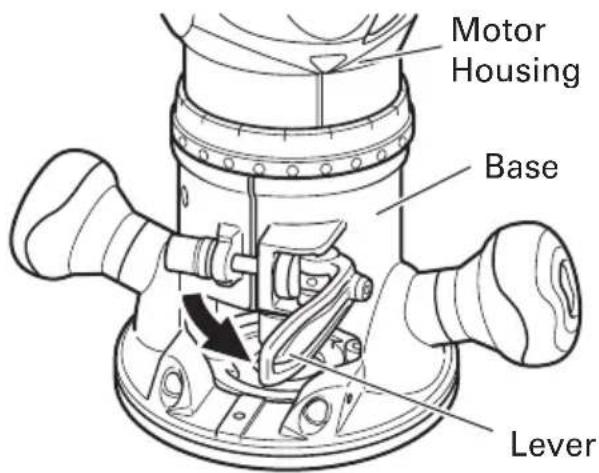
Fig. 2
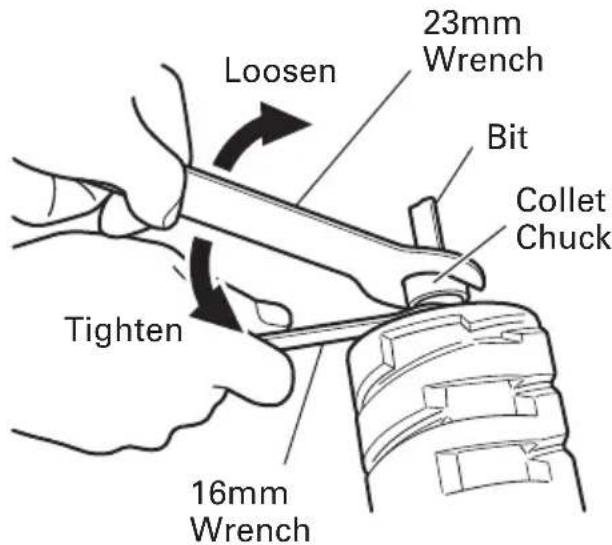
Fig. 3
INSTALLING THE MOTOR HOUSING
WARNING: Be sure to switch power OFF and disconnect the plug from the receptacle to avoid serious trouble.
- Installing the motor housing
(1) Open the lever.
(2) While holding the base, insert the motor housing into the base aligning the pin with the groove in the base.
(3) Confirm that the pin and the groove are aligning. Rotate the motor housing clockwise into the base.
(4) Close the lock lever.
CAUTION:

Fig. 4
You should be able to clamp the locking lever without excessive force. Excessive force may damage the base. You should not be able to move the motor in the base when the lever is clamped. To adjust the lever's clamping force, open the locking lever and turn the knob nut in small increments. Turning the knob nut clockwise tightens the lever, while turning the knob nut counterclockwise loosens the lever.
HOW TO USE THE ROUTER
WARNING: Be sure to switch power OFF and disconnect the plug from the receptacle to avoid serious trouble.
- Adjusting depth of cut
(1) Place the tool on a flat wood surface.
(2) Open the lever and turn the motor housing until the bit just touches the flat surface. (Fig. 5)
(3) Clamp the lever down until the point where a click can be felt. (Fig. 6)
NOTE:
The motor housing can be temporarily secured by clamping the lever (the motor housing does not slide down by its own weight).
If the motor housing slides down, make adjustments by tightening the knob nut. Turning the knob nut clockwise tightens the lever, while turning the knob nut counterclockwise loosens the lever.
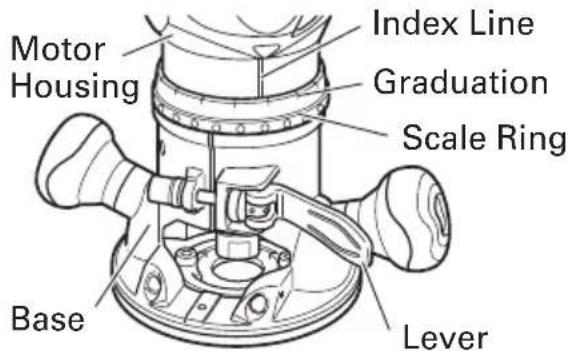
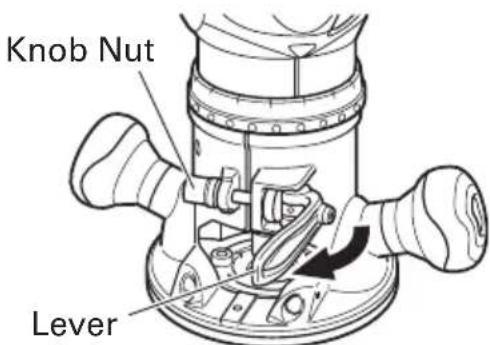
Fig. 5
Fig. 6
(4) While holding up the base slightly, turn the motor housing clockwise until the index line on the motor housing reaches the desired depth indicated on the scale ring. (Fig. 5)
(5) Close the lever firmly.
2. Adjusting the rotation speed (Model M12VC only)
The M12VC have an electronic control system that allows stepless rpm changes. As shown in Fig. 7 dial position "1" is for minimum speed and position "6" for maximum speed.
- Centering the template guide adapter
WARNING: Be sure to switch power OFF and disconnect the plug from the receptacle to avoid serious trouble.
(1) Loosen the 2 template guide adapter screws, so that the template guide adapter can be moved. (Fig. 8)
(2) Insert the centering gauge through the hole in the template guide adapter and into the collet chuck. (Fig. 9)
(3) Tighten the collet chuck by hand.
(4) Tighten the lever. (This aligns the center of the template guide adapter.)
(5) Tighten the template guide adapter screws, and pull out the centering gauge.
- Guiding the router
(1) Template guide (M12VC, M12SC: Optional accessory)
Use the template guide when employing a template for producing a large quantity of identically shaped products. (Fig. 10)
As shown in Fig. 11, to install insert template guide in center hole in template guide adapter and secure in place with the lock nut.
A template is a profiling mold made of plywood or thin lumber. When making a template, pay particular attention to the matters described blow and illustrated in Fig. 12.


Fig. 7
Fig. 8

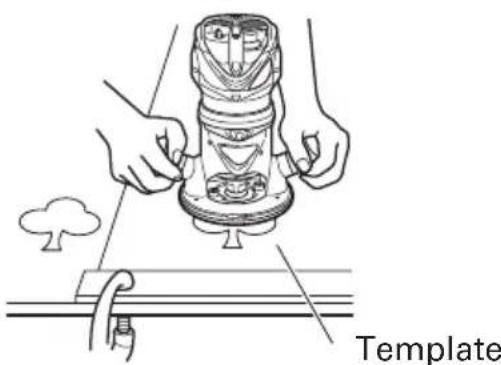
Fig. 9

Fig. 10
Fig. 11
When using the router along the interior plane of the template, the dimensions of the finished product will be less than the dimensions of the template by an amount equal to dimension "A", the difference between the radius of the template guide and the radius of the bit. The reverse is true when using the router along the exterior of the template.
Secure the template to the workpiece. Feed the router in the manner that the template guide moves along the template as shown in Fig. 12.
(2) Straight guide (optional accessory)
Use straight guide for chamfering and groove cutting along the materials side.
① Insert the guide bar into the hole in the bar holder, then lightly tighten the 2 wing bolts (A) on top of the bar holder.
② Insert the guide bar into the hole in the base, then firmly tighten the 2 hex socket bolts (standard accessories).
③Make minute adjustments of the dimensions between the bit and the guide surface with the feed screw, then firmly tighten the 2 wing bolts (A) on top of the bar holder and the wing bolt (B) that secures the straight guide. (Fig.13)
As shown in Fig. 14, securely attach the bottom of the base to processed surface of the materials. Feed the router while keeping the guide plane on the surface of the materials.
5. Cutting
WARNING:
Wear eye protection when operating this tool.
- Keep your hands, face and other body parts away from the bits and any other rotating
parts, while operating the tool.
(1) The bit must be kept clear of the materials which are to be cut, when the power is being turned on. (Fig. 15)
(2) Then turn the tool on and wait until the bit attains full speed.

Fig. 12

Fig. 13
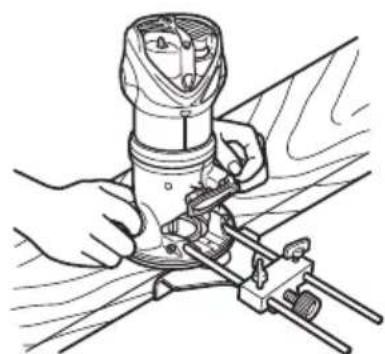
Fig. 14

Fig. 15
(3) The bit rotates clockwise (arrow direction indicated on the base). To obtain maximum conformance with the feed directions shown in Fig. 16.
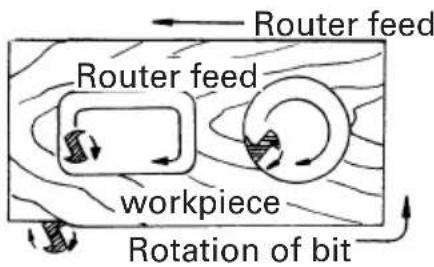
Fig. 16
NOTE:
- Moving the tool forward fast may cause a poor quality of cut, or damage to the bit or motor. Moving the tool forward too slowly may burn and mar the cut. The proper feed rate will depend on the bit size, the kind of workpiece and depth of cut. Before beginning the cut on the actual workpiece, it is advisable to make a sample cut on a piece of scrap lumber. This will show exactly how the cut will look as well as enable you to check dimensions.
Abnormalities and overloads will trigger the overload protector, and stop operation. Remove the load immediately, and turn the power off, then on. The rotation speed should return to normal. - Do not use a power generator as the power source. It may cause the rotation speed to fluctuate.
- When using the straight guide, be sure to install it on the right side in the feed direction. This will help to keep it flush with the side of the workpiece.
MAINTENANCE AND INSPECTION
WARNING: Be sure to switch power OFF and disconnect the plug from the receptacle during maintenance and inspection.
- Inspecting the screws
Regularly inspect all screws and ensure that they are fully tightened. Should any of the screws be loosened, retighten them immediately.
WARNING: Using this router with loosened screws is extremely dangerous.
- Inspecting the carbon brushes (Fig. 17) The motor employs carbon brushes which are consumable parts. Replace the carbon brush with a new one when it becomes worn to its wear limit. Always keep carbon brushes clean and ensure that they slide freely within the brush holders.
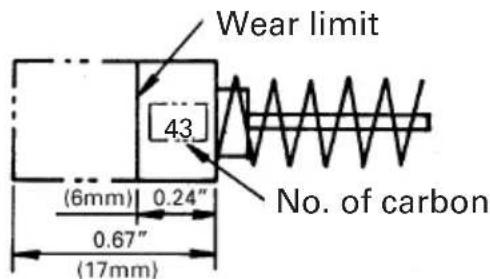
Fig. 17
CAUTION: Using this router with a carbon brush which is worn in excess of the wear limit will damage the motor.
NOTE: Use metabo HPT carbon brush No. 43 indicated in Fig. 17.
- Replacing carbon brushes
Remove the brush caps with a slotted screwdriver. The carbon brushes can then be easily removed. (Fig. 18)
- Service and repairs
All quality power tools will eventually require servicing or replacement of parts because of wear from normal use. To assure that only authorized replacement parts will be used, all service and repairs must be performed by a metabo HPT AUTHORIZED SERVICE CENTER, ONLY.
- Service parts list
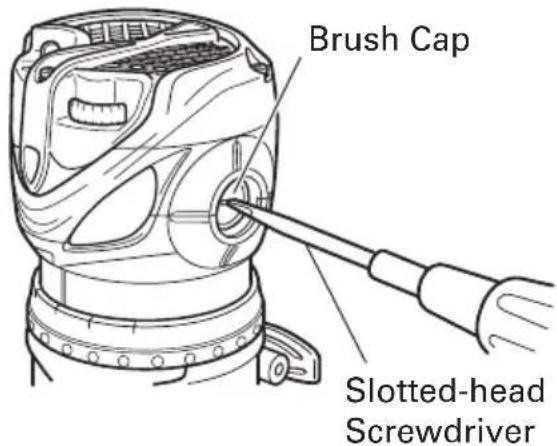
Fig. 18
CAUTION: Repair, modification and inspection of metabo HPT Power Tools must be carried out by a metabo HPT Authorized Service Center.
This Parts List will be helpful if presented with the tool to the metabo HPT Authorized Service Center when requesting repair or other maintenance. In the operation and maintenance of power tools, the safety regulations and standards prescribed in each country must be observed.
- Service parts list
A: Item No.
B:Code No.
C: No. Used
D:Remarks
CAUTION: Repair, modification and inspection of metabo HPT Power Tools must be carried out by an metabo HPT Authorized Service Center.
T his Parts List will be helpful if presented with the tool to the metabo HPT Authorized Service Center when requesting repair or other maintenance. In the operation and maintenance of power tools, the safety regulations and standards prescribed in each country must be observed.
MODIFICATIONS:
metabo HPT Power Tools are constantly being improved and modified to incorporate the latest technological advancements.
Accordingly, some parts (i.e. code numbers and/or design) may be changed without prior notice.
ACCESSIONS

WARNING:
ALWAYS use Only authorized metabo HPT replacement parts and accessories. NEVER use replacement parts or accessories which are not intended for use with this tool. Contact metabo HPT if you are not sure whether it is safe to use a particular replacement part or accessory with your tool. The use of any other attachment or accessory can be dangerous and could cause injury or mechanical damage.
NOTE:
Accessories are subject to change without any obligation on the part of the metabo HPT.
STANDARD ACCESSORIES
- Model M12VC, M12SC
(1) 1 / 4'' Collet Chuck (Code No. 323-293)
(2) Template Guide Adapter (attaches to the router) (Code No. 323-272)
(3) Centering Gauge (Code No. 323-296)
(4) 16mm Wrench (Code No. 323-294)
(5) 23mm Wrench (Code No. 323-295)
- Model KM12VC, KM12SC
(1) 1 / 4'' Collet Chuck (Code No. 323-293)
(2) Template Guide Adapter (attaches to the router) (Code No. 323-272)
(3) Centering Gauge (Code No. 323-296)
(4) 16mm Wrench (Code No. 323-294)
(5) 23mm Wrench (Code No. 323-295)
(6) Large Hole Sub Base (Code No. 323-297)
(7) Template Guide (Fig. 19)
(8) Lock Nut (Code No. 323-305)
(9) Chip Cover (Code No. 323-292)
(10)Case (Code No. 323-358)

Fig. 19
| Code No. | A | B | C |
| 323-298 | 1/4" 5/1 (6.5 mm) | 6" 5/32" (8 mm) (4 mm) | |
| 323-299 | 9/32" 3/8" 5/16" (7 mm) (9.5 mm) (8 mm) | ||
| 323-300 | 11/32" 7/16" 5/32" (8.7 mm) (11.1 mm) | ||
| 323-301 | 13/32" 1/2" 5/16" (10.3 mm) (12.7 mm) | ||
| 323-302 | 17/32" 5/8" 9/16" (13.5 mm) (16 mm) (14.3 mm) | ||
| 323-303 | 21/32" 3/4" 9/16" (16.6 mm) (19.1 mm) | ||
| 323-304 | 5/8" 5/64" 9/16" (16 mm) (20.2 mm) |
OPTIONAL ACCESSORIES sold separately
(1) Straight Guide Set (Code No. 323-342)
① Bar Holder (Code No. 323-343)
②Feed Screw (Code No. 956-793)
③ Wing Bolt (Code No. 301-806)
④Guide Bar (Code No. 323-345)
⑤ Straight Guide (Code No. 323-344)
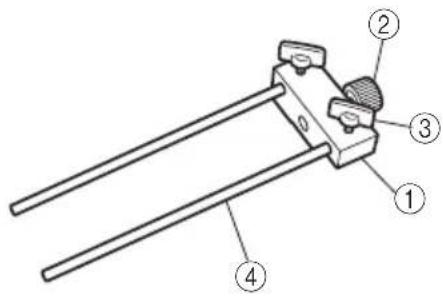
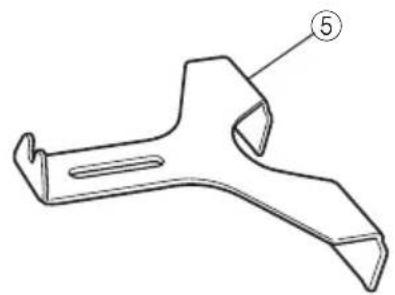
(2) Dust Collector Set (Code No. 323-346)

NOTE: Specifications are subject to change without any obligation on the part of the metabo HPT.
INFORMATIONS IMPORTANTES DE SECURITE
A: No. élément
B: No. code
C: No. utilise
D: Remarques

Some dust created by power sanding, sawing, grinding, drilling, and other construction activities contains chemicals known to the State of California to cause cancer, birth defects or other reproductive harm. Some examples of these chemicals are:
-Lead from lead-based paints,
- Crystalline silica from bricks and cement and other masonry products, and
- Arsenic and chromium from chemically-treated lumber.
Your risk from these exposures varies, depending on how often you do this type of work. To reduce your exposure to these chemicals: work in a well ventilated area, and work with approved safety equipment, such as those dust masks that are specially designed to filter out microscopic particles.
AVERTISSEMENT:
Minato-ku, Tokyo 108-6020, Japan
Distributed by
Koki Holdings America Ltd.
1111 Broadway Ave,
Braselton, Georgia, 30517
Koki Holdings America Ltd. Canadian Branch
3405 American Drive, Units 9-10
Mississauga, ON, L4V 1T6
806
Code No.C99133062F
Printed in China



- SAFETY INSTRUCTIONS AND INSTRUCTION MANUAL
- WARNING
- INSTRUCTIONS DE SECURITE ET MODE D'EMPLOI
- A VERTISSEMENT
- TABLE DES MATIERES
- François
- INDICE
- Espanol
- IMPORTANT SAFETY INFORMATION
- MEANINGS OF SIGNAL WORDS
- SAFETY
- GENERAL POWER TOOL SAFETY WARNINGS
- WARNING:
- 1) Work area safety
- 2) Electrical safety
- 3) Personal safety
- SPECIFIC SAFETY RULES AND SYMBOLS
- USE OF EXTENSION CORD
- SAVE THESE INSTRUCTIONS
- AND
- MAKE THEM AVAILABLE TO
- OTHER USERS
- OWNERS OF THIS TOOL!
- FUNCTIONAL DESCRIPTION
- NOTE:
- NAME OF PARTS
- SPECIFICATIONS
- ASSEMBLY AND OPERATION
- APPLICATIONS
- PRIOR TO OPERATION
- INSTALLING AND REMOVING BITS
- WARNING: Be sure to switch power OFF and disconnect the plug from the receptacle to avoid serious trouble.
- Installing bits
- CAUTION:
- - Ensure that the collet chuck is firmly tightened after inserting a bit. Failure to do so will result in damage to the collet chuck.
- Removing bits
- INSTALLING THE MOTOR HOUSING
- HOW TO USE THE ROUTER
- Cutting
- MAINTENANCE AND INSPECTION
- MODIFICATIONS:
- ACCESSIONS
- STANDARD ACCESSORIES
- OPTIONAL ACCESSORIES sold separately
- INFORMATIONS IMPORTANTES DE SECURITE
- AVERTISSEMENT:
Brand : HiKOKI
Model : M12VC
Category : Router