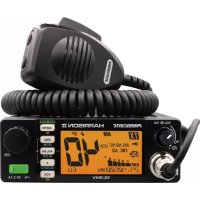
Barry II - Stapler PRESIDENT - Free user manual and instructions
Find the device manual for free Barry II PRESIDENT in PDF.


User questions about Barry II PRESIDENT
0 question about this device. Answer the ones you know or ask your own.
Ask a new question about this device
Download the instructions for your Stapler in PDF format for free! Find your manual Barry II - PRESIDENT and take your electronic device back in hand. On this page are published all the documents necessary for the use of your device. Barry II by PRESIDENT.
USER MANUAL Barry II PRESIDENT
FONCTIONS AVEC LA PEDALE D'ÉMISSION PTT 12
CHARACTERISTIQUES TECHNIQUES 12
GUIDE DE DÉPANNAGE 13
COMMENTÉMETTRE/RECEVOIR UNMESSAGE 13
GLOSSSAIRE 13
DECLARATION DE CONFORMITE EU SIMPLIFIÉE 15
CONDITIONS GENE RALES DE GARANTIE 16
TABLEAUX DES FREQUENCES 64~66
NORMES-F69
François
SUMARIO
INSTALACION 18
UTILIZACION 20
FUNCTIONS AL ENCENDER LA EMISORA 23
FUNCTIONS CON LA PALANCA DE EMISSION PTT 24
CHARACTERISTICAS TECNICAS 24
GUIA DE PROBLEMAS 25
COMO EMITIR O RECIBIR UN MENSAJE 25
LEXICO 25
FUNCTIONS WITH PTT SWITCH
TECHNICAL CHARACTERISTICS
TROUBLESHOOTING
HOW TO TRANSMIT OR RECEIVE AMESSAGE
GLOSSARY
SIMPLIFIED DECLARATION OF CONFORMITY
GENERAL WARRANTY CONDITIONS
FREQUENCY TABLES
NORMS-F
English
SPIS TRESCI
INSTALACJA 41
JAK KORZYSTAC Z CB RADIA 43
WLACZANIE FUNKCJI URZADZENIA 46
FUNKCJE PRZEŁACZNIAKAPTT 47
CHARACTERYSTYKA TECHNICZNA 47
ROZWIAZYWANIE PROBLEMOW 48
JAK PRZESLAC LUB ODEBRAc WIADOMOsC 48
SLOWNICZEK 48
UPROSZCZONA DEKLARACJA ZGODNOSCI UE 49
OGOLNE WARUNKI GWARANCJI 50
TABLECZEESTOTLIWOSCI 64~66
NORMY-F 69
Espanol
CODEPKAHNE
Pycckn
YCTAHOBKA 53
3KCNYYATALIN 55
ФУHKUIM INI PNU BKNIOUEHIN PAДNOCTAHUN 58
ФУHKLIMN C TAHGEHToI NEPEDAuN PTT 59
TEXHUYECKNEXAPAKTEPNCTKU 60
HCTPYKLIIO NO YCTPAHEHIO HENCINPABHOCTE 60
KAK NEPEDATb INI NIOJYHTB COOJIeHNE 61
TLOCCAPN 61
YIPOUHEHHAR EBPONEENCKA DEKJAPALIN COOTBETCTBNA 62
OBSUE YCIOBNA TAPAHN 63
TABNUL4YACTOT64~66
EBPONENCKNECTAHAPtI-F 69
ATTENTION!
VOX SET (pression longue)
11) PTT (Push To Talk)
(Configuration: EU; PL; d; EC; U; In)
H Hotel
India
J Juliett
K Kilo
L Lima
M Mike
N November
O Oscar
P Papc
Quebec
R Rome
Sierra
Tango
U Uniform
V Victor
W Whiskey
X X-ray
Y.Yankee
Z Zulu
LANGUAGE TECHNIQUE
: Fine business (bon, excellent)
QRH :Frequencestable
QRM: Parasites, brouillage
QRM DX : Parasites lointains
QRM 22 :Police
11)PTT(Push To Talk)
Hotel
1. India
J Juliett
K Kilo
L Lima
M Mike
N November
O Oscar
P Papc
Q Quebec
R Romeo
Sierra
Tangac
Uniform
V Victor
W Whiskey
X X-ray
Y. Yankee
Z Zulu
TERMINOS DEL ARGOT CEBEISTA
DOS METROS HORIZONTALES : La cama
Before using, be careful never to transmit without first having connected the antenna (connection "B" situated on the back panel of the equipment) or without having set the SWR (Standing Wave Ratio)! Failure to do so may result in destruction of the power amplifier, which is not covered by the guarantee.
MULTI-NORMS TRANSCEIVER!
See function "F" on page 35 and the Configuration table on page 68.
The guarantee of this transceiver is valid only in the country of purchase.
Welcome to the world of the new generation of CB radios. The new PRESIDENT range gives you access to top performance CB equipment. With the use of up-to-date technology, which guarantees unprecedented quality, your PRESIDENT BARRY II is a new step in personal communication and is the surest choice for the most demanding of professional CB radio users. To ensure that you make the most of all its capacities, we advise you to read carefully this manual before installing and using your PRESIDENT BARRY II.
A) INSTALLATION
1) WHERE AND HOW TO MOUNT YOUR MOBILE CB RADIO
a) You should choose the most appropriate setting from a simple and practical point of view.
b) Your CB radio should not interfere with the driver or the passengers.
c) Remember to provide for the passing and protection of different wires (e.g. power, antenna, accessory cabling) so that they do not in any way interfere with the driving of the vehicle.
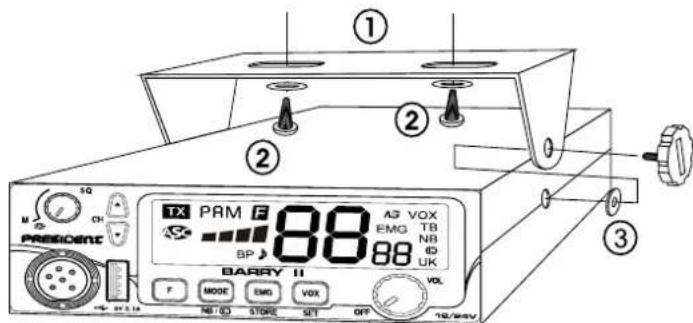
MOUNTING DIAGRAM
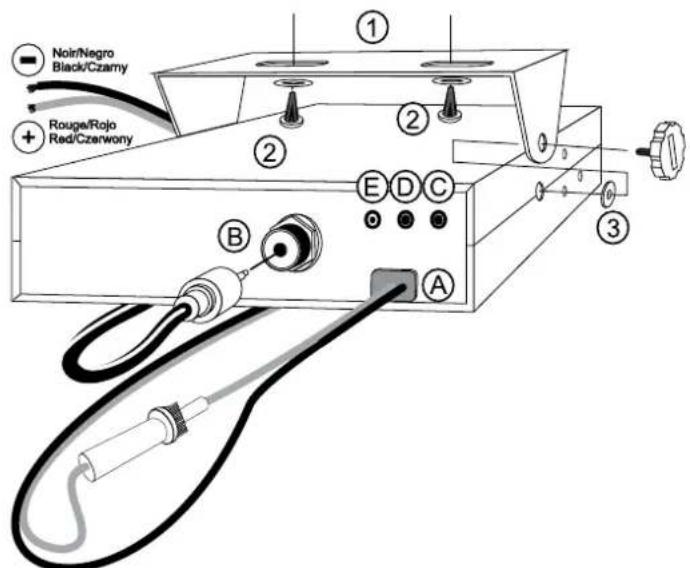
d) To install your equipment, use the cradle (1) and the self-tapping screws (2) provided (drilling diameter 3.2 mm). Take care not to damage the vehicle's electrical system while drilling the dash board.
e) Do not forget to insert the rubber joints (3) between the CB and its support as these have a shock-absorbing effect which permits gentle orientation and tightening of the set.
1) Choose where to place the microphone support and remember that the microphone cord must stretch to the driver without interfering with the controls of the vehicle.
- Note: As the transceiver has a frontal microphone socket, it can be set into the dash board. In this case, you will need to add an external loud speaker to improve the sound quality of communications (connector EXT.SP situated on the back panel: C). Ask your dealer for advice on mounting your CB radio.
2) ANTENNA INSTALLATION
a) Choosing your antenna
- For CB radios, the longer the antenna, the better its results. Your dealer will be able to help you with your choice of antenna.
b) Mobile antenna
- Must be fixed to the vehicle where there is a maximum of metallic surface (ground plane), away from windscreen mountings.
- If you already have a radio-telephone antenna installed, the CB antenna should be higher than this.
- There are two types of antenna: pre-regulated which should be used on a good ground plane (e.g. car roof or lid of the boot), and adjustable which offer a much larger range and can be used on a smaller ground plane (see § 5 page 32, ADJUSTMENT OF SWR).
- For an antenna which must be fixed by drilling, you will need a good contact between the antenna and the ground plane. To obtain this, you should lightly scratch the surface where the screw and tightening star are to be placed.
- Be careful not to pinch or flatten the coaxial cable (as this runs the risk of break down and/or short-circuiting).
- Connect the antenna (B).
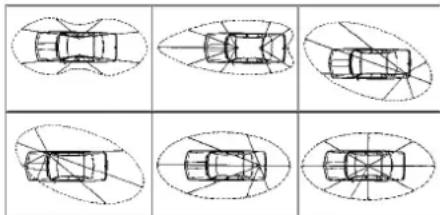
OUTPUT RADIUS PATTERN
c) Fixed antenna
- A fixed antenna should be installed in a clear space as possible. If it is fixed to a mast, it will perhaps be necessary to stay it, according to the laws in force (you should seek professional advice). All PRESIDENT antennas and accessories are designed to give maximum efficiency to each CB radio within the range.
3) POWER CONNECTION
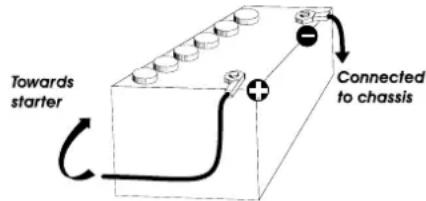
Your PRESIDENT BARRY II is protected against an inversion of polarities. However, before switching it on, you are advised to check all the connections. Your equipment must be supplied with a continued current of 12 or 24 volts (A). Today, most cars and lorries are negative earth. You can check this by making sure that the negative terminal of the battery is connected either to the engine block or to the chassis. If this is not the case, you should consult your dealer.
a) Check that the battery is of 12 or 24 volts.
b) Locate the positive and negative terminals of the battery (+ is red and - is black). Should it be necessary to lengthen the power cable, you should use the same or a superior type of cable.
c) It is necessary to connect your CB to a permanent (+) and (-) . We advise you to connect the power cable directly to the battery (as the connection of the CB cable to the wiring of the car-radio or other parts of the electrical circuit may, in some cases, increase the likelihood of interference).
d) Connect the red wire (+) to the positive terminal of the battery and the black (-) wire to the negative terminal of the battery.
e) Connect the power cable to your CB radio.
WARNING: Never replace the original fuse by one of a different
value.
4) BASIC OPERATIONS TO BE CARRIED OUT BEFORE USING YOUR SET FOR THE FIRST TIME (without transmitting and without using the "push-to-talk" switch on the microphone)
a) Connect the microphone.
b) Check the antenna connections,
c) Turn the set on by turning the volume knob VOL (1) clockwise,
d) Turn the squelch SQ knob (4) to minimum (M position),
e) Adjust the volume to a comfortable level,
f) Go to Channel 20 using either / keys (3) or the UP/DN knobs (12).
5) ADJUSTMENT OF SWR (Standing wave ratio)
WARNING: This must be carried out when you use your CB radio for the first time (and whenever you re-position your antenna). The adjustment must be carried out in an obstacle-free area.
- Adjustment with external SWR-meter (e.g. TOS-1 PRESIDENT)
a) To connect the SWR meter -
Connect the SWR meter between the CB radio and the antenna as close as possible to the CB (use a maximum of 40cm cable, type President CA-2C).
b) To adjust the SWR meter -
Set the CB on channel 20.
- Put the switch on the SWR-meter to position FWD (calibration).
- Press the "push-to-talk" switch on the microphone to transmit.
- Bring the index needle to by using the calibration key.
- Change the switch to position REF (reading of the SWR level). The reading on the Meter should be as near as possible to 1. If this is not the case, re-adjust your antenna to obtain a reading as close as possible to 1. (An SWR reading between 1 and 1.8 is acceptable).
- It will be necessary to re-calibrate the SWR meter after each adjustment of the antenna.
WARNING: In order to avoid any losses and attenuations in cables used for connection between the radio and its accessories, PRESIDENT recommends to use a cable with a length inferior to 3m.
Your CB is now ready for use.
a) To turn the set on, turn the VOL knob (1) clockwise.
If the KEY BEEP function is activated, 4 tones sound when you turn the CB radio on. See § KEY BEEP page 35. Display briefly shows the frequency band (see § F - FREQUENCY BAND SELECTION page 35).
See FUNCTIONS TURNING ON THE UNIT on page 34.
b) To increase the sound level, turn the same knob further clockwise.
2) DISPLAY
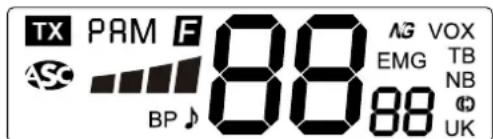
It shows all functions:
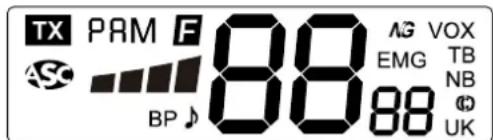
The BARGRAPH shows the reception level and the output power level.
3) CHANNEL SELECTOR: / keys on unit
These keys allow increasing or decreasing a channel. A «beep» sounds each time the channel changes if the KEY BEEP function is activated. See § KEY BEEP page 35.
See also § 12 page 34.
4) ASC (Automatic Squelch Control)/SQUEELCH
Suppresses undesirable background noises when there is no communication. Squelch does not affect neither sound nor transmission power, but allows a considerable improvement in listening comfort.
a) ASC: AUTOMATIC SQUEELCH CONTROL
Worldwide patent, a PRESIDENT exclusivity
Turn the SQ knob (4) anti-clockwise into ASC position. S appears
on the display. No repetitive manual adjustment and a permanent improvement between the sensitivity and the listening comfort when ASC is active. This function can be disconnected by turning the switch clockwise. In this case the squelch adjustment becomes manual again. disappears from the display.
b) MANUAL SQUEELCH
Turn the SQ knob (4) clockwise to the exact point where all background noises disappear. This adjustment should be done with precision as, if set to maximum (fully clockwise), only the strongest signals will be received.
This key allows you to select the modulation mode (AM or FM). Your modulation mode has to correspond to the one of your correspondent. Corresponding mode is displayed on the LCD.
-
Amplitude Modulation / AM: communication on a field with relief and obstacles at middle distance (the most used).
-
Frequency Modulation / FM: for nearby communications on a flat open field.
In U configuration ONLY: press MODE key (6) to alternate the frequency band between ENG and CEPT. "UK" appears in the display when the ENG band is selected. "UK" disappears from the display when CEPT is selected (see table at page 64).
NB & COMPANDER (long press)
Long press the NB/ key (6) to change the status of the filters :

NOISE BLANKER : This filter allows the reduction of back ground noise, and some reception interference. "NB" is displayed when NB filter is active.
COMPANDER (3): this switchable filter allows to improve the reception mode.
7) EMG ~ EMG STORE
EMG(short press)
Emergency channels will be automatically selected by pressing the EMG key (7). First press: emergency channel 1 is activated. Second press: emergency channel 2 is activated. Third press: return to the current channel. "EMG" appears on the display when an emergency channel is activated. The default emergency channels are channel 9/AM (1) and channel 19/AM (2).
Note: Activating an emergency channel prevents use the PA (see § PA page 36) mode. If the KEY BEEP function is activated, an error beep sounds.
EMG STORE (long press)
Emergency channel can be stored to any channel with mode AM or FM. To set a new emergency channel:
Short press on EMG key (7) to call the current emergency channel. "EMG" appears on the display.
- Long press on EMG/STORE key (7). F appears on the display and "EMG" blinks.
Using the / keys (3) on the unit or the UP/DN knobs (12) on the microphone, select the new emergency channel.
- Press MODE key (6) to select the mode (AM, FM or FM UK) used with new emergency channel.
Short press on PTT switch (11) to validate and store the new emergency channel. A validation beep sounds.
Note: Emergency setting is not allowed if the current emergency channel is not the active channel.
8) VOX VOX SET
VOX(short press)
The VOX function allows transmitting by speaking into the original microphone (or in the optional vox microphone) without pressing the PTT switch (11). The use of an optional vox microphone con
nected to the rear panel of the transceiver (E) disables the original microphone.
Press shortly the VOX key (8) in order to activate the VOX function. "VOX" appears on the display. A new press on the VOX (8) key disables the function, "VOX" disappears.
VOX SET(long press)
- Long press the VOX/SET key (8) to enter the VOX SETTING. "VOX" blinks, the current setting and its value appear on the display. Three parameters allow to adjust the VOX: Sensitivity: L / Anti-vox level: R / Vox delay time: E.
2a. Use the / key (3) on the unit or the UP/DN key (12) on the microphone to modify the current parameter then, press the F key (5) to select the next parameter or....
2b. Press first the F key (5) to select another parameter and then use the / key (3) on the unit or the UP/DN key (12) on the microphone to modify the current parameter. - When all adjustments are done, long press the PTT switch (11) to store and exit. If the KEY BEEP function is activated, a long beep sounds to confirm the success of the operation (see § KEY BEEP page 35).
- If no key is pressed for 10 seconds, the unit automatically exits the function VOX SETTING without saving.
Sensitivity L : allows the adjustment of the microphone (original one or optional vox) for an optimum transmission quality. Adjustable level from L1 (high level) to L9 (low level). Default value: L5. - Anti-Vox R: allows disabling the transmission generated by the surrounding noise. The level is adjustable. RF (according to squelch level) and from RO (without anti-vox) to RG (low level). Default value: RF.
Delay time 已 allows avoiding the sudden cut of the transmission by adding a delay at the end of speaking. The level is adjustable from 1 (short delay) to 9 (long delay). Default value: 1.
VOX SETTING doesn't activate the VOX function.
9) USB CHARGING SOCKET
The USB socket (9) can be used to charge a smartphone, tablet or other rechargeable device with 5V - 2.1A .
10) 6 PIN MICROPHONE PLUG
The plug is located on the front panel of the transceiver and makes the setting of the equipment into the dashboard easier.
See cabling diagram page 67.
11) PTT (Push To Talk)
Transmission key, press to transmit a message, is played and release to listen to an incoming communication.
See FUNCTIONS WITH PTT SWITCH on page 35.
TOT (Time Out Timer)
If the transmission key is longer than 3 minutes, active channel and TX start blinking, the transmission ends.
The time-out tone will sound until the PTT switch (11) is released.
12) CHANNEL SELECTOR: UP/DN knobs on the microphone
These keys allow increasing or decreasing a channel. A «beep» sounds each time the channel changes if the KEY BEEP function is activated. See § KEY BEEP page 35.
See also § 3 page 32.
A) DC-POWER TERMINAL (13.2 V / 26.4 V)
B) ANTENNA CONNECTOR (SO-239)
5 more functions are available. Turn off the unit. Turn on the radio while pressing one or two keys to set the function.
1) ROGER BEEP (▲ key on the unit or UP knob on microphone)
The ROGER BEEP sounds when the PTT switch (11) of the microphone is released in order to let your correspondent speak. Historically as
CB is a "simplex" communication mode, it is not possible to speak and listen at the same time (as it is the case with a telephone). Once the conversation was over, he said "Roger" in order to prevent his correspondent that it was his turn to talk. The word "Roger" has been replaced by a significant beep. That is where the name "Roger beep" comes from.
Turn on the power while pressing the key (3a) or UP knob (12) to alternate between enable (n) or disable (F) the ROGER BEEP function.
- When function is activated, “ ” appears on the display.
Note: The Roger beep also sounds in the loudspeaker if the KEY BEEP function is active. If the KEY BEEP function is not active, only the correspondent can hear the ROGER BEEP.
In PA mode the function is not allowed.
2) KEY BEEP (▼ key on the unit or DN knob on microphone)
Some operations such as changing channels, pressure on keys etc. are confirmed by a beep tone. This beep tone can be activated or deactivated as follows:
Turn on the power while pressing the key (3b) or the DN knob (12) to alternate between enable (n) or disable (F) the KEY BEEP function.
- When function is activated, "BP" appears on the display.
3) F-FREQUENCY BAND SELECTION (Fkey)
(Configuration: EU; PL; d; EC; U; In)
The frequency bands have to be chosen according to the country of use. Don't use any other configuration. Some countries need a user's licence. See table page 68.
Proceeding:
Turn on the power while pressing the F key (5).
The symbol corresponding to the current configuration is blinking.
In order to change the configuration, use the / keys (3) on the unit or the UP/DN knobs (12) on the microphone.
- When the configuration is selected, press the F key (5) during 1 second. The symbol corresponding to the configuration is contin
uously displayed and a confirmation tone beep sounds.
- At this point, confirm the selection by switching off the transceiver and then switching it on again.
See the configurations/frequency bands table at pages 64 to 66.
4) COLOR (MODE + EMG keys)
Turn on the power while pressing the MODE (6) and EMG (7) keys. The symbol of the current color, among the seven, blinks: (orange), (green), (blue), (cyan), (yellow), (purple) or CL (cyan light).
Use the / keys (3) on the unit or UP/DN knobs (12) on the microphone to change the color.
$$ \rightarrow \square r \rightarrow g _ {r} \rightarrow b L \rightarrow [ y \rightarrow y E \rightarrow P U \rightarrow [ L ] $$
- When the color is set, long press the F key (5). A beep sounds, the characters of the color are displayed during 1 second.
5) RESET
- Turn on the power while pressing the EMG key (7) to reset to the factory settings.
"5" blinks in the display.
- Press the F key (5) for 1 second to confirm.
D) FUNCTIONS WITH PTT SWITCH
4 more functions are available. To activate the function press and hold the PTT switch (11) and press the function key. Repeat this process to deactivate the function.
1) TALKBACK (PTT + F)
The TAL.KBACK function can be activated or deactivated as follows: a) Press and hold the PTT switch (11)
b) Short press on F key (5). Current TALKBACK level blinks 3 times allowing you to adjust this level.
When function is activated, "TALKBACK" appears on the display. This function allows to ear your own modulation with the CB speaker.
2) TALKBACK LEVEL (PTT + ▲▼ on the unit)
- At step b) adjust the TALKBACK level using the / keys (3) on the unit.
- When the function in on and "TALKBACK" is shown on the display, press and hold the PTT switch (11), then use the (3a) / (3b) keys on the unit to select the level. 9 levels from 0/1 to 0/9.
Note: The use of the UP/DN knobs (12) on microphone are not allowed to adjust TALKBACK level.
3) PA (PTT + MODE)
- Press and hold the PTT switch (11)
- Short press on MODE key (6) to activate or deactivate the PA (Public Address) mode. An external loud speaker can be connected to your BARRY II by the PA jack plug situated on the back panel PA.SP (D). The CB message received or transmitted into the microphone will be directed towards the external speaker and be amplified. Adjust the PA volume with VOL key (1).
When PA mode is activated, "PA" and the used mode (AM, FM or FM UK) blink alternatively. When PTT switch (11) is pressed, "PA" replace the active channel on the display. Release the PTT switch (11) to display again the active channel.
4) NOISE GATE PTT + VOX
- Press and hold the PTT switch (11).
Short press the VOX key (8) to activate (IN) or deactivate (DF) the NOISE GATE. "AGs displayed when the function is active.
Noise Gate: Prevents amplification of background noise. This results in optimized signal levels.
-Channels:40
- Modulation modes : AM/FM
- Frequency ranges : from 26.965 MHz to 27.405 MHz
- Antenna impedance : 50 ohms
- Power supply : 13.2 V / 26.4 V
- Dimensions (in mm)
Weight - Accessories supplied
-Filter
2) TRANSMISSION
- Frequency allowance
- Carrier power
- Transmission interference
- Audio response
- Emitted power in the adj. channel
- Microphone sensitivity
Maximum drain
-Modul. signal distortion
3) RECEPTION
Maxi. sensitivity at 20 dB sinad
- Frequency response
- Adjacent chan. selectivity
- Maximum audio power
- Squelch sensitivity
-
Frequency image rejection rate
-
Intermediate frequency rejection rate
-Drain
+ / - 200Hz
:4WAM/4WFM
: inferior to 4 nW (- 54 dBm)
: 300 Hz to 3 KHz in AM/FM
: inferior to 20~ W
:7mV
: 1.7 A at 13.2 V / 0.85 A at 26.4 V
:2%
0.5μV-113 dBm AM/0.35μV-116 dBm FM
: 300 Hz to 3 kHz
:60dB
:2.5W
: minimum 0.2 μV - 120 dBm
maximum 1 mV - 47 dBm
:60dB
:70dB
: 160 ~ 420 mA (13.2 V)
100~250mA(24.6V)
F) TROUBLE SHOOTING
1) YOUR CB RADIO WILL NOT TRANSMIT OR YOUR TRANSMISSION IS OF POOR QUALITY
-
Check that the antenna is correctly connected and that the SWR is properly adjusted.
-
Check that the microphone is properly plugged in.
- Check that the programmed configuration is the correct one (see table page 68).
2) YOUR CB RADIO WILL NOT RECEIVE OR RECEPTION IS POOR
- Check that the squelch level is properly adjusted.
- Check that the programmed configuration is the correct one (see table page 68).
- Check that the volume is set to a comfortable listening level.
- Check that the antenna is correctly connected and that the SWR is properly adjusted.
- You are using the same modulation mode than your correspondent.
3) YOUR CB WILL NOT LIGHT UP
- Check the power supply.
- Check the connection wiring.
- Check the fuse.
G) HOW TO TRANSMIT OR RECEIVE AMESSAGE
Now that you have read the manual, make sure that your CB Radio is ready for use (i.e. check that your antenna is connected). Choose your channel (19, 27).
Press the "push-to-talk" switch (11) and announce your message. Attention stations, transmission testing which will allow you to check the clearness and the power of your signal. Release the switch and wait for a reply. You should receive a reply like, "Strong and clear".
If you use a calling channel (19, 27) and you have established communication with someone, it is common practice to choose another available channel so as not to block the calling channel.
H) GLOSSARY
Below you will find some of the most frequently used CB radio expressions. Remember this is meant for fun and that you are by
no means obliged to use them. In an emergency, you should be as clear as possible.
INTERNATIONAL PHONETIC ALPHABET
A Alpha H Hotel Oscar V Victor
B Bravo India P Papa W Whiskey
C Charlie J Juliet Q Quebec X X-ray
D Delta K Kilo R Romeo Y Yankee
E Echo L Lima S Sierra ZZulu
F Foxtro M Mike T Tango
G Golf N November U Uniform
TECHNICAL VOCABULARY
AM:Amplitude Modulation
CB : Citizen's Band
CH : Channel
CW:Continuous Wave
DX : Long Distance Liaison
DW:DualWatch
FM : Frequency Modulation
GMT: Greenwich Meantime
HF : High Frequency
LF : Low Frequency
LSB : Lower Side Band
RX : Receiver
SSB : Single Side Band
SWR:Standing Wave Ratio
SWL : Short Wave Listening
SW : Short Wave
TX : CB Transceiver
UHF : Ultra High Frequency
USB : Upper Side Band
VHF : Very High Frequency
CB LANGUAGE
Advertising : Flashing lights of police car
Back off : Slow down
Basement : Channel 1
Base station : A CB set in fixed location
Bear : Policeman
Bear bite : Speeding fine
Bear cage : Police station
Big slab : Motorway
Big 10-4 : Absolutely
Bleeding : Signal from an adjacent channel interfering with the transmission
Blocking the channel : Pressing the PTT switch without talking
Blue boys :Police
Break : Used to ask permission to join a
conversation
Breaker : A CBer wishing to join a channel
Clean and green
Cleaner channel
Coming in loud and proud :
Doughnut
Down and gone
Down one
Do you copy?
DX : Long distance
Eighty eights
Eye ball
Good buddy
Hammer
Handle
Harvey wall banger
How am I hitting you?
Keying the mike
Kojac with a kodak
Land line : Telephone
Lunch box
Man with a gun
Mayday
Meat wagon
Midnight shopper
Modulation
Clear of police
Channel with less interference
Good reception
Tyre
Turning CB off
Go to a lower channel.
Understand?
Love and kisses
CBers meeting together
Fellow CBer
Accelerator
CBer's nickname
Dangerous driver
How are you receiving me?
Pressing the PTT switch without talking
Police radar
CB set
Police radar
SOS
Ambulance
Thief
Conversation
Negative copy
Over your shoulder
Part your hair
Pull your hammer back.
Rat race
Rubberbander
Sail boat fuel
Smokey dozing
Smokey with a camera
Spaghetti bowl
Stinger
Turkey
Up one
Wall to wall
What am I putting to you?
No reply
Right behind you
Behave yourself - police ahead
Slow down
Congested traffic
New CBer
Wind
Parked police car
Police radar
Interchange
Antenna
Dumb CBer
Go up one channel
All over/everywhere
Please give me an S-meter reading
SIMPLIFIED EU
DECLARATION OF CONFORMITY
Hereby, Groupe President Electronics, declares that the radio equipment :
Brand: PRESIDENT
Type: TXPR022
Commercial Name: BARRY II
is in compliance with Directive 2014/53/EU.
The full text of the EU declaration of conformity is available at the following internet address:
https://president-electronics.com/DC/TXPR022
GENERAL WARRANTY CONDITIONS
This device is guaranteed 2 years parts and labour in its country of purchase against any manufacturing defects validated by our technical department. *The After-sales Service of PRESIDENT reserves the right not to apply the warranty if a breakdown is caused by an antenna other than those distributed by PRESIDENT, and if said antenna is at the origin of the breakdown. An extension of 3 years warranty is proposed systematically for the purchase and use of a PRESIDENT antenna, bringing the total duration of the warranty to 5 years. In order to be valid, the warranty certificate must be returned within a period of 30 days after the purchase date to the After-sales Service of the company Groupe President Electronics, or any foreign subsidiary.
It is recommended to carefully read the following conditions and to respect them under penalty of losing their benefit.
- To be valid the warranty certificate must be returned to us at the latest 1 month after the purchase.
- Please duly complete the warranty certificate on the right hand side of the page, detach it (portion to be removed marked by dotted line) and send it back.
- Any repair under warranty will be free and the return delivery costs will be borne by our company.
- A purchase proof must be necessarily included with the device to be repaired.
- The dates listed on the warranty certificate and proof of purchase must match.
- Do not proceed with the installation of the device without reading the user manual
- No spare part will be sent nor exchanged by our services under warranty.
The warranty is only valid in the country of purchase.
Exclusions (are not covered):
- Damages caused by accident, shock or inadequate packaging.
- Power transistors, microphones, lights, fuses and the non respect of the installation and use of specifications (including but not limited to antenna used with too high power, final output power transistors (SWR), inversion of polarities, bad connections, overvoltage,...)
- The warranty cannot be extended due to the non-availability of the device while it is being serviced at our technical services location, nor by a change of one or more components or spare parts.
- Transceivers which have been modified. The warranty application is excluded in case of modification or poor maintenance done by a third party not approved by our company.
If you note malfunctions:
-
Check the power supply of your device and the quality of the fuse.
-
Check that the antenna, the microphone are correctly connected.
- Check that the squelch level is properly adjusted; the programmed configuration is the correct one...
- In case the device is not under warranty, the repair and return of the device will be charged.
- All related documents must be preserved even after the end of the warranty period and if you resell your device, given to the new owner for the After-sales follow-up.
- In case of real malfunction, please contact your dealer first; they will decide action to be taken.
- In case of an intervention not covered by the warranty, an estimate will be established before any repair.
Thank you for your trust in the PRESIDENT quality and experience. We recommend that you read this manual carefully so that you are completely satisfied with your purchase. Do not forget to return the detachable warranty certificate on the right hand side of this page; it is
very important for the identification of your device during a possible rendering of our services.
Technical Manager and Quality Manager

Date of the purchase:
Type: CB Radio BARRY II
Serial Number:

NOT COVERED BY THE WARRANTY WITHOUT THE DEALER STAMP
OSTRZEJEZENIE!
H Hotel
1 India
J Juliet
K Kilo
L Lima
M Mike
N November
O Oscar
P Papa
Q Quebec
R Romeo
Sierra ZZulu
X X-ray
Z Zhu
V Victor
W Whiskey
YYankee
TERMINOLOGIA TECHNICZNA
https://president-electronics.com/DC/TXPR022
OGOLNE WARUNKI GWARANCJI
Baa paanoctaHnra roToBa K nOJb3oBAHHIO.
6) 3KcπIyATAUHA
1) ON/OFF - ΓPOMKOCTb
a) YTo6bI BKNIOHTb paNIOCTAHNUIO, NOBEPHNTe pyKy VOL (1) no yacoboi CTpeKke. Ecnn PkyHNuIN BIN KJABUNA aKTHBNPOBaHa, 4 3ByKOBBIX CmHana 6ydyT CblhHb npn BkIOUeHN. CM. rAby BIN KJABUN Ha CTpaHnue 58, DCINNE kPATO OTOpBXaKT EkyUIN dnaanao HactOT (CM. \$F-BBIBOP DNAIATAOHA YACTOT Ha cmpaHue 58).
Cm. 2aay FyHKU IN PPN BKNIOUEHIN PAADNOCTAHUN Ha cmpaHue 58.
6) YTo6bI yBENuHTb rPOMKoCTb, NOBepHnTe3Tyxe pyUky danee no Yacoboi CTpeNKe.
2) 3KPAH
OH OTOBPAKAET BCE FYHKLINM
Bapraf noka3bBAeT ypoBeHb npIema n ypoBeHb BixOHO MOUHOCTN
3) INPEKIIIOHATEJIb KAHANOB: KHONIKA/HA PAADNOCTAHIN
3TN KHNK N03BOJNOT NOHIMATbCn IN CNyCKaTbCn NO KaHaNAM, 3BvKOBO CNrHaN CnblIeH npkKaXDo CMeHe KaHana, ecn FyHKuIN BNI KIAABuA kTtBnPoBaHa. CM. fynKcUIO Bn KNABuHa cmpaHuie 58.
CM. makke § 12 Ha cmpaHue 58.
4) ASC (Automatic Squelch Control)/SQUELCH (Uymonodumenb)
3TaФункия no3BONЯт ydaNTb HxKeJIaTeNbHbIe NOMEXn npn OTCyTCTBnO6UeHn. UymonoDaBnteH He irpaet pOnn Hn dIpyrPoMkoCTn, Hn dIpy MoUHOCTn nepeDAuH COo6UeHn, HO no3BOJAE TcUeCTBeHHO yNyUHTb KaueCTBO npneMa.
a) ASC: WYMOJADABNTEN C ABTOMATUeCKOHNACTPOJKOJ
MekdyHapOHybI NaTeHT, 3KCKNHO3NBHOCTb KOMnAHn PRESIDENT
NoBepHnTe pyKy SQ (4) npOTnB YacBOB CTpeKN. NoBnTcHa 3KpaHe. HnKaKoI pyHOn peryuPobKn np KAnDm NcNOb3OBAHN IN NOCTOHAR OTNIM3AUN MExdy YyBCTBnTEbHOCTbIO KAcEeTBM npHema, KOrDa ASC AKTNBbI (do KOHc I npOTnB YacBOB CTpeKN). Ero MoXho OTKIOHTb, NoBepHyB pyKy SQ (4) no YacBOB cTpeKe. B 3OM Cnyae, HAcTPOka WymONoBaNTeJI cTaHOBtCra pyHOn. CSue3aET C3KpHa.
IyCTaHOBKn HOBOrO abapnHoro KaHaJa:
KopoTkoe HaxaTne Ha KhoNky EMG (7) Bbl3bIbaet Tekyu n aBapnHbKaHaJI. «EMG» NOBNTcHa 3KpaHe.
Hae Haxatne B TeueHne 1 cekyHbHa KhoNky EMG/STORE (7).
C NOMOJIbIO KHOJOK ▲/V (3) INI UP/DN (12) MKNPOΦoHa BbI6epITe HOBbI aBapINHbI KaHAn.
HaxmTe Ha KONKy MODE (6),YTo6bI Bb6paTb MoynrAIO (AM,FM IIM FM UK),ncNoJIb3yeMyO cAbapnHbIM KaHaNOM.
KopoTKeH aKaTne Ha TaHReHTy PTT (11) noTBePkaeT n3aONMHaet HObI abapnHbI kaHJI. CblIeH cHrHnIO TBePckDeHHI.
PpmeaHne:YCTaHOBka HOBO aBApNIHORO KaHaNA BO3MOXHA TOIbKO ecn TEKUyni ABAPINHb KaHANAKTINBEH.
8)VOX\~HACTPOKVA VOX
VOX (kopomkoe Haxamue)
ФункцИ VAox no3BONЯТ NepeDABaTb COO6eHnB MmKpOPOH (HIN B OIIIOHnIb MmKpOPOH VOx) 63E HAKaTINHa TAHREHTy PTT (11).IcNob3OBaHHe OIcuHOHHORo MmKpOPOHa VOx, NOdKnHoueHHORo K 3aHnei NaheJI npAIOCTaHcIu - VOX pa3bEm (E), DeakTINbUpyet OCH MmKpOPhoH.
Haxmte 6bIcTpo Ha KONky VOX (8), YTo6bl AKTNBnPoBaTB foHKuNIO VOX. OTo6paKaAeTcra Ha dncnnee. HoBoe HaxaTne Ha KONky VOX (8) BbIKNoUaet 3Tu FOHKUNIO. NcE3aET c nCnner.
HACTPOIKA VOX (aunnue haxamue)
-
Haxmte B TeHHe OJHOcKyHbI Ha KhoNky VOX/SET (8), YTO6bl BOITN B npaMeTpbl HACTPOKA VOX. «VOX» Mraet, DeiCTByIOUIN npaMeTp n ero BeMNuHa NoRbIaOTcRa Ha 3kpaHe.
Bo3MOKHb TpHa HAcTpoKn VOX:YyBCTBNTeNbHOCTb:L /Anti-Vox:R/ BbIepkKa BpeMeHn:
2a. NcnoIb3yIte KhoNk △/▼ (3) nII UP/DN (12) MmKpOpoHa nn IImMeHHeHn OTo6paKaemOro npaMeTpA, 3aTe HaxMnTe Ha KhoNky F (5) dIra OTo6paKeHn CneDyUoero npaMeTpA nII ..
2b. Haxmte Ha KhoNky F (5) nIy BbIbopa cneIyUoIe HAcTpoIKn, 3aTEM NcIOJIb3yIte KHOINK / (3) IIN UP/DN (12) MKNPOOHa dIy I3Me-HeHr oTo6paXaemoro npaMeTpA. -
Korda HactpoKn npOn3BeDeHbI, HaxMnte B TeueHne ceKyHbI Ha TaHReHTy PTT (11) nnoTnBepKdEHHa N BixOJa. Ecnn FynKnna BN KINABNw AKTNBa, CNbIeH dNNHHbIM CmHan, noTnBepKdEHH BInIOJIHeHH Oepaun (CM. S BN KINABNw Ha cmpaHue 58).
- Ecnn Hn Onda KhoNka He HaxKaTa B TeueHne 10 cekyHd, paIIO aBToMaTNUeCKN BbIXoOHT N3 MeHIO HACTPOIKA VOX 6e3 coxpaHeHnA.
YBCTBNTeNbHocbL:No3BOJRAET HAcTpONb YBCTBNTeNbHOCTb MKNPOOHa (OpunnHaNBHy INN ONUHOHHb MNKPOOH VOx) DnA ONTmAlhBOrO KaueCTBa nepeaH. Perynpyemb ypoBeHb OT L1 (BbICOKn ypoBeHb) Do L9 (HN3Kn ypoBeHb). No yMOuHaHIO: L5.
Anti-Vox L: NOBONETOKHIOHTb nepeaHy, BbI3BaHHyO OKpykaIOUMM yMOM. Perynypembl ypoBeHb RF (nepeaet B3aBNCIMOCtNOTyPOBHA yMOnoDaBnEHHa) n ot R0 (6e3 anti-vox) do R9 (HN3Km ypoBeHb). Np yMOJHaHIO: RF.
BbIepkKa BpeMeHn I: no3BoJareI36eRaTb «pe3Koro» npepbBaHn nepeaHn, doabJra BbldepKky BpeMeHn B KOHe coo6uHn. Pe- rynpyemb ypoBeHb ot (kopOTka BbldepKka) do 9 (dInHHa BbldePka). No ymOnuaHn: I.
HACTPOMKA VOX He aKTHBnpye ABTOMaTHueCKI FyHKUIO VOX.
PA3bEM USB
Pa3bEM USB (9) n03B0JAE T NO3aepaIITb CMapTfoH, PnAHeT INI IIO6oI nproN O3aepaKaembl annapat 5 B-2,1 A.
10) WECTUINHOBBI PA3bEM MVKPOOHA
Pa3bem HaxoIITcH Na nepeDHei naHEn paNIOCTaHm, YTO o6nere Taee yctaHOBky B naHeI BaWero TpaHCnpTHoro cpeCTBa.
Cmompume cxemy nooknueHna cmpaHuue 67.
11) PTT (PUSH TO TALK)
HaMnTe Ha Hee, YTo6bI nepeDaTb coo6ueHne, TX oTo6paKaetc. OTnyCTnte ee, YTo6bI nonyHtB coo6ueHne.
CM.ФУHKUIN C TAHREHTOДЯ ПЕДAч PTT Ha cmpaHue 59.
TOT (Time Out Timer)
Ecni TaHreHa PTT (11) Haxkata 6oJee 3 MHyT, 3KpaH Miraet n nepe-daay 3akaHnBaetc.
3ByKOBoCNHcNbIeH DoTexnop, noka KhoNka PTT (11) He 6ydet OTnyeHa.
12) IPEKJIIOYATEJIb KAHAJIOB: Khonku UP/DN ha MuKpofohe
3TN KONKIN NO3BOJHOT NOHHTbCn CNYCTNTbCn NO KaHaNy. 3ByKOBoI CNHAn CbIIeH PnKaXDom N3MeHEHH KAHana, eCNI FyHKUg EIN KNABNw akTbBnPoBaHa.Cm. fYHKUO Bn KNABuHa Ha cmpaHuCe 58.
CM. makke S 3 ha cmpaHuue 55.
A) HANPRAXEHNE NITAHN (13,2B/26,4B)
5) PA3bEM AHTEHHbl (SO-239)
B) PA3bEMДЛЯ BHEUHERO ΓPOMKOrOBOPUTEN (8 Ω, 0 3,5 MM)
PA3bEMIPTOMKOROBOPTEINBHEHIEO PA(8Ω,03,5MM)
E) PA3bEMДПА BHEUHErO MUKPOΦOHA VOX (Ø 2,5 MM)
(KoHpIpypaun: EU; PL; d; EC; U; In)
Hnana3oh yactotdoJiKeH Bb6paTc8 COOTBeTCTBHeH0 CTpaHe, rDe Bbl NCNoIb3ye Ta7y paNocTaHIO. Hn B Koem clyuae He NcNoIb3yTe KOHpyraqauo DpyroT cTpaHb. HeKoToPbE cTpaHb Tpe5yOt pa3peueHne Ha NcNoIb3ObaHne. CmOTpTe Ta6nUy Ha cTp. 69.
PpoeDya:
BknHHTe paanocTahuO, yepknaBar hkaToi KhoNky F (5). BykBa, COOTBETCTByUaA KOHpypaun, Mraet.
- TTo6bI n3MeHnTb KOhFHypauNIO, HcNoJIb3yIte nepeKIIouaTeIb KaHaIIOB ▲/(3)Ha nepeDHe nAHeIN INN UP/DN (12) MmKpOfoHa.
-Korda KOHcHpyaun Bb6paHa, HAKMTE B TeueHne 1 cekyHdbi KhoNky F (5). BykBa, COOTBETCTByoUaJ a KOHcHpyaun, 6ecnPepbIBHO OTobpaxaHOTc n CJIbIweH 3ByKOBOB CnTHaI.
Ha 3tOM 3tane, NOITBepDInTe BblOp, BBKIOUChN I CHOBa BKIpaHIOCTaHcHIO.
Cmompume ma5nucbi KOHphiuypauu / duana3oHa yacmom Ha cmp. 64~66.
4) COLOR (LBEt) (KHONKU EMG+MODE)
BKnIOHTe paAIOCTAHUO, yIepKINBa HAXaTbIMN KHONKMODE (6) IN EMG (7). CUMBOJ AKTNBHOI CBETA, IN3 CEIM BO3MOXHbIX, MIRAET: (opAHKeBBi), 9r(3eneHbI), b(CHNH), CbHHe-3eneHbI), KeNTbI), PU (fnoTeOBbl) ou L(ronyoB).
- TTo6bI N3MeHnT bCBeT, IcNoJIb3yIe KHOIIK (3) Ha nepeJHeI naHeJI IN UP/DN (12)
$$ \rightarrow \text {O r} \rightarrow \text {G r} \rightarrow \text {B L} \rightarrow \text {C y} \rightarrow \text {Y E} \rightarrow \text {P U} \rightarrow \text {C L} $$
KordaBET Bb6paH, HaxMnte B TeeHne 1 cekyHdbHa KhoNky F (5). CblIweh 3BykoBoi CnHaI, 6ykBbI cBeTa OTo6paKaIOrCa HnpepbIBHO B TeeHne 1 cekyHdbI.
5) C6P0C B 3ABOДСКИЕ YCTAHOBKIN
BknHHTe paAIOCTaHcIIO, yDepKINBa HAXaToI KHOJky EMG (7)ДТбсрca BceX HAcTpoE B NxCOJHoe NOJOKeHne.
-《r5》MURAETHaDnCnJee.
HaxmTe BteueHe 1 ckyhbl Ha KhoNky F (5) nnoTBePckdeHn.
)ΦYHKUINCTAHREHTOINPEPAUNPTT
4DOnONHnTeNbHbIe FyHKUIN DoCTynHbI. YTo6bI aKTHBnPOBaT bFyHKUIO, HAKMnTE n UyepKnBAuTE TaHReHTy nepeaun PTt (11) HxKaTOI N KOM- 6BNpyte C npYro HxAToI KNHOI. NOBTOPNE 3Ty Xe OnepaUNO, YTO6bl De3AKTNBOPAbT FyHKUIO.
1) TALKBACK (PTT + F)
ФункURA TALKBACK MOKET 6bITb aKTbNbPOBaHa NIN De3aKTbNbPOBaHa CNeDyUOUM O6pa3OM:
a) HaxmTe uydepKnBaTe KhoNk PYT (11).
KopoTkoe HauKaTne Ha KhoNky F (5). TeKyuIy ypoBeHb TALKBACK Miraet 3 pa3a, no3BOJra Bam ycTaHOBnTB eTOr ypoBeHb. KordaФункua akTINBupoBaHa, «TALKBACK» nOraBJIeTcRa Ha dinCnnee.
3TaФункци NO3BOJAEr CbIaTb BaWy co6CTBeHHyMoUyJIuHOB DnHaMnke CnBn.
2) YPOBEHb TALKBACK (PTT + ▲▼Ha nepeoheu naneu)
Ha 3Tane 6), OtperynpyIte ypoBeHb TALKBACK CnOMOuBIO KHOJOK △/V (3) Ha nepeDnei naHenn.
KordaФyHKUЯakTNBnPOBaHaи《TALKBACK》OTobpaXaETcH aNcJIeE,HaxMITEu ydepXnBaTe KHOKNy nepeaHn PTT(11),3aTeM oTperyIInpyTe ypoBeHb TALKBACK C NOMOUBIO KHOONK ▲/▼ (3).9 ypoBHei c 0 I do 09.
PpmeaHne: KHONK UP/DN MKNPOPOHa (12) He NO3BOJrT perynpoBaTb rpmkOCTb TALKBACK.
3) PA (PTT+MODE)
Haxmnte n ydepkmbaite hkaTOn TaHreHTy nepedaPn PTT (11).
KpaTKe HkaTne Ha KhoNky MODE (6), YTo6bl aKTHBnPoBaTB nIi De3aKTHBnPoBaTB pexim PA(Public Address). BHeuHmДINHAMNK MOxet 6bItb NODKnOHyen K paAnocTanuYpee3 PA pa3bEm, pacNoOnoKeHHbHa 3aDHei NaHeJI PA.SP (D). Coo6ueHnra Cn5n, noTyHeHbIe nI npedeAHhleyee3 Mnkpofoh, 6dyT nepeHaPabNeHb Ha BHeUHn rPoMkoROBOpHTeB. KhOJa rPoMkOCTNVOL(1)no3BOJrTepyLnpoBaTb yPOBeHb rPoMkOCTPA. Korda peKIM PA aKTHBnPoBaH, 3NaQK «PA» I BnD nCNoJIb3yEmoM Moynauu (AM, FM nIu FM UK) MrrAOT NoOChepdHO Ha dncnnee. Korda TaHTeTA nepeDaun PTT (1) haxata, «PA» OTO6pKaTaTc Ha MeCTe AKTHBHorO KaHana. AKTHBHy kAHAN CHOBA OTO6pKaAETc KaK ToJIbKO TaHTeTA PTT (1) OTNyckaAETc.
4) NOISE GATE + )
- Haxmte u ydepkmbaTe hkaToT TaHreHTy nepdaun PTT (11).
KpaTkoe haxatne ha KhoNky VOx (8) dIraakTbauu (Dn) nnn De3aKtBauu (DF) NOISE GATE. A3 OTo6paKaaeTcR, KOrda cyHKuaAaTbHbA.
Noise Gate: npedotbpaaaet ycneHne ypOBn 7yMa, B pe3yntaTe Yero ONTUMN3pyOTcYpOBn CnHaHa.
I) TEXHnueCKNE XAPAKTEPNUCTNKN
1)Oblue
-KonueCTBOKaHAnOB:40
-BuMbMoUyJau:AM/FM
-Дианэзнчст :ot 26,965 MHzdo 27,405 MHz
-IMnepaHc aHTHeHHbI :50 OM
-HanpexHne nHTaHn :13,2B/26,4B
-Γa6apntb(MM):125(D)×180(B)×45(F)
-Bec 一 0 , 9 Kr
-AKceccyapbB :1 MmKpOPOH UP/DOWN c KPOHHTeHOM, 1 KpeNEX,KnKCaIIOHHble 6oNTbI N UHyp nHTaHnC npedoxpaHnTeJIem.
-ФильтР :ANL(AutomaticNoiseLimiter)ВСТроEHньI
NEPEDATYK
-CTa6nInbHOCt b YaactOTbl
-BbIXOHaMAOuHOCtB :4WAM/4WF
-Bhenonochoe n3nyeHne :do 4 nW (-54 dBm)
- YactoTHbI dHaana3OH : 300 Hz do 3 kHz B AM / FM
-ⅢnyeHneBcoeDhem KaHane
- yBCTBNTeHbHOCTb MKNPOPOHa
-Notpe6nembI TOK
- TarpMOHueeckne NCKaKeHnna CnHaJa
: +/- 200 Hz
:4WAM/4WM
:do4nW(-54dBm)
:300Hzdo3kHzBAM/FM
:do 20 W
:7mV
:1,7Ado 13,2B/0,85Ado 26,4B
:2%
NPNEMHVK
-MakcmaJbHa
YVBCTBNTeJIbHOCTb
npn 20 dB C/U : 0,5 μV - 113 dBm (AM)
0.35 μV
-Дианэзовocрpon3BODIMbIX
yactOT
-ИЗбираTeNsHoCTb
-MakmambnaaynmouHOCb
-4yBCTBNTeINbHOCTb
MHN.02uV-120dBm
MAKc.1mV-47dBm
:60dB
:70dB
: 160 420 ~mA (13,2 B)
-Ⅰ3bupaateneBHOCTbno
3epKaIbHOMy KaHaNy
-36upatentbHoctb no
npomexkyouHOMy KaHaNy
-Notpe6nembTOK
100~250mA(26,4B)
E) INHCTPYKLIJNOYCTPAHEHNIOHENCNPAHBOCTEI
1)BAJPA PADNOCTAHUHE NPEPAET COOBUHNAI INI PEEDAUY IMEET IIOXOE KAUCTBO
y6eNTecb,yTO:
- ANTeHHa npabnIbHo nOdkNIOUeHa n KCB npabnIbHo OtperynIpObaH.
MnKpofoH noKnIOueH. - Bb6pHa npabNlbHnKoHpypaun (cmompune cmp. 68).
2)BAIJA PAJIOCTAHUNHE IPNHIMAEET COOSEHENI INI INPNEM IMEET PNOXOE KAYECTBO
y6eDnTeCb, yTO:
- YpOBeHb WymOnoDaBnteI npaBnIbHO OTpErynIpObaH.
- Bb6pHa npabnIbHna KOHpyaun (cmompune cmp. 68).
PerynTopVolumeyctaHOBJeHHaIOCTaTOHOMypOBHe - ANTeHHa npabnIbHo nOdkJIIOueHa n KCB npabnIbHo oTperynIpOBaH.
BaWAMoDyIaIcOOTBETCTByeT MoDyIaIcN Bawero cObecdHnka.
3)BAWA PADNOCTAHUNHE BKNIOUCAETC
PnoBepbTe:
- nntaHne paNocTaHn.
- Het nOw6Kn B NOdknUoyen npoBOIOB.
CoctoHne npedoxpaHnten.
H Hotel
India
J Juliet
K Kilo
L Lima
M Mike
N November
Oscar
P Papa
Q Quebec
R Romeo
Sierra ZZulu
X X-ray
Z Zulu
Tango
Uniform
V. Victor
W. Whiskey
Y.Yankee
TEXHNUECKNE TEPMNHBI
AM :AmnntyndHaMoDyrau
CB :PaxKaHckn Dnaana3OH
CH :Kahan
CW :He3aTyxaIoune KoJIe6aHn
DX C8a3b Ha DaIbHIN XnCTaHnIax
DW : CkaHnpoBaHne no 2 kaHaJaMa
FM :YactoTHaMOnyJnA
GMT :BpemnnoPnHbny
GP : AHTeHHa Tnna "ground plane" (BepTnkaJIbHa aHTeHHa)
HF :BbICOKaYacToTa
LF Hn3ka yactota
LSB HxHx6okobanyolocacTOT
RX :PnpemHnK
SSB : OHa 6okobar noIoca
SWR:Ko30nentCTOaBBoJIbI
SWL : PpocnyuBaHne KopoTKnX BoJIH
SW :KopoTkaBONHa
TX :CB npneMHNK
BtF : YnbTpaBbICOKa YactToA
USB :BepxH860KOBa nonocacTOT
VHF :OueH BbICOKa Yactota
CB 3bIK
Advertising
Back off
Basement
Base station
Bear
Bear bite
Bear cage
Big slab
Big 10-4
Bleeding
Blocking the channel
Blue boys
Break
Breaker
Clean and green
Cleaner channel
Coming in loud and proud
Doughnut
Mngaouune OTHN NOINeckoMaHnB
CHnKaaTe cKOpocTb
KaHan 1
CnBn KOMJIeKT BФнКсИрОВаHHOM MeCTe
PonHueckn
XopoOoIe npEbIeHne ckOpocTn
Ponnueckn yactok
ABTotpacc
A6COJIIOTHO
CnHaB aJKeTHOM KaHane, BMeuNBAIOUIN-CB TpaHCJIaIIO
Haxatne taHrehtbI PTT 6e3 nepeaun coo6
Pn
IcnoJIb3yETcA,IaCnpocapaaPeHnA,HTo6bl npcoeHHbrcKpa3roBopy
Cn6nct,KeNaouu npncOeHHTCK KaHaany
: YNCT OT NONUN
KaHAn C MeHbUIM KOINuEcTBOM BMeUaTeNbCTB
Xopoosn npneM
山Ha
Down and gone: BbikloueHne CnBn
Down one : Пекши Кангнжke
How am I hitting you? : KaK cnbluMb meHa?
Keying the mike : Haxatne kHonkn PTt 6e3 nepeaun coo6ue-
HNR
Kojac with a Kodak : Pada pnonu
Land line : Tenefoh
Lunch box:KoMnJIeKT CnBn
Man with a gun : Paap noiucn
Mayday :COC
Modulation : Pa3roBop
Negative copy : Be3 oTBetA
Over your shoulder : Ppma 3a to6o
Part your hair : Beinte c68 HopmaIbHo - Bnpei nnonu
Pull your hammer back : ChnkaTe ckopocTb
Rat race : neperpykeHHbI TpaΦnK
Rubberbander : HOBBI Cn6nCT
Sail boat fuel : Betep
Smokey with a camera : Pánap noíncu
Spaghetti bowl : 06meh
Stinger:AHTeHa
Turkey : MonuBbCnBcT
Up one : PoiHIMMCSb Ha oDIN KaHaI BBePx
What am I putting to you? : Poxkanyi,daai MHe noka3aHne KCB metpa.
IIO3bIBHbIE KAHAbI
27 AM: o6xnn no3bHOB Buepe ropa
19 AM:Дальнобийки
9AM:abapnHbKaHa
YIPPOUENHAR EBPOENCKA YEKJAPAUCA COOTBETCTBNA
Mbl, GROUPE PRESIDENT ELECTRONICS, 3a8nem nod hauy oemeemcbeHHocmb, ymo CuBu paduocmaunca:
Mapka: PRESIDENT
Tun: TXPR022
Modenb: BARRY II
coomeemcmeyem Duplekmuse: 2014/53/EU.
PonHb meKcm EU deKnapaauu coomemcmueh haxodumcra no cneyuouemy adepcy:
https://president-electronics.com/DC/TXPR022
OBUINE YCIOBNA TAPAHN
KomnaHr President Electronics BbpaKaet Bam OrpMoHyIO np3HaTeNbHOCT 3a Bb Hauwe npOdyuKnM. Mb rapaHTmpyEM bBcKOKe KaeTBO n HAdEKeHyIO paBOyTOB eNo npO dyuNnnp yCNOBm cOboDnHn EToXHeCKX Tpe6oBaHN, OInCaHbX B INHCTpyKn no 3KcNpyAtaUaUM. DAnHBm rapaTHnHbIM o63aTeBcTBM President Electronic NoDTBePckDaTe OTCYCTBNE B NDeNn KAKx-Ni6o DeFeKToB n OcyueCTaRnTepaAHTNHbpeMOHT B TeCHEN24 MeCaeU C DaTb NokynI ToBaP, nn 60 MeCaeT B.5 Net C DaTb NokynI ToBaP aCycOBMa, YTO pAOCTAHUN PRsIDENT 6bna PnO6pTeHa nCNOnb3oBAaNaC b AHTEHON PRsIDENT. ONhako Prcaenent Electronics octanreT a3 coBoN npabo otKknoy IocnHbRO pAtoB TaBCNnHO rapaTHnro pAtoTHNO pOMTA B Cnryae HecOboNDHn IANOKeHNbHX HIXe YCOBn IraTHN. BCE yCNOBn rapaTHn DECTByOT B pAMkX DeEByOero 3aKoHOaTeBCTBa CTPAHb, OBeCeNuBaOero 3aUHT npab Notpe6tneH. KomnaHr President Electronics CHMAET C Ce6B OTBcTBeHHOCb 3a BO3MOxHb BpeD, npRoM NIN KOCBeHNHO HaneceHbN pOyoDuKNePR, NOJdM, DOMaHMMN JIKBOTHM NIN MNU MyueCTBy, B cYae, ECNI 3TO npOn3ouNo m3-3a HecOboNDHn npABHn U cyOBn YcTAHOHn 3KcNpyAtaUaUM pA tCTAHUN, A TAKKE B Pe3yNbTate MYbUHNeHbX (HEOctOPoKbHx) DeEChTNOpt6Bntene Hnn TpeTBx Niu. Y6eHtEnbHo npocm Bac nepeD hauanom nCOnb3oBaHNpaADHOCTAHU BHMAENTbHO MUYtNBt HcTpyKuIO no 3KcNpyAtaUHn, npoepHTb KOMnEeTKoCTb N BlNbHOCT 3aONHHeHraPaTHNHO TanaOH. NoxaNyCTa, xpaHte rapaHTNHb TaON H B TEHHeN HBCero CPOka KcNpyAutaqam PAIOCTAHUN.
YcnoeuaepaHmuu:
- RapaHTNJa DeIeCTBtENTbHa ToTbKo pRn HAnHm nPaBunbHO 3aONHHeHOrO rapaHTNHO TANOHa, der YeTKo yKa3aHb: ModEnb, cepri paNDocTaHUn, daTe npDoaXn, ectbNoDNNnc npDoabua and NeuTb FpMbMy-npDoaba.
- Cepn I moIeIb padIOCTAHmI IOJXHb COOTBETCBOBaY yka3aHHbIM B rapAHTHOM TanoHe. PaIOCTAHmI PnINHMAeTcB pEMOH YKOMIIIEKTOBAHHO CORNAHO KOMNEK TY NOCTABKN, yka3aHHOMY B INHCTpykUH, n TOJIbKO B OPWnHaJIbHO (3aBOdckO) ynakOKBE.
- Cpok rapaHTn npoIeBaTcna HApMa np6bBaaHmN aepnBraPHTHOM pMe- MTOh B 30m cnYae BpMaRapAHTM NucInCReTcO cHn OpaSeHHN oPteBtTeN KOpDHaBHOMy Dnepny OyctpaHHeH HeOcTaKOB.
TapaHmu Ha paduocmaHuo He pacnpocmpaHemc e cneyuoux cnuyax:
- Huyapeyehnnpabin npb30baHHpaHIOCTAHmE, INIOXeHNbIX B INHCTpyKmN pO 3KcIpyTAtaun.
2.ПиНИЧИСпсЕДОВ佩MOHТАн导ДИЗЕФИСОДУМДINDEPOMKOMNAHIM President Electronics ИИн obHApyKeHЯ HecaHcIUMHOpOBaHOrO BMeIaTeNbCTBa IInIoIbIeMHeHЯ KOHCTpyKUH(CxMbI) paIIMoCTAHILn.
IapaHmua He paacnpocmpaemc Ha cledyouue Heucnpaehocmu:
-
MexAHWeckne NOBpeKdEHHa (BMTRHb, LpAanHnHb, TpeuHHb I nT.) No BHe NpOBo3oBaTeHa 9ePbYtate H6peBxHO Ro6paeeHnI nnPipeMeHHa Ype3MeHHb XcYNHm
-
POBeKdHnB, Bb3BaHbIbe CTNHeM, NOxapOM, BbTObMbI paKTopaMM (NoJaAHHB BYHTpb PAIOCTAHm NocTOPOHNHX PnpEmTBe, BEeCTB, KJNDKoCTeN T.I.N.), BHeuH HBM Bo3ECTBmE, HApBNaBHm IIOKnQHHeHMe (HePAPBNbHO OTepyrINPOBAH AHTHeHNA, NOkAsTeN KCB-DaTHKa Bblue HopMbI, OwIMka npN oKnQHHeHMe NOnpRHOCTHn, HApBNaBHm NoKnQHeHMe pAOCTAHm, BbcOKeO HanpKxeHne nT.D.), a TaKke HeCCHACTHbIM CNYaHMA.
IbpexdeHn, B3BaHHbIe IcNoIb3OBAHmE HecTaHdApTHbIX paCXoHbIX MaTePnaIOB, aadantepob, 3aHacte.
TapaHTnHe paCnpocTpahReTcHa: TpaHmCTOpb MoHcHcTn, MkPofoH, npEdoxpaHmTeN.
IopBpeKHeHbIe DeTann He npDnKAT 3aMeHe HA HOBBe IM HeHIOCTC TOnbKO npn peMOHTe paDIOCTAHUcN. CpOK pOboEeHHa PEOMTA-24 DnHO COIN B03BPATA PAIOCTAHUN IPODAUY.
Pn HauuHmOBCToRtEnbCTB, KOToBpe NIIaHOT NOKyNaTeNAIpaBA HraPaHTHNbIe PEOHT
Hnn 3aMeHynpOdyKun, TAKOH pOMeHT WNI 3aMeHa NPBOOYrCA HnAaTHbIX YcNOBHX.
Ptn OTOM, ONnATE NOJIeKAT KAK paObTBI, CB8a3AHbIE C HENOpCEJCTBeHHbIM YcTpaHEHem
DeFeKTOB, TAK IN TE pa6oTBI, KOToBpe bbln pOboEeHHbIC CEbIO BbIaBBHHeN 3TNX DeFeKTOB
H/nn nnnn INx BO3NHIOHOBEHHa. N3NoKeHHbIE Bblwe rapaHTMNbIE YcNOBIA KacaKOTcR
McknIOHTeBHO 6b3aTeBCTB, CB8a3AHbIX C o6ecNeeHHEM KaYeCTBa pOdoKUn KOMIaHIN
President Electronics.
MnIIObIe IopNDYNECKHE BONPcbl, C83aHHeBc C npOdaXeJI, DocTbAKOJ, DpyTNMM OTHoUeHNMAH NpMaMeKdy npOaBcOM nOKyNaTeENm, pERnMaHTNpyOTcR deiCTByIOuIMN 3aKOHaMM BaWei cTpaHbI.
He3abnHMOOTOROBaKoIcTeHNNBAMOMyTnpMeHrTaCRe TINN HbIe NIOXKeHHA daHoroDokymeta,BblcerdaMoKtePacChuTbBaTbHa nOlyueHMeOEtKcnpeTOBofnunAnbHorO dInepaPresident Electronics 06BeKTHBNO, KaBNuPPOBaHHO IN OpeATINBOHINfOpMaUM KacateJeTbHO CuEbnpaNDocHTAHmPRsEAD, aTKke OETBa HcNE HtepeCyouuue BonpoCbI,KacakouneecdHaONH pOdykUHN.

Дараздам:
TIN: Paioocantua BARRY II
No cepria:
TAPAHINHBI TAIOH HENDEECTBHTENEH BE3 NEYATN NIPMbI-HPODABLA
TABLEAU DES FREQUENCES pour EU / EC / U (CEPT)
FREQUENCY TABLE for U (ENG)
TABLEA CZESTOTLIWOSCI dlU (ENG)
TABLIMCA EBPOIENCKOIECTKNACTOTnU(ENG)
| N° du canal FréquenceN° Canal Frecuencia Channel FrequencyKanal Częstotliwość Kanal CzȩstotliwośćHomep kahana Yacotota Homep kahana Yacotota | naces N° du canala N° Canal FrecuenciaChannel FrequencyKanal Czȩstotliwość Kanal CzȩstotliwośćHomep kahana Yacotota Homep kahana Yacotota | ||
| 1 | 26,965 MHz | 21 | 27,215 MHz |
| 2 | 26,975 MHz | 22 | 27,225 MHz |
| 3 | 26,985 MHz | 23 | 27,235 MHz |
| 4 | 27,005 MHz | 24 | 27,245 MHz |
| 5 | 27,015 MHz | 25 | 27,25 MHz |
| 6 | 27,025 MHz | 26 | 27,265 MHz |
| 7 | 27,035 MHz | 27 | 27,275 MHz |
| 8 | 27,055 MHz | 28 | 27,285 MHz |
| 9 | 27,065 MHz | 29 | 27,295 MHz |
| 10 | 30 | 27,305 MHz | |
| 11 | 31 | 27,315 MHz | |
| 12 | 32 | 27,325 MHz | |
| 13 | 33 | 27,335 MHz | |
| 14 | 34 | 27,345 MHz | |
| 15 | 35 | 27,355 MHz | |
| 16 | 36 | 27,365 MHz | |
| 17 | 37 | 27,375 MHz | |
| 18 | 38 | 27,385 MHz | |
| 19 | 39 | 27,395 MHz | |
| 20 | 40 | 27,405 MHz | |
| N° du canal FréquenceN° Canal Frecuencen Channel FrecuencKanal CzęstotliwośćKanal CzȩstotliwośćHomep kañana Yac Tota Homep kañana YacTota | naces N° du canala N° Canal Frecuency Channel FrecuencyKanal CzȩstotliwośćKanal CzȩstotliwośćTota | Fréquences enca ncia hcy Kana L Czȩstotli WOSSa YacTota | ||
| 1 | 27,601 | 25 MHz | 2 | 27,80 |
| 2 | 27,611 | 25 MHz | 22 | 27,81 |
| 3 | 27,621 | 25 MHz | 23 | 27,82 |
| 4 | 27,631 | 25 MHz | 24 | 27,83 |
| 5 | 27,641 | 25 MHz | 25 | 27,84 |
| 6 | 27,651 | 25 MHz | 26 | 27,85 |
| 7 | 27,661 | 25 MHz | 27 | 27,86 |
| 8 | 27,671 | 25 MHz | 28 | 27,87 |
| 9 | 27,681 | 25 MHz | 29 | 27,88 |
| 10 | 27,69125 MHz | 30 | 27,89125 MHz | |
| 11 | 27,70125 MHz | 31 | 27,90125 MHz | |
| 12 | 27,71125 MHz | 32 | 27,91125 MHz | |
| 13 | 27,72125 MHz | 33 | 27,92125 MHz | |
| 14 | 27,73125 MHz | 34 | 27,93125 MHz | |
| 15 | 27,74125 MHz | 35 | 27,94125 MHz | |
| 16 | 27,75125 MHz | 36 | 27,95125 MHz | |
| 17 | 27,76125 MHz | 37 | 27,96125 MHz | |
| 18 | 27,77125 MHz | 38 | 27,97125 MHz | |
| 19 | 27,78125 MHz | 39 | 27,98125 MHz | |
| 20 | 27,79125 MHz | 40 | 27,99125 MHz | |
FREQUENCY TABLE for d
TABLECZESTOTLIWOSCI dl a d
TABINUCA EBPONEENCKO CETKN ACTOT dIa
| N° du canal FréquenceN° Canal FrecuencyChannel FrequencyKanal CzęstotliwośćKanal CzȩstotliwośćHomep kahana Yacota Homep kahana YacctaToa Homep kahana Yacctota | |||
| 1 | 26,965 MHz | 21 | 27,215 MHz |
| 2 | 26,975 MHz | 22 | 27,225 MHz |
| 3 | 26,985 MHz | 23 | 27,255 MHz |
| 4 | 27,005 MHz | 24 | 27,235 MHz |
| 5 | 27,015 MHz | 25 | 27,245 MHz |
| 6 | 27,025 MHz | 26 | 27,265 MHz |
| 7 | 27,035 MHz | 27 | 27,275 MHz |
| 8 | 27,055 MHz | 28 | 27,285 MHz |
| 9 | 27,065 MHz | 29 | 27,295 MHz |
| 10 | 27,075 MHz | 30 | 27,305 MHz |
| 11 | 27,085 MHz | 31 | 27,315 MHz |
| 12 | 27,105 MHz | 32 | 27,325 MHz |
| 13 | 27,115 MHz | 33 | 27,335 MHz |
| 14 | 27,125 MHz | 34 | 27,345 MHz |
| 15 | 27,135 MHz | 35 | 27,355 MHz |
| 16 | 27,155 MHz | 36 | 27,365 MHz |
| 17 | 27,165 MHz | 37 | 27,375 MHz |
| 18 | 27,175 MHz | 38 | 27,385 MHz |
| 19 | 27,185 MHz | 39 | 27,395 MHz |
| 20 | 27,205 MHz | 40 | 27,405 MHz |
| N° du canal FréquenceN° Canal Frecuencen Channel FrequencyKanal CzęstotliwośćKanal CzȩstotliwośćHomep kahana Yac | nces N° du canala N° Canal FrecuenciaChannel FrecuencyKanal CzȩstotliwośćKanal CzȩstotliwośćTota Homep kahana Yac | Fréquences enciaKanai Tota | |
| 41 | 26,565 MHz | 61 | 26,765 MHz |
| 42 | 26,575 MHz | 62 | 26,775 MHz |
| 43 | 26,585 MHz | 63 | 26,785 MHz |
| 44 | 26,595 MHz | 64 | 26,795 MHz |
| 45 | 26,605 MHz | 65 | 26,805 MHz |
| 46 | 26,615 MHz | 66 | 26,815 MHz |
| 47 | 26,625 MHz | 67 | 26,825 MHz |
| 48 | 26,635 MHz | 68 | 26,835 MHz |
| 49 | 26,645 MHz | 69 | 26,845 MHz |
| 50 | 26,655 MHz | 70 | 26,855 MHz |
| 51 | 26,665 MHz | 71 | 26,865 MHz |
| 52 | 26,675 MHz | 72 | 26,875 MHz |
| 53 | 26,685 MHz | 73 | 26,885 MHz |
| 54 | 26,695 MHz | 74 | 26,895 MHz |
| 55 | 26,705 MHz | 75 | 26,905 MHz |
| 56 | 26,715 MHz | 76 | 26,915 MHz |
| 57 | 26,725 MHz | 77 | 26,925 MHz |
| 58 | 26,735 MHz | 78 | 26,935 MHz |
| 59 | 26,745 MHz | 79 | 26,945 MHz |
| 60 | 26,755 MHz | 80 | 26,955 MHz |
FREQUENCY TABLE for In
PA3bEM WECTNtBIPbKOTo MKNPOOHA

| 1 | Modulation | Modulación | Modulation | Modulación | MODULOPLA |
| 2 | RX | RX | RX | RX | RX |
| 3 | TX-UP/DOWN | TX-UP/DOWN | TX-UP/DOWN | TX-UP/DOWN | RX |
| 4 | - | - | - | - | - |
| 5 | Masse | Masa | Ground | Masa | MACCA |
| 6 | Alimentation | Alimentación | Power Supply | Zasilanie | PITAHIME |
NORMES • F - NORMAS • F - NORMS • F - NORMY • F • EBPOENCKNE CTAHДAPTbl - F
| No | Code | Frequency | FM Channel | AM Channel | Country | CH 19 (default) |
| 1 | EU | 26.965 ~ 27.405 | 40 Ch (4W) | 40 Ch (4W) | AT, BE, BG, CH, CY, DK, EE, ES, FI, FR, GR, HR, HU, IE, IS, IT, LT, LU, LV, NL, NO, PT, RO, SE, SI | AM |
| 2 | PL | 26.960 ~ 27.400 | -5 KHz 40 Ch (4W) | -5 KHz 40 Ch (4W) | PL | AM |
| 26.965 ~ 27.405 | - | - | ||||
| 3 | d | 26.565 ~ 27.405 | 80 Ch (4W) | 40 Ch (4W) | CZ, DE, SK | FM |
| 4 | EC | 26.965 ~ 27.405 | 40 Ch (4W) | - | MT | FM |
| 5 | U | 26.965 ~ 27.405 | 40 Ch (4W) | 40 Ch (4W) | UK | FM |
| 27.60125 ~ 27.99125 | ENG 40 Ch (4W) | - | FM | |||
| 6 | In | 26.965 ~ 27.275 | 27 Ch (4W) | 27 Ch (4W) | IN | AM |
Note: In U configuration: In order to select the frequency band ENG, press several times F key (5) until "UK" appears in the display. In order to select theCEPT frequency band, press several times F key (5) until "UK" disappears from the display (see table at page 65).
YactoTHbI dnaa3OH n MOUHOCb Baew paIOCTaHm DOXKbI COOTBETCTBOBaT pa3peuHHO KoHnpyaun CTpaHbI, Ie OHa NcNOJb3yETcR.
Countries in which there are particular restrictions (Licence/Register)