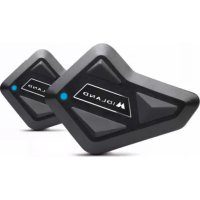
BT Mini - Talkie Walkie MIDLAND - Free user manual and instructions
Find the device manual for free BT Mini MIDLAND in PDF.



| Product type | Bluetooth intercom for motorcycle helmet / walkie-talkie |
| Brand | Midland |
| Model | BT Mini |
| Power supply | Rechargeable lithium battery via USB-C |
| Talk time | 8 hours |
| Charging time | Approximately 2 hours |
| Motorcycle-to-motorcycle intercom range | Up to 400 meters (depending on terrain conditions) |
| Bluetooth | Profiles HFP, A2DP, AVRCP; frequencies 2.402-2.480 GHz; max power 2.5 mW |
| Main functions | Rider-passenger intercom, motorcycle-to-motorcycle intercom, phone calls, A2DP music, GPS instructions, DSP noise cancellation |
| Water resistance | Waterproof |
| Box contents (single version) | BT Mini, audio kit with 2 x 36mm speakers, wired microphone for full-face helmet, boom microphone for open-face helmet, USB-C cable, spare microphone foams, Velcro and adhesive mount |
| Care and cleaning | Clean with a soft dry cloth. Do not use abrasive products or solvents. |
| Safety | Use at a distance greater than 5 cm from the body. Do not modify the device. |
| Spare parts and repairability | Available accessories: speakers, microphones, USB-C cable. For repairs, contact customer service. |
| General information | 24-month warranty for the main unit, 6 months for accessories (battery, charger, etc.). Compliant with RED directive 2014/53/EU. |
Frequently Asked Questions - BT Mini MIDLAND
User questions about BT Mini MIDLAND
0 question about this device. Answer the ones you know or ask your own.
Ask a new question about this device
Download the instructions for your Talkie Walkie in PDF format for free! Find your manual BT Mini - MIDLAND and take your electronic device back in hand. On this page are published all the documents necessary for the use of your device. BT Mini by MIDLAND.
USER MANUAL BT Mini MIDLAND
natural_image
Black 3D object with triangular cutouts and a central logo, resembling a stylized device or device (no readable text or symbols)MANUALE D'USO
INSTRUCTION GUIDE
BEDIENUNGSANLEITUNG
For information about the warranty please visit www.midlandeurope.com
natural_image
Diagram showing a biological structure with two circular insets highlighting internal features (no text or labels)natural_image
Cross-sectional diagram of a mechanical component with layered structure and highlighted section (no text or symbols)natural_image
Line drawing of a car helmet with a small inset detail (no text or symbols)The USB type C plug allows both Audio kit and recharging of the unit (but not at the same time). 1
BT MINI INSTALLATION....2
CHARGING 2
BT MINI MAIN FUNCTIONALITY....3
Enable auto answer....3
Disable auto answer 3
Basic Functionalities....3
Pairing to a phone/GPS 3
How to use a phone....3
How to use a music player ....4
Pairing to another BT Mini Unit 4
How to use the intercom ....4
Pairing to another Intercom ....4
How to use the Universal Intercom....4
Special Action....4
Voice prompt/Beep/Light 5
WARRANTY 6
EUROPEAN CE NOTICE CERTIFICATION AND SAFETY APPROVAL INFORMATION....6
MIDLAND BT MINI
Thank you for choosing the Midland BT Mini, the most simple Intercom for Scooters and Motorbikes.
With your BT Mini you can listen to stereo music and GPS navigation voice, place and answer to phone calls, talk with your friends in full duplex intercom up to a distance of 400 m.
MAIN FEATURES
• Bluetooth with support for the following protocols:
Headset profile, Hands Free Profile (HFP), A2DP, AVRCP.
• Frequency: 2.402 ÷ 2.480 GHz
• Max power: 2.5 mW
- Intercom Driver - Passenger
• Intercom Bike to Bike 400 mt (depending on terrain conditions)
- Connect your phone to receive/place phone calls
- Listen to Stereo music (A2DP)
- Connect your GPS for voice street indications
• Lithium battery with 8 hours talk time
• Recharge time: app. 2 hours
- Waterproof
• DSP Noise cancelling technology
WHAT'S IN THE BOX
BT Mini is available in two different versions:
- Single cod. C1410
- Twin cod. C1410.01
The single packing includes:
BT Mini unit, audio kit with two 36 mm speakers, wired microphone for full helmets, book microphone for open helmets, USB-C recharging cable, spare microphone sponge, velcro pad for speakers and microphones, bi-adhesive mount.
The twin package includes the same accessories in double version.
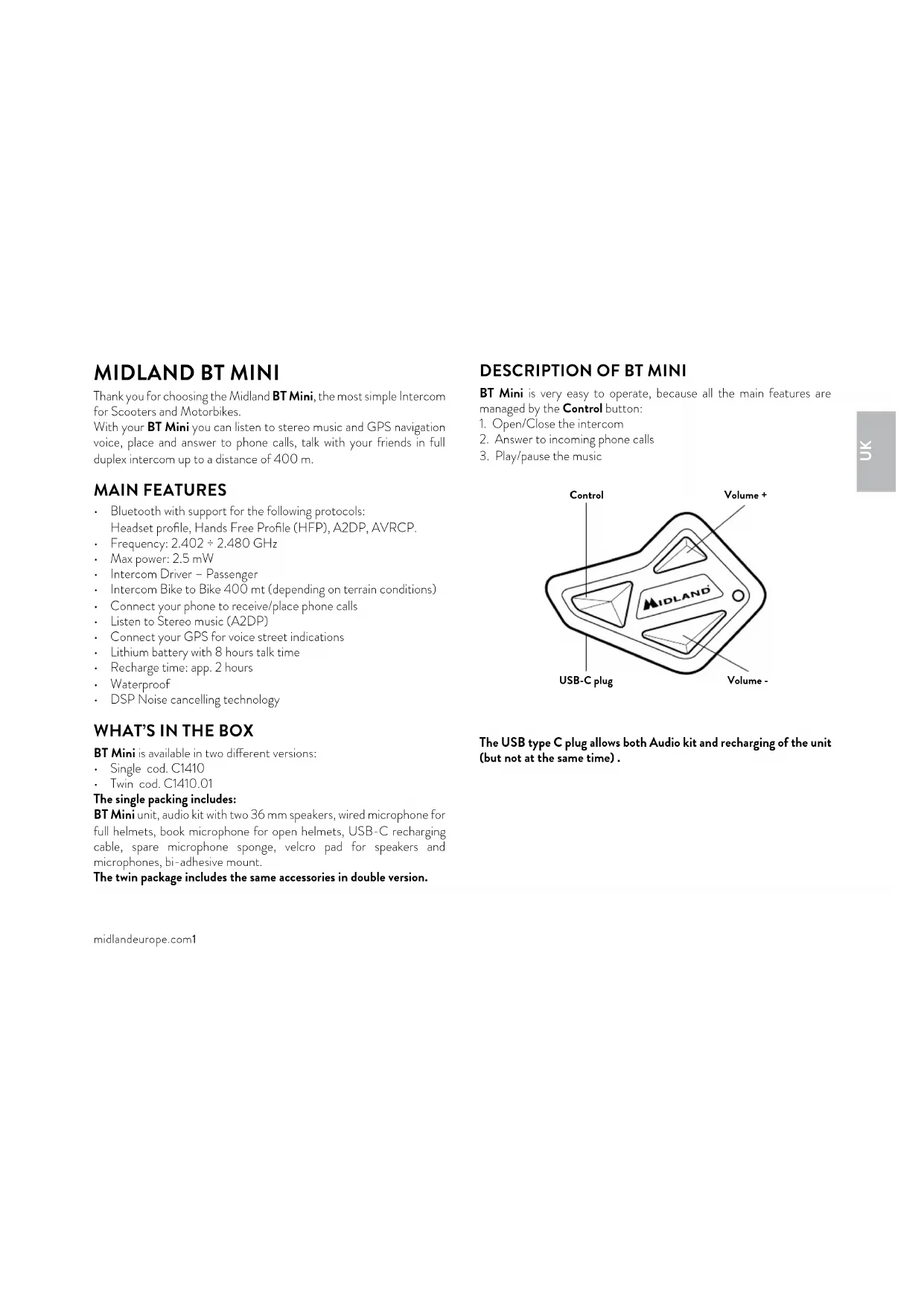
DESCRIPTION OF BT MINI
BT Mini is very easy to operate, because all the main features are managed by the Control button:
- Open/Close the intercom
- Answer to incoming phone calls
- Play/pause the music
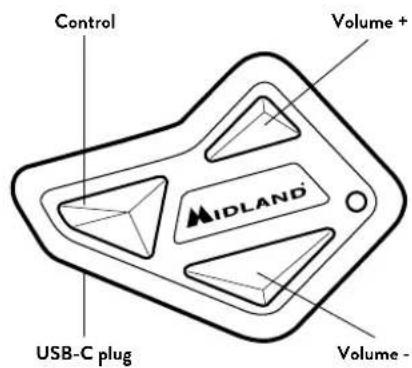
text_image
Control Volume+ MIDLAND USB-C plug Volume -The USB type C plug allows both Audio kit and recharging of the unit (but not at the same time).
BT MINI INSTALLATION
Place both speakers in the deep ear pocket of your helmet. You can fix the speakers using the velcro pad provided in the box.
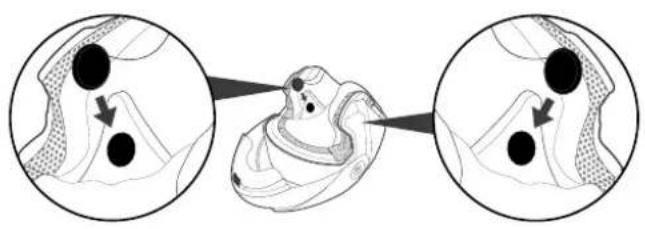
natural_image
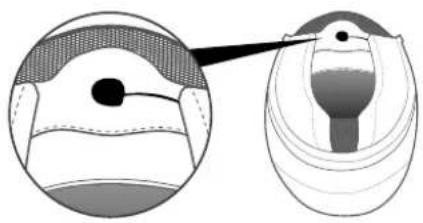
Diagram showing a biological structure with two circular insets highlighting internal features (no text or labels)Place both speakers as much as possible close and centered to your ears. Place the wired microphone in front of your mouth using the adhesive Velcro pad.
natural_image
Diagram of a medical or anatomical structure with cross-sectional view and magnified detail (no text or labels)If you are using the half-boom microphone, fix the boom on the left side and keep the sponge as closely as possible to your mouth when wearing the helmet. Be sure the white arrow is facing your mouth.
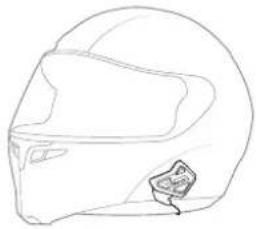
Place the BT Mini unit on the left side of your helmet using the adhesive mount available inside the box.
natural_image
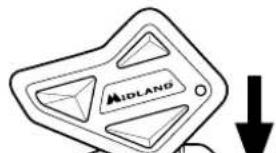
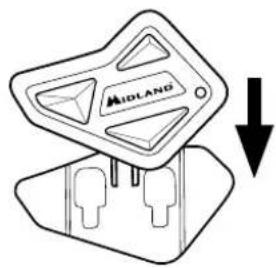
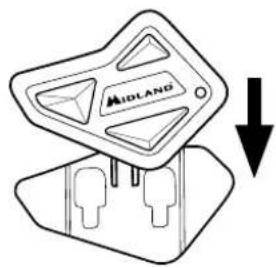
Line drawing of a car helmet with a small inset detail (no text or symbols)The BT Mini can be easily fitted onto the helmet by sliding it downwards so that it fits into the slot of the adhesive Mount.
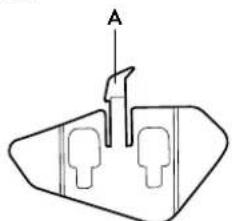
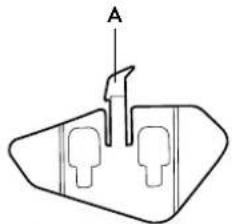
The BTMini is maintained in position thanks to the fixing clip located on the upper section (A).
To detach BT Mini, simply press the fixing clip (A) and push the unit upwards.
natural_image
Simple line drawing of a mechanical component with two ports and a labeled arrow (no text or symbols)Bi-adhesive mount
natural_image
Simple line drawing of a Midland vehicle component with a downward arrow (no text or symbols)
You can hide the speaker wires under the helmet padding.
CHARGING
Only the USB-C cable is supplied inside the box.
You can charge your BT Mini using any standard USB wall adapter or PC port. In the box you can find only the USB type C recharging cable. It takes about 2 hours to fully charge.
BT MINI MAIN FUNCTIONALITY
Midland BT Mini is a full duplex intercom communication system Driver to Passenger and Bike to Bike communication up to a maximum distance of 400 mt. (depending on terrain conditions).
In addition you can listen to Stereo music, place and answer to phone calls or receive voice street indications from the GPS.
If you receive a phone call during an intercom communication, the intercom is closed and reopens as soon as the phone call is over.
If the intercom communication is open while you are listening to music, the music will be paused. When the intercom is closed, the music is automatically resumed.
If you receive a phone call while you are listening to music, the music will be paused. When the phone call is closed, the music is automatically resumed.
ATTENTION: Midland BT Mini automatically answers to on incoming phone call after 8 sec. You can disable this feature and manually answer to the incoming calls.
Enable auto answer
Vol+ and Vol- for 5 sec. Voice: "Enable"
Disable auto answer
Vol+ and Vol- for 5 sec. Voice: "Disable"
Basic Functionalities
| Turn ON | Press 1 sec. on Control and Vol- buttonsVoice prompt: “Power on” and “Battery status” |
| Turn OFF | Press 1 sec. on Control and Vol- buttonsVoice prompt: “Power off” |
| Volume adjustment | Short press on Vol+ or Vol- or keep pressed |
Pairing to a phone/GPS
| Start pairing on BT Mini | Unit is off: Control for 5 secRed and blue LED blink alternatelyVoice: “Pairing” when starts,“Pairing successful” when finished |
| Start pairing on Bluetooth devices (phone/GPS/MP3) | Searches for Bluetooth device from the phone or GPS and select “Midland BT Mini” from the list |
| PIN (if requested) “0000” |
How to use a phone
| Answer call Short press on Control button during incoming call |
| End call Short press on Control |
| Reject call Control for 3 sec when ringing |
| Voice dial Double click on Control button or Vol+ |
Redial Double click on Vol-button (voice: "Redial")
Cancel redial Short press on Control
Auto answer feature By default the "Auto answer" is active, that means the BT Mini will automatically answer to an incoming call after 8 sec.
How to use a music player
Play/Pause music Press 3 sec on Control button
FWD song Vol+ double click
BWD song Vol- double click
Pairing to another BT Mini Unit
Start pairing on both BT Mini units Unit is in stand by mode, press Vol- for 5 sec on both units, red and blue LED blink alternately Voice prompt: "Pairing successful" when finished
How to use the intercom
Open/Close intercom Short press on Control button
Pairing to another Intercom
It is possible to pair the BT Mini to another model/brand intercom, only if the other unit supports the Universal Intercom feature.
The BT Mini will use the phone pairing to connect to the Universal Intercom of the other unit.
| Start pairing on BT Mini Unit | Unit is power offControl for 5 secRed and blue LED blink alternate |
| Start pairing on other Intercom | Follow the manual for “Universal intercom pairing” on the other unit |
How to use the Universal Intercom
| Open/CloseUniversal Intercom | Control double click/Control short press |
Attention: you need to repeat twice the Open command: after you hear the voice "Device connected", double click Control again.
Special Action
| Reset all pairing | Unit is power off: Vol- and Control for 7 sec (LED full blue for 3 sec) |
| Cancel Pairing | When pairing is in progress, double click on Vol+, Vol- or Control |
| Enable auto answer Vol+ and Vol- for 5 sec (voice “Enable”) | |
| Disable auto answer Vol+ and Vol- for 5 sec (voice “Diseable”) | |
Voice prompt/Beep/Light
| ACTION VOICE PROMPT BEEP LED LIGHT | |||
| When you turn on the unit Power ON + battery status Blinking Blue | |||
| When you turn off the unit Power OFF Blinking Red 3 times | |||
| Start pairing Pairing Red /Blue alternate | |||
| After pairing Pairing successful | |||
| Answer phone call 1 Beep | |||
| End phone call 1 Beep | |||
| Reject phone call 2 Beep | |||
| Voice command | 1 Beep | ||
| Redial | Redial | ||
| Play/Pause | 1 Beep | ||
| FWD | 1 Beep | ||
| BWD | 1 Beep | ||
| Intercom open | 1 Beep | ||
| Intercom close | 2 Beep | ||
| Adjust volume | 1 Beep | ||
| Charging | Blinking red | ||
| Full charge | Full blue | ||
| Enable auto answer | Enable | ||
| Disable auto answer | Disable | ||
midlandeurope.com5
WARRANTY
The warranty lasts 24 months for the main device and 6 months for the accessories (batteries, chargers, antennas, headsets, microphones).
For further information about the warranty, please visit:
www.midlandeurope.com
EUROPEAN CE NOTICE CERTIFICATION AND SAFETY APPROVAL INFORMATION
This product is CE marked according to the RED directive 2014/53/UE and is free use in all the EU countries.
Users are not permitted to make any changes or modifications to the device.
Modifications which are not expressly approved by the producer invalidate the warranty card.
For further information, please go to our website:
www.midlandeurope.com
INHALT
MIDLAND BT MINI....1
BT MINI INSTALLATION....2
LADEN 2
BT MINI HAUPTFUNKTIONEN 3
Ansage/Signalton/LED 5
BT MINI INSTALLATION
natural_image
Diagram showing a biological structure with three circular insets highlighting internal features (no text or labels)natural_image
Diagram of a medical or anatomical structure with layered patterns and a highlighted section (no text or labels)natural_image
Line drawing of a helmet with a small inset showing a helmet and a small object on the side (no text or symbols)text_image
A Bi-adhesive mount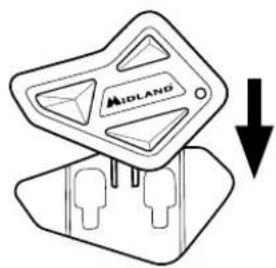
text_image
MIDLANDLADEN
Ansage/Signalton/LED
natural_image
Diagram showing a biological structure with three circular insets illustrating progressive changes in shape (no text or labels)natural_image
Cross-sectional diagram of a mechanical component with internal layers and a highlighted section (no text or labels)natural_image
Line drawing of a car helmet with a small inset detail (no text or symbols)Le single pack comprend:
natural_image
Diagram showing a biological structure with three circular insets illustrating progressive changes in shape (no text or labels)natural_image
Diagram of a bird's head and thorax showing anatomical structures (no text or labels)natural_image
Line drawing of a car helmet with a small inset detail (no text or symbols)natural_image
Diagram showing a biological structure with three circular insets illustrating progressive changes in shape (no text or labels)natural_image
Cross-sectional diagram of a mechanical component with layered structure and highlighted section (no text or symbols)natural_image
Line drawing of a car helmet with a visor and side clip (no text or symbols)Napravo pritrdite na nastavek tako, da jo potisnete navzdol.
Če želite napravo BT Mini odstraniti, preprosto pritisnite na sponko (A) in napravo potisnite navzgor.
natural_image
Pure technical diagram of a mechanical component with no text or symbolsDvostranski nastavek
text_image
MIDLANDnatural_image
Diagram showing a biological structure with two circular insets highlighting internal features (no text or labels)natural_image
Diagram of a medical or anatomical structure with layered sections and a magnified inset showing a highlighted region (no text or labels)natural_image
Line drawing of a car helmet with a visor and side clip (no text or symbols)natural_image
Simple line drawing of a mechanical component with labeled point A (no text or symbols beyond label)Přilepovací držák
text_image
MIDLANDHereby Cte International Srl declares that this product is in compliance with the essential requirements and other relevant provisions of Directive 2014/53/UE. The declaration of conformity is available on the web site http://www.midlandeurope.com/it/pagina/10090-certifications
AT / DE / CH / LI
http://www.midlandeurope.com/it/pagina/10090-certifications
ES
http://www.midlandeurope.com/it/pagina/10090-certifications
SE
http://www.midlandeurope.com/it/pagina/10090-certifications
FI
http://www.midlandeurope.com/it/pagina/10090-certifications
LT
http://www.midlandeurope.com/it/pagina/10090-certifications
LV
CTE INTERNATIONAL Srl deklarē, ka produkts atbilst pamatprasibām un citiem ar to saistitajiem Direktīvas 2014/53 / UE. Atbilstības deklarācija in piecjama majas lapa: http://www.midlandeurope.com/it/pagina/10090-certifications
SK
Important: The equipment must be used at least 5cm away from the body of use
A/D/CH/FL
All articles displaying this symbol on the body, packaging or instruction manual of same, must not be thrown away into normal disposal bins but brought to specialised waste disposal centres. Here, the various materials will be divided by characteristics and recycles, thus making an important contribution to environmental protection.
Produced or imported by:
CTE INTERNATIONAL srl
Via. R.Sevardi 7 42124 Reggio Emilia - Italy.
Read the instructions carefully before installation and use.
Vertrieb durch:
BIHR S.A.S.
www.bihr.eu
Unit 9, Oriana Way Nursing Industrial Estate Southampton, Hampshire SO16 0YU
United Kingdom
www.bikeittrade.com
Read the instructions carefully before installation and use.
Distribué par:
BIHR S.A.S.
www.bihr.eu