
LXT490 - Walkie-talkie MIDLAND - Free user manual and instructions
Find the device manual for free LXT490 MIDLAND in PDF.


| Product Type | Two-Way Radio (Walkie-Talkie) |
| Brand | Midland |
| Model | LXT490 |
| Dimensions | Approximately 2.5 x 1.5 x 6.5 inches |
| Weight | 4.5 oz (with batteries) |
| Power Source | 3 AA alkaline batteries (not included) |
| Number of Channels | 22 (8 GMRS, 14 FRS) |
| Privacy Codes | 38 CTCSS privacy tones |
| Range | Up to 30 miles under ideal conditions |
| Output Power | 2.5 watts (GMRS channels) |
| Key Features | VOX (voice-activated transmission), scan, NOAA weather alerts, silent operation |
| Maintenance and Cleaning | Wipe with a damp cloth and mild detergent; do not submerge in water |
| Safety Precautions | Use only specified batteries; do not use damaged batteries; keep away from children |
| Spare Parts and Repairability | Belt clip and battery cover available; no user-serviceable parts inside |
| General Information | FCC ID: MMALXT490; operates on FRS/GMRS frequencies |
Frequently Asked Questions - LXT490 MIDLAND
User questions about LXT490 MIDLAND
0 question about this device. Answer the ones you know or ask your own.
Ask a new question about this device
Download the instructions for your Walkie-talkie in PDF format for free! Find your manual LXT490 - MIDLAND and take your electronic device back in hand. On this page are published all the documents necessary for the use of your device. LXT490 by MIDLAND.
USER MANUAL LXT490 MIDLAND
www.midlandradio.com
MIDLAND RADIO CORPORATION 5900 Parretta Drive Kansas City, MO 64120 Call 816.241.8500
visit us at http://www.midlandradio.com
Note: Features & Specifications are subject to change without notice. MIDLAND is not responsible for unintentional errors or omissions on its packaging.
Welcome to the world of Midland electronics
Congratulations on your purchase of a high quality MIDLAND product. Your 2-way radio represents the state-of-the-art in high-tech engineering. Designed for GMRS (General Mobile Radio Service) operation, this compact package is big in performance. It is a quality piece of electronic equipment, skillfully constructed with the lines components. The circuitry in all solid-state and mounted on a rugged printed circuit board. Your two-way radio is designed for reliable and trouble-free performance for years to come.
Features
36 GMR8/FRS Channel
-BOX
- Selectable CALL Alert
- NORT WOULD STAR - NAVA WORPER BARL
- NOAA Weather Alert
- SCAN FUNCTION
- Roger Deey Tone
- Silent Operation
Key Pad Back
- Speaker / Microphone Jacks
- Battery Meter / Battery Low Indicator
This device consists with Part 15 of the FCC Rules. Operation is subject to the following two conditions: (1) this device does not cause harmful interference, and (2) this radio must accept any interference that may cause undesired operation. To maintain compliance with FCC's RF exposure guidelines for body-wire operation, its radio has been tested and meets the FCC RF exposure guidelines when used with MHD and Radio Corp. accessions applied or designed for the product. Use of other accessories may not ensure compliance with FCC RF exposure guidelines.
CHARGING THE OPTIONAL BATTERY PACK
Your LXT490 Series is equipped for using an optional rechargeable NIMH battery pack which can be recharged by inserting the AC adapter into the radio charge jack, or with optional desktop charger (see described below) trials charge times a 24 hours. Charge time is about 12 hours thereafter. For maximum battery life, an recommend charging the battery pack when the low battery icon comes on. Remove the serials from the charger when the charge time expires
To charge using a Desktop Charger:
1. Place the rechargeable battery panel in the radio.
2. Connect the AC adapter into an AC panel, called
3. Insert the AC adapter plug for DC Cigarette Lighter adapter
charging in vehicle) into the desktop charger jack
4. Place the unit into the desktop charger slot and how that the LED indicator with RED color will light up, indicating charging function. In order to ensure that the battery pack is fully charged, it is recommended that the battery pack be charged for at least 12 hours with the radio turned OFF.
- Only use our NMH battery pack
- Do not attempt to charge alkaline batteries or any batteries or battery packs other than the one indicated in the
manual. This may cause leakage and damage to the radio 3. For long-term storage of the radio, turn the radio OFF and remove the batteries from the radio.
BATTERY LEVEL INDICATOR
Your LXT450 Battery has a BATTERY LEVEL METER (which the battery power level. The greater the number of bars visible, the stronger the battery level. When the battery level is low, the Battery ShellKor vs flash in the display indicating your batteries should be replaced or recharged if using a rechargeable battery pack.
IMPORTANT NOTICE, FCC LICENSE REQUIRED FOR GMRS OPERATION. Only Applicable for GMRS Radio Use in the United States
The LXT450 Series operates on GMRS (Central Mobile Radio Station) frequencies which require an FOS (Federal Communications Commission) license. You must be licensed prior to operating on channels 1 - 7 or 15 - 32, which comprise the GMRS channels of the LXT450 Series. Basic parallel channel rule for announced use of GMRS channels, registration of FOS rules, and apparatus in the Communications Act's Sections 901 and 902 (amended).
You will be issued a call sign by the FCC which should be used for station certification when opening the rack on GNRS channels. You should also console by installing paymentables any according channel maintenance with other GNRS costs, and being pocket with Pack length of Fast transmission time.
To obtain a license or act question about the license application, control the
http://www.foc.gov and request form: 605.
Exposure To Radio Frequency Energy
Your Midland radio is designed to comply with the following national and international standards and guidelines regarding exposure of human being to reduce frequency electromagnetic energy:
United States Federal Communications Commission, Code of Federal Registration 47 CEP (or 2 approved).
- American National Standards Institute (AMSA) Institute of Electrical
Electric Engines IEEE, Corp. 1982 - Institute of Electrical and Electronic Engineer (IEEE) CRS. 1-1892 Edition National Council on Radiation Protection and Measurements (NCRP) of the United States. Report 45, 1895
International Commission on Non-landing Radiation Protection (CMRP)
To combat your exposure and ensure compliance with the general population in uncontrolled environment exposure limits, interest on more than 50% of the time. The main generation measures the energy resources only when transmitting.
IMPORTANT: Changes or modifications to this unit and expressly approved by MIDLAND RADIO CORP. could visit your right to operate this unit. Your radio is set up to transmit a regulated signal on an assigned frequency. It is against the law to order or adjust the sett inside the COMMUNICATOR to exceed those limitations. Any adjustment to your radio must be made by qualified technicians.
POWER ON/OFF AND VOLUME
Press the POWER/MENU button for all least 3 seconds to turn the radio alert. During Power On, the radio will keep 2 times with different tones. The LCD will display at 1000 for 1 second and the LCD display will indicate the last channel selected.
To increase decrease the volume level, press the ▲▼ button during RX or STANDBY mode.
TRANSMITTING AND RECEIVING A CALL
To communicate, all nodes in your group must be set to the same channel and/or Privacy Code.
-
For maximum clarity, hold the radio 2 to 3 inches from your
-
Press
-
Press and hold the PTT button and speak in a normal voice into the microphone. The TX can will appear continuously
on the LCD Display while transatlting
- To receive a cell, release the PTT button. The RX icon will appear on the display when your radio is receiving a transmission.
ABOUT RANGE
Your LXT Sairia radios are designed to give you maximum range under minimum conditions.

Maximum Range / LMs to the Sight Obstructor
- Ad
Short Range / Major Clashuction to Live of Sight
Optimum Conditions are:
Over water
- Open rural areas without obstruction
- 18. areas where you can see the other person
To ensure you get maximum range
- Be sure to use fresh or fully charged batteries - low batteries will cause low power conditions.
- Be sure you are on a GMRS channel - FRS channels are
Restricted by the FCC to low power
● Be sure to set your facts to use H power
LCD DISPLAY
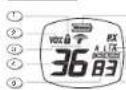
-
KEY LOCK ICON - FOCUS 25-92
-
FOX ICON - holiday AM! FOX 1956
3-MONAL WEATHER (MX) BAND ICON-
TELENS WOODS, 1985. 10:2006 BUDI MA.
- CHANNEL NUMBER - (M) 2017
(1)
- Privacy Code - 1000017
at only level + C++22
① 6. BATTERY VETER (TAXAS/TEUAN)
-
RECHNE (K) ECON
-
TRANSVIT (ITC) IPOV - inclores radio
The source image is illegible due to extreme pixelation and low resolution. No characters, symbols, or punctuation can be reliably identified. Therefore, no valid OCR text can be generated that matches the visual content of the source image.
- Privacy Code: COM - Review
(1985) CCM AAG (C. LUCUS)
CONTROLS
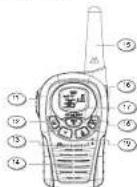
- POWER/MERKIE RAPAN - FWE 2013 sold for at least 3 weeks to last day
obased Press regularly to
- VICTORIGCAN BE
100
- UPNVX SCAN ▲ and DOWN ▼
Baton - 100s 32.10749 in 2011
2017年1月1日
BATTERY INSTALLATION
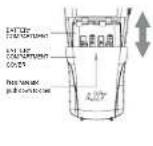
Your LXT490 Series node operates with other 4 AAA alkaline batteries or an optional NMI battery pack. The bolt clip should be removed (see below) to case installation or removal of the batteries. To install the batteries:
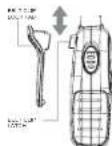
1. With the back of the radio facing you, remove the bolt clip (see diagram below) for easy access, then remove the Battery Cover by pressing down on the top center and sliding it down from the radio.
2. Insert 4 AAA batteries observing the potantly as shown, installing the batteries incorrectly will prevent the unit from operating or may damage the unit.
3. Return the Battery Cover by sliding it up on the radio. Replace the bell slip, making sure it looks into place.
INSTALLING THE BELT CLIP
To install the BELT CLIP, slide the clip up into the slot on the back of the radio until the BELT CLIP LATCH clicks. To remove the BELT CLIP, press the LOCK TAB up, then gently put the bell clip down toward the bottom of the radio.
LXT490 SERIES QUICK REFERENCE CHART
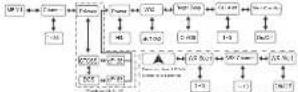
MONITOR
Pressing and holding the MONITOR button for 3 seconds will let you hear noise so you can adjust the volume level of the radio when not receiving a signal. This could also be used to check any activity on your current channel before transmitting.
Press and hold the MONITOR button for 3 seconds again to get out of MONITOR mode.
SCAN
Your LXT480 Salas can scan all 36 channels for activity. To enable quickly press the SCAN button. Repeat the same procedure to exit. Your radio will rapidly soon much of the 36 channels and step on any active channel for 4 seconds before resuming scan.
When you press the PTT button to transmit an active channel, the scanning function will stop and remain on the active channel. To resume scanning, quickly press the SCAN button.
CALL ALERT
Your LXT450 Series can transmit a call alert for a fixed length of time to send a call alert, press the CALL button. The TX icon will appear while transmitting a call alert and a time can be heard on the speaker for confirmation.
KEYPAD LOCK
To avoid accidentally changing the radio setting, press the LOCK button for 4 seconds. The KEY LOCK icon will appear on the display PTT and CALL will still be active. Repeat the same procedure to unlock the keysed
CHANNEL SELECTION (GMRS/FRS BAND)
Press the MENU button once, and then the ▲▼ buttons to select one of the 30 GMRGIFRS channels. To confirm the selection, press the PTT button or press the MENU button again to move to the next. Feature setting:
SETTING PRIVACY CODES
Your LXT490 Series has 121 Privacy Codes available to use in channels 4-22. The selected Privacy Code may be different for each channel. To select a Privacy Code for the command of a press file, the MENU button twice, and then the ▲▼ buttons to select one of the 38 CTCSS Privacy Code. Press again the MENU button and the ▲▼ button to select one of the 93 DCS Privacy Code. The Privacy Code icon on the display will indicate whether you sell your Privacy Code in CTCSS or DCS mode. To confirm the selection, press the PTT button or press MENU button again to move to the next feature setting.
Note: If you select any CTGSS Privacy Code, any pre-selected DCS Privacy Code will be cancelled and video were
DUS (Pally) Code on the Container and its other. Selecting a PrivacyCode of "e5" will also be the Private-Feature
To communicate between two LXT480 Series radios, all radios in
- your group must be set to the same channel and/or Privacy Code
selects. The Privacy Code can only be set in channels 1-22
TRANSMIT | TX | POWER LEVEL SELECTION
Your TX-500 press 2 power level settings. To select the power level on channels 1-7 and 15-36, press the MENU button until a "Pi" can will appear timing on the display. Then press the ▲▼ buttons to select TRANSMIT POWER LEVEL icon (H: H/L: Ln). To confirm, press the PTT button or press MENU button again to move to the next feature setting. When the PTT button is pressed during Low Battery Level condition, the TX Power will automatically switch from
43,H,10 E(2) 16961.
Note: You cannot adjust the power setting on the FRS channels (8-14). They are set to Low power per FCC regulations.
VOX
Your LXT490 Series has 3 VOX level settings: (oF1/23). To set VOX, press the MENU button until the display shows "VOX" blinding while on the right of the CHANNEL NUMBER display, an "oF" icon appears. Select "1" "2" or "3" by pressing the ▲▼ buttons and push the PTT key, or press MENU button again to move to the next feature setting.
VOX will be more sensitive on the '1' selling than on the '2' setting. To turn VOX oil, press, the MENU button until the display shows "VOX" breaking while on the right of the CHANNEL NUMBER display, a '1', 2 or '3' icon appears. Select 'oF' by pressing the ▲▼ buttons and push the PTT key, or press MENU button again to move to the next feature setting.
ROGER BEEP (and of transmission) TONE When the PTT station is released, the radio will beep to confirm to other users that your transmission has finished.
To turn the ROGER BEEP loud on, press the MENU button until the display shows an "nb" icon while on the right of the "nb" display, an "oF" icon appears. Select "on" by pressing the ▲▼ buttons and push the PTT key, or press MENU button to move to the next feature selling.
To turn the ROGER BEEP tone off, press the MENU button until the display shows an "vb" icon while on the right of the "vb" display, an "on" icon appears. Select "oF" by pressing the ▲▼ buttons and push the PTT key, or press MENU button to move to the next feature setting.
CALL ALERT SELECTION Your LXT490 Series has 5 selectable CALL ALERTS. To select, press the MENU button until a "CA" icon appears and to the right of the "CA" icon the current CALL ALERT setting is displayed. Then press the ▲▼ buttons to make the CALL ALERT selections - the radio will out a corresponding tone for each selection. To confirm, press the PTT button or press MENU button in move to the next feature setting.
SILENT OPERATION Your LXT/90 Series box a SILENT OPERATION mode. In this mode all troops and toros are disposed. To turn the SILENT OPERATION mode on press the MENU button until the display shows on "bP" icon while on the right of the "bP" display, an "on" icon appears. Select "of" by pressing the ▲▼ buttons and push the PTT key or MENU button. To turn the SILENT OPERATION mode off press the MENU button until the display shows an "bP" icon while on the right of the "bP" display, an "of" icon appears. Select "of" by pressing the ▲▼ buttons and push the PTT key or MENU button.
| BLS | 2017 | No | 2008* | 1st | 2009* |
| 1 | 325 | 5 | 46 | 57 | 58 |
| 2 | 298 | 1 | 380 | 25 | 30 |
| 3 | 275 | 1 | 350 | 25 | 28 |
| 4 | 250 | 1 | 320 | 25 | 290 |
| 5 | 225 | 1 | 300 | 25 | 300 |
| 6 | 200 | 1 | 280 | 25 | 300 |
| 7 | 185 | 1 | 260 | 25 | 315 |
| 8 | 170 | 1 | 240 | 1 | 320 |
| 9 | 155 | 1 | 220 | 1 | 325 |
| 10 | 140 | 1 | 200 | 1 | 330 |
| 11 | 125 | 1 | 180 | 1 | 335 |
| 12 | 110 | 1 | 160 | 1 | 340 |
| 13 | 100 | 1 | 140 | 1 | 345 |
| 14 | 90 | 1 | 120 | 1 | 350 |
| 15 | 80 | 1 | 100 | 1 | 355 |
| 16 | 70 | 1 | 90 | 1 | 360 |
| 17 | 60 | 1 | 80 | 1 | 365 |
| 18 | 50 | 1 | 70 | 1 | 370 |
| 19 | 40 | 1 | 60 | 1 | 375 |
| 20 | 30 | 1 | 50 | 1 | 380 |
| 21 | 20 | 1 | 40 | 1 | 385 |
| 22 | 10 | 1 | 30 | 1 | 390 |
| 23 | 5 | 1 | 20 | 1 | 400 |
| 24 | 2 | 1 | 10 | 1 | 405 |
| 25 | 1 | 1 | 5 | 1 | 410 |
NOAA WEATHER RADIO/SCAN
Your LXT490 Series has a NOAA WEATHER RADIO function, to enable user to resolve weather reports from designated NOAA stations.
Your LXT490 Series also has a NOAA WEATHER SCAN function, to enable user to scan all the 10 channels of the NOAA WEATHER RADIO. To turn the NOAA WEATHER SCAN on press and hold the UPIWX ▲ button for 5 seconds until in GMRX mode. The radio will go to WX Band mode and start scanning all the 10 channels are stop on any active channel. When the channel becomes inactive for 10 seconds, the radio will resume scanning.
To stop the NOAA WEATHER (WX) SCAN and set the channel manually on the WX Band press the MENU button during NOAA WEATHER (WX) SCAN. The radio will stop scanning and line display will show the current WX Band channel setting and the WX Band icon. While on WX Band mode press the ▲▼ buttons to select one of the 10 NOAA WEATHER (WX) BAND channels. To confirm press the PTT button or press MENU button to move to the next feature setting.
To turn the NOAA WEATHER RADIO off, press the PTT button. The current GMRSIFRS radio setting will be displayed and the WX BAND ion will go off.
NOAA WEATHER ALERT
Your LXT490 has a NOAA WEATHER ALERT function, to enable you to automatically resolve weather alert from designated NOAA stations.
The NOAA WEATHER (WX) ALERT is automatically on during NOAA WEATHER SCAN mode.
To turn the NOAA WEATHER (WX) ALERT or during normal NOAA WEATHER RADIO mode, press the MENU button twice while in NOAA WEATHER SCAN mode. The display shows "AL", while on the right an "oF" icon appears blinking. Select "on" by pressing the ▲▼ buttons.
LIMITED WARRANTY
Midland Radio Corporation will repair or replace, at its option without charge, any Midland FRS/GMRS transceiver which falls due to a defect in material or workmanship within Three Years following the initial consumer purchase.
This warranty does not apply to water damage, battery leak or above. Accessories have a 80 day warranty from date of purchase, including any arteries, chargers, or earphones. This warranty does not include the cost of labor for removal or re-installation of the product in a vehicle or other mounting.
For Product Purchased in the USA:
Performance of any obligation under this warranty may be obtained by returning the warranted product, prepaid freight, along with proof of purchase to:
Midland Radio Corporation
Warranty Service Department
5800 Parretta Drive Kanpras City, MO 5413
This warranty gives you specific legal rights, and you may also have other rights, which vary from state to state.
Note: The above warranty applies only to merchandise purchased in the United States of America or any of the territories or possessions thereof, or from a U.S. Military exchange.
For Product Purchased in Canada:
Performance of any obligation under this warranty may be obtained by sharing the warranted product, along with proof of surcharges to your dealer in Canada.
This warranty gives you specified legal rights. Additional warranty rights may be provided by law in some areas.
To confirm press the PTT button or press MENU, the radio will return to WX BAND and the WX BAND icon will continue drinking. If the radio receives a WX ALERT signal from a designated NOAA station while on GMRSIFRS Radio mode, the radio will beep for 10 seconds while an "AL" and "In" icon appear on the daisy, after which will automatically go to WX BAND.
If any button is proceed during boeping while on GMRSiFRS Radio mode, the radio will automatically go to WX BAND
To turn the NOAA WEATHER (WX) ALERT off, press the MENU button twice write in WX Band. The display shows "AL", write on the right an "on" can appears blinking. Select "oF" by pressing the AL" buttons. To confirm, press the PTT button or press MENU.

Note: The WX Alert is automatically ON during WX SCAN mode.

Your LXT430 serves not to use with an optional external speaker/ microphone or headset, freeing your hands for other keys. To use an optional speaker / microphone or headset.
- Insert the plug(s) into the SPKMIC socks
● Place the social into your ear, and adjust the way into your blood water.

Note: You can charge a rechargeable NiMH battery pack thru the CHG Jack.
TROUBLESHOOTING GUIDE
PROBLEM SOLUTION
| No. | Power, Choice, Littering | Installation and/or reduce batteries |
| Carned Deutschen Monques | - Concern the value from the same electric relaps - More new and more within range of the other components - Buildings and other structures may not be used by your communication. | |
| Radio is reconstaining to their power. | - Make sure key lock is not on. See 'Bayes Local' Board right enough to be the wear - turn and out if then. | |
| Clicks a door - Platform or reduce batteries | ||
| Charger not functioning | - Conscis on the bottom of the race may require cooling. Ensure the touch where the charger is plugged into a working property. Check that the battery push an inclined in the race property. | |
USE AND CARE
- Use a soft clamp cloth to clean the radio
- Do not use alcohol or cleaning solutions to clean the air.
- Do not escape the choice in mode
- Dry the side with dry interest clean bottle if got wet.
- Turn off the milla and remove the battades during la
storage
If you have a problem which you believe requires service, please call first and speak with a service technician. Many problems can be remedied over the phone without returning the unit for service.
ACCESSORIES
Accessories can be purchased at www.midlandradio.com or ill in the form on the following page and mail it to our address.
AVP-1


AVP-H4

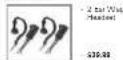
AVP-H1


AVP-H5
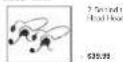
AVR.H7


AVCRHZ
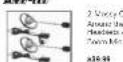
AVP-H3


AVP-HB
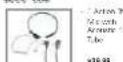
TACTICAL HEADSETS

ZAROTAN M. 2017 Room
821.94
TH2
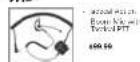
THE
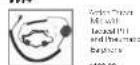
[Non-Text]
![MIDLAND LXT490 - [Non-Text] - 1](/content/2026/05/990490/images/8616e0a90354c99bdaa77015f29ea3be0792be4a2c9c67efdca32f6709f7b375.jpg)
839.99
SPECIFICATIONS
Channels 36 CMRS/FRS Channels +121 Privacy Codas 10 NOAA Weather (WX) Band Channels
Operating Frequency Unit 462.5500 - 467.7125 MHz Power Source 4 AAA Alkaline or 4.8V Rechargeable Ni-MH battery pack
GMRS/FRS FREQUENCY CHART (MHz)
| C# No C# | Freq. C# No C# | Freq. C# No C# | Freq. C# | Freq. |
| 1 | 402 3575 | 13 | 402 3575 | 25 |
| 2 | 402 3575 | 14 | 402 3575 | 26 |
| 3 | 402 3575 | 15 | 402 3575 | 27 |
| 4 | 402 3575 | 16 | 402 3575 | 28 |
| 5 | 402 3575 | 17 | 402 3575 | 29 |
| 6 | 402 3575 | 18 | 402 3575 | 30 |
| 7 | 402 3575 | 19 | 402 3575 | 31 |
| 8 | 402 3575 | 20 | 402 3575 | 32 |
| 9 | 402 3575 | 21 | 402 3575 | 33 |
| 10 | 402 3575 | 22 | 402 3575 | 34 |
| 11 | 402 3575 | 23 | 35 | |
| 12 | 402 3575 | 24 | 36 |
* Channels 8-14 are low-power FRS license for channels
NOAA WEATHER (WX) RADIO FREQUENCY CHART [MHz]
| CH. No | CH. Freq. CH. | No | CH. Freq. |
| 1 | 182.590 | 6 | 182.590 |
| 2 | 182.400 | 7 | 182.520 |
| 3 | 182.470 | 8 | 181.090 |
| 4 | 182.420 | 9 | 181.770 |
| 5 | 182.450 | 10 | 183.270 |
* Channel 8.9 and 10 are designated Canadian Motors Frequencies
PRIVACY CODES FREQUENCY CHART (Hz)
Note: Privacy risks can be programmed for use on Channels 1-23 only
ACCESSORIES ORDER FORM
Please send Money Order or ill in VisaMasterCard information and mail to the address below. Please DO NOT send cash or checks Make Money Order to Midland Radio Corporation.
Name:
Address:
| City: | State | Zip Code |
| Tel: | email: |
cc
| Qty | Item Price | Total |
| AVP-1 | 13.00 | |
| AVP-H1 | 48.99 | |
| AVP-H2 | 48.99 | |
| AVP-H3 | 38.66 | |
| AVP-H4 | 28.89 | |
| AVP-H5 | 38.66 | |
| AVP-I7 | 28.89 | |
| AVP-H6 | 38.66 | |
| AVP-6 | 38.00 | |
| TH1 | 38.99 | |
| TH2 | 39.99 | |
| TH3 | 29.99 | |
| TH4 | $199.99 |
Sub Total
A
\$14.95
(Applies to Domestic U.S. only. For Hawaii, Alaska and Puerto Rico S/H will be \$36.25 for the
and \$64.25 for 2lbs or more
Total
s
- Welcome to the world of Midland electronics
- Features
- CHARGING THE OPTIONAL BATTERY PACK
- BATTERY LEVEL INDICATOR
- POWER ON/OFF AND VOLUME
- TRANSMITTING AND RECEIVING A CALL
- ABOUT RANGE
- BATTERY INSTALLATION
- INSTALLING THE BELT CLIP
- LXT490 SERIES QUICK REFERENCE CHART
- MONITOR
- SCAN
- CALL ALERT
- KEYPAD LOCK
- CHANNEL SELECTION (GMRS/FRS BAND)
- SETTING PRIVACY CODES
- TRANSMIT | TX | POWER LEVEL SELECTION
- VOX
- NOAA WEATHER RADIO/SCAN
- NOAA WEATHER ALERT
- LIMITED WARRANTY
- For Product Purchased in the USA:
- For Product Purchased in Canada:
- TROUBLESHOOTING GUIDE
- USE AND CARE
- ACCESSORIES
- AVP-1
- AVP-H4
- AVP-H1
- AVP-H5
- AVR.H7
- AVCRHZ
- AVP-H3
- AVP-HB
- TACTICAL HEADSETS
- TH2
- THE
- [Non-Text]
- SPECIFICATIONS
- ACCESSORIES ORDER FORM
- Name:
- cc
Brand : MIDLAND
Model : LXT490
Category : Walkie-talkie