777 - Talkie Walkie MIDLAND - Free user manual and instructions
Find the device manual for free 777 MIDLAND in PDF.


User questions about 777 MIDLAND
0 question about this device. Answer the ones you know or ask your own.
Ask a new question about this device
Download the instructions for your Talkie Walkie in PDF format for free! Find your manual 777 - MIDLAND and take your electronic device back in hand. On this page are published all the documents necessary for the use of your device. 777 by MIDLAND.
USER MANUAL 777 MIDLAND
Blue Star By MIDLAND® BR777 TWO-WAY RADIO OWNER'S MANUAL
TABLE OF CONTENTS 1
Introduction 2
Important Notice, FCC Licensing 3
LCD Display 4
Controls 5
Battery Installation 6
Installing the Belt Clip 7
Installing the Swivel Holster 7
Charging the Battery Pack 8
Charging thru the Multi-Unit Charger 9
Battery Level Indicator 9
Operating Your Radio 10 - 11
Factory Default Setting 12
Programming your Radio Settings 13 - 16
Keypad Lock 17
External Speaker/Microphone Jack 17
Troubleshooting Guide 18
Use and Care 18
Specifications and Frequency Charts 19 - 21
Warranty Information 22
Accessories 23 - 24
Welcome to the world of Midland electronics
Congratulations on your purchase of a high quality MIDLAND product. Your 2-way radio represents the state-of-the-art in high-tech engineering. Designed for Business Radio operation, this compact package is big in performance. It is a quality piece of electronic equipment, skillfully constructed with the finest components. The circuitry is all solid-state and mounted on a rugged printed circuit board. Your two-way radio is designed for reliable and trouble-free performance for years to come.
Features
- 4 Selectable Channels
- 56 Programmable Frequencies
- 121 Privacy Codes
- VOX
- CALL Alert Function
- VIBRATE Alert Function
- SCAN Function
- Cloning Capability
- Auto-Squelch Function
- Key Pad Lock
- Speaker / Microphone Jack
- Battery Meter / Battery Low Indicator
This device complies with Part 15 of the FCC Rules. Operation is subject to the following two conditions: (1) this device does not cause harmful interference, and (2) this radio must accept any interference that may cause undesired operation.
To maintain compliance with FCC's RF exposure guidelines, for body-worn operation, this radio has been tested and meets the FCC RF exposure guidelines when used with Midland Radio Corp. accessories supplied or designated for this product. Use of other accessories may not ensure compliance with FCC RF exposure guidelines. (Tested with Headset Model: AVP-1)
IMPORTANT NOTICE FCC LICENSE REQUIRED FOR BUSINESS RADIO OPERATION
The BR777 operates on UHF frequencies which require an FCC (Federal Communications Commission) license. You must be licensed prior to operating on these frequencies. Serious penalties could result for unlicensed use of these frequencies, in violation of FCC rules, as stipulated in the Communications Act's Sections 501 and 502 (amended).
You will be issued a call sign by the FCC which should be used for station identification when operating the radio on these channels. You should also cooperate by engaging in permissible transmissions only, avoiding channel interference with other users, and being prudent with the length of their transmission time.
To obtain a license or ask questions about the license application, contact the FCC at 1-888-CALL FCC or go to the FCC's website:
http://www.fcc.gov and request form 601.
Exposure To Radio Frequency Energy
Your Midland radio is designed to comply with the following national and international standards and guidelines regarding exposure of human being to radio frequency electromagnetic energy:
- United States Federal Communications Commission, Code of Federal Regulations: 47 CFR part 2 sub-part J
- American National Standards Institute (ANSI)/Institute of Electrical & Electronic Engineers (IEEE) C95. 1-1992
- Institute of Electrical and Electronic Engineer (IEEE) C95. 1-1999 Edition
- National Council on Radiation Protection and Measurements (NCRP) of the United States, Report 86, 1986
- International Commission on Non-Ionizing Radiation Protection (ICNIRP) 1998
To control your exposure and ensure compliance with the general population or uncontrolled environment exposure limits, transmit no more than 50% of the time. The radio generates measurable RF energy exposure only when transmitting.
IMPORTANT: Changes or modifications to this unit not expressly approved by MIDLAND RADIO CORP. and BLUE STAR could void your right to operate this unit. Your radio is set up to transmit a regulated signal on an assigned frequency. It is against the law to alter or adjust the settings inside the COMMUNICATOR to exceed those limitations. Any adjustment to your radio must be made by qualified technicians.
LCD DISPLAY

text_image
RXTX VOX LO PROG CLON FREQ CODE- BATTERY METER – Indicates the battery level.
- KEY LOCK ICON – Indicates KEY LOCK mode is on.
- RECEIVE (RX)/TRANSMIT (TX) ICON – Indicates radio is transmitting a signal or receiving a transmission.
- VOX ICON – Indicates when VOX mode is active.
- CHANNEL NUMBER – Indicates the Channel (1\~4) setting.
- PRIVACY CODE – Indicates Privacy Code selected by user (oF\~121).
- VIBRATE-ALERT ICON – Indicates when the Vibrate-Alert feature is on.
- TRANSMIT POWER LEVEL ICON – Indicates TX Power setting(Blank/Lo).
- PROGRAM ICON – Indicates radio is in Programming mode.
- CLONE ICON – Indicates radio is in Cloning mode.
- PRIVACY CODE ICON – Indicates radio is in Privacy Code programming mode.
- FREQ CODE ICON – Indicates radio is in Frequency programming mode.
CONTROLS

text_image
MIDLAND 17 RXTX VOX LO PROG CLON FREQ CODE Blue Star My MIDLAND MIC 13 14 15 16 18 19 20 21- PTT Button – Press and hold to transmit voice communication.
- UP Button – Increase the volume level or make adjustments in Program mode.
- DOWN Button – Decrease the volume level or make adjustments in Program mode.
- MIC – Built-in microphone.
- ANTENNA.
- EXTERNAL SPEAKER/MIC JACK.
- SCAN/CALL/KEYLOCK Button – Press and hold within 2 seconds then release to enter SCAN mode. Press twice quickly to send CALL Alert tone. Press and hold to turn on/off the Keylock function.
- MODE/POWER ON/OFF Button – Press and hold to turn the radio on/off. Press to activate the MENU mode.
- SPEAKER – Built-in speaker.
BATTERY INSTALLATION
Your BR777 radio operates with 3.7Vdc 650mAh Li-ion Battery Pack (BATT7L). The belt clip should be removed (see INSTALLING THE BELT CLIP) to ease installation or removal of the batteries.
To install the batteries:
-
With the back of the radio facing you, remove the belt clip (see INSTALLING THE BELT CLIP) for easy access, then remove the Battery Cover by pressing down on the top center and sliding it down from the radio.
-
Insert the Li-ion Battery Pack, observing the polarity as shown. Installing the batteries incorrectly will prevent the unit from operating or may damage the unit.
-
Return the Battery Cover by sliding it up on the radio. Replace the belt clip.

text_image
BATTERY COMPARTMENT Li-ion BATTERY PACK UP RESET WITH THIS SIDE CIRCUIT BATTERY COVERINSTALLING THE BELT CLIP
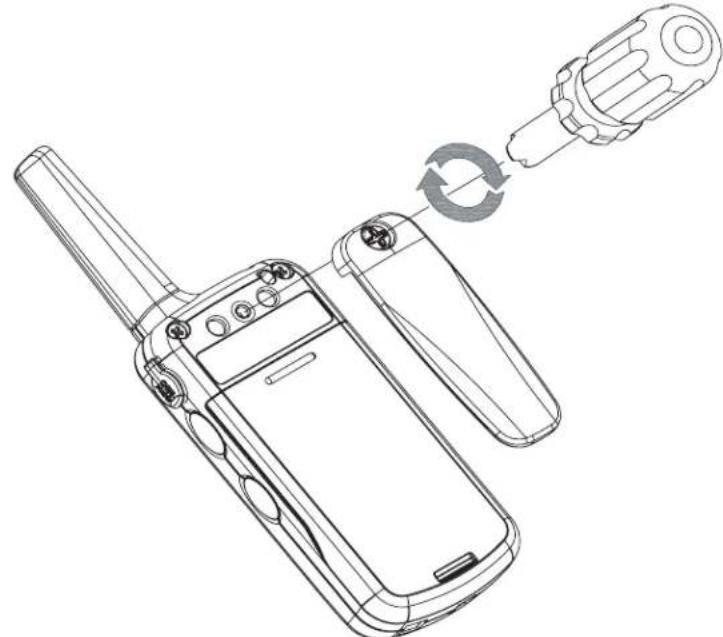
To install the BELT CLIP, use a screwdriver to attach the belt clip to the radio. Turn the screwdriver clockwise to tighten the belt clip screw. Turn the screwdriver counter-clockwise to loosen/remove the belt clip screw.
natural_image
Line drawing of a mobile phone with a hand inserting a plug into a device (no text or symbols present)INSTALLING THE SWIVEL HOLSTER
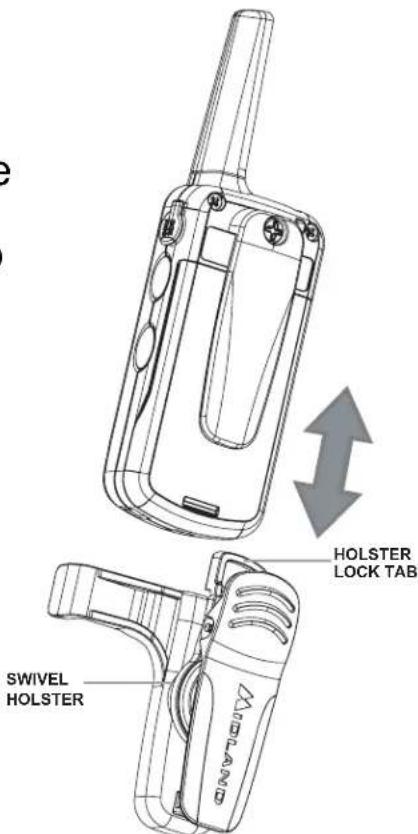
To install the SWIVEL HOLSTER (optional), slide the radio (with the Belt Clip attached) down into the slot on the Swivel Holster until the HOLSTER LOCK TAB clicks. To remove the SWIVEL HOLSTER, press the HOLSTER LOCK TAB up, then gently pull the radio up from the SWIVEL HOLSTER.
text_image
HOLSTER LOCK TAB SWIVEL HOLSTERCHARGING THE BATTERY PACK
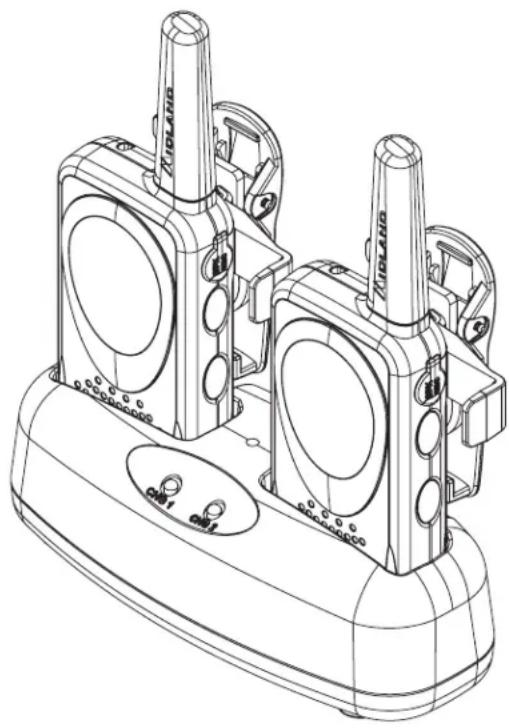
Your BR777 is equipped for using a rechargeable Li-ion Battery Pack which can be recharged using a desktop charger (BRC501). Initial charge time is 2 hours with a charge time of 2 hours thereafter. For maximum battery life, we recommend charging the battery pack when the low battery icon comes on.
To charge using a Desktop Charger (BRC501):
- Turn off the unit.
- Place the rechargeable battery packs in the radios.
- Connect the AC adapter (18AD2) into an AC wall outlet.
- Insert the AC adapter plug into the desktop charger jack.
- Place the units into the desktop charger slot and note that the LED indicator with RED color will light up, indicating charging function. Once the battery packs are fully charged, the LED indicator will change to GREEN color.
In order to ensure that the battery pack is fully charged, it is recommended that the battery pack be charged with the radio turned OFF.

- Only use our Li-ion battery pack.
- Do not attempt to charge any battery packs other than the one indicated in the manual. This may cause leakage and damage to the radio.
- For long term storage of the radio, turn the radio OFF and remove the batteries from the radio.
natural_image
Technical line drawing of a mechanical device with two cylindrical components and mounting base (no text or symbols)CHARGING THRU THE MULTI-UNIT CHARGER
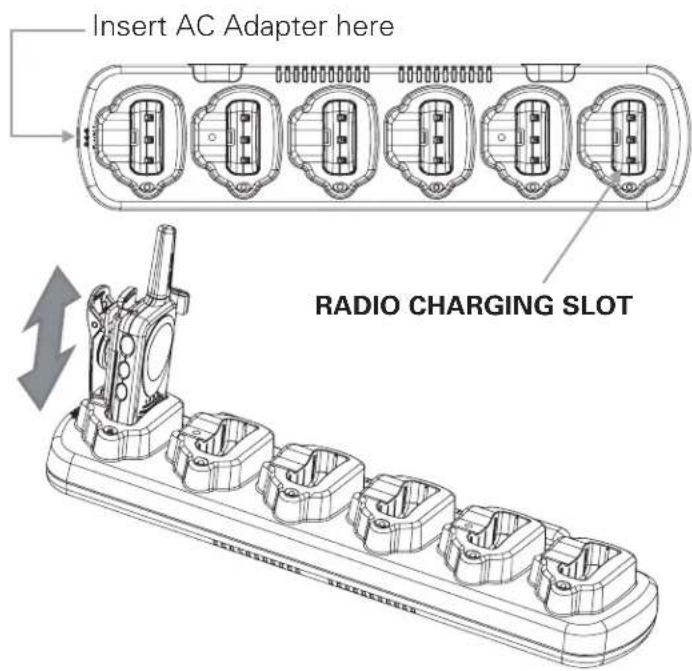
The BRC601 Multi-unit charger (not included) allows charging of up to 6 radios at the same time.
To charge using the Multi-unit Charger (BRC601):
- Turn off the units.
- Place the rechargeable battery packs in the radios.
- Connect the AC adapter (18AD6) into an AC wall outlet.
- Insert the AC adapter plug into the Multi-unit charger jack.
- Place the units into the desktop charger slot and note that the LED indicator with RED color will light up, indicating charging function. Once the battery packs are fully charged, the LED indicator will change to GREEN color.
text_image
Insert AC Adapter here RADIO CHARGING SLOTBATTERY LEVEL INDICATOR
Your BR777 has a BATTERY LEVEL METER that shows the battery power level. The greater the number of bars visible, the stronger the battery level. When the battery level is low, the Battery Meter icon will display the Battery Shell only; indicating your Li-ion Battery Pack should be replaced or recharged. If the Li-ion Battery Pack is not charged at this time, the radio will automatically turn off after a few minutes to save the remaining battery energy.
Press the MODE button for 3 seconds to turn the radio on. During Power On, the radio will beep 2 times with different tones, the LCD will display all icons for 1 second and the LCD display will indicate the last channel selected.
To turn the radio off press the MODE button for 3 seconds.
TRANSMITTING AND RECEIVING A CALL
To communicate, all radios in your group must be set to the same channel, frequency and Privacy Code.
-
For maximum clarity, hold the radio 2 to 3 inches from your mouth.
-
Press and hold the PTT button and speak in a normal voice into the microphone. The TX icon will appear continuously on the LCD Display while transmitting.
To transmit a CALL Alert Tone/Vibrate Alert, press the SCAN button twice rapidly.
- To receive a call, release the PTT button. The RX icon will appear on the display when your radio is receiving a transmission.
RECEIVE SIGNAL STRENGTH INDICATOR
During receiving a transmission, the Signal Strength Indicator number will appear on the right side of the LCD display. This meter is on a scale of 1 to 4, with a “4” indicating a strong signal and a “1” indicating a weak signal.
SETTING THE VOLUME LEVEL
To increase/decrease the Volume Level, press the ▲▼ button during standby or receiving mode. The LCD will display the current volume setting.
CHANNEL SELECTION
Press the MODE button once, and then the ▲▼ buttons to select one of the 4 channels.
To confirm the selection, just wait for around 1 second until the FREQ icon disappears and the CODE icon appears.
TRANSMIT (TX) POWER LEVEL SELECTION
Your BR777 radio has 2 power level settings. To select the power level on any channel, press and hold the PTT button, then press the ▲ button to select Hi Tx Power Level setting, or press the ▼ button to select Lo TX Power Level setting.
If you select blank on the TX Power setting icon, then the TX Power will be set to to Hi Power.
If you select "Lo" on the TX power setting icon, the TX Power will be set to Lo Power.
Note : When you press the PTT button while the Battery level is low (shown by ☐), the TX Power setting will change automatically from Hi to Lo (if original setting is Hi)
You cannot change the TX Power setting when the radio is in VOX mode.
SCAN
Your BR777 radio can scan all 4 channels for activity.
To enter the SCAN mode, press and hold the SCAN button for 2 seconds and release.
Your radio will rapidly scan each of the 4 channels and stop on any active channel. Your radio will resume scanning after 4 seconds.
When you press the PTT button to transmit on an active channel, the scanning function will stop and remain on the active channel for 5 seconds before resuming scan when the PTT button is no longer pressed.
To exit the SCAN mode, quickly press the SCAN button while the radio is scanning.
FACTORY DEFAULT SETTING
Your BR777 radio is programmed at the factory to the following settings:
| Channel Frequency | |
| 1 | 2 |
| 2 | 8 |
| 3 | 5 |
| 4 | 6 |
| Privacy Code | 1 |
| Scan List | y |
| Call Tone/Vibrate Alert | 0 |
| VOX setting | 0 |
To restore the factory settings:
Start with the radio powered off and press and hold the PTT button, ▲ and ▼ button simultaneously while you power the radio on; done by pressing the MODE button for 3 seconds or until an “EP” will be displayed on the LCD.
Release the buttons.
Press the ▲ button and a "CL" will appear next to the "EP".
Press the MODE button again for around 3 seconds to turn the radio off.
During this time, the radio will be set to the original factory setting.
BR777 PROGRAMMING QUICK REFERENCE CHART

flowchart
graph LR
    MODE --> Channel
    Channel <--> Channel1["1~4"]
    Channel <--> Frequency
    Frequency <--> Frequency2["1~56"]
    Frequency <--> Privacy
    Privacy <--> Privacy2
    Privacy <--> ScanList["0~121"]
    ScanList <--> ScanList2["y/n"]
    ScanList2 <--> CallAlert["Call Alert"]
    CallAlert <--> callAlert1["0~4"]
    CallAlert <--> callAlert2["0/1/2/3"]
    VoX --> Clone
    VoX <--> Clone
    style CallAlert fill:#f9f,stroke:#333
    style VoX fill:#ccf,stroke:#333
    note right of CallAlert: 1~3 is Call Alert; 4 is Vibrate Alert
PROGRAMMING YOUR RADIO SETTINGS
Programming mode allows you to change the following settings on your radio:
●Channel (1\~4)
●Frequency (1\~56)
●Privacy Code (0\~121)
- Scan List (y/n)
- Call Alert/Vibrate Alert (0\~4; 4 is for Vibrate Alert)
●VOX (0/1/2/3 ; 0 is off)
- Cloning
ENTERING THE PROGRAMMING MODE
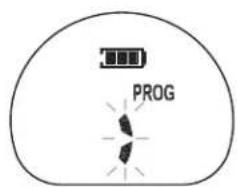
To enter the PROGRAM mode, start with the radio powered off and press and hold the SCAN button and PTT button simultaneously while you power the radio on; done by pressing the MODE button for 3 seconds. The radio will beep and display all the LCD segments for a few seconds. The Program icon (shown by PROG) will appear, the channel number flashes, and the Frequency icon (shown by FREQ) and Privacy Code icon (shown by CODE) will be displayed alternately.
To exit PROGRAM mode, press the MODE button for 3 seconds then the unit will power off.
SELECTING A CHANNEL
In the PROGRAM mode, press the MODE button until the CHANNEL icon flashes (this is the default setting when in Program mode).
Press the ▲\▼ button to select from the 4 available channel numbers.
Press the MODE button again to continue programming.
PROGRAMMING THE FREQUENCY
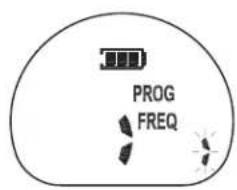
In the PROGRAM mode, press the MODE button until the FREQ icon appears and the Frequency Code flashes.
Press the ▲▼ button to select from the 56 available Frequency numbers.
Press the MODE button again to continue programming.
PROGRAMMING THE PRIVACY CODES
Your BR777 has 121 Privacy Codes available. The selected Privacy Code may be different for each channel.
In the PROGRAM mode, press the MODE button until the CODE icon appears and the Privacy Code flashes.
Press the ▲▼ button to select from the 121 available Privacy Code numbers.
Press the MODE button again to continue programming.
Note : Selecting a Privacy Code of "0" will disable the Privacy feature. To communicate between two BR777 radios, all radios in your group must be set to the same Channel, Frequency and Privacy Code selections.
EDITING THE SCAN LIST
You can edit the SCAN List to skip channels during scanning.
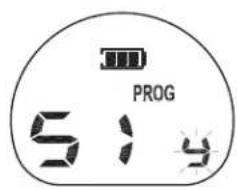
In the PROGRAM mode, press the MODE button until the display shows an "S" on the left side of the display and a "y" or "n" icon flashing on the right of the channel number.
Press the ▲\▼ button to select "y" or "n".
If you select "y" on any channel, it means it will be included on the SCAN List.
If you select "n" on any channel, it means it will be excluded on the SCAN List.
Press the MODE button again to continue programming.
PROGRAMMING CALL ALERT OR VIBRATE ALERT
Your BR777 radio has 3 selectable CALLAlert tones, so you can alert the other radios that you need to communicate with them. Your radio is programmed with the Call Alert turned off (set to 0), but you can change this setting and choose among the 3 available tones.
Your BR777 radio also has a VIBRATE Alert function. This will enable you to alert the other radios by vibration instead of a Call Alert sound for a more silent operation.
Select Call Alert Tone 4 to turn the VIBRATE Alert on. The VIBRATE Alert icon 🎨 will be displayed on the LCD when the VIBRATE Alert function is on.
In the PROGRAM mode, press the MODE button until the CALL Alert icon (shown as "CA") appears on the left, and on the right the current Call Alert setting is shown.
Press the ▲▼ button to hear and select from the 1\~3 available CALL Alert tones. Select CALL Alert tone 4 to choose the VIBRATE Alert function.
Press the MODE button again to continue programming.
Note : To transmit a Call Alert tone or Vibrate Alert, press the SCAN button twice rapidly.
PROGRAMMING THE VOX (HANDS-FREE TRANSMISSION)
Your BR777 radio has 3 VOX level settings (oF/1/2/3).
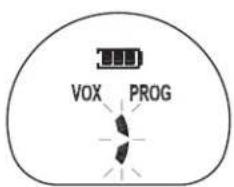
In the PROGRAM mode, press the MODE button until the "VOX" icon appears while the current VOX setting appears on the right.
Press the ▲\▼ button to select between "0", "1", "2", or "3" VOX setting.
Press the MODE button again to continue programming.
Note : VOX will be more sensitive on the "1" setting than on the "3" setting. Selecting "0" will disable the VOX function, and the VOX icon will not appear on the display during operating.
CLONING THE RADIO SETTINGS
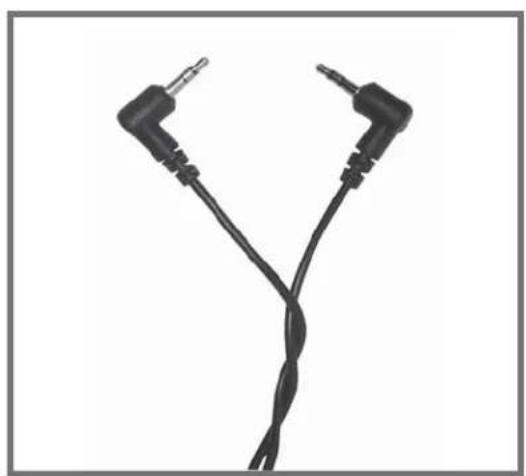
You can copy the BR777 radio settings from one radio (SOURCE) to another BR777 radio (TARGET) by using a Cloning Cable.
Note to start the Cloning Process without the Cloning Cable attached to the radios.
To clone the radios:
- Set both the SOURCE and TARGET radio into PROGRAM mode.
- Press the MODE button of both radios until the CLONE icon (shown as "CLON") appears on the right, and below a "CL" is shown.
- Press the ▼button of the TARGET radio and the RX icon will appear.
- Press the ▲button of the SOURCE radio and the TX icon will appear.
- Attach the Cloning Cable on both radios.
- Press again the ▼button of the TARGET radio and you will see 4 segments blinking in sequence in the LCD display.
- Press again the ▲button of the SOURCE radio and you will see 4 segments blinking in sequence in the LCD display.
- Once the cloning process is done, a "P" will appear on the display.
- Remove the cloning cable from the radios.
- Exit the cloning process by pressing the MODE button for more than 3 seconds until the unit is powered off.
KEYPAD LOCK
To avoid accidentally changing the radio setting, press the LOCK button for more than 3 seconds. The KEY LOCK icon will appear on the display. PTT and CALL will still be active. Repeat the same procedure to unlock the keypad.
Your BR777 Series can be used with an optional external speaker/microphone or headset, freeing your hands for other tasks. To use an optional speaker / microphone or headset:
- Insert the plug(s) into the SPK/MIC jack.
●Place the earbud into your ear, and adjust the mic into your desired position.

text_image
SPK MIC SCANTROUBLESHOOTING GUIDE
PROBLEM
SOLUTION
| No Power - Check battery | installation and/or replace batteries |
| Cannot Receive Messages | - Confirm the radios have the same channel and Privacy Code settings.- Make sure that you are within range of the other transceivers.- Buildings and other structures may interfere with your communication. |
| Radio is not responding to button presses | - Make sure key lock is not on. See "Keypad Lock" (Page 17).- Radio might need to be reset. Turn radio off then on.- Ensure accessory microphone is set properly |
| Display is dim - Recharge | or replace batteries. |
| Charger not functioning - | Contacts on the bottom of the radio may require cleaning.- Ensure the outlet where the charger is plugged into is functioning properly.- Check that the battery pack is installed in the radio properly. |
USE AND CARE
- Use a soft damp cloth to clean the radio
- Do not use alcohol or cleaning solutions to clean the radio.
- Do not immerse the radio in water.
- Dry the radio with dry lint-free cloth should it get wet.
- Turn off the radio and remove the batteries during long-term storage.
If you have a problem which you believe requires service, please call Blue Star customer service at 1-800-630-4684 and speak with a service technician first. Many problems can be remedied over the phone without returning the unit for service.
SPECIFICATIONS
Channels 4 Channels (56 Frequencies) + 121 Privacy Codes
Operating Frequency UHF 461.0375 \~ 469.5625 MHz
Power Source 3.7Vdc Li-ion Battery Pack
FREQUENCY CHART (MHz)
| Display | FREQUENCY (MHz) | Display | FREQUENCY (MHz) | Display | FREQUENCY (MHz) |
| 1 | 464.5000 | 20 | 461.3125 | 39 | 466.1625 |
| 2 | 464.5500 | 21 | 461.3375 | 40 | 466.1875 |
| 3 | 467.7625 | 22 | 461.3625 | 41 | 466.2125 |
| 4 | 467.8125 | 23 | 462.7625 | 42 | 466.2375 |
| 5 | 467.8500 | 24 | 462.7875 | 43 | 466.2625 |
| 6 | 467.8750 | 25 | 462.8125 | 44 | 466.2875 |
| 7 | 467.9000 | 26 | 462.8375 | 45 | 466.3125 |
| 8 | 467.9250 | 27 | 462.8625 | 46 | 466.3375 |
| 9 | 461.0375 | 28 | 462.8875 | 47 | 466.3625 |
| 10 | 461.0625 | 29 | 462.9125 | 48 | 467.7875 |
| 11 | 461.0875 | 30 | 464.4875 | 49 | 467.8375 |
| 12 | 461.1125 | 31 | 464.5125 | 50 | 467.8625 |
| 13 | 461.1375 | 32 | 464.5375 | 51 | 467.8875 |
| 14 | 461.1625 | 33 | 464.5625 | 52 | 467.9125 |
| 15 | 461.1875 | 34 | 466.0375 | 53 | 469.4875 |
| 16 | 461.2125 | 35 | 466.0625 | 54 | 469.5125 |
| 17 | 461.2375 | 36 | 466.0875 | 55 | 469.5375 |
| 18 | 461.2625 | 37 | 466.1125 | 56 | 469.5625 |
| 19 | 461.2875 | 38 | 466.1375 |
PRIVACY CODE CHART (ANALOG)
| Display Number | Frequency (Hz) | Display Number | Frequency (Hz) |
| 1 | 67.0 | 20 | 131.8 |
| 2 | 71.9 | 21 | 136.5 |
| 3 | 74.4 | 22 | 141.3 |
| 4 | 77.0 | 23 | 146.2 |
| 5 | 79.7 | 24 | 151.4 |
| 6 | 82.5 | 25 | 156.7 |
| 7 | 85.4 | 26 | 162.2 |
| 8 | 88.5 | 27 | 167.9 |
| 9 | 91.5 | 28 | 173.8 |
| 10 | 94.8 | 29 | 179.9 |
| 11 | 97.4 | 30 | 186.2 |
| 12 | 100.0 | 31 | 192.8 |
| 13 | 103.5 | 32 | 203.5 |
| 14 | 107.2 | 33 | 210.7 |
| 15 | 110.9 | 34 | 218.1 |
| 16 | 114.8 | 35 | 225.7 |
| 17 | 118.8 | 36 | 233.6 |
| 18 | 123.0 | 37 | 241.8 |
| 19 | 127.3 | 38 | 250.3 |
Note: Privacy codes can be programmed for use on any channel
PRIVACY CODE CHART (DIGITAL)
| Display Number | Digital Code | Display Number | Digital Code | Display Number | Digital Code |
| 39 | 023 | 67 | 174 | 95 | 445 |
| 40 | 025 | 68 | 205 | 96 | 464 |
| 41 | 026 | 69 | 223 | 97 | 465 |
| 42 | 031 | 70 | 226 | 98 | 466 |
| 43 | 032 | 71 | 243 | 99 | 503 |
| 44 | 043 | 72 | 244 | 100 | 506 |
| 45 | 047 | 73 | 245 | 101 | 516 |
| 46 | 051 | 74 | 251 | 102 | 532 |
| 47 | 054 | 75 | 261 | 103 | 546 |
| 48 | 065 | 76 | 263 | 104 | 565 |
| 49 | 071 | 77 | 265 | 105 | 606 |
| 50 | 072 | 78 | 271 | 106 | 612 |
| 51 | 073 | 79 | 306 | 107 | 624 |
| 52 | 074 | 80 | 311 | 108 | 627 |
| 53 | 114 | 81 | 315 | 109 | 631 |
| 54 | 115 | 82 | 331 | 110 | 632 |
| 55 | 116 | 83 | 343 | 111 | 654 |
| 56 | 125 | 84 | 346 | 112 | 662 |
| 57 | 131 | 85 | 351 | 113 | 664 |
| 58 | 132 | 86 | 364 | 114 | 703 |
| 59 | 134 | 87 | 365 | 115 | 712 |
| 60 | 143 | 88 | 371 | 116 | 723 |
| 61 | 152 | 89 | 411 | 117 | 731 |
| 62 | 155 | 90 | 412 | 118 | 732 |
| 63 | 156 | 91 | 413 | 119 | 734 |
| 64 | 162 | 92 | 423 | 120 | 743 |
| 65 | 165 | 93 | 431 | 121 | 754 |
| 66 | 172 | 94 | 432 |
Note: Privacy codes can be programmed for use on any channel
LIMITED WARRANTY
Blue Star will repair or replace, at its option without charge, any Blue Star by Midland BR777 transceiver which fails due to a defect in material or workmanship within Two Years following the initial consumer purchase. This warranty does not apply to water damage, battery leak or abuse.
Accessories have a 90 day warranty from date of purchase, including any antennas, chargers, or earphones. This warranty does not include the cost of labor for removal or re-installation of the product in a vehicle or other mounting. Performance of any obligation under this warranty may be obtained by returning the warranted product, prepaid freight, along with proof of purchase to:
Blue Star
Customer Service
12410 W 62nd Terrace
Shawnee, KS 66216
This warranty gives you specific legal rights, and you may also have other rights, which vary from state to state.
Note : The above warranty applies only to merchandise purchased in the United States of America or any of the territories or possessions thereof, or from a U.S. Military exchange.
Blue Star
Customer Service
12410 W 62nd Terrace
Shawnee, KS 66216
URL: www.bluestarcomm.net
ACCESSORIES
Accessories can be purchased at www.bluestarcomm.net or call 1-800-630-4684.
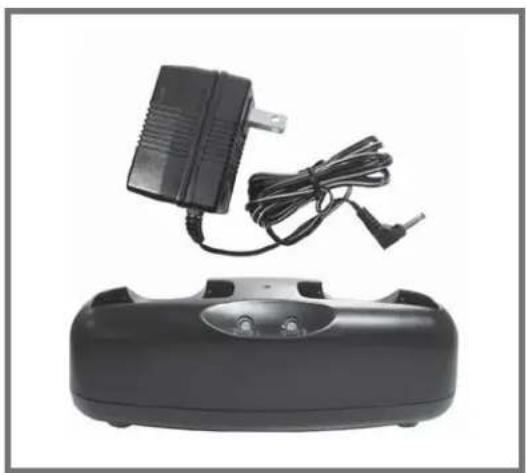
BRC501
natural_image
Black electronic device with a charger and cable, placed on a black base (no visible text or symbols)- 1 Dual Desk Charger
- 1 AC Adapter
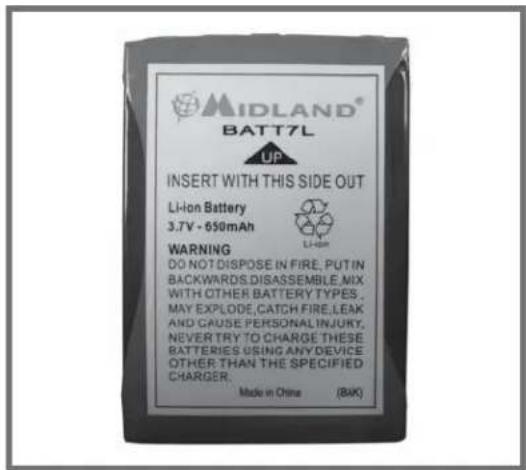
BATT7L
text_image
MIDLAND® BATT7L UP INSERT WITH THIS SIDE OUT Li-ion Battery 3.7V - 650mAh WARNING DO NOT DISPOSE IN FIRE, PUT IN BACKWARDS,DISASSEMBLE,MIX WITH OTHER BATTERY TYPES, MAY EXPLODE,CATCH FIRE,LEAK AND GAUSE PERSONAL INJURY, NEVER TRY TO CHARGE THESE BATTERIES USING ANY DEVICE OTHER THAN THE SPECIFIED CHARGER. Made in China (BAK)- 1 Li-ion Battery Pack
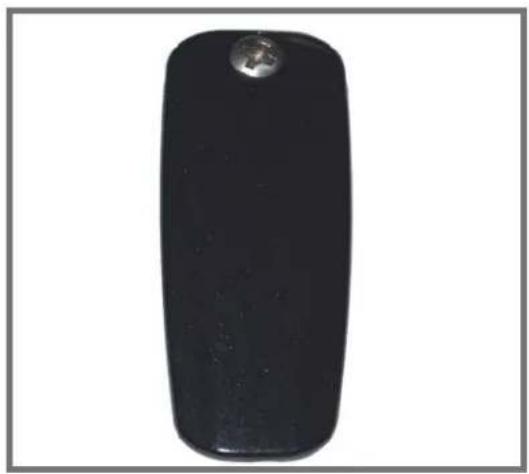
BA100
natural_image
Black rectangular object with a small metallic knob on top, isolated on white background (no text or symbols)- 1 Replacement Belt Clip w/ screw
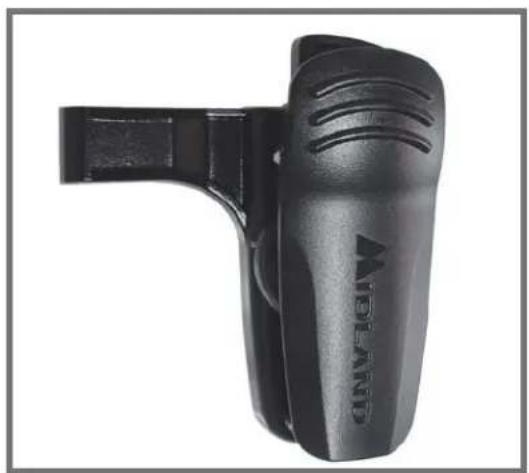
BA300
natural_image
Black handheld device with visible branding and handle, no readable text or symbols- 1 Swivel Holster
BA700
natural_image
Close-up of two black audio jack cables with metallic connectors, forming a Y-shaped pattern (no text or symbols visible)- 1 Cloning Cable

text_image
Blue Star By MIDLAND®Customer Service: 12410 W 62nd Terrace Shawnee, KS 66216
Note: Features & Specifications are subject to change without notice. MIDLAND and BLUE STAR are not responsible for unintentional errors or omissions on its packaging.
BLUE STAR by MIDLAND
BR777 PROGRAMMING QUICK REFERENCE GUIDE
To enter the PROGRAM mode, start with the radio powered off and press and hold the SCAN button and PTT button simultaneously while you power the radio on; done by pressing the MODE button for 3 seconds. The radio will beep and display all the LCD segments for a few seconds. The Program icon (shown by PROG) icon will appear, the channel number flashes, and the Frequency icon (shown by FREQ) and Privacy Code icon (shown by CODE) will be displayed alternately.
To exit PROGRAM mode, press the MODE button for 3 seconds then the unit will power off.
Setting the Channel
text_image
PROG- Press the ▲ or ▼ button.
Setting the Frequency
text_image
PROG FREQ- Press the MODE button until FREQ appears.
- Press the ▲ or ▼ button to change the frequency.
Setting the Privacy Code

text_image
PROG CODE- Press the MODE button until CODE appears.
- Press the ▲ or ▼ button to change the Privacy Code.
Setting the SCAN List
text_image
PROG 5:4- Press the MODE button until "y" appears.
- Press the ▲ or ▼ button to select between "y" or "n".
- Selecting "y" will include the channel during scanning.
- Selecting "n" will exclude the channel during scanning.
BLUE STAR by MIDLAND
BR777 PROGRAMMING QUICK REFERENCE GUIDE
Setting the Call Alert/ Vibrate Alert

text_image
PROG CA- Press the MODE button until "CA" appears.
- Press the ▲ or ▼ button to select the Call Alert tone between 0\~4.
- Selecting "0" will disable the Call Alert function.
- Selecting "1\~3" will set the Call Alert tones.
- Selecting "4" will disable the Call Alert and enable the Vibrate Alert. The Vibrate Alert icon 🎨 will appear on the display.
Setting the VOX
text_image
VOX PROG- Press the MODE button until "VOX" appears.
- Press the ▲ or ▼ button to set the VOX level.
Cloning the Radio setting

text_image
PROG CLON CLStart this process without the Cloning Cable attached to the radios.
- Set both radios to Program mode.
- Press the MODE button until "CL" appears on both radios.
- Press the ▼ button on Target radio. RX will appear.
- Press the ▲ button on Source radio. TX will appear.
- Connect the Cloning Cable.
- Press again the ▼ button on Target radio.
- Press again the ▲ button on Source radio.
- "P" will appear on the display when Cloning is finished.
- Remove the Cloning Cable and turn off the radios.