
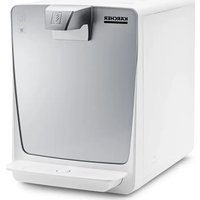
WPD 200 Advanced - Water dispenser Kärcher - Free user manual and instructions
Find the device manual for free WPD 200 Advanced Kärcher in PDF.
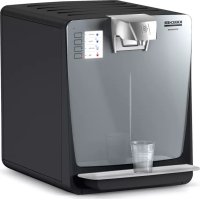


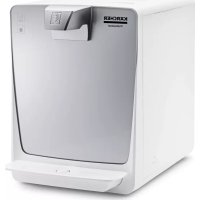
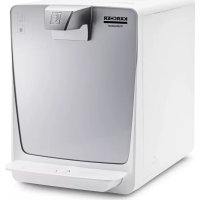
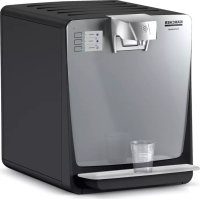
| Product Type | Self-service dispenser for chilled, ambient, sparkling, and hot water |
| Brand | Kärcher |
| Model | WPD 200 Advanced |
| Electrical supply | 220-240 V / 1~ / 50 Hz, 1900 W, fuse protection 10 A |
| Water inlet pressure | 0.15 - 0.6 MPa (1.5 - 6 bar) |
| Water inlet temperature | +4 °C to +35 °C |
| Dimensions (W x D x H) | 390 x 520 x 1450 mm (with base) |
| Weight | 50 kg (with base), 35 kg (without base) |
| Main functions | Ambient water, chilled water, sparkling water (CO₂), hot water (optional) |
| Min. chilled water temperature | 4 °C |
| Hot water temperature | Adjustable (preheat 50 °C, max. 95 °C) |
| CO₂ content | Adjustable; CO₂ pressure 2.8 - 3.2 bar during dispensing |
| Filters | Active-Pure, Hy-ProTECT and Hy-Pure filters (max. capacity 10,000 L / 2,500 L) |
| Display and controls | LCD display with touch-sensitive buttons; programmable user menu |
| Sanitization | Automatic thermal every 4 weeks (programmable) |
| Recommended maintenance | Daily cleaning of drip tray; emptying canister; annual filter change |
| Noise level | < 65 dB(A) |
| Safety | 30 mA circuit breaker; CO₂ instructions (explosion, suffocation); automatic shut-off |
| Spare parts and repairability | Original Kärcher parts; repair by trained personnel; maintenance contract possible |
| Warranty | According to local conditions; valid for material/manufacturing defects |
| Certifications | CE; certified by SGS Institut Fresenius for food contact |
Frequently Asked Questions - WPD 200 Advanced Kärcher
User questions about WPD 200 Advanced Kärcher
0 question about this device. Answer the ones you know or ask your own.
Ask a new question about this device
Download the instructions for your Water dispenser in PDF format for free! Find your manual WPD 200 Advanced - Kärcher and take your electronic device back in hand. On this page are published all the documents necessary for the use of your device. WPD 200 Advanced by Kärcher.
USER MANUAL WPD 200 Advanced Kärcher
WPD 100/200/600 Advanced
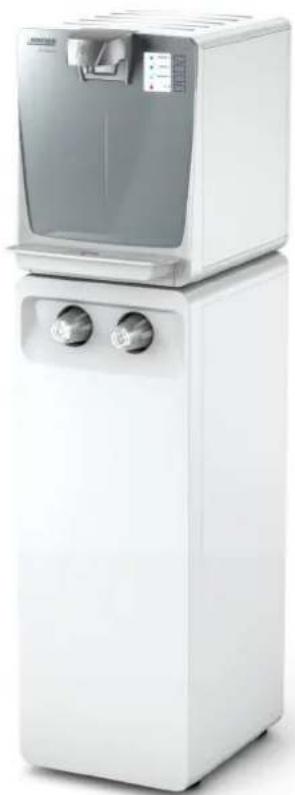
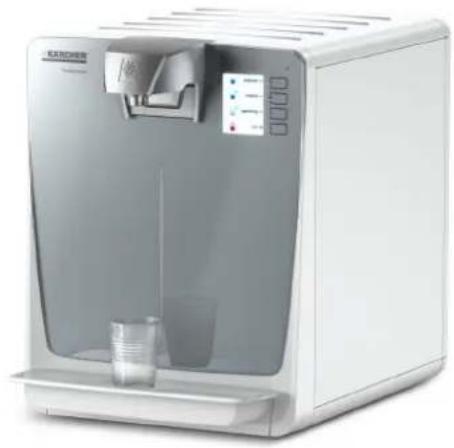
German 3
English 18
French 33
Italian 48
Dutch 63
Spanish 78
Portuguese 93
Danish 108
Norwegian 123
Swedish 138
Finnish 153
Table of Contents
Chairman of the Board of Management
S. Reiser Director Regulatory Affairs & Certification
Winnenden, 2018/07/01
Please read and comply with these original instructions prior to the initial operation of your appliance and store them for
later use or subsequent owners.
Contents
Environmental protection EN 2
General notes EN 2
Transport EN 2
Proper use EN 2
Function EN 2
Connecting the appliance EN 2
Start up EN 3
Operation EN 4
Shutdown EN 5
Startup after shutdown EN 5
Storage EN 5
Care and maintenance EN 6
User menu EN 7
Consumables EN 11
Accessories EN 11
Troubleshooting EN 12
Technical specifications EN 14
Spare parts EN 14
Warranty EN 14
EC Declaration of Conformity EN 14
Maintenance sheet WPD 100/200/600 EN 15
Safety
Danger or hazard levels
DANGER
Pointer to immediate danger, which leads to severe injuries or death.
WARNING
Pointer to a possibly dangerous situation, which can lead to severe injuries or death.
CAUTION
Pointer to a possibly dangerous situation, which can lead to minor injuries.
ATTENTION
Pointer to a possibly dangerous situation, which can lead to property damage.
Safety instructions
DANGER
Risk of electric shock!
First remove the mains plug before doing any job on the device. The socket must be secured through a residual current device (RCD) with a triggering current of 30 mA.
DANGER
Mortal danger due to possibly bursting CO2 gas tank. Install and fasten the pressure gas container in an upright position.
Never connect the pressure gas container without pressure reducer and safety valve. The pressure reducer with safety valve must be approved for the device type. Do not expose the gas cylinder to direct sunlight. The gas cylinder must be protected against excessive heating.
DANGER
Risk of explosion!
Do not use CO2 bottle with riser. Riser bottles are, for example, marked with a red warning label.
DANGER
Risk of suffocation on account of escaping carbon dioxide.
The installation room must be aerated and ventilated sufficiently or, if necessary, a suitable gas warning system must be installed. Country-specific statutory provisions concerning the minimum room size, warning systems, and ventilation during the emptying of gas cylinders must be observed.
WARNING
Health risk due to contamination with germs.
When replacing the filter cartridges, ensure hygiene and cleanliness. Wear sterile disposable gloves when replacing the filter. Do not touch the water dispenser outlet with your fingers or clean it with a cleaning cloth. If necessary, soak a sterile cloth with RM735 (see annex) and wipe it down with this cloth. In order to be able to dispense water of proper quality, the surfaces of the appliance must be cleaned regularly. The thermal hygienisation of the device must be performed at least every four weeks. A due hygienisation is indicated by a relevant message on the display. The time of the next hygienisation is programmed in the menu "Disinfection" (see Chapter "Care
and maintenance/user menu/operating parameters").
After a warning regarding microbiological contamination has been issued by the drinking water supplier, a hygienisation must be performed.
WARNING
Health hazards on account of improperly repaired device.
The appliance may only be repaired by trained and skilled personnel.
WARNING
Health risks due to hot water.
When dispensing hot water, proceed with particular caution.
WARNING
Health risk due to increased micro-organism concentration in the water.
If the device has not been used for more than 4 days, the following actions must be taken:
Set the appliance switch to "I". → Open the water supply. Start cleaning (see "Care and Maintenance/Hygienisation").
WARNING
Risk of injury on account of bursting bottles. Carbonated water must only be filled into pressure-resistant bottles (10 bar).
ATTENTION
If it cannot be ruled out that the device has been stored or transported in a horizontal position, you must wait 24 hours after the set-up of the device before using it. In case of non-observation, the internal cooling device can be damaged.
Environmental protection

The packaging material can be recycled. Please do not throw the packaging material into household waste; please send it for recycling.

Old appliances contain valuable materials that can be recycled; these should be sent for recycling. Batteries, oil, and similar substances must not enter the environment. Please dispose of your old appliances using appropriate collection systems.
This appliance contains the coolant R-134a. This coolant must not leak outside the appliance. Please contact your Kärcher service partner concerning the proper disposal. Work on the cooling unit may only be carried out by qualified electricians.
Notes about the ingredients (REACH)
You will find current information about the ingredients
at:
www.kaercher.com/REACH
General notes
In order to ensure the water quality of the dispensed water, only drinking water from a public water utility may be used. Here, the quality must comply with at least the guideline of the World Health Organization (WHO). If the drinking water supply must be tapped to install the appliance, this must be performed by trained expert personnel that is in possession of a permit that meets the local laws and regulations. This work must be ordered by the customer if required. To protect from water damage caused by a burst water supply hose, we recommend the installation of a shut-off valve and an aqua stop (sold separately) in the water supply line. Care tasks on the inside of the device may only be performed by the operator of the device, who has read these operating instructions. The door of the base must always be locked. If you are using a CO2 bottle, please observe the local guidelines to mark the installation room. Do not clean the device with a water stream. Plastic surfaces must not be cleaned with alcohol-containing, aggressive or abrasive detergents. The surface cleaner CA 30 R (6.295-686.0) is recommended. After initial start-up, filter change and longer standstill times the water may temporarily appear milky when dispensing unchilled water. This is ascribed to fine air bubbles and does not affect the quality of the water.
Transport
CAUTION
Mind the weight of the appliance during transport. Do not transport the device horizontally. Because of its weight, the WPD 600 should be set up by 2 persons or with the help of relevant aids such as a hand truck.
Proper use
The device is used to dispense tempered and untempered drinking water of approved food quality for self-service. Depending on the unit model, the water dispenser is equipped with various filters (Active-Pure filter, Hy-Proct filter, Hy-Pure filter). This device is not intended for use by persons (including children) with reduced physical, sensory or mental abilities or lacking experience and/or knowledge, unless they are supervised by a person responsible for their safety or are instructed by these persons on the use of the device. Children should be supervised, to ensure that they do not play with the device. The appliance may not be set up and used in commercial kitchens. The appliance must be installed in frost-free rooms. Do not use or park the device outdoors. Do not lay down the device or store or transport it in a horizontal position.
Function
From the water inlet the water flows through the filters first (for description of the filters see consumables). Depending on the operated button, the water then flows through the cooling module, the CO2 mixer, the heating module (depending on the equipment) or directly to the water output.
When carbonated water is required (option), the water (option) will be enriched with carbon dioxide. If hot water is required (option), the water is heated via a heating module. In the user menu, two different hot water temperatures as well as the hot water supply can be set.
With minor taking of hot water, it should be selected lower (40°C - 50°C) in order to save energy. If hot water is taken often, the temperature kept ready can be increased in order to reduce the waiting time upon dispensing it.
The second, higher dispensing temperature (extra hot) is deactivated in the delivery state and can be activated in the menu "User parameters".
In the user menu you can also set a portioning, i.e. predefined dispensing quantities on the operation of a button, the selection between two CO2 concentrations (WPD 200 and WPD 600 only), operating and rest periods of the device and an energy saving function.
At intervals determined in the user menu, the entire water system is disinfected by heating it up (thermal hygienisation).
Connecting the appliance
Preconditions
△DANGER
Risk of electric shock. Side parts, cover and circuit board cover of the device must only be removed by a qualified electrician.
During the initial installation and in case of repairs, which involve the replacement of accessories, you must make sure that only the components defined as accessories are used (connection kit, CO2 pressure regulator (option, appliance with CO2). These parts are components that have been released by KARCHER for installation. These components are tested and certified to meet the high quality requirements of the certification by the SGS Institut Fresenius GmbH and the KARCHER quality standards. Never use other components. The power connection and the water input pressure must conform to the data in the specifications. Depending on local regulations, the use of an approved check valve is required. Devices with a drip pan drain into the waste water line of the building must be designed with a trap for the protection against unpleasant odour from the waste water line.
The trap must be positioned lower than the drip pan.
Only with a continuously falling waste water hose the drip pan drain works in a reliable way.
There must be an even surface available to install the appliance. Power plug and receptacle must be freely accessible after the installation. Power switch, fuse and water connection at the back of the device must be freely accessible. The minimum distance to the wall is 100 mm.
Only with WPD 100 and WPD 200 with base: In order to guarantee a great stability of the device in accordance with the provisions of the device standard, a device with base must be secured on the floor or wall (attachment kit floor fixing WPD 2.643-483.0).
As an alternative, the attachment kit additional weight for base WPD (2.643-474.0) can be used in order to lower the centre of gravity of the device accordingly.

1 Water supply line 2 Check valve 3 Pressure reducer** 4 Aqua stop 5 Water faucet 6 Drinking water supply 7 Wastewater line 8 Facility power supply 9 Socket, protected via error current protective
switch 30 mA
10 Connecting cable 11 WPD 100/200/600 12 Drain of drip pan 13 Trap * on site, not included in the scope of delivery ** optional, not included in the scope of delivery *** optional, depending on the device configuration
Establishing connection
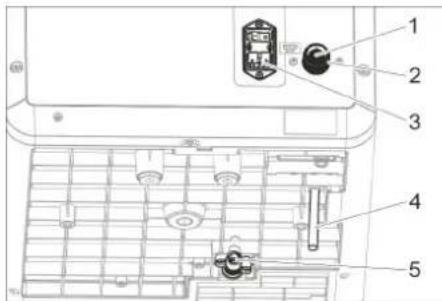
1 Inlet sieve 2 Water connection (connection thread 3/4") 3 Main supply 4 Rinse hose (optional) 5 Drip pan drain (optional)
Device without base and without drip pan drain
With this device design no drain hoses need to be installed.
Device without base with drip pan drain
Route the rinse hose to the trap. Connect the hose to the drip pan drain and route it to the trap.
Device with base, waste water drain and drip pan drain
Route the rinse hose through the base to the trap. Connect the hose to the drip pan drain via an elbow and take it through the base to the trap.
Device with base, can and drip pan drain
Route the rinse hose to the can. Connect the hose to the drip pan drain via an elbow and route it to the can.
All device designs
Connect the water supply hose to the water connection (connection thread 3/4") at the back of the device. Connect power cable with the power supply on the back of the device. Insert the mains plug into the socket.
Start up
Open the device door
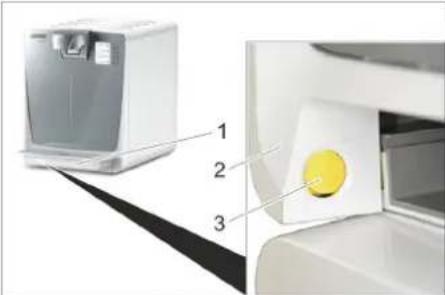
1 Drip pan 2 Device door 3 Release button
Remove the drip pan. Push the unlocking button and open the device door.
Insert filter
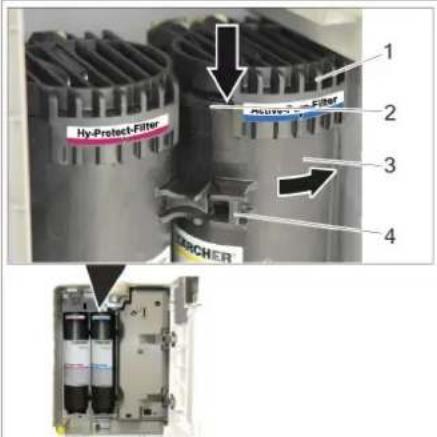
1 Bracket 2 Plate 3 Filter 4 Handle
Do not touch the marked areas.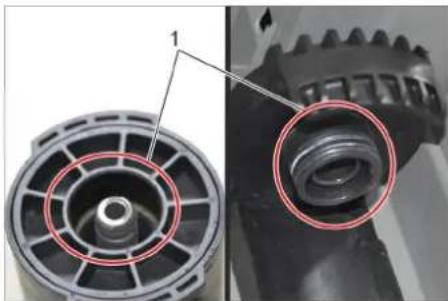
WARNING
Health risk due to contamination with germs. When replacing the filter cartridges, ensure hygiene and cleanliness. Do not touch the connections of the socket and filters. Wear sterile disposable gloves when replacing the filter. Do not interchange filters; observe colour coding. Remove drip pan and open the device door. Turn the filter so that the handle is on the left side and insert it into the relevant support from the bottom.
1 Marking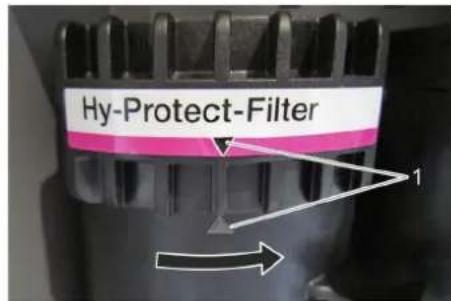
Turn the filter to the right all the way to the stop. Check installation position. The marking on the label on the support and on the filter must be aligned with each other. Close device door and insert drip pan.
Open the door of the base.
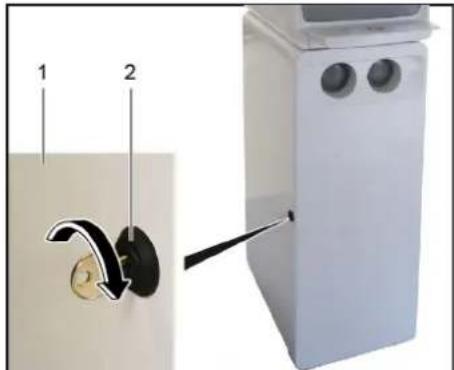
The door of the base can be locked. 1 Door of the base. 2 Door lock
Unlock the door lock. Open the door on the support leg.
Insert the CO2 bottle.
Note:
Observe general information on handling CO2 bottles (see Chapter "Care and maintenance/general information on handling CO2 bottles")
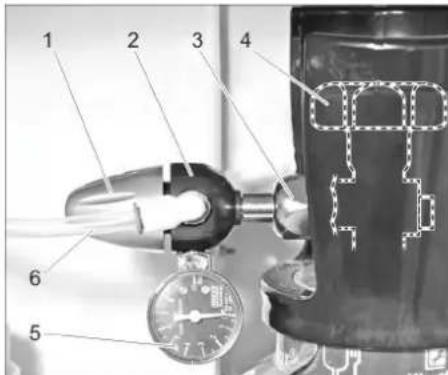
1 Rotating regulator 2 Pressure reducer 3 Union joint 4 Main tap 5 Pressure gauge control pressure 6 CO2 hose
Place the CO2 bottle in the base and secure it by means of the tie down strap. Briefly open the main tap so that possibly present, liquid CO2 can escape. Screw the pressure reducer onto the new gas bottle. Watch for correct mounting of the sealing ring! Tighten covering nut firmly. Connect the CO2 hose to the pressure reducer. Slowly open the main tap on the gas bottle. Set 3 bar on the pressure reducer by means of the control knob. Close the main tap on the gas bottle. Read the value indicated on the pressure gauge control pressure. The indicated value must remain constant for at least 5 minutes.
With detectable pressure reduction: Check if the O-ring between the gas cylinder and the pressure reducer is present and free of damage. Replace defective O-ring. Check the correct positioning of the pressure reducer.
Tighten covering nut firmly.
Check the hose coupling on the pressure reducer and the CO2 hose for visible damage. In case of doubt, call the Customer Service.
If the pressure reduction cannot be remedied by the stated measures, the pressure reducer is defective and must be replaced. Open main tap. Set the operating pressure on the pressure reducer by means of the control knob. WPD 100: Presetting 4 bar, re-adjustable if necessary.
WPD 200/600: Set the CO2 pressure regulator to approx. 3 bar (static) prior to the dispensing of water and then check if the pressure is approx. 3.0 bar during the dispensing of carbonated water (sparkling). Close the door of the base.
Inserting the 425g CO2 bottle
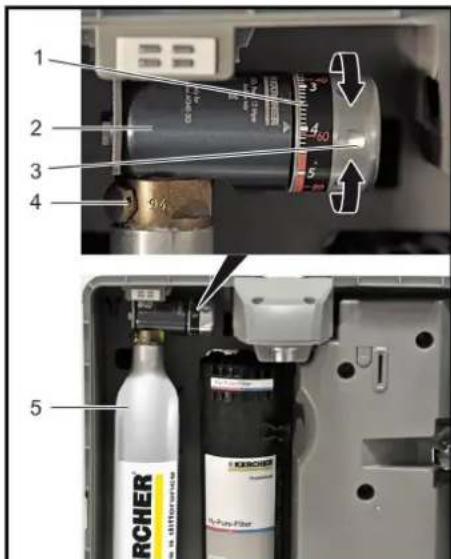
1 Pressure regulator scale 2 Pressure regulator 3 Adjustment wheel 4 Screw connection of the bottle 425g CO2 bottle
Remove drip pan and open the device door. Turn the pressure regulator to "OFF". Remove the cover of the CO2 bottle. Screw the 425g CO2 bottle onto the bottle screw connection of the pressure regulator. If a resistance can be noticed, turn the 425g CO2 bottle slightly further until it is tightened. A short hissing noise may be audible. Pre-set the pressure regulator to "4". Close device door and insert drip pan.
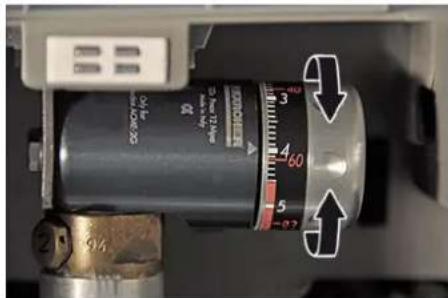
After initial startup, readjust the pressure on the pressure regulator in order to achieve the desired CO2 concentration in the water.
Note:
Regulate strongly spraying water stream during dispensing of carbonated water by lowering the CO2 pressure. If the water is not sufficiently carbonated, increase the CO2 pressure.
Initial start-up menu
Set the appliance switch to "I".
| Display Button | |
| Begin initiation? YES (start initial start-up) Enter | |
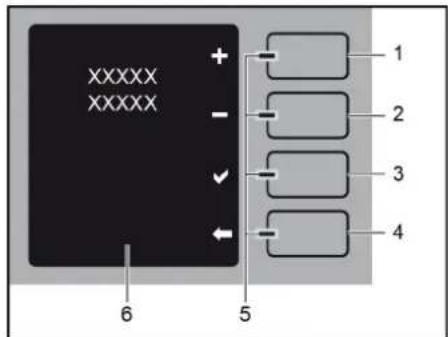
1 Plus button / increase 2 Minus button / decrease 3 Enter key 4 Back/Stop button 5 LED 6 Text messages
With the "plus" and "minus" buttons, sub-menus can be selected and adjustable values (flashing display) can be increased or reduced.
With the "Enter" button, indications on the display or entries can be confirmed.
With the "Back" button, you can return to the previous step or leave the menu level.
| Display Button | |
| Language (language selection) Enter | |
| >Available languages< Plus / Minus | |
| >Selected language< Enter | |
| Actual date / time Enter | |
| >Set day (display is flashing)< Enter | |
| >Set month (display is flashing)< Enter | |
| >Set year (display is flashing)< Enter | |
| >Set hours (display is flashing)< Enter | |
| >Set minutes (display is flashing)< Enter | |
| >Date/time set< | |
| Filter inserted? | Enter |
| Water supply connected? | Enter |
| Canister under the outlet? | Enter |
| First use is running mm:ss |
Note:
Upon the initial start-up, the lines of the individual types of water are rinsed. The process takes approximately 18 minutes.
The water that is dispensed during the rinsing process is not fit for human consumption!
The receptacle underneath the water outlet must be emptied several times during the rinsing process.
| Display Button | |
| First use is running mm:ss | Back (X) |
| First use interrupted continue! |
→ Empty the container and place it under the water outlet.
| Display Button | |
| First use interrupted continue! | Enter |
After completion of the initial start-up, a hygienisation must be performed.
| Display Button | |
| Run the disinfection now. Otherwise ap- pliance hygiene is not safeguarded. | |
| Yes | Enter |
| Later | Back |
After completion of the disinfection/hygienisation, the device is ready for operation.
Operation
Operator and display elements
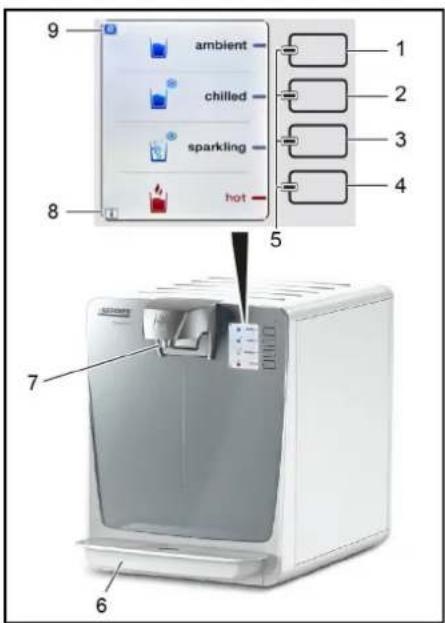
1 Button for unchilled water 2 Button for chilled water 3 Button for carbonated water 4 Button for hot water 5 LEDs blue and red 6 Drip pan 7 Water dispenser 8 Display "I" (information) 9 Display "e" (Eco mode) * Depending on the unit equipment
Note:
The buttons are sensor buttons. They can be operated with merely a light touch.
If an "I" is shown on the bottom left of the display, this points to information that is stored in the user menu under "Error messages". Reading of the error messages is described in Chapter "User menu".
If an "e" is shown at the top left of the display, the Eco mode is activated. In the process, the hot water provision (option) is deactivated and the cooling performance reduced.
This reduces the energy consumption. Heating or chilling may take longer afterwards. Activating or deactivating the Eco mode is described in the Chapter "User menu".
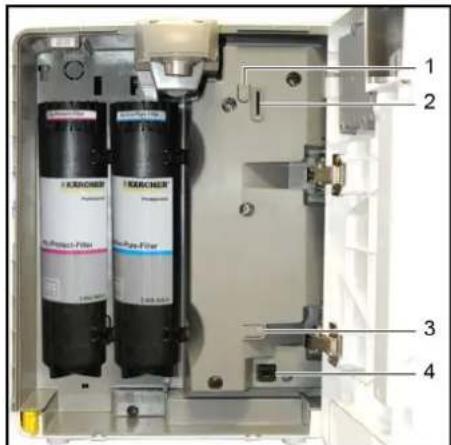
1 MENU button 2 SD card slot 3 Button RESET 4 Service interface
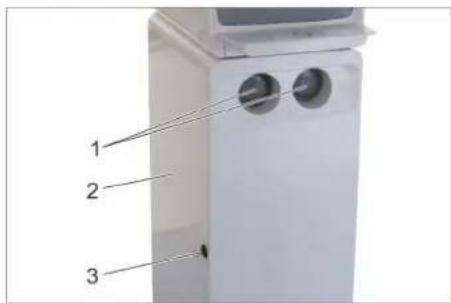
Support leg (option)
1 Cup dispenser (see "Accessories" for suitable cups) 2 Door base 3 Door lock
Requesting water dispensing
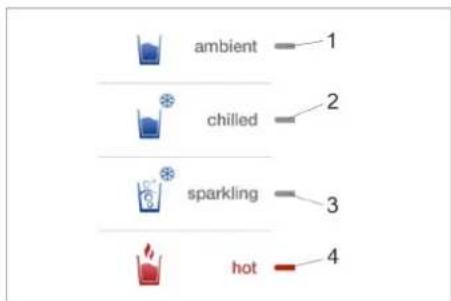
1 Display unchilled water 2 Display chilled water 3 Display carbonated water 4 Display hot water * Depending on the unit equipment Place the receptacle in the middle of the drip pan. Press the button for the selected water type and hold it down until the desired amount of water has been dispensed into the receptacle.
Indication with "Portion customizing Standard"
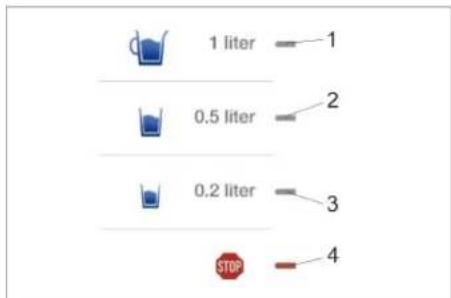
1 Portioning 1.0 litre 2 Portioning 0.5 litre 3 Portioning 0.2 litre 4 Symbol button "STOP"
If the option "Portion customizing Standard" is activated in the user settings, you can choose between 3 predefined portionings (1.0, 0.5 and 0.2 l) after selection of the water type (settings see Chapter "Care and maintenance / user menu / operating parameters").
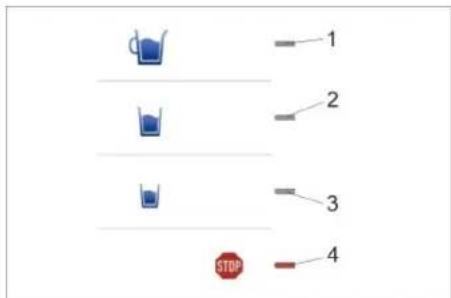
Indication with "Portion customizing Adapted"
Note:
The display symbols and portioning are variable and can be set by the operator (see Chapter "User menu/user settings"). 1 Portioning large 2 Portioning medium 3 Portioning small 4 Symbol button "STOP"
If the option "Portion customizing Adapted" is activated in the user settings, you can choose between 1, 2 or 3 adjustable portionings after selection of the water type (settings see Chapter "Care and maintenance / user menu / operating parameters").
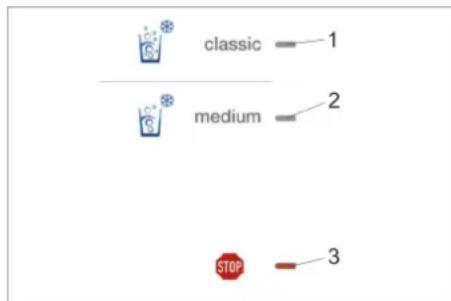
1 CO2 selection "classic" 2 CO2 selection "medium" 3 Symbol button "STOP" (With WPD 200 and WPD 600 with CO2-Option only) If the option "CO2 customizing Classic / Medium" is activated in the user settings, you can choose between the variants "Classic" and "Medium" with different CO2 content after selecting carbonated water (see Chapter "Care and maintenance / user menu / operating parameters").
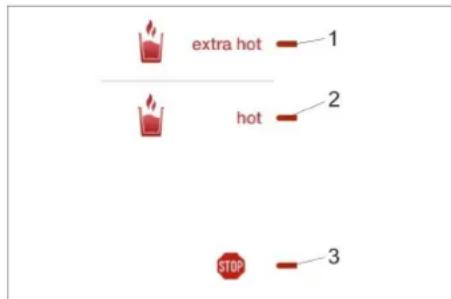
1 Display "Extra hot" 2 Display "Hot" 3 Symbol button "STOP" (Only in devices with hot water function)
If the option "Extra hot" is activated in the user settings, you can choose between the variants "Hot" and "Extra hot" after selection of hot water (settings see Chapter "Care and maintenance / user menu / operating parameters").
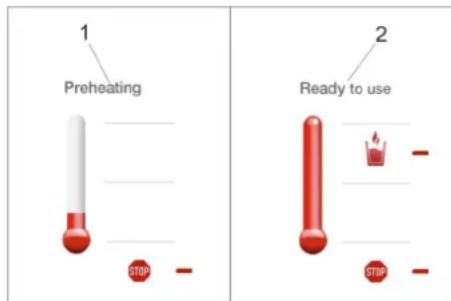
1 Display "Heating" 2 Display "Ready"
Note:
For safety reasons the "Portion customizing" option is not available for dispensing hot water.
In order to remove hot water, briefly push the button for hot water once. The heating process is plotted on the display. As soon as the pre-set water temperature is reached, push the button for hot water and hold it down until the desired water quantity has been dispensed.
After every heating process 0.5 l of hot water are available. The dispensing stops after max. 0.8 l. If more hot water is required, repeat the procedure.
Shutdown
If the appliance will not be needed for more than 4 days:
-> Shut off water supply. Set the appliance switch to "0".
Startup after shutdown
WARNING
Health risk due to increased micro-organism concentration in the water.
If the appliance has not been used for more than 4 days, the following actions must be taken:
Set the appliance switch to "I". → Check the time and date, reset if necessary (see "Care and maintenance/user menu/operating parameters"). Open the water supply. → Start hygienisation manually in the user menu (see Chapter "Care and maintenance/user menu/maintenance").
Storage
CAUTION
Consider the weight of the appliance when storing it. Prior to restarting after storage:
→ Uninstall filters that are inserted in the device and replace them with new filters. → Perform hygienisation.
Care and maintenance
Maintenance instructions
WARNING
Health hazards on account of improperly maintained device. The device may only be maintained by trained and skilled personnel.
Use only original parts of the manufacturer or part suggested by him, such as
parts and wearing parts - accessories parts. - operating materials, - cleaning agents.
Maintenance contract
In order to ensure a reliable operation of the device, we recommend that you conclude a maintenance contract. Please contact your competent KÄRCHER service.
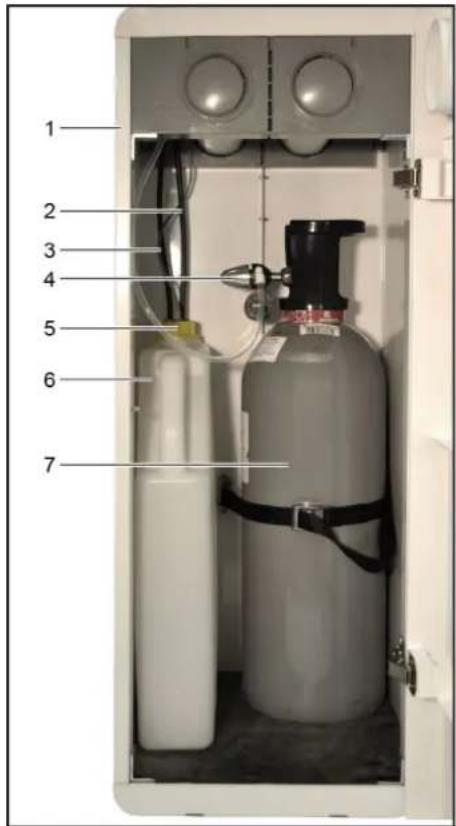
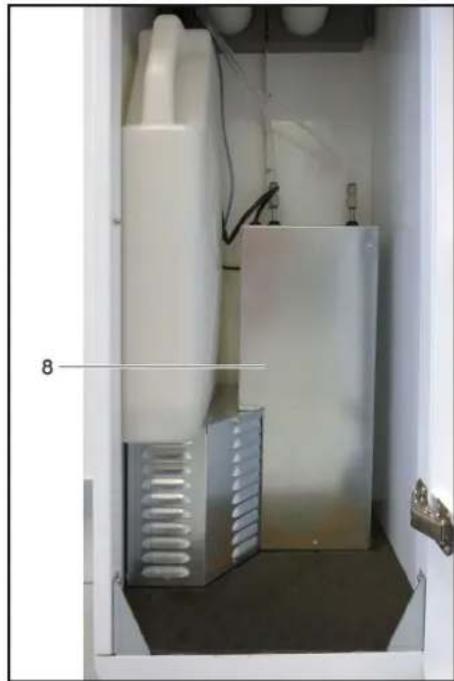
Note:
The base and all components shown are optionally available. 1 Base 2 Drain hose drip pan 3 Drain hose rinsing valve 4 Pressure reducer 5 Can lid 6 Can 7 CO2 bottle 8 Additional cooler (WPD 600 only)
Maintenance schedule
| Time Performance | |
| daily Clean the drip pan and the water output with disinfecting detergent (RM735, see consumables). | |
| Check the drip pan drain (option) for obstructions. | |
| If the device was at a standstill over night, dispense 0.5 l of each water type and pour away. | |
| weekly, more frequently if necessary | Clean the outside surfaces of the appliance with disinfecting detergent. Clean the drip pan with hot water or in the dishwasher. Do not use detergents that contain alcohol, acidic ingredients or scouring agents for cleaning plastic surfaces. |
| Empty can. | |
| Check can for cleanliness and clean or replace if required. | |
| With portioned water dispensing, check the dispensing quantity and readjust it on the adjusting wheel compensation regulator (see Chapter "Operation/water dispensing". | |
| every four weeks | Carry out thermal hygienisation, then, depending on the device design, manually run the rinsing programme. |
| Quarterly | Check and clean the inlet sieve in the water connection (see "Care and maintenance/cleaning inlet sieve"). Clean the inlet sieve on a monthly basis in case of heavy soiling. |
| annually * Have annual customer service work | performed. |
| Replace the Active-Pure and Hy-ProTECT filter. | |
| Replace Hy-Pure filter. | |
| *The device prompts the replacement of the filters after one year or as needed. | |
Cleaning inlet sieve
Shut off water supply to the appliance. Briefly press the "Ambient" button in order to reduce the water pressure in the device. Remove the water inlet hose on the appliance. Pull out the inlet sieve using needle nose pliers. Clean inlet sieve. Insert the inlet sieve into the device. Connect the water supply hose to the water connection on the rear of unit. Open the water supply.
User menu
Start user menu:
Remove drip pan and open the device door. Press the "Menu" button. Close device door and insert drip pan. Press the "Enter" button. If warning messages are pending, they are displayed. Up to 16 messages can be saved (see Chapter "Help in case of malfunctions"). If no warning messages are pending, the display for trouble-free operation appears.
Note:
If no button is pressed for 30 seconds, the appliance returns to the normal operation.
Setting of the current date and time.
| Display Button | |
| Current date / time Enter | |
| >Set day (display is flashing)<Enter | |
| >Set month (display is flashing)<Enter | |
| >Set year (display is flashing)<Enter | |
| >Set hours (display is flashing)<Enter | |
| >Set minutes (display is flashing)<Enter | |
| >Date/time set< | |
| >Finish< Back |
Operating times
Setting the daily times of use. Outside the set times, the device goes into an energy-saving sleep mode. By pushing any button for 5 seconds, the device can be brought into the standby mode again.
| Display Button | |
| Operating time "24 h" or "Timer" Plus / M | nus |
| Timer Enter | |
| >Operating time on: Set day of the week (display is flashing)< | Plus / Minus |
| >Selected day of the week< Enter | |
| >Operating time on: Set hour (display is flashing)< | Plus / Minus |
| >Selected hour< Enter | |
| >Operating time on: Set minutes (display is flashing)< | Plus / Minus |
| >Selected minutes< Enter | |
| >Operating time off: Set hour (display is flashing)< | Plus / Minus |
| >Set selected hour< | Enter |
| >Operating time off: Set minutes (display is flashing)< | Plus / Minus |
| >Selected minute< | Enter |
| >Programmed operating time< | |
| >Finish< Back |
User settings
Specification of preferred temperatures and operating modes.
Setting the cold water temperature
| Display Button | |
| Cold water temperature >XX< °C | Enter |
| >Set temperature (degree value is flashing) | Plus / Minus |
| Cold water temperature >XY< °C | Enter |
| >Finish< Back |
Button sounds
| Display Button | |
| Tones | Enter |
| >Select ON or OFF (display is flashing) | Plus / Minus |
| >Button sounds ON or OFF< | Enter |
| >Finish< Back |
Portioning
Selection of predefined dispensing quantities (recommendable with steady user group).
Standard: predefined portion sizes 1 I, 0.5 I, 0.2 I.
Adapted: up to 3 freely predefined portion sizes can be taught and assigned to keyboard symbols.
| Display Button | |
| Portion customizing | Enter |
| Select "Off", "Standard" or "Adapted">(display is blinking)< | Plus/Minus |
| >Portion customizing Off, Standard or Adapted< | Enter |
| With "Off" or "Standard": >Finish< | Back |
| With "Off" or "Standard": Setting portioning terminated. With "Adapted": perform the following steps below. | |
Adjusting wheel compensation regulator (WPD 200 and WPD 600 only)
The compensation regulator serves for the fine adjustment of the dispensing quantities of carbonated water with portioned dispensing in the operating mode "Portioning Standard". The dispensing quantity of the other water types is not affected.
Prior to the selection of the operating mode "Portioning Adapted", it is necessary to set the compensation regulator in the operating mode "Portioning Standard". In case of incorrect settings, no larger quantities of carbonated water can be dispensed.
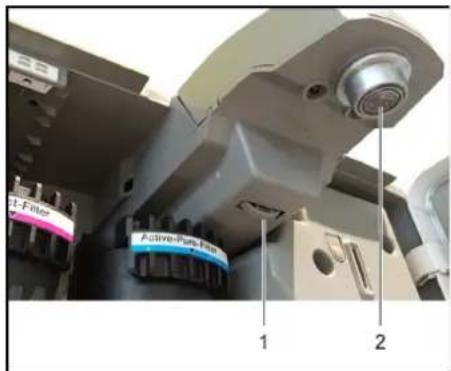
1 Adjusting wheel 2 Water dispenser
Remove drip pan and open the device door. The adjusting wheel is located behind the water outlet. If the adjusting wheel is turned in a clockwise direction, the dispensing quantity is reduced. The entire adjusting range is 4 rotations and should be screwed in approx. 2.5 rotations for vermier adjustment. With stronger reduction not only the portion is reduced but also the CQ content strongly decreases.
Note:
The portioning depends on the feed pressure and CO2 pressure. The CO2 pressure must be in the range between 2.8 bar and 3.2 bar during the dispensing of CQ. If this value is set, the fine adjustment of the portioning is done via the compensation regulator.
| Display Button | |
| >Select water type, Ambient/Cold or Sparkling (display is blinking)< | Plus / Minus |
| >Selected water type< | Enter |
| >Assign button 1< | Plus / Minus |
| >Confirm selected button< | Enter |
| >Select symbol< | Plus / Minus |
| >Confirm selected symbol< | Enter |
| Canister under the outlet? | Enter |
| >Place a container underneath the water outlet,< | |
| >Fill container / save filling quantity / reset< | |
| Fill the container in one go until the desired portion quantity is reached. | Plus |
| >If the filling quantity is not correct, reset the filling quantity and repeat the filling procedure.< | Back |
| >Save filling quantity< | Enter |
| >Next button< | |
| >Assign next button< | Enter |
| >Select next water type< | Back |
Note:
In the operating mode "Portion Adapted", it is not possible to dispense more water than the quantity set in the parameter "Maximum dispensing quantity".
| Symbols available for the operating mode Portioning "Adapted". | |
| No keyboard assignment. |
CO2 selection Classic/Medium
Selection of a high or low level of carbonation (with WPD200 and 600).
| Display Button | |
| CO2 customizing Classic/Medium | Enter |
| Select On or Off > (display is blinking) < | Plus / Minus |
| >CO2 selection Classic / Medium On or Off< | Enter |
| >Finish< Back |
Setting the Eco mode
Power-saving mode, no provision of hot water, cooling performance is reduced.
The power-saving mode becomes active if no button has been pressed for an adjustable period of time.
| Display Button | |
| ECO mode AUTO or ECO mode Off | Enter |
| >Select mode (display AUTO or Off is flashing)< | Plus / Minus |
| With selection AUTO: ECO mode delay >X< min | Enter |
| >Set minutes (display is flashing)< Plus / Minus | |
| >Selected minutes< Enter | |
| >Finish< Back |
Maximum dispensing quantity
Limits the continuous water dispensing in the operating mode portioning Off.
| Display Button | |
| Max. output Ambient Chilled Sparkling | Enter |
| Wateroutlet maximum >X,X<1 | |
| Select dispensing quantity in steps of 100 ml< | Plus / Minus |
| Selected dispensing quantity< | Enter |
| Finish< Back |
Set extra hot
This setting enables the selection of a second hot water dispensing temperature, e.g. 80° and 90°C .
| Display Button | |
| Extra hot | Enter |
| Select On or Off >(display is blinking)< | Plus / Minus |
| With selection On: Select temperature (degree value is flashing)< | Plus / Minus |
| Selected temperature< | Enter |
| >Finish< Back |
Setting the hot water preheating temperature
The preheating temperature is the continuously provided water temperature for hot water dispensing. The energy consumption increases when the preheating temperature is higher, however, the waiting time for hot water dispensing is reduced. Factory setting and with standard use 50°C . A higher temperature is advisable when hot water is dispensed more frequently.
| Display Button | |
| Hot water preheat temperature >XX< °C | Enter |
| >Set temperature (degree value is flash-ing)< | Plus / Minus |
| >Preheating temperature set< | Enter |
| >Finish< Back |
Setting the hot water temperature
| Display Button | |
| Hot water temperature >XX< °C | Enter |
| >Set temperature (degree value is flashing)< | Plus / Minus |
| >Hot water temperature set< | Enter |
| >Finish< Back |
Hygienisation data
Setting the time and interval to the automatic hygienisation. This time can also be outside the programmed operating times. A multiple of 7 (usually 28 days = 4 weeks) is recommended for the hygienisation interval in order to perform the hygienisation always on the same day of the week.
The best effect is achieved if the hygienisation starts approx. 2 hours before the start of operation after the weekend.
WARNING
Health hazard on account of possibly germ-laden water. If the value for the hygienisation interval is set to "0", no automatic hygienisation is performed and no reminder is issued!
| Display Button | |
| Disinfection data Enter | |
| Next disinfection date >Date / time< | Enter |
| >Set day (display is flashing)< Plus / Minus | |
| >Selected day< Enter | |
| >Set month (display is flashing)< Plus / Minus | |
| >Set selected month< Enter | |
| >Set year (display is flashing)< Plus / Minus | |
| >Selected year< Enter | |
| >Set hour (display is flashing)< Plus / Minus | |
| >Selected hour< Enter | |
| >Set minutes (display is flashing)< Plus / Minus | |
| >Selected minutes< Enter | |
| Next disinfection date >with selected date / time< | Minus |
| Disinfection interval >XX< | Enter |
| >Set number of days (display is flashing)< | Plus / Minus |
| >Number of days < | Enter |
| >Finish< | Back |
Language
Selection of the menu language.
| Display Button | |
| Language | Enter |
| >currently selected language< | Enter |
| >Available languages< | Plus / Minus |
| >Selected language< | Enter |
| Language | |
| >Finish< | Back |
OPERATIONS DATA
| Display Button | |
| Device code | Minus |
| Software version | Minus |
| >Day, date and time< | Minus |
| >Date and time of the initial start-up< | Minus |
| Operating hours >XX< h | Minus |
| >Dispensed water quantities per water type and overall quantity< | Minus |
| >Number of performed cleanings< | Minus |
| >Finish< | Back |
SD CARD
Note:
If a SD card is inserted in the SD card slot the SD card menu starts automatically.
Remove drip pan and open the device door.
Correctly insert the SD card into the SD card slot. The SD card must be formatted in the file system FAT32.
Close device door and insert drip pan.
Only the operating parameters can be saved on a blank SD card by the WPD and then be recalled by other WPDs later on.
Operating parameters can also be set via the SD card manager on the computer and transferred to one or more WPDs by means of the SD card. Moreover, pictures for a screen saver, e.g. house advertising, can be saved with the SD card manager.
Software updates can also be carried out via the SD card manager and a SD card.
The SD card manager, including the instructions, can be downloaded from the following link:
| Display Button | |
| SD card | Enter |
| Slide show | Enter |
| Slide show active >YES or NO< | Plus / Minus |
| With selection NO: >back to "SD card"< | |
| With selection YES: >Start delay< | |
| >Set minutes (display is flashing)< Plus / | Minus |
| >Selected minutes< Enter | |
| Show picture >XX< s (display is flashing) | Plus / Minus |
| >Selected display duration< | Enter |
| Slide show parameters | Minus |
| Load parameters | Enter |
| >Load settings? Select YES or NO (dis-play is flashing)< | Enter |
| With selection NO: >back to load param-eters< | |
| With selection YES: The data of the SD card is saved in the device and back to >load PARAMETERS< | |
| Save parameters | Enter |
| >Save parameters? Select YES or NO (display is flashing)< | Enter |
| With selection NO back to >save param-eters< | |
| With selection YES: Data from the device is saved on the SD card and you get back to "Save parameters"< | |
| Save parameters | Minus |
| Firmware update | Enter |
| >Update to firmware X.XX? Select YES or NO (display is flashing)< | Enter |
| With selection NO: >back to firmware up-date< | |
| With selection YES: Data from the SD card is saved in the device, then you get back to >Firmware Update< | |
| >Finish< | Back |
Note:
The firmware update takes at most 5 minutes. The device must not be switched off during the firmware update.
The device cannot be operated during the firmware update.
If the SD card does not contain firmware, the option "Firmware update" is not displayed.
Maintenance
Hygienising
Devices with drip pan drain start the hygienisation automatically and independently at the programmed time, see Chapter "User menu/Operating parameters/Hygienisation data".
For devices without a drip pan drain, a due hygienisation is indicated on the display. This must then be started manually.
△WARNING
Health hazard on account of possibly germ-laden water. If the value for the hygienisation interval is set to "0", no automatic hygienisation is performed and no reminder is issued!
Note
The hygienisation process takes approx. 1 hour. Starting the thermal hygienisation manually: Remove drip pan and open the device door. Press the "Menu" button. Then close device door and insert drip pan.
| Display Button | |
| User Menu | Minus |
| Maintenance | Minus |
| Start disinfection? | Enter |
Place receptacle under the water outlet (for devices without drip pan drain).
| Display Button | |
| Pressure release >for 30 seconds< | |
| Thermal disinfection running >XX:XX min< | |
| The remaining time is displayed count- ing down until the completion of the pro- cess< |
Device with rinsing valve (drip pan with drain): Hygienisation and rinsing process are performed automatically.
Empty the can before and after the hygienisation (see Chapter "Care and maintenance/Emptying the can (option)").
Device without rinsing valve (drip pan without drain)
The rinsing process is performed semi-automatically. The receptacle underneath the water outlet must be emptied several times during the rinsing process.
Note:
Water that is dispensed during the rinsing process is unfit for consumption.
| Display Button | |
| Start rinsing | Enter |
| Rinsing running >XX:XX min< | Back (X) |
| Rinsing paused, continue! |
Empty the container and place it under the water outlet.
| Display Button | |
| Rinsing paused, continu! | Enter |
| Rinsing running >XX:XX min< |
Note:
The device generates a slightly louder operating noise during the hygienisation.
Sampling
If sampling is to be carried out, the samples must be taken immediately after a completed hygienisation observing the regulations for the microbiological water analysis and evaluated by an accredited laboratory.
Installing/removing filter
WARNING
Health risk due to the contamination with germs.
When replacing the filter cartridge, ensure hygiene and cleanliness.
Wear sterile disposable gloves when changing the filter. The "I" symbol (Info) on the display indicates a due change and is displayed in the user menu. The prompt for a filter change takes place after expiry of the service life of the filter or if the filter is clogged.
The due filter change can be started in the user menu. The menu guides the operator through the filter change.
For an extraordinary filter change, perform the following steps:
Remove drip pan and open the device door. Press the "Menu" button. Close device door and insert drip pan. Place a receptacle underneath the water outlet.
| Display Button | |
| User menu | Enter Plus |
| Maintenance | Enter Plus |
| Filter change | Enter |
| Change filter? <No> | Plus / Minus |
| Yes >select< | Enter |
| Canister under the outlet? | Enter |
| Pressure release >30 seconds< |
The pressure in the system is released.
Empty receptacle. Remove drip pan and open the device door.
1 Bracket 2 Plate 3 Filter 4 Handle a Remove the filter. b Insert filter Turn the filter to the left until the tab is visible. Pull the filter downwards out of the support and remove it.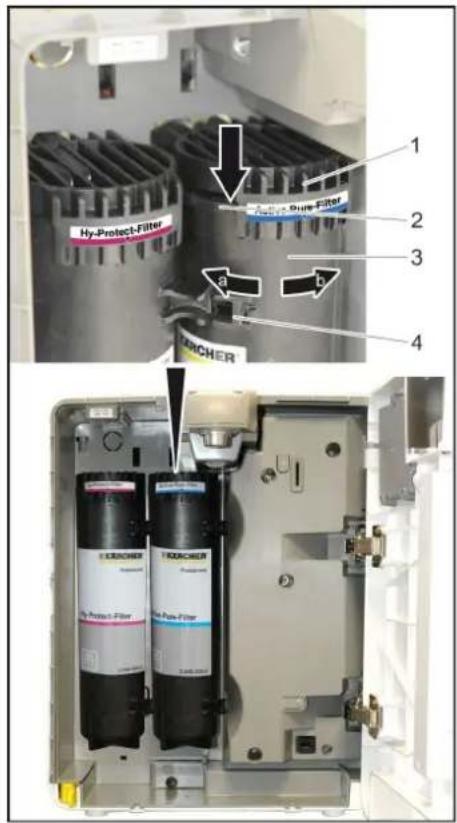
Note:
The used filter can be disposed of as domestic waste after the water has been drained. Wear sterile gloves. Unpack the new filter. Turn the filter so that the handle is on the left side and insert it into the relevant support from the bottom. Turn the filter to the right all the way to the stop.
1 Bracket 2 Filter Check installation position.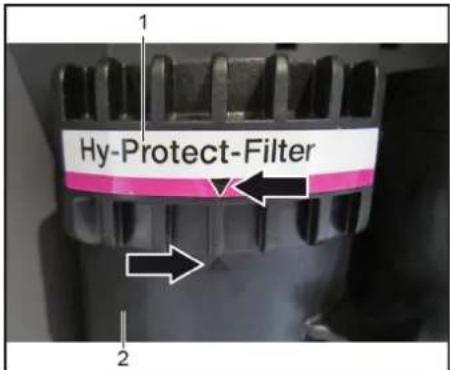
The marking on the label on the support and on the filter must be aligned with each other.
Note:
Filters must be installed in the same position and
must not be interchanged! Observe marking! Close device door and insert drip pan. Place a receptacle underneath the water outlet.
| Display Button | |
| Active-Pure-Filter changed? >or<Hy-Protection>Hy-Pure-Filter changed? >or<Hy-Pure-Filter changed? >Display YES or NO is flashing< | Minus |
| >changed filler< Enter | |
| Canister under the outlet? Enter | |
| Rinse running 20 l |
Note:
During the rinsing process, the receptacle must be emptied several times.
| Display Button | |
| Rinse running >XX< I Back (X) | |
| >Rinsing interrupted, continue!< |
Empty receptacle.
Place receptacle on the drip pan.
| Display Button | |
| Rinsing paused, continue! Enter | |
| Rinse running >XX<1 | |
| Rinse running 001 | |
| Filter change | |
| >Finish< Back |
Note:
It is recommended to perform an extraordinary hygienisation after rinsing.
Emptying the drip pan
As soon as the drip pan has reached its maximum filling level, the message "Empty dripcup" appears on the display.
Remove the drip pan.
Empty the drip pan.
Check drip pan for soiling and clean as necessary.
Insert drip pan.
The device is ready for operation again. The selection water types is shown on the display.
Emptying the can (option)
As soon as the can has reached its maximum filling level, the message "Empty canister" appears on the display.
Open the door on the support leg.
1 Cap with filling level sensor 2 Can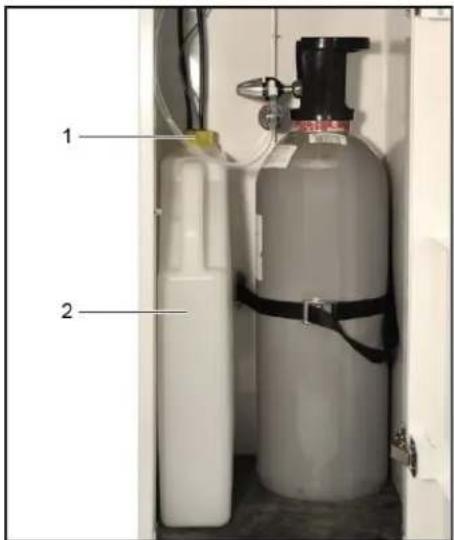
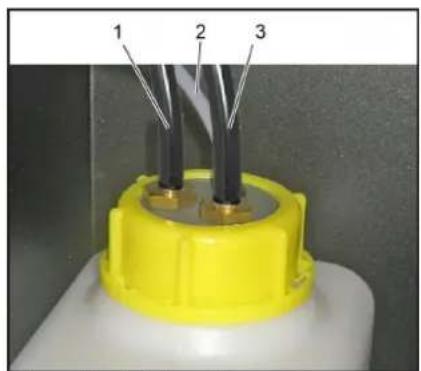
1 Connection drain hose drip pan 2 Cable filling level sensor can 3 Connection drain hose rinsing valve
Unscrew the locking cover. Remove cap with filling level sensor. Remove and empty can. Reinsert the can. Fit cap with filling level sensor and tighten. Close the door of the base.
| Display Button | |
| Drain can emptied? Enter |
The device is ready for operation again.
The selection of water types is shown on the display.
General information on handling CO2 bottles
When replacing CO2 bottles, the safety instructions of the gas supplier and any statutory regulations must be observed.
The CO2 bottle must be equipped with a pressure reducer approved by Karcher, so that the level of carbonation of the water can be adjusted. The food gas carbon dioxide E 290 must comply with the purity requirements as per directive 96/77/EG and must be marked as per Art. 7 of the directive 89/107/EWG. Prior to using a gas bottle, one has to make sure that the correct gas type has been provided. Only the hazardous goods label, which must be present on all gas bottles, can be considered reliable information about the type of gas. The colour of the gas bottle does not always provide clear information regarding the gas type. A gas bottle whose content is questionable or which is abnormal in any other way (damage, fire damage, signs of mechanical tampering), must not be used. Please adhere to country-specific regulations.
DANGER
Risk of explosion! Do not use CO2 bottle with riser. Riser bottles are, for example, marked with a red warning label. Mortal danger due to possibly bursting CO2 gas tank. Install and fasten the pressure gas container in an upright position. Never connect the pressure gas container without pressure reducer and safety valve. The pressure reducer with safety valve must be approved for the device type.
Risk of suffocation on account of escaping carbon dioxide.
The installation room must be aerated and ventilated sufficiently or if a suitable gas warning system must be installed. Do not expose the gas cylinder to direct sunlight. The gas cylinder must be protected against excessive heating. Attach visible marking that points out
the potential presence of gaseous CO2

Replacing the CO2 bottle
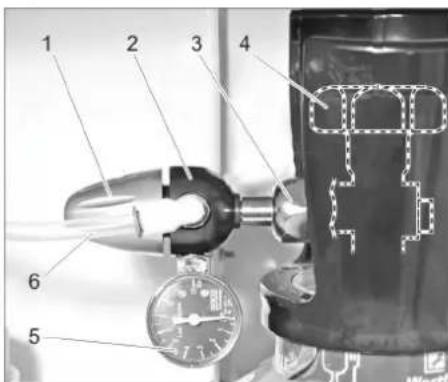
1 Rotating regulator 2 Pressure reducer 3 Union joint 4 Main tap 5 Pressure gauge control pressure 6 CO2 hose
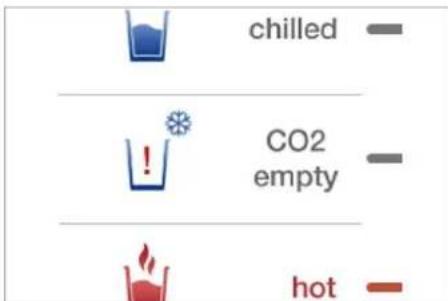
With WPD 200 and 600 the button for carbonated water (sparkling) is inactive and "CO Empty" is blinking when the CO2 bottle must be replaced. With WPD100 there is no indication. Set the appliance switch to "0". Open the door on the support leg. Close the gas bottle at the main tap. Turn the pressure regulator to 0. Unscrew the pressure reducer from the empty gas bottle. Screw the protective cap onto the empty gas bottle. Loosen the tie down strap for securing the CO2 bottle. Remove the empty gas bottle. Insert the new gas bottle in the base and secure it by means of the tie down strap. Unscrew the protective cap from the new gas bottle. Briefly open the main tap so that possibly present, liquid CO2 can escape. Screw the pressure reducer onto the new gas bottle. Watch for correct mounting of the sealing ring! Slowly open the main tap on the gas bottle. Set 3 bar on the pressure reducer by means of the control knob. Close the main tap on the gas bottle. Read the value indicated on the pressure gauge control pressure. The indicated value must remain constant for at least 5 minutes. With detectable pressure reduction: Check if the O-ring between the gas cylinder and the pressure reducer is present and free of damage. Replace defective O-ring. Check the correct positioning of the pressure reducer. Tighten covering nut firmly. Check the hose coupling on the pressure reducer and the CO2 hose for visible damage. In case of doubt, call the Customer Service. If the pressure reduction cannot be remedied by the stated measures, the pressure reducer is defective and must be replaced. Open main tap. Set the operating pressure on the pressure reducer by means of the control knob. WPD 100: Presetting 4 bar, re-adjustable if necessary. WPD 200/600: Set the CO2 pressure regulator to approx. 3 bar (static) prior to the dispensing of water and then check if the pressure is approx. 3.0 bar during the dispensing of carbonated water (sparkling). Close the door of the base. Set the appliance switch to "1".
Place a receptacle underneath the water outlet. After renewing the CO2 bottle, dispense one litre of "sparkling water" so that the CO2 mixer fills up again.
Note: Note:
| Water stream splashes strongly | Water mildly carbonated | |
| WPD 100 | Lower CO2 pressure | Increase CO2 pressure |
| WPD 200 | Check CO2 pressure. | |
| WPD 600 | Adjust compensation regulator (see "User menu/operating parameters/user settings/portioning"). |
If the pressure reducer is separated from the CO2 bottle although there is still sufficient pressure, the O-ring between the bottle and the pressure reducer is deformed and must be replaced.
Replacing the 425g CO2 bottle
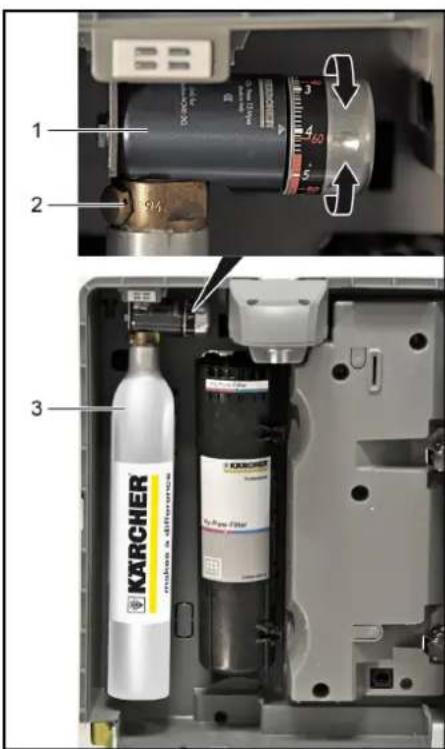
1 Pressure regulator
2 Screw connection of the bottle 3425g CO2 bottle
Remove drip pan and open the device door. Turn the pressure regulator to "OFF". Unscrew the 425 g CO2 bottle from the bottle screw connection in the clockwise direction. Remove the 425 g CO2 bottle. Remove the cover of the new CO2 bottle. Screw the 425 g CO2 bottle onto the bottle screw connection of the pressure regulator. If a resistance can be noticed, turn the 425 g CO2 bottle slightly further until it is tightened. A short hissing noise may be audible. Pre-set the pressure regulator to "4". Close device door and insert drip pan. After initial startup, readjust the pressure on the pressure regulator in order to achieve the desired CO2 concentration in the water.
Note:
| Water stream splashes strongly | Water mildly carbonated |
| Lower CO2 pressure Increase | CO2, pressure |
425 g CO2 bottles are available in drug stores, electronics stores and supermarkets.
Consumables: Detergent for exterior cleaning of the device
| Description Description Order No. | ||
| Replacement filter Active pure filter | Removal of negative taste or odour producing substances (e.g. chlorine), retention of heavy metals and contaminating from the supply line system. | 8.643-305.0 |
| Replacement filter Hy-ProTECT-Filter | Protection from viruses and bacteria. 2.643-306.0 | |
| Replacement filter Hy-Pure filter | Combination of Active-Pure and Hy-ProTECT filter. 2.643-307.0 | |
| O-ring 11.91 x 2.6 KTW Seal | of the pressure reducer on the screw connection of the bottle. 6.640-731.0 | |
| Description Description Order No. | ||
| CA 30 R Ready-to-use surface cleaner, 0.5 l spray bottle 6.295-686.0 | ||
| Spray head for surface cleaner | With the initial order of CA 30R this reusable spray head is required for the spray bottle. 6.295-723.0 | |
Accessories
| Support leg | Botlles | Pitchers | |||
| Description Order No. | Description Order No. | Description Order No. | |||
| Base white 2.643-266.0 | Bottle 0.5 l, made of Tritan, dishwasher-safe | 6.640-430.0 | Water pitcher, 1 l, glass, with plastic lid and KÜRCHER logo, dishwasher-safe | 6.640-431.0 | |
| Base black 2.643-267.0 | Bottle 0.75 l, made of Tritan, dishwasher-safe | 6.640-512.0 | |||
| Rinse cup | |||||
| Description Order No. | |||||
| Rinsing cup 4 l 6.640-341.0 | |||||
| Spare parts | |||||
| Description Order No. | |||||
| Pressure reducer 1.5 - 6 bar - 1/2 6.640-625.0 | 40-625.0 | Bottle 0.6 l with mouth-piece and lid made of Tritan, dishwasher-safe | 6.640-469.0 | Decanter Eva Solo, 1 l, dishwasher-safe. | 0.017-575.0 |
| Touch-up pen signal white RAL 9003 | 6.640-326.0 | ||||
| Cover water connection WPD white | 5.640-407.0 | ||||
| Cover water connection WPD black | 5.640-618.0 | Installation material | |||
Cup
| Description Order No. | |
| Plastic cup, 200 ml, without logo, 3,000 pieces | 6.640-454.0 |
| Plastic cup, 200 ml, with KÄRCHER logo, 3,000 pieces | 6.640-453.0 |
| Hard paper cup, also for hot beverages, 180 ml, without logo, 2,500 pieces | 6.640-455.0 |
| Hard paper cup, also for hot beverages, 180 ml, with KÄRCHER logo, 2,500 pieces | 6.640-460.0 |
Installation material
| Description Order No. | |
| Fault current protective switch 30mA, 230 V, 50 Hz | 6.640-427.0 |
| Check-valve 4.640-463.0 | |
| Aquelstop, leakage water indicatorwith solenoid valve and brass screwconnection G 3/4" | 6.640-291.0 |
| Water block, flooding fuse | 6.640-338.0 |
| Attachment kit additional weight forbase WPD | 2.643-474.0 |
| Attachment kit floor fixing WPD | 2.643-483.0 |
Troubleshooting
WARNING
Health hazards on account of improperly repaired appliance. The appliance may only be repaired by trained and skilled personnel.
Before doing any work on the machine:
Set the appliance switch to "0". Pull out the mains plug. Shut off water supply.
Fault messages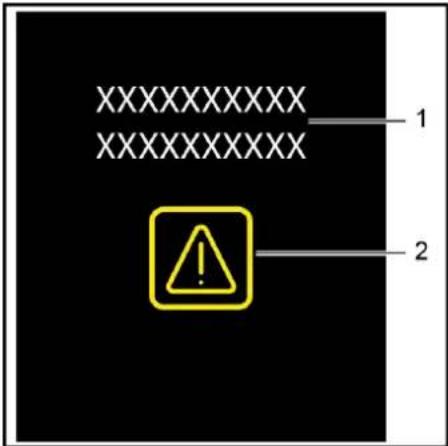
1 Text message
2 Flag or warning symbol
| Failure Possible cause Correction | ||
| WPD100: no CO2 in the water CO | 2 pressure set to low. Increase the CO2 bottle empty. Replace the CO | 2 pressure until the CO2 mixture is satisfactory. |
| 2 bottle. | ||
| WPD 200, WPD 600: no CO2 in the water, button for carbonated water not locked | CO2 bottle almost empty. Open the door | on the support leg. Observe the pressure gauge during dispensing of carbonated water. If the pressure falls significantly, replace the CO2 bottle. |
| Portioning quantity for still water and chilled water too high Malfu-ction internal flow sensor. Inform service. | ||
| No CO2 in the water after hygienisation Discard 1 litre of "sparkling water" after the hygienisation. | ||
| The released CO2 portioning quantity is incorrect WPD 200 and setting (95°C) and at the same time set-up location of the device > 1500 m above MSL. | Adjust compensation regulator (see "User menu/operating parameters/user settings/portioning"). | |
| 2 pressure, adjust as per specification. Readjust the portioning quantity on the adjusting wheel compensation regulator (see chapter "Operation/dispensing of water"). | ||
| Hot water exits partly mixed with steam At maximum temperature setting (95°C) and at the same time set-up location of the device > 1500 m above MSL. | Set a lower hot water temperature or contact service. | |
| Malfunction of control panel (buttons) after fluid has entered from above | Tipped over receptacle on top of the appliance. | Set the appliance switch to "0". Restart the device after 12 hours. If it is occurs again, contact service. |
| Poor water drain from the drip pan (only devices with drain in the sewage line) | Missing trap. | Install trap. |
| Height difference between drip pan and sewage line to low. | Increase height difference. | |
| Poor water drain from the drip pan (only devices with drain in the sewage line or can) | Drip pan drain or drain hose soiled. | Clean drip pan, clean drain hose. |
| Error code | Faults / display | Possible cause Remedy | |
| Device does not work / no indication on the display / one LED is blue | The device is in the sleep mode during the timer operation. | Press any button for more than 5 seconds to wake it up. | |
| Device does not work / no indication on the display / none of the LEDs is on | Voltage supply is interrupted. | Insert the mains plug into the socket. | |
| The appliance is switched off. | Set the appliance switch to "I". | ||
| Fuse responded. | Pull out the fuse holder next to the power switch, replace fuse with fuse of same rating. If it is triggered again, contact service. | ||
| E400 | Replacing the Active-Pure filter | Active-Pure filter worn. | Replace Active-Pure filter. Observe the menu prompts of the device. |
| E401 | Replacing the Hy-ProTECT filter | Hy Protect filter used. | Replace Hy-ProTECT filter. Observe the menu prompts of the device. |
| E402 | Replacing the Hy-Pure filter | Hy-Pure filter worn. | Replace Hy-Pure filter. Observe the menu prompts of the device. |
| E404 | Emptying the drip pan All red LEDs are on | Drip pan full. | Empty and clean drip pan. |
| E405 | Emptying the drain can All red LEDs are on | Drain can full. | Empty the drain can. |
| E407 | Disinfection / cleaning required | Hygienisation due. | Perform hygienisation. |
| E409 | Replace the CO2 bottle. Button for carbonated water deactivated Indication "CO2empty" is blinking. | CO2pressure set to low. Setting CO | 2 pressure 2.8 - 3.2 bar upon dispensing. |
| CO2bottle empty. Replace the CO | 2 bottle. | ||
| E410 | Filter change required | Shortfall of the minimum water flow with water dispensing of chilled still water (pa rameters in the service menu) | Check water connection. Clean the inlet sieve in the water connection (see "Care and maintenance/cleaning inlet sieve"). |
| Change the filter. E400: Replace Active-Pure filter E401: Replace Hy-ProTECT filter E402: Replace Hy-Pure filter (WPD 100) |
| E411 Filter change required Exceeding a maximum run time (device run time) for the various filters (1 year). | Change the filter. E400: Replace Active-Pure filter E401: Replace Hy-Protection filter E402: Replace Hy-Pure filter (WPD 100) | |
| E412 Level sensor carbonator defective Level sensor CO | 2 mixer defective. Set the appliance switch to "0". Set the appliance switch to "1". If it is occurs again, contact service. | |
| E413 Check water supply | No or insufficient water inflow. Clean the inlet sieve in the water connection (see "Care and maintenance/cleaning inlet sieve"). | |
| Check water connection. Set the appliance switch to "0". Set the appliance switch to "1". If it is occurs again, contact service. | ||
| E500 Malfunction hot water All red LEDs are on | Heating module defective. Set the appliance switch to "0". Inform service. | |
| E501 Malfunction hygienisation power failure All red LEDs are on | Hygienisation was not successful Start the hygienisation again. | |
| E502 Malfunction water in the device All red LEDs are on | Water leakage inside the device. Set the appliance switch to "0". Inform service. | |
| E503 Malfunction water in the base All red LEDs are on | Leakage inside the base. | |
| E504 Malfunction buttons All red LEDs are on | Buttons defective. Set the appliance switch to "0". Switch the machine back on again. If it is occurs again, contact service. | |
| E505 Malfunction hygienisation sensor hot All red LEDs are on | Hygienisation was not successful Start the hygienisation again. If it is occurs again, contact service. | |
| E506 Malfunction hygienisation sensor cold All red LEDs are on | Hygienisation was not successful | |
| E507 Malfunction hygienisation sensor ambient All red LEDs are on | Hygienisation was not successful | |
| E508 Malfunction temperature heating module too high All red LEDs are on | Heating module. Set the appliance switch to "0". Restart the device after approx. 10 minutes. If it is occurs again, contact service. | |
| E509 Malfunction hot sensor All red LEDs are on | Sensor hot water defective. Set the appliance switch to "0". Inform service. | |
| E510 Malfunction ambient sensor All red LEDs are on | Sensor unchilled water defective. | |
| E511 Malfunction cold sensor 1 All red LEDs are on | Sensor cooling module 1 defective. | |
| E512 Malfunction cold sensor 2 All red LEDs are on | Sensor cooling module 2 defective. | |
| E513 Malfunction cooling 1 defective All red LEDs are on | Cooling module 1 defective | |
| E514 Malfunction cooling 2 defective All red LEDs are on | Cooling module 2 defective | |
| E515 Malfunction cooling 1 All red LEDs are on | Temperature cooling module 1 too low. | |
| E516 Malfunction cooling 2 All red LEDs are on | Temperature cooling module 2 too low. | |
| E600 Malfunction electronics All red LEDs are on | Malfunction unit control on the control panel. Set the appliance switch to "0". Restart the device after approx. 5 minutes. If it is occurs again, contact service. | |
| E601 Malfunction electronics All red LEDs are on | Malfunction unit control of the display. | |
| E602 Malfunction electronics All red LEDs are on | Malfunction unit control base board. | |
| E603 Malfunction electronics All red LEDs are on | The temperature of the unit control is too high. | |
| E604 Malfunction electronics All red LEDs are on | Malfunction unit control of the brightness sensor. | |
| E610 Invalid device code The setting of the device code is incorrect Inform service. | ||
Technical specifications
| WPD 100 WPD 200 WPD 600 | |||||
| Operating voltage V/~/Hz 220...240/1/50 | |||||
| Connected load W 1900 | |||||
| Minimum power protection A10 | |||||
| Water flow pressure MPa (bar) 0,15...0,6 (1,5...6) | |||||
| Water supply temperature °C +4...+35 | |||||
| Water dispensed, max. l/min 2 | |||||
| Temperature of chilled water, max. | °C | 4 | |||
| Setting of CO2 pressure | Presetting 4 bar Re-adjustable | Presetting 3.0 bar during dispensing of water 2.8...3.2 bar | |||
| Ambient temperature | °C +5...+35 | ||||
| Width | mm | 390 | |||
| Depth | mm | 520 | |||
| Height without support leg | mm | 450 | |||
| Height with support leg | mm | 1450 | |||
| Weight | |||||
| without base | kg | 30 | 35 | - | |
| with base | kg | 45 | 50 | 60 | |
| Sound pressure level during normal operation | dB(A) | <65 | |||
| Cups for cup dispenser in the base (option) | |||||
| Diameter cup collar | mm | 70...71 | |||
| Hy-ProTECT-Filter | Active pure filter | Hy-Pure filter | |||
| max. permissible media temperature | + 80 °C | + 35 °C | + 80 °C | ||
| max. permissible operating pressure | 0.6 MPa (6 bar) | ||||
| max. flow performance | 120 l/h | ||||
| max. capacity | 10,000 litres | 10,000 litres | 2,500 litres | ||
| Materials / approvals | All water-bearing parts/components are suited and approved for the use in direct contact with drinking water as mandated by the industry standard.The device was certified for food grade by the Institut Fresenius and meets the requirements of the mineral and table water regulations. | ||||
Spare parts
Only use accessories and spare parts which have been approved by KARCHER. The exclusive use of original accessories and original spare parts ensures that the appliance can be operated safely and trouble-free. At the end of the operating instructions you will find a selected list of spare parts that are often required. For additional information about spare parts, please go to the Service section at www.kaercher.com.
Warranty
The warranty terms published by the relevant sales company are applicable in each country. We will repair potential failures of your appliance within the warranty period free of charge, provided that such failure is caused by faulty material or defects in manufacturing. In the event of a warranty claim please contact your dealer or the nearest authorized Customer Service centre. Please submit the proof of purchase.
EU Declaration of Conformity
We hereby declare that the machine described below complies with the relevant basic safety and health requirements of the EU Directives, both in its basic design and construction as well as in the version put into circulation by us. This declaration shall cease to be valid if the machine is modified without our prior approval.
Product: Water Dispenser
WPD
Type: 1.024-xxx
Relevant EU Directives
2006/95/EEC
2014/30/EU
2011/65/EU
Applied harmonized standards
EN 55014-1:2006+A1:2009+A2:2011
EN 55014-2:2015
EN 60335-1
EN 60335-2-75
EN 61000-3-2: 2014
EN 61000-3-3:2013
EN 62233:2008
EN 50581
Applied national standards
Applied regulations
1935/2004
10/2011
The signatories act on behalf of and with the authority of the company management.
Chairman of the Board of Management
Director Regulatory Affairs & Certification
Documentation supervisor: S. Reiser
Alfred Karcher SE & Co. KG Alfred-Karcher-Straße 28-40 71364 Winnenden (Germany) Tel.: +49 7195 14-0 Fax: +49 7195 14-2212
Winnenden, 2018/07/01
| Maintenance sheet WPD 100 / 200 / 600 | |||||||||
| Appliance: Installation site: | |||||||||
| Appliance type: Installation date: | |||||||||
| Serial number: Installed by: | |||||||||
| The operator was informed that the water quality must be checked on a regular basis to comply with the national and local regulations. The operator was informed that he is responsible for the performance of regular maintenance procedures according to the "maintenance schedule".Signature of service technician Place, Date Signature of customer | |||||||||
| Date | Technician | Operating hours | Filter replacement | Other parts | Hygienising | Remarks | |||
| Hy Protect* | Active Pure* | Hy-Pure* | |||||||
Table of contents
www.kaercher.com/REACH
General notes
Support foot (option)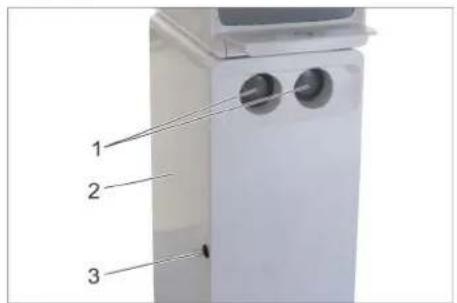
Chairman of the Board of Management
S. Reiser
Director Regulatory Affairs & Certification
Documentation supervisor:
S. Reiser
Alfred Karcher SE & Co. KG
71364 Winnenden (Germany)
Tel.: +49 7195 14-0
Fax: +49 7195 14-2212
Winnenden, 2018/07/01
www.kaercher.com/REACH
General warnings
Chairman of the Board of Management
S. Reiser Director Regulatory Affairs & Certification
Winnenden, 2018/07/01
Product: Water dispenser
WPD
Type: 1.024-xxx
Chairman of the Board of Management
S. Reiser
Director Regulatory Affairs & Certification
71364 Winnenden (Germany)
Tel.: +49 7195 14-0
Fax: +49 7195 14-2212
Winnenden, 2018/07/01
Chairman of the Board of Management
S. Reiser Director Regulatory Affairs & Certification
Responsible for documentation:
S. Reiser
Alfred Kärcher SE & Co. KG Alfred-Karcher-Straße 28-40 71364 Winnenden (Germany) Tel.: +49 7195 14-0 Fax: +49 7195 14-2212
Winnenden, 2018/07/01
Chairman of the Board of Management
Director Regulatory Affairs & Certification
71364 Winnenden (Germany)
Tel.: +49 7195 14-0
Fax: +49 7195 14-2212
Winnenden, 2018/07/01
Chairman of the Board of Management
S. Reiser Director Regulatory Affairs & Certification
71364 Winnenden (Germany)
Tel.: +49 7195 14-0
Fax: +49 7195 14-2212
Winnenden, 2018/07/01
www.kaercher.com/REACH
General notes
Inserting the CO2 cylinder
Note:
Please observe the general instructions for handling CO2 cylinders (see chapter "Care and maintenance/General instructions for handling CO2 cylinders").
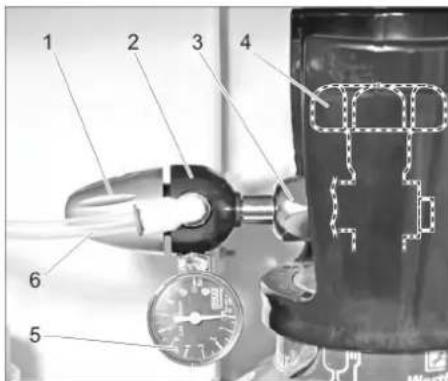
1 On/off switch 2 Pressure reducer 3 Union nut 4 Main valve 5 Pressure gauge for regulating pressure 6 CO2 hose
3 Symbol key "STOP"
3 Symbol key "STOP"
1 Display "Heating"
2 Display "Ready"
Note:
H. Jenner Chairman of the Board of Management
S. Reiser Director Regulatory Affairs & Certification
71364 Winnenden (Germany)
Tel.: +49 7195 14-0
Fax: +49 7195 14-2212
Winnenden, 2018/07/01
Chairman of the Board of Management
S. Reiser
Director Regulatory Affairs & Certification
Authorized for documentation:
S. Reiser
Alfred Karcher SE & Co. KG
71364 Winnenden (Germany)
Tel.: +49 7195 14-0
Fax: +49 7195 14-2212
Winnenden, 2018/07/01
Chairman of the Board of Management
S. Reiser
Director Regulatory Affairs & Certification
Documentation responsible:
S. Reiser
Alfred Karcher SE & Co. KG
71364 Winnenden (Germany)
Tel.: +49 7195 14-0
Fax: +49 7195 14-2212
Winnenden, 2018/07/01
http://www.kaercher.com/dealersearch
- WPD 100/200/600 ADVANCED
- TABLE OF CONTENTS
- CONTENTS
- SAFETY
- DANGER OR HAZARD LEVELS
- DANGER
- WARNING
- CAUTION
- ATTENTION
- SAFETY INSTRUCTIONS
- ENVIRONMENTAL PROTECTION
- NOTES ABOUT THE INGREDIENTS (REACH)
- WWW.KAERCHER.COM/REACH
- GENERAL NOTES
- TRANSPORT
- PROPER USE
- FUNCTION
- CONNECTING THE APPLIANCE
- PRECONDITIONS
- △DANGER
- ESTABLISHING CONNECTION
- DEVICE WITHOUT BASE AND WITHOUT DRIP PAN DRAIN
- DEVICE WITHOUT BASE WITH DRIP PAN DRAIN
- DEVICE WITH BASE, WASTE WATER DRAIN AND DRIP PAN DRAIN
- DEVICE WITH BASE, CAN AND DRIP PAN DRAIN
- ALL DEVICE DESIGNS
- START UP
- OPEN THE DEVICE DOOR
- INSERT FILTER
- OPEN THE DOOR OF THE BASE
- INSERT THE CO2 BOTTLE
- NOTE
- INSERTING THE 425G CO2 BOTTLE
- INITIAL START-UP MENU
- OPERATION
- OPERATOR AND DISPLAY ELEMENTS
- REQUESTING WATER DISPENSING
- SHUTDOWN
- STARTUP AFTER SHUTDOWN
- STORAGE
- CARE AND MAINTENANCE
- MAINTENANCE INSTRUCTIONS
- MAINTENANCE CONTRACT
- CLEANING INLET SIEVE
- USER MENU
- START USER MENU
- OPERATING TIMES
- USER SETTINGS
- SETTING THE COLD WATER TEMPERATURE
- BUTTON SOUNDS
- PORTIONING
- CO2 SELECTION CLASSIC/MEDIUM
- SETTING THE ECO MODE
- MAXIMUM DISPENSING QUANTITY
- SET EXTRA HOT
- SETTING THE HOT WATER PREHEATING TEMPERATURE
- SETTING THE HOT WATER TEMPERATURE
- HYGIENISATION DATA
- LANGUAGE
- SD CARD
- MAINTENANCE
- HYGIENISING
- △WARNING
- DEVICE WITHOUT RINSING VALVE (DRIP PAN WITHOUT DRAIN)
- SAMPLING
- INSTALLING/REMOVING FILTER
- EMPTYING THE DRIP PAN
- EMPTYING THE CAN (OPTION)
- GENERAL INFORMATION ON HANDLING CO2 BOTTLES
- REPLACING THE CO2 BOTTLE
- REPLACING THE 425G CO2 BOTTLE
- TROUBLESHOOTING
- SPARE PARTS
- WARRANTY
- EU DECLARATION OF CONFORMITY
- GENERAL WARNINGS
- INSERTING THE CO2 CYLINDER
Brand : Kärcher
Model : WPD 200 Advanced
Category : Water dispenser