
VSX21A300 - Vacuum Cleaner SIEMENS - Free user manual and instructions
Find the device manual for free VSX21A300 SIEMENS in PDF.



| Brand | Siemens |
| Model | VSX21A300 |
| Product type | Canister vacuum cleaner |
| Usage | Private household, enclosed rooms |
| Maximum operating altitude | 2000 m above sea level |
| Weight (approx.) | 4.5 kg |
| Dimensions (approx.) | 400 x 300 x 250 mm |
| Power supply | Mains, retractable power cord |
| Power (estimated) | 700 W |
| Power control | Yes, integrated in handle |
| Dust container capacity | 2 L |
| Main filter type | Washable dust container filter |
| Air outlet filter | Washable (motor protection included) |
| Included accessories | Telescopic tube, handle, hose, double position brush, combination nozzle, hose holder, mattress nozzle, turbo brush (depending on equipment) |
| Parking function | Yes, parking and storage position |
| Recommended maintenance | Clean the dust collector filter at each emptying, at least once a month |
| Safety instructions | Do not vacuum wet, hot, flammable substances, nor people/animals |
| Repairability | Only original spare parts, repair by qualified personnel |
| Cord length | Approximately 6 m |
| Operating radius | Approximately 8 m |
| Noise level (estimated) | 75 dB |
| Manual pages | 104 multilingual pages |
Frequently Asked Questions - VSX21A300 SIEMENS
User questions about VSX21A300 SIEMENS
0 question about this device. Answer the ones you know or ask your own.
Ask a new question about this device
Download the instructions for your Vacuum Cleaner in PDF format for free! Find your manual VSX21A300 - SIEMENS and take your electronic device back in hand. On this page are published all the documents necessary for the use of your device. VSX21A300 by SIEMENS.
USER MANUAL VSX21A300 SIEMENS
natural_image
Abstract icon of a microchip with a diamond shape on top, surrounded by vertical lines (no text or symbols)
| [de] | Scannen Sie den QR-Code oder besuchen Sie die Webseite, um die erweiterten Hinweise zur Benutzung zu öffnen. Dort finden Sie zusätzliche Informationen zu Ihrem Gerät oder Zubehör. | |
| [en] | Scan the QR code or visit the website to open the Further Notices for Use. You can find additional information about your appliance or accessory here. | |
| [fr] | Scanner le code QR ou visiter le site Web pour ouvrir les informations d'utilisation complémentaires. Vous y trouverez des informations supplémentaires concernant votre appareil ou accessoire. | |
| [it] | Scansionare il codice QR oppure visitare il sito Web per indicazioni dettagliate sull'uso. Si trovano informazioni aggiuntive sull'apparecchio o gli accessori. | |
| [nl] | Scan de QR-code of bezoek de website om de uitgebreide gebruiksinstructies te openen. Hierin vindt u meer informatie over het apparaat of toebehoren. | |
| [es] | Para abrir las indicaciones ampliadas sobre el uso, visite la página web o escanee el código QR. Allí encontrará más información sobre el aparato o los accesorios. | |
| [pt] | Leia o código QR ou visite a página web para abrir as indicações avançadas relativas à utilização. Aí encontra informações adicionais sobre o seu aparelho ou acessório. | |
| [el] | Σαρώστε τον κωδικό QR ή επισκεφτείτε την ιστοσελίδα, για να ανοίξετε τις διευρυμένες υποδείξεις για τη χρήση. Εκεί θα βρείτε πρόσθετες πληροφορίες για τη ουσκευή σας ή τα εξαρτήματα. | |
| [tr] | Ayrıntılı kullanım bilgilerine ulaşmak için QR kodu taratın veya web sayfasını ziyaret ediniz. Cihaz ve aksesuarlar ile ilgili ayrıntılı bilgileri bu şekilde edinebilirsiniz. | |
| [pl] | Aby uzyskać rozszerzone informacje na temat zastosowań urządzenia, należy zeskanować kod QR albo wejść na stronę internetową. Można tam znaleźć dodatkowe informacje na temat posiadanego urządzenia i akcesoriów. | |
| [hu] | Olvassa be a QR-kódot vagy keresse fel a weboldalt a kibővített használati utasítás megnyitásához. Ott ki-egészítő információkat talál a készülékkel vagy tartozékkal kapcsolatban. | |
| [ru] | Чтобы узнать больше о пользовании, отсканируйте QR-код или зайдите на сайт. Там вы найдете более подробные сведения о приборе и принадлежностях. | |
| [kk] | QR- кодын сканерленіз немесе кенейтілген пайдалану нұсқаулықты ашу үшін веб-сайтқа кіріңіз. Онда сіз құрылғы немесе керек-жарактар туралы көбірек акпарат таба аласыз. | |
| [bg] | Сканирайте QR кода или посетете уебстраницата, за да отворите разширените указания за използването. Там ще откриете допълнителна информация за Вашия уред или принадлежност. | |
| [az] | İstifadəniz üçün daha geniş göstərişləri açmaqdan ötrü, QR-kodunu skan edin və ya veb səhifəyə daxil olun. Oradan Siz cihaziniz və aksessuariniza dair əlava məlumat tapa bilərsiniz. | |
| [uk] | Щоб отримати докладніші вказівки з користування, зіскануйте QR-код або відвідайте сайт. Там ви знайдете додаткові відомості про прилад або приладдя. | |
| [ka] | құқұлұзбөмғоқ QR-здққо әб ғұғзқоқ әзқд-ғзқмқол, құқққ ғұқұлбққ ғұдқұмұбұдқол құбқоқ әдққққққ әдқ ɑːdʒmқдәгққәл ɑːdʒɔ̣бүдмұымқққққ әб ɑːdʒmқдәгққәл ɑːdʒɔ̣бүдмұымққққ әб ɑːdʒmқдәгққәл ɑːdʒɔ̣бүдмұымқққ ɑːdʒmқдәгққәл ɑːdʒɔ̣бүдмұымқққ ɑːdʒmқдәгққәл ɑːdʒɔ̣бүдмұымққ ɑːdʒmқдәгққәл ɑːdʒɔ̣бүдмұымққ ɑːdʒmқдәгққәл ɑːdʒɔ̣бүдмұымққ ɑːdʒmқдәгққәл ɑːdʒɔ̣бүдмұымққ ɑːdʒmқ徳қққ ɑːdʒɔ̣бүдмұымққ ɑːdʒmқ徳қққ ɑːdʒɔ̣бүдмұымққ ɑːdʒmқ徳қққ ɑːdʒɔ̣бүдмұымққ ɑːdʒmқ徳қққ ɑːdʒɔ̣бүдмұымқ |

3
4
natural_image
Diagram showing a blue cable being twisted with a black arrow indicating rotational motion (no text or symbols)5
natural_image
Diagram showing a blue brush and black directional arrows indicating rotation or cycle (no text or symbols)6
natural_image
Diagram showing a blue plastic tool interacting with a mechanical component, with arrows indicating motion (no text or symbols present)7
natural_image
Diagram of a pen with blue and white bands, showing a vertical double-headed arrow indicating compression or movement (no text or symbols)8
natural_image
Diagram of a robotic car wheel with a blue tool inserted, showing a force or impact direction (no text or symbols)9
natural_image
Diagram of a car gear shift lever with a blue component and black arrow indicating direction (no text or symbols)10
11
natural_image
Diagram of a washing machine with a blue cover and black plastic components, showing internal wiring (no text or symbols)The image is too blurry to recognize any text content.
natural_image
Diagram showing a blue cable being inserted into a car's head, with arrows indicating motion or force direction (no text or symbols present)13
natural_image
Diagram of a vacuum cleaner with blue tubing and labeled parts (no text or symbols present)The image is too blurry to recognize any text content.
natural_image
Diagram of a blue and white mechanical device with coiled tubing, showing a component with a numbered arrow (no text or symbols present)15
natural_image
Illustration of a car with blue hoses and a checkmark indicating a repair or inspection (no text or symbols present)16
natural_image
Line drawing of a hand inserting a small electronic component into a device (no text or symbols)17
natural_image
Diagram of a device being inserted into a blue plastic container with an arrow indicating the process (no text or symbols present)18
natural_image
Diagram of a device with an open lid and a blue octagonal component, showing internal structure and rotation arrow (no text or symbols)19
natural_image
Illustration showing a hand cleaning a blue soap block and a hand pouring liquid into a 3D-printed container (no text or symbols)The image is too blurry to recognize any text content.
21
natural_image
3D diagram of a mechanical device with an open lid and internal components, showing internal structure (no text or symbols)22
natural_image
Illustration of a hand operating a blue vacuum cleaner with a black upward arrow indicating the process (no text or symbols present)23
natural_image
Illustration of a hand using a tool to adjust or install a device into a container (no text or symbols visible)24
natural_image
Illustration of a cleaning or cleaning device with a blue lid and arrow indicating the component (no text or symbols present)25
natural_image
Illustration of a blue showerhead spraying water onto a textured surface (no text or symbols)The image is too blurry to recognize any text content.
natural_image
Illustration of a hand pouring liquid into a trash bin (no text or symbols)27
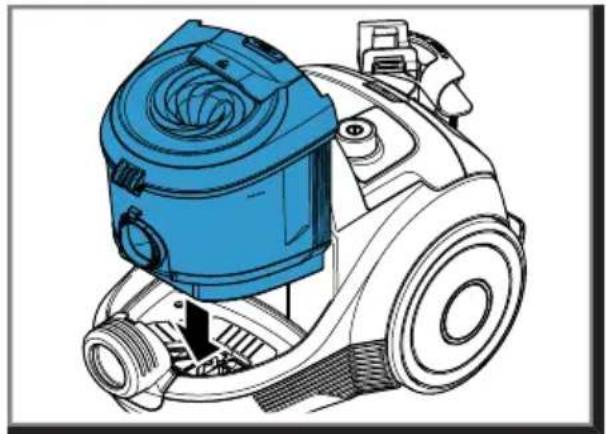
natural_image
Technical illustration of a blue vacuum cleaner with internal components and a black arrow indicating a component (no text or symbols present)28
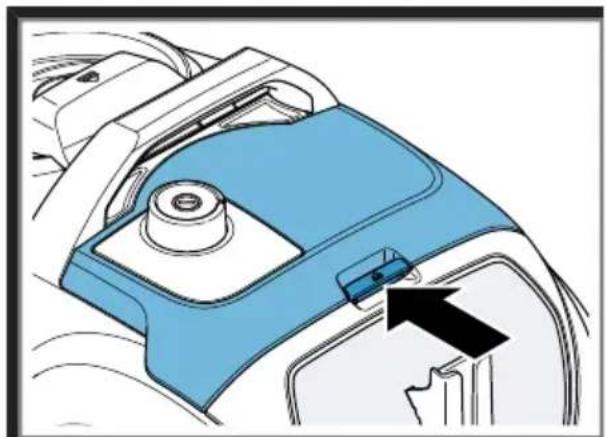
natural_image
Mechanical component diagram showing a blue and white housing with a black arrow pointing to a small component (no text or symbols)29
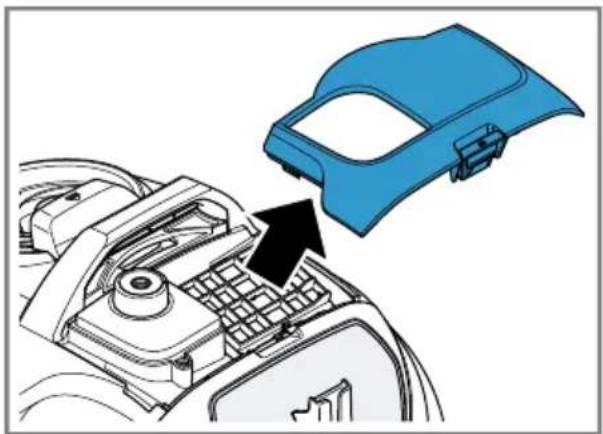
natural_image
Diagram of a blue plastic component being inserted into a mechanical housing (no text or symbols visible)30
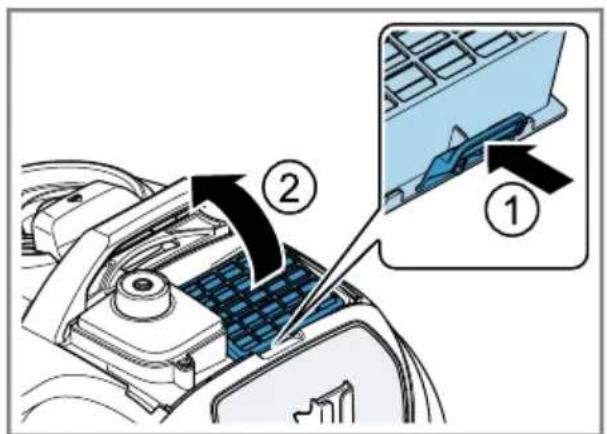
31
natural_image
Illustration showing a hand using a blue plastic tray to press through a rack, and a close-up of the rack being inserted with a tool (no text or symbols present)m = 311
natural_image
Blue electronic component with grid pattern and a circular dial showing 24-hour operation (no text or symbols on the component itself)33
The image is too blurry to recognize any text content.
natural_image
Diagram of a blue plastic component being inserted into a mechanical housing, with a black arrow indicating the insertion direction (no text or symbols present)35
36
37
natural_image
Technical diagram of a mechanical component with an arrow pointing to a blue rectangular block (no text or symbols present)The image is too blurry to recognize any text content.
natural_image
Illustration showing a hand cleaning a blue plate and a hand pouring liquid into a drain (no text or symbols)39
The image is too blurry to recognize any text content.

41

Sicherheit
- Read this instruction manual carefully.
- Keep the instruction manual and the product information safe for future reference or for the next owner.
■ Do not connect the appliance if it has been damaged in transit. Only use this appliance:
■ with genuine parts and accessories. Damage caused by using third-party products is not covered under the warranty.
■ for cleaning surfaces.
■ in private households and in enclosed spaces in a domestic environment at room temperature.
■ Up to an altitude of max. 2000 m above sea level.
Do not use the appliance:
■ for vacuum-cleaning persons or animals.
■ for vacuuming up harmful, sharp-edged, hot or burning substances.
■ for vacuuming up damp substances or liquids.
■ for vacuuming up highly flammable or explosive materials and gases.
■ for vacuuming up ash or soot from stoves and central heating systems.
■ for vacuuming up toner dust from printers and photocopiers.
■ for vacuuming up building rubble.
Disconnect the appliance from the power supply when:
■ cleaning the appliance.
This appliance may be used by children aged 8 or over and by people who have reduced physical, sensory or mental abilities or inadequate experience and/or knowledge, provided that they are supervised or have been instructed on how to use the appliance safely and have understood the resulting dangers.
Children must not play with the appliance.
Cleaning and user maintenance must not be performed by children unless they are being supervised.
- Repairs to the appliance should only be carried out by trained specialist staff.
▶ Only use genuine spare parts when repairing the appliance.
en Safety
If the power cord of this appliance is damaged, it must be replaced by the manufacturer, the manufacturer's Customer Service or a similarly qualified person in order to prevent any risk.
▶ Never operate a damaged appliance.
▶ Never operate an appliance with a cracked or fractured surface.
▶ Never pull on the power cord to unplug the appliance. Always unplug the appliance at the mains.
▶ Never pull or carry the appliance by the power cord.
▶ If the appliance or the power cord is damaged, immediately unplug the power cord or switch off the fuse in the fuse box.
▶ Call customer services. → Page 18
▶ Only use the appliance in enclosed spaces.
▶ Never expose the appliance to intense heat or humidity.
- Do not use steam- or high-pressure cleaners to clean the appliance.
▶ Never let the power cord come into contact with hot appliance parts or heat sources.
- Never let the power cord come into contact with sharp points or edges.
▶ Never kink, crush or modify the power cord.
- Connect and operate the appliance only in accordance with the specifications on the rating plate.
- When cleaning the appliance, do not use flammable substances or substances that contain alcohol.
▶ Pull out the power cord completely.
- Keep clothing, hair, fingers and other body parts away from the openings on the appliance and the moving parts.
▶ Never point the pipe or the nozzles towards eyes, hair, ears or mouths.
- When vacuuming stairs, ensure that there are no persons underneath the appliance.
- When taking a break from vacuuming, switch off the appliance and pull out the mains plug.
▶ Retract the power cord.
- When the cord is being rewound automatically, ensure that the mains plug is not thrown in the direction of persons, body parts, animals or objects.
- Keep packaging material away from children.
- Do not let children play with packaging material.
Preventing material damage
▶ Never place the appliance on the hose.
▶ Regularly check the running surfaces of the nozzles for wear.
▶ Replace worn nozzles.
▶ Never operate the appliance without the motor protection filter.
▶ Never operate the appliance without the exhaust filter.
Included with the appliance
After unpacking all parts, check for any damage in transit and completeness of the delivery.
→ Fig. 1
| A | Telescopic tube with adjusting sleeve1 |
| B | Handle |
| C | Hose |
| D | Adjustable floor nozzle1 |
| E | Hard floor nozzles1 |
| F | Turbo nozzle1 |
| G | Combination nozzle |
| H | Hose holder1 |
| I | Mattress nozzle1 |
^1 Depending on the appliance specifications
Overview
→ Fig. 2
| 1 | Adjustable floor nozzle ^1 |
| 2 | Telescopic tube with adjusting sleeve ^1 |
| 3 | Handle ^1 |
| 4 | Power cord |
| 5 | Carrying handle |
^1 Depending on the appliance specifications
| 6 | Power control and on/off switch |
| 7 | Hose holder ^1 |
| 8 | Storage aid |
| 9 | Hose |
| 10 | Rear flap |
| 11 | Dust container ^1 |
^1 Depending on the appliance specifications
Operating the appliance
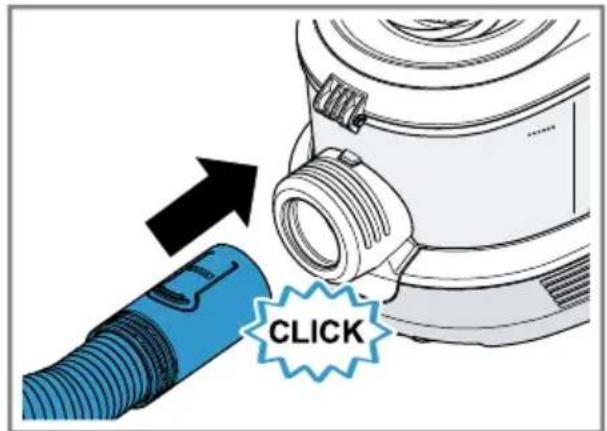
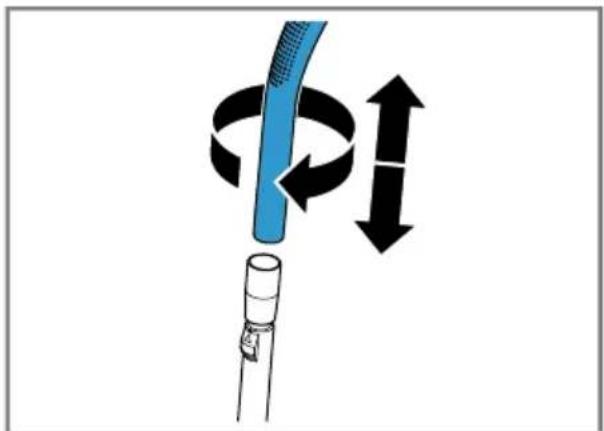
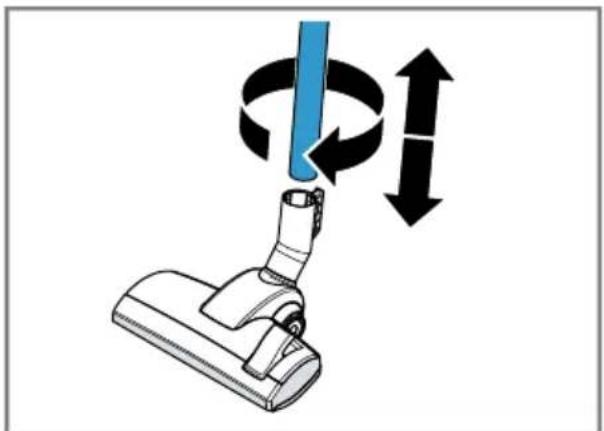
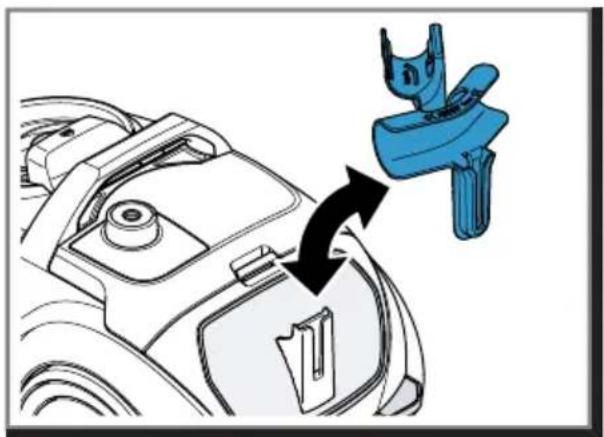
Follow the illustrated instructions.
Assembling and disassembling the appliance
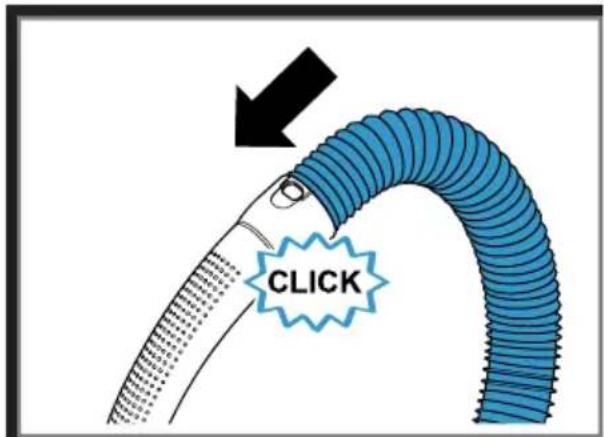
→ Fig. 3 - 7
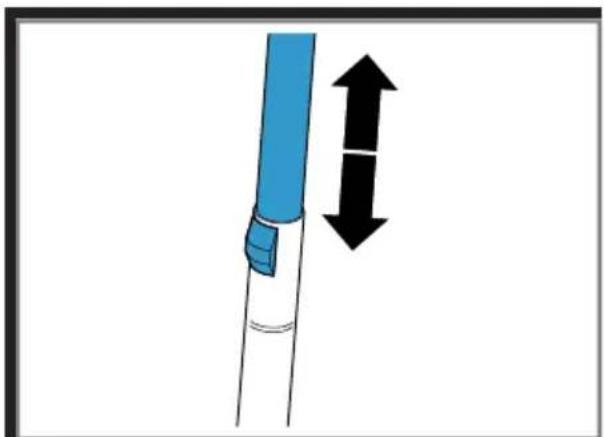
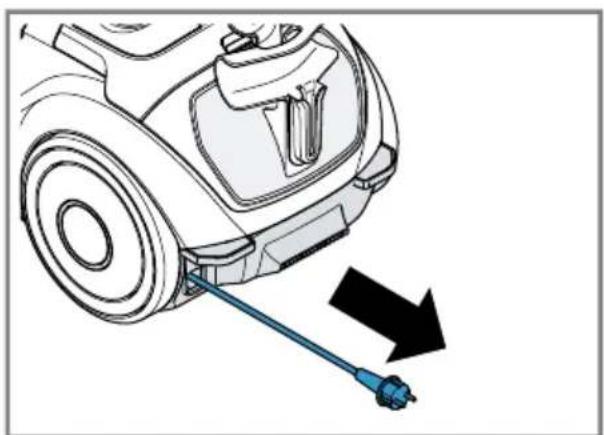
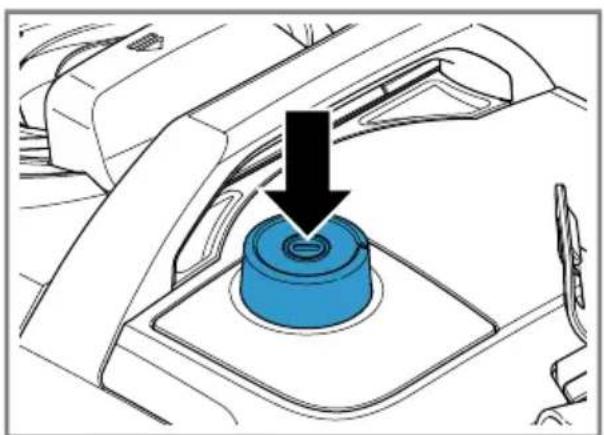
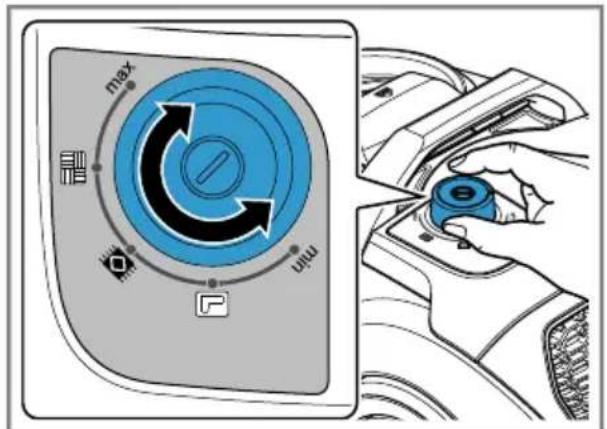
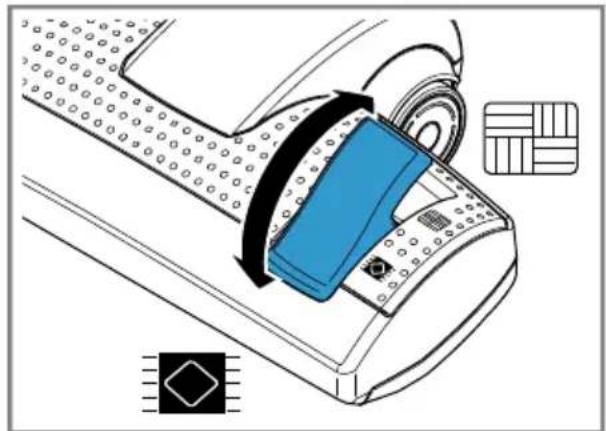
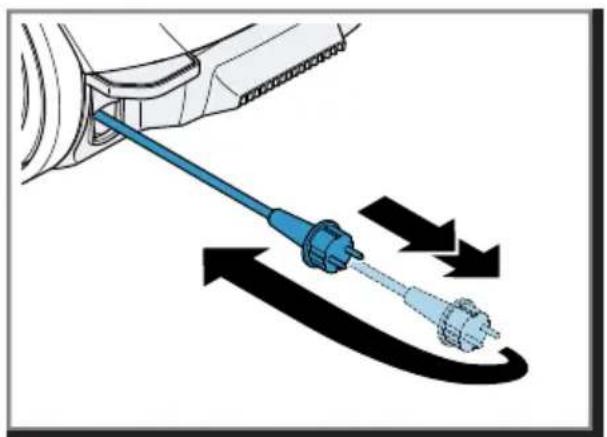
Operating the appliance
→ Fig. 8 - 13
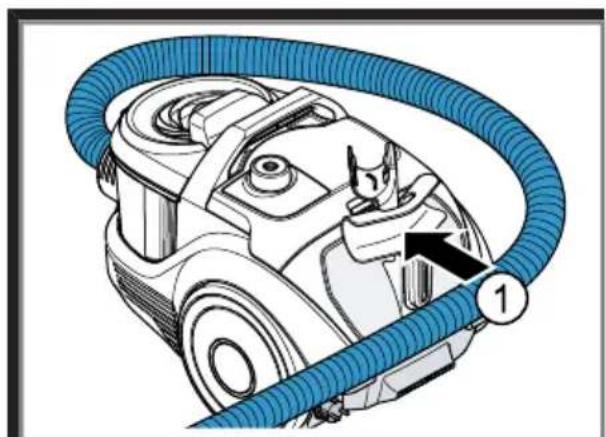
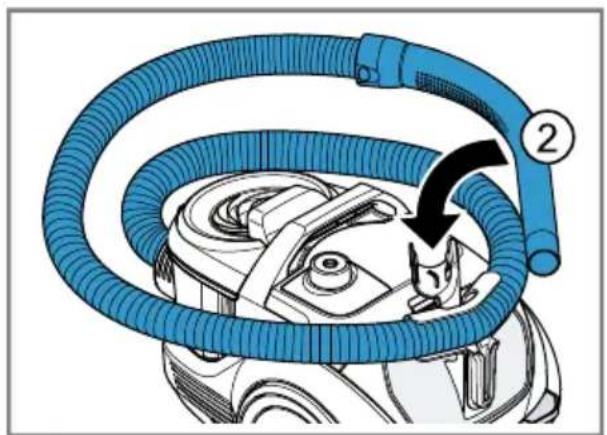
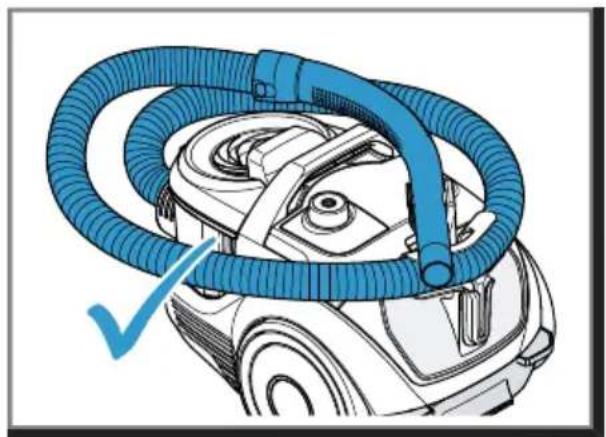
Storing the hose
→ Fig. 14 - 16
Cleaning and servicing
Follow the illustrated instructions.
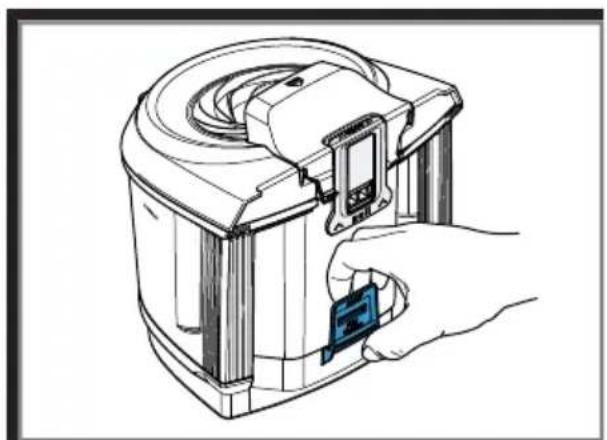
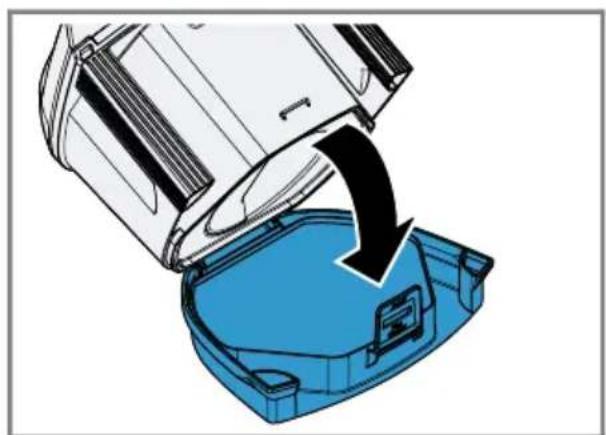
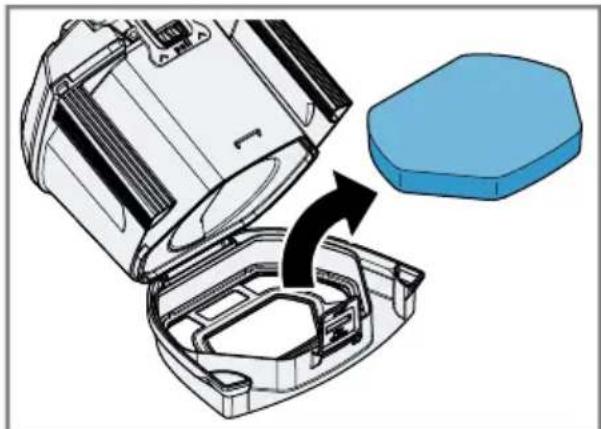
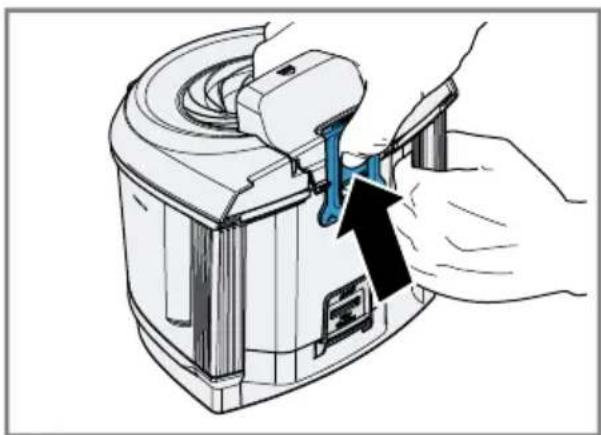
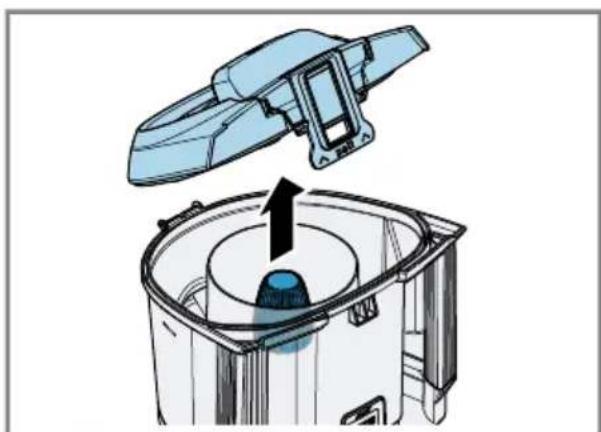
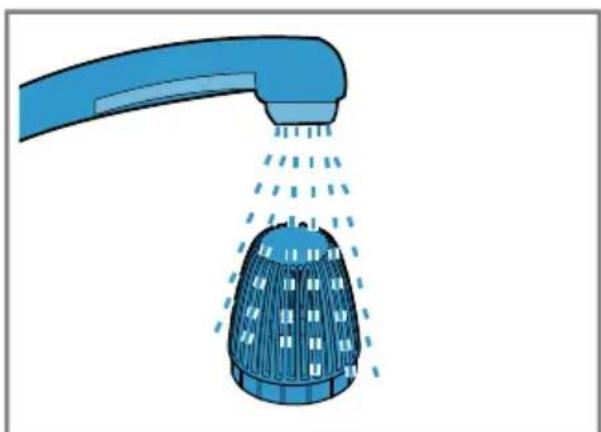
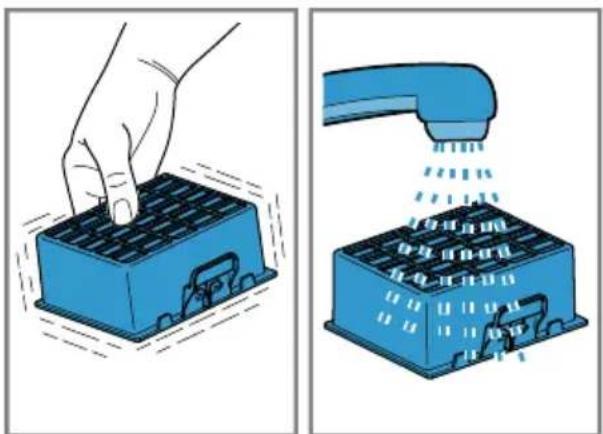
Note: It is recommended cleaning the filter of the dust container whenever you empty the container. It should however be done at least once a month.
Cleaning the filter in the dust container
→ Fig. 17 - 22
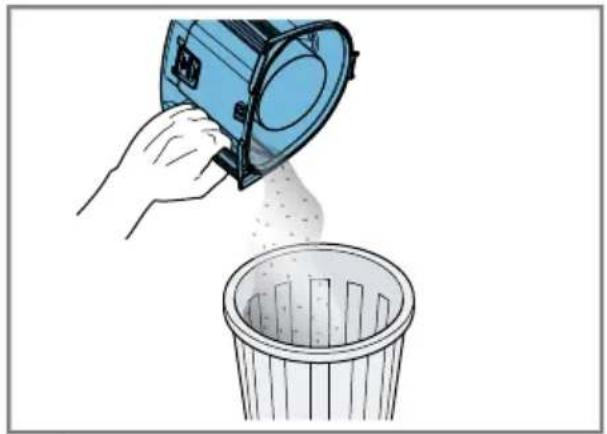
Cleaning the dust container
→ Fig. 23 - 28
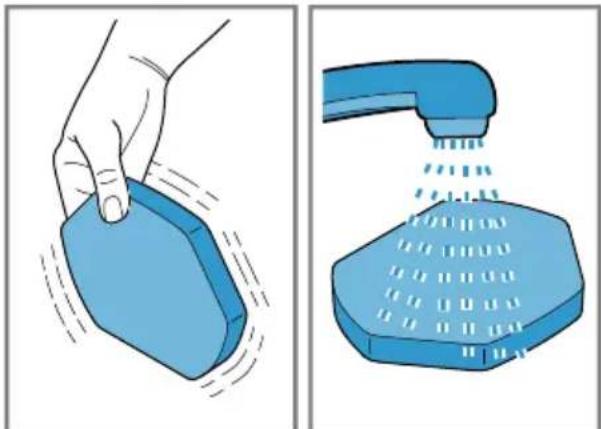
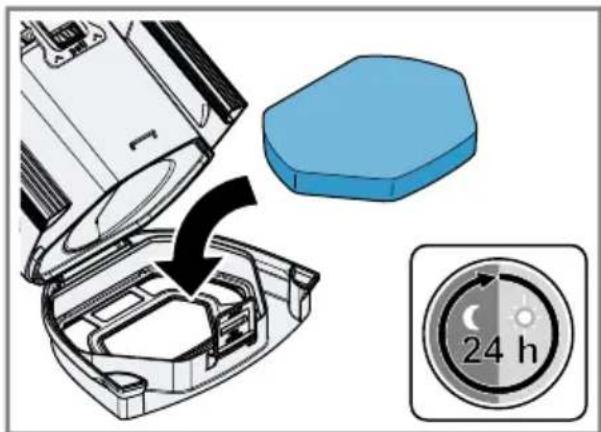
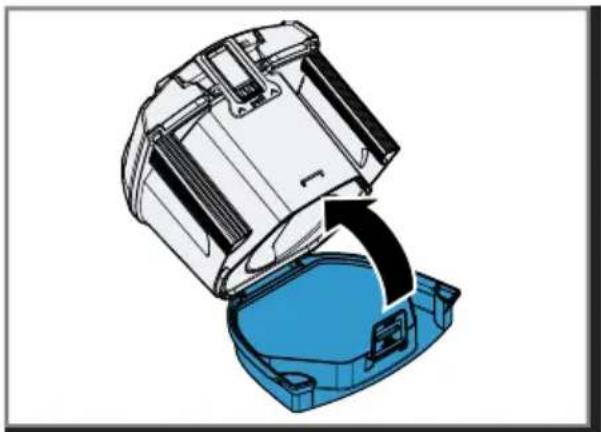
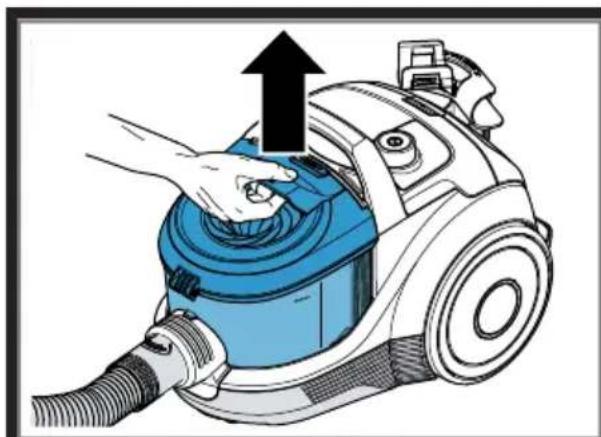
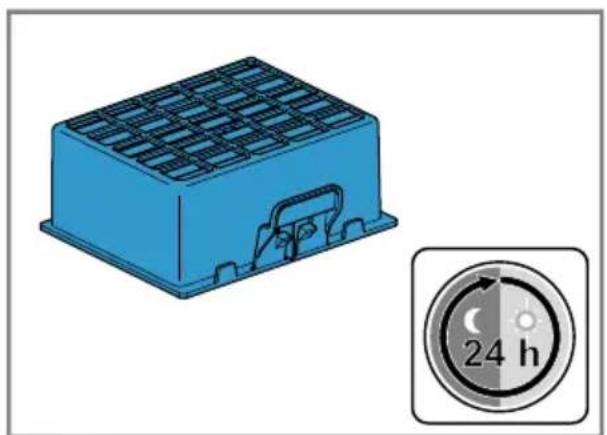
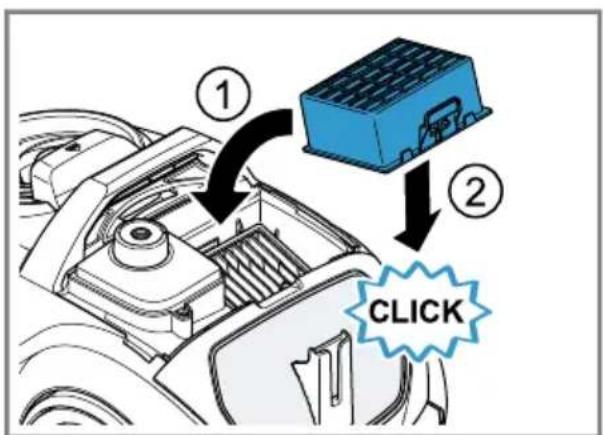
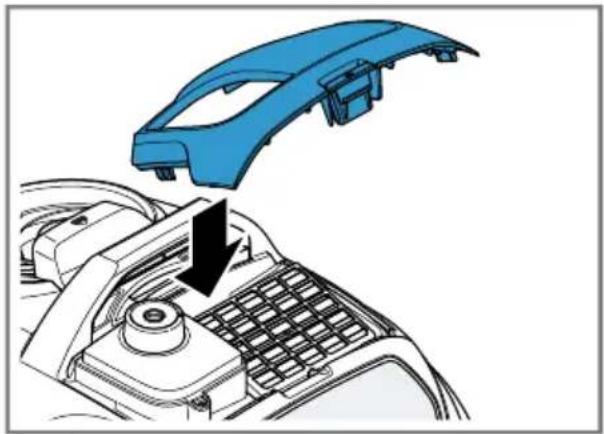
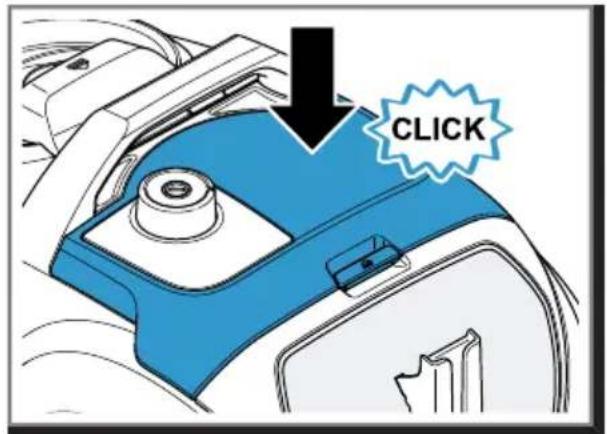
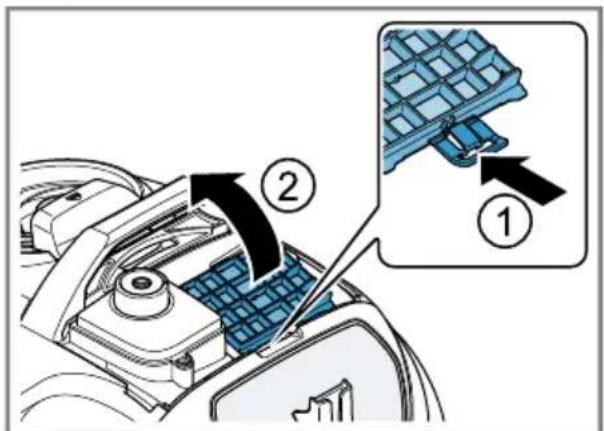
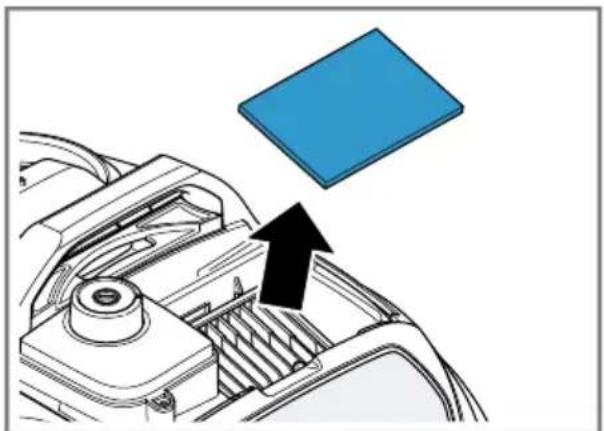
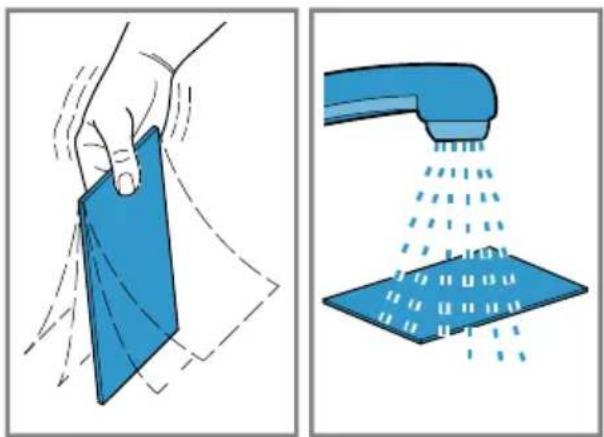
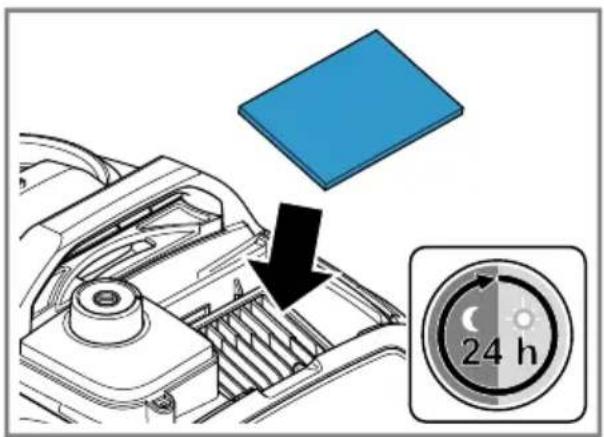
Cleaning the exhaust filter
→ Fig. 29 - 36
Cleaning the exhaust filter fleece
→ Fig. 29 - 35
en Troubleshooting
Troubleshooting
▶ Repairs to the appliance should only be carried out by trained specialist staff.
▶ Only use genuine spare parts when repairing the appliance.
▶ If the power cord of this appliance is damaged, it must be replaced by the manufacturer, the manufacturer's Customer Service or a similarly qualified person in order to prevent any risk.
Suction is reduced.
Nozzle, telescopic tube or hose are blocked.
-
Dismantle the appliance.
-
Remove the blockage.
Dust container is full
-
Check the fill level of the dust container.
-
Empty the dust container as needed.
Filter in the dust container is soiled.
-
Switch off the appliance.
-
Clean the filter in the dust container.
Exhaust filter is dirty.
▶ Clean the exhaust filter.
Brush on the turbo nozzle does not turn.
Brush roller is soiled.
▶ Clean the brush roller.
Suction power is too low.
- Turn the power controller to maximum suction power.
Disposing of old appliance
- Unplug the appliance from the mains.
- Cut through the power cord.
- Dispose of the appliance in an environmentally friendly manner. Information about current disposal methods are available from your specialist dealer or local authority.
This appliance is labelled in accordance with European Directive 2012/19/EU concerning used electrical and
electronic appliances (waste electrical and electronic equipment - WEEE). The guideline determines the framework for the return and recycling of used appliances as applicable throughout the EU.
Customer Service
Detailed information on the warranty period and terms of warranty in your country is available from our after-sales service, your retailer or on our website.
The contact details for Customer Service can be found in the enclosed Customer Service directory or on our website.

Sécurité
Zuigvermogen is te gering.
siemens-home.bsh-group.com
Phone: 0049 89 4590-01
https://www.siemens-home.bsh-group.ru

Қауіпсіздік
g_3d_5m_3n g_2n_1m_1g_6n g_3n_2b_5d_7y_6g_8d_9y_10n_5 .
Valid within Great Britain:
Imported to Great Britain by
BSH Home Appliances Ltd.
Grand Union House
Old Wolverton Road
Wolverton, Milton Keynes
MK12 5PT
United Kingdom
BSH Hausgeräte GmbH
Carl-Wery-Straße 34
81739 München, GERMANY
siemens-home.bsh-group.com

8001301520 (031025)
de, en, fr, it, nl, es, pt, el, tr, pl, hu, ru, kk, bg, az, uk, ka, zh, th, ar