Malmo - Fireplace Eurom - Free user manual and instructions
Find the device manual for free Malmo Eurom in PDF.



| Brand | Eurom |
| Model | Malmo |
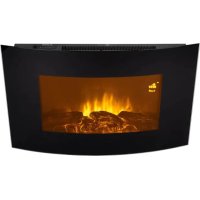
| Product type | Electric ambient fireplace (electric fireplace) |
| Dimensions (L x D x H) | 98 x 27,5 x 80 cm |
| Weight | 26,2 kg |
| Power supply | 220-240 V ~ 50 Hz |
| Maximum power | 2000 W |
| Heating power levels | 0, 1000, 2000 W |
| Integrated thermostat | Yes, adjustable from 15 to 30 °C |
| Lighting | LED bulb with dimmer (5 positions) |
| Flame effect | Yes, adjustable |
| Remote control | Yes, with AAA batteries (not included) |
| Programmable timer | Yes, up to 9 weekly settings |
| Open window detection | Yes |
| Safety distance (ceiling) | 100 cm minimum |
| Safety distance (side walls) | 50 cm minimum |
| Safety distance (front) | 100 cm minimum |
| Body materials | Metal and glass |
| Maintenance | Clean with a soft cloth; do not use abrasive products |
| Safety | Overheat protection |
| Repairability | Repair by certified professional; use original parts |
| Warranty | Manufacturer's warranty (subject to general terms and conditions) |
Frequently Asked Questions - Malmo Eurom
User questions about Malmo Eurom
0 question about this device. Answer the ones you know or ask your own.
Ask a new question about this device
Download the instructions for your Fireplace in PDF format for free! Find your manual Malmo - Eurom and take your electronic device back in hand. On this page are published all the documents necessary for the use of your device. Malmo by Eurom.
USER MANUAL Malmo Eurom
natural_image
White-framed home appliance with a black-and-white photo of a 3D-printed TV displaying a spectral grille (no visible text or symbols)Malmo
Art.nr. 363463 & 363470 (Swiss plug)
This product is only suitable for well insulated spaces or occasional use.
elektrische sfeerhaard / elektrischer Zierkamin / electrical atmospheric fireplace / foyer électrique d'ambiance / elektrisk dekorationsbrasa / elektrická okrasná kamna / elektrický kozub / șemineu electric de ambianță
| Model identifier(s): Malmo | ||||||
| Item | Symbol | Value | unit | Item | unit | |
| Heat output | Type of heat input, for electric storage local space heaters only (select one) | |||||
| Nominal heat output | P_nom | 2,0 | kW | manual heat charge control, with integrated thermostat | [no] | |
| Minimum heat output (indicative) | P_min | 0.0 | kW | manual heat charge control with room and/or outdoor temperature feedback | [no] | |
| Maximum continuous heat output | P_max,c | 2,0 | kW | electronic heat charge control with room and/or outdoor temperature feedback | [no] | |
| Auxiliary electricity consumption | fan assisted heat output | [no] | ||||
| At nominal heat output | el_max | 0 | kW | Type of heat output/room temperature control (select one) | ||
| At minimum heat output | el_min | 0 | kW | single stage heat output and no room temperature control | [no] | |
| In standby mode | el_sb | 0 | kW | Two or more manual stages, no room temperature control | [no] | |
| with mechanic thermostat room temperature control | [no] | |||||
| with electronic room temperature control | [no] | |||||
| electronic room temperature control plus day timer | [no] | |||||
| electronic room temperature control plus week timer | [yes] | |||||
| Other control options (multiple selections possible) | ||||||
| room temperature control, with presence detection | [no] | |||||
| room temperature control, with open window detection | [yes] | |||||
| with distance control option | [no] | |||||
| with adaptive start control | [no] | |||||
| with working time limitation | [no] | |||||
| with black bulb sensor | [no] | |||||
| Contact details : | EUROM-KOKOSSTRAAT 20-8281JC-GENEMUIDEN-NETHERLANDS | |||||
Dank
natural_image
Simple line drawing of a trash bin with diagonal lines crossing it, no text or symbols present.natural_image
Simple line drawing of a trash bin with no text or symbolsThank you very much for choosing for a EUROM device. You have made a good choice! We hope you will be satisfied about its functioning. To get maximum profit from your product, it is important to read this manual attentive and totally before use, and to understand what is written. Read especially the safety instructions: they are there to protect you and your environment. Keep the manual in a safe place for future reference. Store also the package: that is the best protection for your product in times of no-use. And if you at any time pass the appliance on, pass on the manual and package too.
We wish you a lot of fun with the Malmo!
Eurom
Kokosstraat 20
8281 JC Genemuiden (NL)
info@eurom.nl
www.eurom.nl
This manual has been complied with the utmost care. Nevertheless, we reserve the right to optimize this manual at any time and to adjust it technically. The image used may differ.
Symbol Explanation
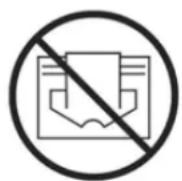
Do not cover the device
Technical data
| Supply voltage | 220-240V~50Hz |
| Maximum capacity | 2000 Watt |
| Settings | 0-1000-2000 Watt |
| Thermostat | + |
| Bulb | LED |
| Dimensions | 98 x 27,5 x 80 cm |
| Weight | 26,2 |
| Batteries remote control | 2 x 1,5V AAA (not provided) |
Warning electric cables
Safety warning - general
- Read the user instructions carefully and completely before using (and installing) this device. Keep the instruction leaflet somewhere safe so that you can consult it and pass it on in future.
- Before use, check your new device (including cable and plug) for any visible damage. Never use a damaged device but take it back to the supplier for a replacement.
- In the event of incorrect usage or installation, there is a risk of electric shocks and/or a fire hazard.
Warnings device position
- Do not use the device before it has been fully installed as set out in the user instructions. Never use the device standing up or leaning against something, or similar. Never insert the plug into the socket before the device has been correctly installed at the appropriate place.
- When installing, the following minimum distances should be considered:
Minimum distance to ceiling: 100 cm
Minimum distance to side walls: 50 cm
Minimum distance to the front: 100 cm
- The air around the device must be able to circulate freely. Never install it too close to large objects and never under a shelf, cupboard, curtains or similar. The minimum distances from large objects such as shelves, cupboards, etc. to the top, sides and underneath of the device are equal to the aforementioned minimum distances to ceilings, side walls and the ground, respectively.
- This device is not suitable for installation in damp spaces such as bathrooms, wash rooms etc. Never install the device near water points and reservoirs (tap, bath, shower, toilet, sink, swimming pool, etc.). Make sure that the device cannot fall into water and that it cannot be penetrated by water. If the device falls into water make sure you remove the plug from the socket! Do not use a device that is wet inside but take it to be repaired. Never immerse the device, cable or plug in water or any other fluid and never touch device with wet hands.
- The wall to which the device is secured and the ceiling and walls within 1 metre of the device must not be made of flammable
materials. Materials must be resistant to temperatures of at least 125^ C without burning, melting, deforming or bursting into flames. Check regularly to ensure that the wall and ceiling are not overheating; this could be dangerous!
- Never install this device behind a door or by an open window, where rain could get in.
- If this device is connected directly to your electrical installation, it must be installed by a specialist, taking into account the valid regulations/legislation.
- Do not place the device near, under or facing an electrical socket and not in the vicinity of an open fire or heat source.
- Do not use the device nearby or facing furniture, curtains, paper, clothing, bedding, towels or other flammable materials. Keep at least 1 metre from device!
- Do not use the heater outdoors or in areas that are smaller than 15m^3 .
- The device contains hot and/or glowing and sparking components. Do not, therefore, use where fuels, paint, flammable fluids and/or gases are stored. Do not use the device in an environment that poses a fire risk, e.g. near gas tanks, gas pipes or aerosols. This is an explosion and fire risk!
Warnings - use
- Do not use additions/accessories on the device that have not been supplied or approved by the manufacturer.
- Only use the device for its intended purpose and in the manner set out in this instruction leaflet.
- Some parts of this device will get very hot and could cause burns. You must pay particular attention to children, vulnerable persons and pets that are present near the device. Never leave them alone with a working device.
-
Never cover or block the device; it will overheat and this could lead to a fire risk. Never hang or place objects such as clothing, towels, blankets, cushions, paper, etc. on the device. The minimum distance of 1 metre between the device and flammable materials must always be applied. Ventilation openings should never be blocked as this may pose a fire risk. Never use the device to dry clothing or place anything on it. Do not let anything lean against the device!
-
The device is exclusively intended for normal, household usage. Only use for providing heat in your home.
-
The connection voltage and frequency, as given on the device, must correspond to that of the socket to be used. The electrical socket to be used must be an earthed connection. The electrical installation must be protected via a 30 mA earth leakage circuit breaker. The electrical socket that you are using must be to hand at all times in order to be able to remove the plug from the socket in the event of an emergency.
-
To avoid overloading and/or fuses being blown, do not use any other equipment on the same socket or electrical group as the one used for the device.
-
Unroll the electric cable for the device fully before inserting the plug into the socket and ensure that the electrical cable does not come into contact with the fireplace or get hot. Do not run the electrical cable under carpet, cover with mats, runners or similar and do not place in areas that are walked on frequently. Ensure that it cannot be stepped on and that no furniture is placed on top of it. Do not bend the electrical cable around sharp corners and do not roll up too tightly after use! Prevent the electrical cable coming into contact with oil, solvents and sharp objects. Check the cable and plug regularly for damage. Do not bend or pinch the electrical cable and do not wind it around the device; this could damage the insulation!
-
The use of an extension cable is not advised as this can lead to overheating and fire. If the use of an extension cable is unavoidable, make sure that it is not damaged and that it is an approved extension cable with a minimum diameter of 3 × 2.5 mm^2 and a minimum permitted capacity of 2500 Watt. Always fully extend the cable in order to prevent overheating.
-
Only connect the device to a fixed socket. Do not use multi-plug adapters or similar.
-
During use, the plug may begin to feel warm; this is normal. If it's really warm, there may be something wrong with the socket. Please contact your electrician.
-
Always turn off the device and remove the plug from the power socket: Never turn the device off using the plug!
-
Prevent foreign objects entering the radiation/ventilation or outlet openings on the device. This may cause electric shock, fire or damage.
- Never leave a working device unattended but switch off and then remove the plug from the socket. Always remove the plug from the socket when the unit is not in use! Always remove plug by pulling on the plug itself; never pull on the electrical cable!
- Apart from manual use, this device can also be operated via a timer. However you operate it, make sure that the safety guidelines are taken into account at all times! Do not operate the device with an additional time clock, timer, volume control or any other device that automatically turns on the device.
- This device gets hot during use. Never touch the device when it is on or shortly thereafter; it could burn you.
- Never operate the device with wet hands.
Who can use the device?
- Children younger than 3 must be kept out of the vicinity of the device unless they are continuously supervised.
- Children between the ages of 3 and 8 may only switch the device on or off if it is set up or installed at its usual location and they are supervised or have received instructions regarding the safe use of the device and understand the corresponding hazards. Children between the ages of 3 and 8 may not insert the plug into the socket, adjust the device settings or clean or maintain it.
- This device can only be used by children from the age of 8 and elderly persons and persons with diminished physical or mental capacities or a lack of experience and expertise if they are supervised or have received instructions regarding the safe use of the device and understand the corresponding hazards.
- Children may not clean or maintain the device without supervision.
- Children may not play with the device.
Warnings for maintenance
- Keep the device clean. Dust, dirt and/or deposits in the device often lead to overheating. Ensure that this type of build-up is regularly removed.
-
Always switch the device off, remove plug from socket and let the device cool down before you:
-
clean the device
- users - maintain the device.
- touch or move the device.
- Never switch the device on if you have noticed damage to the device itself, the cable or plug or if it does not work properly, makes strange noises, smells odd or you can see smoke, or if it has fallen or shows any other signs of damage. Remove the plug from the socket immediately. Take the entire device back to your supplier or a recognised electrician to be checked and/or repaired. Always ask for original parts to be used.
- The device may only be opened and/or repaired by a competent and qualified person. Do not carry our your own repairs as this could be dangerous! Repairs carried out by unauthorised persons or changes made to the device could damage the dust/waterproof capacity of the device and will nullify the guarantee and the manufacturer's liability.
- If the electrical cable is damaged, it must be replaced by the manufacturer, their service department or somebody with similar qualifications in order to prevent creating a hazard.
Failing to adhere to points 3, 4, 5, could lead to damage, fire and/or personal injury. They will invalidate the guarantee and the supplier, importer and/or manufacturer shall not be liable for the consequences.
Description
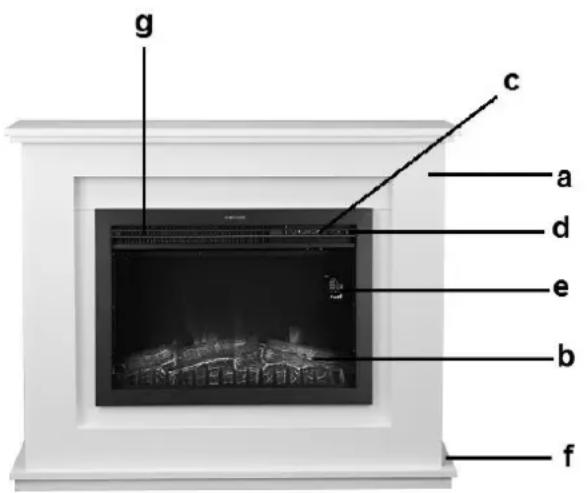
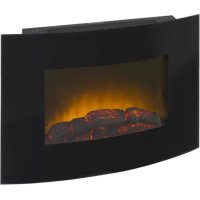
The Malmo is a nostalgic fireplace with an internal heating element and a ventilator. The hot air is blown out through the grate on the front. Normally the fireplace is positioned against a wall.
a. Casing
b. Flame screen
c. Buttons for manual operation
d. Main switch
e. Display
f. Air suction openings
g. Air exhaust grille
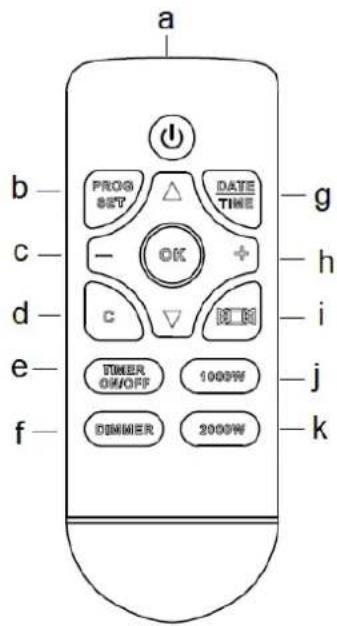
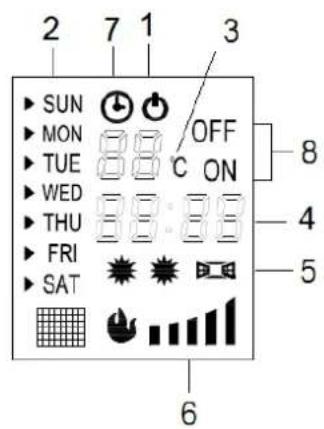
Display
Remote control:
a. ON/OFF button
- Stand-by light
b. Button for setting the time
- Day indicator
c. - button
- Temperature and thermostat setting
d. Erasing the time setting
- Time indicator and timer setting
e. Timer on/off button
- Lamps of 1000W-2000W-Open Window-detection
f. Dimmer button
- Dimmer setting Operating timer light
g. DATE and TIME button
h. + button
- Operating timer light
i. Open-window-detection
- Timer ON & OFF setting
j. 1000W button
k. 2000W button
Location and connection
Remove the packaging materials and keep out of the reach of children. After removing packaging, check device for damage or any evidence that may point to a defect/failure. If in doubt, do not use the device but refer to your supplier for checks/repairs.
The fireplace must be placed against a wall. Place the heater on a sturdy, flat surface. The substrate must be heat-resistant. Make sure that the suction openings are never blocked!
Choose a suitable location for the fireplace, at least one metre from all obstructions, walls and flammable materials (see safety instructions) and in the vicinity of a 16 Amp (at least) fused, earthed electrical socket (protected by a 30 mA earth leakage circuit breaker).
Operating
- Check that the details on the data plate correspond to those of the electrical supply which you wish to use for the fireplace. Do not use the same connection for any other group
- Install two AAA-1,5V batteries in the remote control.
- Check whether the main switch is set to OFF (O is pushed in)
Now insert the plug into the grounded socket.
✿ Push the main switch to ON (I is pushed in). The fireplace is now on stand-by and the light is switched on at the display ⏻
You can now further operate the fireplace with the remote control or with the buttons on the fireplace itself.
Push-button operation:
If you don't use the remote control, you can press the relevant buttons on the control panel, manually set it to 3 positions; the corresponding lights will turn on.
- I/O : flame effect only
- I/O + 1000W : flame display and heating at 1000W
- I/O + 2000W : flame display and heating at 2000 Watt
By pressing the I/O button longer, you initiate the dimmer function; the light intensity will increase or decrease with every tweet. Release the button when you have achieved the desired intensity
Attention! The thermostat cannot be set manually, only with the remote control. The thermostat is standard set to 20^ C.
Remote control:
❖ Press on the ON/OFF button to switch on the stove.
Now set the desired temperature. The temperature & timer setting will usually show the ambient temperature. By pressing on the + or - button, you see the set temperature flashing for a short time and by pressing the + or - buttons, you can adjust the temperature (from 15 to 30°C). After a few seconds, the display switches back to the ambient temperature and the newly desired temperature is set. The temperature is standard set to 20°C.
Now you can start operating the stove by pressing the button to 1000W (half output) or 2000W (full output). When the set temperature is above the ambient temperature, the stove will start to heat (1000W, 2000W). The corresponding lights on the display are turned on (1000W-1 star, 2000W-2 stars).
If you press the button, the window detector will start. The corresponding lights on the display are turned on ( )
The thermostat will switch off the stove as soon as the stove reaches the desired temperature and it will switch it on again if the ambient temperature drops.
- By pressing the 'dimmer' button (there are 5 positions), you can intensity or decrease the flame effect of the stove.
You switch off the stove by pressing the ON/OFF button. The temperature level that you set will remain. However, if you switch on the stove once again, you will have to reset the output.
If you want to switch off the stove for a longer period, then also set the main switch on O (OFF). The set temperature will now be erased. Finally remove the plug from the socket.
If you do not enter any orders for approx. 15 seconds, the display will turn off. Pressing any random button will reactivate the display.
Set open window detector:
❖ Make sure the unit is switched on and heating up.
✿ Press ☐; the display shows the corresponding icon ☐ and the temperature (°C). You can change this using the plus and minus buttons. When open window detection is switched on, the unit will switch off if the temperature in the room drops quickly and go to standby. In this case, you can turn the unit on again using the on/off button.
✿ Press the 📋 button again to turn the open window detection off. The icon disappears from the display and the unit returns to its previous settings.
If the heater is set to come on in a weekly programme and you turn the open window detection on, this will only work while the unit is switched on in the weekly programme.
Timer
The stove has a built-in weekly timer, which allows you to set a weekly schedule for switching on and off. You must first set the date and time; if you don't do that, then the stove assumes that it is scheduled for Sunday at 00.00!
- Press the ON/OFF button to switch on the stove.
- Press on the DATE/TIME button; the day indicator will light up. Select the arrows and V for the current day and confirm this by pressing the DATE/TIME button again (Sunday, Monday, etc.)
- The hour indication will now flash. By pressing on the + and - buttons, you select the current hour. Reconfirm by pressing on the DATE/TIME button.
- The minutes indicator will now flash. By pressing on the + and - buttons, you select the precise time. Confirm by pressing on the DATE/TIME button.
• Day and time are now set.
❖ To set the weekly timer, take the following steps:
- Ensure that the stove is switched on with the ON/OFF button.
- Press on the PROG SET button. The indication P1 on the display starts to flash, indicating that you have selected the first timer setting (you can select 9 timer settings). Confirm this by pressing once again on the PROG SET button.
- The day indicator will now flash (SUN). Choose the days when the stove must operate (e.g., from Monday to Friday) by pressing + next to the days you have selected and pressing - next to the days that you don't want to
select. Use to arrows to move to the next day. Press again on the PROG SET button to choose the days and confirm.
- The hours indication will now flash and you will see ON on the display. By selecting the + and - buttons, you choose the hours when you want the stove to operate. Confirm by pressing the PROG SET button.
- The minutes indicator will now flash. By pressing the + and - buttons, you select the time period (in intervals of 10 minutes) for the stove to operate. Confirm by pressing on the PROG SET button. The starting time is now set.
- The hour indicator is flashing again to order for you to set at which time the operation must end. OFF appears on the display. Select the time in the same way you selected the operating time and confirm by using the PROG SET button.
- Now the temperature setting starts to flash. Using the + or - buttons, select the desired temperature and confirm by using the PROG SET button.
- You initial timer setting is now set.
- To generate a second setting, press once again on the PROG SET button. While P1 is flashing, press on the + button: P2 will appear. Confirm this using the PROG SET button and subsequently set new days, hours and minutes as described above.
- You can generate maximum 9 time settings. Prevent the setting from containing any conflicting or overlapping orders.
To operate the stove according to the timer settings, do the following:
- Switch on the stove using the ON/OFF button.
- Press the 1000W or 2000W button to set the desired output. If the desired temperature is above the ambient temperature, the stove will begin to heat (1000W, 2000W). The corresponding light will light up on the display (1000W-1 star, 2000W-2 stars).
- Now activate the timer operation by pressing the TIMER ON / OFF button. The 'timer in operation' lamp lights up. If you now press OK, the fire will complete all settings on a weekly basis.
- Attention! All timer settings (maximum 10 per week) will be processed completely one by one. Therefore, make sure that they do not contradict each other!
- If you wish, you can also readjust the thermostat, output and dimmer while the timer is working.
- You stop the operation of the timer by pressing on the TIMER ON/OFF button. The stove will act as if there are no current timer settings and will simply operate according to the thermostat and output settings. By pressing the TIMER ON/OFF button again, you reactivate the timer setting.
- To erase the timer setting, press on the PROG SET button. P1 will start flashing on the display. Using the + and - buttons, look for the setting number that you want to erase and subsequently press on the C button (erasing the timer setting). The timer setting will disappear immediately.
ATTENTION! If you want the stove to operate according to a timer programme, it will not only have to remain on stand-by, but also switched on (using the ON/OFF button). If this is not necessary, always switch off the stove using the ON/OFF button, switch off the main switch and remove the plug from the socket.
Switching off
If you are not using the stove, you must switch it off using the main switch (you press O) and remove the plug from the socket. Doing this will erases all the settings, also day and time. Only the timer settings are stored.
Protection
The Malmo atmospheric fireplace is equipped with an overheating protection.
The overheating protection switches the heater off if it overheats internally. This may occur if the heater cannot give off enough heat or if it cannot draw in enough fresh air. As mentioned above, this is generally caused by (partially) covering the heater, obstructing the air intake and/or outlet grills or installing the heater too close to a wall or something similar.
If this happens, turn the fireplace off by switching the main switch to O and remove the plug from the socket. Leave the fireplace to cool down for at least 15 minutes and remove the cause of overheating. You can then switch the fireplace back on. If the device overheats again or you cannot ascertain the reason for this, take the fireplace to your service point to be checked/ repaired.
Important! For safety reasons the fire will not automatically restart after overheating. Check whether conditions are safe before switching it on! So never switch on the heater by means of a timer and never connect it to a power supply that regularly switches on and off.
Cleaning and maintenance
Always remove the plug from the socket and let the fireplace cool down before cleaning or touching. The Malmo atmospheric fireplace does not need much maintenance. Always keep the in- and outlet openings clean and dust-free. Use a soft cloth or a soft brush to clean the outside of the metal case. The glass plate can also be cleaned with a soft cloth. Do not use abrasive cleaning fluids or special glass cleaners! If the device malfunctions, immediately remove the plug from the socket and take to a service point. Do not carry out repairs yourself and always ask for original parts to be used. If the fireplace is to be stored after the winter period, clean it, pack it in original packaging if possible and store in a cool, dry and clean place. Make sure the fireplace is kept upright.
Problems and solutions
If the fireplace will not work check the electrical supply. Is the socket working properly? Has the fuse blown?
If the fireplace stops working suddenly, it may mean that the overheating safeguard has been triggered (see under 'Safeguards').
In the event of other defects, immediately switch the fireplace off, remove the plug from the socket and consult a supplier or recognised electrician. Never carry out repairs yourself as this invalidates the guarantee and may be dangerous!
Removal
natural_image
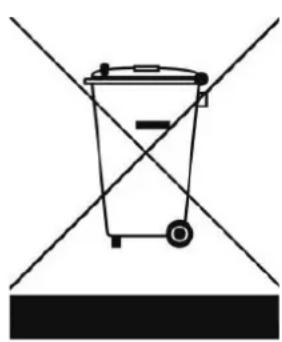
Simple line drawing of a trash bin with diagonal lines crossing it, no text or symbols present.In the EU this symbol indicates that this product may not be disposed of as ordinary household waste. Old equipment contains valuable materials, suitable for recycling. These materials should be made suitable for reuse in order to prevent any adverse effects to health and the environment caused by unregulated waste collection. Therefore, please make sure that you bring old equipment to a designated collection point. Alternatively, contact the original supplier, who can make sure that as many of the components as possible can be recycled.
CE-statement
Eurom - Genemuiden-NL hereby declares that the EUROM electrical atmospheric fireplace, type Malmo, complies with the LVD guideline 2014/35/EU and the EMC guideline 2014/30/EU and meets the following standards:
EN 60335-1:2012+AC:2014+A11:2014 EN 55014-1:2006+A1:2009+A2:2011
EN 60335-2-30:2009+A11:2012 EN 55014-2:2015
EN 62233:2008 EN 61000-3-2:2014
RoHS 2011/65/EU&(EU)2015/863 EN 61000-3-3:2013
Genemuiden, 07-06-2019
W.J. Bakker, alg. dir.
Remerciements
natural_image
Simple line drawing of a trash bin with two crossed lines indicating no waste or prohibition (no text or symbols)natural_image
Simple line drawing of a trash bin with diagonal lines crossing it, no text or symbols present.natural_image
Simple line drawing of a trash bin with diagonal lines crossing it, no text or symbols present.natural_image
Simple line drawing of a trash bin with diagonal lines crossing it, no text or symbols present.natural_image
Simple line drawing of a trash bin with diagonal lines crossing it, no text or symbols present.
- Malmo
- Dank
- Symbol Explanation
- Do not cover the device
- Warning electric cables
- Safety warning - general
- Warnings device position
- Warnings - use
- Who can use the device?
- Warnings for maintenance
- Description
- Display
- Remote control:
- Location and connection
- Operating
- Push-button operation:
- Set open window detector:
- Timer
- Switching off
- Protection
- Cleaning and maintenance
- Problems and solutions
- Removal
- CE-statement
- Remerciements
Brand : Eurom
Model : Malmo
Category : Fireplace