WH500 - Vacuum Cleaner Wëasy - Free user manual and instructions
Find the device manual for free WH500 Wëasy in PDF.


User questions about WH500 Wëasy
0 question about this device. Answer the ones you know or ask your own.
Ask a new question about this device
Download the instructions for your Vacuum Cleaner in PDF format for free! Find your manual WH500 - Wëasy and take your electronic device back in hand. On this page are published all the documents necessary for the use of your device. WH500 by Wëasy.
USER MANUAL WH500 Wëasy
natural_image
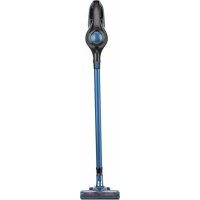
Blue and black handheld vacuum cleaner with handle extended (no text or symbols visible)WH500
Hand vacuum cleaner
Aspirateur à main
Handstaubsauger
Hand stofzuiger
Aspiradora manual
Aspurapolvere manuale
ENGLISH
Dear customer,
We are delighted that you have decided on this battery-operated handheld vacuum cleaner.
Before using the device for the first time, please carefully read the instructions and store them for future reference.
These instructions are to accompany the device when passed on to others.
The manufacturer and importer assume no liability in the event the data in these instructions have not been observed!
Please note: The illustrations in these instructions may vary slightly from the real device.
Proper use
- This device is intended for vacuum cleaning dry surfaces.
- Do not in any case vacuum up the following:
- Smouldering ashes, cigarette butts, matches etc.,
- Flammable or ignitable materials,
- Very fi ne dust (e.g. cement dust), ash or toner,
- Pointy, hard objects such as larger glass shards,
- Liquids or wet dirt.
- The device is intended for domestic, not commercial use.
- Only use the device as described in this instruction manual. Any other use is deemed improper.
- Defects arising due to improper handling, damage or attempts at repair are excluded from the warranty. This also applies to normal wear and tear.
I. Safety notes
This device may be used by children aged 8 and over and by people with reduced physical, sensory or mental abilities or a lack of experience and/or knowledge if they are supervised or have received instruction on how to use the device safely and have understood the dangers resulting from this.
Children may not play with the device.
- Cleaning and user maintenance may not be carried out by children.
Children younger than 8 years of age and animals must be kept away from the device and the connecting cable!
Children must be supervised to guarantee that they do not play with and/or injure themselves on the device.
Only use and store the device out of the reach of children and animals. Improper use may result in injury and electrical shock. The mains cable must also be kept out of the reach of children and animals.
The device must always be disconnected from the mains power when it is left unattended and before assembling, disassembling or cleaning the device.
Only charge the rechargeable battery with the enclosed mains adapter and the charging station. Do not charge any devices other than the handheld vacuum cleaner with the enclosed mains adapter and the charging station.
- Never immerse the device, mains cable or plug in water or other liquids and ensure that they cannot fall into water or become wet.
If the device, the connecting cable or the plug of the device is damaged, it must be replaced by the manufacturer or customer service department or a similarly qualified person (e.g. specialist workshop) in order to avoid any hazards.
Risks of injury
- Keep children and animals away from the device and packaging material. There is a danger of injury and suffocation!
- Do not use the device if it is damaged.
During use, keep the nozzles away from body parts and pets. They could be caught in the vacuum cleaner. If the
vacuum cleaner attaches itself when vacuuming, turn it off immediately with the On/Off switch.
Risk of electric shock and fir
- Only connect the mains adapter to a properly installed socket with protective earth contacts.
The socket must also be easily accessible after connecting so that the mains connection can be quickly disconnected. The mains voltage must correspond to the technical data of the device. Only use proper extension cords, whose technical data correspond to those of the device or mains adapter.
If the device falls in water, immediately disconnect the power supply. Do not attempt to pull the device out of the water when it is connected to the mains supply!
- Never touch the device, the mains cord and the mains adapter with wet hands when these components are connected to the mains supply.
■ Turn the device off and pull the mains adapter out of the socket
■ if you stop working with it,
before a storm,
■ if an error or fault occurs during operation,
■ if foreign objects penetrate the device.
- Do not use the device if it is still connected to the mains adapter or to the power source.
■ Always pull on the mains adapter and never on the mains cord.
- Only use the device in enclosed areas.
- Do not use the device in rooms containing easily flammable dust or toxic and explosive vapours.
- Do not operate the device in very moist environment or in the vicinity of flammable material.
For your own safety, always check the device for damages prior to using it. Only use the device if the device, the rechargeable battery, mains cord and the plug do not exhibit any damages!
Danger from Rechargeable Batteries
■ Rechargeable batteries can be deadly if swallowed. Seek medical attention immediately if a battery has been swallowed.
Before inserting the battery pack, check whether the contacts are clean and clean them if necessary.
- Use only the battery type specified in the technical data.
If the battery has leaked, do not allow your skin, eyes and mucous membranes to come into contact with the battery acid. If you touch battery acid, rinse the affected sites with abundant fresh water immediately and contact a doctor as soon as possible.
■ Remove a leaking battery from the device immediately. Clean the contacts before inserting a new battery.
The battery must not be taken apart, thrown into a fire, immersed in liquids or short circuited.
Avoiding damage to materials, property and the device
■ Always place the device on a dry, level, firm and heat resistant surface.
- Lay the cable of the mains adapter so that it does not pose a tripping hazard.
■ Make sure that the mains cord does not get pinched, kinked or laid over sharp edges and does not come into contact with hot surfaces.
- Maintain adequate distance to heat sources such as stoves or ovens to prevent damage to the device. Do not place any open flames, e.g. burning candles, in the direct vicinity of the device, cord, rechargeable battery and mains adapter.
- Do not allow the device to fall and do not subject it to strong percussions.
- Do not pull or carry the device by the cord of the mains adapter.
- Do not subject the device to extreme temperatures, severe changes in temperature, moisture, wetness or direct sunlight.
- Do not use any corrosive or abrasive cleaning agents to clean the device. They could damage the surface.
Only use the device if it has been completely and correctly assembled! The dust bin and filter must be in place. The filters may not be damaged!
- Do not insert anything in the openings / nozzles of the device and make sure that they are not plugged.
■ Empty the dust bin after every use. The filters must also be cleaned regularly to prevent the motor from being overloaded.
- Only use the accessories recommended by the manufacturer.
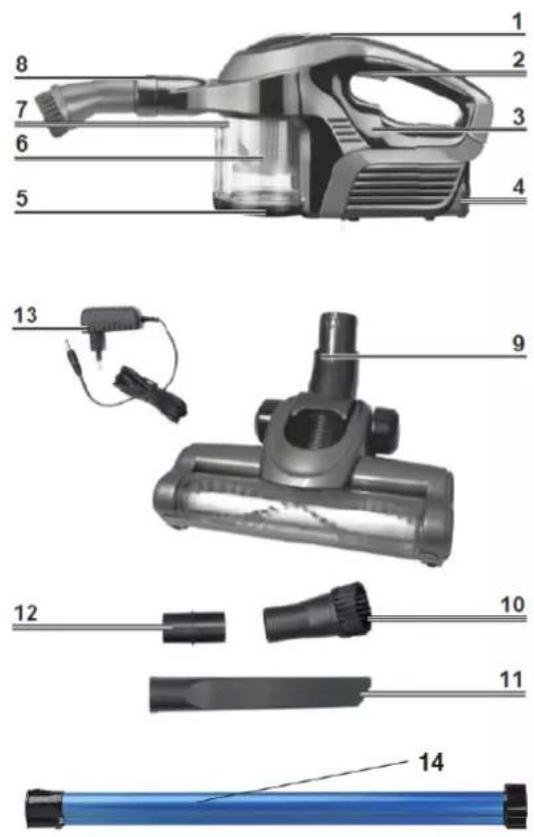
II. Product contents and device overview
text_image
1 2 3 4 5 6 7 8 9 10 11 12 13 141 Charge control light
2 On/Off switch
3 Motor assembly/main unit
4 Rechargeable battery (Removable)
5 Dust bin lid
6 Dust filter (located inside of the dust bin)
7 Dust bin
8 Suction opening
9 Floor nozzle
10 Brush nozzle
11 Tile nozzle
12 Nozzle adapter (is always attached to the suction opening first thing)
13 Mains adapter
Not shown
• HEPA filter (in the dust filter)
- charging station
14 Electric tube
Accessories :
Floor nozzle
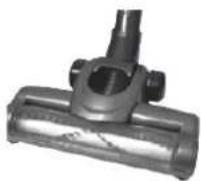
The floor nozzle is suitable for both carpets and smooth floors.
Tile nozzle
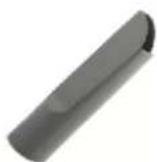
Use the tile nozzle to vacuum up dirt and dust. It is suitable for cushions, cleaning the inside of cars and is perfect for hard-to-reach areas like corners, niches or gaps.
Brush nozzle
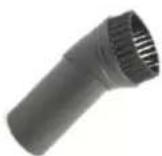
Use the brush nozzle for all objects, furniture, lamps, window sills, profile strips and skirting boards with uneven surfaces as well as delicate objects like picture frames, lamp shades, keyboards, books etc.
III. Using the product
Keep children and animals away from the packaging material. Danger of suffocation exists!
- Unpack all parts, remove the foils and transport guards and make sure that the product contents are complete (see chapter “Product contents and device overview”) and check for any damages from transport. If you identify damages to the components, do not use them (!), instead contact our customer service centre.
- Charge the rechargeable battery (see chapter "Charging the rechargeable battery").
Charging the rechargeable battery
- Pull the mains adapter out of the socket if you do not use it for a prolonged period.
-
Completely charge the rechargeable battery before first use for maximum charge. Charging takes approx. 4 to 5 hours.
If the rechargeable battery is completely depleted after use, it will take approx. 4 to 5 hours to recharge the rechargeable battery. -
Remove the rechargeable battery from the device: Push the latch on the rechargeable battery (see photo) and remove it.
- Insert the rechargeable battery into the charging station.
- First connect the barrel connector of the mains adapter to the connector jack on the charging station and then to a properly installed, easily accessible socket.
- The green and the red control light on the charging station will be illuminated. The rechargeable battery will be charged.
- Let the rechargeable battery of the device charge for approx.
4 to 5 hours in order to reach the maximum charge.
If only the green control light is still illuminated, the rechargeable battery has been fully charged. - First disconnect the mains adapter from the mains supply and then the barrel connector from the charging station.
- Remove the rechargeable battery from the charging station and insert it in the device again.
Operation
During use, never hold the nozzles near body parts and do not reach into them. The device could attach itself to them and you could be injured. If the vacuum cleaner attaches itself to the floor, turn it off immediately.
- Keep the nozzles away from animals during use. Do not attempt to vacuum off animals with the device. The device could attach itself to them and you could be injured. If the vacuum cleaner attaches itself to the floor, turn it off immediately.
■ Make sure that there are no large, pointy objects on the area to be cleaned.
Do not in any case vacuum up the following:
- smouldering ashes, cigarette butts, matches etc.,
- flammable or ignitable materials,
- very fine dust (e.g. cement dust), ash or toner,
- pointy, hard objects such as larger glass shards,
- liquids and wet dirt.
■ Empty and clean the dust bin after every use (see chapter “Cleaning and storage”).
- Do not use the device when it is connected to the mains adapter.
-
Stick the nozzle adapter on the suction opening.
-
If desired, attach the extension tube to the nozzle adapter.
-
Attach the desired nozzle to the extension tube.
The nozzles can also be attached to the nozzle adapter directly without attaching the extension tube between them.
- Switch the device on. This can be done in one of two ways:
- By gently holding the On / Off switch down. The device will switch off when you let it go.
- By firmly pushing the On / Off switch once and then releasing it. If you would like to switch the device back off, push the On / Off switch again
-
The device will immediately start to vacuum clean.
-
Run the device over the area to be cleaned.
-
Turn the device off.
-
If you would like to remove the nozzles, simply pull them off the nozzle adapter or off of the extension tubes.
IV. Cleaning and storage
■ Ensure that the device has been deactivated before you clean it!
- Never immerse the device, the mains adapter, the rechargeable battery or the cable in water or other liquids.
The device may not be connected with the mains adapter when cleaning the dust bin.
- Never use soap or other cleaners to clean the dust and HEPA fi Iter. Otherwise this would damage the filters.
The filters are not suitable for the washing machine, dishwasher or dryer! Only air
dry the filters and do not in any case use a hair dryer.
■ Only put the device back together once all parts are completely dry!
Do not use any corrosive or abrasive cleaners to clean the housing. They could damage the surface. If needed, clean the housing with a damp, soft cloth.
Emptying the dust bin and cleaning the filters
- Take the dust bin off of the device by turning it approx. one quarter revolution counterclockwise and pulling it out.
- Push the release button on the dust bin and empty the dust bin over a waste bin.
- Pull the fi Iters out of the dust bin: Turn the dust fi Iter approx. one quarter turn counterclockwise and remove both fi Iters. Tap out the fi Iters over a waste bin.
- If necessary, clean the dust bin and the fi Iters with clean, lukewarm water.
- Allow all parts to dry completely before assembling them.
ATTENTION: Do not in any case insert the fi Iters if they are still moist. Reverse the steps to assemble them.
Make sure that the catches on the dust bin are inserted into the corresponding recesses on the main unit.
Otherwise, the dust bin will not correctly lock into the device.
- Store the device and accessories in a dry area out of the sun that is not accessible to children and animals.
If you do not want to use the device for a prolonged period, remove the rechargeable battery to stay on the safe side (see section “Removing the rechargeable battery”).
V. Troubleshooting
If the device is not working properly, please check whether you are able to rectify the problem yourself first.
Do not attempt to repair a defective device yourself!
| PROBLEM | POSSIBLE REASON | POSSIBLE SOLUTION |
| Hand vacuum do not operate | 1. Battery is discharged2. Battery is dead (battery won’t hold charge)3. Contacts between the unit and the charging stand are dirty4. No power in electrical outlet supplying transformer5. Charger is plugged in | 1. Charge unit2. Dispose of unit3. Wipe and clean dirt from contacts4. Check fuse or breaker, replace fuse/reset breaker5. Unplug charger |
| Motorized brush do not work | 1. The agitator is blocked with debris or string2. The belt is broken3. Power unit/hand vacuum cleaner is not seated correctly. | 1. Remove debris from agitator. If there is string or thread wrapped out gently with scissors2. Call customer service3. Seat the power unit/hand vacuum cleaner correctly. |
| Hand vacuum do not pick up or suction power is weak | 1. Dust cup container is full2. Dust cup filter needs cleaning or replacement3. Units needs recharging | 1. Empty dust cup container2. Remove dust cup filter and check for object in air dust and remove it. Clean or replace dust cup filter3. Charge unit |
| Dust escaping from hand vacuum | 1. Dust cup container is full2. Dust cup filter is not installed correctly3. Puncture/hole in dust cup filter | 1. Empty dust cup container2. Review dust cup filter installation instructions.3. Replace dust cup filter |
| Battery do not hold charge | 1. Battery has reached the end of its service life. | Call customer service |
Removing the rechargeable battery
Do not open the rechargeable battery; there is a risk of a short circuit; irritating vapours or corrosive liquids may also be emitted.
Do not expose the rechargeable battery to intense sunlight, heat or fire; there is a risk of explosion.
This device has a rechargeable battery; it must be removed before disposing of the old device.
- The rechargeable battery is located on the bottom of the main unit.
- Push the latch on the rechargeable battery (see photo) and remove it.
- Dispose of the rechargeable battery in an environmentally-friendly manner (collection points or vendors).
Dispose of the article in an environmentally friendly manner. It should not be disposed of in the normal household waste. Please dispose of it at a recycling centre for used electrical and electronic devices. You can obtain more information from your local authorities.
Rechargeable batteries and batteries must be removed and disposed of separately before disposing of the device. To protect the environment, batteries and rechargeable batteries may not be disposed of together with normal household waste. Instead, they must be turned in at appropriate collection points. Please also observe applicable statutory provisions regulating the disposal of batteries.
ENVIRONMENT
CAUTION:

Do not dispose of this product as it has with other household products. There is a separation of this waste product into communities, you will need to inform your local authorities about the places where you can return this product. In fact, electrical and electronic products contain hazardous substances that have harmful effects on the environment or human health and should be recycled.
The symbol here indicates that electrical and electronic equipment should be chosen carefully, a wheeled waste container is marked with a cross.
FRANÇAIS
Cher client,