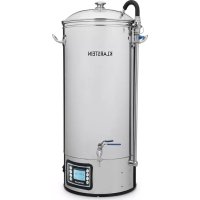
Mundschenk XXL - Beer dispenser Klarstein - Free user manual and instructions
Find the device manual for free Mundschenk XXL Klarstein in PDF.


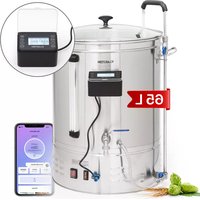
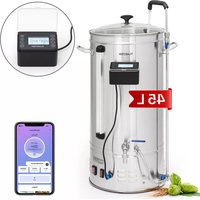
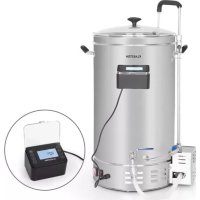
| Product type | Beer brewing machine |
| Brand | Klarstein |
| Model | Mundschenk XXL |
| Article numbers | 10030521, 10040144, 10031629, 10040145 |
| Power supply | 220-240 V ~ 50/60 Hz |
| Power | 2500 W / 3000 W (depending on model) |
| Tank capacity | 30 liters |
| Maximum load weight | Up to 40 kg |
| Tank material | Stainless steel |
| Main functions | Manual mode, automatic mode (up to 9 recipes), digital display, recirculation pump, drain valve, timer |
| Temperature range | Up to 100 °C (boiling) |
| Display | LCD with temperature, power and timer settings |
| Included accessories | Tank, glass lid, perforated strainer, malt hose, circulation pipe, tap, cooling coil (not included?) |
| Maintenance and cleaning | Clean before and after each use; disassemble the pump if blocked; use hot water and a suitable cleaning product |
| Safety | Do not use empty, do not move while operating, overheat protection (sensor), automatic shutdown in case of error |
| Spare parts and repairability | Spare parts available from the manufacturer; temperature sensor replaceable by a professional |
| Warranty | Manufacturer’s warranty (see terms) |
| Recycling | Do not dispose of with household waste; deposit at a WEEE collection point |
Frequently Asked Questions - Mundschenk XXL Klarstein
User questions about Mundschenk XXL Klarstein
0 question about this device. Answer the ones you know or ask your own.
Ask a new question about this device
Download the instructions for your Beer dispenser in PDF format for free! Find your manual Mundschenk XXL - Klarstein and take your electronic device back in hand. On this page are published all the documents necessary for the use of your device. Mundschenk XXL by Klarstein.
USER MANUAL Mundschenk XXL Klarstein
Berlin Brands Group UK Ltd
PO Box 1145
Oxford,OX1 9UW
United Kingdom
SICHERHEITSHINWEISE
Congratulations on purchasing this device. Please read the following instructions carefully and follow them to prevent possible damages. We assume no liability for damage caused by disregard of the instructions and improper use. Scan the QR code to get access to the latest user manual and more product information.

CONTENTS
Safety Instructions 18
Delivery and Assembly 18
Display and Settings 22
Brewing Process (example) 26
Recipe Selection in Auto Mode 27
Troubleshooting 28
Disposal Considerations 28
TECHNICAL DATA
| Item number | 10030521, 10040144 | 0031629, 10040145 |
| Power supply | 220-240 V ~ 50/60 Hz | |
| Power consumption | 2500 W 3000 W | |
MANUFACTURER & IMPORTER (UK)
Manufacturer:
Chal-Tec GmbH, Wallstrasse 16, 10179 Berlin, Germany.
Importer for Great Britain:
Berlin Brands Group UK Ltd
PO Box 1145
Oxford,OX1 9UW
United Kingdom
SAFETY INSTRUCTIONS
- Read all the instruction carefully, and keep this manual for future further reference.
- Do not use the device if the cord or plug is damaged. It should be replaced before used.
- Do not use a multi-sockets as power output of this device is too high. Overloading the electric diffuse must be avoided. As the device requires extra power, do not use the same fuse to protect other „ Large Consumers".
- Check the products rating label and make sure the water urn voltage is fit for your outlet voltage before using
- The device must be only used as intended. It must be operated in a safe, fault-free condition. Ensure to check the proper condition prior to each use.
- This appliance is intended to be used in household and similar applications such as: staff kitchen areas in shops, offices and other working environments; farm houses, By clients in hotels, motels and other residential type environments; bed and breakfast type environments. Do not use this appliance outdoor.
- The appliance is only to be installed in locations where it can be overseen by trained personnel.
Setting Up The Device
- The device must be positioned on a stable, secure and horizontal support structure prior to use.
- A full vessel contains boiling hot liquids and can weigh up to 40kg . Horizontal positioning is a prerequisite for transfer pumping during the brewing process. Avoid an unsteady base.
- The device may not be moved during the brewing process. The handles are only meant for transporting the device in an empty state.
- It is imperative to keep children, frail persons, and animals away from the device while it is in operation. Remember boiling water is very dangerous.
- Always clean all the parts of your brewing equipment, hygiene is imperative to get good brewing results.
- Before use, it is acceptable to heat a quantity of hot water in the boiler to use for sterilizing brewing equipment etc.
DELIVERY AND ASSEMBLY
Structure of the system
With the vessel, almost all styles of beer can be brewed. To do this successfully, the system must be correctly set up. Make yourself familiar with the features of the system.
Scope of delivery
The following parts are included in delivery:
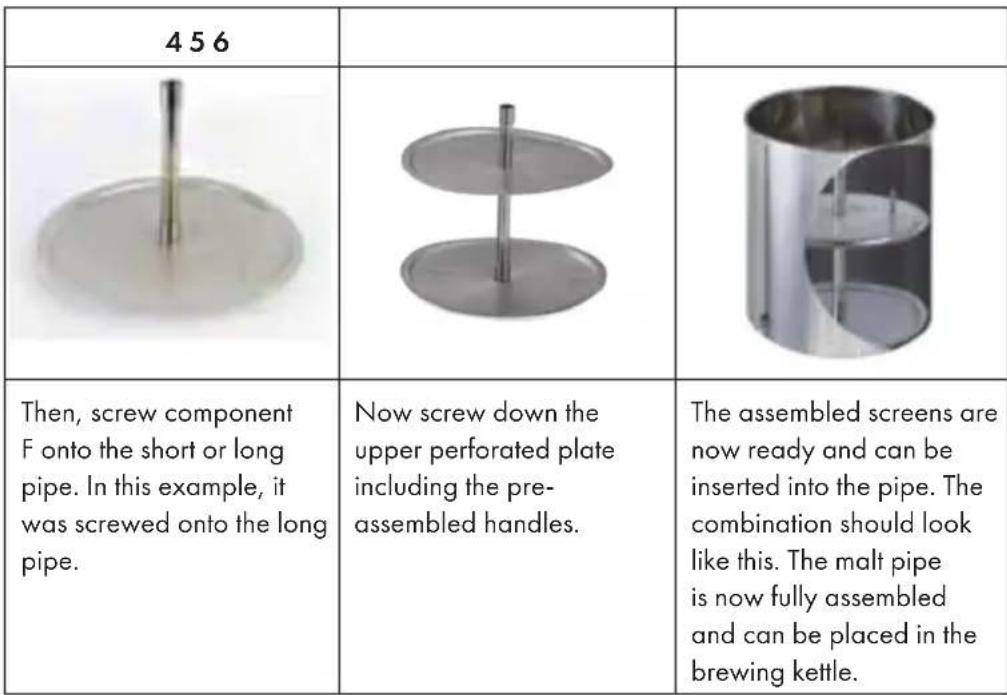
Assembly of the malt pipe
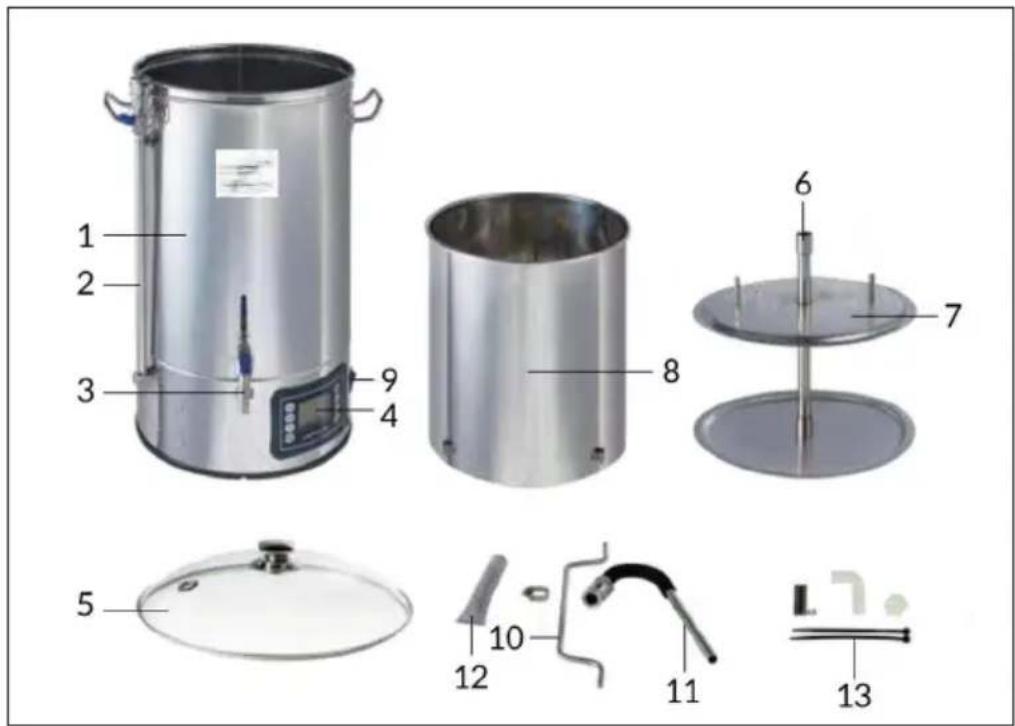
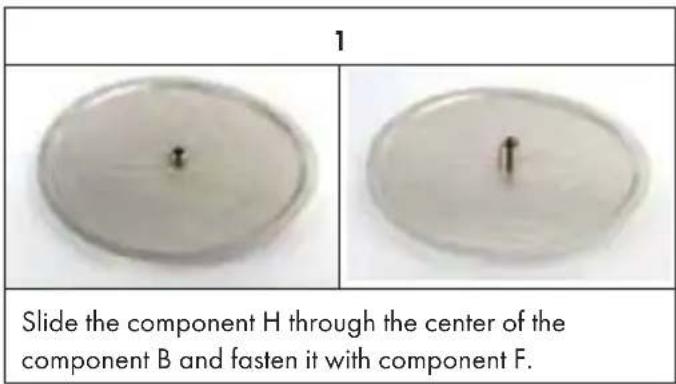
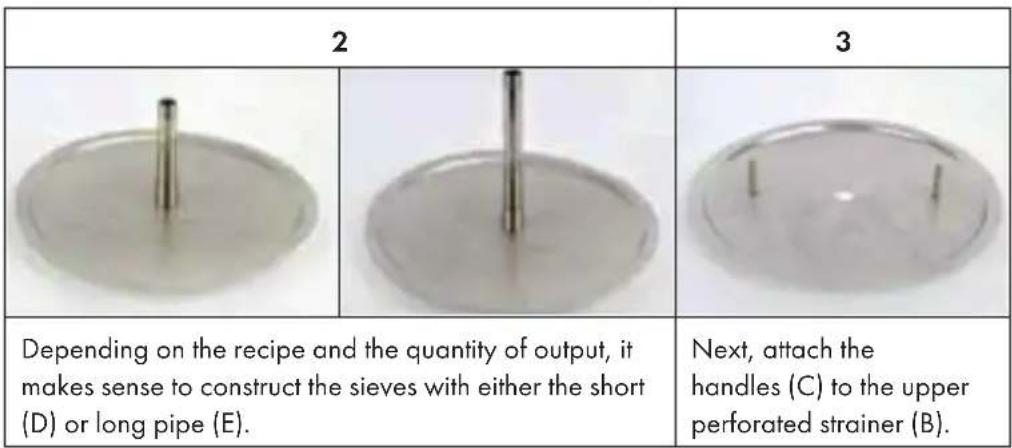
First, the perforated screens must be assembled. For this the following parts are needed:
A Perforated sheet above with 2 small holes
B Perforated plate below
C 2 handles
D Short pipe
E Long pipe
F 2 sleeves with through thread
G Sleeve with thread
H Nipple with external thread
Cap
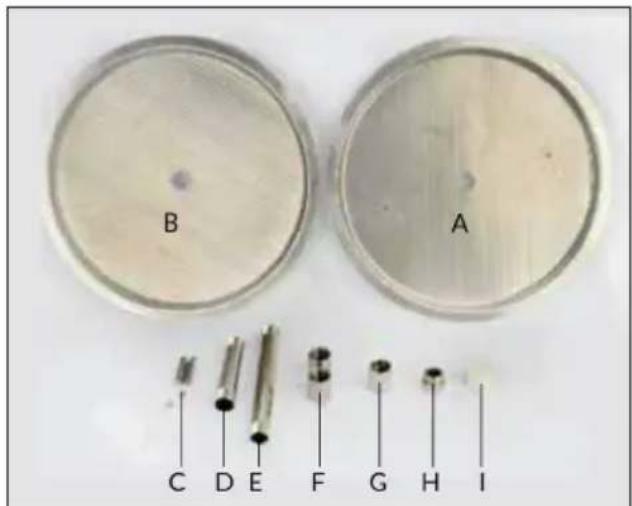
1 Boiler 30 liters
2 Circulation line with ball valve, stainless steel
3 1 / 2 "stainless steel ball valve
4 Digital programmable control
5 Glass lid
6 Overflow tube
7 Perforated strainer
8 Malt pipe
9 Switches
10 Handle for the malt tube
11 Curved pipe for circulation
12 Filter
13 Accessories
Assembly of the circulation pipe
We recommend that you do not run the pump without water. The boiler must be filled with water before switching on the pump.
We recommend using the pump during the mashing process.
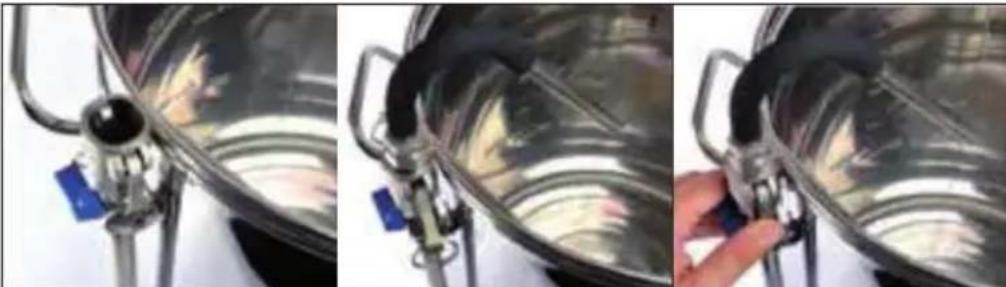
- Before switching on the pump, make sure that the curved pipe (11) is mounted. Mount the curved pipe (11) by placing it on the circulation pipe (2). Check that the black gasket is installed and lock the curved pipe (11) by pushing the two handles down. If you want to use the glass lid (5) when mashing, you must put on the lid (5) before assembling the curved pipe (11). The curved pipe (11) should first be inserted through the hole in the lid (5).
- Set the flow rate on the circulation pipe with the blue valve for a correct circulation speed.
- The blue valve on the circulation pipe in horizontal position closes the ball valve. The blue valve on the circulation line in vertical position opens the ball valve.
- Do not run the pump while the wort is cooking.
- It is not recommended to use the pump to pump the wort after cooling, as there is no filter on the pump inlet. This can cause brewing deposits to enter the pump, which can block and damage the system.
Note: When the assembled malt tube is in the brewing kettle and everything is correctly connected, cleaning can begin.
Cleaning the system
Before the brewing machine is used to brew beer, it should be thoroughly cleaned. To this end, the items must be checked for contamination. If any exist, they must be removed with a suitable cleaning agent. After assembling the system, fill the system with about 20 liters of water and a suitable cleaning agent. This cleaning mixture should circulate at about 60 degrees for half an hour. Afterwards, the device including all lines must be rinsed with water. After this process, the brewing kettle can be used to brew beer.
DISPLAY AND SETTINGS
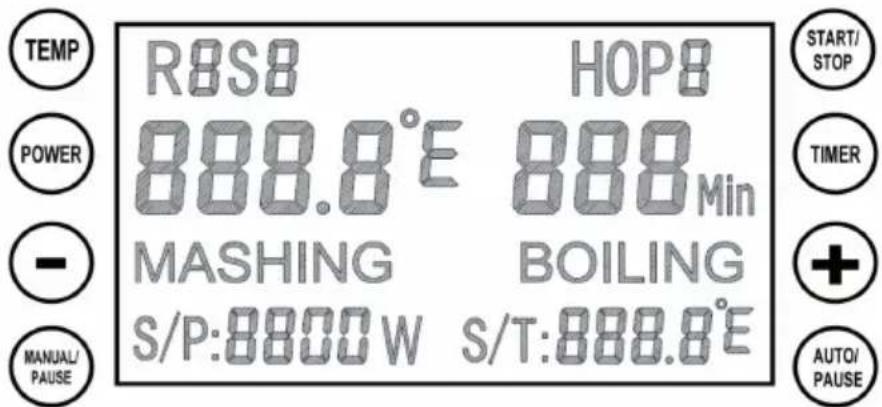
Manual Mode Setting
1 Switch on the power switch, then press the MANUAL button.
2. TEMP is for Temperature setting, POWER is for Wattage setting, TIMER is for session timing. All 3 of these must be set before machine will start. These can be set in any order.
3 Press START button when all 3 settings have been made, and the manual session will start.
4 The default boiling temperature is 100^ in our program, the timer will not be triggered if temperature does not indicate 100^ . In this case, please put the cover on for 1-2 minutes (or see below) to achieve 100^ on the display.
5 If the machine starts to boil, but shows a lower temp on the display, make the following adjustment to set the temp at 100^ and trigger the timer.
6 Press ^ and n + n button together until the display shows the C1/F1 sign. Temperature correction range is from -10 ^ C to +10^
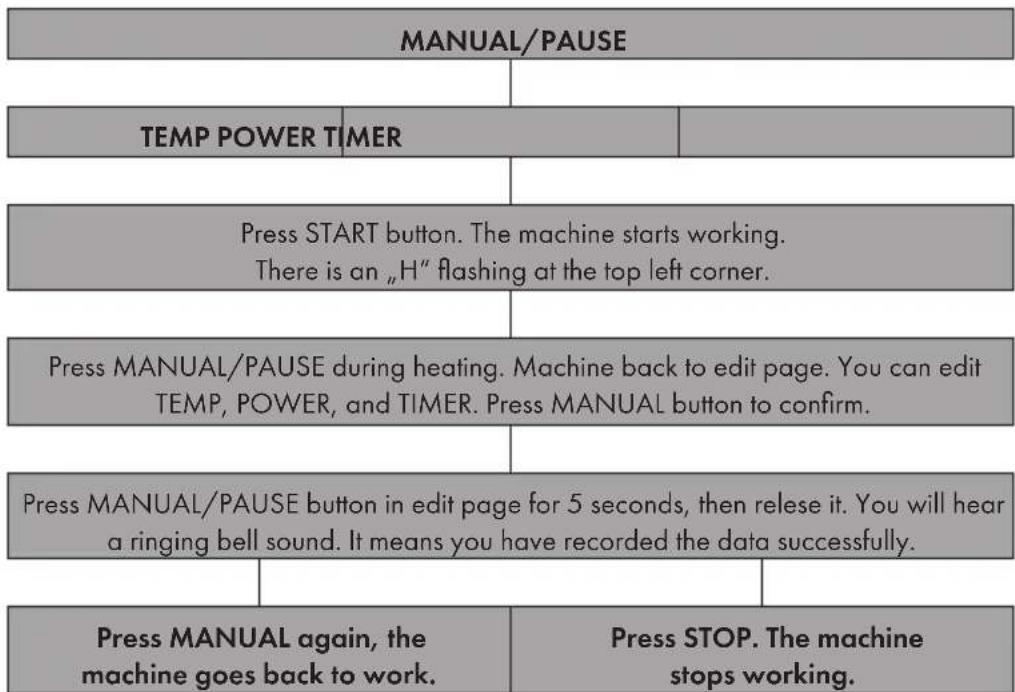
7 Press Manual/Pause button during heating, machine back to edit page. You can edit Temp/Power/Timer, then press Manual/button again to confirm and machine back to heating.
8 Long press TEMP for 5 seconds, switch degree centigrade to Fahrenheit. This operation only can be proceeded when you switch on the machine before any setting.
Memory Function in Manual Mode
1 Press MANUAL/PAUSE button in edit page for 5 seconds, and release it. You can record the last setting, There is ringing sound of bell for successful recording.
2 Press START button after above operation, machine back to work, and carry out the input data.
3 Press STOP button, machine stop working.
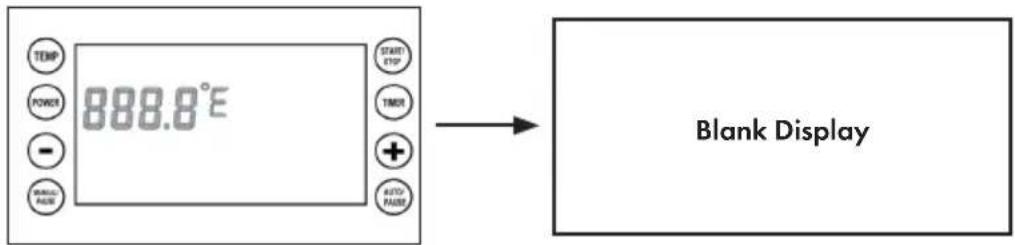
4 Long press AUTO/PAUSE button in BLANK PAGE as below (display shown current temperature only as below) for 5 seconds to restore factory settings, there's a slower ringing for restoring successfully.
Auto Mode Setting
1 Switch on the device, then press AUTO button.
2 S1 will be shown on the top left corner, input the 3 settings - TEMP, TIMER and POWER. (as above)
3 After you have set the 1st program, press AUTO button again then enter into 2nd program setting. 3rd to 6th programs are set as 1st and 2nd.
4 When you have entered up to 9 steps as you require, press the START button to confirm the above step mashing settings.
5 When you have entered up to 9 steps as you require, press the START button to confirm the above step. This program only supports one boiling setting in each Recipe. You can adjust the boiling power during operation anytime. The step after boiling will be skipped if 9 steps is too much for you. This program only supports one boiling setting in each Recipe. You can adjust the boiling power during operation anytime.
6 When S1 temperature is reached, there's reminder ringing, timer will not countdown unless you press auto button to confirm. It is ingredients filling reminder.
7 The boiling reminder is same as above, when machine finish the step before boiling, there is reminder ringing, program will not enter boiling step unless you press AUTO button for confirmation. It is sparging reminder.
8 PAUSE button will stop the element and timer working temporarily, and you can amend the data, afterward, press AUTO to continue.
9 Press START button when auto mode is running, you can skip the step you do not need instantly.
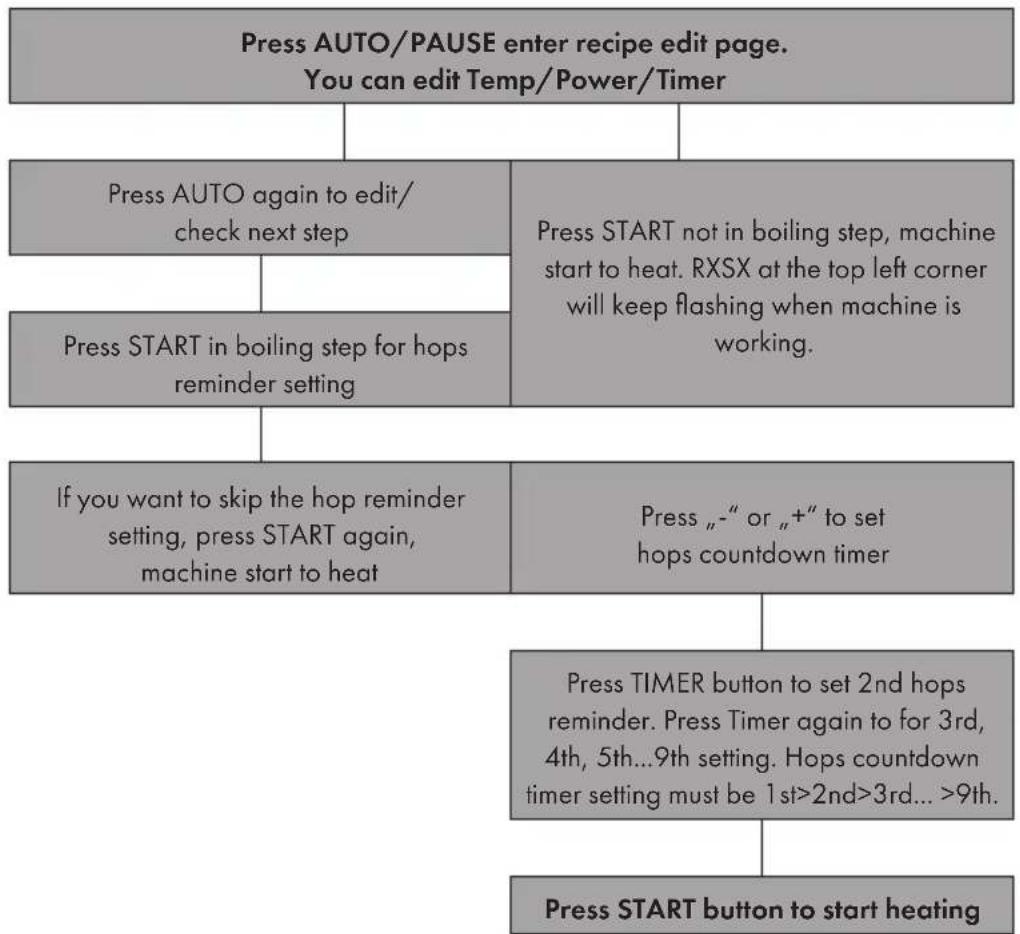
10 Setting hop reminder in boiling process, press - or + for countdown timer setting. Press TIMER button for 2nd, 3rd...9th setting. The countdown timer must be boiling leads time>1st >2nd>3rd...>9th. Press START button start to heat.
11 Long pressing POWER and TIMER buttons for 5s in BLANK PAGE, operation enter to recipe selection. Press " - " or " + " to choose required recipe. Recipe storage is up to 9 programs. Press Start button to confirm the selected recipe, BLANK PAGE will be shown on display, then press AUTO/PAUSE button enter the chosen recipe edit page. You can press START button to run the picked up program instantly or press AUTO/PAUSE button to edit/check the program step by step
12 If you press STOP button to skip all the step, machine stop working, and display shown END, bell ringing for 30s, press the STOP button again enter to BLANK PAGE.
Memory Function in Auto Mode
1 After setting all the data you need in auto mode, press STOP button until BLANK PAGE. Please do not switch off the machine! Follow below step for recording.
2 Press MANUAL button enter manual edit page, then long press MANUAL button for 5 seconds then release it. You can record the last manual and auto mode setting. There is ringing sound of bell for successful recording.
3 Switch off/on the machine, then press AUTO button, the 1st step of last chosen program will be shown on the display.
4 Press START button, machine start working.
5 Our program not support batch storage. Each recording need to repeat above instruction.
BREWING PROCESS (EXAMPLE)
Always Clean the machine before and after use.
- Assemble the Bazooka filter to the tap, and add the required quantity of water before switching on.
- Heat up the water to 66 - 68^, then add the grain into grain basket and stir it gently.
- When the correct temperature is reached, start the circulation pump and regulate the flow as described in the next paragraph.
RECIPSE SELECTION IN AUTO MODE
| Press Power & Timer for 5seconds in BLANK PAGE,enter to Recipe selection operation | |
| Press „-“ or „+“ for recipe selection. | |
| Press Start/Stop to confirm the chosen Recipe enter BLANK PAGE.Please do not switch off the machine. | |
| Press Auto/Pause button enter chosen recipe edit page.You can edit Power/Timer/Temp or press Start/Stop button to start the machine. | |
The default time for the 1st pass is 60 minutes (depending on the recipe).
- The temperature for the 2nd pass is 78 - 80^ , the run time is 20 minutes (depending on the recipe).
After mashing, carefully lift the grain basket by the handle and attach it to the rim of the kettle
- Sprinkle the basket with water to remove any sugar residue from the grain in the basket, and then drain the basket for another 10 minutes. Remove it afterwards
- Heat the appliance up to boiling temperature. The cooking time is 90 minutes (depending on the recipe).
- Add the remaining ingredients at the right time according to your recipe.
- Immerse the cooling coil 15 minutes before the end of the cooking process to sterilize it.
After cooking, cool the mash to 20^ with the help of the cooling coil before filling it into a fermentation vessel via the drain tap on the front of the boiler.
| Refining | Lift up the grain basket using the basket handle |
TROUBLESHOOTING
| Problem Possible cause and suggested solution | |
| Ingredients stuck in the pump. | Flush the pump by connecting a hose to the curve pipe. |
| Dismantle the pump to remove the ingredients. | |
| Failing to reach 100 °C. Put cover on for 1 to 2 mins. Do temperature correction. | |
| Temperature correction. Do | temperature correction. Press " , - " and " , + " at the same time enter into C1 temperature correction setting. Setting range is from -10°C to +10°C (or -50°F to +50°F, respectively). Press Temp button to confirm the setting and exist the temperature correction page |
| ERR-1 shown on display. | Temperature is lower than -20 °C, it is low temperature warning. Senor connector is loosen. Open the underneath and check the sensor. Re-connect it if loosen. |
| ERR-2 shown on display. | Temperature is higher than 120 °C, it is overheat/boil-dry warning. Sensor is failure, please contact dealer for replacement. |
DISPOSAL CONSIDERATIONS
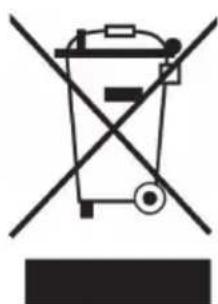
If there is a legal regulation for the disposal of electrical and electronic devices in your country, this symbol on the product or on the packaging indicates that this product must not be disposed of with household waste. Instead, it must be taken to a collection point for the recycling of electrical and electronic equipment. By disposing of it in accordance with the rules, you are protecting the environment and the health of your fellow human beings from negative consequences. For information about the recycling and disposal of this product, please contact your local authority or your household waste disposal service.
Estimado cliente:
Berlin Brands Group UK Ltd
PO Box 1145
Oxford,OX1 9UW
United Kingdom
Chere cliente, cher client,
Berlin Brands Group UK Ltd
PO Box 1145
Oxford,OX1 9UW
United Kingdom
CONSIGNES DE SECURITE
PRODUTTORE IMPORTATORE (UK)
Produtlore:
Chal-Tec GmbH, Wallstraße 16, 10179 Berlin, Germania.
Berlin Brands Group UK Ltd
PO Box 1145
Oxford,OX1 9UW
United Kingdom
AVVERTENZE DI SICUREZZA

- SICHERHEITSHINWEISE
- CONTENTS
- TECHNICAL DATA
- MANUFACTURER & IMPORTER (UK)
- SAFETY INSTRUCTIONS
- Setting Up The Device
- DELIVERY AND ASSEMBLY
- Structure of the system
- Scope of delivery
- Assembly of the malt pipe
- Assembly of the circulation pipe
- Cleaning the system
- DISPLAY AND SETTINGS
- Manual Mode Setting
- Memory Function in Manual Mode
- Auto Mode Setting
- Memory Function in Auto Mode
- BREWING PROCESS (EXAMPLE)
- RECIPSE SELECTION IN AUTO MODE
- TROUBLESHOOTING
- DISPOSAL CONSIDERATIONS
- Estimado cliente:
- Chere cliente, cher client,
- CONSIGNES DE SECURITE
- PRODUTTORE IMPORTATORE (UK)
- AVVERTENZE DI SICUREZZA
Brand : Klarstein
Model : Mundschenk XXL
Category : Beer dispenser