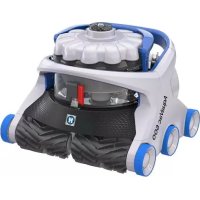
AquaVac 650 - Vacuum Cleaner HAYWARD - Free user manual and instructions
Find the device manual for free AquaVac 650 HAYWARD in PDF.



| Product type | Robotic pool cleaner |
| Brand | Hayward |
| Model | AquaVac 650 |
| Use | In-ground or above-ground pools up to 3 m deep |
| Maximum operating depth | 3 m |
| Water temperature range | 10 °C to 35 °C |
| Maximum ambient temperature | 40 °C |
| Power supply | Via TBTS power supply unit (Safety Extra Low Voltage), 230 V AC |
| Required electrical protection | Residual current circuit breaker (RCCB) of 30 mA max |
| Cleaning types | Full cycle (~150 min), Bottom only (~90 min), Waterline (~90 min, Wi-Fi models) |
| Program modes | One-time cycle, Weekly cycle (Wi-Fi), Recurring cycle (every 48h) |
| Debris collection system | SpinTech collector with TouchFree emptying |
| Retrieval function | Tug & Catch: pull the cable three times to bring the robot back to the waterline |
| Connectivity | Wi-Fi (AV6 Wi-Fi models) for control via AquaVac Connect app |
| Light indicators | On/Off LED, Wi-Fi LED, collector cleaning reminder indicator |
| Maintenance | Clean the collector after each use; lubricate seals if necessary |
| Box contents | Robot, power supply unit, cart (depending on model), accessory bag (lubricant, pin), manual |
| Safety instructions | Do not use when swimmers are present; do not operate out of water; disconnect before any intervention |
| Electrical standards | Compliant with CAN, AUS-NZ, Europe codes (CEC, AS/NZS3000, etc.) |
| Spare parts | Use only genuine Hayward parts |
| Manufacturer | Hayward, 1070 Allée des Chênes, 01150 Saint-Vulbas, France |
Frequently Asked Questions - AquaVac 650 HAYWARD
User questions about AquaVac 650 HAYWARD
0 question about this device. Answer the ones you know or ask your own.
Ask a new question about this device
Download the instructions for your Vacuum Cleaner in PDF format for free! Find your manual AquaVac 650 - HAYWARD and take your electronic device back in hand. On this page are published all the documents necessary for the use of your device. AquaVac 650 by HAYWARD.
USER MANUAL AquaVac 650 HAYWARD
Hayward Pool Products
620 Division Street
Elizabeth, NJ 07207
www.hayward.com
Hayward Pool Products Canada
2880 Plymouth Drive
Oakville, ON L6H 5R4
www.haywardpool.ca
Hayward Pool Europe
Hayward Pool Products (Australia) Pty Ltd.
Melbourne-Sydney-Brisbane-Perth
P.O Box 4384, Dandenong South VIC. 3164
www.hayward-pool.com.au
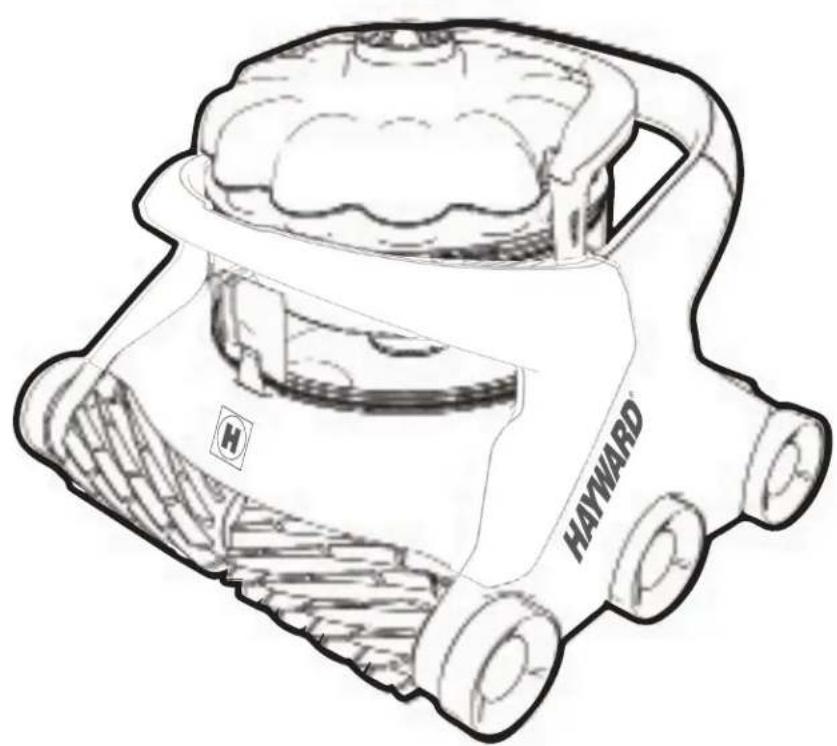
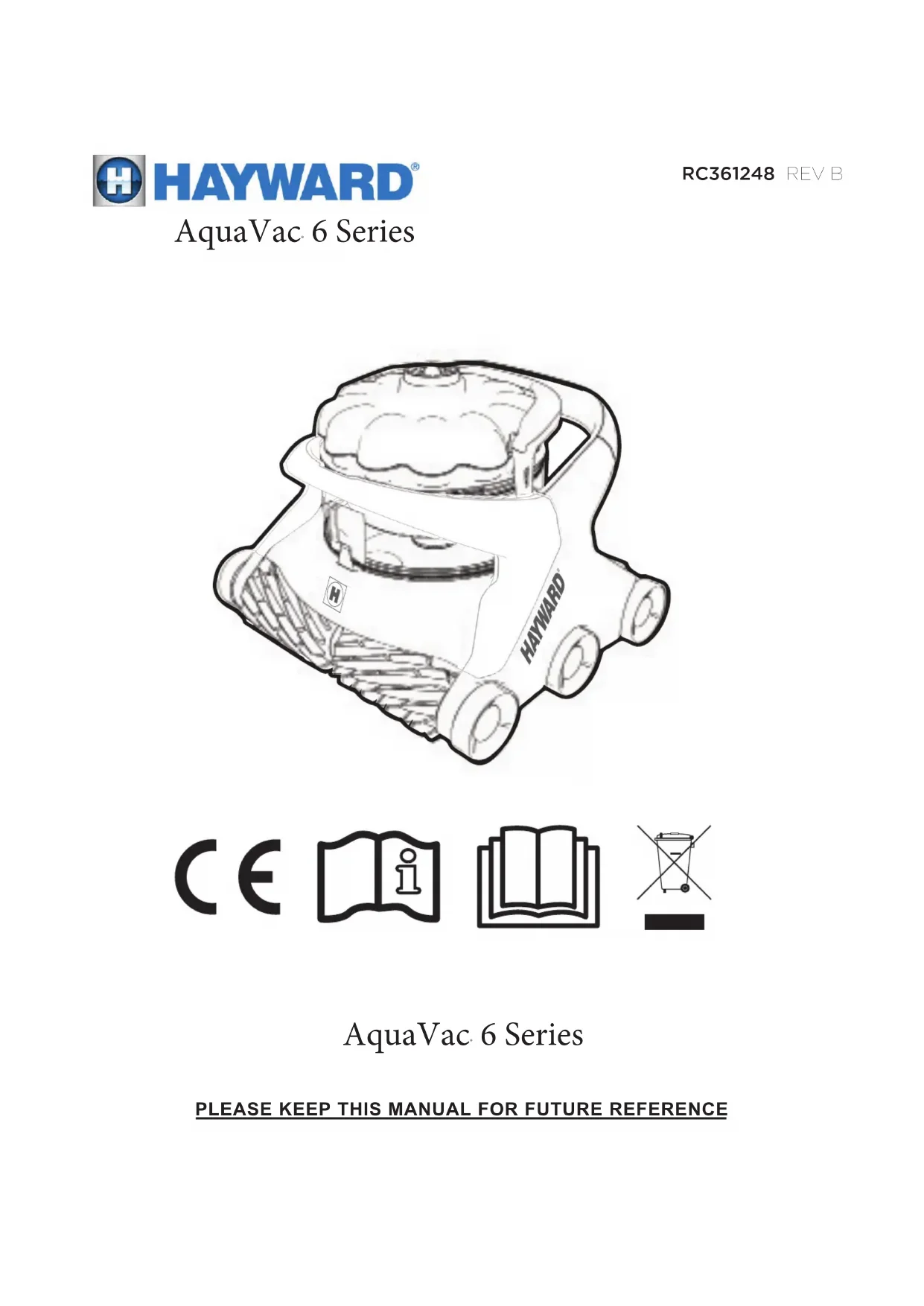
AquaVac 6 Series
CONSERVEZ CE MANUEL POUR CONSULTATION ULTRÉIREURE
INSTRUCTIONS DE SÉCURITÉ IMPORTANTES
PLEASE KEEP THIS MANUAL FOR FUTURE REFERENCE
IMPORTANT SAFETY INSTRUCTIONS
When installing and using this electrical equipment, basic safety precautions should always be observed including the following. Failure to adhere to the safety warnings below may result in severe injury, death or property damage.

READ AND FOLLOW ALL INSTRUCTIONS

This is the safety-alert symbol. When you see this symbol on your equipment or in this manual, look for one of the following signal words and be alert to the potential for personal injury.
WARNING warns about hazards that could cause serious personal injury, death or major property damage and, if ignored, presents a potential hazard.
CAUTION warns about hazards that will or can cause minor or moderate personal injury and/or property damage and, if ignored, presents a potential hazard. It also makes consumers aware of actions that are unpredictable and unsafe.
WARNING - RISK OF INJURY
- Closely supervise children and pets at all times to ensure they do not play with the cleaner - it is not a toy.
- Ensure that children do not attempt to access the cleaner while it is operating.
- This appliance is not intended for use by persons with reduced physical, sensory or mental capabilities, or lack of experience and knowledge, unless they have been given supervision or instruction concerning use of the appliance by a person responsible for their safety.
DO NOT PERMIT CHILDREN TO USE THIS PRODUCT.
- NEVER swim with the cleaner in the pool.
Always disconnect and completely remove the cleaner before entering the pool.
WARNING - RISK OF ELECTRICAL SHOCK
- All electrical wiring MUST be in conformance with applicable local codes and regulations (See table at end of document). Always follow local code requirements. Hazardous voltage can shock, burn, and cause death or serious property damage.
- The cleaner should only be used with the provided cleaner control unit, which supplies only Safety Extra Level Low Voltage (SELLV) to the cleaner.
- The cleaner control unit shall be located at least 3.5m (11.5 ft.) from the closest edge of the pool.
To reduce the risk of electric shock, DO NOT USE AN EXTENSION CORD to connect control unit to electrical outlet. This could create a safety hazard and/or damage to the cleaner. Provide a properly located electrical outlet per local building codes.
WARNING - RISK OF ELECTRICAL SHOCK
- Disconnect the cleaner control unit from the electrical outlet before carrying out any user maintenance. Before working on any equipment, disconnect control unit from the equipment.
- Do not bury cable. Do not operate the cleaner with a damaged cable. If the control unit power cord is damaged, it must be replaced by the manufacturer, service agent, or similarly qualified persons in order to avoid a hazard.
- In the United States and Canada, the cleaner control unit must be connected only to a supply circuit protected by a ground-fault circuit-interrupter (GFCI). Contact a qualified electrician if you cannot verify that the circuit is protected by a GFCI. This GFCI should be tested on a routine basis. To test the GFCI, push the test button. The GFCI should interrupt power. Push reset button. Power should be restored. If the GFCI fails to operate in this manner, the GFCI is defective. If the GFCI interrupts power to the cleaner control unit without the test button being pushed, a ground current is flowing, indicating the possibility of an electrical shock. Do not use the cleaner control unit. Disconnect the cleaner control unit and contact the manufacturer for assistance.
- In Europe, Australia and New Zealand, the cleaner control unit must be supplied through a residual current device (RCD) having a rated residual operating current not exceeding 30mA . Contact a qualified electrician if you cannot verify that the circuit is protected by a RCD.
- Never allow the plug to enter the water.
READ BEFORE USING THE CLEANER OPERATING CONDITIONS
- Do not operate outside the pool. This will damage the motor seal and void the warranty.
- Do not drag the cleaner out of the pool against the side wall. This could damage the cleaner and/or the pool wall.

CAUTION - RISK OF EQUIPMENT DAMAGE
- Only operate the cleaner for the period of time necessary to clean the pool. Excessive use is unnecessary and will cause cleaner parts to prematurely wear.
- Regularly inspect the cleaner, cables and control unit. Do not use if damaged or if any rough edges are visible on the cleaner. This can cause damage to the pool.
- Cleaner filter cartridges or debris canister should be thoroughly cleaned after each use or as often as needed to ensure the cleaner's optimal performance.
- Never store the cleaner with dirty filter cartridges or debris canister.
Water temperature operation range: min 50^ / 10^ , max 95^ / 35^ . Maximum operating depth: 3 m (10 ft.)
- Operating the cleaner in temperatures above or below this range may affect performance, and cause premature wear or failure.
- Ambient air temperature: max 104^ / 40^ .
- To protect itself from permanent damage, if exposed to extremely hot ambient temperature, the power-supply will limit or suspend operation until its temperature is down to an acceptable operating level. To limit overheating and reduced performance, it is recommended to keep the control unit out of direct sunlight and keep the cooling fan unobstructed.
Unpacking and Cleaner Preparation
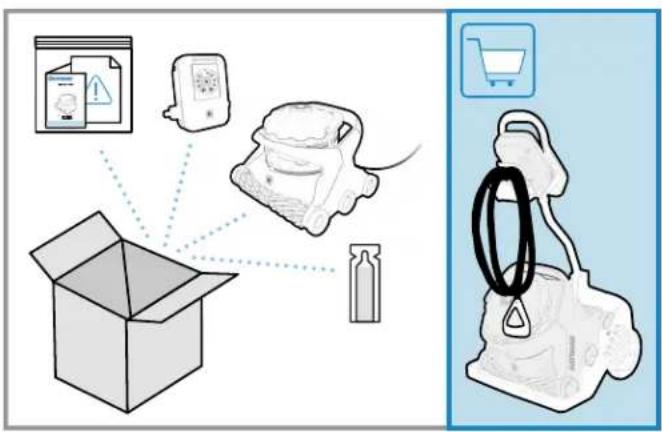
BOX CONTENTS
Operation instructions and warranty pack with product information (serial and model number)
- Accessory pack
Caddy cart handle attachment pin
Canister O-ring and gasket lubricant
- Cleaner with cable
Control unit
- Caddy cart (optional on some models)
UNPACKING
- Carefully remove the contents of the box from the top. Do not put the box on its side to remove content as some parts may fall out of the box and get damaged.
- Verify the contents of the box.
- Carefully read the operation instructions and warning document first.
- Assemble the caddy cart (if included with product).
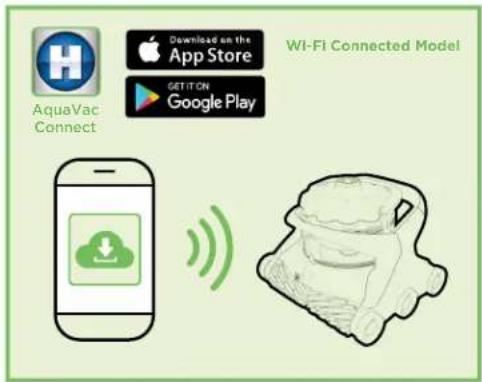
For Wi-Fi Connected Cleaner Version Only
Download and install the Hayward AquaVac Connect Application on your mobile device.
Pool Preparation


pH:7.2-7.8
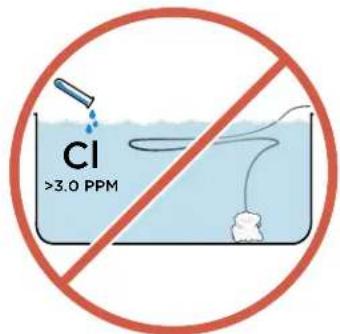
CI: 1.0-3.0 PPM
TAC: 80 - 120 PPM

50°-100°F
10^ - 37^

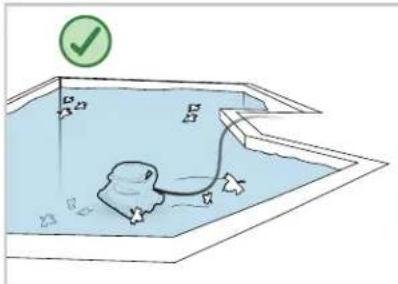
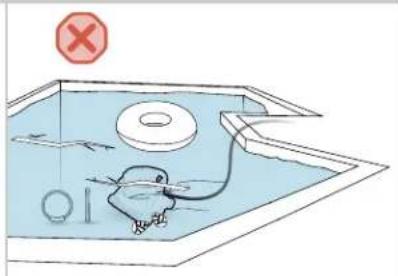
POOL PREPARATION
NEVER SWIM WITH THE CLEANER IN THE POOL.
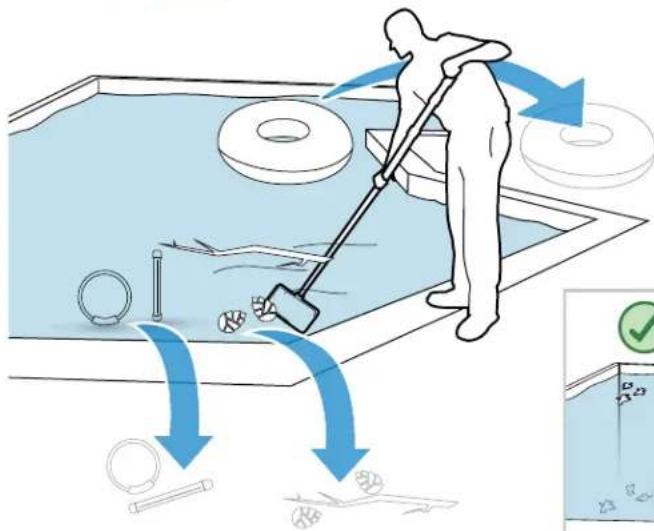
- Before using the cleaner, remove any items such as thermometers, toys and other accessories from the pool. Such items may cause damage to the cleaner or the pool. Large debris should also be removed manually from the pool before installing the cleaner.
- Chemical balance of water may affect cleaner performance, accelerate wear of certain parts, and may lead to more frequent maintenance.
DO NOT LEAVE THE CLEANER IN THE POOL WHEN CHEMICAL SHOCKING THE POOL.
pH should be adjusted and kept between 7.2 - 7.8.
- Free chlorine should be maintained between 1.0 - 3.0 PPM. The cleaner should never be used when chlorine level (or other oxidizer) exceeds the normal values.
Total alkalinity level should always be maintained between 80 - 150 PPM.
To keep the pool safe for swimming and protect your equipment, have the water tested frequently and balance chemicals accordingly.
NORMAL DEBRIS PICK-UP
- The SpinTech™ canister is intended to collect most visible debris by using a selective debris separation system.
- The cleaner is equipped with clog-free, filter-free, and TouchFree™ debris handling with advanced pick-up capability; it is not intended to filter very fine particles.
- When fine particles or algae are present in the pool, they will be put back in suspension to be captured by the pool filtration system. It is normal to observe some fine dust coming out of the cleaner when very fine debris load is present.
CAUTION - RISK OF EQUIPMENT DAMAGE
The cleaner is not intended to clean the pool after extended periods of disuse until the following steps have been taken:
- Clear the pool of any large objects that might interfere with the cleaner's operation.
- Check to see that the water is at the recommended level.
- Check the water chemistry. The water should be properly balanced (pH level), and the pool free from algae. Algae can adversely affect the operation and performance of the cleaner.
- Clean or backwash the filtration system without the cleaner in the pool.
NEW POOL CONSTRUCTION
- The cleaner should not be used to remove plaster dust or construction debris from new or renovated pools.
- Brush the newly constructed pool surface and vacuum new surface debris before installing the cleaner.
POOLS WITH EXCESSIVE DEBRIS
- The cleaner should not be used to remove excessive debris before a seasonal pool opening or following a high wind event or sandstorm.
- Pools with excessive amounts of debris should be vacuumed manually before using the cleaner.
Always empty the cleaner filter cartridges or debris canister when filled with debris.
Control Unit Set-Up
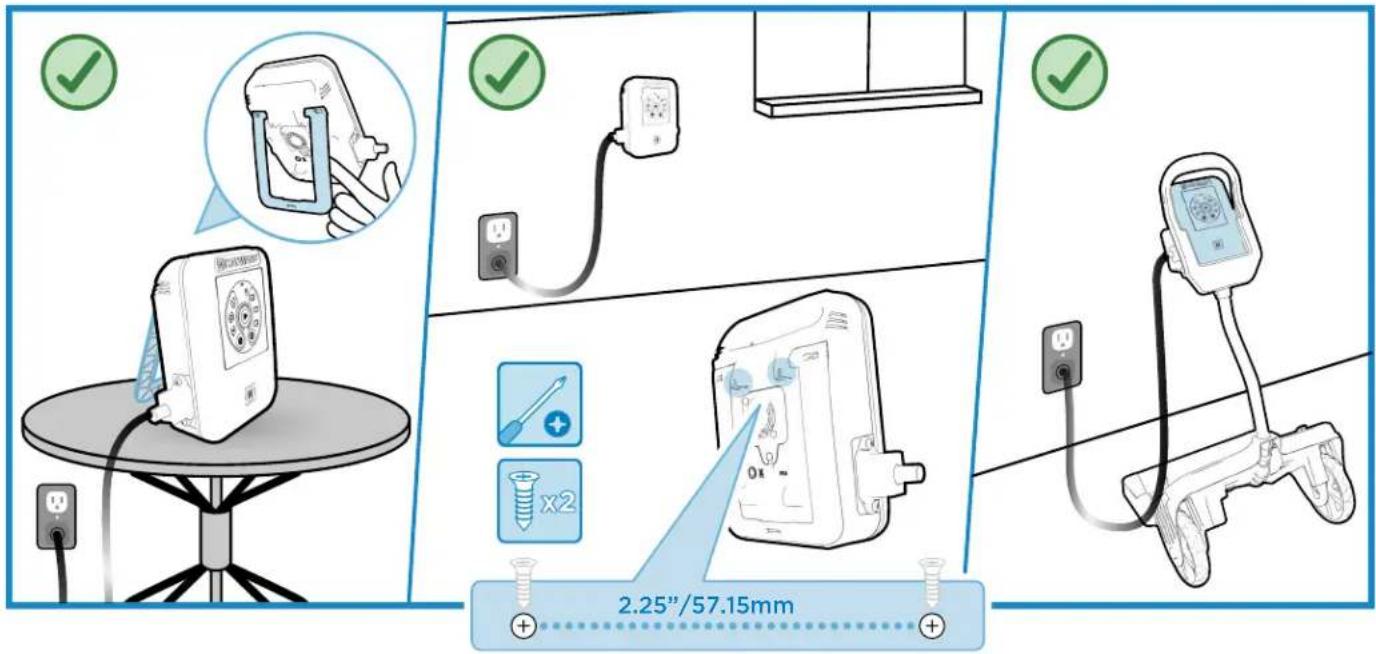
INSTALL
The AquaVac 6 Series Control Unit can be installed and used in different locations:
- Sitting on its kickstand, on a table or on the pool deck
- Using the wall mount attachment fixture located on the back of the control unit (Mounting screw template supplied on the reference guide)
- Positioned on the caddy cart control unit cradle
To find the best location for your control unit, please consider the following:
-
The control unit should preferably be kept in a shady area and the cooling fan kept unobstructed.
-
Leaving the control unit on the pool deck is acceptable but precautions should be taken so it does not get damaged by regular traffic around the pool or by playing children or pets.
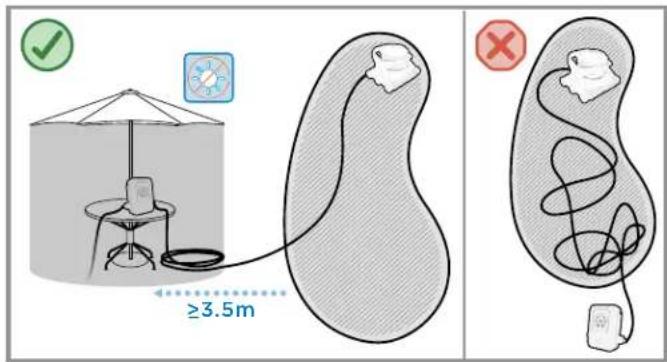
- The cleaner control unit should be located at least 3.5m (11.5 ft.) from the closest edge to the pool.
To reduce the risk of electric shock, DO NOT USE AN EXTENSION CORD to connect unit to electric supply. - Based on your region of the world, the cleaner control unit must be connected only to a supply circuit protected by a ground-fault circuit-interrupter (GFCI) or a residual current device (RCD).
Cleaner Set-Up

Connect the cleaner cable to the control unit and plug the control unit cord into a protected outlet.
CLEANER LOCATION
- It is ideal to have the control unit positioned near the midpoint of your pool (lengthwise).
Depending on the size and shape of your pool, the entire length of the floating cable may not be necessary. The floating cable should reach from the cleaner control unit to the furthest point in the pool, plus the depth at the deep end of the pool. To reduce cable tangling, any excess cable should be coiled and placed next to the control unit.
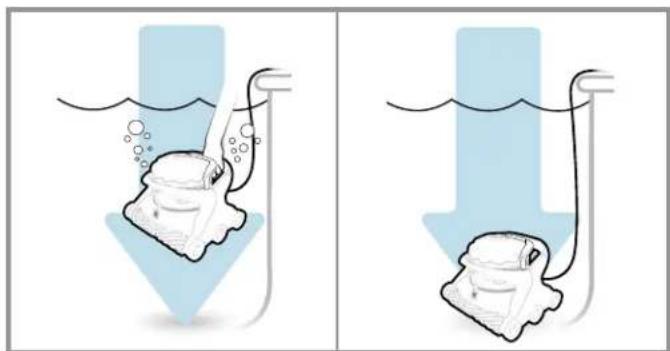
Submerge the cleaner in the pool by gently rocking it back, forth and sideways to help the cleaner purge trapped air and sink to the pool bottom.
STARTING THE CLEANER

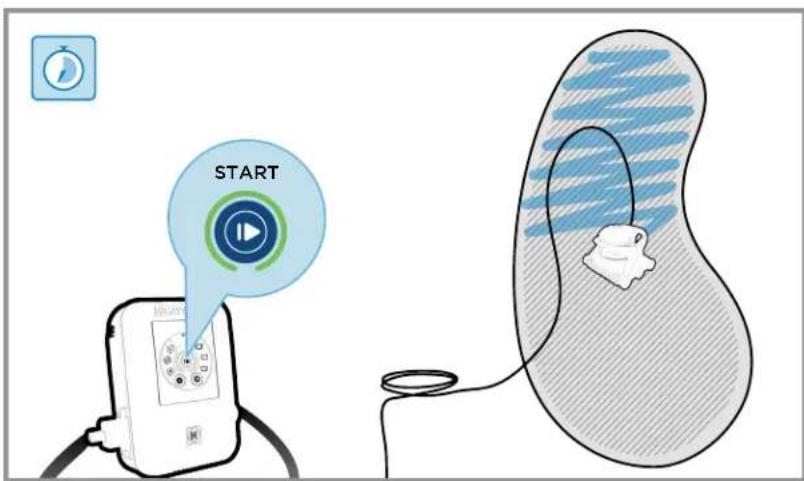
Start the cleaning cycle or program by pressing the Start/Stop button.
The blinking green light will change to solid green confirming that the selected mode and schedule are now enabled, and the cleaner can now start its program.
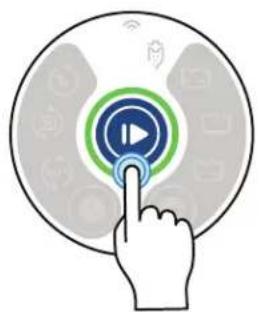

Wi-Fi LED -
Available on Wi-Fi models only.

Canister Cleaning Reminder - Inspect the cleaner's canister and empty, if needed. This reminder does not necessarily indicate the canister is full.

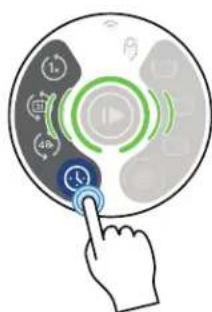
Schedule Mode - Press to choose a cleaning schedule.

Single Cleaning Cycle - Launch a single cleaning cycle.

Weekly Calendar Cycle - Launch the programmed daily cleaning schedule on your AquaVac connect app. Available on Wi-Fi models only.

Recurring Cycle - Launch a cleaning cycle every 48 hours (At the time it's been activated) or at the specific time set on your AquaVac connect app (Wi-Fi models only).
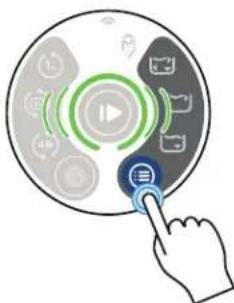

Cleaning Mode - Press to choose a cleaning mode.

Full Cycle - The cleaner will clean the pool floor thoroughly, walls and waterline minimally. (-150 mins.)

Waterline Mode - The cleaner will clean the waterline thoroughly and may additionally clean the bottom to relocate. (-90 mins.) Available on Wi-Fi models only.

Floor Mode - The cleaner will clean only the floor of the pool. This mode is often used on pools equipped with automatic covers, and is enabled to avoid the cleaner from climbing the wall and touching the pool cover. (-90 mins.)
CLEANING CYCLE
- During its cleaning cycle the cleaner may not climb the wall or any vertical surfaces every time. It will adjust its cleaning sequence to offer optimal pool coverage.
- For a quicker cleaning of the main area of the pool, the Bottom Only mode may be selected.
It is normal for the cleaner to operate in both forward and reverse directions. -
To avoid risk of damage or injury, the cleaner will not operate when out of the water. It is equipped with sensors that will allow it to recover from beach entry style pools or shallow areas.
-
The cleaner is equipped with an anti-tangling, electronic cable which balances the left and right turning sequence during a cleaning cycle. If running multiple cycles without removing the cleaner, the cable may show some twisting. To straighten the cleaner cable, let it lie in the sun, removing any bends or kinks from operation or storage.
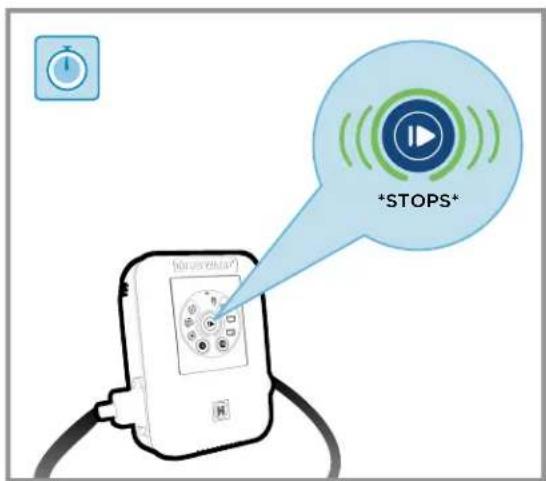
- When the cleaning cycle is completed, the cleaner will go into stand-by mode for 30 minutes (Start/Stop button light is blinking green).
- If no action is performed for 30 minutes, the cleaner will go into sleep mode (Start/Stop button light turns solid blue).
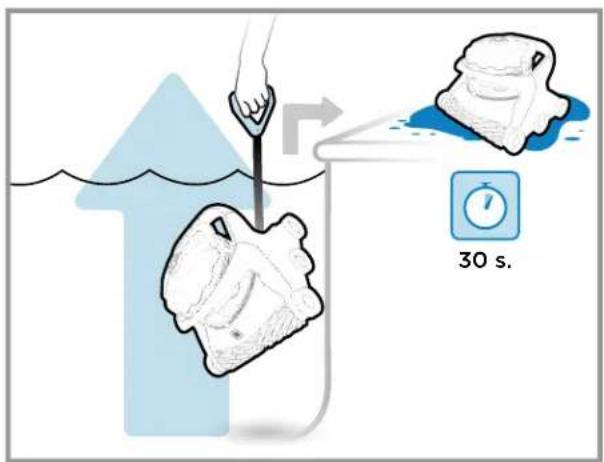
REMOVING THE CLEANER FROM THE POOL
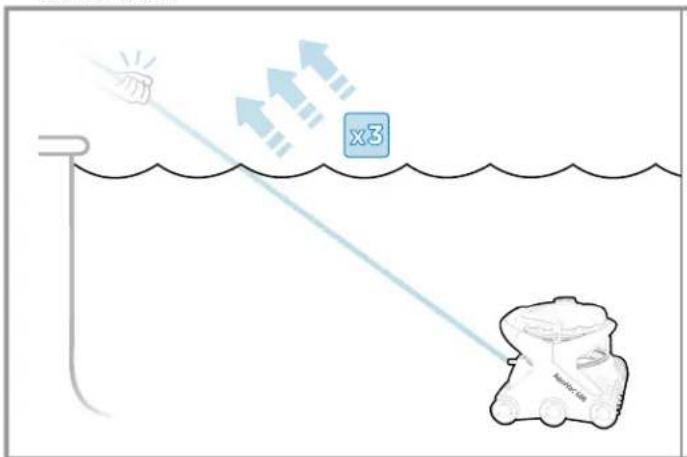
When the cleaning cycle is completed and the cleaner is either in sleep mode (Start/Stop button light is solid blue) or in stand-by mode (Start/Stop button light is blinking green), The AquaVac 6 Series can be easily removed from the pool by using the "Tug & Catch" function.
- Sharply and quickly tug the cable toward you three times (Start/Stop button light will begin blinking white).
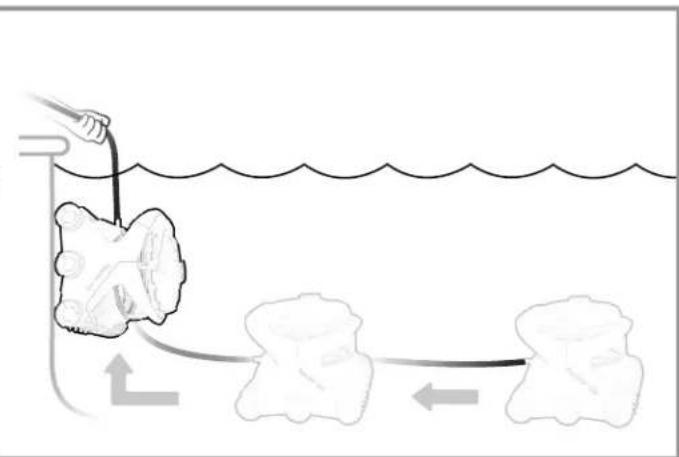
- Wait for the cleaner to drive to the wall and climb to the waterline.
- Remove the cleaner by pulling it out of the water using the handle on the cable.
- Allow the cleaner to drain on the pool deck before removing the canister for cleaning.
- When removed from the pool, tug detection may occur and the pump will start for few seconds. This is not unusual.
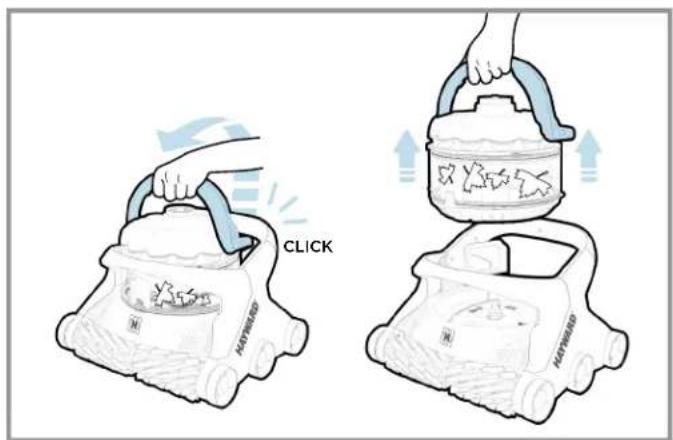

CLEANING THE DEBRIS CANISTER
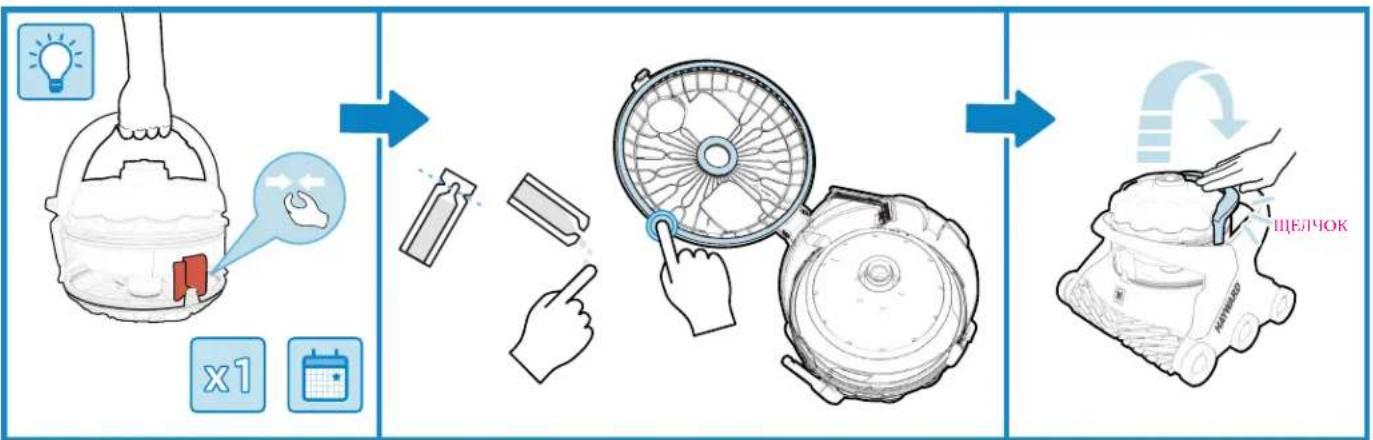
Some water is kept in the canister to enable the self-cleaning and flushing function for a true touch-free debris disposal. If desired, most of the water can be removed from the canister by simply tilting it toward the suction inlet check-valve. Doing so may result in having to rinse the canister after flushing the debris.
- Turn the power off.
- Lift the handle of the debris canister.
-
Remove the debris canister from the cleaner.
-
Twist the canister right and left to agitate the water and loosen the debris, which may be packed within the canister.
- When above the desired debris disposal area, squeeze the red knob so the bottom lid opens and debris is flushed out of the canister.
- If needed, rinse the canister.
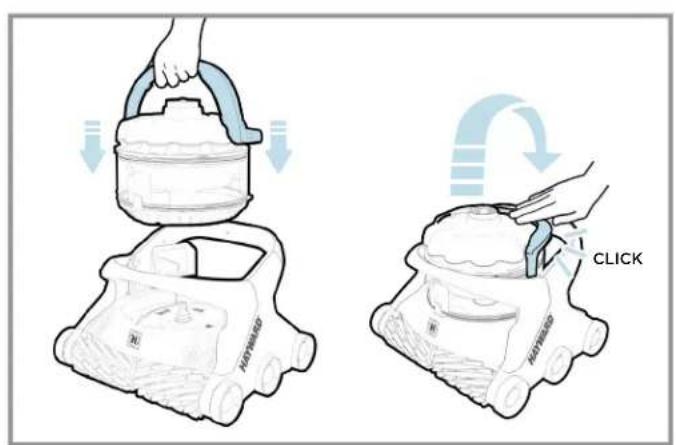
- Close the bottom lid of the canister.
- Replace the canister on the cleaner by aligning the suction inlet on the canister with the suction inlet on the cleaner.
- Press the handle down until a "click" is heard, and it is locked in position.
You can now put the cleaner back in the pool or place it in storage.
CAUTION - RISK OF EQUIPMENT DAMAGE
Operating the cleaner with a full filter or debris canister will result in reduced performance, limited wall-climbing capability and limited debris pick-up. Empty and clean the filter or canister, when needed, to maintain optimal performance. Heavier debris such as sand, pebbles and rocks may require more frequent cleaning, since they have a greater effect on the weight and buoyancy of the cleaner.
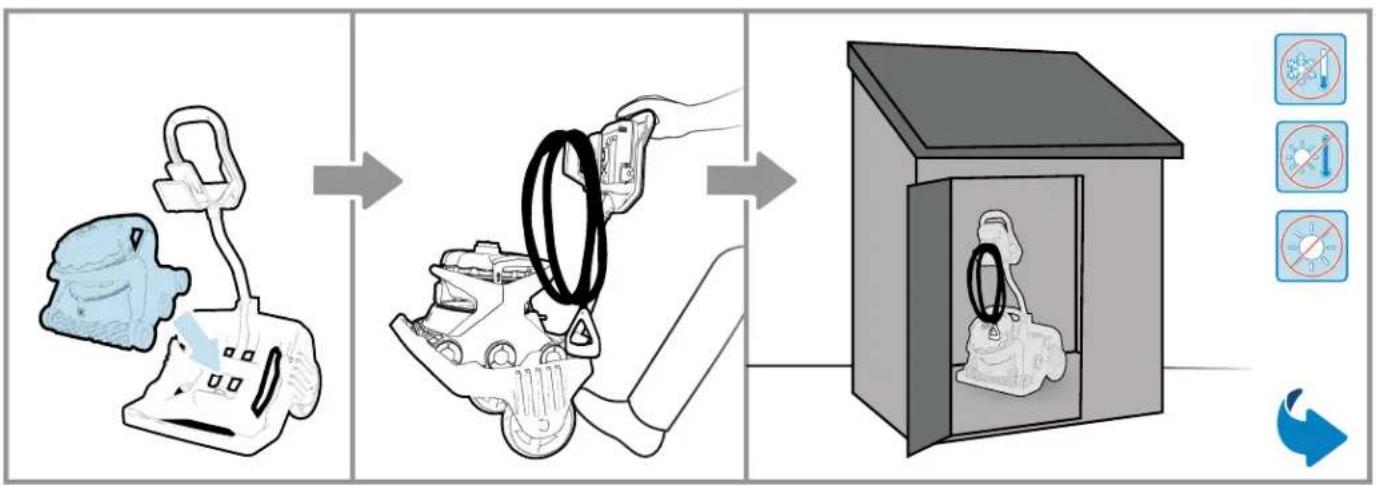
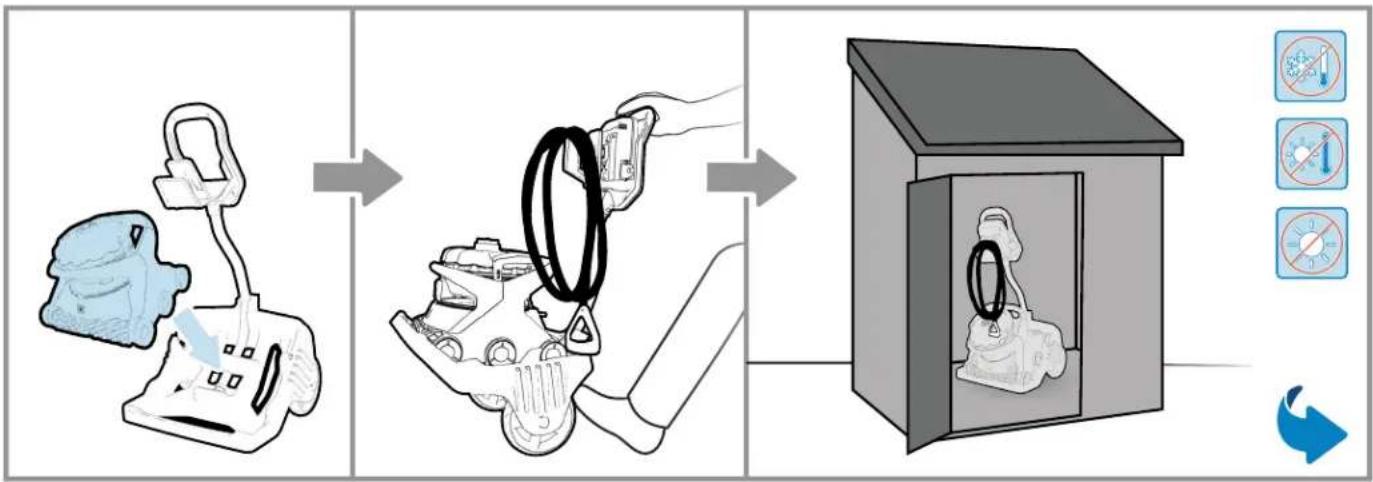
STORING THE CLEANER AND CADDY CART
- When not in the pool, keep the cleaner away from direct sunlight or store it in a protected area.
- For winter storage, store the cleaner in a place where it will be protected from cold temperatures.
- Drain the cleaner completely before storage and remove all remaining debris from the canister.
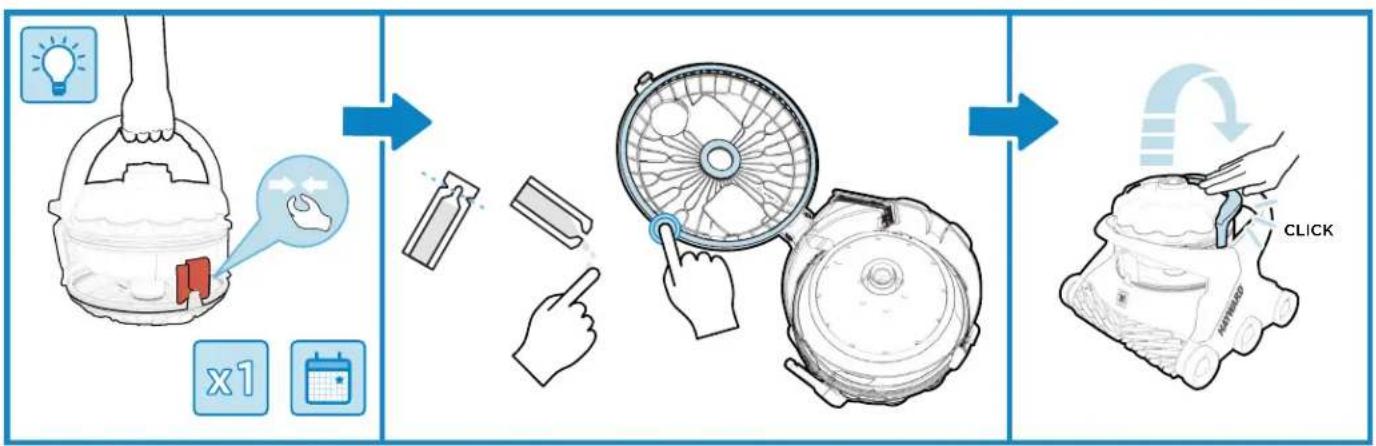
APPLYING LUBRICANT TO THE GASKETS
- If the canister cover is difficult to open or sticks to the canister body, apply some lube to the outer and inner gasket of the canister. This operation can be performed after a long period of storage or when needed.
Control Unit Interface
| AV6 | AV6 WI-FI |
| Schedule Mode | ✓ |
| Cleaning Mode | ✓ |
| Start/Stop | ✓ |
| Wi-Fi LED | × |
| Canister Cleaning Reminder LED | ✓ |
| Single Cleaning Cycle | ✓ |
| Weekly Calendar Cycle | × |
| Recurring Cycle | ✓ |
| Waterline Only (-90 mins.) | × |
| Floor Only (-90 mins.) | ✓ |
| Full Cycle (-150 mins.) | ✓ |
Control Unit Message
| No Power | AV6 | AV6 WI-FI |
| ✓ | ✓ | |
| No Communication | ✓ | ✓ |
| Sleep | ✓ | ✓ |
| Stand-By | ✓ | ✓ |
| Cleaning | ✓ | ✓ |
| Thermal Management Mode | ✓ | ✓ |
| Error | ✓ | ✓ |
| Fault | ✓ | ✓ |
| Software Update | ✓ | ✓ |
| Tug & Catch In Progress | ✓ | ✓ |
| Direct Drive | × | ✓ |
| Spot Clean | × | ✓ |
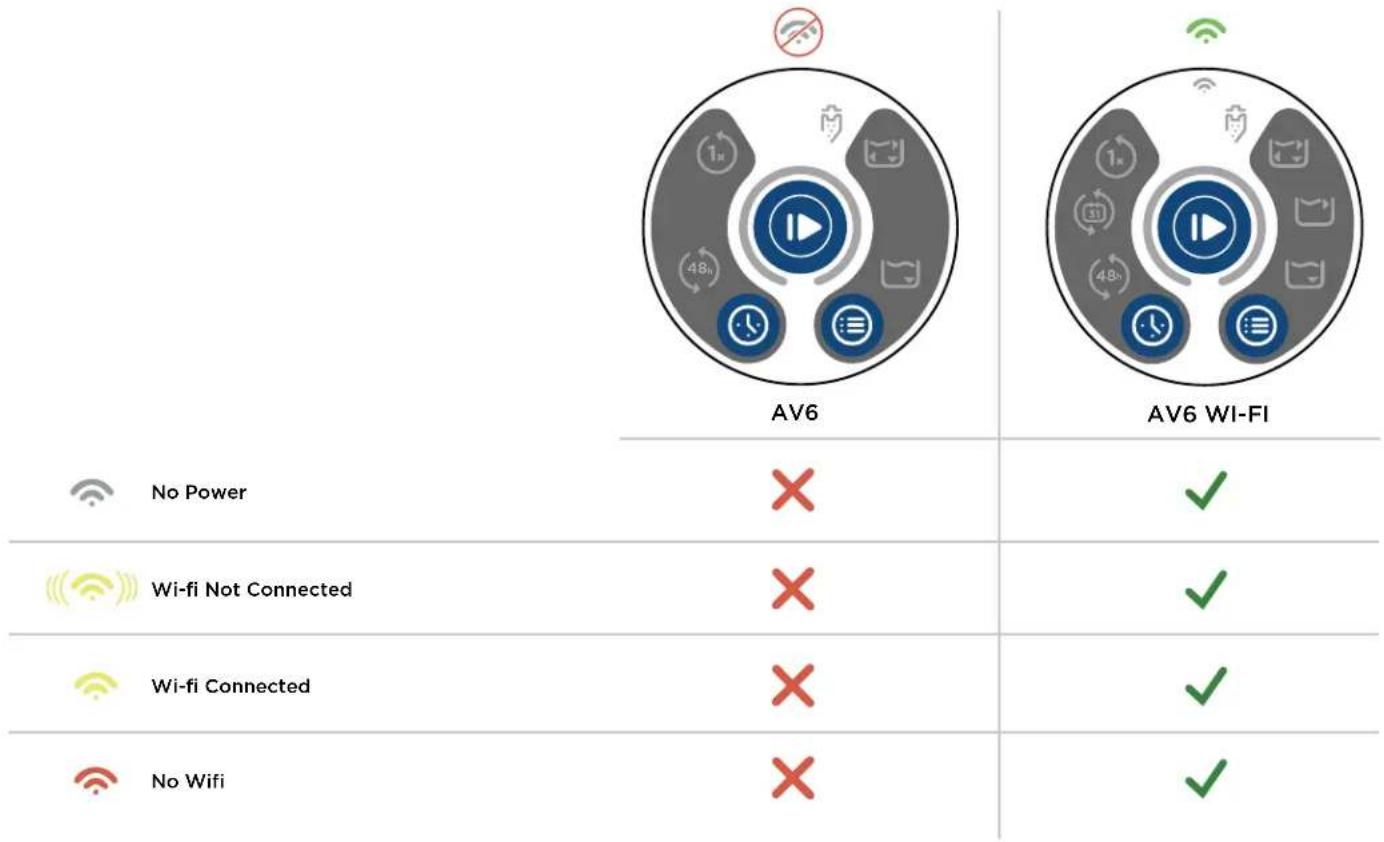
Control Unit Wi-fi Message
ADDITIONAL FUNCTIONS

- Press Start/Stop button for 3 seconds > Put cleaner to sleep

- Press Schedule Mode button for 3 seconds > Light Up (bright)

- Press Cleaning Mode button for 3 seconds > Light Down (dim)

- Press Cleaning Mode button and Schedule Mode button for 10 seconds >Reset Wi-Fi settings

- Press Start/Stop button, Cleaning Mode button and Schedule Mode button for 10 seconds > All settings > Factory Reset and Reboot.
AquaVac 6 Series
CONSERVE ESTE MANUAL PARA FUTURAS CONSULTAS
| AV6 | AV6 WI-FI |
| ✓ | ✓ |
| ✓ | ✓ |
| ✓ | ✓ |
| ✓ | ✓ |
| ✓ | ✓ |
| ✓ | ✓ |
| ✓ | ✓ |
| ✓ | ✓ |
| ✓ | ✓ |
| ✓ | ✓ |
| ✓ | ✓ |
| ✓ | ✓ |
| ✓ | ✓ |
| ✓ | ✓ |
| ✓ | ✓ |
| ✓ | ✓ |
| ✓ | ✓ |
| ✗törung | ✓ |
| ✓ | ✓ |
| ✓ | ✓ |
| ✓ | ✓ |
| ✓ | ✓ |
| ✓ | ✓ |
| ✓ | ✓ |
| ✓ | ✓ |
| ✓ | ✓ |
| ✓ | ✓ |
| ✓ | ✓ |
| ✓ | ✓ |
| ✓ | ✓ |
| ✓ | ✓ |
| ✓ | ✓ |
| ✓ | ✓ |
| ✓ | ✓ |
WAARSCHUWING-KANSOPLETSEL
RACCOLTA NORMALE DEI DETRITI
CHCTKA KOJNEKTOPA JIy MYCOPA
Boda, octaozaac B konnektope dmy Mycopa, cnyKNT dnn erocamooquchKn npomblk6e3 KOHTAKTa C Mycopom.
Pn JxelaHn Bbl MoKeTe cInb 6OnbWyo qactb 3ToN BoBbl, pOcTO HAKHOH N konneTOp B CTOPOHy ero nPHEMHoro OTBepCTHa.
Pn 3ToM, ODAKO, BOzHKAeta PmCK, TTO pnpdETc npOMbBaTb KONNEKTOp nocne ydaaneHMy Copa.
- BbIKIOHTe po60Ta.
2.ПоднIMMTepyKуКолпEkTopaМсра. - BbHbTe konneKTop n3 po6oTa.
- NOBepHnTe KOJIeKTop BnPaBO n BnEBo DnB36aNTbIBaHnB ODbI N OTkpenHeMycopa, KOToPbI MOR CKONITbcHa DHe KOJIeKTopa.
- NomeCTNE eRO TEm MeCTOM, Kyda BbXoNTe BbIbOpcNTb MyCOP HAKMNTe Ha KpaCHyO KHONKY DnA OTKpBtTnDA HaNKONKeTOpa.Boda B KonneKeTope BblBeTcra, 3axBaTbN CcoBoMyCOP.
- Пин Heo6xOДIMOCnI npOMoiTe KoJIneKToP.
- 3akpoTe dno konneKtopa.
- NomeCTnTe erO o6paTHo B po6OT, BbIPOBHnB nPmEHoe OTbepCTNe KONNEKTopa CO BCacbIBaIOUIM NaTpy6kOM po60Ta.
- Haxmte Ha pyky Do ueyka, yka3bBaHooero Ha To, YTO OHa 3a6nokpObaHa.
Tenepb BbMOxete BepHyb po6oB 6accenH nn Mectoxpaehn.
BHIMAHNE-PNUCK MATEPNHBOYUEP6A
He hncnol3yute po6oTa c rpa3HbIMN qnlbtpamn Hnn KONJIeKTOPOM, NOINbIM Mycopa, NocKOBky 3To yxuDaaet pa6oOne XapakTePNCTHKn PO6oTa n ORpAHnUBAET erO cnOC6HOCTb NOHNMaTbChnIO CTeHAM n CO6nPaH MycOp. ONopoxHnIe T OOnuauTe FInbTpbl NIKONJIeKTOp dNr Mycopa No Mepe Heo6XoJIMNOCTN, YTO6bl rapaHTnpoBaTB ONtHMAbHbIe pa6oOye XapakTePNCTK. OTOHcHTeBNo TReXenbl MyCOP, TaKo KaN NECOK, rpaBn INn rAba, MoKET NOTpe6oBaTB Boone CactoN OHCTKN FInbTpOB INN KONJIeKTOPA Dn Mycopa, NocKOBky OHYBeHNUBaIOT Bec po6oTa n CHnKaHOT erO nnAByueCTb.
XPAHEHNEPOBOTA KAPETKIN
Pocne INBnueHn IN BODIpooT DOnKeH6bITNOMeUeH HEOCTyHNOEINCINONHeHbIXNyHcMeTOININB3aTeHeHHoe MecTo BNOMeUeHN.
B 3MHH NEPNO xpaHnTe po6oTa B NOMEueHm, rHe OH 6ydet 3aunuE HOT HN3Kx Tempepatyp.
-ПОЛНСТБЮ ONOPOKHЯТе po60T pe9epe rno xpaHHeHem.YdAnIte BeCb MyCOP, OCTaOuINcR B KONNEKTope.
CMA3bIBAHNE COEINHEHNI
EcnKpbIkaKoJIneKTopaOTkpIbAeTcRAKeNoHnnpuINpTaET K KopnyC KoJIneKTopa,HaHeCtte Cma3ky Ha BHeUHHe N BHyTpEHHne coeHNHeHn KoJIneKTopa.CMa3bIaBTe coeHNHeHn nocNe dInTeNbHOrepnoDa HeNCNoIb3ObaHnNn KaKdIpa3,Korda 3To Heo6xOIMO.
IHTeppeic 6noka nntaHna
US: National Electric Code (NEC)
Use Only Genuine Hayward Replacement Parts
Hayward Pool Products
620 Division Street
Elizabeth, NJ 07207
www.hayward.com
Hayward Pool Products Canada
2880 Plymouth Drive
Oakville, ON L6H 5R4
www.haywardpool.ca
Hayward Pool Europe
Hayward Pool Products (Australia) Pty Ltd.
Melbourne-Sydney-Brisbane-Perth
P.O Box 4384, Dandenong South VIC. 3164
www.hayward-pool.com.au
- INSTRUCTIONS DE SÉCURITÉ IMPORTANTES
- IMPORTANT SAFETY INSTRUCTIONS
- READ AND FOLLOW ALL INSTRUCTIONS
- WARNING - RISK OF INJURY
- DO NOT PERMIT CHILDREN TO USE THIS PRODUCT.
- WARNING - RISK OF ELECTRICAL SHOCK
- READ BEFORE USING THE CLEANER OPERATING CONDITIONS
- CAUTION - RISK OF EQUIPMENT DAMAGE
- Unpacking and Cleaner Preparation
- BOX CONTENTS
- UNPACKING
- For Wi-Fi Connected Cleaner Version Only
- Pool Preparation
- NORMAL DEBRIS PICK-UP
- NEW POOL CONSTRUCTION
- POOLS WITH EXCESSIVE DEBRIS
- Control Unit Set-Up
- INSTALL
- Cleaner Set-Up
- CLEANER LOCATION
- STARTING THE CLEANER
- CLEANING CYCLE
- REMOVING THE CLEANER FROM THE POOL
- CLEANING THE DEBRIS CANISTER
- STORING THE CLEANER AND CADDY CART
- APPLYING LUBRICANT TO THE GASKETS
- Control Unit Interface
- ADDITIONAL FUNCTIONS
- WAARSCHUWING-KANSOPLETSEL
- RACCOLTA NORMALE DEI DETRITI
- CHCTKA KOJNEKTOPA JIy MYCOPA
- BHIMAHNE-PNUCK MATEPNHBOYUEP6A
- XPAHEHNEPOBOTA KAPETKIN
- CMA3bIBAHNE COEINHEHNI
Brand : HAYWARD
Model : AquaVac 650
Category : Vacuum Cleaner