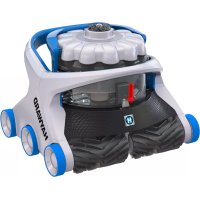
AquaVac 600 - Vacuum Cleaner HAYWARD - Free user manual and instructions
Find the device manual for free AquaVac 600 HAYWARD in PDF.


| Product Type | Robotic pool cleaner |
| Brand | Hayward |
| Model | AquaVac 600 |
| Power Supply | Power supply unit, 220-240 V ~ 50 Hz (adjustable per region) |
| Safety Voltage | Safety Extra Low Voltage (SELV) |
| Residual Current Protection | RCD (GFCI/RCD) mandatory, sensitivity ≤ 30 mA |
| Safety Distance | Power supply unit at ≥ 3.5 m from pool edge |
| Maximum Operating Depth | 3 m |
| Water Temperature | 10 °C to 35 °C |
| Maximum Ambient Temperature | 40 °C |
| Cleaning Cycles | Full cycle (~150 min), Waterline (~90 min), Floor (~90 min) |
| Available Programs | One-time, Weekly (Wi-Fi), Recurring (every 48 h) |
| Technologies | SpinTech™ filterless collection, TouchFree™ draining, anti-tangle cable, Tug & Catch retrieval |
| Connectivity | Wi-Fi (model AV6 Wi-Fi) with AquaVac Connect app |
| LED Indicators | Green (standby/cleaning), blue (idle), white (retrieval) |
| Canister Maintenance | Empty after each use, regular cleaning, lubricate seals if necessary |
| Storage | Away from sun and low temperatures, robot emptied and cleaned |
| Child Safety | Do not let children use, constant supervision required |
| Spare Parts | Use only Hayward genuine parts |
| Repairs | Damaged cable: replace by a qualified professional |
Frequently Asked Questions - AquaVac 600 HAYWARD
User questions about AquaVac 600 HAYWARD
0 question about this device. Answer the ones you know or ask your own.
Ask a new question about this device
Download the instructions for your Vacuum Cleaner in PDF format for free! Find your manual AquaVac 600 - HAYWARD and take your electronic device back in hand. On this page are published all the documents necessary for the use of your device. AquaVac 600 by HAYWARD.
USER MANUAL AquaVac 600 HAYWARD
natural_image
Line drawing of a Hayward robotic car with a cloud-shaped top and visible wheels (no text or symbols)Hayward Pool Products
620 Division Street
Elizabeth, NJ 07207
www.hayward.com
Hayward Pool Products Canada
2880 Plymouth Drive
Oakville, ON L6H 5R4
www.haywardpool.ca
Hayward Pool Europe
Hayward Pool Products (Australia) Pty Ltd.
Melbourne-Sydney-Brisbane-Perth
P.O Box 4384, Dandenong South VIC. 3164
www.hayward-pool.com.au
www.hayward-pool.com

CE

natural_image
Line drawing of a Hayward robotic car with a cloud-shaped top and visible branding (no text or symbols on the car itself)

natural_image
Simple line icon of an open book with an information symbol inside (no text or numbers)
natural_image
Simple line drawing of an open book with no text or symbols visible
AquaVac 6 Series
CONSERVEZ CE MANUEL POUR CONSULTATION ULTÉRIEURE
INSTRUCTIONS DE SÉCURITÉ IMPORTANTES

CONTENU DU CARTON
INSTALLATION
natural_image
Illustration of a person performing a water rescue operation with bubbles and a downward arrow (no text or symbols)MISE EN ROUTE DU ROBOT
EMPLACEMENT DU ROBOT
natural_image
Hand interacting with a circular interface displaying a play button and network icons (no text or symbols)
LED Wi-Fi -

natural_image
Hand interacting with a circular interface displaying music and media icons (no text or symbols)


natural_image
Simple line drawing of a person pulling a pipe into a container with two separate containers, connected by arrows (no text or symbols)EXTRACTION DU ROBOT HORS DE LA PISCINE
natural_image
Illustration of two handwashing buckets with a hand placing a red object into the first bucket, and a second bucket pouring liquid from a bag (no text or symbols)
NETTOYAGE DU COLLECTEUR DE DÉBRIS
flowchart
graph LR
    A["Lightbulb with icon"] --> B["Clutter with hand holding cloud icon"]
    B --> C["Clutter holding magnifying glass"]
    C --> D["Clutter holding magnifying fan with filter"]
    D --> E["Clutter with hand pointing to top panel"]
    E --> F["Clutter with hand pressing down"]
    F --> G["Clutter with hand pressing down, CLIC label visible"]
LUBRIFICATION DES JOINTS
natural_image
Line drawing of a Hayward robotic car with visible engine compartment and roof (no text or symbols)CE

natural_image
Simple line icon of an open book with an information symbol inside (no text or numbers)
natural_image
Simple line drawing of an open book with no text or symbols visible
AquaVac 6 Series
PLEASE KEEP THIS MANUAL FOR FUTURE REFERENCE
IMPORTANT SAFETY INSTRUCTIONS
When installing and using this electrical equipment, basic safety precautions should always be observed including the following. Failure to adhere to the safety warnings below may result in severe injury, death or property damage.

READ AND FOLLOW ALL INSTRUCTIONS

This is the safety-alert symbol. When you see this symbol on your equipment or in this manual, look for one of the following signal words and be alert to the potential for personal injury.
WARNING warns about hazards that could cause serious personal injury, death or major property damage and, if ignored, presents a potential hazard.
CAUTION warns about hazards that will or can cause minor or moderate personal injury and/or property damage and, if ignored, presents a potential hazard. It also makes consumers aware of actions that are unpredictable and unsafe.
WARNING - RISK OF INJURY
- Closely supervise children and pets at all times to ensure they do not play with the cleaner – it is not a toy.
- Ensure that children do not attempt to access the cleaner while it is operating.
- This appliance is not intended for use by persons with reduced physical, sensory or mental capabilities, or lack of experience and knowledge, unless they have been given supervision or instruction concerning use of the appliance by a person responsible for their safety. DO NOT PERMIT CHILDREN TO USE THIS PRODUCT.
• NEVER swim with the cleaner in the pool.
• Always disconnect and completely remove the cleaner before entering the pool.
WARNING - RISK OF ELECTRICAL SHOCK
- All electrical wiring MUST be in conformance with applicable local codes and regulations (See table at end of document). Always follow local code requirements. Hazardous voltage can shock, burn, and cause death or serious property damage.
- The cleaner should only be used with the provided cleaner control unit, which supplies only Safety Extra Level Low Voltage (SELLV) to the cleaner.
- The cleaner control unit shall be located at least 3.5 m (11.5 ft.) from the closest edge of the pool.
- To reduce the risk of electric shock, DO NOT USE AN EXTENSION CORD to connect control unit to electrical outlet. This could create a safety hazard and/or damage to the cleaner. Provide a properly located electrical outlet per local building codes.
WARNING - RISK OF ELECTRICAL SHOCK
- Disconnect the cleaner control unit from the electrical outlet before carrying out any user maintenance. Before working on any equipment, disconnect control unit from the equipment.
- Do not bury cable. Do not operate the cleaner with a damaged cable. If the control unit power cord is damaged, it must be replaced by the manufacturer, service agent, or similarly qualified persons in order to avoid a hazard.
- In the United States and Canada, the cleaner control unit must be connected only to a supply circuit protected by a ground-fault circuit-interrupter (GFCI). Contact a qualified electrician if you cannot verify that the circuit is protected by a GFCI. This GFCI should be tested on a routine basis. To test the GFCI, push the test button. The GFCI should interrupt power. Push reset button. Power should be restored. If the GFCI fails to operate in this manner, the GFCI is defective. If the GFCI interrupts power to the cleaner control unit without the test button being pushed, a ground current is flowing, indicating the possibility of an electrical shock. Do not use the cleaner control unit. Disconnect the cleaner control unit and contact the manufacturer for assistance.
- In Europe, Australia and New Zealand, the cleaner control unit must be supplied through a residual current device (RCD) having a rated residual operating current not exceeding 30 mA. Contact a qualified electrician if you cannot verify that the circuit is protected by a RCD.
- Never allow the plug to enter the water.
OPERATION INSTRUCTIONS AND IMPORTANT INFORMATION
READ BEFORE USING THE CLEANER OPERATING CONDITIONS
- Do not operate outside the pool. This will damage the motor seal and void the warranty.
- Do not drag the cleaner out of the pool against the side wall. This could damage the cleaner and/or the pool wall.

CAUTION - RISK OF EQUIPMENT DAMAGE
- Only operate the cleaner for the period of time necessary to clean the pool. Excessive use is unnecessary and will cause cleaner parts to prematurely wear.
- Regularly inspect the cleaner, cables and control unit. Do not use if damaged or if any rough edges are visible on the cleaner. This can cause damage to the pool.
- Cleaner filter cartridges or debris canister should be thoroughly cleaned after each use or as often as needed to ensure the cleaner's optimal performance.
- Never store the cleaner with dirty filter cartridges or debris canister.
• Water temperature operation range: min 50^ F / 10^ C, max 95^ F / 35^ C. Maximum operating depth: 3 m (10 ft.)
- Operating the cleaner in temperatures above or below this range may affect performance, and cause premature wear or failure.
- Ambient air temperature: max 104°F / 40°C.
- To protect itself from permanent damage, if exposed to extremely hot ambient temperature, the power-supply will limit or suspend operation until its temperature is down to an acceptable operating level. To limit overheating and reduced performance, it is recommended to keep the control unit out of direct sunlight and keep the cooling fan unobstructed.
Unpacking and Cleaner Preparation
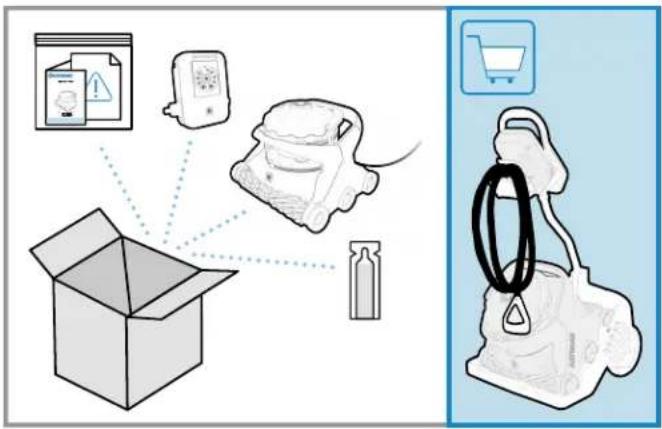

BOX CONTENTS
• Operation instructions and warranty pack with product information (serial and model number)
- Accessory pack
Caddy cart handle attachment pin
Canister O-ring and gasket lubricant
- Cleaner with cable
- Control unit
• Caddy cart (optional on some models)
UNPACKING
- Carefully remove the contents of the box from the top. Do not put the box on its side to remove content as some parts may fall out of the box and get damaged.
- Verify the contents of the box.
- Carefully read the operation instructions and warning document first.
- Assemble the caddy cart (if included with product).
For Wi-Fi Connected Cleaner Version Only
Download and install the Hayward AquaVac Connect Application on your mobile device.
Pool Preparation

POOL PREPARATION
• NEVER SWIM WITH THE CLEANER IN THE POOL.
- Before using the cleaner, remove any items such as thermometers, toys and other accessories from the pool. Such items may cause damage to the cleaner or the pool. Large debris should also be removed manually from the pool before installing the cleaner.
- Chemical balance of water may affect cleaner performance, accelerate wear of certain parts, and may lead to more frequent maintenance.
• DO NOT LEAVE THE CLEANER IN THE POOL WHEN CHEMICAL SHOCKING THE POOL.
- pH should be adjusted and kept between 7.2 - 7.8.
- Free chlorine should be maintained between 1.0 - 3.0 PPM. The cleaner should never be used when chlorine level (or other oxidizer) exceeds the normal values.
- Total alkalinity level should always be maintained between 80 - 150 PPM.
• To keep the pool safe for swimming and protect your equipment, have the water tested frequently and balance chemicals accordingly.
NORMAL DEBRIS PICK-UP
- The SpinTech™ canister is intended to collect most visible debris by using a selective debris separation system.
- The cleaner is equipped with clog-free, filter-free, and TouchFree™ debris handling with advanced pick-up capability; it is not intended to filter very fine particles.
- When fine particles or algae are present in the pool, they will be put back in suspension to be captured by the pool filtration system. It is normal to observe some fine dust coming out of the cleaner when very fine debris load is present.
CAUTION - RISK OF EQUIPMENT DAMAGE
The cleaner is not intended to clean the pool after extended periods of disuse until the following steps have been taken:
- Clear the pool of any large objects that might interfere with the cleaner's operation.
- Check to see that the water is at the recommended level.
- Check the water chemistry. The water should be properly balanced (pH level), and the pool free from algae. Algae can adversely affect the operation and performance of the cleaner.
- Clean or backwash the filtration system without the cleaner in the pool.
NEW POOL CONSTRUCTION
- The cleaner should not be used to remove plaster dust or construction debris from new or renovated pools.
- Brush the newly constructed pool surface and vacuum new surface debris before installing the cleaner.
POOLS WITH EXCESSIVE DEBRIS
- The cleaner should not be used to remove excessive debris before a seasonal pool opening or following a high wind event or sandstorm.
- Pools with excessive amounts of debris should be vacuumed manually before using the cleaner.
• Always empty the cleaner filter cartridges or debris canister when filled with debris.
Control Unit Set-Up
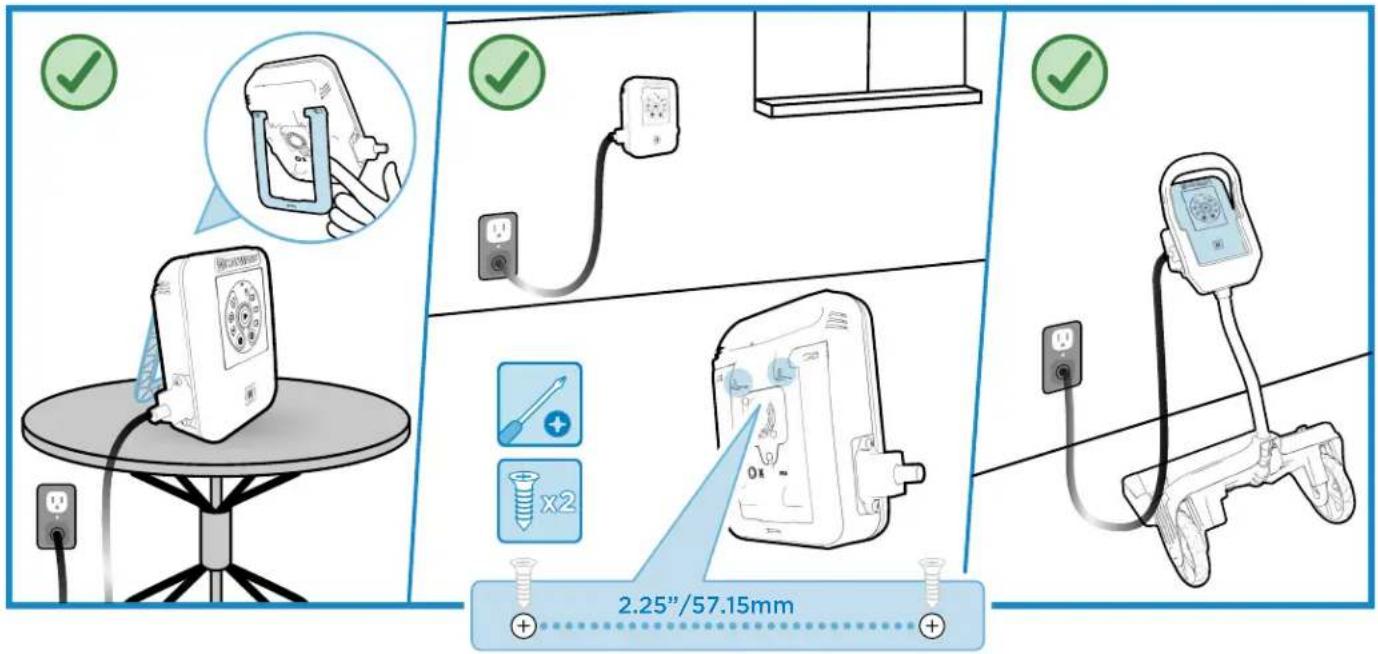
INSTALL
The AquaVac 6 Series Control Unit can be installed and used in different locations:
- Sitting on its kickstand, on a table or on the pool deck
- Using the wall mount attachment fixture located on the back of the control unit (Mounting screw template supplied on the reference guide)
- Positioned on the caddy cart control unit cradle
To find the best location for your control unit, please consider the following:
- The control unit should preferably be kept in a shady area and the cooling fan kept unobstructed.
• Leaving the control unit on the pool deck is acceptable but precautions should be taken so it does not get damaged by regular traffic around the pool or by playing children or pets.
- The cleaner control unit should be located at least 3.5 m (11.5 ft.) from the closest edge to the pool.
• To reduce the risk of electric shock, DO NOT USE AN EXTENSION CORD to connect unit to electric supply.
- Based on your region of the world, the cleaner control unit must be connected only to a supply circuit protected by a ground-fault circuit-interrupter (GFCI) or a residual current device (RCD).
Cleaner Set-Up

Connect the cleaner cable to the control unit and plug the control unit cord into a protected outlet.

natural_image
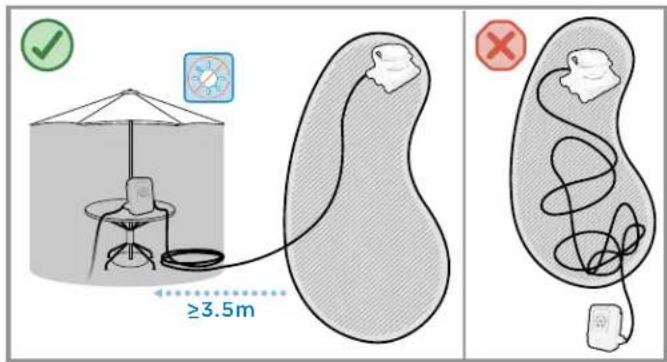
Illustration of a person performing a water rescue operation with bubbles and a downward arrow (no text or symbols)CLEANER LOCATION
- It is ideal to have the control unit positioned near the midpoint of your pool (lengthwise).
- Depending on the size and shape of your pool, the entire length of the floating cable may not be necessary. The floating cable should reach from the cleaner control unit to the furthest point in the pool, plus the depth at the deep end of the pool. To reduce cable tangling, any excess cable should be coiled and placed next to the control unit.
Submerge the cleaner in the pool by gently rocking it back, forth and sideways to help the cleaner purge trapped air and sink to the pool bottom.
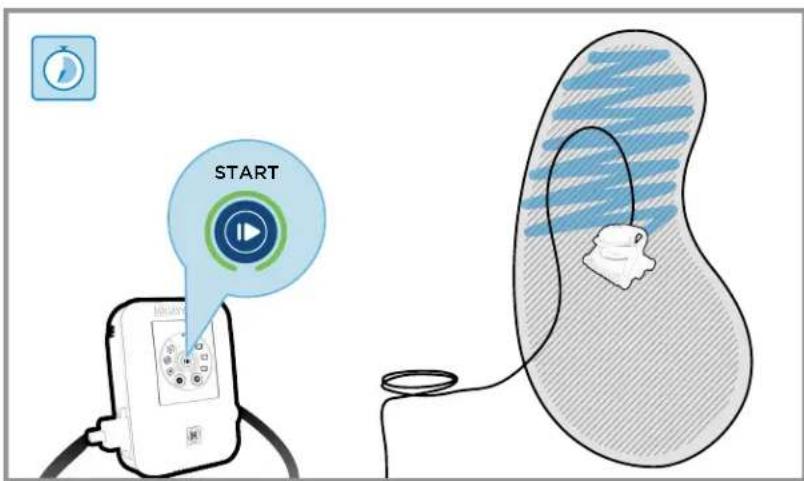
STARTING THE CLEANER

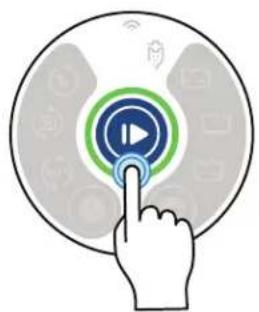
Start the cleaning cycle or program by pressing the Start/Stop button.
The blinking green light will change to solid green confirming that the selected mode and schedule are now enabled, and the cleaner can now start its program.
natural_image
Hand interacting with a circular interface displaying a play button and network icons (no text or symbols)
Wi-Fi LED - Available on Wi-Fi models only.

Canister Cleaning Reminder - Inspect the cleaner's canister and empty, if needed. This reminder does not necessarily indicate the canister is full.

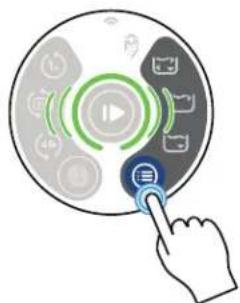
Schedule Mode - Press to choose a cleaning schedule.

Single Cleaning Cycle - Launch a single cleaning cycle.

Weekly Calendar Cycle - Launch the programmed daily cleaning schedule on your AquaVac connect app.
Available on Wi-Fi models only.

Recurring Cycle - Launch a cleaning cycle every 48 hours (At the time it's been activated) or at the specific time set on your AquaVac connect app (Wi-Fi models only).


natural_image
Hand interacting with a circular interface displaying music and media icons (no text or symbols)
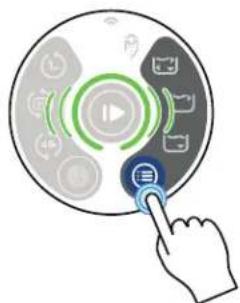
Cleaning Mode - Press to choose a cleaning mode.

Full Cycle - The cleaner will clean the pool floor thoroughly, walls and waterline minimally. (-150 mins.)

Waterline Mode - The cleaner will clean the waterline thoroughly and may additionally clean the bottom to relocate. (\~90 mins.) Available on Wi-Fi models only.

Floor Mode - The cleaner will clean only the floor of the pool. This mode is often used on pools equipped with automatic covers, and is enabled to avoid the cleaner from climbing the wall and touching the pool cover. (\~90 mins.)

CLEANING CYCLE
- During its cleaning cycle the cleaner may not climb the wall or any vertical surfaces every time. It will adjust its cleaning sequence to offer optimal pool coverage.
- For a quicker cleaning of the main area of the pool, the Bottom Only mode may be selected.
- It is normal for the cleaner to operate in both forward and reverse directions.
-
To avoid risk of damage or injury, the cleaner will not operate when out of the water. It is equipped with sensors that will allow it to recover from beach entry style pools or shallow areas.
-
The cleaner is equipped with an anti-tangling, electronic cable which balances the left and right turning sequence during a cleaning cycle. If running multiple cycles without removing the cleaner, the cable may show some twisting. To straighten the cleaner cable, let it lie in the sun, removing any bends or kinks from operation or storage.
- When the cleaning cycle is completed, the cleaner will go into stand-by mode for 30 minutes (Start/Stop button light is blinking green).
- If no action is performed for 30 minutes, the cleaner will go into sleep mode (Start/Stop button light turns solid blue).

natural_image
Simple line drawing of a hand pulling a pipe into a container with two separate containers, connected by arrows indicating flow (no text or symbols)
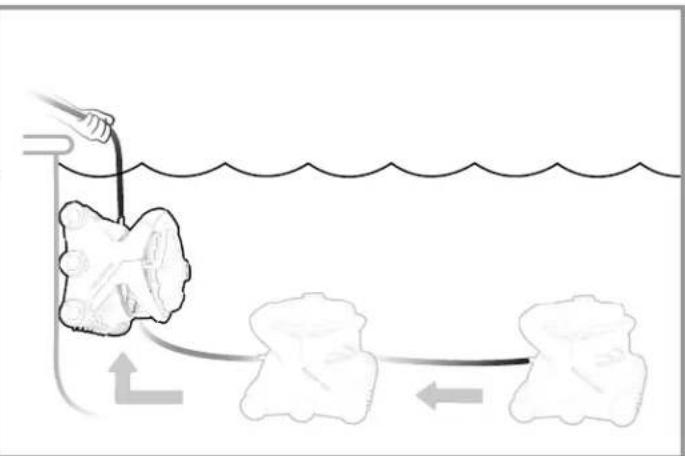
REMOVING THE CLEANER FROM THE POOL
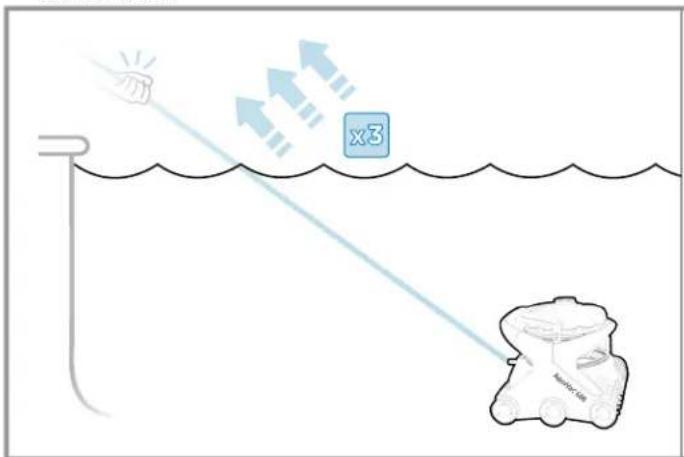
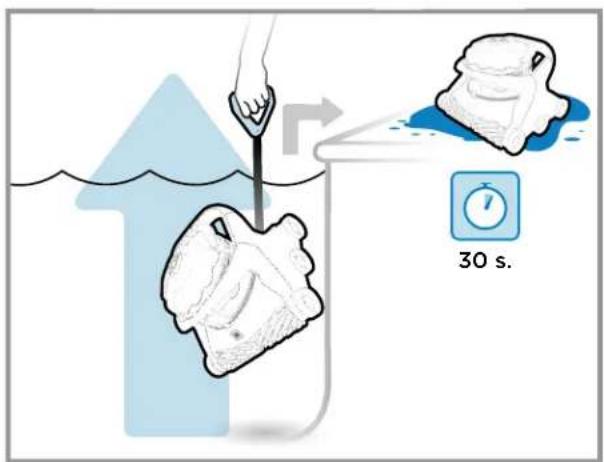
When the cleaning cycle is completed and the cleaner is either in sleep mode (Start/Stop button light is solid blue) or in stand-by mode (Start/Stop button light is blinking green), The AquaVac 6 Series can be easily removed from the pool by using the "Tug & Catch" function.
- Sharply and quickly tug the cable toward you three times (Start/Stop button light will begin blinking white).
- Wait for the cleaner to drive to the wall and climb to the waterline.
- Remove the cleaner by pulling it out of the water using the handle on the cable.
- Allow the cleaner to drain on the pool deck before removing the canister for cleaning.
- When removed from the pool, tug detection may occur and the pump will start for few seconds. This is not unusual.
natural_image
Illustration of two handwashing buckets with a hand placing a red object into the first bucket, and a second bucket pouring liquid from a bag (no text or symbols)
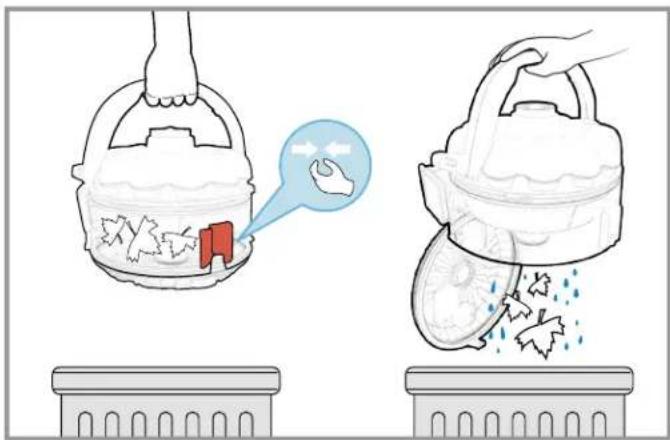
CLEANING THE DEBRIS CANISTER
Some water is kept in the canister to enable the self-cleaning and flushing function for a true touch-free debris disposal. If desired, most of the water can be removed from the canister by simply tilting it toward the suction inlet check-valve. Doing so may result in having to rinse the canister after flushing the debris.
- Turn the power off.
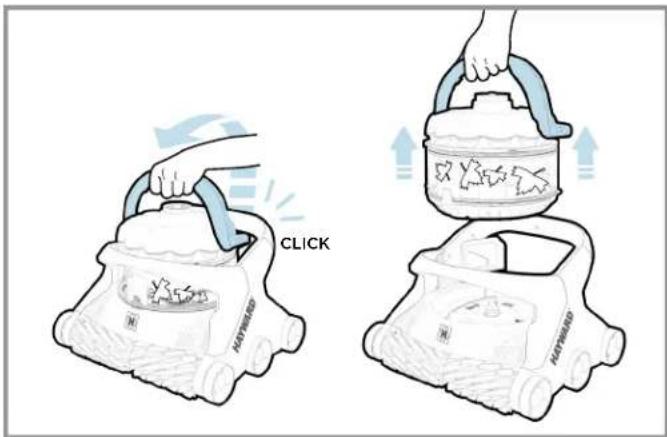
- Lift the handle of the debris canister.
- Remove the debris canister from the cleaner.
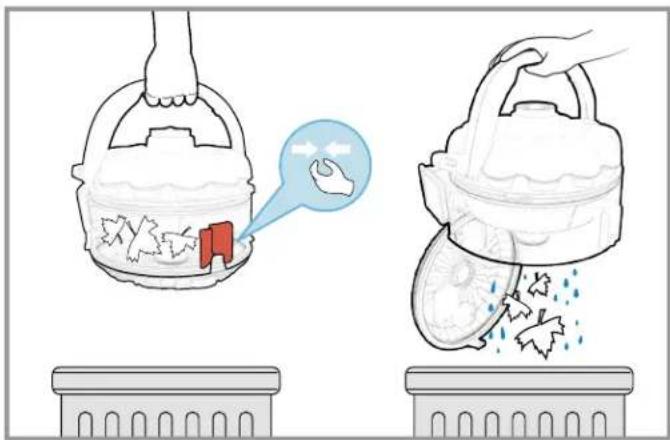
- Twist the canister right and left to agitate the water and loosen the debris, which may be packed within the canister.
- When above the desired debris disposal area, squeeze the red knob so the bottom lid opens and debris is flushed out of the canister.
- If needed, rinse the canister.
- Close the bottom lid of the canister.
- Replace the canister on the cleaner by aligning the suction inlet on the canister with the suction inlet on the cleaner.
- Press the handle down until a "click" is heard, and it is locked in position.
You can now put the cleaner back in the pool or place it in storage.
CAUTION - RISK OF EQUIPMENT DAMAGE
Operating the cleaner with a full filter or debris canister will result in reduced performance, limited wall-climbing capability and limited debris pick-up. Empty and clean the filter or canister, when needed, to maintain optimal performance. Heavier debris such as sand, pebbles and rocks may require more frequent cleaning, since they have a greater effect on the weight and buoyancy of the cleaner.
flowchart
graph LR
    A["Device Insert"] --> B["Medical Procedure"]
    B --> C["Stabilization Unit"]
    C --> D["Health Monitoring Device"]
    style A fill:#f9f,stroke:#333
    style B fill:#ccf,stroke:#333
    style C fill:#cfc,stroke:#333
    style D fill:#fcc,stroke:#333
STORING THE CLEANER AND CADDY CART
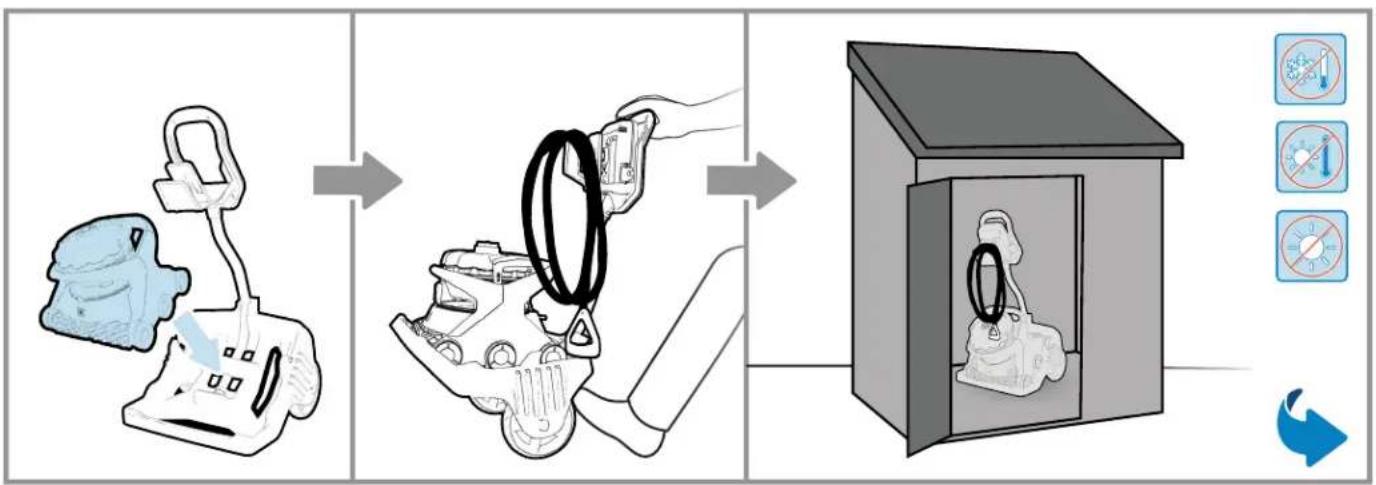
- When not in the pool, keep the cleaner away from direct sunlight or store it in a protected area.
- For winter storage, store the cleaner in a place where it will be protected from cold temperatures.
- Drain the cleaner completely before storage and remove all remaining debris from the canister.

flowchart
graph LR
    A["Lightbulb icon"] --> B["Close-up of food bag with hand and lid"]
    B --> C["Add product to clean food bag"]
    C --> D["Check for cleaning product"]
    D --> E["Cleaner with fan blade, hand pointing to clean food bag"]
    E --> F["Recycl or reuse step"]
    F --> G["Recycl or reuse step with click button"]
APPLYING LUBRICANT TO THE GASKETS
- If the canister cover is difficult to open or sticks to the canister body, apply some lube to the outer and inner gasket of the canister. This operation can be performed after a long period of storage or when needed.
Control Unit Interface
 |  | |
| AV6 | AV6 WI-FI | |
| Schedule Mode | √ | √ |
| Cleaning Mode | √ | √ |
| Start/Stop | √ | √ |
| Wi-Fi LED | × | √ |
| Canister Cleaning Reminder LED | √ | √ |
| Single Cleaning Cycle | √ | √ |
| Weekly Calendar Cycle | × | √ |
| Recurring Cycle | √ | √ |
| Waterline Only (-90 mins.) | × | √ |
| Floor Only (-90 mins.) | √ | √ |
| Full Cycle (-150 mins.) | √ | √ |
Control Unit Message
 |  | |
| AV6 | AV6 WI-FI | |
| No Power | √ | √ |
| No Communication | √ | √ |
| Sleep | √ | √ |
| Stand-By | √ | √ |
| Cleaning | √ | √ |
| Thermal Management Mode | √ | √ |
| Error | √ | √ |
| Fault | √ | √ |
| Software Update | √ | √ |
| Tug & Catch In Progress | √ | √ |
| Direct Drive | ✗ | √ |
| Spot Clean | ✗ | √ |
Control Unit Wi-fi Message

other
| Network Condition | AV6 | AV6 WI-FI | | ----------------------- | ----- | --------- | | No Power | ✗ | ✓ | | Wi-fi Not Connected | ✗ | ✓ | | Wi-fi Connected | ✗ | ✓ | | No Wifi | ✗ | ✓ |ADDITIONAL FUNCTIONS


- Press Start/Stop button for 3 seconds > Put cleaner to sleep
- Press Schedule Mode button for 3 seconds > Light Up (bright)
- Press Cleaning Mode button for 3 seconds > Light Down (dim)
- Press Cleaning Mode button and Schedule Mode button for 10 seconds > Reset Wi-Fi settings
- Press Start/Stop button, Cleaning Mode button and Schedule Mode button for 10 seconds > All settings > Factory Reset and Reboot.
AquaVac® 6 Series
natural_image
Line drawing of a Hayward robotic car with visible engine compartment and roof (no text or symbols)

natural_image
Simple line icon of an open book with an information symbol inside (no text or numbers)
natural_image
Simple line drawing of an open book with no text or symbols visible
AquaVac® 6 Series
CONSERVE ESTE MANUAL PARA FUTURAS CONSULTAS

CONTENIDO DE LA CAJA
INSTALACIÓN
natural_image
Illustration of a person performing a water rescue operation with bubbles and a downward arrow (no text or symbols)natural_image
Hand interacting with a circular interface displaying a play button and network icons (no text or symbols)
natural_image
Hand interacting with a circular interface displaying music and media icons (no text or symbols)

natural_image
Simple line drawing of a hand pulling a pipe into a container with two separate containers, connected by arrows indicating flow (no text or symbols)natural_image
Illustration of two handwashing buckets with a hand placing a red object into the first bucket, and a second bucket pouring liquid from a bag (no text or symbols)
LIMPIEZA DEL COLECTOR DE RESIDUOS
flowchart
graph LR
    A["Receipt with light bulb"] --> B["Recycle with hand icon, x1 timer and calendar"]
    B --> C["Check for cleaning using a brush, hand pointing to clean air"]
    C --> D["Cleaner with fan blade, hand pointing to clean air"]
    D --> E["Recycl after recycling with CLIC label"]
natural_image
Line drawing of a Hayward robotic car with visible engine compartment and roof (no text or symbols)

natural_image
Simple line icon of an open book with an information symbol inside (no text or numbers)
natural_image
Simple line drawing of an open book with no text or symbols visible
AquaVac® 6 Series
GUARDAR ESTE MANUAL PARA FUTURA REFERÊNCIA
INSTRUÇÕES DE SEGURANÇA IMPORTANTES

CONTEÚDO DA EMBALAGEM
INSTALAÇÃO
natural_image
Two diagrams showing a submerged object with bubbles and tubing submerged in liquid, connected by wires (no text or symbols)natural_image
Hand interacting with a circular interface button featuring a play symbol (no text or symbols present)
natural_image
Hand interacting with a circular interface displaying music and media icons (no text or symbols)
natural_image
Diagram showing a hand pulling a rope over a container with three separate containers, illustrating a physical or ecological process (no text or symbols present)TIRAR O ROBÔ DA PISCINA
natural_image
Illustration of two handwashing buckets with a hand placing a red object into the first bucket, and a second bucket pouring liquid from a bag (no text or symbols)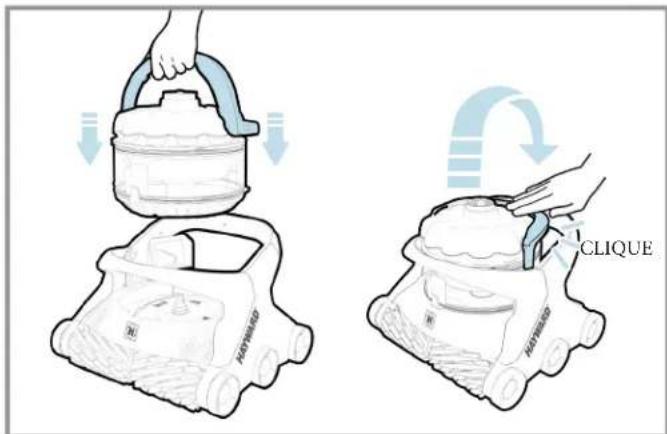
LIMPAR O COLETOR DE DETRITOS
flowchart
graph LR
    A["Lightbulb with icon"] --> B["Close-up of soap bottle"]
    B --> C["Check for first wash"]
    C --> D["Check for second wash"]
    D --> E["Check for third wash"]
    E --> F["Final inspection with CLIQUE container"]
natural_image
Line drawing of a Hayward robotic car with visible engine compartment and roof (no text or symbols)

natural_image
Simple line icon of an open book with an information symbol inside (no text or numbers)
natural_image
Simple line drawing of an open book with no text or symbols visible
AquaVac® 6 Series
BEWAHREN SIE DIESES HANDBUCH ZUM NACHSCHLAGEN AUF

INSTALLATION
natural_image
Illustration of a person performing a water rescue operation with bubbles and a submerged object (no text or symbols)STANDORT DES REINIGUNGSROBOTERS
natural_image
Hand interacting with a circular interface displaying a play button and network icons (no text or symbols)


natural_image
Simple line drawing of a person pulling a rope over water with two separate bags, connected by arrows indicating flow (no text or symbols)
DEN ROBOTER AUS DEM POOL HOLEN


REINIGEN DES AUFFANGBEHÄLTERS
flowchart
graph LR
    A["Device Insert"] --> B["Medical Procedure with Contour"]
    B --> C["Catheter Placement"]
    C --> D["No Severe/No Pressure/No Exposure/No Safety/No Control/No Detection/No Assessment/No Access/No Security/No Management"]
flowchart
graph LR
    A["Lightbulb with icon"] --> B["Close-up of food bag with hand gesture"]
    B --> C["Add product to filter into tray"]
    C --> D["Close-up of filter with hand pointing to tray"]
    D --> E["Add product to clean air mask with 'KLICK' label"]
    style A fill:#f9f,stroke:#333
    style E fill:#bbf,stroke:#333
natural_image
Line drawing of a Hayward robotic car with visible engine compartment and roof (no text or symbols)

natural_image
Simple line icon of an open book with an information symbol inside (no text or numbers)
natural_image
Simple line drawing of an open book with no text or symbols visible
AquaVac® 6 Series
BEWAAR DEZE HANDLEIDING VOOR TOEKOMSTIG GEBRUIK
BELANGRIJKE VEILIGHEIDSVOORSCHRIFTEN
⚠ WAARSCHUWING - KANS OP LETSEL

INHOUD VAN DE DOOS
INSTALLATIE
natural_image
Illustration of a person performing a water rescue operation with bubbles and a downward arrow (no text or symbols)PLAATSING VAN DE ROBOT
natural_image
Hand interacting with a circular interface displaying a play button and network icons (no text or symbols)


DE ROBOT UIT HET ZWEMBAD HALEN
natural_image
Illustration of two handwashing buckets with a hand placing a small red object into the first bucket, and a second bucket pouring liquid from a bag (no text or symbols)
DE VUILVERZAMELAAR SCHOONMAKEN
flowchart
graph LR
    A["Raw Material Inspection"] --> B["Add Paper Toward"]
    B --> C["Close-up of Paper Toward"]
    C --> D["Close-up of Paper Toward"]
    D --> E["Final Packaging with KLIK Component"]
SMERING VAN DE PAKKINGEN
natural_image
Line drawing of a Hayward robotic car with a cloud cover on top (no text or symbols)
AquaVac 6 Series
CONSERVARE QUESTO MANUALE PER POTERLO CONSULTARE IN FUTURO
ISTRUZIONI DI SICUREZZA IMPORTANTI

RACCOLTA NORMALE DEI DETRITI
INSTALLAZIONE
natural_image
Two diagrams showing a submerged object with bubbles and tubing, connected by wires to a submerged container (no text or symbols)POSIZIONE DEL ROBOT PULITORE
natural_image
Hand interacting with a circular interface displaying a play button and icons (no text or symbols)


natural_image
Diagram showing a hand pulling a rope into a container with two separate bags, illustrating a physical process (no text or symbols)
ESTRAZIONE DEL ROBOT PULITORE DALLA PISCINA
natural_image
Illustration of two handwashing buckets with a hand placing a small red object into the first bucket, and a second bucket pouring liquid from a bag (no text or symbols)
PULIZIA DEL CONTENITORE DI RACCOLTA
flowchart
graph LR
    A["Receipts with icon"] --> B["Check for first wash"]
    B --> C["Check for second wash"]
    C --> D["Check for third wash"]
    D --> E["Check for final inspection with CLIC label"]
natural_image
Line drawing of a Hayward robotic car with visible wheels and roof (no text or symbols)

natural_image
Simple line icon of an open book with an information symbol inside (no text or labels)
natural_image
Simple line drawing of an open book with no text or symbols visible
AquaVac® 6 Series

СОДЕРЖАНИЕ КОРОБКИ
МОНТАЖ
natural_image
Two diagrams showing a submerged object with bubbles and tubing, connected by wires to a submerged container (no text or symbols)РАЗМЕЩЕНИЕ РОБОТА
natural_image
Hand interacting with a circular interface button featuring a play symbol (no text or symbols present)


natural_image
Simple line drawing of a person pulling a rope over rocks with arrows indicating flow direction (no text or symbols)natural_image
Illustration showing two handwashing buckets with waste, one with a red object and the other with broken leaves (no text or symbols)
flowchart
graph LR
    A["Initial cleaning device"] --> B["Reinjection step"]
    B --> C["Packaging with ring and handle"]
    C --> D["Product packaging with circular components inside a box with rings and a magnifying glass"]
flowchart
graph LR
    A["Recycle with food, icon, x1 timer, calendar"] --> B["Recycle with filter, hand, brush, and magnifying glass"]
    B --> C["Recycle with filter, hand, brush, and magnifying glass"]
    C --> D["Recycle with filter, hand, brush, and magnifying glass"]
    D --> E["Recycle with filter, hand, brush, and magnifying glass"]
Use Only Genuine Hayward Replacement Parts
Hayward Pool Products
620 Division Street
Elizabeth, NJ 07207
www.hayward.com
Hayward Pool Products Canada
2880 Plymouth Drive
Oakville, ON L6H 5R4
www.haywardpool.ca
Hayward Pool Europe
Hayward Pool Products (Australia) Pty Ltd.
Melbourne-Sydney-Brisbane-Perth
P.O Box 4384, Dandenong South VIC. 3164
www.hayward-pool.com.au
- INSTRUCTIONS DE SÉCURITÉ IMPORTANTES
- CONTENU DU CARTON
- INSTALLATION
- EMPLACEMENT DU ROBOT
- EXTRACTION DU ROBOT HORS DE LA PISCINE
- NETTOYAGE DU COLLECTEUR DE DÉBRIS
- LUBRIFICATION DES JOINTS
- IMPORTANT SAFETY INSTRUCTIONS
- READ AND FOLLOW ALL INSTRUCTIONS
- WARNING - RISK OF INJURY
- WARNING - RISK OF ELECTRICAL SHOCK
- OPERATION INSTRUCTIONS AND IMPORTANT INFORMATION
- READ BEFORE USING THE CLEANER OPERATING CONDITIONS
- CAUTION - RISK OF EQUIPMENT DAMAGE
- Unpacking and Cleaner Preparation
- BOX CONTENTS
- UNPACKING
- For Wi-Fi Connected Cleaner Version Only
- Pool Preparation
- NORMAL DEBRIS PICK-UP
- NEW POOL CONSTRUCTION
- POOLS WITH EXCESSIVE DEBRIS
- Control Unit Set-Up
- Cleaner Set-Up
- CLEANER LOCATION
- STARTING THE CLEANER
- CLEANING CYCLE
- REMOVING THE CLEANER FROM THE POOL
- CLEANING THE DEBRIS CANISTER
- STORING THE CLEANER AND CADDY CART
- APPLYING LUBRICANT TO THE GASKETS
- ADDITIONAL FUNCTIONS
- CONTENIDO DE LA CAJA
- INSTALACIÓN
- LIMPIEZA DEL COLECTOR DE RESIDUOS
- INSTRUÇÕES DE SEGURANÇA IMPORTANTES
- CONTEÚDO DA EMBALAGEM
- INSTALAÇÃO
- TIRAR O ROBÔ DA PISCINA
- LIMPAR O COLETOR DE DETRITOS
- STANDORT DES REINIGUNGSROBOTERS
- DEN ROBOTER AUS DEM POOL HOLEN
- REINIGEN DES AUFFANGBEHÄLTERS
- BELANGRIJKE VEILIGHEIDSVOORSCHRIFTEN
- ⚠ WAARSCHUWING - KANS OP LETSEL
- INHOUD VAN DE DOOS
- INSTALLATIE
- PLAATSING VAN DE ROBOT
- DE ROBOT UIT HET ZWEMBAD HALEN
- DE VUILVERZAMELAAR SCHOONMAKEN
- SMERING VAN DE PAKKINGEN
- ISTRUZIONI DI SICUREZZA IMPORTANTI
- RACCOLTA NORMALE DEI DETRITI
- INSTALLAZIONE
- POSIZIONE DEL ROBOT PULITORE
- ESTRAZIONE DEL ROBOT PULITORE DALLA PISCINA
- PULIZIA DEL CONTENITORE DI RACCOLTA
- СОДЕРЖАНИЕ КОРОБКИ
- МОНТАЖ
- РАЗМЕЩЕНИЕ РОБОТА
Brand : HAYWARD
Model : AquaVac 600
Category : Vacuum Cleaner