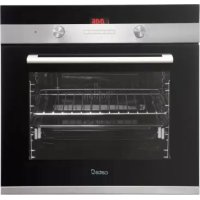
CDP 780 AS BK - Oven CATA - Free user manual and instructions
Find the device manual for free CDP 780 AS BK CATA in PDF.



| Product type | Built-in oven |
| Brand | CATA |
| Model | CDP 780 AS BK |
| Dimensions (W x D) | 440 mm x 390 mm |
| Usable volume | 59 litres |
| Rated voltage | 220-240 V ~ 50 Hz |
| Maximum power | 2.30 kW (fan heating element) |
| Bottom heating element power | 1.30 kW |
| Top heating element power | 0.90 kW |
| Grill heating element power | 1.35 kW |
| Bulb type | 15-25 W, 300 °C, E-14 |
| Cooking modes | Convection, top element, bottom element, circular with fan, grill, maxi-grill, fan grill, defrost |
| Timer | Electronic 6-key (automatic cooking, semi-automatic, timer) |
| Thermostat | 50 °C - 250 °C |
| Number of racks | 4 guide levels |
| Included accessories | Grid, drip tray, screws and fixing covers |
| Door material | Glass (removable for cleaning) |
| Cleaning | Soft cloth and soapy water or diluted ammonia; no abrasives |
| Installation | By a qualified person, earthing required |
| Electrical class | Class I |
| Catalytic coatings | Available as an option, not covered by warranty |
Frequently Asked Questions - CDP 780 AS BK CATA
User questions about CDP 780 AS BK CATA
0 question about this device. Answer the ones you know or ask your own.
Ask a new question about this device
Download the instructions for your Oven in PDF format for free! Find your manual CDP 780 AS BK - CATA and take your electronic device back in hand. On this page are published all the documents necessary for the use of your device. CDP 780 AS BK by CATA.
USER MANUAL CDP 780 AS BK CATA
Operating and maintenance instructions for built-in ovens
IT
REEMPLACEMENT DE L'AMPOULE DU FOUR
DIMENSIONS INTÉRIÉURES
Hauteur: 340 mm
Thank you for choosing one of our products. We hope this household appliance provides you with the best service. Therefore, we suggest you read the instructions and suggestions contained in this manual carefully in order to use our products correctly.
The specifications plate for this oven is available on this appliance. This plate, visible by opening the door, displays all the necessary identification information for this appliance for ordering replacement parts.
GENERAL INFORMATION
Please read this manual carefully before using the appliance. It is important that all the control functions are understood before beginning to cook with this appliance.
Heed the advice and warnings included under the title "IMPORTANT - Safety advice and instructions".
- This appliance has been designed for private domestic use and can be integrated into standard kitchen furnishings or similar.
- In order to use in caravan-type vehicles, the suitable indications included in the Installation Instructions should be borne in mind.
- Use of this appliance for any other purpose or in any other environment without the manufacturer's express agreement will invalidate any guarantee or liability.
- This new appliance is guaranteed against electrical or mechanical defects, subject to certain exclusions indicated in the Manufacturer's Terms and Conditions of the Guarantee.
The above does not affect your statutory rights.
Ensure that all protective packaging and covering has been removed before using this appliance.
To collaborate in protecting the environment, separate the packaging materials into the different types and dispose of them according to local waste disposal regulations.
The packaging is designed so as not to harm the environment; it can be recovered or recycled as it is an ecological product. By recycling the packaging, you will contribute to saving raw materials and reducing the volume of industrial and domestic waste.
Any additional information on waste disposal may be requested from your local environmental agency.
When used for the first time, a slight smell from the protective covering or damp may be noticeable, which will disappear after a short time.
The symbol on the product or its packaging indicates that this product cannot be treated as normal household waste. This product must be handed over to an electric and electronic equipment collection point for recycling. On ensuring that this product is disposed of correctly, you will help to avoid possible negative consequences for the environment and public health, which could occur if this product is not handled correctly. To
receive more detailed information about recycling this product, contact your local government, domestic waste disposal services or the outlet where the product was bought.
This appliance has been built and distributed in compliance with the essential requirements of the following EEC EUROPEAN LAWS AND DIRECTIVES:
EC Symbol - 93/68 Low voltage - 73/23 CEM-89/336
Safety Rules - EN 60 335-1, EN 60 335 -2 -6.
This appliance respects laws of the suppression of radiointerference.
As the Manufacturer has a policy of continuous product improvement, it reserves the right to adapt and carry out any modification considered necessary without prior warning.
IMPORTANT NOTICE
SAFETY INSTRUCTIONS AND WARNING
- This appliance complies with all current European safety legislation, however, the Manufacturer must emphasise that this compliance does not prevent the surfaces of the appliance from heating up during use and remaining hot during its operation.
- Therefore, the Manufacturer highly recommends that this appliance is kept out of the reach of babies and small children.
- If children cannot be kept out of the kitchen, they must be watched at all times.
- We also recommend that great care is taken during use and cleaning. Read the cleaning and maintenance sections for this appliance carefully.
- Do not place heavy objects on this oven or lean on the door when opening it, as this may damage the hinges.
- Do not leave hot oil or fats unattended as they may catch light.
- Do not place oven dishes or trays of the lower part of the oven or cover it in aluminium foil.
- Never store flammable objects inside the oven as they may catch light.
- Do not allow the accessories or electric cables to touch the hot parts of the appliance.
- Do not use the appliance for special heating or drying clothes.
- Do not install the appliance near curtains or upholstered furniture.
- Do not try to lift or move kitchen appliances by pulling any door or handle as this may cause damage.
- If the oven join is very dirty, the door will not close properly when the oven is working. The fronts of neighbouring furniture may be damaged. Keep the oven join clean.
- During operation the appliance will heat up. Care must be taken to avoid touching heating elements inside the oven.
-
Open the oven carefully. Steam may escape and burn anyone nearby.
-
Do not pour water inside a very hot oven. The enamel may be damaged.
- This appliance must be installed correctly by a suitably qualified person, strictly following the manufacturer's instructions.
- The Manufacturer declines all liability for personal or material damage as a result of misuse or incorrect installation of this appliance.
- Heat, vapour and humidity are produced during use, avoid all kinds of personal damage and ensure that the room is suitably ventilated. If used for a prolonged period of time, additional ventilation may be necessary - consult a qualified installer if you have any doubts about the necessary volume.
INSTRUCTIONS
This User Manual must be kept for future reference and use by someone who is not familiar with the appliance.
Before using the oven, carefully clean the inside with a non-abrasive detergent and warm water. Introduce the grill and tray in their respective runners. Once the operation is complete, turn the oven on to the maximum temperature for approximately 20 minutes to remove any traces of manufacturing grease, oil or resins which may cause unpleasant odours when cooking.
WARNING: During this first heating some smoke or unpleasant odours may appear. Should this happen ventilate the room suitably until the first operation is finalised.
Once this simple operation has been carried out the oven is ready to use for cooking.
This appliance is exclusively for domestic use.
Use the oven to cook food only.
USING THE OVEN
The oven is controlled by a thermostat between 50^ and 250 ^ C, depending on the temperature required. The thermostat pilot light turns on and off to indicate the temperature control during use.
The required cooking mode is selected using the multi-functional control button. The functions that may be selected are:

A. OVEN LIGHT. Automatic when selecting the cooking mode for all models. The oven light remains on when using the oven.

B. CONVECTION MODE. Provides traditional cooking with heat from the upper and lower elements.

C. UPPER ELEMENT MODE. For gentle cooking, browning or keeping cooked dishes warm.

D. LOWER ELEMENT MODE. For slow cooking and heating food.

E. FAN-ASSISTED CIRCULAR ELEMENT MODE. Provides uniform heating with the fan and allows different
dishes to be cooked at the same time on different levels.

F. FAN-ASSISTED LOWER ELEMENT MODE. This provides heating by semi-convection with the lower element to elicit dishes.

FIG. FAN-ASSISTED CONVECTION MODE. This provides a convection heating of the upper and lower elements for a term cooking.

H. GRILL. For gratinating and browning food.

I. MAXI-GRILL. As above, but the grill element provides a larger area for roasting.

J. FAN-ASSISTED GRILL. This provides fast browning so that food remains juicy. For convection baking, this is the most energy-efficient function.

K. THAWING MODE
The fan works without heat to reduce the thawing time for frozen food.
USEFUL ADVICE
- Before cooking, make sure all oven accessories that are not required are removed from the oven.
- Pre-heat the oven to the cooking temperature before using it.
- Place the cooking trays in the centre of the oven and leave space in between when using more than one, so that the air can circulate.
- Do not fill the tray to full when preparing a juicy, fruit cake.
Any fruit juice that drips from the tray will produce stains that cannot be removed. - Do not put oven trays on the base of the oven or cover it with aluminium foil. This will cause thermal accumulation. The cooking and roasting times will not coincide and the enamel may be damaged.
- Try to open the oven door as little as possible to see the food (the oven light remains on during cooking).
- Take care when opening the door to avoid contact with hot parts and steam.
COOKING INSTRUCTIONS
Read the information of the food packaging for the cooking temperatures and times. Once familiar with the performance of the appliance, the temperatures and times may be varied to adapt them to your personal tastes.
Check that frozen food is completely thawed before cooking, unless indicated otherwise.
| Type of food Temp. °C Runners Cooking time in minutes Suggested Personal | ||
| Cake mixture desserts in moulds | ||
| Sponges or buns 175 2 55-65 | ||
| Cake 175 3 60-70 | ||
| Short pastry desserts in moulds | ||
| Pie base | 200 3 | 08-10 |
| Cheesecake pie base | 200 3 25-35 | |
| Fruit pie base | 200 3 25-35 | |
| Raised dough desserts in moulds | ||
| Pie base | 180 3 | 30-45 |
| Soft bread 1 kg of flour | 200 3 25-35 | |
| Small pastries | ||
| Short pastry | 200 3 | 10-15 |
| Doughnut dough | 200 2 | 35-45 |
| Biscuit dough | 200 3 | 15-20 |
| Lasagne | 225 2 | 40-50 |
| Meats (Cooking time per cm of thickness) | ||
| Long roasts | 200 2 | 120-150 |
| Short roasts | 200 2 | 60-90 |
| Meatballs | 200 2 | 30-40 |
| Poultry | ||
| Duck 1 1/2 Kg | 200 2 | 120-180 |
| Goose 3 Kg | 200 2 | 150-210 |
| Roast chicken | 200 2 | 60-90 |
| Turkey 5Kg | 175 2 | 240-260 |
| Game | ||
| Hare | 200 2 | 60-90 |
| Leg of venison | 200 2 | 90-150 |
| Vegetables | ||
| Oven-baked potatoes | 220 2 | 30-40 |
| Cooked vegetable flan | 200 2 40-50 | |
| Fish | ||
| Trout | 200 2 | 40-50 |
| Sea Bream | 200 2 | 40-50 |
| Pizza | 240 3 | 10-20 |
| Grill | ||
| Chops | 4 8-12 | |
| Sausages | 4 10-12 | |
| Grilled chicken | 2 25-35 | |
| Spit-roasted veal 0,6Kg | 50-60 | |
- The runner number is counted from the bottom of the oven up (Excluding the base of the oven as trays cannot be placed on it)
THE POSITION INFORMATION IS INDICATIVE BECAUSE THE COOKING TYPE AND TIMES CHANGE DEPENDING ON THE QUANTITY AND QUALITY OF THE FOOD.
HOW TO USE THE GRILL
Place the food to be browned on the grid or in the shallow tray. The grid has to be placed on the highest runner, whilst the tray for collecting fat should be on the lower runner. Connect the grill using the following positions of fan-assisted oven selector knob, or in the position of the multi-function oven selection knob.
Depending on the type of food (meat, fish, poultry, etc.) it will be necessary to turn it over to expose both sides to the infra-red rays of the grill. For guidance only, we indicate some cooking times below:
| Food to be grilled | Cooking times in minutes Suggested |
| Lean or thin meat | 4-6 |
| Normal meat | 5-8 |
| Fish without scales | 8-10 |
| Fish (e.g. Trout, salmon) | 12-15 |
| Sausages | 10-12 |
| Sandwiches | 2-5 |
WARNING
- Do not use aluminium foil to cover the grill tray or heat.
- Do not wrap elements in aluminium foil or place them under the grill - the great reflective quality of aluminium may damage the grill element.
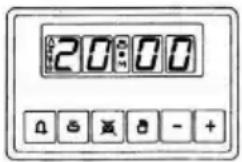
USING THE 6-BUTTONE ELECTRONIC TIMER
Description of the button functions:

Alarm

Automatic cooking (duration)

End of cooking time (end time)

Manual operation

Reducing numbers in all programmes

Adding numbers in all programmes
Meaning of the lit symbols:

Indicates that programmed cooking is under way or it is the manual position.

Programmed alarm.

More "AUTO" (Both flashing): Programming error.
AUTO: AUTOMATIC PROGRAMME
Flashing): Programmer in automatic position, but not programmed or ended.
(Light on): Programmer in automatic position and programmed.
No symbol lit, except the clock numbers means that a waiting time is programmed.
Programmer functions:
24-hour display clock.
Alarm (Maximum 23:59).
Automatic programming (start and end of cooking).
Semi-automatic cooking (only start or only end of cooking).
The timer only works when the appliance is connected to the electricity supply.
Electronic clock
Immediately after connection (Also after a power cut) THREE flashing digits will appear on the panel.
To enter the correct time press + simultaneously and AT THE SAME TIME one of the buttons 6 until the correct time is shown. There is a 5-second acceptance delay during which no button should be touched.
The speed that the marker changes will noticeably increase some seconds after beginning to press the buttons and +
Manual cooking
(Without using the programmer)
To use the oven with the help of the programmer, the flashing «AUTO» indication must be cancelled by pressing the button If the «AUTO» indicator is not flashing (which means that the oven is programmed) the programming must be cancelled first by pressing and setting the marker to 0.
Automatic cooking.
(Start and end of cooking)
1)Programme the cooking time using
2)Programme the end of the cooking time using
3) Select the temperature and function required using the thermostat and selector knobs.
After these operations, the «AUTO» symbol will appear on the display, indicating that the oven has been programmed.
Practical example:
We wish to cook for 45 minutes and that the cooking time ends at 2 p.m.
- Pressing we set 0.45 on the display.
- Pressing we set 14:00 on the display.
After these operations the current time will reappear on the display as well as the «AUTO» symbol, indicating that our programming has been understood and memorised.
At 13:15 (14:00 minus 45 minutes), the oven will automatically start, the symbols and «AUTO» appearing during cooking.
At 14:00 the cooking will automatically stop and the alarm will
sound intermittently.
Press to turn the alarm off.
Semi-automatic cooking
A. Programming the duration of the cooking
Set the chosen cooking time using the button and set the duration.
Cooking will start immediately, the symbols «AUTO» and will appear on the display. When the programmed time has passed the cooking will stop and the alarm will sound intermittently. Turn the alarm off as described above.
B. Programming the end of the cooking
Set the chosen end time for the cooking using the button and set the end time. Cooking will start immediately and the symbols «AUTO» and will appear on the display. Cooking will end at the set time and the alarm will sound intermittently. Turn it off as indicated above. The state of the programming can be checked at any time by pressing the corresponding button.
The programming can also be cancelled at any time by pressing and setting the marker to zero. By then pressing the oven will be ready for manual operation.
Electronic alarm
The timer function consists solely of an alarm which can be adjusted for a maximum period of 23:59. To adjust the time, press the button and at the same time (+) or (-) until the desired time appears. Having made the adjustment, the real time will reappear next to the symbol.
The countdown will begin immediately and can be viewed on the display at any time by simply pressing the button. When the time has ended, the symbol will disappear and the alarm will sound intermittently, which may be turned off by pressing the button. The alarm does not control any of the oven functions.
NOTE
- If an error is made it will be indicated via an alarm and the "AUTO" symbol will flash. Cancel the adjustment by pressing the button , and then re-programme to rectify it.
The alarm that sounds at the end of a programme will continue for seven minutes unless cancelled by pressing the button. However, at the end of the seven minutes the "AUTO" symbol will continue flashing. - The alarm has three tone positions, low, medium and high. To adjust the tone, check that the timer is in the manual mode, then press the button and hold down to hear the tone selected. On releasing the button, press again and hold down to select another tine. Repeat the procedure until the required tone is heard.
WARNING! a power cut will result in the programmed functions to be cancelled, including the clock. Once the power returns three flashing zeros will appear and the oven can be re-programmed.
USING THE MECHANICAL TIMER
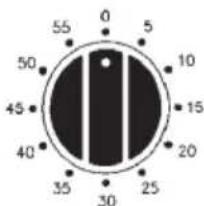
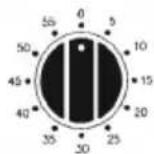
Once the thermostat controls are in the desired position, turn the knob clockwise to the maximum position and then turn it anti-clockwise to the desired time; at the end of this set time the buzzer will sound. The timer only indicates the end of the set time, but it does not stop the function being used.
CLEANING THE APPLIANCE
IMPORTANT
As a safety precaution, before beginning to clean the oven always unplug it from the power supply or remove the appliance power lead.
Cleaning an oven that does not self-cleaning panels must be done after use, when it is switched off but still warm, not hot, so that the film of grease produced by the cooking vapours on the walls is still easy to remove, as well as the drips and splashes of fat that are not yet hard and dry.
Remove the chrome-plated wire side supports; pull the front part upwards to unattach them from the wall and remove them from the rear orifices. Clean the oven with a soft cloth soaked in a diluted ammoniac solution; rinse and dry. If there are still stains and splashes, place a damp cloth soaked in ammoniac at the back, close the door and, after a few hours, wash the oven with warm water and liquid detergent, rinse and dry carefully. To clean the shiny metal outside doors, use a soft cloth with soap and water; do not use any powdered products that contain abrasive substances.
Also avoid the use of acid or alkaline substances (lemon juice, vinegar, salt, tomatoes, etc.). Avoid using products containing chlorine, acid or abrasive substances specially for cleaning the varnished walls. Do not use thick steel wool or hard utensils, as they can damage the surface finishes.
Do not use high pressure cleaners or steam appliances for cleaning the oven.
Normally, wiping with a damp soft cloth and warm detergent is enough, but for stubborn stains the following is recommended:
VTRIFIED ENAMELLED PARTS
Only use a recommended cleaner for this type of material - avoid chloride-based products such as bleach.
GLASSDOOR PANEL
Do not use abrasive products which could damage the glass. Remember that if the surface of the glass panel becomes scratched, it could cause a dangerous failure.
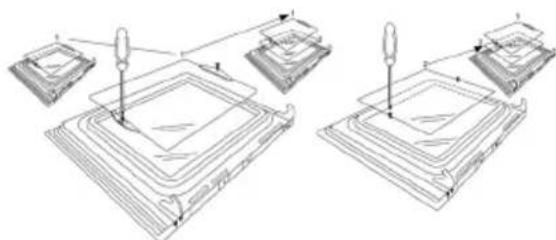
To simplify the cleaning, the inner glass panel can be taken out of the door. The method for removing the glass from the three types of door is shown below.
Door type A
After removing the screws fixing the glass, located on the inner face of the door, lift the glass out carefully. In versions with three glasses the intermediate glass can also be removed. The procedure is the same as above.
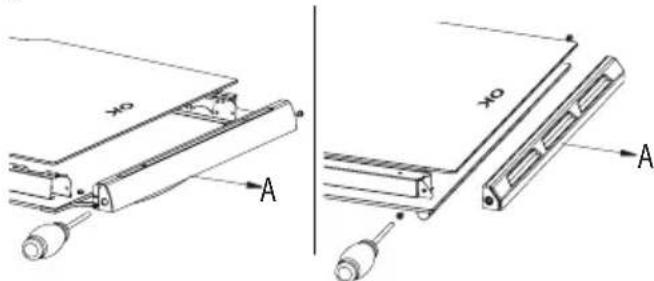
Door type B1/B2
After removing the screws fixing the upper support of the glass, remove the support in direction "A". Then the glass can be pulled out. In versions with three glasses the intermediate glass can also be removed.
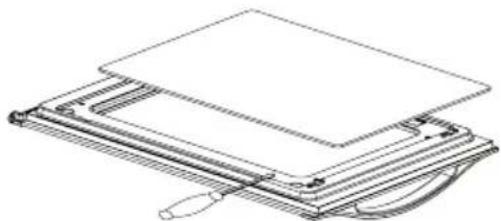
Door type C
Carefully lever up the glass with a flat screwdriver located in the groove shown in the figure.
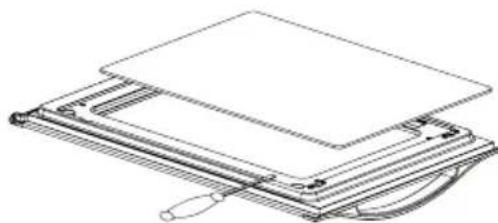
When refitting the glass, check that it is correctly fitted into the toothed joint of the door and all around.
REMOVING THE DOOR FROM THE OVEN
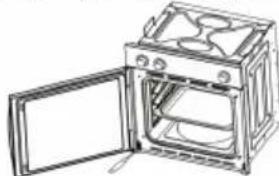
To simplify cleaning the interior of the oven, the door can be removed. The process of removing the door for the three types is shown below:
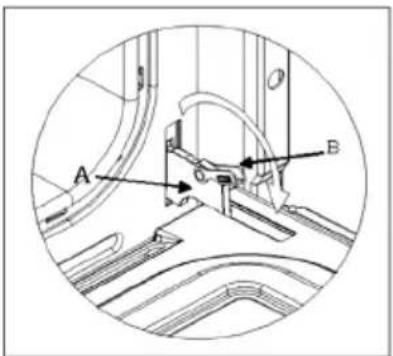
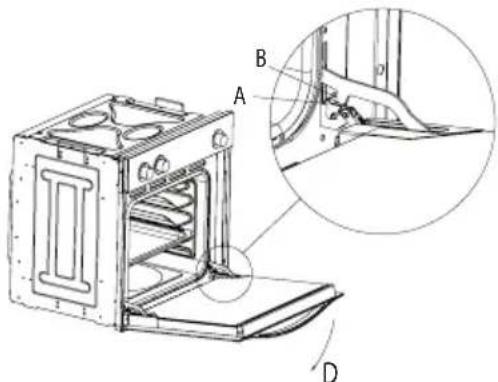
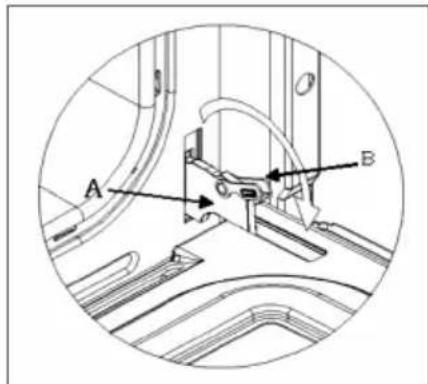
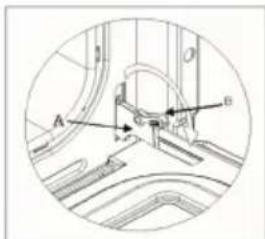
Door type A/B2
The hinges "A" have two moving bolts "B".
When the bolt "B" is lifted, the hinge comes out of its housing. Then close the door to the half-way position.
Next, lift the door upwards and remove it, sliding it outwards; hold the door by the sides close to the hinges when doing this.
To replace the door, first slide the hinges into their grooves and open the door completely.
Remember to turn the two moving bolts "B" used to engage the two hinges before closing the door (Fig. 3).
WARNING
- Take care not to remove the hinge locking system when taking off the door, as the hinge mechanism can spring back suddenly.
- Never submerge the door in water for any reason.
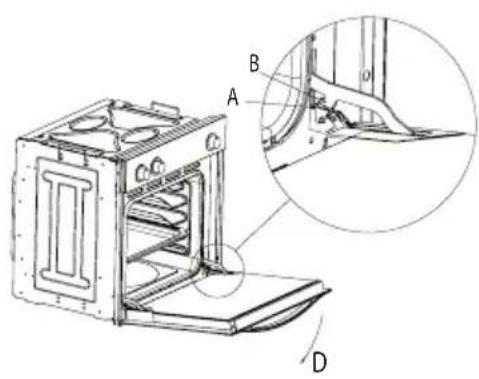
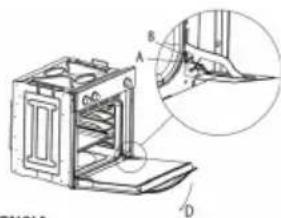
Door type B1
Open the door fully to position "D"
Lift the two mobile links "A" of the hinges, until fixing at point "B".
Then close the door to the half-way position.
Next, lift the door upwards and remove it, sliding it outwards; hold the door by the sides close to the hinges when doing this.
To replace the door, first slide the hinges into their grooves and open the door completely.
Remember to turn the two moving links "B" used to engage the two hinges before closing the door (Fig. X).
WARNING
- Take care not to remove the hinge locking system when taking off the door, as the hinge mechanism can spring back suddenly.
- Never submerge the door in water for any reason.
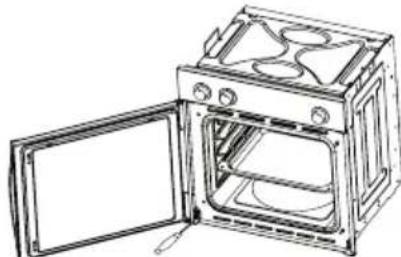
Door type C
Open the door and support it firmly.
Using a suitable screwdriver remove the lower hinge by the part fixed to the oven.
Then remove the upper hinge from its place and take off the door.
To replace the door, follow the same steps in reverse.
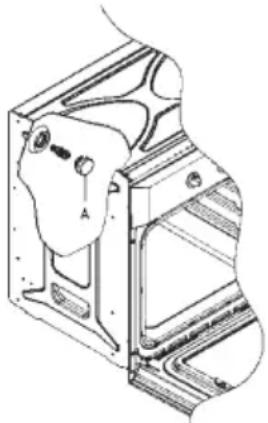
Oven accessories (Fig. 4)
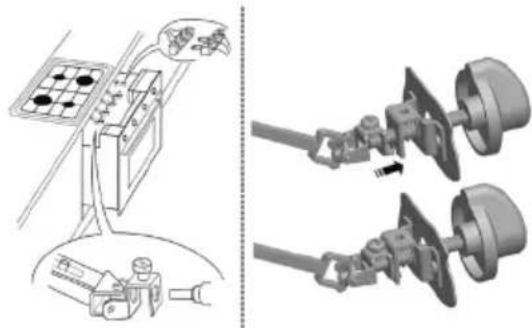
The oven can be provided with lateral guides fitted to the oven wall. Insert the grid and oven sheet provided on the lateral guides. To remove the guides proceed as follows for the two types:
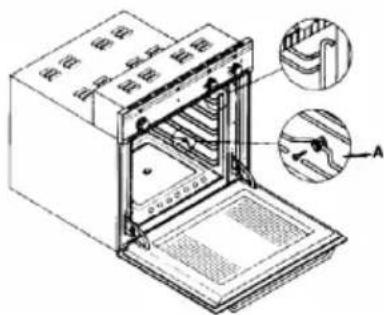
Bars type 1
To remove the lateral guides press downwards at point A.
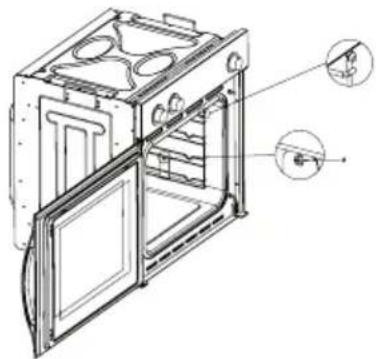
Bars type 2
To remove the lateral guides take out the screw using a suitable screwdriver, lift the bars upwards until they are free.
INSTRUCTIONS FOR INSTALLATION
This appliance must be installed by a competent person, in accordance with the current version of the UK Safety Rules and Regulations or their European equivalent:
Urban development regulations (published by the Department of Environment).
Urban development laws (published by the Scottish Executive Development Department).
IEE wiring regulations.
Electricity in labour regulations.
PRIOR START-UP OF THE APPLIANCE
When it is unpacked, check that the following parts are with the oven:
- Instructions and Installation Manual
oven grid
1 tray - Screws and stoppers for fitting the appliance in the housing
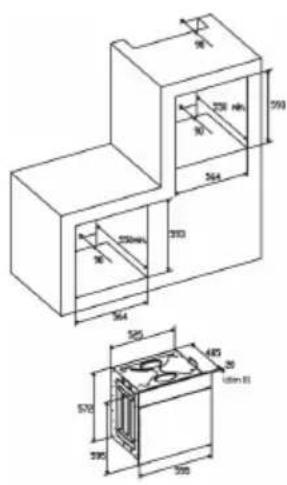
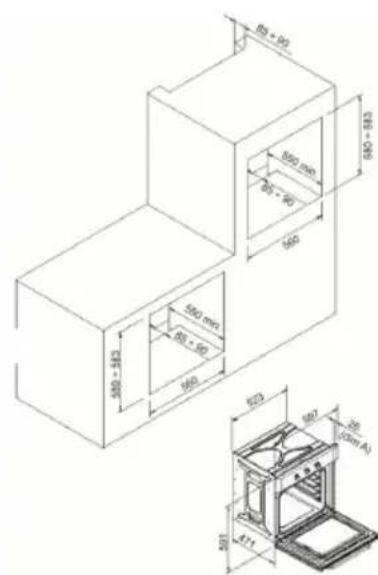
FITTING THE APPLIANCE (see Fig. 5)
These appliances are classified as Class I.
The earth is obligatory as provided for by law. The manufacturer declines all liability in the event that the accident prevention rules have not been followed.
IMPORTANT
The adjacent piece or furniture or cupboard and all the materials used in the installation must resist a minimum temperature increase of 85^ above the ambient temperature during use of the appliance.
Certain types of vinyl or laminated kitchen furniture are particularly susceptible to damage due to decolouration at temperatures below those indicated.
If the appliance is installed without paying attention to this temperature limit or if it is placed less than 4mm from the adjacent cupboards, liability will belong to the owner.
INSTALLATION NOTES
-
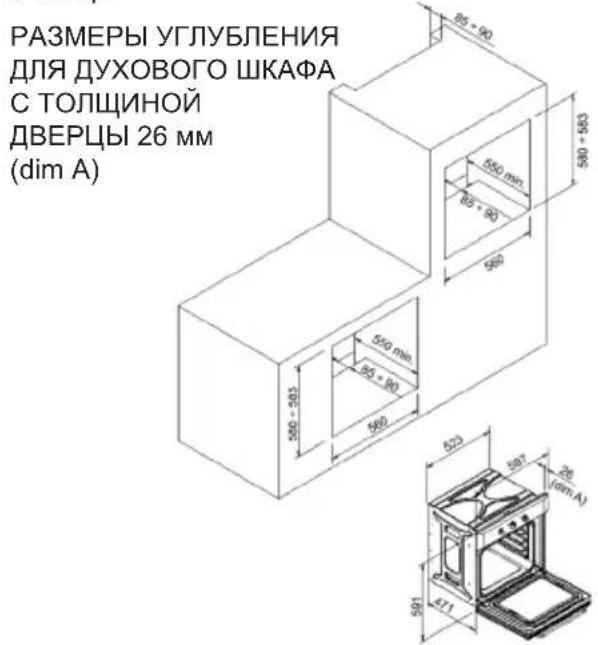
The oven has to be installed in a standard gap of 600mm as indicated in Fig. 5, whether under a hob or in a column.
-
On inserting the oven in a column, it is essential in order to ensure there is enough ventilation, to remove the rear panel of the furniture and have an opening of at least 85 - 90mm as indicated in Fig. 5.
-
Check that the oven has been fixed securely in the housing. Fixing the oven into the cupboard is done using 4 screws "A" Fig.5. One in each corner of the oven door frame.
Fig. 5: Installation distanced for simple electric ovens of 60 cms wide (the shape of the upper casing may vary) and attachment to the cupboard.
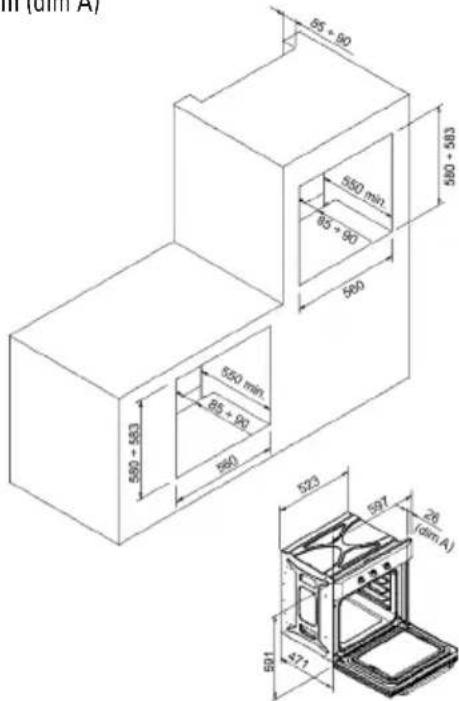
BUILT IN DIMENSION FOR OVEN WITH DOOR THICKNESS OF 26mm (dim A)
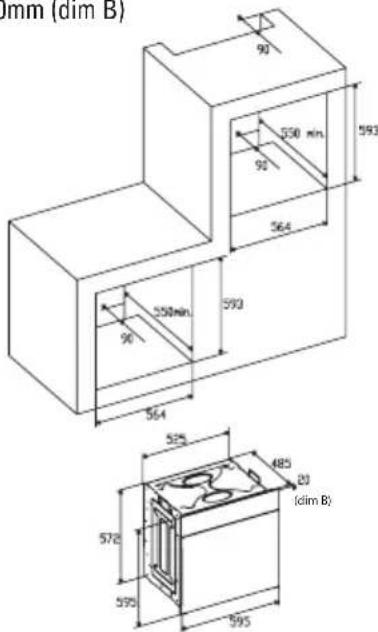
BUILT IN DIMENSION FOR OVEN WITH DOOR THICKNESS OF 20mm (dim B)
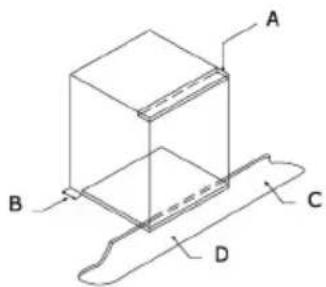
4. When installing multipurpose ovens install the s shown in figure n°6.
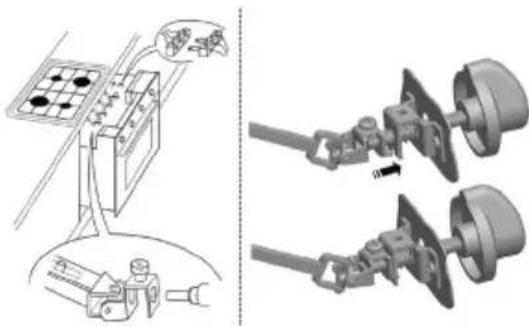
A. The support runner must be removed
B. Spacing of 75 - 90mm between the wall and the rear part of the support shelf and the base of the cupboard
C. Base
D. False box front to be assembled
Minimum ventilation requirements for upper, base and support shelves for the rear part of the unit.
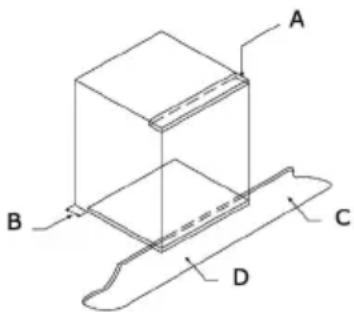
Fig. 7: Ventilation and gap requirements for the installation of a simple electric oven in a standard cooking unit.
A. Rear panel
B. Storage space
C. Remove the rear part of this section
D. Real panel
E. Storage space
F. Base
G. Minimum ventilation gap 80 cm2
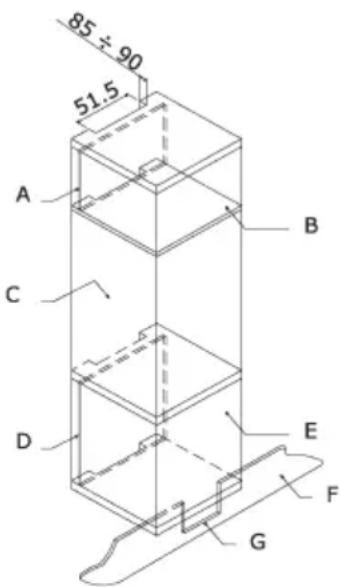
Fig. 8: Ventilation and gap requirements for the installation of a simple electric oven in an upper cupboard.
ELECTRICAL CONNECTION
Before connecting the appliance, check that the voltage marked on the specifications plate coincides with the voltage of the electricity network.
The NICEIC register is recommended for electrical installations.
WARNING - THIS APPLIANCE MUST BE EARTHED
This appliance must be wired to a 13 A bipolar automatic switch with protected socket, which has a 3mm separation between contacts and is placed in an easily accessible place next to the appliance.
IMPORTANT
The conductors of the network power supply lead are coded by colours are follows:
Green and yellow -Earth
Blue - Neutral
Brown-Live
- The green and yellow conductor must be connected to the terminal marked "E" or with the symbol of the earth or which is green and yellow.
- The blue conductor must be connected to the terminal marked "N".
- The brown conductor must be connected to the terminal marked "L".
The lead must not reach a temperature higher than 50^ above the ambient temperature at any point. - If the power lead is damaged, it must be replaced by a special lead or unit supplied by the manufacturer or it after-sales service.
REPLACEMENT OF THE NETWORK POWER SUPPLY LEAD
If it is necessary to replace the network power supply lead, proceed as follows:
- Disconnect the appliance from the power supply, unscrews the fastening screws and remove the rear panel.
- Unscrew the fastening screws and those of the terminals to free the existing lead.
- Assemble the replacement lead which must comply with the information listed in the Specifications, ensuring the correct connection of the colour codes and that all the screws are correctly tightened.
MAINTENANCE
Before carrying out maintenance, disconnect the appliance from the power supply.
During the guarantee period, if necessary all services should be commissioned to the Manufacturer's Technical Assistance Service Department. Bear in mind that intervention or repair by unauthorised personnel will invalidate this guarantee.
REPLACEMENT OF THE OVEN LIGHTBULB
Not covered by the appliance guarantee.)
The oven has a light with the following characteristics: 15 W or 25 W, 300^ and type E-14
WARNING: Disconnect the appliance from the electricity supply, remove the oven door (as described above), as well as the oven shelves.
Remove the glass cover that protects the light bulb by turning it anti-clockwise. Fig. 9 (A)
Unscrew the old light bulb and dispose of it safely and ecologically, change it for one as specified in the Specifications and replace the cover.
NOTE - The glass cover may be tight and, therefore, may need a grip to release it.
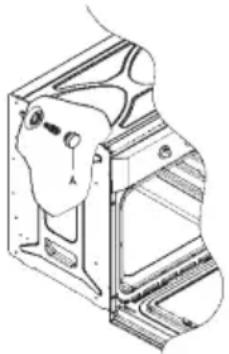
CARE AND REPLACEMENT OF THE CATALYTIC COVERING
(When assembled, the covering is not covered by the appliance guarantee).
In order to keep the covering "always clean" efficiently, the oven must be heated to a minimum of 200^ whenever there are stubborn stains, so that they do not become permanent. If the covering becomes black and shiny, they must be replaced. Remove all the internal accessories to facilitate the replacement of the covering.
The replacement covering may be bought directly from the Manufacturer's Replacement Part Department (see details included in the cover). Indicate the reference numbers of the product type described in the specifications plate and/or the series number of the appliance on ordering.
SPECIFICATIONS
INTERIOR DIMENSIONS
Height: 340 mm
Width: 440 mm
Depth: 390 mm
Useful volume: 59 litres
ELECTRICAL INFORMATION
Nominal voltage:
220V-240V\~50Hz
Power connection: 13A (automatic bipolar switch with protected socket, with 3mm separation between contacts)
POWER ABSORPTION
Base Resistance: 1,30 kW
Roof Resistance: 0,90 kW
Fan Resistance: 2,30 kW
Grill Resistance: 1,35kW
Network power cable:
3x1.5mm2typeH07RN-F
Oven light bulb:
15 W - 25 W / 300 °C screw type E-14
The Manufacturer declines all liability for damage caused to persons and objects due to incorrect or improper installation of the appliance.
The Manufacturer reserves the right to make any modification it believes necessary and useful to the products, without prior warning.
ISTRUZIONI PER L'UTENTE
Volume utile: 59 litri
DATI ELETTRICI
Tensione nominale:
220V-240V\~50Hz
WAARSCHUWING en VEILIGHEIDSVOORSCHRIFTEN
(Zonder programminging)
WAARSCHUWING-DIT APPARAAT MOET GEAARD WORDEN
Para as instalacoes electrolyicas, recomenda-se o registo NICEIC.
ADVERTÉNCIA - ESTE APARELHO DEVE SER LIGADO A TIERRA
Este aparecido deve ser ligado a um interruptor automatico bipolar de 13 A com tomada protegida, que tenha separação de contactos de 3 mm e situada num lugar fácilmente acessivel jusqu'à do aparecido.
IMPORTANT
Obaaate BnMaHne Ha BCE COBtI n npdynpexKeHn, KOToPbI DaHOCT NOI 3aROJOBKOM "BAKHAR INHOPMALURA - COBtI INHCTpyKcIM no Texnke Be3oNaCHOCTN".
- DyXOBka pa3pa6oTaHa IЯ DomaUHero NOJIb3OBAHnI, n OHa MoKet 6bITb BCTpoEHa B CTaHapTHyIO KxyOHHyIO Me6eIb.
- Pn nCnoJIb3OBAHnn ee B TpaHCnOpTHbIX CpeIcTBax Tnna Doma-ФуProHa HxKHO yuHTbIBaTb COOTBETCTByIOUne yKa3AHn, BKIIQUeHHbIE B INHCTpyKUnn NO MOHTaxy.
- IcnoB3OBAHne 3ToI dYxOBKn dJa KaKnx-Jn6o dpyrux ceene nn B nIObON dpyroon o6ctaHOBe6e RaBHO BbipaxKeHHoro cornaCn N3rTOBHTeJ npINBODNT K aHHyInpOBAHnIO rapaHTnn N OTKa3y OT OTBeTCTBEHHOCn.
-「RapaHTnpyETcA, YTO B HOBOI DyXOBKe HET 3JIeKTPnuecknx IIN MExaHnuecknx DepeKTOB, B COOTBetCTBmN C HeKOtOpbIMN NCKHIOyeHNMyM, KOTOpbie yKa3aHbI B "PiJIoXeHNyx N ycNoBnIx RapaHTn N3rOToBnTeJI". - BbIeYka3aHHoe He BnIeT Ha Baun 3akOHhie npaba.
Ipekde Yem NOJb3OBAtbcra DyXOBKo, HxKHO 68a3aTeNbHO CHrTb BCIO 3aunTHyU ynaKOBky N nOKpbITn. IpyKaHooe Cpebl, pa3dJeNte ynaKOBouhble MaTePnJIbHa pa3NJuHbIE TINbl uYtnH3npyIte INB COOTBeTCTBUN C MeCTHbIMn npabInaMn, KacaIoUmmcra yTNlN3aCmN OTXODOB.
Ynakobka pa3pa6oTaHa TaKIM o6pa3OM, yTo6bl He HABpeNTb OkpyKaIOUeI cpeIe; ee MOxHO BOCCTaHOBtB Nn Nepepa6oTaTb, TaK KaO hA YBIAETcN 3KOLOrHcEckN YCtBIM npOdyKTOM. EcNn Bbl nepepa6oTaTe DaHHy OynakOBky, Bbl BHeCeTe CBOB BKlaD B DeNo 3KOHOOMN CBIpBeBbIX MaTePnaIOB IN B DeIO CHNXeHNA OBemOB IpomBlNeHHbIX IN
DOMaUHnX OTXoIDOB.
IOnonHnteBHyu INHOpMauno6 yTuNn3aunOTXoOB MOxHO 3aTpe6oBaTb B MeCTHOM3KoJIoRnueckOM aReHTCTBe.
B haane 3KcnpnyatauH, MoXHO NOyBCTBOBaTb Ierkn 3anax OT 3aunTHoro NOKpbITn INN CbipocTN, KOtOpBn NCye3HET Ype3 KaKO-TO HnpoOnJKNteJIbHbI nepNOB BPemEn.
CnMBoHa npOdyKTe nIeero ynaKOBke yka3bIbaet Ha To, YTO daHHbI npOdyKT HeIb3a pacCMaTpNBaTb KaK obHbI 6bITOBo MycOp. DaHHbI npOdyKT dJa nepepa60TK DoJIKeH cDaBaTbCSHa NyHK Tc6opa 3JIeKtpueckoro n 3JIeKTPoHHoro o6OpydoBaHry. EcN Bbl no3a6OTntecb O npabInbHO yTuIN3aunn daHHoro npOdykTA, Bbl NOMoxTe u36exKaTB BO3MOxHbIX HeratNBbIX NOCEdCTBn DnA OKpyXaIOUe Cpebl N 3DopOBbBy HaceJeHry, KOTOpbIE MOrYr BO3HNKHyTB pNl HnepepbIBHO yTuIN3aUnn npOdykTA. DnA NOJyehn 6OJee NoPpO6Hoi INΦOpMaUnn OTHCnTEhBO yTuIN3aUnn DaHHOR npOdykTA, O6patNTecb B MeCTbIe opraHbI ynpABNeHry, B cnJy6y yTuIN3aUnn DOmaunHX OTXODOBuN B Mara3H, rDe Bbl Kynnn DaHHBII npOdyKT.
3Ta DxyOBka 6blna n3rOToBJIeHa n peaIIN3OBAHa B COOTBETCTBn C BaXHeINHMn Tpe6oBaHnMn CJeDyIOxN EBPOENCKNX 3AKOHOB N IINPEKTNIB E3C:
CnMBOJ EC-93/68 Hn3KOBONbTHOe 06OpyIOBaHne -73/23 CEM-89/336
IpaBnJaTexHnK6e3oNaChocTn-EN60335-1, EN60335-2-6.
JaHoe yCTpoIcTBO COOTBETCTByET 3aKOHAM O IIOaBHeHN paDNoONomEx.
Tak kak n3roTOBnteJIb npnIepKINBaETcR npHnCINOB NOCTOHHORO COBepUeHCTBOBAHnnpOdyKTa, OH OCTabJIeT 3a Co6oI npABO npHnMaTb N BblONHtB BCaKne MOndpNkauu, KOTOpbIE CHTaHTcR Heo6xODIMbIMu, 6e3 KaKOrO 6bl TO Hn 6blNO npEdBaNTeJIbHO rYBeDOMnHeHn.
AXHOE3AMEUAHNE-HNCTPYKUNNOTEXHNIKE 6E30NACHOCTN INPDEUYPPEXDEHNE
-Данhoe yctpoIcTB COOTBETCTBYET BCEMy Tekyueme My EBponeNCKOMy 3aKHOaTeNbCTBy NO 6e3oNaChocTN, OHaKO n3rOToBnTeJIb DOJKeH NODeRPKHyTb, YTO 3TO COOTBeTCTBHe He KacaetC HArpeBaHnIOBepXHOCTeY cTPOIcTBA BO BpEm 3KcnPnyatauH, KOTopbIE OCTaIOTcR rOpAUMN BO BpEm pa60Tb.
- IOnToMv N3rTOBnTeJb HAcTOrTeJbHo peKOMeHdyET He DonyckaTb K yCtPoNCTBy MaJIeHbKnx DeTei.
- Ecnn obecneuhtb oTCyTCTBne Teen B KyxHe
HEBO3MOXHO, 3a HIMN HYKHO NOCTOARHNO CNeIHTb.
- TaKke peKomeHdyem 6bItb octopoXhIMN BO BpeMnOJb3OBaHnI OChCTKn. BHImaTeNbHO npOHTaITe pa3dJIb IIO DaHHOMy yCTpOInCTBy, KacaUuieCer OChCTKn IN TEXHueCKOrO 06cJnyXnBaHnI.
He klaDHTHa dYXOBKY TReKeIbIX npEIMTeOB Hn He OnpaTecb Ha DBePcy, KOrda ee OTKpbIbAeTe, NOTOMy UTO 3TO MOKeT pINBECTN K NOBpeKDeHIO nTeJIb.
He octabnayte 6e3 npncmoTpa ropeee Macno nJIn Knp, TAK kak OHN MoryT 3aropeTbcra.
-
He klaIaIte npOTuBHN JIN NIOHOCbI Ha IHO dYXOBKn Hne npIKpbBaIte ee aIIOMmHHeBOH cOJbRoI.
-
HNKOrda He xpaHnTe BHyTpN dYXOBKn JERKOBOcPnAmHeREmbIe PpeDMeTbI, NOTOMy UTO OH MOrTy 3aRopeTbcr.
-
He donyckaTe npNKoCHOBENr npHaIeXHOCTeu nn 3neKtpnuecknx Ka6eNe c ropaymN deTaJIaMn yctpoiCTBa.
He nCnoJb3yIte yCTpoIcTBO dIaCneuaJIbHbIX HarpeBaHn IIN dIa cySeHna Odekbl.
- He yctaHabnBaIte ycTpoiCTBO B6Iu3n 3aHaBecok nn MrgKoM Me6eN.
He nbItaTeCb noHIMaTb nIIN nepMeaTaB kXoHHbIe yCtpoiCTBa 3a pyKy nIIN 3a DBepy, TAK KAK 3TNM Bbl MoKeTe IN NOBpeDHTb.
- Ecni nIIOCKOCTn COpJxKeHn DyXOBKn OueHb rpy3HbI, DBepua He 6ydt NaIeKaUm O6pa3OM 3akpbIbATbcr BO BpeM pa60TbI. Moryt 6bITb NOBpeXdEhblnepeDHeueactN6n3KopacnoLoXeHHo Me6eni. POndePjNBAitte NcCTOTy nIOCKOCTe COpJxKeHn DyXOBKn.
Bo Bpempa6oTb ycTpoNCTBOHarpeBaETc. CneNyET 6bITb OCTopoXHbIM Nn36eRaTB KOHTaKTA C HarpeBaTeNbHbIMNJIeMeHTAmBHyTpN DyXOBKn.
- OtkpbBaIte dIyXOBky OCTOpOxH0. I3 dyXOBKMOKET BblpBaTb nap n npuHHITb OXoRn HaxOJaUIMcRApydOM.
He BnBaIte BOy BOBHyTp b OeyHb ropYe IyXOBKn. MoKet 6bITb NOBpeKeHa 3MaJIb.
-
YCTPOICTBO DOJXHO npabINbHO yCTaHABINBaTbcr INUOM, O6NaDAIOUIM DOCTaTOUHO KBaNΦUKaUnei, B CTporOM COOTBETCTBUN C NHCTpyKUmaMn N3ROTOBtEJI.
-
U3ROTOBNTeJIb CHNMAET C ce6yIO6yO OTBeTCTBeHHOCtB 3a TpaBMbl IIN MaTePnAIBHbIyUepe6, HAcTyNHBWne B pe3yJbTaTe He npBaUNbHOJ EKcPnlyaTaunn INn HEnpABUNbHOJ yCTaHOBKn DaHHoJdyXOBKN.
-
Bo Bpempa6oTbI o6pa3yeTcTenNo, nCnapeHnN Bnara, n36eraTe noLyuEHHa TpaBM n ObecneBte HaDJIeKaUO BeHTUNAciu NOMEeHHa. Pnp IOnb30BaHnN B TeueHHe NPOdoJXHTeNbHO rpeNoDa MoKet OKa3aTbcr Heo6xOdMOn DonoJHtEnbHa B eHTINaIe - ecnn y Bac Bo3HKnHYT comHeHHa B OTHoUeHHn Heo6xOdMOro 6bema, npOKOHcyNbTnpuyITecb C KBaJIncuPObaHHbIM MOHTaxHnKOM.
HHCTPYKUN
JaHHoe pyKOBOdCTBO NOJIb3OBaTeJRA DOJXHO XpaHHTbcB KaueCTBe CnpaBOuHoro Noc6nHa 6yduyee nIgnoJIb3OBAHnY eJIOBEkOM, He3HaKOMbIM cDaHHbIM yCTpOJCTBOM.
PpeKdyeemNoIb3OBAtbcraDyXOBKO,TuaTeNbHO OuHCTNTe BHyTpEHHne NOBepxHocTN Hea6pa3NBbIM YnCTaUIM CpeCDTBOM N TeNIOB BOIo. UcTaHOBnte peWeTKU npOTNBbB COOTBeTCTByOUsne HnPaBnIOUne. No 3aBepweHm 3ToI onepaun, BKIOHTe DxyOBky Ha MaKcImMaJIbHyTO Tempeatpy npImepHo Ha 20 MInyt dJa ydaJeHnaCneoB 3aBOcko Cma3Kn, Macla INn CMOJbl, KOTopbIe MOrYT cTaTb PnUnHOHepnAeTHbIX 3anaxOB BO Bpema npiroTOBLeHnRAuIN.
PENYPNEXHENE: Bo BpemnepBoro HarpBaHnMoKET NOBtbcA DbIM NnHEnpNTHbIe 3anaxn. B TAKOM cnyae xopoO npoBeHTnIpuTe NOMeueHne, noka He 3aKOHnTc npBaononepaun. Pocne OKOHuaHn 3ToI npocToonepaun dyXOBka 6yDet roTOBa dI npiroTOBJIeHn Niun.
Hactoie yctpoCTBO npedHa3NaeHo NCKIOHTeIbHO DnI DOMaUHeRo nOJIb3OBaHnI. IcnoJIb3yIte dYxOBky TOnbKO dNpNIrTOBJeHnI pNtN.
NOLb3OBAHNE NINTOJ
D.PEXKIM HIXKHEFO 3NEMEHTA.
TOTOBKn Ha MeIeHHOM OrHe N IJIa NOOrpeBaHnMIIu.

E. PEXKIM KPYROBOO 3JIEMHTA C NOIyBOM.
ОбспуньаET OДнOOбра3hoe HarpeBaHne c ПрIMЕнEHМ BeHTINЯТopa И Дaet BO3MOxHOCtБ ПрИ�OTaBnIBaTb OДНOBрЕмEHо pa3ЛИЧьIE 6ЛЮда Ha pa3HbIX yPOBнAx.

F. PEXKIM HIXXHETO 3JIEMEHTA C
IOnyBOM.ObecneuBaetHarpeBaHne C
NONYKOBKeUeH HNXHM 3JEMeHTOM dIa N3bICKaHHbIX 6JIIO.

G. KOHBEKLIOHHbI PEXIM C
IIOyBOM.ObecneuBaet KOHBeKUHOHHe
HarpeBaHHe BepXHM N HIXHM 3JeMeHTaMn dJa paBHOMepHO TEnIIOBOO o6pa6oTK.

Ipeed roTOBKO npOBepbTe npOdyKTbHa npPeDMET NOHoro OTTaBAHHa,ecn He yka3aHO INhoe.
YacbC24-YacOBbIM DnCnJIeem
CnHaJIIN3aIy (MaKcIMMym 23:59)
AByOMaTnueckoe nporpaMMnpOBaHne (Haayao N OKOHuaHne TeNIOBOO6pa60TK)
IonyabTomatuecka TeNIOBb o6pa6oTa
(TOJIbKO HaHaNo IIN TOJIbKO OKOHuaHne TeIIOBOI o6pa6oTkn)
TaNmep pa6oTaET TOnbKO B TOM cnyae,ecnIyXOBKa NODKNIOHEna K NcTOUHNky 3NeKTPnueCKORO NITAHIN.
3NeKtpoHHbI yacbl reloj electronic
Cpa3y je nocne coeHHeHnra (TaKKe i nocne OTKJIIOUeHnna 3JeKTPo3Heprrn) Ha naHeJn NOBJIaOTcT Pn MIRAOuX uOppbl.
Дя BBOda npaBnIbHOrO BpeMeHn HaxMnte + OndOBpeMeHHo n B TO KE CAMOE BPEMЯ
ODHy H3 KHOHOK NIN ,NOKa He NOBHTCnPabInbHoe Bpem.BbINOHNReTc8 5-ceKyHdHa3aepkKa DnI npHeMa,B TeueHne KOtOpO HeNb3HaxMAtb Hn Ha KaKne KHOKN.
Ckopoocb N3MeHnHa MapKepa 3aMeTHo BO3pactaet Ypee3 HeckOJIbKO CeKHyN IocNe HaxaTna Ha KHONK
TOTOBka BpyHOM peKIme
(6e3 noIb3OBaHn nporpaMMaTopa)
ДЯ noIb3OBaHn dYXOBKn C nOMOuBIO
nporpaMMaTopa HxKHO OTMeHHTb MraHouyU
HNikauHIO AUTO> HaxaTneM Ha KhoNky .
EcIn INDkaTOP AUTO> He Miraet (TuO O3HaayE,
TuO dYXOBKa 3anporpaMMuPoBaHa), HyxHo
OTMeHHTb nporpaMMuPOBaHn cHaJaHaXaB Ha a 3aTeM yCTaHOBv MapKeP Ha 0.
TOTOBka B aBTOMaTHueCKOM peXnme.
(Haayano OKOHuaHne TeINOBoN o6pa60TKn)
1) 3anporpammmpyteBpeMraTOBKn npn nOmooun
2) 3anporpammmnpyTe KOHeC rTOBKn npn NOMOUs
3) BbIbepnTe TemnepaTyu n cyHKunIO, HxKHyIO JIy IONb3OBaHnre TepMOCTaTOM n pyKaMn ceNeKTopHOrO nepeKluOyateJIa.
Iocne BbINOJIHeHnA 3Tnx Oepaun CmBOn «AUTO» IoBNTcHa DaIcNPeE, yKa3bBaJ Ha To, YTO dYxOBka 3aIporpaMMIpObaHa.
Ppaktnueckn npmep:
Ham Hyxha TeTnoBa 6pa6oTKa B TeueHne 45 MNHyT uYTo6bI BpeMa OKOHuaHnHaCTyNnIO 6bl B 14:00.
-HaximmaHa ,MbI yCTaHaBnBaem Ha
Ducnnee0
-HaXIMaHa
ducnnee 14:00

,MbIyCTaHaBnBaem Ha

,MblYCTaHaBnBaem Ha
Iocne BbINOJIHeHn 3Tnx Otnepaun Ha dncnnee IOBNTc TeKyuuee Bpem, a TAKKe CmBOn «AUTO» Yka3bBaHa To, UTO 3aJaA npOrpaMMnpoBaHHa NOHrTa N BBedeHa B nAmrTb.
B 13:15 (14:00 MmHyc 45 MmHyT) dYXOBka aBTOMaTHueCKN BKJIHOuHTcR, N BO BpEmr rOTOBKn IONBArTC CNMBOJbI n «AUTO».
B 14:00 tennoba o6pa6oTKa aBTOMaTnueckn octaHOBNTcra 6yJeT c NaY3amN 3ByuAtb cnHaJIn3aun. HaxMnte Ha DJIa BbIKIOUeHn CnHaJIn3aun.
TOTOBKa B NOJyABTomaTHueCKOM pexHMe.
CTEKJIaHHa IaHEnb DBePcbl
3aIpeaaeTcNcNoJIb3ObaTb abpa3nBhIe cpeCTBa, KOToPbIe MoTy TnoIapanaTb CTeKNo. TomHe o TOM, yTO NoRbIeHHe capaHn Ha nobepxHOCTn CTekJa MOxET npUBeCTn K BO3HnKHOBEHIO ONaCHO nCITyaCNI.
BbMoKTe BbHyTb BHyTpEHHee CTeKNo n3 DBepCuI npomblb erO. HxkeMbI npINBOdIM ONUCAHne npocecca BbIHMaHnA CTeKna DJIa BCEx Tpex BO3MOXHbIX BNDOB DBepCuI:
BuaDbepuA
OTBnHTntb n CHrTB KpeNexHbIe 6oNTbl Ia CTeKna, pacnoJIOXeHHbIe Ha BHyTpEnHe NOBepxHOCTn DBepbl, n OCTopoXHO BbIHytB CTekNo. Ecnn DnA DAHHo DBepbl PpeyCMOTpeHbI Tpn CTekNa, TO TORda MOxHO BbIHytB n IpomExkyTOuHoe CTekNo. Ia 3TORO NOBtOpTE BblIePnPBedeHHbIe DeiCTBna.
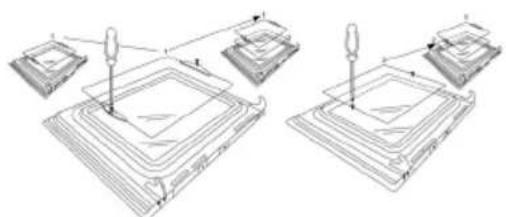
BnA DBepuB1/B2
OTBnHTnTb n ChrTb KpeNexHbIe 6oNTbI BepxHei onopbl CTeKna, N BbIHytb CTeKNo NO HAnpaBneHIO "A". CTeKNo npocTo cHmaeTc. EcnI dIaHHO DBepzbl npedyCMOTpeHbI TpN CTeKNa, TO TOrDa MOxHO BbIHytb I npomExkyTOuHoe CTeKNo.
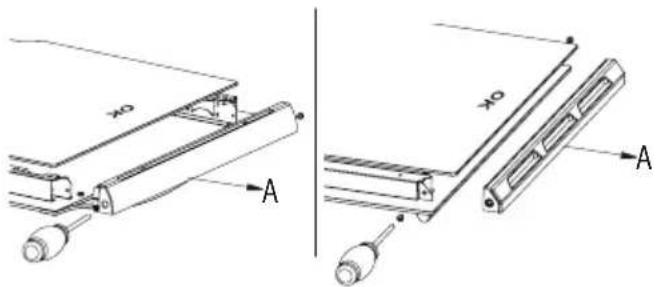
BnA DBepuC
Ponb3yrcb nIOCKo OTBepTKo B KaueCTbe pbIcara, BIOXHTb ee B na3 n CnErKa NODeTb CTekNo, TaK, KaK 3TO yKa3aHO Ha pncyHke.
Pn c6opke y6eHntecb B TOM, YTO CTeKNO yCTaHOJIeHO npaBUNbHO OTHOCHTbHO DBepuI N BCero KOHTypa neu.
KAK BbIHytb DBEPUYNEH
Дверца Neун ChИмaelТСдЯ оБлereHЯ уXODa 3a BHyTppeHNe NOJocTbI Neu. HIXe Mbl npNBoDm ONICAHne pa36OpKn DBepcI neu ДЯ BCex Tpex BO3MOxHbIX BVIOB DBepCbI:
BnA DBepuA/B2
Дпгдьрньх neteNB "A" npeducmOTpeHb I Dba IOdBnKhbIX 6oJTa "B".
Pn noHrtn 60Ta "B", DBePha nTJcBo6oHo CHMaETc.
Pocne 3toro 3akpoTe DBepuy Do npomexkytoHoro noJoxhen.
3aTeM NOHIMITE DBepy No HappaBneHIO BBepx N BbIHbTe ee, NotaHyB 3a Hee No HappaBneHIO HApxky, INpNDepKINBAI DBepy B MeCTax PraDom C NeTnAM. INaC6OpKn DBepzbl, BO-NepBbIX, BCTaBbTe DBebpHbIe NETnB COOTBETCTByOuNe Na3bl N NOHOCtBu OTkpoIte DBepy.
He 3a6ydbTe nobepHytb o6a nodBnXbIX 6oNTa "B", KOtOpbl Bbl nOHNn dNn CHrTn DBePbI, dNn 3akpenneHn OeHx neTeJb npeed 3akpbITnem DBePbI (Pnc.3).
BHIMAHNE
BbHmMa DBepu, CneInte 3a TeM, TTo6bI BMeCTe C DBepei Bbl He BblHyn CnCTeMy 6NoKIpOBKn NTeNb, TAK KAK B ATOM Cnyae MexAHN3M NTeJIbHOrO 3aTBoPa pe3KO BepHeTcB INCXoINHOe INOJKeHne.
Kateropnueckn 3anpeuaetcnaorpykaTb DBepuy B BOdy.
BnDBepuB1B1
OTKpoTe DBepuy HacteXb Do DOCTNXeHnnoJIOJKeHn“D"
IOnHMnTe 06a NODBnKHbIe 3BeHa “A” IBePbIX nTeJIb, Do 3akpenneHn ToKn “B”.
Iocne 3Toro 3aKpOte DBepy Do DOCTNXKeHn npomexyTOHOro nIOXKeHn.
3aTeM noHmnte DBepu No HnpaBHeHIO BBepx N BbInbTe ee, NotryHB 3a Hee no HnpaBJeHnO Hapxy, npuem npn BbINOnHeHn 3THX DeIcTBn PnpdepKnBaIte DBepu B MeCTax PAnOM C NeTJAMN.
Длясборкндевцbl,BO-нepBbIX,BCTaBBTe DBePьIe netn B COOTBeTCTByOuIne na3bl I NONHOCTbIO OTKpoITe DBepuy.
He 3a6ydbTe NOBepHyTb o6a NOdBnXhIx 6oNTa "A", KOtOpblc Bbl nOdHnI dIe ChrTna DBepCuI, dIra 3akpenneHnOBeux neTeJb nepeD 3aKpbItnem DBepCuI (Pnc. X).
BHIMMAHNE
BbHmMa DBepu, CneIte 3a TeM, TTo6bl BMeCTe C DBepeB BHe BBHyN CnCTemy 6JOKPOBKn NTeJB, TaK KaK B 3TOM CJIyae MexAHN3M NeTeNbHO 3aTBopa pe3KO BepHeTcB INCXODHO NOLOXHeH.
Kateropueckn 3anpeaaetcno npykaTb DBepuy B Body.
BnA DBepuCb C
OtkpoTe DBepy u KpeKo ee npndepknte.
C NOMOJIbIO COOTBeTCTByUoIeN OTBepTKN, CHIMNTE HIXHIO DBePhyIO NTJIIO, KOtOpAra KpeINr DBepCy K neu.
Iocne 3TOro nOHOCTbIO OCBO6OIndTe BepXHIOI neTJIIO NCHIMNTe DBepUy.
IyXOBKa DOnJxHa yCTaHABINBaTbCra
KBaJIHΦUHpOBaHHbIM CneUHaJIHCTOMB COOTBeTCTBmC TeKyuIeBepCneH HOpM I npAByI TEXHNK6e3oNaChOCTn CoeINHeHHoro KoponeBcTBa IInnxEBPoneckNX aHaIOROB:
HopMbI rpaOCTpOnTeJIbCTBa (ony6NIKOBaHbI denapTaMeHTOM OKpykaIOSe i Cpebl)
3aKohbl rpaOCTpOnTeNbCTBa (ony6NIKOBaHbI WOTnHaNDCkIM NcNoJIHNTeNbHbIM DeNapTaMeHTOM pa3BHTNA)
3NeKtpoTeXHnueeCKne npaBnla INcHTuTa nHXeHepOB no 3NeKtpnke n 3NeKtpoHnke
3NeKtpuueCTBO TpydOBom 3aKOHOaTeJIbCTBe
NEPED BKJIIOUChEHNEM DUXOBKN
Pn pacnaKOBKe npOBepbTe, HaxoJrTcN B DyXOBKe CneDyUOuNe DeTaN:
- INHCTpyKUIN pyKOBOCTBO NO yCTaHOBKe.
-NeuHbIe peWJETKNJIN
1 npoTnBeHb
BnHTbI n cTOnOpbln BcTpbanBaHnny dYXOBKn B HnUy.
MOHTAX dyxOBKn (CMOTpn pnc. 5)
3Tn dYxOBKn Knaaccnphiu npyHcno Knaccy I. 3a3eMneHne o6raTeNbHO, KaK TOrO Tpe6yET 3aKOH. N3rotOBNTeNB cHMaet C Ce6B CIO OTBETCTBEHHOCb npn Hec6bIHOdEHN npaBn PpeD0TBpaueHnre HeCuaCThIx CnyaeB.
BAXKHOE 3AMEYAHNE:
PnmbkaHua Me6eB nnu 1kKaΦ, a TaKke BCE MaTePnAblb, nCNoJb3yeMbIe npy UcTaHOBKe, DOJXHb I BbIepxNBAbTb, KaK MNHMym, NOBbIWeHne TemnepaTypbHa 85°C BblSe TemnepaTypbI OKpykaUoJe CpeDbI BO BpEmpa6ObI dyXOBKn. OnpeDeHeHHbIe Tnbl KyxOHn Me6eN n3 BNHnna Hnn cONCTOrO pNaCTnKa OocO bYBCNTeNBbI K NOBpeKdEHNm B CBraN C oBeCuBeuNbAHm Epn TemnepaTypax Hnke yKa3aHnO. Ecnn dYxOBKa yCTaHaBnBaETcB 6e3 yUeTa 3TOrO TemnepaTyphoro npedeNa, nNecn OHa YcTaHaBnBaETcRa Ha pacCToHm MeHee 4 MM OT npmbkaHua XkKaΦOB, OTBeTCTBeHHOCb 3a 3To 6yDet HeCTn BnAdeneU. 3AMEUAHNIOYCTAHOBKE
1.DyXOBka yCTaHaBnBaETcB CTAHdApTHOM npoeme 600 MM, kak yka3aHo Ha pncyHke 5, 6ydTo nOJ NOJIKOI DnI HarpeBaHnI INN B NeHaJI.
2.Pn yCTaHOBKe DyXOBKn B neHaI OeHb BaXHo, YTO6bl ObecneuHTb DOCTaTOUHyO BeHTnlauIO, CHrTb 3aNDIO paHeJIc MbeJI N IpeDyCMOTpeTb OTBepCTne pa3MepAMn, nKpAneH Mepe, 85-90 MM KAK yKa3aHO Ha pncyHke 5.
3.IpoBepbTe, yTo6bl DyXOBka 6blJa HaJeKHO 3aФNKcnpOBAHa B HnWe. 3aKpeIJIeHne DyXOBKn B Wka4py OcyueCTBnEETc npn NOMoU 4 BuHTOB "A", pnc.5. IIO ODNMy B KaXdOM yrny DBePHo paMbI dYxOBKn.
Pnc.5: PacctoHnnpu yctaHOBKe dnn npocbix 3JIeKtpnuecknx neey uipnHO 60 cm (fOpMa BepxHrO KOxyxA MOKeT 6bITb pa3HO) N BCTpaUNBaHne B WkaΦ.
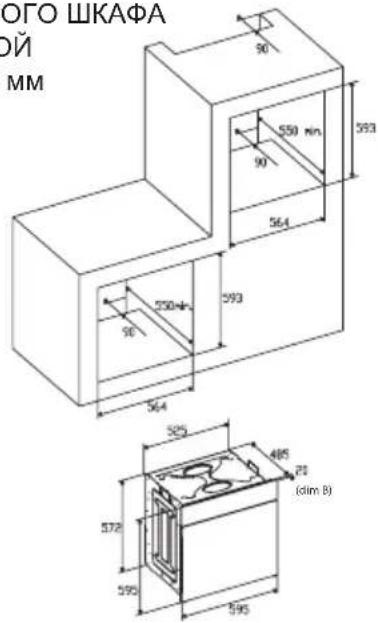
PA3MEPbI yJyBJIeHnA
ДЯДУXOBOTO UKAPAC TOJIUNHOI
ДВЕРцbl 20 MM
(dimВ)
4.Pn yCTaHOBKe MHOroOyHKUHOHaJIbHOJ DyXOBKn, ycTaHOBNTe S, NOKa3aHHYIO Ha pncyHke 6
A. OnopHyIO HanpaBnIouHyXHO CHrTb
B.PacctoHne 75-90 MM MExdy CTeHKoN 3aDHeuactbIO ONOpHOI NOJK N OCHOBAHnEM WkaΦa
C.OCHOBAHne
D.YCTaHaBnBaETCaIeKopatNBHaaHaKaJaKa
Pnc.7: Tpe6oBaHnK BeHTnJauuN 3a3Opam npnycTaHOBKe IpocToI 3JIeKTPnuYeCKO JdyXOBKn B cTaNapTHoKyXOHHoMe6eHn.
MnHMaJIbHbIe Tpe6oBaHnK BeHTnJIaCnДЯBepxHei, 6a3OBoi n OOnpHOI NOLOk DJIa 3aDHeuactN dYXOBKn.
A. 3aHnra naHeIb
B. MecToДЯхpaHEnHЯ
C. CHIMNTE 3aDHIOU qACTb 3TOI CEKUN
D. 3aДнЯ панель
E. MecTo dIy xpaHEny
F.OCHOBAHNE
G. MInHmAlbHbI 3a3Op dIy BeHTnIaIuN 80 cm2
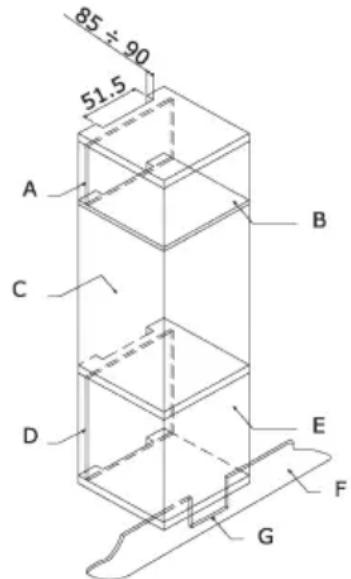
Pnc.8: Tpe6oBaHnK BeHTnIaCmN 3a3Opam npnyctaHOBKe npocToe 3JIeKtpnueckO dyXOBKn BBepxhem ukaqy.
3NEKTPNueCKNE COEINHEHNA
Ipejde yem nodknluoyb dxyOBky, npOBepbte, yTo6bl HanpJxHHe, yka3aHHoe Ha nacnopTHoT Ta6nUKe, COBnaJaNo C HapJxHHeM 3JIeKtpuYeCKoCetN. DnA 3JIeKtpuYeCKnx yCTaHOBok peKOMeHdyETc RONb3OBAtbcr peRnCTpom NICEIC (CobET HAunOHalbHoN INChEkuIN dnn POnpraDnKOB, BbINOJIHryUOxN 3JIeKtpOTExHnuYeCKne pa60TbI).
PNEyIPEXJEHNE - DAHHOE YCTPOIcTBO NOJIEXKIT 3A3EMJIeHIO
Пювода Дан Horу устор CTВа Doлжна OCUшecТьЯ Тбса Урета DBByXNoIIOCHы aBToMaTnueckи ВblKlNoYaTeNb Ha 13 aMnepe c 3aUnSeHHoN Po3eTKoN, B KOToPOM npeDyCMOTpeH 3a3Op 3 MM MExJy KOHTaKTaMn, N KOToPbI yCTaHaBnBaTeCBA JleKo DoCTyHOM MeCTe PraDom c UystpoiCTBOM.
BAXHOE 3AMEYAHNE
PpOBoJaIeJxNJIbI CeTeBOrKa6eIaNTaHnO 6o3HaueHbI UBeTOBOMapKInpOBKOcJeDyUOUM 6pa30M:
3eJneHO-JeNTbI - 3emn
Tolbyo - Heitpanb
KopuHeBbI -Φa3a
- 3eJHeO-JeJIbI INPOBOHNI KOJIKeH 6bITb
PnCoeDInHeN K KJIeMMe, Oo3HaueHHoE "E" IIN K
KJIeMMe C CmB0JOM 3a3EmJeHnA, IIN K KJIeMMe,
Oo3HaueHHo3eJHeo-JeJIbIM cBeTOM. - TOny60 npOBoHNK DoJxH 6bITb npuCoeHNHe K KJIemMe, 6O3HaueHHoN "N".
KopuHbI npOBoHNkOJIKeH6bITb npCoeUHeH KKnEMMe, 063HaueHHoN "L".
TemnepaTpa npoBOnHka Hn B KaKo erO TouKe He DoJxHa DoCTuRaTb TemnpaTpyb BiIe 50^ NaI TemnepaTpor OkpyKaHOue Cpebl. - Ecnn cnloBoi Ka6eIb nobpeXdeH,ero HyxHo 3aMeHnTb CneuHaNbHbIM Ka6eIeM nn Ka6eIeM, NOCTaBnAeMbIM N3rOToBnteIeM nn pN noclenpOdaXHom o6cnyKuBaHN.
3AMEHA CETEBOTO KABENI NITAHNIA
Pn Heo6xOIMOCtN 3aMeHNT bcTeBOI Ka6enb nTahnnoctynite cNeDyUOUM o6pa3OM:
1.OTcoeHnHTe DxyOBky OT 3NeKTpOnNTaHnry, OTBnHTnte BnHTbI KpeJIeHnry n CHmNte 3aDHOIO NaHeJb.
2.OTBnHTNTe BNHTbI KpeJIeHnI N BNHTbIKJEMM, yTO6blOCBO6OuNTb CTapbI Ka6JIb.
3.PnncoeHnHTe HOBBI Ka6eJIb, KOTOpBIO DOJIKeH COOTBeCTBOBaTb NHΦopMaUIN, YKa3aHHoB B TEXHnuecknx ycNoBnX, CJeIa 3a ZCBetOBoM MapKnpoBkoN I 3aTgNBaB BnHTbI COOTBeTCTByOuIM yCnJIneM.
TEXHNUECKOE OBCNJYKUBAHNE
PpeXe Yem BbINOHNrTb TexHnueCKoe 06cnyKBaHne,OTcoEduHnte dYxOBky OT 3NeKTPoNtHaHn.
B TeueHne rapaHTnHoro nepnoDa BCE Heo6xOdImoe 06cJyXuBaHHe DoJXHO npuyatbcra OTDeNy TexHnueckoro 06cJyXuBaHnru n3rOToBnteJI. NOMHnte, YTO BMeWaTeJIbCTBO HNI peMOHT CO CTOpOHbI HeyNoJIHOMOeHHORo Ha 3TOro NepcoHaJa npNBODNT KaHHyInpOBaHIO HactOaJe rapaHTn.
3AMEHA JAMNOCBEHNYXOBK
(Ha JAMNoKy rapaHTna Ha dYXOBky He pacnpoctpaHareTc)
BdyxOBKe npedymoTeHa lamnoka co cneyuOnMnXapaKTepeNCTnKaMn: 15 BaTT nIIN 25 BaTT, 300^ Tnpe3b6bE-14
PNEyPExEHEH:OTcoeHNHTeDyXOBkyOTcETN 3JIeKTPnueCKoro NITaHn,CHMnTe DBepuy DyXOBKn (KaK ONIcaHO BbIe),a TaKKe IONKn DyXOBKn.
CHIMnTe cTeKJIaHHyIO KpbIuKy, 3aUuHaOuSyIO
JAMnoUky, NOBepHyB ee npOTnb YacOBn CTpeKN.
Pnc.9(A)
BbIBHTnte CTapyU NaMNoUky UytuN3npyTe ee 6e3oNaChbIM O6pa3OM N 6e3 BpeDa OkpyKaIOUe CpeDe, BBInHTnte HOByU, KaYka3aHO B TexHuecknx YcNOBx, INOCTaBBTe Ha MeCTO KpbIuKy.
IPUMEYAHNE - CTeKJIaHHa KpbIuKa MoXeT cnIeTb Tyro, nДЯ ChrTnA MoXeT notpe6oBaTbcra ycUInne.
Yxod 3a KaTaNtNuecknM NOKpbITHeM Iero 3aMeHa
(Ecnn npedymoTpeHO 3TO NOKpbITNe, rapaHTnHa dYxOBky Ha NOKpbITNe He pacnpocTpaHareTc).
ДяТOrOчTo6bl NOKpbITne Bcerda OChuzaIocb 3ФфeKTHINBO,ДуXOBKa DOJxHa HArpeBaTbcN, NO KpaHHeMpe,do 200^ BЛIObOM cIyuae,Korda BO3HnKAOT TpydHOBbIBODmble PANTHa CTeM,чTO6bl OHNeOCTaJIncb Habcerda.
Ecnn nokpbItne cTaHOBntcyeHbIM n 3epKaJIbHbIM, ero HxKHO 3aMeHNTb. N3BLeKeITe BCE BHyTpEHnne npHaJdIeXHOCtN, yTo6bl 6blIO JERHe PpON3BOIDtB 3aMEny nOKpbTn.
IokpbItne Ha 3aMeHy MoKHO npno6peCTn HeNOCpeDCTBeHHO B OTdene 3aNaChbIX ChTei N3rTOBHTeJIa (CMOTPN NOpO6HyIO INHOpMaUIO, yKa3aHHyIO Ha NOKpbITNI).Pn 3aKa3e YkaxNTe CnpaBOuHbIe Homepa TnPa npOdyKTA, yKa3aHHbIe Ha NaCnOpTHoTabLnuKe I (nII) cepuHbI HOMep dYXOBKn.
TEXHnueCKNE YCIOBnA
BHYTPEHHHE PA3MEPbI:
BbICota: 340 MM
UnpHa: 440 MM
TnybHa: 390 MM
Pone3HbO6bEm:59IHTPOB
OXIAXDAIOUINBEHTNIAIATOP
TaHReHuaJIbHbI BENTJIArTOxXnJaXDeHnYcTaHaBnBaETcHa CNeDyUOuX MoDeIax:
3NEKTPNUECKNE DAHHbIE
HomHaJIbHoe HapJxKeHne:
220-240 BoJbT, 50 rep
IopKJIuOHeH nITaHn:1 3 - aM nepHbI aBTOMaTnueckn BBKJIIOUaTeNb C 3aunueHHoP03eTKoB, B KOTOpOM npedycmOTpeH 3a3Op 3 MM MeJx KoHTaTAMN
3HEPTONOTPBEJIENHE:
MoHocTh HxKHeO 3JeMeHTa: 1,30 kBt
MoHocTb BepxHeo 3nemHeTa: 0,90 kBt
Mouhoctb BeHTnJIaTopa: 2,30 kBT
MoHocb rnila: 1,35 kBt
MaKcImaJIbHoe 3HepronoTpe6IeHne: 2,38 KBT
CeteBOn Ka6eJb NITaHnA:
3×1,5MM2,TunH07RN-F
JaMnoUka OcBeSeHn yXOBKn:
15-25 BaTT, 300^ Tn npe3b6bE-14
N3ROTOBNTeIb He Hecet HnKaKo OTBETCTBEHHOCTb 3ayuepe6, npuHHHeHHbI JIOJMaTePnaJIbHOMy NMyeCTBy n3-3a HnPaBnJbHOY yCTaHOBKn dYXOBKn.
N3ROTOBNTeNbCOxpaHReT3aC06oNpapBO BHOCTb B N3DeIINr N3MeHeHn, KOToPbIe, NO eRO MHeHIO, YBJIOTcR HeO6XODMbIM NII N0Je3HbIMN 6e3 npedBaPHTeNbHorO yBeOMneHn.

用户手册
gaaa aagaaa aaaaa aaaaa aa aaaaa
aill 1y yaiialll aie baa
jglg 3212
100 p100
y 1
y 1
g 1 1 1 1 1 1 1 1 1 1 1 1 1 1 1 1 1 1
aasli aas aabai jai bii p3. aaii cioia i npal 1 g laoi npal sai yolll
. 1111 1111 1111 1111 1111 1111 1111
. 1
y1 lue 2. jololll 1all gao zaoi jlas aeb pdoal, gao 1jaoa 1jaoj
aBb5olga 5g0j3 gsoo Cioo
p231 1025
a 1
. 1
yai yai aabaaai ayagai yaiy jaiy gaiy jil gaoi jil gaoi
1
13 13
| b0| = | b0| = 1.
AUTO" 0000 0000 0000 0000 0000 0000
a a a 1
111 111 111 111 111 111 111 111 111 111
"AUTO" jy jaa
y 3 3 3 3
Jolg gdoaall aabll glaw! jll ge doaol p sgsal gogll q cagall aolgi n aSt. aabll Joo
yjg jll aai 1000 1000 1000 1000 1000
(A) 9.521 . aIaI IaI aIaI aIaI aIaI aIaI aIaI aIaI aIaI
aai 9 aaiiill cui baeall gacg ioo all jie eao yao yao yao yao yao yao yao yao yao yao yao yao yao yao yao yao yao yao yao yao yao yao yao yao yao yao yao yao yao yao yao yao yao yao yao yao yao yao yao yao yao yao yao yao yao yao yao yao yao yao
.
E-14 300, W25, 15W:aaalaaa
4 10 30 20 10 00 00 00 00 00 00
.ogolall 1jia jao
. u.SjU 2016 C. l.bdo
1
(5gao) 与
g aaijgl auiu aaiiui uui iue g. aaiiui aaiiui jia 2
.5.JSJ 90/85
4abg jj 1 j 1 1 1 1 1 1 1 1 1 1 1 1 1 1 1 3
.55A
5 60 y 60
a1j0 5 j0 (ggl)
J 1
(A) 26
20.
jbl jdl jsl
(B slay) jala
yj jgai jai jia
(6) 15
4
ADVERTENCIA
2.3 × 5
aJ 1s J 1s J 1s J aJ pbl j 1s J
j0j0 j000
C uui
02:45mol 1
aagall aloal all jy p3 p .jally alolll agil n aolll aloaal wlin aan adn y
a.aaess alesse p. wuw wuyu y. wuw gai
(4)000)jall g0gol all
j 1
gall
1gj
LgRU 1000000000000000000000000000000000000000000
a a a a a a a a a a a a a a a a a a a a a a a a a a a
guy jusj Jaaal jaleo jajll qay jll daaall.
0joo j 0j0j0j0j0j0j0j0j0j0j0j0j0j0j0j0j0j0j0j0j0j0j0j0j0j0j0j0j0j0j0j0j0j0j0j0j0j0j0j0j0

A/B2
B jlaal . B jlaia Jlaa A Caaai y
L5
(3g) 154 "B" j5j0all jlaalll
x2 = 3 - x1
aBally 100000000000000000000000000000000000000000000000000000000000000000000000
aLal 034 plall sie cHoaall yjy JyI gio 531
sii 5i 15 uill gia 3 15 y 15 15 15 15 15 15 15 15 15 15 15 15 15
(X)yJ 13 A j5j0all jlaal 2g 2x 2
atblz aon:()
aLagajla
gab 150
0 1 jgai gaaal jll d aally

1
gabaiy 1
1)
2)
3)
Cttgagjll pao jolis ab 1g: plnnn nn aBgg agball oJy Jd
O"buJnRyCldaoa
:glas Jtla
14.00 aclw g yg 45 gabll oJ jn jni

0.45

14.00
.
y
jauu aagaiu uuu uua uuiu uuiu uuiu uuiu uuiu uuiu uuiu uuiu uuiu uuiu uuiu uuiu uuiu uuiu uuiu uuiu uuiu uuiu uuiu uuiu uuiu uuiu uuiu uuiu uuiu uuiu uuiu uuiu uuiu uuiu uuiu uuiu uuiu uuiu
a 100000000000000000000000000000000000000000000
yall 100 jai pbsi bbs g gail plia
aagall aad gaii jjg jjgl dawc cll all
aaiy 1000 1000 1000
Lgao jia xian li
badll clades
aegd 3yaa aalll 8jall a gabll cag yadg jilgal ggo clogeol alzai
cLxIy lo gabll sio g alaxmoll oJgall jolal a
y
1 1 1 1 1 1 1 1 1 1 1 1 1 1 1 1 1 1 1 1 1 1 1 1 1 1 1
1j00 100000000000
()
a 1
(y)
yolall oogg g aos yonr jaiygdall oag agegj yoluy bia ge oie cll
a b a a a a a a a a a a a a a a a a a a a
J 1
aegalnygstllnnae gaaellgallpaa
yjol jaoiia
gall

aill 100
yaiipilai
y
y 250000000000000

.00000000000000000000000000000000000000000
y

Lulu yll pail plal y jall jll
yda 1 yda jaojao jao jao
a 10000000000000000000000000000000000

doya z-b 1g yaou C3yj
aaiyaiyaiyaiyaiyaiyaiyaiyaiyaiyaiyaiyaiyaiyaiyaiyaiyaiyaiyaiyaiyaiyaiyaiyaiyaiyaiyaiyaiyaiyaiyaiyaiyaiyaiyaiyaiyaiyaiyaiyaiyaiyaiyaiyaiyaiyaiyaiyaiyai
.
"doxlalclao g cai jia - pae"gao yaiyai jia jia jia jia jia jia jia jia jia jia jia jia jia jia jia jia jia jia jia jia jia jia jia jia jia jia jia jia jia jia jia jia jia jia jia jia jia jia jia jia jia jia jia jia jia jia jia
j 1 j 1000000000000000000000000000000000000000000
.
15yj( jg)CJyjg yjgljgljgljglj
jglal 15y j Cg aol y Jn Jn Jn nn nnnn
gaaalga aagaaaill jauanai gai jia jaoi jaoj jaoj jaoj iia
150 1111111111111111111111
y 1
yoll
gaiy 1 y la aiaa 2 j b na agogall bogll
Ldaiu Juaaia g jg cui x y allj jao 1
Jgaoall 1y jilgal gao jalao gao aolgo jay p
aal
Pue g tllg lalall aalalal alga paa (Cullill jauaill) Jauaill 13 4
p aalalallolall oio no pao 1y yalalll. agae algaleaiae gdoaiy jay g
jogao jolol clogao gai jiaoi gaiioll iayao jao aaiy gaiu ol algall
1a 1 a 1 1 1 1 1 1 1 1 1 1 1 1 1 1 1 1 1
aai jglal aiai g Cuaai gall algall agg jghkxtd 0
y plaoa yie jil
1203 13g jyao yia zaiwao aoi jil oia aygbj
aaiiia 1ie aie iie y jai
区j011ie0g
3 1500 1500
aai jingjS110jy11g
89/336-CEM 73/23 93/68-CE
.2-33560 1-33560 EN
Luluull lalil gao jgalil 1
1 Jl 3a aai 2 aia 3 aia 4 aai 5 aai
1
- 120000000000000000000000000000000000000
cataC
CNA
CATA ELECTRODOMÉSTICOS, S.L.
c/ Ter, 2 - 08570 TORELLO (Barcelona) SPAIN
Tel. +34 938 594 100 - Fax +34 938 594 101
www.cnagroup.es - e-mail: cna@cnagroup.es