Drum Set Concert I - Microphone AKG - Free user manual and instructions
Find the device manual for free Drum Set Concert I AKG in PDF.



User questions about Drum Set Concert I AKG
0 question about this device. Answer the ones you know or ask your own.
Ask a new question about this device
Download the instructions for your Microphone in PDF format for free! Find your manual Drum Set Concert I - AKG and take your electronic device back in hand. On this page are published all the documents necessary for the use of your device. Drum Set Concert I by AKG.
USER MANUAL Drum Set Concert I AKG
natural_image
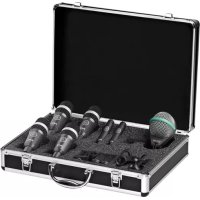
Open aluminum briefcase containing multiple audio recording devices (no visible text or labels)Drum Set Concert I
PROFESSIONAL MICROPHONE DRUM SET
Read the manual before using the equipment!
20 MODE D'EMPLOI
2.3 Optional Accessories 14
3 CONNECTING TO
AUDIO EQUIPMENT 15
3.3.1 Pinout 15
3.3.2 Connecting the Microphone 15
4 OPERATION 16
5 CLEANING 17
5.1 Microphone 17
5.2 Internal Windscreen 17
6 TROUBLESHOOTING 18
7 TECHNICAL DATA 19
7.1 D112 MKII 19
7.2 D40 19
7.3 C430 19
| Publisher | AKG Acoustics GmbH | AKG ACOUSTICS, U.S. |
| Laxenburger Straße 254 | 8500 Balboa Blvd. Dock 15 | |
| 1230 Vienna | Northridge, CA 91329 | |
| Austria | U.S.A. | |
| Tel: +43 (0)1 86654-0 | Tel: +1 818 920-3224 | |
| Fax: +43 (0)1 86654-8800 | ||
| sales@akg.com | akgusatechsupport@harman.com | |
| Copyright | © 2015 AKG Acoustics GmbH | |
| All rights reserved. | ||
| The information contained in this manual, including any drawings and photos provided, are the intellectual property of AKG Acoustics GmbH. | ||
| In accordance with copyright law, it is not permitted for this documentation or parts thereof to be reproduced or transmitted for any purpose in any form using any means, whether electronic or mechanical, by photocopying, recording or using information storage and information processing systems without the express, written consent of AKG Acoustics GmbH. Forwarding to third parties is not permitted. This manual should be returned to us on request. | ||
| Updates | This manual may be modified without prior notice and does not represent any obligation on the part of AKG Acoustics GmbH. | |
| Version 1.0 | ||
| Publication date | August 2015/EN | |
1 Safety and environment

Risk of damage
Please make sure that the piece of equipment your microphone will be connected to fulfills the safety regulations in force in your country and is fitted with a ground lead.

1.1 Environment
- At the end of the lifetime of the product, disconnect the housing, electronics and cable from each other and discard all components according to applicable disposal regulations.
- The packaging is recyclable. Dispose of the packaging via an appropriate collection system provided for this purpose. Dispose of the packaging in an appropriate recycling collection system.

2 Description
Introduction
2.1 Introduction
Thank you for your decision to buy an AKG product. Please read the user instructions carefully, before using the unit and keep them in a safe place so that you can refer to them in the future at any time. We wish you a lot of fun!
Package content
2.2 Package content
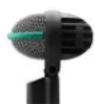
D112 MKII
2.2.1 1 x D112 MKII
• Dynamic instrument microphone
- Cardioid polar pattern
- For kick drum, bass amps, wind instruments
D40D40
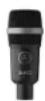
2.2.2 4 x D40
• Dynamic instrument microphone
- Cardioid polar pattern
- 4 x H440 bracket
- For toms, percussion, guitar amps, wind instruments, snare drum
C430
2.2.3 2 x C430
• Condenser instrument microphone
- Cardioid polar pattern
- 2 x SA60 Stand adapter
- For hi-hat, cymbals, acoustic guitars

The microphone uses a true condenser transducer designed for 48-volt phantom powering to IEC 61938.
Optional accessories
2.3 Optional Accessories
Optional accessories can be found at www.akg.com. Your dealer will be happy to advise you.
3 Connecting to Audio Equipment
Pinout
3.3.1 Pinout
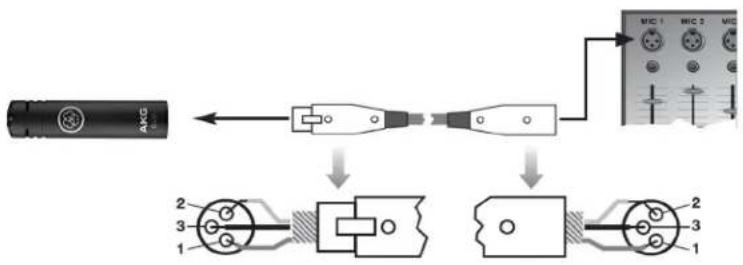
The microphone provides a balanced output on a 3-pin male XLR connector:
Pin 1: ground
Pin 2: hot
Pin 3: cold
flowchart
graph LR
    A["AMG"] --> B["USB"]
    B --> C["Microcontroller"]
    C --> D["Microcontroller with I/O interface"]
    D --> E["Microcontroller with I/O interface"]
    style A fill:#f9f,stroke:#333
    style B fill:#ccf,stroke:#333
    style C fill:#cfc,stroke:#333
    style D fill:#fcc,stroke:#333
Figure 1: Connecting to a balanced input with phantom power
Connecting the Microphone
3.3.2 Connecting the Microphone
1) Use an XLR cable to connect the microphone to a balanced XLR input with phantom power.
2) Switch the phantom power on. (Refer to the user manual of the unit to which you connected your microphone.)
4 Operation
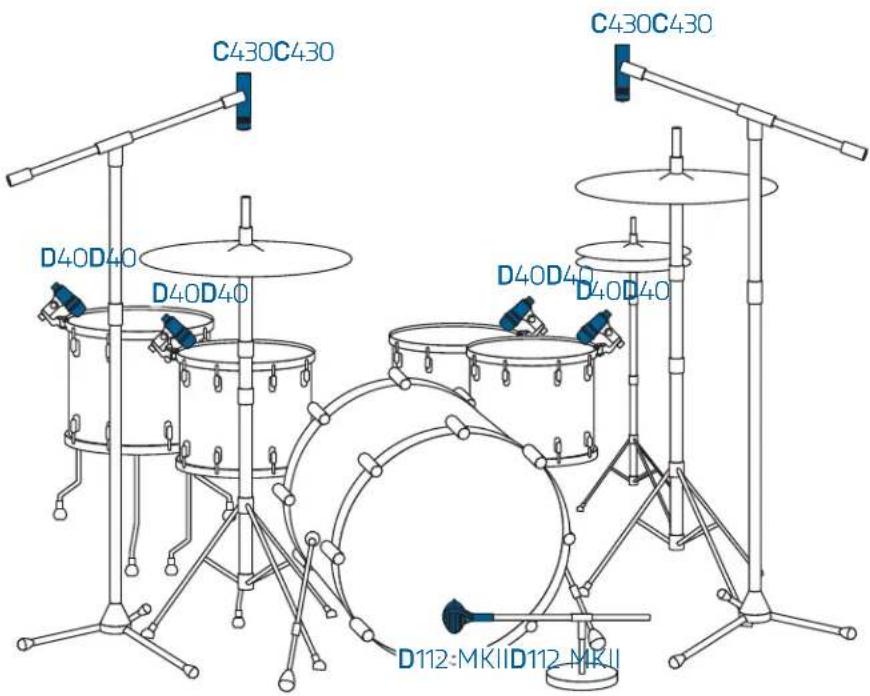
Drum Set
text_image
C430C430 D40D40 D40D40 C430C430 D40D40 D112-MKIID112-MKII5 Cleaning
Microphone
5.1 Microphone
- Use a soft cloth moistened with water to clean the surface of the microphone body.
Internal Windscreen (D40)
5.2 Internal Windscreen
1) Unscrew the wire-mesh-grill from the microphone CCW.
2) Remove the windscreen from the front grill and wash the windscreen in soap suds.
3) Allow the windscreen to dry overnight.
4) Replace the windscreen in the wire-mesh grill and screw the wire-mesh-grill on the microphone CW.
6 Troubleshooting
| Problem Possible cause Remedy | |||
| No sound | No sound Channel or master fader on mixer or volume control on amplifier is at zero. | Set channel or master fader on mixer or volume control on amplifier to desired level. | |
| Microphone is not connected to mixer or amplifier. | Connect microphone to mixer or amplifier. | ||
| Cable connectors are seated loosely. | Check cable connectors for secure seat. | ||
| Cable is defective. Check cable and replace if damaged. | |||
| Distortions | Distortions Gain control on mixer or transmitter module not set correctly. | Set gain control to stop distortions. | |
| Microphone sounds dull | Microphone sounds dull | Internal or external windscreen attenuates high frequencies when soiled. | Clean internal or external windscreen. |
7 Technical data
D112 MKII
7.1 D112 MKII
| Type: large diaphragm dynamic micro-phone |
| Polar pattern: cardioid |
| Frequency response: 20 Hz to 17 kHz |
| Recommended load impedance: ≥ 2000 ohms |
| Sensitivity: 1.8 mV/Pa |
| Max. SPL for 0.5% THD: >160 dB SPL |
D40
7.2 D40
| Type: dynamic microphone |
| Polar pattern: cardioid |
| Frequency response: 75 Hz to 17 kHz |
| Recommended load impedance: ≥ 2000 ohms |
| Sensitivity: 2.2 mV/Pa |
| Max. SPL for 0.5% THD: 156 dB SPL |
C430
7.3 C430
| Type: 1/2" diaphragm, true condenser pressure-gradient microphone |
| Polar pattern: cardioid |
| Frequency response: 20 Hz to 20 kHz |
| Recommended load impedance: ≥ 2000 ohms |
| Sensitivity: 7 mV/Pa |
| Max. SPL for 0.5% THD: 126 dB SPL |
| Phantom powering: 48 V ± 4 V to IEC 61938 |
This product conforms to the standards listed in the Declaration of Conformity. You can request the Declaration of Conformity by e-mail from sales@akg.com.
