AKG PT470 - Microphone

PT470 - Microphone AKG - Free user manual and instructions

Find the device manual for free PT470 AKG in PDF.

📄 1 pages English EN Download 💬 AI Question 10 questions ⚙️ Specs
Notice AKG PT470 - page 1
Pick your language and provide your email: we'll send you a specifically translated version.
Product Type Wireless Bodypack Transmitter
Brand AKG
Model PT470
System Compatibility WMS 470 Series
Power Supply DC 12V, 500mA via external adapter
Input Connector 3-pin mini XLR (for lavalier or headset mic)
Frequency Range UHF (specific bands vary by region)
Channel Selection Automatic or manual via Group/Channel system
Automatic Setup Yes, with IR synchronization to receiver
Input Gain Adjustment Yes, adjustable via menu (HTGAIN)
Mute Function Switch off to mute; 10 sec transmission timeout
Battery Type 2 x AA alkaline (not included)
Battery Life Approx. 8 hours (alkaline)
Dimensions Approx. 80 x 65 x 25 mm (bodypack only)
Weight Approx. 80 g (without batteries)
Operating Temperature 0°C to 50°C
Cleaning Wipe with a dry, soft cloth. Do not use solvents.
Safety Use only supplied power adapter. Do not expose to moisture.
Spare Parts / Repairability Contact AKG service for replacement parts or repairs.

Frequently Asked Questions - PT470 AKG

How do I pair the PT470 transmitter with the receiver?
Place the transmitter close to the receiver (within 30 cm). On the receiver, start automatic setup (press AUTO). Then use the transmitter's menu to select the same group and channel, or use IR sync by pressing the IR button on both units. The transmitter will display 'PROGRAMMING...' and then 'SUCCESS'.
What type of microphone can I use with the PT470?
The PT470 bodypack is compatible with AKG lavalier or headset microphones that have a 3-pin mini XLR connector. Ensure the microphone is wired correctly (pin 1: ground, pin 2: audio, pin 3: bias voltage).
How do I adjust the input gain on the PT470?
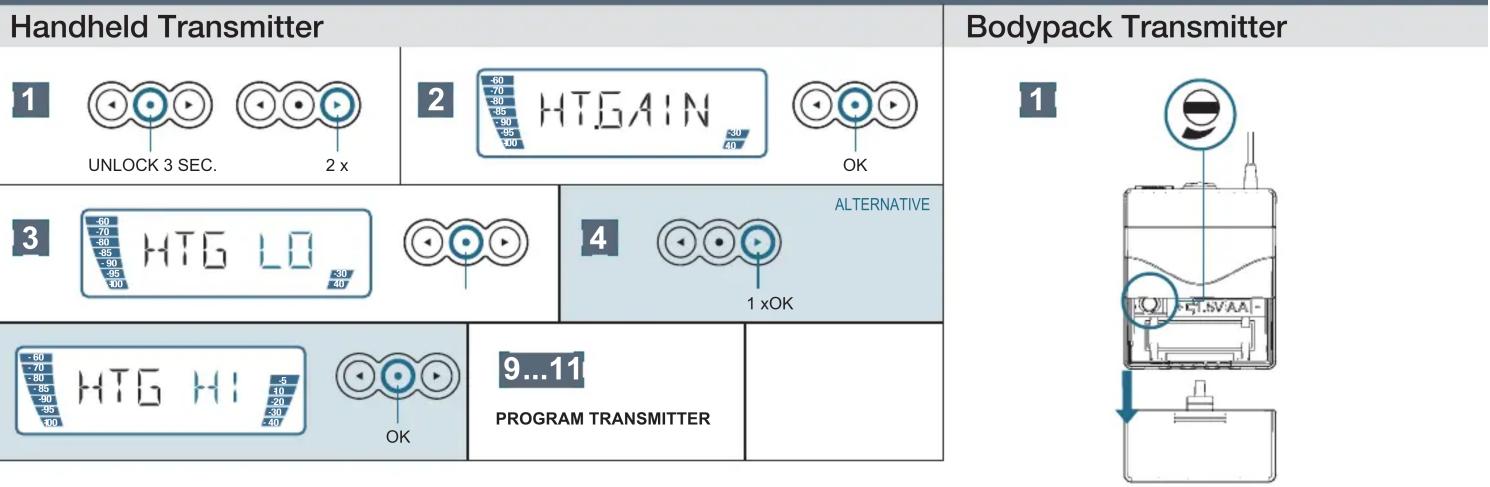
Press and hold the lock button for 3 seconds to unlock. Press the button twice to enter gain adjustment mode. Use the menu to set HTGAIN to LO, MID, or HI. Press OK to confirm.
What does 'OFF ⇒ MUTE' mean on the PT470?
When you switch the transmitter off, it automatically mutes the audio output for about 10 seconds before fully powering down. This prevents noise or pops from being transmitted during shutdown.
How do I change the frequency (channel) on the PT470?
Unlock the transmitter (hold 3 sec). Use the menu to select GROUP and CHANNEL. Choose an available (clean) channel from the receiver's list. Press OK to save. Alternatively, use automatic setup for the best channel.
What does 'ERR IR' mean and how do I fix it?
'ERR IR' indicates an infrared synchronization error. Ensure the transmitter's IR window is aligned with the receiver's IR port (usually within 30 cm). Retry the sync up to 2 times. If persistent, check for obstructions or ambient IR interference.
Does the PT470 have a battery status indicator?
Yes, the display shows a battery icon. When the battery is low, the icon will flash. Replace the batteries promptly to avoid sudden shutdown.
Can I use rechargeable batteries with the PT470?
Yes, you can use rechargeable NiMH AA batteries. Note that battery life will be shorter than alkaline (approx. 5-6 hours). The battery level indicator may be less accurate with rechargeables.
How do I clean and maintain the PT470 transmitter?
Wipe the transmitter with a soft, dry cloth. Do not use any liquids, solvents, or abrasive cleaners. Remove batteries if not in use for extended periods. Store in a cool, dry place.
What should I do if the transmitter stops working?
First, check the batteries and power connection. Ensure the receiver is on and set to the same channel. Try a manual or automatic resync. If the issue persists, contact AKG service for troubleshooting or repair.

User questions about PT470 AKG

0 question about this device. Answer the ones you know or ask your own.

Ask a new question about this device

The email remains private: it is only used to notify you if someone responds to your question.

No questions yet. Be the first to ask one.

Download the instructions for your Microphone in PDF format for free! Find your manual PT470 - AKG and take your electronic device back in hand. On this page are published all the documents necessary for the use of your device. PT470 by AKG.

USER MANUAL PT470 AKG

WMS 470 Quick Start Guide
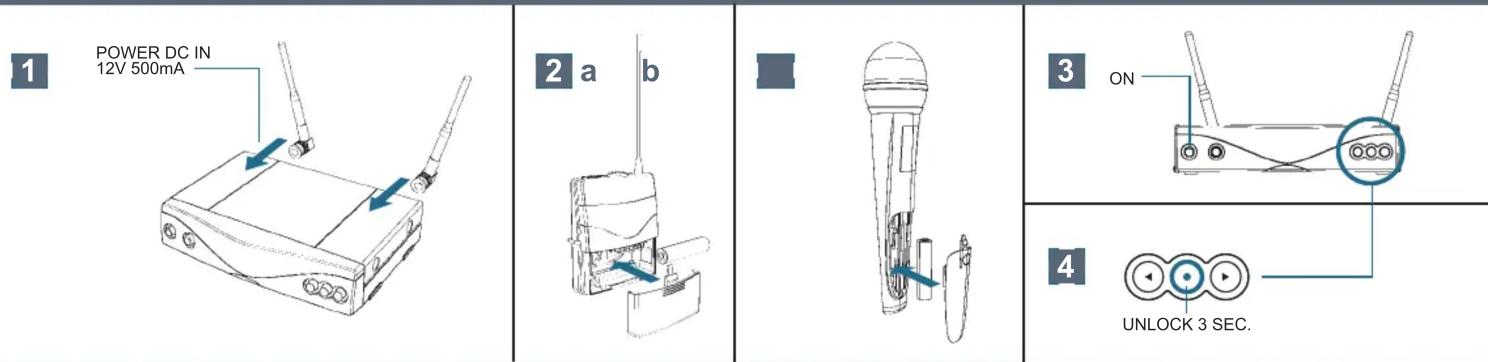
POWER DC IN 12V 500mA 2 a b 3 ON 4 UNLOCK 3 SEC.

AUTOMATIC SETUP

51 xGROUP CHANNEL AUTOOK6SELECT GROUP and CHECK AVAILABLE CHANNELS
7CHOOSE ONE AVAILABLE (CLEAN) CHANNELOK8SAVE--Y OK
9PROGRAM TRANSMITTER?OK103-9 cm OFF ⇒ MUTE 10 sec. time to transmit3-9 cm OFF ⇒ MUTE 10 sec. time to transmit
11PROGRAMMING...IR OKOKIR ERRRETRY 2x

WMS 470 INPUT GAIN
Handheld Transmitter 1 UNLOCK 3 SEC. 2 x 2 HTGAIN OK 3 HTG LO 4 ALTERNATIVE 1 xOK 9...11 PROGRAM TRANSMITTER Bodypack Transmitter 1

www.akg.com

AKG Acoustics GmbH

Lemböckgasse 21–25, 1230 Vienna /AUSTRIA, phone: +43 1 86654 0

e-mail: sales@akg.com

For other products and distributors worldwide visit www.akg.com or www.harman.com

Specifications subject to change without notice. Technische Änderungen vorbehalten. Ces caractéristiques sont susceptibles

Manual assistant
Powered by Anthropic
Waiting for your message
Product information

Brand : AKG

Model : PT470

Category : Microphone