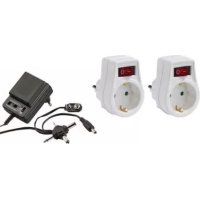
10284A - Electric charger POWERFIX - Free user manual and instructions
Find the device manual for free 10284A POWERFIX in PDF.



User questions about 10284A POWERFIX
0 question about this device. Answer the ones you know or ask your own.
Ask a new question about this device
Download the instructions for your Electric charger in PDF format for free! Find your manual 10284A - POWERFIX and take your electronic device back in hand. On this page are published all the documents necessary for the use of your device. 10284A by POWERFIX.
USER MANUAL 10284A POWERFIX
All-purpose power AdAptor
GB
All-purpose power AdAptor
Operation and Safety Notes
SE
universAlnätAdApter
Before reading, unfold the page containing illustrations and familiarise yourself with all functions of the device.
SE
natural_image
Close-up of a handheld electronic device with labeled ports and connectors (no readable text or symbols)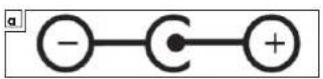
| GB All-purpose power adaptor Page 6 | |||
| SE | Universalnätadapter | Sida | 22 |
| FR BE | Adaptateur d'alimentation universel | Page 38 | |
| NL BE | Universele netspannings-adapter | Page 56 | |
| DE | Universal-Netzadapter | Seite | 74 |
Contents
Introduction 7
Correct purpose of use....7
Technical data 8
Parts description....9
Scope of delivery 9
Operation 15
Select polarity 15
Select output voltage 15
Connect to terminal device 16
Plug in mains adapter 16
Meaning of LED indicator....16
Disconnection from power supply 17
Cleaning.... 18
Disposal 18
Warranty and Service 19
Service address 20
Manufacturer 21
All-purpose power adaptor
●Introduction
natural_image
Simple icon of an open book with a lowercase 'i' symbol on the right page (no text or symbols present)Congratulations on the purchase of your new device. You have bought a quality product. These operating instructions are part of this product. They contain important information regarding safety, use and disposal. Please familiarise yourself with all operational and safety notes prior to using your product. Use the product only in the manner as described and for the areas of application as stated. When passing the product to a third party be sure to also supply all papers.
- Correct purpose of use
The mains adapter has been designed for providing power to DC devices. The mains adapter is only suitable for use indoors (IP20 protection class II). The mains adapter must not be used for any other purpose or modified
Introduction
in any way – failure to comply with this will result in damage. Failure to follow the safety instructions can lead to life-threatening hazards and injuries, and may also cause technical malfunctions (short circuiting, fire, electric shock etc.). This mains adapter is only intended for use in domestic households.
●Technical data
Model 10284A
Typ A-DC500
Nominal voltage 220-240V AC (0,2 A max)
Nominal frequency 50 Hz
Output voltages 3 / 4,5 / 6 / 7,5 / 9 / 12 V DC
Output current Max. 300 mA
Protection class IP 20
Protection class II
Dimensions 74 x 52,5 x 71 mm
(incl. plug) (L x W x D)
Weight 93 g
●Parts description
1 Mains voltage plug
2 Red LED
3 Polarity selector switch
4 Voltage selector switch
5 Low voltage adapter plug
- Scope of delivery
Check whether the entire scope of delivery is present immediately after unpacking, and check that the product is in perfect condition.
1 x Operating instructions
1 x Universal mains adapter
Safety instructions
Please read these operating instructions carefully and keep them in a safe place. It is particularly important to observe and follow the safety instructions. These operating instructions belong to the POWERFIX® Model 10284A universal mains adapter. Damage that is caused by failure
Introduction
to follow these operating instructions, particularly the safety instructions, will invalidate the warranty. No liability is accepted for damage to property, injuries, or resulting consequential damage.
All persons who use, clean or dispose of this product must be familiar with the contents of these operating instructions. These operating instructions are a constituent of this product. Please follow all safety instructions. If you have any questions or are uncertain how to use of the mains adapter, please contact your nearest service point.
IMPORTANT: Please observe the following instructions when using the mains adapter to prevent injuries or damage to property caused by erroneous use.
- Keep the operating instructions in a safe place, and pass them onto third parties if necessary. Keep the operating instructions in
a safe place and pass them on together with the mains adapter.
■Do not manipulate the mains adapter.
Never manipulate or modify the mains adapter. Intervention like this constitutes a risk of death due to electric shock, and is prohibited for certification reasons (CE).
The casing must not be opened under any circumstances.
■Check voltages. The voltages at the input
and output sides and the nominal voltage of the mains adapter on the relevant terminal device must be checked before starting up.
Please ensure that the mains voltage matches the specifications on the name plate. Failure to comply can result in excessive heat generation.
■Do not use defective equipment. Stop
using the mains adapter in the event of malfunctions and defects/damage. Defects can occur due to knocks, impacts or falls, even from a low height. Have the mains adapter checked and repaired (if necessary)
before using it again. Failure to do this will result in a risk of electric shock.
■Be vigilant at all times, and always be careful what you are doing. Do not use electrical equipment if you are lacking in concentration or awareness, or are under the influence of drugs, alcohol or medication. Even a moment of inattentiveness can lead to serious accidents and injuries when using electrical equipment.
■Protect the mains adapter from use by third parties (particularly children). Keep the unused mains adapter in a dry, elevated or locked location away from children.
■Not for use in potentially explosive environments. Please do not use the product in potentially explosive environments in which flammable liquids, gasses or dust are present. This product is not approved for such environments.
■This device is not intended for use by persons (including children) with restricted
physical, sensory or intellectual capability or lack of experience and/or knowledge, unless they are supervised by a person who is responsible for their safety or provides them with instructions on how to use the device. Children should be supervised in order to ensure that they do not play with the device.
■National regulations: Please observe the applicable national regulations and conditions during the installation, use and disposal of the mains adapter.
■Pay attention to the ambient conditions. Operation in the following environments is not permitted: Ambient temperatures above 40^ C or below 0^ C, environments containing flammable gasses, solvents, vapours and dust.
This product must only be used to supply DC devices (terminals). Please ensure that the required input voltage of the terminal device matches the voltage setting of the mains adapter, and that the polarity is correct.
natural_image
Simple line drawing of a person standing near a structure (no text or symbols)WARNING! RISK OF FATAL INJURY AND ACCIDENT HAZARD
FORTODDLERS AND SMALL CHILDREN!
■Never leave children unattended with the packaging material. The packaging material represents a danger of suffocation. Children frequently underestimate the dangers. Always keep children away from the packaging material. This product is not a toy.
Children or persons lacking knowledge or experience in handling the device or have limited physical, sensory or mental abilities, must not use the device without supervision or instruction by a person responsible for their safety. Children must be supervised at all times to prevent them from playing with the device.
CAUTION! DANGER OF INJURY!
Please do not use this device if you find that it is damaged in any way.
Operation
- Select polarity
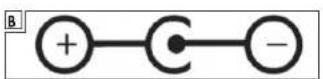
☐Inspect the terminal device to establish the polarity that is required, or consult the operating instructions of the terminal device. See illustration A for positive polarity, where outside is – and inside is +. Or see illustration B for negative polarity, where outside is + and inside is -
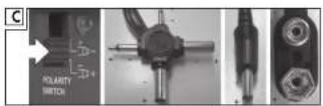
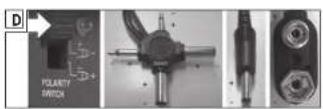
□Move the polarity selector switch ③ switch on your mains adapter to the relevant position. Image C shows a positive polarity with the selector switch down. Image D shows a negative polarity with the selector switch up.
- Select output voltage
☐ Set the voltage selector switch 4 to the supply voltage that is needed for your terminal device.

CAUTION: An erroneous voltage can damage the connected terminal device.
- Connect to terminal device
☐Plug the relevant adapter plug ⑤ into the supply socket of your terminal device.
CAUTION: Ensure that the unused plugs cannot cause a short circuit!
⚠️ CAUTION: Do not connect normal (non-re-chargeable) batteries!
- Plug in mains adapter
☐Plug the mains adapter into a live safety socket.
●Meaning of LED indicator
☐The red LED ☐2 illuminates if the mains adapter is correctly connected and operational.
⚠️ CAUTION: Using the polarity can damage the connected terminal device. The red LED ② on the mains adapter is flashing if over-voltage or wrong polarity is present and • the charge indicator is not working on terminal devices with a charging function (i.e. rechargeable batteries or terminal
devices with built-in rechargeable battery) or
- the terminal device is not working (terminal devices without charge function). In the above-mentioned cases check the settings of adapter immediately.

CAUTION: The red LED ② of terminal devices with an extremely low short-circuit current (e.g. MP3 players) may also illuminate if the polarity is incorrect! If the connected terminal device is not working properly, unplug mains adapter immediately, check the polarity setting and change it over if necessary.
●Disconnection from power supply
☐Disconnect the mains adapter from the power supply if it is no longer needed.
●Cleaning

DANGER: Disconnect the plug from the mains before cleaning!
☐For electrical safety reasons the device must only be cleaned with a damp cloth. Do not use aggressive cleaning agents or chemicals.
●Disposal
The packaging and the packaging materials consist of environmentally friendly materials and can be 100% recycled.
The mains adapter must not be disposed of with the household waste. Please dispose of old equipment via suitable collection systems or send the device to the location where you purchased it for disposal. The device will then be recycled.
Do not dispose of electrical equipment in the household waste!
In accordance with European Directive 2012/19/EC relating to old electrical and electronic appliances and its translation into national law, used electrical equipment must be collected separately and recycled in an ecologically compatible way.
If you wish to part with the product, please dispose of it in accordance with the regulations applicable at such time. Advice is available from your local council.
●Warranty and Service
The 3 year warranty valid from the date of purchase of this device only applies for the initial buyer and is not transferable. Please keep receipt as proof. The warranty only applies to material or manufacturing defects, but not for parts subject to wear and tear or damage due to improper use. Unauthorized interference voids this warranty. Your statutory rights are not affected by this warranty. In case of a warranty claim, contact your service center. This is the
only way to ensure that your device is submitted for free.
●Service address
Please contact us before sending in the defective product; we will also be more than happy to return your call! The warranty shall only be valid upon submitting the defective device along with a copy of the receipt. Mailings without prepaid postage cannot be accepted, please request a return form.
Uni-Elektra GmbH
Kirchstraße 48
D-72145 Hirrlingen
Germany
Tel.: +49 (0) 74 78 / 9 13 85-0
E-Mail: service@uni-elektra.de
IAN 113159
In case of any questions, please keep the receipt and the item number (e.g. IAN 12345) as proof of purchase.
●Manufacturer
Uni-Elektra GmbH
Kirchstraße 48
D-72145 Hirrlingen
Germany
Innehåll
Inledning 23
natural_image
Simple icon of an open book with a lowercase 'i' symbol on the right page (no text or labels)natural_image
Simple line drawing of a person standing next to a vertical structure (no text or symbols)! WARNING! LIVSFARA OCH OLYCKSRISK FÖR BARN OCH SMÅBARN!
natural_image
Symbol of a trash bin with crossed lines indicating no waste or discharge (no text or numbers present)E-post: service@uni-elektra.de