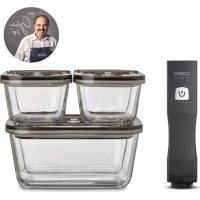
Vacu OneTouch EcoSet 1169 - Vacuum Cleaner CASO - Free user manual and instructions
Find the device manual for free Vacu OneTouch EcoSet 1169 CASO in PDF.



| Product type | Manual vacuum sealer |
| Brand | Caso |
| Model | Vacu OneTouch EcoSet 1169 |
| Dimensions (W × H × D) | 45 × 195 × 45 mm |
| Weight | 242 g |
| Power supply | Rechargeable battery 5 V, 1500 mAh; USB Type-C port |
| Battery life / Charging time | Charge approx. 4 hours; auto shut-off after 2 minutes in standby |
| Set 1169 contents | Device, USB cable, 10 ZIP bags (5x20×23, 3x26×23, 2x26×35 cm), 4 sticker sheets, 2 ZIP cases, 3 VacuBoxx glass containers (2×500 ml + 1×1500 ml), user manual |
| Main functions | Vacuum sealing of ZIP bags, containers and WineLocks; automatic vacuum stop; white LED for operation and red for low battery |
| Bag compatibility | Reusable ZIP bags, dishwasher-safe, microwave-safe (12 min max at 650 W) and boil-safe (8 h at 100 °C) |
| Container compatibility | VacuBoxx glass containers, microwave-safe (without lid) and oven-safe (without lid up to 350 °C); suitable for freezing down to -18 °C |
| Maintenance and cleaning | Device: soft dry cloth; silicone seal: washable in hot water after disassembly; bags: dishwasher; containers: dishwasher or hot water |
| Safety | Do not vacuum liquids or powders; do not immerse; immediate stop if liquid is sucked; do not clean with abrasive products |
| Spare parts and repairability | Replaceable silicone seal; removable bag valve; containers and bags sold separately on caso-design.de; repairs reserved for customer service |
| Warranty | 24 months from date of purchase |
| Standards | CE |
Frequently Asked Questions - Vacu OneTouch EcoSet 1169 CASO
User questions about Vacu OneTouch EcoSet 1169 CASO
0 question about this device. Answer the ones you know or ask your own.
Ask a new question about this device
Download the instructions for your Vacuum Cleaner in PDF format for free! Find your manual Vacu OneTouch EcoSet 1169 - CASO and take your electronic device back in hand. On this page are published all the documents necessary for the use of your device. Vacu OneTouch EcoSet 1169 by CASO.
USER MANUAL Vacu OneTouch EcoSet 1169 CASO
10 Operating Manual - General
Please read all the information provided here to become familiar with your device.
10.1 Copyright protection
This document is copyright protected. Braukmann GmbH reserves all the rights, including those for photomechanical reproduction, duplication and distribution using special processes (e.g. data processing, data carriers, data networks), even partially. Subject to content and technical changes.
11 Safety
11.1 Warning notices
The following warning notices are used in the Operating Manual concerned here.
▲WARNING WARNING
A warning notice of this level of danger indicates a possible dangerous situation. If the dangerous situation is not avoided, this can lead to serious injuries.
Observe the instructions in this warning notice in order to avoid the personal injuries.
AVORSICHT ATTENTION
A warning notice of this level of danger indicates a possible dangerous situation. If the dangerous situation is not avoided, this can lead to slight or moderate injuries.
Observe the instructions in this warning notice in order to avoid the personal injuries.
HINWEIS PLEASE NOTE
A notice of this kind indicates additional information, which will simplify the handling of the canisters.
11.2 Intended use
The hand vacuum sealer is intended for vacuuming zip bags, vacuum canisters or WineLocks (with a connection suitable for the hand vacuum sealer).
The ZIP-bags and vacuum canisters are designed for vacuuming and storing, heating and freezing food.
▲WARNING Warning
Danger due to unintended use! Dangers can emanate from the device if it is used for an unintended use and/or a different kind of use.
Use the device exclusively for its intended use.
Observe the procedural methods described in this Operating Manual.
Claims of all kinds due to damages resulting from unintended uses are excluded. The User bears the sole risk.
11.3 Delivery scope and transport inspection
As a rule, this article is delivered with the following components:
| 1301 Vacu OneTouch | Hand vacuum sealer | USB-cable type C |
| 10 Vacu ZIP-Bags: (reusable) | 4 sheets of stickers for food organization | |
| 5x 20 x 23 cm; 3x 26 x 23 cm; 2x 26 x 35 cm | ||
| 2 ZIP-Locker | Operation manual | |
| 1169 Vacu OneTouch Eco-Set | Hand vacuum sealer | USB-cable type C |
| 10 Vacu ZIP-Bags: (reusable) | 4 sheets of stickers for food organization | |
| 5x 20 x 23 cm; 3x 26 x 23 cm; 2x 26 x 35 cm | ||
| 2 ZIP-Locker | Operation manual | |
| 3 VacuBoxx canister: 2x 500 ml; 1x 1500 ml |
HINWEIS Please note
Examine the shipment for its completeness and for any visible damages.
- Immediately notify the carrier, the insurance and the supplier about any incomplete shipment or damages as a result of inadequate packaging or due to transportation.
11.4 Disposal of the packaging

The packaging protects the device against damages during transit. The packaging materials are selected in accordance with environmentally compatible and recycling-related points of view and can therefore be recycled.
Returning the packaging back to the material loop saves raw materials and reduces the quantities of accumulated waste. Take any packaging materials that are no longer required to "Green Dot" recycling collection points for disposal.
HINWEIS Please note
If possible, keep the original packaging for the device for the duration of the guarantee period of the device, in order that the device can be re-packaged properly in the event of a guarantee claim.
11.5 Electrical connection
In order to ensure the safe and trouble-free operation of the device, the following instructions must be observed for the electrical connection:
Before connecting the device, compare the connection data (voltage and frequency) on the rating plate with those of your electrical network. This data must agree in order that no damages occur in the device.
If in doubt, ask your qualified electrician.
12 Operation
ZIP-bags, vacuum canisters or WineLocks can be vacuumed with the hand vacuum sealer.
▲WARNING WARNING
Warning: The device must not absorb liquids or powders directly (e.g. water, oil, flour).
▲WARNING WARNING
If you notice that the device is sucking in liquids or powder, stop the vacuum operation immediately by pressing the ON / OFF button.
- Then let the device run freely without contact with bags or canisters so that the remaining liquid or powder can be pumped out of the pump.
Then clean the device.
We recommend freezing liquid or soft food before vacuum operation.
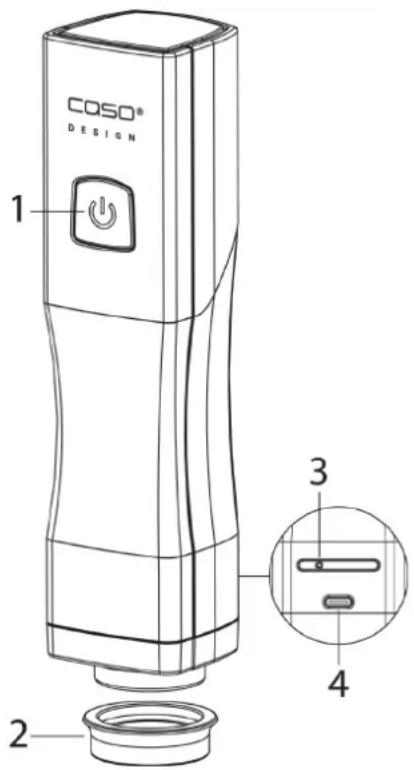
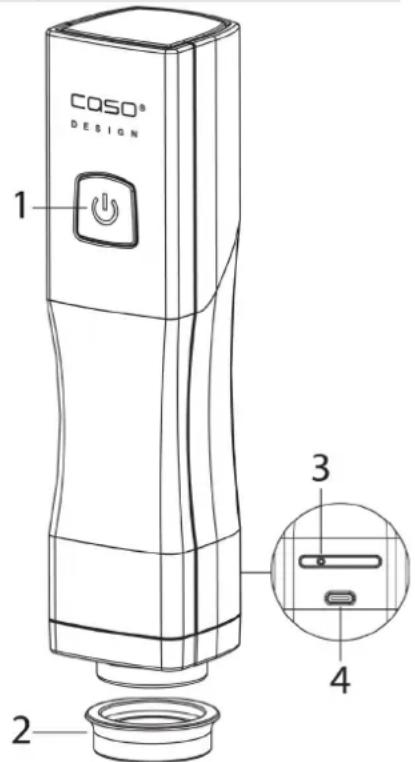
12.1 Overview
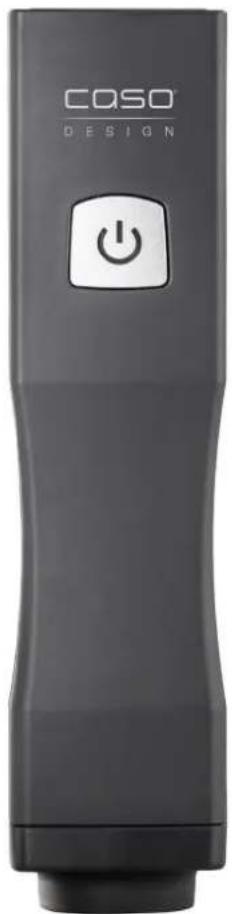
- ON/OFF button with LED
- Silicon gasket
- Air outlet (must not be covered)
- USB-port type C
12.2 LED and battery symbol
- The LED lights up constantly white during the vacuum operation
- The device stops the vacuum operation automatically and the white LED switches off.
- The LED flashes red when the battery is weak and during charging.
- The LED lights up constantly white as soon as the battery is charged.
12.3 Charging the battery
Charge the device at least every 3 to 6 months to ensure optimal battery function. Charge the device fully before using it for the first time. To charge the device connect the USB cable with USB charger and the USB port of the device. The charging process can take about 4 hours.
HINWEIS Please note
If the device is started unintentionally, when you are not performing a vacuum operation, then the device switches itself off after approx. 2 minutes to protect its battery.
12.4 Vacuuming a ZIP-bag
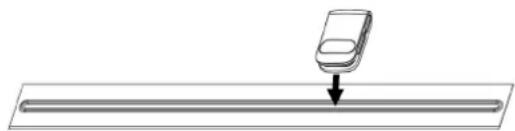

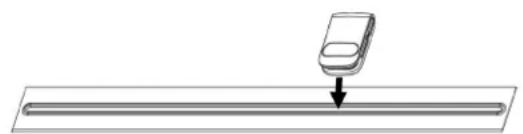
Put the food in the zip bag. Close the zip bag tightly with the help of a ZIP Locker and check that the zip lock is closed properly.
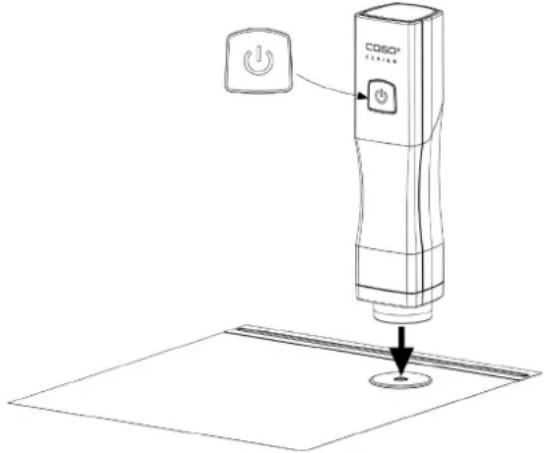
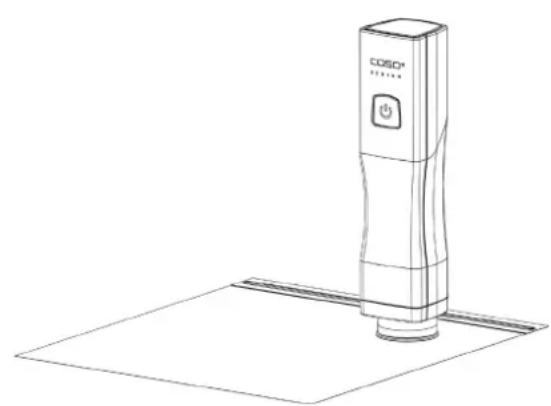
Place the device on the valve of the bag and gently press it down. Press the ON / OFF button of the device. Then air is withdrawn from the bag.
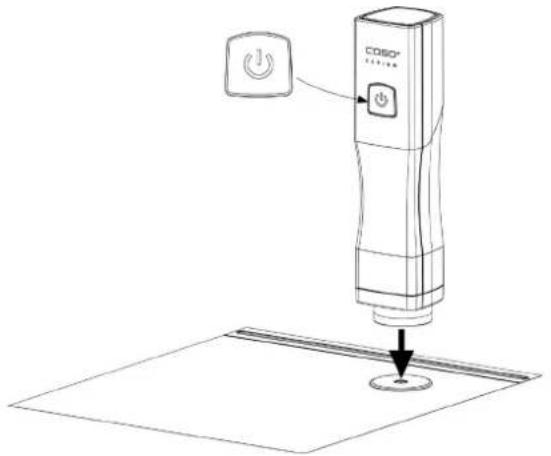
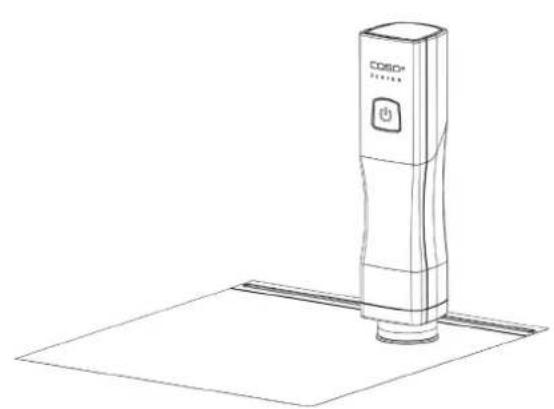
The vacuum operation is automatically stopped when the vacuum is reached. The vacuum operation can be stopped at any time by pressing the ON / OFF button.
Carefully lift the device sideways from the valve of the bag.
HINWEIS Please note
Be careful that the valve and the zip lock are tightly closed.
The opening of he ZIP-bag must be completely clean and dry.
- Be careful that the valve on the inside of the ZIP-bag does not come into contact with the content.
Be careful that the food in the bag is approx. 2cm away from the valve.
12.5 Opening a ZIP-bag
To make it easier to open the bag, pull the vacuum valve on the valve cover to the side so that air can again enter the bag. Carefully open the zip lock and remove the food.
12.6 Suitability of the ZIP-bags
The bags are suitable for the freezer, for the dishwasher and they are reusable.
You can heat the bags with their contents in the microwave for a maximum of 12 minutes at 650~W . To do this, open the closure of the ZIP-bag.
The bags are boil-proof for up to 8 hours at 100^ (suitable for sous vide). Be careful that the valve and the zipper do not come into contact with the water, as otherwise liquid could enter the bag.
▲WARNING Risk of burns
- Handle the bags and the food carefully, there is a risk of burns. Use pot holders or something similar if necessary.
12.7 Vacuum a canister (only included in set 1169)
You can also vacuum canisters with the device; you can order them for example here: https://www.caso-design.de
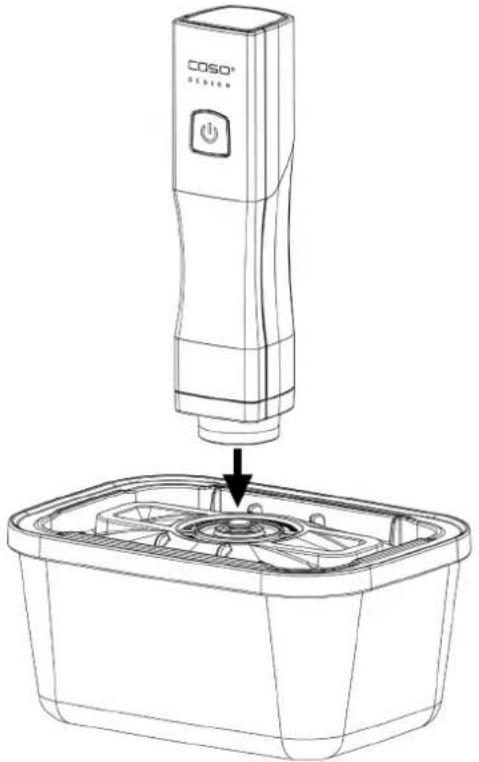
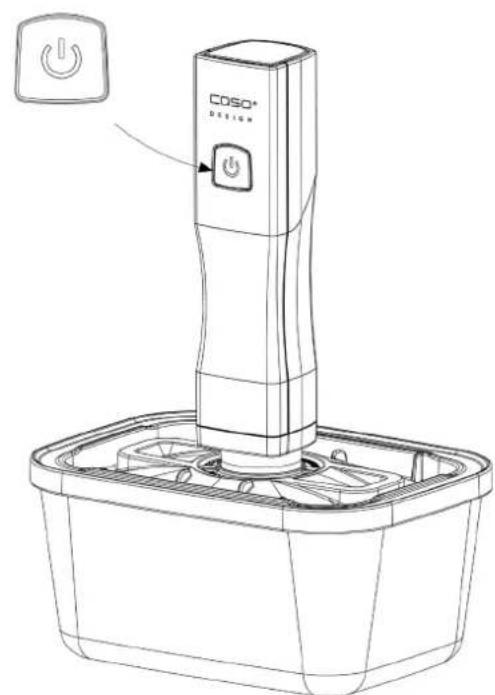
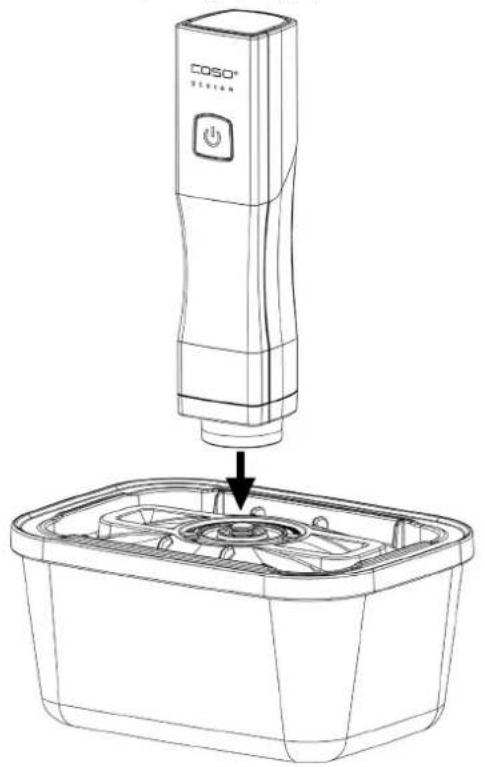
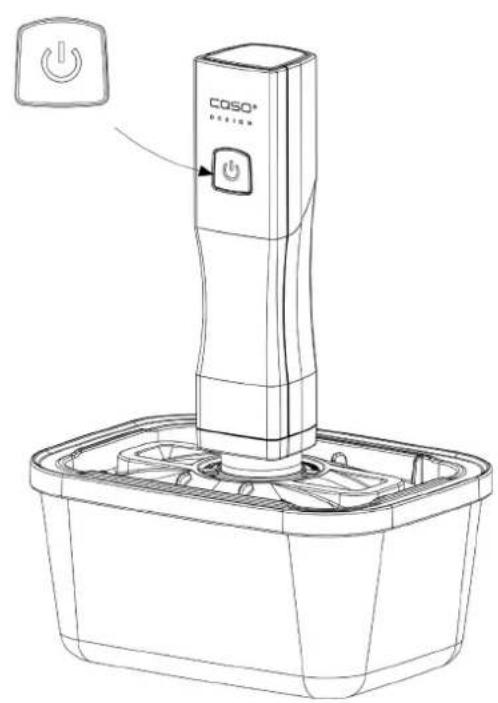
Fill the canister and leave 3cm free to the upper edge. Place the lid on the canister. Lightly press down the lid of the canister at the beginning of the vacuum operation. Place the device at the middle of the valve on the canister lid and press it down slightly. Press the ON/OFF button of the device and air will be withdrawn form the canister.
12.8 Heating and freezing canisters
Without lid these canisters can be used to heat food in the microwave. Without lid, you can also use them to heat food in your oven (up to 350^ C).
WARNING Warning: Risk of scalding
Please be careful when handling heated canisters and food, as there is a risk of scalding. Use potholders or similar items as necessary.
You can also use these canisters to freeze food (down to -18^ ). When filling, please remember that frozen food can expand.
WARNING Warning: Risk of injury
Do not use frozen canister in the oven.
Also do not clean hot canister with cold/wet damp cloth. Let them cool down.
Do not heat the canister directly on fire.
12.9 Opening canisters
Push vacuum valve to one side to let air in.
13 Cleaning and Maintenance
This chapter provides you with important notices with regard to cleaning and maintaining the device. Please observe the notices to prevent damages due to cleaning the device incorrectly and to ensure trouble-free operation.
13.1 Safety information
A VORSICHT Attention
Please observe the following safety notices, before you commence with cleaning the device:
- Do not clean the device or its components, the canisters or the ZIP-bags with aggressive or abrasive cleaning agents. Do not use solvents.
The device and its components as well as the ZIP-bags must be cleaned after each use. Failure to keep these items in a clean condition can result in a dangerous condition, as well as in the growth of fungus and bacteria.
Do not scratch off stubborn dirt with hard items.
13.2 Cleaning
Vacu OneTouch: Before cleaning disconnect the device from the charger.
Only clean it with a dry soft cloth. The device and its components are not suitable for the dishwasher.
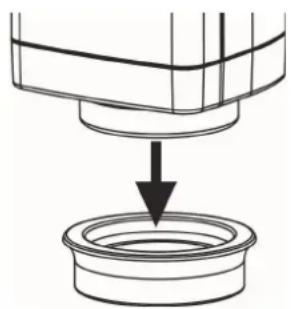
To clean the silicon gasket, remove it from the housing by gently pulling it down. Clean it with warm water and then dry it as well. Then reassemble the device correctly.
ZIP bag:
You can clean the ZIP bags in warm soapy water or in the dishwasher and then reuse them again.
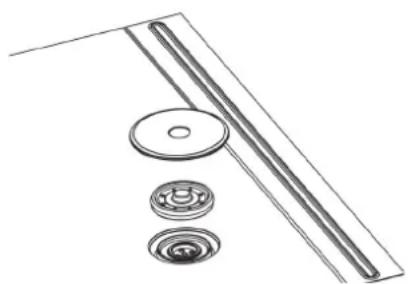
To clean the valve of the zip bag separately, remove the outer valve cover and the inner silicon part and clean them with warm water. Then carefully dry and assemble them again.
A VORSICHT Attention
ZIP bags that were used to store raw meat, fish or fatty foods, or for warming or SousVide cooking, should not be reused.
VacuBoxx canister:
Clean your VacuBoxx canister before first use and after each use. You can clean the canisters and its lids in warm soapy water or in the dishwasher. Dry the parts well after the cleaning.
14 Troubleshooting
| Problem | Cause | Solution |
| The device stops during the vacuum operation and does not switch on again. | The device sucked in liquid or powder.. | Do not turn the device over. Shake the device gently to remove powder or liquids. Make sure the device is completely dry. Press the ON / OFF button. Additional liquids may drip out. Repeat this process when the device stops again. |
| The device does not create vacuum when placed on a canister or the vacuum does not last. | The lid of the canister, the silicon gasket or the valve are positioned incorrectly. | Check that the positioning is correct and that the lid is properly closed. |
| The silicon gasket or the valve or the canister are dirty or wet | Clean and dry the silicon gasket and the valve of the canister. | |
| The device is placed too loosely on the valve. | During vacuum operation press the device slightly on the valve so that no air can escape. | |
| The device does not respond to the ON/OFF button. | The battery of the device is low or not charged. | Charge the battery |
| The above problems cannot be solved | Device could be defective. | Contact the customer support. Do not try to repair the device yourself |
15 Disposal of the Old Device

Old electric and electronic devices frequently still contain valuable materials. However, they also contain damaging substances, which were necessary for their functionality and safety. If these were put in the non-recyclable waste or were handled incorrectly, they could be detrimental to human health and the environment. Therefore, do not put your old device into the non-recyclable waste under any circumstances.
HINWEIS Please note
Utilise the collection point, established in your town, to return and recycle old electric and electronic devices. If necessary, contact your town hall, local refuse collection service or your dealer for information.
Ensure that your old device is stored safely away from children until it is taken away.
16 Guarantee
We provide a 24 month guarantee for this product, commencing from the date of sale, for faults which are attributable to production or material faults.
Your legal guarantee entitlements in accordance with § 439 ff. BGB-E remain unaffected by this. The guarantee does not include damages, which were incurred as a result of improper handling or use, as well as malfunctions which only have a minor effect on the function or the value of the device.
Consumables, transit damages, inasmuch as we are not responsible for these, as well as damages, which were incurred as a result of any repairs that were not performed by us, are also excluded from the guarantee entitlements.
This device is designed for use in domestic situations and has the appropriate performance levels. Any use in commercial situations is only covered under the guarantee to the extent that it would be comparable with the stresses of being used in a domestic situation. It is not intended for any additional, commercial use. In the event of justified complaints, we will repair the faulty device at our discretion or replace it with a trouble-free device. Any pending faults must be reported within 14 days of delivery. All further claims are excluded. To enforce a guarantee claim, please contact us prior to returning the device (always provide us with proof of purchase).
17 Technical data
| Device Hand vacuum sealer | |
| Name | Vacu OneTouch; Vacu OneTouch Eco-Set |
| Article no. 1301; 1169 | |
| Connection 5 V; 1500 mAh | |
| (WxHxD) of hand vacuum sealer | 45 x 195 x 45 mm |
| Weight of hand vacuum sealer 242 g | |
Mode d'emploi
Vacu OneTouch (1301) Vacu OneTouch Eco-Set (1169)



18 Mode d'emploi
18.1 Généralités
A continuación,SEO,SEOSEOSEOSEOSEOSEOSEOSEOSEOSEOSEOSEOSEOSEOSEOSEOSEOSEOSEOSEOSEOSEOSEOSEOSEOSEOSEOSEOSEOSEOSEOSEOSEOSEOSEOSEOSEOSEOSEOSEOSEOSEOSEOSEOSEOSEOSEOSEOSEOSEOSEOSEOSEOSEOSEOSEOSEOSEOSEOSEOSEOSEOSEOSEOSEOSEOSEOSEOSEOSEOSEOSEOSEOSEOSEOSEOSEOSEOSEOSEOSEOSEOSEOSEOSEOSEOSEOSEOSEOSEOSEOSEOSEOSEOSEOSEOSEOSEOSEOSEO SEO
▲WARNING WAARSCHUWING
▲WARNING WAARSCHUWING
▲WARNING WAARSCHUWING
▲WARNUNG WAARSCHUWING
WAARSCHUWING: Verbrandingsgevaar
WAARSCHUWING: Verwondingsgevaar
Vacu OneTouch Eco-Set (1169)


48PykoBoDCTBO no 3KcPnyataun - OCHOBhie nOIOXeHnA
Дялuyшero O3HaKOMNeHЯ C npi6opom Bam cneIyET O3HaKOMnTbCЯ C MaTePnaIaMn,праздТаBJIeHHbIMN B HAcToIeM pyKOBoDCTBe.
48.1 3aunta aBtopckoro npaba
Данная дokумени зашишина abTOpCKIM npabOM. Braukmann GmbH coxpanyet 3a co6oь BCE npaba,В TOM чисné npabo Ha ФOTOMexAHnueckoe BOCPON3BedeHne, KOINPOBaHne И распрocтранене посpeДСТВOM OC6bIX Cnoc6ob (HaNPIMep,обрабOTka ДaHHbIX,HOCHTeJI N daHHbIX,CETN пердачддaHHbIX),В TOM ChICNeЧаCTNHyoe.Mbl OCTaBЯEM 3a co6oь npabo Ha BHeceHne COdepXaTeIbHbIX IN TeXHnuecknx I3MeHEni.
49 Be3onaCHOCTb
49.1 Празупраздптеловье уka3анna
B daHnom PykoOoCTBe no 3KcPnyaTaun nCNoJb3yOTc r CneDyUoIe npdeynpeintelhble yka3aHn:
GEFAHR ONACHOCTb
IpeDynpedntelbHoe yka3aHne 3Toi cTepeHn onachoctn o6o3naaet yrpo3y onacno cnTyaun.
Ecnn onacha cntyaun He 6ydt npedotbpaueha, 3TO MOXET npNBecTN K CMEPTN IIN TjxeIbIM TpaBMam.
Bo n36eJHHe ONaCHOCTn CMePTu NJI TJeJIbIX TpaBM IIODeH Heo6XoIMOCJeIDOBaTb INHCTpyKcIyM B DaHHOM PpeDyPpeDITeJIbHOM yKa3AHN.
▲WARNUNG ΠРЕДУПPEЖДЕΗΝΕ
IpeDynpTeNbHoe yka3aHne 3Toi CTeNeHn ONaCHOCTN 6o3Haayet BO3MOxHOCTb onachNo cnTyauu.
Ecnn onaancha cntyaun He 6ydt npedotbpaueha, 3TO MOKeT npNBecTN K TjXeJIbIM TpaBMam.
Bo n36exaHne onacHOCTn TpaBM IIOeH Heo6xOIMO CJeIOBaTb IHCTpyKcIyM B DaHHOM npEduynpeDntelbHOM yka3aHNI.
HINWEIS PUNMEUAHNE
Onachoctb BCleDCTBne HcNoJIb3OBaHnHa He No Ha3NaYeHnO! Ppi NcNoJIb3OBaHn np6opa He no npramomy Ha3NaYeHnO OT Hero MOrY INCXoIITb ONpeJeHhble onaCHOCTN.
IcnoJIb3yIte np6op TJIbKO no pIpyMOMy Ha3HaueHIO.
Co6IIOJaTe npHcUInbI n MeToDbI, onncaHHbIe B daHHom PykoBODCTBe no 3KcNpyatauIN.
IpeTeH3nN Tpe6oBaHnRA JIO6O rpoDa B CBA3n C yUeP6OM, PpUHHeHHbIM BCJeDCTBHe NCNoJIb3OBAHnRA pIbopa He nO Ha3NaueHnIO, NCKIIOueHbI.
Bce pncn Hecet noIb3ObaTeJIb.
49.2 O6bem nocTaBkn n npOBepka nocJe TpaHcnpTnpoBkn
Kak npabnlo, np6op noctablaetcB cneyuoue kompkektaun:
IpeDynpexKeHne: np6op He doJxHe HaprMyo BnITbBaTb XndKocTn nn NPOwKn (HaNPmep, Body, MacNo, Myky).
EcnBb3aMeTnI,HTOpnp6Op BcacbBaet KndKoCTb NnNn npOwok,HemeJeHHO
OCTaHOBnTe Ipouecc repMeTu3aun, HaxaB KhoNkY BKJI/BbIKJ (ON/OFF).
3aTeMaTe npbOpy npa6oTaTb CBo6OdHo, He KOHTaKTnpyc nakEtamNII KOnTeHepaMn, YTO6bl OCTaBwaJcR XndKocTb NII NopoWOK MOJIb 6bITb OTKaUaHbI N3 Hacoca.
3aTeM npOn3BeInTe ouNCTky npn6opa.
- Ipeed npoeccom repMeTn3aun pekomeHnyeTc 3amOp03ntb XnIDKne nnMraKne npOdyKTbl.
50.1 Onncanne np6opa
- KhoIIa BKJI/BbIKJI (ON/OFF) co cBeToIOIOnHbIM INHdNKaTOPOM.
2.CnNkoHOBa npoknaKa - OTBepCTne InЯ BbIXOda BO3dUxa (HnKOrIa He DoJXHO 6bITb 3aKpbITo)
- USB-nopT type C
50.2 CBeTOBbIe CNrHaJIbI
- CBeToDIOHbI INHnKaTOp BO BpeMa BakyMnpoBaHnI NOCTOHHO rOpNT 6JIbIM .
- Пибор abTomatueckn octaHabnBaet pa60Tu Bakyyma nocne yero 6enbI CBeToNDnHbI INDnKaTOp rachET.
- CBeToIIOIbI INDnKaTOp MnaeT KpaChbIM, KOrda 6aTapeR pa3pJxKeHa, a TaKke BO BpeM 3apJdkN.
- KaK ToIbKO aKKyMylAToP npI6opa nonHocTbIO 3apIaNTcR, CBeToIOnoHbI INHdNkAToP NaHHaET NOCTOARHHO rOpTeB 6eJIbIM.
50.3 3apraKa 6aTapeu
3apjkaTe np6op He p9e oJHO ra3a B 3-6 Me7eB dIra TOrO, YTObI oBeCneHTb ONTImaJIbHyIO pa6OTy aKKymyTATopa. Ipeep nePBbIM nCNoJIb3OBAHNEM noJIHOCTbIO 3apJNTe np6op. DnA 3apJDKn np6oPa nOdkHouHTe USB-Ka6eB K USB-3apJdHomy ycTPOcTBu N USB-nOpTy np6oPa. PpoceC 3apJDKn MoKeT 3aHrTb OKOIO 4 acOB.
HINWEIS PrimeyacheHne
Ecn np6op 3anyckaetc HnpeHaMepeHNO, KOrda BbI He BblnoJHare oepaun no repmetnaun, np6op aBtOMaTueckn BbIKNoaetc npimepHo uee3 2 MInHytI dIra 3aunTbI aKKymyIaTopa.
50.4 BaKyymnpoBaHne 3n-naKeTOB

IomeCTnte B 3nI-NaKeT npOdyKtbl. IIOTHo 3akpoIte erO c nOMoUbIO ZIP-nOkepa n npOBepbTe, YTO6bl 3AMOK 6bln 3AkpyT npaBnJIbHo.
IomeCTte npnbop Ha Klaanah 3n-naKeTa n ocToPOxHo HanaBnTe Ha Hero. HaxMnte KhoNky BKJI/BbIKI (ON/OFF). Bo3dyx n3 naKeTa 6ydet ydaJeH.
ПюцeccВakyymnpOBaHnЯ abTomatNuecknпpekpaaetc npndoctnxeHnвakyyMa.БblMOxete octahOBtB erO B nIO6oMоMeHT,нжав кHonky BKJI/BbIKI (ON/OFF).
Octopoxho npnnoDnHmnte np6op B6ok OT knanaHa 3n-naKeTa.
HINWEIS PrimeyacheHne
CneIte 3a TeM, yTo6bl KlaanH n 3aTeKka 6bln NIOTho 3akpbItbl.
BepxHra yacTb naKeTa doJnxHa 6bItb cyxO u nCToI.
CneiTe 3a Tem, YTO6bI KnaHn Ha BHyTpEHHe CTOpOHe NaKeTa He KaCaJcR coepxMOrO.
CneDHTe 3a TeM, YTO6bI npn HanoHHeHn NaKeTa CBepxv Bcerda OCTaBaNoCb CBO6oHDoe IPOcTpaHCTBO pPImEepHo 2 cm Do KnaHa.
50.5 OTkpblBaHne 3n-naKeTa
ДяТOrO,TO6bI O6JIeYHtB OTKpbIBaHHe 3IN-NaKeTa,NOTAHTe BaKyyMHbI KJIanaH Ha KpbIshke KJIanaHa B CTOpOHy,TO6bI BO3dUx CHOBa MOI Nonactb B NaKeT. OctopoxHo OTKpoIte 3aCTeKkU I DoCTaHbTe npOdyKTbl.
50.6 Исторовные XIII-NapkeTob
PaketbI NOxOaT dIy MOp03HbHO KAmepbl, IJI NocydomoeyHO MaunHbI IN ABJHotcMHoropa3OBbIMN.
BbIMoKeTe HArpeBaTb NaKeTb C INx CoDeepXmMbIM B MInKpOBoJHOBOI neu MaKcMym 12 MNHyT npN MoUHocTn 650 Bt. OTKpoTe 3aCteKky 3un-naKeTa.
PaketoMOKHO KINrTb Do 8 yacob npn 100^ (noxodnt dny npiroTOBJeHna No cnoc6y cy-BnD). Cneinte 3a Tem, YTo6bl Knaan H 3actexka He copnKacannc b C BODo, nHaue B PAKET MOKeT NONACTb XndKOCTb.
▲WARNUNG PnCK OXKOTOB
O6paaItecB c nakeTamn I npOdyKTamn OCTOpoxHo, cyuecTByeT onaCHOctb Oxora. Pnp Heo6xOdHMOCTn NcNoJb3yTe npNXBaTKn.
50.7 BaKyympoBaHne B KOHTeHHepe (BXoIIT TOnbKO Ha6Op 1169)
C daHbIM npu6opom Bbl TaKxe MoXeTe NCNoIb3OBA Tb N BaKyUHMbIe KOHTeHepbl, KOTOpBle Bbl MoXeTe 3aKa3aTb, HApPmEp, Ha NaIeM Be6-caIte No aIpecy: https://www.caso-design.de.
HanoJIHnTe KOHTeHep, OCTaBnB 3 cm CBO6oHOrO npocTpaHCTBa Do BepxHero Kpa. 3akpoIte KOHTeHep KpbIshKoI.
B haçane npoceca BaKyyMnpoBaHn cIeKa HaxMtTe Ha KpbIiKy KOHTeHepa.
IomeCTHe np6op nOcepeHHe KJIanaHa Ha KpbIuKe KOHTeHepa HcnerKa HAdaBnTe Ha Hero. HaxMnte Ha np6ope KhoNky BKJI/BbIKJ (ON/OFF), noche yero Bo3duyx u3 KOHTeHepa 6ydt ydaJeH.
50.8 HarpeB n 3amopo3ka KOHTeHepOB

- Operating Manual - General
- Copyright protection
- Safety
- Warning notices
- ▲WARNING WARNING
- AVORSICHT ATTENTION
- HINWEIS PLEASE NOTE
- Intended use
- Delivery scope and transport inspection
- Disposal of the packaging
- Electrical connection
- Operation
- Overview
- LED and battery symbol
- Charging the battery
- Vacuuming a ZIP-bag
- Opening a ZIP-bag
- Suitability of the ZIP-bags
- ▲WARNING Risk of burns
- Vacuum a canister (only included in set 1169)
- Heating and freezing canisters
- WARNING Warning: Risk of scalding
- WARNING Warning: Risk of injury
- Opening canisters
- Cleaning and Maintenance
- Safety information
- A VORSICHT Attention
- Cleaning
- ZIP bag:
- VacuBoxx canister:
- Troubleshooting
- Disposal of the Old Device
- Guarantee
- Technical data
- Mode d'emploi
- Vacu OneTouch (1301) Vacu OneTouch Eco-Set (1169)
- Mode d'emploi
- Généralités
- ▲WARNING WAARSCHUWING
- ▲WARNUNG WAARSCHUWING
- WAARSCHUWING: Verbrandingsgevaar
- WAARSCHUWING: Verwondingsgevaar
- Vacu OneTouch Eco-Set (1169)
- 48PykoBoDCTBO no 3KcPnyataun - OCHOBhie nOIOXeHnA
- 3aunta aBtopckoro npaba
- Be3onaCHOCTb
- Празупраздптеловье уka3анna
- GEFAHR ONACHOCTb
- ▲WARNUNG ΠРЕДУПPEЖДЕΗΝΕ
- HINWEIS PUNMEUAHNE
- O6bem nocTaBkn n npOBepka nocJe TpaHcnpTnpoBkn
- Onncanne np6opa
- CBeTOBbIe CNrHaJIbI
- 3apraKa 6aTapeu
- HINWEIS PrimeyacheHne
- BaKyymnpoBaHne 3n-naKeTOB
- OTkpblBaHne 3n-naKeTa
- Исторовные XIII-NapkeTob
- ▲WARNUNG PnCK OXKOTOB
- BaKyympoBaHne B KOHTeHHepe (BXoIIT TOnbKO Ha6Op 1169)
- HarpeB n 3amopo3ka KOHTeHepOB
Brand : CASO
Model : Vacu OneTouch EcoSet 1169
Category : Vacuum Cleaner