Vacu OneTouch 1301 - Vacuum Cleaner CASO - Free user manual and instructions
Find the device manual for free Vacu OneTouch 1301 CASO in PDF.



| Product Type | Manual vacuum sealer |
| Brand | CASO |
| Model | Vacu OneTouch 1301 |
| Dimensions (L x H x D) | 45 x 195 x 45 mm |
| Weight | 242 g |
| Power supply | Rechargeable lithium-ion battery, 5 V, 1500 mAh |
| Charging type | USB Type-C |
| Charging time | Approximately 4 hours |
| Main functions | Vacuum sealing of ZIP bags and containers (with set 1169), automatic vacuum stop |
| LED indicator | Solid white (operating/charged), flashing red (low battery/charging) |
| Seal material | Silicone (removable) |
| Package contents | Device, USB Type-C cable, 10 ZIP bags (5x20x23, 3x26x23, 2x26x35 cm), 4 sticker sheets, 2 ZIP racks, user manual |
| Bag compatibility | ZIP bags with valve, reusable, dishwasher and microwave safe (max 12 min at 650 W) |
| Container compatibility | VacuBoxx containers (sold separately), withstand -18°C and oven without lid up to 350°C |
| Safety | Do not vacuum liquids/powders; automatic shut-off after 2 minutes of inactivity; shut-off in case of liquid/powder intake |
| Cleaning the device | Soft dry cloth; silicone seal washable in hot water; do not put in dishwasher |
| Cleaning the bags | Wash with hot water or in dishwasher; do not reuse for raw meat/fish or sous vide cooking |
| Warranty | 24 months |
| Repairability | Do not repair yourself; contact CASO customer service |
| Intended use | Vacuum sealing of food for storage, freezing, low-temperature cooking |
| Battery life | Approximately 2 minutes of continuous operation before automatic protective shut-off |
Frequently Asked Questions - Vacu OneTouch 1301 CASO
User questions about Vacu OneTouch 1301 CASO
0 question about this device. Answer the ones you know or ask your own.
Ask a new question about this device
Download the instructions for your Vacuum Cleaner in PDF format for free! Find your manual Vacu OneTouch 1301 - CASO and take your electronic device back in hand. On this page are published all the documents necessary for the use of your device. Vacu OneTouch 1301 by CASO.
USER MANUAL Vacu OneTouch 1301 CASO
Braukmann GmbH
Raiffeisenstraße 9
D-59757 Arnsberg
Service-Hotline International:
Tel.: +49 (0) 29 32 / 80 55 4 - 99
Fax: +49 (0) 29 32 / 80 55 4 - 77
eMail: kundenservice@caso-design.de
natural_image
Line drawings of two CO2O® flashlights with power button and base, no text or symbols presentnatural_image
Diagram showing a mechanical component with a downward arrow indicating compression or disassembly (no text or symbols present)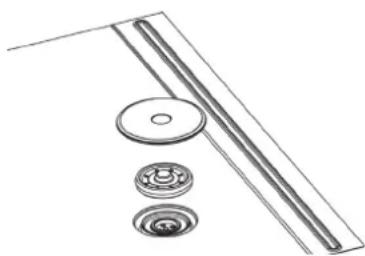
natural_image
Technical line drawing of mechanical components including a roller, bearing, and flange (no text or symbols)10 Operating Manual - General
Please read all the information provided here to become familiar with your device.
10.1 Copyright protection
This document is copyright protected. Braukmann GmbH reserves all the rights, including those for photomechanical reproduction, duplication and distribution using special processes (e.g. data processing, data carriers, data networks), even partially. Subject to content and technical changes.
11 Safety
11.1 Warning notices
The following warning notices are used in the Operating Manual concerned here.
▲WARNUNG WARNING
A warning notice of this level of danger indicates a possible dangerous situation.
If the dangerous situation is not avoided, this can lead to serious injuries.
▶ Observe the instructions in this warning notice in order to avoid the personal injuries.
▲VORSICHT ATTENTION
A warning notice of this level of danger indicates a possible dangerous situation.
If the dangerous situation is not avoided, this can lead to slight or moderate injuries.
▶ Observe the instructions in this warning notice in order to avoid the personal injuries.
HINWEIS PLEASE NOTE
A notice of this kind indicates additional information, which will simplify the handling of the canisters.
11.2 Intended use
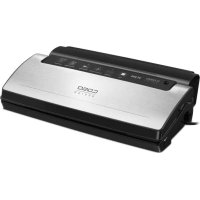
The hand vacuum sealer is intended for vacuuming zip bags, vacuum canisters or WineLocks (with a connection suitable for the hand vacuum sealer).
The ZIP-bags and vacuum canisters are designed for vacuuming and storing, heating and freezing food.
▲WARNUNG Warning
Danger due to unintended use! Dangers can emanate from the device if it is used for an unintended use and/or a different kind of use.
▶ Use the device exclusively for its intended use.
▶ Observe the procedural methods described in this Operating Manual.
Claims of all kinds due to damages resulting from unintended uses are excluded.
The User bears the sole risk.
11.3 Delivery scope and transport inspection
As a rule, this article is delivered with the following components:
| 1301 Vacu OneTouch | Hand vacuum sealer | USB-cable type C |
| 10 Vacu ZIP-Bags: (reusable)5x 20 x 23 cm; 3x 26 x 23 cm; 2x 26 x 35 cm | 4 sheets of stickers for food organization | |
| 2 ZIP-Locker | Operation manual | |
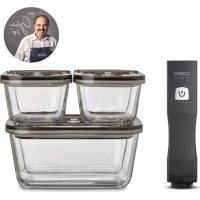
| 1169 Vacu OneTouch Eco-Set | Hand vacuum sealer | USB-cable type C |
| 10 Vacu ZIP-Bags: (reusable)5x 20 x 23 cm; 3x 26 x 23 cm; 2x 26 x 35 cm | 4 sheets of stickers for food organization | |
| 2 ZIP-Locker | Operation manual | |
| 3 VacuBoxx canister: 2x 500 ml; 1x 1500 ml |
HINWEIS Please note
▶ Examine the shipment for its completeness and for any visible damages.
▶ Immediately notify the carrier, the insurance and the supplier about any incomplete shipment or damages as a result of inadequate packaging or due to transportation.
11.4 Disposal of the packaging

The packaging protects the device against damages during transit. The packaging materials are selected in accordance with environmentally compatible and recycling-related points of view and can therefore be recycled.
Returning the packaging back to the material loop saves raw materials and reduces the quantities of accumulated waste. Take any packaging materials that are no longer required to “Green Dot” recycling collection points for disposal.
HINWEIS Please note
▶ If possible, keep the original packaging for the device for the duration of the guarantee period of the device, in order that the device can be re-packaged properly in the event of a guarantee claim.
11.5 Electrical connection
In order to ensure the safe and trouble-free operation of the device, the following instructions must be observed for the electrical connection:
Before connecting the device, compare the connection data (voltage and frequency) on the rating plate with those of your electrical network. This data must agree in order that no damages occur in the device.
If in doubt, ask your qualified electrician.
12 Operation
ZIP-bags, vacuum canisters or WineLocks can be vacuumed with the hand vacuum sealer.
▲WARNUNG WARNING
▶ Warning: The device must not absorb liquids or powders directly (e.g. water, oil, flour).
⚠️WARNUNG
WARNING
▶ If you notice that the device is sucking in liquids or powder, stop the vacuum operation immediately by pressing the ON / OFF button.
▶ Then let the device run freely without contact with bags or canisters so that the remaining liquid or powder can be pumped out of the pump.
▶ Then clean the device.
▶ We recommend freezing liquid or soft food before vacuum operation.
12.1 Overview
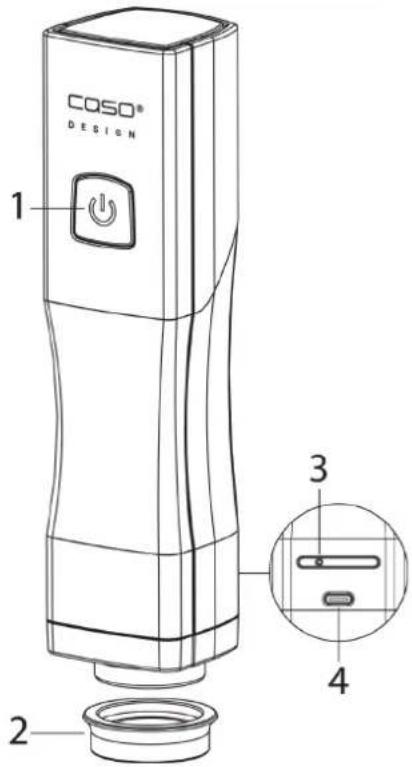
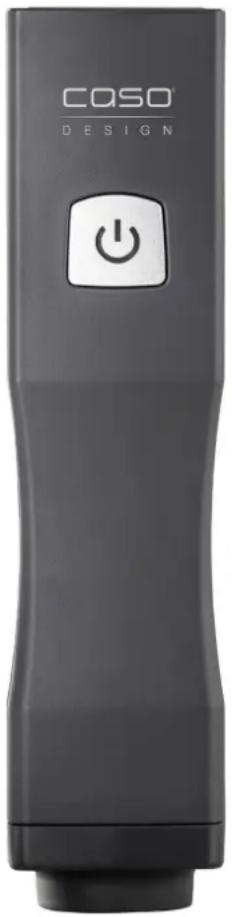
- ON/OFF button with LED
- Silicon gasket
- Air outlet (must not be covered)
- USB-port type C
12.2 LED and battery symbol
- The LED lights up constantly white during the vacuum operation
- The device stops the vacuum operation automatically and the white LED switches off.
- The LED flashes red when the battery is weak and during charging.
- The LED lights up constantly white as soon as the battery is charged.
12.3 Charging the battery
Charge the device at least every 3 to 6 months to ensure optimal battery function. Charge the device fully before using it for the first time. To charge the device connect the USB cable with USB charger and the USB port of the device. The charging process can take about 4 hours.
HINWEIS
Please note
▶ If the device is started unintentionally, when you are not performing a vacuum operation, then the device switches itself off after approx. 2 minutes to protect its battery.
12.4 Vacuuming a ZIP-bag
natural_image
Simple line drawing of a mobile phone with a downward arrow pointing to a horizontal bar (no text or symbols)
natural_image
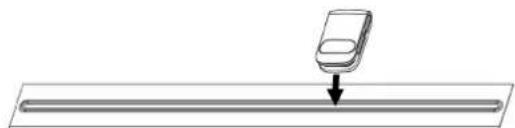
Diagram of a mechanical component with a cylindrical part inserted into a horizontal bar, showing motion direction (no text or symbols)Put the food in the zip bag. Close the zip bag tightly with the help of a ZIP Locker and check that the zip lock is closed properly.
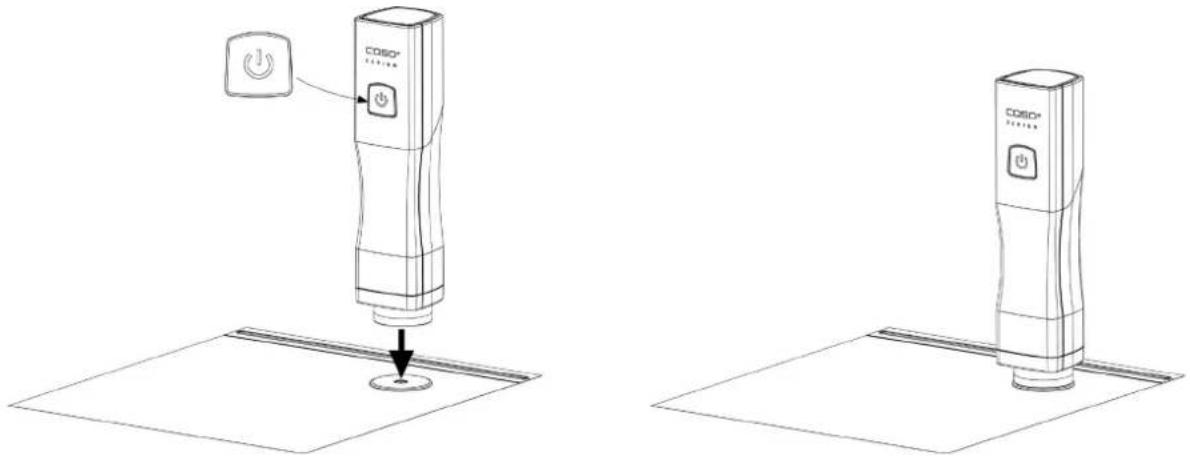
Place the device on the valve of the bag and gently press it down. Press the ON / OFF button of the device. Then air is withdrawn from the bag.
natural_image
Line drawings of two CO2O® digital devices with power button indicators, no text or symbols presentThe vacuum operation is automatically stopped when the vacuum is reached. The vacuum operation can be stopped at any time by pressing the ON / OFF button.
Carefully lift the device sideways from the valve of the bag.
HINWEIS Please note
▶ Be careful that the valve and the zip lock are tightly closed.
▶ The opening of the ZIP-bag must be completely clean and dry.
▶ Be careful that the valve on the inside of the ZIP-bag does not come into contact with the content.
▶ Be careful that the food in the bag is approx. 2 cm away from the valve.
12.5 Opening a ZIP-bag
To make it easier to open the bag, pull the vacuum valve on the valve cover to the side so that air can again enter the bag. Carefully open the zip lock and remove the food.
12.6 Suitability of the ZIP-bags
The bags are suitable for the freezer, for the dishwasher and they are reusable.
You can heat the bags with their contents in the microwave for a maximum of 12 minutes at 650 W. To do this, open the closure of the ZIP-bag.
The bags are boil-proof for up to 8 hours at 100^ (suitable for sous vide). Be careful that the valve and the zipper do not come into contact with the water, as otherwise liquid could enter the bag.
▲WARNUNG Risk of burns
▶ Handle the bags and the food carefully, there is a risk of burns. Use pot holders or something similar if necessary.
12.7 Vacuum a canister (only included in set 1169)
You can also vacuum canisters with the device; you can order them for example here: https://www.caso-design.de
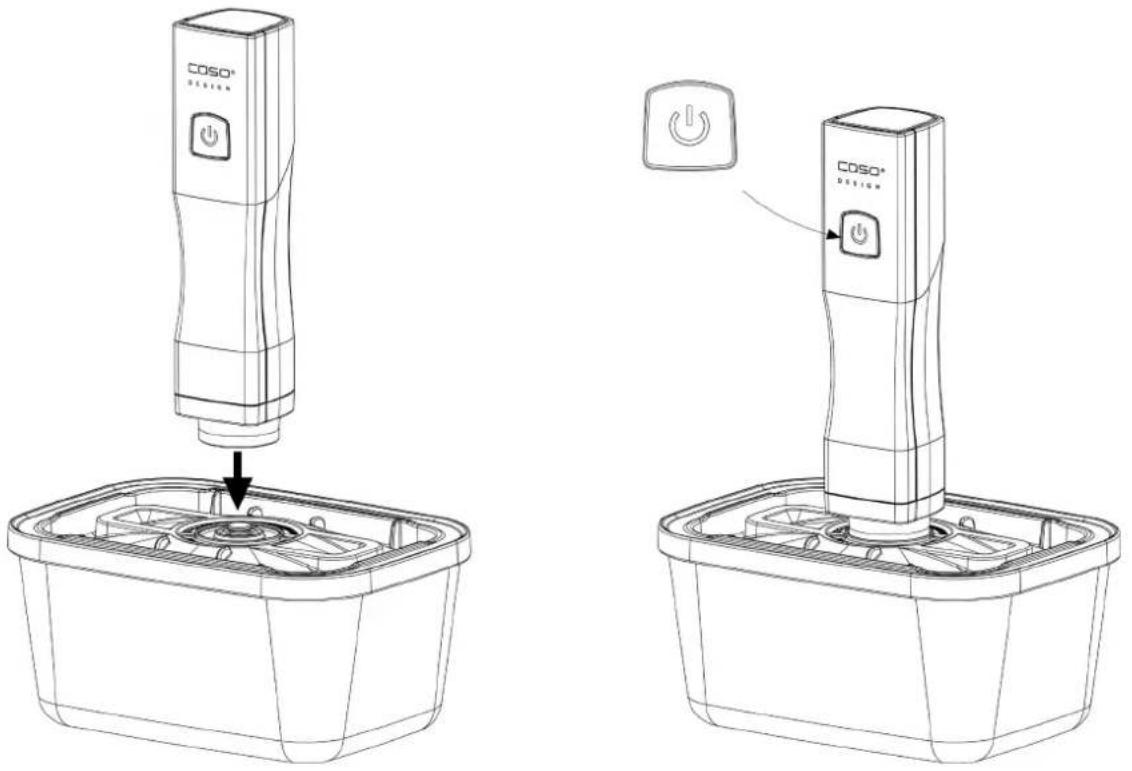
Fill the canister and leave 3 cm free to the upper edge. Place the lid on the canister. Lightly press down the lid of the canister at the beginning of the vacuum operation. Place the device at the middle of the valve on the canister lid and press it down slightly. Press the ON/OFF button of the device and air will be withdrawn from the canister.
12.8 Heating and freezing canisters
Without lid these canisters can be used to heat food in the microwave. Without lid, you can also use them to heat food in your oven (up to 350^ C).
▲WARNUNG Warning: Risk of scalding
▶ Please be careful when handling heated canisters and food, as there is a risk of scalding. Use potholders or similar items as necessary.
You can also use these canisters to freeze food (down to -18^ ). When filling, please remember that frozen food can expand.
▲WARNUNG Warning: Risk of injury
▶ Do not use frozen canister in the oven.
▶ Also do not clean hot canister with cold/wet damp cloth. Let them cool down.
▶ Do not heat the canister directly on fire.
12.9 Opening canisters
Push vacuum valve to one side to let air in.
13 Cleaning and Maintenance
This chapter provides you with important notices with regard to cleaning and maintaining the device. Please observe the notices to prevent damages due to cleaning the device incorrectly and to ensure trouble-free operation.
13.1 Safety information
▲VORSICHT Attention
Please observe the following safety notices, before you commence with cleaning the device:
▶ Do not clean the device or its components, the canisters or the ZIP-bags with aggressive or abrasive cleaning agents. Do not use solvents.
The device and its components as well as the ZIP-bags must be cleaned after each use. Failure to keep these items in a clean condition can result in a dangerous condition, as well as in the growth of fungus and bacteria.
▶ Do not scratch off stubborn dirt with hard items.
13.2 Cleaning
Vacu OneTouch: Before cleaning disconnect the device from the charger.
Only clean it with a dry soft cloth. The device and its components are not suitable for the dishwasher.
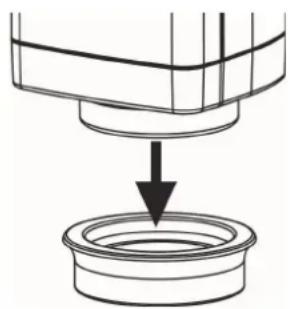
To clean the silicon gasket, remove it from the housing by gently pulling it down. Clean it with warm water and then dry it as well. Then reassemble the device correctly.
ZIP bag:
You can clean the ZIP bags in warm soapy water or in the dishwasher and then reuse them again.
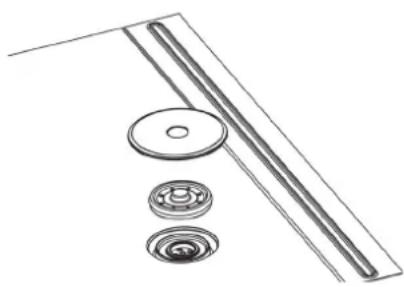
To clean the valve of the zip bag separately, remove the outer valve cover and the inner silicon part and clean them with warm water. Then carefully dry and assemble them again.
natural_image
Diagram showing a mechanical component being inserted into a circular housing (no text or symbols present)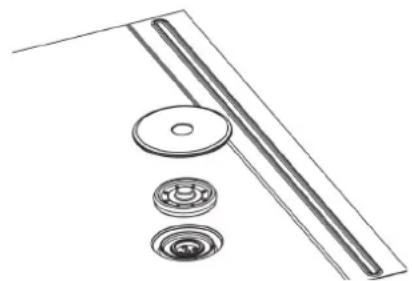
natural_image
Technical line drawing of mechanical components including a ruler, bearing, and flange (no text or symbols)▲VORSICHT Attention
ZIP bags that were used to store raw meat, fish or fatty foods, or for warming or SousVide cooking, should not be reused.
VacuBoxx canister:
Clean your VacuBoxx canister before first use and after each use. You can clean the canisters and its lids in warm soapy water or in the dishwasher. Dry the parts well after the cleaning.
14 Troubleshooting
| Problem | Cause | Solution |
| The device stops during the vacuum operation and does not switch on again. | The device sucked in liquid or powder.. | Do not turn the device over. Shake the device gently to remove powder or liquids. Make sure the device is completely dry.Press the ON / OFF button. Additional liquids may drip out. Repeat this process when the device stops again. |
| The device does not create vacuum when placed on a canister or the vacuum does not last. | The lid of the canister, the silicon gasket or the valve are positioned incorrectly. | Check that the positioning is correct and that the lid is properly closed. |
| The silicon gasket or the valve or the canister are dirty or wet | Clean and dry the silicon gasket and the valve of the canister. | |
| The device is placed too loosely on the valve. | During vacuum operation press the device slightly on the valve so that no air can escape. | |
| The device does not respond to the ON/OFF button. | The battery of the device is low or not charged. | Charge the battery |
| The above problems cannot be solved | Device could be defective. | Contact the customer support. Do not try to repair the device yourself |
15 Disposal of the Old Device
Old electric and electronic devices frequently still contain valuable materials.
However, they also contain damaging substances, which were necessary for their functionality and safety. If these were put in the non-recyclable waste or
were handled incorrectly, they could be detrimental to human health and the environment.
Therefore, do not put your old device into the non-recyclable waste under any circumstances.
HINWEIS Please note
▶ Utilise the collection point, established in your town, to return and recycle old electric and electronic devices. If necessary, contact your town hall, local refuse collection service or your dealer for information.
▶ Ensure that your old device is stored safely away from children until it is taken away.
16 Guarantee
We provide a 24 month guarantee for this product, commencing from the date of sale, for faults which are attributable to production or material faults.
Your legal guarantee entitlements in accordance with § 439 ff. BGB-E remain unaffected by this. The guarantee does not include damages, which were incurred as a result of improper handling or use, as well as malfunctions which only have a minor effect on the function or the value of the device.
Consumables, transit damages, inasmuch as we are not responsible for these, as well as damages, which were incurred as a result of any repairs that were not performed by us, are also excluded from the guarantee entitlements.
This device is designed for use in domestic situations and has the appropriate performance levels. Any use in commercial situations is only covered under the guarantee to the extent that it would be comparable with the stresses of being used in a domestic situation. It is not intended for any additional, commercial use. In the event of justified complaints, we will repair the faulty device at our discretion or replace it with a trouble-free device. Any pending faults must be reported within 14 days of delivery. All further claims are excluded. To enforce a guarantee claim, please contact us prior to returning the device (always provide us with proof of purchase).
17 Technical data
| Device Hand vacuum sealer | |
| Name | Vacu OneTouch; Vacu OneTouch Eco-Set |
| Article no. 1301; 1169 | |
| Connection 5 V; 1500 mAh | |
| (WxHxD) of hand vacuum sealer | 45 x 195 x 45 mm |
| Weight of hand vacuum sealer | 242 g |
Mode d'emploi
Vacu OneTouch (1301)
Vacu OneTouch Eco-Set (1169)
18 Mode d'emploi
18.1 Généralités
natural_image
Technical line drawing of two CO50® digital devices with power button indicators, no text or symbols presentnatural_image
Diagram showing a mechanical component with a downward arrow pointing to a circular base (no text or symbols)Les sachets ZIP:
natural_image
Technical line drawing of mechanical components including a roller, bearing, and flange (no text or symbols)▲VORSICHT Prudence
Vacu OneTouch Eco-Set (1169)



natural_image
Simple line drawing of a mobile phone with an app icon above a horizontal bar (no text or symbols)
natural_image
Simple line drawing of a car on a horizontal bar with an arrow indicating upward motion (no text or symbols)natural_image
Line drawing of a CO2O® digital device with a power button and base plate (no text or symbols)natural_image
Diagram showing a mechanical component with a downward arrow pointing to a circular base (no text or symbols)natural_image
Technical line drawing of mechanical components including a ruler, flange, and bearing (no text or symbols)


natural_image
Technical line drawings of two CO2O® digital devices with power button indicators, no text or symbols presentnatural_image
Diagram showing a mechanical component with a downward arrow pointing to a circular base (no text or symbols)natural_image
Technical line drawing of mechanical components including a ruler, flange, and bearing (no text or symbols)
CE

▲WARNUNG WAARSCHUWING
▲WARNUNG WAARSCHUWING
▲WARNUNG WAARSCHUWING
▲WARNUNG WAARSCHUWING
natural_image
Two diagrams showing a mobile phone on a track with an arrow indicating motion (no text or symbols)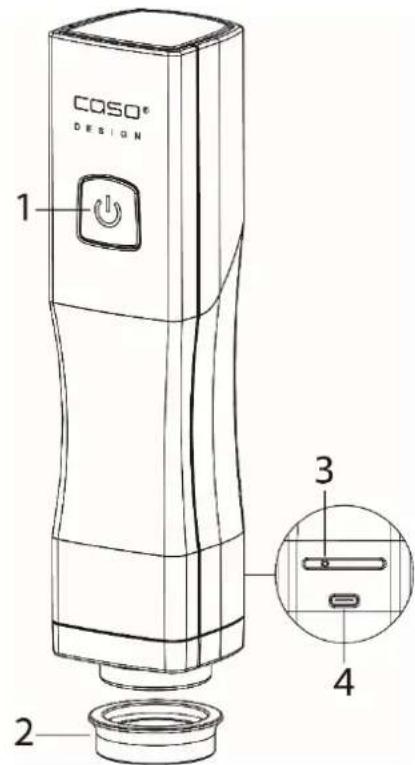
natural_image
Technical line drawings of two COISO® digital devices with power button indicators, no text or symbols presentWAARSCHUWING: Verbrandingsgevaar
WAARSCHUWING: Verwondingsgevaar
natural_image
Diagram showing a mechanical component with a downward arrow pointing to a circular base (no text or symbols present)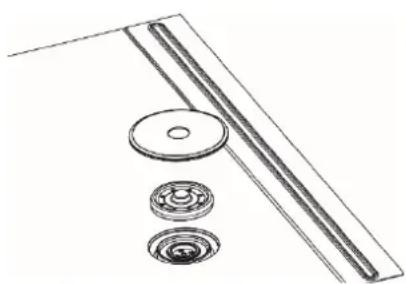
natural_image
Technical line drawing of mechanical components including a ruler, flange, and bearing (no text or symbols)Vacu OneTouch Eco-Set (1169)



natural_image
Simple line drawing of a mobile phone with an arrow pointing to it, no text or symbols present
natural_image
Simple line drawing of a car on a horizontal track with an arrow indicating upward motion (no text or symbols)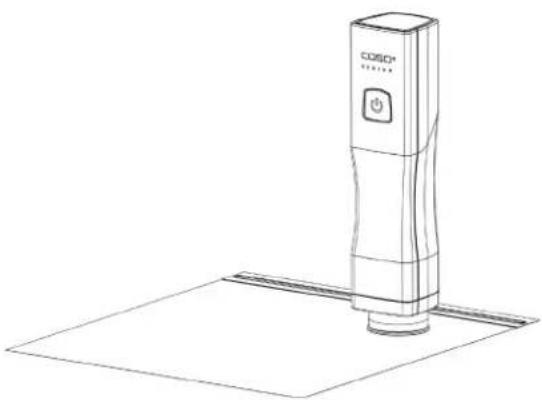
natural_image
Line drawing of a COSO® digital scanner with a power button and base plate (no text or symbols)natural_image
Line drawing of a COSO® digital kitchen appliance with a base unit and control panel (no text or symbols)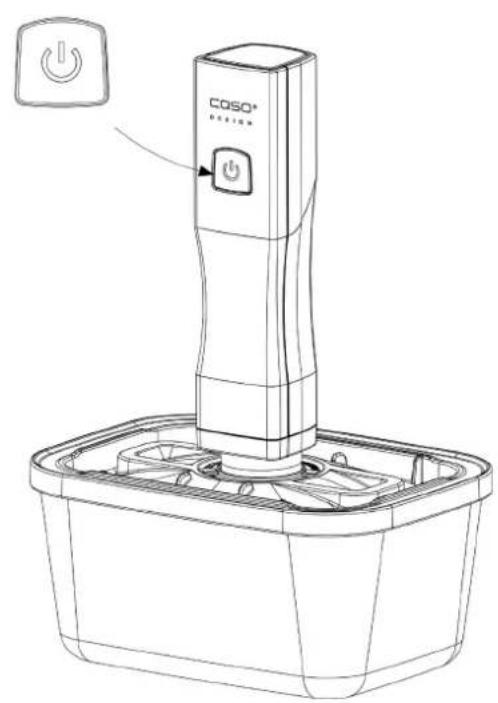
natural_image
Line drawing of a Coso® appliance with a power button and fan base (no text or symbols)natural_image
Diagram showing a mechanical component with a downward arrow pointing to a circular base (no text or symbols)зип-пакет:
natural_image
Technical line drawing of a mechanical assembly with rollers and a ruler (no text or symbols)
- Braukmann GmbH
- Raiffeisenstraße 9
- D-59757 Arnsberg
- Operating Manual - General
- Copyright protection
- Safety
- Warning notices
- ▲WARNUNG WARNING
- ▲VORSICHT ATTENTION
- HINWEIS PLEASE NOTE
- Intended use
- Delivery scope and transport inspection
- Disposal of the packaging
- Electrical connection
- Operation
- ⚠️WARNUNG
- WARNING
- Overview
- LED and battery symbol
- Charging the battery
- HINWEIS
- Please note
- Vacuuming a ZIP-bag
- Opening a ZIP-bag
- Suitability of the ZIP-bags
- ▲WARNUNG Risk of burns
- Vacuum a canister (only included in set 1169)
- Heating and freezing canisters
- ▲WARNUNG Warning: Risk of scalding
- ▲WARNUNG Warning: Risk of injury
- Opening canisters
- Cleaning and Maintenance
- Safety information
- Cleaning
- ZIP bag:
- VacuBoxx canister:
- Troubleshooting
- Disposal of the Old Device
- Guarantee
- Technical data
- Mode d'emploi
- Mode d'emploi
- Généralités
- Les sachets ZIP:
- ▲VORSICHT Prudence
- Vacu OneTouch Eco-Set (1169)
- ▲WARNUNG WAARSCHUWING
- WAARSCHUWING: Verbrandingsgevaar
- WAARSCHUWING: Verwondingsgevaar
Brand : CASO
Model : Vacu OneTouch 1301
Category : Vacuum Cleaner