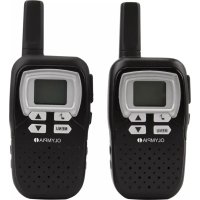
PMR 1208 - Talkie Walkie OLYMPIA - Free user manual and instructions
Find the device manual for free PMR 1208 OLYMPIA in PDF.

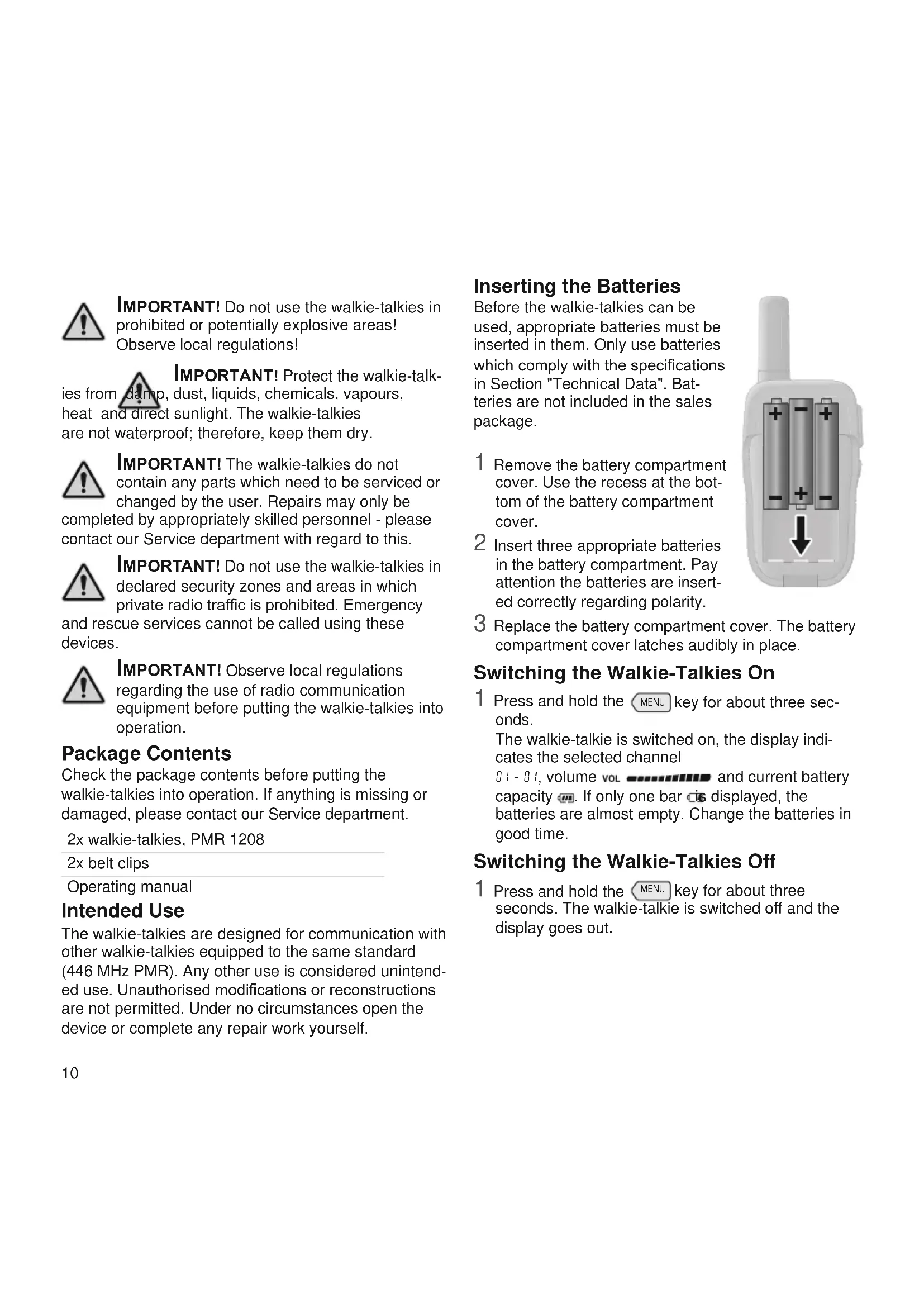


| Product type | PMR 446 two-way radio |
| Brand | Olympia |
| Model | PMR 1208 |
| Frequencies | 446.00625 MHz - 446.09375 MHz |
| Number of channels | 8 |
| Sub-code (CTCSS) | 38 codes |
| Maximum range | Up to 5 km (open area) |
| Power supply | 3 AAA batteries (1.5 V) per unit |
| Transmission power | < 500 mW PMR |
| Channel spacing | 12.5 kHz |
| Battery life (talk time) | Up to 8 hours |
| Dimensions | 125 x 55 x 30 mm |
| Weight | 64 g |
| Available colors | Black, Pink, Blue |
| VOX function | Yes, with 3 sensitivity levels |
| Channel scanning | Yes |
| Ring tones | 10 selectable ring tones |
| Automatic power off | Programmable from 1 to 4 hours |
| Key beep | On/Off |
| Confirmation signal (Roger Beep) | On/Off |
| Display backlight | Yes, manual activation |
| Cleaning | Dry, soft, lint-free cloth |
| Package contents | 2 two-way radios, 2 belt clips, user manual |
| Warranty | Return to store with original packaging and receipt |
| Compliance standard | CE, directives 1999/5/EC or 2014/53/EU |
Frequently Asked Questions - PMR 1208 OLYMPIA
User questions about PMR 1208 OLYMPIA
0 question about this device. Answer the ones you know or ask your own.
Ask a new question about this device
Download the instructions for your Talkie Walkie in PDF format for free! Find your manual PMR 1208 - OLYMPIA and take your electronic device back in hand. On this page are published all the documents necessary for the use of your device. PMR 1208 by OLYMPIA.
USER MANUAL PMR 1208 OLYMPIA
Technische Daten 8
Overview of Devices 9
Safety Instructions 9
Inserting the Batteries 10
Switching the Walkie-Talkies On. 10
Switching the Walkie-Talkies Off. 10
Package Contents 10
Intended Use 10
Operating the Walkie-Talkies 11
Disposal 13
Declaration of Conformity 13
Cleaning 13
Guarantee 13
Contenu
1 Taste Push-to-Talk

6 Display
The diagrams on Page 2 illustrate the walkie-talkie devices in detail. Familiarise yourself with the walkie-talkies before putting them into operation.
Overview of Operating Elements
1 Push-to-Talk key

6 Display
2 Display lighting button 7 Navigation keys


3 Call signal key 8 Microphone
4 Menu key

9 Loudspeaker
5 Antenna
Overview of Display Symbols
10 Channel 158OX mode on


11 Signal being sent 16 Battery capacity indicator
12 Signal being received 17 Subcode (subchannel)
13 Call signal on 18 volume
14 Automatic switch-off APO
Safety Instructions

Read the operating manual carefully and proceed as described. Keep the operating manual close to hand for future reference. Avoid
any personal injury by paying attention to the following information!

WARNING! The walkie-talkies can be used by children from eight years of age and by persons with restricted physical, sensory or mental
capabilities or a lack of experience and/or knowledge when they are under supervision or have been instructed with regard to safe use of the walkie-talkies and have understood the potential risks which result if the instructions are ignored. Children may not be allowed to play with the walkie-talkies. Cleaning and user maintenance may not be completed by children without any supervision.

WARNING! Risk of suffocation! Keep away from children! Keep packaging and protective foils as well as batteries out of reach of children.
Keep the walkie-talkies out of reach of children. Small children can swallow small parts. If a battery has been swallowed, seek medical assistance immediately.

CAUTION! Risk of explosion through improper replacement or removal of the batteries! Only replace the batteries with a type approved by manufacturer and dispose of used batteries along to the applicable laws.

CAUTION! Voice transmission is played through the loudspeaker. Hold the walkie-talkies about 30 cm away when receiving voice
transmissions. This prevents any possible hearing damage.

IMPORTANT! Do not use the walkie-talkies in prohibited or potentially explosive areas! Observe local regulations!
IMPORTANT! Protect the walkie-talkies from damp, dust, liquids, chemicals, vapours, heat and direct sunlight. The walkie-talkies are not waterproof; therefore, keep them dry.

IMPORTANT! The walkie-talkies do not contain any parts which need to be serviced or changed by the user. Repairs may only be ed by appropriately skilled personnel - please our Service department with regard to this.

IMPORTANT! Do not use the walkie-talkies in declared security zones and areas in which private radio traffic is prohibited. Emergency
and rescue services cannot be called using these devices.

IMPORTANT! Observe local regulations regarding the use of radio communication equipment before putting the walkie-talkies into operation.
Package Contents
Check the package contents before putting the walkie-talkies into operation. If anything is missing or damaged, please contact our Service department.
2x walkie-talkies, PMR 1208
2x belt clips
Operating manual
Intended Use
The walkie-talkies are designed for communication with other walkie-talkies equipped to the same standard (446 MHz PMR). Any other use is considered unintended use. Unauthorised modifications or reconstructions are not permitted. Under no circumstances open the device or complete any repair work yourself.
Inserting the Batteries
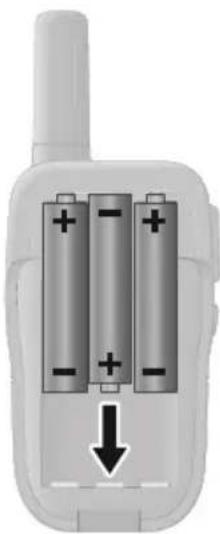
Before the walkie-talkies can be used, appropriate batteries must be inserted in them. Only use batteries which comply with the specifications in Section "Technical Data". Batteries are not included in the sales package.
1 Remove the battery compartment cover. Use the recess at the bottom of the battery compartment cover.
2 Insert three appropriate batteries in the battery compartment. Pay attention the batteries are inserted correctly regarding polarity.
3 Replace the battery compartment cover. The battery compartment cover latches audibly in place.
Switching the Walkie-Talkies On
1 Press and hold the key for about three seconds. The walkie-talkie is switched on, the display indicates the selected channel I - I , volume vol and current battery capacity If only one bar displayed, the batteries are almost empty. Change the batteries in good time.
Switching the Walkie-Talkies Off
1 Press and hold the MENU key for about three seconds. The walkie-talkie is switched off and the display goes out.
Operating the Walkie-Talkies
When you want to communicate through the walkie-talkies, you must switch the walkietalkies on and set them to the same channel. To ensure a connection is established successfully, the walkie-talkies must be within the reception range.
The elements selected in the menu flash when you are defining the respective setting.
Sending and Receiving Signals
1 Press and hold the |_PTT| key. 'appears in the display. The walkie-talkie is in Transmit mode.
2 Hold the walkie-talkie close to your mouth and speak into the microphone. All the walkie-talkies which are within range and are switched to the same channel receive your message. appears in the display.
3 If you want to answer a signal received, press the key and speak into the microphone.
Setting the Channel
The walkie-talkies use free channels. The walkie-talkies within range which are set to the same channel can receive signals. Also observe the information on subchannels if you want to be sure that third parties cannot listen-in or participate in your conversation.
1 Press the MENU key. 01 appears in the display.
2 Use the and keys to set the required channel.
3 Confirm your input by pressing the p key.
Setting the Subcode (Subchannel)
In order to enable communication via a subcode (subchannel), the walkie-talkies communicating with each other must be set to the same channel and same subchannel.
1 Press the MENU key twice. 日 appears in the display.
2 Use the and keys to select the required subchannel.
Select the setting 品 if you do not wish to use a subchannel.
Confirmation Signal (Roger Beep)
You can define whether a short confirmation signal (Roger Beep) should be issued at the end of your voice transmission.
1 Press the MENU key seven times. r_o appears in the display.
2 Use the and keys to switch the roger beep on or off.
3 Confirm your input by pressing the key.
Scanning the Channels
Before scanning all the channels to receive possible radio signals within range of your walkie-talkie, ensure that the setting in the Subchannel menu is 00.
1 Press and hold the key for seconds. The walkie-talkie scans all the channels in succession.
2 If you want to retain a channel, press the key.
If you want the communicate with others, ensure that all the walkie-talkies communicating with each other are using the same subchannel.
Selecting and Transmitting a Call Signal
Select a call signal and transmit it to get the attention of other walkie-talkie users.
1 Press the MENU key four times.
O I - C A appears in the display.
2 Select one of the 10 call signal tones available using the and keys.
3 Confirm your input by pressing the key.
4 If you want to transmit a call signal, press the key. Your call signal is transmitted to the other walkie-talkies.
Automatic Switch-Off
You can define whether the walkie-talkie should be switched off automatically after a certain period of time
(1 to 4 hours).
1 Press the MENU key five times.
APO appears in the display.
2 Use the a d keys t y select the required period of time.
3 Confirm your input by pressing the key.
Setting the Key Tones
You can define whether a tone is issued each time a key is pressed.
1 Press the MENU key six times. appears in the display.
2 Use the and keys to switch the key tone on or off.
3 Confirm your input by pressing the |PTT| key.
VOX Function
You can use the VOX function when the microphone should be activated automatically on detecting a sound.
You can set one of three different sensitivity levels.
1 Press the MENU key three times.
wAppears in the display.
2 Use the and keys to select the required sensitivity for the microphone.
3 Confirm your input by pressing the key.
Setting the Volume
You can set the volume of incoming signals when the walkie-talkie is in Standby mode.
1 Use the and keys to set the required volume. The volume set appears at the bottom edge of the display. The more bars displayed, the higher the volume.
Display Lighting
You can switch on the display lighting, if necessary.
1 Press the Display Lighting key.
Switch the display lighting off again when no longer required to save the batteries.
2 Press the Display Lighting key again.
Disposal

In order to dispose of your device, take it to a collection point provided by your local public waste authorities (e.g. recycling centre). According to laws on the disposal of electronic and electrical devices, owners are obliged to dispose of old electronic and
electrical devices in a separate waste container. The symbol indicates that the device must not be disposed of in normal domestic waste!
Risks to health and the environment from batteries! Remove the batteries from the device before disposing of the device. Never open, damage or swallow batteries or allow them to pollute the environment. They may contain toxic, ecologically hazardous heavy metals. You are legally obliged to dispose of batteries at a battery retailer or in the corresponding containers provided at collection points by local public waste authorities.
Disposal is free of charge.
The symbol indicates that the batteries must not be disposed of in normal domestic waste and that they must be brought to collection points provided by local public waste authorities.

Packaging materials must be disposed of according to local regulations.
Information on Handling Batteries Properly
Always use batteries of the type stipulated in Section "Technical Data". Never mix the types of batteries used. Remove the batteries if the device will not be used for longer periods.
When the batteries are almost empty, the walkie-talkie issues a warning signal at regular intervals.
Declaration of Conformity
Olympia Business Systems Vertriebs GmbH, Zum Kraftwerk 1, 45527 Hattingen hereby declares that this device fulfils the requirements and complies with the regulations stipulated in the Directive 1999/5/EC and Directive 2014/53/EU. The CE marks on these devices confirms their conformity.

The Declaration of Conformity for this product is available at www.olympia-vertrieb.de
Cleaning
Clean the surfaces of the housing with a dry, soft, lint-free cloth. Do not use any solvents or cleaning agents.
Guarantee
Dear Customer, we are pleased that you have chosen this equipment. In the case of a defect, please return the device together with the receipt and original packing material to the point-of-sale.
Technical Data
See Page 39.
1 Touche Push-to-Talk

6 Ecran
instructions locales!

iAVISO! Los aparatos de radiotelefoníaSEOSEOSEOSEOSEOSEOSEOSEOSEOSEOSEOSEOSEOSEOSEOSEOSEOSEOSEOSEOSEOSEOSEOSEOSEOSEOSEOSEOSEOSEOSEOSEOSEOSEOSEOSEOSEOSEOSEOSEOSEOSEOSEOSEOSEOSEOSEOSEOSEOSEOSEOSEOSEOSEOSEOSEOSEOSEOSEOSEOSEOSEOSEOSEOSEOSEOSEOSEOSEOSEOSEOSEOSEOSEOSEOSEOSEOSEOSEOSEOSEOSEOSEOSEOSEOSEOSEOSEOSEOSEOSEOSEOSEOSEOSEOSEOSEOSEOSEOSEO
| Frequencies | 446.00625 MHz - 446.09375 MHz |
| Channels 8 | |
| Call coding 38 CTCSS codes | |
| Range Up to 5 km (in open terrain) | |
| Power supply | 3x batteries, Type AAA (1.5 V) per device |
| Transmission power < 500 mW PMR | |
| Channel bandwidth 12.5 kHz | |
| Talk time | Up to 8 hours |
| Dimensions | 125 x 55 x 30 mm |
| Weight | 64 g |
Specifiche tecniche
We reserve the rights to make technical modifications and change the contents without notification.
Art. No. 5392 (black), 5394 (pink), 5393 (blue) / Version 2016.12

- Contenu
- Overview of Operating Elements
- Overview of Display Symbols
- Safety Instructions
- Package Contents
- Intended Use
- Inserting the Batteries
- Switching the Walkie-Talkies On
- Switching the Walkie-Talkies Off
- Operating the Walkie-Talkies
- Sending and Receiving Signals
- Setting the Channel
- Setting the Subcode (Subchannel)
- Confirmation Signal (Roger Beep)
- Scanning the Channels
- Selecting and Transmitting a Call Signal
- Automatic Switch-Off
- Setting the Key Tones
- VOX Function
- Setting the Volume
- Display Lighting
- Disposal
- Information on Handling Batteries Properly
- Declaration of Conformity
- Cleaning
- Guarantee
- Technical Data
Brand : OLYMPIA
Model : PMR 1208
Category : Talkie Walkie