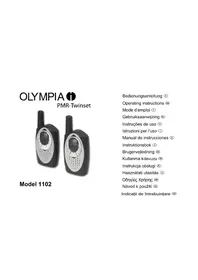
PMR 1102 - Walkie-talkie OLYMPIA - Free user manual and instructions
Find the device manual for free PMR 1102 OLYMPIA in PDF.


| Product type | PMR walkie-talkie |
| Brand | Olympia |
| Model | PMR 1102 |
| Frequency range | UHF PMR446 (446.0 - 446.2 MHz) |
| Number of channels | 8 PMR channels |
| Maximum range | Up to 10 km in open field |
| Power supply | 3 AAA batteries (Not included) or rechargeable battery (optional) |
| Estimated battery life | Approximately 20 hours standby |
| Dimensions (W x H x D) | 48 x 120 x 28 mm |
| Weight (without batteries) | 80 g |
| Main functions | VOX, Scan, Squelch, Key lock, LCD backlight |
| Included accessories | Belt clip, lanyard, user manual |
| Care and cleaning | Clean with a soft, dry cloth. Do not use chemicals. |
| Safety | Do not expose to rain or moisture. Avoid shocks. |
| Spare parts and repairability | Spare parts not available. Device not user-serviceable. |
| General information | License-free use PMR446. Max transmission power 500 mW. |
Frequently Asked Questions - PMR 1102 OLYMPIA
User questions about PMR 1102 OLYMPIA
0 question about this device. Answer the ones you know or ask your own.
Ask a new question about this device
Download the instructions for your Walkie-talkie in PDF format for free! Find your manual PMR 1102 - OLYMPIA and take your electronic device back in hand. On this page are published all the documents necessary for the use of your device. PMR 1102 by OLYMPIA.
USER MANUAL PMR 1102 OLYMPIA
Model 1102
Operating instructions GB
Mode d'emploi Ⓕ
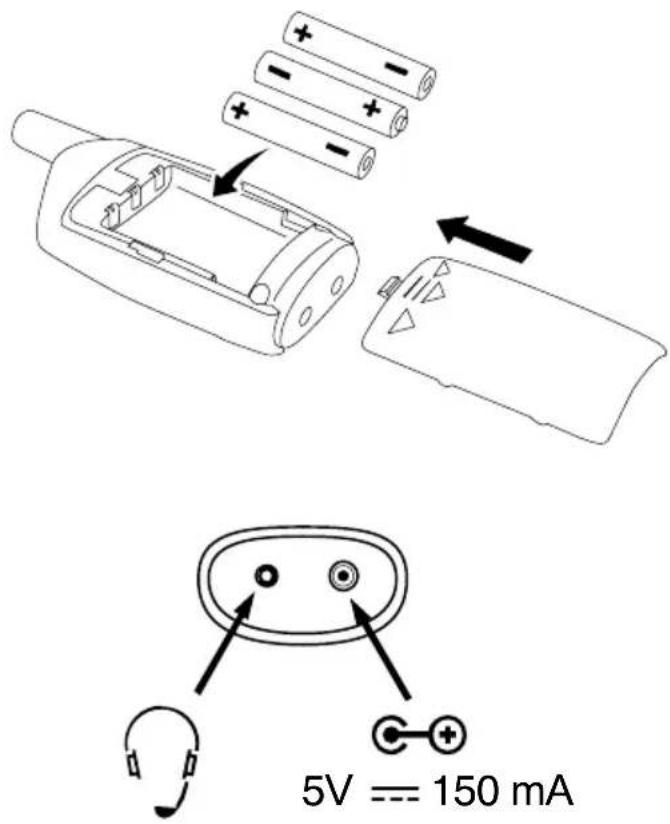
| Channel Frequency (MHz) |
| 1 446.00625 |
| 2 446.01875 |
| 3 446.03125 |
| 4 446.04375 |
| 5 446.05625 |
| 6 446.06875 |
| 7 446.08125 |
| 8 446.09375 |
SICHERHEITSHINWEISE
Please read carefully through the following information concerning safety and proper use.
●This Private Mobile Radio (PMR) is not intended to be used as a toy.
- Do not expose the equipment to extreme temperatures or high relative humidity and protect it from direct sunlight and dusty conditions.
- To clean the unit, wipe with a soft cloth dampened with water. Don't use a cleaner or solvents on the unit.
- Pay attention to the correct polarity when using a power plug.
- Never open the unit. Opening the unit annuls claims under the terms of guarantee and exposes the person to the risk of an electric shock.
- Repairs to defective units should only be carried out by service centers recommended by the sales outlet.
- Remove the battery if the device is not going to be used for a long period.
- Turn your radio OFF as soon as interference is taking place with medical equipment.
- Do not place your device in the area over an air bag or in the air bag deployment area.
- In some countries it is prohibited to use your PMR while driving a vehicle. In this case leave the road before using the device.
- Check the local regulations before using it outside the country where it was purchased. The standard may be prohibited in this country.
- Dispose of the unit and used batteries in an environment friendly manner.


Do not dispose of batteries in a normal household garbage.
EXEMPTION FROM LIABILITY
The features described in this manual are published with reservation to modifications.
INTENDED USE
This PMR is designed for communication with other PMR devices complying to the same standard. Any other use is considered unintended use. Unauthorized modifications or reconstruction not described in this manual are not permitted.
WARRANTY
The legal warranty period applies. For further information, refer to the warranty page enclosed.
USING A PMR DEVICE
To communicate between PMR devices they need to be set all on the same channel and CTCSS code and within receiving range (up to max. 3 km in open field). Since these devices use free frequency bands (channels), all devices in operation share these channels (total 8 channels). Therefore, privacy is not guaranteed. Anybody with a PMR set to your channel and CTCSS codec can overhear the conversation.
If you want to communicate (transmitting a voice signal) you need to press the PTT - button (Push to talk). Once this button pressed, the device will go into transmit mode and you can speak into the microphone. All other PMR devices in range, on the same channel and CTCSS code and in standby mode (not transmitting) will hear your message. You need to wait until the other party stops transmitting before you can reply to the message. At the end of each transmission the unit will send a beep if the roger is on. To reply, just press the PTT - button and speak into the microphone.
CTCSS (CONTINUOUS TONE CODED SQUELCH SYSTEM)
The 2 digit CTCSS code corresponds to a specific tone frequency the radio emits. Two users, with the same channel and CTCSS set can hear one another. They will not be able to hear anyone else on the channel unless the other radios have the same exact CTCSS code enabled.
The exception here is use of the CTCSS code "0". If this code is selected, all conversations on the channel set can be overheard.
| TURNING THE UNIT ON/OFF | 1x MENU 2 sec |
| ADJUSTING SPEAKER VOLUME (1...15) | + / - |
| TRANSMITTING A SIGNAL PTT | |
| RECEIVING A SIGNAL PTT loose | |
| CHANGING CHANNELS (1...8) | 1x MENU / + / - / PTT |
| CHANGING CTCSS-CODE (1...38) | 2x MENU / + / - / PTT |
| CHANGING CALL TONE (0...5) | 3x MENU / + / - / PTT |
| CHANNEL SCAN ONCHANNEL SCAN performs searches for active signals in an endless loop from channel 1 to 8. | 4x MENU / + / “Y” / PTT |
| CHANNEL SCAN OFF | 4x MENU / - / “-” / PTT |
| BUTTON LOCK ON | 5x MENU / + / “Y” / PTT |
| BUTTON LOCK OFF | 1x MENU 2 sec |
| MONITOR ONYou can use the MONITOR feature to check for weaker signals in the current channel. | 6x MENU |
| MONITOR OFF 1x MENU | |
| TRANSMITTING CALL TONE | |
| ROGER BEEP ON/OFF | MENU and + / 2 sec (while TURNING ON) |
INSTRUCTIONS DE SÉCURITÉ
MESULIYETSIZLIK KOÇULU


Brand : OLYMPIA
Model : PMR 1102
Category : Walkie-talkie