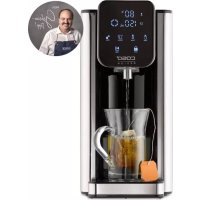
HW 660 - Water dispenser CASO - Free user manual and instructions
Find the device manual for free HW 660 CASO in PDF.



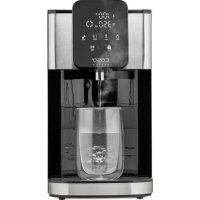
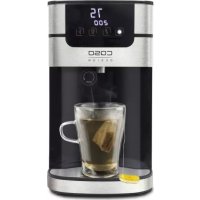
| Product type | Hot water dispenser |
| Brand | CASO |
| Model | HW 660 |
| Item number | 1879 |
| Dimensions (W x D x H) | 155 x 315 x 255 mm |
| Net weight | 2.4 kg |
| Power supply | 220-240 V, 50/60 Hz |
| Power | 2200-2600 W |
| Tank capacity | 2.7 L |
| Adjustable temperatures | 40 °C, 50 °C, 60 °C, 70 °C, 80 °C, 90 °C, 100 °C, and ambient temperature (000) |
| Adjustable water volumes | 100 ml, 150 ml, 200 ml, 250 ml, 300 ml, 350 ml, 400 ml, or continuous (000) |
| Baby function | Water distribution at 40 °C for baby preparations |
| Water filter | Included, lifespan 4-6 weeks (approx. 160 L) |
| Descaling | Integrated cleaning and descaling function |
| Child safety | Automatic lock after 15 seconds of inactivity |
| Overheating protection | Yes, with reset button |
| Display | Digital display with indicators (descaling, lack of water, etc.) |
| Drip tray | Removable for emptying |
| Maintenance | Wipe with a damp cloth; regular descaling |
| Included accessories | Water filter, filter holder, user manual |
| Spare parts | Replacement filters available: pack of 6 item no. 1841, pack of 3 item no. 1861 |
| Warranty | 24 months (Germany, Austria, Netherlands); for other countries, contact service |
Frequently Asked Questions - HW 660 CASO
User questions about HW 660 CASO
0 question about this device. Answer the ones you know or ask your own.
Ask a new question about this device
Download the instructions for your Water dispenser in PDF format for free! Find your manual HW 660 - CASO and take your electronic device back in hand. On this page are published all the documents necessary for the use of your device. HW 660 by CASO.
USER MANUAL HW 660 CASO
5.2.3 Fehlercode Lo Lack of water
Original Operating Manual Turbo Hot Water Dispenser HW 660

Item no. 1879
10 Operating Manual
10.1 General
Please read the information contained herein so that you can become familiar with your device quickly and take advantage of the full scope of its functions. Your appliance will serve you for many years if you handle it and care for it properly. We wish you a lot of pleasure in using it!
10.2 Information on this manual
These operating instructions are a component of the CASO HW 660 turbo hot water dispenser (referred to hereafter as the device) and provide you with important information for the initial commissioning, safety, intended use and care of the device. The Operating Instructions must be available at all times at the device. This Operating Manual must be read and applied by every person who is instructed to work with the device:
- Commissioning - Operation - Troubleshooting and/or - Cleaning
- Keep the Operating Manual in a safe place and pass it on to the subsequent owner along with the device.
10.3 Warning notices
The following warning notices are used in the Operating Manual concerned here.
▲GEFAHR Danger
A warning notice of this level of danger indicates a potentially dangerous situation. If the dangerous situation is not avoided, this can lead to death or serious injuries.
Observe the instructions in this warning notice in order to avoid the danger of death or serious personal injuries.
WARNING Warning
A warning notice of this level of danger indicates a possible dangerous situation. If the dangerous situation is not avoided, this can lead to serious injuries.
Observe the instructions in this warning notice in order to avoid the personal injuries.
▲VORSICHT Attention
A warning notice of this level of danger indicates a possible dangerous situation. If the dangerous situation is not avoided, this can lead to slight or moderate injuries.
Observe the instructions in this warning notice in order to avoid the personal injuries.
HINWEIS Please note
A notice of this kind indicates additional information, which will simplify the handling of the machine.
10.4 Limitation of liability
All the technical information, data and notices with regard to the installation, operation and care are completely up-to-date at the time of printing and are compiled to the best of our knowledge and belief, taking our past experience and findings into consideration.
No claims can be derived from the information provided, the illustrations or descriptions in this manual. The manufacturer does not assume any liability for damages arising as a result of the following:
Non-observance of the manual
Uses for non-intended purposes
- Improper repairs
- Technical alterations, modifications of the device
- Use of unauthorized spare parts
Modifications of the device are not recommended and are not covered by the guarantee. All translations are carried out to the best of our knowledge. We do not assume any liability for translation errors, not even if the translation was carried out by us or on our instructions. The original German text remains solely binding.
10.5 Copyright protection
This document is copyright protected. Braukmann GmbH reserves all the rights, including those for photomechanical reproduction, duplication and distribution using special processes (e.g. data processing, data carriers, data networks), even partially.
Subject to content and technical changes.
11 Safety
This chapter provides you with important safety notices when handling the device. The device corresponds with the required safety regulations. Improper use can result in personal or property damages.
11.1 Intended use
This device (with waterfilter included) is only intended for use in households in enclosed spaces for boiling of drinking water.
This device is intended for use in the household and for similar applications such as:
- in kitchens for employees in shops, offices, and other commercial areas;
in farms, - by customers in hotels, motels and other similar residential environments,
- in bed and breakfast establishments.
Uses for a different purpose or for a purpose which exceeds this description are considered incompatible with the intended or designated use.
▲WARNUNG
Warning
Danger due to unintended use! Dangers can emanate from the device if it is used for an unintended use and/or a different kind of use.
Use the device exclusively for its intended use.
Observe the procedural methods described in this Operating Manual.
Claims of all kinds due to damages resulting from unintended uses are excluded. The User bears the sole risk.
11.2 General Safety information
HINWEIS
Please note
Please observe the following general safety notices with regard to the safe handling of the device.
- Use the appliance only as described in the user's guide to avoid possible injury from misuse.
This device may be used by children aged 8 and above, if they are supervised or have been instructed at to the safe use of the device and have understood the resulting hazards. -
Cleaning and maintenance by the user must not be performed by children unless they are at least 8 years old and are supervised.
Children are not allowed to play with the device.
The device and its connecting cable must be kept away from children who are less than 8 years old.
This appliance can be used by persons with reduced physical, sensory or mental capabilities or lack of experience and knowledge if they have been given supervision or instruction concerning the use of the appliance safely and they understand the hazards involved.
Operate the appliance only in dry indoor areas.
Do not operate the appliance unattended.
Do not use the appliance: -
if the appliance itself or parts are damaged,
- if the power cord or plug is damaged,
- if the appliance has been dropped.
Always unwind the power cord completely before use. When doing so, ensure the power cord is not damaged by sharp edges or hot objects.
HINWEIS Please note
Pull the plug out of the socket:
- when you are not using the appliance,
- after each use,
- before cleaning the appliance or putting it away,
-
if there is an obvious malfunction during operation,
during a thunderstorm. -
Do not make any modifi cations to the appliance or the power cord. Only have repairs carried out by a specialist workshop, as appliances that have not been repaired properly endanger the user. Please also observe the enclosed warranty conditions.
- Only use the device with original accessories.
- Place the appliance on a stable, level surface. Ensure sufficient distance between the appliance and strong heat sources such as hotplates, heating pipes, etc.
- Do not clean the appliance with hard, scratchy or abrasive cleaning agents such as steel wool or similar.
Defective components must always be replaced with original replacement parts. Only such parts will guarantee that the safety requirements are fulfilled.
11.3 Danger of burns
WARNING Warning
The water heated in the device and the device can become very hot. Please observe the following safety notices in order not to burn or scald yourself or others.
- Do not touch the hot surface and not the spout when the device is in operation. Danger of burns.
The heating element surfaces and the warming plate still have residual heat after use. Do not touch them until they have cooled down completely.
Always test the temperature of the water before you drink it.
▲WARNING Warning
Always check the temperature of food before you feed your baby. Shake the bottle carefully and check the temperature of the food by putting a few drops on the inside of your wrist.
Pay attention to the hot water steam that is produced during cooking process. Risk of burns.
11.4 Dangers due to electrical power
GEFAHR Mortal danger due to electrical power!
Mortal danger exists when coming into contact with live wires or subassemblies! Observe the following safety notices to avoid dangers due to electrical power:
- Do not dip the cable, device or plug into water or other liquid to prevent an electric shock.
- If the power cord of this appliance is damaged, it must be replaced by the manufacturer or its customer service or a similarly qualified person in order to avoid hazards.
Do not immerse the appliance in water for cleaning.
WARNING! Risk of electric shock! Do not allow any liquid to run over the appliance connector. - Do not open the housing on the device under any circumstances. There is a danger of an electrical shock if live connections are touched and the electrical or mechanical structure is altered. In addition, functional faults on the device can also occur.
12 Commissioning
This chapter provides you with important safety notices during the initial commissioning of the device. Observe the following notices to avoid dangers and damages:
12.1 Safety information
WARNING Warning
Packaging materials may not be used for playing. There is a danger of suffocation.
12.2 Delivery scope and transport inspection
As a rule, the device is delivered with the following components:
- CASO HW 660
Waterfilter
- Filter holder
Operation Manual
HINWEIS Please note
Examine the shipment for its completeness and for any visible damages.
- Immediately notify the carrier, the insurance and the supplier about any incomplete shipment or damages as a result of inadequate packaging or due to transportation.
12.3 Unpacking
To unpack the device, proceed as follows: Remove the device out of the carton and remove the packaging material. Remove the protective film from the unit.
12.4 Disposal of the packaging

The packaging protects the device against damages during transit. The packaging materials are selected in accordance with environmentally compatible and recycling-related points of view and can therefore be recycled. Returning the packaging back to the material loop saves raw materials and reduces the quantities of accumulated waste.
Take any packaging materials that are no longer required to "Green Dot" recycling collection points for disposal.
HINWEIS Please note
If possible, keep the original packaging for the device for the duration of the guarantee period of the device, in order that the device can be re-packaged properly in the event of a guarantee claim.
12.5 Setup location requirements:
In order to ensure the safe and trouble-free operation of the device, the setup location must fulfil the following prerequisites:
- The device must be set up on a firm, flat, horizontal surface with sufficient load-bearing capacity for the device.
- Place the device only on a waterresistant surface.
- Do not use the device outdoors.
- Do not operate the product near hot gas or hot stove.
- Choose the setup location in such a way that children cannot reach the device.
- The device is not intended to be installed in a wall or a built-in cupboard.
- Do not set up the device in a hot, wet or extremely damp environment or near flammable material.
- The electrical socket must be easily accessible so that the power lead can be disconnected easily, in the case of an emergency.
- The installation and assembly of this device in non-stationary setup locations (e.g. on ships) must be carried out by specialist companies / electricians, provided they guarantee the prerequisites for the safe use of this device.
12.6 Electrical connection
In order to ensure the safe and trouble-free operation of the device, the following instructions must be observed for the electrical connection:
- Before connecting the device, compare the connection data (voltage and frequency) on the rating plate with those of your electrical network. This data must agree in order that no damages occur in the device. If in doubt, ask your qualified electrician.
- The connection between the device and the electrical network may employ a 3 meter long (max.) extension cable with a cross-section of 1.5mm^2 . The use of multiple plugs or gangs is prohibited because of the danger of fire that is involved with this.
- Make sure that the power cable is undamaged and has not been installed under the ice maker or over hot or sharp surfaces.
- The electrical outlet must be protected by a 16A safety cut-out switch.
- The electrical safety of the device is only guaranteed if the device is connected to a properly installed protective conductor system. If in doubt, have the house installation checked over by a qualified electrician. The manufacturer cannot be made responsible for damages that are caused by a missing or damaged protective conductor.
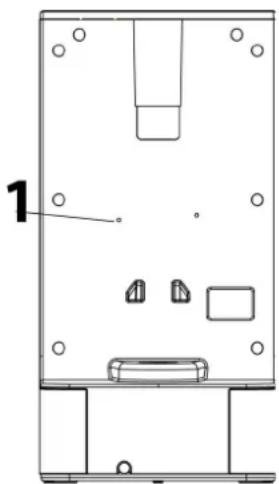
12.7 Overheating protection & reset
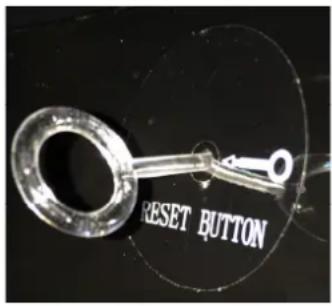
The device is equipped with an overheating protection facility. If the temperature of the device exceeds the critical limit the device shuts off further power supply for safety reasons.
By pressing the reset button (1) the device can be reactivated.
Unplug the device before reset. When the device is only producing cold water please press reset button.
Please use enclosed reset-key for the reset-button.
13 Design and Function
In this chapter, you'll find important information on the design and function of the device.
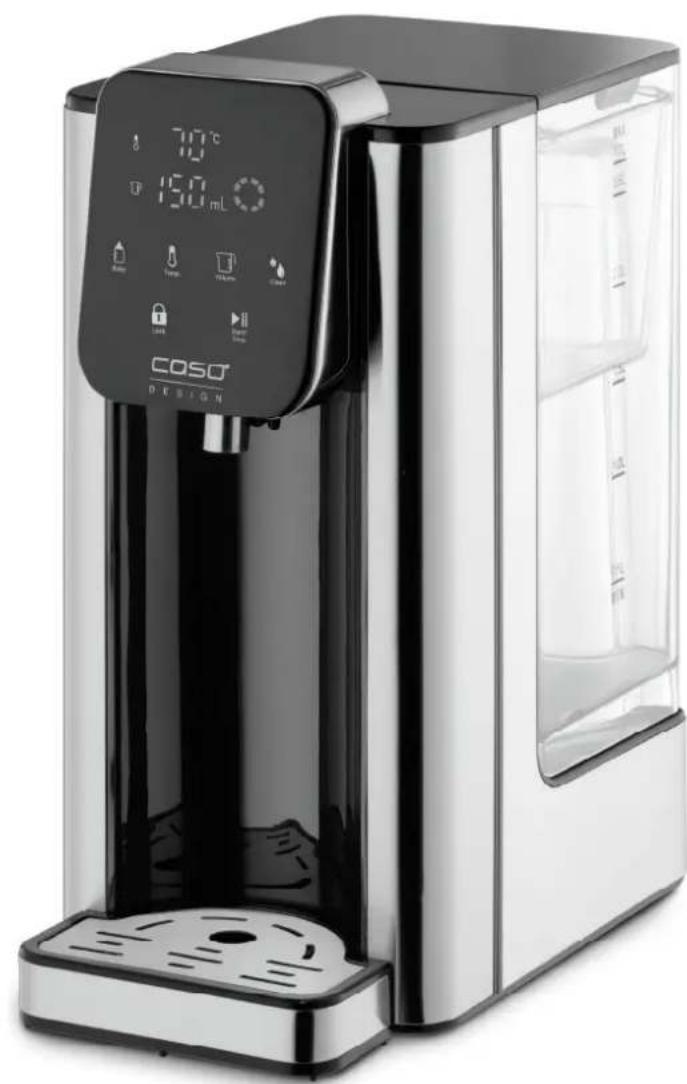
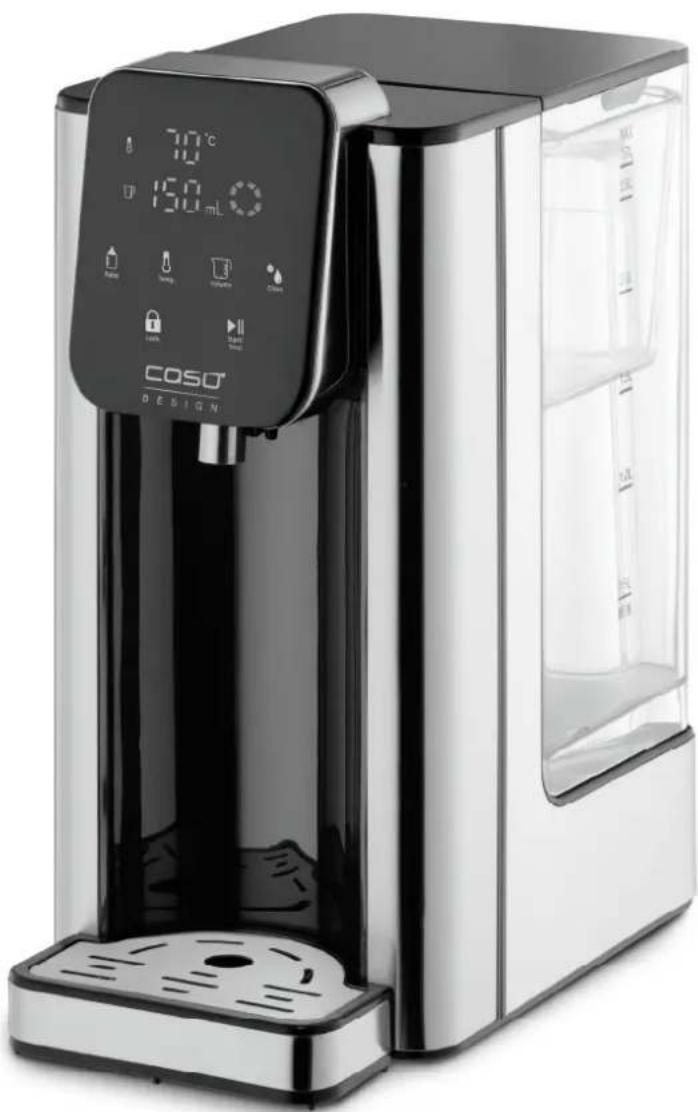
13.1 Overview
WARNING
Warning
Warning symbol: hot steam.
Caution hot steam can escape at device. Risk of burns.

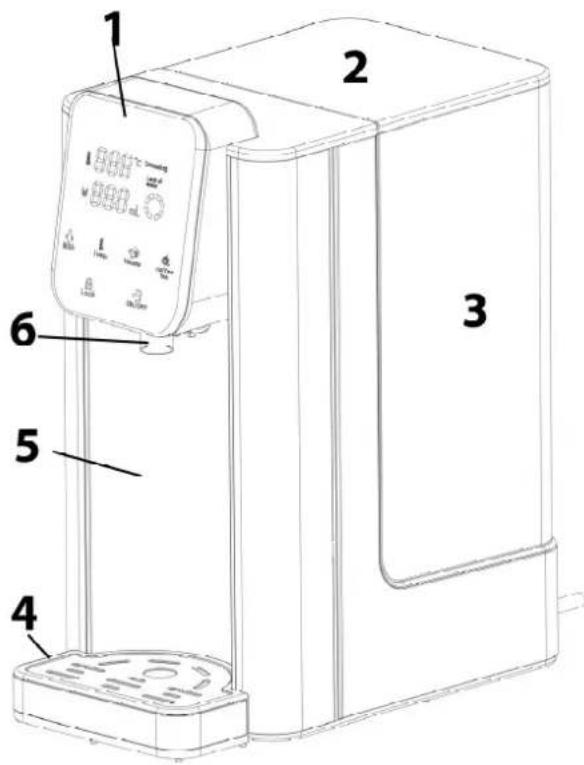
1 control panel
2 tank cover
3 tank
4 drip tray
5 main body
6 spout
HINWEIS
Please note
- Please note that the dispensed water (at all temperature settings) is not boiled before. Therefore, especially when preparing baby food, we recommend first boiling the water in a saucepan for at least 3 minutes; cooling it down to room temperature and then pouring it into the device's water tank.
13.2 Control panel
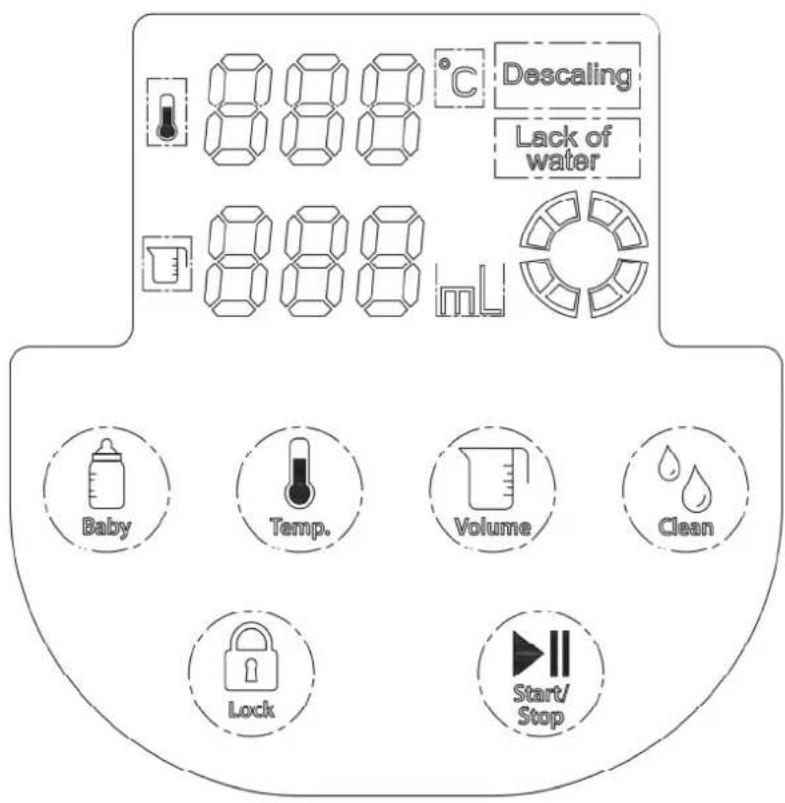
Descaling: Device needs to be descaled.
Lack of water: Add water.

Baby -button for dispensing of water with 40^ for preparation of baby food. Water with 40^ will be dispensed as long as button is pressed.
HINWEIS
Please note
Do not fill milk into the device.
WARNING
Warning
Avoid the risk of burns: Always check the temperature of food before you feed your baby. Shake the bottle carefully and check the temperature of the food by putting a few drops on the inside of your wrist.

Temp. -button: Set the desired temperature according to 000 (normal temperature water), 40^ , 50^ , 60^ , 70^ , 80^ , 90^ , 100^ .

Volume -button: Set the water volume according to 100ml, 150ml, 200ml, 250ml, 300ml, 350ml, 400ml, 000 (continuous water flow)

Clean
- button: For setting of water hardness and start of cleaning and descale function.

Lock
-Button: Press the button for about 3-5 seconds to unlock the device.
After approximately 15 seconds without operation it locks automatically. Press the button again to unlock the device.

Start/
Stop -button: Start and stop the dispense of water.
13.3 Rating plate
The rating plate with the connection and performance data can be found beneath the device.
14 Operation and Handling
This chapter provides you with important notices with regard to operating the device. Observe the following notices to avoid dangers and damages.
WARNING
Warning
Do not leave the device unsupervised during operation.
14.1 Before initial use
14.1.1 Preparation of the waterfilter
- Remove the waterfilter from all packaging.
- Wash your hands and clean the water tank and the filter holder.
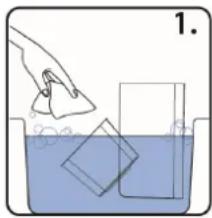
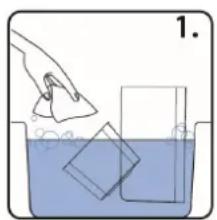
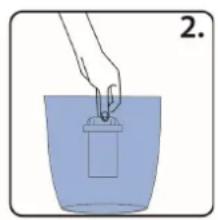
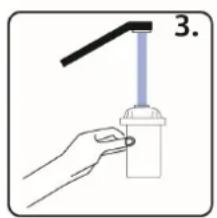
- Remove the water filter from its packaging and soak it in fresh tap water for 10 minutes.
- Rinse the filter for around 10 seconds under running water.
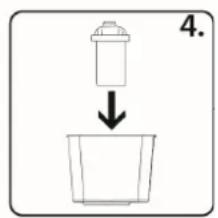
- Insert the filter into the filter holder, ensuring that it sits firmly. To do this, push it down with a slight turning movement, applying some pressure when doing so.
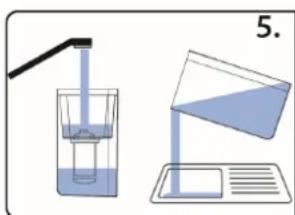
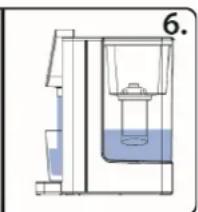
- Insert the filter holder into the water tank. Run water through the filter 2-3 times, using 1 litre each time, before you drink the water.
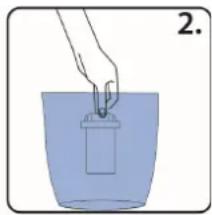
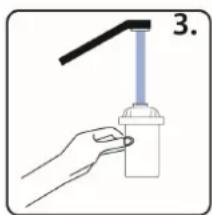
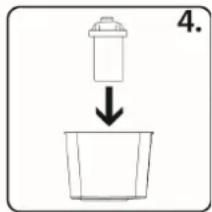
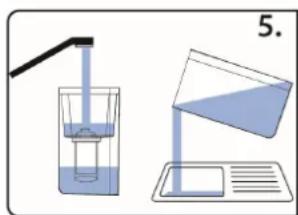
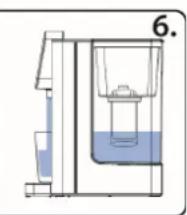
HINWEIS
Please note
The lifetime of the waterfilter lasts about 4-6 weeks of normal use (filtering of approximately 160 l water in total).
Despite soaking the filter beforehand, a small residue of black carbon particles may leak out during use. This is normal and harmless.
Make sure that the bottom of the filter is always in contact with water and never allow it to dry out. If the filter does dry out, then re-soak it for 10 minutes.
Change the water in the tank every 48 hours at the latest.
- Store the water tank and filter in a cool place and keep them out of direct sunlight.
14.1.1 Preparation of the device
- Place the device on a hard surface.
- Fill the tank with approx. 1 litre of water.
- Place a vessel which can hold approx. 700ml water under the spout.
- Start the device with 000 temperature setting until ca. 300ml water is dispensed.
- Set the device to 100^ and dispense 400 ml water.
- The device can now be equipped with waterfilter and filled with fresh water.
- The device is ready for use.
14.1.2 Set the water hardness

Press and hold Clean -button, the display shows "001" or "002" as Volume. "001" stands for soft water. This means that "Descale" will light up in the display after 60 litres of water were dispensed. "002" stands for hard water. This means that "Descale" will light up in the display
after 25 litres of water were dispensed. With the Volume -button you can change between "001" and "002" confirm with Start/Stop.
14.2 Use
- Fill the watertank with water. Pay attention to the mark which shows the maximum water amount.
- Insert the water tank into the device and place its lid on top of it.
- Place your cup or container on the drip tray. Make sure that the cup is located under the water spout.
- Plug the power socket into mains power.

- First press button about 3-5 seconds for unlocking the device.


- Press button to choose your desired temperature and press -button to set the water volume.
- Press Start/Stop-button to start the device. The desired water volume will flow out from water spout. Press Start/Stop-button again, to stop the device. The device will stop working at once.

- Alternatively: Press and hold Baby -button for dispensing of water with 40^ for preparation of baby food. Water with 40^ will be dispensed as long as button is pressed.
- If you want to dispense water again, repeat the steps above.
HINWEIS
Please note
- If only a small amount of water is dispensed, then the desired temperature may differ. Preheat the vessel.
If device was not used for longer time there could be scale deposits despite water filter. In this case let 100ml with 100^ run through the device.
The device has a memory function if the plug is still plugged in. The settings, that were adjusted the last time, are still adjusted. The settings will be reset after unplugging.
The ambient temperature changes everyday. This leads to different amounts of water. It can vary up to + - 15% .
14.2.1 Water disposal from the drip tray
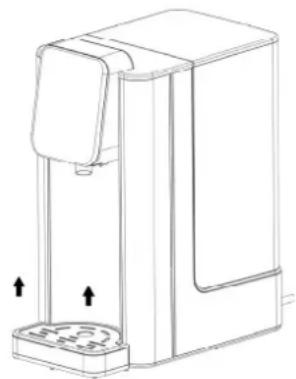
- When the drip tray is full, grasp and stabilize the device by one hand and use the other hand to lift up the drip tray slightly to remove it.
- Lift it slightly to remove it.
- Remove the water from the drip tray and then hook it back onto the appliance. Make sure that the drip tray is fixed to the device.
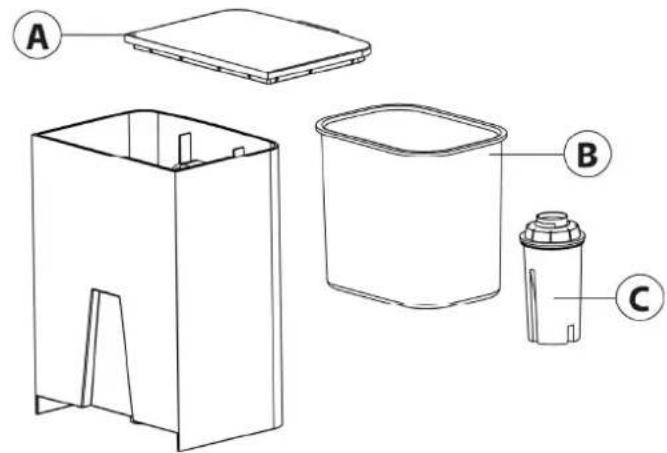
14.2.2 Replacing the waterfilter
- Remove the water tank lid (A) and remove the filter holder (B) with the water filter (C).
- Follow the steps described in Section
"Preparation of the water filter".
HINWEIS Please note
Spare water filters are available separately.
Set of 6 = Caso Item No. 1841, Set of 3 = Caso Item No. 1861
The lifetime of the waterfilter lasts about 4-6
weeks of normal use (filtering of approximately 160 l water in total).
14.2.3 Error code Lo Lack of water
If the device stops to operate with a beeping sound and the display shows the error code Lo Lack of water, it means that there is too little water or no water in the water tank. Please fill in enough water into the water tank immediately.
14.2.1 Calibration
If you want to optimize the temperature or volume of water, then you can calibrate the device. Fill the tank up to max marking.
Place vessel below the spout which can collect whole content of watertank.

Press and hold Temp. -button for 3 seconds until „CAL“ is displayed. When volume “000” is shown press Start/Stop for confirmation. The device performs the calibration and beeps once process is finished.
15 Cleaning and Maintenance
This chapter provides you with important notices with regard to cleaning and maintaining the device. Please observe the notices to prevent damages due to cleaning the device incorrectly and to ensure trouble-free operation.
15.1 Safety information
▲VORSICHT Attention
Please observe the safety instructions, before cleaning your device
Unplug the device when not in use and before any cleaning.
- Never immerse the device, cord or plug in water or other liquids and do not place in the dishwasher.
Do not use iron brush, aberrant, kitchen cleaner, or sharp cleaning tool for cleaning.
15.2 Cleaning and descaling
Wipe the device with damp cloth.
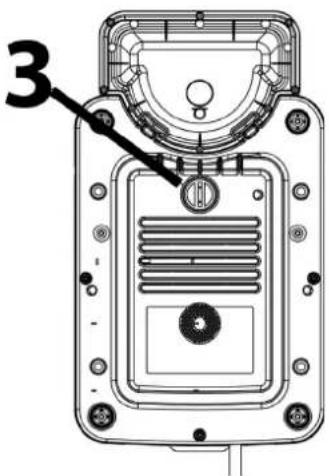
Drainage stopper
The drainage stopper prevents water from flowing out of the device. You can unscrew the stopper (3) with a screwdriver so that the dirty water can drain off. Then put the stopper back into the opening. Tighten it again so that it seals the drain.
HINWEIS
Please note
If you need to send the device to customer service, then first remove the water from the device.
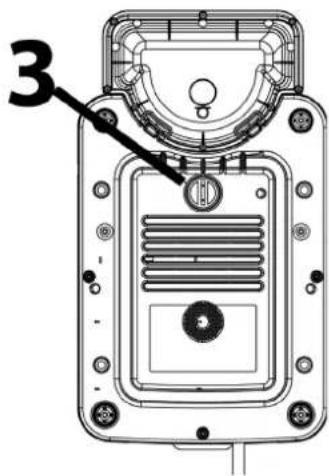
15.2.1 Cleaning and descending function
When "Descale" is blinking in the display then the device needs to be descaled, please proceed as follows:
Place device without drip tray and without water filter. Fill the watertank up to max marking. Add a little bit of vinegar.
Place vessel below the spout which can collect whole content of watertank.


Press Clean -button. The display shows 50^ as temperature. With Temp. -button you can select between 50, 80 und 100^ C. We recommend 80^ C. Start the process with Start/Stop. The device dispenses whole content of watertank and will be cleaned and descaled. Pour the water away. Rinse the watertank with fresh water after this.
15.3 Storage
If the device is not used frequently, unplug and clean it, then put back into the original packing box to avoid that the electrical components from getting humidified or damaged.
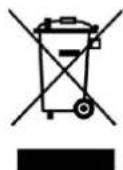
16 Disposal of the Old Device
Old electric and electronic devices frequently still contain valuable materials. However, they also contain damaging substances, which were necessary for their functionality and safety.
If these were put in the non-recyclable waste or were handled incorrectly, they could be detrimental to human health and the environment.
Therefore, do not put your old device into the non-recyclable waste under any circumstances.
HINWEIS
Please note
- Utilise the collection point, established in your town, to return and recycle old electric and electronic devices. If necessary, contact your town hall, local refuse collection service or your dealer for information.
Ensure that your old device is stored safely away from children until it is taken away.
17 Guarantee
We provide a 24-month guarantee for defects caused by production or material faults, beginning on the date of purchase. Our guarantee is valid for Germany, Austria and the Netherlands. For all other countries, please contact us. Your legal guarantee claims as per Art. 437 ff. German Civil Code (BGB) will remain unaffected by this. You may exercise your statutory guarantee rights free of charge. The guarantee does not cover damage caused by improper handling or use of the product or defects which have only a minor impact on the product's functionality or value. In addition to this, the guarantee also excludes parts which are subject to wear and tear; transport damages insofar as we are not responsible for them and damages caused by repairs which were not carried out by us. This product has been constructed for non-commercial use (domestic use) and its performance is designed to meet the corresponding needs. The guarantee only covers commercial use insofar as it is comparable to domestic use. The product is not intended for any other type of commercial use. In the case of legitimate complaints we may either repair the defective product or replace it with a defect-free product at our discretion. Obvious defects must be notified to us within 14 days of the product's delivery. Any further claims are excluded. When making a guarantee claim please contact us before you return the product (always with the purchase receipt!). Our contact details ("Guarantor") are provided at the beginning of this instruction manual.
18 Technical Data
| Device Turbo Hot Water Dispenser HW 660 | |
| Item No.: 1879 | |
| Mains data 220 V - 240 V; 50 Hz / 60 Hz | |
| Power consumption 2200 W - 2600 W | |
| Volume 2,7 L | |
| External measurements (W x H x D): 155 x 315 x 255 mm | |
| Net weight 2,4 kg |
59.2.3 Foutcode Lo Lack of water
Power consumptie 2200 W - 2600 W
Volume 2,7 L
Afmetingen buitenkant (B x H x D) 155 x 315 x 255 mm
Netto gewicht 2,4 kg
PykoBoDcTBO NOIb3OBaTeJIa Typ6o-ДиСпeнсер roрачeв OДы HW 660
64PykoBOdCTBO noIb3OBaTeJIa
64.1 OБшпесбedingия
IpoHTte coepkauyoc3decb HOpMaunu, YTo6bl 6bICTpo O3HaKOMTbcra CO CBOIM np6opom n B noHnO Mepe nCNoJb3OBaTb BCE ero yHKun.
Baw np6op npocnyknt Bam donrne rodbi npn ycnoBn Hndnexkaeero obaune n yxoda. Ponb3yITeCb c ydoBOJIbCTBnEM!
64.2Инфорmaця O haCToIeM pyKOBoIcTBe
3TO pykoBODCTBO NO 3KcPnPyatauHЯBJIeTcC oCTaBHOn YacTBIO BOHOHaRpeBaTeJRA CASO Turbo HW 660 (Ha3bIbaemoro daJe e" npnbop") n daet BaxKhIe yka3aHnra IPOIROTOBKe K INcNoJIb3OBaHNIO, 6e3oNaChOCTN, HAdJIeXaUeMy npImeHeHIO npnbopa n yxOy 3a Hm. PykoBODCTBO Nolb3OBaTeJr DOJXHO BcerDa HaxOJITbc R6JIINr npnbopa. Ero cIeNyET npOueCTb n npIMeHrTb BCem IInzam, KOToPBie OcyUeCTBJIYOT:
BBoD B 3KcPnyatauHIO 3KcPnyatauHIO YcTpaHHe HEnCnPaBHOCTe N/nn YncTKy np6opa. CoXpaHnte daHoe pyKOboCTBO noIb3ObaTeN npepaIte erO cNe dyUoUeMy BnaJeBtu BMeCTe C np6obopom.
64.3 Празостешия
B daHHOM pyKOBOIDCTBE NOJIb3OBaTeJn pIIMHeHrOToC cJeDyUcne npedocTepeXeHn:
GEFAHR OnaCHOCTb
IpeodoctepexeHne 6 onacnoctn 3toi cTeeneHn 6o3Haayet yrpo3y onacHO cnTyauu.
Ecnn onaeha cntyaun He 6ydt npedotbpaueHa, 3TO MOKeT npNBecTu K CMeptu nn TjXeJIbIM TpaBMam.
Bo n36exaHne cmeptn nn TaeXeBIX TpaBM IIOdei CpeDyIte yka3aHnA M B daHHOM npedocTepeXeHn.
▲WARNUNG Празостеожене
IpeoctepexeHne 6 onacnoCTn 3Toi cTeeneHn 603Haayet BO3MOxHyO onacHyocTyaun.
Ecnn onacna cnTyaun He 6ydt npedotbpaueHa, 3TO MOKeT npNBecTN K TjXeJIbIM TpaBMam.
Bo n36exaHne TpaBm IIOe CneDuYte yka3aHnM B daHHOM npedocTepeXeHN.
AVORSICHT OctopoxHO
IpeoctepexeHne 6 onaCHOCTn 3Toi CTeneHn 06O3Haayet BO3MOxHyIO onaCHyIO cnTyaunio.
EcnHne npedotbpaTb 3Ty onaChyO cHTyaUIO, 3TO MOKeT pNBecTn K JIeKIM IIN CpeHNm TpaBMam.
Bo n36eKaHne TpaBm IIOe CneDuYte yka3aHnM B daHHOM npedocTepeXeHN.
HINWEIS
Ppimechne
Yka3aHne o6o3Haayet dOONHnTeIbHbIe cBeDeHn, oBneruOuIe o6paueHne c np6opom.
64.4 OrpaHnueHne OTBeTCTBeHHOCTn
Bce coepkaune B daHHom pyKOoDCTBe texHueckne CbeDeHnra, daHHbIe uKa3aHnra IIO yctaHOBKe, nCNoJIb3OBAHnIO u YXoOy 3a npi6Opom akTyalbHbI Ha MOMENT neaTNI DaHbI NCxOJaN3 BCEx HauNX 3HaHnI, c yHeTOM HaWeRo npexKHeO ONbITa N IOHMaHnRA DaHHbIe, pncyKnI OONCAHnRA, coepkaune B daHHOM pyKOoDCTBe, He MOryT RaJIaTbcra OCHOBaHNem dJa KaKnx-JIn60 IpTeH3nI.
Pon3BOinteH He Hecet OTBeTCTBENHOCTn 3a yuep6, BO3HNKm BcneDCTBNE:
Heco6JIOeHnpyKoBOOCTBa
- INCIOJIb3OBaHnI np6Opa He no Ha3HaueHnIO
- HeKBaIIHΦnIuPObaHHOro peMOHTa
- Исторы Нерацелов
- Доступance
- Доступance
- Доступance
- Достotypical
- Достotypical
- Достotypical
- Достotypical
- Достotypical
- Достotypical
- Достotypical
- Достotypical
- Достotypical
- Достotypical
- Достotypical
- Достotypical
- Дostory
- Дostory
- Дostory
- Дostory
- Дostory
- Дostory
- Дostory
- Дostory
- Дostory
- Дostory
- Дostory
- Дostory
- Дostory
- Дostory
- Дostory
- Дostory
- Дostory
- Дostory
- Дostory
- Дostory
- ДostORY
- TexHnueckmN n3MeHeHnMaM, MoDnΦnKaucnMa N np6opa
MoIuKauun np6opa He peKomeHdyOTcN He NOKpbIAOTc rapaHTne. NepeBObI BbIOJIHeHb I NCXODn 3Bce HauNX 3HaHn. Mbl He Hecem OTBeTCTBEHHOCTH 3a OUn6Kn B nepeBOde, daXe ecn nepeBOd 6bl BbIOJHeH HAMN nIN NO HaWeMy 3aka3y. HauN 08a3aTeJIbCTBa ORpaHnUHBAOTc TOJIbKO OpIRINHaJIbHbIM HemeZkM TEKTOM.
64.5 3aunTa aBtopcknx npab
JaHHa JOKymeHTaun 3aunueHa ABTOPKm npabOM.
Kompana HbaykmaH Tm6X coxpaHReT 3a co6oB BCE npaba, B TOM uCnpe npaBO Ha φOTomexaHnueckoe BocnpOn3BeDeHne, KONpOBaHne i pacnpoctpaHeHne NocpeDCTBOM Oc6bIX CnOC6OB (HaNPImep, Obpa60TK DaHHbIX, HocnteJe DaHHbIX, CETn NpepaHn DaHHbIX), B TOM uCnCe YacTnUHoe.
Mbl octabJnem 3a co6oB npabo Ha BHeceHne nTexHnuecknx N3MeHeHn.
65 Be30NaCHOCTb
B 3ToI rIaBe BbI nOlyuHte BaXHbIe yKa3aHnI no 6e3oNaChocTn npn o6paUeHN c npu6opom.
3TOT npnbop COOTBETCTByeT yCTaHOBJIeHHbIM HopMaM 6e3ONaCHOCTN. Ondako HnnpabnIbHna 3KcIIyatauia npnbopa MOKeT npNBecTN K TpaBMnPOBaHIO IIOJe N MaTePnAbHOMy uep6y.
YdaJeHne HaKnn (Dscaling): Heo6xOJIMO OunchTb np6Op OT HauKn. Hn3Kn ypoBeHb BObl (Lack of water): Do6aBbTe BObl.

Baby B36n-KHONKa DnI NODaU NBObl 40° C DnI npuroTOBHeHn DeTCKOro nHTAHn. BOna Tempepatypoi 40° C 6yDet NODaBaTbCn, NOKa Haxkata KHNka.
HINWEIS Pnmeuahne
He 3aIbaiTe MoIOKo B np6Op.
▲WARNUNG Празостеожене
▶ИзberаTe риcka oxorob: Bcerda npOBepaIte TemnepaTpy nepeK KOpMJIeHem pe6eHka. OcToPOxHObB36oJTHnTe 6yTBInKy n npOBepbTe TemnpaTpy DeTcKO cmecn, KaHHyB HeCKOJbKO KaJeNb Ha BHyTpEHHIOU CTopoHY 3aJCTbY.

Temp. Khonka TemnepaTypb. YctahOBnte Jeknaemyo TemnepaTypy: 000 (HOpMaJIbHaTemnepaTypa BOIb), 40^ C, 50^ C, 60^ C, 70^ C, 80^ C, 90^ C, 100^ C.

Volume KhoNka KoJIInueCTBa BOIbI: yCTaHOBnTe oBbeM BOIbI: 100 Mn, 150 Mn, 200 Mn, 250 Mn, 300 Mn, 350 Mn, 400 Mn, 000 (HenpepbIBhBn NOtOK BOIbI).

Clean KhoNka OuNCTKn:ДЯ yCTaHOBKn JecTKOCTn BOdBi N 3aNyckaФyHKcNn OuNCTkn N ydaJIeHnRA HAKUN.

Lock Khonka 6lOKnPOBKn: HaxMnte KhoNky npImepHo Ha 3-5 cekyHd, yTo6bI pa36lOknpoBaTb np6op. PpImepHo uepe3 15 cekyHd 6e3deiCTBna OH aBTOMaTHueckn 6lOKpyetc. HaxMnte KhoNky eue pa3, yTo6bl pa36lOknpoBaTb np6op.

Start/
Stop KhONka «CTapT / Cton»: 3anyck n ocTaHOBka noJaCuN BOJbl.
67.3 PnopTna Ta6nUka
PacnopTna TabnUka c HOpMauee O noKIOueHm K 3JIeKTPocETn I TexHnueckmXapaKTepeNCTnKaMn HaxODHTcra Ha HxKHei CTOpOHe np6opa.
68O6cnyxmbaHne n nCNoIb3OBaHne
B 3ToI rIaBe cOePkaTcB BaxHbIe yKa3aHnI NO o6cnyKuBaHnIO npi6opa. CneDyIte 3TIM yKa3aHnIaM, YTO6bl N36ExkAtb OnaCHOCTe I NOBpeJDeHnI.
AWARNUNG PpeoctepeKeHne
He octabnIte pa6oTuOuI np6op 6e3 npncMoTpa, YTObI B clyuae onaCHOCTM MoXHO 6blIO 6blcTpo npedpHraTb Heo6xOdMbIe MEPbl.
68.1пердпрвимиспь3OBaHneM
68.1.1 IopndroTOBka qnIbTpda JnBa BOdbI
- YdaInte c cnIbItpa InB OBDI BCIO ynaKOBky.
- BbIMoIe pyKn n OunchTe pe3epByap IJRA BOdbl N cnJIbTpoBaJIbHyIO EMKOCTb.
- BbHbTe ΦnIbTp dIy BOIy I3 yNaKOBKn I 3aMoUHTeeroB YnCToB BOOnpOBOHDHO BOE Ha 10 MNHyT.
4.ПомоиTeФильТРпдnpOTOчнВODОВТeчЕнe npIMepHNo 10ceKyHД. - BCTaBbTe 0nIbTp B 0nIbTpObaJIbHyIO eMKoCTb, YTO6bl OH 6bl I npOuHO 3akpenJeH. Dna 3TOrO NOTAHNTe ERO BHN3 JeKIM BpaAaTeJIbHbIM DBNXKeHNEM N C HeKOTOpbIM ycINNeM.
- ПометиTe ФньТpoBaЛьНую EMКоCTь В peЗерВуap ДЯ вовы. ПорунуСпte 1 пИт р Вды chepe3 ФньТр 2-3 pa3a, поед Tem Кak пИть Вody.
HINWEIS PrimeyacheNe
Cpok cnyk6bI pInbTpa coCTaBnAeT npImepHo 4-6 HeJeIb npN o6bIyHOM nCNoJIb3OBAHn (pInbTpaunr BODbl O6UIM o6bEMOM OKo1o 160 n).
HeCMOTpHa npEeBapntbHoe 3aMaunBaHne BO BpeM nCNoIb3OBaHnI 3ΦnIbTp a MOrTy BblTN HeCKoJIbKO YepHbIX qactNt aKTINBnPOBaHHoro yrJ. OHI 6e3BpeHbl.
CneiTe 3a TeM, yTo6bI Ha IHe fInbTp a Bcerda 6bIa Boga n OHO He Bbcixano. Ecnn fInbTp BlicoxHeT, ChOBA 3amOHTe erO ha 10 MNHyT.
HINWEIS
Приимechanicals
He octabnIte Body B pe3epByape dIy BoIbI 6Ooe yem Ha 48 yacOB. NobTopHO 3aONHITe pe3epByap dIy BObl.
XpaHnTe pe3epByap IЯ BODbIC cIINbTpOM B npoxJaHOM MeCTe, 3aIuHHom OT npraMbIX COJIHeuHbIX Jyuei.
68.1.2 IopIroTobKa npIbopa
- PacnoJoxnTe yctpoNCTBO Ha ycToHUNBO NOBepxHOCTN.
- 3aNoJIHnTe pe3epByap npIM. 1 IITpOM BOIbI.
- NocTaBbTe NOB BbInyCKHbIM OTBepCTHeEM EMKoCTb o6beMOM npm. 700 mJI BOdbI.
- CnneTe n3 npnbopa npnbIaIeIbHo 300 Ml BOdbI HeIpepbIBHbIM NOTOKOM C NaCTpOkoT TeMnpaTpybI 000.
- YcTaHOBnTe yCtpoIcTBo Ha TempepaTyPy 100°C n i3pacXoJyIe 400 Ml BOIbl.
- Tenepb moKHO yCTaHOBnTb cnIbTp n HanoJIHnTb npIbOp CBeKe BDoJ.
- Пибор roTOB KЭКСПуtaци.
68.1.3 YcTaHOBka JxecTKOCTN BODbI

Hajmte u yepnBaTe KhoNky OuncTk n Clean,Ha dncnnee noBntcA 001> nn «002 B kaeeTbe oBeMa. 03Naayet mKyo Boy. 3TO 03NaayeT, YTO Ha dncnnee 3arOpntc Hndncb «Descale» nocne TORO, KaK 6ydt HAnIto 60 NITPOB BObl. «002» 03Naayet JecTKyO BoY. 3TO 03NaayeT, YTO Ha dncnnee 3arOpntc coo6uHHe «UdaneHne HAKINn» nocne TORO, KaK 6ydt HAnIto 25 NITPOB BObl. C NOMOuHIO KHOKN

Volume obbema BOIbI Bbl MOKeTe nepeKIOUaTbcMekdy «001» n «002», noDTBepXdaj HaxkATnem Start / Stop.
68.2 NcnoJb3OBaHne
- HanoJIHnTe eMKoCTb IJy BObl BOIo. CJeIHTe 3a MaKcImaJIbHOm MapKnIpOBKOJ.
2.Помecnttepe3epByapДЯвдВустpoиCTBOинадeHbTeKpbIuKyHa pe3epByapДЯ BOdbl. - YctaHOBInTe yawky n T.I. Ha noDOnH dIy c6opa kaneIb. CneIte 3a Tem, YTO6bl yawka HaxoINacb NOD BblNcKhbIM OTBepCTnem IIN BODbl.
- BCTaBbTe ceTeBOH uTekep.

69.2 OuNTka n ydaJeHne HaKnn
PpOtpTe np6Op BnaXHO TkaHbHO.
PpO6ka dIy cIINBa
Pocne ounctkn npnbopa BbItaunTe npo6ky (3), TTo6bl cInTb rpa3HyO BODY. Pocne 3toro CHOBA BCTaBbTe npo6ky BO TBepcTne. Y6eINTecb, yTO OHa cnDIT DOCTaTOH NOTHO.
HINWEIS PnpmeuHne
EcnB Bam Heo6xOdmo OTnpaBnTb npnbop B cepBnchyo cnjx6y, cna7a ydaIte B0dy n3 np6opa.
69.2.1 Ouchka u ydaJIeHHe NaKInn
Ecnn Ha dinclnee Miraet coo6eHne "Descale" (YdaJeHne haKn), 3NaHT np6op Heo6xOdIMO ouHCTnTb OT haknn. BblonHnte cNe dyuOune DeiCTBna: YctaHOBInTe np6op 6e3 noDoHa dJa c6opa kaneIb I BOJHOrO fNtpa.
Hanoonnte pe3epByap dna BObl DO OTMeTkn max. O6abTe HEMHO yKcyca. NomeCTnte EMKocTB nOd HOCIKOM, B KOTOpyo MOXHO co6paTB BCE cOepeXIMoe EMKoCTn dnn BODbl. Haxmnte KhONky Clean (ouncTk).

Ha dincnee oTo6paKaetc TaemepaTypa «50». C nOmoUbIO KHOKN Temp. Bbl MOKeTe BbIbupatb MeKdy 50, 80 n 100 °C. Mbl peKOMeHnyem 80 °C. HauHnTe npocecc c CtaprCTon. Pnp6op Bblaet BCE coJepxHMoe pe3epByapa dnn BODbl, nocne yero npOn3BOdntcra Ouchka n ydaJIeHne haknn. Cneite BoDy. Nocne 3tOro npomoyte pe3epByap dJa BObl pecHoBBoDor.
69.3 XpaHeHne
Ecn np6op nCnoB3yeTc Heyacto, To BbItaunTe Bnky, Ounchte erO nNoJoxnte o6paTHOBOpHnHaIbHyU ynaKOBky, YTO6bl PpeDtBpataNTb nonadHne Bnarn Ha 3JIeKtpnueckne KOMNOHeHTb IIN INX NOBpeXdeHne.
70 Ytvn3aunr cTaporo npnbopa
OTcnykBwne 3JekTpueckne n 3JekTpoHHbI np6OpbI copeXaT eue MHoro ceHHbIX MaTePnaNoB. Ho OHn copeXaT TAKKe N BpeHbI BeeCTBa, KOtOpbIE 6blnn Heo6xOdImbl dIy nx pa60bl N 6e3OnacHOCTN.
B npoynx OTxOdaX nnn npn HnnpaBnIbHom obaeHn OH MOryt 6bITb onacbI dIy 3doPobBy IIOdeN OKpykaUoSe Cpebl. NToM y H N B KOem clyuae He Bbl6paCbBAaTe OTCnyKMBn npnbop B npoune OTxoDbI.
HINWEIS PnmeaHne
ДяВОЗВРАИУТПИЗАЦИНСТСЛУЖИВШИХ 3ЛЕКТРИЧЕСКИ И 3ЛЕКТРОНБИX npиборов BOCПОЛьЗУITEССБОРHBIMN ПУНКТAMN,oprAHIN3OBaHHbIMN B MecTe Baшero npoxKIBAHЯ.При HeO6xODIMOCTH COOTBETCTBYUQUH INФOPMaIIO MOXHO NOJYHTB B TROPOДСКОДМИNHICTPацИN,СЛУЖБЕ ВБIBO3a MYCOPA ИЛYnpOДАВca.
Побовпесь o 6e30�achom xpaHeHn BaIero OTCnyKbIbero npIbopa B HeIOCTyINHom ДЯ DeTei MeCte Do erO BbIBO3a.
71 TapaHTnA
Mbl npedoctabnem Ha daHbI np6op rapaHTIO cpoKOM 24 Meca c MOMeHa TOKyNk, KOtOpa rapaoctpaHReTc H a DepeKTb MaTePnaIOB n IpOn3BOIDCTBeHHbIe DepeKTb. DaHNa rapaHTn DaIcTBNTbHa dIra TaKx CTpaH Kac TepMaHn, ABCTpN i HndepNaHdbI. DnI noLyueHn rapaHTn B dpYnx CTPaHax, NoKaJyIcTa, CBXNTecb C HAMn. Baun npaba rapaHTnpOBaHbI COOTBeTcBm co CT. 437 n daJe. Ppi 3Tom OCTaHETcR B cnIe IpaJdaHckn KoJekr TepMaHn (BGB). Bbl 6ecnPaTHo MoKeTe BOCNoJIb3OBAtbcra CBOIMN 3aKOHbIMn rapaHTnHbIMn npabAm. TapaHTn He pacnpoctpaHReTc Ha NOBpeJdeHn, BO3NKuWe B pe3yNbTaTe He npaBnIbHorO oBaAeHn Nn NcNoJb3OBAHn Prbopa, a TaKxe Ha HeNCpapBHOCTN, KOToPbIE OKa3bIAOT He3NaHTeJIbHOE BnIaHne Ha cyHKuIN NII CTOMMOCTb np6opba. Kpome TOrO, rapaTn He pacnpoctpaHReTc Ha DeTaIn, NODBeRgeHHbIe CTAHdAPTHOMy N3HOCy, Ha NOBpeJdeHn, BO3NKuNE pRn TpaHCnOpTnpOBKe (NOCKOBy Mbl He HeCEm 3a Hee OTBeTCTBeHHOCTN), a TaKxe NOBpeJdeHn, BB13BaHHbIe peMOHTOM, BblONHeHHbIM CTOPOHIMN OprAHn3aUqAIMN.
Даньл пибор bbl pa3pa6otan Дя HeKOMMepueckoro (6bITOBoro) ИСПЛБ3OBAHЯ И erохаразерпснкпpeHn3HaueHbДЯ уDObIeTBOpeHncoOTBcTByUOxN IOТpe6hocTei. Гаразныltse ob3aTeJIbCTBa pacnpocTpahryOTcHa KOMpeCKeOE IcPONb3OBAHne пибор TOJbKO B TOM cIyae, ecn OHO cpaBHmO C DomaHmM IcPONb3OBAHmE.Даньл пибор He пeHn3HaueHдЯ ЛбOTOИHOro KOMpeCckoro IcPONb3OBAHnR.В сIyae BO3HnKHOBEHn 3akOHbIX JkaIO6 Mbl MOXem OTpeMOHTIpOBaTB NOBpeJdeHbI пибор nIbO 3aMeHnTb erO Ha aHaIOnuHbI IcPabHbI пибор no NaWeMy yCMTopeHnO. OЯВbIx DeΦeKTax I nobpeJdeHnX cIeMyet COObIb HAM B TeUeHne 14 dHeN C MOMeHTa DoCTaBKn TObApa. JIObIe DaJIbHeIShne npTeH3n NCKIIoueHbI. Пр пeJbYBaHnnpTeH3nNo rapaHTn, POKAnyCTa, CBXITecb c HAMN,пeжde Yem BepHyTb TOBap (HaInuYe KeA, NOdTBePjdaIoUeToФak T Pokynk, ob3aTeJIbHo!).Haun KoTHaKTbIe daHHbIe («「FapaHT») yKa3aHbI B NaJaNe HactOJeero PykoBoIDCTBa No 3KcPnyatauIN.
72 TexHnueckne xapaKTepeNCTnKN

- Fehlercode Lo Lack of water
- Original Operating Manual Turbo Hot Water Dispenser HW 660
- Operating Manual
- General
- Information on this manual
- Warning notices
- ▲GEFAHR Danger
- WARNING Warning
- ▲VORSICHT Attention
- HINWEIS Please note
- Limitation of liability
- Copyright protection
- Safety
- Intended use
- ▲WARNUNG
- Warning
- General Safety information
- HINWEIS
- Please note
- Please observe the following general safety notices with regard to the safe handling of the device.
- Danger of burns
- ▲WARNING Warning
- Dangers due to electrical power
- GEFAHR Mortal danger due to electrical power!
- Commissioning
- Safety information
- Delivery scope and transport inspection
- Unpacking
- Disposal of the packaging
- Setup location requirements:
- Electrical connection
- Overheating protection & reset
- Design and Function
- Overview
- Rating plate
- Operation and Handling
- Before initial use
- Preparation of the waterfilter
- Preparation of the device
- Set the water hardness
- Use
- Water disposal from the drip tray
- Replacing the waterfilter
- Error code Lo Lack of water
- Calibration
- Cleaning and Maintenance
- Safety information
- Cleaning and descaling
- Drainage stopper
- Cleaning and descending function
- Storage
- Disposal of the Old Device
- Guarantee
- Technical Data
- Foutcode Lo Lack of water
- PykoBoDcTBO NOIb3OBaTeJIa Typ6o-ДиСпeнсер roрачeв OДы HW 660
- 64PykoBOdCTBO noIb3OBaTeJIa
- OБшпесбedingия
- 64.2Инфорmaця O haCToIeM pyKOBoIcTBe
- Празостешия
- GEFAHR OnaCHOCTb
- ▲WARNUNG Празостеожене
- AVORSICHT OctopoxHO
- Ppimechne
- OrpaHnueHne OTBeTCTBeHHOCTn
- 3aunTa aBtopcknx npab
- Be30NaCHOCTb
- HINWEIS Pnmeuahne
- PnopTna Ta6nUka
- 68O6cnyxmbaHne n nCNoIb3OBaHne
- AWARNUNG PpeoctepeKeHne
- 68.1пердпрвимиспь3OBaHneM
- IopndroTOBka qnIbTpda JnBa BOdbI
- HINWEIS PrimeyacheNe
- Приимechanicals
- IopIroTobKa npIbopa
- YcTaHOBka JxecTKOCTN BODbI
- NcnoJb3OBaHne
- OuNTka n ydaJeHne HaKnn
- PpO6ka dIy cIINBa
- HINWEIS PnpmeuHne
- Ouchka u ydaJIeHHe NaKInn
- XpaHeHne
- Ytvn3aunr cTaporo npnbopa
- HINWEIS PnmeaHne
- TapaHTnA
- TexHnueckne xapaKTepeNCTnKN
Brand : CASO
Model : HW 660
Category : Water dispenser