CR 7720 - Heating CAMRY - Free user manual and instructions
Find the device manual for free CR 7720 CAMRY in PDF.



User questions about CR 7720 CAMRY
0 question about this device. Answer the ones you know or ask your own.
Ask a new question about this device
Download the instructions for your Heating in PDF format for free! Find your manual CR 7720 - CAMRY and take your electronic device back in hand. On this page are published all the documents necessary for the use of your device. CR 7720 by CAMRY.
USER MANUAL CR 7720 CAMRY
SAFETY CONDITIONS IMPORTANT INSTRUCTIONS ON SAFETY OF USE PLEASE READ CAREFULLY AND KEEP FOR FUTURE REFERENCE
The warranty conditions are different, if the device is used for commercial purpose."
1. Before using the product please read carefully and always comply with the following instructions. The manufacturer is not responsible for any damages due to any misuse.
2. The product is only to be used indoors. Do not use the product for any purpose that is not compatible with its application.
3. The applicable voltage is 220-240V, 50Hz . For safety reasons it is not appropriate to connect multiple devices to one power outlet.
4. Please be cautious when using around children. Do not let the children to play with the product. Do not let children or people who do not know the device to use it without supervision.
5. WARNING: This device may be used by children over 8 years of age and persons with reduced physical, sensory or mental capabilities, or persons without experience or knowledge of the device, only under the supervision of a person responsible for their safety, or if they were instructed on the safe use of the device and are aware of the dangers associated with its operation. Children should not play with the device. Cleaning and maintenance of the device should not be carried out by children, unless they are over 8 years of age and these activities are carried out under supervision.
6. After you are finished using the product always remember to gently remove the plug from the power outlet holding the outlet with your hand. Never pull the power cable!!!
7.Never put the power cable, the plug or the whole device into the water. Never expose the product to the atmospheric conditions such as direct sun light or rain, etc.. Never use the product in humid conditions.
8.Periodically check the power cable condition. If the power cable is damaged the product should be turned to a professional service location to be replaced in order to avoid hazardous situations.
9. Never use the product with a damaged power cable or if it was dropped or damaged in any other way or if it does not work properly. Do not try to repair the defected product yourself because it can lead to electric shock. Always turn the damaged device to a professional service location in order to repair it. All the repairs can be done only by authorized service professionals. The repair that was done incorrectly can cause hazardous situations for the user.
10. Never put the product on or close to the hot or warm surfaces or the kitchen appliances like the electric oven or gas burner.
11.Never use the product close to combustibles.
12.Do not let cord hang over edge of counter or touch hot surfaces.
13. Never leave the product connected to the power source without supervision. Even when use is interrupted for a short time, turn it off from the network, unplug the power.
14. In order to provide additional protection, it is recommended to install residue current device (RCD) in the power circuit, with residual current rating not more than 30mA . Contact professional electrician in this matter.

15.Never use this device close to water, e.g.: Under shower, in bathtub, or above sink filled with water.
- If using the device in bathroom after use remove the power plug from the socket, because water proximity presents risk, even if the device is turned off.
- Do not allow the device or power adaptor to wet. If the device falls into water, immediately remove the power plug or power adaptor from the socket. If the device is powered, do not put hands in the water. Have the device checked by the qualified electrician before using it again.
-
Do not touch the device or power adaptor with wet hands.
-
Place the fan heater only on flat, stable surface
- Always turn the fan heater off and set the thermostat dial to minimum before removing the power plug from the socket.
- Never use the fan heater in high humidity rooms – bathroom, shower room, swimming pools etc. The humidity can cause short circuit, and effect in damaging the device.
- The operating fan heater needs to be under supervision and in sight all the time. If you are leaving the room with the fan heater, always turn the fan heater off. If the fan heater is not used, the power plug has to be removed from the power outlet.
- Do not connect the fan heater to the automatic switching device, for example temperature controlling device or time switch.
- Flammable materials, for example furniture, bedclothes, paper, clothes, curtains should be kept at least one meter from the fan heater.
- Do not cover the device or put any objects on it while it is operating. Do not use the device to dry clothes.
- The power cord should not be placed above the fan heater, and it should not touch or be placed near hot surfaces of the fan heater. Do not place the fan heater directly under the power outlet.
- The heating surfaces can heat to a temperature of 60^ or higher. The fan heater should be in a place that children and animals do not have access to.
- The device is not intended to be installed or used in vehicles.
- Some parts inside the device can be hot or cause sparking. Do not use the fan heater in places, where gasoline, paints or other flammable materials are used or stored.
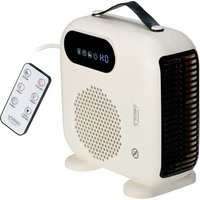
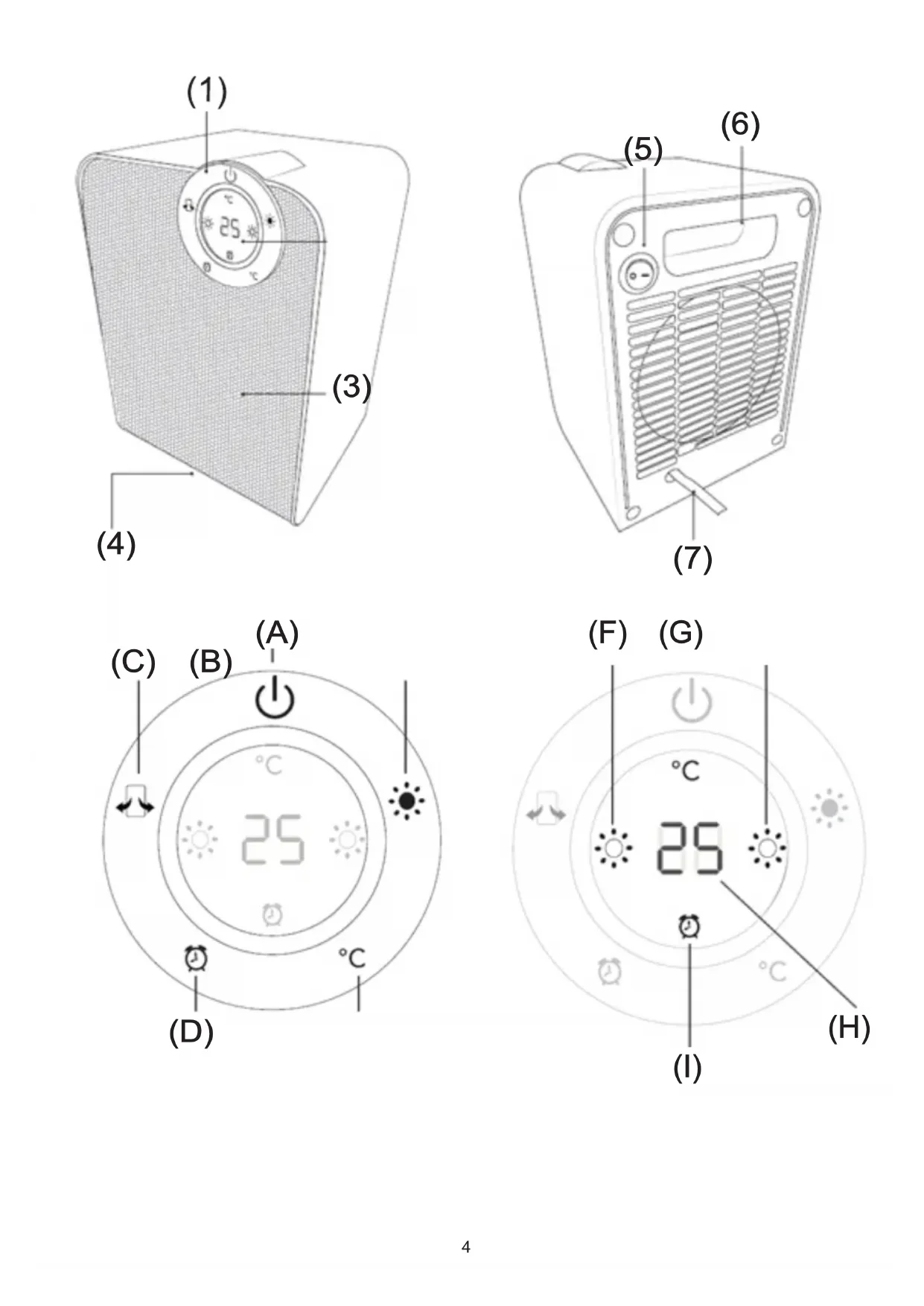
PRODUCT DESCRIPTION: LED CERAMIC FAN HEATER
- Control Panel
B. Heat outlet
-
Power switch
-
Digital display
-
Tip-over switch (located on the base)
-
Carry handle
-
Power cord
CONTROL PANEL
A. ON/OFF / Standby Mode button
C. Oscillation button
E. Temperature adjustment button
G. High heat level 1800W icon
H. Timer activation icon
B. Heat button
D. Timer button
F. Low heat 900W icon
I. Desired temperature level icon
USSING THE DEVICE
- Once the power switch (5) on the rear of the device has been switched on, use the On/Off switch (A) to power on the device. Once pressed the other functions will be activated.
- By pressing the heating button (B) once will activate low heating level, the display will light up icon (F). By pressing a second time will activate high heating level, the display will light up icon (G). When pressed the heating button (B) a third time heat mode will be switched off.
By p t 10-35C. d e t i t t t t t t t t t t t t t t t t t t t t t t t t t t t t t t t t t t t t t t t t t t t t t t t t t t f - By pressing the timer button (D) chose desired time operation from 1 to 8 hours. Display will light up the icon (I). When the time has elapsed the device will power off.
- By pressing the oscillation button (C) - keep it longer time - to activate left - right direction oscillation, to deactivate press again.
- After operation, press the On/Off switch (A), the device will cool down automatically and switch off after 30 seconds.
SAFETY PORTECTION
- OVER TIP SWITCH Your heater is designed to automatically shut the heater off when tipped forward or backward. The unit will automatically turn on once it is returned to its normal upright position. Do not use on thick and long pile carpets, as the heater may not work, due the tip over switch not been activated.
- OVERHEAT PROTECTION In the event of abnormal overheating, a safety device shuts down the appliance automatically. After a short cooling down phase, the appliance is ready for use again. If you still notice the same defect as above mentioned, remove the plug from the socket and consult your authorized dealer to your after-sales service department.
WARNING: During use, do not touch or cover the air inlet and air outlet.
CLEANING AND MAINTENANCE
- Make sure the fan heater is not hot.
- Before cleaning the device remove the plug from the electrical socket.
-
Keep the air inlet and outlet openings clean. Do not allow dust to collect on the openings.
-
Clean the housing using only dry or moist cloth.
- Do not immerse the device in water!
TECHNICAL DATA
Voltage: 220-240V 50Hz
Power: 1800W
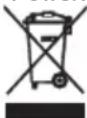
To protect your environment: please separate carton boxes and plastic bags and dispose them in corresponding waste bins. Used appliance should be delivered to the dedicated collecting points due to hazardous components, which may effect the environment. Do not dispose this appliance in the common waste bin.
This device is made in class II insulation and does not require grounding.
The device is compliant with the requirements of the following standards:
The Low Voltage Standard (LVD)
Electromagnetic compatibility (EMC)
The product is CE marked on the nameplate
DEUTSCH
PRODUKTA APRAKSTS:LED CERAMIC FAN HEATER
YpeE BO cornacHOCT CO DnapeKTHBNTe Ha EY
-ДирекTNBA3aHn3OKHanoH(LVD)
EnektpomarHeta komnataBnHocT (EMC)
YpeD 03NaeHn CE O3HaKa Ha eTnKeTaT
Ce rpnKIMe 3a npnpoHaTcpeDnHa.KapTOHCKITe NaKOBMOJIME da ce HameHaT 3a peuKNipaHe. IOnJIeTNIEHOBNTe Kecn (PE) da ce oPpIaT BO KOHTeHep 3a nlaCTnKa. NcOpNCteHnot ypeI Tpe6a Da ce npdaTe BO COOdBETNtOT cKlaIpaKINpyHK, 6nDejkn Hebe36bHNTE CoCTOjKn Kon Ce HAOaAT Bo ypeDT MoKaT da 6nDat 3arpo3yBaHe 3a cpeDnHaTa.
EneKtpnHnO tpeBa da ce npeaHa NaHH KOJ Ke OHeBO3MOxN HcROBa NOBTOPA yNtpeBa NCKOpNCyBaHe. DOKoJIky BO ypeIOT mA bATEPN, TpeBa da ce n3BaDaT Noc6HO da CE pEDAAT BO CKnAmpaKNO TnyHKT.
EAAHNIKA
TENIKOI KANONEAΦAIA
POPIS PRODUKTU:LED KERAMICKY VENTILATOR
1.Ovladaci panel 2.Digitaln displeje
3. Odvod tepla 4. Prepinac prevraceni (umisteny na zakladne)
5.Vypinač 6.Prenaseje rukojet
7. Napajeci kabel
KONTROLNI PANEL
A. Tlačitko ON / OFF / Standby
B. Tlačitko Heat
C. Tlačitko oscilace D. Tlačitko casovace
ONICAHNE IPODYKTA:LED KEPAHUECKN BEHTNJRTOP
1.PaheIb ynpabJIeHnI 2.LuΦpOBoI duCnnEi
3. OTbO TepJa. 4. OnpoknDbIBaUoHmNcpeKKnOuHteB (pacnoJoxKeH Ha oCHOBAHm).
5.BbiklnoateIb nITaHn 6.Pyka dnerpehockn
7.нурптуня
IIAHEJIyIPABJEHIN
A.Khonka BKJ/BbIK/Pexm oxndaHn B.Khonka o6orpeBa
C.KhonkaKoJe6aH N D.Khonka TaMepa
E.KhONka perynipOBKn TemnepaTpybl F.3NaOcK Hm3KOro ypOBHa HarpeBa 900 Bt
G.3haOK BbICOKoTtempepatpyb1 1800 Bt I.3haOK Tpe6yemom TempepatpybI
H. 3NaOH aKTnBaUcN TaMepa
INCIOJIb3OBAHHEYCTPOIcTBA
- Tocne BKIOHHeN BbIKHOaTeN nHTAHN (5) Ha 3aIHe N aHEIN ycTPOcTBa IcNOJIb3yIe BBIKHOaTeN nHTAHN (A), YTO6bl BKNIOHTb yCTPOcTBO. Tocne Haxatn Dpyrne FyHKuN bdyt aKTHBnPOBaHbl.
- Pn ODHOKpaTHOM HaxaTm KONKn HArpeBa (B) aKTNBpyETcH N3Kn yPoBeHb HArpeBa, Ha dncJIee 3aropaetc 3Haoyok (F). Pn NOBTOpHOM HaxaTm AKTNBpyETcBbICOKn yPoBeHb HArpeBa, Ha dncJIee 3aropaetc 3Haoyok (G). Pn HaxaTm KONKn HArpeBa (B) TpeTm pexIM HArpeBa 6yDenOTKJIOUeH.
- Haxkab KhoNky perynnpOBKn TEMpepatpybE (E), MoXHO OTperyIINPOBaTb Jeaemyo TEMpepatpy B dnaana30he 10-35 ^ C. Tpe6yembl ypoBeHb TEMpepatpyb6byet OTo6paKaTbca Ha nCnIee 3NaYKOM (H). YTObbl CHn3NTb TEMpepatpy, HaxMNTe KHONky peryIINPOBKN TEMpepatpybE (E). Ppi DoCTnxKeHNJ KeJaEMO KOMHaTHOH TEMpepatpybI yCTpOcTB0 Ipekpaaet HarpeB. YcTpoiCTBO 6ydet npOdyBaTb BO3dyxC TEMpepatpyo, 6bn3KoN K TEMpepatye OkpykaUoSei cpebl.
- Haxkab KhoNky Taimepa (D), BbIbePte XeJaemoe BpeM pa60tbi OT 1 do 8 yacOB. Ha dinCnnee 3aRopntcra 3naQK (I). IIO nCTeueHm 3TOB BpeMeHN YCTPOINCTBO BbIKIOUHTCRA.
- Haxkab KhoNky KoJe6aHn (C) - ydepxmbaTe ee doJIbWe - TTo6bl aKtINBnPoBaTb Kone6baHne BnEBO - BnpaBO, TTo6bl cHOBA OTKIOUHTb Haxkatne.
- IocJIe pa60bI HAKMITE BbIKIOHateJIb (A), yCTpoJcTBO ABOTMAHTueCKN OCTbIHET N BbIKIOHNTcR Yepe3 30 cekyHd.
BE30NACHOCTb
- INEPEKNIQUATEJIb HAKOHEUYIKA BaHnHarpeBaTeIb npeHa3NaueH dIaBtOMaTNUeCKOrO OTKnHoueHn HaPeBaTeJI npHakIOHe BnepeIINn H3ad.YcToPoiCTBO aBtOMaTNUeCKN BKJIOHTcR, KaK ToIbKO BepHeTcR B HopMaJIbHOe BepTKKaJIbHOe NOIOKeHne. He
NcnoJIb3yIte Ha TOJICTbIX IINHHbIX BOPCOBbIX KObpaX, TAK KAK OboRpeBaTeNb MOKeT He pa6OtaTb, TAK KAK nepeKTHouaTeNb ONpOKnDbIBaHnE He 6bln AKTNBnPoBaH.
2. 3AUHTA OT INEPERPEBA B cnyae HeHOpMaIbHOro nepepeBa npedoxpaHTeNbHOe ycTpoNCTBO aBtOMaTHueckn BblKIOuHaET np6op. Iocne kopoTKo faa3bOxnaJdeHn np6ob cop cHOBa r0TOB K paBoTe. EcnB bbl NO-npexHemy 3aMeuaTe TOT Xe DepeKT, YTO N Bblwe, BblbTe BnIKy n3 po3eTKn n Ocbatntecb K aBTopn3ObaHHOMy dInepy B OTdE NocIePpOdaXHOrO obcnykBaHnra.
PNEyPPEKDEHIE.BoBpeMaHcNoJIb3OBAHnHa He KacaITeCb H He 3aKpbBaIe Bo3DyXo3a6OpHnK B03DyXOBbIpyCKHe OTBepCTHe.
OuNTKA N OBCJYKUBAHIE
- Y6eHNTecb, YTO TENJIOBEHTUNIATOP He IropaHn.
2.Перед очирков, Вильтей Вильки n3 розтк.
3.ДерхиTe BXOнhoeи BbIXOнhoe OTBepCTnB YnCTOTE.He nO3BOJnTe Ha OcaKdHne nblIN.
4.ДяоусTKKOPNYCa nCnoJb3yIe cyxHyIO INN CJIerKa BnaXHyIO TkaHb.
5.He norpykaaTe yctpoiNCTBO B Body.
TEXHUNECKNE DAHHbIE
HanpaKeHnE:220-240B\~50T
Mouhoctb:1800BT
YcTpoCTBO IMeET II KJIACC N3OJIaunn H He Tpe6yeT 3aemJeHna.
YcTPOINCTBO OTBeueaET Tpe6oBaHnM DInpeKTHB EC:
-3neKtpnueckn np60p Hn3koro HanpaarKeHn (LVD).
-ДиректINA NO 3JIeKTPOMaHHTHOI COBMeCTMIOCTN (EMC).
Pnp6op MapKnpoBaH 3HaKOM COOTBeTCTBnA CE.
3a60Tc6b6okpykaioe cpe..ynakobky n3kapToHa nepeaite, noxayncta, ha maKnyatpy. IOnn3tnneHOBBe MeWK (PE) BbIKDaTB B pe3epByap nI pNactMaccbI. N3HOwenhoe yctpoiCTBO hAO nepeDAtB COOTBeCTBYOuYIO TOkY xpaHeHn, TAK KAKHXoJUncB YCTPOICTBEONACHIE CoCTABJIHOUIme MOyT RABTBCsrygP030dIgOKpykaioe cpebl. 3NeKtpueckoe yctpoiCTBO hAO nepeDaTB TakIM OpbazOM, UTObI orpAHuHTb erO NobTopHO eYnotpeBHe HcNOlb3OBAHne. EcnB yctpoiCTBe haojraTcB batapei, IN HAIO BBITHyB npepaTb B ToKy XpaHeHn OTdeNo. YcPoIcTBo He BIKdaTb B pe3epByap dIg KomMyhNbHbIX OTXODOB!
(DK) DANSKI
ALMINDELIGE SIKKERHEDSBETINGELSER
VIGTIGE INSTRUKTIONER FOR SIKKERHEDSVEJLEDNING SKAL LAESES GRUNDIGT OG GEMMES FOR FREMTIDEN
DeakTINBUPaJI INOHOBO.
- Hako npda, npitncnte npeknda 3a ykbyubhe / nckbyuBahe (A), ypehaj he ce aytomatcKn oxlaanu nnckbyuHn haKoH 30 ckyHn.
CNYPHOCHAIOPTEKUNJA
- IPEKO CABJETbIBAUA Baaw rpijau je dni3ajHnpaH Tako da ayTomatckn NCKbUyye rpijau kaD ce harne npema Hapnjued nHn Ha3ad. JeHHuca he ce ayTomatckn yKbUyNTn HAKOH uTo ce BpTu y CBOJ HopMaJIHN YcnpabHN pNoJxaj. He KopncTte Ha TeNIXOM od De6eINX IN Dyrnx romnla, jep rpejau moKda Hehe paunTu, jep IpeKnua 3a IpeBPTaHe Hnje AKTNbupan.
- 3AHTTATGOTOBHHE Y cnyajy HeOpMaHnOr nperpeBaHa, cnrypHoCHn ypehaj ayToMaTcKn NCKJbUyje anapat. HakoH KpaTke pa3e XnaheBa, anapat je noHOBO cnpemAH 3a ynoTpeby. Ako n daBe npImTe nCTn KBap KaO n rope, n3BaAnTe yTuKaH n3 yTuHnue n Obopatte ce OBnaHeHOM npoDaBuY oDeIbeHy cepBnche cnyKbe.
YI03OPEHbE: Tokom ynoTe6e He npajTe n He npekpnbajTe yna3 n n3na3 3paKa.
YIWTHHeBENOPKXABAHE
- YBepnte ce da rpejau BENTnlaTopa Hnje Bpyh.
2.Пе чишениа урeshaja ИЗвадутукай ИЗ утуннице.
3.ДржnteOTBOpe 3a DOBODI OOBDABa3Dyxa Chte.HemojTe Do3BOJNTn IpaunHy Ha OTBOPmHa - OuCTnTe KyhnsTe cMo CyBOM INN BnAxxHOM KpIOM.
- Hemojte notanatynypehajy BDOY!
TEXHNUKNIPODAU
Hanoh:220-240B\~50X3
Chara: 1800B
3a 3aHTNTy KINBOTHe CpeDInHe: MOJIMBO Bac Da OJBOJTe KAPTOHcKe KyTnje IN PnactuHe Kece N OJIOKInTe INx y OJROBapajyHe KaHTe 3a CmeHe. KopniShen ypehaj Tpe6a Da 6ynde Icnpuyen Ha HameHcKe ckyIbAte Taue 36or OwTpnx KOMNOHENTN, ITO MoKe yTucaTn Ha XINBOTHy CpeDInHy. HEmoJTe OJNaRaTn Obajypehaj y 3ajeHNChy Kopny 3a OTnATke.
SVENSKA
SÄKERHETSVILLKOR VIKTIGA INSTRUKTIONER FÖR ANVÄNDNINGSÄKERHET LÄS SÄKERHET LÄCKLIGHT OCH HÄLL FÖR FRAMTIDA REFERENS
Garantivillkoren ar olica, om encheten anvands for kommersielt andamål. "