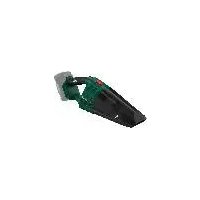
PHSSA 20Li B1 - Vacuum Cleaner PARKSIDE - Free user manual and instructions
Find the device manual for free PHSSA 20Li B1 PARKSIDE in PDF.


| Product type | Cordless hand vacuum |
| Brand | Parkside |
| Model | PHSSA 20Li B1 |
| Nominal voltage | 20 V |
| Runtime (idle) | 16 - 20 min |
| Dust container capacity | 400 ml |
| Liquid container capacity | 150 ml |
| Filter type | HEPA filter |
| Protection rating | IPX0 |
| Operating temperature | -20 °C to 50 °C |
| Charging temperature | 4 °C to 40 °C |
| Storage temperature | 0 °C to 45 °C |
| Included accessories | Liquid nozzle, crevice nozzle, brush nozzle, universal nozzle |
| Compatible batteries | PAP 20 A1, PAP 20 A2, PAP 20 A3, PAP 20 B1, PAP 20 B3 (X 20 V TEAM series) |
| Compatible chargers | PLG 20 A1, PLG 20 A3, PLG 20 A4, PDSLG 20 A1 |
| Warranty | 3 years |
| Use | For dry and wet surfaces (no flammable, explosive or hazardous substances) |
| Filter cleaning | Washable with water, dry completely before reuse |
| Wall mounting | Possible via keyhole slot (screws not included) |
Frequently Asked Questions - PHSSA 20Li B1 PARKSIDE
User questions about PHSSA 20Li B1 PARKSIDE
0 question about this device. Answer the ones you know or ask your own.
Ask a new question about this device
Download the instructions for your Vacuum Cleaner in PDF format for free! Find your manual PHSSA 20Li B1 - PARKSIDE and take your electronic device back in hand. On this page are published all the documents necessary for the use of your device. PHSSA 20Li B1 by PARKSIDE.
USER MANUAL PHSSA 20Li B1 PARKSIDE
20V Akku-Handstaubsauger / 20V Cordless Handheld Vacuum Cleaner / Aspirateur à main sans fi l 20 V PHSSA 20-Li B1
DE AT CH
20V Cordless Handheld Vacuum Cleaner
Translation of the original instructions
NL BE
20 V-accuhandstofzuiger
Before reading, unfold the page containing the illustrations and familiarise yourself with all functions of the device.
FR BE
Service-Center....14
Importeur 14
Original-
Intended purpose......15
General description......16
Extent of the delivery 16
Description of functions....16
Overview....16
Technical Data....16
Safety information......16
Symbols used in the instructions .....17
Symbols on the device 17
General safety instructions......17
Initial start-up....18
Inserting/removing the rechargeable battery....19
Checking the charge status of the rechargeable battery....19
Attaching the nozzles....19
Wet nozzle 20
Crevice nozzle....20
Brush nozzle attachment .....20
Universal nozzle attachment......20
Working instructions ......20
Switching on/off......20
Emptying the collection
container 20
Cleaning 21
Maintenance 21
Replacing the filter 21
Storage......21
Wall mounting....22
Replacement parts/Accessories ..22
Disposal/environmental
protection 23
Guarantee 23
Repair Service....24
Service-Center......24
Importer 24
Translation of the original EC
declaration of conformity......101
Exploded Drawing ......109
Introduction
Congratulations on the purchase of your new device. With it, you have chosen a high quality product.
During production, this equipment has been checked for quality and subjected to a final inspection. The functionality of your equipment is therefore guaranteed.

The operating instructions constitute part of this product. They contain important information on safety, use and al.
Before using the product, familiarise yourself with all of the operating and safety instructions. Use the product only as described and for the applications specified.
Keep this manual safely and in the event that the product is passed on, hand over all documents to the third party.
Intended purpose
The cordless hand-held vacuum cleaner is only suitable for vacuuming dry and wet surfaces. You can vacuum dry and wet material and small volumes of liquid. The suction of flammable, explosive or hazardous substances is prohibited.
The device may be used by children aged 8 and older under supervision.
The device is intended to be used by do-it-yourselfers. It was not designed for commercial use. The warranty is void in the case of commercial use.
The manufacturer is not liable for damage caused by improper use or incorrect operation.
The device is part of the Parkside X 20 V TEAM series and operates with the X 20 V TEAM battery. The batteries may only be charged using chargers from the Parkside X 20 V TEAM series.
General description
The illustration of the principal functioning parts can be found on the front foldout page.
Extent of the delivery
Carefully unpack the appliance and check that it is complete: Dispose of the packaging material properly.
- Cordless hand-held vacuum cleaner
- Wet nozzle
- Crevice nozzle
- Brush nozzle attachment
• Universal nozzle attachment - Instruction Manual

Battery and charger are not included
Description of functions
The cordless hand-held vacuum cleaner is equipped with a robust, transparency plastic container for holding dirt.
Refer to the following descriptions for the function of control elements.
Overview

1 Collection container
2 Filter holder
3 Filter (HEPA)
4 Release button
5 On/off switch
6 Universal nozzle attachment
7 Brush nozzle attachment
8 Crevice nozzle
9 Wet nozzle
10 Guide rail

11 Keyhole bore
Technical Data
Cordless hand-held
vacuum cleaner......PHSSA 20-Li B1
Nominal voltage U....20V ===
Protection type.....IPX0
Run time (idle)....16 - 20 min
Collection volume, maximum
Dust....400 ml
Liquid 150 ml
Temperature.....max. 50 °C
Charging process....4 - 40 °C
Operation....-20 - 50 °C
Storage....0 - 45 °C

Attention! An up-to-date list of battery compatibility can be found at: www.lidl.de/akku
This device can only be operated with the following rechargeable batteries:
PAP 20 A1, PAP 20 A2, PAP 20 A3, PAP 20 B1, PAP 20 B3.
This type of battery may only be charged with the following chargers: PLG 20 A1, PLG 20 A3, PLG 20 A4, PDSLG 20 A1
| Charging time (min.) | PLG 20 A1PLG 20 A4 | PLG 20 A3PDSLG 20 A1 |
| PAP 20 A1PAP 20 B1 | 60 | 30 |
| PAP 20 A2 | 75 | 30 |
| PAP 20 A3PAP 20 B3 | 90 | 60 |
Safety information
This section describes the basic safety rules when working with the device.
Symbols used in the instructions

Hazard symbols with in- formation on prevention of personal injury and property damage.

Precaution symbol (explanation of precaution instead of exclamation mark) with information on prevention of harm/damage.

Notice symbol with information on how to handle the device properly.
Symbols on the device
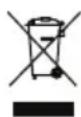
Electrical devices do not be- long in domestic waste.

The device is part of the Parkside X 20 V TEAM series
General safety instructions
This device can be used by children aged 8 years and up as well as individuals with reduced physical, sensory or mental abilities or a lack of experience and knowledge if they are supervised or have been instructed in the safe use of the device and understand the resulting hazards. Children must never play with the device. Cleaning and user maintenance must not be carried out by children if they are not supervised.

Attention! The following basic safety precautions must be observed while using electrical devices to protect against electric shock, injury and risk of fire:
This is how to avoid accidents and injuries:
- Never leave the device unattended at the workplace when it is ready for use.
- Do not allow the vacuum to come into contact with people or animals.
- While in operation, never aim the device and nozzles at yourself or other people; particularly not eyes or ears. There is a risk of injury.
- Do not vacuum hot, glowing, flammable, explosive or hazardous substances. These include hot ashes, petrol, solvents, acids or alkalis amongst others. Risk of fire and injury.
- Check the device and accessories regularly for damage. Do not use the device or accessories if damaged.
This is how to avoid accidents and injuries from an electric shock:
- Switch off the device and remove the battery:
- When you are not using the device or when you are transporting or leaving it unattended;
- When you inspect the device, clean it or remove blockages;
- When you perform cleaning or maintenance work, or swap accessories;
GBIE
- After contact with foreign objects or if abnormal vibration occurs.
- Do not submerge the device in water and do not operate it in a damp environment.
- Do not submerge the device in water!
- Do not touch the device with wet or damp hands!
This is how to avoid damage to the equipment and possible personal injuries resulting from this:
• Make sure before use that the device is properly assembled and that the filters are in the correct position.
- Do not operate the device without filters. The device could become damaged.
- Only use original spare parts and accessories (see "Spare parts/accessories") which are supplied and recommended by our service centre. Using externally produced parts results in the immediate loss of the warranty claim.
- Only have repairs performed by customer service centres authorized by us.
- Comply with the device's cleaning and maintenance instructions.
- Store the device in a dry place and out of reach of children.
- Do not use non-rechargeable batteries.
- Remove the rechargeable battery from the device before charging.
- Do not mix different types of batteries or new and used batteries when using the device.
- When inserting the battery, pay
attention to correct polarity.
- Remove discharged batteries from the device and dispose of them in accordance with local regulations. We recommend covering the contacts with an adhesive strip to protect against short circuits. Do not open the battery.
- Remove the rechargeable battery from the device before storing the device for a long period of time (winter storage).
- When not in use, keep batteries away from paper clips, coins, keys, nails, screws or other small metal objects that could cause the contacts to be bridged.
- Do not use any accessories that are not recommended by PARKSIDE. This can result in electric shock or fire.

Observe the safety information and notes on charging and proper use as shown in the instruction manual for your battery and charger from the Parkside X 20 V Team series. A detailed description of the charging process and further information can be found in the separate operating instructions.
Initial start-up
Before each use, ensure the filter (3) and filter holder (2) are sitting correctly in the collection container (1).
Also inspect the device visually for damage.

Do not operate the device if damaged or incorrectly assembled! Replace damaged parts and dirty filters. See "Spare parts/accessories".

Ensure that the battery is not inserted! (See section "Inserting/removing the rechargeable battery")
- Remove the collection container (1) by pressing the release button (4) and detaching the collection container (1).
- Check that the filter holder (2) is sitting securely against the mechanical stop in the collection container (1) by lightly pressing the filter holder (2). Due to its shape, the filter holder (2) can only be inserted into the collection container (1) in one position.
- Check whether the filter (3) is sitting securely in the filter holder (2). Lightly press the filter into the filter holder (2).
- Re-attach the collection container (1) onto the device. Place it on the underside of the device and allow it to latch into the interlock release on the top side of the device.
Inserting/removing the rechargeable battery

Ensure that the cordless hand-held vacuum cleaner is switched off.
- To insert the battery into the device, push the battery along the guide rail (10) into the device. You will hear it click into place.
- To remove the battery from the device, press the release button on the battery and pull the battery out.

Only insert the battery once the battery-operated tool is fully ready for use.
Checking the charge status of the rechargeable battery
The battery charge status indicator signalises the state of charge of the battery.
Press the button on the battery. The state of charge of the battery is displayed by illuminating the 3-colour LED lights of the state of charge display.
3 LEDs light up (red, orange and green): Battery is fully charged.
2 LEDs light up (red and orange):
Battery has a residual charge.
1 LED lights up (red):
Battery has to be charged

Only charge the battery when the red LED on the charge status indicator is on.
Attaching the nozzles
Insert the desired nozzle into the front opening of the collection container (1). Remove the nozzle by pulling it forward out of the collection container (1).
Removing the brush nozzle attachment (7) and the universal nozzle attachment (6)
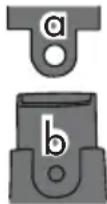
Remove the attachments (6+7) by pulling them off the crevice nozzle (8) at a slight angle. This makes it easier to pull the tab (a) over the nose (b).
GBIE
Wet nozzle
The wet nozzle (9) is suitable for vacuuming liquids.

When transporting the cordless hand-held vacuum cleaner after vacuuming liquids, always hold the device vertically with the wet nozzle (9) pointing downwards otherwise liquid will leak out!

Do not allow the vacuumed liquid to exceed the "max" mark.
If the filter (3) has become wet while vacuuming liquids, allow it to fully dry before using it again.
Crevice nozzle
The crevice nozzle (8) is suitable for dry vacuuming crevices, corners and radiators. The crevice nozzle also acts as an extension for the brush nozzle attachment (7) and universal nozzle attachment (6).
Brush nozzle attachment
The brush nozzle attachment (7) is suitable for dry vacuuming sensitive surfaces. The brush nozzle attachment (7) can only be used in combination with the crevice nozzle (8).
Universal nozzle attachment
The universal nozzle attachment (6) is suitable for many types of dry vacuuming, e.g. to catch dust from drilling. The universal nozzle attachment (6) can only be used in combination with the crevice nozzle (8).
Working instructions
- Ensure that the collection container (1), filter holder (2) and filter (3) are dry when changing directly from wet to dry vacuuming!
Switching on/off

Before switching on, ensure that the filter (3) and filter holder (2) are ready for us. See "Initial start-up".

Place a nozzle on the device if required. See "Attaching the nozzles".
Switching on:
Push the on/off switch (5) forwards.
Switching off:
Pull the on/off switch (5) backwards.
Emptying the collection container
Empty the collection container (1) after every use.
Empty the collection container if suction performance is decreasing.
If the collection container is full of dust or liquid gets into the motor housing during wet vacuuming, the cordless hand-held vacuum cleaner may become damaged!

Emptying the collection container after wet vacuuming: Hold the collection container with the wet nozzle pointing downwards when removing it to prevent liquid getting into the device!
- Remove the collection container (1) carefully by pressing the release button
(4) and removing the collection container (1).
- Carefully remove the filter (3) and filter holder (2) from the collection container (1).
- Empty the collection container (1).
- Clean the collection container (1) with a damp cloth if required. If required, clean the filter (3) as indicated in the "Cleaning" section.
- Place the filter holder (2) and filter (3) back into the collection container (1). Due to its shape, the filter holder (2) can only be inserted into the collection container (1) in one position.
- Re-attach the collection container (1) onto the device. Place it on the underside of the device and allow it to latch into the interlock release on the top side of the device.
Cleaning

Always remove the rechargeable battery before carrying out work on the device. Risk of injury!

Never spray down the device with water or place it in water! Do not use any abrasive cleaning agents or solvents. The device could become damaged.
- Clean the housing with a dry cloth or paint brush.
- Tap the filter (3) and clean it with a brush or compressed air. You can also clean a heavily soiled lamella fine filter under running water. → Allow it to fully dry before using it again.
If the filter is contaminated and cannot be cleaned, replace it!
See "Spare parts/Accessories".
- Empty the collection container (1) after every use.
Clean the collection container (1) with a damp cloth.
- Always keep the ventilation slit on the device housing unobstructed otherwise the device will overheat.
Maintenance
Replacing the filter
If contaminated, replace the filter with a new one.
New filters can be acquired from the online shop. See "Replacement parts/Accessories".
- Remove the collection container (1) by pressing the release button (4) and detaching the collection container (1).
- Remove the filter (3) from the filter holder (2).
- Place the new filter into the filter holder. Ensure the filter is positioned correctly and securely.
- Re-attach the collection container (1) onto the device by placing it on the underside of the device and allowing it to latch into the interlock release on the top side of the device.
Storage
- Store the device in a dry place, out of reach of children.
- The storage temperature for the battery and the device is between 0 °C and 45 °C. Avoid extreme cold or heat during storage to ensure the battery output is not adversely affected.
B Wall mounting (optional)
You can also mount the cordless hand-held vacuum cleaner on the wall.
- Using a dowel, place one screw at the desired position on a wall (neither are included in delivery).
- The screw head can have a diameter of 6 - 7 mm.
- Leave the screw head protruding at a distance of approx. 10 mm from the wall.
- You can then place the cordless hand-held vacuum cleaner onto the screw using the keyhole bore (11) and pull the cordless hand-held vacuum cleaner downwards as far as it will go.

When drilling, be careful not to damage any supply lines. Use suitable search devices to find these or consult an installation plan for guidance. Contact with electrical cables can lead to electric shock and fire. Contact with a gas line can result in an explosion. Damage to a water line can lead to property damage and electric shock.
Replacement parts/Accessories
Spare parts and accessories can be obtained at www.grizzlytools-service.eu
If you have issues ordering, please use the contact form. If you have any other questions, contact the "Service-Center" (see page 24).
| Position manual | Description | Order No. |
| 1 | Collection container 91105424 | |
| 3 | Filter | 91105426 |
| 6 | Universal nozzle attachment 91105430 | |
| 7 | Brush nozzle attachment 91105429 | |
| 8 | Crevice nozzle 91105428 | |
| 9 | Wet nozzle 91105427 |
Disposal/environmental protection
Remove the battery from the device and recycle the device, battery, accessories and packaging in an environmentally-friendly manner. Instructions on how to dispose of the rechargeable battery can be found in the separate instruction manual for your battery and charger.
Machines do not belong with domestic waste.
• Take the machine to a recycling point. The waste plastic and metal parts can be separated, accurately graded and passed on for recycling. Contact our Service Centre for more details.
- Defective units returned to us will be disposed of for free.
Guarantee
Dear Customer,
This equipment is provided with a 3-year guarantee from the date of purchase. In case of defects, you have statutory rights against the seller of the product. These statutory rights are not restricted by our guarantee presented below.
Terms of Guarantee
The term of the guarantee begins on the date of purchase. Please retain the original receipt. This document is required as proof of purchase. If a material or manufacturing defect occurs within three years of the date of purchase of this product, we will repair or replace – at our choice – the product for you free of charge. This guarantee requires the defective equipment and proof of purchase to be presented within the three-year period with a brief written description of what constitutes the defect and when it occurred.
If the defect is covered by our guarantee, you will receive either the repaired product or a new product. No new guarantee period begins on repair or replacement of the product.
Guarantee Period and Statutory Claims for Defects
The guarantee period is not extended by the guarantee service. This also applies for replaced or repaired parts. Any damages and defects already present at the time of purchase must be reported immediately after unpacking. Repairs arising after expiry of the guarantee period are chargeable.
Guarantee Cover
The equipment has been carefully produced in accordance with strict quality guidelines and conscientiously checked prior to delivery.
The guarantee applies for all material and manufacturing defects. This guarantee does not extend to cover product parts that are subject to normal wear and may therefore be considered as wearing parts (e.g. filter) or to cover damage to breakable parts (e.g. switches).
This guarantee shall be invalid if the product has been damaged, used incorrectly or not maintained. Precise adherence to all of the instructions specified in the operating manual is required for proper use of the product. Intended uses and actions against which the operating manual advises or warns must be categorically avoided.
GBIE
The product is designed only for private and not commercial use. The guarantee will be invalidated in case of misuse or improper handling, use of force, or interventions not undertaken by our authorised service branch.
Processing in Case of Guarantee
To ensure quick handling of you issue, please follow the following directions:
- Please have the receipt and item number (IAN 360589_2010) ready as proof of purchase for all enquiries.
- Please find the item number on the rating plate.
- Should functional errors or other defects occur, please initially contact the service department specified below by telephone or by e-mail. You will then receive further information on the processing of your complaint.
- After consultation with our customer service, a product recorded as defective can be sent postage paid to the service address communicated to you, with the proof of purchase (receipt) and specification of what constitutes the defect and when it occurred. In order to avoid acceptance problems and additional costs, please be sure to use only the address communicated to you. Ensure that the consignment is not sent carriage forward or by bulky goods, express or other special freight. Please send the equipment inc. all accessories supplied at the time of purchase and ensure adequate, safe transport packaging.
Repair Service
For a charge, repairs not covered by the guarantee can be carried out by our service branch, which will be happy to issue a cost estimate for you.
We can handle only equipment that has been sent with adequate packaging and postage.
Attention: Please send your equipment to our service branch in clean condition and with an indication of the defect.
Equipment sent carriage forward or by bulky goods, express or other special freight will not be accepted.
We will dispose of your defective devices free of charge when you send them to us.
Service-Center
GB Service Great Britain Tel.: 0800 404 7657
E-Mail: grizzly@lidl.co.uk
IAN 360589_2010
IE Service Ireland Service Northern Ireland
Tel.: 1890 930 034
(0,08 EUR/Min., (peak))
(0,06 EUR/Min., (off peak))
E-Mail: grizzly@lidl.ie
IAN 360589_2010
Importer
Please note that the following address is not a service address. Please initially contact the service centre specified above.
Service-Center......37
Importateur ....37
Service-Center....59
Importer 59
Service-Center......69
Dovozce....69
Service-Center....79
Dovozca....79
Service-Center......89
Importør 89
Service-Center....99
Importador ......99
| GBIE | Translation of the original EC declaration of conformity | |
| We hereby confirm that the Cordless handheld vacuum cleaner model PHSSA 20-Li B1 Serial number 000001 - 285000 conforms with the following applicable relevant version of the EU guidelines: | ||
| 2014/35/EU • 2014/30/EU • 2011/65/EU* & (EU) 2015/863 | ||
| In order to guarantee consistency, the following harmonised standards as well as national standards and stipulations have been applied: | ||
| EN 60335-1:2012/A2:2019 • EN 60335-2-2:2010/A1:2013 EN 62233:2008 • EN IEC 63000:2018 EN 55014-1:2017 • EN 55014-2:2015 | ||
| This declaration of conformity (21)** is issued under the sole responsibility of the manufacturer: | ||
 | Grizzly Tools GmbH & Co. KG Stockstädter Straße 20 63762 Großostheim Germany 10.04.2021 |  Christian Frank Documentation Representative Christian Frank Documentation Representative |
* The object of the declaration described above satisfies the provisions of Directive 2011/65/EU of the European Parliament and the Council of 8 June 2011 on limiting the use of certain harmful substances in electrical and electronic appliances.
** The last two digits of the year in which the CE marking was affixed.
IAN 360589_2010

8


- 20V Akku-Handstaubsauger / 20V Cordless Handheld Vacuum Cleaner / Aspirateur à main sans fi l 20 V PHSSA 20-Li B1
- 20V Cordless Handheld Vacuum Cleaner
- V-accuhandstofzuiger
- FR BE
- Introduction
- Intended purpose
- General description
- Extent of the delivery
- Description of functions
- Overview
- Technical Data
- Cordless hand-held
- Safety information
- Symbols used in the instructions
- Symbols on the device
- General safety instructions
- This is how to avoid accidents and injuries:
- This is how to avoid accidents and injuries from an electric shock:
- GBIE
- This is how to avoid damage to the equipment and possible personal injuries resulting from this:
- Initial start-up
- Inserting/removing the rechargeable battery
- Checking the charge status of the rechargeable battery
- Attaching the nozzles
- Removing the brush nozzle attachment (7) and the universal nozzle attachment (6)
- Wet nozzle
- Crevice nozzle
- Brush nozzle attachment
- Universal nozzle attachment
- Working instructions
- Switching on/off
- Switching on:
- Switching off:
- Emptying the collection container
- Cleaning
- Maintenance
- Replacing the filter
- Storage
- B Wall mounting (optional)
- Replacement parts/Accessories
- Disposal/environmental protection
- Guarantee
- Terms of Guarantee
- Guarantee Period and Statutory Claims for Defects
- Guarantee Cover
- Processing in Case of Guarantee
- Repair Service
- Service-Center
- Importer
Brand : PARKSIDE
Model : PHSSA 20Li B1
Category : Vacuum Cleaner