
Sonicare 2100 Series HX3651 - Electric toothbrush PHILIPS - Free user manual and instructions
Find the device manual for free Sonicare 2100 Series HX3651 PHILIPS in PDF.
 FR
FR
 AZ
AZ
 BG
BG
 CS
CS
 DA
DA
 DE
DE
 EL
EL
 EN
EN
 ES
ES
 ET
ET
 FI
FI
 HE
HE
 HU
HU
 HY
HY
 IT
IT
 KA
KA
 KK
KK
 KY
KY
 LT
LT
 LV
LV
 MK
MK
 NL
NL
 NO
NO
 PL
PL
 PT
PT
 RO
RO
 RU
RU
 SK
SK
 SL
SL
 SQ
SQ
 SV
SV
 TG
TG
 TK
TK
 TR
TR
 UK
UK
 UZ
UZ
| Product Type | Electric toothbrush |
| Brand | Philips |
| Model | Sonicare 2100 Series HX3651 |
| Brushing Technology | Sonic |
| Functions | SmarTimer (2 min), QuadPacer (30 s intervals), EasyStart (gradual power increase over 14 brushings) |
| Intensity Levels | 2 (high, low) |
| Power Supply | USB charger (Philips WAA1001 or WAA2001 wall adapter) |
| Input Voltage | 100-240 V~, 50/60 Hz |
| Power | 3.5 W (input), 2.5 W (output) |
| Battery Type | Built-in rechargeable lithium-ion |
| Battery Life | About 28 two-minute brushing sessions (14 days at 2 brushings/day) |
| Charging Time | Up to 24 h for full charge |
| Charge Indicator | Green/orange LED |
| Brush Head | Replacement recommended every 3 months (Philips Sonicare models) |
| Included Accessories | Brush head(s), handle, USB charger, travel case (depending on version) |
| Maintenance | Rinse brush head after each use; clean handle and charger with a damp cloth |
| Safety | Do not use with essential oils; do not immerse charger; consult a doctor if you have a pacemaker |
| Intended Use | Home use, plaque removal and cavity prevention |
| Recycling | Device and battery to be recycled separately (consult local guidelines) |
| Warranty | Visit www.philips.com/support |
| Model Number | Starts with "HX" (e.g., HX123A) - located at bottom of handle |
| Maximum Operating Altitude | 4,500 m |
| Operating Temperature Range | 0 °C to 40 °C |
| Storage Temperature Range | -20 °C to +60 °C |
Frequently Asked Questions - Sonicare 2100 Series HX3651 PHILIPS
User questions about Sonicare 2100 Series HX3651 PHILIPS
0 question about this device. Answer the ones you know or ask your own.
Ask a new question about this device
Download the instructions for your Electric toothbrush in PDF format for free! Find your manual Sonicare 2100 Series HX3651 - PHILIPS and take your electronic device back in hand. On this page are published all the documents necessary for the use of your device. Sonicare 2100 Series HX3651 by PHILIPS.
USER MANUAL Sonicare 2100 Series HX3651 PHILIPS
1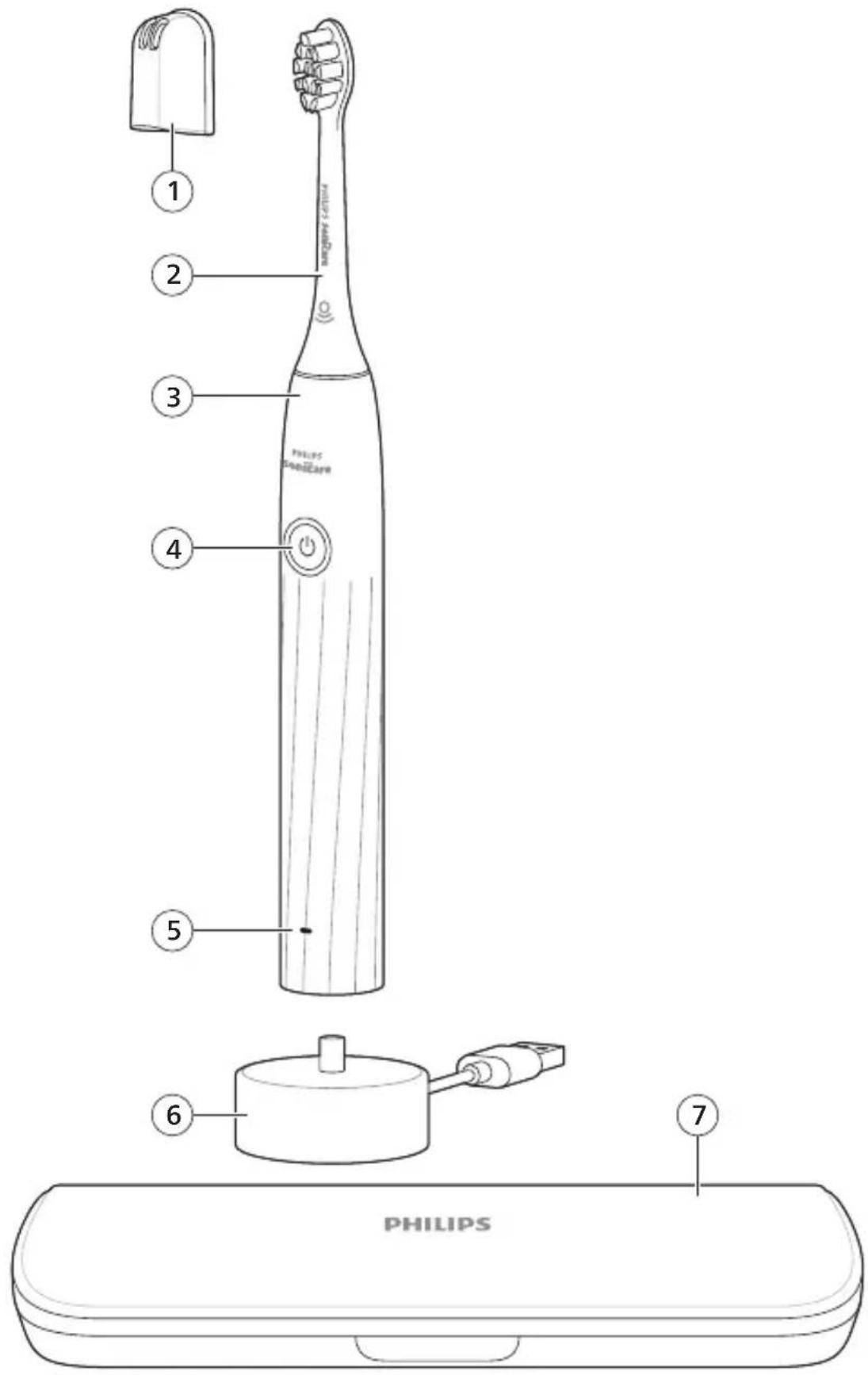
-1
1_
-1
1
English 5
Azerbaijani 18
Czech 32
Danish 45
German 58
Estonian 74
Spanish 87
French 101
Croatian 115
Italian 128
Latvian 142
Lithuanian 155
Hungarian 168
Dutch 181
Norwegian 195
Uzbek 208
Polish 222
Portuguese 236
Romanian 250
Albanian 264
Slovenian 278
Slovak 291
Serbian 304
Finnish 317
Swedish 330
Turkish 343
Turkmen 356
Greek 370
Bulgarian 385
Kyrgyz 400
Macedonian 414
Russian 428
Tajik 443
Ukrainian 458
Kazakh 472
Ruijtntu 486
Jusmonyunn 501
Hebrew 516
Introduction
Congratulations on your purchase and welcome to Philips! To fully benefit from the support that Philips offers, register your product at www.philips.com/welcome.
Important safety information
Only use the product for its intended purpose. Read this information carefully before you use the product and its batteries and accessories, and save it for future reference. Misuse can lead to hazards or serious injuries.
Accessories supplied may vary for different products.
Warnings
- Only use original Philips accessories or consumables. Only use the USB charger provided with the product.
- This appliance contains no user-serviceable parts. If the appliance is damaged, stop using it and contact the Consumer Care Center in your country (see 'Warranty and support').
- Keep adapters and chargers away from water.
- After cleaning, make sure the adapters, chargers, and travel cases are completely dry before connecting to power.
- This appliance can be used by children and persons with reduced physical, sensory or mental capabilities or lack of experience and knowledge if they have been given supervision or instruction concerning use of the appliance in a safe way and understand the hazards involved. Cleaning and user maintenance shall not be made by children without supervision.
- Children should be supervised to ensure that they do not play with the product.
- Do not clean any part of the product in the dishwasher unless otherwise instructed in the Cleaning section.
- Do not use adapters and chargers outdoors or near heated surfaces.
- If the power adapter, the USB charger or cable is damaged, stop using it and replace with a new one.
- This appliance has only been designed for cleaning teeth and gums.
- Replace the brush head every 3 months or sooner if signs of wear appear. Stop using a brush head with crushed or bent bristles.
- Rinse the handle, especially the brush head connection. Gently clean around the rubber seal.
- Make sure brush head and toothbrush are dry before storing in travel case.
- Avoid direct contact with products that contain essential oils or coconut oil. Contact may result in bristles dislodging.
- The maximum altitude of use is 4500 meters.
- Information on REACH substances, contained in Philips products, can be found on www.philips.com/REACH
Medical warnings
- Stop using the appliance and consult your dentist/doctor if excessive or prolonged bleeding occurs after use, or if you experience discomfort or pain during use.
- If you have a pacemaker or other implanted device, contact your doctor or the manufacturer of the implanted device prior to use.
- This appliance is a personal care device and is not intended to be shared by multiple users.
Battery safety instructions
- This appliance contains batteries that are only removable by skilled persons.
- Keep product and batteries away from fire and do not expose them to direct sunlight or high temperatures.
- If the product becomes abnormally hot or smelly, changes color or if charging takes longer than usual, stop using and charging the product and contact Philips.
- Do not place products and their batteries in microwave ovens or on induction cookers.
- Do not open, modify, pierce, damage, or dismantle the product or battery to prevent batteries from heating up or releasing toxic or hazardous substances. Do not short-circuit, overcharge, or reverse charge batteries.
- This appliance contains batteries that are non-replaceable. When the battery is at end of life, the appliance shall be properly disposed of, see section on Recycling.
- Charge only with Philips WAA1001, WAA2001, safety approved IPX4 adapters with input ratings (100-240 V~; 50/60 Hz; 3.5 W) and output ratings (5 V dc; 2.5 W). For the list of adapters, please see www.philips.com/support.
- Charge and use the product at a temperature between 0 °C and 40 °C (32 °F and 104 °F).
Storage and transportation conditions
Temperature -20 °C to +60 °C (-4 °F to 140 °F).
Electromagnetic fields (EMF)
This Philips appliance complies with all applicable standards and regulations regarding exposure to electromagnetic fields.
LIST OF SYMBOLS USED
The following symbols may appear on the product:

This symbol means read the instructions for use, before using the appliance.

This symbol means to use the indicated power supply.
Intended use
This Sonicare power toothbrush is intended to remove adherent plaque and food debris from the teeth to reduce tooth decay and improve and maintain oral health. This Sonicare power toothbrush is intended for consumer home use. Use by children should be with adult supervision.
Your Philips Sonicare (Fig 1.)
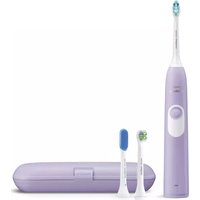
1 Brush head cap 2 Brush head(s) 3 Handle 4 Power on/off button 5 Battery indicator 6 USB charger (wall adapter not included) 7 Travel case
Note: Accessories included may vary based on the model purchased.
Getting started
Attaching the brush head
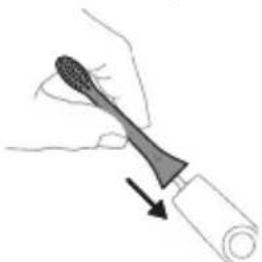
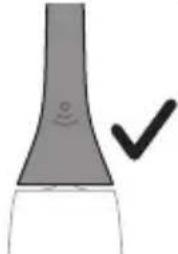
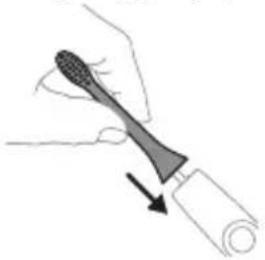
1 Align the brush head so the bristles point in the same direction as the front of the handle.
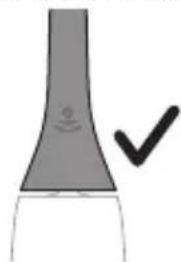
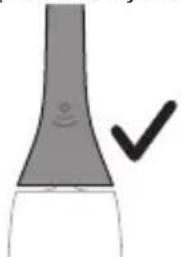
2 Firmly press the brush head down onto the metal shaft until it will not go any further.
Note: It is normal to see a slight gap between the brush head and the handle.
Using your Philips Sonicare toothbrush
If you are using your Sonicare toothbrush for the first time, it is normal to feel more vibration than when using a non-electric toothbrush. It is common for first time users to apply too much pressure. Only apply gentle pressure and let the toothbrush do the brushing for you. Please follow brushing instructions below for the best experience.
To help you transition to your new Sonicare power toothbrush, it comes with the EasyStart feature activated. This feature gradually increases the power over the first 14 brushing sessions to help you adapt to brushing with your Sonicare toothbrush.
Brushing instructions
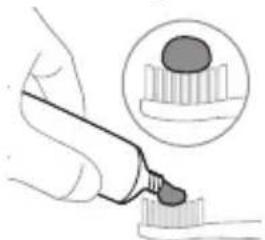
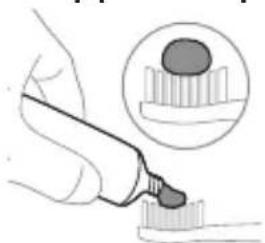
1 Wet the bristles and apply a small amount of toothpaste.
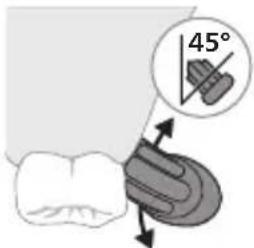
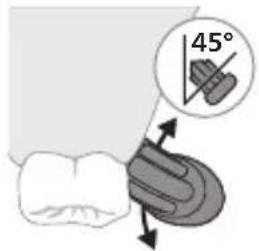
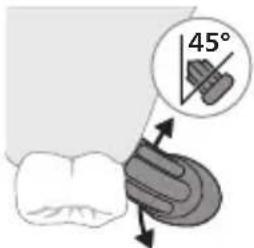
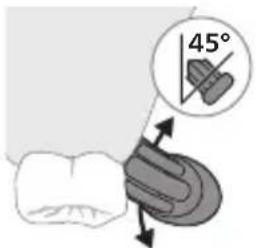
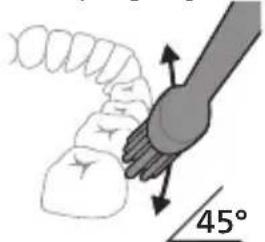
2 Place the toothbrush bristles against the teeth at a slight angle (45 degrees), pressing gently to make the bristles reach the gumline or slightly beneath the gumline.
Note: Keep the center of the brush in contact with the teeth at all times.
3 Press the power on/off button to turn on the Philips Sonicare.
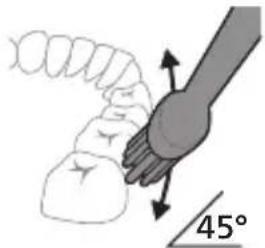
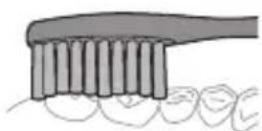
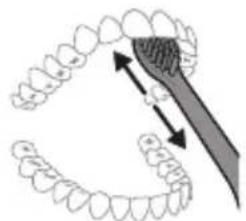
4 Gently keep the bristles placed on the teeth and in the gumline. Brush your teeth with small back and forth motion so the bristles reach between the teeth. Continue this motion throughout your brushing cycle.
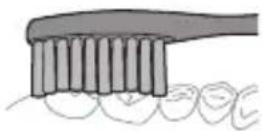
Note: The bristles should slightly flare. It is not recommended to scrub as you would with a manual toothbrush.
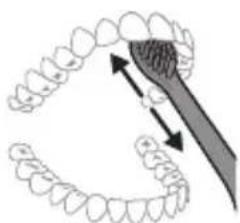
5 To clean the inside surfaces of the front teeth, tilt the brush handle semi-upright and make several vertical overlapping brushing strokes on each tooth.
Note: To make sure you brush evenly throughout the mouth, divide your mouth into 4 sections using the QuadPacer feature (see chapter 'Features').
![graph TD A["①"] --> B["②"] B --> C["③"] C --> D["④"] D --> E["④"] style A fill:#f9f,stroke:#333 style B fill:#f9f,stroke:#333 style C fill:#f9f,stroke:#333 style D fill:#f9f,stroke:#333 style E fill:#f9f,stroke:#333](/content/2026/03/536068/images/e16e4ee63279cb17b5fbc0e5acd4219a38e17488b2793b5937c1d9165daa4978.jpg)
6 Begin brushing in section 1 (outside upper teeth) and brush for 30 seconds before you move to section 2 (inside upper teeth). Continue brushing in section 3 (outside lower teeth) and brush for 30 seconds before you move to section 4 (inside lower teeth).
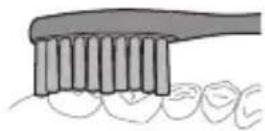
7 After you have completed the brushing cycle, you can spend additional time brushing the chewing surfaces of your teeth and areas where staining occurs. You can also brush your tongue, with the toothbrush turned on or off, as you prefer. Your Philips Sonicare toothbrush should be safe to use on braces (brush heads wear out sooner when used on braces) and dental restorations (fillings, crowns, veneers) if they are properly adhered and not compromised. If a problem occurs, please follow up with a dental professional.
Note: When using the Philips Sonicare toothbrush in clinical studies, operate it at high intensity setting with the handle fully charged and the EasyStart feature deactivated.
Intensities
Intensity settings
Your power toothbrush comes with 2 different intensities:
- High intensity
- Low intensity
Note: We recommend high intensity for best results.
To manually select your desired intensity, press the power button within 2 seconds of starting or resuming the brushing when the toothbrush is on, to toggle between the options.
Features
- SmarTimer
- QuadPacer
- EasyStart
SmarTimer
The SmarTimer indicates that your brushing cycle is complete by automatically switching off the toothbrush at the end of the brushing cycle.
Dental professionals recommend brushing no less than 2 minutes twice a day.
Note: If you press the power on/off button after you started the brushing cycle, the toothbrush pauses. If you press the on/off button within 30 seconds, the timer resumes to allow you to finish your brushing cycle. After a pause of 30 seconds, the SmarTimer resets.
QuadPacer
![graph TD A["①"] --> B["②"] B --> C["③"] C --> D["④"] D --> E["④"] style A fill:#f9f,stroke:#333 style B fill:#f9f,stroke:#333 style C fill:#f9f,stroke:#333 style D fill:#f9f,stroke:#333 style E fill:#f9f,stroke:#333](/content/2026/03/536068/images/246c7d33d8a63ff970c97e4b2b8b99af05fa8ec839d819296fece0e2f85a22a7.jpg)
The QuadPacer is an interval timer that has a short beep and pause to remind you to brush the 4 sections of your mouth evenly and thoroughly. This Philips Sonicare toothbrush comes with the QuadPacer feature activated.
EasyStart
This Philips Sonicare model comes with the EasyStart feature activated. The EasyStart feature gently increases the power over the first 14 brushing sessions to help you get used to brushing with the Philips Sonicare.
To activate or deactivate EasyStart, follow the instructions below:
1 Place the handle on the plugged-in charger. 2 Press and hold the power on/off button while the handle remains on the charger.
3 Keep the power on/off button pressed until you hear three short beeps (after 3 seconds). 4 Release the power on/off button.
- Triple tone of low-med-high means the EasyStart feature has been activated. The battery level indicator light will also blink green 2 times to confirm activation.
- Triple tone of high-med-low means the EasyStart feature has been deactivated. The battery level indicator light will blink amber 1 time to confirm deactivation.
Charging and battery status
This Philips Sonicare toothbrush is designed to provide on average 28 brushing sessions, each session lasting 2 minutes (14 days if used twice per day) on a fully charged battery. The battery indicator shows the battery status when you complete the 2-minute brushing session, when you pause the toothbrush, or while it is charging.
Note: It can take up to 24 hours to fully charge the battery before first use, but you can use the Philips Sonicare toothbrush before it is fully charged.
Charging
1 Attach the USB charging cord to a wall adapter, plug the wall adapter into an electrical wall outlet.
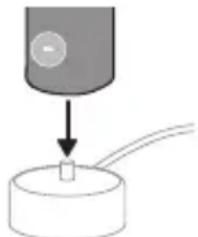
2 Place the handle on the charger. 3 Two short beeps are emitted to confirm that the handle is placed properly. 4 The flashing green light of the battery indicator shows that the toothbrush is charging. 5 Once the battery is fully charged, the green light remains solid for 30 seconds and then turns off.
Battery status (when handle is on plugged-in charger)
When the handle is plugged into the charger, the battery indicator at the bottom of the handle shows the battery level.
Battery status
LED color
Low Flashing green
Partially full Flashing green
Full solid green for 30 seconds and then switches off.
Battery status (when handle is not on plugged-in charger)
When the toothbrush is awake, the battery indicator at the bottom of the handle shows the battery level.
Battery status LED color
Full: solid green
Partially full: solid green
Medium low: flashing green
Low: flashing amber and 3 beeps after brushing
Empty: flashing amber and 2 sets of 5 beeps
Note: To save energy, the battery indicator will switch off when no longer charging.
Note: When the battery is completely empty, the toothbrush switches off. Plug the toothbrush into the charger to charge it.
Note: To keep the battery fully charged at all times, you may keep your toothbrush plugged into the charger when not in use.
Cleaning
Toothbrush handle
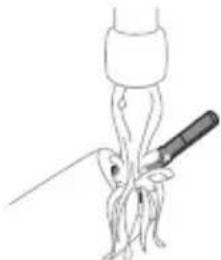
1. Remove the brush head and rinse the metal shaft area with warm water. Make sure you remove any residual toothpaste on the handle and around the buttons at least once a week, but preferably after each use.
Caution: Do not push on the rubber seal on the metal shaft or around the buttons with sharp objects, as this may cause damage.
2 Wipe the entire surface of the handle with a damp cloth.
Caution: Do not tap the handle on the sink or counter to remove excess water.
3 Dry the handle with a soft cloth or towel.
Brush head
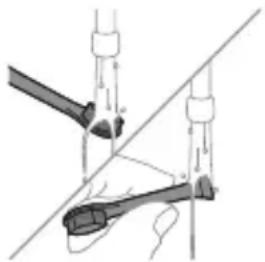
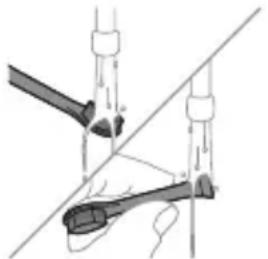
1 Rinse the brush head and bristles after each use and allow to air dry.
2 Remove the brush head from the handle and rinse the brush head connection with warm water at least once a week.
Charger
1 Unplug the charger before you clean it.
2 Wipe the surface of the charger with a damp cloth.
3 Dry the charger with a soft cloth or towel.
Travel case
Rinse with warm water and use a damp cloth to clean the travel case and allow to air dry.
Storage
If you are not going to use the product for an extended period of time, unplug it from the electrical outlet, clean it and store it in a cool and dry place away from direct sunlight.
Replacement
Replace Philips Sonicare brush heads every 3 months to achieve optimal results. Use only Philips Sonicare replacement brush heads.
Locating the model number
The model number begins with "HX" (e.g. HX123A) and can be found on the bottom of your toothbrush.
Troubleshooting
This chapter summarizes the most common problems you could encounter with the appliance. If you are unable to solve the problem with the information below, visit www.philips.com/support and insert your model number for a list of frequently asked questions or contact the Consumer Care Center in your country.
Problem Possible Cause Solution
| I cannot fully attach the brush head. There is a gap between the brush head and handle. | This gap is normal and is needed for the brush head to vibrate appropriately. The brush head must be able to move to create the right amount of vibrations. | |
| My Philips Sonicare toothbrush vibration is less powerful than before. | The brush head is too close to the body of the toothbrush or the toothbrush needs to be charged. | Remove the brush head from the handle and re-set it on the metal shaft leaving a small gap. (1-2 mm).When charging, make sure the charger is plugged into a power supply and placed on a flat surface before placing the toothbrush on the charger. Allow the toothbrush to charge for 24 hours. |
| I charged my toothbrush, but it only works for a short time. | The base of the toothbrush is not placed flat on the charger when attempting to charge. | Make sure the charger is plugged into a power supply and placed on a flat surface before placing the toothbrush on the charger. Allow the toothbrush to charge for 24 hours. |
Warranty and support
Please visit www.philips.com/support and enter the model number located at the bottom of your device in the search bar in order to obtain more
information on how to register your device, warranty information, and other frequently visited support topics.
For all product support, power consumption details, and the EU Declaration of Conformity, please visit www.philips.com. After searching for your device, you can find information on your product's features, technical specifications, as well as available accessories.
Warranty exclusions
What is not covered under warranty:
- In mouth attachments including brush heads and nozzles.
- Damage caused by use of unauthorized replacement parts or unauthorized brush heads.
- Damage caused by misuse, abuse, neglect, alterations or unauthorized repair.
- Normal wear and tear, including chips, scratches, abrasions, discoloration or fading.
Recycling
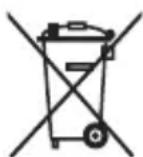
- This symbol means that electrical products and batteries shall not be disposed of with normal household waste.
- Follow your country's rules for the separate collection of electrical products and batteries.
Removal of built-in rechargeable battery
- CONTAINS LITHIUM-ION RECHARGEABLE CELL. MUST BE RECYCLED OR DISPOSED OF PROPERLY.
- The built-in rechargeable battery can be removed for disposal. If you are not comfortable disassembling electronics, please seek professional assistance at your local electronics recycling or repair shop.
- Instructions for removal of built-in rechargeable batteries can be found on www.philips.com/support. Use the Philips support home search bar to enter the toothbrush model number and find your product. The model number begins with "HX" (e.g. HX123A) and can be found on the bottom of your toothbrush. The battery removal instructions are in the Troubleshooting and Repair section of the product's support page.
- If batteries are damaged or leaking, avoid contact with the skin or eyes. If this occurs, immediately rinse well with water and seek medical care.
- When you handle batteries, make sure that your hands, the product and the batteries are dry.
- To avoid accidental short-circuiting of batteries after removal, do not let battery terminals come into contact with metal objects (e.g. coins, hairpins, rings). Do not wrap batteries in aluminum foil. Tape battery terminals or put batteries in a plastic bag before you discard them.
Introduction
Danish
Danish
This symbol means that you must read the instructions for use before using the device.

This symbol means that you must use the specified power supply.
Intended use
This Sonicare electric toothbrush is intended for the removal of plaque and food debris from teeth to reduce caries and to improve and maintain oral health. This Sonicare electric toothbrush is intended for home use. Children should use the toothbrush under adult supervision.
Your Philips Sonicare (Fig. 1)
1 Brush head cap 2 Brush heads 3 Handle 4 On/off button 5 Battery indicator 6 USB charger (wall adapter not included) 7 Travel case
Note: The accessories supplied may vary depending on the model purchased.
Getting started
Attaching the brush head
5 To clean the inner surfaces of the front teeth, tilt the brush handle semi-upright and make several vertical overlapping strokes on each tooth.
Note: To ensure even brushing of all teeth in the mouth, divide your mouth into 4 sections using the QuadPacer function (see chapter 'Features').
![graph TD A["①"] --> B["②"] B --> C["③"] C --> D["④"] D --> E["③"] style A fill:#f9f,stroke:#333 style B fill:#ccf,stroke:#333 style C fill:#cfc,stroke:#333 style D fill:#fcc,stroke:#333 style E fill:#ffc,stroke:#333](/content/2026/03/536068/images/bb1e6fccdba072d25d19bf3557041192d9839abc69cfcdb9d8ea78c5bf2c4421.jpg)
1 Detach the brush head and rinse the area around the metal shaft with warm water. At least once a week, and preferably after each use, be sure to remove all remaining toothpaste from the handle and around the buttons.
1 Apply a small amount of toothpaste to the brush head.
2 Place the handle on the charger. 3 Two short beeps confirm that the handle is correctly placed. 4 The blinking green light on the battery indicator shows that the toothbrush is charging. 5 When the battery is fully charged, the green light will stay on for 30 seconds and then turn off.
1. Align the brush head so that the bristles point in the same direction as the front of the handle.
2. Press the brush head firmly onto the metal shaft until it stops.
Note: It is normal to see a small gap between the brush head and the handle.
Using your Philips Sonicare toothpaste
If you are using a Sonicare toothbrush for the first time, it is normal to feel more vibration than with a non-electric toothbrush. First-time users tend to apply too much pressure. Press gently and let the toothbrush do the cleaning for you. For the best results, follow the brushing instructions.
1. Wet the brush and apply a small amount of toothpaste.
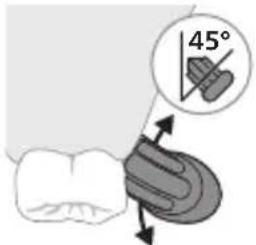
2. Hold the toothbrush at a small (45-degree) angle against the teeth and press gently so the bristles reach the gum line or just below it. Note: Keep the center of the brush in constant contact with the teeth.
3. Press the on/off button to turn on the Philips Sonicare.
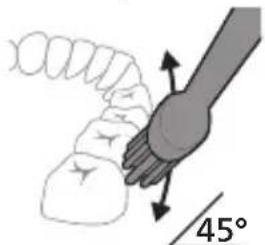
4. Hold the brush gently against the teeth and gum line. Clean your teeth by moving the brush head back and forth in small motions to allow the bristles to reach between the teeth. Continue these motions until the brushing cycle is complete.
5. To clean the inner surfaces of the front teeth, hold the handle in a semi-vertical position and clean each tooth individually with several vertical strokes.
2. Place the handle on the charging base.
3. Two short beeps will sound to confirm that the handle is properly seated. 4. The blinking green battery indicator shows that the toothbrush is charging. 5. When the battery is fully charged, the green light stays on for 30 seconds and then turns off.
1. Remove the brush head and rinse the metal shaft area with warm water. Clean toothpaste residue around the handle and buttons at least once a week, preferably after each use.
Warning: Do not press the rubber seal on the metal shaft or around the buttons with sharp objects, as this may cause damage.
2 Wipe the entire surface of the handle with a damp cloth.
Warning: Do not tap the handle against the sink or table to remove excess water.
3 Dry the handle with a soft cloth or towel.
Brush head
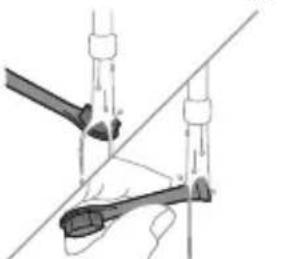
1 After each use, rinse the brush head and bristles and let them air dry.
2 Remove the brush head from the handle and rinse the brush head connection part with warm water at least once a week.
Charging stand
1 Before cleaning, unplug the charger from the power outlet. 2 Wipe the entire surface of the charging stand with a damp cloth. 3 Dry the charger with a soft cloth or towel.
Travel pouch
Rinse with warm water and use a damp cloth to clean the travel pouch, then let it air dry.
Memory
This symbol means that you must read the instructions for use before using the device.

This symbol means that you must use the specified power supply.
Intended use
This symbol means that you should read the instructions for use before using the device.

1 Moisten the bristles and apply a small amount of toothpaste to the brush head.

This symbol indicates that you need to read the instruction manual before using the device.

1 Align the brush head so that the bristles face the same direction as the front of the handle.
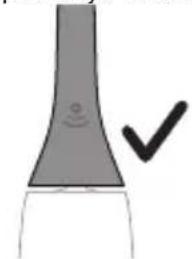
2 Press the brush head firmly onto the metal shaft until it clicks into place.
1 Wet the bristles and apply a small amount of toothpaste.
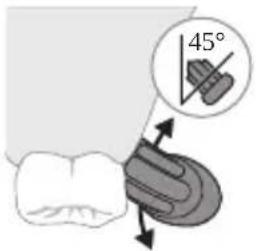
2 Place the bristles at a slight angle (45 degrees) against the teeth and apply gentle pressure so the bristles reach the gum line or slightly below it.
4 Gently keep the bristles on the teeth and gums. Brush with gentle back-and-forth motions so the bristles can reach between the teeth. Continue these motions for the entire brushing cycle.
5 To clean the inside surfaces of the front teeth, tilt the brush handle to a semi-upright position and move the brush vertically over each tooth so that the strokes overlap.
Note: To ensure you brush evenly in all areas of your mouth, divide your mouth into 4 sections using the QuadPacer feature (see the 'Features' chapter).
![graph TD A["①"] --> B["②"] B --> C["③"] C --> D["④"] D --> A](/content/2026/03/536068/images/65f89d8c6036a6d79fed6b4907c2ca596a1c2a5ba040e2affc1a174a3b25668d.jpg)
6 Start brushing with section 1 (upper teeth outside) and brush for 30 seconds before moving to section 2 (upper teeth inside). Continue brushing with section 3 (lower teeth outside) and brush for 30 seconds before moving to section 4 (lower teeth inside).
7 After completing the brushing cycle, you can additionally clean the chewing surfaces and areas where stains occur. You can also clean your tongue with the toothbrush on or off, as desired. Your Philips Sonicare toothbrush is safe to use with fixed dental appliances (brush heads will wear out faster in that case) and with dental restorations (fillings, crowns, veneers), provided they are properly placed and undamaged. If problems occur, consult your dentist.
Note: When the Philips Sonicare toothbrush is used in clinical studies, it should be used with the high intensity setting, a fully charged handle, and the EasyStart feature deactivated.
Intensities
Intensity settings
The electric toothbrush has two different intensity levels:
- High intensity
- Low intensity
Note: For best results, we recommend high intensity.
To manually select the desired intensity, press the power button within two seconds of starting or resuming brushing when the toothbrush is turned on, to cycle through the options.
Functions
- SmarTimer
- QuadPacer
- EasyStart
SmarTimer
1 Remove the brush head and rinse the area around the metal shaft with warm water. Be sure to remove any toothpaste residue from the handle and around the buttons at least once a week, and preferably after each use.
Caution: Do not press the rubber seal on the metal shaft or around the buttons with sharp objects, as this may cause damage.
2 Wipe the entire surface of the handle with a damp cloth.
1 Rinse the brush head and bristles after each use and let them air dry. 2 At least once a week, remove the brush head from the handle and rinse its connection with warm water.
Charger
1 Unplug the charger from the electrical outlet before cleaning. 2 Wipe the surface of the charger with a damp cloth. 3 Dry the charger with a soft cloth or towel.
Travel case
Rinse the travel case with warm water and clean it with a damp cloth, then allow it to air dry.
Storage
If you will not use the product for an extended period, unplug it from the wall outlet, clean it, and store it in a cool, dry place away from direct sunlight.
Replacement
Replace the Philips Sonicare brush heads every 3 months for optimal results. Use only Philips Sonicare replacement brush heads.
LIST OF SYMBOLS USED
This symbol means that you should read the user manual before using the device.

This symbol means that the indicated power supply must be used.
Intended use
This Sonicare electric toothbrush is intended to reduce tooth decay and maintain oral health by removing plaque and food debris from teeth. This Sonicare electric toothbrush is intended for household use only. Children should use it under adult supervision.
Your Philips Sonicare device (Fig. 1.)
1 Brush head 2 Brush head(s) 3 Handle 4 On/off button
1 Align the bristles so they face the same direction as the front of the handle.
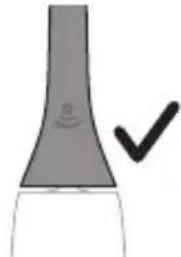
2 Press the brush head firmly onto the metal shaft until it stops.
Note: It is normal to see a small gap between the brush head and the handle.
1 Wet the bristles and apply a small amount of toothpaste.
1 After each use, rinse the brush head and bristles and allow them to air dry.


2 Philips Sonicare (Fig. 1)
1 Handle 2 Brush head 3 Charger 4 Charging base/stand 5 Power button 6 USB charging cable (with travel adapter) 7 ดูดูดูดูดูดูดูดูดูดูดูดูดูดูดูดูดูดูดูดูดูดูดูดูดูดูดูดูดูดูดูดูดูดูดูดูดูดูดูดูดูดูดูดูดูดูดูดูดูดูด L2niú 3tinn unwúwnnynn wputuniwnuttn ywnnn tǔ unwnptnulti qùuwó uñntihg ywhuulwó:
hùzhì guòu
Uünwgntp hunqwüwlyh qihuhyn
1 lonquuwlyh qihuhyn hwwluwwntgntp wjuwtu, nn uwqhutnu ninnylwsh hutu unju ninnnajwup, huz pnuwlyh nhuwgh lnnun:
2 Uúnín utnúúp hunquùwlyh qíjuhún útnplú útunwnuǐwǔ jhutzh útg, u̅hùzì wjù lǚwùq wǔzh:
12 nui' funquwuh qjuhuh u pnuwuh uhgu hnnp wugph wnlywnjajniun unnuwl 5:
2tn Philips Sonicare wunwutph junquwuh oqunwqndnuiŋ
tpati wnwghù wùqwiú tþ oqunwqnnðniú átn Sonicare winwúh hunqwùwʊŋ, wultih 2wn jænæng qquwln ñnpúwɪl ́ hwiútuwinwó nís ħtlynnwʊjwù hunqwùwʊlh htún: ñnpúwɪl ́, tþr wwnwghù wùqwiú oqunwqnnðnnútnŋ zwiuhg 2wn utnúniú tǔ qnpðwnnniú: Uhwjù yhnwntp üninp utnúniú u janyl unltp, nnwtuqh winwúh hunqwùwʊŋ átn yhnhuwntü úwpnh: hvünnniú túp htúnutí hunqwùwʊlh g oqunlṭīnì gnigniúutnhù ́ wwlwqnijù wnnjniúpūtn uwnwùwɪnì hwiúwn:
Sonicare ٤٣٥١٥١٥٠٥٠٠٠٠٠٠٠٠٠٠٠٠٠٠٠٠٠٠٠٠٠٠٠٠٠٠٠٠٠٠٠٠٠٠٠٠٠٠٠٠٠٠٠٢ hunquwlyhù wugniù wultgh hāzūn ṣwnàutīnì huuúwn, wjù wunwpǔniú ٤ wujnhulwgulwò EasyStart qnnòwnnyanq: Uju qnnòwnnyjəu wunhǎwùwpwn wultlwgūniú ٤ hnuwùpù wunwghù 14 úwppnniùtgh dwúwùwú` oqùtīnì àtiq unyñnti l àtin Sonicare wunwúh hunquwlyhg oqunutīniù:
Uwpnúwù hnwhuìqùtn
1 陰ngtp hunqwùwuh ùwqhlyuttn u utiongntp wunwuh ùwðnilyh phz puìwūlniŋniú:
2 Stwnntp wunwuh hunqwuwgh uwqhlyuttn wunwutph ynw uh yhnpn wuljwu unwu (45 wunhǎwù) ̈ unpnntu utnútlnu, nnwbuqh uwqhlyuttn hwuutu juntph tqnwqðhu lywú juntnh tqnwqðhg uh yhnpn utnpu:
L2niú Úúpnng dwúwúwú hunqwúwúh ytúunnún wjuhtp wùnwútngh htún 2yhuúwú útúg:
3 Utnútip hnuwúph úhwugúwù/wùgwnúwù lynǎwūn` Philips Sonicare-n úhwugútīnì hwiúwùn:
4 Unplug the appliance before cleaning and maintenance. Do not immerse the appliance in water or any other liquid. Never use the appliance near water.
L2niú hunquùwuh úwqhúutnn whtnp t úh ühnpn lujúwùwù: hunnhnìng sh unylniú wunwúutnn úwpntl wjùwǒu, hùzwtu ŋnip lúwwpnthp unylnnwlywù wunwúh hunquùwlynú:
5 Unplug the appliance from the power outlet before cleaning and when not in use. Do not pull the cord to disconnect, but grasp the plug and pull to disconnect.
L2niu 3wúnqutni hwiwn, nn hwiwwwnwuh tp úwpnni wúpnno ptnwùn, dtn ptnwùn 4 úwuh pudwùtp oqnwnqnδtlnj QuadPacer qnnδwnnyjān (untu «9nnδwnnyjātn» pudhùn):
![graph TD A["①"] --> B["②"] B --> C["③"] C --> D["④"] D --> E["③"] style A fill:#f9f,stroke:#333 style B fill:#ccf,stroke:#333 style C fill:#cfc,stroke:#333 style D fill:#fcc,stroke:#333 style E fill:#ffc,stroke:#333](/content/2026/03/536068/images/8f6ae4560f5ad57fc3cb11c98ec6517c17ecf674a910c848dda5b6adb42e4961.jpg)
6 Use the appliance for 1 hour (until the battery is fully charged) and then for 30 minutes for the second use (until the battery is fully discharged). Use the appliance for 3 hours (until the battery is fully charged) and then for 30 minutes for the fourth use (until the battery is fully discharged).
7 The appliance is intended for cleaning teeth and gums. It is not intended for use by children or persons with reduced physical, sensory or mental capabilities, unless they are supervised by a responsible person. The Philips Sonicare toothbrush is safe for use by children aged 3 years and above (when the brush head is small and the handle is suitable) and for persons with braces, fillings, crowns, or implants, provided they are used under the supervision of a responsible person.
L2niú Philips Sonicare wunwúh hunqwùwūn yjhùhlywlywù htúnwqnunnijājnìùutīnniú oqnuwqnpòtāni nṭwypniú qnnδwnytp wjù pwnàn hùntìuuhlnijājwúp ywnqwulnnúwúp` pnùwūn jhnuhù yhgpwulnnuówð, huly EasyStart qnnδwnnnijān` wùgwunuówð:
hùntùuhúlnípíwù wùn hǎwùtǔn
hùntùuhúniējwù ywnqwúnnuìfūn
Etiynnwjuwu hunqwuwlyu niuh hùntüuhulniqjwi 2 unwnptn wuuuhǎwúutn.
- Fwnàn hùntǔu huìnǚ jǐ niǔ
- 3wòn hùnbuuhúniŋniù
L2niu' Lwuqwnyu wnnjniuputnh hwuwn hunhnnnn tup unwju pwnàn huntuuuhynujniu:
2tn gwúlywgwò hùntìuuhúlníajnìún àtnpnú nùunptāni huwúwn hunqwùwùn úhwgúwò dwúwùwù yutnútp hnuwùph úhwgúwù/wùgwùnúwù lynǎwùn’ wunwútph úwpnniǔ uúutīnig lywú utpulqutīnig htunn 2 qujnlywùh núpawgpniú’ unwnptnwúlútph úhglu uhnhuwnyltnì huwúwn:
9nρδωνηγρεύτη
- SmarTimer
- QuadPacer
- EasyStart
SmarTimer
SmarTimer is a feature that helps you brush for the recommended two minutes. It uses a short pause to signal that the brushing time is complete.
The SmarTimer is activated when you use the QuadPacer feature. It will beep at 30-second intervals to help you brush evenly. The SmarTimer is set to 2 minutes.
QuadPacer
![graph TD A["①"] --> B["②"] B --> C["③"] C --> D["④"] D --> A](/content/2026/03/536068/images/6996c8cdbd0899ace3fc73f29aafac5d057ccb94cc07d16a54a902149446c8d4.jpg)
QuadPacer is a feature that helps you brush all areas of your mouth evenly. It divides your mouth into 4 sections and uses a short pause to signal when to move to the next section. This Philips Sonicare toothbrush has the QuadPacer feature.
EasyStart
2. Place the brush head on the handle.
3. Wet the bristles and apply a small amount of toothpaste. 4. Place the brush head in your mouth at a 45-degree angle to the gum line. 5. Turn on the toothbrush and gently move the brush head back and forth across the teeth for 2 minutes.
The toothbrush will pause briefly (about 0.5 seconds) to signal the end of the brushing cycle.
If you pause the toothbrush, it will resume brushing when you turn it on again. The toothbrush will automatically turn off after 2 minutes of brushing.
The toothbrush will beep
LED indicator
1. The device is intended for the detection and measurement of ionizing radiation. It is designed to be used in various fields, including medicine, industry, and scientific research, to ensure safety and accuracy in radiation monitoring.
2. Note: The device must be operated in accordance with the instructions provided in this manual to ensure proper functioning and accurate readings.
2. The device should be stored in a dry place, away from direct sunlight and extreme temperatures.
2. Note: The device is equipped with a rechargeable battery that should be charged regularly to maintain optimal performance.
3. The device should be calibrated periodically to ensure accurate measurements.
radiation detection
1. The device is designed for the detection and measurement of radiation, and it is important to follow the safety guidelines provided.
2. The device should be used in accordance with the instructions and safety precautions outlined in this manual.
Maintenance
1. Clean the device with a soft, dry cloth. 2. Do not use abrasive cleaners or solvents. 3. The device should be inspected regularly for any signs of damage.
phosphorus phosphate

Philips Sonicare: This is a key for the purpose of this program.
EasyStart
EasyStart is. nis'jis EasyStart is. nis'jis Philips Sonicare is. nis'jis
www.philips.com/support
www.philips.com/support
www.philips.com/support
Philips 7
www.philips.com/Sonicare
Philips Consumer Lifestyle BV
Tussendiepen 4
9206 AD Drachten
The Netherlands
©2025 Koninklijke Philips N.V. (KPNV). All rights reserved. Philips and the Philips shield are trademarks of KPNV. Sonicare and the Sonicare logo are trademarks of Philips Oral Healthcare, LLC and/or KPNV.
300014957001(05/11/2025)



- INTRODUCTION
- IMPORTANT SAFETY INFORMATION
- WARNINGS
- MEDICAL WARNINGS
- BATTERY SAFETY INSTRUCTIONS
- STORAGE AND TRANSPORTATION CONDITIONS
- ELECTROMAGNETIC FIELDS (EMF)
- LIST OF SYMBOLS USED
- INTENDED USE
- YOUR PHILIPS SONICARE (FIG 1.)
- GETTING STARTED
- ATTACHING THE BRUSH HEAD
- USING YOUR PHILIPS SONICARE TOOTHBRUSH
- BRUSHING INSTRUCTIONS
- INTENSITIES
- INTENSITY SETTINGS
- FEATURES
- SMARTIMER
- QUADPACER
- EASYSTART
- CHARGING AND BATTERY STATUS
- CHARGING
- BATTERY STATUS (WHEN HANDLE IS ON PLUGGED-IN CHARGER)
- BATTERY STATUS (WHEN HANDLE IS NOT ON PLUGGED-IN CHARGER)
- BATTERY STATUS LED COLOR
- CLEANING
- TOOTHBRUSH HANDLE
- BRUSH HEAD
- CHARGER
- TRAVEL CASE
- STORAGE
- REPLACEMENT
- LOCATING THE MODEL NUMBER
- TROUBLESHOOTING
- WARRANTY AND SUPPORT
- WARRANTY EXCLUSIONS
- RECYCLING
- REMOVAL OF BUILT-IN RECHARGEABLE BATTERY
- DANISH
- YOUR PHILIPS SONICARE (FIG. 1)
- USING YOUR PHILIPS SONICARE TOOTHPASTE
- CHARGING STAND
- TRAVEL POUCH
- MEMORY
- FUNCTIONS
- YOUR PHILIPS SONICARE DEVICE (FIG. 1.)
- PHILIPS SONICARE (FIG. 1)
- HÙZHÌ GUÒU
- TN PHILIPS SONICARE WUNWUTPH JUNQUWUH OQUNWQNDNUIŊ
- UWPNÚWÙ HNWHUÌQÙTN
- HÙNTÙUHÚLNÍPÍWÙ WÙN HǍWÙTǓN
- HÙNTÙUHÚNIĒJWÙ YWNQWÚNNUÌFŪN
- NΡΔΩΝΗΓΡΕΎΤΗ
- THE TOOTHBRUSH WILL PAUSE BRIEFLY (ABOUT 0.5 SECONDS) TO SIGNAL THE END OF THE BRUSHING CYCLE
- RADIATION DETECTION
- MAINTENANCE
- PHOSPHORUS PHOSPHATE
Brand : PHILIPS
Model : Sonicare 2100 Series HX3651
Category : Electric toothbrush