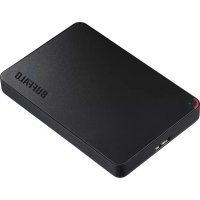
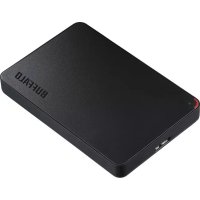
MiniStation HDPCF2.0U3BD - Hard Drive BUFFALO - Free user manual and instructions
Find the device manual for free MiniStation HDPCF2.0U3BD BUFFALO in PDF.



| Product Type | Portable external hard drive |
| Brand | Buffalo |
| Model | MiniStation HDPCF2.0U3BD |
| Interface | USB 3.0 (compatible with USB 2.0/1.1) |
| Connector | USB 3.0 Micro-B |
| Maximum transfer speed | 5 Gbps (USB 3.0) |
| Dimensions (W x D x H) | 76 x 115 x 11.5 mm |
| Weight | Approx. 120 g |
| Power supply | 5 V ±5% via USB |
| Compatible operating systems | Windows (XP to 10) and macOS (10.6+) |
| Default formatting | FAT32 (max file size 4 GB) |
| Main functions | Portable storage, hot-plug, activity indicator |
| Maintenance and cleaning | Avoid shocks, disconnect after safe ejection |
| Safety | Do not disconnect during access, use safe ejection |
| Spare parts and repairability | Not applicable, contact technical support |
| General information | Buffalo MiniStation, manufacturer warranty |
Frequently Asked Questions - MiniStation HDPCF2.0U3BD BUFFALO
User questions about MiniStation HDPCF2.0U3BD BUFFALO
0 question about this device. Answer the ones you know or ask your own.
Ask a new question about this device
Download the instructions for your Hard Drive in PDF format for free! Find your manual MiniStation HDPCF2.0U3BD - BUFFALO and take your electronic device back in hand. On this page are published all the documents necessary for the use of your device. MiniStation HDPCF2.0U3BD by BUFFALO.
USER MANUAL MiniStation HDPCF2.0U3BD BUFFALO
Hard Drive User Manual
Americas: www.buffaloamericas.com
Europe: www.buffalo-technology.com
Asia Pacific: www.buffalo-asia.com
35012868-04
2015.11
Table of Contents
Hard Drive User Manual (EN) 13
HD-PCFU3 13
Diagrams 13 Specifications 13
HD-PUSU3. 14
Diagrams 14 Specifications 14
Recommended Usage 17 Dismounting the Unit 18
For Windows 18 For Mac 18
Troubleshooting 19
I can see the DriveStation or MiniStation in My Computer but I cannot access it. (Windows) 19 I cannot see the DriveStation or MiniStation. 19 My backup program cannot save files to the DriveStation or MiniStation. 19
User Manual for Hard Disk Drive (RU) 65
HD-PCFU3 65
Figures 65
Technical Specifications 65
HD-PUSU3 66
Figures 66
Technical Specifications 66
Troubleshooting 70
Hard Disk User Manual (SC) 72
HD-PCFU3 72
Figures 72
Specifications 72
HD-PUSU3 73
Figures 73
Specifications 73
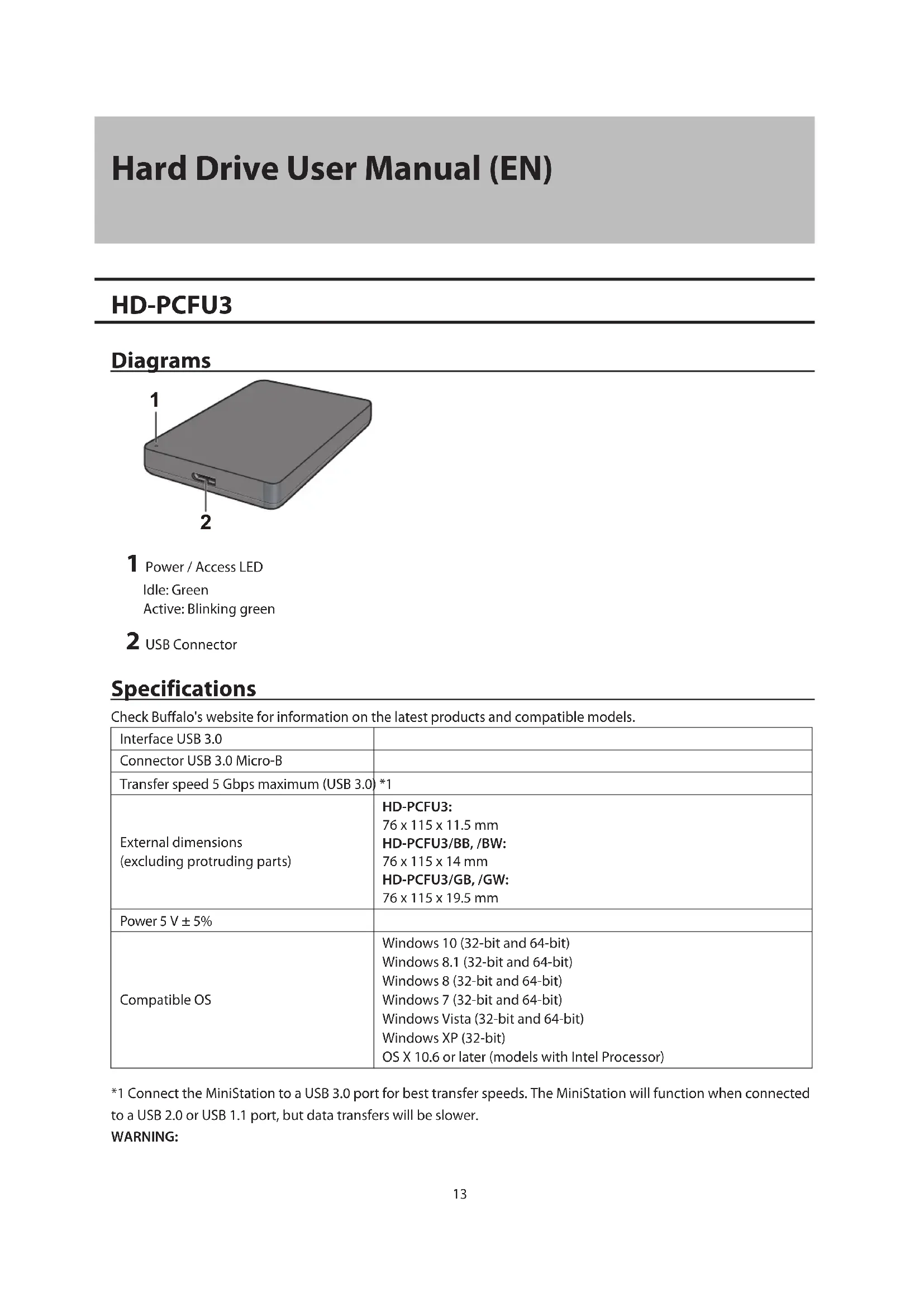
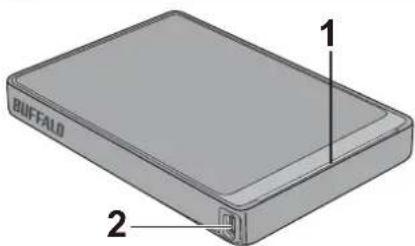
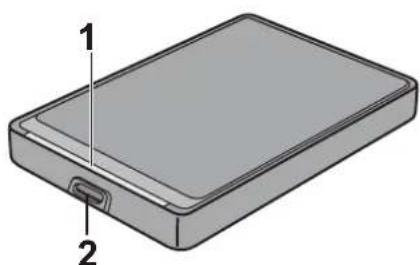
1 Power / Access LED
Idle: Green
Active: Blinking green
2 USB Connector
Specifications
Check Buffalo's website for information on the latest products and compatible models.
| Interface USB 3.0 | |
| Connector USB 3.0 Micro-B | |
| Transfer speed 5 Gbps maximum (USB 3.0) | *1 |
| External dimensions (excluding protruding parts) | HD-PCFU3: 76 x 115 x 11.5 mm HD-PCFU3/BB, /BW: 76 x 115 x 14 mm HD-PCFU3/GB, /GW: 76 x 115 x 19.5 mm |
| Power 5 V ± 5% | |
| Compatible OS | Windows 10 (32-bit and 64-bit) Windows 8.1 (32-bit and 64-bit) Windows 8 (32-bit and 64-bit) Windows 7 (32-bit and 64-bit) Windows Vista (32-bit and 64-bit) Windows XP (32-bit) OS X 10.6 or later (models with Intel Processor) |
*1 Connect the MiniStation to a USB 3.0 port for best transfer speeds. The MiniStation will function when connected to a USB 2.0 or USB 1.1 port, but data transfers will be slower.
WARNING:
This product and its components contain chemicals known to the State of California to cause cancer and birth defects, or reproductive harm. Wash hands after handling.
HD-PUSU3
Diagrams
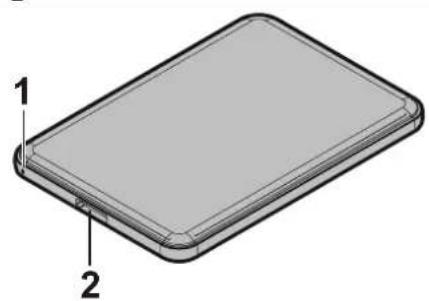
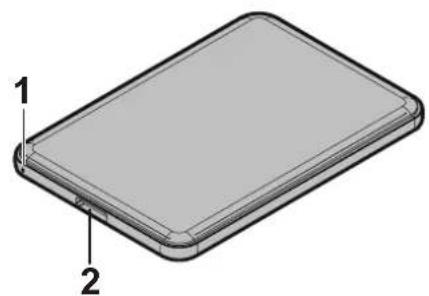
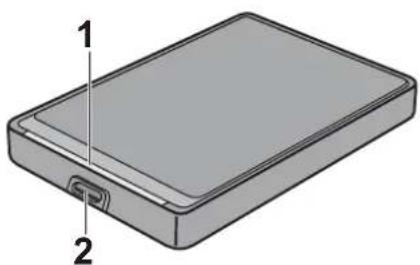
1 Power / Access LED
Idle: White
Active: Blinking white
2 USB Connector
Specifications
Check Buffalo's website for information on the latest products and compatible models.
| Interface USB 3.0 | |
| Connector USB 3.0 Micro-B | |
| Transfer speed 5 Gbps maximum (USB 3.0) | *1 |
| External dimensions (excluding protruding parts) | 79 x 115 x 8.8 mm |
| Power 5 V ± 5% | |
| Compatible OS | Windows 10 (32-bit and 64-bit) Windows 8.1 (32-bit and 64-bit) Windows 8 (32-bit and 64-bit) Windows 7 (32-bit and 64-bit) Windows Vista (32-bit and 64-bit) Windows XP (32-bit) OS X 10.5 or later (models with Intel Processor) |
*1 Connect the MiniStation to a USB 3.0 port for best transfer speeds. The MiniStation will function when connected to a USB 2.0 or USB 1.1 port, but data transfers will be slower.
WARNING:
This product and its components contain chemicals known to the State of California to cause cancer and birth defects, or reproductive harm. Wash hands after handling.
Diagrams
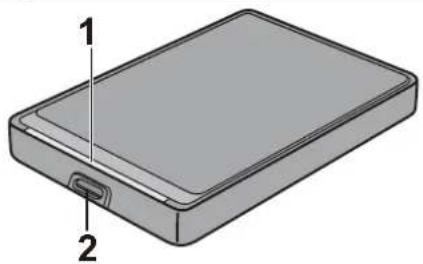
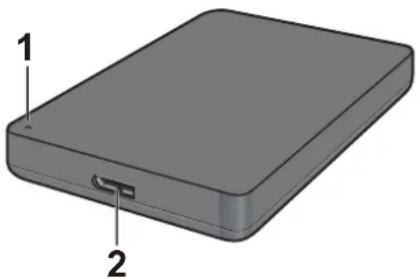
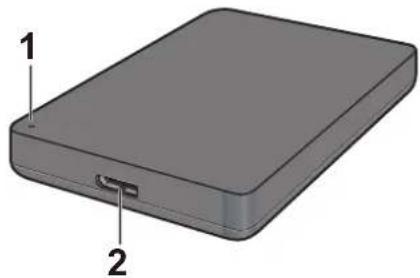
1 Power / Access LED
USB 3.0
Idle: Blue
Active: Blinking blue
USB 2.0
Idle: Green
Active: Blinking green
2 USB Connector
Specifications
Check Buffalo's website for information on the latest products and compatible models.
| Interface USB 3.0 | |
| Connector USB 3.0 Micro-B | |
| Transfer speed 5 Gbps maximum (USB 3.0) | *1 |
| External dimensions (excluding protruding parts) | HD-PCTU3, HD-PCU3: 77 x 114 x 14 mm HD-PCTU3/BB, /BW: 77 x 114 x 17 mm HD-PCTU3/GB, /GW: 77 x 114 x 19.5 mm |
| Power 5 V ± 5% | |
| Compatible OS | Windows 8 (32-bit and 64-bit) Windows 7 (32-bit and 64-bit) Windows Vista (32-bit and 64-bit) Windows XP (32-bit) OS X 10.8, 10.7, 10.6, 10.5, 10.4 (models with Intel Processor) |
*1 Connect the MiniStation to a USB 3.0 port for best transfer speeds. The MiniStation will function when connected to a USB 2.0 or USB 1.1 port, but data transfers will be slower.
WARNING:
This product and its components contain chemicals known to the State of California to cause cancer and birth defects, or reproductive harm. Wash hands after handling.
Diagrams
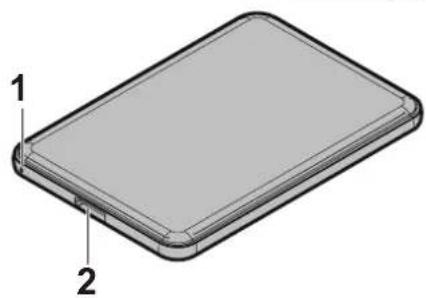
1 Power / Access LED
Idle: Blue
Active: Blinking blue
2 USB Connector
Specifications
Check Buffalo's website for information on the latest products and compatible models.
| Interface USB 2.0 | |
| Connector USB 2.0 Mini-B | |
| Transfer speed 480 Mbps maximum (USB 2.0) *1 | |
| External dimensions (excluding protruding parts) | HD-PCTU2, HD-PCU2: 77 x 114 x 14 mm HD-PCTU2/BB, HD-PCU2/BB: 77 x 114 x 17 mm |
| Power 5 V ± 5% | |
| Compatible OS | Windows 8 (32-bit and 64-bit) Windows 7 (32-bit and 64-bit) Windows Vista (32-bit and 64-bit) Windows XP (32-bit) OS X 10.8, 10.7, 10.6, 10.5, 10.4 (models with Intel Processor) |
*1 Connect the MiniStation to a USB 2.0 port for best transfer speeds. The MiniStation will function when connected to a USB 1.1 port, but data transfers will be slower.
WARNING:
This product and its components contain chemicals known to the State of California to cause cancer and birth defects, or reproductive harm. Wash hands after handling.
Recommended Usage
To avoid damage to data, never do any of the following while data is being accessed:
- unplug the cables
- turn off your computer
- put your computer into standby, hibernate, or sleep mode -log off, log on, or switch users
Never configure this unit as a destination for virtual memory.
The maximum size of a file on a FAT32 hard drive is 4 GB. To work with larger files, reformat the drive with NTFS or Mac OS extended.
Mac OS may not recognize this device at boot. If this happens, unplug the cable, then plug it again after a few seconds.
This unit supports hot-plugging.
You can plug or unplug the USB cable while the unit and your PC are on. However, never unplug the cable while data is being accessed. If you unplug the unit while the data is being accessed, your data may be damaged or lost.
Do not lean any object against this unit. It may cause the unit to malfunction.
If the unit is connected to a USB 2.0 or 1.1 plug, Windows will display a message that a high-speed USB device is connected to a non high-speed USB hub. Move the unit to a USB 3.0 port for best performance, or click [X] to continue.
You may hear some noise while the unit is working, especially while it's booting or being accessed. This is normal.
Disconnect this drive before reinstalling Mac OS.
Do not boot your operating system from this unit.
The first time you connect this unit, it may take about 20 seconds before the power/access LED turns on.
If you use this unit with multiple partitions, format each partition before use.
If your Windows computer will not boot while this unit is connected, then connect the unit to your computer after rebooting Windows. Also, refer to your computer's manual to change the BIOS setting to boot from an internal hard drive if you want to turn your computer on or off while this unit is connected.
Some computers may display a delayed write when they return from an energy-saving state. If this happens, unplug the unit before putting your computer into the energy-saving mode.
This unit drive may become hot during use.
This unit is designed to release heat through its case. The surface of the case may become quite hot in normal use. Even when the unit is off, the case may still be warm from standby current.
If the power/access LED does not turn off when you turn off your computer, unplug the USB cable from the drive.
Some computers do not support power saving mode.
Before using this unit with a Mac, reformat it with Mac OS Extended using the disk utility in Mac OS.
Dismounting the Unit
If your computer is turned on, please follow the procedure below to unplug the unit. If your computer is turned off, then it is always safe to unplug the unit. Unplugging the unit incorrectly can corrupt data. Please be careful.
For Windows
1 Click the icon or in the system tray. 2 When the menu opens, click the device name.

3 A message that indicates you can safely remove the unit will appear.
For Mac
1 Drag this unit's icon to the trash to dismount the drive. 2 It's now safe to unplug the unit from your Mac.
Troubleshooting
I can see the DriveStation or MiniStation in My Computer but I cannot access it. (Windows)
The drive may require formatting. Try using DiskFormatter2. Consult the manual for DiskFormatter2 for more help.
I cannot see the DriveStation or MiniStation.
Verify that the power LED is on. If it is not, then ensure that the power switch is in the on position. Check your cables! The DriveStation or MiniStation should be connected to your computer by a USB cable. Check that both ends are correctly plugged in.
Verify that the hard drive inside the DriveStation or MiniStation is spinning. This can be verified by placing your hand on the side of the case and feeling for a slight vibration.
Also, after the DriveStation or MiniStation has been powered on for 15 minutes or longer it will begin to get warm. If neither of the preceding tests verified that the hard drive is spinning, then please contact technical support for further assistance.
My backup program cannot save files to the DriveStation or MiniStation.
Reformat your DriveStation or MiniStation with NTFS or Mac OS Extended. FAT32 is limited to 4 GB size files.
User Manual for Hard Disk (RU)
HD-PCFU3
Figures
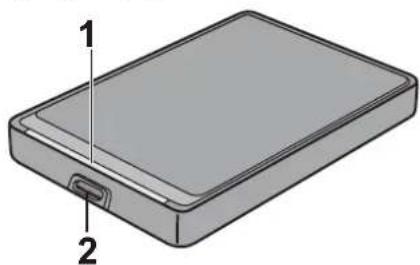
1 Power/Access LED
Inactive: Green
ACTIVE: BLINKING GREEN
2 USB CONNECTOR
SPECIFICATIONS
For the latest product information and compatible models, visit the Buffalo website.
| Иntерфейс USB 3.0 | |
| Разьем USB 3.0 Micro-B | |
| Скорость пereдачим Мамс. 5 Гит/c (USB 3.0) *1 | |
| ГабарNTы(за полоченem ВьICTупauошихочтей) | HD-PCFU3:76 x 115 x 11,5 MMHD-PCFU3/BB, /BW:76 x 115 x 14 MMHD-PCFU3/GB, /GW:76 x 115 x 19,5 MM |
| Питанne 5 B ± 5 % | |
| СовмостIMье OC | Windows 10 (32-и 64-pa3p.)Windows 8.1 (32-и 64-pa3p.)Windows 8 (32-и 64-pa3p.)Windows 7 (32-и 64-pa3p.)Windows Vista (32-и 64-pa3p.)Windows XP (32-pa3p.)OS X 10.6 полес подnev верси (modел с поцessорамnIntel) |
1 POWER/ACCESS INDICATOR
USB 3.0
INACTIVE: BLUE
ACTIVE: BLINKING BLUE
USB 2.0
INACTIVE: GREEN
ACTIVE: BLINKING GREEN
2 USB CONNECTOR
SPECIFICATIONS
For the latest product information and compatible models, visit the Buffalo website.
| Иntерфейс USB 3.0 | |
| Разьем USB 3.0 Micro-B | |
| Скорость пereдач Мамс. 5 Гит/c (USB 3.0) *1 | |
| ГабарNTы(за Исклочене_MьICTупалошихочten) | HD-PCTU3, HD-PCU3:77 x 114 x 14 MMHD-PCTU3/BB, /BW:77 x 114 x 17 MMHD-PCTU3/GB, /GW:77 x 114 x 19,5 MM |
| Питанne 5 B ± 5 % | |
| СовмecтимBLE OC | Windows 8 (32- n 64-pa3p.)Windows 7 (32- n 64-pa3p.)Windows Vista (32- n 64-pa3p.)Windows XP (32-pa3p.)OS X 10.8, 10.7, 10.6, 10.5, 10.4 (moideи с поцessорам Intel) |
1 POWER/ACCESS INDICATOR
2 USB port
Technical specifications
To obtain additional information about the latest products and compatible models, see the Buffalo company website.
| Иntерфейс USB 2.0 | |
| Разьем USB 2.0 Mini-B | |
| Скорость пereдач Мамс. 480 MбNT/c (USB 2.0) *1 | |
| ГабарNTы(за Исклоченem ВbICTурацхчаду) | HD-PCTU2, HD-PCU2:77 x 114 x 14 MMHD-PCTU2/BB, HD-PCU2/BB:77 x 114 x 17 MM |
| Питанne 5 B ± 5 % | |
| Совмecтимble OC | Windows 8 (32- n 64-pa3p.)Windows 7 (32- n 64-pa3p.)Windows Vista (32- n 64-pa3p.)Windows XP (32-pa3p.)OS X 10.8, 10.7, 10.6, 10.5, 10.4 (mojaши с пroducesсорами Intel) |
*1 垄已 3.0 2.0 1.1 1.1 1.1 1.1 1.1 1.1 1.1 1.1 1.1 1.1 1.1 1.1 1.1 1.1 1.1 1.1 1.1 1.1 1.1 1.1 1.1 1.1 1.1 1.1 1.1 1.
HD-PCTU3, HD-PCU3
DAIHON
1 daiergh
USB 3.0
Height
Chief:
USB 2.0
Shape: as shown:
Empty
2 USB
1 W LED
27nu:
207uay:wnwuw
2 USB
2a
Buffalo
| xiahuayuan USB 3.0 | |
| xiahuayuan USB 3.0 Micro-B | |
| xiahuayuan 5 Gbps (USB 3.0) *1 | |
| xiahuayuan (xxxxxx) | HD-PCFU3: 76 x 115 x 11.5 mm. HD-PCFU3/BB, /BW: 76 x 115 x 14 mm. HD-PCFU3/GB, /GW: 76 x 115 x 19.5 mm. |
| xiahuayuan 5 V ± 5% | |
| xiahuayuan 5 V ± 5% | Windows 10 (32 1000u64 100) Windows 8.1 (32 1000u64 100) Windows 8 (32 1000u64 100) Windows 7 (32 1000u64 100) Windows Vista (32 1000u64 100) Windows XP (32 1000) OS X 10.6 5.0 5.0 5.0 5.0 5.0 Intel Processor) |
*1 MiniStation USB 3.0
W
1 W LED
yio:
yuaay:wnsswun
2 USB
2ywn
| xiahuawei USB 3.0 | |
| xiahu USB 3.0 Micro-B | |
| xiahuawei xiahuawei 5 Gbps (USB 3.0) *1 | |
| xiahuawei xiahuawei (xiahuawei xiahuawei) | 79 x 115 x 8.8 mΩ. |
| xiahu 5 V ± 5% | |
| xiahuawei xiahuawei xiahuawei xiahuawei | Windows 10 (32 64 64 mΩ) Windows 8.1 (32 64 64 mΩ) Windows 8 (32 64 64 mΩ) Windows 7 (32 64 64 mΩ) Windows Vista (32 64 64 mΩ) Windows XP (32 64) OS X 10.5 x 5 GHz (Intel Processor) |
*1 MiniStation USB 3.0 and MiniStation
HD-PCTU3, HD-PCU3
W
1 W LED
USB 3.0
Interface:
USB 3.0
USB 2.0
Interface:
USB 2.0
2 USB
y
2ywn
| xiahuangwei USB 3.0 | |
| xinme USB 3.0 Micro-B | |
| xxxxxx5 Gbps (USB 3.0) *1 | |
| xxxxxx( "xxxxxx" ) | HD-PCTU3, HD-PCU3:77 x 114 x 14 mm.HD-PCTU3/BB, /BW:77 x 114 x 17 mm.HD-PCTU3/GB, /GW:77 x 114 x 19.5 mm. |
| 5 V ± 5% | |
| xxxxxx( "xxxxxx" ) | Windows 8 (32 64 mm)Windows 7 (32 64 mm)Windows Vista (32 64 mm)Windows XP (32 mm)OS X 10.8, 10.7, 10.6, 10.5, 10.4 (xxxxxx Intel Processor) |
*1 MiniStation USB 3.0 and MiniStation USB 2.0 are compatible with USB 1.1
HD-PCTU2, HD-PCU2
1 WLED uanwnnna-n-aaeav/naaynay
yio:
207uay:wnwsswun
2 USB
2a
Windows
1 ananannau nua tunn 2 1

3 3
Ma Mac
1 1 2 2auiu uunnnnnaaannnnaananaananaananaananaananaananaananaananaananaananaananaananaananaananaananaananaananaananaananaananaananaananaananaananaananaananaananaananaananaananaananaananaananaananaananaananaananaananaananaananaananaananaananaananaananaananaananaananaananaananaanara
nun
DriveStation MiniStation (Windows)
KuJiuu DriveStation u3a MiniStation
aal jlll lal Jg aal glll Buffalo 4s y
aill jlll l llll l llll lllllllllllllllllllllllllll
| USB 3.0 العربية | |
| USB 3.0 Micro-B العربية | |
| 1* (USB 3.0) جزيرة بانيت بधان مصéri | سيرة الحرفية |
| \( \text{ملا}\\ )8,8\times 115\times 79 \) | الإستعمال الحرفية(الإستعمال الحرفية) |
| %5 ± %5 | الإستعمال |
| \( (\text{ب}\\ )64\text{;} \) 32) Windows 10\( (\text{ب}\\ )64\text{;} \) 32) Windows 8.1\( (\text{ب}\\ )64\text{;} \) 32) Windows 8\( (\text{ب}\\ )64\text{;} \) 32) Windows 7\( (\text{ب}\\ )64\text{;} \) 32) Windows Vista\( (\text{ب}\\ )32)Windows XP(Intel)\( (\text{ب}\\ )32)Windows XP(Intel)\( (\text{ب}\\ )32)Windows XP(Intel) \) | 牀PGA牀PGA牀PGA牀PGA牀PGA牀PGA牀PGA牀PGA牀PGA牀PGA牀PGA牀PGA牀PGA牀PGA牀PGA牀PGA牀PGA牀PGA牀PGA牀PGA牀PGA牀PGA牀PGA牀PGA牀PGA牀PGA牀PGA牀PGA牀PGA牀PGA牀PGA牀PGA牀PGA牀PGA. OS X 10.5 |
USB USB 2.0 MiniStation USB 3.0 MiniStation
1.1
HD-PCU3 HD-PCTU3
C. l : y = - 4/3x + 1 l2 : y = 4/3x + 2
USB 3.0
SΔACD = 1/2 · AC · PD = 1/2 × CD × PD = CD.
iialj:
USB 2.0
jai:Jai
jaiy jaii
Claolgal
| USB 3.0 الإستعمال | |
| USB 3.0 Micro-B الإستعمال | |
| 1* (USB 3.0) | سيرة الحرفية |
| :HD-PCU3·HD-PCTU3 :HD-PCTU3/BB-/BW :HD-PCTU3/GB-/GW :HD-PCTU3/GB-/GW :HD-PCTU3/GB-/GW :HD-PCTU3/GB-/GW :HD-PCTU3/GB-/GW :HD-PCTU3/GB-/GW :HD-PCTU3/GB-/GW :HD-PCTU3/GB-/GW :HD-PCTU3/GB-/GW : HD-PCTU3/GB-/GW : HD-PCTU3/GB-/GW : HD-PCTU3/GB-/GW : HD-PCTU3/GB-/GW : HD-PCTU3/GB-/GW : HD-PCTU3/GB-/GW : HD-PCTU3/GB-/GW : HD-PCTU3/GB-/GW : HD-PCTU2/SSS : HD-PCTU2/SSS : HD-PCTU2/SSS : HD-PCTU2/SSS : HD-PCTU2/SSS : HD-PCTU2/SSS : HD-PCTU2/SSS : HD-PCTU2/SSS : HD-PCTU2/SSS : HD-PCTU2/SSS | |
| %5 ± 5% | الإستعمال |
| ( بب 64 و 32) ( بب 64 و 32) ( بب 64 و 32) ( بب 64 و 32) ( بب 64 و 32) ( بب 64 و 32) ( بب 64 و 32) ( بب 64 و 32) ( بب 64 و 32) ( بب 64 و 32) (BPZ) (الإستعمال) (الإستعمال) (الإستعمال) (ال,enGLISH) (USX) (Intel) | طامه الحرفicl الحرفicl |
HD-PCU2 HD-PCTU2
1
2 USB
NTFS
.Mac OS extended
- 11.
a
USB 1.1 USB 2.0
USB 3.0
Mac OS 1
52g10 1
Jusgill/abll 20 1 1 1
pssu 10000000000000000000000000000000000000000000000000
Windows
BIOI 1
j 1
aaii
a
e 1
My Computer] MiniStation DriveStation
(Windows
dckfornr2 .Diskfommer2
.MiniStation DriveStation
DriveStation 1111111111111111111111111111111111111111111111111111
. MiniStation DriveStation
FAT32 .Mac OS Extended NTFS MiniStation DriveStation
HD-PCFU3
P
1
:
jjSaa:Jaa
2 USB
C
| USB 3.0 | RJAP |
| USB 3.0 Micro-B | RJAP |
| USB 3.0) *1) | SIRIUS |
| :HD-PCFU3 :BD-LB-11,5 × 115 × 76 :HD-PCFU3/BB -/BW :BD-LB-14 × 115 × 76 :HD-PCFU3/GB -/GW :BD-LB-19,5 × 115 × 76 | LADAR (الله صَير نَزَن) (الله صَير نَزَن) |
| %5 ± 5 | TUNAN BRIEF |
| (€ 64, 32) Windows 10 (€ 64, 32) Windows 8.1 (€ 64, 32) Windows 8 (€ 64, 32) Windows 7 (€ 64, 32) Windows Vista (€ 64, 32) Windows XP (Intel HDH H3A H3A H3A H3A H3A H3A H3A H3A H3A H3A H3A H3A H3A H3A H3A H3A H3A H3A H3A H3A H3A H3A H3A H3A H3A H3A H3A H3A H3A H3A H3A H3A H3A H3A ) | SIRIUS |
MiniStation USB 3.0 MiniStation
J 1.1 USB 2.0
2 USB
Mac OS extended by Mac OS (disk utility) Mac 10
125
05
1 1
Windows

- 15
Safely remove USB Mass Storage Device - Drive(E:)


5:15PM
3 1
Mac
1.
My Computer My Computer
(Windows).
. MiniStation DriveStation
125 45 45
- fat32 Mac OS Extended NTFS MiniStation DriveStation
C
- HARD DRIVE USER MANUAL
- TABLE OF CONTENTS
- HARD DRIVE USER MANUAL (EN) 13
- USER MANUAL FOR HARD DISK DRIVE (RU) 65
- HARD DISK USER MANUAL (SC) 72
- SPECIFICATIONS
- HD-PUSU3
- DIAGRAMS
- WARNING
- 1 POWER / ACCESS LED
- 2 USB CONNECTOR
- RECOMMENDED USAGE
- DISMOUNTING THE UNIT
- FOR WINDOWS
- FOR MAC
- TROUBLESHOOTING
- I CAN SEE THE DRIVESTATION OR MINISTATION IN MY COMPUTER BUT I CANNOT ACCESS IT. (WINDOWS)
- I CANNOT SEE THE DRIVESTATION OR MINISTATION
- MY BACKUP PROGRAM CANNOT SAVE FILES TO THE DRIVESTATION OR MINISTATION
- USER MANUAL FOR HARD DISK (RU)
- HD-PCFU3
- FIGURES
- TECHNICAL SPECIFICATIONS
- HD-PCTU3, HD-PCU3
- DAIHON
- 2A
- W
- 2YWN
- HD-PCTU2, HD-PCU2
- WINDOWS
- MA MAC
- NUN
- DRIVESTATION MINISTATION (WINDOWS)
- KUJIUU DRIVESTATION U3A MINISTATION
- HD-PCU3 HD-PCTU3
- HD-PCU2 HD-PCTU2
- MINISTATION DRIVESTATION
Brand : BUFFALO
Model : MiniStation HDPCF2.0U3BD
Category : Hard Drive