HD-QLU3R5 - Hard Drive BUFFALO - Free user manual and instructions
Find the device manual for free HD-QLU3R5 BUFFALO in PDF.


Pick your language and provide your email: we'll send you a specifically translated version.
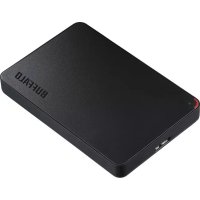
| Product type | External hard drive |
| Brand | Buffalo |
| Model | HD-QLU3R5 |
| Form factor | 3.5 inches |
| Interface | USB 3.0 (backward compatible with USB 2.0) |
| Dimensions (approx.) | 170 x 130 x 45 mm |
| Weight (approx.) | 1.0 kg |
| Power supply | External power adapter (included) |
| Main features | Data storage and backup; automatic backup software included |
| System compatibility | Windows, macOS |
| Maintenance and cleaning | Clean with a soft dry cloth; do not use liquid products |
| Security | No built-in hardware security function |
| Spare parts available | No (sealed product) |
| Repairability | Not user-repairable; contact customer service |
| Warranty | 2 years (manufacturer) |
Frequently Asked Questions - HD-QLU3R5 BUFFALO
What is the capacity of this hard drive?
The HD-QLU3R5 model is available in several capacities. Check the label on the product or the manual for the exact capacity.
Is it compatible with Mac?
Yes, the hard drive is compatible with Windows and macOS. It can be formatted in exFAT for use with both systems.
How to format the hard drive?
Connect the drive, open your system's disk management utility, select the drive, and format it in the desired format (NTFS for Windows, HFS+ for Mac).
Is the backup software provided?
Yes, Buffalo provides an automatic backup software with this drive. You can find it on the drive or the official website.
What to do if the drive is not recognized?
Check the USB cable and power supply. Try another USB port or another computer. If the problem persists, contact technical support.
Can I leave it plugged in permanently?
Yes, the drive can remain plugged in. It will enter sleep mode after a period of inactivity to save energy.
What is the transfer speed?
With USB 3.0, theoretical speed can reach 5 Gbit/s. In practice, it depends on the drive and system, often around 100-200 MB/s.
The drive makes noise, is this normal?
A slight rotation or clicking noise is normal. If the noise becomes loud or intermittent, it may indicate a malfunction.
How to clean the hard drive?
Use a soft dry cloth to wipe the surface. Avoid any liquid products that could damage the device.
Where to find the manual in French?
The manual is available for download on notice-facile.com or on Buffalo's official website. You can also request a translation via the form.
User questions about HD-QLU3R5 BUFFALO
0 question about this device. Answer the ones you know or ask your own.
Ask a new question about this device
No questions yet. Be the first to ask one.
Download the instructions for your Hard Drive in PDF format for free! Find your manual HD-QLU3R5 - BUFFALO and take your electronic device back in hand. On this page are published all the documents necessary for the use of your device. HD-QLU3R5 by BUFFALO.
USER MANUAL HD-QLU3R5 BUFFALO
Manual assistant
Powered by Anthropic
Waiting for your message
Product information
Brand : BUFFALO
Model : HD-QLU3R5
Category : Hard Drive