PANASONIC DMC-GM1LEG - Camera

DMC-GM1LEG - Camera PANASONIC - Free user manual and instructions

Find the device manual for free DMC-GM1LEG PANASONIC in PDF.

📄 36 pages English EN Download 💬 AI Question 10 questions ⚙️ Specs
Notice PANASONIC DMC-GM1LEG - page 1
Pick your language and provide your email: we'll send you a specifically translated version.
Product type Digital interchangeable-lens hybrid camera
Brand and model Panasonic DMC-GM1LEG (DMC-GM1 body + H-X015 lens)
Lens mount Micro Four Thirds
Included lens LEICA DG SUMMILUX 15 mm F1.7 ASPH. (H-X015)
Focal length 15 mm (35 mm equivalent: 30 mm)
Maximum aperture F1.7
Minimum aperture F16
Optical construction 9 elements in 7 groups (3 aspherical lenses, Nano coating)
Filter diameter 46 mm
Lens dimensions Ø 57.5 mm × 36 mm
Total weight (with battery and card) Approx. 319 g
Power supply Rechargeable battery (not specified, compatible with included charger)
Power consumption (recording) 2.2 W
Power consumption (playback) 1.5 W
Recordable number of photos (CIPA) Approx. 240 photos
Video recording time (AVCHD FHD) Approx. 90 minutes
Built-in flash Range: 0.5 m to 9.4 m (ISO AUTO)
Included accessories Lens, front/rear lens caps, decoration ring, lens hood, hood cap, body cap
Maintenance and cleaning Use a soft, dry cloth. Clean the lens electrical contacts carefully.
Safety Do not expose to humidity. Avoid shocks. Use only recommended accessories.
Spare parts and repairability Parts available from Panasonic after-sales service. Repair by an authorized technician recommended.

Frequently Asked Questions - DMC-GM1LEG PANASONIC

How to install the lens hood on the H-X015 lens?
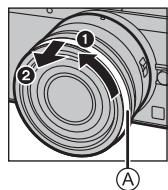
First remove the front lens cap. Remove the decoration ring by turning it in the direction of the arrow. Align the mounting notch of the lens hood with the mark on the lens end, then turn until it clicks. Align the hood stop position with the lens notch.
How to use the lens aperture ring?
Turn the aperture ring to set the aperture value. In Aperture Priority (A) or Manual (M) mode, the ring is active. If the ring is set to [A], the camera controls the aperture.
How to switch between autofocus and manual focus?
Use the [AF/MF] switch on the lens. If set to [MF] or if the camera is in MF mode, manual focus is activated. Turn the focus ring to adjust.
What is the range of the built-in flash?
The flash range is approximately 0.5 m to 9.4 m when the ISO setting is AUTO.
How many photos can I take with one battery?
Approximately 240 photos according to CIPA standard in Program AE mode with the H-X015 lens.
Can I record videos continuously? What is the maximum duration?
Yes, in AVCHD FHD or MP4 FHD, you can record up to approximately 90 minutes in total, but the continuous duration per sequence is about 45 minutes.
How to clean the lens?
Use a soft, dry cloth for the lenses. For the electrical contacts, use a dry cotton swab. Avoid solvents.
What to do if the camera does not turn on?
Check that the battery is charged and inserted correctly. If the problem persists, contact Panasonic technical support.
Can I use other lenses on this body?
Yes, the DMC-GM1 body uses the Micro Four Thirds mount, compatible with all lenses of this standard.
How to install the decoration ring?
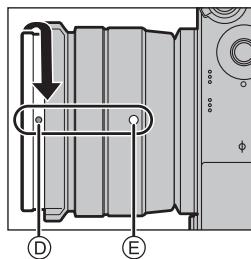
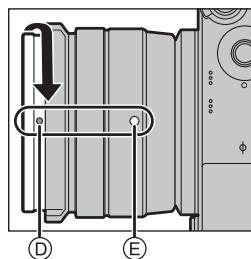
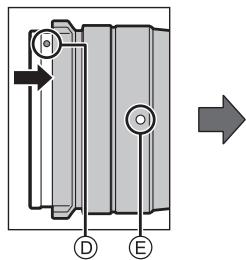
Remove the front lens cap. Align the mounting position of the ring at approximately 90° from the mounting mark, then turn to align the marks.

User questions about DMC-GM1LEG PANASONIC

0 question about this device. Answer the ones you know or ask your own.

Ask a new question about this device

The email remains private: it is only used to notify you if someone responds to your question.

No questions yet. Be the first to ask one.

Download the instructions for your Camera in PDF format for free! Find your manual DMC-GM1LEG - PANASONIC and take your electronic device back in hand. On this page are published all the documents necessary for the use of your device. DMC-GM1LEG by PANASONIC.

USER MANUAL DMC-GM1LEG PANASONIC

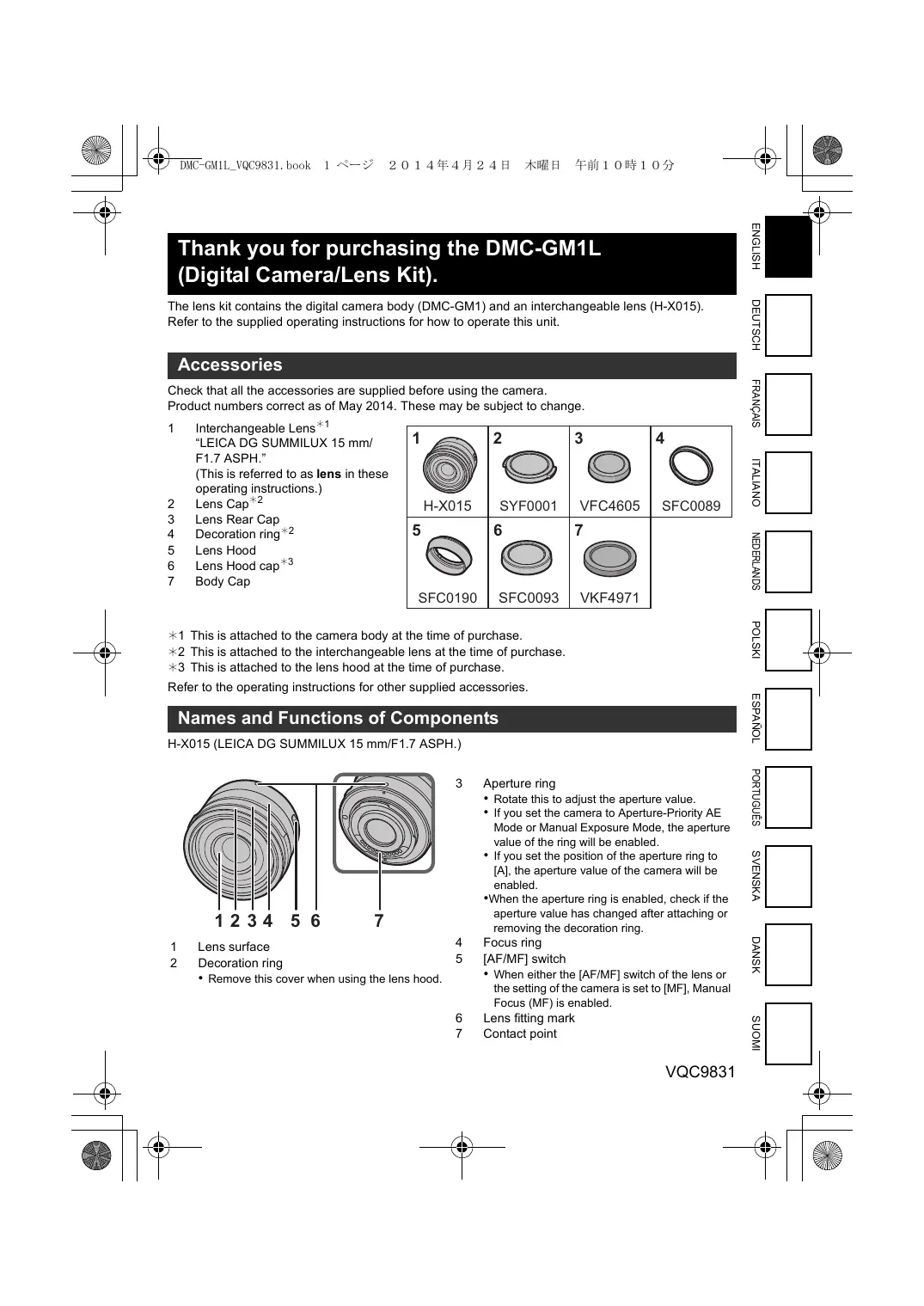
Thank you for purchasing the DMC-GM1L (Digital Camera/Lens Kit).

The lens kit contains the digital camera body (DMC-GM1) and an interchangeable lens (H-X015).

Refer to the supplied operating instructions for how to operate this unit.

Accessories

Check that all the accessories are supplied before using the camera.

Product numbers correct as of May 2014. These may be subject to change.

1 Interchangeable Lens ^1 "LEICA DG SUMMILUX 15 mm/ F1.7 ASPH."
(This is referred to as lens in these operating instructions.)
2 Lens Cap ^
2
3 Lens Rear Cap
4 Decoration ring ^2
5 Lens Hood
6 Lens Hood cap ^
3
7 Body Cap

1PANASONIC DMC-GM1LEG - Accessories - 1H-X0152PANASONIC DMC-GM1LEG - Accessories - 2SYF00013PANASONIC DMC-GM1LEG - Accessories - 3VFC46054PANASONIC DMC-GM1LEG - Accessories - 4SFC0089
5PANASONIC DMC-GM1LEG - Accessories - 5SFC01906PANASONIC DMC-GM1LEG - Accessories - 6SFC00937PANASONIC DMC-GM1LEG - Accessories - 7VKF4971

*1 This is attached to the camera body at the time of purchase.
*2 This is attached to the interchangeable lens at the time of purchase.
*3 This is attached to the lens hood at the time of purchase.

Refer to the operating instructions for other supplied accessories.

Names and Functions of Components

H-X015 (LEICA DG SUMMILUX 15 mm/F1.7 ASPH.)

PANASONIC DMC-GM1LEG - Names and Functions of Components - 1

text_image 1 2 3 4 5 6 7

1 Lens surface

2 Decoration ring

- Remove this cover when using the lens hood.

3 Aperture ring

  • Rotate this to adjust the aperture value.
  • If you set the camera to Aperture-Priority AE Mode or Manual Exposure Mode, the aperture value of the ring will be enabled.
  • If you set the position of the aperture ring to [A], the aperture value of the camera will be enabled.
  • When the aperture ring is enabled, check if the aperture value has changed after attaching or removing the decoration ring.

4 Focus ring

5 [AF/MF] switch

- When either the [AF/MF] switch of the lens or the setting of the camera is set to [MF], Manual Focus (MF) is enabled.

6 Lens fitting mark

7 Contact point

Attaching the Lens Hood

■ Interchangeable Lens (H-X015)

- Before attaching the lens hood, make sure to remove the lens cap. The lens hood cannot be attached unless you remove the lens cap.

1 Rotate the decoration ring Ⓐ in the direction of the arrow to remove it.
PANASONIC DMC-GM1LEG - ■ Interchangeable Lens (H-X015) - 1

text_image Diagram of a camera lens with labeled parts and directional arrows indicating rotation or movement

2 Align the mounting index Ⓑ on the lens hood with the mark on the tip of the lens.
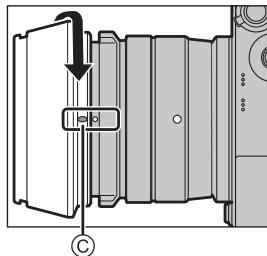
3 Rotate the lens hood in the direction of the arrow until it clicks into place, and align the stop position © on the lens hood with the index on the tip of the lens.

2
PANASONIC DMC-GM1LEG - ■ Interchangeable Lens (H-X015) - 2

text_image Technical diagram showing a mechanical component with labeled parts and directional arrows indicating flow or movement.

3
PANASONIC DMC-GM1LEG - ■ Interchangeable Lens (H-X015) - 3

text_image Technical diagram showing a mechanical component with labeled parts and an arrow indicating direction, marked with 'C' at the bottom.

■ Attaching the decoration ring

- Before attaching the decoration ring, make sure to remove the lens cap.

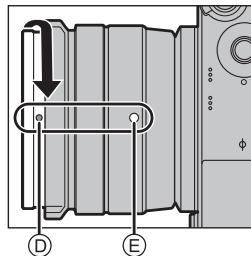
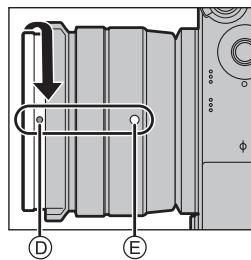
1 Align the mounting position Ⓓ on the decoration ring with a position approximately 90° away from the lens fitting mark Ⓔ to fit the decoration ring into place.
2 Rotate the decoration ring in the direction of the arrow to align the mounting position Ⓓ on the decoration ring with the lens fitting mark Ⓔ.

1
PANASONIC DMC-GM1LEG - ■ Attaching the decoration ring - 1

text_image Diagram of a mechanical or electrical component with labeled parts D and E, showing directional arrows and internal structure.

2
PANASONIC DMC-GM1LEG - ■ Attaching the decoration ring - 2

text_image Technical diagram showing a mechanical assembly with labeled parts D and E, and directional arrows indicating movement or force.

Specifications

Power Consumption:When the interchangeable lens (H-X015) is used
2.2 W (When recording)
1.5 W (When playing back)
Minimum IlluminationApprox. 5 lx (when i-Low light is used, the shutter speed is 1/25th of a second)
FlashFlash range: Approx. 0.5 m (1.6 feet) to 9.4 m (31 feet) (When [ISO AUTO] is set)
MassApprox. 319 g/0.70 lb [with the interchangeable lens (H-X015), card and battery]

Refer to the operating instructions for other specifications.

Interchangeable Lens (H-X015) "LEICA DG SUMMILUX 15 mm/F1.7 ASPH."

Focal lengthf=15 mm(35 mm film camera equivalent: 30 mm)
Aperture type7 diaphragm blades/circular aperture diaphragm
Maximum apertureF1.7
Minimum aperture valueF16
Lens construction9 elements in 7 groups (3 aspherical lenses)
Nano surface coatingYes
In focus distance0.2 m (0.66 feet) to (from the focus distance reference line)
Maximum image magnification0.1 × (35 mm film camera equivalent: 0.2 × )
Optical Image StabiliserNot available
[AF/MF] switchAvailable (Switching AF/MF)
Mount“Micro Four Thirds Mount”
Angle of view72°
Filter diameter46 mm
Max. diameterApprox. 57.5 mm (2.3 inch)
Overall lengthApprox. 36 mm (1.4 inch)(from the tip of the lens to the base side of the lens mount)
MassApprox. 115 g (0.25 lb)
  • LEICA is a registered trademark of Leica Microsystems IR GmbH. SUMMILUX is a registered trademark of Leica Camera AG. The LEICA DG lenses are manufactured using measurement instruments and quality assurance systems that have been certified by Leica Camera AG based on the company's quality standards.

■ Approximate operating time and number of recordable pictures

When the interchangeable lens (H-X015) is used

Recording still pictures (By CIPA standard in Programme AE Mode)
• Number of recordable pictures: Approx. 240 pictures• Recording time: Approx. 120 min
Recording motion pictures
[AVCHD](Recording with picture quality set to [FHD/50i])• Recordable time: Approx. 90 min
• Actual recordable time: Approx. 45 min
[MP4](Recording with picture quality set to [FHD/25p])• Recordable time: Approx. 90 min
• Actual recordable time: Approx. 45 min
Playback
• Playback time: Approx. 160 min
text_image Diagram of a camera lens with labeled parts and directional arrows indicating components
text_image Technical diagram showing a mechanical assembly with labeled component B and directional arrow

3
PANASONIC DMC-GM1LEG - ■ Approximate operating time and number of recordable pictures - 1

text_image Technical diagram showing a mechanical component with an arrow indicating direction and a labeled point C.
text_image Technical diagram showing a mechanical assembly with labeled components D and E, and directional arrows indicating flow or movement.

2
PANASONIC DMC-GM1LEG - ■ Approximate operating time and number of recordable pictures - 2

text_image Technical diagram showing a mechanical component with labeled parts D and E, and directional arrow indicating rotation or movement.

Spécifications

text_image Diagram of a camera lens with labeled parts and directional arrows indicating components
text_image Technical diagram showing a mechanical or electrical component with labeled parts and directional arrows indicating flow or movement.

3
PANASONIC DMC-GM1LEG - ■ Approximate operating time and number of recordable pictures - 3

text_image Technical diagram showing a mechanical component with a labeled arrow and circular symbol, likely indicating assembly or assembly instructions.
text_image Diagram of a mechanical or electrical component with labeled parts D and E, showing directional arrows indicating flow or movement.

2
PANASONIC DMC-GM1LEG - ■ Approximate operating time and number of recordable pictures - 4

text_image Technical diagram showing a mechanical component with labeled parts D and E, and an arrow indicating direction.

Specifiche

text_image Diagram of a camera lens with numbered parts and labeled point A
text_image Technical diagram showing a mechanical or electrical component with labeled parts and directional arrows

3
PANASONIC DMC-GM1LEG - ■ Approximate operating time and number of recordable pictures - 5

text_image Technical diagram showing a mechanical component with labeled parts and an arrow indicating direction, marked with 'C' at the bottom.
text_image Technical diagram showing a mechanical assembly with labeled components D and E, and directional arrows indicating flow or movement.

2
PANASONIC DMC-GM1LEG - ■ Approximate operating time and number of recordable pictures - 6

text_image Technical diagram showing a mechanical component with labeled parts D and E, and an arrow indicating direction.

Specifications

text_image Diagram of a camera lens with labeled parts and directional arrows indicating components
text_image Technical diagram showing a mechanical or electrical component with labeled parts and directional arrows indicating flow or movement.

3
PANASONIC DMC-GM1LEG - ■ Approximate operating time and number of recordable pictures - 7

text_image Technical diagram showing a mechanical assembly with labeled component 'C' and directional arrow indicating motion or force.
text_image Technical diagram showing a mechanical or electrical component with labeled parts D and E, and directional arrows indicating flow or movement.

2
PANASONIC DMC-GM1LEG - ■ Approximate operating time and number of recordable pictures - 8

text_image Technical diagram showing a mechanical component with labeled parts D and E, and an arrow indicating direction.

Dane techniczne

text_image Diagram of a camera lens with labeled parts and directional arrows indicating components
text_image Technical diagram showing a mechanical or electrical component with labeled parts and directional arrows indicating flow or movement.

3
PANASONIC DMC-GM1LEG - ■ Approximate operating time and number of recordable pictures - 9

text_image Technical diagram showing a mechanical component with an arrow indicating direction and a labeled point C.
text_image Technical diagram showing a mechanical or electrical component with labeled parts D and E, and directional arrow indicating flow or movement.

2
PANASONIC DMC-GM1LEG - ■ Approximate operating time and number of recordable pictures - 10

text_image Technical diagram showing a mechanical component with labeled parts D and E, and directional arrows indicating movement or force.

Especificaciones

text_image Diagram of a camera lens with labeled parts and directional arrows indicating components
text_image Diagram showing a mechanical or electrical component with labeled parts and directional arrows indicating flow or movement.

3
PANASONIC DMC-GM1LEG - ■ Approximate operating time and number of recordable pictures - 11

text_image Technical diagram showing a mechanical assembly with labeled components and directional arrow indicating motion or force.
text_image Diagram of a mechanical or electrical component with labeled parts D and E, showing directional arrows indicating flow or movement.

2
PANASONIC DMC-GM1LEG - ■ Approximate operating time and number of recordable pictures - 12

text_image Technical diagram showing a mechanical assembly with labeled parts D and E, and an arrow indicating direction.

Especificações

text_image Diagram of a camera lens with labeled parts and directional arrows indicating components
text_image Technical diagram showing a mechanical or electrical component with directional arrows and labeled point B

3
PANASONIC DMC-GM1LEG - ■ Approximate operating time and number of recordable pictures - 13

text_image Technical diagram showing a mechanical component with an arrow indicating direction and a labeled point C.
text_image Technical diagram showing a mechanical assembly with labeled components D and E, and directional arrows indicating flow or movement.

2
PANASONIC DMC-GM1LEG - ■ Approximate operating time and number of recordable pictures - 14

text_image Technical diagram showing a mechanical component with labeled parts D and E, and directional arrows indicating movement or force.

Egenskaper

text_image Diagram of a camera lens with labeled parts and directional arrows indicating motion or movement
text_image Technical diagram showing a mechanical or electrical component with labeled parts and directional arrows indicating flow or movement.

3
PANASONIC DMC-GM1LEG - ■ Approximate operating time and number of recordable pictures - 15

text_image Technical diagram showing a mechanical component with labeled parts and an arrow indicating direction or force.
text_image Technical diagram showing a mechanical assembly with labeled components D and E, and directional arrows indicating flow or movement.

2
PANASONIC DMC-GM1LEG - ■ Approximate operating time and number of recordable pictures - 16

text_image Technical diagram showing a mechanical assembly with labeled components D and E, and directional arrows indicating movement or force.

Specifikationer

text_image Diagram of a camera lens with numbered parts and labeled section A
text_image Technical diagram showing a mechanical component with labeled parts and directional arrows indicating flow or movement.

3
PANASONIC DMC-GM1LEG - ■ Approximate operating time and number of recordable pictures - 17

text_image Technical diagram showing a mechanical component with labeled parts and an arrow indicating direction, marked with 'C' at the bottom.
text_image Technical diagram showing a mechanical assembly with labeled components D and E, and directional arrows indicating flow or movement.

2
PANASONIC DMC-GM1LEG - ■ Approximate operating time and number of recordable pictures - 18

text_image Technical diagram showing a mechanical assembly with labeled components D and E, and directional arrows indicating movement or force.

Tekniset tiedot

Manual assistant
Powered by Anthropic
Waiting for your message
Product information

Brand : PANASONIC

Model : DMC-GM1LEG

Category : Camera