CRD 8996 - Freezer SEVERIN - Free user manual and instructions
Find the device manual for free CRD 8996 SEVERIN in PDF.



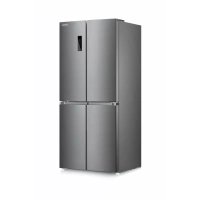
| Type of product | Combined freezer and refrigerator |
| Brand | Severin |
| Model | CRD 8996 |
| Dimensions (H x W x D) | 1810 x 785 x 716 mm |
| Weight | 103 kg |
| Total volume | 492 litres |
| Refrigerator volume | 316 litres |
| Freezer volume (4 stars) | 88 litres |
| TransitZone volume (variable) | 88 litres |
| Energy efficiency class | F |
| Annual consumption | 376 kWh/year |
| Climate class | SN, N, ST (10-38°C) |
| Freezing capacity | 4 kg/24h |
| Autonomy in case of power failure | 10 hours |
| Defrost type | Automatic (refrigerator), manual (freezer) |
| Refrigerant | Isobutane (R600a) |
| Noise level | 42 dB(A) |
| Interior lighting | LED (class F) |
| Special functions | Fast Cooling, Fast Freeze, Vacation, Smart, Multi-Fresh |
| Key lock | Yes, automatic |
| Manufacturer warranty | 2 years (10 years for inverter compressor) |
| After-sales service France | SEVERIN France Sarl, 03 88 47 62 08 |
Frequently Asked Questions - CRD 8996 SEVERIN
User questions about CRD 8996 SEVERIN
0 question about this device. Answer the ones you know or ask your own.
Ask a new question about this device
Download the instructions for your Freezer in PDF format for free! Find your manual CRD 8996 - SEVERIN and take your electronic device back in hand. On this page are published all the documents necessary for the use of your device. CRD 8996 by SEVERIN.
USER MANUAL CRD 8996 SEVERIN
GB Instructions for use Fridge/freezer combination 17
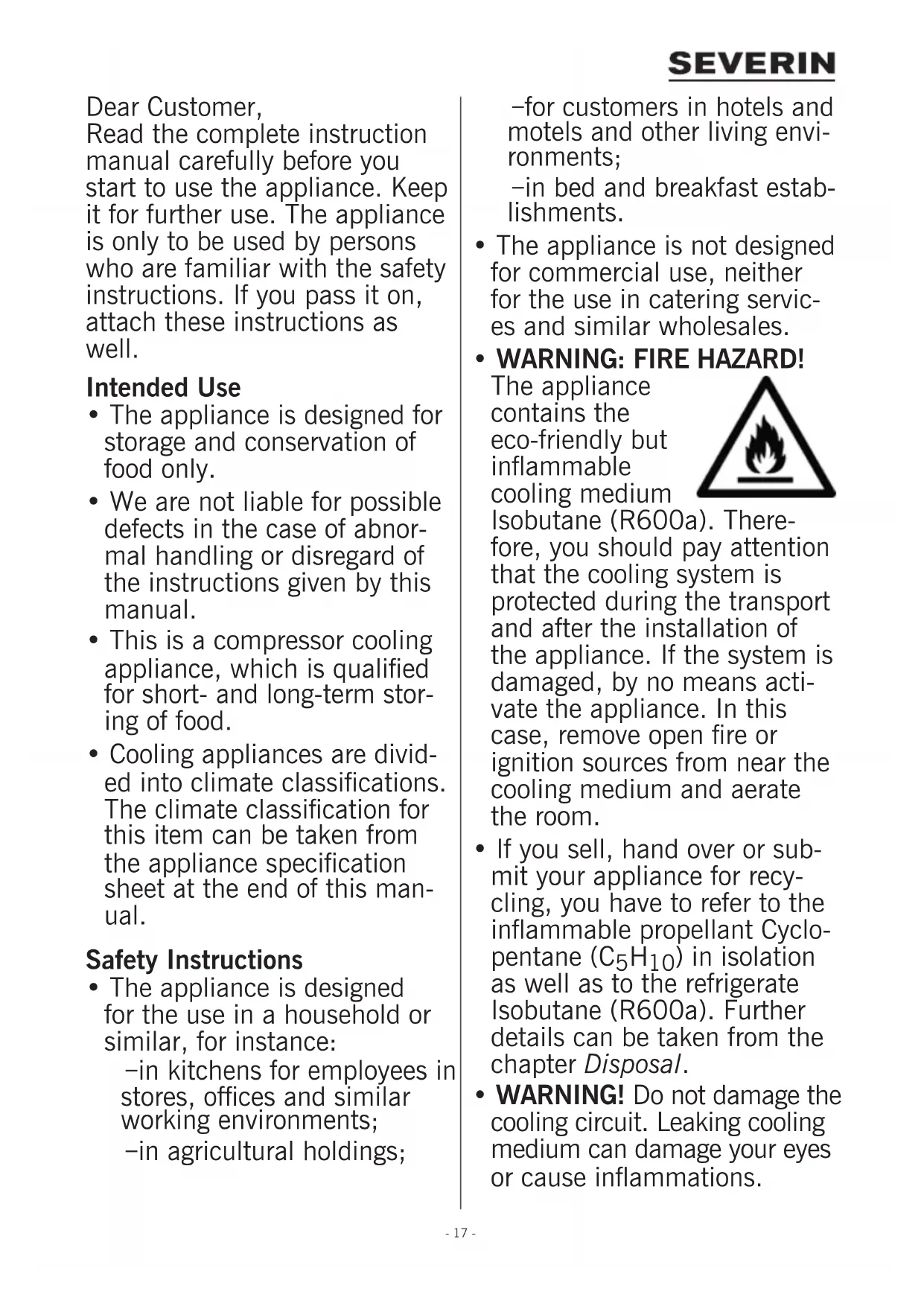
- WARNING: BRANDGEFAHR!
Dear Customer, Read the complete instruction manual carefully before you start to use the appliance. Keep it for further use. The appliance is only to be used by persons who are familiar with the safety instructions. If you pass it on, attach these instructions as well.
Intended Use
- The appliance is designed for storage and conservation of food only.
- We are not liable for possible defects in the case of abnormal handling or disregard of the instructions given by this manual.
- This is a compressor cooling appliance, which is qualified for short- and long-term storing of food.
- Cooling appliances are divided into climate classifications. The climate classification for this item can be taken from the appliance specification sheet at the end of this manual.
Safety Instructions
- The appliance is designed for the use in a household or similar, for instance:
- in kitchens for employees in stores, offices and similar working environments;
-
in agricultural holdings;
-
for customers in hotels and motels and other living environments;
-
in bed and breakfast establishments.
-
The appliance is not designed for commercial use, neither for the use in catering services and similar wholesales.
- WARNING: FIRE HAZARD!
The appliance contains the eco-friendly but inflammable cooling medium Isobutane (R600a). Therefore, you should pay attention that the cooling system is protected during the transport and after the installation of the appliance. If the system is damaged, by no means activate the appliance. In this case, remove open fire or ignition sources from near the cooling medium and aerate the room.
- If you sell, hand over or submit your appliance for recycling, you have to refer to the inflammable propellant Cyclopentane (C5H10) in isolation as well as to the refrigerate Isobutane (R600a). Further details can be taken from the chapter Disposal.
-
WARNING! Do not damage the cooling circuit. Leaking cooling medium can damage your eyes or cause inflammations.
-
WARNING! Do not block the air inlets of the appliance panelling or the design with built-in furniture. A sufficient circulation of air has to be ensured.
- WARNING! Do not use any electric appliances (e.g., ice machines, etc.) that are not described in the manual.
- When positioning the appliance, ensure the supply cord is not trapped or damaged.
- Do not locate portable multiple socket-outlets or portable power supplies at the rear oft he appliance.
- Before plugging it in, check for possible damage during shipping in the power cord or in the appliance itself. If this is the case, the appliance must not be put into operation.
- In this appliance, explosive substances such as an aerosol container with inflammable propellant cannot be stored.
- If reparations or interventions on the appliance are necessary, they have to be executed by an authorized repair service, in order to follow the safety regulations and to prevent endangerment. This also applies to the replacement of the power plug.
- The appliance can be used by children of 8 years or older as well as persons with reduced
physical, sensory or mental abilities or lack of experience and/or knowledge, but only if they are supervised or instructed relating to the safe use of the appliance and thus understand the resulting dangers.
Children aged from 3 to 8 years are allowed to load and unload refrigerating appliances.
Children are not allowed to play with the appliance.
- Cleaning and maintenance must not be executed by children without supervision.
- Tepid water with an addition of washing-up liquid is suitable for regular maintenance. Further details of the cleaning can be taken from the chapter Cleaning and Defrosting (Maintenance).
- WARNING! Do not take off the cover of the LED interior lighting. In case of a defect of the LED-lamp call the after-sales service (see appendix).
- To avoid contamination of food respect the following instructions:
- Opening the door for long periods can cause a significant increase of the temperature in the compartments of the appliance.
- Clean regularly surfaces that can come in contact with food and accessible drainage systems.
- Store raw meat and fish in suitable containers in the refrigerating appliance so that it is not in contact with or drip onto other food.
- If the refrigerating appliance is left empty for long periods switch off, defrost, clean, dry and leave the door open to prevent mould developing within the appliance.
- There are different zones of low temperature in the refrigerator. The warmest zone is at the top of the door in the refrigerator. The coldest zone is on the back wall at the bottom of the refrigerator.
- For this reason, arrange the food in the following way:
-On the trays in the refrigerator (from top to bottom):
Pastries, ready dishes, dairy appliances, sausages, meat and fish.
-In the VeggiBox: Vegetables, salad and fruits.
-In the door (from top to bottom):Butter,cheese, eggs, tubes, small bottles, big bottles,milk and juice bags.
- In order to prevent damage to persons or property, the appliance can only be transported in a box, and it requires two persons to be installed.
- Caution! Keep your children away from packaging material - choking hazard!
- Regularly check the power plug for damages. If this is the case, do not use the appliance.
- Do not use electric appliances on the storage space to prevent fire hazards. Also, do not put liquid containers on the appliance, so that possible leaking liquids do not interfere with the electronics and the isolation.
- Store high-proof alcoholic substances only tightly sealed and upright.
- Do not store glass bottles with freezable liquids or carbonated liquids in the freezer of the appliance, since they could burst while freezing.
- Do not consume expired food. This could lead to food poisoning. Do not refreeze already defrosted groceries.
- Do not misuse any shelves, compartments, doors, etc., as a tread or for leaning on.
- Do not handle open fire or ignition sources in the interior space of the appliance.
- Pull the power plug:
- in case of disturbances during the operation;
- before every cleaning;
- while working on the appliance.
- Do not pull the power cord; always grab the power plug for this purpose.
- We reserve technical changes.
Configuration
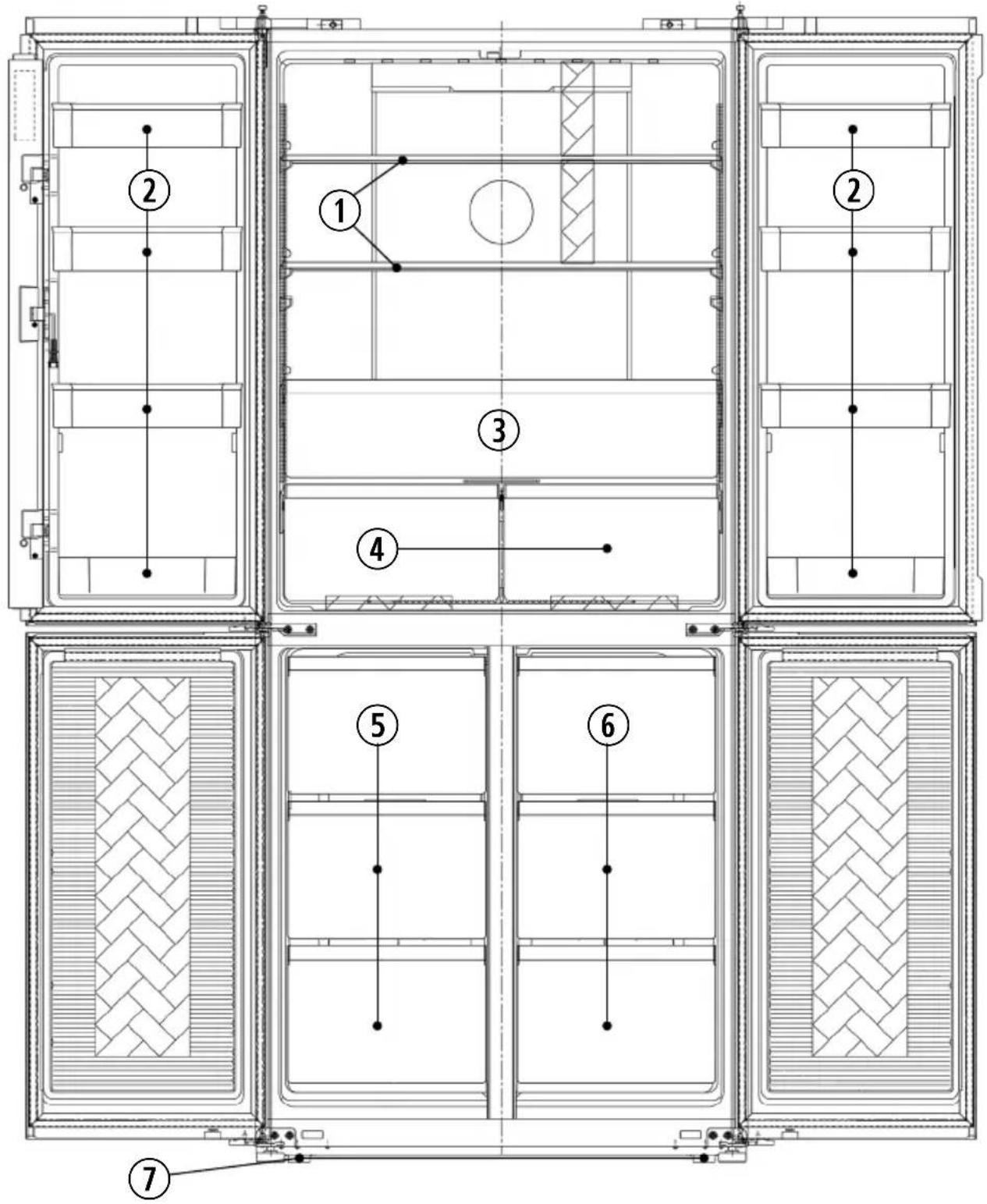
| 1 Cold store glass shelves 5 „TransitZone“ boxes (c) can be switched between chill/freeze) | ||
| 2 Door storage compartments 6 Freeze boxes | ||
| 3 ZeroBox 7 Adjustable screw feet | ||
| 4 VeggiBoxes |
Transport of the appliance
- During the transport, you have to secure all loose parts in and on the appliance, in order to prevent damage.
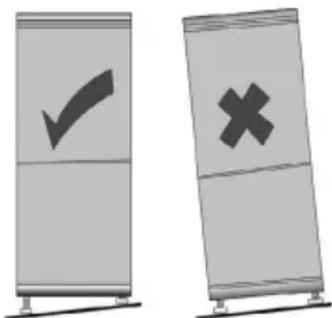
- The appliance should not be transported in a vertical position and at the same time not tilted over more than 30 degrees.
After each Transport
- Wait 30 minutes after the installation, before you connect the appliance to the mains.
- If the appliance was transported with a tilt of more than 30 degrees, wait 4 hours before you connect the appliance to the mains.
Before the initial operation
- Remove the protective sheets and all packaging material incl. the transport securing of the storage spaces and of the trays from the appliance.
- Dispose the packaging professionally.
- You might notice a slight 'new smell' when you start the appliance for the first time. It goes away once the appliance begins to cool.
- Clean the interior with tepid water with the addition of washing-up liquid. Clean the equipment separately with rinsing water, not in the dishwasher.
- Before you fill the appliance with food, let it work for 24 hours, so that the target temperature can be reached.
Installation of the appliance
- The appliance should be installed in a dry and well-aired room.
The appliance can be operated at a humidity of max. 70% . - The surrounding temperature, at which the appliance can be operated, can be taken from the appliance specification sheet at the end of this manual.
- Do not install the appliance outdoors.
- Bear in mind that you can pull the power plug anytime.
- Protect the appliance from direct insolation. It should not be installed near heat sources (stove, heater, etc.). If this, however, cannot be avoided, you should put isolation between the heat source and the appliance.
- You must not imbed the appliance in a cabinet. The installation of the fridge directly under a board or a cabinet is disallowed.
- The unevenness of the floor can be compensated with the two vertically adjustable screw-in feet in the front, so that safe stability is attained.
Installation measures
If the appliance is placed sideways on a wall, you will leave a lateral gap of at least 60~mm so that the doors of the appliance can open in a 90-degree angle.
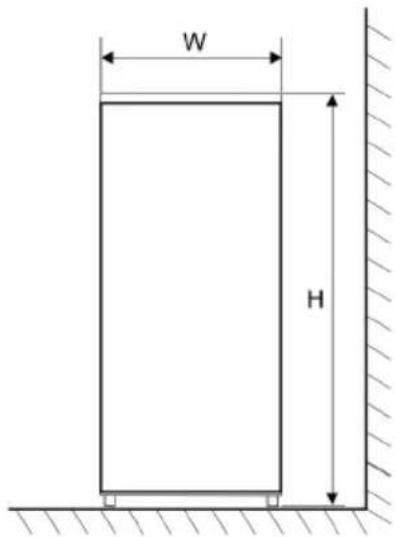
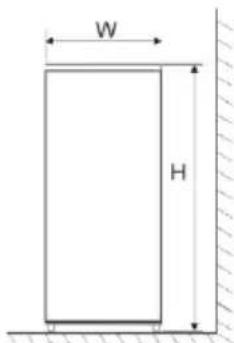
Fig. 1
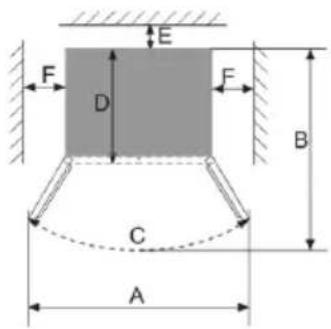
Fig. 2
| Width (W) De*depth (D) Height (H) | ||||
| 785 mm 716 mm 1810 mm | ||||
| A B C E F | ||||
| 1270 mm | 1060 mm | 125° +/- 5 50 | - 60 mm 1 | 00 mm |
Ventilation
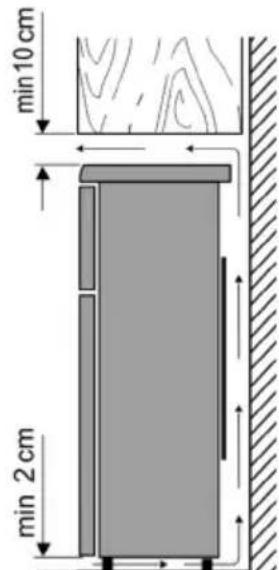
The air warmed behind the appliance needs to circulate freely. For this reason, the circulation of air cannot be compromised.
Caution! Do not cover possible existing ventilation openings in the back area of the top cover plate!
Connection
- Before you connect the appliance, you have to make sure that itself and the power plug do not show any transport damages.
- Connect the appliance only to a shockproof outlet. The mains voltage has to correspond to the one stated on the tool identification plate.
- The appliance complies with the guidelines that are obligatory for CE marking.
- Do not connect the appliance to an inverter
- The power plug should not touch the backside, in order to avoid possible vibration noise.
- The appliance can be put into operation by plugging the mains plug into the point.
- A complete switching-off only occurs by pulling the mains plug.
Controls and Display
The control is carried out by push buttons under the display on the outside of the cold storage door. If the refrigerator doors are closed and no button is touched within 3 minutes, the display illumination turns off.
- The inverter symbol always lights up as long as the compressor is operating.
Key lock
The device is equipped with an automatic key lock. To change the settings, first press the button for three seconds. If no changes are made to the display for three minutes, the key lock is reactivated.
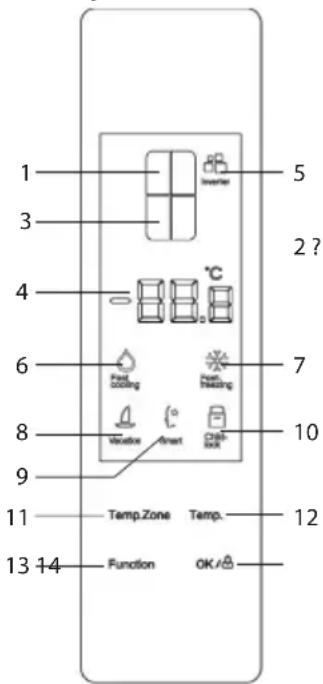
| 1 | Display for Temperature zone Fridge | |
| 2 | Temperature | zone Transit-Boxes |
| 3 | Temperature | zone Freezer |
| 4 | Temperature | |
| 5 | Inverter | |
| 6 | FastCooling mode | |
| 7 | FastFreeze mode | |
| 8 | Vacation mode | |
| 9 | Smart mode | (Energy Saving) |
| 10 | Key lock | |
| 11 | Button for selection | Temperature zone |
| 12 | Temperature | |
| 13 | Function | |
| 14 | OK / Key lock | |
ZeroBox
The ZeroBox serves as the optimal storage for meat and fish.
VeggiBox
The VeggiBox serves as the optimal storage for fruits and vegetables.
TransitZone
The "TransitZone" boxes can be used either as a cooling compartment, as a 0^ compartment or as a freezer compartment.
Set the temperature in the "TransitZone" boxes Press the "TempZone" button. When the display for the "TransitZone" boxes flashes, every tap on "Temp" changes the temperature by one degree between -18^ and 5^ . Tap on 5^ once more during configuration, OF lights up and the cooling for this piece of equipment is switched off.
Regulate the Temperature in the Cooling Room
Tap the button 'TempZone'. If the display for the cooling temperature blinks, then every tap on 'Temp' changes the temperature by one degree between 2^ and 8^ . If you tap again at the setting of 8^ , then 'OF' illuminates and the cooling for this part of the appliance is turned off.
Regulate the Temperature in the Freezer
Tap on the button 'TempZone'. If the display for the freezer temperature blinks, then every tap on 'Temp' changes the temperature by one degree between -24^ and -16^ .
Special Features
Tap if necessary several times on 'Function' and subsequently on 'OK', in order to activate the following special features. To deactivate a special feature, tap the 'Function' button until the symbol of the desired function gets illuminated. Then, hit 'OK'. The symbol lighting goes out.
Fast Cooling
This setting fixes the cold store temperature at 2^ . This temperature can no longer be changed until the function is disabled.
Fast Freezing
This setting fixes the freezer temperature for 26 hours at -32^ . This function can only be selected for the freezer boxes on the right side of the device. This temperature cannot be changed until the function is deactivated. After 26 hours, the appliance will freeze again at the preset temperature.
Vacation
This setting fixes the cooling temperature at 14^ , and it cannot be changed until the function is deactivated. The freezer temperature remains unaffected.
After 5 seconds without further input, the blinking stops, and the respective function will be taken over.
SMART
This setting fixes the cold store temperature at 5^ , the temperature in the "TransitZone" to 7^ and the temperature in the freezer boxes (right) to -18^ . These temperatures cannot be changed until the function is deactivated. After 5 seconds without further input, the blinking stops, and the respective function will be taken over.
Special Functional Features
Multi-Fresh function
The device is equipped with a Multi-Fresh function. On account of the maintenance-free active carbon filter, food stays noticeably fresher for longer. The formation of unpleasant odours and bacteria is reduced.
Memory Preservation in the Case of Power Failure
Every configuration will be preserved in the case of a separation from the mains supply and will come into operation again when the mains supply is re-established.
Delayed Restart after Mains Failure
So as to protect the appliance from damages, it cannot be turned on again immediately for a period of 5 minutes after a short separation from the mains supply. Wait a few minutes until the appliance starts working again.
Alarm in Case of open refrigerator doors
If the refrigerator doors (top) stay open longer than 3 minutes, then a warning signal will go off. Close the doors or tap on any button, in order to stop the alarm. If the doors stay open, however, then the alarm occurs again after 3 minutes.
Error Symbols
If 'E0', 'E1', 'E2', 'EH', 'EC', 'EF', 'EE' or other abnormal displays appear, then there is something wrong with the appliance. If so, contact our after-sales service.
Interior Lighting
Do not take off the cover of the interior lighting. The appliance is equipped with high quality, durable LED-lighting. If the light is inoperative, call our after-sales service.
Freezer drawers
The freezer drawers should always be kept closed so that the food does not defrost.
Thereby, the formation of ice and frost accretion is reduced. Therefore, make sure that the door is only open for withdrawal of food or rather for filling the freezer.
Freezing/Storing of Food
Drawers freezer:
- The freezer is designed for the freezing of food, for the long-term storage of frozen food as well as for the appliance ion of ice cubes.
- Fresh food should be frozen to the core as quickly as possible, so that the nutritional value, the vitamins, etc. do not get lost. For this reason, put the food in one or two rows in the freezer.
- Do not bring them into contact with already frozen food.
- Do not exceed the freezing capacity per day! The respective value for the maximum freezing capacity can be taken from the appliance specification sheet at the end of the manual.
- To fast freeze, choose either the special feature Fast Freezing or set the lowest possible temperature (-24^) . After 24 hours, manually set the normal temperature again (-18^) .
- The freezing time shortens if the food to be frozen is divided into small portions.
- Store the frozen food in the appliance only packaged. You can use uncoloured plastic sheets/bags or aluminium foil as packaging material. Remove the air from the packaging before freezing and check for airtightness. Provide every packaging with a label with the content, date of freezing and date of expiry on it.
- Do not freeze carbonated liquids, warm foods or liquids in a glass container or bottle.
- Defrost frozen appliances in the refrigerator. Foods keep their taste when they are defrosted slowly, and the emitted cooling energy from these appliances can be used
to maintain the intended temperature in the refrigerator.
- If the appliance is turned off for a longer period of time, e.g., because of a mains failure, leave the drawers closed. Thereby, a more significant loss of cooling energy can be avoided. The maximum storage time during malfunction can be taken from the appliance specification sheet at the end of the manual. Because of the higher interior temperature, the storage time for food is shortened.
Data for expiry dates of frozen food are indicated in the chart per month.
| 2·6 | 4·8 | 8·12 |
Do not store the frozen food longer than the given time in the freezer. Pay attention to the expiry date of the frozen food indicated by producer.
Refrigerator:
- Store the food only packaged or covered in the refrigerator, in order to sustain the flavour and the freshness. Especially foods with a strong smell or prone to absorbing smell (cheese, fish, butter, among others) have to be stored separately.
- At first, set an average cooling temperature. If the cooling is too strong, set a higher temperature and if the cooling is too weak, set a lower temperature.
If frost is built upon the back wall, then the cause of this could be that the door was opened too long, warm dishes were in the appliance or the temperature was set too low.
- Warm foods have to be cooled down to room temperature before they can be stored in the appliance.
- Make sure that the door is closed correctly and that it is not blocked by cooled food.
Ice Cube Production
There is an ice cube maker for making ice cubes. Place the ice cube tray in the ice cube maker. Pour drinking water through the filling opening until the tray is filled to 3/4 . Insert
the ice cube maker into the Freezer. When using the Fast Freezing function, the freezing process takes about one hour.
By turning the knob to the right, the ice cube tray can be turned. The ice cubes are dissolved and can then be removed or left in the ice cube maker for storage. If the ice cubes cannot be removed, let them thaw briefly and turn the tray back and forth a few times. Clean the ice maker regularly with water and a little detergent.
Cleaning and Defrosting (Maintenance)
Cleaning
- Always pull the mains plug before cleaning.
- Do not pour water into the appliance.
- Tepid water with a bit of washing-up liquid is suitable for the regular maintenance. In order to avoid an unpleasant smell in the cooling room, a cleaning of the latter once a month is recommended.
- Clean the equipment separately with rinsing water, not in the dishwasher.
- Do not use aggressive, abrasive or alcoholic detergents.
After cleaning it with clear water, wipe the surface and carefully dry it off. Subsequently, plug the mains plug with dry hands. - In order to save energy and maintain the efficiency, you should clean the condenser (on the backside) and the compressor at least twice a year with a broom or vacuum cleaner.
- The rating label in the interior of the appliance cannot be damaged or even removed while cleaning.
Defrosting
The appliance does not have to be defrosted, just cleaned. The evaporator is in the back wall. Therefore, the back walls in the cooling room can get covered with frost. Whenever the compressor is not operating, the frost can melt. The occurring water is guided through a hose system into a bowl on the compressor, where it is vaporised by the occurring heat.
Tips for Energy Saving
- For the installation of the appliance, choose a cool, dry and well-aired room.
-
Protect the appliance from direct insolation. It should not be installed near heat sources (stove, heater etc.). If this cannot be avoided, some sort of isolation between heat source and appliance has to be used.
-
Don't cover the ventilation openings and grid. Provide enough circulation of air on the backside of the appliance.
- Let warm food cool down before you store it in the fridge.
- Do not leave the door open too long when withdrawing or putting food inside. Otherwise, the formation of ice in the interior will be accelerated.
- Do not set the temperature lower than necessary. More details on temperature settings can be taken from the chapter 'Controls and Display'.
Operation Noises
There might be some typical operation noises when the appliance is turned on. These are:
- Noise of the electric motor is arising from the working compressor. When the compressor starts to operate, then the noises get slightly louder for a short time.
- Noises in the tubes of the circulation of the refrigerant.
Disposal
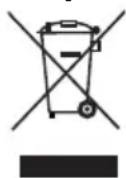
Appliances that are marked with this symbol have to be disposed of separately from household rubbish. These appliances contain valuable resources that can be recycled. A correct waste disposal protects the
environment and the health of those around you. To get informed about it, either defer to your municipal administration or the retailer.
Pull the mains plug out of the socket and disconnect it from the appliance before getting rid of it.
- The cooling medium Isobutane (R600a) and the propellant in the isolation Cyclopentane (C5H10) are inflammable substances,
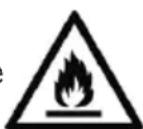
thus, need to be appropriately disposed of.
- Make sure the tubes of the cooling circuit don't get damaged before the proper disposal.
Warranty
Severin grants you a manufacturer's warranty of two years starting from the date of purchase. The warranty for the inverter motor is 10 years for appliances with inverter technology. During the two-year period, we eliminate all defects which are noticeably based on material or fabrication defects and substantially affect the function, free of charge. Further claims are excluded. The following is excluded from the warranty: Damages that result from non-observation of the instruction manual, improper use or normal abrasion, also delicate parts, e.g., glass, plastic or light bulbs. The warranty expires in the case of an intervention that is not authorized by us. If a repair is necessary, call and write an e-mail to our after-sales service. The contact details can be taken from the appendix of the manual. The legal warranty laws against the vendor and possible vendor warranties stay untouched.
Details for After-Sales Service
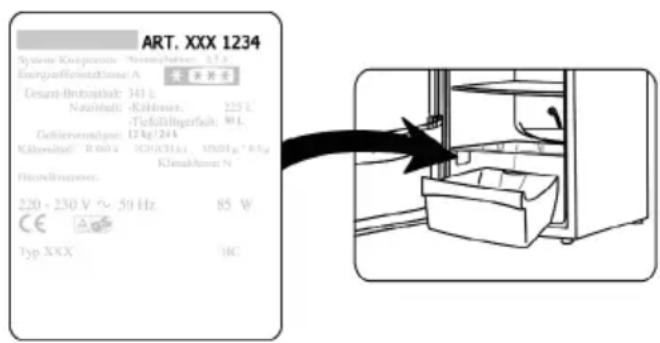
If a repair is necessary, please contact the service hotline directly with an explanation of the defect. Before you do that, write down the article number from the rating label on the appliance (see figure), since this is needed for the smooth processing of your request.
Malfunction Removal
Subsequently, there is a table with possible malfunctions and recovery methods. Check if the recovery methods can repair the malfunctions. If this is not the case, then the appliance has to be disconnected from the mains supply, and the after-sales service has to be contacted.
| Fault Possible reason | and rectification |
| The appliance is not working. | • Power cut. • The main fuse has dropped out. • The fuse in the wall socket is not working. Check this by plugging another appliance into the same point. |
| The noises are too loud (if the normal operation noises change). | • Does the device have a solid stand? • Does the running cooling unit set adjoining furniture or objects into vibration? • Do objects positioned on the top of the appliance vibrate? |
| The left refrigerator door cannot be closed. | • The door lip is folded out. • Fold the door lip into the correct position. |
Appliance specification sheet
| Model identifier CRD 8996 | ||||||
| Type of refrigerating appliance: | ||||||
| Low-noise appliance: No Design type: Free-standing | ||||||
| Wine storage appliance: No Other refrigerating appliance: Yes | ||||||
| Overall dimensions (H ×W ×D in mm) 1810 × 785 × 716 | ||||||
| Total volume (in l) 492 | ||||||
| EEI 122 | ||||||
| Energy efficiency class F | ||||||
| Annual energy consumption (in kWh/a)* 376 | ||||||
| Airborne acoustical noise emission class D | ||||||
| Airborne acoustical noise emissions (in dB[A] re 1pW) | 42 | |||||
| Climate class | SN, N, ST | |||||
| Ambient temperature (in °C) | 10 - 38 | |||||
| Storage time in case of power failure (in h) | 10 | |||||
| Weight (in kg) | 103 | |||||
| Winter setting | No | |||||
| Compartment Parameters: | ||||||
| Type | Volume (in l) | Recommended temperature (in°C) | Freezing capacity (kg/24h) | Defrosting type A=auto M = manual | Fast freezing facility | |
| Fresh food | 316 | 4 | - | A | ||
| 4-star | 88 | -18 | 4 | A | Yes | |
| Compartment with variable temperature | Fresh food | 88 | 4 | - | A | - |
| 4-star com-partment | -18 | 4 | No | |||
| Light source parameters: | ||||||
| Type of light source | LED | |||||
| Energy efficiency class F | ||||||
| Electric data See rating label | ||||||
*) The actual consumption depends on the use and the location of the appliance.
Fast Freezing (Congélation rapide)
WAARSCHUWING: BRANDGGEVAAR!
Multi-fresh-function
After varje transport
Vanta 30 minute after installationen innan du ansluter apparaten till elnätet.
- Om apparaten transporterades med en lutting på mer øn 30 grader ske du vanta 4 timmar innan du ansluter apparaten till elnatet.
Fast Freezing (Snabbfrys)
Den harinstallingen fixerar frystemperaturen vid -32^ i 26 timmar. Denna Funktion kan endast valjas for frysladorna paenhetens hogra sida. Temperaturen kan inte andras forran fonctionen inaktiveras. Efter 26 timmar andras frystemperaturen till den forinstallda temperaturen.
Vacation (Semester)
1 Angel Kanchev, 5th floor
1000 Sofia, Bulgaria
Tel.: +359 2 973 11 31, 973 55 33
Fax:+35929449649
E-Mail: vihra.koleva@pirita.bg
Croatia
Koracell d.o.o.
Donje Svetice 40
26 Oaktree Business Park
Trim Co., Meath
Tel.: 046 94 83100
Fax: 046 94 83663
Web: www.bluestone.ie
Italia
ASSISTENZA POST-VENDITA
NUMERO VERDE 800224155
E-Mail: assistenza@severinitalia.it
Indonesia
PT. Setai Modem Elektronik
Email: info@severin.co.id
Web: www.severin.co.id
Jakarta
Komp. Glodok Plaza Blok F No. 9, JI. Pinangsia Raya,
Jakarta Barat
02165911888/0216592889
Medan
JI. Apel No. 88 Kom. Cemara Asri
0616620186/0616625836
Surabaya
Pergudangan Mutiara Margo Mulyo Indah,
Blok DC No. 2
Telp: (031) 749 1012, (031) 749 1016
Banjarmasin
Pergudangan Sumber Baru Jin A. Yani KM 17.9 Gudang
B 15, Gambut
05116730101
Tangerang
JI. Industri Raya III Blok AD No. 3, Cikupa
0215902219-21
Cirebon
Dr.Waleed Maraga commercial center, Level 1
Khalda, Amman Zip code: 11953
Tel.: +962 65346429
Fax:+96265341706
Mob Jordan: +962 797426108
Kuwait
Mohammed Abdulrahman Al Bahar
Al Bahar Building P.O.Box 148
Safat 13002 Kuwait
Tel.: +965 4810855
Latvia
SIA GTCL BALTIC
Piedrujas iela 7
LV-Riga 1073
Tel.: +371 29119989
Fax:+37167297769
Lebanon
Khoury Home
7th Floor, Cité Dora 3 Building, Dora
P.O.Box 70611
Antelias, Lebanon
Tel.: +961 1 244200
Fax:+9661253535
E-Mail: info@khouryhome.com
Internet: www.khouryhome.com
Lithuania
UAB Topo Grupe
Savanoriu PR. 206A
50193 Kaunas, Lithuania
Tel.: +370 660 00200
E-Mail: uzakymai@topocentras.It
Luxembourg
Ser-Tec
A.A.K & Partners L.L.C.
P.O Box:-1650, Muttrah
Postal Code - 114
Sultanate of Oman
Tel.: +968 24834470
Fax:+96824835186
E-Mail: aakpllcc@gmail.com
Peru
SEVERIN PERU / Comercial Rebecca S.R.L.
208 Circunvalacion del Golf Avenue
Office 301-A Los Inkas Prime Tower II
Santiago de Surco, Lima - Peru
Tel.: 0051 12729370
E-mail: severinperu@gmail.com
Philippines
Mezzanine 1, South Center Tower
2206 Venture Street, Madrigal Business Park
Alabang, Muntinlupa City
Tel.: 8093441
E-Mail: severinconsumercare@colombophils.com.ph
Polska
Severin Polska Sp.z o.o.
6 Tagore Drive, #03-04
Singapore 787623
Tel.: +65 6455 0005
Fax: +65 6455 4010
Web: www.beste.com.sg
E-Mail: info@beste.com.sg
Slovenia
SEVTIS d.o.o.
Smartinska 130
1000 Ljubljana
Tel.: +386 1542 1927
Fax:+38615421926
Slowak Republic
BVZ Commerce s.r.o.
Parkerova 618
CZ 25067 Klecany
Tel.: +420 233 55 94 74
Fax:+420233558159
South Africa
AL&CD Ashley (PTY) Ltd.
3rd Floor, Grove Exchange
Grove Avenue
Claremont
South Africa
7708
Tel: +27 21 674 0294
Fax:+27216740295
Web: http://www.alcdashley.co.za
Mail: service@alcdashley.co.za
Svenska
El & Digital Service AB
Folkungagatan 144
11630 Stockholm
Tel.: +46 8 845180
www.eldigital.se
E-Mail: info@eldigital.se
Switzerland
SPC Electronics AG
Mövenstrasse 12
CH-9015 St.Gallen
Tel.: +41 71 227 99 99
E-Mail: service@spcag.ch
www.spc.ch
Thailand
Verasu Ltd. part.
83/7 Wireless Rd., Lumpini,
Patumwan, Bangkok 10330
Tel.: +662 254 81 008
E-Mail: askverasu@verasu.com
Tunisie
GEI
54, rue du Mercure
Zone Industrielle 2013-BEN AROUS
TUNISIE
Ukrayina
Service for Modern Electronics LLC
Sim'i Khokhlovkyh Str.8
4119 Kiev
Tel.: +380442476734
E-Mail: info1@photoservice.com.ua
United Kingdom
Homespares Centres Limited
Firwood Industrial Estate
Thicketford Road
Bolton, BL2 3TR
Tel.: 01204 558160
Fax: 01204 558169
E-Mail: office@homespares.co.uk
Web: wwwhomespares.co.uk
Vietnam
BRAND PARTNER
CTY TNHH DOI TAC NHAN HIEU
2/7 NGUYENTHANHY
DA KAO WARD, DISTRICT 1
HO CHI MINH CITY, VIETNAM
Tel.: +84 862 899 6tun8
Fax:+84862899649
E-Mail: info@brandpartner.vn
Stand: 01/2021