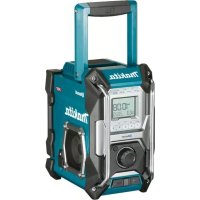
MR002GZ - Radio MAKITA - Free user manual and instructions
Find the device manual for free MR002GZ MAKITA in PDF.



| Product type | Job site radio |
| Brand | Makita |
| Model | MR002GZ |
| Dimensions (L x W x H) | 278 x 170 x 298 mm |
| Weight (without battery) | 4.3 kg |
| Mains power | 12V DC 2.5A adapter (center positive pin) |
| Battery power | Makita slide battery CXT (10.8-12V max), LXT (14.4V / 18V), XGT (36-40V max) |
| Backup batteries | 2 UM-3 batteries (AA size) |
| FM frequency range | 87.50 - 108 MHz (0.05 MHz step) |
| AM frequency range | 522 - 1710 kHz (9 kHz step) |
| Bluetooth | Version 5.0, profiles A2DP/AVRCP, optimal range 10 m |
| Audio output power (max) | 5W x 2 (under 36V) |
| Speakers | 2 x 3.5 inches, 8 ohms |
| Ports | 3.5mm AUX IN jack, USB port (5V, 2.4A), DC IN jack |
| Main features | AM/FM radio with RDS, Bluetooth streaming, radio and buzzer alarm, snooze, sleep timer, USB charging, LCD display, presets (5 stations per band) |
| Maintenance | Clean with a dry cloth. Do not use solvents. Do not wash with water. |
| Safety | Follow instructions: do not expose to rain, use only recommended batteries, disconnect before moving, etc. |
| Repairability | Repairs should be carried out by an authorized Makita service center. |
| General information | Manual available in multiple languages. Battery weight not included. |
Frequently Asked Questions - MR002GZ MAKITA
User questions about MR002GZ MAKITA
0 question about this device. Answer the ones you know or ask your own.
Ask a new question about this device
Download the instructions for your Radio in PDF format for free! Find your manual MR002GZ - MAKITA and take your electronic device back in hand. On this page are published all the documents necessary for the use of your device. MR002GZ by MAKITA.
USER MANUAL MR002GZ MAKITA
(Original Instruction)
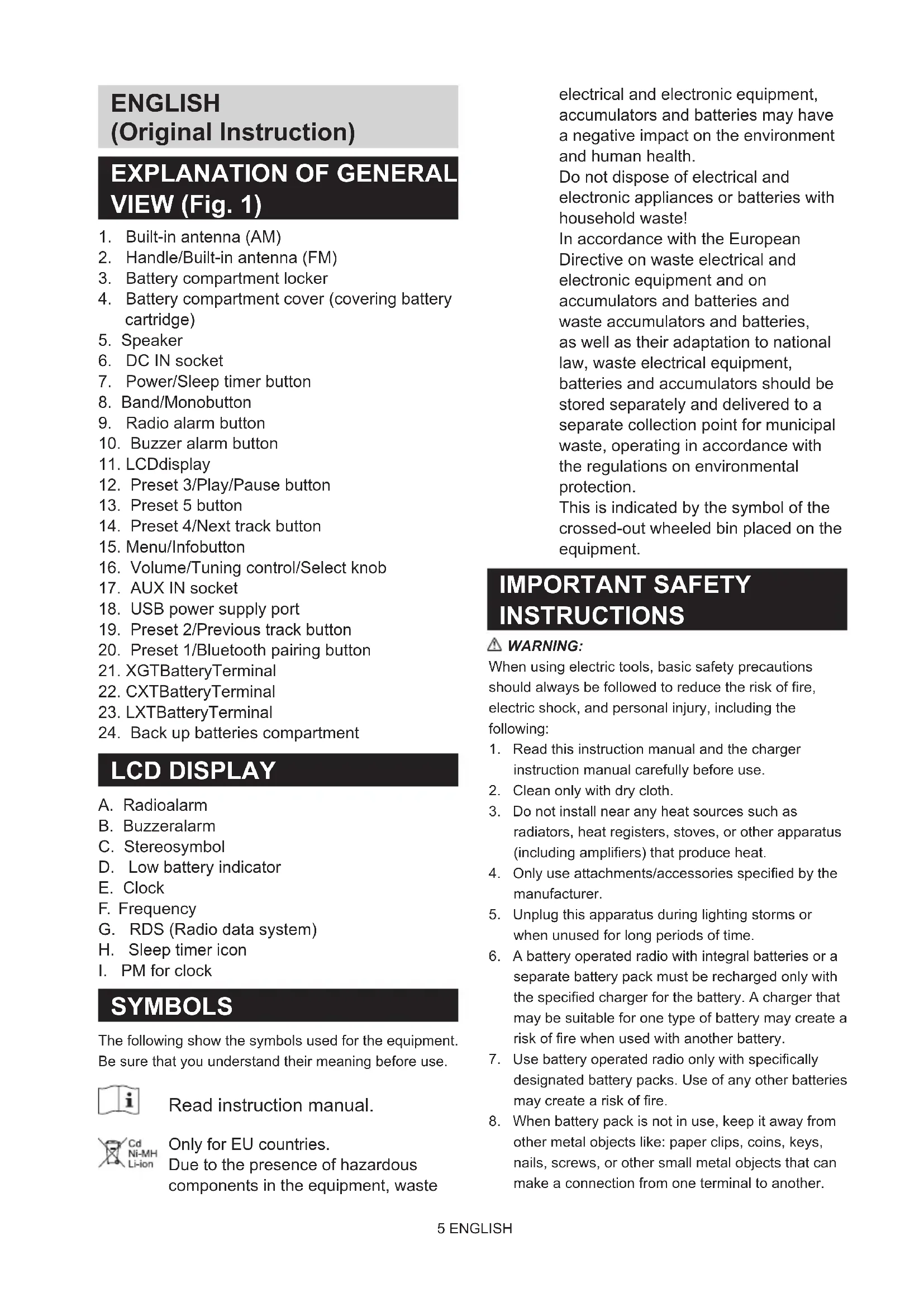
EXPLANATION OF GENERAL VIEW (Fig. 1)
- Built-in antenna (AM)
- Handle/Built-in antenna (FM)
- Battery compartment locker
- Battery compartment cover (covering battery cartridge)
- Speaker
- DC IN socket
- Power/Sleep timer button
- Band/Monobutton
- Radio alarm button
- Buzzer alarm button
- LCDdisplay
- Preset 3/Play/Pause button
- Preset 5 button
- Preset 4/Next track button
- Menu/Infobutton
- Volume/Tuning control/Select knob
- AUX IN socket
- USB power supply port
- Preset 2/Previous track button
- Preset 1/Bluetooth pairing button
- XGTBatteryTerminal
- CXTBatteryTerminal
- LXTBatteryTerminal
- Back up batteries compartment
LCD DISPLAY
A. Radioalarm
B. Buzzeralarm
C. Stereosymbol
D. Low battery indicator
E. Clock
F. Frequency
G. RDS (Radio data system)
H. Sleep timer icon
I. PM for clock
SYMBOLS
The following show the symbols used for the equipment. Be sure that you understand their meaning before use.

Read instruction manual.
Only for EU countries. Due to the presence of hazardous components in the equipment, waste
electrical and electronic equipment, accumulators and batteries may have a negative impact on the environment and human health.
Do not dispose of electrical and electronic appliances or batteries with household waste!
In accordance with the European Directive on waste electrical and electronic equipment and on accumulators and batteries and waste accumulators and batteries, as well as their adaptation to national law, waste electrical equipment, batteries and accumulators should be stored separately and delivered to a separate collection point for municipal waste, operating in accordance with the regulations on environmental protection.
This is indicated by the symbol of the crossed-out wheeled bin placed on the equipment.
IMPORTANT SAFETY INSTRUCTIONS
WARNING:
When using electric tools, basic safety precautions should always be followed to reduce the risk of fire, electric shock, and personal injury, including the following:
- Read this instruction manual and the charger instruction manual carefully before use.
- Clean only with dry cloth.
- Do not install near any heat sources such as radiators, heat registers, stoves, or other apparatus (including amplifiers) that produce heat.
- Only use attachments/accessories specified by the manufacturer.
- Unplug this apparatus during lighting storms or when unused for long periods of time.
- A battery operated radio with integral batteries or a separate battery pack must be recharged only with the specified charger for the battery. A charger that may be suitable for one type of battery may create a risk of fire when used with another battery.
- Use battery operated radio only with specifically designated battery packs. Use of any other batteries may create a risk of fire.
- When battery pack is not in use, keep it away from other metal objects like: paper clips, coins, keys, nails, screws, or other small metal objects that can make a connection from one terminal to another.
Shorting the battery terminals together may cause sparks, burns, or a fire.
9. Avoid body contact with grounded surfaces such as pipes, radiators, ranges and refrigerators. There is an increased risk of electric shock if your body is grounded.
10. Under abusive conditions, liquid may be ejected from the battery; avoid contact. If contact accidentally occurs, flush with water. If liquid contacts eyes, additionally seek medical help. Liquid ejected from the battery may cause irritation or burns.
11. Do not use a battery pack or tool that is damaged or modified. Damaged or modified batteries may exhibit unpredictable behaviour resulting in fire, explosion or risk of injury.
12. Do not expose a battery pack or tool to fire or excessive temperature. Exposure to fire or temperature above 130^ (266^) may cause explosion.
13. Follow all charging instructions and do not charge the battery pack or tool outside the temperature range specified in the instructions. Charging improperly or at temperatures outside the specified range may damage the battery and increase the risk of fire.
14. If the tool is not used for a long period of time, the battery must be removed from the tool.
15. Keep the battery away from children.
16. The MAINS plug is used as the disconnect device, and it shall remain readily operable.
17. Do not use the product at a high volume for any extended period. To avoid hearing damage, use the product at moderate volume level.
18. (For products with LCD display only) LCD displays include liquid which may cause irritation and poisoning. If the liquid enters the eyes, mouth or skin, rinse it with water and call a doctor.
19. Do not expose the product to rain or wet conditions. Water entering the product will increase the risk of electric shock.
20. This product is not intended for use by persons (including children) with reduced physical, sensory or mental capabilities, or lack of experience and knowledge, unless they have been given supervision or instruction concerning use of the product by a person responsible for their safety. Children should be supervised to ensure that they do not play with the product. Store the product out of the reach of children.
21. Do not heat or expose the radio to fire or leave it in a hot location such as near a heat source, exposed to direct sunlight, or inside a vehicle under the blazing sun. Doing so may cause a fire or explosion
and result in personal injury.
SAVE THESE INSTRUCTIONS
SPECIFIC SAFETY RULES FOR BATTERY CARTRIDGE
- Before using battery cartridge, read all instructions and cautionary markings on (1) battery charger, (2) battery, and (3) product using battery.
- Do not disassemble or tamper the battery cartridge. It may result in a fire, excessive heat, or explosion.
- If operating time has become excessively shorter, stop operating immediately. It may result in a risk of overheating, possible burns and even an explosion.
- If electrolyte gets into your eyes, rinse them out with clear water and seek medical attention right away. It may result in loss of your eyesight.
- Do not short the battery cartridge:
(1) Do not touch the terminals with any conductive material.
(2) Avoid storing battery cartridge in a container with other metal objects such as nails, coins, etc.
(3) Do not expose battery cartridge to water or rain. A battery short can cause a large current flow, overheating, possible burns and even a breakdown.
- Do not store the tool and battery cartridge in locations where the temperature may reach or exceed 50^ (122^) .
- Do not incinerate the battery cartridge even if it is severely damaged or is completely worn out. The battery cartridge can explode in a fire.
- Do not nail, cut, crush, throw, drop the battery cartridge, or hit against a hard object to the battery cartridge. Such conduct may result in a fire, excessive heat, or explosion.
- Do not use a damaged battery.
- To avoid risk, the manual of replaceable the battery should be read before use. And the max discharging current of the battery should be greater than or equal to 8A.
- The contained lithium-ion-batteries are subject to the Dangerous Goods Legislation requirements. For commercial transports e.g. by third parties, forwarding agents, special requirement on packaging and labeling must be observed. For preparation of the item being shipped, consulting an expert for hazardous material is required. Please also observe possibly more detailed national regulations.
Tape or mask off open contacts and pack up the
battery in such a manner that it cannot move around in the packaging.
- Follow your local regulations relating to disposal of battery.
- Use the batteries only with the products specified by Makita. Installing the batteries to non-compliant products may result in a fire, excessive heat, explosion, or leak of electrolyte.
- During and after use, the battery cartridge may take on heat which can cause burns or low temperature burns. Pay attention to the handling of hot battery cartridges.
- Do not touch the terminal of the tool immediately after use as it may get hot enough to cause burns.
- Do not allow chips, dust, or soil stuck into the terminals, holes, and grooves of the battery cartridge. It may result in poor performance or breakdown of the tool or battery cartridge.
- Unless the tool supports the use near a high-voltage electrical power lines, do not use the battery cartridge near a high-voltage electrical power lines. It may result in a malfunction or breakdown of the tool or battery cartridge.
CAUTION:
- Danger of explosion if battery is incorrectly replaced.
- Replace only with the same or equivalent type.
- Only use genuine Makita batteries. Use of non-genuine Makita batteries, or batteries that have been altered, may result in the battery bursting causing fires, personal injury and damage. It will also void the Makita warranty for the Makita tool and charger.
Tips for maintaining maximum battery life
- Charge the battery cartridge before completely discharged. Always stop tool operation and charge the battery cartridge when you notice less tool power.
- Never recharge a fully charged battery cartridge. Overcharging shortens the battery service life.
- Charge the battery cartridge with room temperature at 10^ - 40^ (50^ - 104^) . Let a hot battery cartridge cool down before charging it.
- When not using the battery cartridge, remove it from the tool or the charger.
- Charge the battery cartridge if you do not use it for a long period (more than six months).
OPERATING TIME
- The suitable battery packs for this radio listed as the following table.
- The following table indicates the operating time on a single charge.
| Battery capacity | Battery cartridge voltage | AT SPEAKERS OUTPUT = 100mW Unit: Hour (Approximately) | ||||
| CXT (10.8V - 12V max) | LXT (14.4V) LXT (18V) | XGT (36V - 40V max) | Radio/AUX Bluetooth play | |||
| 1.5Ah | BL1015 | 7.5 7.0 | ||||
| BL1016 | ||||||
| BL1415N 6.5 | 6.0 | |||||
| BL1815N 6.5 | 6.0 | |||||
| 2.0Ah | BL1020B | 9.5 9.0 | ||||
| BL1021B | ||||||
| BL1820B 9.0 | 9.0 | |||||
| BL4020 13.5 | 13.0 | |||||
| 2.5Ah BL4025 17.0 16.0 | ||||||
| 3.0Ah | BL1430B 10.5 | 10.0 | ||||
| BL1830B 12.5 | 12.0 | |||||
| 4.0Ah | BL1040B | 17.0 18.5 | ||||
| BL1041B | ||||||
| BL1440 17.0 | 16.0 | |||||
| BL1840B 17.5 | 17.0 | |||||
| BL4040 27.5 | 26.0 | |||||
| 5.0Ah | BL1450 20.5 | 19.5 | ||||
| BL1850B 23.0 | 22.0 | |||||
| 6.0Ah | BL1460B 22.0 | 21.0 | ||||
| BL1860B 27.5 | 26.0 | |||||
Some of the battery cartridges and chargers listed above may not be available depending on your region of residence.
WARNING:
Only use the battery cartridges listed above. Use of any other battery cartridges may cause injury and/or fire. NOTE:
- Table regarding to the battery operating time above is for reference.
The actual operating time may differ with the type of the battery, charging condition, or usage environment.
INSTALLATION AND POWER SUPPLY
CAUTION:
- Be careful not to pinch your fingers when opening and closing the battery cover.
- Return the battery compartment locker to the original position, after installing or removing battery cartridge. If not, battery cartridge may accidentally fall out of the radio, causing injury to you or someone around you.
Always close and lock the battery compartment locker before moving the radio. - Always switch off the radio before installing or removing the battery cartridge.
- Be careful not to drop or strike the radio. Broken shell may slash your finger or stab your body. Damaged radio may exhibit unpredictable behaviour resulting in fire, explosion or risk of injury.
- Hold the tool and the battery cartridge firmly when installing or removing battery cartridge.
IMPORTANT:
- Reduced power, distortion, "stuttering sound" or when both low battery indicator and "POWERFAIL" appear on the display are all the signs that the main battery pack needs to be replaced.
- When low battery indicator appears and an "EMPTY" keeps on flashing is the time to replace the backup batteries.
- The battery cartridge can't be charged via the supplied AC power adaptor.
- The battery cartridge is not included as standard accessories.
Installing or removing slide battery cartridge (Fig. 2-5)
- To install the battery cartridge, align the tongue on the battery cartridge with the groove in the housing and slip it into place. Always insert it all the way until it locks in place with a little click.
- If you can see the red indicator on the upper side of the button, it is not locked completely. Install it fully until the red indicator cannot be seen. If not, it may accidentally fall out of the radio, causing injury to you or someone around you.
- Do not use force when installing the battery cartridge. If the cartridge does not slide in easily, it is not being inserted correctly.
- To remove the battery cartridge, slide it from the radio while sliding the button on the front of the cartridge.
Indicating the remaining battery capacity (Fig. 6-8)
- Indicator lamps 2. Check button
Press the check button on the battery cartridge to indicate the remaining battery capacity. The indicator lamps light up for few seconds.
| Indicator or lamps | Remaining capacity | ||
| Lighted Off Blinking | |||
| 75% ~ 100% | |||
| 50% ~ 75% | |||
| 25% ~ 50% | |||
| 0% ~ 25% | |||
| (For XGT and LXT battery cartridges only) | Charge the battery. | ||
| (For XGT and LXT battery cartridges only) | The battery may have malfunctioned. | ||
NOTE:
- Depending on the conditions of use and the ambient temperature, the indication may differ slightly from the actual capacity.
- The first (far left) indicator lamp will blink when the battery protection system works.
Back up battery Installation (Fig. 9)
Keeping back up batteries inside the compartment prevent stored data in preset memories from being lost.
- Pull out the battery compartment locker to release battery compartment. There are main battery pack compartment and back up battery compartment.
- Remove back up battery compartment cover and insert 2 fresh UM-3 (AA sizes). Make sure the batteries are with correct polarity as shown inside the compartment. Replace the battery cover.
- After back up batteries are inserted, insert the main battery pack to power radio.
Using supplied AC power adaptor
Remove the rubber protector and insert the adaptor plug into the DC socket on the right hand side of the radio. Plug the adaptor into a standard mains socket outlet. Whenever the adaptor is used, the battery pack is automatically disconnected.
CAUTION:
- Always disconnected the AC power adapter completely before moving the radio. If the AC
adapter is not removed, it may cause an electric shock.
- Never pull and/or drag the cord of the adapter. If not, the radio may accidentally fall down, causing injury to you or someone around you.
IMPORTANT:
- The mains adaptor is used as the means of connecting the radio to the mains supply. The mains socket used for the radio must remain accessible during normal use.
- In order to disconnect the radio, the mains adaptor should be removed from the mains outlet completely.
- Use the AC power adaptor supplied with the product or specified by Makita only.
- Do not hold the power supply cable and plug by your mouth. Doing so might cause an electric shock.
- Do not touch the power plug with wet or greasy hands.
- Damaged or entangled cords increase the risk of electric shock. If the cord is damaged, have it replaced by our authorized service center in order to avoid a safety hazard. Do not use it before repair.
- After use, always store AC power adaptor out of the reach of children. If Children play with the cord, they may suffer injury.
Note:
When your radio has any interference in AM band by its adaptor, please move your radio away from its AC power adaptor over 30cm .
Charging with USB power supply port
There is the USB port at the front side of the radio. You can charge USB device through the USB port.
- Press the Power button to switch on your radio.
- Connect the USB device, such as a mobile phone, with USB cable available in the market.
- No matter if the radio is AC powered or battery powered, the radio can charge the USB device when the radio is switched on and in FM radio mode, or BT mode, or AUX mode, which is appeared when an external audio source is connected.
Note:
- You cannot charge USB devices during AM mode because radio signal reception becomes extremely poor when charging USB device.
- The maximum volume of the output power speaker will decrease when your USB is charging.
- The USB socket can provide max 5V/2.4A of electrical current.
Important:
- Before connecting USB device to the charger, always backup your data of USB device. Otherwise your data may lose by any possibility.
-
The charger may not supply power to some USB devices.
-
When not using or after charging, remove the USB cable and close the cover.
- Do not connect power source to USB port. Otherwise there is risk of fire. The USB port is only intended for charging lower voltage device. Always place the cover onto the USB port when not charging the lower voltage device.
- Do not insert a nail, wire, etc. into USB power supply port. Otherwise a circuit short may cause smoke and fire.
- Do not connect this USB socket with your PC USB port, as it is highly possible that it may cause breakdown of the units.
The FM antenna is built into the handle. When operating the radio, please straighten the handle properly above the radio to get better reception. For the AM band, rotate the radio to get best signal as the AM antenna is built into the radio.
- Press the Power button to switch on your radio.
- Press the Band button to select AM or FM radio mode.
- Press and hold the Tuning control knob to carry out an auto-tune. Your radio will scan up the AM/FM band from the currently displayed frequency and will stop scanning automatically when it finds a station of sufficient strength.
- After a few seconds the display will update. The display will show the frequency of the signal found.
- To find other station, press and hold the Tuning control knob as before.
- When the end of the waveband is reached your radio will recommence tuning from the opposite end of the waveband.
- Rotate the Tuning control knob to adjust the sound level as required.
Note:
- While adjusting the volume, make sure the FM/AM is NOT flashing on the screen.
- If AM/FM is flashing on the screen, it allows you to tune the stations manually (see the section of "Manual tuning - AM/FM" for more detail).
-
The volume should not be too large. To prevent possible hearing damage, do not listen at high volume levels for long periods.
-
To switch off your radio press the Power button.
Manual tuning - AM/FM
- Press the Power button to switch on your radio.
-
Press the Band button to select AM or FM radio mode.
-
Press the Tuning control knob and you will see the FM or AM is flashing on the display. Note:
FM/AM will flash approx. 10 seconds. Within this period, only manual tuning is allowed.
- If volume adjustment is desired while FM/AM is flashing, press the Tuning control knob to stop the flash and you can rotate the Tuning control knob to adjust sound level.
- Rotate the Tuning control knob to tune to a station.
- When the end of the waveband is reached your radio will recommence tuning from the opposite end of the waveband.
- Rotate the Tuning control knob to adjust the sound level as required.
Presetting stations in AM/FM mode
There are 5 preset stations each for AM and FM radio. They are used in the same way for each waveband.
- Press the Power button to switch on your radio.
- Press the Band button to select the desired waveband. Tune to the required radio station as previously described.
- Press and hold the required Preset button (1 to 5) until the display shows "P4" for example after the frequency. The station will be stored using the preset number. Repeat this procedure for the remaining presets as you wish.
- Preset stations which have already been stored may be overwritten by following the above procedure if required.
Display modes - FM
Your radio has a range of display options for FM radio mode.
Repeatedly press the Menu/Info button to view the RDS information of the station you are listening to.
a. Station name Displays the name of the station being listened to.
b. Program type Displays the type of station being listened to such as Pop, Classic, News, etc.
c. Radio text Displays radio text message such as new items etc.
d. Year/Day Displays the year and day of the week according to the date setting of your radio.
e. Date/Day Displays the date and day of the week according to the date setting of your radio.
f. Frequency Displays the frequency of the FM for the station listened to.
If the FM radio station being listened to has a weak signal some hiss may be audible. It is possible to reduce this hiss by forcing the radio to play the station in mono rather than stereo.
- Press the Band button as needed to select the FM band and tune to the desired FM station as previously stated.
- Press and hold Menu/Info button to enter the menu setting.
- Rotate the Tuning control knob until the "FM AUTO (or MONO)" setting shows on the display. If the setting is Auto, press the Tuning control knob and then rotate the Tuning control knob to switch to Mono mode to reduce the hiss. Press the Tuning control knob to select the option.
Recalling a preset in AM/FM mode
- Press the Power button to switch on your radio.
- Press the Band button to select AM or FM radio mode
- Momentarily press the required Preset button to tune to your radio to one of the stations stored in the preset memory.
MISCELLANEOUS SETTINGS
Setting the time and date format
The clock display used in stand-by mode and on the playing mode screens can be set to different format. The selected format is then also used when setting the alarms.
- Press and hold the Menu/Info button to enter the menu setting.
- Rotate the Tuning control knob until "CLOCK xxH" appears on the display and press the Tuning control knob to enter the setting. You will see the time format begins to flash.
- Rotate the Tuning control knob to select either 12 or 24 hour format. Press the Tuning control knob to confirm your choice of clock format.
Note:
If the 12 hour clock format is chosen, the radio will then use the 12 hour clock for the setting.
- Press and hold the Menu/Info button to enter the menu setting.
- Rotate the Tuning control knob until a date (e.g. THU APR 3) appears on the display and press the Tuning control knob to enter the setting. You will see the date format begins to flash.
- Rotate the Tuning control knob to select the desired date format. Press the Tuning control knob to confirm your choice.
Setting the clock time and date
- Press and hold the Menu/Info button.
- Rotate the Tuning control knob until "CLOCK ADJ" appears on the display. Press the Tuning control knob to enter the setting.
- The hour setting on the display will begin flashing. Rotate the Tuning control knob to select the desired hour, and press the Tuning control knob to confirm the setting. Then rotate the Tuning control knob to select the desired minute, and press the Tuning control knob to confirm the setting.
- Rotate the Tuning control knob until "DATE ADJ" appears on the display. Press the Tuning control knob to enter the setting.
- Rotate the Tuning control knob to select the desired year and press the Tuning control knob to confirm the setting. Then rotate the Tuning control knob to select the desired month, and press the Tuning control knob to confirm the setting. Then rotate the Tuning control knob to select the desired date and press the Tuning control knob to confirm the setting.
Radio Data System (RDS)
When you set the clock time using the RDS function, your radio will synchronize its clock time whenever it tunes to a radio station using RDS with CT signals.
- When tuning to a station transmitting RDS data, the RDS symbol will be shown on the display. Press and hold the Menu/Info button.
- Rotate the Tuning control knob until "RDS CT" and a clock symbol appear on the display. Press the Tuning control knob to enter the setting.
- Rotate the Tuning control knob until "RDS CT" appears on the display. Press the Tuning control knob to confirm the setting. The clock time of the radio will set up automatically according to the RDS data received.
Note:
- The radio clock time will be valid for 5 days each time the radio time is synchronized with RDS CT.
- To disable the RDS CT function, go back to step 1 to 2 and then rotate the Tuning control knob to select "MANUAL" option. Press the Tuning control knob to confirm the setting.
Setting the alarm clock
Your radio has two alarms which can each be set to wake you to AM/FM radio or buzzer alarm. The alarms may be set while the unit is in standby mode or while playing.
Note:
Ensure that the time is set correctly before setting the alarms. If no buttons are pressed for 10 seconds, the radio will exit the alarm setup.
a. Setting radio alarm time:
- The radio alarm can be set either when radio is on or off.
- Press and hold the radio alarm button, the radio alarm symbol and the display hour will flash along with a beep.
- During radio alarm symbol flashes, rotate the Tuning control knob to select the hour and press the Tuning control knob again to confirm the hour setting. Then rotate the Tuning control knob to select the minute and press the Tuning control knob to confirm the minute setting.
- Rotate the Tuning control knob and the display will show the frequency options for the alarm.
The alarm options are as follows:
ONCE - the alarm will sound once
DAILY - the alarm will sound everyday
WEEKDAY - the alarm will sound only on weekdays
WEEKEND - the alarm will sound only at weekends
Press the Tuning control knob to confirm the setting.
- During radio alarm symbol is flashing, rotate the Tuning control knob to select desired wake-up band and station, then press the Tuning control knob to confirm the selection.
- Rotate the Tuning control knob to select the desired volume and press the Tuning control knob to confirm the volume. Radio alarm setting is now completed.
Note:
- If new radio alarm station is not selected, it will select the last alarm station.
- If the selected AM/FM alarm station is not available when the alarm is sounding, the buzzer alarm will be used instead.
b. Setting HWS (Humane Wake System) buzzer alarm:
A beep tone will activate when selecting the HWS buzzer alarm.
The alarm beep will sound shorter every 15 seconds for one minute followed by one minute silence before repeating the cycle.
- The buzzer alarm can be set either when the radio is on or off.
- Press and hold the buzzer alarm button, the symbol and the display hour will flash along with a beep.
- During buzzer alarm symbol flashes, rotate the Tuning control knob to select the hour and press the Tuning control knob again to confirm the hour setting. Then rotate the Tuning control knob to select the minute and press the Tuning control knob to confirm the minute setting.
- Rotate the Tuning control knob and the display will show the frequency options for the alarm.
The alarm options are as follows:
ONCE - the alarm will sound once
DAILY - the alarm will sound everyday
WEEKDAY - the alarm will sound only on weekdays.
WEEKEND - the alarm will sound only at weekends.
Press the Tuning control knob to confirm the setting.
Note:
There is no volume adjustment for buzzer alarm.
Stopping the alarm sound
To cancel a sounding alarm, press the Power button.
Disable the alarm setting
To disable the alarm setting before the alarm sounds, press and hold the corresponding alarm button until alarm symbol disappears on the display.
Snoopze
- When the alarm sounds, press any button other than the Power button will silence the alarm for 5 minutes. "SNOOZE" will appear on the display.
- To adjust the silence time for the snooze timer, press and hold the Menu/Info button to enter the menu setting.
- Rotate the Tuning control knob until "SNOOZE X" appears on the display, then press the Tuning control knob to enter the setting. Rotate the Tuning control knob to adjust the silence time from 5, 10, 15 and 20 minutes for the snooze timer.
- To cancel the snooze timer while the alarm is suspended, press the Power button.
Sleep timer
Your radio can be set to turn off automatically after a preset time has elapsed. The Sleep Timer setting can be adjusted between 60, 45, 30, 15, 120 and 90 minutes.
- Press and hold the Power button to enter the Sleep Timer setting. "SLEEP XX" will show on the display.
- Keep holding the Power button and the Sleep Timer options will start switching on the display. Stop until the desired Sleep Timer setting appears on the display. The setting will be saved and the LCD will return to normal display.
- Your radio will switch off automatically after the preset Sleep Timer has elapsed. The Sleep Timer icon will be shown on the display indicating an active Sleep Timer.
- To cancel the Sleep Timer function before the preset time has elapsed, simply press the Power button to turn the unit off manually.
Loudness
You can get compensation on lower and higher frequency for your radio by adjusting the loudness function.
- Press and hold the Menu/Info button to enter the
menu setting.
- Rotate the Tuning control knob until "LOUD ON" or "LOUD OFF" appears on the display. Press the Tuning control knob to enter the setting.
- Rotate the Tuning control knob to choose ON to turn on the loudness function, then press the Tuning control knob to confirm the setting.
- To turn off the loudness function, select OFF and press the Tuning control knob to confirm the setting.
LISTENING TO MUSIC VIA BLUETOOTH STREAMING
You need to pair your Bluetooth device with the radio before you can auto-link to play/stream Bluetooth music through the radio. Pairing creates a 'bond' so two devices can recognize each other.
Note:
- To have the better sound quality, we recommend setting the volume to more than two-thirds level on your Bluetooth device and then adjust the volume on the radio as required.
- The radio can memorize up to 8 sets of paired device, when the memory exceeds this amount, the oldest pairing history will be over written.
Pairing your Bluetooth device for the first time
- Press the Power button to turn on the radio. Press the Band button to select Bluetooth mode. The display will appear "BT PAIR" and "PAIR" will flash on the display.
- Activate Bluetooth on your device according to the device's user manual to link to the radio. Locate the Bluetooth device list and select the device named 'MR002G' (With some mobiles which are equipped with earlier versions than BT2.1 Bluetooth device, you may need to input the pass code "0000").
- Once connected, there will be a confirmation tone sound. "BLUETOOTH" will remain on the display and the backlight will be dim-out in 10 seconds. You can simply select and play any music from your source device. Volume control can be adjusted from your source device, or directly from the radio.
- Use the controls on your Bluetooth-enabled device or on the radio to play/pause and navigate tracks.
Note:
- If 2 Bluetooth devices, pairing for the first time, both search for the radio, it will show its availability on both devices. However, if one device links with this unit first, then the other Bluetooth device won't find it on the list.
-
If your Bluetooth device is temporarily disconnected to the radio, then you need to manually reconnect your device again to the radio.
-
If 'MR002G' shows in your Bluetooth device list but your device cannot connect with it, please delete the item from your list and pair the device with the radio again following the steps described previously.
- Optimum Bluetooth streaming range is roughly 10 meters (33 feet) (line of sight) to the radio but distance up to 30 meters (100 feet) are possible.
- If Bluetooth connection is lost due to exceeding time of separation, exceeding the optimum distance, obstacles or otherwise, reconnecting your device with the radio may be necessary.
- Physical obstacles, other wireless devices or electromagnetic devices may affect the connection quality.
- Bluetooth connectivity performance may vary depending on the connected Bluetooth devices. Please refer to the Bluetooth capabilities of your device before connecting to the radio. All features may not be supported on some paired Bluetooth devices.
Playing audio files in Bluetooth mode
When you have successfully connected the radio with the chosen Bluetooth device you can start to play your music using the controls on your connected Bluetooth device.
- Once playing has started adjust the volume to the required setting using the Volume knob on the radio or on your enabled Bluetooth device.
- Use the controls on your Bluetooth source device to play/pause and navigate tracks. Alternatively, control the playback using Play/Pause, Next track, Previous track buttons on your radio.
- Press and hold the Next track or Previous track button to move through the current track. Release the button when the desired point is reached.
Note:
- Some player applications or devices may not respond to all of these controls.
- Some mobile phones may temporarily disconnect from the radio when you make or receive calls. Some devices may temporarily mute their Bluetooth audio streaming when they receive text messages, emails or for other reasons unrelated to audio streaming. Such behaviour is a function of the connected device and does not indicate a fault with the radio.
Playing a previously-paired Bluetooth source device
If your Bluetooth device already paired with the radio previously, the unit will memorize your Bluetooth device and it attempts to reconnect with a device in memory which is last connected. If the last connected device is not available, the radio will be discoverable.
Disconnecting your Bluetooth device
Press and hold the Bluetooth pairing button for 2-3 seconds until "BT PAIR" is shown on the display or turn off Bluetooth on your Bluetooth device to disable the connection.
You can also press the Band button to select any mode other than Bluetooth mode to disable the connection.
Deleting Bluetooth paired device memory
To clear the memory of all paired devices, press and hold the Bluetooth pairing button more than 5 seconds until "CLEARING" shows on the display.
AUXILIARY INPUT SOCKET
A 3.5mm Auxiliary input socket is provided at the front of your radio to permit an audio signal to be fed into the unit from an external audio device such as a MP3 or CD player.
- Connect an external audio source (for example, MP3 or CD player) to the AUX IN socket.
- Press the Power button to switch on your radio.
- Repeatedly press and release the Band button until "AUX IN" is displayed.
- To have the better sound quality, we recommend setting the volume to more than two-thirds level on your audio device and then adjust the volume on the radio as required.
Note:
Audio cord is not included as standard accessories.
MAINTENANCE
CAUTION:
- Never use gasoline, benzine, thinner, alcohol or the like. Discoloration, deformation or cracks may result.
- Do not wash the radio with water.
SPECIFICATIONS
| Power requirements | |
| AC power adaptor | DC 12V 2.5A, center pin positive |
| Battery | UM-3 (AA size) x 2 for backup Slide battery: 10.8V - 36V |
| Frequency coverage | FM 87.50-108 MHz (0.05MHz/step) AM (MW) 522-1,710 kHz (9kHz/step) |
| Bluetooth® (The Bluetooth® word mark and logos are registered trademarks owned by Bluetooth SIG, Inc.) | |
| Bluetooth version 5.0 Certified | |
| Bluetooth Profiles A2DP | SCMS-T/AVRCP |
| Transmission Power Power Class2 | |
| Transmission Range | Optimum: Max.10 meters (33 feet) Possible: Max.30 meters (100 feet) (varies according to usage conditions) |
| Supported codec SBC | |
| Compatible Bluetooth profile | A2DP/AVRCP |
| Maximum radio-frequency power | BT EDR: 3.98dBm |
| Operating Frequency 240MHz~2480MHz | |
| Circuit feature | |
| Loudspeaker 3.5 inches | 8 ohm x 2 |
| Output power | 10.8V-12V max: 1.2W x 2 14.4V: 2.2W x 2 18V: 3.5W x 2 36V: 5W x 2 |
| Input terminal 3.5mm dia. (AUX IN) | |
| Antenna system | FM: Built-in antenna AM: bar antenna |
| Dimensions (L x W x H) | 278 x 170 x 298 mm |
| Weight | 4.3Kg (without battery) |
FRANÇAIS
(Instructions d'origine)
INTERPRETATION DE LA VUE GENERALE (Fig. 1)
Radio Data System (RDS)
Radio Data System (RDS)
installing to openen.
Radio Data System (RDS)
Radio Data System (RDS)
Some of the battery cartridges and chargers listed above may not be available depending on your region of residence.
AVISO:
Radio Data System (RDS)
Installation of backup-batter (Fig. 9)
Placeringen af backup-batterier inde i kabinettet forhindrer, at data i forudindstellingshukommelser garet abt.