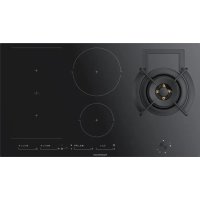
KIG9850.0SR - Cooker Küppersbusch - Free user manual and instructions
Find the device manual for free KIG9850.0SR Küppersbusch in PDF.



| Product type | Gas/induction hybrid cooker |
| Brand | Küppersbusch |
| Model | KIG9850.0SR |
| Power supply | 220-240 V ~ 50/60 Hz, single-phase or three-phase |
| Total induction power | Approx. 7.4 kW (4 zones) |
| Gas burner | 1 DUAL ultrarapid burner (6.0 kW) |
| Induction zones | 2 zones: 15 cm (1.2/1.6 kW) and 21.5 cm (2.1/3.0 kW) |
| Flex induction zones | 2 Flex zones: 22.8 x 20 cm (1.75/2.0 kW each) |
| Compatible gas type | G20 (natural gas), G30 (butane), G31 (propane) |
| Controls | Touch with sliding cursor + mechanical buttons for gas |
| Induction functions | Chef (Keep warm, Melting, Simmering, Rapid boiling, Sliding cooking, Grill, Pan frying, Deep frying, Confit, Poaching) |
| Power function | Temporary Boost (P) on induction zones |
| Timer | Independent countdown per zone (1 to 99 minutes) |
| Child safety | Touch lock (Block) |
| Automatic shut-off | Safety disconnection after maximum duration depending on power level |
| Pan detection | Yes, with automatic shut-off if absent or unsuitable cookware |
| Residual heat indicator | H on display as long as surface is hot |
| Surface type | Black ceramic glass |
| Cleaning | Warm soapy water, scraper for encrusted dirt, specific ceramic glass products |
| Energy efficiency class | Data on the rating plate (Wh/kg) |
| Installation dimensions (WxD) | Approx. 560 x 490 mm (refer to cutout plan) |
| Power cable | H05RR-F 3G1.5 mm² or H05V2V2-F 5x1.5 mm² depending on configuration |
| Gas pressure | G20: 20 mbar, G30: 28-30 mbar, G31: 37 mbar |
Frequently Asked Questions - KIG9850.0SR Küppersbusch
User questions about KIG9850.0SR Küppersbusch
0 question about this device. Answer the ones you know or ask your own.
Ask a new question about this device
Download the instructions for your Cooker in PDF format for free! Find your manual KIG9850.0SR - Küppersbusch and take your electronic device back in hand. On this page are published all the documents necessary for the use of your device. KIG9850.0SR by Küppersbusch.
USER MANUAL KIG9850.0SR Küppersbusch
Please read the users and installation instructions carefully before installation of the appliance and before starting to use it.
WARNING! In the need to disassemble the hob, fi rst remove the screw on the bottom, as shown in the fi gure to side!
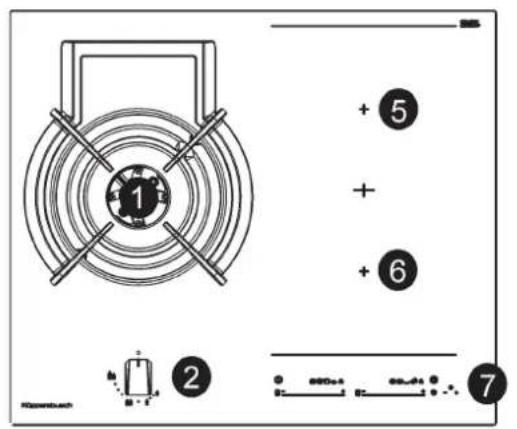
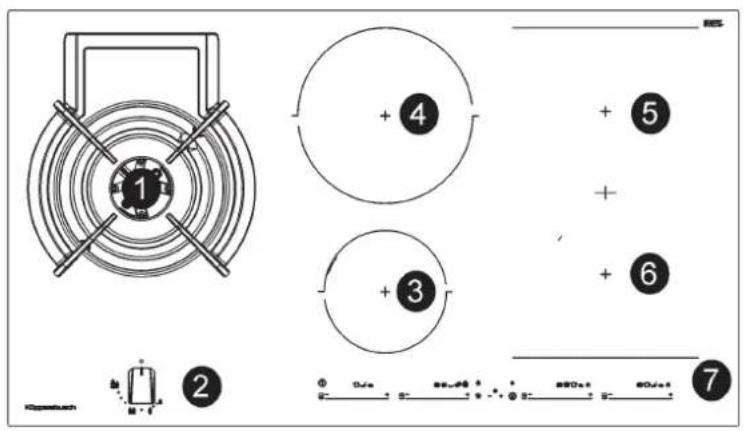
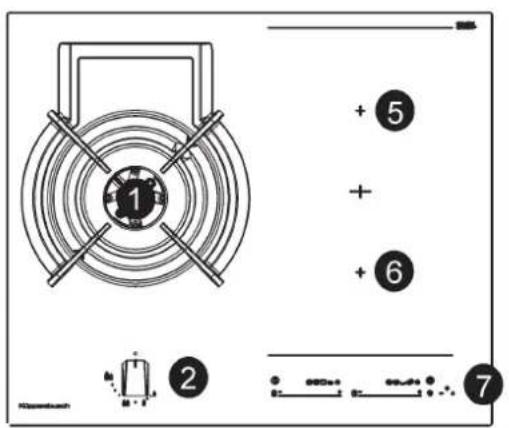
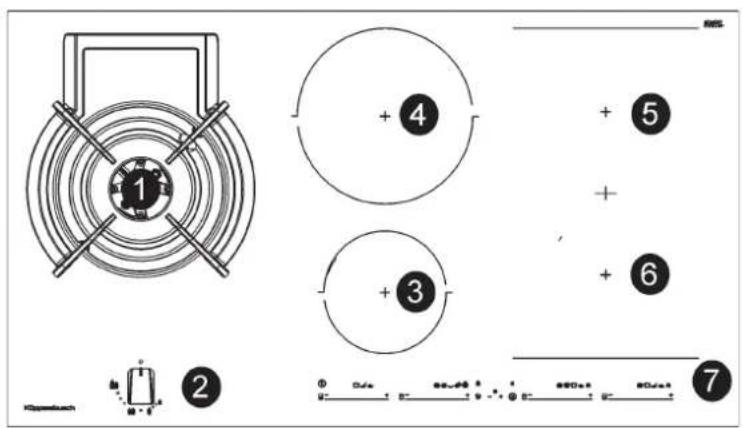
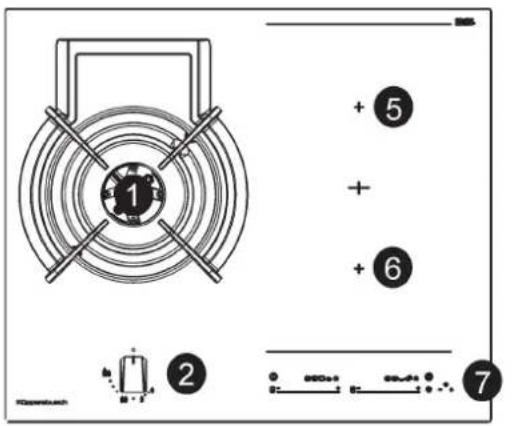
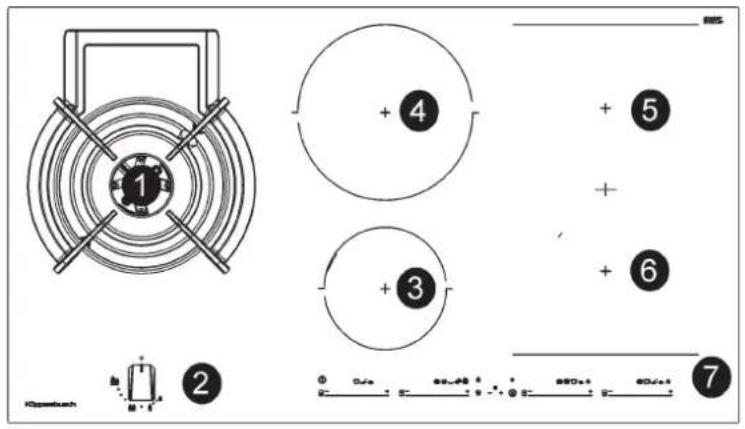
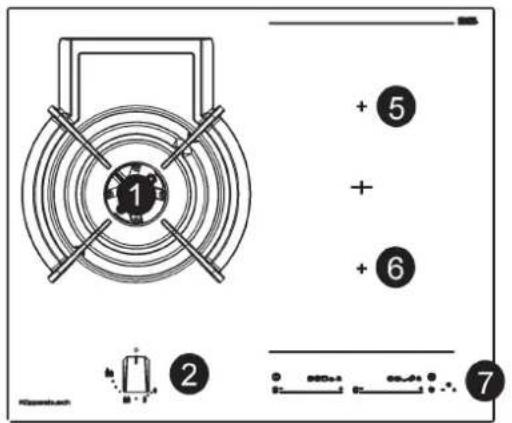
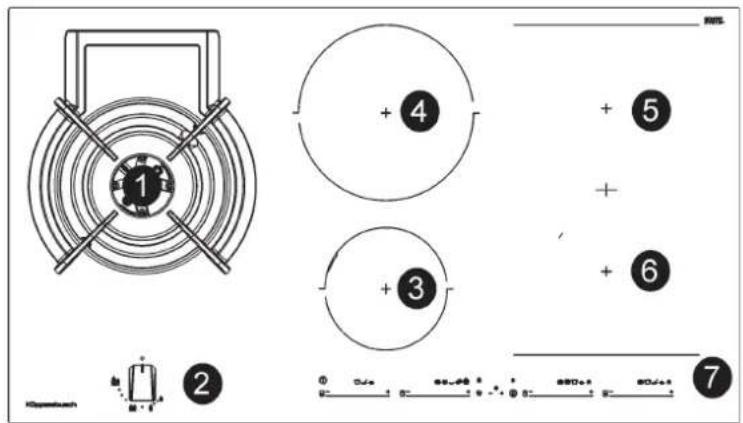
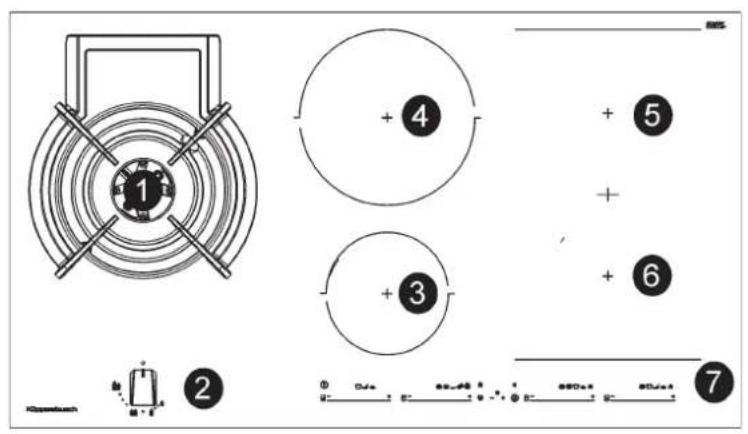
KIG9850.0SRKIG6850.0SR
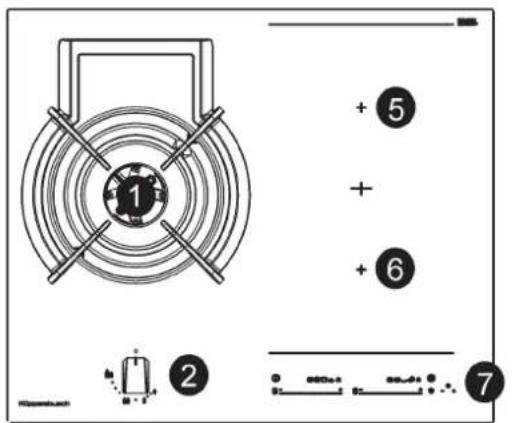
1 Quemador ultrarrápido DUAL 6000 W
2 Botón giratorio mando
3 Elemento de calentimiento eletrico 15,0 cm de 1200/1600 W
4 Elemento de calentamento eletrico 21,5 cm de 2100/3000 W
5 Elemento de calentimiento ind. fl ex 22,8X20,0 cm de 1750/2000 W
6 Elemento de calentimiento ind. fl ex 22,8X20,0 cm de 1750/2000 W
7 Control tactil
Warning. If the ceramic glass breaks or cracks, immediately unplug the stovetop to avoid electric shocks.
This appliance is not designed to work with an external timer (not built into the appliance) or a separate remote control system.
Do not steam clean this device.
Warning. The device and its accessible parts may heat up during operation. Avoid touching the heating elements. Children younger than 8 years old must stay away from the hob unless they are permanently supervised.
This device may solely be used by children 8 years old or older, people with impaired physical, sensory or mental abilities, or those who lack experience an knowledge, ONLY when supervised or if they have been given adequate instruction on the use of the device and understand the dangers its use involves. User cleaning and maintenance may not be done by unsupervised children.
Children must not play with the device.
Warning. It is dangerous to cook with fat or oil without being present, as these may catch fire. NEVER try to extinguish a fire with water! In this event disconnect the device and cover the flames with a lid, a plate or a blanket.
Do not store any object on the cooking areas
of the induction hob. Prevent possible fire hazards.
The induction generator complies with current EU legislation We however recommend that anyone fitted with a device such as a pacemaker should refer to their physician, or if in doubt abstain from using the induction areas.
Metal object such as knives, forks, spoons and lids may not be placed on the surface of the hob as they may overheat.
After use always disconnect the hot plate, do not simply remove the pot or pan. Otherwise a malfunction may occur if inadvertently another pot or pan is placed on it within the detection period. Prevent possible accidents!
If the supply cord is damaged, it must be replaced by the manufacturer, its service agent or similarly qualified persons in order to avoid hazard.
WARNING: Use only stovetop protectors designed by appliance manufacturer or indicated by the manufacturer in the instructions for use as adequate or stovetop protectors incorporated into the device. The use of inadequate protectors can cause accidents.
It is necessary to allow the appliance disconnection after installation. Disconnection devices must be incorporated to the fixed electrical installation, according to the installation regulations.
For a proper cleaning, see cleaning instructions.
CAUTION: The cooking process has to be supervised. A short term cooking process has to be supervised continuously.
WARNING! The manufacturer will not be liable for any damage caused by the alteration or modification of the product or its components during the installation. The installer will be liable for any damages or faults occurred for the incorrect assembly or installation. For any damages resulting from the installation of the product, please contact the authorized installer.
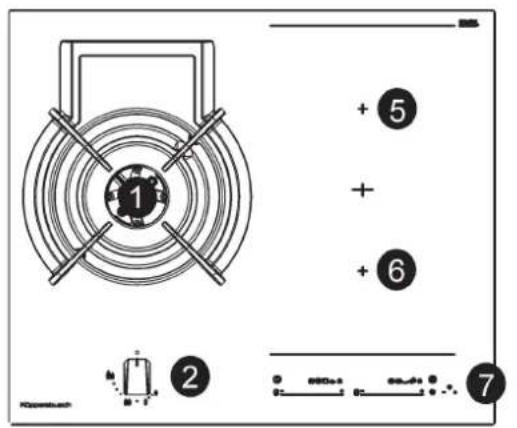
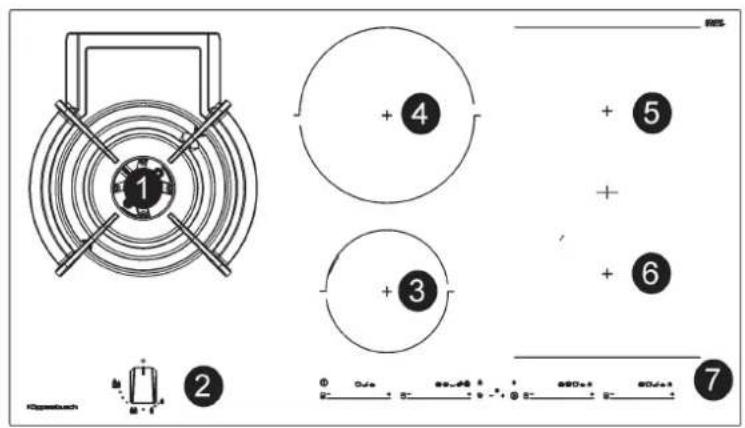
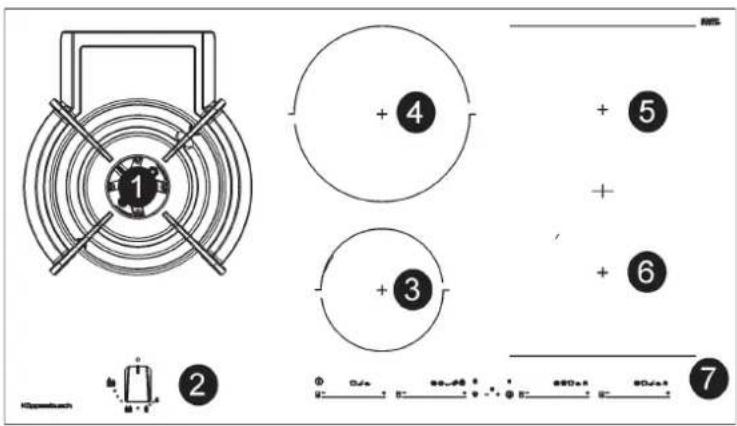
1 Ultra rapid gas burner DUAL
of 6000 W
2 Burner control knob
3 Electric heating element induction 15,0 cm of 1200/1600 W
4 Electric heating element induction 21,5 cm of 2100/3000 W
5 Heating element ind. fl ex 22.8X20.0 cm of 1750/2000 W
6 Heating element ind. fl ex 22.8X20.0 cm of 1750/2000 W
7 Touch control
Attention: this appliance has been manufactured for domestic use only and it employment by private person.
DUAL BURNERS
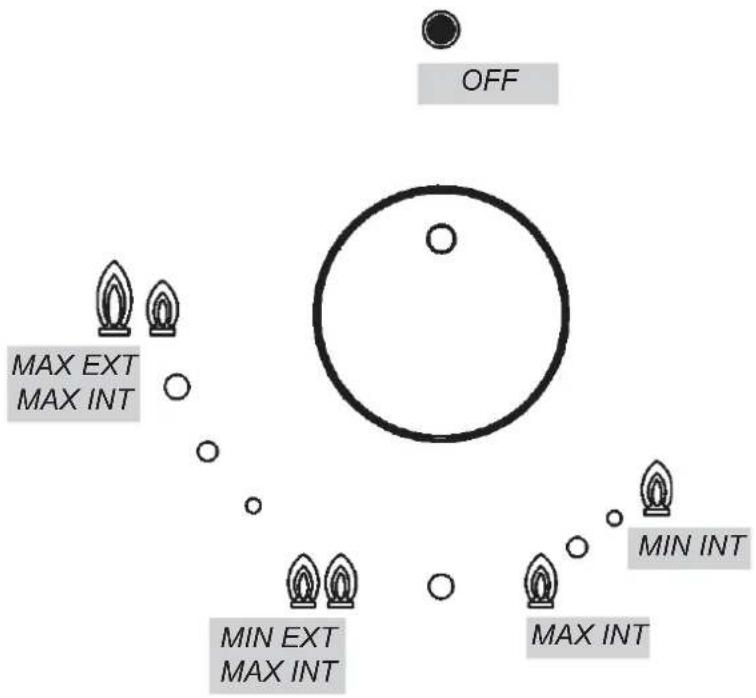
Separate regulation of the inner and outer rings (in practical terms, a dual burner controlled by a single knob), offering very fl exible use thanks to the possibility to light either the inner fl ame only or the whole burner (inner and outer fl ame at the same time).
LIGHTING AND USING THE "DUAL" BURNER
Stand the pan on the burner before lighting.
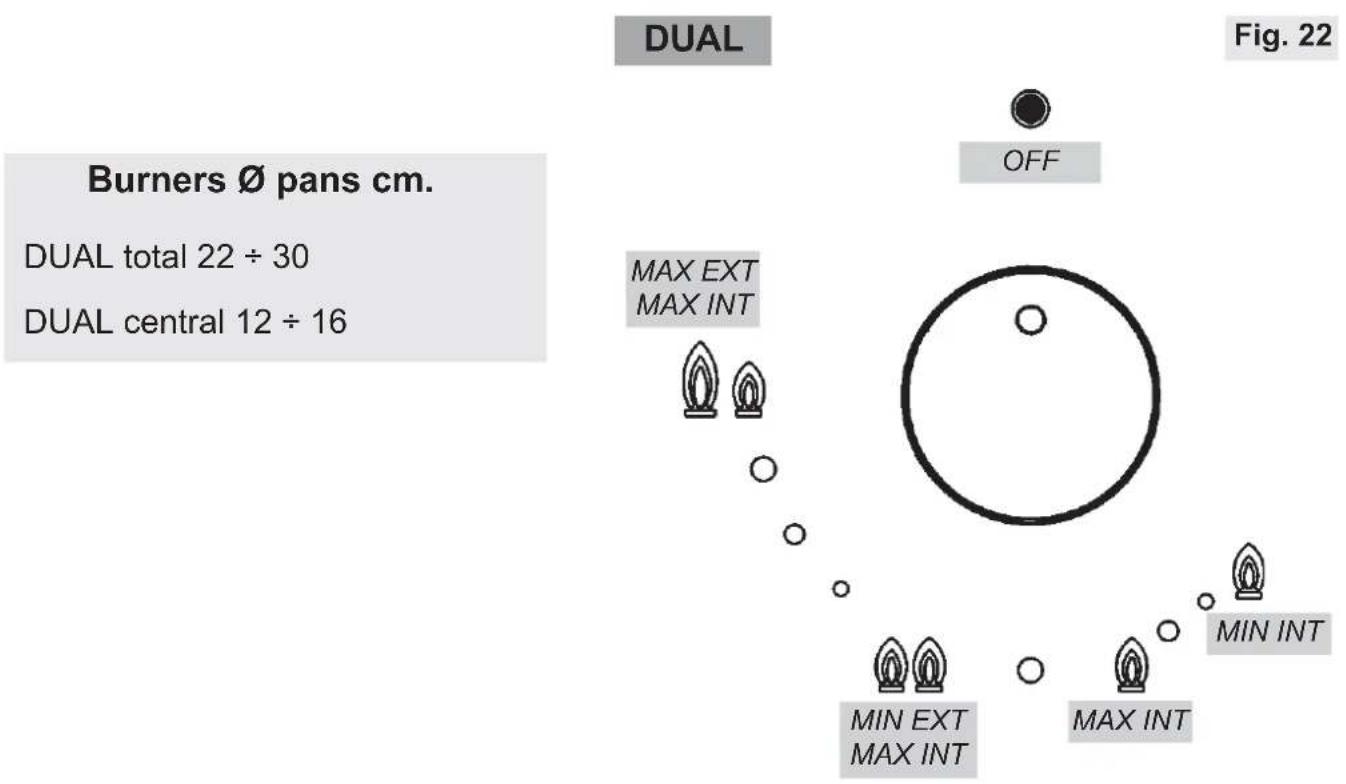
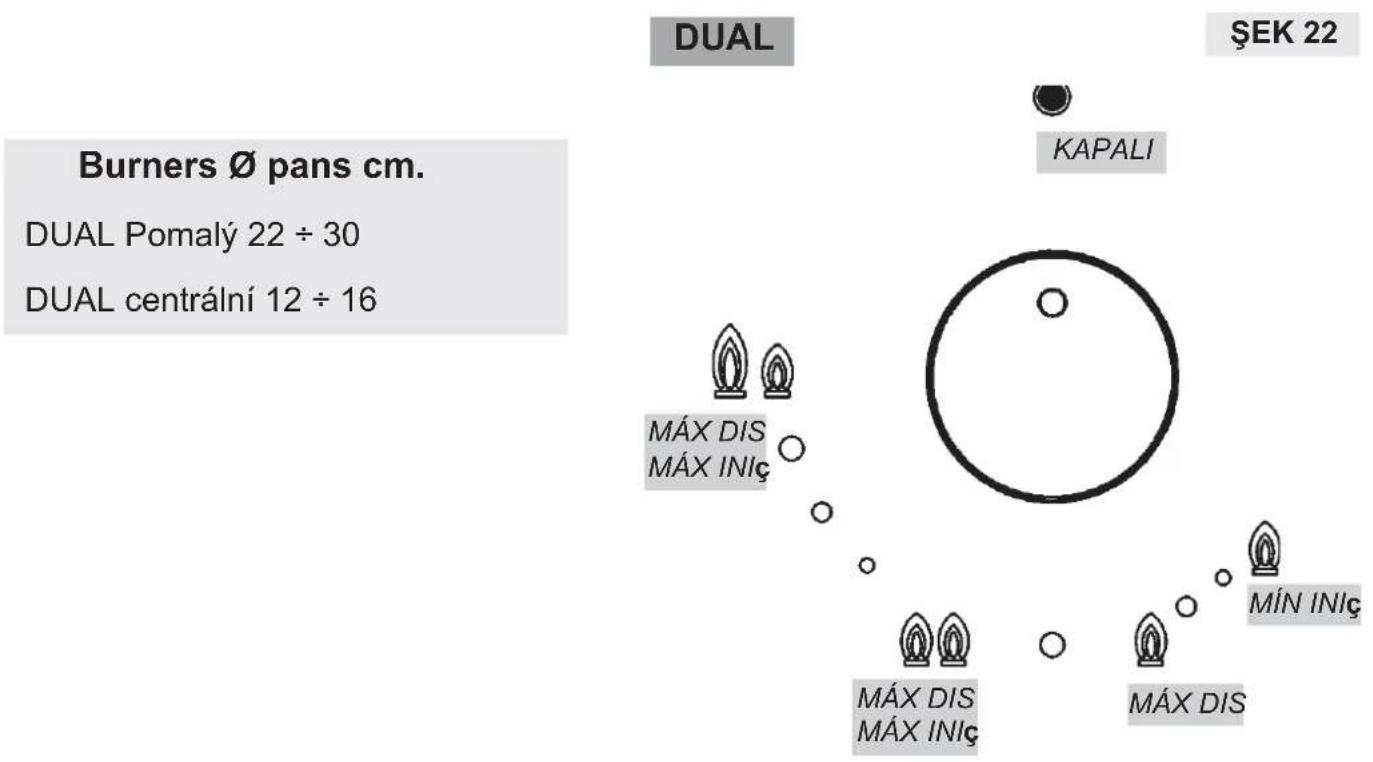
Despite being controlled by a single knob (fig. 22), the "DUAL" burner can be used in two different ways.
A) - Using the complete burner: starting from the off position. You must first press the knob, simultaneously turning it anticlockwise,
until the indicator points to the ma ximum de li very pos it io n obtaining the maximum flow capacity of both fl ames.
When the flames are lit, keep the knob pressed for a few seconds, until the device automatically keeps the burner lit.
It is now possible to regulate the intensity of the flame by turning the knob anti-clockwise (from the maximum flow capacity position of the inner and outer flames to the maximum flow capacity of the inner flame and the minimum of the outer flame.
To turn off the burner, turn the knob clockwise, realigning the indicator with the off symbol.
B) - Using the inner fl ame only: after lighting the burner and regulating the inner flame to maximum flow capacity and the outer flame to minimum flow capacity as described above, turn the knob anti-clockwise until it clicks once. The inner fl ame is now at maximum flow capacity while the outer fl ame is turned off.
Continue turning anti-clockwise to regulate the inner fl ame to the minimum flow capacity.
Turning off : to turn off the burner, turn the knob clockwise, realigning the indicator
with the off symbol.
Once the "DUAL" burner is operating in either of the two modes described, it is possible to swap from one mode to the other by simply turning the knob to the position required.
IMPORTANT WARNINGS FOR THE USER
- Use of a gas cooking appliance produces heat and moisture in the room in which it is installed. The room must therefore be well ventilated by keeping the natural air vents clear (see fig. 2) and by activating the mechanical aeration device (suction hood or electric fan fig. 3 and fig. 4).
- Intensive and lengthy use of the appliance may require additional ventilation. This can be achieved by opening a window or by increasing the power of the mechanical exhausting system if installed.
- Do not attempt to change the technical characteristics of the product because it can be dangerous.
- If you should not to use this appliance any more (or replace an old model), before disposing of it, make it inoperative in conformity with current law on the protection of health and the prevention of environmental pollution by making its dangerous parts harmless, especially for children who might play on an abandoned appliance.
- Do not touch the appliance with wet or damp hands or feet.
- Do not use the appliance barefoot.
- The manufacturer will not be liable for any damage resulting from improper, incorrect or unreasonable use.
- During, and immediately after operation, some parts of the cook top are very hot: avoid touching them.
- After using the cook top, make sure that the knob is in the closed position and close the main tap of the gas supply or gas cylinder.
- If the gas taps are not operating correctly, call the Service Department.
IMPORTANT: always disconnect the appliance
from the gas and electricity mains before carrying out any cleaning operation.
HOTPLATE
It is very important to clean the surface soon after every use, when the glass is still tepid.
Do not use metallic sponges, powder abrasives or corrosive sprays.
Depending on the dirty level we recommend:
-
slights stains: it is enough the use of a moist clean rag.
-
Marks of liquid, overfl owed from the pot, can be removed using vinegar or lemon.
Periodically wash the hot plate, the enamelled stell pan support, the enamelled burner caps "A", "B" and "C" and the burner heads "T" (see fi g. 7 and 8) with lukewarm soapy water. They should also be cleaned plugs "AC" and flame detection "TC" (see fi g. 8).
Clean them gently with a small nylon brush as shown (see fig. 6) and allow to dry fully.
Do not wash in the dishwasher. Do not allow vinegar, coff ee, milk, salted water, lemon or tomato juice from remaining in contact with the enamelled surfaces for long periods of time.
WARNING:
comply with the following instructions, before remounting the parts:
- check that burner head slots "T" (fig. 8) have not become clogged by foreign bodies.
- Check that enamelled burner cap "A", "B", "C" (fig. 7 and 8) have correctly positioned on the burner head. It must be steady.
- The pan support must be placed in the appropriate centering pins verifying the perfect stability.
- Do not force the taps if they are difficult open or close. Contact the technical assistance service for repairs.
- Don't use steam jets for the equipment cleaning.
CAUTION: In case of hotplate glass breakage: -shut immediately off all burners and any electrical heating element and isolate the appliance from the power supply; do not touch the appliance surface; do not use the appliance.
Note: continuous use could cause the burners to change colour due to the high temperature.
within children's reach since they could become potential sources of danger.
The measurements of the opening made in the top of the modular cabinet and into which the hot plate will be installed are indicated in either fi g. 10. Always comply with the measurements given for the hole into which the appliance will be recessed (see fi g. 10).
The appliance belongs to class 3 and is therefore subject to all the provisions established by the provisions governing such appliances.
the hot plate itself. Furthermore, the rear wall, the surfaces surrounding and adjacent to the appliance must be able to withstand an temperature of 90 ^ C
The adhesive used to stick the plastic laminate to the cabinet must be able to withstand a temperature of not less than 150 ^ C otherwise the laminate could come unstuck.
The appliance must be installed in compliance with BS 6172 1990, BS 5440 part. 2 1989 and BS 6891 1988.
This appliance is not connected to a device able to dispose of the combustion fumes. It must therefore be connected in compliance with the above mentioned installation standards. Particular care should be paid to the following provisions governing ventilation and aeration.
TECHNICAL INFORMATION FOR THE INSTALLER
Installation, adjustments of controls and maintenance must only be carried out by a qualified engineer.
The appliance must be correctly installed in conformity with current law and the manufacturer's instructions. Incorrect installation may cause damage to persons, animals or property for which the Manufacturer shall not be considered responsible. During the life of the system, the automatic safety or regulating devices on the appliance may only be modified by the manufacturer or by his duly authorized dealer.
INSTALLING THE HOT PLATE
Check that the appliance is in a good condition after having removed the outer packaging and internal wrappings from around the various loose parts. In case of doubt, do not use the appliance and contact qualifi ed personnel. Never leave the packaging materials (cardboard, bags, polystyrene foam, nails, etc.)
FIXING THE HOT PLATE
The hot plate has a special seal which prevents liquid from infiltrating into the cabinet.
Strictly comply with the following instructions in order to correctly apply this seal:
- take off all the movable parts of the hob.
- Cut the seal in 4 parts of the necessary lenght to positioning it on the 4 edges of the crystal.
- Overturn the hot plate and correctly position seal "E" (fig. 5) under the edge of the hot plate itself, so that the outer side of the seal perfectly matches the outer perimetral edge of the crystal. The ends of the strips must fit together without overlapping.
- Evenly and securely fi x the seal to the crystal, pressing it in place with the fi ngers.
- Position the hob in the hole in the unit and fasten it in place using the appropriate screws "F" of the fastening hooks "G" (see fig. 11 and 12).
- In order to avoid accidental touch with the overheating bottom of the hob, during the working, is necessary to put a wooden insert, fixed by screws, at a minimum distance of 120mm from the top (see fig. 10).
ROOM VENTILATION
To ensure correct operation of the appliance, it is important to ensure that the room where the hot plate is installed has sufficient ventilation, as set out in BS 5440 part 2. 1989. See table above.
Natural air flow must enter directly through permanent openings in the walls of the room in question. These must open towards the outside and possess a minimum section of 100 cm see fig.2). It must be impossible to obstruct these openings.
Indirect ventilation with air drawn from adjacent rooms is permitted in strict compliance with the provisions in force.
Gas cooking appliances must always dispose of their combustion fumes through hoods. These must be connected to flues, chimneys or straight outside (see fi g. 3). If it is not possible to install a hood, an electric fan can be installed on a window or on a wall facing outside (see fi g. 4). This must be activated at the same time as the appliance,
| Type of appliance | Volume of room cubic metres | Min. size of vent sq. cm. | Openable window or alternative method of venting to the outside |
| Domestic ovens hotplates or any combinations | 5 | 100 | yes |
| 5 to 10 | 50 | yes | |
| 11 to 20 | nil | yes | |
| 20 and above | nil | yes |
IMPORTANT INSTALLATION OPENABLE WINDOW INSTRUCTIONS
The installer should note that the appliance that side walls should be no higher than
so long as the specifications in the provisions in force are strictly complied with.
GAS CONNECTION
Before connecting the appliance, check that the values on the data label affixed to the underside of the cooktop correspond to those of the gas and electricity mains in the home.
A label on the appliance indicates the regulating conditions: type of gas and working pressure. Gas connection must comply with the pertinent standards and provisions in force.
When gas is supplied through ducts, the appliance must be connected to the gas supply system:
with a rigid steel pipe. The joints of this pipe must consist of threaded fttings conforming to the standards.
- With copper pipe. The joints of this pipe must consist of unions with mechanical seals.
- With seamless fl exible stainless steel pipe. The length of this pipe must be 2 meters at most and the seals must comply with the standards.
When the gas is supplied by a bottle, the appliance must be fuelled by a pressure governor conforming to the provisions in force and must be connected:
- with a copper pipe. The joints of this pipe must consist of unions with mechanical seals.
- With seamless fl exible stainless steel pipe. The length
of this pipe must be 2 meters at most and the seals must comply with the standards.
This pipe must be installed so that it can not come into contact with moving parts of the built form (eg drawers) and must not cross compartments that could be crammed.
It is advisable to apply the special adapter to the fl exible pipe. This is easily available from the shops and facilitates connection with the hose nipple of the pressure governor on the bottle.
ELECTRICAL CONNECTION
The electrical connections of the appliance must be carried out in compliance with the provisions and standards in force.
Before connecting the appliance, check that:
- the voltage matches the value as shown on the specifi cation plate and the section of the wires of the electrical system can support the load, which is also indicated on the specifi cation plate.
- The electrical capacity of the mains supply and current sockets suit the maximum power rating of the appliance (consult the data label applied to the underside of the hot plate).
- The socket or system has an efficient earth connection in compliance with the provisions and standards in force. The manufacturer declines responsibility for failing to comply with these provisions.
When the appliance is connected to the electricity main by a socket: - fit a standard plug "C" suited to the load indicated on the data label to the cable. Fit the wires following figure 15, taking care of respecting the following correspondences:
Letter L (live) = brown wire; Letter N (neutral) = blue wire;
earth symbol yellow wire.

- The power supply cable must be positioned so that no part of it is able to reach an temperature of 90^ .
- Never use reductions, adapters of shunts for connection since these could create false contacts and lead to dangerous overheating.
- The outlet must be accessible after the built-in.
When the appliance is connected straight to the electricity main:
- install an omnipolar circuit-breaker between the appliance and the electricity main. This circuit-breaker should be sized, in compliance with current installation regulations.
- Remember that the earth wire must not be interrupted by the
circuit-breaker.
- For optimum safety, the electrical connection may also be protected by a high sensitivity differential circuit-breaker.
You are strongly advised to fix the relative yellow-green earth wire to an efficient earthing system.
Before performing any service on the electrical part of the appliance, it must absolutely be disconnected from the electrical network.
Always disconnect the appliance from the electricity main before making any adjustments.
All seals must be replaced by the technician at the end of any adjustments or regulations. Our burners do not require primary air adjustment.
11
TAPS
"Reduced rate" adjustment
-
witch on the burner and turn the relative knob to the "Reduced rate" position (small fl ame fi g. 22).
-
Remove knob "M" (fi g. 13 and 14) of the tap, which is simply pressed on to its rod. The by-pass for minimal rate regulation can be: beside the tap (fi g. 13) or inside the shaft. In any case, to access to regulation, it can be done wrought the insertion of a small screwdriver "D" beside the tap (fi g. 13) or in the hole "C" inside the shaft of the tap (fi g 14). Turn the throttle screw to the right or left until the burner fl ame has been adequately regulated to the "Reduced rate" position.
The flame should not be too low: the lowest small flame should be continuous and steady. Reassemble the several components. It is understood that only burners operating with G20 gas should be subjected to the above mentioned adjustments. The screw must be fully locked when the burners operate with G30 or G31 (turn clockwise).
REPLACING THE INJECTORS
The burners can be adapted to different types of gas by mounting
injectors suited to the type of gas in question. To do this, first remove the burner tops using an appropriate tool. Now unscrew injector (see fig. 16) and fit a injector corresponding to the utilized type of gas in its place.
It is advisable to strongly tighten the injector in place.
To access the injector, (fi g. 18 and fi g. 19).
After the injectors have been replaced, the burners must be regulated as explained in paragraphs 9. The technician must
reset any seals on the regulating or pre-regulating devices. The envelope with the injectors and the labels can be included in the kit, or at disposal to the authorized customer Service Centre. For the sake of convenience, the nominal rate table also lists the heat inputs of the burners, the diameter of the injectors and the working pressures of the various types of gas.
TAPS LUBRIFICATION Should a tap being blocked, do
not force and ask for Technical Assistance.
WARNING: MAINTENANCE MUST ONLY BE PERFORMED BY AUTHORISED PERSONS.
In case of failure or cut in the cable, please move away from the cable and do not touch it. Moreover the device must be unplugged and not switched on. Call the nearest authorized service center to fix the problem.
| BURNERS | GAS | NORMAL PRESSURE | NORMAL RATE | INJECTOR DIAMETER | NOMINAL HEAT INPUT (W) | ||||
| N° | DESCRIPTION | mbar | gr/h | l/h | 1/100 mm | Min. | Max. | EEgasburner** | |
| 1 | DUAL total | G30 - BUTANE | 28 - 30 | 436 | 2x80B+46B | 3500 | 6000 | 56,4% | |
| G31 - PROPANE | 37 | 429 | 2x80B+46B | 3500 | 6000 | ||||
| G20 - NATURAL | 20 | 571 | 2x125A+71A | 3500 | 6000 | ||||
| DUAL central | G30 - BUTANE | 28 - 30 | 58 | 46B | 800 | ||||
| G31 - PROPANE | 37 | 57 | 46B | 800 | |||||
| G20 - NATURAL | 20 | 76 | 71A | 800 | |||||
**In accordance with Regulation No. 66/2014 EU measures for the implementation of Directive 2009/125/EC, the performance (Eegas burner) was calculated according to EN 30-2-1 last review with the G20.
TYPE AND SECTION OF THE POWER CABLES
| Typo of cable | Monophase power supply 220 V ~ 230 V ~ 220 - 240 V ~ 230 - 240 V ~ | Monophase power supply (2 elements) 220 - 230 V ~ 220 - 240 V ~ | Monophase power supply (4 elements) 220 - 230 V ~ 220 - 240 V ~ | ||
| gas | B | H05 RR-F H05 RN-F H07 RN-F | 3 x 0.75 mm² | ||
| inducción | A | H05 RR-F | 3 x 1.5 mm² | ||
| H05 V2V2-F | 5 X 1.5 mm² |
ATTENTION!!!
If the power supply cable is replaced, the installer should leave the ground wire (B) longer than the phase conductors (fig. 9) and comply with the recommendations given in paragraph 8.
POWER RATINGS OF THE ELECTRICAL COMPONENTS
| DENOMINATIONS | Ø (cm) | Ø pot recommended (minimum in cm.) | POWER (W) | *EC \( {}_{\text{electric cooking}} \) Wh/kg |
| Element heating induction | 15,0 | 10 | 1200/1600 | 182,1 |
| Element heating induction | 21,5 | 13 | 2100/3000 | 178,7 |
| Heating element ind. flex 22.8X20.0 cm | \( {22},8 \times {20},0 \) | 18 | 1750/2000 W | 194,6 |
| Heating element ind. flex 22.8X20.0 cm | \( {22},8 \times {20},0 \) | 18 | 1750/2000 W | 194,6 |
EC_electric cooking energetic consumption calculated per kg in accordance with Regulation (EU) 66/2014.
INSTALLATION
Installation with cutlery drawer
If you wish to install furniture or a cutlery drawer under the hob, a sepa-ration board must be fitted between the two. Accidental contact with the hot surface of the device's housing is thus prevented. The board must be fitted 18mm beneath the under part of the stovetop, oven housing, if installed in the same unit.
Put the oven on top
See figure 10 for cutting table dimensions and ventilation openings are required!
ELECTRICAL CONNECTION
Before you connect the stovetop to the mains, check that the voltage and frequency match those specified on the stovetop nameplate, which is underneath it, and on the Guarantee Sheet, or if applicable on the technical data sheet, which you must keep together with this manual throughout the product's service life.
Ensure that the inlet cable does not come into contact with the induction top housing or the oven housing, if it is installed in the same unit.
Warning:
The electrical connection must be properly grounded, following current legislation, otherwise the induction hob may malfunction.
Unusually high power surges can damage the control system (like with any electrical appliance).
It is advised to refrain from using the induction hob during the pyrolytic cleaning function in the case of pyrolytic ovens, due to the high temperature that this type of device attains.
! Only the official technical service can handle or repair the appli nce, including
replacement of the power cable.
Before disconnecting the hob for m the mains, we recommend switching off the cutoff switch and waiting for approximately 23 seconds before disconnecting from the mains. This time is required to allow for the complete discharge of the electronic circuitry and thus preclude the possibility of electric shock from the cable terminals.

Keep the Guarantee
Certificate or the technical data sheet together with the instructions manual throughout the product's service life. These contain important technical information.
ABOUT INDUCTION
Advantages
With an induction hob, the heat is transmitted directly to the pan.
This has a number of advantages: -Saves time.
-Saves energy.
-Easy to clean as if the food comes into contact with the glass plate, it does not burn easily.
-Improved energy control. The energy is transferred to the pan as soon as the power controls are pressed. In addition, as soon as the pan is removed from the cooking zone, the power supply stops. It is not necessary to switch the power off first.
Pans
Only ferromagnetic pans are suitable for use with an induction hob.
There are several types: cast iron, enameled steel, and stainless steel pans specifically for use with induction hobs. We do not recommend the use of diffuser plates or materials such as fine steel, aluminum, glass, copper, or clay.
Each cooking zone has a minimum The type of base used on the pan detection time. This depends on pan may affect the uniformity
the material and the ferromagnetic diameter of the base of the pan. Therefore it is essential to use the cooking zone that best matches the diameter of the base of the pan to be used.
If the pan is not detected on the selected cooking zone, try using the next smallest zone.
When the Flex Zone is used as a single cooking zone, larger pans suitable for this type of zone can be used (see fig. 23).
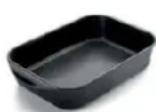
Fig. 23
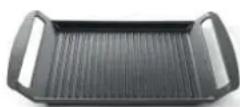
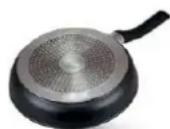
Some pans without a complete ferromagnetic base are sold as suitable for induction (see fig. 24). In these pans, only the ferromagnetic base is heated. Consequently the heat is not evenly distributed across the base of the pan. This may mean that the non-ferromagnetic part of the base of the pan does not reach the right cooking temperature.
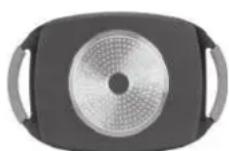
Fig. 24
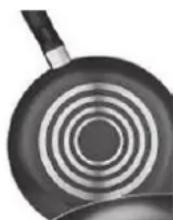
Other pans, with aluminum inserts in the base have a smaller area of ferromagnetic material (see fig. 25). In this case, it may be difficult or even impossible to detect the pan. In addition, the power supplied may be lower and, consequently, the pan will not heat up correctly.
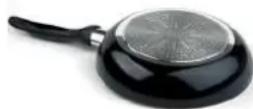
Fig. 25
Influence of the base of the pans
EN
and results of the cooking. Pans with a stainless steel "sandwich" base use materials that assist the uniform distribution and diff union of the heat, resulting in savings in time and energy
The base of the pan must be completely flat, thus ensuring a uniform power supply (see fig. 26).
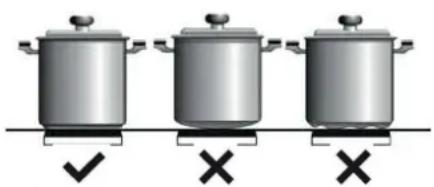
Fig. 26

Never heat empty pans, or
use pans with a thin base, as these may heat up quickly without allowing time for the automatic disconnection function of the cooker to come into operation.

IMPORTANT RECOMMENDATIONS:
Use vessels with the same base diameter as that of the cooking zone.
In the cooking zones closest to the control panel, always keep the vessels within the cooking marks indicated on the glass surface and use vessels of the same or smaller diameter to these. This will help to prevent overheating in the control zone.
Use the rear cooking zones for intensive use of the appliance. This will help to prevent overheating of the control panel.
Do not allow the vessels to invade the control panel zone, especially during cooking.
Use and Maintenance
USER INSTRUCTIONS OF THE TOUCH CONTROL
HANDLING ELEMENTS (fig. 20)
1 General on/off sensor.
2 Cursor slider for controlling power.
9 Pilot indicator light "Stop & Go" function Only visible while running. activated.
3 Power and/or residual heat indicator.
4 Decimal dot of power and/ of residual heat indicator.
5 Direct access to "Power" function.
6 Activation sensor for "Block" function.
7 Pilot indicator light "Block" function activated.
8 Activation sensor for "Stop&Go" function.
10 "Minus" sensor for timer.
11 "Plus" sensor for timer.
12 Timer indicator.
13 Decimal dot of the timer.*
14 Activation sensor for "Synchro" function; (depending on model).
15 Activation sensor for "Flex Zone" function; (depending on model).
16 Activation sensor for "Chef" functions; (depending on model).
17 Pilot indicator light "Keep Warm" function activated* (depending on model).
18 Pilot indicator light" Melting" function activated* (depending on model).
19 Pilot indicator light "Simmering" function activated*; (depending on model).
20 Pilot indicator light "Quick Boiling" function activated* (depending on model).
21 Pilot indicator light "Slide Cooking" function activated* (depending on model).
22 Pilot indicator light "Grilling" function activated* (depending on model).
23 Pilot indicator light "Pan Frying" function activated* (depending on model).
24 Pilot indicator light "Deep Frying" function activated* (depending on model).
25 Pilot indicator light "Confi t" function activated* (depending on model).
26 Pilot indicator light "Poaching" function activated*; (depending on model).
The manoeuvres are done by means of the touch keys. You do not need to exert force on the desired touch key, you only need to touch it with your fingertip to activate the required function
Each action is verified by a beep. Use the cursor slider (2) to adjust power levels (0 - 9) by sliding your finger over it. Sliding towards the right increases the value, whereas sliding towards the left decreases it.
It's also possible to directly select a power level by placing your finger directly on a desired point of the cursor slider (2)
In order to select a plate on these models, directly touch the cursor slider (2).
SWITCHING ON THE DEVICE
1 Touch the On touch key (1) for at least one second. The touch control will become active, a beep will be heard and the indicators (3) o rwill light up displaying a "-". If any cooking area is hot, the related indicator will flash an H. If you do not take any action in the next 10 seconds the touch control will switch off automatically.
When the touch control is activated, you can disconnect it at any time by touching the touch button (1), even if it has been locked (lock function activated). The touch button (1) always has priority to disconnect the touch control.
ACTIVATING PLATES
detected or the pan is not suitable
will display "OF".
Once the Touch Control is activated with sensor(1), any plate can be turned on by following these steps:
If a pan is taken off the zone while it is running, the plate will automatically stop supplying energy and it will show the symbol for "there is no pan". When a pan is once again placed on the cooking zone, energy supply will resume at the same power level previously selected.
This deactivation will not be applied to all the functions, as for example the beep for on/off, the ending of the timer or the locking/unlocking of the touch keys always remain activated.
1 Slide the finger or touch in any position of one of the cursors "slider" (2). The zone has been selected and simultaneously the power level will be set between 0 and 9. That power value will be shown on the corresponding power indicator and its decimal dot (4) will keep light up during 10 seconds.
If a pan is taken off the zone while it is running, the plate will automatically stop supplying energy and it will show the symbol for "there is no pan". When a pan is once again placed on the cooking zone, energy supply will resume at the same power level previously selected.
To once again activate all the beeps that accompany each action, again simultaneously press the touch key (11) and the locking touch key (6) for three seconds. The time indicator (12) will display "On".
2 Use the cursor slider (2) to choose a new cooking level between 0 and 9.
As long as the plate is selected, in other words, with the decimal (4) dot light up, its power level can be modified.
TURNING OFF A PLATE
Using the touch slider key (2) lower the power to level 0. The hotplate will switch off.
When finished, turn off the cooking zone by using the touch controls. Otherwise an undesired operation could occur if a pan is accidentally placed on the cooking zone during the three minutes. Avoid possible accidents!
STOP&GO FUNCTION
This function puts the cooking process on pause. The timer will also be paused if it is activated.
Activating the Stop function.
Touch the Stop sensor (8) for one second. The pilot (9) lights up and the power indicators will show the symbol to indicate cooking has been paused.
Deactivating the Stop function
Touch Stop&Go sensor again. The pilot (9) turns off and cooking resumes under the same power and timer settings that were established before the pause.
BLOCK FUNCTION
When a hot plate is switched off an H will appear in its power indicator (3), if the glass surface of the related cooking area is hot and there is a risk of burns. When the temperature drops, the indicator (3) switches off (if the hob is disconnected), or otherwise a "-" will light up if the hob is still connected.
TURING ALL PLATES OFF
All plates can be simultaneously disconnected by using the general on/off sensor (h). All plate indicators (3) will turn off. If the heating zone turned off is hot, its indicator shows an H.
PAN DETECTOR
Induction cooking zones have a built-in pan detector. This way, the plate will stop working if there is no pan present or if the pan is not suitable.
The power indicator (3) will show a symbol to designate "there is no panU" if, while the zone is on, no pan is
With the Block Function, you can block the other sensors, except for the on/off sensor (1), in order to avoid undesired operations. This function is useful as a childproof safety.
To activate this function, touch sensor 6) for at least one second. Once you have done so, the pilot (7) turns on indicating that the control panel is blocked. To deactivate the function, simply touch sensor 6 again.
If the on/off sensor (1) is used to turn off the appliance while the block function is activated, it won't be possible to turn the cooktop on again until it unblocks.
When the hob is on, if one presses the touch key (11) and the locking touch key (6) simultaneously for three seconds, the beep that accompanies each action will be deactivated. The time indicator (12)
POWER FUNCTION
This function supplies "extra" power to the plate, above the nominal value. Said power depends on the size of the plate, with the possibility of reaching the maximum value permitted by the generator.
1 Slide the finger above the corresponding cursor slider (2) until the power indicator (3) shows "9" and keep the finger pressed for one second, or touch directly on "P" and keep pressed the finger for one second.
2 The power level indicator (3) will show the symbol, and the plate will start to supply extra power. The Power function has a maximum duration specified in Table 1. After this time, the power level will automatically adjust to 9. A beep sounds.
On activating the Power function in one hotplate, it is possible that the performance of some of the others may be affected, reducing its power to a lower level, in which case this will be displayed on its indicator (3). Deactivation of Power Function, before its working time passes, can be done either by means of touching cursor "slider" modifying its power level or repeating step 3.
TIMER FUNCTION (countdown clock)
This function facilitates cooking given that you don't have to be present: You can set a timer for a plate, and it will turn off once the desired time is up.
For these models, you can simultaneously program each plate for durations ranging from 1 to 99 minutes.
Setting a timer on a plate.
Once the power level is set on the desired zone, and while the decimal dot of the zone keeps on, the zone will be able to be timed.
To that end:
1 Touch sensor (10) or 11). Timer Indicator (12) will show "00" and corresponding zone indicator (3) will show the symbol blinking alternately with its current power level.
2 Immediately afterwards set a cooking time between 1 and 99 minutes, using the sensors (10) o+11). With the first one the value will start at 60, whereas with the second it will start at 01. By keeping sensors (10) o+11) pressed, the value will be restored to 00. When there is less than one minute left, the clock will begin to count down in seconds.
3. When the timer indicator (12) stops flashing, it will start to count down the time automatically. The indicator (3) relating to the timed hotplate will alternately display the selected power level and the symbol .
Once the selected cooking time has
elapsed, the heating zone being timed is turned off and the clock emits a
series of beeps for several seconds. To turn off the audible signal, touch any sensor. The timer indicator (12) will display a flashing 00 beside of the decimal dot (4) of the selected zone. If the heating zone turned off is hot, its power indicator (3) will display alternately the H symbol and a “-”.
If you wish to time another hotplate at the same time, repeat steps 1 to 3.
If one or more zones are already timed, the timer indicator (12) will show by default the shortest remaining time to fi nish, showing a "t" on the related zone. Rest of timed zones will show on their corresponding indicator zones the decimal dot blinking. When cursor "slider" of another timed zone is pressed, the timer will show the remaining time of that zone for a few seconds and its indicator will show its power level and the "t" alternately.
Changing the programmed time.
For modifying programmed time, cursor "slider" (2) of timed zone has to be pressed. Then it will be possible to read and modify the time.
Through sensors (10) and (11), you can modify the programmed time.
Disconnecting the clock
If you wish to stop the clock before the programmed time is up, this can be done at any time by simply adjusting its value to - .
1 Select the desired plate.
2 Adjust the value of the clock to "00" by using the sensor (10). The clock is cancelled. This can also be done more quickly by pushing the "sensors" (10) and (11) at the same time.
POWER MANAGEMENT FUNCTION
Some models are equipped with a power limiting function (Power Management). This function allows the total power generated by the hob to be set to different values selected by the user. To do this, for the first minute after having connected the hob to the power supply, it is possible to access the power limiting menu.
1 Press the + (11) touch key for three seconds. The letter PL will appear on the timer indicator (12)
2 Press the locking touch key (6). The different power values to which the hob can be limited will appear and these can be changed using the + (11) and - (10) sensors.
3 Once the value has been selected, once again press the locking touch key (6). The hob will be limited to the chosen power value.
If you want to change the value again, you must unplug the hob and plug it in again after a few seconds. Thus you will again be able to enter the power limiting menu.
Every time the power level of a hotplate is changed, the power limiter will calculate the total power the hob is generating. If you have reached the total power limit, the touch control will not allow you to increase the power level of that hotplate. The hob will beep and the power indicator (3) will blink at the level that cannot be exceeded. If you wish to exceed that value, you must lower the power of the other hotplates. Sometimes it will not be enough to lower another by a single level as this depends on the power of each hotplate and the level it is set at. It is possible that to raise the level of a large hotplate that of several smaller ones must be turned down.
If you use the quick switch-on at maximum power function and the said value is above the value set by the limit, the hotplate will be set to the maximum possible level. The hob will beep and the said power value will blink twice on the
indicator (3).
SPECIAL FUNCTIONS: CHEF
These functions have pre-allocated power levels to make cooking easier, obtaining excellent results as the temperature of the pan is controlled continuously by sensors. When the target temperature for the function has been reached, it is automatically maintained without needing to change the power level.
The Chef functions operate correctly with pans with the same ferromagnetic area on the base of the pan as the area of the cooking zone. In addition, for high temperature functions (above 100 ^ C ), pans must have a flat, even base (preferably "sandwich" type) as shown in fi gure 27.
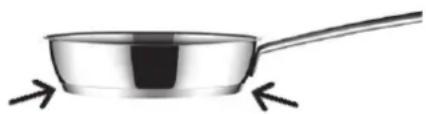
Fig. 27
To ensure the correct operation of these functions, it is important that the pan and the cooking zone are not hot at the start of the process.
Further information about suitable pans (saucepans, frying pans, grills, etc.) is given on the Teka web page.
The Touch Control has special features that help the user to cook through the CHEF sensor (16). These functions are available depending on the model. To activate a special feature on a zone:
1 First it should be selected; and then, the decimal point (4) will be active on the power indicator (3).
2 Now click on the CHEF sensor
(16). The sequentially successive presses will go over all the CHEF functions available in each zone one by one. These functions will show the activation with the corresponding leds (16), (17), (18), (19), (20), (21), (22) and (23).
You can override the function at any time by turning off the plate, by changing the power level or by choosing a different special function.
SIMMERING FUNCTION
This feature allows you to keep the desimmered.
If you want to cancel a special active function at any time, you should touch the "slider" cursor sensor (2) of the related zone to select it. The decimal point (4) of the power indicator (3) will light up. Then, touch again the "slider" (2) cursor to set a new power level or to power off the zone, or you can choose a different special function touching again on the CHEF sensor (15).
KEEP WARM FUNCTION
This function automatically sets an appropriate power level to keep the cooked food hot. To activate it, select the plate, and press on the CHEF sensor (16) until the led (17) located on the icon lights up. Once the function is activated, the symbol will appear on the power indicator (3). You can override the function at any time by turning off the plate, by changing the power level or by choosing a different special function.
MELTING FUNCTION
This function maintains a low temperature in the cooking zone. Ideal for defrosting food or for slowly melting other food types as chocolate, butter, etc.
To activate it, select the plate, and press on the CHEF sensor (16) until the led (18) located on the icon lights up. Once the function is activated, the symbol will appear on the power indicator (3).
After the food is boiled, enable the plate by selecting it, and press the CHEF sensor (16) until the led (19) located on the icon lights up. Once the function is activated, the symbol will appear on the power indicator (3).
You can override the function at any time by turning off the plate, by changing the power level or by choosing a different special function.
QUICK BOILING FUNCTION (depending on the model)
This function enables the automatic boiling control, which is a great help for cooking pasta, rice, eggs, boil some food, etc. It is available only in zones where the symbol appears.
Conditions of the container
For a proper operation of the Quick Boiling function, you need to use a container that meets the following preconditions:
- Bottom size as close as possible to the diameter of the plate.
- WITHOUT CAP.
- Filled to over half its capacity at room temperature water (never use warmed or hot water).
Failure to comply with these conditions will distort the proper control of boiling.

Fig. 28

Fig. 29
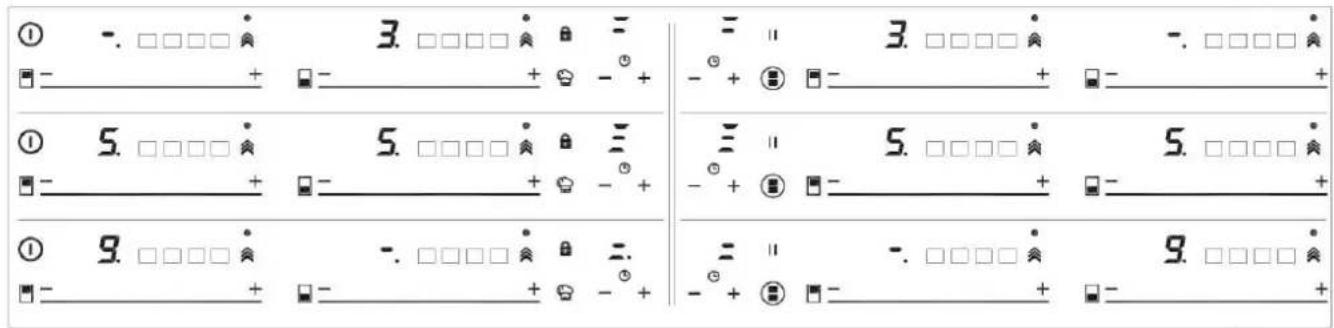
Fig. 30
WARNING: do not use this feature for a different cooking purpose other than boiling water. Never use oil, it may lead to overheat and generate a flame.
Activation of the function
To activate the function, select the plate, and press the CHEF sensor (16) until the led (20) located on the icon rights up.
Once the feature is activated, the sign will appear on both the power indicator (3) and the timer indicator (12); a moving segment will appear, indicating that the cooking is under system's control.
When the system detects that it is about to start boiling, a first beep will be heard. Take this opportunity to prepare your food for boiling or baking as desired.
After 30 seconds, a second beep will be heard; if you have not already done so, it's time to pour the food in the pan.
After the second beep, the system will activate the timer and stopwatch for you so that you can control how long the food is to be boiled.
30 seconds after activating the stopwatch, a third beep will sound to warn that from that moment on, the system will decrease the power supplied in order to maintain
a gentle and continuous boil. The timer will remain active until the end of cooking.
If desired, you can disable the timer and set a time for the countdown and automatic shutdown of the plate (see section Timer Function).
Deactivation of the function
You can override the function at any time by turning off the plate, by changing the power level or by choosing a different special function.
SLIDE COOKING FUNCTION (depending on the model)
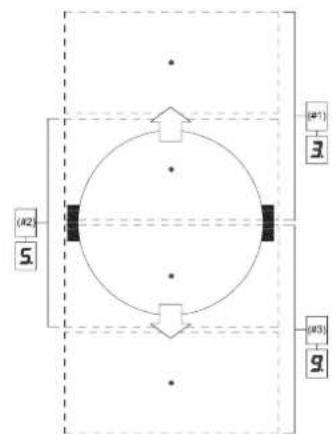
This function allows to divide the fl exible zone into three areas (see fi g. 31) and activates a predefi ned power configuration. It will allow slide the vessel from one area to another, to cook with the power assigned to each zone.
To activate it, you must first activate the "Flex Zone" function (see section "Flex Zone function").
After, press on the CHEF sensor (16), until the leds (21) located on the icon lights up. When doing so, the power indicators (3) will show three segments (see fig. 29) indicating that you can now place the vessel.
Once the vessel is placed, the powerheard, indicating to the user that he level will appear automatically in must add the food. the power indicators (3): for zone
1, the power level is 3, for zone #2 the power level is 5 and for zone #3 the power level is 9 (see fig. 31 and 30).
To deactivate this function, you must touch the "slider" cursor (2) in the position "0".
GRILLING FUNCTION
This function sets an automatic power control suitable for cooking on the grill.
To activate it, select the plate, and press on the CHEF sensor (16), until the led (22) located on the icon lights up. Once the function is activated, on the power indicator (3) a moving segment will appear indicating that the cooking is in the preheating phase of the vessel. Once this phase is finished, the sign will appear on the power indicator (3) and a beep will be
You can override the function at any time by turning off the plate by changing the power level or by choosing a different special function.
PAN FRYING FUNCTION
This function sets an automatic power control suitable for frying with little oil or sauteing.
To activate it, select the plate, and press on the CHEF sensor (16), until the led (23) located on the icon lights up. Once the function is activated, on the power indicator (3) a moving segment will appear indicating that the cooking is in the preheating phase of the vessel. Once this phase is finished, the sign will appear on the power indicator (3) and a beep will be heard, indicating to the user that he must add the food.
You can override the function at any time by turning off the plate by changing the power level or by choosing a different special function.
FUNCTION DEEP FRYING
This function sets an automatic power control suitable for frying with plenty of oil.
To activate it, select the plate, and press on the CHEF sensor (16), until the led (24) located on the icon
lights up. Once the function is activated, on the power indicator (3) a moving segment will appear indicating that the cooking is in the preheating phase of the vessel.
Once this phase is finished, the sign will appear on the power indicator (3) and a beep will be heard, indicating to the user that he must add the food.
You can override the function at any time by turning off the plate by changing the power level or by choosing a different special function.
CONFIT FUNCTION
This function sets an automatic power control suitable for confi t.
To activate it, select the plate, and press on the CHEF sensor (16),
until the led (25) located on the icon lights up. Once the function is activated, on the power indicator (3) a moving segment will appear indicating that the cooking is in the preheating phase of the vessel. Once this phase is finished, the sign R will appear on the power indicator (3) and a beep will be heard, indicating to the user that he must be add the food.
You can override the function at any time by turning off the plate by changing the power level or by choosing a different special function.
POACHING FUNCTION
This function sets an automatic power control suitable for frying food at medium temperature. Ideal for frying potatoes, in the preparation of the Spanish omelette.
To activate it, select the hob, and successively press the CHEF sensor (16), until the led (26) above the icon lights up. Once the function is activated, a moving segment will appear on the power indicator (3), indicating that the system is in the preheating phase of the container. Once this phase is finished, a will appear on the power indicator (3) and an acoustic signal will sound indicating that the user must add food.
You can override the function at any time by turning off the hob, modifying the power level, or choosing a different special function.
FLEX ZONE FUNCTION
Through this function, it is possible to enable two cooking zones work together, and to select a power level and to activate the timer function for both zones.
To activate this function, press the sensor (15). By doing so, the decimal points (4) of the linked plate will light up and the value "0" will be shown on their power indicators (3). The clock timer indicator (12) will show three segments indicating the activated zones. In case your model has several zones with "Flex Zone", you can select the desired option by pressing the sensor (15) before assigning the power to the chosen zone. You will have
a few seconds to perform the next operation; otherwise, the function will be disabled automatically (see fig 28).
After the "Flex Zone" is selected, you can assign the power by touching any of the "滑行器" cursors (2) of one of the linked zone. The power level and its variations are displayed simultaneously on the power indicators (3) of both zones.
To disable this feature, you should touch the sensor (15) again. Also, when the function is disabled, the levels of powers and functions assigned to the related zones are cleared.
SYNCHRO FUNCTION (depending on the model)
Through this function, it is possible to achieve that two cooking zones -indicated in the printing screen as "Synchro" work together and to select a power level and to activate the timer function for both zones
Press the sensor (14) to active this function. By doing so, the decimal points (4) of the linked plates will light up and the value "0" will blink on their power indicators (3). The detection of the container will take place throughout the linked zone. You will have a few seconds to perform the next operation; otherwise, the function will be disabled automatically.
To disable this feature, you should touch the sensor (14) again. Also, when the function is disabled, the levels of powers and functions assigned to the related zones will be cleared.
SAFETY SWITCH OFF FUNCTION
If due to an error one or several heating zones do not switch off, the appliance will be automatically disconnected after a set amount of time (see table 1).
Table1
| Selected power level | MAXIMUN OPERATING TIME (in hours) |
| 0 | 0 |
| 1 | 8 |
| 2 | 8 |
| 3 | 5 |
| 4 | 4 |
| 5 | 4 |
| 6 | 3 |
| 7 | 2 |
| 8 | 2 |
| 9 | 1 |
| P | 10 or 5 minutes, readjusts to level 9 (depending on model) |
When the "safety switch off" function has been triggered, a 0is displayed if the glass surface temperature is not dangerous for the user or an H if there is a burn risk.
Keep the control panel of the heating areas clean and dry at all times.
In the event of operating problems or incidents not mentioned in this manual, disconnect the appliance and contact the technical service.
SUGGESTIONS AND RECOMMENDATIONS
- Use pots or pans with thick, complete-tely fl at bottoms.
- Do not slide pots and pans over the glass because they could scratch it.
- Although the glass can take knocks from large pots and pans without sharp edges, try not to knock it.
- To avoid damaging the ceramic glass surface, do not drag pots and pans over the glass and keep the undersides of them clean and in good condition.
- Recommended diameters of the pot bottom (see "Technical Data Sheet" supplied with the product).
Try not to spill sugar or products containing sugar on the
glass as while the surface is hot these could damage it.
CLEANING AND MAINTENANCE
To keep the appliance in good condition, clean it using suitable products and implements once it has cooled down. This will make the job easier and avoid the buildup of dirt. Never use harsh cleaning products or tools that could scratch the surface, or steam-operated equipment.
Light dirt not stuck to the surface can be cleaned using a damp cloth and a gentle detergent or warm soapy water. However, for deeper stains or grease use a special cleaner for ceramic hot plates and follow the instructions on the bottle. Dirt that is firmly stuck due to being burned repeatedly can be removed using a scraper with a blade.
Slight tinges of colour are caused by pots and pans with dry grease residue underneath or due to grease between the glass and the pot during cooking. These can be removed using a nickel scouser with water or a special cleaner for ceramic hot plates. Plastic objects, sugar or food containing a lot of sugar that have melted onto the surface must be removed immediately using a scraper.
Metallic sheens are caused by dragging metal pots and pans over the glass. These can be removed by cleaning thoroughly using a special cleaner for ceramic glass hot plates although you may need to repeat the cleaning process several times.
Warning:
A pot or pan may become stuck to the glass due to a product having melted between them. Do not try to lift the pot while the heating zone is cold! This could * break the glass.
Do not step on the glass or lean on it as it could break and cau-se injury. Do not use the glass as a surface for placing objects.
The manufacturer reserves the right to make changes to its manuals that it deems necessary or useful,
without affecting the product's essential features.
ENVIRONMENTAL CONSIDERATIONS
The symbol on the product or its packaging means that this product cannot be treated like ordinary household waste. This product must be taken to a recycling collection point for electrical and electronic appliances. By ensuring that this product is disposed of correctly, you will avoid harming
the environment and public health, which could happen if this product is not handled properly. For more detailed information about recycling this product, please contact your local authority, household waste service or the store where you purchased the product. The packaging materials used are environmentally friendly and can be recycled completely. Plastic components are marked PE < ,LD < ,EPS < , etc. Dispse gof packaging materials, like household waste, in your local container.
Fulfillment with Energy Efficiency of the appliance:
- Appliance has been tested according to standard EN 60350-2 and the obtained value, in Wh/kg, is available in the appliance's rating plate.
Following advices will help you to save energy anytime you cook:
- Use the correct lid for each pot.
e whenever is possible. Cooking without lid uses more energy. - Use pans with flat bases and appropriate base diameters in order to match size of the cooking zone. Pan manufacturers usually provide top diameter of the pot that is always larger than base diameter.
- When water is used for cooking, use little quantities in order to preserve vitamins and minerals of vegetables and set the minimum power level that allows maintaining the cooking. High power level is unnecessary and a waste of energy.
- Use small pots with small quantities of food.
IF SOMETHING DOES NOT WORK
Before calling the technical service, perform the verifi cations described below.
The appliance does not work:
Ensure that the power cable is plugged in.
The induction zones do not produce heat:
The container is not appropriate (it does not have a ferromagnetic bottom or is too small). Check that the bottom of the container attracts a magnet, or use a larger container.
A humming is heard when starting to cook in the induction zones:
With containers which are not very thick or not of one piece, the hummir results from the transmission of energy directly to the bottom of the container. The humming is not a defect, but if you wish to avoid it anyway, reduce the power level slightly or use a container with a thicker bottom, and/or of one piece.
The touch control does not light up or, despite lighting, does not respond:
No heating zone has been selected. Be sure to select a heating zone before operating it.
There is humidity on the sensors, and/or your fingers are wet. Keep the touch control surface and/or your fingers clean and dry. The locking function is activated. Unlock the controls.
The sound of a fan is heard while cooking, which continues even after cooking has ended:
The induction zones have a fan to keep the electronics cool. This only operates when the electronic circuits get hot. It stops again when the circuits cool whether the hob is turned on or not.
The symbol will appear on the power indicator of a hotplate:
The induction system does not find a pot or pan on a hotplate or it is of an unsuited type.
The hotplate will switch off and the message C81 or C82 will appear on the indicators:
Excessive temperature in the electronics or on the glass. Wait for a while for the electronics to cool down or remove the pot or pan so that the glass can cool.
C85 appears on the indicator of one of the hotplates:
The pot or pan used is of an unsuited type. Switch off the hob, switch it on again and try with another pot or pan.
The appliance switches off and the message C90 appears on the power indicators (3):
The touch control detects on/off (1) sensor is covered and doesn't allow switching on the cooktop. Remove the possible objects or liquids keeping the touch control surface, clean and dry until the message disappears.
The appliance switches off and the message C91 appears on the power indicators (3):
The touch control detects Stop&Go sensor (6) is covered and doesn't allow to handle the cooktop. Remove the possible objects or liquids keeping the touch control surface, clean and dry, then press twice Stop&Go (6) sensor for removing the message and return to normal operation.
EMPLACEMENT ET EVACUATION DES PRODUITS DE LA COMBUSTION
REEMPLACEMENT DES BUSES
RECOMMANDATIONS IMPORANTES:
SUGGESTIONS ET RECOMMANDATIONS
TOIOOETHsH THES EETIA
ApoaipoeTe Tny EeWTEpiKn OuaKEuaia KAI TIG eOwTEpiKc GuaK Eaaiies Twv 8 iapopw Vkntwvmuw, Bepaiowte Iyia TnV aKepaIOTnT aNtG eotia. ZEPiTTwn auPBoiaC myn XpnoiIOiTie Tn oukeun KAI aTeuovtheite oE iDikeuEvo TPOoWTIKo.
Ta oToiExia Tns oukeuaoiac
(gaptoKlBwTio, oakoulaKia,
eaiol, kappia...) dev pTei
va aqnvovtai Kovta e TaIdia
ETeioh mTopouv va aToteleosouv
tnyeC KIVovou.
PpETEVA KAVET ETTAVW OTV TAYKO TOU OUVOTOU EITINLou,Ev avoiya Via TOV EVTOIXIO TOG OoKEUns ME TIG DIAOTAOEIC TOU avapovtai OTNV EIK.10,KA VA BbaIWeite OTI EXOV TnpnOei OI KpiAIEC DIAOTAEIC TOU Xwpou OTOV OTIO PPETEVA EYkataoTaOe i n OoKEun (BALTE EIK.10).
H O u o K e u n T p E T E I V gaiivoumthetai otny klaon 3 kai wc ek toutou utokeitai oe oAec TIG PPOdiaypapes Tou TPObetaovtai aTTO Ta TPOPTUVA iTIS OoKEuEc autc.
ΣTEPEΩΣH THΣ EΣTIAΣ
H eotia eivai Eeotlaioevn e iia eiodikn 0avTza TPOKEIeVou va aTOpeuxoEOTIOaONTOE biedouan upou oTo EtTIA. Ia va toTOeTNOeTe Owota autn tn 0Avtca, TAPAKAEiOte va aKoLouhnoe Ta 0oa avapepovtai TAPAKATW:
-
aφαipéóTe ǒλa Ta KIVNTá μéρn Tns Ετiας.
-
Kóptyt n φλávtzα oε 4 ερη με to απapaiŋnto μnkoc étoi wotv tnv totθεtnoεte oτa 4 akpa tou kpuσtállou.
-AvantooyupioTe Tny Eotia KAI TOIOOTNE OOWTA TNY autokoAaTn TIAEUPa TNC φAavTcag E" (EK.5)KATW aTTO akpo TNS etoi wote n EwTEPIKn TLEUPa TNS iOiac TNC φAvtZac va ouptiTTeI TEIAa ME TO TEPiETPiko EwTEPIKO akpo Tou Tzaiou. Ta akpa twv Awoiodov TTpeTIva ouPTiTouv Xwpi va aANNTIKAUUTTovtaI.
-KoAAnote OTo Tzapi Tn PhAvTca μe ooiOpopo Kai siyoupo TpOTo, TiEoVtac TnV μe Ta daxTuA.
-
TOnoTeHnOte Tn XUTpa OTo OTING TIOU YIeTAl OTov TIVaKa KAI OTEPeWOTe ME TIG BIDcF FTO ayKiOTPI "G" (Bλ. σχ. 11 KαI 12).
-
Tia va aTioΦuyETe TIOAVEc ETTaΦcKaTa λaθoC μE TNV EITIφáVEIA TouKoutiou TnC UTEPθεpμaiVOpEvncEOTiac KaTa Tn DlApKEIA TnLAEIToupyiAc TnC, Xpeiaζetai vaTOTIOθETnOETE eva DIAxωpiTikoαnto Gulo TnUva aσφalizetai μEβδεσ Εμia ELáXiOTn aTIOSTaON120 mm aTTOv TAYko (Eik. 10).
SHMANTIKEIPOAIAPAEIIA THN EKATAZAH
ETIONaivetai OTOV TEXVIKO EYkataoTaNc OTI TA EVDEXOmeva TTAAiva ToiXwata DEv TIPETEVA UTEPbaivouv OE uos TIV EOTIA MAyeipepaTO.ETIONC TO TIOW ToiXwkaI OI ETIAPAEIECS TOU BpiKovTAI DIITKAI TEPIAALouv TNV EOTIA TPETEI VA AVTEXOuv TNV ΘePavon Twv 90°C.
H kOλa Tnou Evwvei To Tlaaotikó
Eλoμa μe To EπΠλo, Tpεπεi
va αντexei σε θερμokαoicε
avw Twv 150 °C για va μην
ξεkOλnoεi n iδια n επενδuοŋ.
H EykataoTaon Tns OoKEunc TpETTEI VA Eiva OuBatn ME TIG Tpobiaypapec Twv IOxuovTwv TpotTuWv.
H oukeun autn dev ouvdeetae mia diatagn EKKevwong Tuv Tpoiovtwv Tns kaoung. P eT I w s K TOU TO U v O uovdetheta i oupwva touc kavoviaouc Eykataoan Tpuoavapepovtai liaitepn Tpooxh 0a Tpei va dotheta i OTIC epapuootees biataeic Tou avapepovtai napakatw nepi Egaepiouk aepioou.
E3AEPIESMOZ TON XQPQN
Eivai aTapaiTTO o xwpos OTOV 0toio Eivai EykataaTnEvn n oukeun va eaepiZeTai movipa wote va evai duvatn n owotn Aetoupyia autns.
H aπapaiŋtn TIOOTNTa Tou aεpa εivai autn TIOU aTaitai ato Tnv Kavovikn kaun Tou aepiou kai atoTov aepioo Tou xwou oTov oTOIO oOyKoδevθa mTopei va εivai katw ato 20 m³. H quoikn OuykEytpwn Tou aepa TpETeI VA yivetai μE aμeao TpOTo μeω Moviμw avoiymatw Tou yivovtai OTouc Toixouc Tou xwou Tou TpETeI VA eαepizetai μE avoiyma TPOC Ta Eξω μE touTouλxioTov 100 cm² (βλETE EIK.2). Ta avoiyata auta TpETeI va yivouv μe TpOTo woteva n vEvai duvatn Εμφαξη touc.
ETIPTETAI ETIONC KAI O EUMEOG
EgepiOg MC AHPa aTTO
ETIKOVWVOVTECs Wpouc ME
autov TIO PPETIE VA EgepiCTAI,
akolo U wVtcauotn p a TIC
TPoDiaypaqcs TwV TPOTUTWV
TTO Eiva OE IOXU.
TONOETHKAI AEPIEMO
Ouakeues paevipaeatoc 1e aepio TpeTc va EKKEVwovv Tavta Ta TpoiovTa Tc Kaounc 1eow atoppoqtnpWv Tou ouvdeovtai 0e Kattvofoxouc, kaivace n att' eUthetaiac 5gtwepika (BETEIK.3).2e TEPiTTwn Tou EV UTIAPXei NduvatotnTa epapoyns Tou aToppoqtnpA, ETITpeTTaI n Xpnon Evoc av Emuot n Eykataotnuevou TTavw 6Ev
AAAATTOIPOPTPAMMATIEMNOYXPONOY
TnV TpOTTOI nTo U
TPOypaumaiou Xpovou,
TpeTe va patnei o OupoEvoc
puOtiacs
(2) TcEOTiaC m To xpvObiaKoTTn.
Tote a eivai EpiKIn n avaywOn Ka
tn TpoTTOinOn Tou Xpovou.
Me Touc aoThe npes - (10) ka+ 11), mTPOeTE va TpOTTOIOEToV TPOypaMaioEvO xpovo.
Atouvdeon tou poayiou:
Av 8EAEv aTaqatnoeTo poAoI Tpiiv Anxi o PPOypaumatioEvos Xpovoc, auto MTOpei va yivei OToiabnTote stiyun, atla μe puOmuon Tng TiuNtou e.
- antes de colocar as cabecas
RegulaΔão do “Minimo”:
KIG9850.0SRKIG6850.0SR
1 Cift tacyanma DUAL 6000 W
2 Kontrol Düğmesi
3 Elektriklisi tici elmani induksiyon 0 15,0 cm 1200/1600 W
4 Elektriklisi tici elmani induksiyon 21,5 cm 2100/3000 W
5 Elektriklisi tici elmani induksiyon fl ex 22.8x20.0 cm 1750/2000 W
6 Elektriklisi tici elmani induksiyon fl ex 22.8x20 .0cm 1750/2000 W
7 Dokunma kontrlü
Dikkat: bu cihaz yalnizca ev icinde aile uyeleri tarafindan kullanim icin uretilmi ster.
"DUAL"bek
KIG9850.0SRKIG6850.0SR
1 Arzator ultra rapid DUAL 6000 W
2 Buton control arzător
3 Element electric de incalzire cu inductie 0 15,0 cm 1200/1600 W
4 Element electric de incalzire cu inductie 21,5 cm 2100/3000 W
5 Element electric de incalzire cu inductie fl ex 22.8x20.0 cm 1750/2000 W
6 Element electric de incalzire cu inductie fl ex 22.8x20.0 cm 1750/2000 W
7 Control tactil
FUNCTION, KEEP WARM (PASTRARE LA CALD)
FUNCTIA SLIDE COOKING (in
KIG9850.0SRKIG6850.0SR
1 Horak rychly horak DUAL
2 Ovladač horáku
3 Elektricky topnyclarek indukce 0 15,0 cm of 1200/1600 W
4 Elektricky topny clanek indukce 21,5 cm of 2100/3000 W
5 Elektricky topny (£) (£) (£) (£) (£) (£) (£) (£) (£) (£) (£) (£) (£) (£) (£) (£) (£) (£) (£) (£) (£) (£) (£) (£) (£) (£) (£) (£) (£) (£) (£) (£) (£) (£) (£) (£) (£) (£) (£) (£) (£) (£) (£) (£) (£) (£) (£) (£) (£) (£) (£
6 Elektricky topny (£) clánek indukce fl ex 22.8X20.0 cm of 1750/2000 W
7 Dotykový ovládač
Attention: this appliance has been manufactured for domestic use only and it employment by private person.
DUAL
obr. 22
Burners pans cm.
DUAL total 22 ÷ 30
DUAL central 12 ÷ 16
HOrAK ,DUAL
KIG9850.0SRKIG6850.0SR
1 Horák rychly horák DUAL 6000 W
2 Ovládač k horák
3 Elektricky ohrievaci clanok indukcie 0 15,0 cm 1200/1600 W
4 Elektricky ohrievaci clanok indukcie 21,5 cm 2100/3000 W
5 Elektricky ohrievaci clanok indukcie fl ex 22.8x20.0 cm 1750/2000 W
6 Elektricky ohrievaci clanok indukcie fl ex 22.8x20.0 cm 1750/2000 W
7 Dotykový ovládač
r: toto zariadenie bolo vyvinuté na použivanie v domácom prostredi.
DUAL
obr.22
Arzatoare Vas (cm)
DUAL total 22 ÷ 30
DUAL central 12 ÷ 16
MAXEXT
MAX INT


OFF
MININT


MINEXT MAXINT

MAX INT
HORÁK “DUAL”
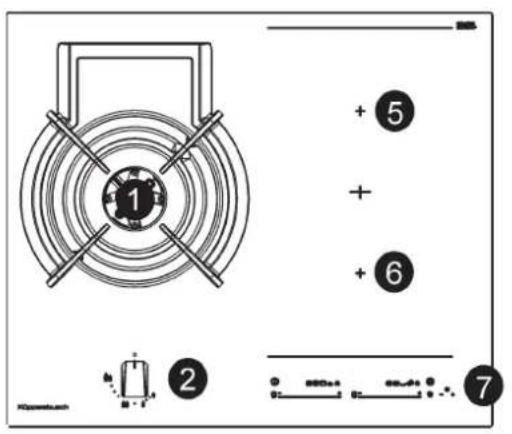
KIG9850.0SRKIG6850.0SR
In case of hotplate glass breakage:
- shut immediately off all burners and any electrical heating element and isolate the appliance from the power supply;
- do not touch the appliance surface;
- do not use the appliance.
ACCENSIONEL DISPOSITIVO
aillai ayssuususususususususususususususususususususususususususususususususususususususususususususususususususususususususususususususususususususususususususususususususususus
jlll j l j 11 jll jll jll jll jll jll jll jll jll jll jll jll jll jll jll jll jll jll jll jll jll jll jll jll jll jll jll jll jll jll jll jll jll jll jll jll jll jll jll jll jll jll jll jll jll jll jll jll jll jll jill jll jll jll jll jll jll jll
gall yagc C85 all jalil
p 1000 g e jn aiaiill gll g
plaiu lglg aljdtsele p gall jglg
#
1
1
1
1
1
1
1
C90 aalwJg 1aJg Jg Jg Jg Jg Jg Jg Jg Jg Jg Jg Jg Jg Jg Jg Jg Jg Jg Jg Jg Jg Jg Jg Jg Jg Jg Jg Jg Jg Jg Jg Jg Jg Jg Jg Jg Jg Jg Jg Jg Jg Jg Jg Jg Jg Jg Jg Jg Jg Jg Jg
aill llae e aie 125j Jaiy
. jia jao gai
:Jae y jg
.
i j 1 1 1 1 1 1 1 1 1 1 1 1 1 1 1 1 1 1 1 1 1 1 1 1 1 1 1 1 1 1 1
C91 1111 1111 1111 1111 1111 1111 1111 1111 1111 1111 1111 1111 1111 1111 1111 11
aall jiaabix iSai jay aaiy jia
Jaae aalll gnaa aalssg aa
a
i 1
aill 5
.5jaiai jai jai
(j)
aalll aay jaiy aaii yaae yao
jiaobially (3) 2a ball juy koo
a
aalal
.5jaiai jaiji
y
a
1 1 1 1 1 1 1 1 1 1 1 1 1 1 1 1 1 1 1 1 1 1 1 1 1 1 1 1 1 1 1 1 1 1 1 1 1
(10)
aalall cllgblall
sill lalb lce abd Joo
y jll j 8 g s k jll aaiial all
J 1
jlaa Jaaai 13a a
as yaiyaiyaiyaiy
()
aill jia bio jai jay aai all o 10 Jao "Synchro" pui aai iag Lai
a,b,juxj,gabll gina aiais
jiaobail 189all
y
led (24) 16
aalee aee eae ee eae
Cgillg j
201 201 201
isowolaiabwa
slll 1
jll jy jg jgl bll
j 1
Aa aai 1 Jg d 0000
aaiy aaii iaii
.
(Li)
g jao Lulilai Jiaoyo Xo jao po xiaoj
aaii 14jieeall bc biai (4) ayaiil baii eaiw ciis j
<0> aall jao sii, aai jai all iagll aalil
ai a ai (3)
a
1
1
i
aillll s gnnn nn nnnn nn nnnn nn nnnnnnnnnnnnnnnnnnnnnnnnnnnnnnnnnnnnnnnnnnnnnnnnnnnnnnnnnnnnnnnnnnnnnnnnnnnnnnn
.5jaiaiai jia jia
gaii 1
a 1
1isw 1s 1jcbw 1i
aannnll aal 1 yaiolil oia jbi jai gill jbaic aai los .s sio (14)
i
aalil cd glblall
(jjbl) jiljie gabll
aiaai aillbally lalal Lsas ayabg oJy
aia 1i ic alabil
i 1
(LED)
123 2024 (25)
(3)
a
aai aia jao elgii 2jnnn
(3)aIall jaoie R aIall
aaiy aaiy abaii yaaia 0a caii
jay jay jay jay jay jay jay jay jay jay jay jay jay jay jay jay jay jay jay jay jay jay jay jay jay jay jay jay jay jay jay jay jay jay jay jay jay jay jay jay jay jay jay jay jay jay jay jay jay jay jay
aaiii) aia g laie 1g sile (aaii) (aaiiaaiiaiaiaiaiaiaiaiaiaiaiaiaiaiaiaiaiaiaiaiaiaiaiaiaiaiaiaiaiaiaiaiaiaiaiaiaiaiaiaiaiaiaiaiaiaiaiaiaiaiaiaiaiaiaiaiaiaiaiaiaiaia
gall gll gll gll gll gll gll gll gll gll gll gll gll gll gll gll gll gll gll gll gll gll gll gll gll gll gll gll gll gll gll gll gll gll gll gll gll gll gll gll gll gll gll gll gll gll gll gll gll gll gll gell 12000000000000000000000000000000000000000000000000000000000000000000000000000000000000
aagjy jll jiaai iis 1
jgl aal aaii ciS gaaai ai ball
gall nuiu uaiu uaiu pi gaiai
gaiu galiu uauu uauu uauu uauu uauu uauu uauu uauu uauu uauu uauu uauu uauu uauu uauu uauu uauu uauu uauu uauu uauu uauu uauu uauu uauu uauu uauu uauu uauu uauu uauu uauu uauu uauuu
a_1 + a_2 + a_3 = 6
aill aaii 10000000000000000000000000000000000000000000000
A
+,(10)J 5
aL
a 1111111111111111111111111111111
1
100 2
(10) yu wlll
jg jy jy
(11)+ (10)
()
81) aill 2a 4a 5a 6a jll jll
aill jn nn nnnn nn nnnn nn nnnn nn nnnn nn nnnn nn nnnn nn nnnn nn nnnn nn nnnn nn nnnn nn nnnn nn nnnn nn nnnn nn nnnn nn nnnn nn nnnn nn nnnn nn nnnn nn nnnn nn nnnn nn nnnn nn nnnn nn nnnn nn nnnn nn nnnn nn nann nn nnnn nn nnnn nn nnnn nn nnnn nn nnnn nn nnnn nn nnnn nn nnnn nn nnnn nn nnnn nn nnnn nn nnnn nn nnnn nn nnnn nn nnnn nn nnnn nn nnnn nn nnnn nn nnnn nn nnnn nn nnnn nn nnnn nn nnnn nn nnnn nn nnn
J 1 PL 11) + (12)
Jai jai liao 2
aaii aai bai jaiw.6) aill
oai jay gai gai jai y
g (11) +jaiy jajj
aabina aagaaagall gail clalai 2
ae gao aclll jai, jaiiill jus wll
jayil jaiy jaiy jaiy jaiy jaiy jaiy jaiy jaiy jaiy jaiy jaiy jaiy jaiy jaiy jaiy jaiy jaiy jaiy jaiy jaiy jaiy jaiy jaiy jaiy jaiy jaiy jaiy jaiy jaiy jaiy jaiy jaiy jaiy jaiy
3 1 1
J 150
24
36
40
42
44
46
48
50
52
54
56
58
60
62
64
66
68
70
72
74
76
78
80
82
84
86
88
90
yj> 1c laiall juyy yjll cagll jyj (2) jajll
a_4 = 12 · a_1 · 2^4 = 12
1 1 1 1 1 1 1 1 1 1 1 1 1 1 1 1 1 1 1 1 1 1 1 1 1 1 1 1 1 1 1 1 1
1
(3) 2
(2)
(9)
(4)
jll (3) aIbll sioo sioo 2
aIbll aIbll bIy I yIy I yIy
1 1 1 1 1 1 1 1 1 1 1 1 1 1 1 1 1 1 1 1 1 1 1 1 1 1 1 1 1 1 1
jai jao 1g aai ball aag jaoi sic
ll lalal jao y jao gall jaoeclal
le alis jaoa aai all oao jao jao
.(3) la
aag aaii iiaaiaiiaiaiaiaiaiaiaiaiaiaiaiaiaiaiaiaiaiaiaiaiaiaiaiaiaiaiaiaiaiaiaiaiaiaiaiaiaiaiaiaiaiaiaiaiaiaiaiaiaiaiaiaiaiaiaiaiaiaiaiaiaiaiaiaiaia
()
aagall gall aac o aagall oaa
gall bs gss elc lo :g y jy
elgl 2yay lgyu w gll sdy
.
99,1 j 9
aagglgagal
aijball aaiiall aiall s iua Jus y
sikw .aiaiiall ayaiiall aiaili jui 1
aiaiiall i g b
jll aag jiee eel jieell jiaai jay
jai gai jra gall chw jiaai slk ay
Aic jall all
aal
laiaiaiai 111 aagai jie 110 (11) Jaa Jai jai jai 6) Jai Jai Jai Jai Jai Jai Jai Jai Jai Jai Jai Jai Jai Jai Jai Jai Jai Jai Jai Jai Jai Jai Jai Jai Jai Jai Jai Jai Jai Jai Jai Jai Jai Jai Jai Jai Jai Jai Jai Jai Jai Jai Jai Jai Jai Jai Jai Jai Jai Jai
aillg 12 aal lal jai j
jai gill oall jai jlll j
cl/ jao jao jao jao jao jao jao jao jao jao jao jao jao jao jao jao jao jao jao jao jao jao jao jao jao jao jao jao jao jao jao jao jao jao jao jao jao jao jao jao jao jao jao jao jao jao jao jao jao jao jae
J 1 J 1 J 1 J 1 J 1 J 1 J 1 J 1 J 1 J 1 J 1 J 1 J 1 J 1 J 1 J 1 J 1 J 1 J 1 J 1 J 1 J 1 J 1 J 1 J 1 J 1 J 1 J 1 J 1 J 1 J 1 J 1 J 1 J 1 J
a_i a a_i 分母最小值为 k .
aai 1 aie 1 1 1 1 1 1 1 1 1 1 1 1 1 1
《A》
8 10000000000000000000000000000000000000000000000000
《《》
8(8)11(Jaiillgaiy)juswauu wll
clitui (9) jzill jzall lalw. 5j
pi gall gall lall 12c! was gol
ci gall gill lgla
.(11) + (10)
28
| ① | - | - | - | - | - | - | - | - | - | - | - | - | - | - | - |
| - | + | - | + | - | - | + | - | - | + | - | - | - | + | - | + |
| ① | 0. | 0. | 0. | 0. | 0. | 0. | 0. | 0. | - | 0. | 0. | 0. | - | 0. | 0. |
| - | + | - | + | - | - | + | - | - | + | - | - | - | + | - | + |
AR
gall jS l! «-» eaiy aay j y
1
aaii iiaaii aaiii
yj 0j j 0j j j j j j j j j j j j j j j j j j j j j j j j j j j j j j j j j j j j j j j j j j j j j j j j j j j j j j j j
(2)
y j 111 111 111 111 111 111 111 111 111 111 111 111 111 111 111 111 1
yolwll .jilalil 1.2
jie 1
= ( x_1,y_1) , = ( x_2,y_2)
aal 10 Jx aol yia dai p
G a alaa jicay wally pa sill Jiaie
a 1 (1)wllr jz waiy jz
Lag yjg.(jall gjg jai)aii
WALLPsaill (1)① wlll j
#
(1) ①
1
1
1
1
1
1
1
1
1
1
1
1
1
1
1
1
1
1
1
1
1
1
1
1
1
1
1
1
1
1
1
1
1
1
1
2 90
solai! srsj oJyag a gill yg lall b
aill s giua Jzai jSao .(4) ayuall alalil
4g
J 1000000000000000000000000000000000000000000000000000000
Ha jaiy jai yjaiy aagaiy Jiaiia jia iie
jia jia zbiuui jia 12i (3) aaiaiy jay
jbi yiy ayaiu aiall ci yaiy ai
i jaiy jy uaiaiy iie g. guyill jayil
(ajgall jaiy) (3) yiyaiy
aill 2
( 4) A_i ( 1,2,3,4)
a 4
. 5
. 6
a#
()
a#jla g#yill a jzalla c gia J.
10
C. sall ( ) 11
"aiyallabial,ayibjusill 15 (jll
()“aill”
17
a 8
a 19
20 1
1
2
3
24 1
25 1
26 a 1
Jia will ic laa
j 1000000000000000000000000000000000000000000000000000000000000000000000000000000
gagaiagaii 111 (s) gaiy
jai jai i aaiiaiaiaiaiaiaiaiaiaiaiaiaiaiaiaiaiaiaiaiaiaiaiaiaiaiaiaiaiaiaiaiaiaiaiaiaiaiaiaiaiaiaiaiaiaiaiaiaiaiaiaiaiaiaiaiaiaiaiaiaiaiaiaiaiaiaiaiaiaiaiaiaiaiaiaiaiaia
25
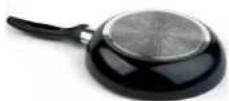
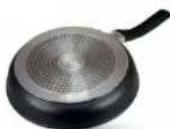
y
scll s piauoll oal g jy d
oal cgl gjg. gall g uai
gao piau (a ydiell) jwau wuliu
oJrll JuaIg jiaaiagjjgill g cL
aIbIg aIg g aic
yI Iai aabua eI yI oSsi j 1
.6 Jaii) aaiia
26
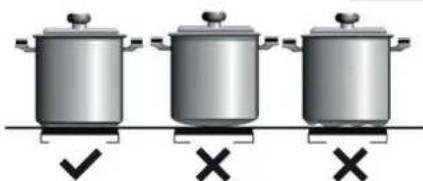
1 1
1
1
1
:alecluysi
aiaiaiaaii
S AOB = S AOB + S_ AOB
gabla gabla gabla gabla gabla gabla gabla gabla gabla gabla gabla gabla gabla gabla gabla gabla gabla gabla gabla gabla gabla gabla gabla gabla gabla gabla gabla gabla gabla gabla gabla gabla gabla gabla g
aalg
aannnnae
(20)
1
a^2 + 3b^2 = 4 有无穷多的解 ( 2x) ^2 + 3y^2 = 4
a1y
1
C. 与 各不一致
法上法
y 1
aegnnn 2.
y 111 111 111 111 111 111 111 111 111 111 111 111 111 111 111 111 111 111 111 1
1
Jalil aayuul aaii aai 1000
J 23d Jg 100
1
| ### | ###(###) | ###(###) | ###(###) | ###(###) | ###(###) | ###(###) | ||
| ### | ### | 1/100### | 1/100### | 1/100### | ||||
| 56,4% | 6000 | 3500 | 80B+46B×2 | 436 | 30-28 | ###-G30 | (jz) DUAL | 1 |
| 6000 | 3500 | 80B+46B×2 | 429 | 37 | ###-G31 | |||
| 6000 | 3500 | 125A+71A×2 | 571 | 20 | ###-G20 | |||
| 800 | 46B | 58 | 30-28 | ###-G30 | (jz) DUAL | |||
| 800 | 46B | 57 | 37 | ###-G31 | ||||
| 800 | 71A | 76 | 20 | ###-G20 | ||||
EN 30-2-1 Juea (EE jie) 2014/66
a111 1
| element 4) | element 2) | ~ ~ ~ ~ ~ ~ ~ ~ ~ ~ ~ ~ ~ ~ ~ ~ ~ ~ ~ ~ ~ ~ ~ ~ ~ ~ ~ ~ ~ ~ ~ ~ ~ ~ ~ ~ ~ ~ ~ ~ ~ ~ ~ ~ ~ ~ ~ ~ ~ ~ ~ ~ ~ ~ ~ ~ ~ ~ ~ ~ ~ ~ ~ ~ ~ ~ ~ ~ ~ ~ ~ ~ ~ ~ ~ ~ ~ ~ ~ ~ ~ ~ ~ ~ ~ ~ ~ ~ ~ ~ ~ ~ ~ ~ ~ ~ ~ ~ ~ ~ ~ | J | |
| ~ ~ ~ ~ ~ ~ ~ ~ ~ ~ ~ ~ ~ ~ ~ ~ ~ ~ ~ ~ ~ ~ ~ ~ ~ ~ ~ ~ ~ ~ ~ ~ ~ ~ ~ ~ ~ ~ ~ ~ ~ ~ ~ ~ ~ ~ ~ ~ ~ ~ ~ ~ ~ ~ ~ ~ ~ ~ ~ ~ ~ ~ ~ ~ ~ ~ ~ ~ ~ ~ ~ ~ ~ ~ ~ ~ ~ ~ ~ ~ ~ ~ ~ ~ ~ ~ ~ ~ ~ ~ ~ ~ ~ ~ ~ ~ ~ ~ | ~ ~ ~ ~ ~ ~ ~ ~ ~ ~ ~ ~ ~ ~ ~ ~ ~ ~ ~ ~ ~ ~ ~ ~ ~ ~ ~ ~ ~ ~ ~ ~ ~ ~ ~ ~ ~ ~ ~ ~ ~ ~ ~ ~ ~ ~ ~ ~ ~ ~ ~ ~ ~ ~ ~ ~ ~ ~ ~ ~ ~ ~ ~ ~ ~ ~ ~ ~ ~ ~ ~ ~ ~ ~ ~ ~ ~ ~ ~ ~ ~ ~ ~ ~ ~ ~ ~ ~ ~ ~ ~ ~ ~ ~ ~ ~ ~ ~ = 220 | H05 RR-F H05 RN-F H07 RN-F | B | J |
| A | ||||
| H05 V2V2-F2x 1.5 x 5 | ||||
8 8
ylll lglssll
aaiall aaiall alal all jssj Sny. 13 kill) waill iil: gii Jauall jag ool ygaiy gaoai lgl jaiu waii dai jaiwai (13) kiill) wailll jaii D" 13 wailld gaiid C" 13 jaii gaiiell Jaao jil .(14 Kill) waiia Jaiiall qaiia Jauill "Jaiiall Jaiil" 13 ic
G20 jai jai jil Jellal 1 gagall
hui lii jai jai jai jai jai hao
laai jai jai jai jai jai ojgl aal
o) G31 g G30 jai jai laic
(aclull jia olai
Jalal Jd
J 19-18
J 19-18
J 19-18
J 19-18
J 19-18
Cuiy
aaii aai i 1 1 1 1 1 1 1 1 1 1 1 1 1 1 1 1 1 1 1 1 1 1 1 1 1 1 1 1 1 1 1 1 1 1 1 1
gii 1
aaiy jiygsl cyg ggl yi i 1
J 1 J
a aaiall aagll gailiy
alill g dLjAeBao jgaiall ciaal gall
lll sall Jaii j kay gily
aiell cialgall
laall ydlal ay lgl
jall gaiall sdlil gai i all
jall cuiall ciall gl albl) (uill aol jao
Jas j Jusoi alli paill giaill
As jai ay jauall glaia
pcj jai ay jaiiaai all
jaiy jaiy jaiy jaiy
Jc jaiy jaiy jaiy jaiy
$$ ; \dot {c} _ {i} ^ {\text {与}} \quad \text {d i s} = (\mathcal {G}) L \quad \text {d i s} $$
$$ \cdot \text {i} \cdot \text {i} \cdot \text {i} \cdot \text {i} \cdot \text {i} \cdot \text {i} \cdot \text {i} \cdot \text {i} \cdot \text {i} \cdot \text {i} $$
y 90
jll lglg j 100
g 90
g 90
a11 jaa yjla jg21 jagsi 1
J 1000000000000000000000000000000000000000000000000000000000000000000000000000000000000
#
"Jiaai Jiaai" bui
14 13 K) "M" jai Jai
S_ OBC = S_ COD + S_ BOC
a jell y g i j 100
jell a jy j 20
jell a jy j 100
jell a jy j 20
jell a jy j 100
jell a jy j 20
jell a jy j 100
4g 11 g
J 15
J 15
J 15
J 15
J 15
J 15
J 15
J 15
J 15
J 15
J 15
J 15
J 15
J 15
J 15
J 15
J 15
J 15
J 15
J 15
J 15
4.2.1.11
aJlal g aIisll cIaill Jaiial lal
4g Sll p 20 ga 3ga aIal 11
laolal 11
laolal 11
laolal 11
laolal 11
laolal
"gjall" Jaalal g Jaiil
Aaii jaiil 1e pliy iin
aaiy jaiil s y jai pe jai
piai jaii (22 k) 100
. jaii jaii jai "gjall" Jaiil
Jalil jaii piai 1
yjie yjie 0f Off cblly jao jdy
Cgl yo yog jiaolc laiall
aLl w Jlac olal use
gwl 2dyl gwl jyall
jll s gl aill gdl Jglall
lc bial l qal lglal
jgal Iol gnl gail
laia Jaliall
jell Aikls Jbiu jyall jay
jac oaiu ic gnil
gaii gaii gaii gaii
gaii gaii gaii gaii
gaii gaii gaii gaii
gaii gaii gaii gaii
111 111 111 111 111 111 111 111 111 111 111 111 111 111 111 111 111 111 111 111 1
al 1 jai aill jai aall alab jai jao 0j gall olal ola! gacll jiae .off . alal joi Jg "Cglal" Jaalll Jauo Jauo Jauo Jauo Jauo Jauo Jauo Jauo Jauo Jauo Jauo Jauo Jauo Jauo
1 1 1 1 1 1 1 1 1 1 1 1 1 1 1 1 1 1 1 1 1 1 1 1 1 1 1 1 1 1 1 1 1 1 1 1 1 1 1 1 1 1 1 1 1 1 1 1 1 1 1
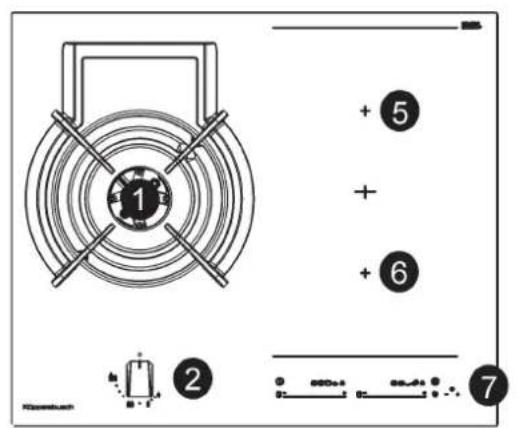
KIG9850.0SRKIG6850.0SR
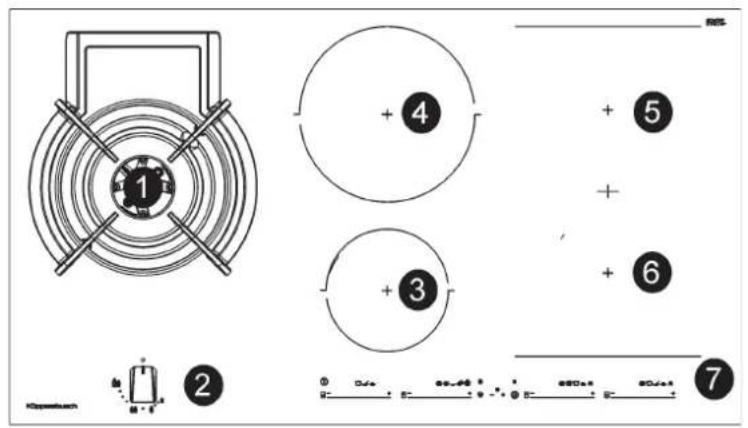
6000
1
1
2Jauu
3-10 15.0
4-21,5
5-20.0×2
620.0x2
7wally
a
22
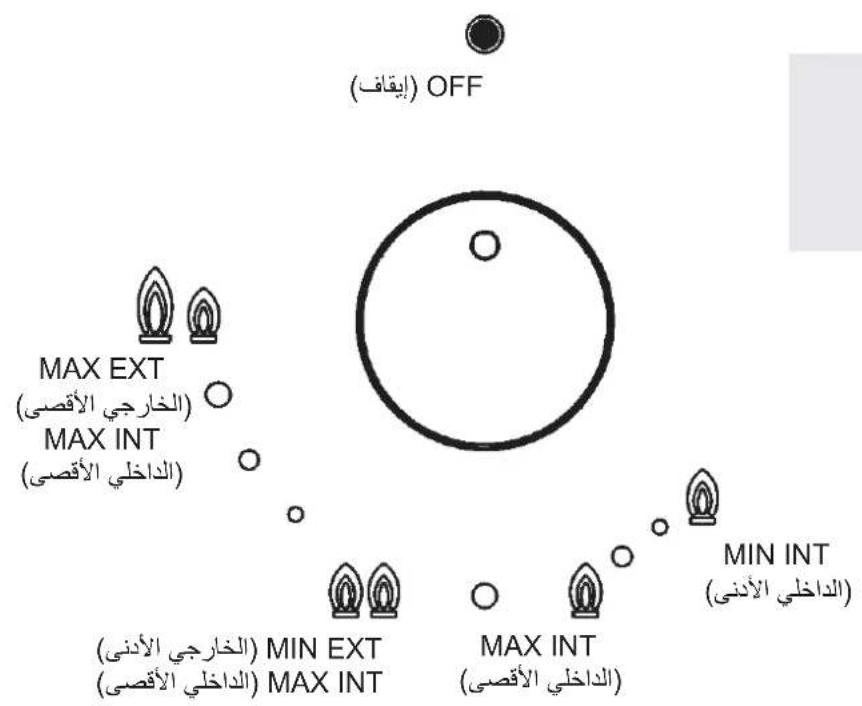
(2) DUAL
JieLai.
30÷22
16÷12
aal 15 a 15
Jilu 21 piaiuiy: jin
aeaiall as yjll Jn aaiall gall
as yll jna Lgill Juaill gi jlgll
aipiaiu Ly aalll Cilaiill gaeiuall
gall ayLus iluog i uulll gull
piaiu uui jay. jglll g aaiall
. gge gaiuiauiae ayias jiluag
J 1
cysI EUs Ucs Aas Ugs. gJg JgJ 1s JgS Ugs Ugs Ugs Ugs Ugs Ugs
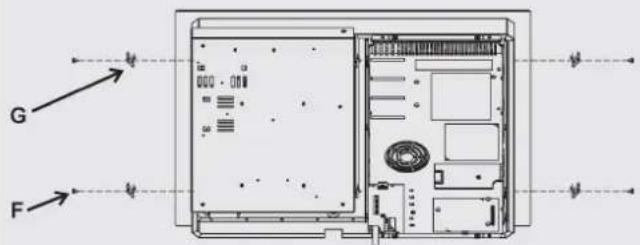
1g2 2e5e
12
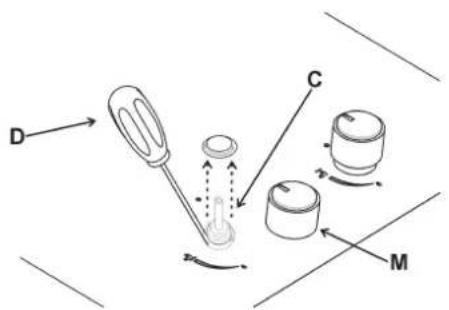
13 14
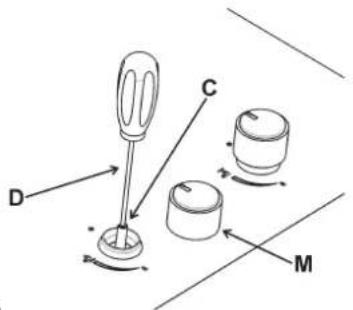
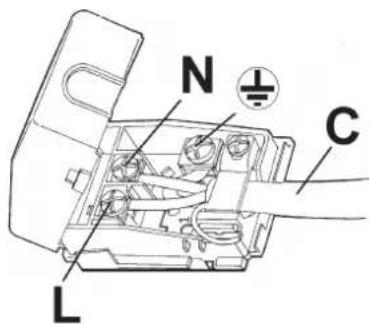
15
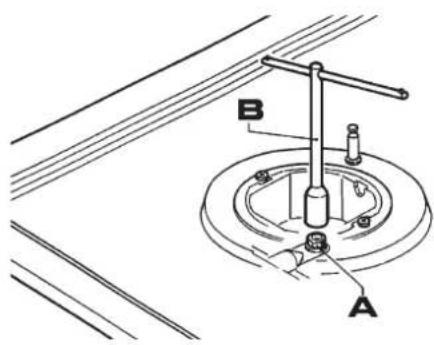
16
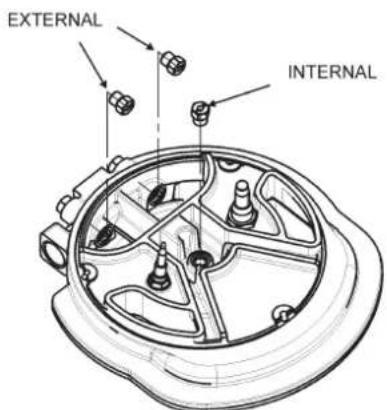
18
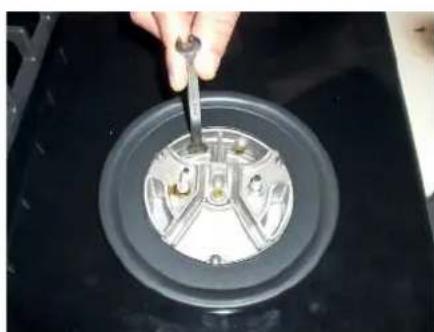
19
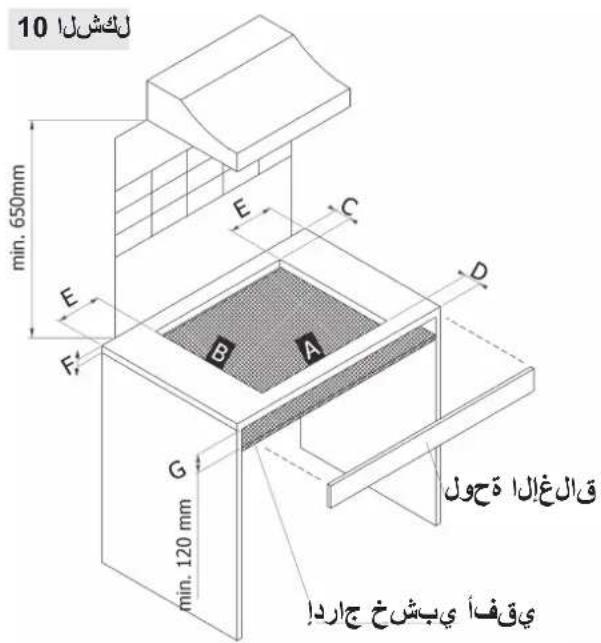
AR
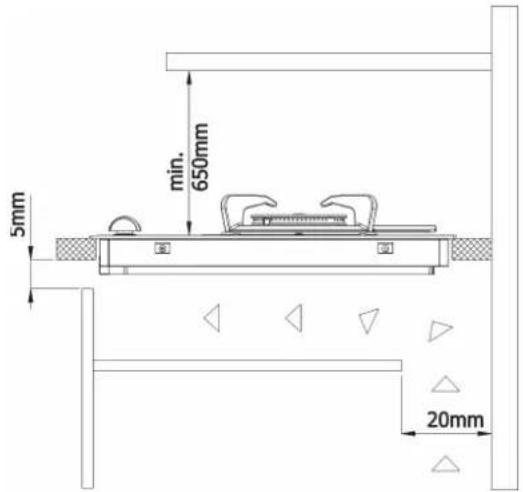
()
ABCDEFG
60 cm. 560 490 55 55 60 min. 30 - max 50 min. 120 mm
90 cm. 860 490 55 55 60 min. 30 - max 50 min. 120 mm
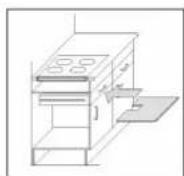
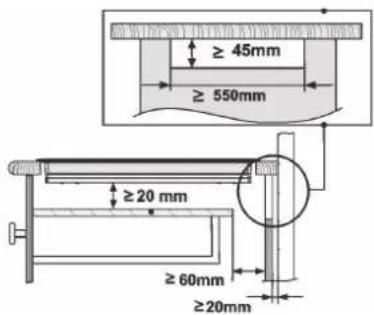
2. · 2g · da s a_b
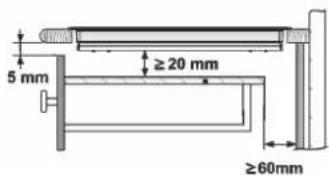
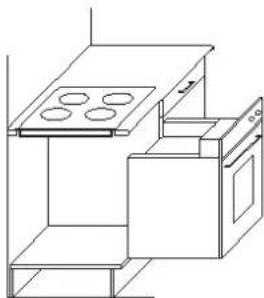
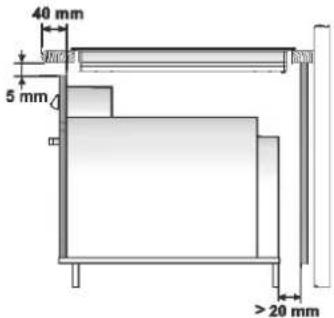
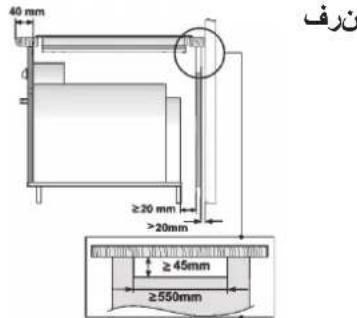
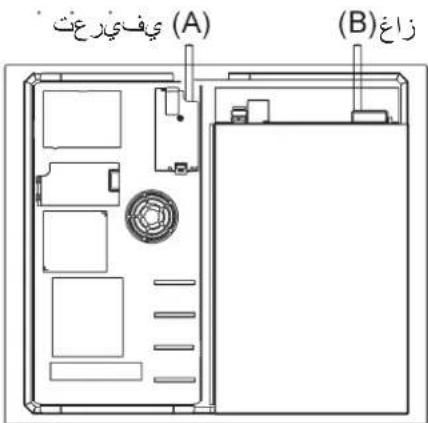
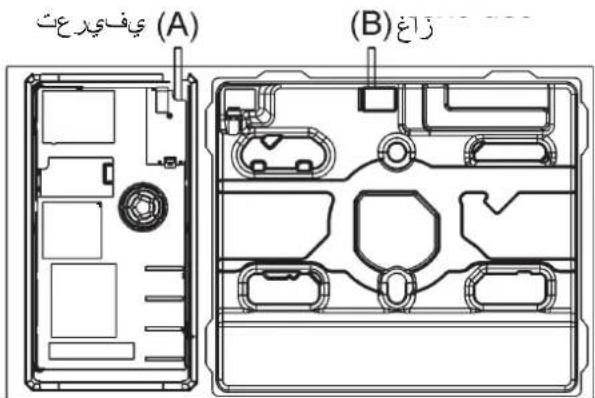
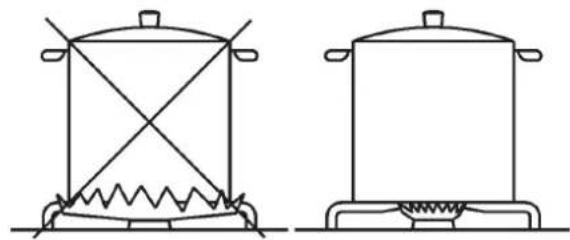
1
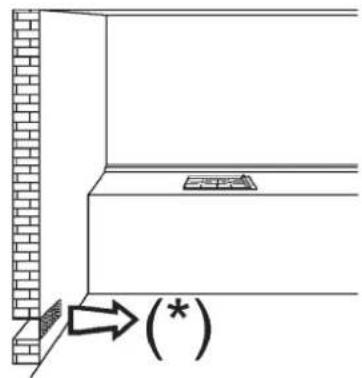
234
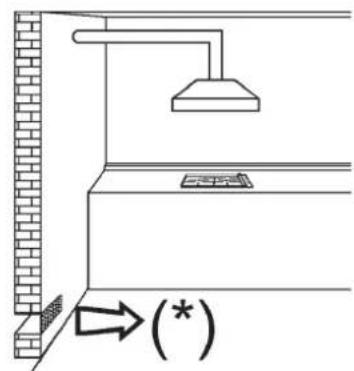
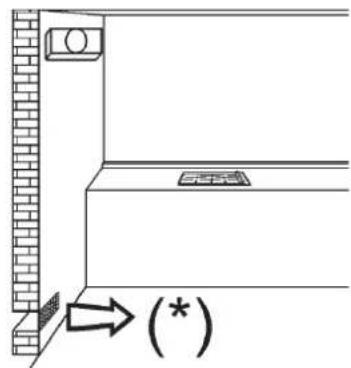
1 + u1 - 1 = ( 1 + u) u1 < 1 = u
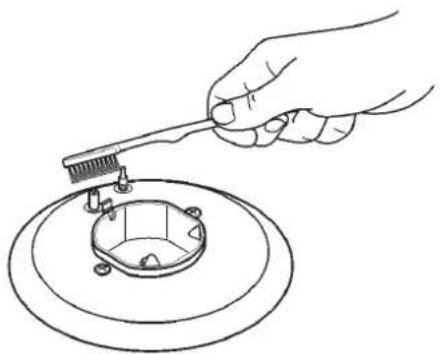
6
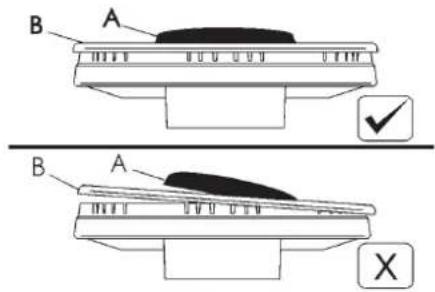
7 8
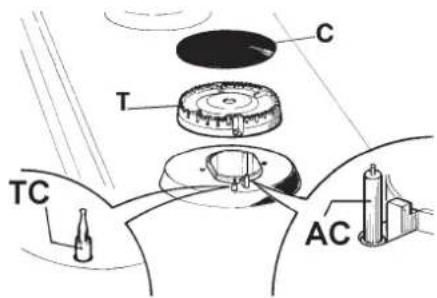
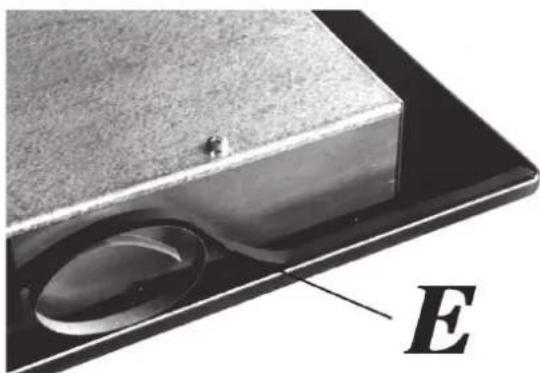
5
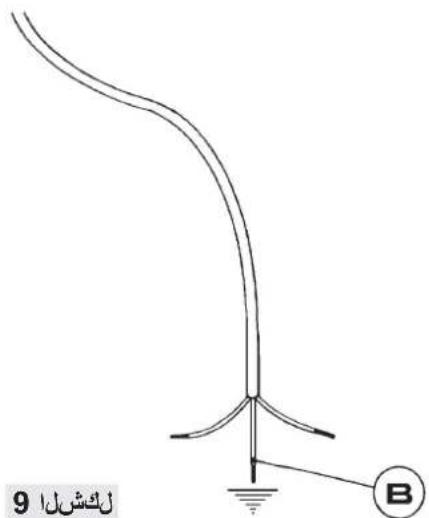
Küppersbusch

- KIG9850.0SRKIG6850.0SR
- DUAL BURNERS
- LIGHTING AND USING THE "DUAL" BURNER
- Stand the pan on the burner before lighting.
- IMPORTANT WARNINGS FOR THE USER
- HOTPLATE
- WARNING:
- TECHNICAL INFORMATION FOR THE INSTALLER
- INSTALLING THE HOT PLATE
- FIXING THE HOT PLATE
- ROOM VENTILATION
- IMPORTANT INSTALLATION OPENABLE WINDOW INSTRUCTIONS
- GAS CONNECTION
- ELECTRICAL CONNECTION
- TAPS
- "Reduced rate" adjustment
- REPLACING THE INJECTORS
- INSTALLATION
- Installation with cutlery drawer
- Put the oven on top
- Keep the Guarantee
- ABOUT INDUCTION
- Advantages
- Pans
- EN
- IMPORTANT RECOMMENDATIONS:
- Use and Maintenance
- USER INSTRUCTIONS OF THE TOUCH CONTROL
- HANDLING ELEMENTS (fig. 20)
- SWITCHING ON THE DEVICE
- ACTIVATING PLATES
- TURNING OFF A PLATE
- STOP&GO FUNCTION
- Activating the Stop function.
- Deactivating the Stop function
- BLOCK FUNCTION
- TURING ALL PLATES OFF
- PAN DETECTOR
- POWER FUNCTION
- TIMER FUNCTION (countdown clock)
- Setting a timer on a plate.
- Changing the programmed time.
- Disconnecting the clock
- POWER MANAGEMENT FUNCTION
- SPECIAL FUNCTIONS: CHEF
- SIMMERING FUNCTION
- KEEP WARM FUNCTION
- MELTING FUNCTION
- QUICK BOILING FUNCTION (depending on the model)
- Conditions of the container
- - WITHOUT CAP.
- Activation of the function
- Deactivation of the function
- SLIDE COOKING FUNCTION (depending on the model)
- GRILLING FUNCTION
- PAN FRYING FUNCTION
- FUNCTION DEEP FRYING
- CONFIT FUNCTION
- POACHING FUNCTION
- FLEX ZONE FUNCTION
- SYNCHRO FUNCTION (depending on the model)
- SAFETY SWITCH OFF FUNCTION
- SUGGESTIONS AND RECOMMENDATIONS
- CLEANING AND MAINTENANCE
- ENVIRONMENTAL CONSIDERATIONS
- IF SOMETHING DOES NOT WORK
- EMPLACEMENT ET EVACUATION DES PRODUITS DE LA COMBUSTION
- REEMPLACEMENT DES BUSES
- RECOMMANDATIONS IMPORANTES:
- SUGGESTIONS ET RECOMMANDATIONS
- TOIOOETHsH THES EETIA
- ΣTEPEΩΣH THΣ EΣTIAΣ
- SHMANTIKEIPOAIAPAEIIA THN EKATAZAH
- E3AEPIESMOZ TON XQPQN
- TONOETHKAI AEPIEMO
- AAAATTOIPOPTPAMMATIEMNOYXPONOY
- Atouvdeon tou poayiou:
- RegulaΔão do “Minimo”:
- "DUAL"bek
- FUNCTION, KEEP WARM (PASTRARE LA CALD)
- FUNCTIA SLIDE COOKING (in
- DUAL
- Burners pans cm.
- HOrAK ,DUAL
- Arzatoare Vas (cm)
- HORÁK “DUAL”
- ACCENSIONEL DISPOSITIVO
- #
- (j)
- ()
- Cgillg j
- a_1 + a_2 + a_3 = 6
- a_4 = 12 · a_1 · 24 = 12
- aagglgagal
- aal
- a_i a a_i 分母最小值为 k .
- 28
- AR
- 1
- jie 1
- a = ( x_1,y_1) ,b = ( x_2,y_2)
- 4g
- a2 + 3b2 = 4 有无穷多的解 ( 2x) 2 + 3y2 = 4
- Jalal Jd
- gii 1
- S_ OBC = S_ COD + S_ BOC
- 4g 11 g
- 4.2.1.11
- Küppersbusch
Brand : Küppersbusch
Model : KIG9850.0SR
Category : Cooker