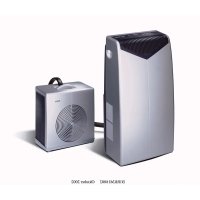
B1RKM16002 - Air Conditioning BOSCH - Free user manual and instructions
Find the device manual for free B1RKM16002 BOSCH in PDF.



| Brand | Bosch |
| Model | B1RKM16002 |
| Product type | Mobile split air conditioner (indoor and outdoor unit) |
| Power supply | 220-240 V, 50 Hz |
| Recommended fuse | 16 A, slow-blow |
| Maximum consumption | 1500 W |
| Refrigeration capacity | 4400 W |
| Indoor temperature range (cooling) | +18°C to +32°C |
| Outdoor temperature range (cooling) | +20°C to +43°C |
| Operating modes | Cooling, dehumidification, air purification, turbo, silent |
| Fan speed | 5 levels (manual) |
| Dehumidification capacity | Up to 60 liters per day |
| Programmable timer | Yes (automatic on/off) |
| Air filter | Washable main filter + purifier filter (ref. B1 RKZ 15013) |
| Filter maintenance | Clean the main filter regularly; replace the purifier filter every 3 months or as indicated by the light |
| Safety | Compressor protection (restart after 3 min) |
| Weight (indoor unit) | Not specified (estimated ~25 kg) |
| Dimensions (indoor unit) | Not specified |
| Weight (outdoor unit) | Not specified |
| Dimensions (outdoor unit) | Not specified |
| Included accessories | Flexible air hose, support plate, protective caps, drainage pipe |
| Spare parts available | Purifier filter (B1 RKZ 15013) |
Frequently Asked Questions - B1RKM16002 BOSCH
User questions about B1RKM16002 BOSCH
0 question about this device. Answer the ones you know or ask your own.
Ask a new question about this device
Download the instructions for your Air Conditioning in PDF format for free! Find your manual B1RKM16002 - BOSCH and take your electronic device back in hand. On this page are published all the documents necessary for the use of your device. B1RKM16002 by BOSCH.
USER MANUAL B1RKM16002 BOSCH
GB Instructions for Use
FR Mode d'emploi

Household Appliances
Inhaltsverzeichnis
Wichtige Hinweise
Disposal of packaging 27
Disposal of your old appliance 27
Before connecting your new appliance 27
Your new appliance
Description of your appliance 28
Control panel 29
Accessories. 29
Requirements for use 30
Transportation requirements. 31
Preparations
Positioning of the outdoor unit 32
Indoor/outdoor unit communication. 33
Separating the flexible duct from the indoor unit ...34
Connecting the flexible duct to the indoor unit ....36
Turning the appliance on
Cooling 37
Only dehumidification. 38
Air purification 39
Setting the time / Programming the timer
Setting the time 41
Setting the timer 41
Disconnecting the timer. 42
Cleaning and Maintenance 43
Technical service/Warranty 44
Things that can save you from making unnecessary phone calls 45
Technical information 47
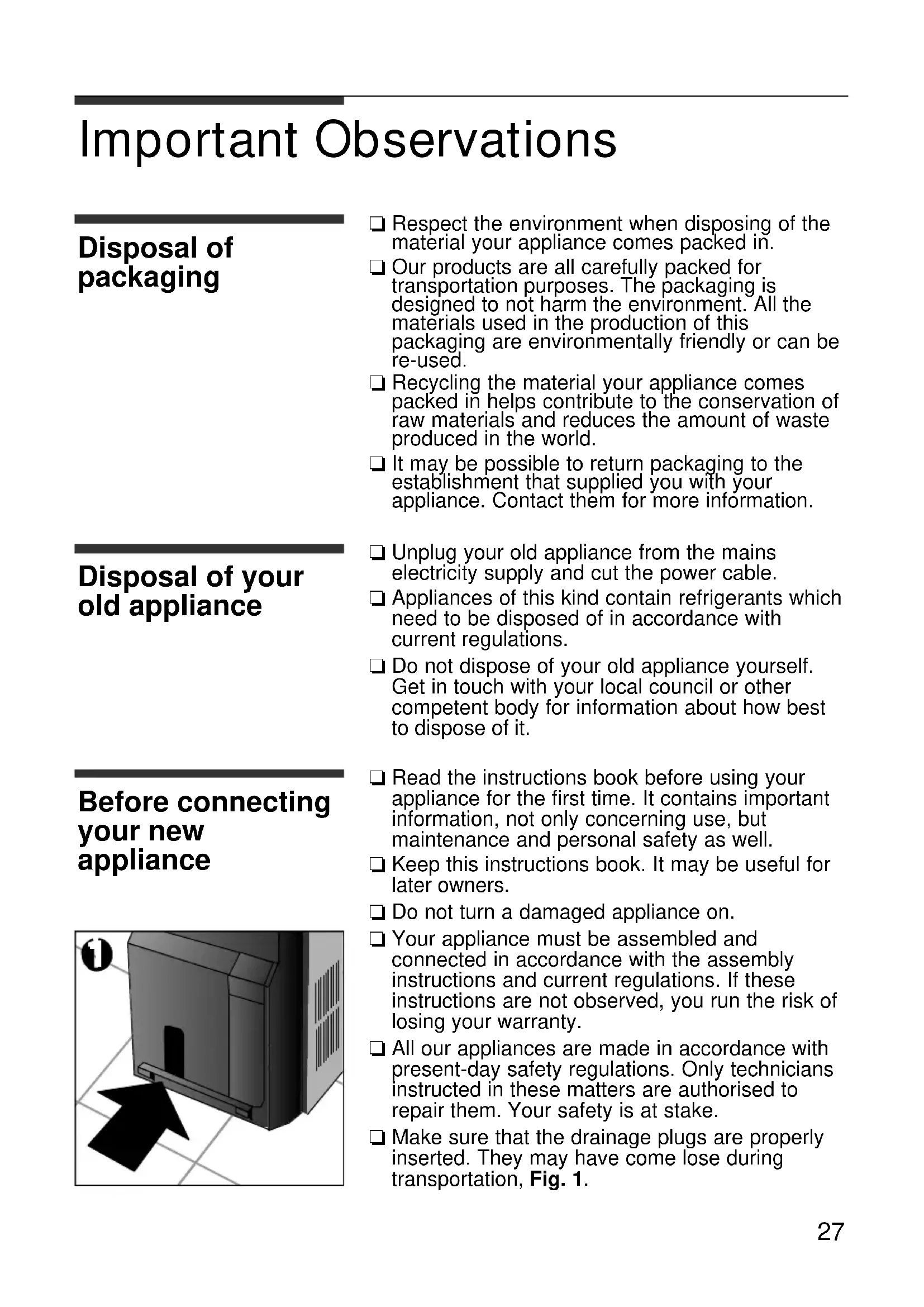
Important Observations
Disposal of packaging
Respect the environment when disposing of the material your appliance comes packed in.
Our products are all carefully packed for transportation purposes. The packaging is designed to not harm the environment. All the materials used in the production of this packaging are environmentally friendly or can be re-used.
Recycling the material your appliance comes packed in helps contribute to the conservation of raw materials and reduces the amount of waste produced in the world.
It may be possible to return packaging to the establishment that supplied you with your appliance. Contact them for more information.
Disposal of your old appliance
Unplug your old appliance from the mains electricity supply and cut the power cable.
□ Appliances of this kind contain refrigerants which need to be disposed of in accordance with current regulations.
Do not dispose of your old appliance yourself. Get in touch with your local council or other competent body for information about how best to dispose of it.
Before connecting your new appliance
- Read the instructions book before using your appliance for the first time. It contains important information, not only concerning use, but maintenance and personal safety as well.
- Keep this instructions book. It may be useful for later owners.
Do not turn a damaged appliance on. - Your appliance must be assembled and connected in accordance with the assembly instructions and current regulations. If these instructions are not observed, you run the risk of losing your warranty.
All our appliances are made in accordance with present-day safety regulations. Only technicians instructed in these matters are authorised to repair them. Your safety is at stake.
Make sure that the drainage plugs are properly inserted. They may have come lose during transportation, Fig. 1.

Your new appliance
Description of your appliance
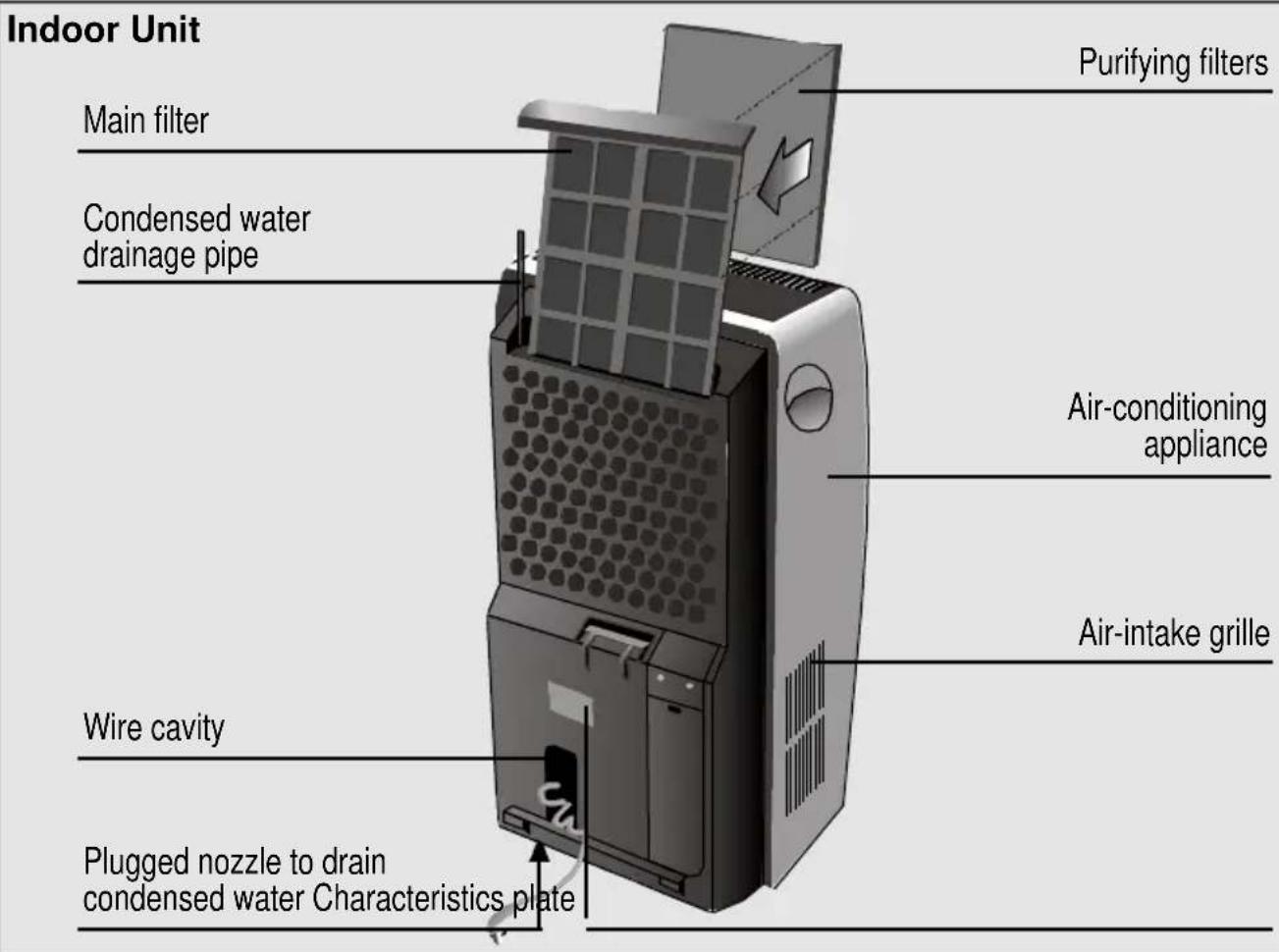
Outdoor unit
Plugged nozzle to drain water produced by condensation in "Dehumidification" mode

Flexible duct to connect indoor and outdoor units
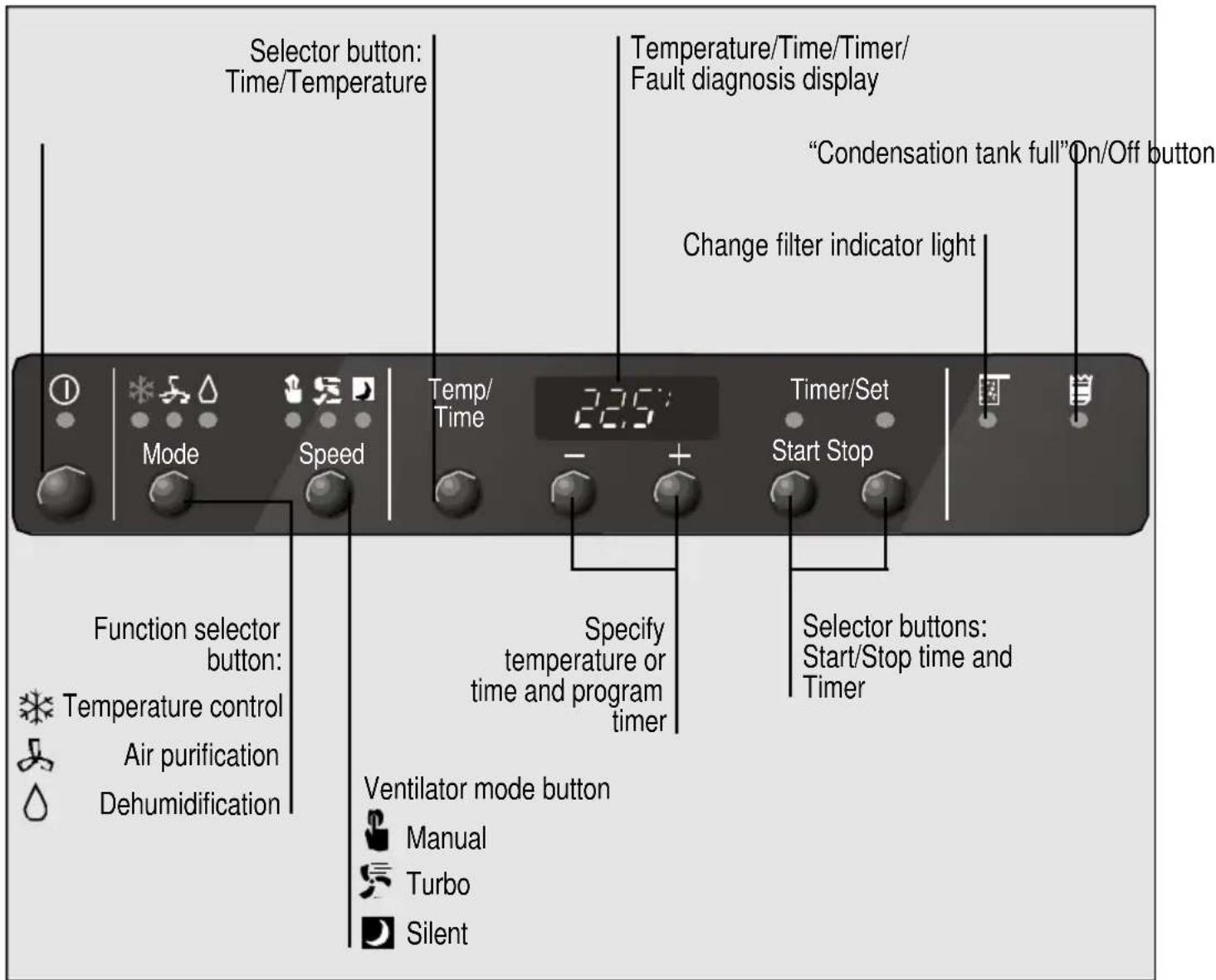
Control panel
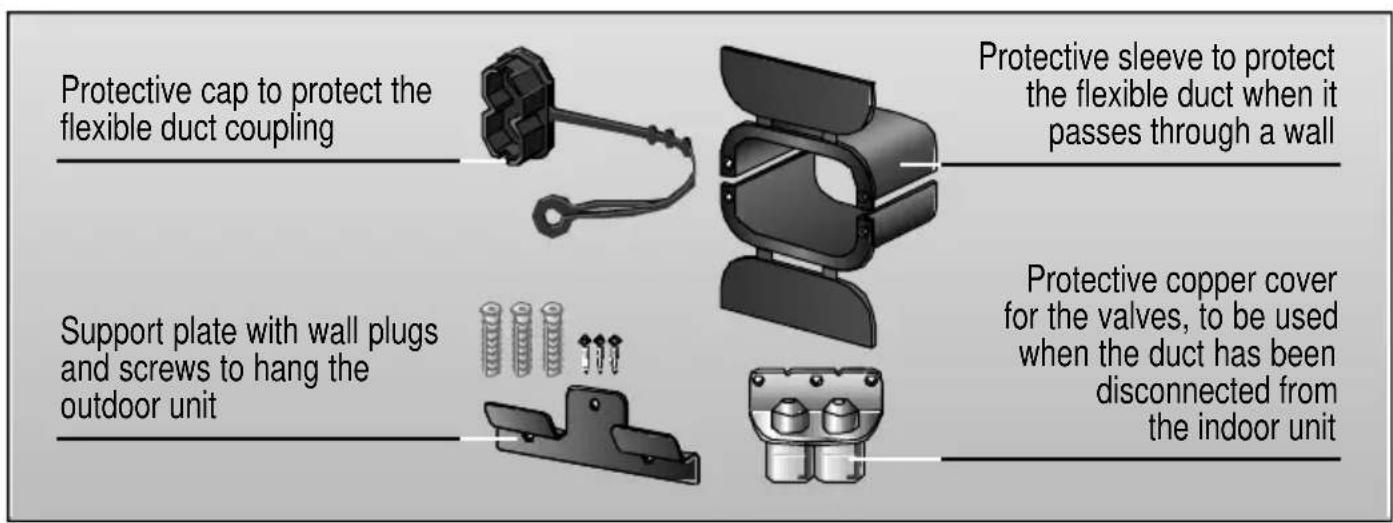
Accessories
Requirements for Use
Requirements for use
This appliance must be connected to a 220/240 V 50 Hz mains electricity supply using an earthed plug.
It must be protected with a 16 A slow-action fuse.
Should an extension lead be needed, this lead must be at least 1,5mm^2 per terminal thick, no more than 25 m. long and earthed.
There is a cavity at the back of the appliance for the mains electricity supply connection wire.
Do not allow water to enter the appliance.
Do not block the air inlets or outlets on your appliance, especially when used for heating.
Should the mains electricity supply wire be damaged in any way, it must only be replaced with a wire of similar characteristics. Get in touch with the manufacturer, after-sales service or similarly qualified person.
Warning!
If the appliance is turned off and then turned back on again, there is a 3-minute interval before the compressor starts up again. This interval is necessary in order for the appliance to work properly.
Transportation requirements
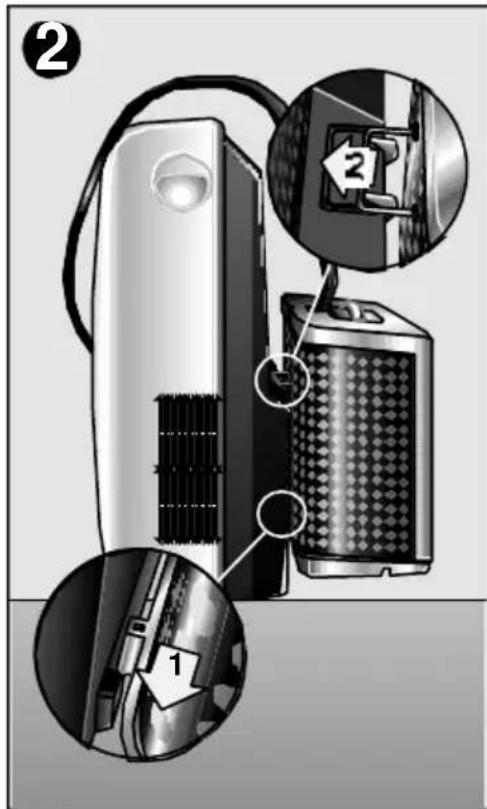
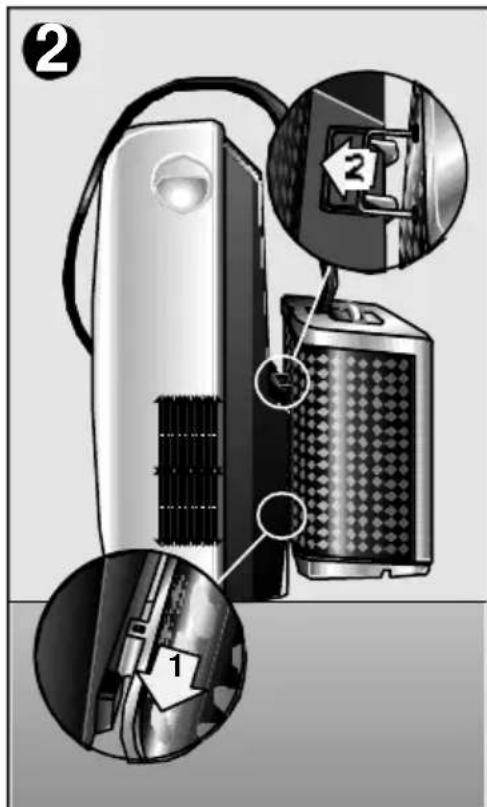
The indoor appliance is mounted on castors to facilitate transportation. To transport the outdoor appliance together with the indoor appliance, hang the outdoor appliance in the park position on the indoor appliance - the appliance can then be moved without difficulty, Fig. 2.
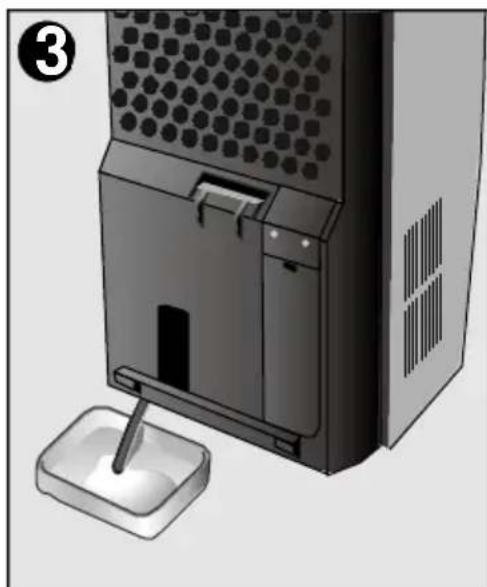
There are castors fitted on your appliance to make moving it easier. If it is necessary to tilt your appliance in order to move it, then the internal water tank must be drained first. To do this, connect drainage pipe to stopcock at the bottom of the appliance, Fig. 3.
If only the outdoor appliance is transported, first pull the stopper out of the outdoor appliance, tilt the outdoor appliance slightly and pour out the remaining water.
Warning!
Be particularly careful when transporting this unit. There is a water drainage pipe on the bottom of the appliance which may break if knocked.

Preparations
Positioning of the outdoor unit
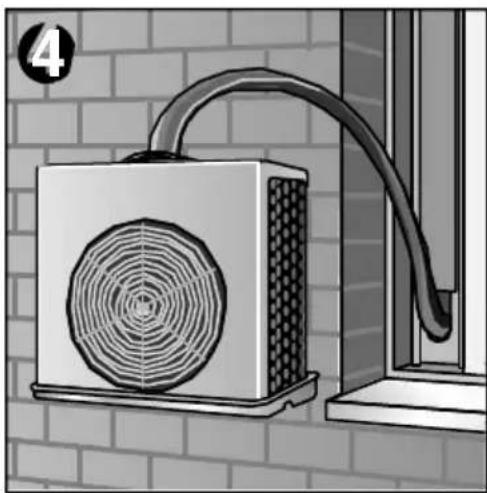
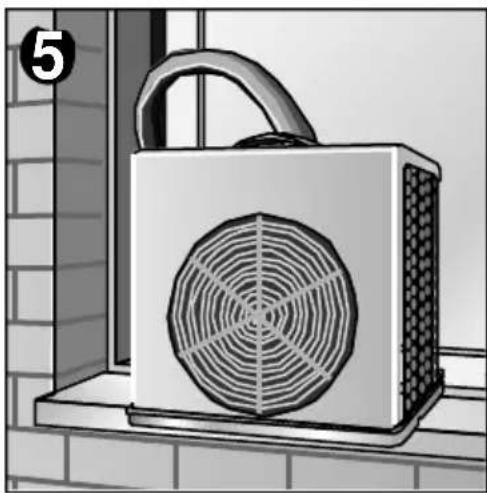
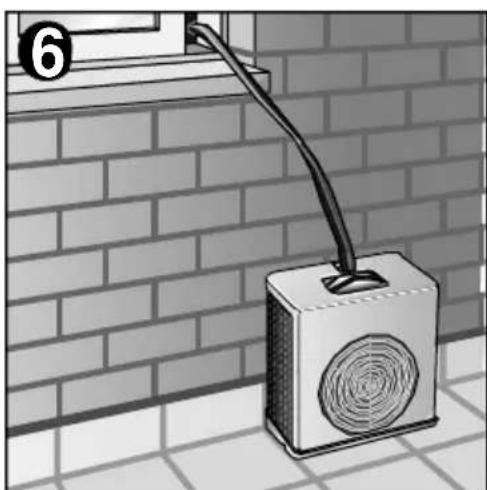
The outdoor unit can be set in any of the three positions shown in figures 4, 5 and 6 as desired depending on space conditions. Remember that the outdoor unit must be placed on a horizontal surface. Use the Support Plate accessory in order to hang the outdoor unit from the hook it comes supplied with.
Warning!
Make sure that the appliance is hung in a horizontal position, else the lower tray may shed water. To do so, adjust the rear bar on the outdoor unit.
For safety reasons, never allow the outdoor unit to hang solely from the duct that joins it with the indoor unit.
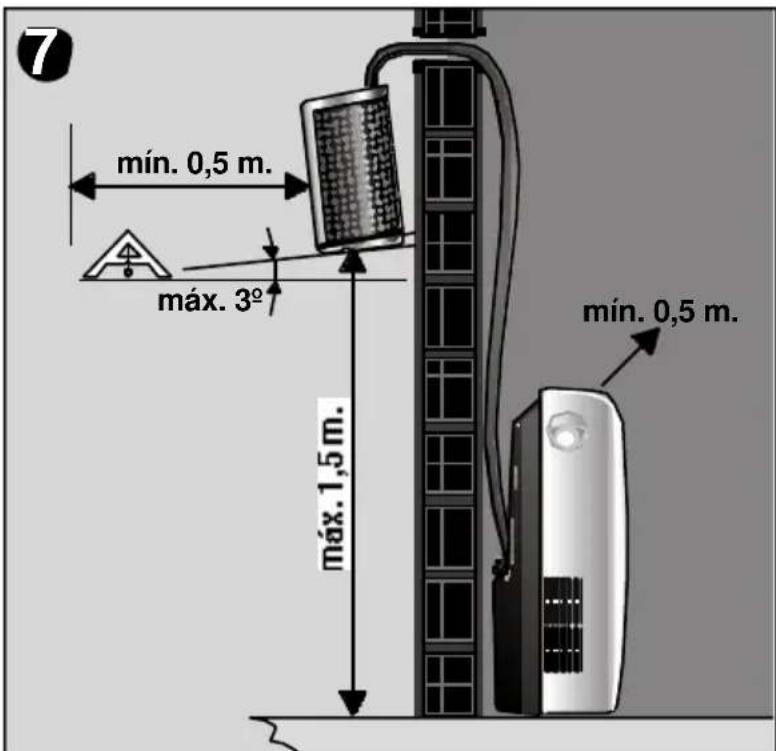
Do not set the outdoor unit higher than permitted. Observe the minimum permitted distances between the appliance and other objects. See figure 7.
Do not impede or twist the flexible duct that joins the two units.
Indoor/outdoor unit communication
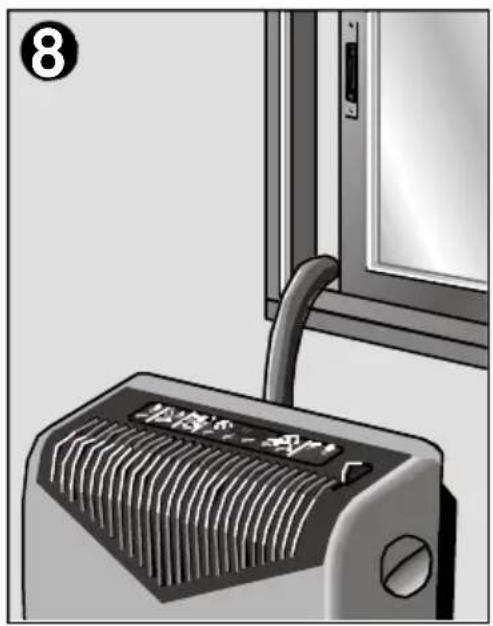
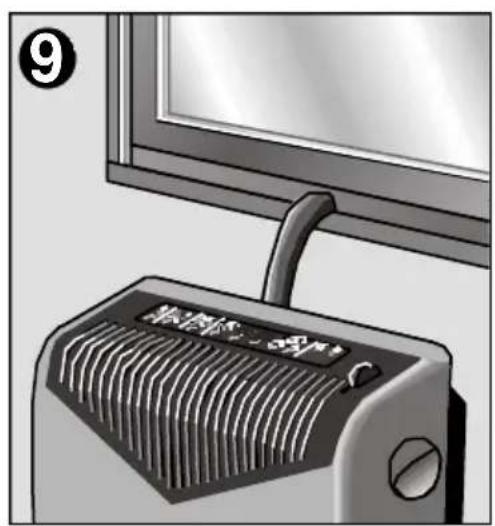
The two units are joined by a flexible duct which affords a number of installation options:
Pass the duct through a door or window left ajar, Fig. 8.
Make a 4 × 2 -cm hole in a door or window frame to pass the duct through, thereby avoiding having to leave the door or window open, Fig. 9.
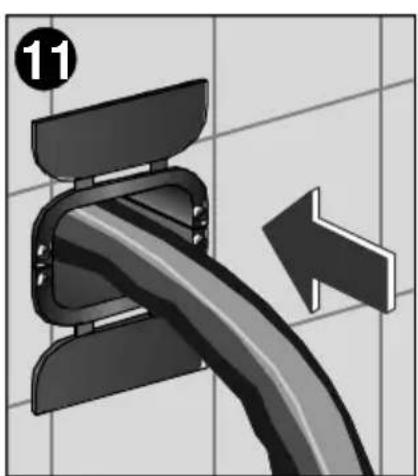
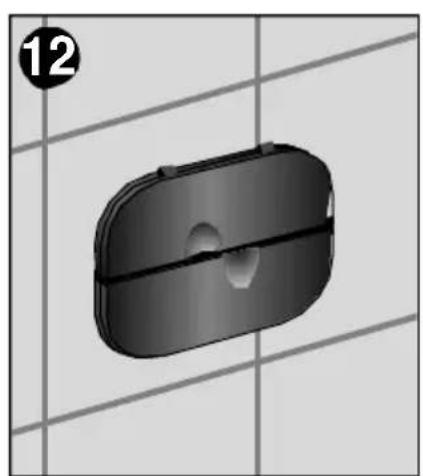
Make a hole in the wall and fit the Protective sleeve accessory, Fig. 10, 11 and 12.
The covers on the accessory can be closed when the appliance is not in use or not required, thereby sealing the hole in the wall, Fig. 12.

Separating the flexible duct from the indoor unit
Disconnecting the flexible duct
To pass the duct through a window frame or wall, it must first be disconnected from the indoor unit. On certain models, this can be done via fast connection, proceeding as follows:
Unplug the appliance from the mains electricity supply.
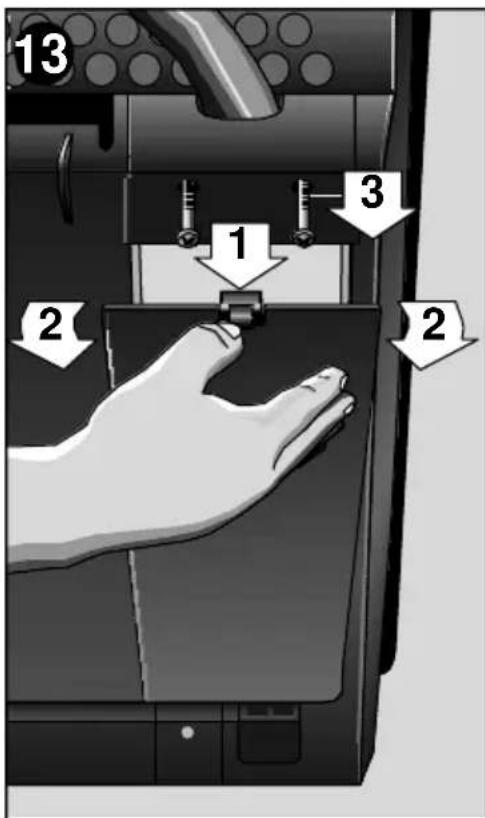
- Remove the lower cover from the connection area and the screws from the upper cover. The flexible duct connection area can now be seen, Fig. 13.
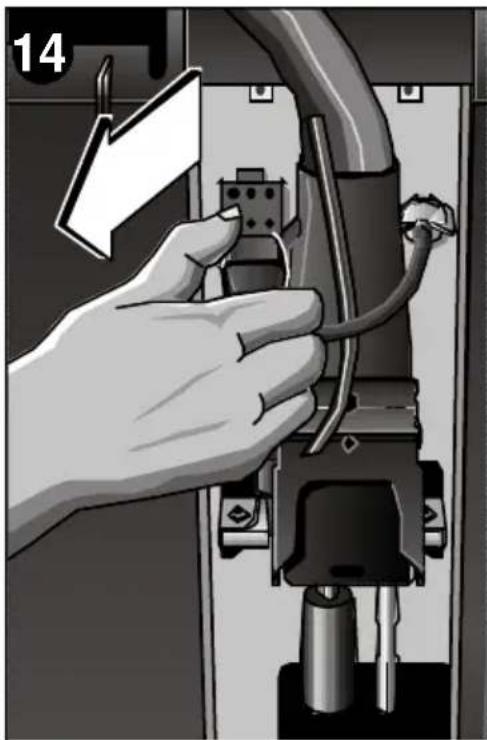
Remove the electrical connection by squeezing the upper and lower tabs on the plug. See Fig. 14.
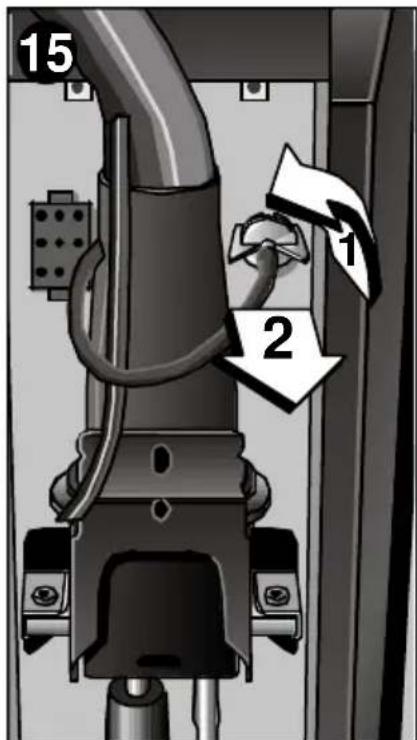
Disassemble the condensed water drainage pipe by turning it 90^ in an anti-clockwise direction and extracting, Fig. 15.
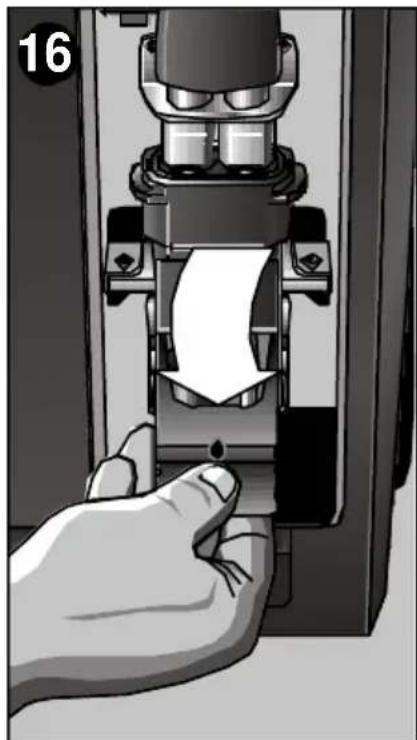
Push the fast connection lever down, Fig. 16.
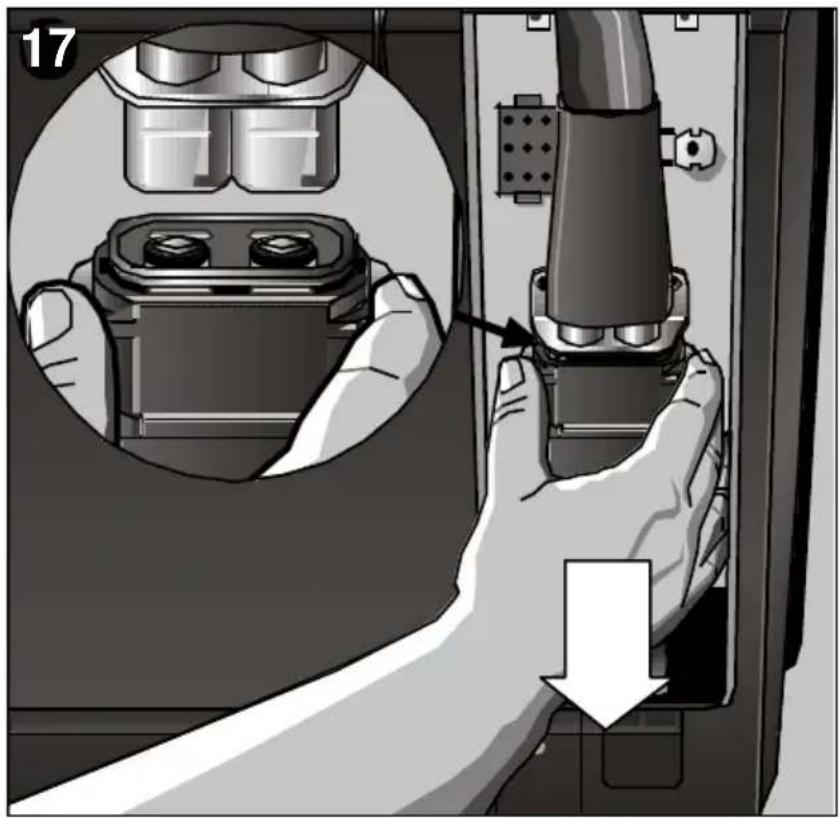
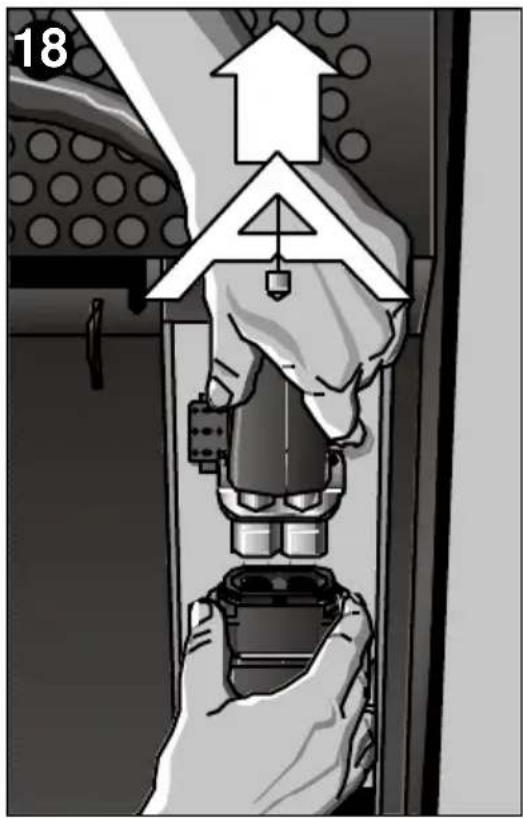
Push the metal coupling fixture down, Fig. 17, and pull the duct upwards at the same time, Fig. 18.
Connecting the flexible duct to the indoor unit
Reconnect the flexible duct to the indoor unit by following the inverse process to that just described.
Warning!
The fast connection can only be mounted in one position, see Figure 18. It must only be inserted in its housing in a vertical position.
Exerting a little force, pull up the lever until it is vertical. Only then is the hose connected correctly.
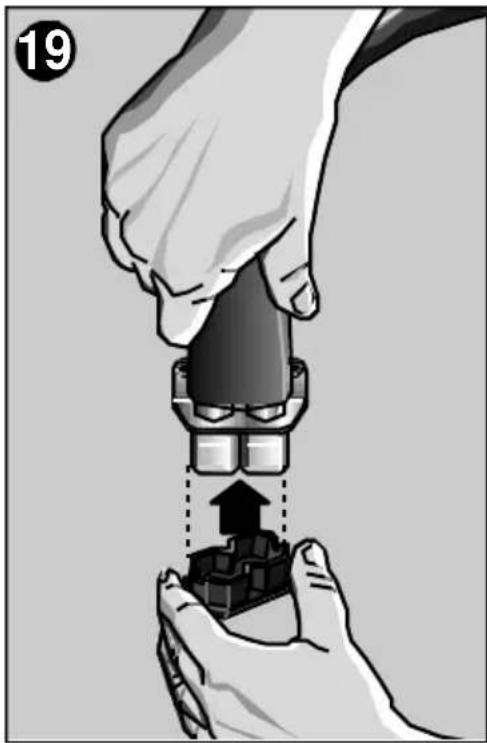
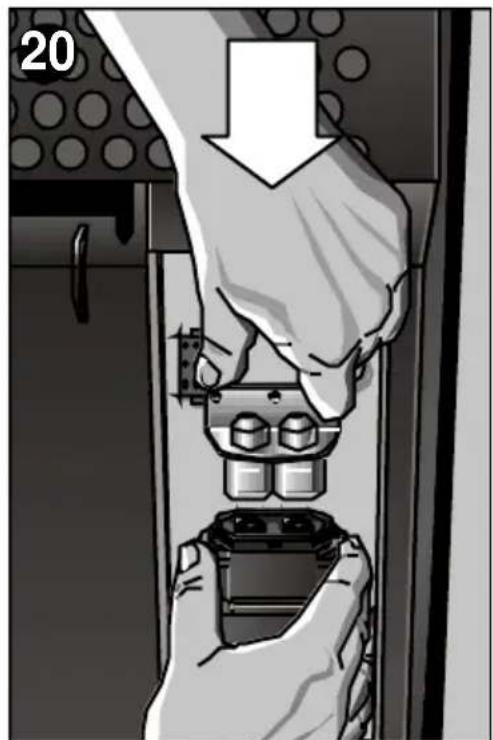
Should the indoor and outdoor units be disconnected for a lengthy period of time, protect the free end of the flexible duct using the protective cap (See Accessories and Fig. 19) supplied to prevent dust and dirt from entering and fit the protective copper cover over the valves, Fig. 20. You are recommended not to leave the duct disconnected from the indoor unit for more than 24 hours.
- Never operate the indoor appliance without the outdoor appliance.
Turning the appliance on
Cooling


Plug your appliance in.
Lead the hot-air expulsion duct outdoors.
Turn the appliance on using the "On/Off" button.
Select the "Temperature control" function with the mode button. Fig. 21.
Set the required temperature with the (+) and () buttons. Fig. 22.
- Select the desired operation mode with the Ventilator mode button:
"Manual": The speed of the ventilator can be set manually to five different levels (1: minimum,...,5: maximum). Ventilator speed is set using the buttons (increase) and (decrease). The speed selected appears on the digital display screen. When the "manual" button is pressed again, the temperature appears and when it is pressed twice, the time is displayed.
"Turbo" Temperature regulation is performed automatically when this mode is selected. The appliance starts up at maximum temperature control power and adapts to room atmosphere conditions directly, without passing through each of the levels, until the desired temperature is reached. This operation mode provides maximum power and simplicity of use.
"Silencioso" Temperature regulation is performed automatically when the silent mode is selected. The appliance starts reducing the temperature control power and adapts to room atmosphere conditions directly, without passing through each of the levels, until the desired temperature is reached. This operation mode is very silent and simple to use.
The appliance cools and dehumidifies the air in the room at the same time in order to produce pleasant air conditions.
Should the appliance turn itself off by effect of the thermostat, it will come back on again when room temperature rises 2^ .
The water produced during this process by condensation is led outside and released from the condenser by evaporation.
If the red warning light comes on
Condensed water has unduly accumulated in the tank on the indoor unit.
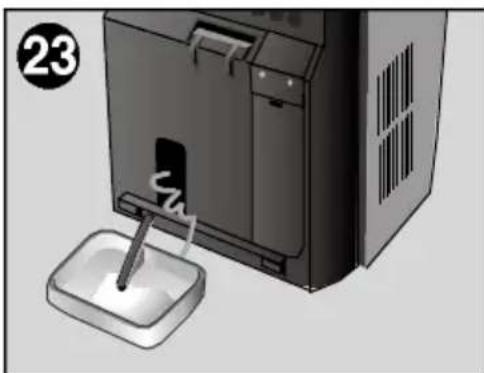
Condensed water is emptied using the flexible drainage pipe, which is coupled onto the water drainage nozzle on the bottom of the appliance, (see description of your appliance, page 28). Fig. 23.
Make sure that the flexible duct which joins the two units has not been squashed or been trapped in any way. The difference in height between the two units should not exceed 1.5m Fig.7.
Only dehumidification
Set the function at this setting, the appliance will only reduce the humidity present in the atmosphere, without affecting the temperature. The appliance is capable of extracting up to 60 litres of water a day from the air depending on atmospheric conditions.
- Release the water from the outdoor unit by removing the plug from the lower tray.
- Move the outdoor unit to the room that you wish to dehumidify
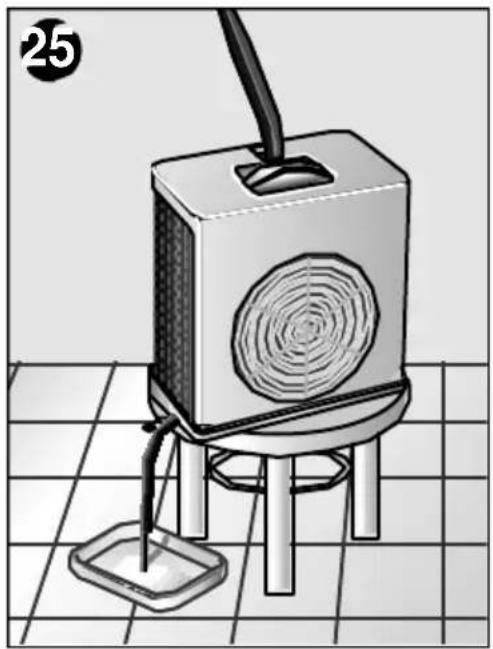
- Connect the flexible water drainage pipe to the drainage nozzle on the outdoor unit and collect the water produced by condensation in a suitable receptacle, Fig. 25.
Turn the appliance on using the "On/Off" button.
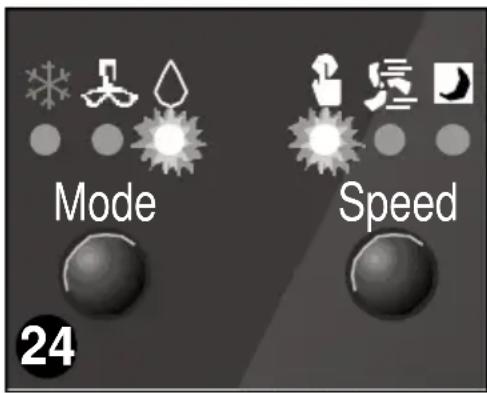
Select the "Dehumidification" function with the button. Fig. 24.
The speed of the ventilator can be set to five different levels, from 1 (minimum) to 5 (maximum), using the and the buttons. Dehumidification power depends on the ventilator speed selected.
Air purification
N.B.
The dehumidification function only works in manual mode. The automatic "turbo" and "silent" modes are not available for this function.
Warning!
When you change back to the "Cooling" function, put the plug back into the drainage nozzle on the outdoor unit. Should you fail to do so, the appliance will shed water produced by condensation during the cooling process.
Always remember that in order for the dehumidification function to work properly, ambient temperature must be at least 18^ .
The air inside a room is circulated through a set of purifying filters when the appliance is set to this function. As a result, there is no temperature regulation.
The appliance comes with a main filter with a double active purifying filter. This special filter is for smells and smoke, pollen, bacteria and dust.
Put the air expulsion duct in the same position as for dehumidification.
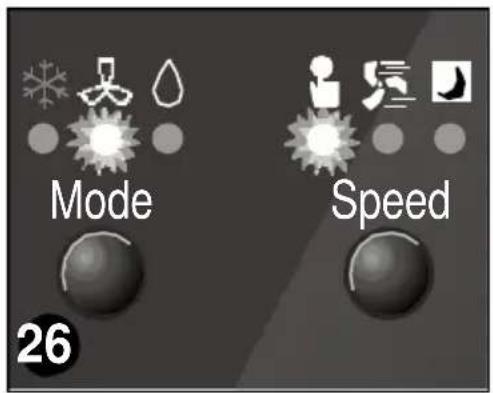
Select the "Air purification" function with the button. Fig. 26.
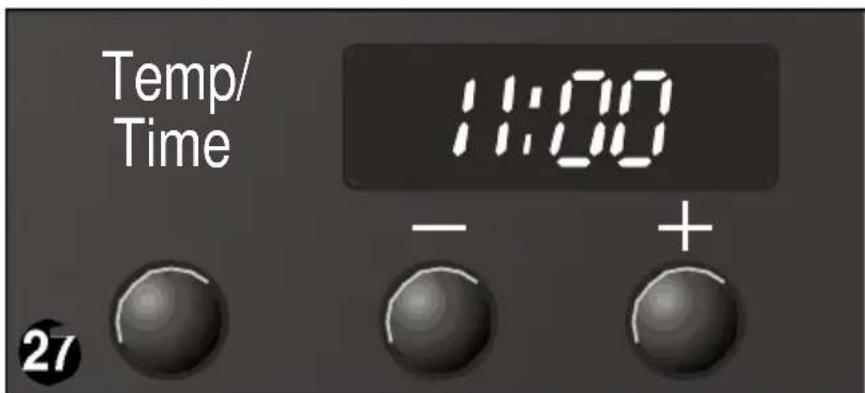
The speed of the ventilator can be set to five different levels, from 1 (minimum) to 5 (maximum), using the and the buttons. Fig.27.
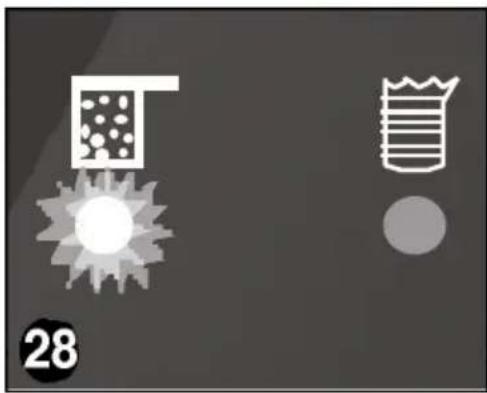
The appliance is fitted with a change filter indicator light. The purifying filter should be changed as soon as this indicator light comes on Fig. 28. The reference for the purifying filter is B1 RKZ 15013 and it can be purchased at specialised outlets. Press the two buttons and at the same time for a period of two seconds to clear the change filter indication.
N.B.
The air purification function only works in manual mode. The automatic "turbo" and "silent" modes are not available for this function.
We recommend you leave the optional filters in position regardless of the desired function setting (cooling, dehumidification, air purification). The appliance purifies the air more efficiently in this way.
Setting the time/Programming the timer
Setting the time
- With the appliance on, the present time currently set can be displayed by pressing the "Temp / Time" button.
The present time is then displayed on the digital screen for a period of 5 seconds with the two dots flashing.
The present time displayed on the screen can be altered using the and buttons. Each time one of these buttons is pressed the present time is put forwards or back one minute. The present time can be altered continuously by keeping these buttons pressed in.
Unless another button is pressed in the meantime, 5 seconds after the present time has been set, the temperature will reappear on the display screen.
Setting the timer
(To turn air conditioning on and off automatically). Then the timer can be programmed to turn the air conditioning on and off at set times - regardless of whether the air conditioning is working at the time of setting or not.
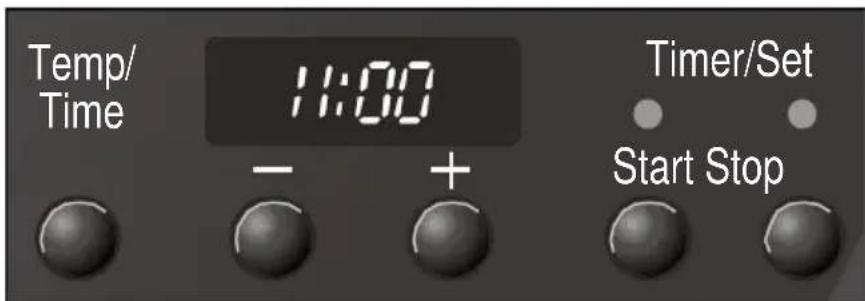
Press the "Start" or "Stop" button: The last timer setting will appear on the display screen. The timer light comes on to indicate that the timer has been activated.
Press the or button in order to alter the timer setting. The timer is set in blocks of 15 minutes.
5 seconds after the timer has been set, the set temperature will reappear on the display screen.
- When the "on" and "off" times set on the timer are shown on the display screen, the two dots do not flash.
Disconnecting the timer
Press the Start / Stop buttons for a period of two seconds. The timer light goes out. The timer deactivated.
The times and functions set on the timer remain active and the programmed operation will be repeated at the set times until deactivated or cancelled as described above.
Cleaning and Maintenance
Cleaning
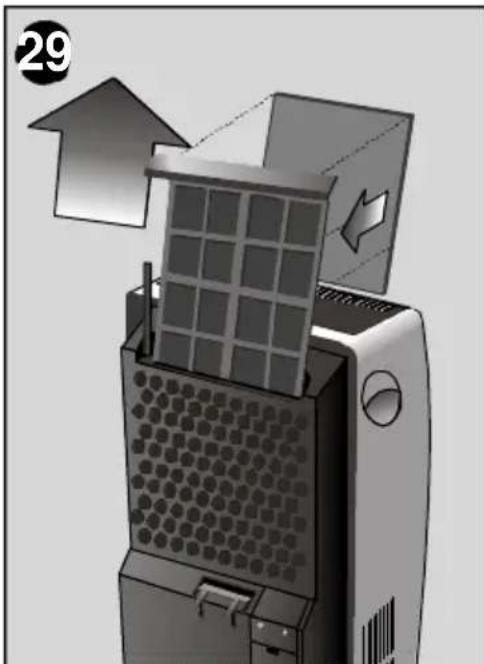
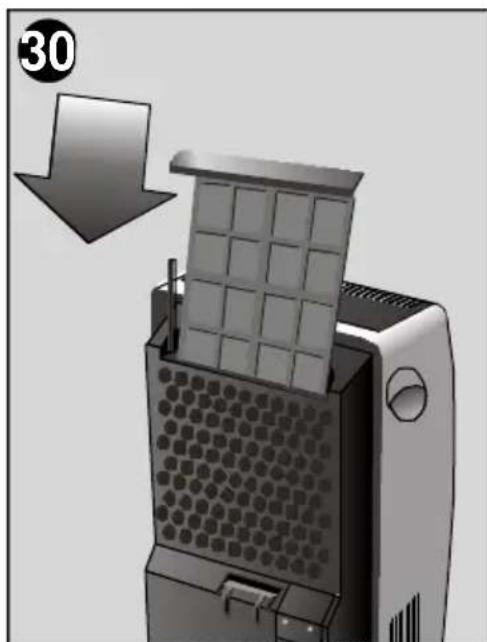
The indoor unit features a main filter, which must be cleaned after prolonged operation. Flush under running water, allow to dry and re-install.
In order to ensure correct filter and appliance operation, purifying filter reference B1 RKM 15013 should be changed every three months or, at minimum, when the change filter indicator light comes on. A dirty filter reduces the cooling power of the appliance.
The filters must be fitted as shown in figures 29 and 30.
The appliance can be cleaned with a cloth or sponge, warm water and mild detergent.
Never use hot water (more than 40^ ), bleach, petrol-based products, acids or brushes when cleaning your appliance. Prevent water entering the appliance.
Do not clean your appliance with a hose.
Prior to use at change of season
Clean the air filter and then the cover and grille if required.
Technical Service / Warranty
Technical service
Should your appliance fail to work properly and all the instructions for use and installation (especially the section headed "Requirements....") have been carefully observed, then remember that our Technical Service Network is at your full disposal.
When contacting the Technical Service, quote the model code (E-NR) and the appliance's factory number (FD). This information can be found on characteristics plate.
Warranty
The conditions of warranty depend on the relevant Supplier in a particular country. Contact the establishment where you purchased your appliance for more information and quote the appliance model and factory number. The receipt of purchase for the appliance must be produced prior to any work carried out under warranty.
Things that can save you from making unnecessary phone calls
What to do if ...
The suggestions below will help you to correct minor faults for yourself and save you calls to Technical Services.
If, after checking through these possibilities, the problem remains unsolved, contact our specialised technical service.
... the appliance doesn't work ...
Make sure that the appliance is plugged in properly.
Make sure that there is power in the mains electricity supply and all the fuses are in working order.
Set a lower temperature using the button
... the appliance doesn't work and the safety pilot light comes on ...
Check that the connection hose is not restricted - it must not be crushed.
The outdoor unit should not be positioned or hung more than 1,5 m. above the indoor unit.
Place the indoor unit on a flat surface. If the light does not go out, empty the internal water tank. (See instructions in Transport Conditions).
... the appliance operates for a while and then switches off ...
Check whether the air inlet or air outlet is blocked.
Should the outdoor temperature rise above 43^ , the appliance will turn itself off for a short period of time after which it will then turn itself back on again. Should the temperature in or outside of the room fall below 20^ , the appliance will turn itself off temporarily in order to prevent frost or ice from forming on the evaporator.
Make sure that the fast connection is fitted properly.
... the appliance fails to cool the air properly ...
Ensure that the window or the door is open as little as possible. This is especially important if the window or door has to be opened slightly for the connection hose.
Check that the connection hose is not restricted - it must not be crushed.
If the origin of the fault is in the ventilator, then "F4" appears on the display screen. In the event of this occurring, call our Technical Service.
... the appliance makes a lot of noise ...
Check that the air inlet and outlet are not blocked.
If you hear a cyclical water noise, the condensate pump is pumping the water outside.
... the appliance is switched on but the compressor is not running ...
The delayed start system is activated each time that the appliance is turned on. The appliance comes on audibly after three minutes.
Should the "dehumidification" light flash, then the dehumidification function has been selected with a room temperature of less than 18^ . The compressor turns itself off (see recommendations and warnings in the "Dehumidification only" section).
The ambient temperature must be above 18^ for the appliance to operate in dehumification and cooling mode.
Should "F1" or "F2" appear on the display screen, then a fault has occurred in the thermal probes. Inform the brand's Official Technical Assistance Service!
... the outdoor unit is dripping ...
Check that the outdoor unit has been positioned or hung horizontally.
Check that the stopper has been inserted correctly.
Warning!
Any other breakdown or repair should be carried out by a specialised technician. In such cases, contact the authorised dealer, the customer attention service or the Technical Services Dept.
Technical Information
Technical information
Consumption at maximum power 1.500W
Fuse 16 A
Cooling capacity * 4.400W
Cooling and dehumidification modes:
Indoor temperature: .min. +18°C / max. +32°C
Outdoor temperature: ....min. +20°C / max. +43°C
* Ashrae 128
Index
Observations importantes
Conditions de transport 53
Preparatifs
Conditions de transport

- Inhaltsverzeichnis
- Wichtige Hinweise
- Your new appliance
- Preparations
- Turning the appliance on
- Setting the time / Programming the timer
- Important Observations
- Disposal of packaging
- Disposal of your old appliance
- Before connecting your new appliance
- Description of your appliance
- Outdoor unit
- Control panel
- Accessories
- Requirements for Use
- Warning!
- Transportation requirements
- Positioning of the outdoor unit
- Indoor/outdoor unit communication
- Separating the flexible duct from the indoor unit
- Disconnecting the flexible duct
- Connecting the flexible duct to the indoor unit
- Cooling
- If the red warning light comes on
- Only dehumidification
- Air purification
- N.B.
- Setting the time/Programming the timer
- Setting the time
- Setting the timer
- Disconnecting the timer
- Cleaning and Maintenance
- Cleaning
- Prior to use at change of season
- Technical Service / Warranty
- Technical service
- Warranty
- Things that can save you from making unnecessary phone calls
- What to do if ...
- Technical Information
- Index
- Observations importantes
- Preparatifs
- Conditions de transport
Brand : BOSCH
Model : B1RKM16002
Category : Air Conditioning