OW3912 - Battery charger Huslog - Free user manual and instructions
Find the device manual for free OW3912 Huslog in PDF.



| Product type | Desk lamp with wireless charger |
| Brand | Huslog |
| Model | OW-3912 |
| Input power | 100-240 V~, 50/60 Hz, 0,5 A |
| Power adapter output | 12 V = 1,5 A, 18 W |
| USB output (wired) | 5 V = 2,1 A |
| Wireless output | 10 W |
| Light output | 5 W (45 LEDs, non-replaceable) |
| Light color | 3000 K / 4500 K / 6500 K (3 modes) |
| Brightness | 400 lm, 5 brightness levels |
| Color rendering index | >80 Ra |
| Display | Built-in LCD (calendar, thermometer, alarm) |
| Control | Touch keys and physical buttons |
| Material | ABS+PC |
| Backup battery | CR2032 3 V (for calendar) |
| Package contents | Lamp, power adapter, user manual |
| Manufacturer | mPTech Sp. z o.o., Poland |
| Warranty | 3 years |
| Maintenance and cleaning | Dry cloth, avoid liquids and extreme temperatures |
| Safety | Do not immerse, do not look directly at the light, indoor use only |
| Repairability | Light source not user-replaceable; repair by qualified service only |
Frequently Asked Questions - OW3912 Huslog
User questions about OW3912 Huslog
0 question about this device. Answer the ones you know or ask your own.
Ask a new question about this device
Download the instructions for your Battery charger in PDF format for free! Find your manual OW3912 - Huslog and take your electronic device back in hand. On this page are published all the documents necessary for the use of your device. OW3912 by Huslog.
USER MANUAL OW3912 Huslog
Desk lamp with wireless charging
Lot number: 613100
Equipment delivery location:
mPTech Sp. z o.o.
Krakowska street 119
50-428 Wrocław
Poland
Designed in Poland
Made in China
Manufacturer:
mPTech Sp. z o.o.
- Safety of use .... 10
- Technical specification....12
3.1 Technical data 12
3.2 Package contents 12
- Construction of the device....13
- Use of the device....13
4.1 Connecting power adapter....13
4.2 Lamp operation 13
4.3 USB Charging....14
4.4 Wireless charging 14
4.5 Setting up the calendar 14
4.6 Replacing the battery....15
- Troubleshooting 15
- Maintenance of the device .... 16
- Correct disposal of used equipment and batteries....16
- The use of the manual....17
- Warranty 17
- Declaration of conformity with European Union Directives ....17
1. Safety of use
Warning! Do not immerse the device in water or other liquids while cleaning or using it. Electric shock hazard! Do not touch the electrical device if it has fallen into water or has been flooded. Immediately disconnect the electrical power from the socket to which the device is connected and disconnect the power adapter from the socket.
Check the power cable regularly for damage. If it is damaged, it must be replaced by the manufacturer's service or other qualified personnel.
Warning! Do not look at the device's LEDs for too long. LED light can cause eye damage or irritation. Do not look at the light source with any optical devices that focus on light rays.

Caution! Risk of electric shock! The light source contained in this luminaire shall only be replaced by the manufacturer or his service agent or similar qualified person.
Read these guidelines carefully. Not following them may be dangerous or illegal.
-CHILDREN-
This device is not a toy. Keep the device, its accessories and packaging out of reach of children. Cables and plastic packaging may wrap around the child's neck or be swallowed, resulting in suffocation or choking.
-DO NOT RISK-
Do not switch on the device when the use of electronic devices is prohibited or if it might cause interference or danger. Always abide by any kinds of prohibitions, regulations and warnings conveyed by the staff of the entity where you wish to use the device. Do not use the device near flammable fabrics.
-QUALIFIED SERVICE-
This product may only be repaired by qualified service personnel of the manufacturer or by an authorised service centre. Repairing the device by an unqualified or unauthorized service technician may result in damage to the device and void the warranty.
-MODIFICATIONS-
The manufacturer is not liable for radio or tv interferences caused by independent alterations. Similarly, when using non-original connection cables and chargers.
-PHYSICALLY OR MENTALLY DISABLED PEOPLE-
This device should not be operated by people (including children) with limited physical or mental abilities, as well as by people with no earlier experience in operation of electronic equipment. They may use the device only under supervision of people responsible for their safety.
-WATER AND OTHER LIQUIDS-
Protect the device from water and other liquids. Avoid using the device in environments with high humidity like kitchens or bathrooms. Water particles may cause moisture to appear in the device, which adversely affects the electronics and may cause damage to the equipment.
-SURROUNDINGS-
The device should not be used in dusty conditions. It should be placed on a stable surface so that it cannot be damaged or pose a risk to humans and animals. Children and animals should not have access to the unit - they can damage it.
Do not expose the device to sunlight and do not place it in close proximity to heat-generating devices. Plastic parts may deform, which may affect the operation of the device or cause it to break down completely.
- Do not charge non-rechargeable batteries.
- Do not short circuit the power terminals in batteries.
- Use the same type of batteries recommended for this device.
- When installing new batteries, be sure to their +/- polarity.
- Immediately remove exhausted batteries from the device, as they may leak and cause damage.
- Always remove the batteries when the device is not in use - this will prevent damage to the product in the event of battery electrolyte leakage.
- Always replace the complete set of batteries with a fresh one.
- Keep batteries away from children and pets.
- Do not throw used batteries to the garbage, but to special containers for used batteries and accumulators.
- Never use used batteries together with new ones.
- Avoid exposing the battery to very cold or very hot temperatures (below 0 °C / 32 °F or
above 40^ C / 104°F). Extreme temperatures may affect their service life.
- Avoid contact of the battery with liquids and metal objects, they can lead to their complete or partial damage.
- Put used or damaged batteries in a special container.
- Never expose the batteries to direct heat sources, such as: excessive sunlight, heater, fire.
- Never dispose of batteries in a fire - they may explode.
- Never immerse the battery in water. Do not touch them with wet hands.
- If your hands come into contact with battery acid, rinse your hands with running water.
- In the event of the fluid coming into contact with the eyes, consult a doctor. Battery acid can irritate or burn you.
- Swallowing batteries can be fatal! Keep batteries away from children and pets. Get medical attention immediately if a battery is swallowed.
2. Technical specification
3.1 Technical data
| Desk lamp with wireless charging | |
| Model | OW-3912 |
| Luminaire | LED module (non-replaceable diodes), 45 pcs. |
| Colour temperature | 3000 K - 4500 K -6500 K |
| Brightness | 400 lm (5 degrees of regulation) |
| CRI | >80 Ra |
| Power supply input | 100-240 V~ 50/60 Hz, 0,5 A Max |
| Power supply output | 12 V = 1,5 A, 18 W |
| Input | 12 V = 1,5 A |
| USB output | 5 V = 2,1 A (wired charging) |
| Wireless charging output | 10 W |
| Light source power | 5 W |
| Method of control | Touch buttons, physical buttons |
| Material | ABS+PC |
| Additional | Built-in LCD display, calendar and thermometer function, retractable phone holder, 3V = CR2032 battery |
3.2 Package contents
- Desk lamp with wireless charging
Power adapter - User manual
If any of the above items is missing or damaged, please contact your dealer.
We advise you to keep the packaging in case of a possible complaint.
You can download the user manual from the following internet address:
https://huslog.eu/
Or by scanning the QR code:
3. Construction of the device
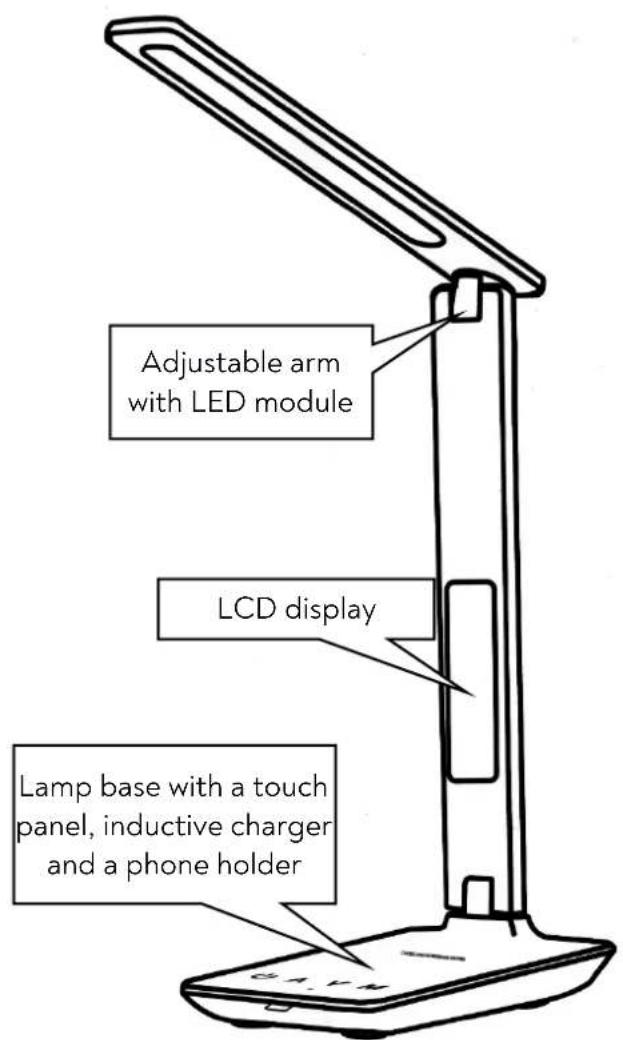
text_image
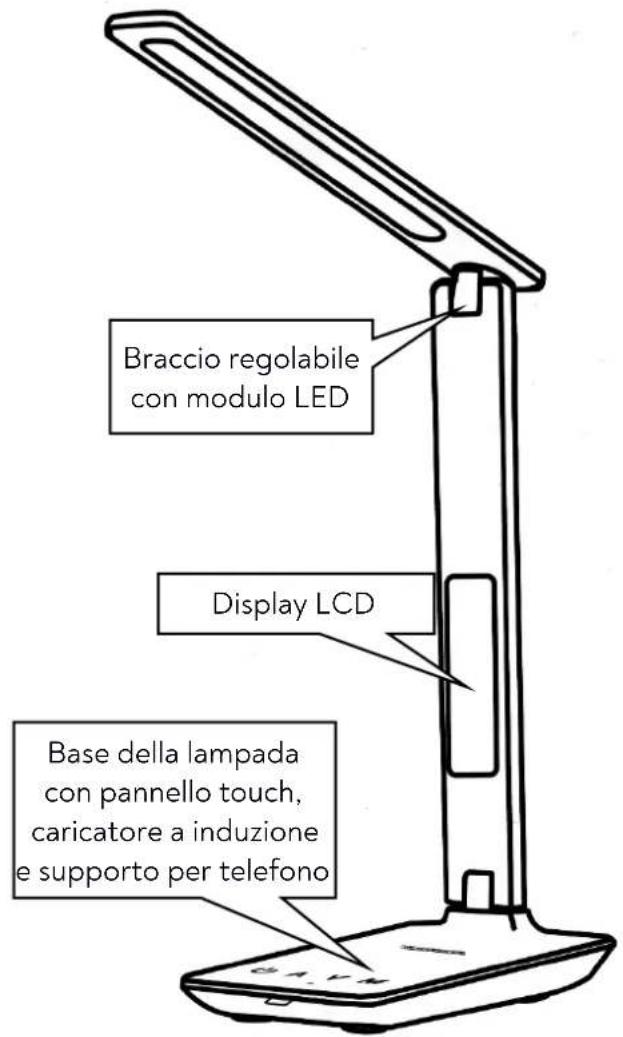
Adjustable arm with LED module LCD display Lamp base with a touch panel, inductive charger and a phone holderGeneral view
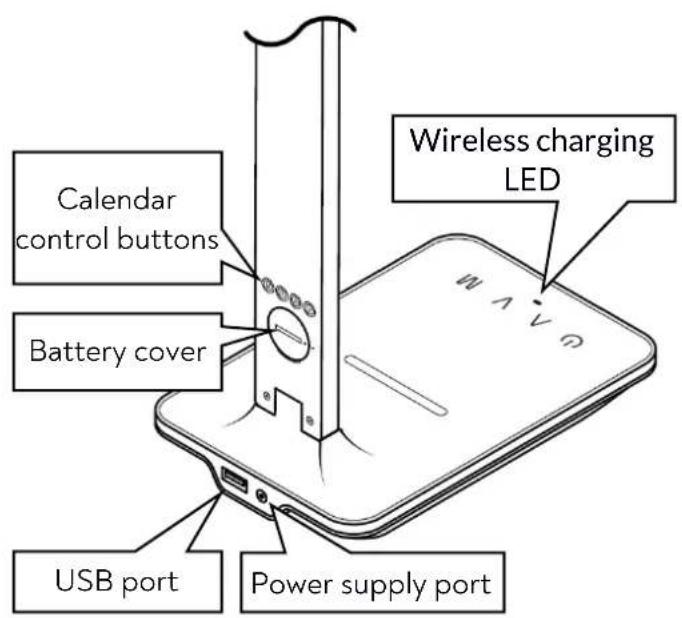
text_image
Calendar control buttons Battery cover USB port Power supply port Wireless charging LEDBack view
4. Use of the device
4.1 Connecting power adapter

Do not plug in the power supply with the housing or cable damaged - it may result in electric shock! Use only the supplied power adapter. Using other adapters may cause the ter to explode or damage the device. Any damage due to incorrect handling is not covered for the warranty.
After taking the device and accessories out of the packaging, make sure that none of their components are damaged. Connect the cord of the included AC adapter to the power socket on the back of the lamp, then plug the mains plug into a mains socket. Also remove the insulating strip securing the battery from the back of the lamp arm.
4.2 Lamp operation

Do not place your phone or other objects on the device's touch button panel. This may cause the device to be turned on or off accidentally, and the lighting modes may switch or tness levels change by itself.
To turn on the lamp, touch the power button. Touch it again to turn the light off. The and buttons allow you to adjust the brightness of the lamp within five levels. When the lamp is on, touching the M button changes the colour of the light to one of the three available colours. Long pressing the button (approx. 3 seconds) turns the LCD backlight on and off.
The adjustable arm of the lamp allows for its convenient positioning depending on the user's needs. The part with the light module can be moved in two planes up to 180^ , while the part at the base of the lamp moves in one plane up to 90^ .
In the base of the lamp at the front there is a retractable holder, in which you can place a smartphone-type mobile phone.
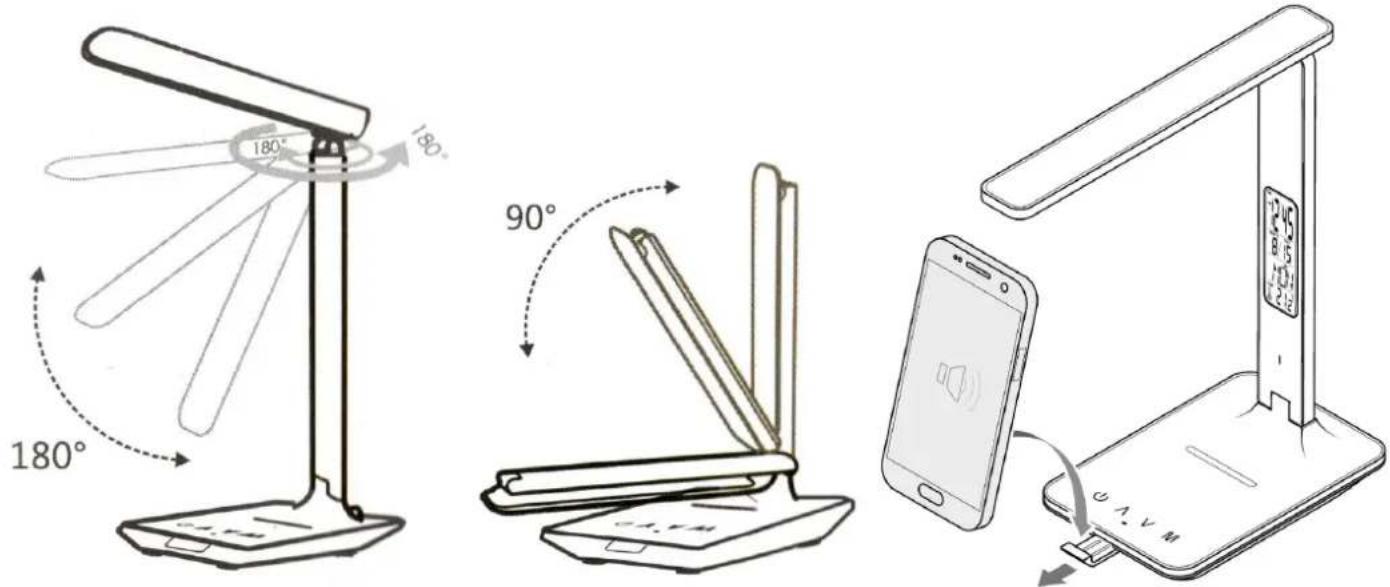
text_image
180° 180° 90° 180° 180° 12:45 8:15 12:15 W.A.V.M4.3 USB Charging
To use the built-in USB charger, connect the USB cable (not included) to the USB port located on the back of the device. Connect the other end of the cable to the device you want to charge. The charging process will start automatically.
4.4 Wireless charging
To use the built-in inductive charger, place your Qi-compatible device on the lamp stand above the touch panel as shown in the illustration. The charging process will start automatically and will be indicated by the wireless charging LED lighting up green.
In special cases, there may be a need for a different location of the device being charged. In this case, follow the instructions provided with the device.
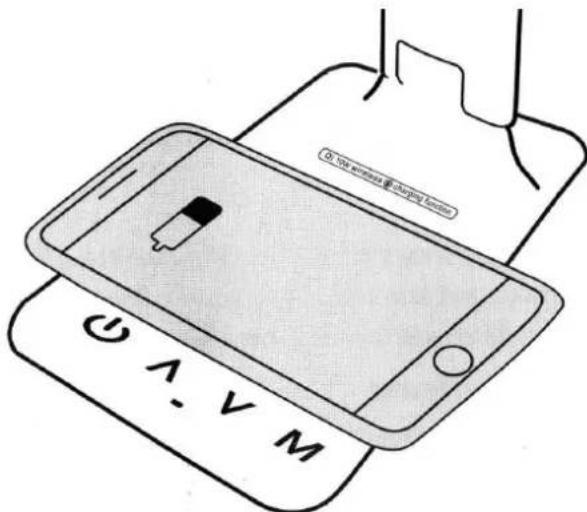
text_image
On track wireless & charging station A. V M4.5 Setting up the calendar
- Setting the date and time:
- In clock mode (TIME shown in the upper left corner of the LCD screen), press the S button to activate the date and time settings change. Pressing the S button again allows you to change the settings of the next option in the following order: hours - minutes - year - month - day - exit.
○ The ^ and ▼ buttons are used to change the value of the currently selected option.
- Pressing the M button while setting the date and time will save the changes and exit. The changes will be saved and exited also after a minute of inactivity.
- Pressing the ^ button in clock mode switches the hour format between the 12-hour and 24-hour system. Pressing the √ button toggles the displayed temperature scale between Celsius and Fahrenheit.
- Setting the alarm clock:
○ Activate the alarm mode by pressing the M button - the word ALARM will appear in the upper part of the LCD display.
o Press the S button to switch to setting the alarm clock. Another pressing of the S button allows you to change the settings of the next option in the following order: hours - minutes - snooze - alarm sound - exit.
- The ^ and √ buttons are used to change the value of the currently selected option.
- In the alarm clock mode, pressing the ^ and ∨ buttons turns the snooze and alarm sound on and off in the following order: alarm on - snooze off - alarm and snooze off.
- The alarm rings for a minute. When snooze is selected, the alarm will ring twice, each time for a minute. Press the S button to turn off the alarm or any other button to pause the alarm.
- The snooze duration can be adjusted from 1 to 60 minutes (the default is 60 minutes). There are 9 different alarm sounds to choose from.
4.6 Replacing the battery
The device is equipped with a battery that powers the calendar built into the device's adjustable arm. Thanks to this, it is possible to run the calendar when the device is not powered (e.g. power failure, disconnecting the device from the power supply to change its location). The battery is factory-installed in the device, but an insulating strip protects it from discharging. Before using the product, remove the insulation strip.
To replace the battery, open its cover using, for example, a coin or a tool that can be inserted into the slot on the cover. Replace the old battery with a new one, make sure to put it in with the polarity. Secure the battery by closing the battery cover.
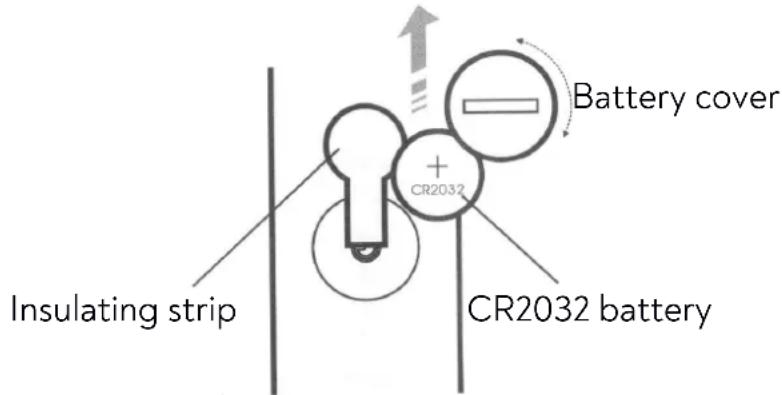
text_image
Insulating strip CR2032 + - Battery cover CR2032 battery5. Troubleshooting
Check the tips below if you experience any problems with your device.
| The device cannot be turned on | Check that the power adapter is connected to the mains and to the lamp. Check that the cables, plugs and sockets are not damaged. |
| USB charging does not work | Check that the USB cable used for charging is not damaged. |
| Inductive charging does not work | Check that the maximum inductive charging distance is not exceeded (e.g. by using additional housings on the device being charged). Check that the device is Qi-compliant. Check if another wired charging device is connected. In order to increase charging efficiency, we recommend that you only use one charging method at a time. |
| The device does not turn on after disconnecting the power cord | The lamp does not have a built-in battery and does not work without a power supply. The lamp cannot be charged. |
| The LCD display does not work | Check if the battery is worn out.Check that the battery has been installed correctly.Check that the insulating strip has been removed. |
| If the problem has not been remedied, contact the manufacturer's service department. | |
6. Maintenance of the device
To extend the service life of the device:
- Keep the device and its accessories out of reach of children.
- Avoid contact between the unit and liquids, as these can damage the electrical parts of the unit.
- Avoid very high temperatures for it can shorten the life of device electronic components, melt the plastic parts and destroy the battery.
- Do not try to disassemble the device. Tampering with the device in an unprofessional manner may cause serious damage to the device or destroy it completely.
- For cleaning use only a dry cloth. Never use any agent with a high concentration of acids or alkalis.
- Use the original accessories only. Violation of this rule may result in an invalidation of the warranty.

The packaging of the device can be recycled in accordance with local regulations.
Symbol for corrugated cardboard (packing material)
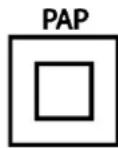
Symbol for Class II equipment (for power supply). Equipment where protection against electric shock is provided not only by basic insulation but also by additional safety measures such as double insulation or reinforced insulation.
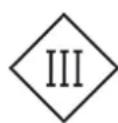
Symbol of Class III equipment (for lamp). A Class III appliance is supplied from a separated/safety extra-low voltage (SELV) power source, in such system the voltage cannot exceed ELV under given conditions.

Indoor use only.

The symbol means that the packaging contains the user's manual, which should be read before use.
7. Correct disposal of used equipment and batteries
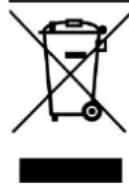
The device is marked with a crossed-out garbage bin, in accordance with the European Directive 2012/19/EU on used electrical and electronic Equipment (Waste Electrical and Electronic equipment - WEEE). Products marked with this symbol should not be disposed of or dumped with other household waste after a period of use. The user is obliged to get rid of used electrical and electronic equipment by delivering it to
designated recycling point in which dangerous waste are being recycled. Collecting this type of waste in designated locations, and the actual process of their recovery contribute to the protection of natural resources. Proper disposal of used electrical and electronic equipment is beneficial to human health and environment. To obtain information on where and how to dispose of used electrical and electronic equipment in an environmentally friendly manner user should contact their local government office, the waste collection point, or point of sale, where the equipment was purchased.
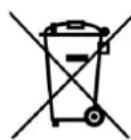
According to the EU directive 2006/66/EC with changes contained in EU directive 2013/56/UE on the disposal of batteries, this product is marked with crossed-out garbage bin symbol. The symbol indicates that the batteries used in this product should not be disposed with regular household waste, but treated according to the legal directives and local regulations. It is not allowed to dispose of accumulators with unsorted municipal waste. Users of battery and accumulators must use the available collection points of these items, which allows them to return, recycle and disposal. Within the EU, the collection and recycling of batteries and accumulators is a subject to separate procedures. To learn more about existing procedures of recycling of batteries and accumulators please contact your local office or an institution for waste disposal or landfill.
8. The use of the manual
Without prior written consent of the manufacturer, no part of this manual may be photocopied, reproduced, translated or transmitted in any form or by any means, electronic or mechanical, including photocopying, recording or storing in any systems of storing and sharing information. The device and screen shots contained in this manual may differ from the actual product. Accessories attached to the set may differ from the illustrations included in manual.
All brand names and product names are trademarks or registered trademarks of their respective companies.
9. Warranty
The product is covered by a 3 year warranty from the date of sale of the product. In the case of a defect, the product should be returned to the store where it was purchased, with the proof of purchase. The product should be complete and preferably packed in its original packaging.
10. Declaration of conformity with European Union Directives

mPTech Ltd. hereby declares that the type of radio equipment of Desk lamp with wireless charging OW-3912 complies with Directive 2014/53/EU. The full text of the EU Declaration of Conformity is available at the following Internet address:
https://huslog.eu/
BEDIENUNGSANLEITUNG
text_image
my wireless charging function ω - v Mtext_image
QR code image with a central circular logo, likely linking to a digital resource or website.text_image
my wireless • charging function A - V Mtext_image
QR code image with a central circular logo, likely linking to a digital resource or website.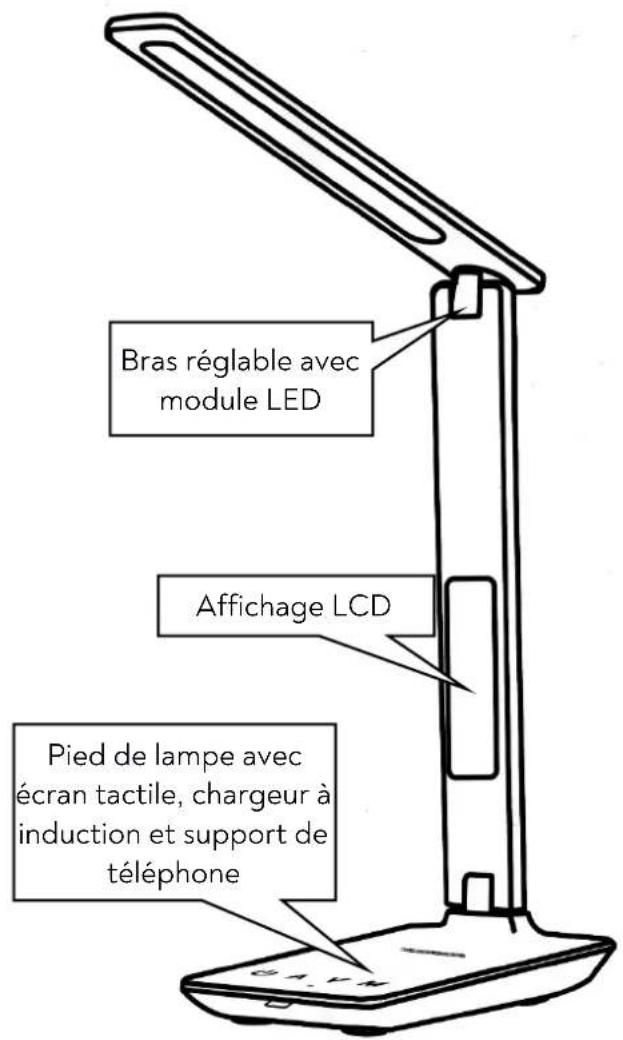
text_image
my wireless charging function ω - v Mtext_image
QR code image with a central circular logo, likely linking to a digital resource or website.