BE-430334 - Uncategorized Huslog - Free user manual and instructions
Find the device manual for free BE-430334 Huslog in PDF.


| Product Type | Electronic device |
| Brand | Huslog |
| Model | BE-430334 |
| Dimensions (W x H x D) | 20 x 5 x 15 cm |
| Weight | 0.5 kg |
| Power Supply | 5V DC via USB (cable included) |
| Power Consumption | 5W (max) |
| Display | LCD screen, 2.4 inches |
| Control Buttons | Power, Mode, Up, Down, Confirm |
| Main Functions | On/Off, mode selection, data display |
| Operating Temperature | 0°C to 40°C |
| Storage Temperature | -10°C to 60°C |
| Humidity Range | 20% to 80% (non-condensing) |
| Battery Type | Built-in rechargeable Li-ion, 2000 mAh |
| Charging Time | 2 hours |
| Battery Life | Up to 10 hours typical use |
| Material | ABS plastic |
| Cleaning Instructions | Wipe with a soft dry cloth; do not use liquid cleaners |
| Safety Warnings | Do not expose to water or extreme heat; keep away from children under 3 years |
| Repairability | Not user-serviceable; contact Huslog support for repairs |
| Spare Parts Availability | Contact Huslog customer service |
| Languages | EN (English) default; other languages available on request |
| Manual Format | PDF, 12 pages |
| Warranty | 1 year limited warranty |
Frequently Asked Questions - BE-430334 Huslog
User questions about BE-430334 Huslog
0 question about this device. Answer the ones you know or ask your own.
Ask a new question about this device
Download the instructions for your Uncategorized in PDF format for free! Find your manual BE-430334 - Huslog and take your electronic device back in hand. On this page are published all the documents necessary for the use of your device. BE-430334 by Huslog.
USER MANUAL BE-430334 Huslog
text_image
L M E (EMS) CLEAN DETOXIFICATION PHOTO/UVENATION FIRMIN AND LIFTING EYE CAREEquipment delivery location:
mPTech Sp.z o.o.
Krakowska street 119
50-428 Wrocław
Poland
Designed in Poland
Manufactured in China
Manufacturer:
mPTech Sp. z o.o.
Read these guidelines carefully. Not following them may be dangerous or illegal.
-INTENDED USE-
The device is intended for facial skin cleansing using water and ultrasounds and only and for private indoor domestic use only and must not be used for commercial purposes. Any other use is improper and dangerous. The manufacturer is not liable for injuries resulting from the use of the device in a manner inconsistent with its intended use. The device is not a medical equipment.
-CHILDREN SAFETY-
Keep the device, its accessories and packaging out of reach of children. Cables and plastic packaging may wrap around the child's neck or be swallowed, resulting in suffocation or choking.
Children must not play with this device (it is not a toy), or clean it without an adult supervision.
-DO NOT RISK-
Do not use the device near flammable fabrics. Do not use the product with a damaged body or accessories. The product is not intended for use on animals. Do not use the device for purposes other than cleaning the skin.
-QUALIFIED SERVICE-
This product may only be repaired by qualified service personnel of the manufacturer or by an authorised service centre. Repairing the device by an unqualified or unauthorized service technician may result in damage to the device and void the warranty. The manufacturer is not responsible for problems caused by unauthorized modifications to the equipment made by the user.
—CHILDREN AND PHYSICALLY OR MENTALLY DISABLED PEOPLE—
This appliance may be used by children from 8 years of age and older and persons with limited physical, sensory or mental capabilities, or lack of experience and knowledge, if they are supervised or have been instructed in the safe use of the appliance and understand the hazards involved.
—WATER AND OTHER LIQUIDS—
Protect the device from water and other liquids. Avoid using the device in environments with high humidity like kitchens or bathrooms. Water particles may cause moisture to appear in the device, which adversely affects the electronics and may cause damage to the equipment.
—SURROUNDINGS—
The device should not be used in dusty conditions. While charging the battery make sure it cannot be damaged or endanger people or animals. Do not expose the device to sunlight and do not use it or leave it in close proximity to heat-generating devices (heaters, radiators etc.). Plastic parts may deform, which may affect the operation of the device or cause it to break down completely.
-BATTERY-
Avoid exposing the battery to very high/low temperatures ( 0^ C – 45^ C / 32^ F – 113^ F). Extreme temperatures may influence capacity and battery life. Avoid contact with liquids and metal objects as it may cause partial or complete battery damage. The battery should be used according to its purpose. Do not destroy, impair or throw the battery into flames - it might be dangerous and may cause fire. Worn-out or impaired battery should be placed in a dedicated container. Excessive charging the battery can cause damage. Therefore do not charge longer than necessary. The battery in the device is not replaceable.
-CONTRAINDICATIONS-
Do not use the massager without a doctor's consent in the following cases: pregnancy, breast-feeding, cancer, fever, skin diseases, hypertension, heart disease, dermatitis, allergies, haemophilia, diabetes, facial nerve pain.
If you experience pain or discomfort while using the device, stop using it immediately.
2. Technical Specification
2.1 Technical data
| Multifunctional face massager | |
| Model | BE-430334 |
| Moc | 4 W |
| Power supply | 5 V -- 1 A |
| Battery | Li-ion 3,7 V -- 1200 mAh, 4,44 Wh |
| Additional | micro USB cable |
2.2 Package content
• Multifunctional face massager
- micro USB cable
- User manual

If any of the above items is missing or damaged, please contact your dealer.

We advise to keep the container in case of any complaints.
You print a version of the user manual with the large font size or download it from the web address below:
https://mptech.eu/qr/huslog
3. Device construction
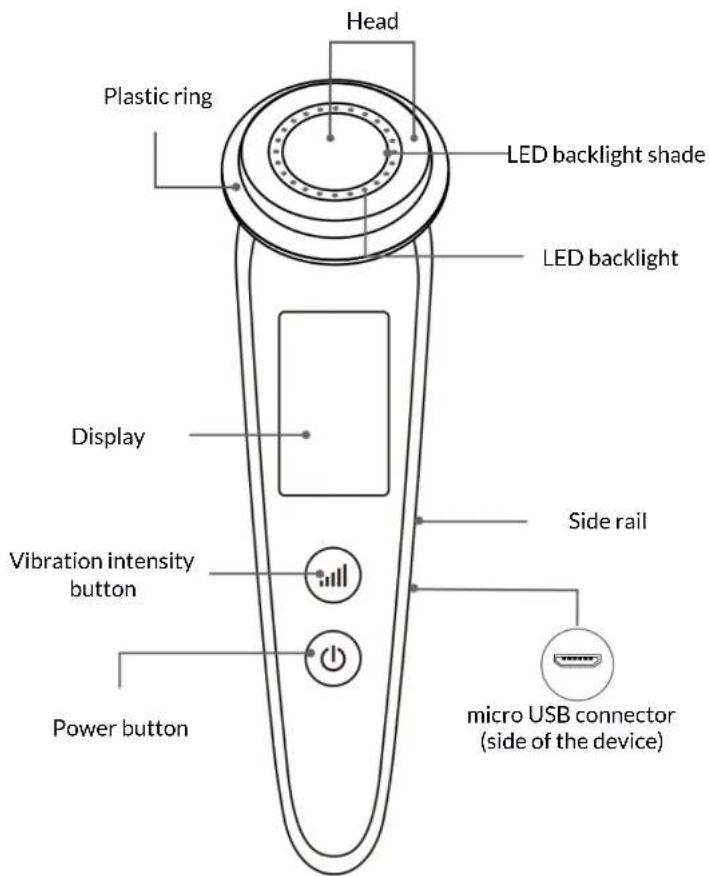
text_image
Head Plastic ring LED backlight shade LED backlight Display Vibration intensity button Power button Side rail micro USB connector (side of the device)4. The use of the equipment
4.1 Charging the battery

The battery should be fully charged before the first use of product. Several charging and discharging cycles may be necessary to achieve full battery capacity.

Avoid excessive battery discharge. This can damage the battery or shorten its service life. A low battery is indicated by a short double beep and the device is switched off.

The device can heat up during charging. It is a regular occurrence and should not affect the stability or performance of the device. Do not leave the device to be charged unattended s may result in fire, damage to the device or its surroundings etc.
To charge the device, connect the micro USB plug of the supplied cable to the micro USB connector on the device. Connect the other end of the cable to a powered USB adapter or, for example, a socket in a computer, power bank, etc., which at the output guarantees a power supply of 5 V = 1 A or higher. When charging starts, the battery icon on the display will flash.
When charging is complete, the battery icon will remain lit. After charging is complete, disconnect the USB cable from the device and the power source.
4.2 Turning the device on, off and operating it
Press and hold the power button for about 3 seconds to turn on the device. After turning on, short pressing the power button will switch between four operating modes of the device:
- Cleansing
-
Photorejuvenation
-
Regeneration
- Eye care
The massager allows you to adjust the intensity of head vibrations, which lets you adjust them to individual needs. After turning on the device, set the desired operating mode then by short pressing the vibration intensity button change the intensity of vibrations. You can choose between three levels of their intensity. The current vibration intensity is visible on the screen of the device and is represented by a letter:
- L - low vibration
• M - medium vibration - H - high vibration
In the eye care mode, the vibration intensity is constant, and the vibration intensity button turns the red backlight of the massager head on and off, giving an effect similar to the photorejuvenation mode.
To turn off the device, press and hold the power button for about 3 seconds. Additionally the product automatically turns off after about 5 minutes of inactivity.
4.3 Use
Avoid using the device for too long and intensively in one place. It can cause skin irritation.
Do not use the device on an irritated or damaged skin.
Before each use of the device, remove make-up, wash and dry your face.
When using the appliance, always hold it so that it touches the side rails. Do not hold the unit by the body alone.
Never use the device on dry skin. Use the massager in combination with preparations intended for facial skin.
Regardless of the selected operating mode, we recommend moving the massager head in the following way:
- Face - inside out
• Around the mouth - circularly - Eye area - circularly
- Forehead - bottom to top
- Cheeks - bottom to top
- Chin - bottom to top
When moving the massager around the face, do not stay in one place for a long time.
Cleansing mode - helps to effectively remove impurities from the skin pores. This mode requires the use of a cotton pad and facial cleanser. Remove the plastic ring from the device head and moisten a cotton pad with facial cleanser. Put a moistened cotton pad on the massager head and put the plastic ring back on it, pressing it until you hear a click.
Turn on the device. By default, the massager turns on in cleaning mode. Adjust the vibration intensity level and start cleansing your face.
Photorejuvenation mode - the red light of the backlight stimulates the skin to produce collagen and elastin, which increases its elasticity. It helps in reducing wrinkles and discolorations, delays the aging process. The heated head stimulates blood circulation, improving blood supply to the skin.
Before use, apply a cream, serum, oil or other product intended for facial skin to the face. Turn on the device, select the photorejuvenation mode, adjust the level of vibration intensity and, massaging your face, introduce the cosmetic into the skin.
Regeneration mode - the blue light of the backlight has an antibacterial and anti-inflammatory effect on the skin. It inhibits the development of inflammation in acne vulgaris and rosacea. It destroys bacteria without affecting the skin tissues.
Before use, apply a skin product with antibacterial and anti-inflammatory properties to the face or a one accelerating skin regeneration. Turn on the device, select the regeneration mode, adjust the level of vibration intensity and, massaging your face, introduce the cosmetic into the skin.
Eye care mode - massages and improves the condition of the skin around the eyes. In this mode, the vibration intensity button turns the red backlight of the massager head on and off, giving an effect similar to the photorejuvenation mode.
Apply eye cream evenly around the eye area before use. Turn on the device, select the eye care mode and, massaging the eye area, introduce the cosmetic into the skin.
When massaging the eye skin area, be especially careful and try to gently put the head to the skin.
When using the device, do not press the head too hard against the skin. Move the head along the skin at a slow pace and do not stay in one place for too long.
The frequency of activities related to the use of the device depends on the individual needs of the skin. We recommend prior consultation with a specialist in this matter. However, do not use the device multiple times in one day.
5. Troubleshooting
If you have problems with the unit, please refer to the following tips.
| The device does not switch on | Check that the battery is charged.Check that the cables, plugs and sockets supplying power to the unit are not damaged. |
| After switching on, the head does not vibrate | Make sure when holding the device you touch its side slats and the head is in direct contact with the skin.Perhaps there has been a damage to the device. Contact the manufacturer's service department. |
| If the problem persists, contact the manufacturer's service department. | |
6. Cleaning of the device
To extend the service life of the device:
- WARNING! The device must not be submerged in water or washed under running water!
- Clean the device after each use.
- Disinfect with any disinfectant or with hydrogen peroxide.
- Before cleaning, make sure that the device is switched off and is not being charged.
- For cleaning use only a dry cloth. Never use any agent with a high concentration of acids, alkalis or abrasives.
- Store the device and its accessories in a dry place away from the reach of children, sources of heat and moisture.
- Avoid very high temperatures, for it can shorten the life of electric and electronic components, melt the plastic parts and destroy the battery.

The packaging of the device can be recycled in accordance with local regulations.

Symbol for corrugated cardboard (packaging material).

The packaging elements should be disposed of in appropriate containers.

Marking of the container into which the stamping should be thrown - plastic/metal.

The marking of the container into which the box - paper should be discarded.
7. Correct disposal of used equipment and battery
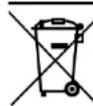
The device is marked with a crossed-out garbage bin, in accordance with the European Directive 2012/19/EU on used electrical and electronic Equipment (Waste Electrical and Electronic equipment - WEEE). Products marked with this symbol should not be disposed of or dumped with other household waste after a
■ period of use. The user is obliged to get rid of used electrical and electronic equipment by delivering it to designated recycling point in which dangerous waste are being recycled. Collecting this type of waste in designated locations, and the actual process of their recovery contribute to the protection of natural resources. Proper disposal of used electrical and electronic equipment is beneficial to human health and environment. To obtain information on where and how to dispose of used electrical and electronic equipment in an environmentally friendly manner user should contact their local government office, the waste collection point, or point of sale, where the equipment was purchased.
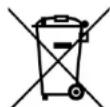
According to the EU directive 2006/66/EC with changes contained in EU directive 2013/56/UE on the disposal of batteries, this product is marked with crossed-out garbage bin symbol. The symbol indicates that the batteries used in this product should not be disposed with regular household waste, but treated according to the legal directives and local regulations. It is not allowed to dispose of accumulators with unsorted municipal waste. Users of battery and accumulators must use the available collection points of these items, which allows them to return, recycle and disposal. Within the EU, the collection and recycling of batteries and accumulators is a subject to separate procedures. To learn more about existing procedures of recycling of batteries and accumulators please contact your local office or an institution for waste disposal or landfill.
8. The use of the manual
Without prior written consent of the manufacturer, no part of this manual may be photocopied, reproduced, translated or transmitted in any form or by any means, electronic or mechanical, including photocopying, recording or storing in any systems of storing and sharing information.
All brand names and product names are trademarks or registered trademarks of their respective companies.
9. Warranty and service
The product is under warranty for 2 years from the date of sale of the product, except for accessories (USB cable) which are under warranty for 6 months. If you need to make use of a warranty claim, please contact the manufacturer's helpline or point of sale. The product returned for warranty claim should be complete and best in its original packaging.
10. Declaration of conformity with European Union Directives

mPTech sp. z o.o. hereby declares that the product complies with all relevant provisions of the so-called 'New Approach' of Directive of the European Union.