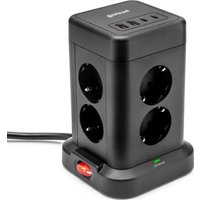
HUS-1004 - Extension cord Huslog - Free user manual and instructions
Find the device manual for free HUS-1004 Huslog in PDF.


| Product type | Vertical USB power strip |
| Model | HUS-1004 |
| Brand | Huslog |
| Power supply | 230 V~ 50/60 Hz, 16 A max |
| Max current | 16 A |
| Total USB output | 5 V == 3.4 A max |
| USB-A ports | 2 (5 V == 2.4 A each) |
| USB-C ports | 2 (5 V == 3 A each) |
| AC outlets | 8 x type E |
| Overload protection | Auto-resetting overcurrent fuse |
| Switch | Yes, on the base of the device |
| Intended use | Powering indoor household appliances |
| Operating environment | Indoors, protected from water and dust |
| Cleaning | Dry or slightly damp cloth, do not immerse |
| Safety | Do not use if damaged, keep out of reach of children |
| Package contents | Power strip, user manual |
| Warranty | 2 years |
| Compliance | European directives (CE marking) |
Frequently Asked Questions - HUS-1004 Huslog
User questions about HUS-1004 Huslog
0 question about this device. Answer the ones you know or ask your own.
Ask a new question about this device
Download the instructions for your Extension cord in PDF format for free! Find your manual HUS-1004 - Huslog and take your electronic device back in hand. On this page are published all the documents necessary for the use of your device. HUS-1004 by Huslog.
USER MANUAL HUS-1004 Huslog
Equipment Delivery Point:
mPTech Sp. z o.o.
street Krakowska 119
50-428 Wrocław
Poland
Designed in Poland
Made In China
Manufacturer:
mPTech Sp. z o.o.
u Nowogrodzka 31
00-511 Warsaw
Poland
Helpline: (+48 71) 71 77 400
Email: pomoc@mptech.eu
Website: huslog.eu
TABLE OF CONTENTS
- Safety of use.... 11
- Specification 13
2.1 Technical data....13
2.2 Contents ....14
- Use of the device....15
- Cleaning the device....16
- Explanation of symbols ......17
- Use of the manual ....17
- Warranty and Service....18
- EU Declaration of Conformity ....18
1. Safety of use
Please read the instructions provided here carefully before using your device. Failure to follow these instructions may be dangerous or illegal.
—INTENDED USE—
The products covered by this user manual are intended to power devices equipped with USB connectors and serve as an electric extension cable.
Products intended for indoor use in households. They cannot be used for commercial purposes. Any other use is considered
inappropriate and dangerous. The manufacturer is not responsible for injuries resulting from improper use of the device.. This manual contains important information about the use of the product – please read it carefully and keep it for future reference.
—IMPORTANT SAFETY INSTRUCTIONS—
Do not switch the device on in places where the use of electrical and electronic devices is forbidden, or when it may cause interference or other hazards. Comply with all kinds of prohibitions, regulations and warnings provided by the staff of the place where you want to use the device.
Do not switch the device on when it is visibly damaged or the power cord is damaged. Disconnect the power plug from the power outlet by grasping the plug, not the cord.
—WATER AND OTHER LIQUIDS—
Do not expose the device to water or other liquids. Avoid working in high humidity environments - steamy kitchens, bathrooms, etc. Water particles can cause moisture to appear in the device, which adversely affects the electronics and may damage the device.
—SURROUNDINGS—
The device should not work in dusty conditions. Connect the device in such a way that it cannot be damaged (e.g. by placing it on a stable surface) and does not pose a threat to people and animals. Do not expose the device to sunlight and do not use it, or leave it in the immediate vicinity of devices that emit a lot of heat (heaters, radiators, etc.). Elements made of plastic may deform, which may affect the operation of the device or lead to its complete damage.
—MOTION AND MENTAL DISABILITIES AND CHILDREN—
The device is not a toy. Keep the device, its accessories and packaging out of reach of children. Tubes and foil wraps can become wrapped around a child's neck or be swallowed, resulting
in suffocation or choking. The device should not be operated by people (including children) with limited mobility or mental predispositions and without experience in using electronic equipment. They may only use it under the supervision of persons responsible for their safety.
—PROFESSIONAL SERVICE—
Only qualified service of the manufacturer or an authorized service centre may repair this product. Repairing the device by an unqualified service centre or by an unauthorized service point and introducing modifications on your own may damage the device and void the warranty.
2. Specification
2.1 Technical data
| Cube extension cable with LED | |
| Model | HUS1001 |
| Lot number | 613405 |
| Power supply | 230V~ 50/60Hz, max. 16 A |
| USB output | 5V == 2.4A |
| Connectors | 2 type E sockets, one USB connector, 2 USB-C connectors |
| Cube extension cable PD 20W | |
| Model | HUS1002 |
| Lot number | 613405 |
| Power supply | 230V~ 50/60Hz, max. 16 A |
| USB output | USB-A: 5V == 3A / 9V == 2A / 12V == 1.5AUSB-C: 5V == 3A / 9V == 2.22A / 12V == 1.67A |
| Connectors | 3 type E sockets, USB connector, 2 USB-C connectors |
| Cube extension cable with USB | |
| Model | HUS1003 |
| Lot number | 613405 |
| Power supply | 230V~ 50/60Hz, max. 16 A |
| USB output | USB-A: 5V == 2.4AUSB-C: 5V == 3AMax: 5V == 3.4A |
| Connectors | 3 type E sockets, 2 USB connectors, 2 USB-C connectors |
| Vertical extension cable with USB | |
| Model | HUS1004 |
| Lot number | 613405 |
| Power supply | 230V~ 50/60Hz, max. 16 A |
| USB output | USB-A: 5V == 2.4AUSB-C: 5V == 3AMax: 5V == 3.4A |
| Connectors | 8 type E sockets, 2 USB connectors, 2 USB-C connectors |
2.2 Contents
Model: HUS1001
Cube extension cable with LED
User manual
Model: HUS1002
- Cube extension cable with fast charging 20 W
User manual
Model: HUS1003
Cube extension cable with 3 AC sockets
User manual
Model: HUS1004
- Vertical extension cable with 8 AC sockets
User manual

If any of the above items are missing or damaged, please contact your dealer.

We recommend to keep the packaging in case of any complaint.
It is possible to download the electronic version of the user manual from the following Internet address:
https://mptech.eu/support-huslog/
Or by scanning the QR code:
3. Use of the device
FIRST START-UP
Remove the appliance from the packaging and unwind the power cord. Place it in its intended location. If all elements are visually undamaged, connect the power plug to the electrical outlet.
Model: HUS1001
Connect the power cord plug to the mains socket. Press the switch k to turn on the extension cord. You can connect up to two mains-pow devices and three USB-powered devices (1 x USB, 2 x USB-C) to extension cable.
There is an LED backlight on the top of the device, which has the intensity levels. To turn on or change the intensity of the LED backlight touch the touch button on the top of the device.
Model: HUS1002
Connect the power cord plug to the mains socket. Press the switch k to turn on the extension cord. You can connect up to three mo powered devices and three USB-powered devices (1 x USB, 2 x USB-C the extension cable.
The product is compatible with the USB-PD fast charging protocol up 20W.
Model: HUS1003
Connect the power cord plug to the mains socket. Press the switch k to turn on the extension cord. You can connect up to three mo powered devices and four USB-powered devices (2 x USB, 2 x USB-C) the extension cable.
Model: HUS1004
Connect the power cord plug to the mains socket. Toggle the switch on the base of the device to turn on the extension cord. You can connect up to eight mains-powered devices and four USB-powered devices (2 x USB, 2 x USB-C) to the extension cable.
The product is equipped with an automatic overload fuse located next to the power cord. Once the fuse has blown, unplug all devices connected to the extension cord and press the fuse button. Then connect the devices one by one until you identify the source of the overload.
4. Cleaning the device

WARNING! The device cannot be immersed in water or washed under running water!

Cleaning can only be done when the device is turned off, cooled down and the power source is not connected.

Do not use any chemicals, alkaline, abrasive or disinfecting agents for cleaning, as they may have a ful effect on the device's components.
The device housing can only be cleaned with a dry cloth or paper towel. If the body is heavily dirty, use a cloth slightly moistened with lukewarm water and wring out any excess water. Afterwards, immediately wipe the washed area with a dry cloth or paper towel and leave the device to dry completely.
5. Explanation of symbols
The packaging of the device can be recycled in accordance with local regulations.

Symbol indicating corrugated board (packaging mat.).

For indoor use only.
The symbol indicates that the package contains a user manual which must be read before use.
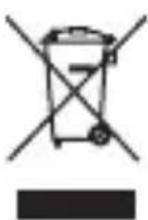
In accordance with the WEEE Directive 2012/19/EU, the product is marked with the symbol of a crossed-out garbage container. The product must not be disposed of with municipal waste, but must be delivered to a
designated collection and recycling point for waste electrical and electronic equipment that disposes of such hazardous waste. The accumulation of this type of waste in indicated places and the proper process of its recovery contribute to the protection of natural resources. Proper recycling of waste electrical and electronic equipment has a beneficial effect on human health and the environment. For information about the points of disposal of waste electrical and electronic equipment, please contact the municipal administration or the seller of the device.
6. Use of the manual
Without the prior written consent of the manufacturer, no part of this manual may be reproduced, distributed, translated or
transmitted in any form or by any electronic or mechanical means, including by photocopying, recording or storing in any storage and information-sharing systems.
All brands and product names are trademarks or registered trademarks of the respective companies.
The graphic appearance or colour of the product may differ from the actual product.
7. Warranty and Service.
The product has a 2-year warranty, starting from the date of sale of the product. In the event of a defect, the product should be returned to the store where it was purchased, remembering the need to present proof of purchase. The product should be complete and preferably placed in its original packaging.
8. EU Declaration of Conformity
CE Hereby mPTech Sp. z o.o. declares that this product complies with the basic requirements and other provisions of the Directives of the so-called "New
Approach" of the European Union
BEDIENUNGSANLEITUNG
3. Použití zařízení
PRVNÍ SPUŠTĚNÍ


- EQUIPMENT DELIVERY POINT
- MANUFACTURER
- TABLE OF CONTENTS
- SAFETY OF USE
- INTENDED USE
- IMPORTANT SAFETY INSTRUCTIONS
- WATER AND OTHER LIQUIDS
- SURROUNDINGS
- MOTION AND MENTAL DISABILITIES AND CHILDREN
- PROFESSIONAL SERVICE
- SPECIFICATION
- 2.1 TECHNICAL DATA
- 2.2 CONTENTS
- MODEL: HUS1001
- MODEL: HUS1002
- MODEL: HUS1003
- MODEL: HUS1004
- USE OF THE DEVICE
- FIRST START-UP
- CLEANING THE DEVICE
- EXPLANATION OF SYMBOLS
- USE OF THE MANUAL
- WARRANTY AND SERVICE
- EU DECLARATION OF CONFORMITY
- BEDIENUNGSANLEITUNG
- POUŽITÍ ZAŘÍZENÍ
- PRVNÍ SPUŠTĚNÍ
Brand : Huslog
Model : HUS-1004
Category : Extension cord