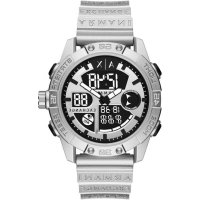
Exchange AX2965 - Watch Armani - Free user manual and instructions
Find the device manual for free Exchange AX2965 Armani in PDF.



| Product type | Wristwatch |
| Brand | Armani |
| Model | Exchange AX2965 |
| Movement | Quartz (analog and digital depending on version) or automatic |
| Power source | Battery (quartz models) or automatic winding (automatic model) |
| Main functions | Hour, minute, second, date, day, chronograph, alarm, backlight, 12/24h format |
| Water resistance | Varies by version: from 3 ATM (30 m) to 50 ATM (500 m) |
| Case material | Stainless steel |
| Bracelet material | Metal (adjustable links) |
| Crystal | Mineral or sapphire (depending on version) |
| Case dimensions | Approximately 42 mm diameter (estimate) |
| Weight | Approximately 150 g (estimate) |
| Warranty | 2 years (material and manufacturing defects) |
| Care and cleaning | Clean with a soft dry cloth; avoid chemicals. Check water resistance after opening. |
| Usage precautions | Do not set the date between 10 PM and 2 AM; do not operate pushers underwater; keep crown pushed in. |
| Spare parts and repairability | Contact an Armani authorized service center for any repair or replacement of battery, bracelet, crystal. |
| General information | Watch designed for everyday use. Full manual available for download in PDF format. |
Frequently Asked Questions - Exchange AX2965 Armani
User questions about Exchange AX2965 Armani
0 question about this device. Answer the ones you know or ask your own.
Ask a new question about this device
Download the instructions for your Watch in PDF format for free! Find your manual Exchange AX2965 - Armani and take your electronic device back in hand. On this page are published all the documents necessary for the use of your device. Exchange AX2965 by Armani.
USER MANUAL Exchange AX2965 Armani
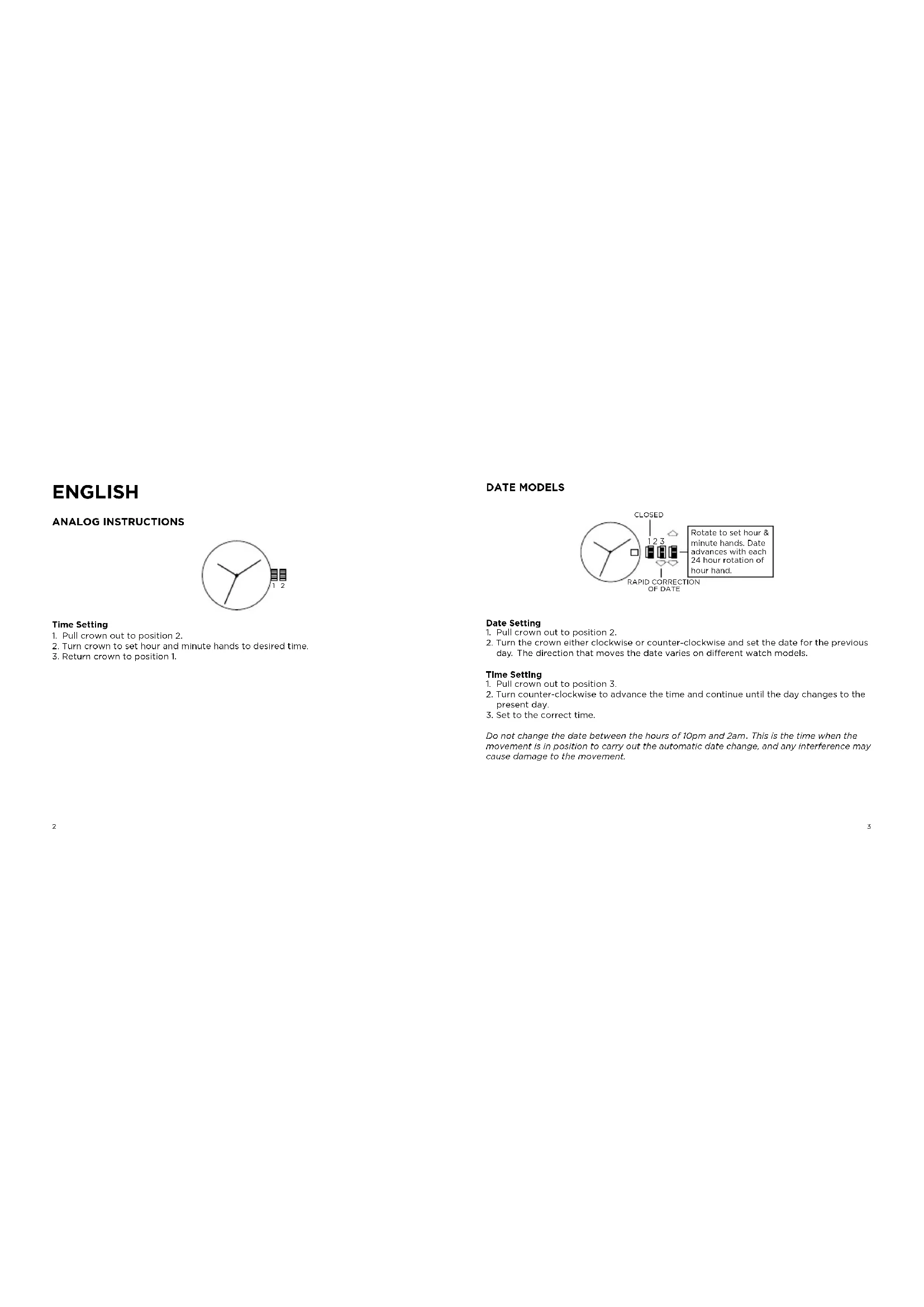
- Pull crown out to position 2.
- Turn crown to set hour and minute hands to desired time.
- Return crown to position 1.
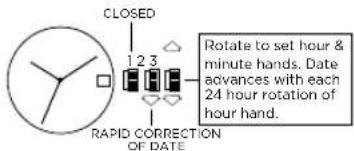
DATE MODELS
Date Setting
- Pull crown out to position 2.
- Turn the crown either clockwise or counter-clockwise and set the date for the previous day. The direction that moves the date varies on different watch models.
Time Setting
- Pull crown out to position 3.
- Turn counter-clockwise to advance the time and continue until the day changes to the present day.
- Set to the correct time.
Do not change the date between the hours of 10pm and 2am. This is the time when the movement is in position to carry out the automatic date change, and any interference may cause damage to the movement.
2 EYE DAY/DATE MULTI-FUNCTION VX36

Date Setting
- Pull crown out to position 2.
- Turn clockwise to advance date hand.
- Push crown back to position 1.
Date and Time Setting
- Pull crown out to position 3.
- Turn clockwise to advance hour and minute hands.
The hand showing days of the week will also move with the hour and minute hands.
Keep turning until you have reached the desired day.
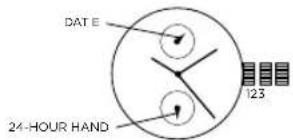
MULTIFUNCTION 6P23
Time Setting
- Pull crown out to position 3.
- Turn clockwise to advance hour and minute hands. 24-hour hand will move with hour and minute hands. Keep turning to reach desired time.
- Return crown to position 1.
Date Setting
- Pull crown out to position 2.
- Turn crown counter-clockwise to set date.
- Return crown to position 1.
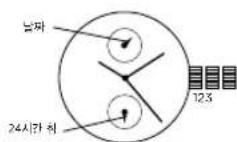
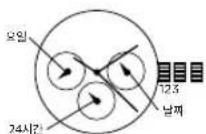
THREE EYE MULTI-FUNCTION 6P29/6P79
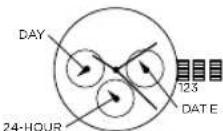
Date Setting
- Pull crown out to position 2.
- Turn clockwise to advance the date hand.
- Push crown back to position 1.
Day and Time Setting
- Pull crown out to position 3.
- Turn clockwise to advance hour and minute hands. The hand showing days of the week will also move with the hour and minute hands. Keep turning until you have reached the desired day.
24-Hour Sub-Dial Setting
The 24-hour hand moves correspondingly with the hour and minute hands. When setting the time be sure to check that the 24-hour hand is set properly.
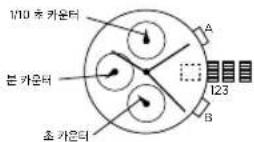
CHRONOGRAPH STOPWATCH VD55 (with date-VD57)
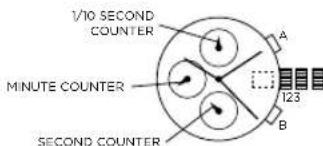
Time and Date Setting
- Before setting the time, make sure the chronograph is stopped and set to zero (12:00) position.
-
Pull crown out to position 2 and turn crown clockwise to set date to the previous day.
-
Pull crown out to position 3 when the second hand is at the 12:00 position, and turn clockwise until the present date is displayed. Continue turning crown to set the correct a.m./p.m. time.
-
Return crown to position 1.
NOTE: When crown is in position 2, do not press the pushers. Otherwise the chronograph hands will move.
NOTE: To ensure accuracy, do not set the date between 9:00 p.m. and 1:00 a.m.
Chronograph Functions
Basic Function
- Press A to start/stop the chronograph.
- Press B to reset to zero.
Interval Timing
- Press B while the chronograph is running.
- Press B again to return to the chronograph.
- Press A to finalize timing.
- Press B to reset.
Adjusting the Chronograph Hands to Zero Position
If one or more chronograph hands are not in their correct zero (12:00) positions after pressing B (for example, following a battery change):
- Pull crown out to position 3.
- Press A to move the chronograph 1/10 second counter one increment; press and hold A for fast advance.
- Press B to reset the second and minute counters one increment; press and hold B for fast advance.
- Return crown to position 1.
CHRONOGRAPH STOPWATCH JS25/VD54 (with date-VD53)
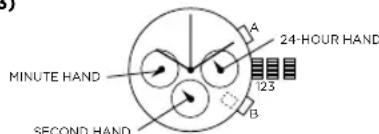
Time and Date Setting
- Before setting the time, make sure the chronograph is stopped and set to zero (12:00) position.
2.Pull crown out to position 2. - Turn crown clockwise until the previous day's date is displayed.
4.Pull crown out to position 3 when the second hand is at the 12:00 position. - Turn crown to set time.
NOTE: 24-hour hand moves correspondingly with the hour and minute hands. When setting the time be sure to check that the 24-hour hand is set properly.
6. Return crown to position 1
NOTE: When the crown is in position 2, do not press the pushers. Otherwise the chronograph hands will move.
Chronograph
- Press A to start/stop the chronograph.
- Press B to reset to zero.
Split Time (VD53/VD54)
- Press B while the chronograph is running.
- Press B again to return to the chronograph.
- Press A to finalize timing.
- Press B to reset.
Chronograph Zero Reset
- If either of the chronograph hands is not at the zero (12:00) position, pull crown out to position 3.
- Press A to move hands clockwise; press B to move hands counter-clockwise.
- Return crown to position 1.
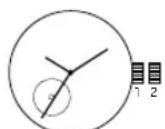
AUTOMATIC 82SO/2189
8250
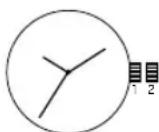
2189
- Pull crown out to position 2.
- Turn crown clockwise to advance hour and minute hands.
- Push crown back to position 1.
NOTE: A timepiece with an automatic winding movement obtains the power to wind itself by the movement of your wrist, there is no battery. Therefore, not wearing the timepiece for several consecutive days could exhaust the power reserve. If your watch stops, it is recommended that you manually wind the movement by rotating the crown clockwise at position 1 to achieve the necessary power reserve.
It is important your timepiece is adjusted to match the size of your wrist. A loose fit may result in a loss in capacity of the timepiece to wind itself. When fully wound, your timepiece has a power reserve of approximately 36 hours.
DIGITAL LED - BJ-3470
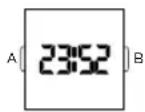
Normal Time Display
- Press B to display time; press B again to change display mode. Mode sequence is time, date and seconds.
- LED automatically turns off after 5 seconds.
Time / Calendar Setting
- In time display mode, press and hold A for 2 seconds to enter setting mode. 12/24-hour format will begin flashing.
- Press B to choose 12 or 24-hour format. For 12-hour setting, "P" will be displayed for afternoon/evening hours. For 24-hour setting, no symbol will be displayed.
- Press A to advance to hour
- Press B to increase digits; press and hold B for fast advance.
- Press A to advance to next setting value.
- Setting sequence is: 12/24-hour format, hour, minutes, seconds, year, month, date, and
exit setting mode.
NOTE: In setting mode, if no pusher is operated for 5 seconds, all changes will be saved and the watch will automatically turn off.
DIGITALUPCR-992A
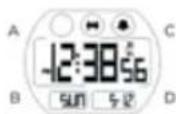
Time Mode
- Press B to change modes.
- Press A for EL.
- Press C to select 12/24 hour format
- Press D to enable/disable hourly chime.
Time Setting
- In time mode, press and hold A for 2 seconds to enter time setting.
- Press C to increase setting value. Press D to decrease setting value.
- Press B to enter next setting field
- Press pusher A to exit setting mode.
Alarm Mode
- Press B to enter alarm mode.
- Press A for EL.
- Press C to select alarm 1 or alarm 2.
- Press D to enable/disable alarm.
Alarm Setting
- Press and hold A for 2 seconds to enter alarm setting.
- Press C to increase setting value. Press D to decrease setting value.
- Press B to enter next setting field.
- Repeat steps 2 and 3 until desired time is selected.
- Press A to exit setting mode.
NOTE: Alarm turns on automatically when exiting setting mode.
Chrono Mode
- Press B to enter chrono mode.
- Press C to start chrono.
- Press D to stop chrono.
- Press and hold D for 2 seconds to reset chrono.
NOTE: Maximum chrono time is 23 hours, 59 minutes and 59 seconds. When chrono
reaches maximum time, it will stop running. Press and hold D to reset value to
run chrono. 1/00s resolution for first 59 minutes and 59.99 seconds.
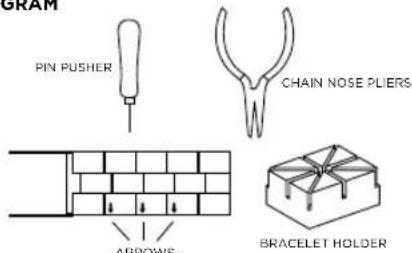
PIN LINK DIAGRAM
Link Removal
To remove a link from a pin link bracelet, you will need the bracelet holder, pin pusher, and chain nose piers (see pin link diagram).
- Open the clasp on the bracelet.
- Look on the inside of the bracelet and locate the arrows near the clasp (see diagram).
- Place the band into the appropriate size slot of the bracelet holder with the arrows pointing down (see diagram).
- Center the desired pin to be removed over one of the holes in the bottom of the bracelet holder.
- With the pin pusher, push the pin, as far as possible, through the link
- Remove the watch from the bracelet holder and simply finish pulling out the pin with the chain nose pliers.
NOTE: Two pins hold each link in place and must be taken out before a link can be removed. Please note that the pins are partially split down the center.
USE PRECAUTIONS - RESISTANCE TO WATER
| Water Resistance Water | related Use | ||||
| Caseback Marking | Depth | 5 | 8 | 20 | 7 |
| Washing Hands | Shower, Bathing | Swimming, Snorkeling | Scuba diving | ||
| - | - | X | X | X | X |
| WR | - | ✓ | X | X | X |
| 3 ATM | 3 Bar, 30 Meters | ✓ | X | X | X |
| 5 ATM | 5 Bar, 50 Meters | ✓ | ✓ | X | X |
| 10 ATM | 10 Bar, 100 Meters | ✓ | ✓ | ✓ | X |
| 20 ATM | 20 Bar, 200 Meters | ✓ | ✓ | ✓ | ✓ |
| 30 ATM | 30 Bar, 300 Meters | ✓ | ✓ | ✓ | ✓ |
| 50 ATM | 50 Bar, 500 Meters | ✓ | ✓ | ✓ | ✓ |
| Always set the crown in closed position (the normal position). Tighten screw-lock crown completely. | |||||
DEUTSCH
- 15rLsrt·00d-00t#T#E #
- 24.12.13.14.15.16.17.18.19.20.21.22.23.24.25.26.27.28.29.30.31.32.33.34.35.36.37.38.39.40.41.42.43.44.45.46.47.48.49.50.51.52.53.54.55.56.57.58.59.60.61.62.63.64.65.66.67.68.69.70.71.72.73.74.75.76.77.78.79.80.81.82.83.84.85.86.87.88.89.90.91.92.93.94.95.96.97.98.99.100
3.
半
- 3.
32的卡当能串卡自6P29/6P79
华
- 3.
日,
- 3的w到
- Ω日用示士
24日间 da日尔
241
克羅尼上格斯德勒姆VD55
(V57)
T
Your ARMANI EXCHANGE watch is warranted by Armani Exchange Watches for a period two (2) years from the original date of purchase under the terms and conditions of this warranty. The Armani Exchange warranty covers materials and manufacturing defects. A copy of the receipt or dealer stamp in the warranty booklet is required for proof of purchase.
During the warranty period the watch movement, hands and dial are the only components covered under this warranty. A covered component will be repaired or the watch will be replaced free of repair charges, if it proves to be defective in material or workmanship under normal use.
In case of replacement, Armani Exchange cannot guarantee that you will receive the same model watch if your model is not available, a watch of equal value and similar style will be provided. The warranty for the replacement watch ends two (2) years from the date the replacement watch is received.
This Warranty Does Not Cover:
Any defects in materials and workmanship of battery, case, crystal, strap or bracelet.
- Damage resulting from improper handling, lack of care, accidents, or normal wear and tear.
- Water damage unless marked water-resistant.
This warranty is void if the watch has been damaged by accident, negligence of persons other than authorized Armani Exchange sales or services agents, unauthorized service, or other factors not due to defects in materials or workmanship.
The foregoing warranties and remedies are exclusive and in lieu of all other warrants, terms or conditions, express, implied or statutory, as to any matter whatsoever, including, without limitation, warranties of merchant liability, fitness for a particular purpose, accuracy, satisfactory quality, title, and non-infringement, all of which are expressly disclaimed by Armani Exchange. Armani Exchange shall not be liable for incidental, consequential, indirect, special or punitive damages or liabilities of any kind arising out of or in connection with the sale or use of this product, whether based in contract, tort (including negligence), strict product liability or any other theory, even if Armani Exchange has been advised of the possibility of such damages and even if any limited remedy specified herein is deemed to have failed of its essential purpose. Armani Exchange's entire liability shall be limited to 16/6/7
replacement or repair of the purchase price paid, at Armani Exchange's sole option.
Some countries, states, or provinces do not allow the exclusion or limitation of implied warranties or the limitation of incidental or consequential damages so the above limitations and exclusions may be limited in their application to you. When implied warranties may not be excluded in their entirety, they will be limited to the duration of the applicable written warranty. This warranty gives you specific legal rights; you may have other rights that may vary depending on local law. Your statutory rights are not affected.
FOR AUSTRALIAN CUSTOMERS: Our goods come with guarantees that cannot be excluded under the Australian Consumer Law. You are entitled to a replacement or refund for a major failure and for compensation for any other reasonable foreseeable loss or damage. You are also entitled to have the goods repaired or replaced if the goods fail to be of acceptable quality and the failure does not amount to a major failure.
Requesting Warranty and Other Watch Repair
Should you recure work under warranty, please send in your watch, a copy of your sales receipt and/or the warranty booklet with dealer stamp and a description to the authorized international watch service center closest to you (see enclosed list of addresses).
For service work that is not covered under this warranty, the service contract may perform those services you request for a charge dependent on watch style and type of work requested. These charges are subject to change.
Do not send original packaging, as it will not be returned. Armani Exchange highly recommends you insure your parcel and adequately protect the watch during shipment. Armani Exchange is not responsible for product lost or damaged during shipment.
For repairs of your ARMANI EXCHANGE watch we recommend that you contact an authorized Armani Exchange dealer or the authorized international watch service center closest to you (see enclosed list of addresses).
In the U.S., there is a (8.50 handling charge to cover return shipping, insurance and handling to U.S. addresses. International addresses will have a higher shipping charge.
*901 South Central Expressway, Richardson, Texas 75080 USA
DEUTSCH
INTERNATIONALE ZWEI (2)-JAHRES-GARANTIE
*901 South Central Expressway, Richardson, Texas 75080 USA
FRANÇAIS
GARANTIE INTERNATIONALE DE DEUX (2) ANS
*901 South Central Expressway, Richardson, Texas 75080 USA
ESPANOL
GARANTÍA SOLO PARA ESPaña
*901 South Central Expressway, Richardson, Texas 75080 USA
PORTUGUES
GARANTIA VÁLIDA APENAS PARA PORTUGAL
*901 South Central Expressway, Richardson, Texas 75080 USA
BAHASA INDONESIA
JAMINAN INTERNASONAL 2 TAHUN
*901 South Central Expressway, Richardson, Texas 75080 USA
POLSKI
901 South Central Expressway, Richardson, Texas 75080 USA
PYCCKN
MEXKNYHAPODHAR TAPAHTHA HA 2 (DBA) TODA
CorIaHO yOIOBIMn IIOJOKEHMIHN HACOTIOHn rapAHTNn, KOMIIAHNA ARmani EXCHANGE Wachs" npOcctABINETRAPAHTMn Ha BAAM Nacb ARMANI EXCHANGE cpoKOM h DaBa (2) rOda C npeBocahauhno daTbN oKNYkN. HAcTOBAPAAHNTPApOcPcTbAHTeRc Haa DeEeKtBu MATEBAPHA mIROTOBHeHH. B KaIECTe NoDTHBcKDeHn NOKYNKn Heo6XoDmO npDEyABITb KOKNK BKTAHHm NmN 380JONHEHHr napAHTNI bTANO.
B TceHHHO papHTHnHO cacoa hOeMAHm, CTEKINK uDcpe6nAT BANROTTC qHMHCTBBHMOMKOTHEHMTNOKPbHAeRbMOHJ HApOHARoTHEETKPObIbHMMeBcKOMTHeHOTMQHKTBOCHNTOMHOMy HENTMy IYsEETeCENHAE SBeuHtAHM ZAMehA HOCnHpnn OeHAPKeyEHMNDEKETMA MATPNAH NIMPNPO30dTeHHO DEKETAK PYNCOHNPAIbHORO XCNONTO30HaHJI.
B Cnya3aMeHb, Mbl He MoKem rapaHTmPoBaT ppeOcCTabHeHnHcAocB ToJ Xe MoDEni. PnH OTCyTCTBM BauoM MOeMn Bam 6byT peNdoHNbI cAsb, PaHOBHeHHbIO NO CTMOCHN NO XoNOXIO NO CTNIHO. rapaHTmBnCpOx 3aMeHEHHbX Yacoc INctKeA TpeE3 2 (1) RoDa C dathn DnHnEHnHb 3aMeHHbX aoc
Hactoana rapaHTHa He paonpoCTpaHRaTHa:
- DepeKthMaTePnaIOB N npOK3BOcTBeHHbIe DepeKTh BApTaE, Kopnyca, cTeKIIa, pEmHr mnn OpaCeta.
NIOEHNHNEHNHEENHNEHNHEHNEHNHO HNOEHNHO HNOEHNHO HNOEHNHO HNOEHNHO HNOEHNHO HNOEHNHO HNOEHNHO HNOEHNHO HNOEHNHO HNOEHNHO HNOEHNHO HNOEHNHO HNOEHNHO HNOEHNHO HNOEHNHO HNOEHNHO HNOEHNHO HNOEHNHO HNOEHNHO HNOEHNHO HNO
POBpeKdENHBOO,ecn YacbHe ABNIAKTCA BOOyCToHBOMdoJIbIO.
Hactoiaa rapaHTnA aHHNpyTcB Cnyae, cCm TaBb NnoPoeKdeBc nyaiHO HNO HO HocctopXHOCHTI NAMAM. He ANIOOIMMCR yNOHMOHBOIMTOPOBBIMN KNTCPAXOBIMAROTAMM Emporio BAN, a TAKKE BpeyntBaTEHEPAZHEWORHO TReeHXKOKO ROQyKBAHIN MNEI RNPHX pKaTOpAR, BOHNKIMXHe IIO PpNHMe DEpKtA MaTePMAI NIKIROTOBIIH
BbIeHOMNHyTbe rapAHTHIN n CpeCTBa IpaBOOB 3aJIHTB. RnHOTCR NICKHOHTeBbIMM n 3AmeHHOT COBc BCE npHrHe rAPAHTHIN, YCOBAH INIOJXHEMHA, BZy To RBH BOUpIXHHE, NOpDAYMeBAHMEbIMN INI PpOcYDMOTEHHEK3 ZKHOADATEBCTCBOM, No IOMOB BONPCY, BKNIOAH, Eze pOAHREHnE, rAPATIKo RD OCHNTd InpOJxkN, PnIOHOCTBD TBN ICNLOB3oAHmN IO HAHsHHeHNO, TOOHCTb, YDQOBETBPOTHPENHO KAEHTCbe, PpAO BIAHNEH INOTCTBEH HAPUYHEH, B OTHOOHbKOTOPBXKOMNAMH He DaT KAKHX-NIMBOB3ATenBCTB, KOMTAHNI HE Hecet OTBeCTBEHNOH 3a CNYuHbIe, NIOOVAHbIe, KOCBHeHbIe, fakTIVcckMe NITUIPAPChhne yBtIKN, A TAKHE ME KEAKT KAKNX-MNIOB6AnTEBNTB, B03HNKAAOUWBCNBJCTME NIN BCSRIN CnpOAKNJK INICNNTOBHAMOH DAIHFOI KNDIEH,N BCIYYDOROBOPA MNNIDHTA (KNIQOAYE CEOCTHOXPOHTB). CTPOR OTBOE TBECTBOHCHNTSA KACHETO N Bo3OANHOCTb TOAepA NIOLOB bHXINPNIHO, DAKCE ECIN CHA BSNYBDEOMHENA B 03MOXHOCTNTANKX TBIKNOK IN HEB3IPAR HA TOT PAXK, YTO JIOBOE OPAHNeHHOE CpeCTBO PABAOB 3AIZMTI, NIOXKeHHOE B HACTOJIeau PAHTAHN, He DCSTHTIO CBO8O OHOBHOI CEIL. BeCb oBbHM HauwE OTBCTBEHNOCTOn OPaAHNBaaTcN, NO cOeTBEHHOMY cOMTpeHHIOKOM PAHIMN, 3AEMHOI NKPEOTOHN INEDENNA B PAmepe er 3AOKYPOHOI NeuI.
B HOKOTOPbX cTPAHAX, IITATAX IMN NPOBIMHIXHX He DNOYCKAGTCN KNCIOHHEHN IORPAAHHEHNE NOA3y- MeBBMEBHX rAPAHNTI INM ORPAAHIVEHNE NOOHOHBX INM KOCEBHNN Xy bblkKOS; NOSTOMY BbWeyK8A3HHBte ORPAAHHEHIN NKICIKHEHN MORYT BYBb ORPAAHHEHIN B aBaEM city-ae, B Tom city-ae, KOGI pAAO3yBAeMBE HIOBAPAHNTM OMYT BYBb NOHCTBO NIKIOCHUY, OHa BYD TY ORPAAHHEHIN dNNTBbOCTIO pIMMIHMMIO NcMbEEHMHAN PAHANTH. DAHAI PAHHTN PEODOCTABNET BAM KOHKPTBHe IOPHNIECKNE PpABAA; Bb MOKETE mMeBtI dypeBRA B 3AEBMCIOTN OT MEChTbZAKOHOB. BAAM PPABAA, NIOIOKEHN BAM POZAKHY, OCTA-OTCR HOHNMEHBMM.
182183
Tpe6oBaHHe rapaHTnHoro n npOyero pmoHTa qacOB:
B Cnyae Hoo60xdmoctn, OtnpaBaTe B 6nnKaiuuiin cspHNC-ueHr Tacbl, HAXOaHUNoCn Ha rapaHTNtHOM 6cOnyKbAHm, KOIO KBBaTaNiM uINn rapAHTNHOr TaONHa, a TAKKE ONIcHMe npo6bEms (cm. npnIrae bmm CInock Apecec)
B KaheCTBE pEMCHTA, He NOKpIbABMOrO daHnro RaapAnThe, cepAHC-ueHTP MoKET PpeIOCTaBtIpeDyeMble BAMN yCJyTN 3a nTAty, B 3aBNCIMoCTN OT BA DA cAcOB IN TINa BILIOJIHeHHo PABOt. PaCzEHKn HA 3TN yCJyTN MOrT MEHTRcSBr.
Pc0b6Ba He npCnBnabI NsDBeIne BOpHnHbN SoynakOBKe, NockoNkSy OHa He 8o3bpaaTcN. HAcToaTeHbNO pOKeMHyEaStpOxABbNoCtPOKByNObocNpHTbNAdHeXaQeCpeCTDa3auMThAocB O BoSpMe Ix TnAPcnOpTnPbOKBMy Mbl HocemOTBeTCTBHeHcTb 3a ToBap, yTopRnHbN KIN NIOpeKekDeHHB aPiPeJee TaHOnOpTnPbOKBMy.
Pn He60DmOCTn TExHccko 06CnyKbAHn BaaHX XaocB ARMANI EXCHANGE, y6eHtBHeNo PpCIM 3a3Ba C opHnAunHb Hnepom ARMANI EXCHANGE Wn BnKkHmM CepBC-ueHTPno pemOHy caw (cm. pnpHaerMaM CnKoK aepce)
901 South Central Expressway, Richardson, Texas 75080 USA (CLIA)
日本語
2年間の國際保証
901 South Central Exressway, Richardson, Texas 75080 USA
中文
两(2)年国际保证
*901 South Central Expressway, Richerson, Texas 75060 USA
繁體中文
兩(2)年國際保證
*901 South Central Expressway, Richardson, Texas 75080 USA
中国
2年国中
901 South Central Expressway, Richardson, Texas 75080 USA
190 191
AUTHORIZED ARMANI EXCHANGE WATCH SERVICE CENTERS
ANDORRA
Avidal, de Pesobro, 1LOC. ADO700 Escalades-Ecordygonia (2005)
E: cscairg@andprnet.ad
AUSTRALIA
Metro Service Centre
D.C. 66777
Frenchs Forest 2086
Australia
T:02.8977.8086
T:1800.818.853(tollfree)
F:0299390526
E: customercare.au@fossil.com
BELGIUM/LUXEMBOURG
DHL
Actn. Warranty & Repairs
Wolwelaan 151
133Diegem 7+7(0-7)
1.43(0)3147939082
E: customerservice@fossil.nl
BRAZIL
Grupp Technologies
Rua Julio Gonzalez, number 132
27th floor
Barra Funda
Sao Paulo Off56-060
Brazil
1:455(II)3008-1070 2:3008-1070
1:GAGC-721-0108
http://www.gruoprotechno.com.br
Metro Service Centre - Canada
214 King Street West - Suite #601
Toronto, Ontario 130 260
M5H35B
1.1800-899-03982、联系人:陈晓
E. SERVICE
metroservicecentrecanada.ca
CHILE
Establecimentos California SERTEC
Attn: Carlos Rosales (manager) and
Maria Estelia Nunez
Fossil Trading (Shanghai) Co. Ltd
Km 2504, 257F Grand Gateway
Tower II
3 Hong Qiao Road
Xu Hui District, Shanghai 200030
China
T:(86)400-820-3126
F:(8621)-6448-2733
E: shanghaicustomererservicegroup2
@fossil.com
COLOMBIA
San Jose, Costa Rica
T:222-0804
T:2256-5716
1:2257-234
F:2256-5340
E: guialsa@polarcr.com
DENMARK
Fossil Denmark A/S
Mdtager 29
DK-2605 Broendby
Denmark
T+4545883460
E:Salcsdenmark@Fossil.com
ECUADOR
Grupo Viertina
Tomás Bermur N39-242 y Francisco
Urruta
Quito, Ecuador
T:(593)23520537
FRANCE
54X501F
SAPV-0017146
Rue du Martelberg 2860037 Manwils
BP 80025 Monwhiler 677015 Immune Endos
6701 SAVENCE CEDEX
France
T:33.88.025252
E:contact@fossil.fr
GERMANY
EESCQ GmbH
Service
PHLLogistikagcr/LDB
Werkstrasse 17
D-77815B0bl
T:49.8651-632.6054
5:498661-6223000
1496831-022700
E servicekossil de
GUATEMALA
Watch it!
Attr: Evelyn Guacamaya / Alfredo
Marquieu
Diagonal 13-01 zona 12 Oakland
Mall
T:50223167777
E. seroviciolacnigaiimxuaalamala
2
HONG KONG
Tsuwan Wang
17年5DWBulldpa
17P,CDW Building 1000-2000
388 Castle Peak Road
Tsuen Wan, New Territories
Hong Kong
T:(852)24378566
FossilAsia-AllorSales@fossil.com
192 193
INDIA
Fossil India Pvt. Ltd.
621,12tn Main
HAL II Stage, Indiranagar
Bancalore 560.008
India
T:+8604253747
E:+9180.35216789
F:19086231639
E:servicehttp:/cssrl.com
#
INDONESIA Watch Care Centre
M
Mennnne nnne nnnnne nee 68
1
Jakarta 12190
Indonesia
1:4622129272744
F: +62 21 29272745
IRELAND
Transalliance TS
EAST (Fossil After Sales Team)
F
Eaeay Cour - Centrum 100
Parasay Coont - Centrton 100
Burton Upan Trent
DE14 2WX Safordshire
T: +44 03444 123 27
E:4403444123281
E:ukenpurics@fossil.com
JAPAN
Fossil Japan Repair Center
Yasuda A building 2F, 3-8
E:shop.jsp@fossil.com
KOREA
Fossil (Korea) Limited
5E Samik B/D 5Q
Nophyun-gong, Kangnam-ku
Seoul Korea
1:07-356-0509
3:00-10:00
2.1.10.10
KIMMA
ALYONFOLIOOONOOON
At Yasra Fashion Online Service
Center Marina Mall
P
Salmiya, Kuwait
T-965-2-2244515
F-9652-2249301
E: a.mullachery@alyasra.com
LEBANON
Romance.
5.0Box773
Fattal building, Jiss el-Wati (Sin
FerEEL
100
Lebanon/Borgot T+9611512003ext 377-340
1.981+312002Ex357-346
E: nadine.stein@fattal.com.1b
MACAU
Tsuwan War
17/ECDW Buildings
700GbpsDink
888
Iuien War, New Territories
Hong Kong
T(852)24378566
E: Fossil Asia-Altor Sales@fossil.com
MALAYSIA
Fossil Time Malaysia - Service
Centre
CentreUnit1-7-7-7-3rd Floor
1
Wisma Kemajuan
No.2Jalan 19/13
46300 Petaling Jaya, Selangor
1:60379691900
F:60379691909
E:fmycs@fossil.com
MEXICO
Metro Service Center Mexico
Carretera Monterrey - Saltillo
1249-A
Col Bio XU
SantaCaterinaNLMexicoG
66762
685021-000237344
1.08002387745
E:regalarclones@tossnl.com mix
E:service@fossil.com.mx
NETHERLANDS
Team for Logistics
Att. Warranty & Repairs
Jirwen 16
2153PHNauvVannn
215371000000000000000000000000000000000000000000000000000
1.47(6)214799056
E:customerservice@fossil.ni
NEW ZEALAND
Watea World Ltd.
45a Arpenway Drive
1
Albary
Auck and
New Zealand
T:094756103E-mail:info@zzb.com.cn
PANAMA
EL Béglie
Eri Kecjero
Ward Clinic
Attn: sauio
Plaza Concordia, Piso 2
Time Check Service Center
G/F 6750 Retail Arcade, Avala
Center
Avala Avenue, Makati City.
Biliprpoes
T(632)47
1032478687
F:(832)478-61895.00006750
E:timecheck6/701@gmail.com
POLAND
FAST
C/O Expeditors Warehouse
AI Krakowska 106
02-256Warraw
T-482357428
F:reklamcag@foss
E. TELARALACJE@TOSSIN.COM
PORTUGAL
Expeditors:Portugal C/D
ExcepcorsPortugesC/C
Estrada Nacional IO
Translational
Termnal Term
Armazem B
2815-051A
T:214232000
E:customerservice.pt@fossil.com
PUSKI
ROSSIA
Rusie
BemnArt
Kastanaevskala St, 42, t
Moscow, Russia, 127108
T:74952340017
F:74957999960
E:bern-art@yandex.ru
SAUDI ARABIA
AlvAsraFashion(OnTime)
Prince Nasser bin Abdul A.7 Street
Behind GuthmFumiture
Khurais Road, Rawda Dist.
P
Riyaohr KsH 13661257
:-96612572093
E:anwarul@alyasra.com
SAUDI ARABIA
Al Yasra Trading
Villa No 18, Al Eya salesyah Dist 6
Omar Al Khayyam St.29.Near
AZT Mall
dcbK5A
+96612.6987255
1000000000000000
E:info-Watches@yiyas.com 2.https://www.wjw.net
E:secuartwatchworkshop
aiyasra.com
SAUDIARABIA
Al Yasra Trading
Rahmaniva Mall, Ground El, Gate
4.800
3386 Custodian of The Two Holy
Mosques Rd, Al Khobar al
Ploosues AG,ATKONGER AG
Shamalia
34429 Al Knobar, KSA
T:+966138995857
E:info-watches@alyasra.com
E:DemmamWatchWorkshop@
H
SINGAPORE
Fossil Singapore Pte Ltd.
51 Bras Basab Road
106.07M
408-07 Marilte Centre 6
Singapore 189554
T:6564318100
E:customerservice.sip@fossil.com
SOUTH AFRICA
Fossil Accessories South Africa
Unit 5A Somerset Square
OffHightfield Rd.Grown Point
8005GaoTou
6005, Cape Point, Africa
South Africa
T:42721480645
E:contact@keren.co.za
E: shamentha@keren.co.za
SPAIN - CANARIAS
Naeko Logistics S.A. c/o Expeditors
International
Att. Reparaciones Fossil (FAST)
Marce Deu de Nuria 13-15
Zhongxiao East Rd., Soc. 4 Taizhou, Tianjin
Taipei, Taiwan
T:(886)28773991
F:886287714477
E:service.tw@rossli.com
THAILAND
Thong Sila (Thailand) Limited
347, 349 Muang Thong Thani
Bondstreet Road
Bangpood Subdistrict, Pakkred
District
Nonthaburi III20 Thailand
-6529840888
F: +662 984 0779
cs@thongsia.co.th
UNITED ARAB EMIRATES
Al Yasra Fashion Ontime Service
Center Optima+Dubal Eventual Center
OntheDulBif
First Floor,shop No.5C227
Dubai
149742833453
E: info-watches@aiyasra.com
UNITED ARAB EMIRATES
Al Yasra Fashion Ontime Service
Center
Ontime Marina Mall
Ground Floor, Unit No 21, Marina
Mall
Abu Dhabi
1:4972681834
E:info-watches@alyasra.com
UNITED ARAB EMIRATES
Time Bridge fzco
Dubai Airport Free Zone, Unit G21
PO 293706 Duba
T: +971 4 299 33 00
F: +971429933
E:info@timebridge.ae
UNITED KINGDOM
Transalliance TS
FAS1 (Fossil After Sales Team)
Suite 8-9
Faraday Court - Centrum 100
Burton Upon Trent
DE14 2WX Safordshire
T: +44 03444 123 277
F:4403444123281
E: ukenquiries@fossil.com
UNITED STATES OF AMERICA
Metro Service Center - Attn: Repairs
10615 Sanden Drive
Dallas, Texas 75238-1720
T:800-277-4013
E:service@metroservicecenter.com
URUGUAY
Service Official
Attn: Florencia Sanchis
58 Ba Thang Hai Street, District 10
Ho Chi Minh City
T+84-839634344
T-84-902347534
E:customerservice@watchmecorp.
S8M
CERTIFICATE OF WARRANTY
The CERTIFICATE OF WARRANTY that follows below is to be completed at time of purchase by the retail store where you purchased your watch.
Disposal of Old Electrical and Electronic Equipment
The symbol indicates that this product shall not be mixed with unsorted municipal waste when disposed of. There is a separate collection system for waste electrical and electronic equipment. Usually old electrical and electronic equipment can be returned free of charge. For further information please contact the competent municipal authorities or the shop where you purchased the product. Correct disposal ensures that waste electrical and electronic equipment is recycled and reused appropriately. It helps avoid potential damage for the environment and human health and to preserve natural resources.
NOTE: Certain watch styles are fitted with lithium batteries which may contain perchlorate material. A special handling may apply, see www.dtsc.ca.gov/hazardouswaste/perchlorate for more information.
ENGLISH: Any diamonds used in our products have been purchased from legitimate sources not involved in funding conflict and in compliance with United Nations resolutions. We hereby guarantee that these diamonds are conflict free, based on personal knowledge and/or written guarantees provided by the supplier of these diamonds.
- DATE MODELS
- Date Setting
- Time Setting
- EYE DAY/DATE MULTI-FUNCTION VX36
- Date and Time Setting
- MULTIFUNCTION 6P23
- THREE EYE MULTI-FUNCTION 6P29/6P79
- Day and Time Setting
- 24-Hour Sub-Dial Setting
- CHRONOGRAPH STOPWATCH VD55 (with date-VD57)
- Time and Date Setting
- Chronograph Functions
- Basic Function
- Interval Timing
- Adjusting the Chronograph Hands to Zero Position
- CHRONOGRAPH STOPWATCH JS25/VD54 (with date-VD53)
- Chronograph
- Split Time (VD53/VD54)
- Chronograph Zero Reset
- DIGITAL LED - BJ-3470
- Normal Time Display
- Time / Calendar Setting
- DIGITALUPCR-992A
- Time Mode
- Alarm Mode
- Alarm Setting
- Chrono Mode
- Link Removal
- DEUTSCH
- 半
- 32的卡当能串卡自6P29/6P79
- 华
- 日,
- 24日间 da日尔
- 克羅尼上格斯德勒姆VD55
- (V57)
- T
- This Warranty Does Not Cover:
- Requesting Warranty and Other Watch Repair
- INTERNATIONALE ZWEI (2)-JAHRES-GARANTIE
- FRANÇAIS
- GARANTIE INTERNATIONALE DE DEUX (2) ANS
- ESPANOL
- GARANTÍA SOLO PARA ESPaña
- PORTUGUES
- GARANTIA VÁLIDA APENAS PARA PORTUGAL
- BAHASA INDONESIA
- JAMINAN INTERNASONAL 2 TAHUN
- POLSKI
- PYCCKN
- MEXKNYHAPODHAR TAPAHTHA HA 2 (DBA) TODA
- Hactoana rapaHTHa He paonpoCTpaHRaTHa:
- Tpe6oBaHHe rapaHTnHoro n npOyero pmoHTa qacOB:
- 日本語
- 2年間の國際保証
- 中文
- 两(2)年国际保证
- 繁體中文
- 兩(2)年國際保證
- 中国
- 2年国中
- AUTHORIZED ARMANI EXCHANGE WATCH SERVICE CENTERS
- ANDORRA
- AUSTRALIA
- BELGIUM/LUXEMBOURG
- BRAZIL
- CHILE
- COLOMBIA
- DENMARK
- ECUADOR
- FRANCE
- GERMANY
- GUATEMALA
- HONG KONG
- INDIA
- #
- IRELAND
- JAPAN
- KOREA
- KIMMA
- LEBANON
- MACAU
- MALAYSIA
- MEXICO
- NETHERLANDS
- NEW ZEALAND
- PANAMA
- PORTUGAL
- PUSKI
- SAUDI ARABIA
- SAUDIARABIA
- SINGAPORE
- SOUTH AFRICA
- SPAIN - CANARIAS
- THAILAND
- UNITED ARAB EMIRATES
- UNITED KINGDOM
- UNITED STATES OF AMERICA
- URUGUAY
- CERTIFICATE OF WARRANTY
- Disposal of Old Electrical and Electronic Equipment
Brand : Armani
Model : Exchange AX2965
Category : Watch