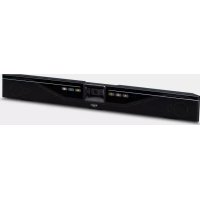
CS700 - Video conferencing system YAMAHA - Free user manual and instructions
Find the device manual for free CS700 YAMAHA in PDF.



| Product Type | Video Conferencing System |
| Brand | YAMAHA |
| Model | CS700 |
| Dimensions (H x W x D) | 98.75 x 861.7 x 68.5 mm |
| Weight (with bracket) | 3.3 kg |
| Power Supply | 100-240 V AC, 50/60 Hz, 1 A |
| Max. Power Consumption | 36 W |
| Network Standby Power Consumption | 1.6 W |
| Standby Duration | 20 minutes (adjustable) |
| Operating Temperature | 0 to 35 °C |
| Storage Temperature | -30 to 55 °C |
| Operating/Storage Humidity | 20% to 85% (non-condensing) |
| Camera | HD CMOS sensor, 1080p resolution at 30 fps (USB 3.0) or 640x360 (USB 2.0), 120° diagonal field of view |
| Audio: Speakers | 4 elements: 2 tweeters and 2 midrange |
| Audio: Microphones | 4 directional dynamic microphones with voice activity detection, 120° coverage up to 3.60 m |
| Audio: Processing | Full duplex, ultra-wideband acoustic echo cancellation (AEC) |
| Interfaces | USB 3.0/3.1 (audio, video, HID), Ethernet RJ45 10/100 M, Bluetooth 2.1+EDR, stereo 3.5 mm auxiliary audio input |
| Bluetooth | Profiles HFP (1.6) and A2DP, range 10 m, codecs SBC, mSBC, CVSD |
| SIP Functions (-SP model) | Call management (call, answer, transfer, hold...), SIP/USB/Bluetooth relay, codecs G.711/G.722/G.726/G.729 |
| Security | SRTP/SRTCP, RFC 1889, IETF SIP, SSH, password-protected configuration files |
| Safety Standards | IEC 60065, IEC 60950, IEC 62368 |
| Warranty | 1 year (non-EU), 2 years (EU) - factory return |
| Maintenance and Cleaning | Clean the camera lens and surface with a soft, dry cloth. Avoid any liquid. Do not obstruct the microphones. |
| Spare Parts and Repairability | Contact YAMAHA after-sales service for parts and repairs. |
Frequently Asked Questions - CS700 YAMAHA
User questions about CS700 YAMAHA
0 question about this device. Answer the ones you know or ask your own.
Ask a new question about this device
Download the instructions for your Video conferencing system in PDF format for free! Find your manual CS700 - YAMAHA and take your electronic device back in hand. On this page are published all the documents necessary for the use of your device. CS700 by YAMAHA.
USER MANUAL CS700 YAMAHA
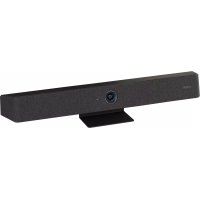
Video Sound Collaboration System for Huddle Rooms
CS-700
Always update the firmware to the latest version.
Please refer to the user's manual that provides detailed information on how to use the product.
You can download the latest firmware and user's manual from the following website:
https://uc.yamaha.com/products/video-sound-bar/huddle-room-system/
https://uc.yamaha.com/products/video-sound-bar/huddle-room-system/
https://uc.yamaha.com/products/video-sound-bar/huddle-room-system/
https://uc.yamaha.com/products/video-sound-bar/huddle-room-system/
https://sound-solution.yamaha.com/download/
ファームウェア
https://uc.yamaha.com/products/video-sound-bar/huddle-room-system/
始终确保固件更新到最新版本。
https://uc.yamaha.com/products/video-sound-bar/huddle-room-system/
https://uc.yamaha.com/products/video-sound-bar/huddle-room-system/
EN
FR
DE
SP
JP
CN
KO
RU
English 3
Français 11
Deutsch 19
Español 27
日本語 35
中文 44
한국어....52
Русский 60
EEA Precaution Information 69
EEA Guarantee Information 71
Simplified Declaration of Conformity ..... 73
List of International Distributors 75
English
Content
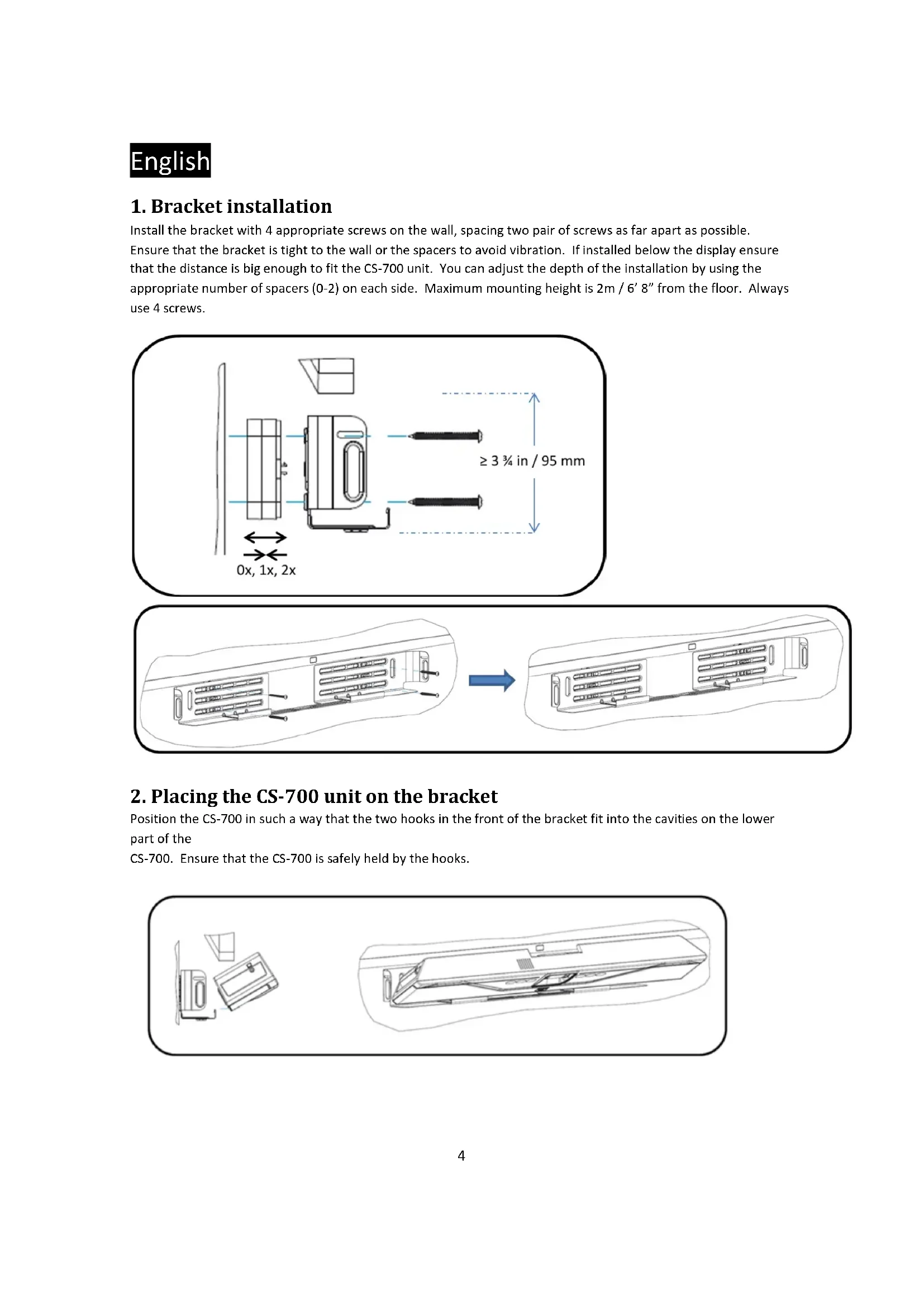
1. Bracket installation
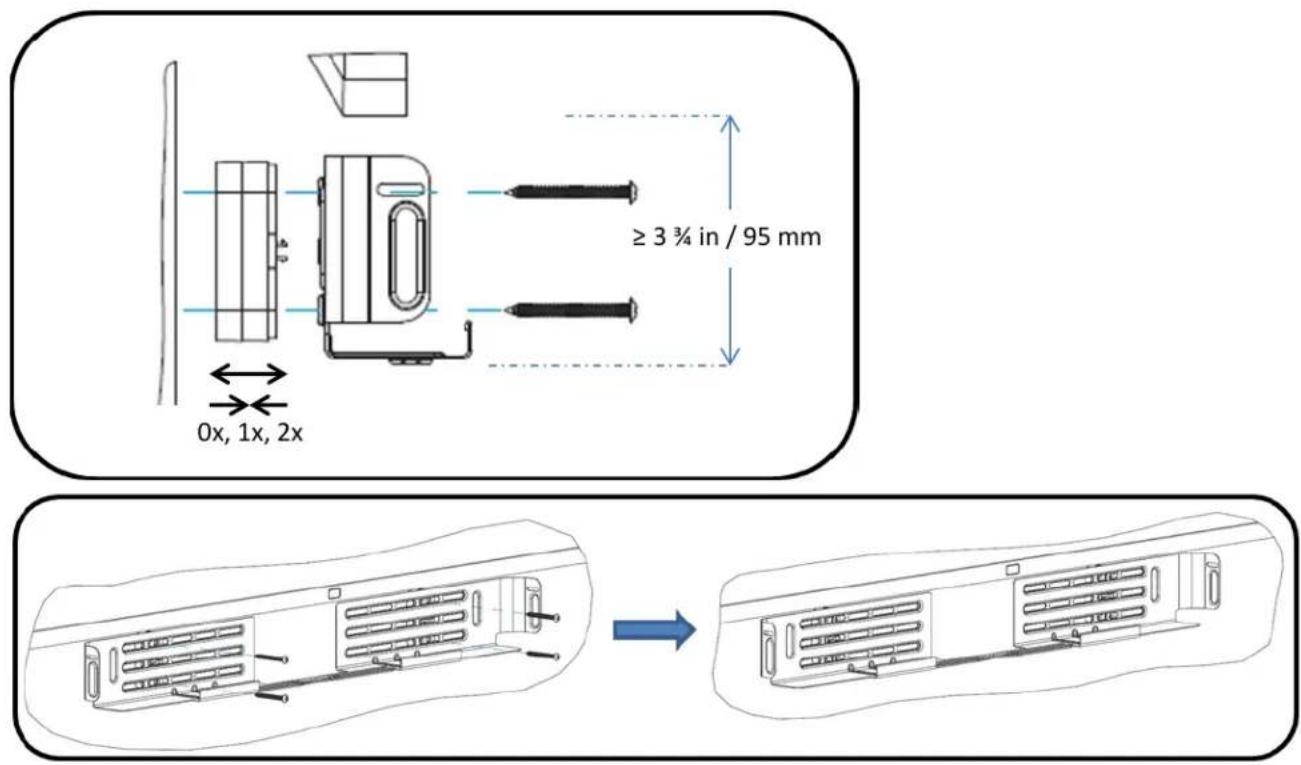
Install the bracket with 4 appropriate screws on the wall, spacing two pair of screws as far apart as possible.
Ensure that the bracket is tight to the wall or the spacers to avoid vibration. If installed below the display ensure that the distance is big enough to fit the CS-700 unit. You can adjust the depth of the installation by using the appropriate number of spacers (0-2) on each side. Maximum mounting height is 2m / 6' 8" from the floor. Always use 4 screws.
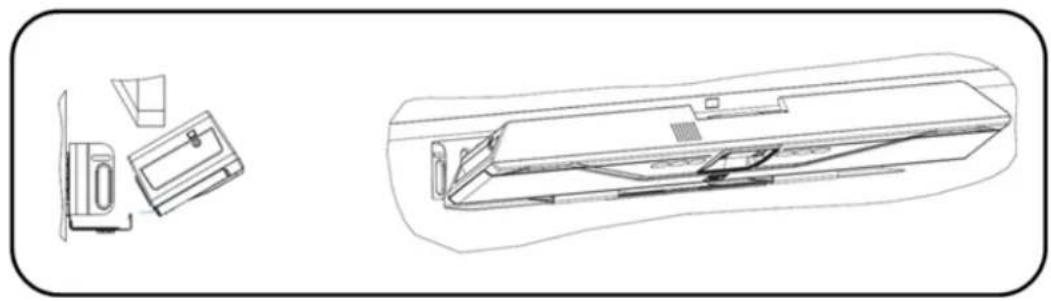
2. Placing the CS-700 unit on the bracket
Position the CS-700 in such a way that the two hooks in the front of the bracket fit into the cavities on the lower part of the
CS-700. Ensure that the CS-700 is safely held by the hooks.
natural_image
Technical line drawing of a refrigerator with front and side views (no text or symbols)English
3. Connect the CS-700
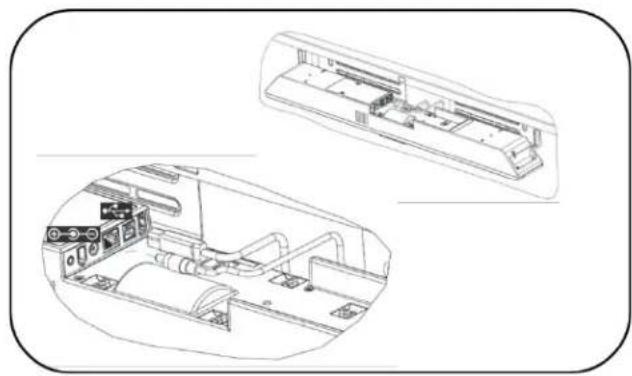
Once the CS-700 is safely positioned on the hooks of the bracket, connect the power cable and the USB cable to the CS-700 as shown. If it is planned to manage the CS-700 using the web browser, also connect the network cable into the corresponding connector.
Secure the cable using the provided cable ties to the CS-700 unit.
natural_image
Technical line drawing of a car air conditioning unit with internal components and control panel (no text or labels)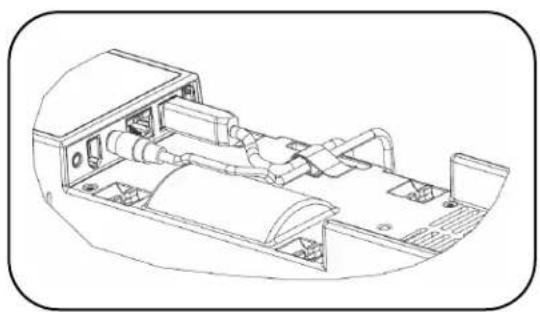
natural_image
Technical line drawing of a vehicle chassis with internal components (no text or symbols)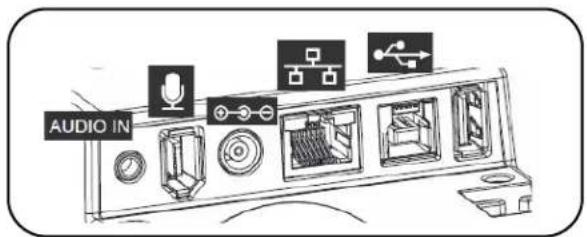
English
4. Installing unit in Bracket
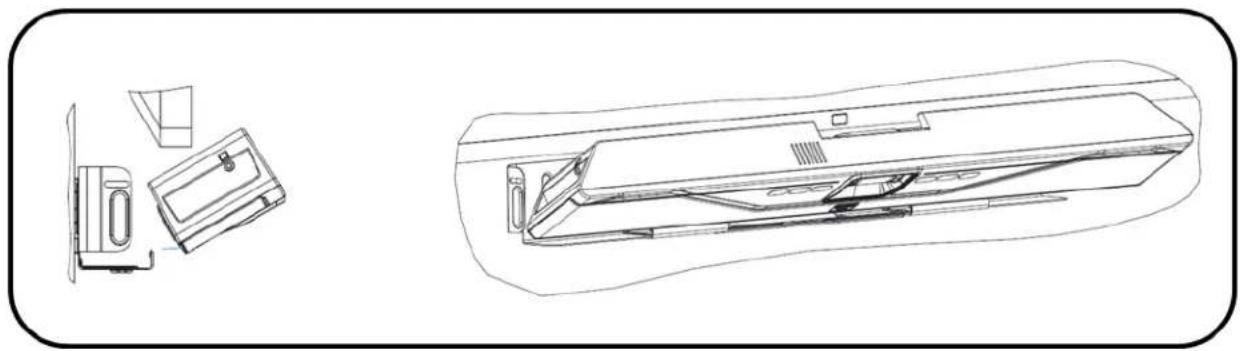
Once all cables are correctly connected and secured, tilt the CS-700 back on the bracket and push it pack into the bracket.
natural_image
Technical line drawing of a washing machine with front and side views (no text or symbols)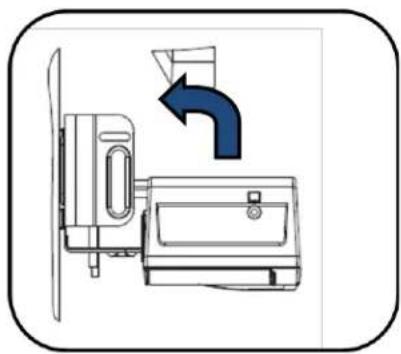
natural_image
Diagram of a kitchen appliance with a fan and door, showing a blue arrow indicating direction (no text or symbols)5. Secure unit
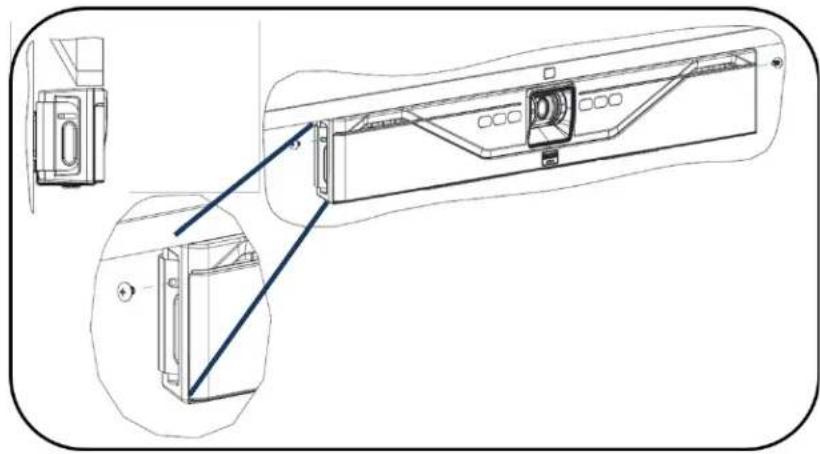
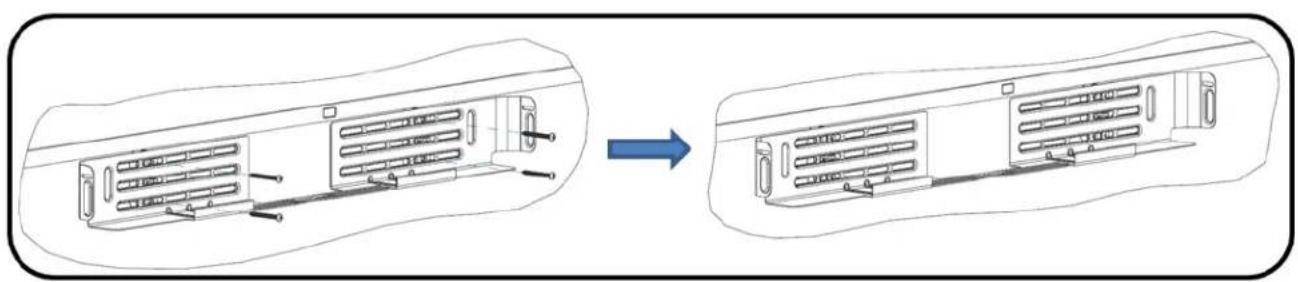
Secure the CS-700 unit in the bracket with the provided machine screws.
natural_image
Technical line drawing of a mechanical device with internal components and a close-up view (no text or symbols)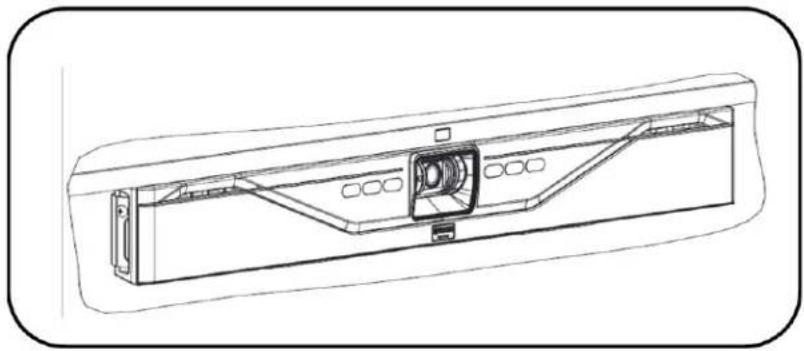
natural_image
Technical line drawing of a mechanical component with internal structure and mounting brackets (no text or symbols)6. Connect to power and computer
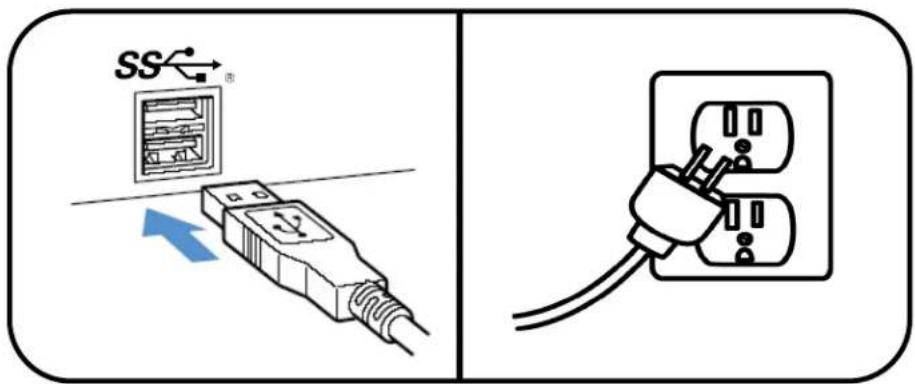
Connect the power cord to the power supply, and plug the power cord into a mains power connector.
Connect the USB cable to a USB 3 (USB Super Speed) connector on the computer
English
7. Select device
In your operating system select the "Yamaha AudioVideo Device" as your default audio playback and recording device.
In your unified communications application, select the CS-700 as the Video device.
8. Manage through IP interface
If an IP connection was made to the CS-700, the unit is configured to receive a DHCP address.
Press the two middle buttons (volume up / Bluetooth) for 5 seconds, and the system will speak the IP address that was assigned to it.
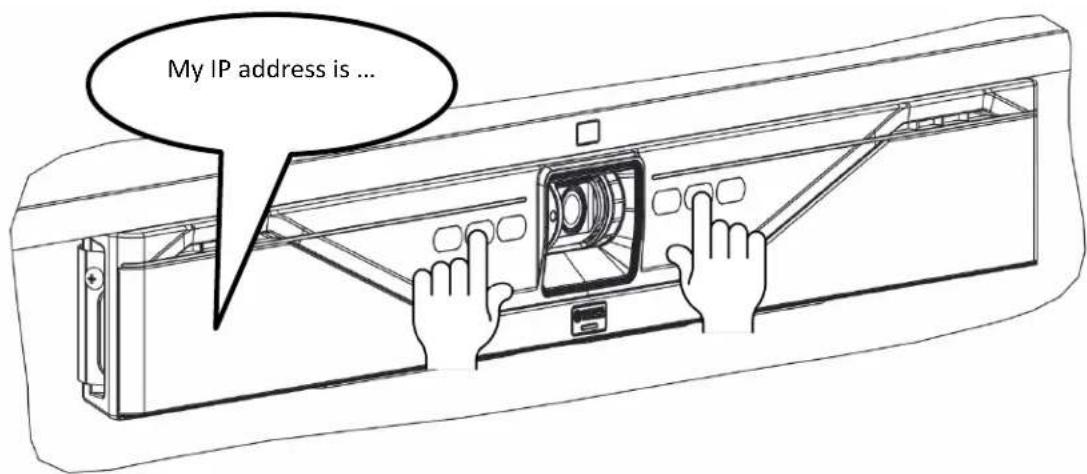
For more information, download the full documentation: https://uc.yamaha.com/products/video-sound-bar/huddle-room-system/
Specifications
| Power adapter | |
| Model Number | ADP-38DR A |
| Bluetooth Specifications | |
| Bluetooth specification version | 2.1 + EDR |
| Supported profiles | HFP (1.6), A2DP |
| Supported Codecs | SBC, mSBC, CVSD |
| Wireless output | Class 2 |
| Maximum communication distance | 10 m |
| Radio frequency (Operational frequency) | 2,402 MHz to 2,480 MHz |
| Maximum output power (EIRP) | 4.0 dBm (2.5 mW) |
| Audio | |
| Speaker Bar | 4 Speaker elements with tweeter and mid-woofer on left and right |
| Speaker Frequency Response | 160 – 20,000 Hz |
| Max SPL | 90 dB at 1m |
| Microphones | 4 microphone dynamic beamforming array with human voice activity detection |
| Microphone Coverage | 120 degrees audio pickup, best results within 12 feet / 3.60m |
| Microphone Frequency Response | 160 – 16,000 Hz |
| Full Duplex Audio | Yes |
| Echo Cancellation | Ultra-wideband adaptive AEC |
| LED indicator | Call activity and microphone mute/unmute |
| Video | |
| Camera Sensor | High Definition CMOS |
| Image resolution | 1080p, 30 fps (USB 3.0/3.1)640 x 360, 30 fps (USB 2.0) |
| Video Mute | Digital privacy control |
| LED Indicators | Camera activity and video stream mute/unmute |
| UVC Support | UVC 1.5 |
| Field of View | 120 degrees diagonally |
| Interfaces | |
| Mount Connector | Wall Mount Bracket for above or below display mounting |
| USB Host Port | USB with strain reliefAudio, video, HID and graphics display supported over USB 2.0 and 3.0/3.1 |
| Ethernet | RJ 45, 10M / 100M |
| Bluetooth® | Yes. HFP and A2DP support |
| Aux Audio Input | 3.5mm Stereo |
| SIP (-SP model only) | |
| Call Handling | Make, Answer, Hold, Resume, Transfer (Blind and Supervised), Forwarding, Do not disturb, Redial, Call Timer, Call ID, Speed Dial, Missed Call Notifications, Voice Mail Notifications (Call Manager configured) |
| Call Bridging | Supports Bridging SIP and USB Calls. Join, Split, Hold, Resume, 2+1+1 Lines: Up to 2 SIP calls, 1 USB call, 1 Bluetooth® call, plus the user |
| Codecs | G.711 (A-law and μ-law), G.722, G.726, G.729 |
| DTMF Support | RTP event, SIP in-band, SIP info package |
English
| Security | SRTP/SRTCP Support (RFC 1889), IETF SIP support (RFC 3261 and companion RFCs), SSIP, Password protected configuration files, Password protected login |
| Network & Provisioning | DHCP or Static IP, Server Based Central Provisioning, Web Portal for Individual Unit Configuration |
| Compliance | |
| Safety | IEC60065, IEC60950, IEC62368 |
| EMC | CISPR13/CISPR22/CISPR32/ FCC/J55013/ ETSI EN 300 328 / ETSI EN 302 291-2 / ETSI EN 300 330-2 EN55024/ CISPR24 or 35 and ETSI EN 301 489-1 |
| Environmental | RoHS, Reach, WEEE |
| Warranty | |
| Global except for EU | 1 Year return to factory |
| European Union | 2 Year return to factory |
| Size, Weight, Power, Operating Temperature | |
| Height | 3.9in/98.75mm |
| Length | 2.7in/68.5mm |
| Width | 34.in/861.7mm |
| Weight (incl. bracket) | 7.3 lbs/3.3kg |
| Input Voltage (power supply) | 100-240 VAC |
| Input Current (power supply) | 1A |
| Input Frequency (power supply) | 50-60 Hz |
| Input Voltage (CS-700) | 15V |
| Input Current (CS-700) | 2.4A |
| Power consumption (max) | 36 W |
| Power consumption (network stand-by) | 1.6 W |
| Stand-by time | 20 minutes (user selectable) |
| Power Cord Length | 10ft/3m - Please order correct SKU for regional power cord requirements |
| Operating Temperature | 32 to 104 °F (0 to 40 °C) |
| Storage Temperature | -22 to 131 °F (-30 to 55 °C) |
| Operating / Storage Relative Humidity | 20%-85% (non-condensing) |
Date code
The date code on the CS-700 label indicates when the product was manufactured. The first digit indicates the year.
| First digit | Calendar year |
| 7 | 2017 |
| 8 | 2018 |
| 9 | 2019 |
| 0 | 2020 |
| 1 | 2021 |
The second and third digits indicate the calendar week in that year – from 01 at the beginning of the year to 52 (or 53).
Français
Contenu
natural_image
Diagram showing a device rear panel with internal components and a blue arrow indicating transformation (no text or symbols present)natural_image
Technical line drawing of a refrigerator with front and side views (no text or symbols)Français
natural_image
Technical line drawing of a vehicle dashboard and air conditioner unit (no text or symbols)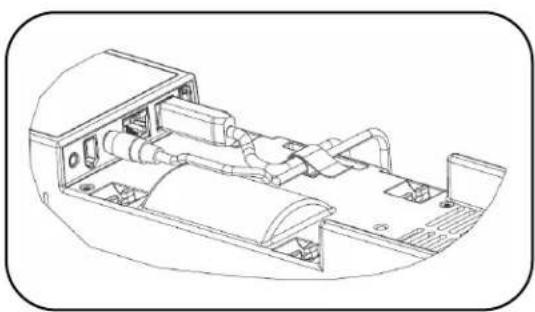
natural_image
Technical line drawing of a vehicle chassis with internal components (no text or symbols)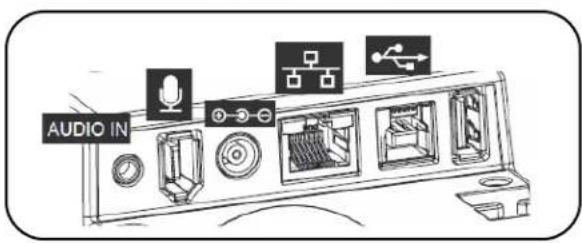
Français
natural_image
Technical line drawing of a kitchen appliance with front and side views (no text or symbols)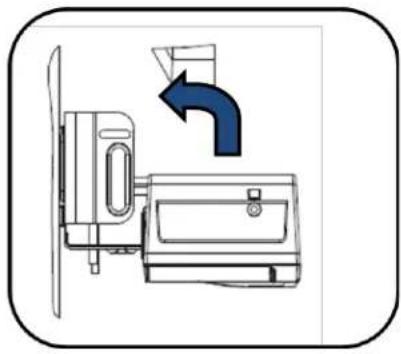
natural_image
Diagram of a kitchen appliance with a fan and door, showing a blue arrow indicating direction (no text or symbols)Français
5. Fixer l'unité
natural_image
Technical line drawing of a mechanical device with internal components and a close-up view (no text or symbols)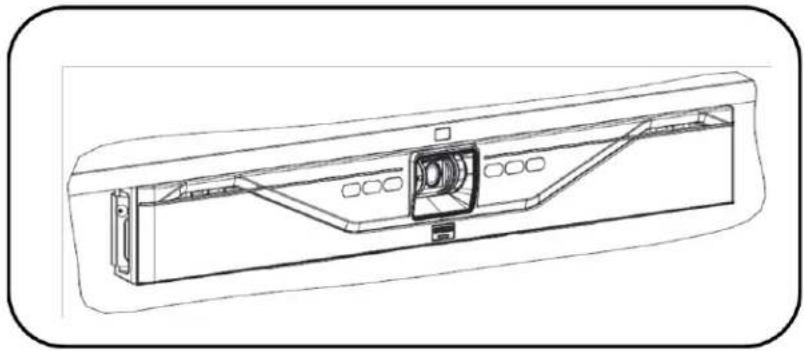
natural_image
Technical line drawing of a mechanical component with internal structure and mounting brackets (no text or symbols)natural_image
Diagram showing a device's internal structure before and after assembly, with no visible text or symbols.natural_image
Technical line drawing of a washing machine with front and side views (no text or symbols)Deutsch
natural_image
Technical line drawing of a vehicle dashboard and air conditioner unit (no text or symbols)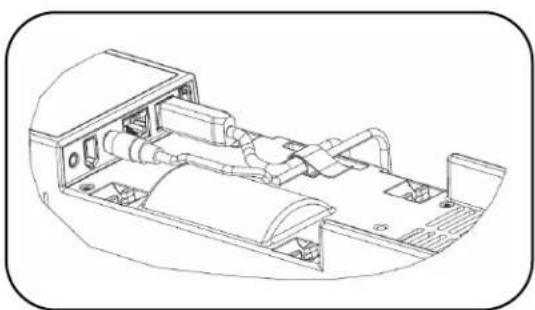
natural_image
Technical line drawing of a mechanical assembly with internal components (no text or symbols)
Deutsch
natural_image
Technical line drawing of a kitchen appliance and fixtures, showing front and side views (no text or symbols)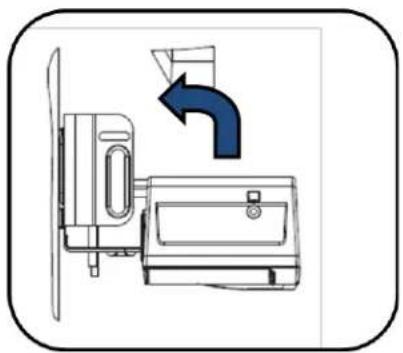
natural_image
Diagram of a door switch mechanism with directional arrow indicating motion (no text or symbols)Deutsch
natural_image
Technical line drawing of a device casing with internal components and mounting bracket (no text or symbols)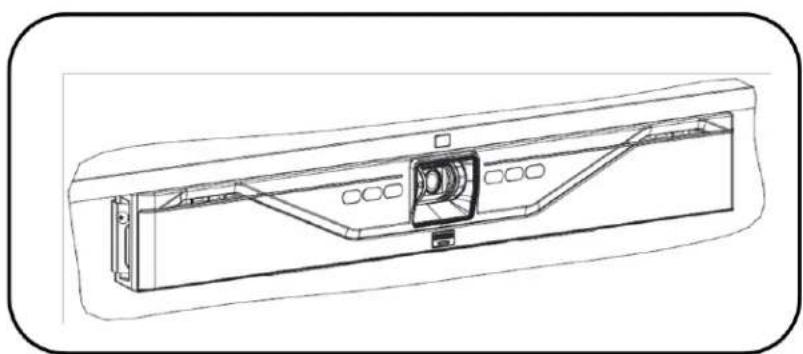
natural_image
Technical line drawing of a mechanical component with internal structure and mounting brackets (no text or symbols)natural_image
Technical line drawing of a server rack with ventilation slots and mounting brackets, showing before and after assembly (no text or symbols)natural_image
Technical line drawing of a washing machine with front and side views (no text or symbols)Español
natural_image
Technical line drawing of an air conditioner unit with internal components and ventilation ducts (no text or labels)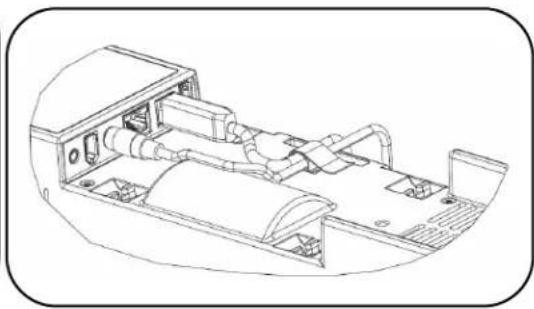
natural_image
Technical line drawing of a vehicle chassis with internal components (no text or symbols)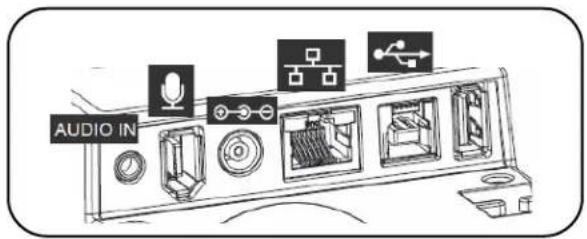
Español
natural_image
Technical line drawing of a kitchen appliance with front and side views (no text or symbols)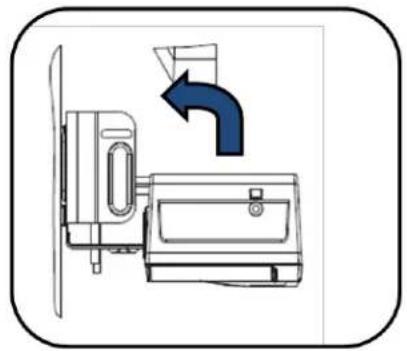
natural_image
Diagram of a kitchen appliance with a door handle and directional arrow indicating airflow or movement (no text or symbols)Español
natural_image
Technical line drawing of a mechanical device with internal components and a close-up view (no text or symbols)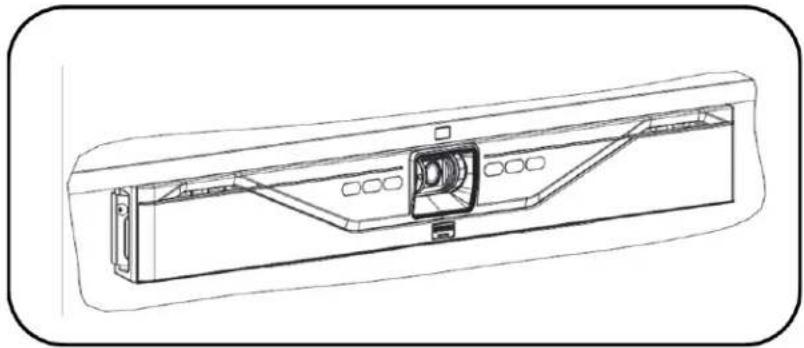
natural_image
Technical line drawing of a mechanical component with internal structure (no text or symbols)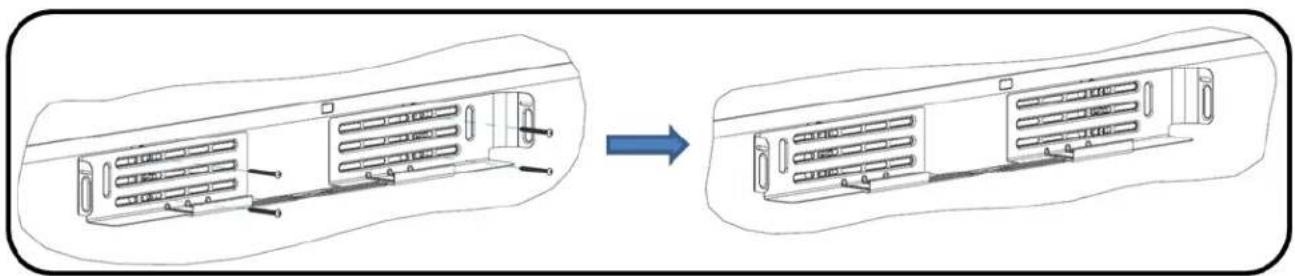
natural_image
Technical line drawing of a mechanical component before and after assembly (no text or symbols)natural_image
Technical line drawing of a washing machine with front and side views (no text or symbols)日本語
3. CS-700 を接続する
natural_image
Technical line drawing of a vehicle interior with dashboard and control panel (no text or symbols)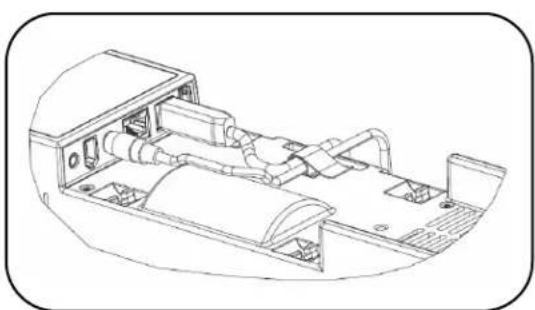
natural_image
Technical line drawing of a vehicle chassis with internal components (no text or symbols)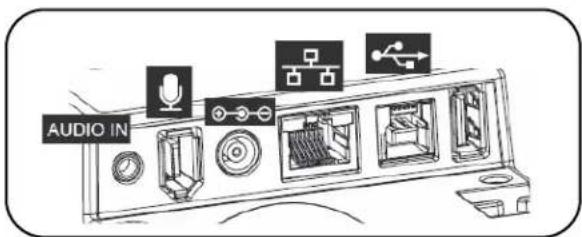
日本語
4. ブラケットに本体を取り付ける
natural_image
Technical line drawing of a kitchen appliance with front and side views (no text or symbols)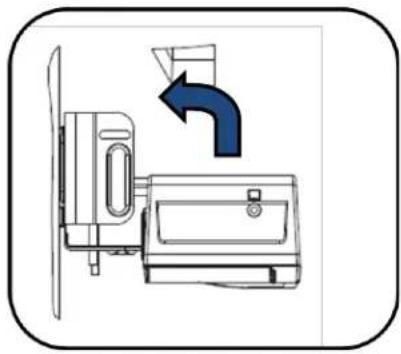
natural_image
Diagram of a kitchen appliance with a fan and door, showing a blue arrow indicating direction (no text or symbols)日本語
5. 本体を固定する
natural_image
Technical line drawing of a mechanical device with internal components and a close-up view (no text or symbols)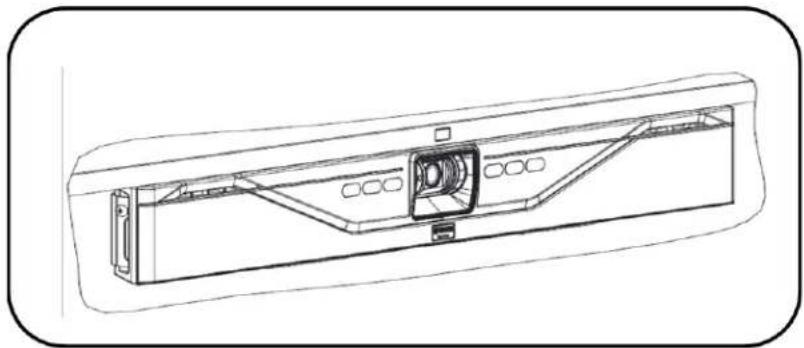
natural_image
Technical line drawing of a mechanical component with internal structure and mounting brackets (no text or symbols)6. 電源と PC に接続する
https://sound-solution.yamaha.com/download/
日本語
アフターサービスについて
サポート規定
https://sound-solution.yamaha.com/support/uc/policy/
サポート窓口
https://sound-solution.yamaha.com/support/uc/
保証と修理について
■ 保証書について
natural_image
Diagram showing a device's internal structure before and after assembly, with no visible text or symbols.2. 在支架上放置 CS-700 装置
natural_image
Technical line drawing of a refrigerator with front and side views (no text or symbols)中文
3. 连接 CS-700
natural_image
Technical line drawing of a car air conditioning unit with internal components and control panel (no text or labels)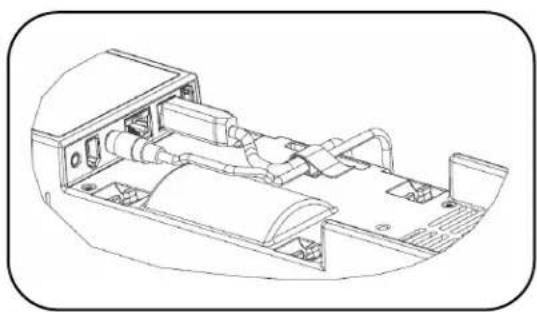
natural_image
Technical line drawing of a vehicle chassis with internal components (no text or symbols)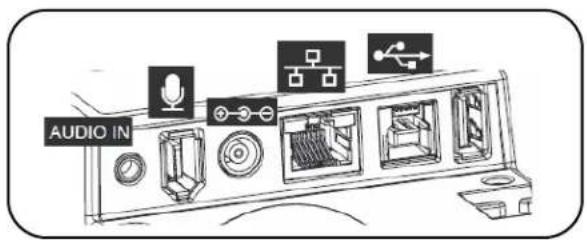
中文
4. 将装置安装到支架内
natural_image
Technical line drawing of a kitchen appliance with front and side views (no text or symbols)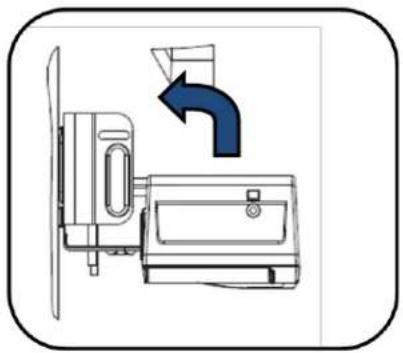
natural_image
Diagram of a kitchen appliance with a fan and door, showing airflow direction (no text or symbols)中文
5.固定装置
natural_image
Technical line drawing of a mechanical device with internal components and a close-up view (no text or symbols)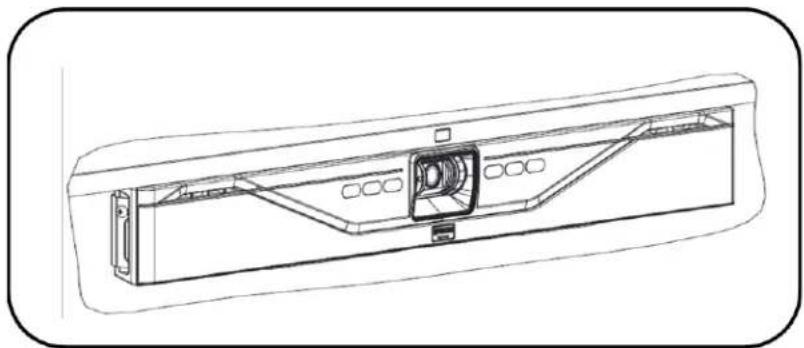
natural_image
Technical line drawing of a mechanical component with internal structure and mounting brackets (no text or symbols)6. 连接电源和计算机
有关更多信息,请下载完整文档:https://uc.yamaha.com/products/video-sound-bar/huddle-room-system/
规格
natural_image
Diagram showing a device casing with internal components before and after assembly, no text or symbols present한국어
2.브래킷에 CS-700 기기 배치
natural_image
Technical line drawing of a refrigerator with front and side views (no text or symbols)3. CS-700 연결
natural_image
Technical line drawing of a vehicle interior showing front and side views of a vehicle chassis (no text or symbols)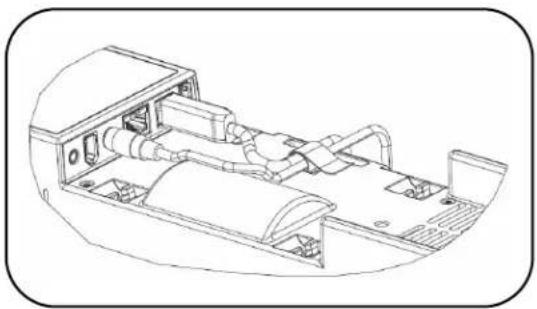
natural_image
Technical line drawing of a vehicle chassis with internal components (no text or symbols)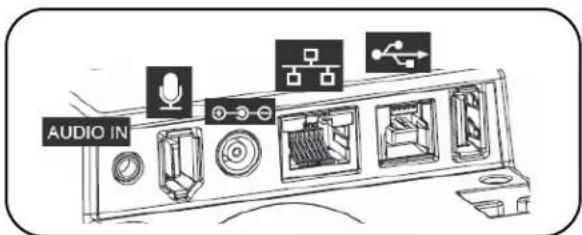
한국어
4.브래킷에 기기 설치
natural_image
Technical line drawing of a kitchen appliance with front and side views (no text or symbols)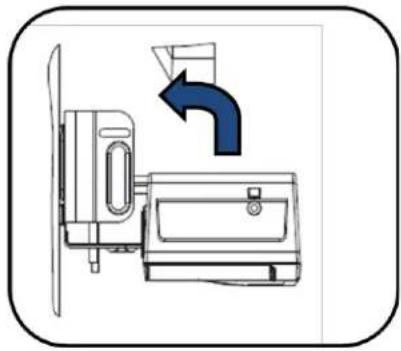
natural_image
Diagram of a kitchen appliance with a fan and door, showing a blue arrow indicating direction (no text or symbols)한국어
5. 기기 고정
natural_image
Technical line drawing of a device rear panel with internal components and mounting holes (no text or symbols)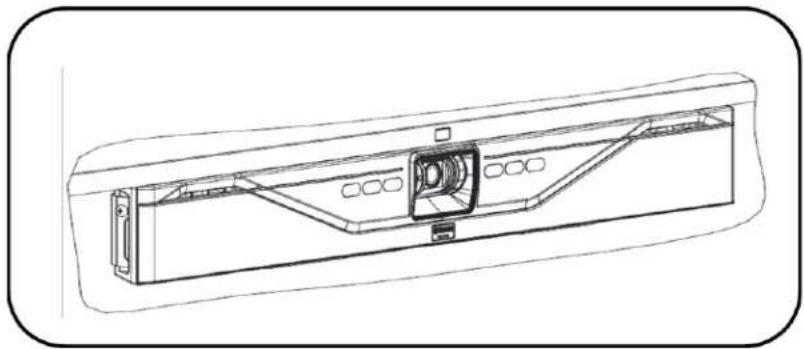
natural_image
Technical line drawing of a mechanical component with internal structure and mounting bracket (no text or symbols)6. 전원 및 컴퓨터 연결
natural_image
Technical line drawing of a kitchen appliance and equipment (no text or symbols)Русский
natural_image
Technical line drawing of a vehicle air conditioning unit with internal components and control panel (no text or labels)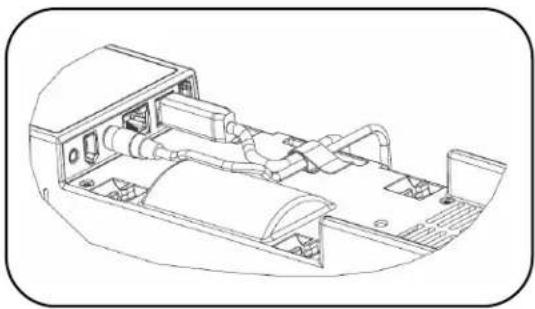
natural_image
Technical line drawing of a vehicle chassis with internal components (no text or symbols)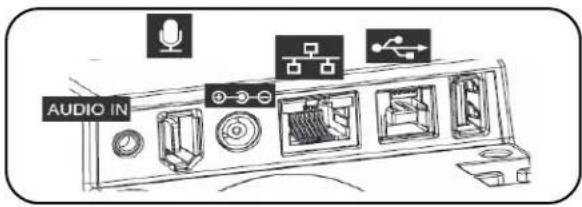
Русский
natural_image
Line drawing of a kitchen appliance with front and side views (no text or symbols)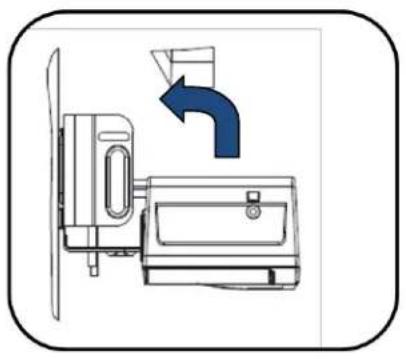
natural_image
Diagram of a kitchen appliance with a blue arrow indicating airflow direction (no text or symbols)Русский
natural_image
Technical line drawing of a mechanical device with internal components and a blue annotation arrow (no text or symbols)
natural_image
Technical line drawing of a mechanical component with internal structure and mounting brackets (no text or symbols)Important Notice: Precautions and legal information for customers in European Economic Area (EEA), Switzerland and Turkey
| Precautions and legal information: | English |
| For detailed precaution and legal information about this Yamaha product for customers in EEA*, Switzerland and Turkey, please visit the website address below or contact the Yamaha representative office in your country. * EEA: European Economic Area | |
| Sicherheitsvorkehrungen und rechtliche Hinweise: | Deutsch |
| Ausführliche Sicherheitsvorkehrungen und rechtliche Hinweise zu diesem Yamaha-Produkt für Kunden im EWR*, der Schweiz und der Türkei finden Sie auf der unten angegebenen Website, oder wenden Sie sich an eine Yamaha-Vertretung in Ihrem Land. * EWR: Europäischer Wirtschaftsraum | |
| Consignes et informations légales: | Français |
| Les clients résidant dans l'EEE*, en Suisse et en Turquie et souhaitant consulter les consignes détaillées et les informations légales sur ce produit Yamaha peuvent se rendre sur le site Web ci-dessous ou contacter leur bureau de représentation Yamaha local. * EEE : Espace économique européen | |
| Voorzorgen en juridische informatie: | Nederlands |
| Ga voor uitgebreide voorzorgen en juridische informatie met betrekking tot dit Yamaha-product voor klanten in de EER*, Zwitserland en Turkije naar de hieronder vermelde website of neem contact op met de Yamaha-vertegenwoordiger voor uw land. * EER: Europese Economische Ruimte | |
| Precauciones e información legal: | Español |
| Para obtener más detalles sobre las precauciones y la información legal de este producto Yamaha para clientes en el EEE*, Suiza y Turquía, visite el siguiente sitio web o póngase en contacto con el representante de Yamaha en su país. * EEE: Espacio Económico Europeo | |
| Precauzioni e informazioni legali: | Italiano |
| Per precauzioni e informazioni legali dettagliate su questo prodotto Yamaha per clienti in SEE*, Svizzera e Turchia, visitare il sito Web all'indirizzo seguente o rivolgersi all'ufficio di rappresentanza Yamaha nel proprio paese. *SEE: Spazio Económico Europeo | |
| Precauções e informações legais: | Português |
| Para obterem precauções detalhadas e informações legais sobre este produto da Yamaha, os clientes do EEE*, Suíça e Turquia devem visitar o endereço do website abaixo indicado ou contactar o representante da Yamaha nos respetivos países. * EEE: Espaço Económico Europeu | |
| Προφυλάξεις και νομικές πληροφορίες: | Ελληνικά |
| Για λεπτομερείς προφυλάξεις και νομικές πληροφορίες σχετικά με αυτό το προϊόν Yamaha για πελάτες στον ΕΟΧ*, την Ελβετια και την Τουρκία, επισκεφτείτε την παρακάτω τοποθεσία web ήεπικοινωνήστε με το γραφείο του αντιπροσώπου της Yamaha στη χώρα σας. * ΕΟΧ: Ευρωπαϊκός Οικονομικός Χώρος | |
| Försiktighetsåtgärder och juridisk information: | Svenska |
| Besök webbplatsen med adress nedan eller kontakta ditt lands Yamaha-representant för detaljerad juridisk information och information om försiktighetsåtgärder för kunder I EES*, Schweiz och Turkiet. * EES: Europeiska ekonomiska samarbetsområdet | |
| Forholdsregler og juridiske oplysninger: | Dansk |
| Kunder i EOS-landene*, Schweiz og Tyrkiet kan få detaljerede forholdsregler og juridiske oplysninger om dette Yamaha-produkt ved at gå til nedenstående websted eller kontakte Yamahas repräsentationskontor i deres land. * EOS: Det Europæiske ∅konomiske Samarbejdsområde | |
| Varotoimet ja oikeudelliset tiedot: | Suomi |
| Tämän Yamaha-tuotteen yksityiskohtaiset varotoimet ja oikeudelliset tiedot asiakkaille ETA:ssa*, Sveitsissä ja Turkissa ovat saatavilla alla olevasta osoitteesta tai paikalliselta Yamaha-edustajalta. *ETA: Euroopan talousalue | |
| Środki ostrożności i informacje prawne: | Polski |
| Szczegółowe środki ostrożności i informacje prawne dotyczące niniejszego produktu firmy Yamaha dla klientów w obszarze EOG*, Szwajcarii i Turcji sa dostępne w witrynie internetowej pod adresem podanym poniżej oraz u krajowego przedstawiciela firmy Yamaha. * EOG: Europejski Obszar Gospodarczy | |
| Bezpečnostní opatření a právní informace: | Čeština |
| Podrobná bezpečnostní opatření a právní informace související s tímto produktem Yamaha pro zákazníky v EHP*, Švýcarsku a Turecku najdete na webových stránkách uvedených niže, případně si je můžete vyzádat u zastoupení společnosti Yamaha ve vaší zemi. * EHP: Evropský hospodářský prostor | |
| Óvórendszabályok és jogi információk: | Magyar |
| A Yamaha termékekkel kapcsolatos, az EGT*-országokban, Svájcban és Törökországban érvényes óvórendszabályok és jogi információk megtekintéséhez keresse fel az alább feltüntetett webhelyet, vagy érdeklődjön országa Yamaha képviseleténél. *EGT: Európai Gazdasági Térség | |
| Ettevaatusabinõud ja õigusteave: | Eesti |
| EMP*, Šveitsi ja Türgi klientidele mõeldud üksikasjalikud ettevaatusabinõud ja õigusteabe selle Yamaha toote kohta leiate alljärgnevalt veebisaidilt või põörduge vastavas riigis olevasse Yamaha esinduskontorisse. * EMP: Euroopa Majanduspiirkond | |
| Piesardzības pasākumi un juridiskie aspekti: | Latviski |
| Lai pirceji no EEZ*, Šveices un Turcijas uzzinatu vairak par piesardzības pasakumiem un juridiskajiem aspektiem, apmeklejiet talak noradito timekļa vietni vai sazinieties ar „Yamaha” parstavniecību sava valstī. * EEZ: Europas Ekonomikas zona | |
| Atsargumo priemonės ir teisinė informacija: | Lietuvių k. |
| Šio EEE*, Šveicarijos ir Turkijos klientams skirto „Yamaha“ gaminio išsamias atsargumo priemones ir teisinę informaciją rasite toliau nurodytoje žiniatinklio svetainėje arba jų teiraukitės savo šalies „Yamaha“ atstovybėje. * EEE: Europos ekonominė erdvė | |
| Preventívne opatrenia a právne informácie: | Slovensky |
| Podrobnosti k preventivnym opatreniam a právnym informáciám týkajúcim sa tohto výrobku od spoločnosti Yamaha pre zákazníkov v EHP*, Švajčiarsku a Turecku nájdete na webovej stránke uvedenej nižšie alebo sa obrátte na zastúpenie spoločnosti Yamaha vo vašej krajine. * EHP: Európsky hospodársky priestor | |
| Previdnostni ukrepi in pravne informacije: | Slovenščina |
| Za podrobne previdnostne ukrepe in pravne informacije o tem izdelku Yamaha za stranke v EGP*, Švici in Turčiji obiščite spodnje spletno mesto ali stopite v stik s predstavništvom Yamaha v svoji državi. * EGP: Evropski gospodarski prostor | |
| Предпазни мерки и правна информация: | Български |
| За подробни предпазни мерки и правна информация относно този продукт на Yamaha за потребители в ЕИП*, Швейцария и Турция, моля, посетете адреса на учеб сайта по-долу или сесвържете с представителство на Yamaha във вашата държава. * ЕИП: Европейско икономическо пространство | |
| Măsuri de precautie și informații juridice: | Română |
| Pentru detalii privind măsurile de precautie și informații juridice referitoare la acest produs Yamaha pentru clientii din ZEE*, Elvetia și Turcia, vizitați site-ul web de la adresa de mai jos sau contactați biroul reprezentanței Yamaha din țara dvs. *ZEE: Zona Economică Europeană | |
| Mjere opreza i pravne informacije: | Hrvatski |
| Detaljne mjere opreza i pravne informacije o ovom Yamahinu proizvodu za kupce u EGP-u*, Švicarskoj i Turskoj potražite na mrežnoj stranici u nastavku ili se obratite predstavniku tvrtke Yamaha za svoju zemlju. * EGP: Europski gospodarski prostor | |
| Önlemler ve yasal bilgiler: | Türkçe |
| AEA*. İsviçre ve Turkiye’de bulunan ve bu Yamaha ürününün önlemleri ve yasal bilgileri hakkında daha fazla bilgi edinmek isteyen musterilerimiz aşağıda verilen web sitesini ziyaret edebilir veya ilgili ülkede bulunan yetkili Yamaha temsilcisiyle iletisime geçebilir. *AEA: Avrupa Ekonomik Alanı | |
http://europe.yamaha.com/precautions/
Important Notice: Guarantee Information for customers in European Economic Area (EEA) and Switzerland
Important Notice: Guarantee Information for customers in EEA\* and Switzerland
English
For detailed guarantee information about this Yamaha product, and Pan-EEA* and Switzerland warranty service, please either visit the website address below (Printable file is available at the website) or contact the Yamaha Unified Communications representative office for your country. *EEA: European Economic Area
https://uc.yamaha.com/warranty
Yamaha CS-700 simplified declaration of conformity for Radio Equipment Directive
SIMPLIFIED EU DECLARATION OF CONFORMITY
English
Hereby, Yamaha Unified Communications, Inc. declares that the radio equipment type Yamaha CS-700 is in compliance with Directive 2014/53/EU. The full text of the EU declaration of conformity is available at the following internet address: https://uc.yamaha.com/products/video-sound-bar/huddle-room-system/
DECLARATION UE DE CONFORMITE SIMPLIFIEE
Français
For details of products, please contact your nearest Yamaha representative or the authorized importer listed below.
Yamaha Unified Communications, Inc. 144 North Road, Suite 3250, Sudbury, MA 01776, USA Tel +1-800-326-1088
Europe
Yamaha Music Europe GmbH Siemensstrasse 22-34, 25462 Rellingen, Germany Tel +49-4101-303-0
Japan
Yamaha Corporation 10-1 Nakazawa-cho, Naka-ku, Hamamatsu-shi, Shizuoka, 430-8650, Japan
ヤマハ株式会社
V2 Technology Korea, Inc
1815, 128 Wangsan-Ro, Dongdaemun-Gu,
Seoul, 02566, Republic of Korea
The People's Republic of China
Digital China (China) Limited Digital Technology Plaze, NO.9 Shangdi 9th Street, Haidian District, Beijing, China
Australia / New Zealand
Hills Limited Level 7, 130 Pitt Street, Sydney NSW 2000, Australia
Other Countries
https://uc.yamaha.com/support/dealers-listing/
© Yamaha Corporation. All Rights Reserved.
Manufacturer: Yamaha Unified Communications, Inc.
Address: 144 North Road, Suite 3250
Sudbury, MA 01776, USA
- Video Sound Collaboration System for Huddle Rooms
- CS-700
- English
- Bracket installation
- Placing the CS-700 unit on the bracket
- Connect the CS-700
- Installing unit in Bracket
- Secure unit
- Connect to power and computer
- Select device
- Manage through IP interface
- Date code
- Français
- Fixer l'unité
- Deutsch
- Español
- 日本語
- CS-700 を接続する
- ブラケットに本体を取り付ける
- 本体を固定する
- 電源と PC に接続する
- アフターサービスについて
- サポート規定
- サポート窓口
- 保証と修理について
- 在支架上放置 CS-700 装置
- 中文
- 连接 CS-700
- 将装置安装到支架内
- 5.固定装置
- 连接电源和计算机
- 한국어
- 2.브래킷에 CS-700 기기 배치
- CS-700 연결
- 4.브래킷에 기기 설치
- 기기 고정
- 전원 및 컴퓨터 연결
- Русский
- Important Notice: Precautions and legal information for customers in European Economic Area (EEA), Switzerland and Turkey
- Important Notice: Guarantee Information for customers in European Economic Area (EEA) and Switzerland
- Important Notice: Guarantee Information for customers in EEA\* and Switzerland
- Yamaha CS-700 simplified declaration of conformity for Radio Equipment Directive
- SIMPLIFIED EU DECLARATION OF CONFORMITY
- DECLARATION UE DE CONFORMITE SIMPLIFIEE
- Europe
- Japan
- ヤマハ株式会社
- 1815, 128 Wangsan-Ro, Dongdaemun-Gu,
- The People's Republic of China
- Australia / New Zealand
- Other Countries
Brand : YAMAHA
Model : CS700
Category : Video conferencing system