RXV-3079 - Home Theater System YAMAHA - Free user manual and instructions
Find the device manual for free RXV-3079 YAMAHA in PDF.


Pick your language and provide your email: we'll send you a specifically translated version.
| Brand | Yamaha |
| Model | RXV-3079 |
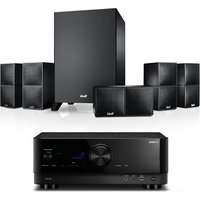
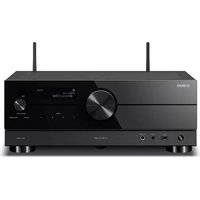
| Product Type | AV Receiver / Home Theater System |
| Channels | 7.2-channel surround sound |
| Surround Sound Decoding | Dolby Atmos, DTS:X, Dolby TrueHD, DTS-HD Master Audio |
| Video Processing | 4K Ultra HD passthrough, HDR10+ and Dolby Vision compatible |
| HDMI Connectivity | 8 HDMI inputs, 2 HDMI outputs |
| Wireless Connectivity | Wi-Fi, Bluetooth, AirPlay 2, Spotify Connect |
| Output Power | 160 W per channel (8 ohms, 1 kHz, 0.9% THD) |
| Dimensions (W x H x D) | 435 x 171 x 377 mm |
| Weight | 15.2 kg |
| Power Supply | AC 120 V / 230 V, 50/60 Hz |
| Power Consumption | 500 W (max), 0.1 W (standby) |
| Audio Calibration | YPAO automatic room calibration with multi-point measurement |
| Zone Functionality | Zone 2 and Zone 3 independent audio output |
| Music Streaming | Supports Pandora, Spotify, Tidal, and network USB storage |
| Maintenance | Clean the exterior with a soft dry cloth; ensure adequate ventilation around the unit |
| Safety | Do not expose to moisture; keep ventilation openings clear; avoid overloaded power outlets |
| Repairability | Spare parts available through Yamaha authorized service centers; user-replaceable fuses and remote control batteries |
Frequently Asked Questions - RXV-3079 YAMAHA
How do I set up the speakers for my Yamaha RXV-3079?
Connect the front, center, surround, and height speakers to the corresponding speaker terminals on the rear panel. Ensure the positive and negative wires are properly matched. For a 7.2-channel setup, use the designated outputs for each channel. After wiring, run the YPAO calibration to optimize speaker levels and distances.
How can I connect my TV to the RXV-3079 receiver?
Use an HDMI cable from the TV's ARC/eARC port to the receiver's HDMI OUT (ARC) jack. For video input, connect sources like cable boxes or streaming devices to any of the 8 HDMI inputs. Select the corresponding input on the receiver to see the picture and hear the audio.
How do I use Bluetooth to play music from my smartphone?
Press the Bluetooth button on the front panel or remote. Make sure the receiver is in pairing mode (the indicator flashes). On your phone, go to Bluetooth settings, search for Yamaha RXV-3079, and select it. Once connected, stream any audio from your device.
What is YPAO and how do I use it?
YPAO (Yamaha Parametric room Acoustic Optimizer) automatically measures the acoustic characteristics of your room and adjusts speaker levels, distances, and EQ. To use it, connect the included microphone to the receiver, place it at your listening position, and run the YPAO setup from the on-screen menu.
How do I update the firmware on my RXV-3079?
Connect the receiver to your home network via Wi-Fi or Ethernet. Go to the setup menu, select Firmware Update from the network/system section, and follow the prompts. You can check the Yamaha website for the latest firmware version and update instructions.
The receiver turns on but there is no sound. What should I check?
First, verify that the correct input source is selected and the speakers are properly connected. Check the speaker impedance setting in the menu matches your speakers. Also ensure that the volume is not set to mute and that the audio output of your source device is set to PCM or bitstream as appropriate.
How do I reset the Yamaha RXV-3079 to factory settings?
Turn off the unit. Press and hold the STRAIGHT button on the front panel, then press the POWER button. Release both buttons when the display flashes. This resets the receiver to factory defaults, clearing all custom settings.
How do I connect the receiver to my Wi-Fi network?
Press the NETWORK button, then go to the setup menu and select Network > Wireless (Wi-Fi). Choose your network from the list, enter the password, and confirm. Alternatively, use the WPS button on your router if available for quick setup.
Can I play music from a USB flash drive?
Yes, connect a FAT32-formatted USB drive to the USB port on the front panel. Select the USB input, and the receiver will list the audio files. You can play MP3, WAV, FLAC, and other common formats. Use the remote to navigate and select tracks.
What is the Zone function and how do I use it?
Zone 2 and Zone 3 allow you to play different sources in other rooms with separate speakers. Connect the zone speakers to the corresponding ZONE 2/3 terminals. On the remote, press ZONE, select the zone, then choose the input source and adjust its volume independently. Use the Zone power button to turn each zone on or off.
User questions about RXV-3079 YAMAHA
0 question about this device. Answer the ones you know or ask your own.
Ask a new question about this device
No questions yet. Be the first to ask one.
Download the instructions for your Home Theater System in PDF format for free! Find your manual RXV-3079 - YAMAHA and take your electronic device back in hand. On this page are published all the documents necessary for the use of your device. RXV-3079 by YAMAHA.
USER MANUAL RXV-3079 YAMAHA


Manual assistant
Powered by Anthropic
Waiting for your message
Product information
Brand : YAMAHA
Model : RXV-3079
Category : Home Theater System