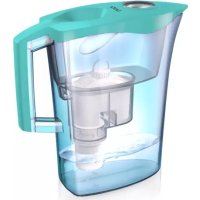
MikroPLASTIKSTOP - Water filter LAICA - Free user manual and instructions
Find the device manual for free MikroPLASTIKSTOP LAICA in PDF.



| Product Type | Water Filter Pitcher |
| Brand | Laica |
| Model | MikroPLASTIKSTOP |
| Microplastic Reduction | More than 99.99% |
| Main Filtration | Bi-flux® Cartridge + MikroPLASTIK-STOP™ Filter |
| Bi-flux® Cartridge Capacity | 150 liters or 1 month (whichever comes first) |
| MikroPLASTIK-STOP™ Filter Lifespan | Up to 1000 liters (depending on water turbidity) |
| Power Supply | Manual (activation pump included) |
| Main Functions | Microplastic, chlorine, heavy metal, and chemical contaminant reduction; water softening; mineral salt preservation |
| Maintenance and Cleaning | Wash components (except filter and cartridge) with hot water and dish soap 2-3 times a week; rinse the breather with a brush; replace cartridge and filter as recommended |
| Safety | Use only cold water (+4°C to +30°C); never filter hot water; do not use if lid is damaged; keep out of reach of children (pouches) |
| Spare Parts and Repairability | Bi-flux® Cartridge (ref. Laica), MikroPLASTIK-STOP™ Filter, Activation Pump; if damaged, contact retailer |
| Warranty | 2 years from delivery (domestic use) |
| Recommended Water Type | Cold municipal tap water (pre-filtered by Bi-flux® cartridge) |
| Replacement Indicator | Manual indicator on lid to set month and week |
Frequently Asked Questions - MikroPLASTIKSTOP LAICA
User questions about MikroPLASTIKSTOP LAICA
0 question about this device. Answer the ones you know or ask your own.
Ask a new question about this device
Download the instructions for your Water filter in PDF format for free! Find your manual MikroPLASTIKSTOP - LAICA and take your electronic device back in hand. On this page are published all the documents necessary for the use of your device. MikroPLASTIKSTOP by LAICA.
USER MANUAL MikroPLASTIKSTOP LAICA
EN MikroPLASTIK-STOP™ PITCHER Reduces more than 99,99%* of microplastics Instructions and guarantee
natural_image
Cross-sectional illustration of a water purifier with internal components and control knob (no text or symbols)LAICA
Mikro PLASTIK
STOP
DE - KOMPONENTEN
EN - COMPONENTS
IT - COMPONENTI
ES - COMPONENTES
FR - COMPOSANTS
PL - KOMPONENTY
RO - COMPONENTE
CS - SOUČÁSTI
SK - KOMPONENTY
HU - ALKATRÉSZEK
A
Deckel
Lid
Coperchio
Cubierta
Couvercle
Pokrywa
Capac
Víko
Kryt
Fedél
C
natural_image
Line drawing of a mechanical device with two circular components and a cylindrical top (no text or symbols)
natural_image
Technical line drawing of a cleaning or cleaning device with labeled components (no text or symbols present)natural_image
Diagram of a human head with surgical forceps and surgical tools (no text or labels)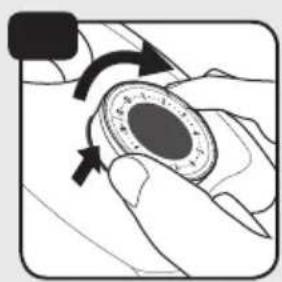
natural_image
Illustration of a hand holding a circular mechanical component with directional arrows indicating rotation (no text or symbols)
natural_image
Hand pressing a button on a device (no text or symbols visible)
DE - Zeit-Einstellbereich für entfernbare manuelle Anzeige
EN - Time setting range for removable manual indicator
IT - Impostazione del tempo per l'indicatore manuale removibile
ES - Configuración del tiempo para el indicador manual extraíble
FR - Réglage de la durée pour l'indicateur manuel amovible
natural_image
Simple line drawing of a bucket with a handle and side panel (no text or symbols)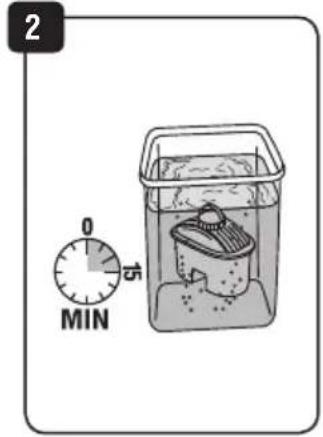

natural_image
Diagram of a hand pressing down a cylindrical object into a container with an arrow indicating downward motion (no text or symbols)
natural_image
Cross-sectional diagram of a mechanical device with internal components and a labeled section '4A' (no text or symbols on the diagram itself)
natural_image
Cross-sectional diagram of a mechanical device with internal components and a curved handle (no text or symbols)
natural_image
Simple line drawing of a cylindrical object with a flanged top and base, no text or symbols present.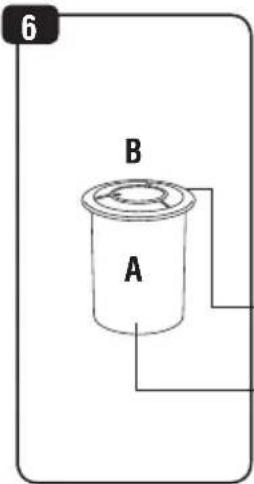

8
natural_image
Diagram of a cylindrical container with an upward arrow indicating flow or movement, mounted on a base (no text or symbols)9
10
EN - Always use water previously filtered with Bi-flux® cartridge. Never use unfiltered water.
natural_image
Illustration of two hands pouring liquid from a beaker into a glass with a curved arrow indicating flow (no text or symbols)natural_image
Diagram showing a cylindrical container being inserted into a smaller cylindrical component, with no text or symbols present.12
DE - Drücken DE - Ziehen
EN - Push EN - Pull
IT - Premere IT - Sollevare
ES - Pulsar ES - Elevar
FR - Appuyer FR -Soulever
PL - Wcisnąć PL - Podnieść
RO - Apăsati RO -Ridicati
CS - Stiskněte CS -Zvedněte
SK - Stlačte SK - Zdvihnite
HU - Nyomja meg
HU -Emelje fel

13
EN -UNSCREW AND REMOVE
IT - SVITARE E RIMUOVERE
ES - DESENROSCAR Y QUITAR
natural_image
Technical line drawing of a mechanical assembly with two views (top and side), showing internal components and a central component (no text or symbols)
natural_image
Cross-sectional diagram of a mechanical component with no visible text or symbols15
natural_image
Line drawing of a hand pressing down on a cylindrical container with an arrow indicating upward motion (no text or symbols)
natural_image
Technical diagram of a mechanical device with internal components and a magnified inset showing the piston mechanism (no text or symbols)The image is too blurry to recognize any text content.

natural_image
Technical line drawing of a mechanical component with arrows indicating direction (no text or symbols)Dear customer, Laica wishes to thank you for choosing this product, designed for reliability and quality to provide complete satisfaction.
IMPORTANT
READ CAREFULLY BEFORE USING
KEEP FOR FUTURE REFERENCE
The instruction manual must be considered an integral part of the product and must be kept for its entire life. If the appliance is transferred to another owner, its documentation must also be transferred in its entirety. To ensure the safe and correct use of the product, the user must carefully read the instructions and warnings contained in the manual insofar as they provide important information regarding safety, user and maintenance instructions.
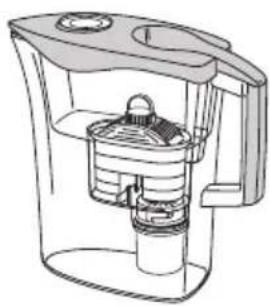
The system is equipped with:
1) MikroPLASTIK-STOP ™ filter (fig. 5), which is effective in the mechanical block of plastic particles that may be present in the municipal potable water for accidental situation.
Microplastics are not necessarily present in the water supply network. For more information, contact your water supply company.
2) MikroPLASTIK-STOP™ Activation pump (fig. 6), a manual piston-type module made of two components: a cylinder (fig. 7A) and a piston (fig. 7B) for the preparation of the MikroPLASTIK-STOP™ filter.
3) Bi-flux ® cartridge (fig. 1), reduces the hardness of tap water, preserving the mineral salts useful to the body. Bi-flux ® cartridge also reduces: chemical contaminants, heavy metals and chlorine.
CAUTION: use this cartridge and filter to treat municipal potable water (check with the competent authority in your area).
GENERAL WARNINGS ON SAFETY OF YOUR LAICA ULTRA-FILTRATION SYSTEM
- Prior to use, ensure the product is intact and that there is no visible damage. If in doubt, refrain from using the device and contact your retailer.
- Keep the plastic bag out of reach of children: danger of suffocation.
- Follow the instructions of the present manual. Failure to do so may affect the product safety or damage the product itself.
- This device must be used only for its intended purpose which is DEVICE TO TREAT POTABLE WATER and according to the instructions for use.
All other types of use shall be considered inappropriate and therefore hazardous.
- Do not use this product for the production of potable water.
- In case of Authorities warning to boil the tap water for safety against a temporary contamination risk, also the water filtered with this filtration system must be boiled.
- When Authorities declare that the tap water is potable and safe again, the system must be cleaned as per "ULTRA-FILTRATION SYSTEM PREPARATION" paragraph and both Bi-flux® cartridge and MikroPLASTIK-STOP™ filter must be replaced.
- People affected by specific diseases, allergies or following controlled diets should refer to a doctor before using the ultra-filtration system.
- NEVER use the ultra-filtration system with previously treated water.
- In the case of emergency situations reported by the competent authorities, contact the competent authority in your area for further information.
- NEVER tamper with or break the cartridges and filters for any reason.
- The manufacturer shall not be deemed liable for any damage caused by inappropriate or incorrect use.
- Preparing, filter/cartridge replacing and maintenance must be performed only by anyone aged 12 years and over.
- Children and individuals with physical, sensory or mental disabilities or unskilled people, may use and perform maintenance on the product only under adult supervision.
- Do not use the product as a toy.
- In the event of failure or poor operation, contact an authorized dealer. Information on technical support can be requested by contacting info@laica.com.
- Handle the product with care, protect it against accidental impact, extreme temperature fluctuations, dust, direct sunlight and sources of heat.
- Keep the device away from the stove, electric hot plate, oven or flammable materials.
- NEVER use in a microwave oven.
- NEVER expose the product to weather (rain, sun).
- Do not insert any objects into openings.
- Do not use the device if the lid is damaged.
- NEVER filter hot water.
- Only filter cold running water from the household mains, always with both cartridge and filter assembled.
- NEVER put the device into a working disinfection cabinet.
- NEVER freeze the device.
- This device is not intended for professional use, but rather only for domestic use.
IMPORTANT:
1) Always remove the MikroPLASTIK-STOP™ filter and Bi-flux® cartridge before washing the hopper.
N.B. The filter may be difficult to remove: this is normal because, due to safety issues, the filter adheres to the hopper in order to prevent unwanted leakages.
Do not wash the cartridge and filter with soap or detergents.
2) Never wash MikroPLASTIK-STOP™ filter with tap water and never filter directly tap water with MikroPLASTIK-STOP™ filter. Always use water already filtered by Bi-flux® cartridge.
IMPORTANT NOTES FOR PRODUCT USE
This system is for use on water supplies that have been treated to public water system standards or that otherwise are determined to be microbiologically safe as demonstrated by routine testing.
This system has been tested to demonstrate protection against intermittent accidental microplastic contamination of safe drinking water.
- The Laica filtration system maintains the pH value within the range indicated by European Directive EU 2020/2184 concerning the quality of water meant for human consumption.
- The activated carbon contained in the Bi-flux ® cartridge may release a certain amount of fine powder (which is in no way harmful).
- Silver is used in the Bi-flux® cartridge to grant its bacteriostatic action. Any release of silver ions falls under the guidelines from the World Health Organization (WHO).
- MikroPLASTIK-STOP™ filter flow rate and life time may vary depending on the quantity, quality and temperature of the filtered water.
DECLARATION OF CONFORMITY:
Filtration systems produced by Laica are compliant with the following standards:
- European Directive EMC 30/2014/EU concerning Electromagnetic Compatibility (where required).
- Ministry Decree no. 174 dated 6/04/2004 regarding materials and objects that may be used in collection, treatment, supply and distribution systems for water intended for human consumption.
- Legislative Decree no. 18 dated February 23, 2023, Italian transposition of the Directive EU 2020/2184 related to water meant for human consumption.
- Regulation (EU) 1935/2004 regarding materials in contact with food.
- Regulation (EU) 10/2011 regarding plastic materials and objects intended to come in contact with food.
ULTRA-FILTRATION SYSTEM PREPARATION
Wash the plastic parts of the device (except for the cartridge, timer and filter) with potable water and washing-up liquid. Make sure all the detergent is rinsed off after cleaning. Do not use detergent on the filter and the cartridge. Never wash the MikroPLASTIK-STOP™ filter with tap water.
The hopper has got a funnel (fig. E) for air outlet, closed by a safety cap (fig. D). Take care of keeping always the funnel closed. The hopper of the ultra-filtration system is made to house Laica Bi-flux ® cartridge and Laica MikroPLASTIK-STOP ™ filter only.
PREPARATION OF BI-FLUX® CARTRIDGE
1) Before proceeding with the following operations, wash hands thoroughly with water and soap.
2) Remove the cartridge (fig. 1) from its bag.
3) Use a clean dish or surface to place the cartridge. Never work in dirty conditions.
4) Soak the cartridge in a container full of cold tap water, for approximately 15 minutes (fig. 2). Shake the cartridge to release the air it contains.
5) Insert the cartridge into the hopper pressing slightly to ensure correct insertion (fig. 3).
6) Fill the hopper with 1L of cold potable tap water. Let it filter and then discard the filtered water (or use it to water your plants).
7) Repeat point 6 until 3 liters has been filtered and discarded.
8) In order to prepare the MikroPLASTIK-STOP TM filters, fill the hopper with at least 1L of cold potable tap water and let it filter.
The Bi-flux ® system is now ready to be completed with the MikroPLASTIK-STOP TM system.
PREPARATION OF MikroPLASTIK-STOP™ filter
1) Before preparing the device, wash your hands thoroughly with water and soap.
2) Remove the filter (fig. 5) from its bag.
3) Use a clean dish or surface to place the filter. Never work in dirty conditions.
4) Remove the Activation pump (fig. 6) from its bag and never place it on dirty surfaces during operation.
5) Separate piston from cylinder by pulling it upwards.
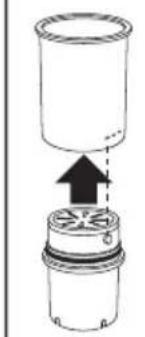
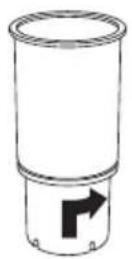
6) Hook the MikroPLASTIK-STOP™ filter to the cylinder by screwing it (fig. 8 and 9).
7) Fill the cylinder, once hooked to the filter, with cold potable water previously filtered with Bi-flux® cartridge (see Bi-flux® preparation section on the I/M) (fig. 10).
ALWAYS USE WATER PREVIOUSLY FILTERED WITH BI-FLUX® CARTRIDGE
NEVER USE UNFILTERED WATER
8) Take the piston (fig. 7B) and push it downwards inside the cylinder strongly enough to make the water go out from the MikroPLASTIK-STOP™ filter and then pull it upwards (fig. 11 and 12).
EN
Important: make sure to never push the piston downwards inside the cylinder if it is still empty and not filled with cold tap water previously filtered with Bi-flux® cartridge, in order to avoid any air to enter.
9) Unscrew the MikroPLASTIK-STOP TM filter from the cylinder of the activation pump (fig. 13).
10) Assemble the MikroPLASTIK-STOP™ filter to the bottom of the hopper by screwing it (fig. 14).
11) Place the hopper into the main unit.
ACTIVATION OF THE CARTRIDGE LIFE INDICATOR


Bi-flux® cartridge life indicator
1) Remove the lid from the pitcher, turn it upside down and slightly push the manual indicator on its backside, in order to partially extract it from the lid (fig. H2 and fig. H3).
2) Turn the upper lens of the indicator clockwise as indicated in fig. H3, to set the start month and week for the cartridge (fig. I). The month and week of reference must be aligned with the red sign printed on the upper lens of the indicator. Insert the manual indicator into the lid by pushing as per fig. H4.
USING THE WATER TREATMENT SYSTEM
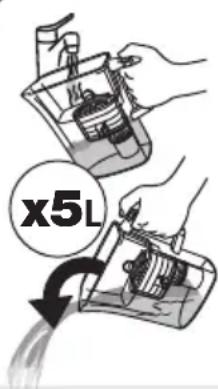
ATTENTION! MANDATORY: At FIRST USE:
1) Fill the hopper with cold potable water up to the top level of the same and allow filtering without closing the lid.
2) Discard the water filtered in the previous section (or use it to water your plants).
3) Repeat the operation until 5L have been filtered and discarded.
Repeat these operations also in case you don't use the system for 15 days and every time you replace the cartridge/filter
Place the pitcher under the tap so that the water jet directly enters the hopper through the opening in the lid. Turn on the tap (the pressure of the water jet should not be too strong in order to avoid splashes): the water automatically opens the automatic quick-fill and directly enters the hopper (fig. 4A). Fill the hopper to the top with cold tap water.
When the hopper is almost full the automatic quick-fill gradually closes: reduce the water flow and shut off the tap when the automatic quick-fill closes (fig. 4B). It is in any case recommended to check the water level in the hopper from one side of the pitcher.
Keep the water pitcher in the fridge. The refrigerator must be kept in a good condition.
Caution:
- In the case of non-use of the ultra-filtration system for 24 hours, discard the water that remains inside it, then fill the hopper and let it filter. The system is ready for use again.
- Keep the product away from heat sources and direct sunlight.
- Only use cold water (+4°C: +30°C).
- Only filter water; do not filter any other type of liquid.
FILTER AND CARTRIDGE LIFE-TIME
- Bi-flux® cartridge:
150 liters or 1 month (what comes first).
- MikroPLASTIK-STOP™ filter:
MikroPLASTIK-STOP™ blocks microplastics and suspended particles (water turbidity). The filter stops working when its hollow fibers pores are completely blocked. Tests carried out with challenge water with a 30 FAU turbidity indicate a life-time of 1000 Liters.
FILTER AND CARTRIDGE REPLACEMENT
- Bi-flux® cartridge:
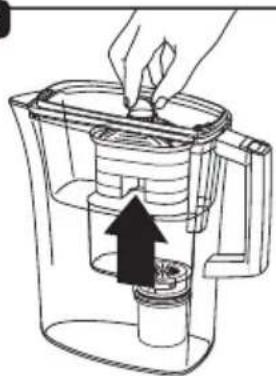
For replacement of the cartridge remove it from the hopper by pulling it upwards, as shown in fig. 15, and repeat the operations as indicated in the section: "ULTRA-FILTRATION SYSTEM PREPARATION - PREPARATION OF BI-FLUX® CARTRIDGE".
- MikroPLASTIK-STOP™ filter:
For replacement of the filter remove it from the hopper by unscrewing it as shown in fig. 16 and repeat the operations as indicated in the section: "ULTRA-FILTRATION SYSTEM PREPARATION - PREPARATION OF MikroPLASTIK-STOP™ FILTER".
CARE AND MAINTENANCE
- Washing instructions for the pitcher lid:
Remove the lid from the jug, turn it upside down and remove the manual indicator by pushing on its backside (fig. H2). Then hand wash the lid in warm water and washing-up liquid. Dry the lid and insert the indicator into the lid by pushing as per fig. H4.
- Washing instructions for the hopper's funnel:
Clean the funnel internally and its cap with a cleaning brush at least 2-3 times a week. After cleaning, close the funnel with the cap and take care not to lose it (fig. 17).
- Washing instructions for all other components:
Always remove the MikroPLASTIK-STOP™ filter and the Bi-flux® cartridge before washing the hopper.
N.B. The filter may be difficult to remove: this is normal because, due to safety issues, the filter adheres to the hopper in order to prevent unwanted leakages. Wash all the components, except for the Bi-flux® cartridge, the MikroPLASTIK-STOP™ filter and the removable manual indicator, by hand with warm water and washing-up liquid at least 2-3 times a week.
Do not use other chemicals or abrasives. Never wash the MikroPLASTIK-STOP™ filter with tap water.
Do not wash the Bi-flux ® cartridge and the MikroPLASTIK-STOP ™ filter with soap or detergents.
REPLACEMENT OF DAMAGED PARTS
Replacement of the lid / removable manual indicator / MikroPLASTIK-STOP™ Activation Pump:
In case of breaking or damage, contact your retailer. Then dispose of the damaged parts as per the paragraph "DISPOSAL PROCEDURE".
TROUBLE SHOOTING
| PROBLEM | POTENTIAL CAUSE | SOLUTION |
| The water flow slows down until stopping | 1) Bi-flux® cartridge has not been properly activated.2) Air bubbles may build up inside the Bi-flux® cartridge thus hindering the normal water flow.3) MikroPLASTIK- STOPTM filter life time has elapsed.4) MikroPLASTIK- STOPTM filter is new but it has not been activated properly. | 1) Repeat the procedure described in the section "PREPARATION OF BI-FLUX® CARTRIDGE".2) Remove the cartridge, immerse it in water letting the air bubbles escape, allow it to drip and then insert it again into the hopper.3) Replace MikroPLASTIK- STOPTM filter with a new one.4) Repeat the procedure described in the section "PREPARATION OF MikroPLASTIK- STOPTM FILTER" |
| Undesirable smells or tastes are present in the system | 1) The system cleaning and maintenance have not been done properly.2) MikroPLASTIK- STOPTM filter life time has elapsed. | 1) Repeat the procedure described in the section "CARE AND MAINTENANCE"2) Replace the MikroPLASTIK- STOPTM filter with a new one. |
DISPOSAL PROCEDURE
Dispose all the components according to their respective belonging class.
WARRANTY
This appliance is guaranteed for 2 years from the time of delivery of the goods, or another longer term envisaged by the national legislation of the consumer's residence. This provision complies with Italian and European legislation. The LAICA products are designed for home use and must not be used in public venues. The warranty only covers manufacturing defects and does not apply if the damage is caused by an accidental event, incorrect use, negligence or misuse of the product. Use only the accessories supplied; the use of different accessories may result in invalidity of the warranty. Do not open the unit for any reason; in the case of opening or tampering, the warranty is definitively voided. This warranty does not apply to parts subject to wear or to the batteries when supplied. After 2 years from delivery, or another longer term envisaged by the national legislation of the consumer's residence, the warranty expires; in this case, the technical assistance interventions will be carried out against a fee. Information on technical assistance, whether under warranty or for a fee, can be requested by contacting info@laica.com.
No payment will be due for repairs or replacements of products that fall within the terms of the warranty. In the event of faults, contact the retailer. Do NOT send the appliance directly to LAICA.
All the operations under warranty (including those of replacement of the product or part thereof) will not prolong the duration of the original period of warranty of the product replaced. The manufacturer declines any liability for any damage that may, directly or indirectly, be caused to persons, property or animals as a result of the non-observance of all the requirements established in the relevant instructions manual and concerning, especially, warnings relating to installation, use and maintenance of the appliance.
LAICA, in its constant commitment to improving its products, is entitled to changing without any notice, in whole or in part, its products in relation to production requirements, without this entailing any liability for LAICA towards its dealers. For further information: www.laica.it.
a filter MikroPLASTIK-STOP™.
1) Guidelines for Drinking-water Quality - 4th ed.
ISBN 978 92 4 154815 1 (NLM classification: WA 675), World Health Organization, WHO Library Cataloguing-in-Publication Data.
2) Nutrients in Drinking-water
ISBN 92 4 159398 9 (NLM classification: WA 687), Water, Sanitation and Health, Protection and the Human Environment, World Health Organization, Geneva. World Health Organization, WHO Library Cataloguing-in-Publication Data.
3) Silver in Drinking-water
Background document for development of WHO Guidelines for Drinking-water Quality. World Health Organization, World Health Organization, Geneva, 1996.
4) pH in Drinking-water
Background document for development of WHO Guidelines for Drinking-water Quality. World Health Organization, World Health Organization, Geneva, 1996.
5) Calcium and Magnesium in Drinking-water
Public health significance.
ISBN 978 92 4 156355 0 (NLM classification: QV 276)
World Health Organization, WHO Library Cataloguing-in-Publication Data
6) Hardness in Drinking-water
Background document for development of WHO Guidelines for Drinking-water Quality. World Health Organization, World Health Organization, Geneva, 1996.
7) Jug water filter systems – Specification
British Standard, BS 8427 : 2004
8) AFNOR – Association Française de Normalisation
Norme Francaise NF P41 - 650
9) Microplastics range from 0.1 to 5,000 µ m.
EFSA CONTAM Panel (EFSA Panel on Contaminants in the Food Chain), 2016. Statement on the presence of microplastics and nanoplastics in food, with particular focus on seafood.
EFSA Journal 2016;14(6):4501, 30 pp.
LAICA®
LAICA S.p.A.
Company with sole shareholder and subject to the management and coordination of Strix Group Plc.
UK Importer: Strix Ltd, Forrest House, Ronaldsway, Isle Of Man, IM9 2RG, British Isles
natural_image
Cross-sectional diagram of a mechanical device with internal components (no text or labels)
natural_image
Close-up of a LiCa air purifier with control dial and base, no visible text or symbols on the device itself.
- LAICA
- A
- C
- IMPORTANT
- READ CAREFULLY BEFORE USING
- KEEP FOR FUTURE REFERENCE
- The system is equipped with:
- GENERAL WARNINGS ON SAFETY OF YOUR LAICA ULTRA-FILTRATION SYSTEM
- IMPORTANT:
- IMPORTANT NOTES FOR PRODUCT USE
- DECLARATION OF CONFORMITY:
- ULTRA-FILTRATION SYSTEM PREPARATION
- PREPARATION OF BI-FLUX® CARTRIDGE
- PREPARATION OF MikroPLASTIK-STOP™ filter
- ALWAYS USE WATER PREVIOUSLY FILTERED WITH BI-FLUX® CARTRIDGE
- NEVER USE UNFILTERED WATER
- EN
- ACTIVATION OF THE CARTRIDGE LIFE INDICATOR
- Bi-flux® cartridge life indicator
- USING THE WATER TREATMENT SYSTEM
- ATTENTION! MANDATORY: At FIRST USE:
- Caution:
- FILTER AND CARTRIDGE LIFE-TIME
- - Bi-flux® cartridge:
- - MikroPLASTIK-STOP™ filter:
- FILTER AND CARTRIDGE REPLACEMENT
- CARE AND MAINTENANCE
- - Washing instructions for the pitcher lid:
- - Washing instructions for the hopper's funnel:
- - Washing instructions for all other components:
- REPLACEMENT OF DAMAGED PARTS
- Replacement of the lid / removable manual indicator / MikroPLASTIK-STOP™ Activation Pump:
- DISPOSAL PROCEDURE
- WARRANTY
- LAICA®
- LAICA S.p.A.
Brand : LAICA
Model : MikroPLASTIKSTOP
Category : Water filter