
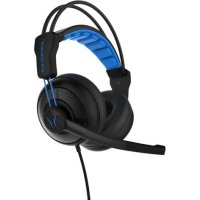
ERAZER Mage X10 - Headphones MEDION - Free user manual and instructions
Find the device manual for free ERAZER Mage X10 MEDION in PDF.


| Product type | Gaming headset |
| Brand | MEDION |
| Model | ERAZER Mage X10 |
| Dimensions (W x H x D) | 173 x 270 x 80 mm |
| Weight | 312 g |
| Power supply | Lithium-ion battery 3.7 V, 1000 mAh, 3.7 Wh; charging via micro USB (5 V, 500 mA), charging time approx. 3 hours |
| Battery life | Up to 10 hours |
| Connectivity | 3.5 mm jack (LINE IN); 2.4 GHz USB transmitter, range up to 10 m |
| Frequency response | 20 Hz – 20 kHz |
| Impedance | 32 Ohm |
| Main features | Microphone with LED, configurable LED lighting, equalizer (Normal/Bass/3D), volume control, microphone mute |
| Care and cleaning | Soft dry cloth; avoid solvents and chemicals |
| Safety | Do not expose to prolonged high volumes; private use only; keep out of reach of children |
| Spare parts and repairability | Contact MEDION customer service; no user repairs recommended |
| General information | Operating temperature: +10 °C to +35 °C; max. humidity 80 % without condensation |
Frequently Asked Questions - ERAZER Mage X10 MEDION
User questions about ERAZER Mage X10 MEDION
0 question about this device. Answer the ones you know or ask your own.
Ask a new question about this device
Download the instructions for your Headphones in PDF format for free! Find your manual ERAZER Mage X10 - MEDION and take your electronic device back in hand. On this page are published all the documents necessary for the use of your device. ERAZER Mage X10 by MEDION.
USER MANUAL ERAZER Mage X10 MEDION
Wireless RGB Gaming Headset
Casque gamer RGB sans fil
Gaming Headset wireless RGB
Gaming Headset inalámbrico RGB
Draadloze RGB-gaming headset
MEDION® ERAZER® Mage X10 (MD 88980)
Inhaltsverzeichnis
DE
- Information about this user manual.... 19
1.1. Explanation of symbols ......19
EN
-
Proper use
-
Safety information
-
Package contents ......ES
-
Device overview
-
Using the headphones 24 IT
6.1. Charging the headphones ....24
6.2. Using the headphones with the 2.4 Ghz transmitter .....24 NL
6.3. Using the headphones with an audio cable....24
6.4. Setting the lighting 25
6.5. Setting the volume .....25
6.6. Setting the EQ 25
- Cleaning 2!
- Disposal 2
- Technical specifications
- EU Declaration of Conformity 27
- Legal notice 2
- Privacy statement 2
1. Information about this user manual

Thank you for choosing our product. We hope you enjoy using this device.
Please read the safety instructions and the user manual carefully before using this product for the first time. Note the warnings on the device
and in the user manual.
Always keep the user manual close to hand. If you sell the device or give it away, please ensure that you also pass on this user manual. It is an essential component of the product.
1.1. Explanation of symbols
If a block of text is marked with one of the warning symbols listed below, the hazard described in that text must be avoided to prevent the potential consequences described there from occurring.

DANGER!
Warning: risk of fatal injury!
WARNING!
Warning: danger due to loud volume!

More detailed information about using the device!

Follow the instructions in the user manual!
- Bullet point/information on steps during operation
▶ Instruction to be carried out

Declaration of conformity (see "Declaration of conformity" section):
Products that feature this symbol meet the requirements of the EC directives.
2. Proper use
The device is only intended for private use and not for industrial/commercial use.
Please note that we shall not be liable in cases of improper use:
▶ Do not modify the device without our consent and do not use any auxiliary equipment that we have not approved or supplied.
▶ Only use replacement parts or accessories that we have supplied or approved.
▶ Comply with all the information in this user manual, especially the safety information. Any other use is considered improper and can cause personal injury or property damage.
▶ Do not expose the device to extreme conditions. Avoid:
–high humidity or wet conditions
—extremely high or low temperatures
-direct sunlight
-naked flames.
3. Safety information
- Keep the device and its accessories out of the reach of children.
This device is not intended for use by people (including children) with reduced physical, sensory or mental abilities or by those without experience and/or knowledge, unless they are supervised by a person responsible for their safety or they have been instructed in its use by that person.
▶ Children should be supervised to ensure they do not play with this device.

DANGER!
Risk of choking and suffocation!
There is a risk of choking and suffocation if plastic film or small parts are breathed in or swallowed.
▶ Keep packaging away from children.
▶ Do not allow children to play with the packaging material.
The packaging material is not a toy!
WARNING!
Risk of injury!
Excessive sound pressure when using earphones and headphones can result in damage to and/or loss of hearing.
Using headphones/earphones to listen to a device at high volumes for an extended period can damage your hearing.
Before pressing play, set the volume to the lowest setting.
▶ Start playback and increase the volume to a comfortable level.
- Do not expose the headset to direct heat sources (e.g. radiators).
▶ Do not expose the device to direct sunlight.
▶ Avoid contact with moisture, water and splashes.
▶ Do not pull on the cable to disconnect the headset from the PC or mobile phone.
In the event of a fault, please contact the MEDION Service Centre or another suitable repair workshop.
4. Package contents

DANGER!
Risk of choking and suffocation!
There is a risk of choking and suffocation if plastic film or small parts are breathed in or swallowed.
▶ Keep packaging away from children.
▶ Do not allow children to play with the packaging material.
The packaging material is not a toy!
Remove the product from the packaging and remove all packaging material.
▶ Check your purchase to ensure that all items are included. If anything is missing, please contact our customer service team within 14 days of purchase.
Before each use, check the headphones for any damage.
▶ Contact our Service Centre if you find any damage.
The following items are supplied with your product:
- Headset
• 2.4 GHz transmitter - Microphone
- User manual
• Warranty documents
5. Device overview
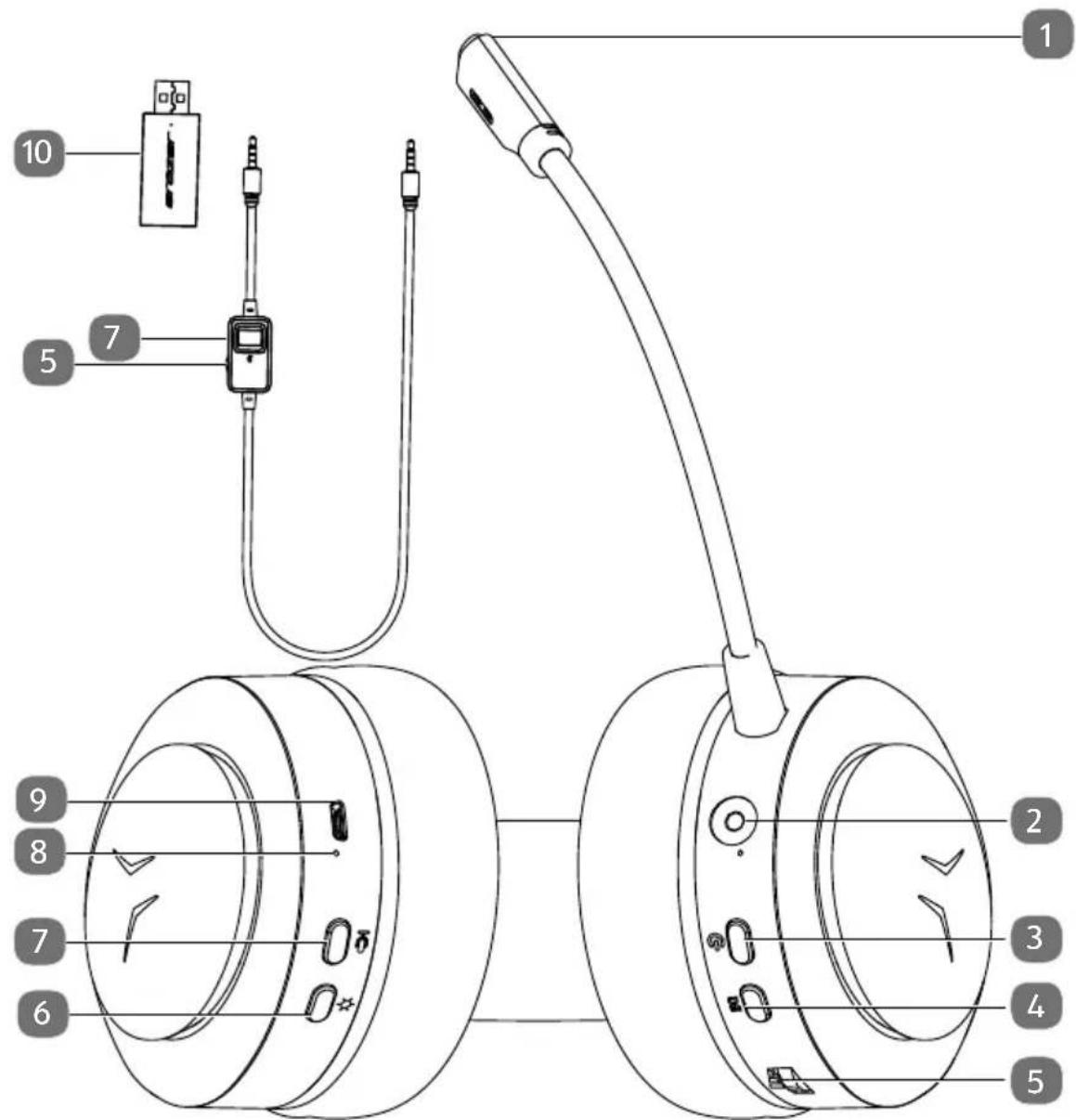
1) Microphone with integrated LED
2) 3.5 mm connection
3) In/Out
4) Equaliser
5) Volume
6) LED lighting
7) Microphone mute button
8) Micro USB charging port
9) Charging LED
10) 2.4 Ghz transmitter with operating light
6. Using the headphones
6.1. Charging the headphones
▶ Use the USB cable supplied to connect the headphones to the USB power supply.
As soon as the headphones are connected to a power source, the built-in rechargeable battery begins charging automatically and the charging LED lights up.
The battery charging time is about 3 hours.
6.2. Using the headphones with the 2.4 Ghz transmitter
Connect the microphone to the corresponding port on the headphones.
Connect the supplied USB transmitter to a free USB port on your PC or laptop.
▶ Press and hold the On/Off button for approximately 3 seconds.
The headphones switch on and automatically connect to the 2.4 GHz transmitter.
▶ Set the required volume level.
▶ You may need to push the microphone closer to your mouth if other call participants are finding it difficult to hear you.
6.3. Using the headphones with an audio cable
Connect the microphone to the corresponding port on the headphones.
Connect the end with the remote control unit of the audio cable to the headphones.
Now connect the audio cable to the corresponding port on your PC or laptop.
▶ Press and hold the On/Off button for approximately 3 seconds.
▶ Set the required volume level.
▶ You may need to push the microphone closer to your mouth if other call participants are finding it difficult to hear you.

Use the sound card microphone amplification or conference call software to increase the microphone recording level.
6.4. Setting the lighting
▶ Press and hold the ⚙ button to activate the lighting.
▶ Then press the ⚙ button several times to set the various lighting settings.
▶ Press and hold the button to deactivate the lighting.
6.5. Setting the volume
▶ Turn the controller ▶▶▶ on the headphones or the remote control on the audio cable to change the volume.
6.6. Setting the EQ
You can choose between three different EQ settings:
- Normal
- Bass
3D
▶ Press the EQ button several times to apply the required settings.

The headphones switch to energy-saving mode after 10 minutes of inactivity. The headphone lighting flashes slowly.
The headphones switch off completely after 15 minutes of inactivity.
7. Cleaning
▶ Use a dry, soft cloth to clean the device.
- Avoid the use of chemical solutions and cleaning products because these may damage the device surface and/or markings.
8. Disposal

Packaging
Your device has been packaged to protect it from damage in transit. The packaging is made of materials that can be recycled in an environmentally friendly manner.
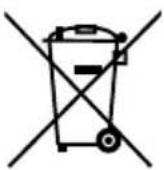
Device
Do not dispose of old devices in normal household waste.
In accordance with Directive 2012/19/EU, these devices must be disposed of correctly at the end of their service life.
This involves separating the materials in the device for the purpose of recycling and minimising the environmental impact.
Take old devices to a collection point for electrical scrap or a recycling centre.
Contact your local waste disposal company or your local authority for more information on this subject.
9. Technical specifications
| General data | |
| Weight: 312 g | |
| Dimensions (WxHxD): 173 x 270 x 80 mm | |
| Frequency response: 20 Hz–20 kHz | |
| Impedance: 32 ohms | |
| Broadband voltage detection: 176.0 mV | |
| Power supply | |
| USB port (DC IN): 5 V 500 mA | --- |
| Rechargeable battery (integrated) | |
| Battery type: Li-ion, 3.7 V, 1000 mAh, 3.7 Wh | |
| Battery life: Up to 10 hours | |
| Battery charging time: | Approx. 3 hours |
| Connections | |
| LINE IN: 3.5 mm jack | |
| Ambient temperatures | |
| In operation: +10°C to +35°C at a | relative humidity of (non-condensing) max. 80% |
| Not in operation: 0°C to +45°C at a | relative humidity of (non-condensing) max. 80% |
| Wireless transmission | |
| Frequency range: 2402–2480 MHz | |
| Max. transmission power: 6.78 dBm | |
| Range: Up to 10 metres (depending on environmental conditions) | |
10. EU Declaration of Conformity
MEDION AG hereby declares that this device complies with the fundamental requirements and the other relevant provisions of:
• Radio Equipment Directive 2014/53/EU
• RoHS Directive 2011/65/EU.
You can download the complete EU Declaration of Conformity at www.medion.com/conformity.
11. Legal notice
Copyright © 2020
Date: 25.09.2020
All rights reserved.
This user manual is protected by copyright.
Mechanical, electronic and any other forms of reproduction are prohibited without the written permission of the manufacturer.
Copyright is owned by the company:
MEDION AG
Am Zehnthof 77
45307 Essen
Germany
Please note that you cannot use the above address for returns. Please always contact our customer service team first.
12. Privacy statement
Dear customer,
We wish to inform you that we, MEDION AG, Am Zehnthof 77, 45307 Essen, Germany process your personal data as a data controller.
For matters regarding data protection, we are supported by our company data protection officer who can be contacted at MEDION AG, Datenschutz, Am Zehnthof 77, D – 45307 Essen; datenschutz@medion.com. We process your data for the purpose of warranty processing and associated processes (e.g. repairs) and therefore rely on processing your data for the sales contract concluded with us.
Your data will be provided to repairers contracted to us for the purpose of warranty processing and associated processes. We generally store your personal data for a period of three years in order to fulfil your legal warranty rights.
You have the right to be informed of the personal data concerned as well as the right to rectification, deletion, restriction of processing, the right to object to processing, as well as the right to data portability.
In case of access and cancellation rights, restrictions apply according to S 34 and S 35 of BDSG (Federal Data Protection Act) (Art. 23 GDPR). In addition, there is a right of appeal to a competent data protection supervisory authority (Article 77 GDPR in conjunction with S 19 BDSG). The state official for data protection and freedom of information for MEDION AG is Nordrhein Westfalen, P box 200444, 40212 Düsseldorf, Germany. www.ldi.nrw.de.
The processing of your data is necessary for warranty processing: it is not possible to process the warranty without the provision of the required data.
Sommaire



- Inhaltsverzeichnis
- Information about this user manual
- Explanation of symbols
- DANGER!
- WARNING!
- Proper use
- Safety information
- Risk of choking and suffocation!
- Risk of injury!
- Package contents
- Device overview
- Using the headphones
- Charging the headphones
- Using the headphones with the 2.4 Ghz transmitter
- Using the headphones with an audio cable
- Setting the lighting
- Setting the volume
- Setting the EQ
- Cleaning
- Disposal
- Packaging
- Device
- Technical specifications
- EU Declaration of Conformity
- Legal notice
- MEDION AG
- Privacy statement
- Sommaire
Brand : MEDION
Model : ERAZER Mage X10
Category : Headphones