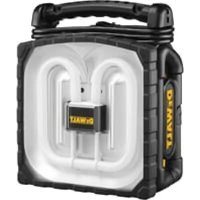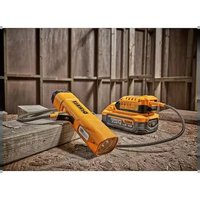
DC020 - Flashlight DEWALT - Free user manual and instructions
Find the device manual for free DC020 DEWALT in PDF.



| Product Type | Rechargeable professional work light (battery/mains) |
| Brand | DeWalt |
| Model | DC020 |
| Category | Flashlight / work light |
| Mains supply voltage | 230 V AC (models BD, QW, GB) or 115 V AC (model LX) |
| Compatible battery voltage | 12 V to 18 V (NiCd, NiMH or Li-Ion) |
| Bulb type | Fluorescent 38 W |
| Weight (unit only) | 2.7 kg |
| Built-in sockets (230 V models) | 2 outlets 16 A (QW) or 13 A (GB) |
| Battery life on 18 V battery | 1 hour or more |
| Power modes | AC mains or battery |
| Protection | Double insulation (LX) or Class I grounding (BD, QW, GB) |
| Storage temperature | Below 40 °C, avoid direct sunlight |
| Maintenance | Clean with a damp cloth and mild soap; do not immerse |
| Bulb replacement | Fluorescent bulb DeWalt DC0213 38 W |
| Warranty | 1 year (manufacturing defects) + 30 days satisfaction |
| Included accessories | Instruction manual, exploded view |
Frequently Asked Questions - DC020 DEWALT
User questions about DC020 DEWALT
0 question about this device. Answer the ones you know or ask your own.
Ask a new question about this device
Download the instructions for your Flashlight in PDF format for free! Find your manual DC020 - DEWALT and take your electronic device back in hand. On this page are published all the documents necessary for the use of your device. DC020 by DEWALT.
USER MANUAL DC020 DEWALT
English (original instructions)
Figure 5
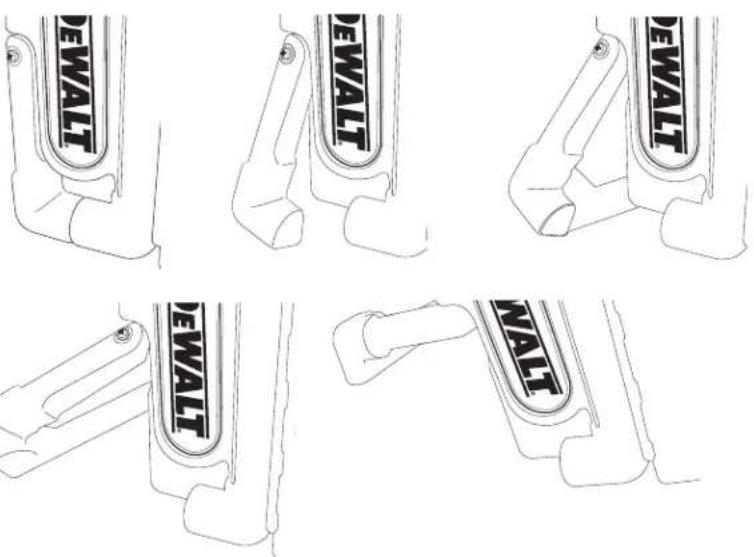
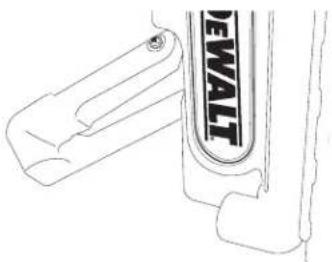
Figure 6
DANSK
KRAFTIGT ARBEJDSLYS MED/UDEN LEDNING DC019/DC020
Tillykke!
natural_image
Technical line drawings of four different electrical socket components (no text or symbols)Arbeitsleuchte
You have chosen a DEWALT product. Years of experience, thorough product development and innovation make DEWALT one of the most reliable partners for professional users.
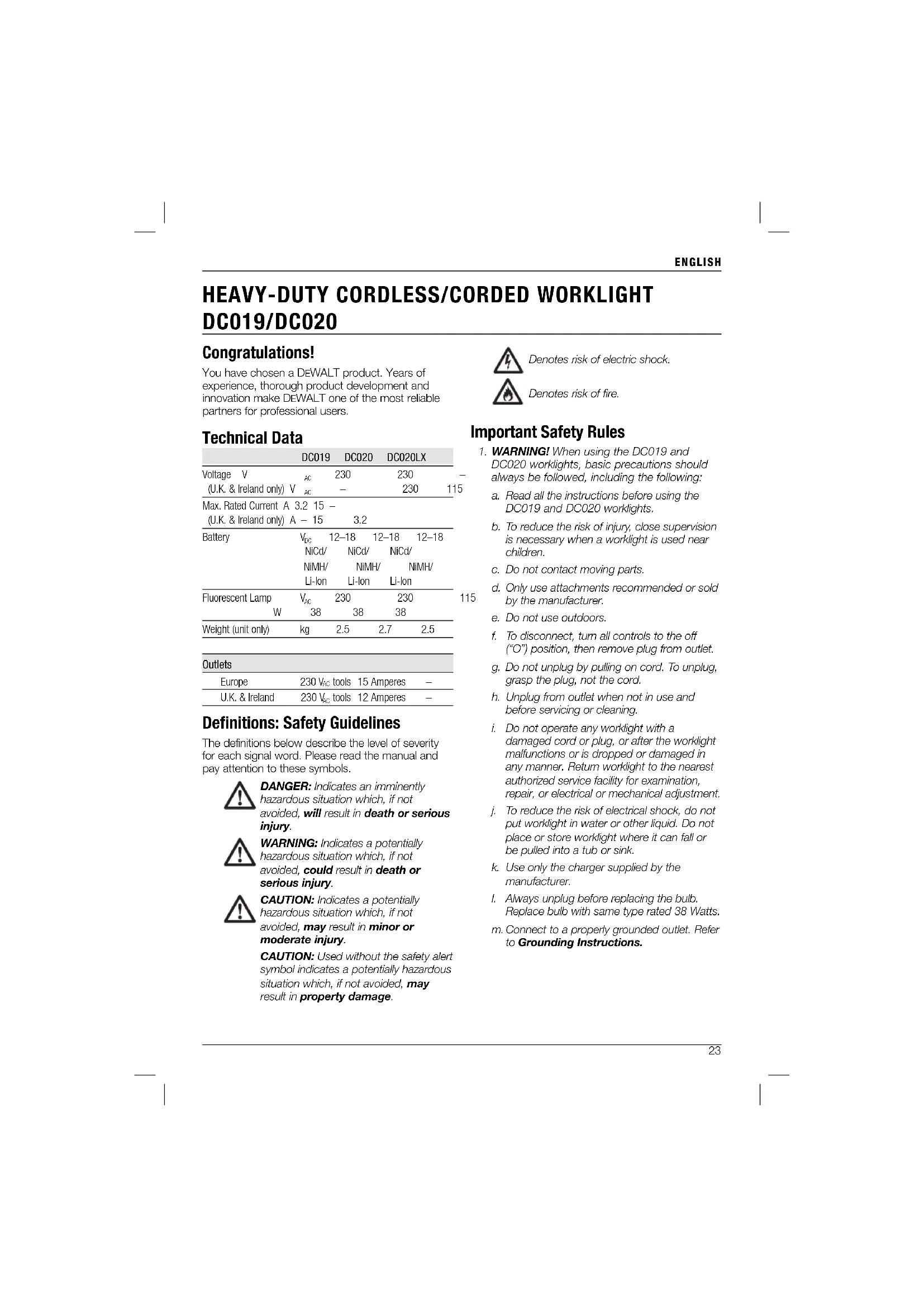
Technical Data
| DC019 | DC020 | DC020LX | ||
| Voltage V | _AC | 230 | 230 | - |
| (U.K. & Ireland only) V | _AC | - | 230 | 115 |
| Max. Rated Current A (U.K. & Ireland only) A - 15 | ||||
| Battery | V_DC | 12–18 | 12–18 | 12–18 |
| NiCd/ | NiCd/ | NiCd/ | ||
| NIMH/ | NIMH/ | NIMH/ | ||
| Li-Ion | Li-Ion | Li-Ion | ||
| Fluorescent Lamp W | V_AC | 230 | 230 | 1 |
| 38 | 38 | 38 | ||
| Weight (unit only) | kg | 2.5 | 2.7 | 2.5 |
Outlets
| Europe | 230 V_AC tools | 15 Amperes | - |
| U.K. & Ireland | 230 V_AC tools | 12 Amperes | - |
Definitions: Safety Guidelines
The definitions below describe the level of severity for each signal word. Please read the manual and pay attention to these symbols.

DANGER: Indicates an imminently hazardous situation which, if not avoided, will result in death or serious injury.

WARNING: Indicates a potentially hazardous situation which, if not avoided, could result in death or serious injury.

CAUTION: Indicates a potentially hazardous situation which, if not avoided, may result in minor or moderate injury.
CAUTION: Used without the safety alert symbol indicates a potentially hazardous situation which, if not avoided, may result in property damage.

Denotes risk of electric shock.

Denotes risk of fire.
Important Safety Rules
- WARNING! When using the DC019 and DC020 worklights, basic precautions should always be followed, including the following:
a. Read all the instructions before using the DC019 and DC020 worklights.
b. To reduce the risk of injury, close supervision is necessary when a worklight is used near children.
c. Do not contact moving parts.
d. Only use attachments recommended or sold by the manufacturer.
e. Do not use outdoors.
f. To disconnect, turn all controls to the off ("O") position, then remove plug from outlet.
g. Do not unplug by pulling on cord. To unplug, grasp the plug, not the cord.
h. Unplug from outlet when not in use and before servicing or cleaning.
i. Do not operate any worklight with a damaged cord or plug, or after the worklight malfunctions or is dropped or damaged in any manner. Return worklight to the nearest authorized service facility for examination, repair, or electrical or mechanical adjustment.
j. To reduce the risk of electrical shock, do not put worklight in water or other liquid. Do not place or store worklight where it can fall or be pulled into a tub or sink.
k. Use only the charger supplied by the manufacturer.
- Always unplug before replacing the bulb. Replace bulb with same type rated 38 Watts.
m. Connect to a properly grounded outlet. Refer to Grounding Instructions.
ENGLISH
Safety Rules for Worklights

IG: Bum hazard. Do not operate flashlight near flammable liquids or in gaseous or explosive atmospheres. Internal sparks may ignite fumes causing personal injury.

WARNING: Shock hazard. Remove battery pack before replacing the fluorescent bulb.
- Vision may be impaired when looking directly into fluorescent light.
- Do not expose light to wet or damp areas. Use only in dry locations. Do not allow any liquid to get inside worklight. Do not submerge worklight in any liquid.
- The worklight is intended for household and commercial use.
- Do not operate without lens cover assembly attached.
- Before using battery, read all instructions and cautionary markings on battery pack, and product using battery pack.
- This appliance is not intended for use by persons (including children) with reduced physical, sensory or mental capabilities, or lack of experience and knowledge, unless they have been given supervision or instruction concerning use of the appliance by a person responsible for their safety.
- Children should be supervised to ensure that they do not play with the appliance.

WARNING: Shock hazard. Do not allow any liquid to get inside worklight. Electric shock may result.

CAUTION: Under certain conditions, with the worklight plugged in to the power supply, the exposed contacts inside the worklight can be shorted by foreign material. Foreign materials of a conductive nature such as, but not limited to, steel wool, aluminum foil, or any buildup of metallic particles should be kept away from charger cavities. Always unplug worklight before attempting to clean.
- In case of damaged power supply cord the supply cord must be replaced immediately by the manufacturer, its service agent or similar qualified person to prevent any hazard.
-
Do not expose worklight to rain or snow. The worklight is intended for household and commercial use.
-
Make sure cord is located so that it will not be stepped on, tripped over, or otherwise subjected to damage or stress.
- Do not use an extension cord unless it is absolutely necessary. Use of an improper extension cord could result in risk of fire, electric shock or electrocution.
- Place the worklight in a position away from any heat source.
- Do not place any object on top of worklight or place the worklight on a soft surface that might block the ventilation slots and result in excessive internal heat. Place the worklight in a position away from any heat source.
- Do not operate worklight with a damaged cord or plug — have them replaced immediately.
- Do not operate the worklight if it has received a sharp blow, been dropped, or otherwise damaged in any way. Take it to an authorised service center.
- Do not disassemble worklight. Take it to an authorized service center when service or repair is required. Incorrect reassembly may result in a risk of electric shock, electrocution or fire.
- Disconnect the worklight from the outlet before attempting any cleaning. This will reduce the risk of electric shock. Removing the battery pack will not reduce this risk.
- The DC020 (230 V) worklights are designed to operate on 230 Volts, 50 Hz AC (except outlets). The DC020 (115 V) is designed to operate on 115 Volts, 50 Hz AC. It also operates on direct current (DC) through a fully charged battery pack. Do not use any other voltage.
Residual Risks
- The following risks are inherent to the use of this appliance:
- impaired vision when looking directly into fluorescent light
- burns from touching a hot bulb
Grounding Instructions
The DC020 (230 V) worklight must be grounded. In the event of malfunction or breakdown, grounding provides a path of least resistance for electric current to reduce the risk of electric shock. The worklight are equipped with a cord having an equipment-grounding conductor and a grounding plug. The
plug must be plugged into an appropriate outlet that is properly installed and grounded in accordance with all local codes and ordinances.

DANGER: Improper connection of the equipment grounding conduct or can result in a risk of electric shock. The conductor with insulation having an outer surface that is green with yellow stripes is the equipment grounding conductor. If repair or replacement of the cord or plug is necessary, do not connect the equipment-grounding conductor to a live terminal. Repairs shall only be performed by DEWALT service agent. Do not modify the plug provided with the worklight – if it will not fit the outlet, have a proper outlet installed by a DEWALT repair agent.
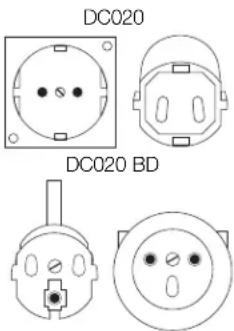
FOR GROUNDED, CORD-CONNECTED WORKLIGHT RATED 16A AND LOWER AND INTENDED FOR USE ON A NOMINAL 230 V SUPPLY CIRCUIT
The worklight is for use on a nominal 230 V circuit, and has a grounding plug that looks like the plug in the following illustration.
Worklight
The worklight accepts 12–18 V NiCd, NiMH or Li-Ion batteries.
Important Safety Instructions for All Battery Packs
When ordering replacement battery packs, be sure to include catalog number and voltage.
The battery pack is not fully charged out of the carton. Before using the battery pack and charger, read the safety instructions below. Then follow charging procedures outlined in the charger manual.
READ ALL INSTRUCTIONS
- Do not charge or use battery in explosive atmospheres, such as in the presence of flammable liquids, gases or dust. Inserting or removing the battery from the charger may ignite the dust or fumes.
- Charge the battery packs only in DEWALT chargers.
- DO NOT splash or immerse in water or other liquids.
- Do not store or use the tool and battery pack in locations where the temperature may reach or exceed 40^ (105°F) (such as outside sheds or metal buildings in summer).

DANGER: Electrocution hazard. Never attempt to open the battery pack for any reason. If battery pack case is cracked or damaged, do not insert into charger. Electric shock or electrocution may result. Damaged battery packs should be returned to service center for recycling.

WARNING: Never attempt to open the battery pack for any reason. If battery pack case is cracked or damaged, do not insert into charger. Do not crush, drop or damage battery pack. Do not use a battery pack or charger that has received a sharp blow, been dropped, run over or damaged in any way (i.e., pierced with a nail, hit with a hammer, stepped on). Damaged battery packs should be returned to service center for recycling.

CAUTION: When not in use, place tool on its side on a stable surface where it will not cause a tripping or falling hazard. Some tools with large battery packs will stand upright on the battery pack but may be easily knocked over.
SPECIFIC SAFETY INSTRUCTIONS FOR NICKEL CADMIUM (NiCd) OR NICKEL METAL HYDRIDE (NiMH)
- Do not incinerate the battery pack even if it is severely damaged or is completely worn out. The battery pack can explode in a fire.
- A small leakage of liquid from the battery pack cells may occur under extreme usage or temperature conditions. This does not indicate a failure.
However, if the outer seal is broken: a. and the battery liquid gets on your skin, immediately wash with soap and water for several minutes.
ENGLISH
b. and the battery liquid gets into your eyes, flush them with clean water for a minimum of 10 minutes and seek immediate medical attention. (Medical note: The liquid is 25-35% solution of potassium hydroxide.)
SPECIFIC SAFETY INSTRUCTIONS FOR LITHIUM ION (LI ION)
- Do not incinerate the battery pack even if it is severely damaged or is completely worn out. The battery pack can explode in a fire. Toxic fumes and materials are created when lithium ion battery packs are burned.
- If battery contents come into contact with the skin, immediately wash area with mild soap and water. If battery liquid gets into the eye, rinse water over the open eye for 15 minutes or until irritation ceases. If medical attention is needed, the battery electrolyte is composed of a mixture of liquid organic carbonates and lithium salts.
- Contents of opened battery cells may cause respiratory irritation. Provide fresh air. If symptoms persist, seek medical attention.

WARNING: Burn hazard. Battery liquid may be flammable if exposed to spark or flame.
Battery Cap (fi g. 2)
A protective battery cap is supplied to cover the contacts of a detached battery pack. Without the protective cap in place, loose metal objects could short circuit the contacts, causing a fire hazard and damaging the battery pack.
- Take off the protective battery cap before placing the battery pack in the charger or tool (fig. 2A).
- Place the protective cap over the contacts immediately after removing the battery pack from the charger or tool (fig. 2B).

WARNING: Make sure the protective battery cap is in place before storing or carrying a detached battery pack.
Battery Pack
DC019 AND DC020 BATTERY TYPE
The DC019 and the DC020 will provide light using 12–18 Volt DEWALT nickel cadmium, nickel metal hydride and lithium ion battery packs. Run-time per one 18 V battery is one hour or greater.
Your battery may be charged in DEWALT 1 hour chargers, 15 minute chargers or vehicular
12 volt chargers. Be sure to read all safety instructions before using your charger. The 38W fluorescent worklight will run on 12–18V DEWALT batteries or 230 V and 115 V AC Power.
Storage Recommendations
- The best storage place is one that is cool and dry away from direct sunlight and excess heat or cold. For optimum battery performance and life, store battery packs at room temperature when not in use.
NOTE: Li-Ion battery packs should be fully charged when stored.
- Long storage will not harm the battery pack or charger. Under proper conditions, they can be stored for up to 5 years.
Labels on Battery Pack
In addition to the pictographs used in this manual, the labels on the battery pack show the following pictographs:

Read instruction manual before use.

Do not probe with conductive objects.

Do not use damaged battery packs.

Use only with DEWALT battery packs, others may burst, causing personal injury and damage.

Do not expose to water.

Have defective cords replaced immediately.

Discard the battery pack with due care for the environment.

Do not incinerate the battery pack NiMH, NiCd+ and Li-Ion.
Labels on Worklight
The following pictograms are shown on the worklight:

Read instruction manual before use.
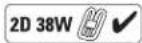
Ensure correct bulb is used.

Do not use near fire.

Do not plug cord in.

Correct bulb placement.
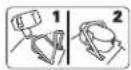
Battery clamp down.
DATE CODE POSITION
Date Code, which also includes the year of manufacture, is printed into the housing surface that forms the mounting joint between tool and battery!
Example:
2010 XX XX
Year of Manufacture
Package Contents
The package contains:
1 Worklight
1 Instruction manual
1 Exploded drawing
- Check for damage to the worklight, parts or accessories which may have occurred during transport.
• Take the time to thoroughly read and understand this manual prior to operation.
Description (fi g. 1)
WARNING: Never modify the power tool or any part of it. Damage or personal injury could result.
INTENDED USE
The DC019 and DC020 worklights are designed to use as a light source.
The DC019 and DC020 worklights are professional appliances. DO NOT let children come into contact with the tool. Supervision is required when inexperienced operators use this tool.
a. ON/OFF switch
b. Handle
c. Battery port
d. 16 Amp outlets (DC020 QW, 230 V only)
13 Amp outlets (DC020 GB, 230 V only)
e. Power cord
f. Built-in cord wrap
g. Battery hold-down
h. Fluorescent bulb
i. Lens cover
j. Worklight housing
k. Support arm
1. Rubber gasket
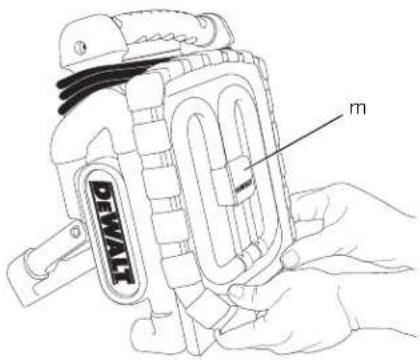
m. Bulb guard
Electrical Safety
The electrical product has been designed for one voltage only. Always check that the power supply corresponds to the voltage on the rating plate.

DC020 LX; DC019
Your tool is double insulated in accordance with EN 60598.
DC020 BD, QW and GB are grounded (class I) according to EN 60335 and EN 60598.
Mains Plug Replacement (U.K. & Ireland Only)
If a new mains plug needs to be fitted:
• Safely dispose of the old plug.
- Connect the brown lead to the live terminal in the plug.
- Connect the blue lead to the neutral terminal.
WARNING: No connection is to be made to the earth terminal.
Follow the fitting instructions supplied with good quality plugs. Recommended fuse: 3 A.
Fitting a Mains Plug to 115 V Units (U.K. and Ireland only)
- The plug should be fitted by a competent person. If you are in doubt, contact an authorized DEWALT repair agent or a qualified electrician.
- The wires are coloured according to the following code:
live = brown
neutral = blue
- Do not connect the blue or brown wire to the earth terminal in the plug. Connect as follows:
brown to terminal marked 'L' blue to terminal marked 'N'
ENGLISH
- The plug fitted should be comply with BS EN 60309 (BS4343), 16 Amps, earthing contact position 4h.

VG: Always ensure that the cable clamp is correctly and securely fitted to the sheath of the cable.
Using an Extension Cable

WARNING: Keep electrical cords in good condition. Do not use worn, bare, or frayed cords because they can cause electrical shock.

WARNING: Operating equipment at low voltage can cause it to overheat. Using an excessively long extension cord can cause the cord to overheat.
Only use grounded extension cords that are rated for outdoor use and equipment with a third-wire ground.
If an extension cable is required, use an approved three-wire extension cable suitable for the power input of this tool (see technical data).
The minimum conductor size is 1.5 mm ^2 . When using a cable reel, always unwind the cable completely.
OPERATION
AC Operation
- Unwrap power cord and plug into 115 or 230 V AC wall outlet.
- DC020 BD, QW, GB (230 V AC): The two sockets are now active and can be used.
NOTE: The two sockets are only active during AC use.
Battery Operation (fi g. 1, 4)
- Place the folded up DC020 on a stable, level surface, lens cover (i) side down.
- Lift the battery hold-down (g) with one hand and insert the battery pack into the battery port (c). Slowly place the battery hold-down on battery pack to hold the battery pack firmly.
- With one hand securely holding the handle (b), use the other hand to lift the worklight housing (j).
Usage (fi g. 1, 5)
- Place the folded up DC020 on a stable, level surface.
- The worklight housing can be positioned in different positions. With one hand securely
holding the handle (b), use the other hand to lift the support arm (k) to one of the five positions shown.
- Position the worklight as desired. Press the ON/OFF switch (a) to ON.
When finished using the worklight, turn the ON/OFF switch to OFF, fold the worklight housing down to the flat position for storage.
Replacing the Fluorescent Bulb (fi g. 1, 6)

JG: Shock Hazard.
Disconnect battery pack and unplug tool before replacing the fluorescent bulb. Such preventative safety measures reduce the risk of personal injury.

N: Vision may be impaired when looking directly into fluorescent light.

CAUTION: Cut hazard. If replacing a broken bulb, protect your hands before attempting to remove the bulb. Do not remove any pieces of broken glass or bulb from the socket area with bare hands, or personal injury may occur.
To change the fluorescent bulb, the worklight housing must be in an upward position as shown in figure 1.
CAUTION: To avoid damage to the worklight, DO NOT separate the rubber gasket from the lens cover. The rubber gasket is permanently attached.
NOTE: Recommended replacement bulb is the DEWALT DC0213 38W fluorescent bulb.
NOTE: Avoid touching the reflective surface. Surface contamination will decrease reflectivity.
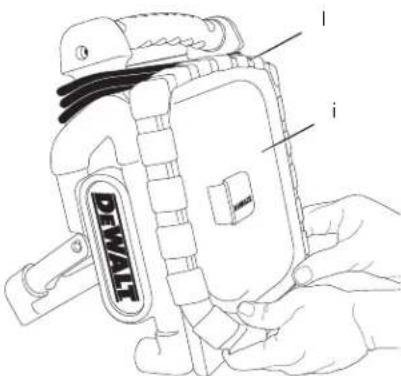
- With one hand securing the bottom corner of the worklight housing (i) and lens cover (j), use the other hand to roll back the rubber gasket (l) from the worklight housing starting at one of the bottom corners.
- Still securely holding the worklight housing roll back the rubber gasket from all sides of the housing, finishing at the top.
- Remove the rubber gasket (l) and lens cover (i) and set aside.
-
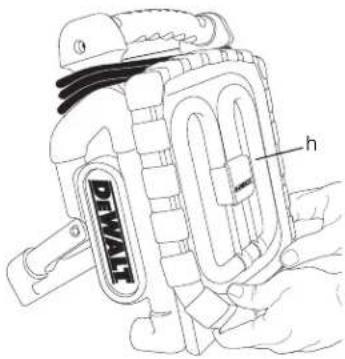
With one hand securing the bottom corner of the worklight housing, use the other hand to remove the bulb guard (m). Gently squeeze the sides of the bulb guard with the thumb and index finger to release it from the clips. Set the bulb guard aside.
-
Secure the bottom corner of the worklight housing with one hand. Use the other hand to firmly grasp the fluorescent bulb (h) at the center and hold onto the white plastic housing under the bulb guard. While still securing the bottom corner, gently remove the bulb from the worklight housing as shown. Ensure that the socket and area around the socket is free of dirt, dust and other contaminants.
- Align the replacement fluorescent bulb in the same orientation as the previous bulb. Secure the bottom corner of the worklight housing with one hand. Using the other hand, carefully press on the center of the bulb's plastic housing to secure it in place.
- Once the replacement bulb is in place, gently press the center of the bulb's plastic housing to ensure it is connected properly. Replace the bulb guard by clipping it to the worklight housing.
- Replace the lens cover. Place the rubber gasket in one of the top corners and roll the gasket onto the other top corner, finishing on a bottom. Ensure the rubber gasket is firmly in place around the worklight housing.
MAINTENANCE
Your DEWALT appliance has been designed to operate over a long period of time with a minimum of maintenance. Continuous satisfactory operation depends upon proper tool care and regular cleaning.
WARNING: Shock Hazard.

Disconnect battery pack and unplug tool before replacing the fluorescent bulb. Such preventative safety measures reduce the risk of personal injury.
Service Notes
This product is not user serviceable. Other than the replacement bulb, there are no user serviceable parts inside the worklight. Servicing at an authorized service center is required to avoid damage to static sensitive internal components.

Cleaning
WARNING: Remove the battery pack and disconnect worklight from the AC outlet before cleaning. Never use solvents or other harsh chemicals for cleaning the non-metallic parts of
the tool. These chemicals may weaken the non-metallic materials used in these parts. Use a cloth dampened only with water and mild soap or soft non-metallic brush. Never let any liquid get inside the worklight; never immerse any part of the worklight into a liquid.
Optional Accessories

WARNING: Since accessories, other than those offered by DEWALT, have not been tested with this product, use of such accessories with this tool could be hazardous. To reduce the risk of injury, only DEWALT, recommended accessories should be used with this product.
Consult your dealer for further information on the appropriate accessories.
Protecting the Environment

Separate collection. This product must not be disposed of with normal household waste.
Should you find one day that your DEWALT product needs replacement, or if it is of no further use to you, do not dispose of it with household waste. Make this product available for separate collection.

Separate collection of used products and packaging allows materials to be recycled and used again. Re-use of recycled materials helps prevent environmental pollution and reduces the demand for raw materials.
Local regulations may provide for separate collection of electrical products from the household, at municipal waste sites or by the retailer when you purchase a new product.
DEWALT provides a facility for the collection and recycling of DEWALT products once they have reached the end of their working life. To take advantage of this service please return your product to any authorised repair agent who will collect them on our behalf.
You can check the location of your nearest authorised repair agent by contacting your local DEWALT office at the address indicated in this manual. Alternatively, a list of authorised DEWALT repair agents and full details of our after-sales service and contacts are available on the Internet at: www.2helpU.com.

Rechargeable Battery Pack
This long life battery pack must be recharged when it fails to produce sufficient power on jobs which were easily done before. At the end of its technical life, discard it with due care for our environment:
- Run the battery pack down completely, then remove it from the tool.
- NiCd, NiMH and Li Ion cells are recyclable. Take them to your dealer or a local recycling station. The collected battery packs will be recycled or disposed of properly.
THE FOLLOWING BATTERIES ARE COMPATIBLE WITH THESE WORKLIGHTS:
| DE9074 | 12 V | NiCd | 1.3 Ah |
| DE9071 | 12 V | NiCd | 2.0 Ah |
| DE9075 | 12 V | NiCd | 2.4 Ah |
| DE9501 | 12 V | NiMH | 2.6 Ah |
| DE9094 | 14,4 V | NiCd | 1.3 Ah |
| DE9091 | 14,4 V | NiCd | 2.0 Ah |
| DE9092 | 14,4 V | NiCd | 2.4 Ah |
| DE9502 | 14,4 V | NiMH | 2.6 Ah |
| DE9140 | 14,4 V | Li-Ion | 2.0 Ah |
DE9098 18 V NiCd 1.3 Ah
DE9095 18 V NiCd 2.0 Ah
DE9096 18 V NiCd 2.4 Ah
DE9503 18 V NiMH 2.6 Ah
DE9180 18 V Li-Ion 2.0 Ah
GUARANTEE
DEWALT is confident of the quality of its products and offers an outstanding guarantee for professional users of the product. This guarantee statement is in addition to and in no way prejudices your contractual rights as a professional user or your statutory rights as a private non-professional user. The guarantee is valid within the territories of the Member States of the European Union and the European Free Trade Area.
• 30 DAY NO RISK SATISFACTION GUARANTEE •
If you are not completely satisfied with the performance of your DEWALT tool, simply return it within 30 days, complete with all original components, as purchased, to the point of purchase, for a full refund or exchange. The product must have been subject to fair wear and tear and proof of purchase must be produced.
• ONE YEAR FREE SERVICE CONTRACT •
If you need maintenance or service for your DEWALT tool, in the 12 months following purchase, you are entitled to one service free of charge. It will be undertaken free of charge at an authorised DEWALT repair agent. Proof of purchase must be produced. Includes labour. Excludes accessories and spare parts unless failed under warranty.
• ONE YEAR FULL WARRANTY •
If your DEWALT product becomes defective due to faulty materials or workmanship within 12 months from the date of purchase, DEWALT guarantees to replace all defective parts free of charge or – at our discretion – replace the unit free of charge provided that:
• The product has not been misused;
- The product has been subject to fair wear and tear;
• Repairs have not been attempted by unauthorised persons;
• Proof of purchase is produced.
- The product is returned complete with all original components
If you wish to make a claim, contact your seller or check the location of your nearest authorised DEWALT repair agent in the DEWALT catalogue or contact your DEWALT office at the address indicated in this manual. A list of authorised DEWALT repair agents and full details of our after-sales service is available on the Internet at: www.2helpU.com