SCCB1011 - Soundbar SAMSUNG - Free user manual and instructions
Find the device manual for free SCCB1011 SAMSUNG in PDF.




User questions about SCCB1011 SAMSUNG
0 question about this device. Answer the ones you know or ask your own.
Ask a new question about this device
Download the instructions for your Soundbar in PDF format for free! Find your manual SCCB1011 - SAMSUNG and take your electronic device back in hand. On this page are published all the documents necessary for the use of your device. SCCB1011 by SAMSUNG.
USER MANUAL SCCB1011 SAMSUNG
operating instructions
imagine the possibilities
Thank you for purchasing this Samsung product. To receive more complete service, please register your product at www.samsung.com/global/register
safety precautions
CAUTION
RISK OF ELECTRIC SHOCK. DO NOT OPEN

CAUTION: TO REDUCE THE RISK OF ELECTRIC SHOCK, DO NOT REMOVE COVER (OR BACK)NO USER-SERVICEABLE PARTS INSIDEREFER SERVICING TO QUALIFIED SERVICE PERSONNEL


This symbol indicates that dangerous voltage consisting a risk of electric shock is present within this unit.
This symbol indicates that there are important operating and maintenance instructions in the literature accompanying this unit.
WARNING
• To reduce the risk of fire or electric shock, do not expose this appliance to rain or moisture.
WARNING
- Be sure to use only the standard adapter that is specified in the specification sheet.
Using any other adapter could cause fire, electrical shock, or damage to the product. - Incorrectly connecting the power supply or replacing battery may cause explosion, fire, electric shock, or damage to the product.
- Do not connect multiple cameras to a single adapter. Exceeding the capacity may cause abnormal heat generation or fire.
- Securely plug the power cord into the power receptacle. Insecure connection may cause fire.
-
When installing the camera, fasten it securely and firmly. A falling camera may cause personal injury.
-
Do not place conductive objects (e.g. screwdrivers, coins, metal things, etc.) or containers filled with water on top of the camera. Doing so may cause personal injury due to fire, electric shock, or falling objects.
- Do not install the unit in humid, dusty, or sooty locations. Doing so may cause fire or electric shock.
- If any unusual smells or smoke come from the unit, stop using the product. In such case, immediately disconnect the power source and contact the service center. Continued use in such a condition may cause fire or electric shock.
- If this product fails to operate normally, contact the nearest service center. Never disassemble or modify this product in any way. (SAMSUNG is not liable for problems caused by unauthorized modifications or attempted repair.)
- When cleaning, do not spray water directly onto parts of the product. Doing so may cause fire or electric shock.
CAUTION
- Do not drop objects on the product or apply strong shock to it.
Keep away from a location subject to excessive vibration or magnetic interference. - Do not install in a location subject to high temperature (over 122^ F), low temperature (below 14^ F), or high humidity. Doing so may cause fire or electric shock.
- If you want to relocate the already installed product, be sure to turn off the power and then move or reinstall it.
- Remove the power plug from the outlet when then there is a lightning. Neglecting to do so may cause fire or damage to the product.
- Keep out of direct sunlight and heat radiation sources. It may cause fire.
- Install it in a place with good ventilation.
- Avoid aiming the camera directly towards extremely bright objects such as sun, as this may damage the CCD image sensor.
- Apparatus shall not be exposed to dripping or splashing and no objects filled with liquids, such as vases, shall be placed on the apparatus.
- The Mains plug is used as a disconnect device and shall stay readily operable at any time.
important safety instructions
- Read these instructions.
- Keep these instructions.
- Heed all warnings.
- Follow all instructions.
- Do not use this apparatus near water.
- Clean only with dry cloth.
- Do not block any ventilation openings. Install in accordance with the manufacturer's instructions.
- Do not install near any heat sources such as radiators, heat registers, or other apparatus (including amplifiers) that produce heat.
- Do not defeat the safety purpose of the polarized or grounding-type plug.
A polarized plug has two blades with one wider than the other.
A grounding type plug has two blades and a third grounding prong.
The wide blade or the third prong is provided for your safety.
If the provided plug does not fit into your outlet, consult an electrician for replacement of the obsolete outlet. - Protect the power cord from being walked on or pinched particularly at plugs, convenience receptacles, and the point where they exit from the apparatus.
- Only use attachments/accessories specified by the manufacturer.
- Use only with cart, stand, tripod, bracket, or table specified by the manufacturer, or sold with the apparatus.
- Unplug this apparatus. When a cart is used, use caution when moving the cart/apparatus combination to avoid injury from tip-over.
- Refer all servicing to qualified service personnel.
Servicing is required when the apparatus has been damaged in any way, such as power-supply cord or plug is damaged, liquid has been spilled or objects have fallen into the apparatus, the apparatus has been exposed to rain or moisture, does not operate normally, or been dropped.
external cctv camera installation
ENG
text_image
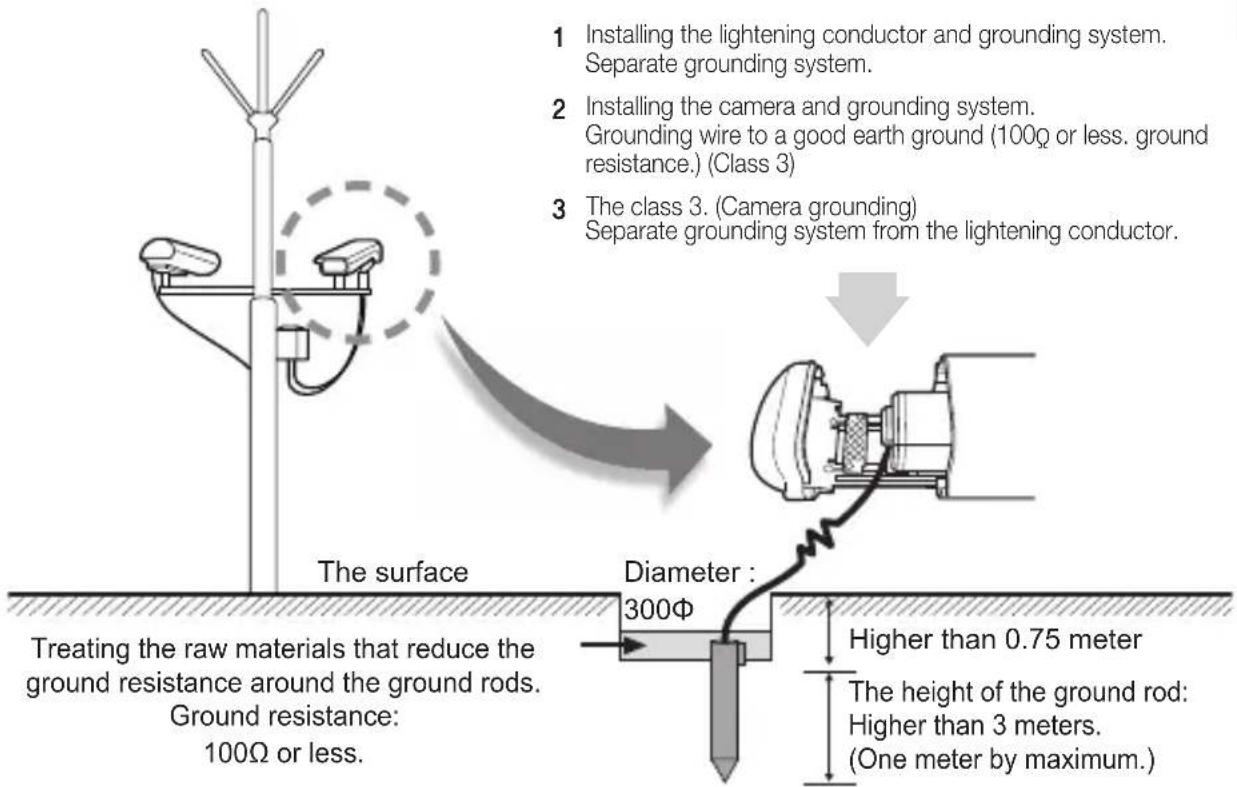
1 Installing the lightening conductor and grounding system. Separate grounding system. 2 Installing the camera and grounding system. Grounding wire to a good earth ground (100Ω or less. ground resistance.) (Class 3) 3 The class 3. (Camera grounding) Separate grounding system from the lightening conductor. The surface Diameter : 300Φ Treating the raw materials that reduce the ground resistance around the ground rods. Ground resistance: 100Ω or less. Higher than 0.75 meter The height of the ground rod: Higher than 3 meters. (One meter by maximum.)< Construction of the ground rod >
1. Installing a lightening conductor
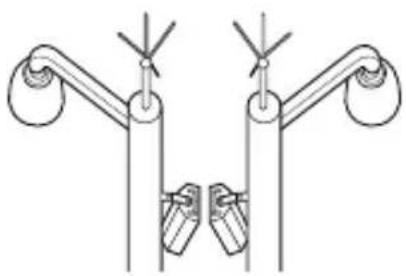
natural_image
Pure mechanical linkage diagram without any text, numbers, or symbolsa) Protection area
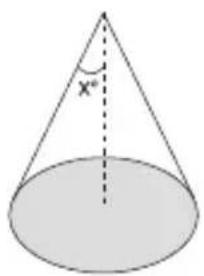
text_image
x*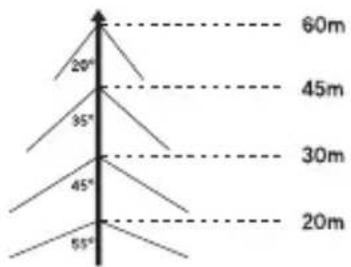
text_image
20° 95° 45° 55° 60m 45m 30m 20mb) Protected angle
(Depending on the height of the lightening conductor)
2. Camera grounding
| No Distinguished by Standard Note | |||
| 1 | Grounding method The class 3 CCTV product | ||
| 2 | Thickness of the Grounding wire 1.6mm ^2 ↑ | ||
| 3 | Ground resistance | 100 Ω↓ | |
The purpose of the camera grounding
Installing the lightening conductor and grounding the camera chassis prevent the CCTV camera from the lightning strikes. When installing the CCTV camera outside, avoid the damages form the lightning strikes by using the lightening conductor and camera grounding.
contents
ENG
OVERVIEW
02 Overview
02
FEATURES
03 Features
03
INSTALLATION
04
04 Package
04 Parts & Description
05 Things to keep in mind during installation and Use
05 Connect the auto iris lens connector
06 Install the lensr
06 Adjust the back focus
07 Connect the cables and check the operation
SPECIFICATIONS
11
11 Specifications
01
overview
It is a high-resolution box camera that has implemented the horizontal resolution of 540 lines by taking advantage of the Digital Signal Processing and OLPF technologies.
- In mechanical fluorescent lightning conditions, you can experience so-called “color rolling” if you have installed the manual iris lens on the camera and positioned the function switch from ELC to ON. In this case, connect the camera to the power source (AC) and position the L/L switch on the rear panel to EXT. (NTSC: 60Hz, PAL: 50Hz)
- What is Color Rolling?
This occurs because the mechanical fluorescent lightning blinks from power frequencies, where the color temperature input to the camera is not certain so the color on the screen changes irregularly (red, blue, yellow, etc).
- This problem can be solved by using the Line Lock function or the Auto Iris Lens.
features
| High Color Sensitivity | The camera adopts the latest 1/3” super-HAD IT CCD to get the benefit of high color sensitivity. |
| Resolution | Introduces Full Digital Image Processing from the digital signal technology to implement a high-resolution image. |
| Excellent Back Light Compensation | This will guarantee a sharp image by compensating for the back light even if the sunlight or bright lightening reflects against the subject. |
| Digital Power Synchronization | Adopts the full digital line lock system to enable you to adjust the vertical synchronization of the camera, an enhancement of manipulation and reliability. |
| Dynamic CCD Defect Compensation | Uses advanced technology to compensate CCD defects in any mode, to give clear, sharp and noise-free images, even in low contrast scenes. |
ENG
installation
In this chapter, we will provide you with general instructions for product installation and preferred places as well as considerations before installation. Now, let's install the camera and connect necessary cables.)
Package
You must check that all the components and accessories listed below are included in the product package.
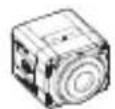
Camera
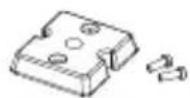
Camera Holder (Mount Adaptor) screw x2
User's guide Auto Iris Lens Connector

Parts & Description
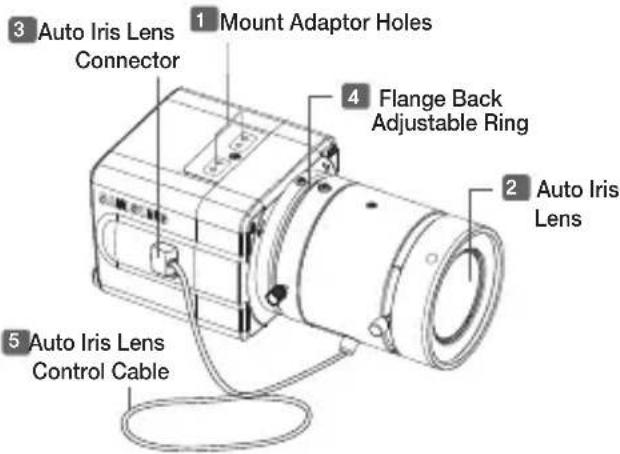
text_image
3 Auto Iris Lens Connector 1 Mount Adaptor Holes 4 Flange Back Adjustable Ring 2 Auto Iris Lens 5 Auto Iris Lens Control Cable1 Mount Adaptor Holes
Used to fix the mount adaptor with a screw if you want to mount the camera on the bracket.
2 Auto Iris Lens (Optional)
A lens to be installed on the camera
- If the camera gets dirty on the surface of the lens, apply ethanol to the provided tissue or a dry cloth and wipe it out.
3 Auto Iris Lens Connector
Provides power source and control/ DC signal with iris lens that are required to control the iris of the lens
4 Flange Back Adjustable Ring
Used to adjust the back focus of the camera.
5 Auto Iris Lens Control Cable
Transfers the control signal from the camera to the iris lens.
Things to keep in mind during installation and Use
- Do not disassemble the camera on your own.
- Always be careful when handling the camera. Do not strike the camera by your fists or shake it. Please be careful not to be careless when storing and operating it.
- Do not place or operate the camera in any wet environment such as rain or wet surfaces.
- Do not clean the camera with rough sandpaper. Please always use a dry cloth when cleaning it.
- Put the camera in a cool area free from direct sunlight. Otherwise, the camera may be damaged.
Connect the auto iris lens connector
Remove the sheath round the iris control cable and connect it to each of the auto iris lens connector as described below.
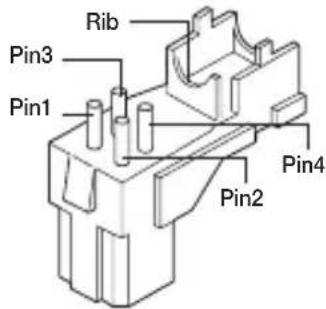
text_image
Rib Pin3 Pin1 Pin2 Pin4| Pin Number | DC Control Type |
| 1 Damp(-) | |
| 2 Damp(+) | |
| 3 Drive(+) | |
| 4 Drive(-) |
Install the lens
Loosen the single screw on the adjustable ring of the flange back by turning it anti-clockwise and turn the ring in the "C" direction (anti-clockwise) to the end. Otherwise, it can cause damage to the internal image sensor or the lens when you install the lens on the camera.
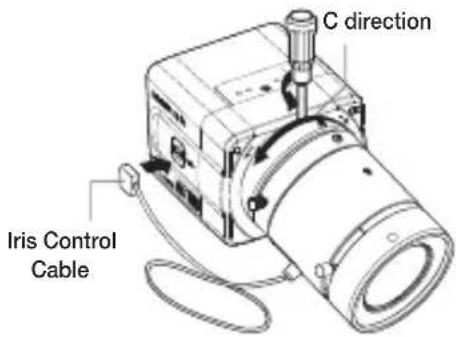
text_image
C direction Iris Control CableAdjust the back focus
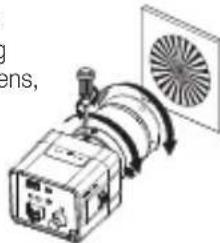
The back focus of a camera is predefined by the factory default. However, some models are out of focus depending on the lens type. If your camera is out of focus, follow the instructions below to adjust the back focus. The following is the procedure used to set the proper back focus point in fixed focus lenses.
06
Lens without zooming feature
- Capture a sharp subject (with a grid pattern) more than 10m apart and adjust the focus ring to the infinity ( ).
- Adjust the adjustable ring of the flange back so that you can capture the sharpest image.
- Fasten the screw of the adjustable ring of the flange back.
Lens with zooming feature
- Capture a sharp subject (with a grid pattern) 3-5m apart and adjust the zoom in the TELE (zooming) direction as possible and also adjust the focus ring so that you can capture the sharpest image.
- Adjust the zoom in the WIDE direction as possible and turn the adjustable ring of the flange back so that you can capture the sharpest image.
- Repeat 1 and 2 above 2-3 times to match the focus from the ZOOM TELE side with that from the ZOOM WIDE side.
- Fasten the screw of the adjustable ring of the flange back.
- If you darken the image before adjusting the focus by attaching the ND filter to the front of the lens, you can get a sharper focus.
natural_image
Diagram of a fan or fan device with rotating blades and a box, no text or symbols presentConnect the cables and check the operation
text_image
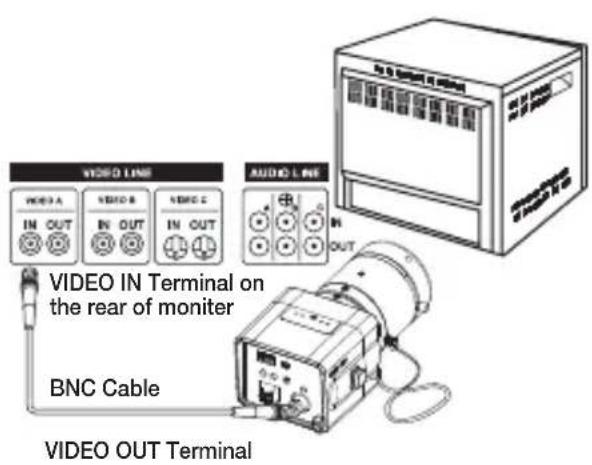
VIDEO LINE IN OUT VIDEO IN Terminal on the rear of monitor BNC Cable AUDIO LINE IN OUT VIDEO OUT Terminal- Connect one end of the BNC cable to the VIDEO OUT port of the monitor.
- Connect the other end of the BNC cable to the VIDEO In port.
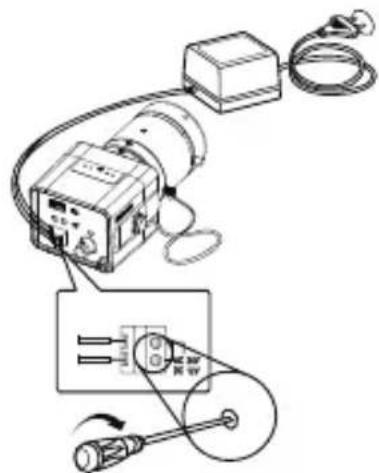
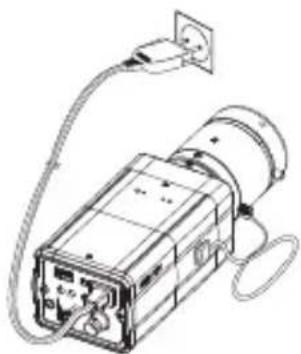
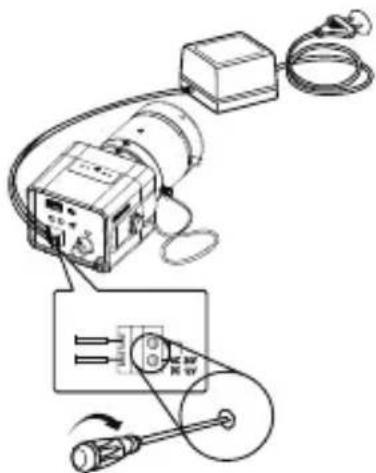
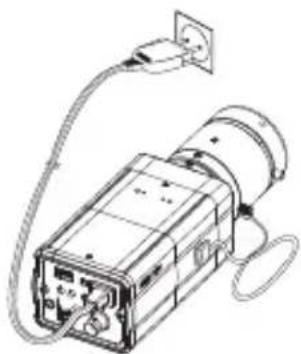
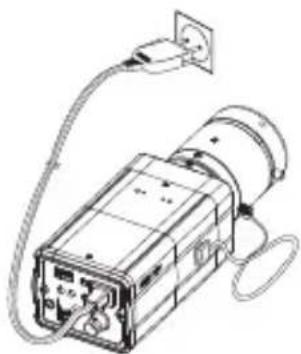
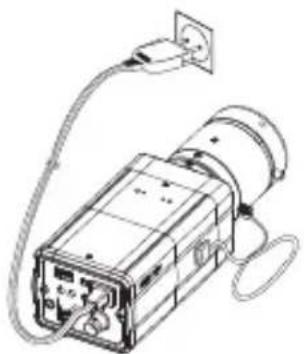
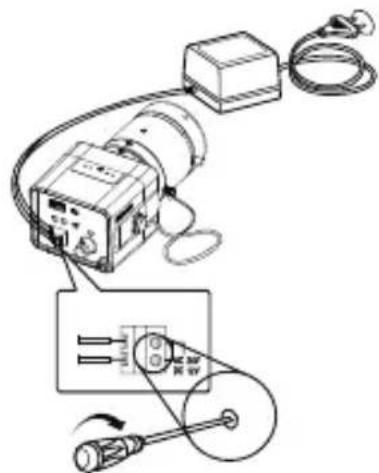
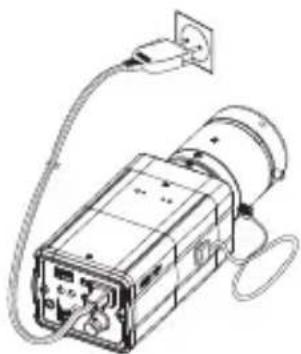
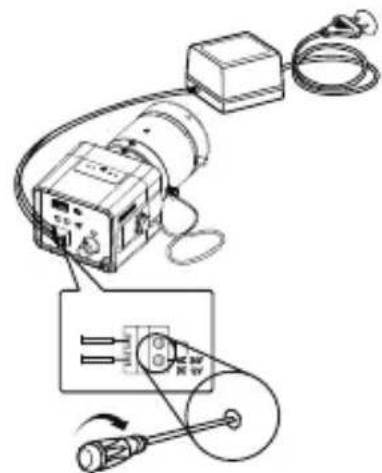
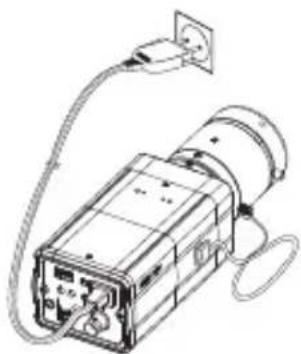
- Connect the camera to the power adaptor. Use a slotted flat (-) screwdriver to connect one end of the two-line power adaptor to the DC/AC IN port of the camera. (GND: marked with a white line on the cable) - You can plug in to a power outlet regardless of the polarity for both AC 24V and DC 12V adaptor.
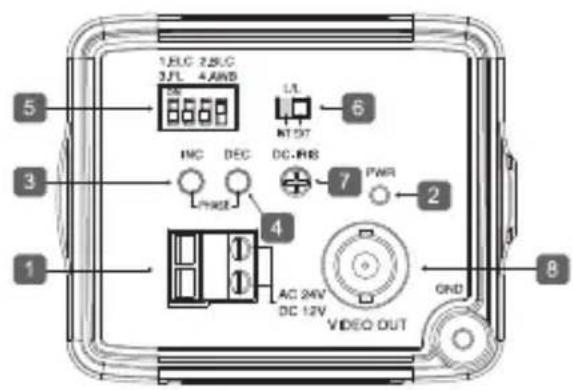
AC24V/DC12V (SCC-B1311, B1311P)
text_image
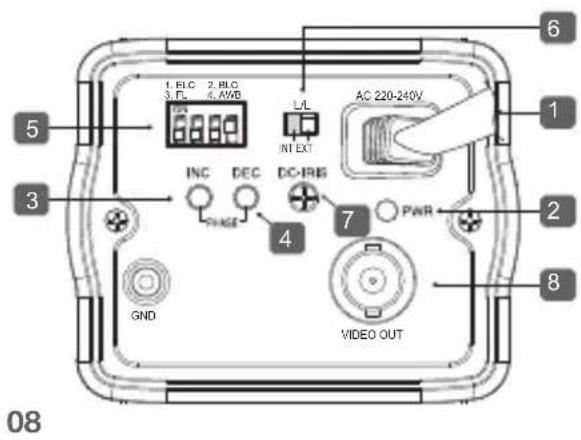
Technical diagram showing electrical connections with labeled components and wiring pathsAC220V \~ 240V (SCC-B1011P)
natural_image
Technical line drawing of a mechanical device with wiring and power outlet (no text or symbols)AC24V/DC12V (SCC-B1311, B1311P)
text_image
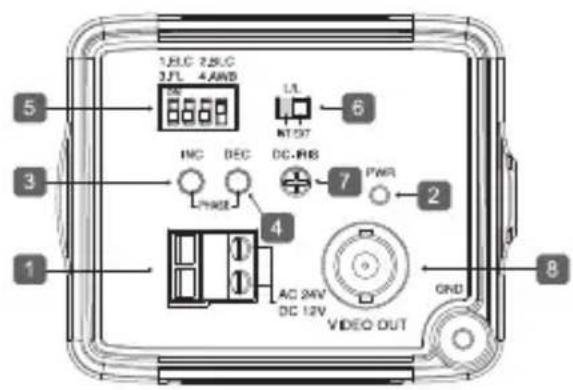
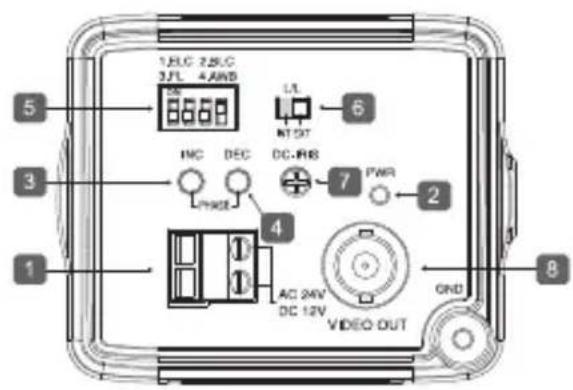
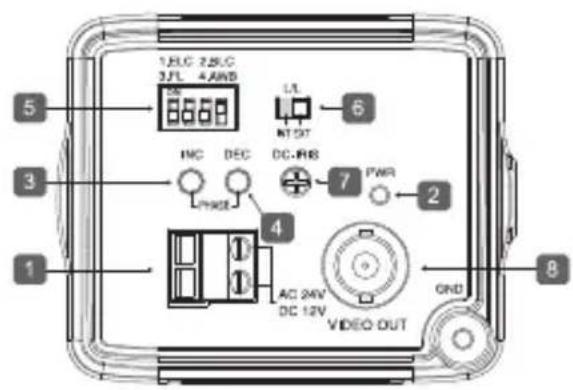
1.81C 2.51C 3JL 4AND 5 6 INC DEC DC-RNS 7 PWR 2 4 AC 24V DC 12V GND 1 8AC220V \~ 240V (SCC-B1011P)
text_image
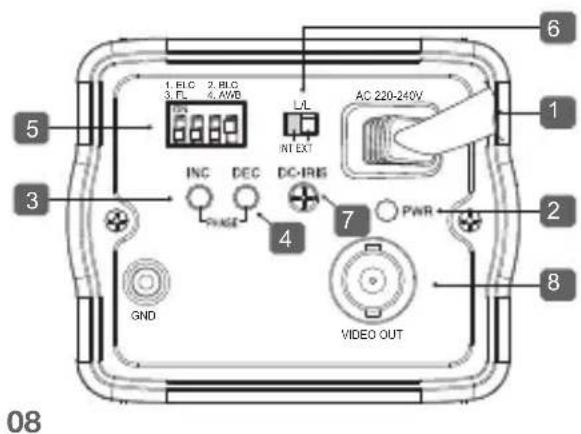
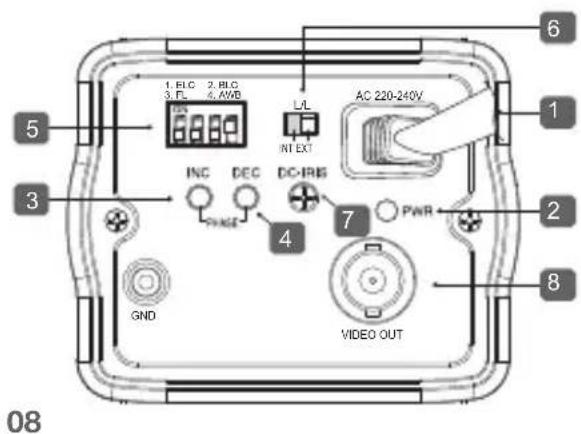
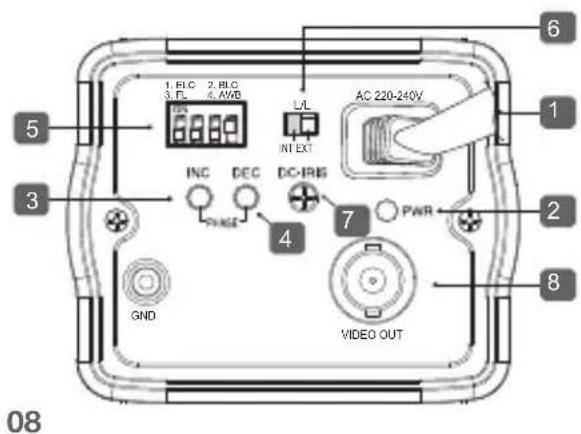
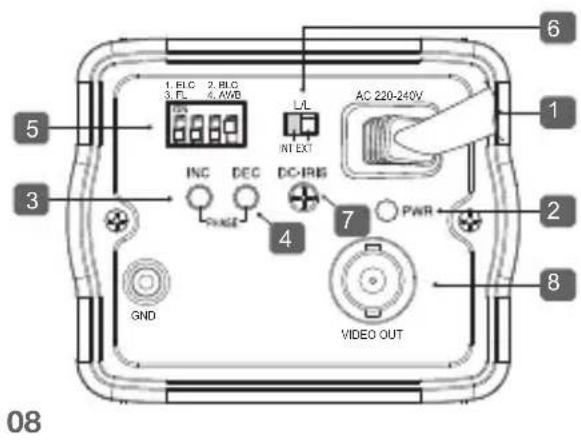
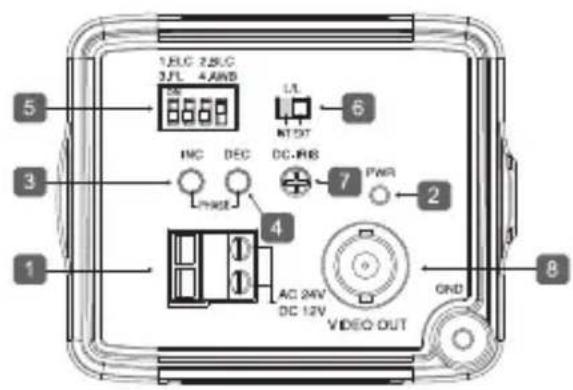
1. PLC 2. PLC 3. FL 6. AWB L/L INT EXT AC 220-240V 5 3 INC DEC DC-IRIS PAGE 7 PWR GND VIDEO OUT 8 1 2 6 1 4 7 081 Power Port
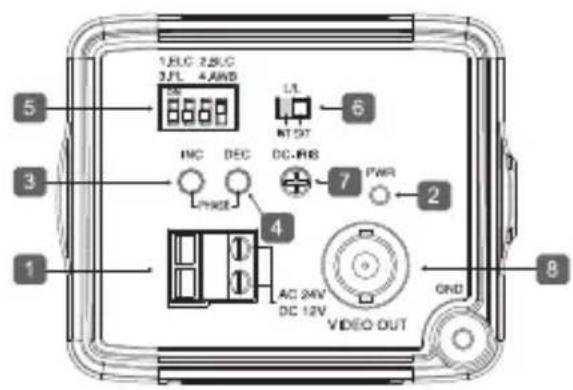
Port that is connected to the power (adaptor) cable.
- For SCC-B1311, B1311P
Connects to AC 24V or DC 12V.
- For SCC-B1011P
Connects to AC220V \~ 240V.
2 Power Indication LED
If properly supplied with power, the LED turns on.
3 Vertical Synchronization Phasing Switch (Left)
Used to adjust the vertical synchronization phasing. If pressed, the vertical synchronization moves to the left.
4 Vertical Synchronization Phasing Switch (Right)
Used to adjust the vertical synchronization phasing. If pressed, the vertical synchronization moves to the right.
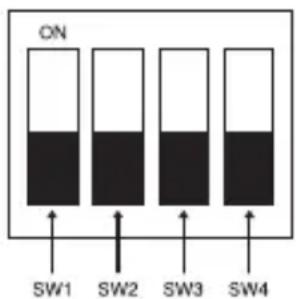
5 FUNCTION SWITCH-1
text_image
ON SW1 SW2 SW3 SW4- ELC
- BLC
- FL(Flickerless)
- AWB
SW1(ELC)
Use this for the manual iris lens. If set to ON, the electronic shutter speed varies between 1/60 and 1/120,000 second to keep the screen brightness proper. However, you must position this switch to OFF if you are using the auto iris lens (DC control type). Because, in this mode, the camera can show the color rolling effect when operating under the mechanical fluorescent lightning. If this happens, apply the AC power and set the L/L to "EXT". (NTSC: 60Hz, PAL: 50Hz)
SW2(BLC)
Use to compensate for a display that is too bright or too dark when indoor lighting or windows reflects against the subject. Set to ON for these conditions.
SW3(FL)
It is an anti-flicker system that prevents the flickering of the image due to mismatch between the vertical sync frequency and the on-off frequency of the lightning.
It is used when the camera and broadcasting system within its own region do not match each other. If set to ON, the electronic shutter speed stays at either 1/100sec (NTSC) or 1/120sec (PAL).

If SW1 (ELC) is set to ON, the anti-flicker system does not work even if SW3 is positioned to ON.
SW4(AWB)
ON(ATW): It automatically adjusts the image color according to the temperature change of the lightning color. Under a very irregular lightning condition (such as car headlight), if set to ON, it captures a subject normally (white).
OFF(AWC): It remembers the normal color temp switch with the OFF to operate at a certain white balance level.

Note that AWB can cause an error in the following conditions:
- If a big subject of a uniform color with a high saturation exists in the center of the screen or if few part of the image is in white.
- If the lightning is made of special material like sodium.
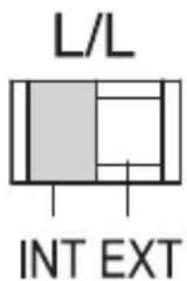
6 FUNCTION SWITCH-2
text_image
L/L INT EXTIf multiple cameras are connected to such as a sequential switcher in auto switch mode, the camera in the internal sync mode occurs a skip every time it moves to other scene. However, this can be solved by positioning the L/L switch to EXT and using the level bar to adjust the vertical sync phasing.
- INT: It operates in the internal synchronization mode.
- EXT: it operates in the power synchronization mode.
※ If your camera uses DC 12V for power source, it operates in the internal mode regardless of the position (EXT/INT) of the L/L switch.
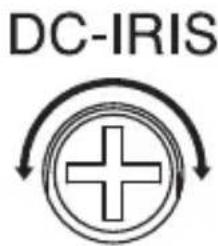
7 DC IRIS Level Bar
text_image
DC-IRISUsed to adjust the iris level of this level bar using a screwdriver.
- Anti-clockwise: Decreases the luminance level.
- Clockwise: Increases the luminance level.

- The IRIS range of the DC lens is about between 80IRE and 120IRE. In other words, the DC lens adopts a variable range limitation system, rather than IRIS Full Open/Close system.
- Depending on the type of the lens used that allows setting the value below 75 IRE may cause IRIS hunting. Therefore, make sure that the range is set to an appropriate level (higher than 80 IRE).
8 Video Out Port
Connected to the Video Out port of a monitor. The video signal is output via this port.
specifications
SCC-B1311
| Item Description | |
| Product Type | Surveillance Camera |
| Broadcasting System | NTSC STANDARD SYSTEM |
| Imaging Device | 1/3”IT, S-HAD-CCD |
| Number of Effective Pixels | 768(H) x 494(V) |
| Scanning 525 Line, 2:1 | interlace |
| Line Frequency | INTERNAL : 15,734Hz(H)59.94 Hz(V)LINELOCK : 15,750Hz(H)60 Hz(V) |
| Synchronous Mode | INTERNALLINE LOCK (AC 24V) |
| Horizontal Resolution | 540 TV Lines |
| S/N Ratio | Approx. 50dB |
| Minimum Subject Illumination | 0.40Lux (F1.2, 50IRE)0.24Lux (F1.2, 30IRE)0.12Lux (F1.2, 15IRE) |
| ALC/ELC | ALC: DC IRIS LENS OnlyELC: Electronic Shutter Iris(max. 1/120Ksec) |
ENG
| Item Description | |
| FL(FLICKERLESS) OFF/ON | |
| Lens Manual/Auto Iris DC Lens | |
| Lens Mount | C, CS Lens Adaptable |
| AWB(Auto White Balance) | ON : ATWOFF : AWC |
| BLC(Back Light Compensation) | ON/OFF |
| AGC AUTO | |
| Signal Out | COMPOSITE VIDEO OUT1V p_p 75 Ω / BNC |
| Power | AC24V ±10%(60Hz±0.3Hz),DC12V+10%~5% |
| Power Consumption | Approx. 3.0 Watts |
| Operation Temperature | -10°C ~ +50°C |
| Operation Humidity | ~90% |
| Dimension(mm) 68(W) x 55(H) x 77.1(D) | |
| Weight 220 g | |
SCC-B1311P, B1011P
| Item Description | |
| Product Type | Surveillance Camera |
| Broadcasting System | PAL STANDARD SYSTEM |
| Imaging Device | 1/3”IT, S-HAD-CCD |
| Number of Effective Pixels | 752(H) x 582(V) |
| Scanning 625 Line, 2:1 interlace | |
| Line Frequency | INTERNAL : 15,625Hz(H) 50 Hz(V)LINE LOCK : 15,625Hz(H) 50 Hz(V) |
| Synchronous Mode | INTERNALLINE LOCK (AC 24V) |
| Horizontal Resolution | 540 TV Lines |
| S/N Ratio | Approx. 50dB |
| Minimum Subject Illumination | 0.40Lux (F1.2, 50IRE)0.24Lux (F1.2, 30IRE)0.12Lux (F1.2, 15IRE) |
| ALC/ELC | ALC : DC IRIS LENS OnlyELC : Electronic Shutter Iris(max. 1/120Ksec) |
| FL(FLICKERLESS) | OFF/ON |
| Lens Manual/Auto | Iris DC Lens |
| Item Description | |
| Lens Mount | C, CS Lens Adaptable |
| AWB(Auto White Balance) | ON : ATWOFF : AWC |
| BLC(Back Light Compensation) | ON/OFF |
| AGC AUTO | |
| Signal Out | COMPOSITE VIDEO OUT1V p_p 75 Ω / BNC |
| Power | SCC-B1311P:AC24V ±10%(50Hz±0.3Hz),DC12V+10%~-5%SCC-B1011P :AC220V~AC240V(50Hz±0.3Hz) |
| Power Consumption | SCC-B1311P: approx. 3.0 WattsSCC-B1011P: approx. 3.5 Watts |
| Operation Temperature | -10°C ~ +50°C |
| Operation Humidity | ~90% |
| Dimension(mm) | SCC-B1311P:68(W) x 55(H) x 77.1(D)SCC-B1011P:65(W) x 55(H) x 130.5(D) |
| Weight | SCC-B1311P: 220 gSCC-B1011P: 450 g |
natural_image
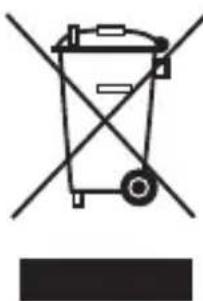
Symbol of a trash bin crossed with a diagonal line, no text or labels presentCorrect Disposal of This Product
(Waste Electrical & Electronic Equipment)
(Applicable in the European Union and other European countries with separate collection systems)
This marking shown on the product or its literature, indicates that it should not be disposed with other household wastes at the end of its working life. To prevent possible harm to the environment or human health from uncontrolled waste disposal, please separate this from other types of wastes and recycle it responsibly to promote the sustainable reuse of material resources.
Household users should contact either the retailer where they purchased this product, or their local government office, for details of where and how they can take this item for environmentally safe recycling.
Business users should contact their supplier and check the terms and conditions of the purchase contract. This product should not be mixed with other commercial wastes for disposal.
Memo
SCC-B1311(P)
SCC-B1011P
DIGITALE FARBKAMERA
bedienungsanleitung
natural_image
Diagram of a fan blade being heated by a rotating fan, with no visible text or symbolsAC24V/DC12V (SCC-B1311, B1311P)
natural_image
Pure electrical circuit lines without any symbolsAC220V \~ 240V (B1011P)
natural_image
Line drawing of a device with attached power outlet and cable (no text or symbols)AC24V/DC12V (SCC-B1311, B1311P)
text_image
1.ELC 2.ELC 3JL 4.AND 5 6 INC DEC DC-RMB 7 PWR 2 4 AC 24V DC 12V GND 1 8 VIDEO OUTAC220V \~ 240V (SCC-B1011P)
text_image
1. PLC 2. PLC 3. FL 6. AWB L/L INT EXT AC 220-240V 5 3 INC DEC PAGE DC-IRIG 7 PWR 2 GND 8 VIDEO OUT 6 1 4 7 081 Netzanschluss
text_image
L/L INT EXTnatural_image
Symbol of a trash bin with crossed lines indicating no waste or restriction, accompanied by a solid black rectangle below (no text or labels)natural_image
Diagram of a fan blade system with rotating blades and a base device (no text or symbols)text_image
Diagram of an electrical circuit setup with labeled components and wiring connections220VCA \~ 240V (B1011P)
natural_image
Line drawing of a device with attached power outlet and cable (no text or symbols)24VCA/12VCD (SCC-B1311, B1311P)
text_image
1.5C 2.5C 3JL 4A/8ND 5 6 INC DEC DC-RB 7 PWR 2 4 AC 24V DC 12V GND 1 8 VIDEO OUT220VCA \~ 240V (SCC-B1011P)
text_image
1. PLC 2. PLC 3. FL 6. AWB L/L INT EXT AC 220-240V 5 3 INC DEC PAGE DC-IRIG 7 PWR 2 GND 8 VIDEO OUT 6 1 4 7 08text_image
L/L INT EXTnatural_image
Symbol of a trash bin crossed with a diagonal line, no text or labels presentCÁMARA COLOR DIGITAL
natural_image
Diagram of a mechanical device with a fan and rotating components (no text or symbols)natural_image
Pure electrical circuit lines without any symbols220VAC \~ 240V (SCC-B1011P)
natural_image
Line drawing of a device with attached power outlet and cable (no text or symbols)24VAC / 12VDC (SCC-B1311, B1311P)
text_image
1.ELC 2.ELC 3JL 4.AND 5 6 INC DEC DC-RMB 7 PWR 2 4 AC 24V DC 12V GND 1 8CA220V. \~ 240V. (SCC-B1011P)
text_image
1. PLC 2. PLC 3. FL 4. AVB L/L AC 220-240V 5 INC DEC DC-IRIS INT EXT 4 7 PWR GND VIDEO OUT 6 1 2 3 8 08text_image
L/L INT EXTnatural_image
Symbol of a trash bin crossed with no text or labels, accompanied by a black rectangular block below (no text or symbols present)natural_image
Illustration of a fan blade mounted on an electronic device with a rotating blade (no text or symbols)AC24V/DC12V (SCC-B1311, B1311P)
text_image
Diagram of an electrical circuit setup with labeled components and wiring connectionsAC220V \~ 240V (B1011P)
natural_image
Line drawing of a device with attached power outlet and cable (no text or symbols)
AC24V/DC12V (SCC-B1311, B1311P)
text_image
1.ELC 2.ELC 3JL 4.AND 5 6 INC DEC DC-RMB 7 PWR 2 4 AC 24V DC 12V GND 1 8AC220V \~ 240V (SCC-B1011P)
text_image
1. PLC 2. PLC 3. FL 6. AWB L/L AC 220-240V 1 5 3 INC DEC PAGE DC-IRIS 7 PWR 2 GND VIDEO OUT 8 6text_image
L/L INT EXTnatural_image
Symbol of a trash bin crossed with no text or labels, representing waste sorting or disposal (no text present)natural_image
Diagram of a fan or fan device with rotating blades and a base unit, no text or symbols presentAC24V/DC12V (SCC-B1311, B1311P)
text_image
Technical diagram showing electrical connections with labeled components and a switch mechanismAC220V \~ 240V (B1011P)
natural_image
Line drawing of a device with attached power outlet and cable (no text or symbols)AC24V/DC12V (SCC-B1311, B1311P)
text_image
1.ELC 2.ELC 3JL 4.AND 5 3 1 4 INC DEC PWR 7 DC-RMB PWR 2 AC 24V DC 12V GND 8 VIDEO OUTAC220V \~ 240V (SCC-B1011P)