LS A 9007 - Dishwasher CANDY - Free user manual and instructions
Find the device manual for free LS A 9007 CANDY in PDF.


User questions about LS A 9007 CANDY
0 question about this device. Answer the ones you know or ask your own.
Ask a new question about this device
Download the instructions for your Dishwasher in PDF format for free! Find your manual LS A 9007 - CANDY and take your electronic device back in hand. On this page are published all the documents necessary for the use of your device. LS A 9007 by CANDY.
USER MANUAL LS A 9007 CANDY
Aunched in the center of the room, a single man stood in front of the table. The man looked at the floor and sat down. He looked up at the wall and saw a large figure standing in front of him. The figure was a tall man with a dark face and a black hair. He looked at the floor and saw a single man standing in front of him.
ANOMALIES
CAUSE
SOLUTIONS
Thank you for choosing a Candy appliance; quality dishwashers which guarantee high performance and reliability.
Candy manufacture a vast range of domestic appliances: washing machines, washer/dryers, cookers, microwave ovens, ovens and hobs, refrigerators and freezers.
Ask your dealer for the catalogue with the complete range of Candy products.
Please read this booklet carefully as it provides important information regarding the safe installation, use, and maintenance of the machine, together with some useful advice on how to achieve the best results from your dishwasher.
For future reference please keep this instruction booklet in a safe place.
Guarantee
This appliance is supplied with a guarantee certificate which allows free use of the Technical Assistance Service, apart from a fixed call out charge, for a period of one year from the date of purchase. Remember to post part A of the guarantee certificate within 10 days of the purchase date.
Part B should be filled in and retained by you, to be shown to the person from the Technical Assistance Service if required. You should also keep your sales receipt.
Contents
Description of the controls
Technical data Page 19
Operating the programmes and special functions
Water softener setting
The waterblock system
Programmes selection
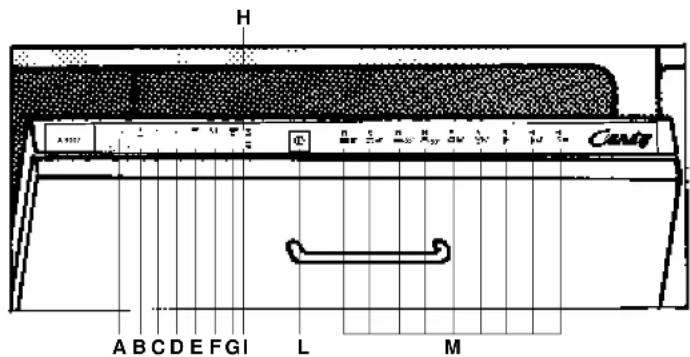
Description of the control
A Digital led display
BProgramme selection button
C Delay start button
D Economy button
E HPS button
F Half load button
G START programme button
H Salt level indicator light
1 Rinse aid indicator light
LOn/off button
M Programme guide
Dimensions:
Height cm 82+88,5
Depth cm 55
width cm 59,6
Porth with door open cm 117
Depth with door open cm 117
Technical Data
IEC place load
Capacity with pans and dishes
Water supply pressure
Fuse
Power input
Supply voltage
12
8 persons
Min. 0,08 - Max 0,8 MPa
(see rating plate)
(see rating plate)
(see rating plate)
Operating the programmes and special functions
Use in conjunction with programme guide
Setting a programme
Open the door press the button; the last programme selected will appear on the display. To set a new programme, press the Programme Selection Button "P". When the required programme is shown in the display, press the "Start" button. The time of the selected programme (in hours and minutes) will start to flash in the display. Close the door and after an audible signal has sounded (if it has not been deactivated) the programme will start automatically.
Setting the Rapid Programme
This is a super-fast programme for lighter soiled or reduced loads.
To set: a quarter of an hour before needed start programme R "P9".
The dishwasher will then automatically fill with water and heat it up. When the heating phase has finished, the "P9" symbol will flash in the display and an audible signal (if it has not been deactivated) lets you know that the door can be opened and the dishes loaded. (If the door is opened during the preheating phase, a signal reminds you that has not yet finished heating.) Put the detergent in the dispenser and load the dishes, distributing them over the two racks (e.g., putting the plates in alternate slots). Press the "Start" button and the "P9" symbol will disappear to be replaced by the remaining wash time, which will flash.
Close the door and, after a short audible signal (if it has not been deactivated) the programme starts automatically.
Half load button 1/2
By pressing this button it is possible to wash a small quantity of crocery using only the upper basket for dishes and cutley in the bottom basket.
This reduces water and energy consumption and requires a smaller quantity of detergent.
Please Note:
When the START Button has been selected it is not possible to deselect it.
HPS button (High Pressure System)
Your dishwasher is filled with a two speed motor. By pressing the HPS Button, the motor operates at a higher speed which will result in higher water pressure, to attack the dirt.
The HPS option is particularly suitable for washing pans, pots and heavily soiled crockery.
Please Note:
This option must be selected before pressing the START button.
Economy button E
The "E" button reduces the temperature of the water during the last rinse, provides an energy saving of more than 20% and shortens the cycle.
Recommended for evening washes when the dishes are not required perfectly dry, straight away.
Interrupting a programme
It is not recommended that the door be opened while a programme is running, and especially not during the main wash phase and final drying.
However, the appliance will stop automatically when the door is opened. At this point the various wash options can be programmed or cancelled. The current programme can also be cancelled.
If, the door is opened during a programme, the symbol for that programme will flash in the display and the machine stops.
Please Note:
If you open the door during the drying cycle an audible audio signal advises you that the drying cycle has not yet completed.
To restart the machine, press the "Start" button and the time remaining for the programme will flash. Now close the door.
If you wish to cancel or change a programme that is running, carry out the following: open the door keep the "Start" button pressed in until the number of the programme stops flashing. A new programme can now be set.
NB: if, on pressing the "Start" button the symbol "00" starts to flash on the display, it means that there is water in the machine. Close the door to allow the water to be discharged and wait for the audible signal, after which the new programme can be set. Before startling a new programme, you should check that there is still detergent in the dispenser. If necessary, top up the dispenser.
End of programme
The end of the programme is indicated by an audible signal (if it has not been deactivated). When the door is opened the number of the programme that has just finished will appear on the display.
Important
If the programme shown in the display starts to flash and the machine will not let any more programmes be selected, press the "Start" button and keep this button pressed until the display stops flashing.
Delay Start programme button
To set the delay start programme press the button.
On the first press the current setting appears on the display. Each time the button is pressed the delayed time In one hour increments increases, up to a maximum of 19 hours.
Once set, wait until the selected time is confirmed when it appears in the display. Press the "Start" button to start the countdown. If the countdown has not already been activated, the delay start can be cancelled by pressing the . button
until the selected programme appears on the display.
The delay start can be cancelled at any time simply by keeping the "Start" button pressed in until the required wash cycle appears on the display.
If you wish to see which programme has been selected, press the Programme Selection button "P".
NB: If the door is opened during the countdown, for example to select one of the options (or to add more dishes), the "Start" button should be pressed before closing the door again, in order to restart the countdown.
Activating and deactivating the audible signal
The audible signal function can be deactivated in the following way:
keep the Programme Selection Button (P) pressed in for a few seconds and at the same
time press the stop/start button ①
symbol "b1" appears on the display the audible signal is activated. Press the programme selection button (P) again and the symbol "b0" will appear which means that the audible signal has been deactivated.
An audible signal sounds to indicate that the setting has been stored in memory.

Attention
This dishwasher is equipped with an anti-overflow safety device which works even when power is off, and if the water level is too high, the supply will automatically be closed off. Important
To ensure the correct operation of the anti-overflow safety device, it is recommended not to move or to tilt the dishwasher during operation.
If it is necessary to move or to tilt the dishwasher, first make sure the washing cycle is finished and that no water is left in the tank.
The Dishwasher is able to self-assess a number of problems. The problem will be illustrated in the display window and by an audible signal.
PROBLEMS AUTOMATICALLY SIGNED
| PROBLEM | CAUSE | REMEDY |
| Display shows E1. | Water supply switched off. | Switch off appliance. Turn on water supply. Reset the cycle. |
| Display shows E2. | Proleom with electronic temperature control. | Call Service for assistance. |
| Display shows E3. | Proleom with Water Heater element. | Call Service for assistance. |
| Display shows E4. | The appliance does not discharge water. | Check : • That the discharge hose is not bent • Syphon is not blocked • Filters are not blocked |
| Display shows E5. | Problem with electronic load device. | Call Service for assistance. |
Regulating the water softener with electronic programmer
The water softener can treat water with a hardness level of up to 90ofH (French grading) or 50odH (German grading) through 8 settings.
The settings are listed in the table below:
| Level | Water hardness | Water hardness | Use of regenerating salt | Water softener setting |
| °F (French) | \( ^o_dH \)(German) | |||
| 0 | 0-5 | 0-3 | NO | D1 |
| 1 | 6-10 | 4-6 | YES | D1 |
| 2 | 11-20 | 7-11 | YES | D2 |
| 3 | 21-30 | 12-16 | YES | D3 |
| 4 | 31-40 | 17-22 | YES | D4 |
| 5 | 41-50 | 23-27 | YES | D5 |
| 6 | 51-60 | 28-33 | YES | D6 |
| 7 | 61-90 | 34-50 | YES | D7 |
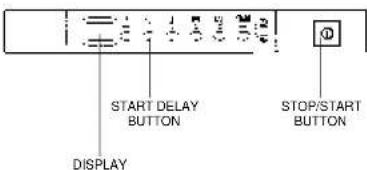
The softener unit is set in the factory at level 4 (D4) as this satisfies the requirements of the majority of users. Regulate the setting of your water softener unit according to the degree of hardness of your water as follows: open the door, keep the delay start button pressed in and at the same time press the stop/start button
The factory setting "D4" will appear on the display. To change the setting, press the start delay button .Each time you press that button the setting will increase by one level. When you have reached "D7", the display will go back to "D1". When the required setting appears on the display, wait for an audible signal to confirm that the new setting has been stored in memory.
22
The waterblock system
The waterblock system has been designed to improve the safety of your appliance, particularly when the machine is left unattended.
The waterblock system actually prevents flooding which might be caused by a machine malfunction or as a result of a fracture on the pipes.
How does waterblock work
The sump located in the base of the appliance collects any possible water leakage and operates a sensor which subsequently activates a valve placed under the water tap and stops any water from the supply even with the tap fully opened. If the box containing the electrical parts is damaged, remove the plug from the socket immediately.
To ensure perfect operation of the safety system, box "A" with the hose, should be connected to the tap as shown in Figure
- The inlet hose should not be cut, as it contains parts under load. If the hose is not long enough for correct connection, it must be replaced with a longer one. The hose can be obtained from your Service Agent.

Fig. 1
23
PROGRAMME SELECTION
| Programme Symbol | Description |
| Check list | Programme contents | Average duration minutes | Special function buttons available | ||||||||||
| Determinant for soaking (Freshwater) | Detergent for washing | Clean filter | Check rinse and dispenser | Check salt container | Hot pre-wash | Cold pre-wash | Main wash | First cold rinse | Second cold rinse | Hot rinse with rinse aid | With cold water (15°C) | Economy button | |
| 70° | Intensive | Once a day - for heavily soiled pans and any other items that have been left all day for washing. |
| Normal | Once a day - for normal soiled pans and any other items that have been left all day for washing. Programme standardised to IEC 436. | |
| Regular | Suitable for heavily soiled items that are to be washed straight after a meal. | |
| Eco 50°C | Energy Saving Programme suitable for normal soiled items. Using detergents with enzyme. Programme standardised to EN 50242. | |
| Delicate | Suitable for delicate crockery and glassware. Also for less soiled items excluding pans. | |
| Glassware | For washing glassware and delicate porcelain without dried-on material. | |
| Cold pre-wash | Short cold pre-wash for items that are stored in the dishwasher until you are ready to wash a full load. | |
| Platewarming | Suitable for rinsing dishes which have not been used for some time and for warming dishes prior to serving. | |
| Rapid 18 minute programme | Stage I Water is heated before the machine is loaded with dishes. | |
| Stage II Quick wash for dishes which are to be washed immediately after the meal. Wash load of 4/6 persons. |
| ● | ● | ● | ● | ● | ○ | 70°C | ○ | ○ | ○ | 115 | YES | YES | YES | YES | ||
| ● | ● | ● | ● | ● | ○ | 65°C | ○ | ○ | 95 | YES | YES | YES | YES | |||
| ● | ● | ● | ● | 55°C | ○ | ○ | 85 | YES | YES | YES | YES | |||||
| ● | ● | ● | ● | 50°C | ○ | ○ | 105 | YES | YES | YES | YES | |||||
| ● | ● | ● | ● | 50°C | ○ | ○ | 70 | YES | YES | YES | ||||||
| ● | ● | ● | ● | 45°C | ○ | ○ | 65 | YES | YES | YES | ||||||
| ● | ○ | 5 | N/A | YES | YES | YES | ||||||||||
| ● | ● | 68°C | ○ | 40 | N/A | YES | YES | |||||||||
| 15 | N/A | YES | ||||||||||||||
| ● | ● | 60°C | ○ | 18 | N/A | YES |
*WITH HOT WATER THE TIME REMAINING UNTIL THE END OF THE PROGRAMME
IS AUTOMATICALLY DISPLAYED WHILE THE PROGRAMME IS RUNNING.
N/A = OPTION NOT AVAILABLE
| ●●● | ○ | ● | 70°C | ○ | ○ | ○ | 115 | JA | JA | JA | |||||
| ●●● | ○ | 65°C | ○ | ● | ○ | 95 | JA | JA | JA | ||||||
| ●● | ● | ●55°C | ○ | ○85 | JA | JA | JA | ||||||||
| ●● | ● | ●60°C | ○ | ○105 | JA | JA | JA | ||||||||
| ●● | ● | ●60°C | ○ | ○70 | JA | JA | JA | ||||||||
| ●● | ● | ●45°C | ○ | ○65 | JA | JA | JA | ||||||||
| ● | ○ | 5 | N.D. | JA | JA | JA | |||||||||
| ● | ● | 68°C | ○40 | N.D. | JA | JA | |||||||||
| 15 | N.D. | JA | |||||||||||||
| ● | ● | 60°C | ○ | 18 | N.D. | JA |
^ BEI WARMWASSERANSCHLÜB KORRIGIER T SICH DIE RESTZEIT ZUM
PROGRAMMENDE AUTOMATISCH IM LAUFES DES PROGRAMMES.
N.D. = OPTION NICT VERFUGBAR
Waterblock
| ●●● | ○ | ● | 70°C | ○ | ○ | ○ | 115 | AJA | JA JA | ||||||
| ●●● | ○ | 65°C | ○ | ● | ○ | 95 | JA JA | JA JA | |||||||
| ●● | ● | ●55°C | ○ | ○ | ○ | 85 | JA JA | JA JA | |||||||
| ●● | ● | ●60°C | ○ | ○ | ○ | 105 | JA JA | JA JA | |||||||
| ●● | ● | ●60°C | ○ | ○ | ○ | 70 | AJAA | ||||||||
| ●● | ● | ●45°C | ○ | ○ | JA65 | JA | JA | ||||||||
| ● | ○ | 5 | N/A | JA | JA | JA | |||||||||
| ● | ● | 68°C | ○ | 40 | JNA | JA | |||||||||
| 15 | JNA | ||||||||||||||
| ● | ● | 60°C | ○ | 18 | JNA |
- WANNEER DE MACHINE WARM WATER GEBRUKT TUDENS EEN PROGRAMMAKOMT AUTOMATISCH OP DE DISPLAY TE STAAAN HOEVEEL MINUTEN HET NOG DUURT TOT HET EINDE VAN HET PROGRAMMA.
N:A= KEUZEMOGELUKHEID NIET AANWEZIG.
Waterblock
N.D. = OPCIÑ NO DISPONIBLE
Parabens,
No公共场所。
No local public places.
No public parks.
No public libraries.
No public libraries.
No public libraries.
No public libraries.
No public libraries.
No public libraries.
No public libraries.
No public libraries.
No public libraries.
No public libraries.
No public libraries.
No public libraries.
No public libraries.
No public libraries.
No public libraries.
No public libraries.
No public libraries.
No public libraries.
No public libraries.
No public libraries.
No public facilities.
No public facilities.
No public facilities.
No public facilities.
No public facilities.
No public facilities.
No public facilities.
No public facilities.
No public facilities.
No public facilities.
No public facilities.
LABELA DOS PROGRAMAS
The manufacturer declines all responsibility in the event of any printing mistakes in this booklet. The manufacturer also reserves the right to make appropriate modifications to its products without changing the essential characteristics.



