
CIP 3D9E0B - Dishwasher CANDY - Free user manual and instructions
Find the device manual for free CIP 3D9E0B CANDY in PDF.


User questions about CIP 3D9E0B CANDY
0 question about this device. Answer the ones you know or ask your own.
Ask a new question about this device
Download the instructions for your Dishwasher in PDF format for free! Find your manual CIP 3D9E0B - CANDY and take your electronic device back in hand. On this page are published all the documents necessary for the use of your device. CIP 3D9E0B by CANDY.
USER MANUAL CIP 3D9E0B CANDY
natural_image
Technical line drawing of a computer chassis with front, back, and internal components (no text or symbols)CIP 3D9E0B
natural_image
Isometric line drawing of a wooden box with a textured panel on one side, enclosed in a dashed-line frame (no text or symbols)text_image
Vista in piano A BDimensioni del mobile
natural_image
Technical line drawing of a computer tower case with visible internal components and mounting brackets (no text or symbols)text_image
Diagram illustrating a device assembly or mounting process with labeled components and directional arrowsnatural_image
Illustration of a gray rectangular device with an upward arrow and labeled parts, no text or symbols present.4 [08] x4 (3,5x44 mm)
natural_image
Simple circular diagram with intersecting lines and a downward arrow, no text or symbols present.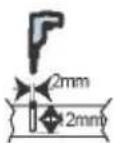
natural_image
Circular diagram showing a mechanical or electrical structure with no visible text or symbolsIMPORTANTE!
natural_image
Technical diagram of a mechanical assembly with spring-loaded components and a blue panel (no text or symbols)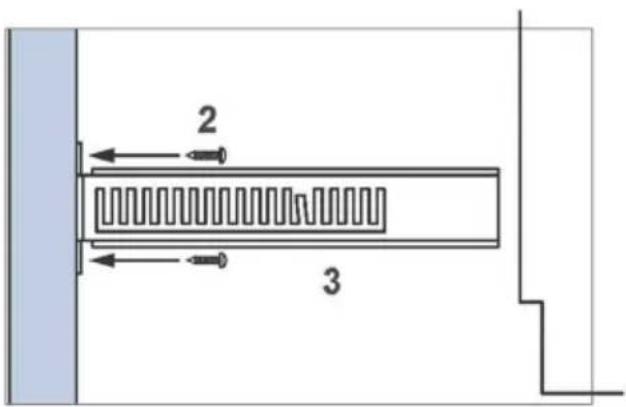
text_image
2 34
natural_image
Diagram of a mechanical lever system with a spring and pulley, no text or symbols present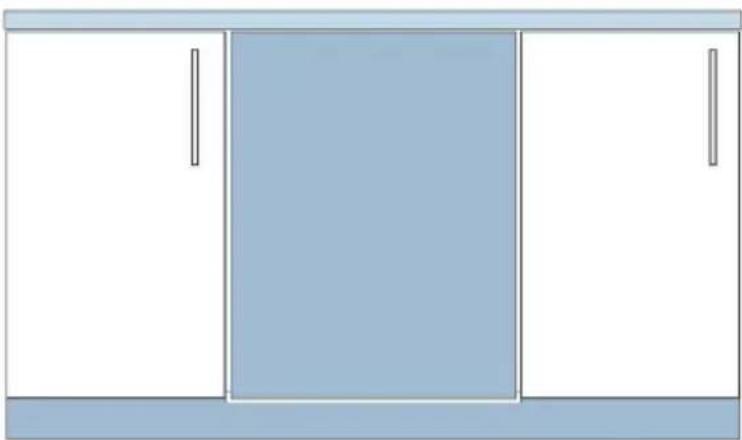
natural_image
Simple diagram of a cabinet with three doors, one front view and one side view (no text or symbols)3
natural_image
Simple line drawing of a plug inserted into a wall socket (no text or symbols)text_image
Technical diagram of an open refrigerator with numbered parts for identificationnatural_image
Technical line drawing of a mechanical component with spring-like elements (no text or symbols)natural_image
Technical line drawing of a mechanical component with spring and housing (no text or symbols)natural_image
Isometric line drawing of a multi-wheeled vehicle chassis with wheels and structural ribs (no text or symbols)natural_image
Technical line drawing of a dual-panel grid structure with no visible text or symbolstext_image
Safety warning symbols for cleaning a container, indicating no need to check or mark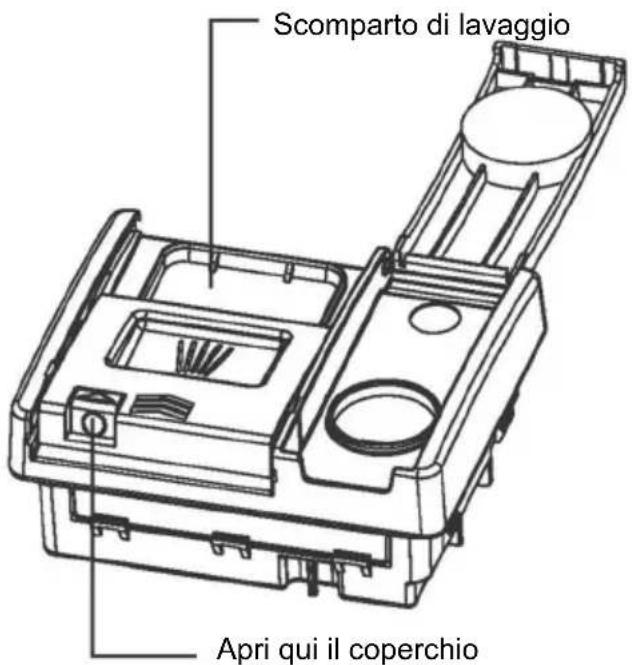
natural_image
Disassembled kitchen appliance with multiple cups and tiered plates arranged in a grid (no text or symbols visible)Cestello superiore
natural_image
Cross-sectional cutaway of an internal combustion engine cylinder showing internal turbine blades and internal combustion engine components (no text or labels)Cestello inferiore
natural_image
Cross-sectional diagram of an internal combustion engine cylinder with internal components and internal combustion engine blocks (no text or labels)Cestello inferiore
natural_image
Technical line drawing of a computer chassis with front panel, rear panel, and internal components (no text or labels)CIP 3D9E0B
natural_image
Isometric line drawing of a wooden panel inside a cube, showing wood texture and structural details (no text or symbols)natural_image
Technical line drawing of a computer tower case with visible internal components and mounting brackets (no text or symbols)text_image
Diagram illustrating a device assembly or mounting process with labeled components and directional arrowsnatural_image
Illustration of a gray rectangular device with two hands holding it, featuring an upward arrow and a small symbol below (no text or labels)natural_image
Simple circular diagram with intersecting lines and a downward arrow, no text or symbols present.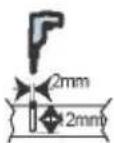
text_image
rauben r Blendenatural_image
Circular diagram showing a mechanical or electrical structure with no visible text or symbolsWICHTIG!
natural_image
Technical diagram of a mechanical assembly with spring and housing components (no text or labels)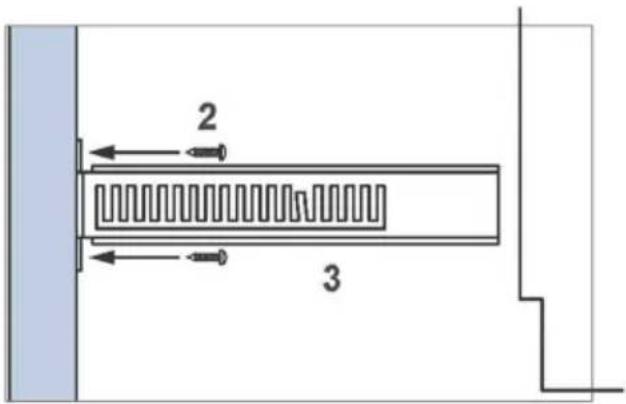
text_image
2 34
other
| Dimension | Value | | --------- | ----- | | Top Left | 153 | | Top Right | 100 | | Bottom Left | 30 | | Bottom Right | 65 | | Bottom Right (labeled) | A |natural_image
Technical line drawing of a mechanical system with spring-loaded components and a wheel (no text or symbols)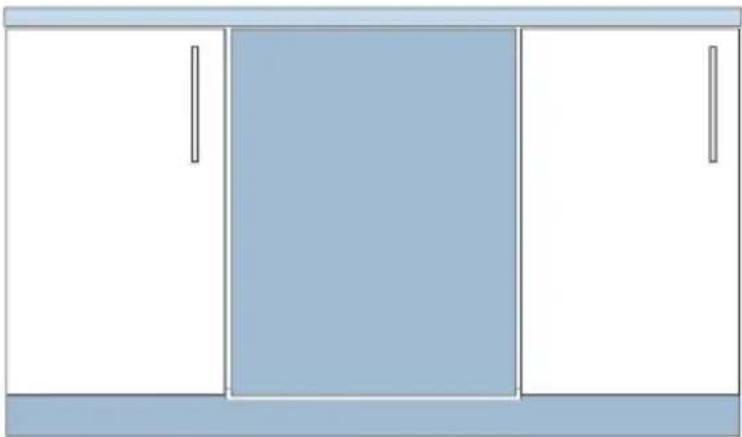
natural_image
Simple line drawing of a cabinet with three panes (no text or symbols)natural_image
Simple line drawing of a plug inserted into a wall socket (no text or symbols)text_image
Exploded view diagram of a washing machine with numbered components for identificationnatural_image
Technical line drawing of a mechanical component with spring-like elements (no text or symbols)natural_image
Technical line drawing of a mechanical component with springs and housing (no text or symbols)natural_image
Isometric line drawing of a multi-wheeled vehicle chassis with wheels and structural ribs (no text or symbols)natural_image
Technical line drawing of a dual-panel grid device with no visible text or symbolstext_image
Safety warning symbols for cleaning a container, indicating no need to check or mark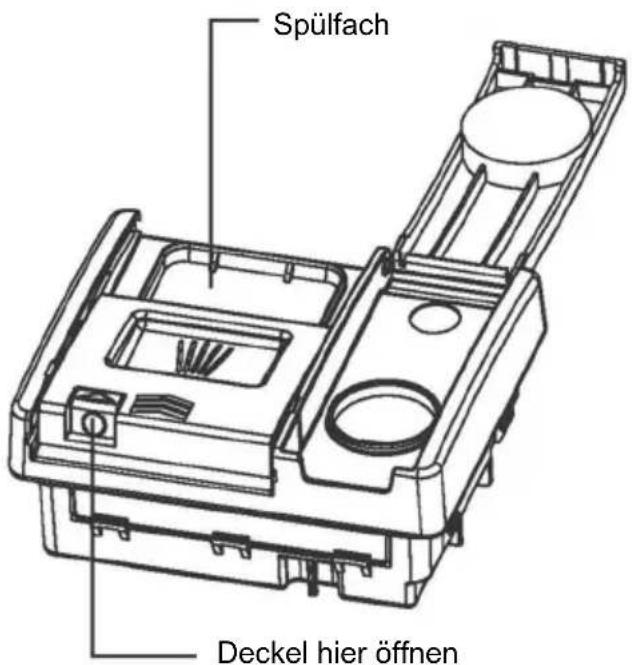
natural_image
Assorted kitchen utensils arranged in a transparent plastic tray (no visible text or labels)Oberer Korb
natural_image
Cross-sectional cutaway of an electrical insulator showing internal components like stator and rotor blades (no text or labels)Unterer Korb
natural_image
Cross-sectional diagram of an internal combustion engine cylinder with internal components and smokestacks (no text or labels)Unterer Korb
natural_image
Technical line drawing of a computer chassis with front, back, and internal components (no text or symbols)CIP 3D9E0B
Thank you for purchasing a Candy product
Please read these instructions carefully before using this appliance. The instructions contain important information which will help you get the best out of the appliance and ensure safe and proper installation, use and maintenance.
Keep this manual in a convenient place so you can always refer to it for the safe and proper use of the appliance.
If you sell the appliance, give it away, or leave it behind when you move house, make sure you also pass on this manual so that the new owner can become familiar with the appliance and safety warnings.
Safety and warnings....97
Installation instructions .... 100
Product Description 116
Ocerview of programmes 118
Water softening system....120
Using rinse aid....122
Utensils....123
Loading utensils 124
Adding detergent 126
Before first Use....127
Daily Use 129
Care and cleaning 131
Troubleshooting....135
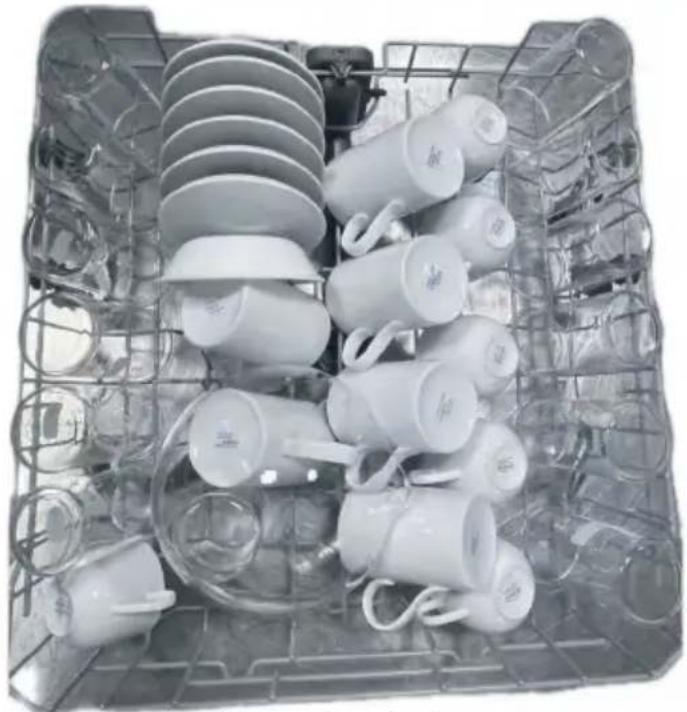
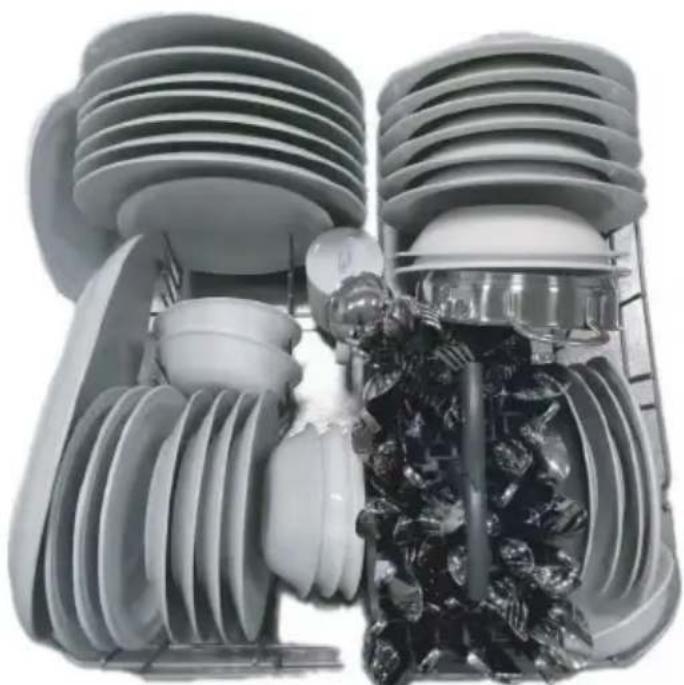
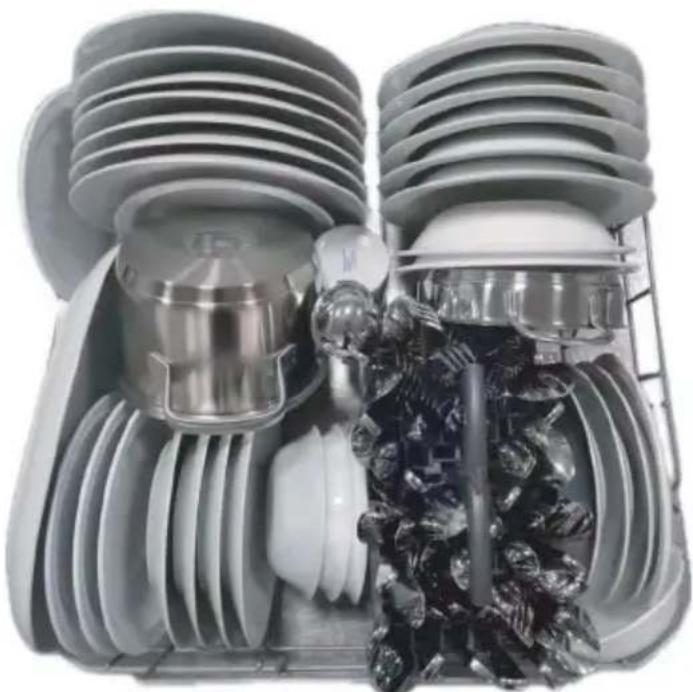
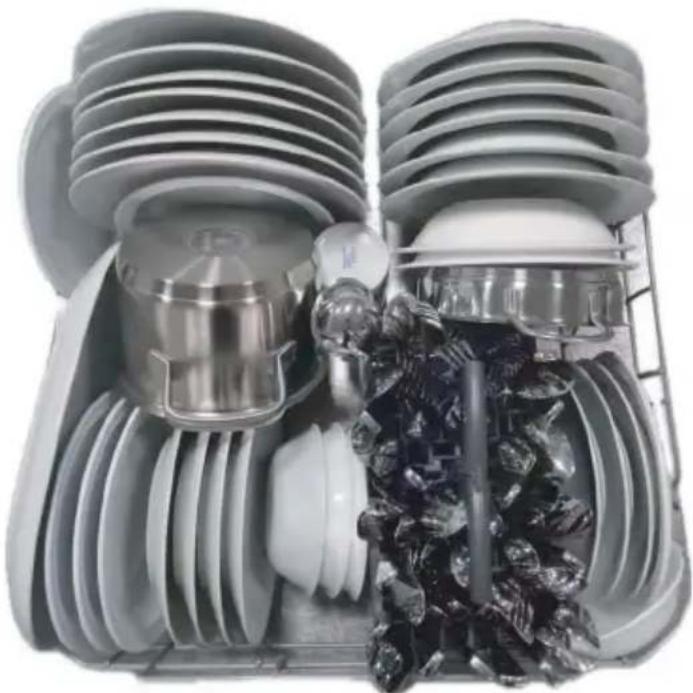
Recommended loading....139
Technical Data 140

WARNING
Electrical shock hazard
Before installing the dishwasher, remove the house fuse or open the circuit breaker. This appliance must be earthed. In the event of a malfunction or breakdown, earthing will reduce the risk of electric shock by providing a path of least resistance for electric current.
This appliance is equipped with a cord having an equipment earthing conductor and an earthing plug. The plug must be plugged into an appropriate outlet that is installed and earthed in accordance with all local codes and ordinances.
WARNING - Improper connection of the equipment-earthing conductor can result in a risk of electric shock. Check with a qualified electrician or service representative if you are in doubt as to whether the appliance is properly earthed.
Do not modify the power supply plug provided with the appliance - if it will not fit the outlet, have a proper outlet installed by a qualified electrician. Do not use an extension cord, adapter plug or multiple outlet box.
Failure to follow this advice may result in electrical shock or death.

WARNING
Cut Hazard
Take care - panel edges are sharp.
Failure to use caution could result in injury or cuts.

WARNING
When using your dishwasher, follow basic precautions, including the following:
- Read all instructions before using the dishwasher.
- The information in this manual must be followed to minimise the risk of fire or explosion or to prevent property damage, personal injury or loss of life.
- Use the dishwasher only for its intended function as described in this user guide.
-
This appliance is intended to be used in household and similar applications such as:
-
staff kitchen areas in shops, offices and other working environments;
- farm houses;
- by clients in hotels, motels and other residential type environments;
-
bed and breakfast type environments.
-
Use only detergents or rinse aid recommended for use in a domestic dishwasher and keep them out of reach of children.
- Check that the detergent dispenser is empty after the completion of each wash program.
- When loading items to be washed, locate sharp items so that they are not likely to damage the dishwasher and load sharp knives with the handle up to reduce the risk of cut-type injuries.
- Do not touch the filter plate (the metal disc in the dishwasher base) during or immediately after use, as it may be hot from the heater plate underneath.
- Do not tamper with the controls.
- Do not abuse, sit in, stand on the door or dish rack of the dishwasher.
- Do not lean on the adjustable racks or use them to support your body weight.
- To reduce the risk of injury, do not allow children to play in or on the dishwasher.
- Under certain conditions, hydrogen gas may be produced in a hot water heater system that has not been used for two weeks or more. Hydrogen gas is explosive. If the hot water system has not been used for such a period, before using the dishwasher, turn on all hot water taps and let the water flow from each for several minutes. This will release any accumulated hydrogen gas. As the gas is flammable, do not smoke or use an open flame during this time.
- Remove the door to the washing compartment when removing an old dishwasher from service or discarding it.
- Some dishwasher detergents are strongly alkaline. They can be extremely dangerous if swallowed. Avoid contact with the skin and eyes and keep children away from the dishwasher when the door is open. Check that the detergent receptacle is empty after completion of the wash cycle.
• Certified residential dishwashers are not intended for licensed food establishments.
Maintenance safety instructions
- Disconnect the appliance from the power supply before any cleaning or maintenance.
- When disconnecting the appliance, pull the plug rather than the power supply cord or junction of cord to avoid damage.
- Do not repair or replace any part of the appliance or attempt any servicing unless specifically recommended in this user guide.
- Keep the floor around your appliance clean and dry to reduce the possibility of slipping.
- Keep the area around/underneath your appliance free from the accumulation of combustible materials, such as lint, paper, rags and chemicals.
Operational safety instructions
- Open the door very carefully if the dishwasher is in operation. There is a risk of being sprayed with hot water. Do not open the door fully until the spray arms have stopped rotating.
- The door should not be left in the open position as this could present a tripping hazard.
- The water inside the dishwasher is not suitable for drinking.
- The dishwasher must be used with the filter plate, drain filter and spray arm(s) in place. To identify what these parts are, see drawings in section “Care and Cleaning” of this user guide.
- Do not operate this dishwasher if it is damaged, malfunctioning, partially disassembled or has missing or broken parts, including a damaged power supply cord or plug.
- Household appliances are not intended to be played with by children. Children of less than 8 years old must be kept away from the appliance unless continuously supervised. This appliance can be used by children aged from 8 years and above, and persons with reduced physical, sensory or mental capabilities or lack of experience and knowledge, if they have been given supervision or instruction concerning the use of the appliance in a safe way and they understand the hazards involved.
- Cleaning and user maintenance shall not be done by children without supervision.
- Do not allow children to play inside, on or with this appliance or any discarded appliance.
- If a dishwasher cleaner is used, we would strongly recommend a wash program with detergent should be run immediately afterward, to prevent any damage to the dishwasher.
- The dishwasher is designed for washing normal household utensils. Items that are contaminated by petrol, paint, steel or iron debris, corrosive, acidic or alkaline chemicals are not to be washed in the dishwasher.
- If the dishwasher is not being used for long periods of time, turn the electricity and water supply to the dishwasher off.
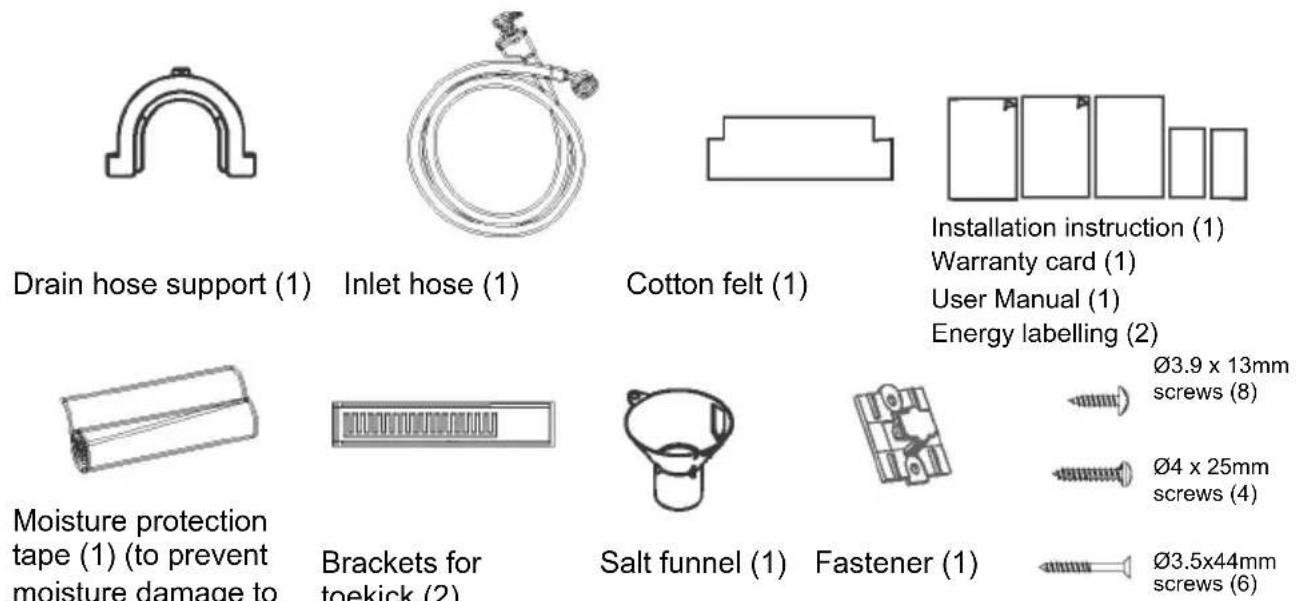
■ Parts supplied
text_image
Drain hose support (1) Inlet hose (1) Cotton felt (1) Installation instruction (1) Warranty card (1) User Manual (1) Energy labelling (2) Moisture protection tape (1) (to prevent moisture damage to Brackets for toekick (2) Salt funnel (1) Fastener (1) Ø3.9 x 13mm screws (8) Ø4 x 25mm screws (4) Ø3.5x44mm screws (6)■ Prior to installation
Unpacking and handling
- Check packaging and dishwasher for signs of transport damage. If the dishwasher is in any way damaged, do not install it. Contact the dealer the dishwasher was purchased from.
- Disposal of packaging: some of the packaging is recyclable. Check the symbols and labels and recycle if possible.
- Never lift the dishwasher from the door handle or the top panel. Doing so may cause damage.
- Always be careful with the hoses and power cord at the back of the dishwasher. Careful handling will prevent damage and malfunction from squashing, kinking or cuts.
- While installing the dishwasher, check the drain hose is not restricted or kinked.
Connections and services
- Check that the power cord is long enough to reach the outlet. If it isn't, it must be replaced by a haier authorised technician. Extension cords or multi-outlet power boards should not be used to connect the dishwasher to the power supply.
- Check that the hoses are long enough to reach the services. If a hose needs extending, ensure that the extension hose is new and of equal quality and diameter to the one already fitted.
- The dishwasher should not be connected to a water system where the emperature exceeds 25^ C.
- The dishwasher must not be connected to an undersink high-pressure "pushthrough" type hot water system, as damage to the system will result.
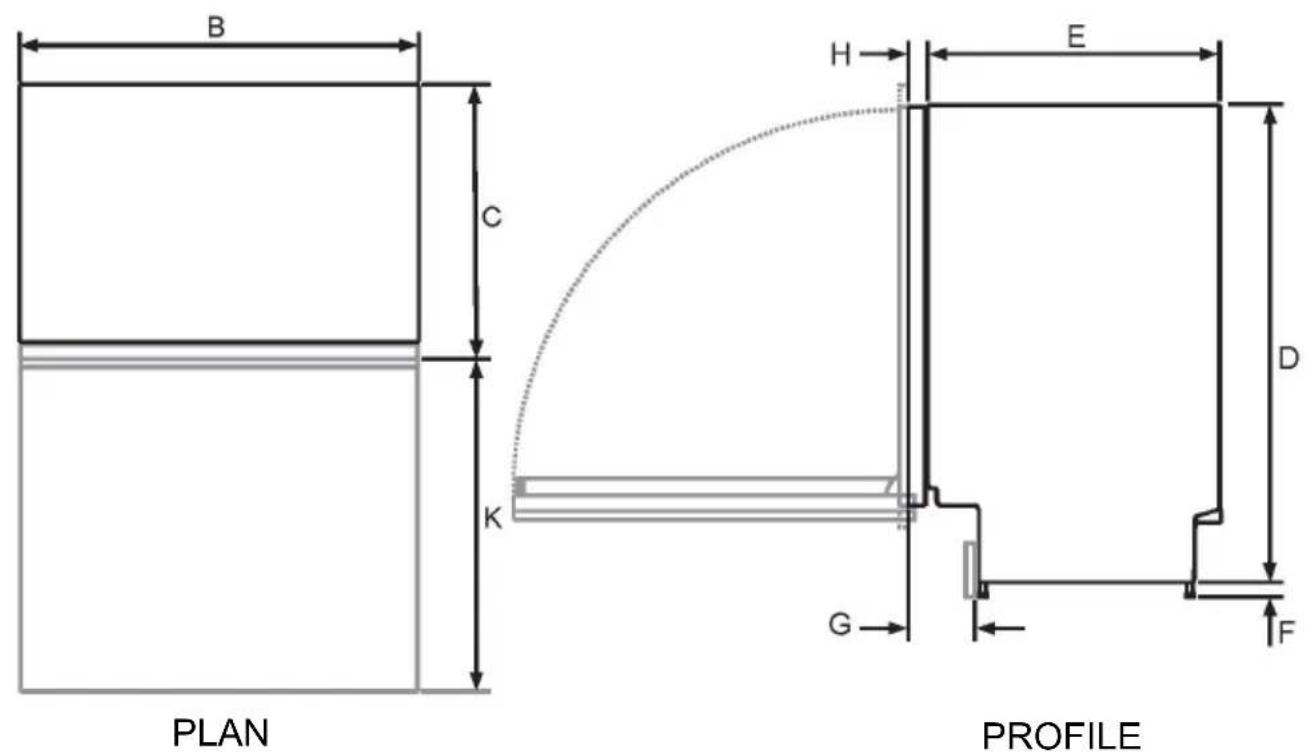
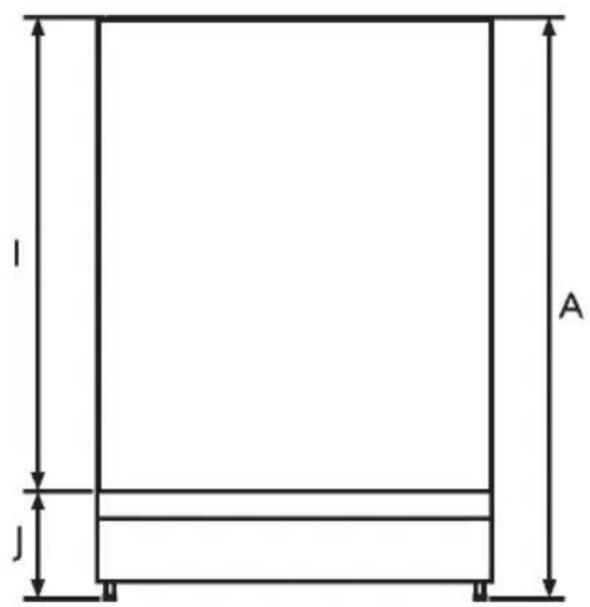
1 Product dimensions
text_image
A j lFRONT
natural_image
Isometric line drawing of a wooden panel inside a cube, showing wood texture and structural details (no text or symbols)| Product dimensions | Std tub product unit: mm |
| A Overall height* 820-880 | |
| B Overall width** 597 | |
| C Overall depth** 554 | |
| D Height of chassis 820 | |
| E Depth of chassis 521 | |
| F Height of feet* 0-60 | |
| G Depth of toe kickrecess | 120 |
| H Depth of inner door** | 33 |
| I Height from top of chassis to bottom of inner door | 683 |
| J Height from bottom of inner door to floor* | 137 |
| K Depth of door opening** | 639 |
* depending on adjustment of levelling feet.
** excluding custom panel and handle.
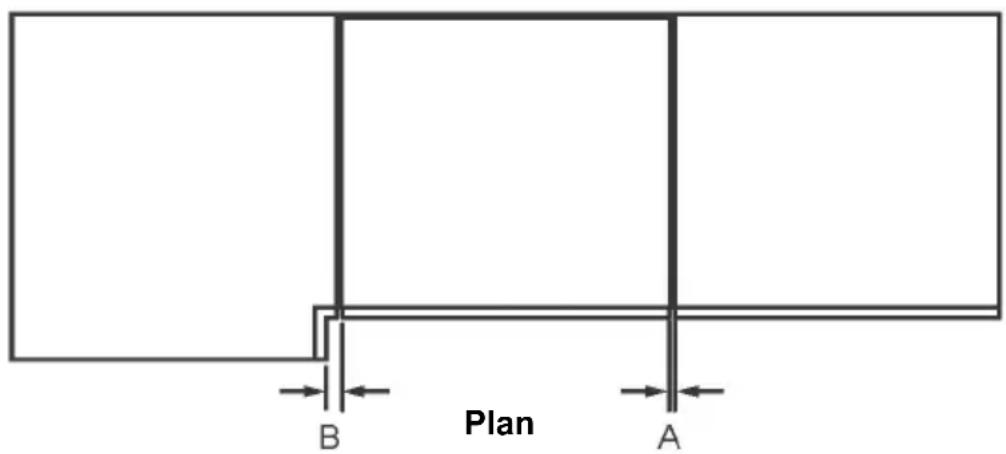
text_image
Plan A BCabinetry dimensions
| Minimum clearance to adjacent cupboard door |
| Minimum clearance to corner cupboard |
unit: mm
2
13
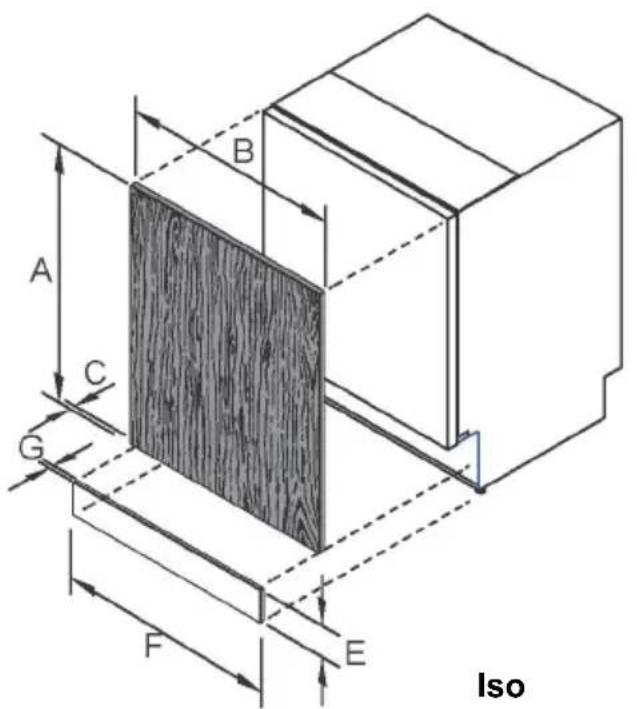
text_image
A B C G F E Iso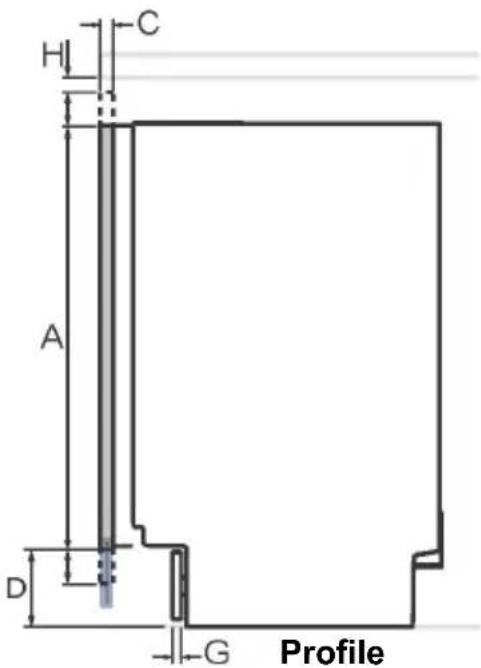
text_image
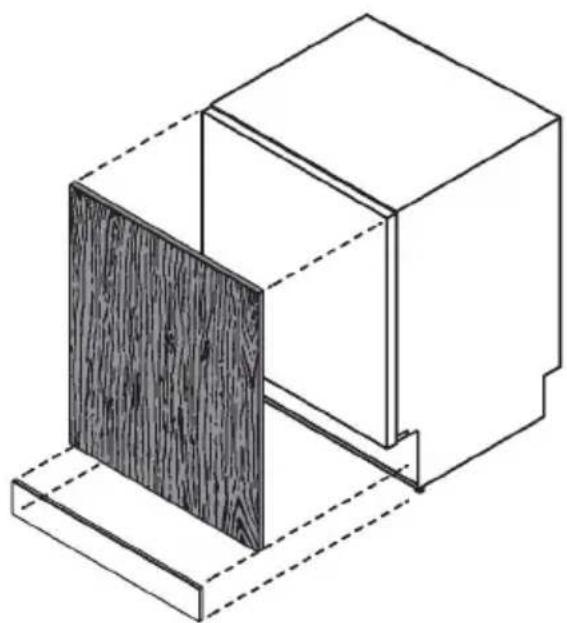
H C A D G ProfileCustom panel considerations
| A | Minimum height of custom door panel for full coverage of the inner door |
| B | Minimum door panel width 596 |
| C | Door panel depth 16-25 |
| D | Distance from base of door panel to floor |
| E | Toe kick panel height |
| F | Minimum width of custom toe kick panel * 596 |
| G | Minimum toe kick panel depth** 16 |
| H | Minimum clearance between top of door panel and benchtop |
| Weight of door panel (including handle) |
| Std tub product unit: mm |
| 677 |
| 65-200 |
| 65-200 |
| 2 |
| 4-9kg |
** if using supplied toe kick mounting screws. Panel can be fixed via screwing or gluing to the supplied mounting bracket.
Actual Product dimensions may vary by +2mm
2 Cavity preparation
Preparing the product and cabinetry
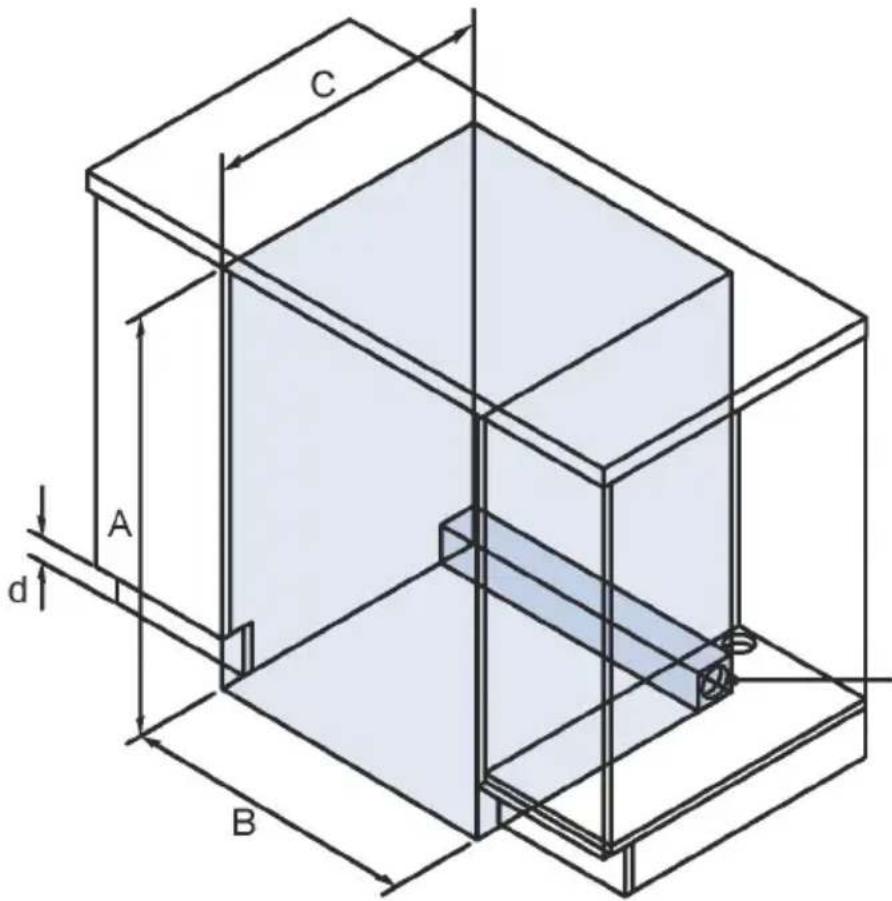
text_image
C A d BConnections can be located in an adjacent cabinet on either side of the dishwasher***
Isometric
| Cabinetry dimensions | unit: mm |
| A Minimum inside height* 822 | |
| B Minimum inside width 601 | |
| C Minimum overall depth** 581 | |
| D Height of toe kick area | 65-200 |
* depending on adjustment of levelling feet
** including 19mm door panels on adjacent cabinetry
*** For more information on service requirements, refer to 'Plumbing & electrical considerations' and 'Cabinetry preparation'.
IMPORTANT!
To prevent possible steam damage to the cabinetry, ensure that any bare wood surrounding the dishwasher is sealed with an oil-based paint or moisture-proof polyurethane.
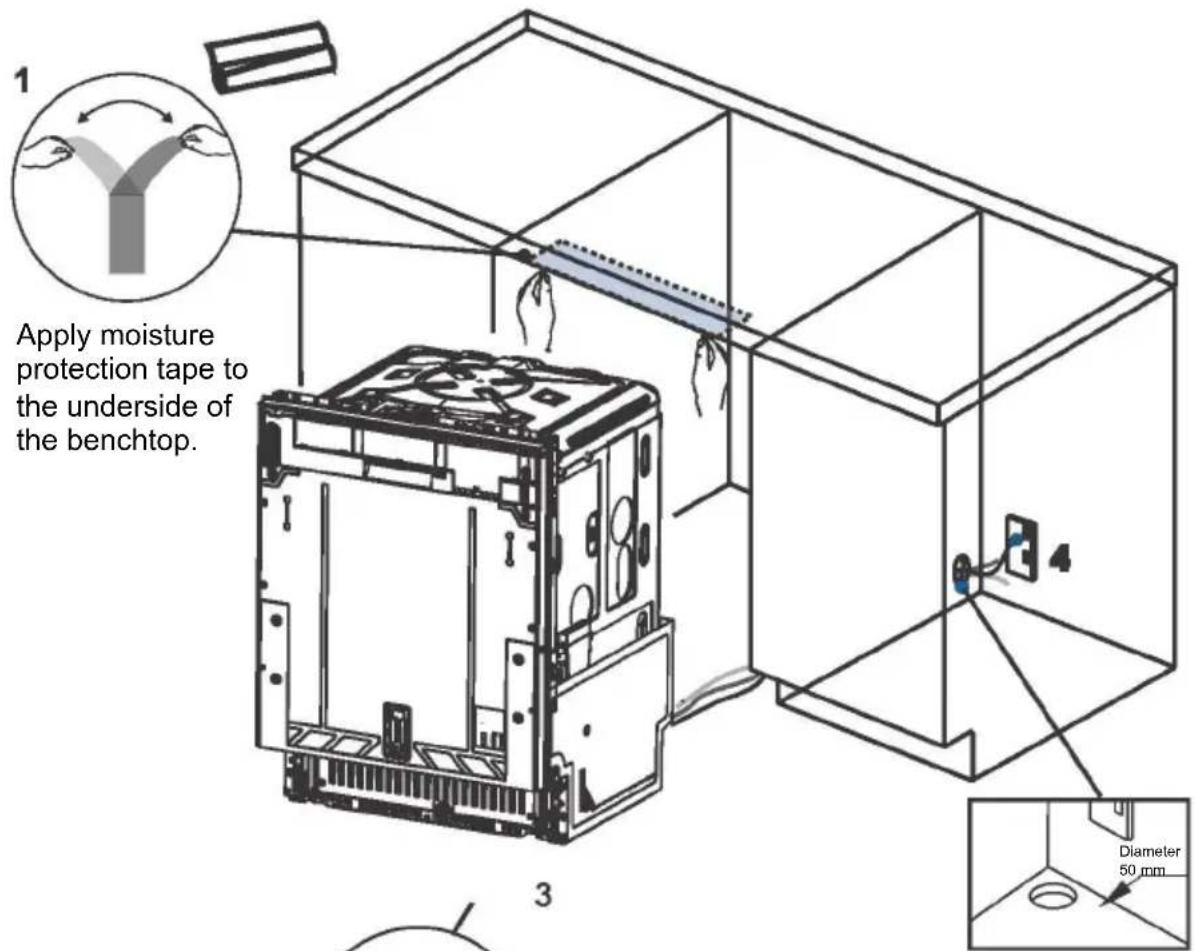
text_image
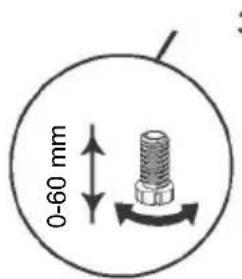
1 Apply moisture protection tape to the underside of the benchtop. 3 4 Diameter 50 mmThe feet of dishwasher can be adjusted as shown
text_image
0-60 mm- Services can be located either side of the dishwasher.
- Ensure that any services hole has a minimum diameter of 50mm.
IMPORTANT!
The power outlet must be located in a cabinet adjacent to the dishwasher cavity.
Positioning and stabilising the dishwasher
- Do not lift the dishwasher from the door handle.
- As you push product in, pull through hoses and cord, ensuring they don't get kinked or twisted.
- Plastic spacers can now be inserted at the side of the dishwasher next to the hinge to improve stability see step 7 for details on fitting spacers
- After sliding the dishwasher into position, adjust back foot with a 6mm Allen key.
- The front feet can be adjusted manually also.
- We recommend that you adjust the feet so that the dishwasher sits securely under the bench top so that it doesn't tip.
3 Custom door panel preparation
Front panel material specifications
The front of the dishwasher can be fitted with a front panel with the following specifications: Adequately sealed to withstand moisture (50°C @ 80% RH). Because of it being a hot and wet environment generally, the back and sides of the panel should be completely sealed with a waterproof vapor barrier (ie polyurethane) to prevent damage to the panel.
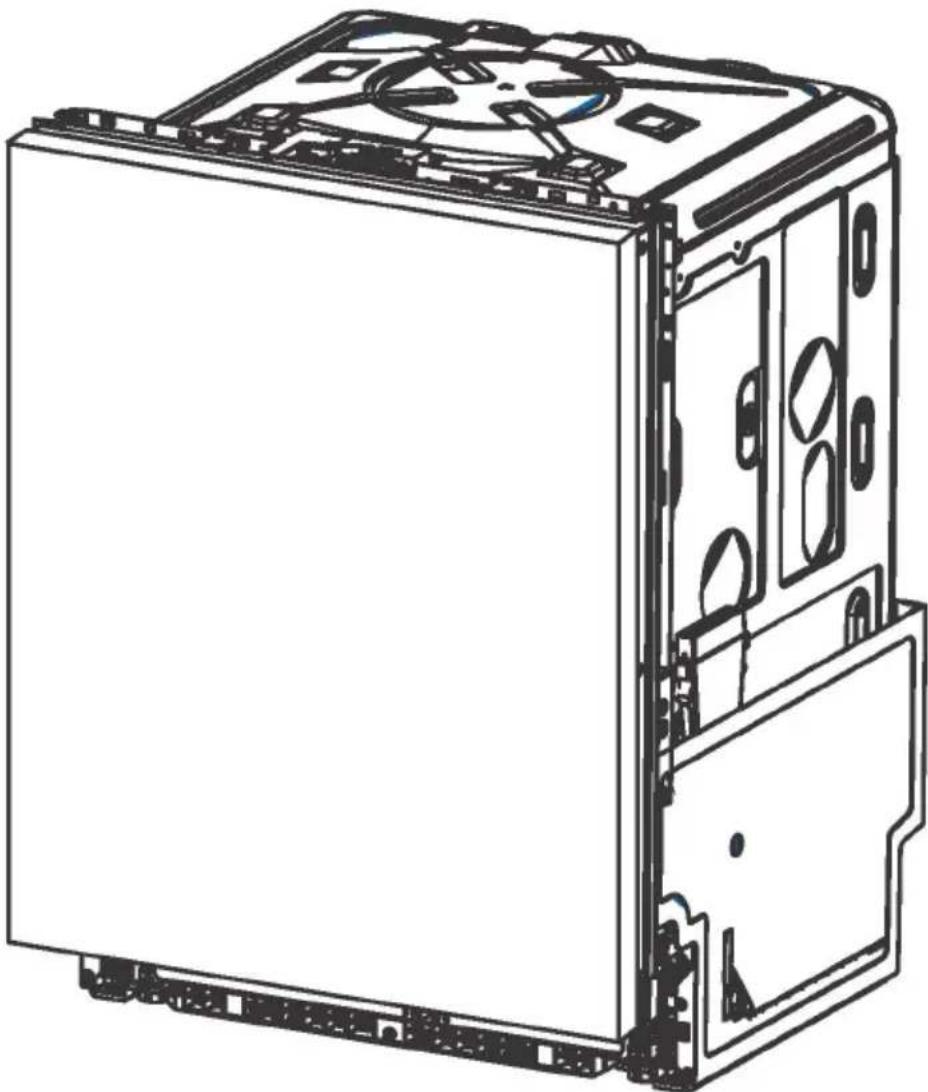
natural_image
Technical line drawing of a computer tower case with visible internal components and mounting brackets (no text or symbols)4 Attaching custom door panel
text_image
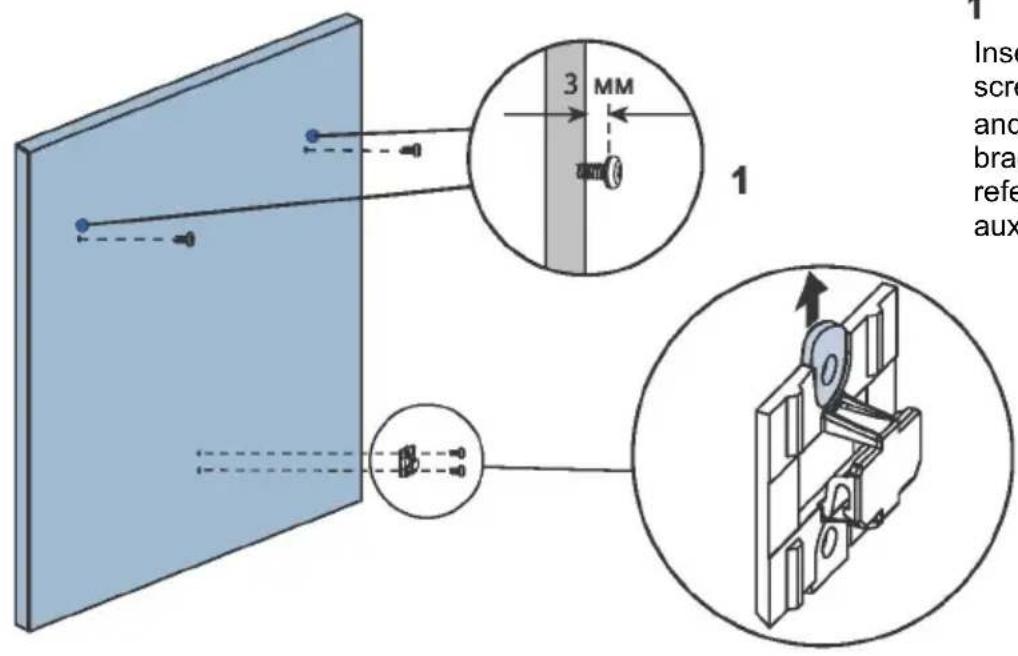
1 Insert screw and bras refe aux 3 MM 11
Insert ∅3.5 x 13mm screws through pilot holes and attach the small slider bracket to panel. (Please refer to the installation auxiliary page)
text_image
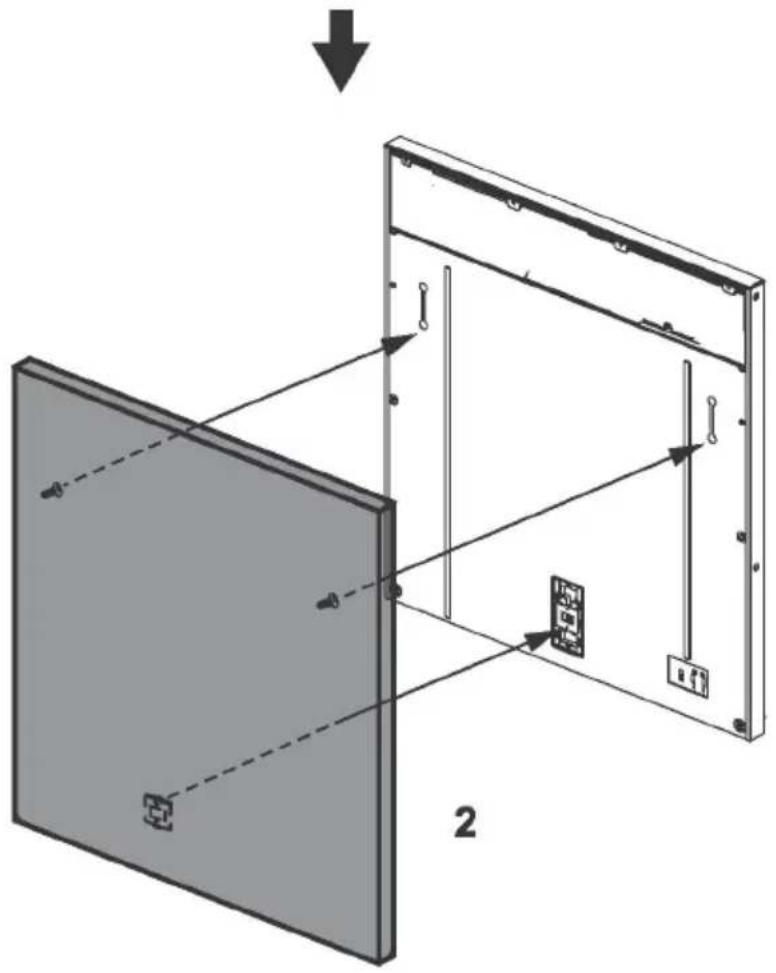
Diagram illustrating a device panel assembly with labeled components and directional arrows, showing structural alignment and component positioning.2
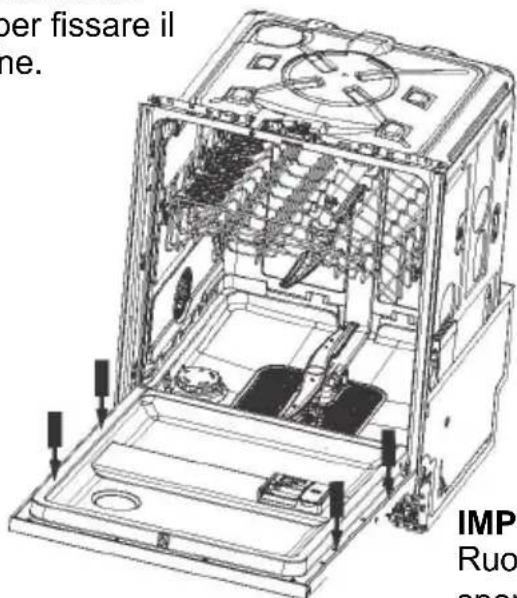
Close the door of the dishwasher, then hang the custom panel onto the front of the door.

natural_image
Illustration of a gray rectangular device with an upward arrow and labeled parts, no text or symbols present.Close the door of the dishwasher, then hang the custom panel onto the front of the door.
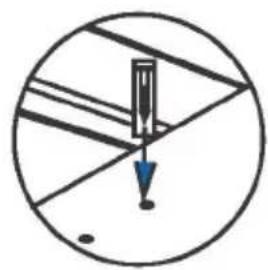
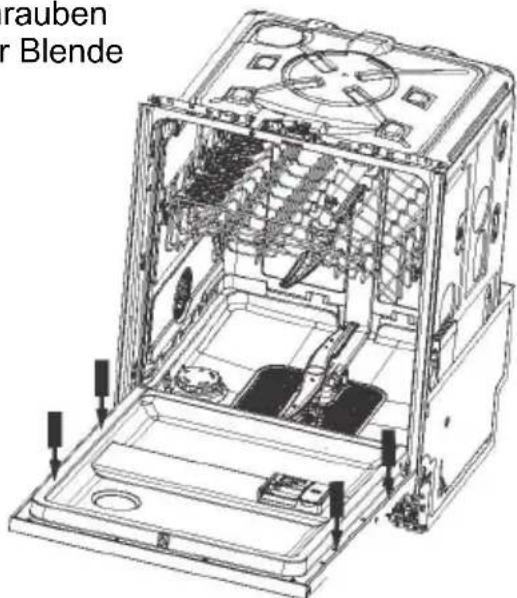
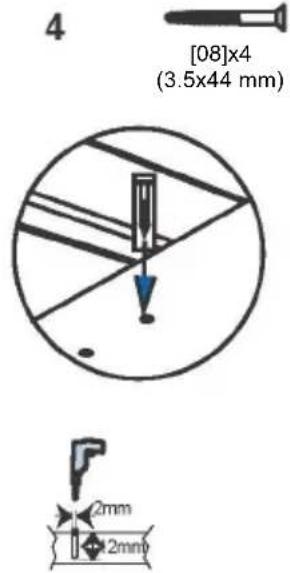
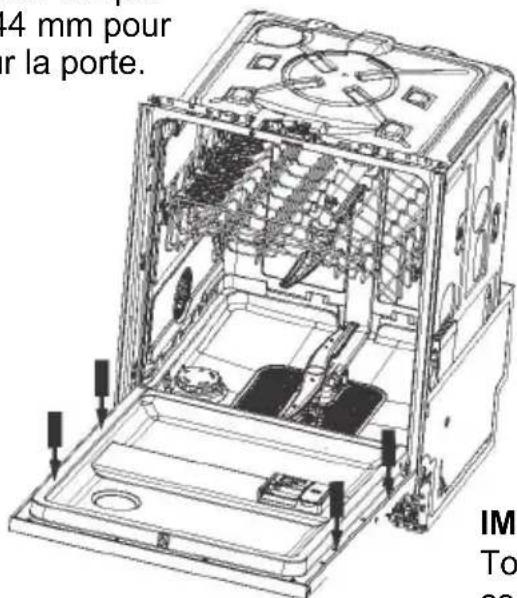
Open the door and remove screws before replacing them with ∅3.5 x 44mm screws to fix panel into place.
text_image
4 [08]x4 (3.5x44 mm) 2mm 2mm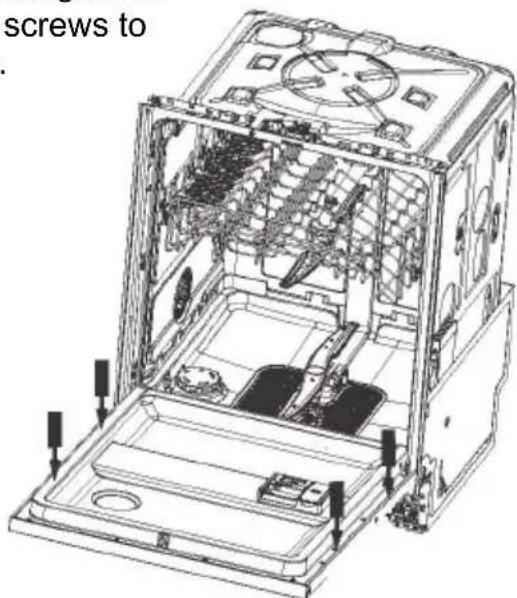
text_image
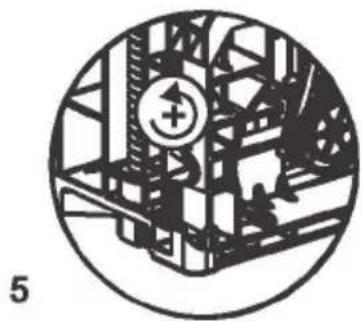
screws toDoor balancing The door balance can be adjusted via two screws accessed through two holes at the front. Adjust both sides at the same time, alternating between the sides so that even balance is achieved.
natural_image
Circular diagram showing a mechanical or electrical structure with no visible text or symbolsIMPORTANT!
Rotate the screws to adjust until the door is just open under its own weight.
Clockwise rotation: Spring tension
Counterclockwise rotation: Spring relaxation
5 Toe kick installation
Separate panel
text_image
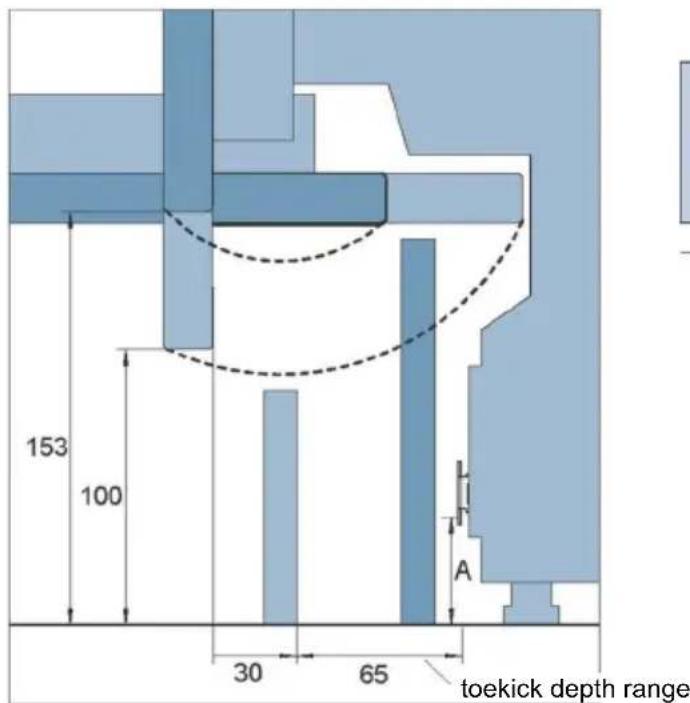
153 100 30 65 A toekick depth range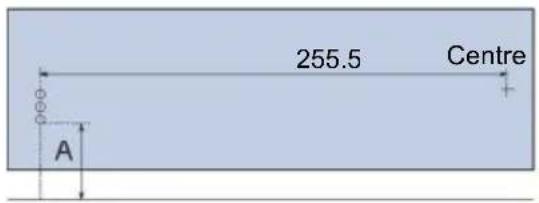
text_image
255.5 Centre A1
Mark out the pilot hole locations for each bracket. To establish the height in which the bracket will be fixed, measure the distance from the floor to the lowest hole of the bracket. Remove bracket from the product and plot the location of the other holes relative to this measurement. Note door overhang and swing range.
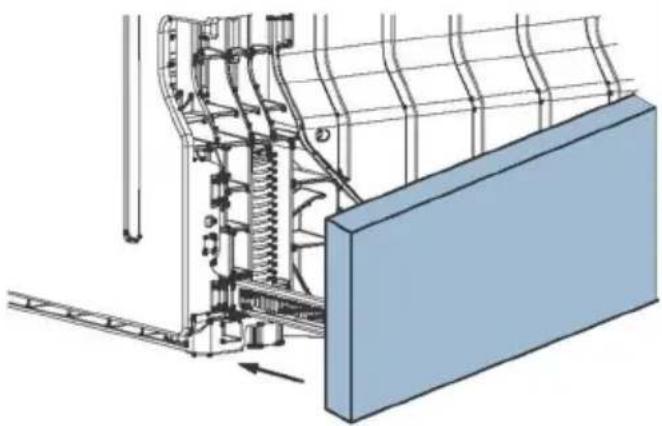
Fix brackets to panel using ∅3.5 x 13mm screws. Insert toekick into product and mark the desired alignment depth on the bracket. Remove panel. Using a screwdriver, bend the marked tabs out on both brackets to prevent toekick from receding into product further.
natural_image
Technical diagram of a mechanical assembly with spring-loaded components and a blue panel (no text or symbols)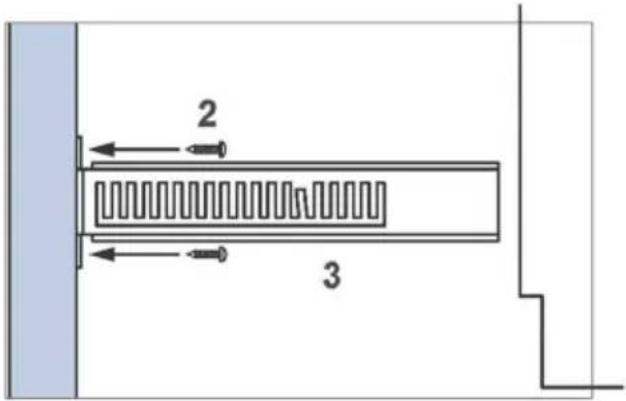
text_image
2 34
Slide toe kick firmly into the spaces on either side of the chassis to attach.
Continuous panel
text_image
153 100 30 65 toekick depth range A2
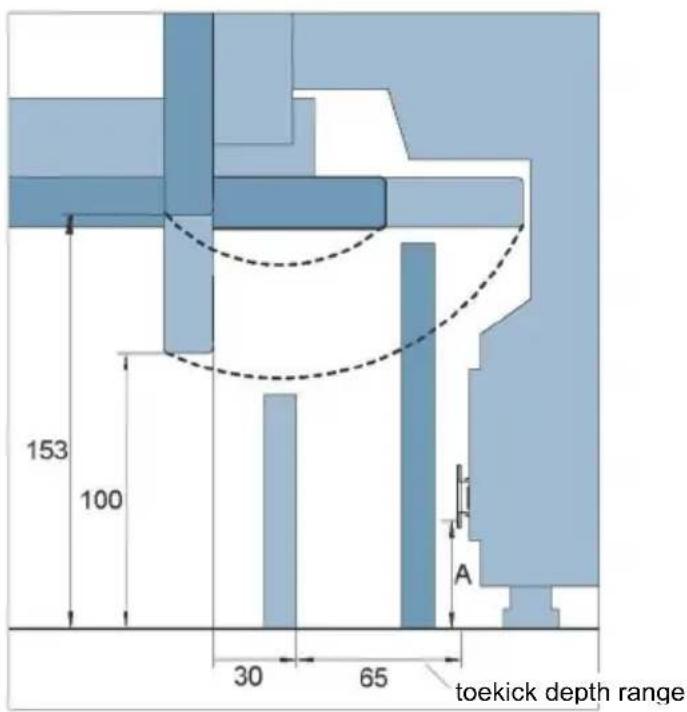
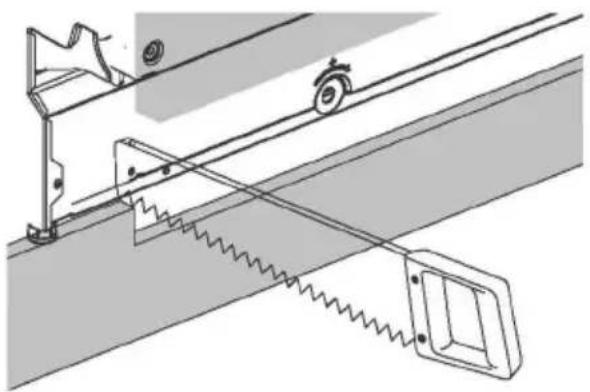
Align the toekick to desired position and mark out the point in which the toekick meets the base of the door panel. Cut back excess.
Note door overhang and swing range relative to height and depth of toekick panel. As the panel is continuous, cutting back panel is likely to be necessary to ensure seamless integration.
1
natural_image
Technical diagram of a mechanical system with spring-loaded components and a wheel (no text or symbols)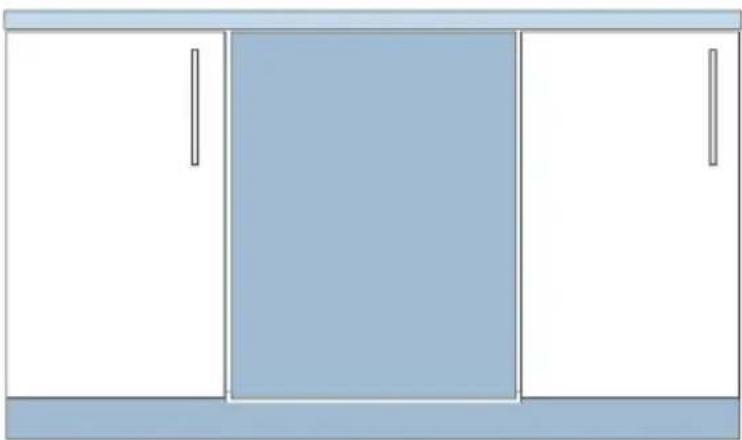
natural_image
Simple diagram of a cabinet with three doors, one front blank and one side closed (no text or symbols)3
Fit continuous panel to surrounding cabinetry
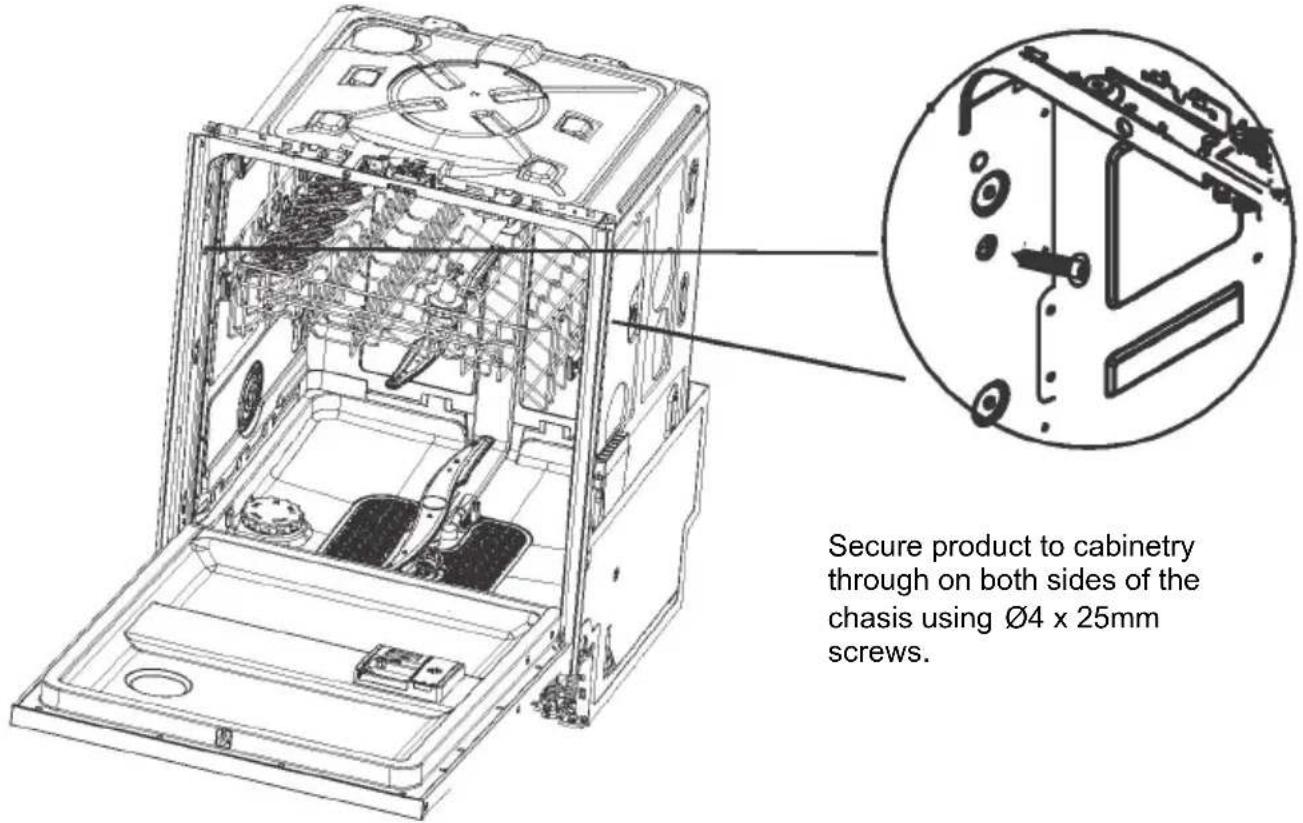
A Secure to the cabinetry on the sides
text_image
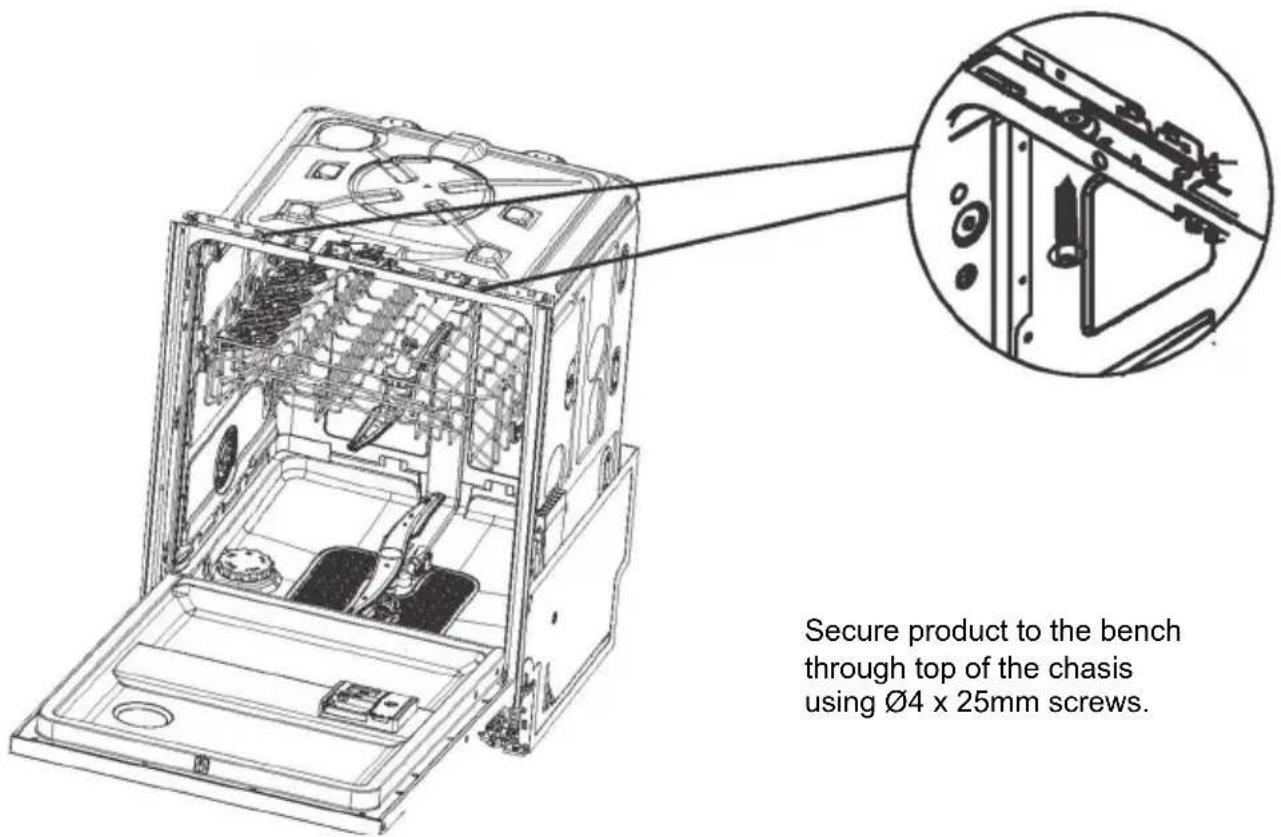
Secure product to cabinetry through on both sides of the chassis using Ø4 x 25mm screws.B Optionally secure to the cabinetry above
text_image
Secure product to the bench through top of the chassis using Ø4 x 25mm screws.Secure product to the bench through top of the chassis using ∅4 x 25mm screws.
6 Plumbing and drainage options. Determine which is more suitable
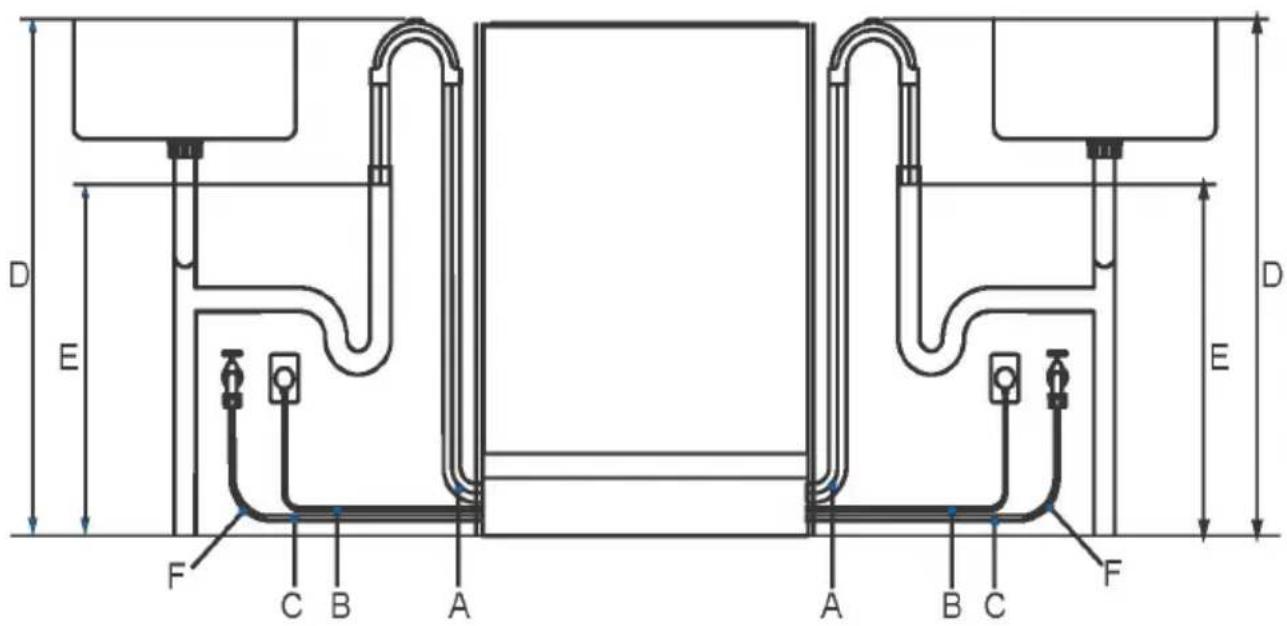
text_image
D E D E F C B A A B C F| Service dimensions | Left side | Right side |
| unit: mm | unit: mm | |
| A Length of drain hose | 1650 | 1300 |
| B Length of power cord * | 950 | 1450 |
| C Length of inlet hose | 1450 | 1300 |
| D Distance from floor to top of hose support | 750-883 | 750-883 |
| E Minimum distance from floor to end of drain hoses ** | 500 | 500 |
| F Minimum inlet hose radius | 200 | 200 |
* excluding plug.
** standpipe install illustrated. Distance is the same for all plumbing installs.
Hose and cord lengths
- Your services can be installed to either the left-hand or right-hand side of the product in an adjacent cabinet. Refer to 'Cabinetry preparation' for service access requirements.
- The drain hose should not extend more than 4m. A longer drain hose will cause reduced performance.
Water connection
- The dishwasher should not be connected to a water system where there is no temperature control, unless the system is fitted with a suitable tempering valve.
- The dishwasher must not be connected to an undersink high-pressure push-through hot water system, as damage to the system will result.
• Maximum water temperature: 25°C - 3/4 BSP connector water inlet hose.
- Ensure water connection complies with local plumbing regulations.
Water pressure
- 0.03-1 MPa
Electrical requirements
• 220V - 240V, 50Hz, 13A
Anti-flood protection
- This dishwasher has anti-flood protection, which will stop the water flowing in the event of a leak within the machine.
7 Connect inlet hose to cold water
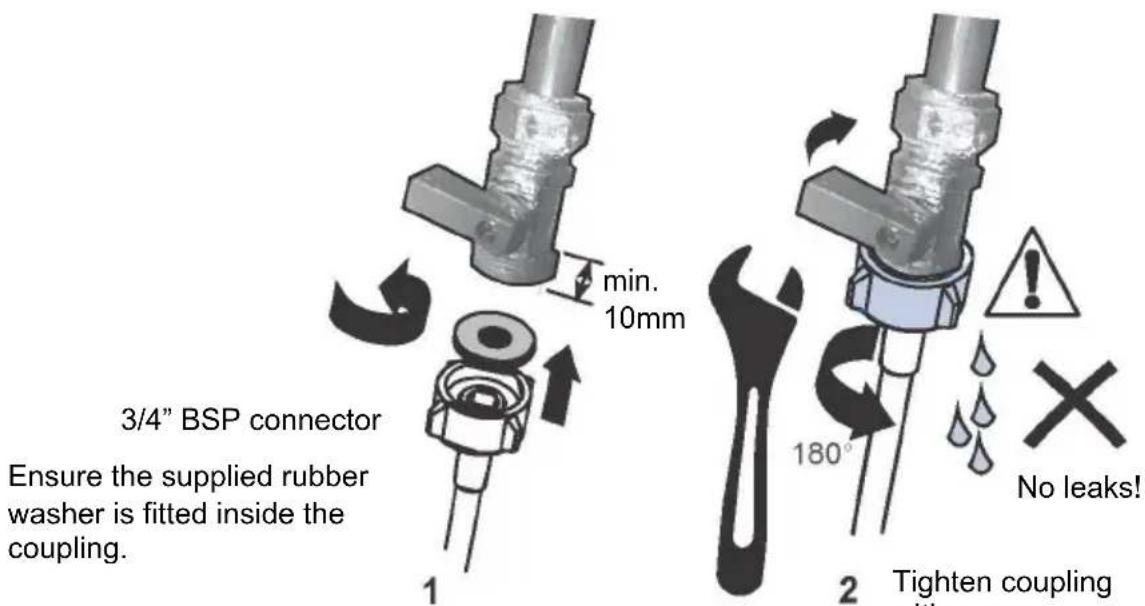
text_image
min. 10mm 3/4" BSP connector Ensure the supplied rubber washer is fitted inside the coupling. 180° No leaks! 2 Tighten coupling with pressurePlumbing -- Water inlet connection
IMPORTANT!
- The appliance should be connected to the water main using the new water inlet hose supplied. Old hoses should not be used.
-
Do not shorten the inlet hose.
-
Take note of water connection requirements.
-
The dishwasher has a single valve water connection.
• We recommend a cold water connection for best performance and energy efficiency. -
The incoming water temperature should not exceed 25°C.
-
Take note of the permitted water pressure extremes.
-
Lowest: 0.3 bar = 3 N/cm2 = 0.03MPa
- Where pressure is below 1 bar, contact a qualified plumber.
- Highest: 10 bar = 100 N/cm2 = 1 MPa
-
Where pressure is above 10 bar, a pressure reduction valve must be installed. Contact a qualified plumber.
-
Connect the water inlet hose to an accessible water tap with a 3/4" BSP connector. Ensure that there is no kink in the inlet hose that could restrict the flow of water. A 90o bend requires a minimum height of 200mm for a kink-free curve.
-
Ensure incoming water is clear. If the water pipes have not been used for a long period of time, let the water run to make sure it is clear with no impurities. Not doing so may result in the water inlet hose getting blocked and damaging the appliance.
-
If required, use a filter insert to filter out deposits from the piping. The filter insert is available from your Authorised Service Centre or Customer Care.
-
Tighten the hose coupling a further half turn after seal contact.
-
Check that the connection does not leak.
8 Plug product in
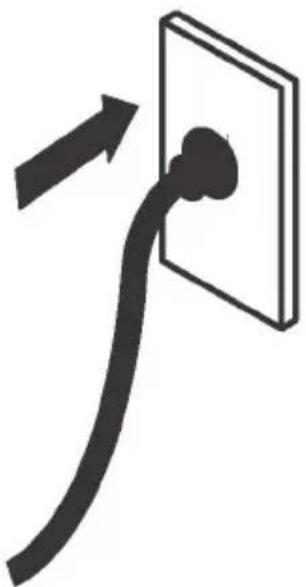
natural_image
Simple line drawing of a plug inserted into a wall socket, with an arrow indicating direction (no text or symbols)Electrical connection
- The dishwasher must not be connected to the electrical supply while installation is being carried out. Ensure all domestic wiring is properly earthed.
- Check the rating label (located on the left-hand side of the dishwasher's stainless steel inner door) and ensure that the voltage and frequency values for the current in the house correspond to those on the rating label.
- Insert the plug into a properly earthed power outlet that has a disconnection switch.
IMPORTANT!
• The earthing of the appliance is a safety requirement mandated by law.
- If the power cord is not long enough to reach the outlet or the outlet to which the appliance must be connected is not appropriate for the plug, the entire dishwasher power cord must be replaced. This should only be done by a Haier authorised technician. Do not modify or cut the plug. Do not use an adaptor, extension cord, or multi-outlet power board to connect the dishwasher to the power supply, as these could cause overheating and create a fire hazard.
- The outlet into which the dishwasher is plugged must remain easily accessible (e.g. in an adjacent cabinet) even when the appliance is installed. This is to ensure that the dishwasher can be disconnected from the power supply for safe cleaning and maintenance.
■ Final checklist
To be completed by the installer
- Check all parts are installed.
- Ensure that all panels and parts thereof are secure and final electrical tests have been conducted in accordance with local electrical regulations.
- Check that the dishwasher is level. If necessary, adjust the levelling feet slightly. To ensure optimum performance, the dishwasher should not be inclined more than 1°. Check with a spirit level.
- Ensure inlet hose to water supply has supplied rubber washer fitted, and that it's tightened a further half turn after seal contact.
- Ensure any knockouts or plugs in drain connection have been drilled out and drain connection has been made.
- The drain hose joiner must not support the weight of excess hose material. Keep drain hose as fully extended as possible to prevent sagging. Any excess length of drain hose should be kept on the dishwasher side of the highloop.
- If connecting the drain hose to the sink trap, ensure the Highloop is a minimum 150mm higher than the drain hose joiner.
- Ensure any packaging or tape securing the racks is removed from the dishwasher.
- Check that the door opens and closes freely without resistance to adjacent cabinetry.
- Check that the electrical outlet is accessible and located in an adjacent cupboard.
- Check the operation of the dishwasher:
If a fault code appears, see the 'Fault codes' section of the User guide for advice.
▶ Ensure the installer has completed the ‘Final checklist’ in the Installation instructions.
▶ Read this guide, taking special note of the 'Safety and warnings' section.
▶ Remove all internal and external packaging and dispose of it responsibly. Recycle items that you can.
Dishwasher overview
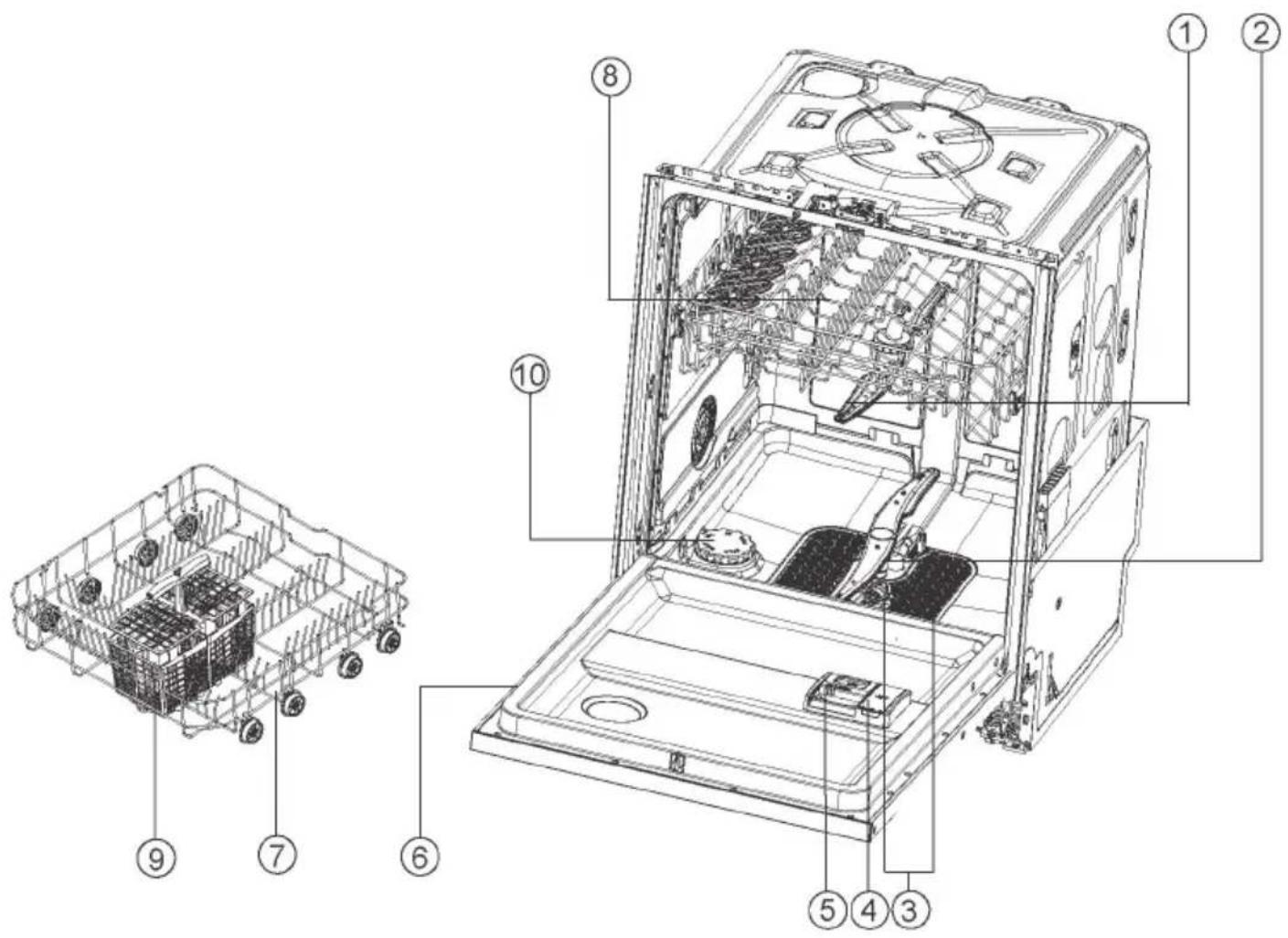
text_image
Technical diagram of an open refrigerator with numbered parts for identification-
Upper spray arm
-
Lower spray arm
-
Filter
-
Rinse aid dispenser
-
Detergent dispenser
-
Rating label
-
Lower basket
-
Upper basket
-
Cutlery basket
-
Salt container
Ocerview of programmes
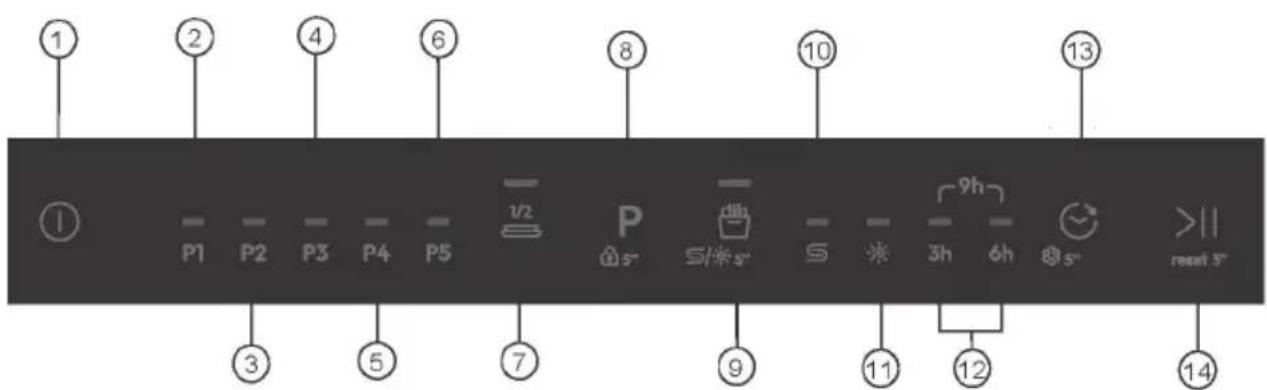
text_image
① ② ④ ⑥ ⑧ ⑩ ⑬ P1 P2 P3 P4 P5 ½ P S/* S 9h 3h 6h 8 >11 reset 5° ③ ⑤ ⑦ ⑨ ⑪ ⑫ 12 14- ON/OFF Power button
- WASH&DRY 35' wash program indicator
- Universal wash program indicator
- Eco wash program indicator
- Intensive wash program indicator
- Glass wash program indicator
- 1/2 Load additional function indicator button
- Program selection button (Child Lock*)
- Auto Door additional function indicator button
- Lose salt icon
- Rinse aid icon
- Delay icon (3h, 6h, 9h)
- Appointment button
- Start/Reset button
1) Press and hold the program selection key for 5 seconds to activate the child lock.
1) Program and Additional Function Matching Table
| + 1/2 Load Auto Door | ||
| WASH&DRY 35' | √ | √ |
| UNIVERSAL | √ | √ |
| ECO | √ | √ |
| INTENSIVE | √ | √ |
| GLASS | √ | √ |
Press P to select the program, and then to start the program.
| Programme | Type of food residue | Type of load |
| P1 | Light soil: Casseroles, sauces, potatoes, pasta, rice, roasted or fried food | Non-delicate: Dinnerware cutlery, pots and pans |
| P2 | Light to heavy soil: Soups, eggs, sauces, potatoes, pasta, rice, roasted or fried food | Non-delicate: Dinnerware, cutlery, glassware |
| P3 | Normal soil: Casseroles, sauces, potatoes, pasta, rice, roasted or fried food | Non-delicate: Dinnerware, cutlery, pots and pans |
| P4 | Heavy soil: Casseroles, sauces, potatoes, pasta, rice, roasted or fried food | Non-delicate: Dinnerware, cutlery, pots and pans |
| P5 | Light soil: Coffee, cake, milk, cold drinks, salad, sausages | Delicate: Glassware, dinnerware, cutlery |
To ensure good washing results, the dishwasher requires soft water. Hard water can be detrimental to the performance of your dishwasher. Over time, glassware washed in hard water will become opaque and dishes will become spotted or covered in a white film. Using very hard water can cause dishwasher parts to fail over time. Salt can improve the situation.
Adjusting the water softening system
The amount of salt dispensed can be set in SO and S5 stages, depending on the hardness of your water.
- Find out about the hardness value of your tap water. Your water utility company will help you with this.
- Setting can be found in the water hardness table.
Identify the local water hardness
| Water hardness | Water softener adjustment | |||
| German degrees (°dH) | French degrees (°fH) | Mmol/l Clarke | degrees | electronic |
| 31-50 | 55-89 | 5.5-8.9 | 39-63 | S5 |
| 17-30 | 30-54 | 3.0-5.4 | 21-38 | S4 |
| 13-16 | 23-29 | 2.3-2.9 | 16-20 | S3^1)* |
| 9-12 | 16-22 | 1.6-2.2 | 11-15 | S2 |
| 0-8 | 0-15 | 0-1.5 | 0-10 | S1^2)* |
| - - - - S0 | 3)* | |||
\* Remark
1) Factory default setting for powder detergent.
2) Recommended setting for combi detegent tablets.
3) Indicator for Salt is off.
Using special salt
As soon as the low salt indicator is lit on the control panel, salt should be topped up. Always refill with special salt immediately before switching on the appliance. This ensures that overrun special salt solution is immediately washed out and does not corrode the rinsing tank.
Top up the salt as follows:

CAUTION
Only use dishwasher salt. Other products can cause damage to the appliance! Any spilled salt causes corrosion. Run a programme after each refill.
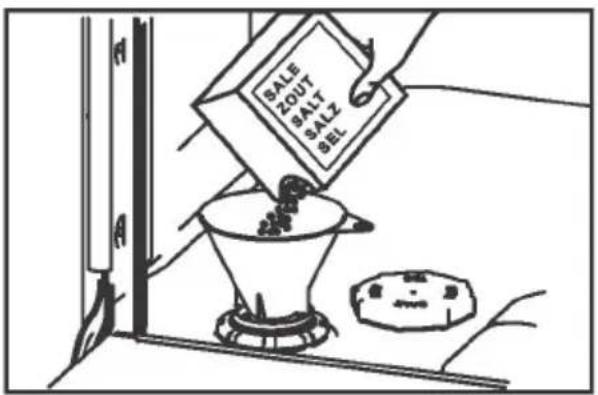
text_image
SALE ZOUT SALT SALZ SEL- Turn the cap counter-clockwise to open the salt container.
- Fill with 1 litre of water into the salt container.
- Fill the tank up with specific salt(water overflows).
- Remove spilled salt from the opening area.
- Turn the cap clockwise to close the salt container.
We highly recommend using liquid rinse aid regularly to get the best drying results. Rinse aid gives a streak-free, sparkling clean look to glass and chinaware. In addition, it prevents metal from tarnishing.
When to refill the rinse aid dispenser
When rinse aid level becomes low, the rinse and salt indicators will be on to remind you.

Adjusting the rinse aid dosage
The normal, factory-set dosage level is S3, but you may need to adjust this to suit your water conditions.
- If there is excessive foaming at the end of the wash, reduce the dosage.
- If you live in a hard water area or if dishes are wet or streaky after drying, increase the dosage.
- To adjust the rinse aid setting: see the guidance in section "Before first use".
- If you are using tablets with built-in rinse aid, we recommend setting the rinse aid dosage level to off (S0).
How to refill the rinse aid dispenser
- Pull the button to snap the dispenser cover open.
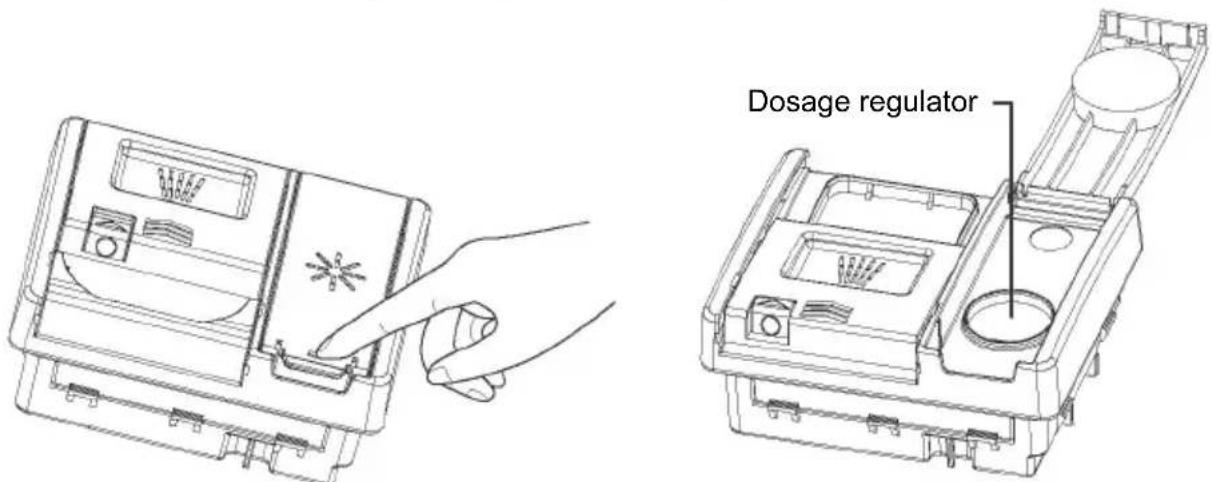
text_image
Dosage regulator- Pour rinse aid into the circular opening, making sure not to fill beyond the MAX marking.
IMPORTANT!
Take care not to spill rinse aid into the dishwasher. Any spills must be wiped up to prevent excess foaming. Failure to do so may result in a service call, which will not be covered by warranty.
- Close the cover, making sure it clicks shut.
IMPORTANT!
Never put highly absorbent materials, such as sponges and towels in your dishwasher. Do not put dishes or cutlery that have been soiled by tobacco ash, wax, lubricating grease or paint in your dishwasher.
Cutlery and silverware
All cutlery and silverware should be rinsed immediately after use to prevent tarnishing caused by some foods. Silver items should not come into contact with stainless steel, e.g. other cutlery. Mixing these items can cause staining. Remove silver cutlery from the dishwasher and hand dry immediately after the programme has finished.
Aluminium
Aluminium can be dulled by dishwasher detergent. The degree of change depends on the quality of the item.
Other metals
Iron and cast iron objects can rust and stain other items. Copper, pewter and brass tend to stain. Wash these items by hand.
Woodware
Wooden items are generally sensitive to heat and water. Regular use in the dishwasher may cause deterioration over time. If in doubt, wash by hand.
Glassware
Most everyday glassware is dishwasher safe. Crystal, very fine and antique glassware may etch that is, become opaque. You may prefer to wash these items by hand.
Plastic
Some plastic may change shape or colour with hot water. Check the manufacturer's instructions about washing plastic items. Washable plastic items should be weighted down so they do not flip over and fill with water or fall through the basket during the wash.
Decorated items
Most modern china patterns are dishwasher safe. Antique items, those with a pattern painted over the glaze, gold rims or hand-painted china may be more sensitive to machine washing. If in doubt, wash by hand.
Glued items
Certain adhesives are softened or dissolved in machine washing. If in doubt, wash by hand.
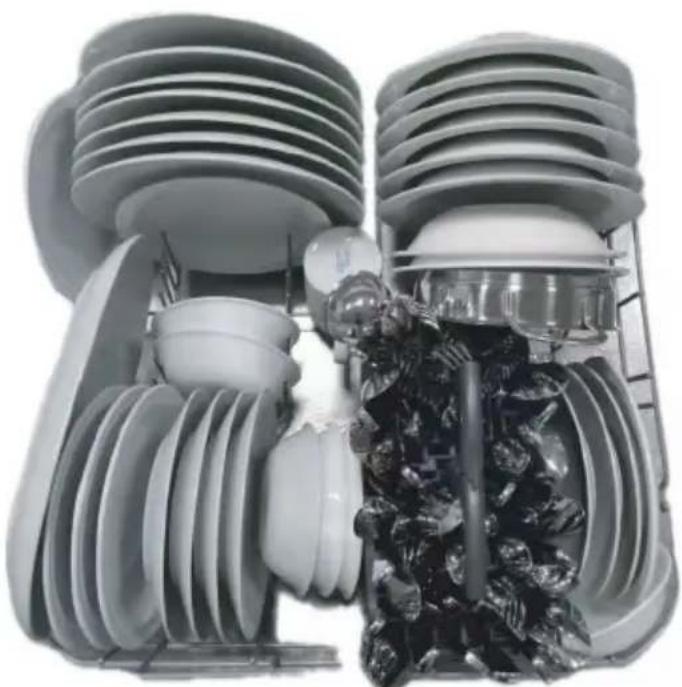
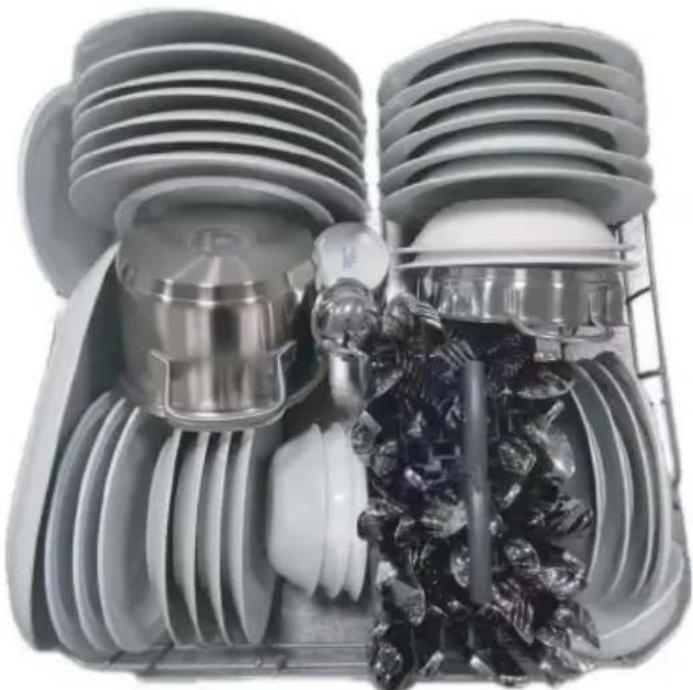
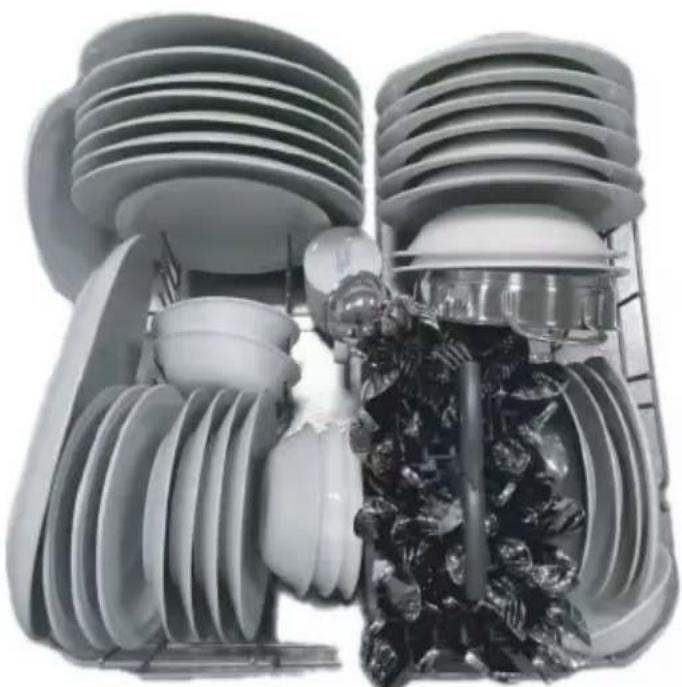
If the tableware or cookware rack is burnt, scorched, sticky, and other food which is very difficult to remove, it is advisable to soak it for a period of time before washing it or predispose it with a dish cloth or else it will be hard to clean. Remove any large food particles before placing dishes in the dishwasher. It is not necessary to prerinse utensils under running water.
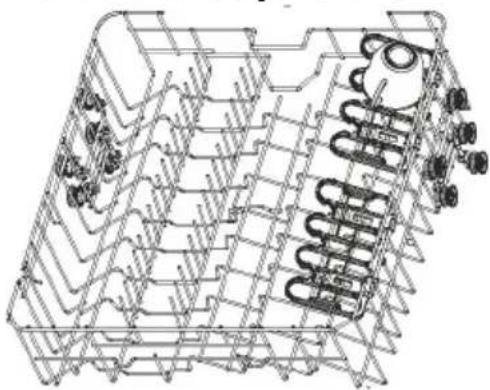
Upper rack
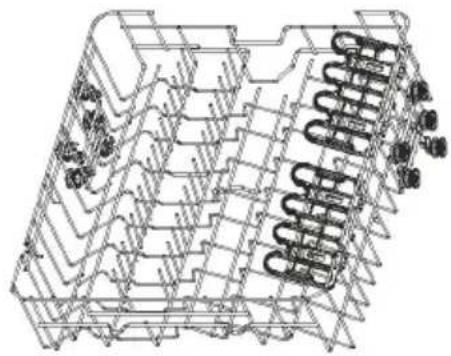
natural_image
Technical line drawing of a mechanical component with spring-like elements (no text or symbols)The upper basket is designed to hold items like glasses, cups, saucers, plates, small bowls and shallow pans.
Foldable cup racks
natural_image
Technical line drawing of a mechanical component with coiled spring and housing (no text or symbols)Adjust the height to suit or fold out of the way to make space for other items. Use the notches to support wine glass stems.
To adjust height
- Fold up to unlock.
- Adjust the height to suit by sliding up or down.
- Fold back down to lock in position.
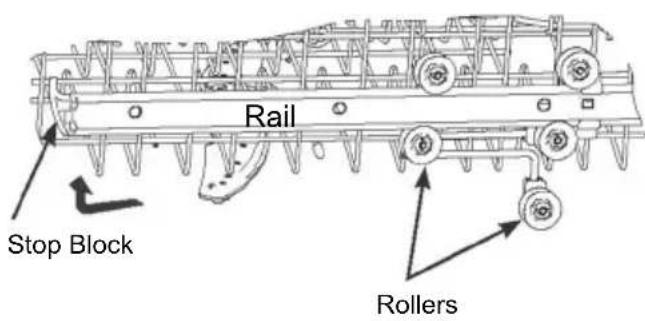
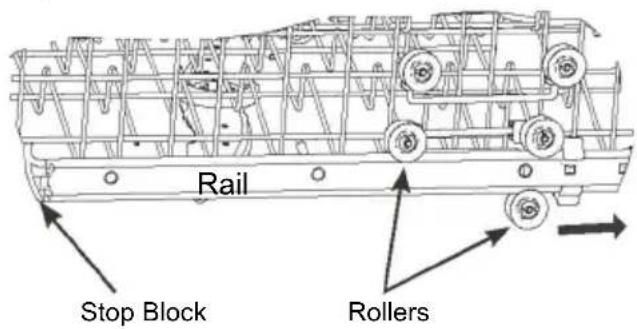
To adjust the upper basket.
Before you adjust its height, make sure the basket is empty.
Remove:
text_image
Rail Stop Block RollersReplace:
text_image
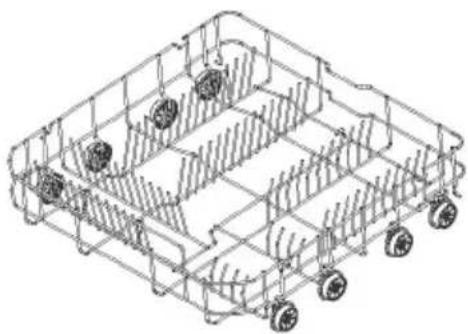
Rail Stop Block RollersLower rack
natural_image
Isometric line drawing of a multi-wheeled cart with wheels and structural ribs (no text or symbols)Place heavily soiled items (like pots, pans or dinner plates) in the bottom basket. The more powerful spray jet provides a better dishwashing result.
Cutlery/ Utensil basket
natural_image
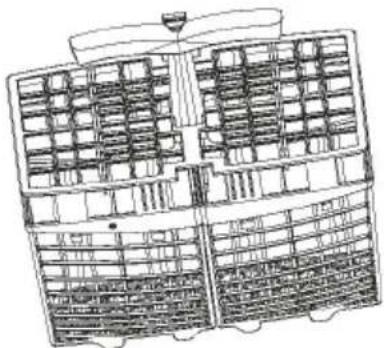
Technical line drawing of a multi-level industrial or warehouse structure with grid patterns and structural elements (no text or symbols)Use the basket to secure cutlery and utensils. Insert cutlery and utensils into the basket to secure.

CAUTION
Put sharp and pointed items with the blade pointing downward to keep them out of harms way.
IMPORTANT!
- Only use detergents recommended for automatic dishwashers.
- Dishwasher detergents are strongly alkaline. They can be extremely dangerous if swallowed. Avoid contact with the skin and eyes and keep children and infirm persons away from the dishwasher when it is open. Check that the detergent dispenser is empty after completion of each wash programme.
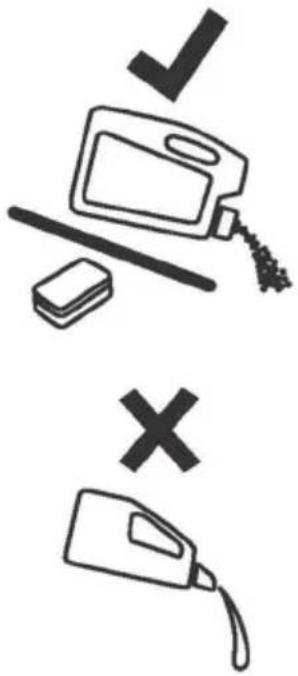
- Never sprinkle or pour detergent directly onto any item in the dishwasher. Detergent and dishwasher tablets should not be in direct contact with dishes or cutlery.
- Do not use hand washing liquids, soap, laundry detergents or disinfectants, as these will damage the dishwasher.
Filling the detergent dispenser
- Pull the button on the right of the dispenser.
IMPORTANT!
Approach the dispenser from the right-hand side to prevent the cover from snapping open on your hand.
- Add detergent into the appropriate compartment(s).
IMPORTANT!
Tablets should only be placed in the main wash (larger) compartment.
- Remove any excess detergent from the edges of the dispenser.
- Close the cover and press down until it clicks shut. The detergent will automatically be released into the dishwasher during the wash programme.
text_image
Safety warning symbols for cleaning a container, indicating rejection or invalid use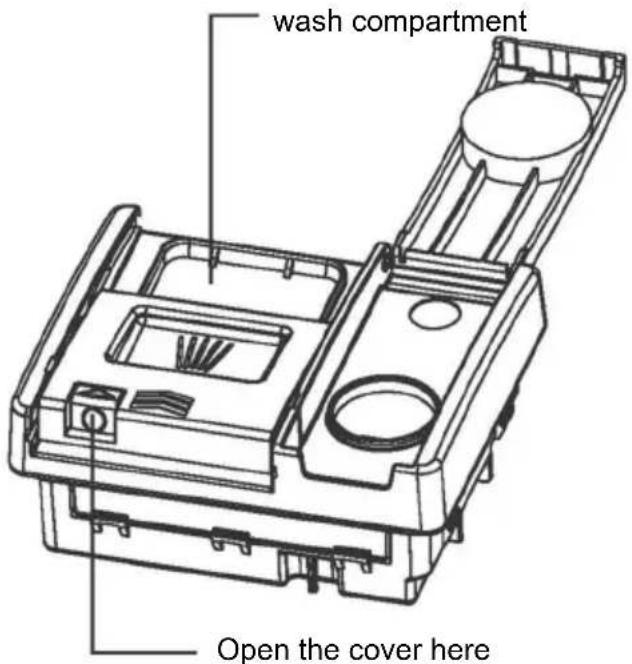
text_image
wash compartment Open the cover hereHow to Adjust User Preference Settings
1. User Preference Settings Mode
During the selection of programmes, press and hold for about 5 seconds to enter the user preference settings, and all LEDs will flash for 1 s and then turn off, the buzzer will sound once. User preference settings include Rinse Aid setting, Water Softener setting, Buzzer setting, Momo Mode setting and Automatic door opening setting.
2. Memo Mode Setting
Press to change the switch (default is off), the program that was run last time will not be remembered and ECO will be default when you start up the next time. When you set the MEMO mode to on, the washing program with added function that was run last time will be remembered and default to run it.
Press and hold ① to exit the Settings menu and return to the program selection status. If MEMO mode is set to On, will light up.
If the MEMO mode is set to off, will turn off.
Press to save the changes, the buzzer rings once.
3. Water Hardness Setting
Enter the preference setting mode. Press the one time to change the level (S3 by default) Press and hold ⏻ to exit the Settings menu and return to the program selection status.
(1) S0 = No Led light up
(2) S1 = Pled lighting up
(3) S2 = P Led lighting up
(4) S3 = P Led lighting up
(5) S4 = P Led lighting up
(6) S5 = P Led lighting up
4. Buzzer Setting
Enter the preference setting mode. Press ☐ to change tits status (open by default). Press and hold ⏻ to exit the Settings menu and return to the program selection status. If the buzzer is set to on, the will light up and beep
If the buzzer is set to off, the 📄 key will go off and no buzzer will beep.
When the buzzer gear is set to NO, keep the ON/OFF tone, start/reset tone, program end tone, alarm tone, and failure tone.
5. Rinse Aid Setting
After entering the preference setting mode
Press the ⚙ key to enter the brightener gear setting, R0-R3.
The default is R2 (5ml)
Hold down Ⓐ for 3s to exit setting mode
| 3h | 6h | Rx level | ||
| 0 | 0 | 0 | R0 | Empty |
| 1 | 0 | 0 | R1 | 3ml |
| 1 | 1 | 0 | R2 | 5ml default |
| 1 | 1 | 1 | R3 | 6ml |
Start a Programme
- Open the door and Press the ON/OFF button Ⓐ to turn the dishwasher on.
- Press P to select the program you want on the dishwasher control panel.
- Press >11 to start the programme and close the door.

NOTICE
When the MEMO mode is turned off (default setting), the last used program will not be saved, and the washer will default to ECO mode at the next startup. When the MEMO mode is turned on, the last used washing program will be saved, and the washer will default to the previous program and additional functions at the next startup.
Pause and restart a wash programme
- Open the door carefully to pause the programme. The time remaining will flash and the pause beep will sound while the dishwasher is paused.

NOTICE
There is a risk of being sprayed with hot water, do not fully open the door until the spray arms have stopped rotating.
- Load, remove, or rearrange any dishes if needed.
- Close the door to restart the programme.
Cancel or change a wash programme
Open the door carefully to pause the programme. Press and hold 3 sec, Washing program reset. And then you can choice a new wash programme to start.

CAUTION
If a programme will be aborted in the process of washing dishes, the residue of detergent remains on the dishes. These can cause damage to health! Make sure to rinse off the detergent residues completely before using these dishes again.
Start a Programme with Delay
Set a start time by the following procedure in order to delay a programme start:
- Set a programme.
- Press and hold button ⚙ until the delay time you need (3h, 6h, 9h) disappears.
- Press the START/PAUSE button >|| and close the door.
▶ The appointment time decreases in hours
▶ When the countdown ends, the program will start.
Cancel a Delayed Start
- Press ≥ || for about 3 seconds to cancel the startup delay and enter the program selection state.
- Or press the power button ⏻ to turn off the appliances and cancel the startup delay.

CAUTION
If a programme will be aborted in the process of washing dishes, the residue of detergent remains on the dishes. These can cause damage to health! Make sure to rinse off the detergent residues completely before using these dishes again.
End of Programme
When the programme is completed, the buzzer rings for 3 times. After 1 minute, the appliance will shut down without the need for button operation.

CAUTION
If the door will be opened immediately after the end of programme, hot steam can escape. Danger of scalding! Open the door carefully!
Remove dishes:
▶ Open the door slightly and leave it ajar (about 100 mm) to help the drying process.
▶ Let the dishes become cold before removing them from the appliance. Hot dishes damage more easily.
▶ First remove the items from the lower basket, then from the upper basket.
Over time, food residue or limescale deposits may accumulate inside your dishwasher. These may reduce efficiency, and food residue may produce a bad odour. Inspect and clean your dishwasher regularly.
IMPORTANT!
- Before any cleaning or maintenance, always disconnect the dishwasher from the power supply, turn off the water supply, and wait until all parts of the dishwasher have cooled.
- Do not use the following cleaning aids, as they may damage the surfaces:
- plastic or stainless steel scouring pads
- abrasive, solvent, household cleaners
- acid or alkaline cleaners
- laundry detergents or disinfectants
- stainless steel cleaners or polishes
- hand-washing liquids or soap
- Where there is broken crockery or glass in the dishwasher, it must be carefully removed to prevent personal injury or damage to the appliance.
- After cleaning, always check that the spray arms and filters are all correctly in place.
Cleaning the dishwasher exterior
- To clean exterior surfaces of the dishwasher, wipe with a clean, soft damp cloth and dry with a clean, lint-free cloth.
- For non-flush surfaces wipe along or around the surface. For example, to wipe down the exterior control buttons, use a circular wiping motion around the button.
- Take care not to cause excessive wetting of the control panel area.
Note: before cleaning the control panel, it is useful to disable the buttons by activating Keylock.
Cleaning the door seal and dishwasher interior
Clean thoroughly with warm water on a soft, lint-free cloth. If the interior is heavily soiled, use a dishwasher cleaner/descaler following the manufacturer's instructions.
Cleaning the filters
The filters prevent larger food particles in the wash water from reaching the pump. These particles may occasionally block the filters. We recommend cleaning the filters whenever there is evidence of food particles.
• To remove the drain filter, turn the filter anti-clockwise to release, then lift out.
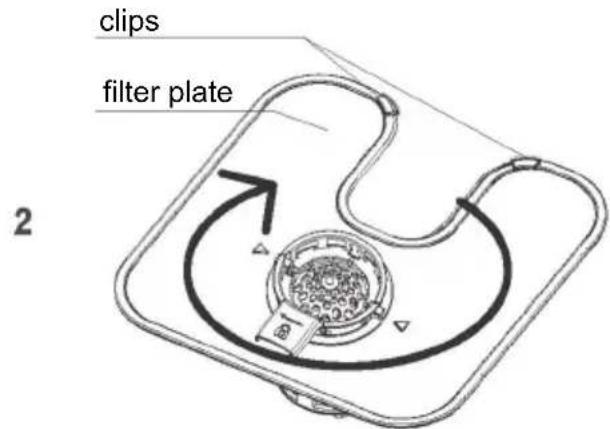
- Once the drain filter has been removed you can lift the filter plate out.
- Rinse them thoroughly under running water and then replace.
Replace the filters correctly after cleaning, making sure the filter plate is flush with the dishwasher base.
IMPORTANT!
When cleaning the underside of the filter plate, take care handling its sharp outer edge.
text_image
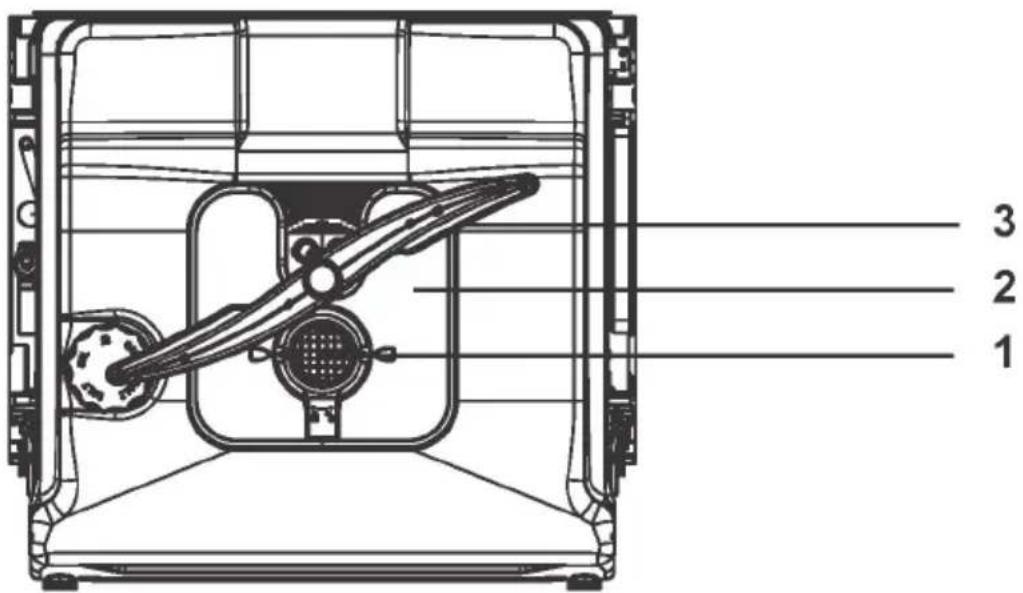
1 2 3Features
- Drain filter
- Filter plate
- Lower spray arm
Not shown: middle spray arms
Cleaning the spray arms
Limescale and food particles in the wash water can block the holes in the spray arms and the arm mountings. Clean these parts about once a month, or more often should the need arise.
Cleaning the centre spray arm
• To remove the centre spray arm, carefully unscrew its locking nut.
- Rinse the spray arm thoroughly under running water, then refit.
IMPORTANT!
Make sure you twist the locking nut on the centre spray arm firmly back on the water supply tube. Check that the centre spray arm is firmly locked in place and rotates freely.
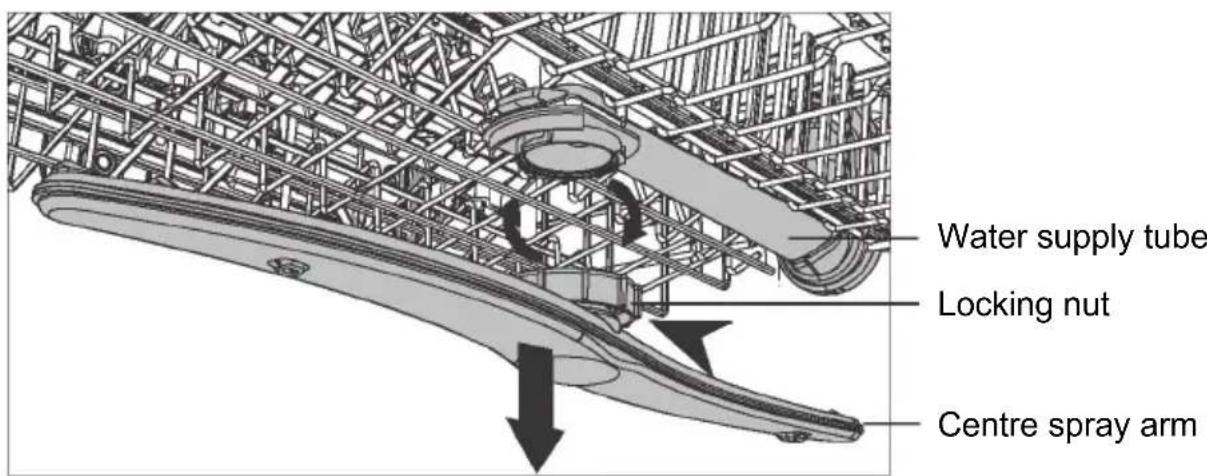
text_image
Water supply tube Locking nut Centre spray armCleaning the lower spray arm
- To remove the lower spray arm, simply lift the spray arm off its mounting.
- Rinse the spray arm thoroughly under running water, then refit it on its mounting.
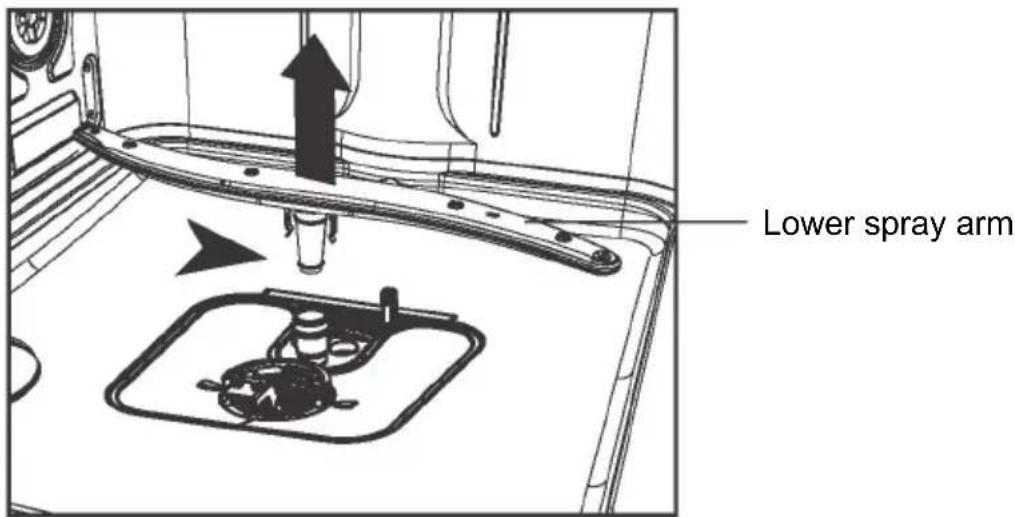
text_image
Lower spray armRemoving and cleaning the filter
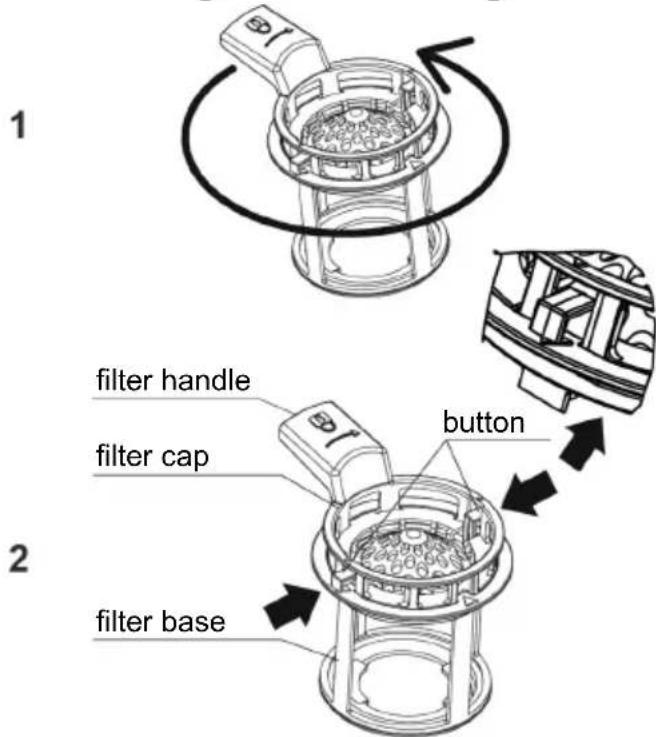
text_image
1 filter handle filter cap button 2 filter baseTwist the filter anti-clockwise to release. Lift to remove.
Twist the filter handle anti-clockwise to release. Lift to remove from the filter plate. Separate the filter cap from the base by pressing the release buttons and lifting. Remove the filter plate gently from the locating clips at the rear of the drain. Do not attempt to remove the filter by force as this may cause damage. Clean under hot water and rinse thoroughly.
Replacing the filters:
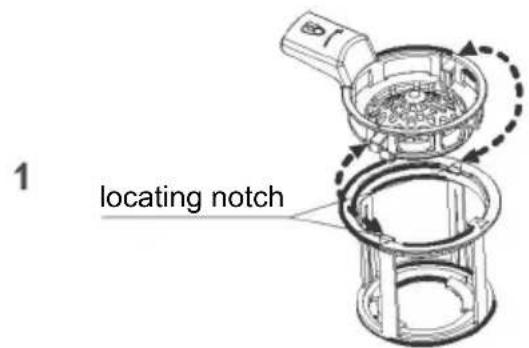
text_image
locating notch- Align the filter cap with the notch on the filter base for one side.
- Press the button to clip the filter cap under the filter base locating notches for the other sides.
- Slot the filter plate under the locating clips at the rear of the drain and push firmly back into the clips. Ensure the filter plate is flush with the dishwasher base.
- Place the drain filter back into the dishwasher base. Rotate the filter handle clockwise to click into place.
text_image
clips filter plate 2Place the drain filter back into the dishwasher base. Rotate 2 clockwise to click into place.
Many occurring problems could be solved by yourself without specific expertise. In case of a problem please check all shown possibilities and follow below instructions before you contact an after sales service.

CAUTION
- Before maintenance, deactivate the appliance and disconnect the mains plug from the mains socket.
- Electrical equipment should be serviced only by qualified electrical experts, because improper repairs can cause considerable consequential damages.
The appliance does not start, or it stops during operation or Indicator is lighted
| Problem | Possible cause | Possible solution |
| The programme does not start. | Appliance door is open. Close the appliance door. | |
| Delay start is set. Refer to displayed time. | ||
| Mains plug is not connected in the mains socket. | Connect the mains plug. | |
| Fuse in the house circuit is damaged. | Replace the fuse. | |
| Rinse Aid Indicator is lighted. | Rinse aid dispenser is empty | Refill Rinse aid until full. |
| Salt Aid Indicator is lighted. | Softener salt is empty. | Fill the tank up with specific salt until full. |
Error codes on the display
| Problem | Possible cause | Possible solution |
| The LED screen displays "E10" No water | Water tap is closed. | Open the water tap.Note: Whenever Error is solved switch off the appliance and restart the programm. |
| Water inlet hose has a kink or a bend. | Make sure that the position of the hose is correct. | |
| In case of aqua-stop system: water protection is triggered; the marker (C) is red. | The hose must be replaced. | |
| Filter in the water inlet hose is clogged. | Clean the filter at the inlet hose connections at tap and the rear of the appliance. | |
| Water inlet is clogged. | Check water flow from tap. | |
| Water pressure is too low. | Contact your local water authority. | |
| The LED screen displays "E30" Water leak | Anti-flood device is on:There are water leakages in the appliance.The water inlet valve is open and blocked.The drainage is blocked. | 1. Close the water tap.2. Disconnect appliance from power supply.3. Contact Service. |
All other Alarmcodes:
- Note Alarmcode
- Contact Service; refer to CUSTOMER SERVICE
| Problem | Possible cause | Possible solution |
| The dishes are not clean. | Filters are clogged. | Clean the filters. |
| Filters are not correctly assembled and installed. | Make sure that the filters are correctly assembled and installed. | |
| Spray arms are clogged. | Remove remaining food remnants with a thin pointed object. | |
| Programme was not applicable for the type of load and food remnants. | Make sure that the programme is applicable for the type of load and food remnants. | |
| Incorrect position of the items in the baskets. Water could not wash all items. | Make sure that the position of the items in the baskets is correct and that the water can easily wash all items. | |
| Spray arms could not turn freely. | Make sure that the position of the items in the baskets is correct and does not cause the blockage of the spray arms. | |
| No detergent or insufficient quantity of detergent in the detergent dispenser. | Make sure that you add the correct quantity detergent in the dispenser before you start a programme. | |
| The wash cycle was interrupted by a long break. | Do not open the door or cut power supply during the wash cycle. | |
| Whitish streaks, stains or bluish layers on glasses and dishes. | Released quantity of rinse aid is too much. | Decrease the released quantity of rinse aid. |
| Quantity of detergent was too much. | Make sure that you add the correct quantity of detergent in the dispenser before you start a programme. | |
| Multitab detergent tablets used with a short programme might not fully dissolve. | Select a longer programme when using Multitab detergent tablets. |
Troubleshooting
| Problem | Possible cause | Possible solution |
| Dry water drop stains on glasses and dishes. | Rinse aid dosage is too low. | Increase the released quantity of rinse aid. |
| Quality of rinse aid or Multitab. stains on glasses | Cleaning product too old; change the product. | |
| The dishes are wet. | Programme had no drying phase.Programme had a low temperature drying phase. | Open the door slightly and leave it ajar (about 100 mm) to help the drying process. |
| The dishes are wet and matte. | Rinse aid dispenser is empty. | Refill rinse aid into the dispenser and reset the rinse aid indicator. |
| Quality of rinse aid or Multitab. | Cleaning product too old; change the product. | |
| Wash programme | EcoThe program has auto-door opening function by default. | |
| Powder detergent quantities | 21g main wash | |
| Rinse aid dosage level | R0-R3, R2 (default) | |
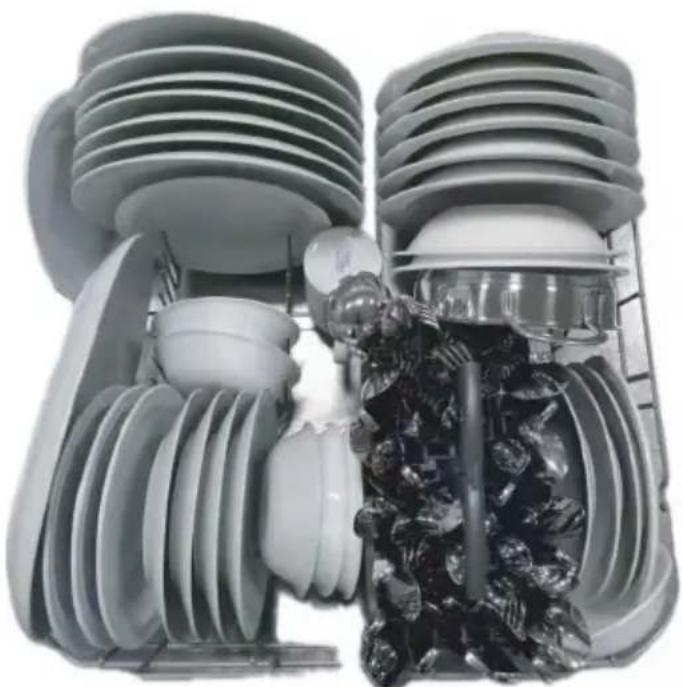
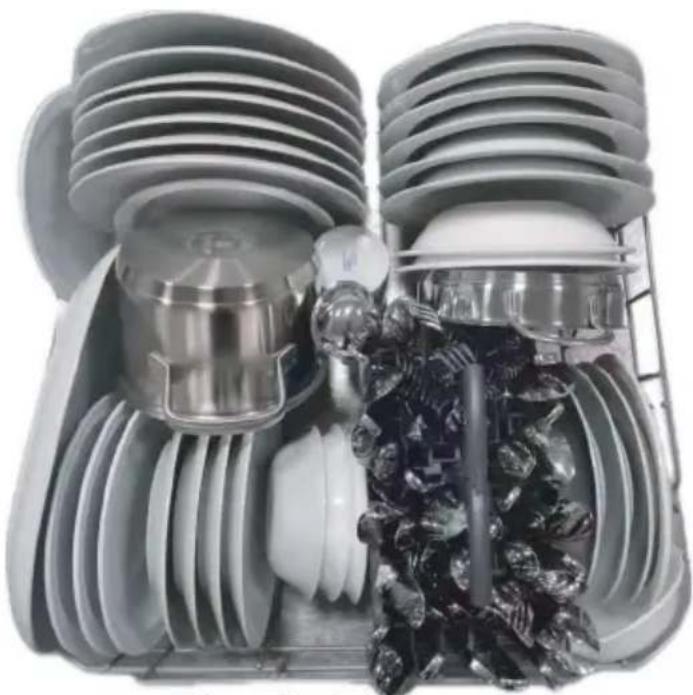
| Maximum number of place settings | 13 | |
| Height adjustment of upper basket | Ensure the upper basket is in its high most position |
natural_image
Disassembled kitchen appliance with multiple cups, rings, and a grid rack (no text or symbols visible)Upper basket
natural_image
Cross-sectional cutaway of a high-voltage electrical transformer showing internal components like insulators and motors (no text or labels)Lower basket
natural_image
Cross-sectional diagram of an internal combustion engine cylinder with internal components and internal combustion cavity (no text or labels)Lower basket
| Supplier's name or trade mark: Candy | ||||
| Supplier's address ^(b) : No. 236, Qianwangang Road, Huangdao District, Qingdao, China | ||||
| Model identifier: CIP 3D9E0B | ||||
| General product parameters: | ||||
| Parameter Value Parameter | Value CIP 3D9E0B | |||
| Rated capacity (a) (ps) 13 Dimensions in cm | Height 82,0 | |||
| Width 59,7 | ||||
| Depth 55,4 | ||||
| EEI (a) 49,6 Energy efficiency class | (a) [D] | (c) | ||
| Cleaning performance index (a) | 1,121 | Drying performance index (a) | 1,061 | |
| Energy consumption in kWh [per cycle], based on the eco programme using cold water fill. Actual energy consumption will depend on how the appliance is used. | 0,830 | Water consumption in litres [per cycle], based on the eco programme. Actual water consumption will depend on how the appliance is used and on the hardness of the water. | 11 | |
| Programme duration (a) (h:min) | 4:05 | Type | [built-in] | |
| Airborne acoustical noise emissions (a) (dB(A) re 1 pW) | 49 | Airborne acoustical noise emission class (a) | [C] (c) | |
| Off-mode (W) | 0,50 | Standby mode (W) | 0,50 | |
| Delay start (W) (if applicable) | 4,00 | Networked standby (W) (if applicable) | - | |
| Minimum duration of the guarantee offered by the supplier (b): 24 | ||||
| Additional information: - | ||||
| Weblink to the supplier's website, where the information in point 6 of Annex II to Commission Regulation (EU)2019/2022 (1) (b) is found | ||||
| (a) for the eco programme.(b) changes to these items shall not be considered relevant for the purposes of paragraph 4 of Article 4 of Regulation (EU) 2017/1369.(c) if the product database automatically generates the definitive content of this cell the supplier shall not enter these data. | ||||
Information to be included in the technical documentation
| PARAMETER UNIT VALUE | ||
| Eco programme energy consumption (EPEC)rounded to three decimal places | kWh/cycle 0.830 | |
| Standard programme energy consumption(SPEC) rounded to three decimal places | kWh/cycle 1.675 | |
| Energy Efficiency Index (EEI) — 49,6 | ||
| Eco programme water consumption (EPWC)rounded to one decimal place | l/cycle 11 | |
| Cleaning performance index (Ic) — 1,121 | ||
| Drying performance index (Id) — 1,061 | ||
| Duration of the eco programme (Tt) rounded tothe nearest minute | h:min 4:05 | |
| Power consumption in off-mode (Po) rounded totwo decimal places | W 0,50 | |
| Power consumption in standby mode (Psm)rounded to two decimal places | W 0,50 | |
| Does standby mode include the display ofinformation? | — No | |
| Power consumption in delay start (Pds)(if applicable) rounded to two decimal places | W 4,00 | |
| Airborne acoustical noise emissions | dB(A) re 1 pW | 49 |
CANDY
natural_image
Technical line drawing of a computer chassis with front panel, rear panel, and internal components (no text or labels)CIP 3D9E0B
natural_image
Simple line drawing of a coiled pipe with a valve attached (no text or symbols)Tuyau d'entrée (1)
Feutre de coton (1)
natural_image
Isometric line drawing of a wooden box with a textured panel on one side, enclosed in a dashed-line frame (no text or symbols)natural_image
Technical line drawing of a computer tower case with visible internal components and mounting brackets (no text or symbols)text_image
Diagram illustrating a device assembly or mounting process with labeled components and directional arrowsnatural_image
Illustration of a gray rectangular device with an upward arrow and labeled parts, no text or symbols present.natural_image
Simple circular diagram with intersecting lines and a downward arrow, no text or symbols present.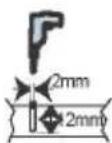
natural_image
Circular diagram showing a mechanical structure with an upward arrow and plus sign, no readable text or symbols.IMPORTANT!
natural_image
Technical diagram of a mechanical assembly with spring-loaded components and a blue panel (no text or symbols)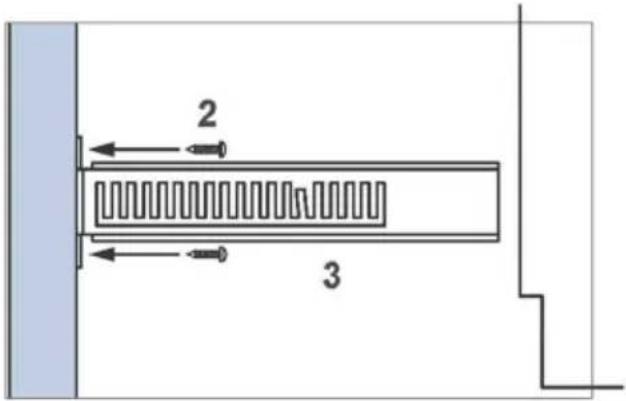
text_image
2 34
natural_image
Technical line drawing of a mechanical system with spring-loaded components and a wheel (no text or symbols)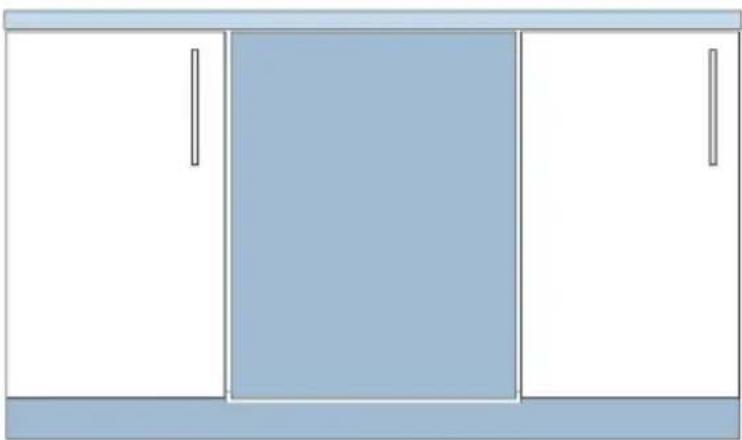
natural_image
Simple line drawing of a cabinet with three doors and one front cabinet (no text or symbols)Protection anti-débordement
natural_image
Simple line drawing of a plug inserted into a wall socket (no text or symbols)text_image
Exploded view diagram of a washing machine with numbered components for identificationnatural_image
Technical line drawing of a mechanical component with spring-like elements (no text or symbols)natural_image
Technical line drawing of a mechanical component with spring and housing (no text or symbols)natural_image
Isometric line drawing of a modular vehicle chassis with wheels and structural ribs (no text or symbols)natural_image
Technical line drawing of a dual-panel grid device (no text or symbols)text_image
Safety warning symbols for cleaning a container, indicating no need to check or mark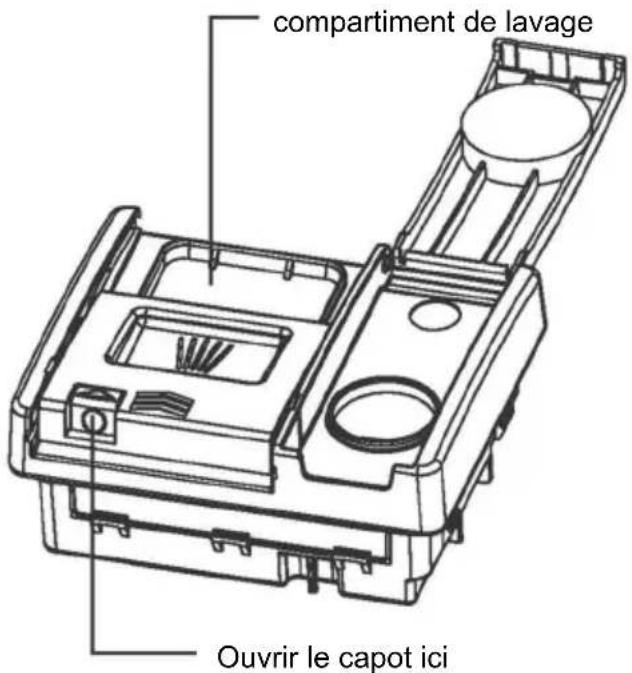
text_image
clips plaque filtrante 2natural_image
Assorted kitchen utensils arranged in a transparent plastic tray (no visible text or labels)Panier supérieur
natural_image
Cross-sectional cutaway of an internal combustion engine cylinder showing internal components like piston, turbine, and exhaust (no text or labels)Panier inférieur
natural_image
Cross-sectional diagram of an electrical insulator showing internal components and internal combustion process (no text or labels)Panier inférieur


