NavGate HUD - GPS Navigation System PIONEER - Free user manual and instructions
Find the device manual for free NavGate HUD PIONEER in PDF.

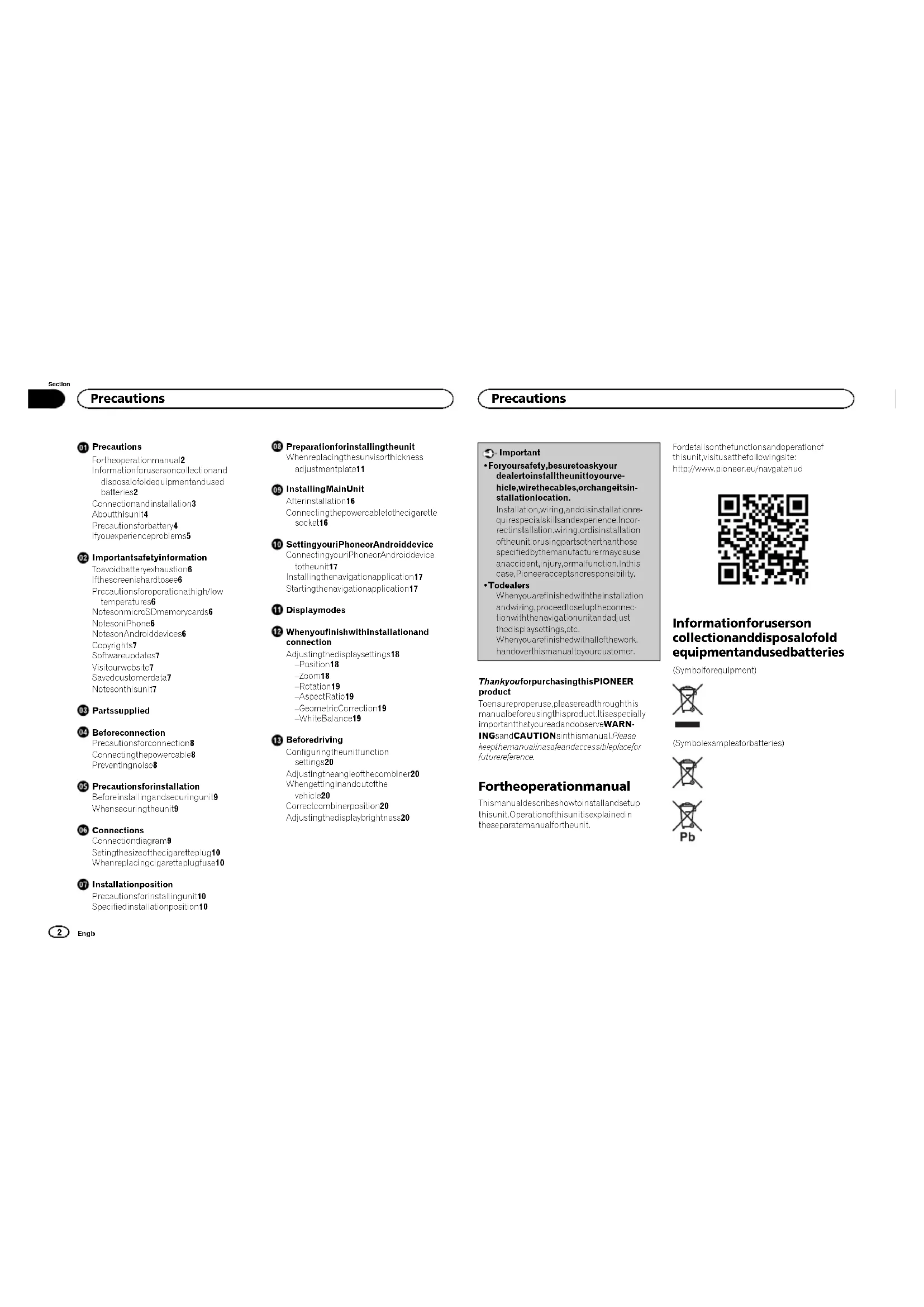


| Product Type | GPS navigation system with heads-up display (HUD) |
| Brand | Pioneer |
| Model | NavGate HUD |
| Main unit dimensions (approx.) | Approx. 150 x 80 x 30 mm (L x W x H) |
| Main unit weight (approx.) | Approx. 200 g |
| Power supply | 12 V DC (vehicle battery), via cigarette lighter cable with 3A fuse |
| Main functions | GPS navigation, heads-up display, augmented reality (AR) mode, speed table mode, route view, voice guidance, brightness adjustment, zoom, rotation, geometric correction, white balance |
| Connectivity | iPhone (via included Lightning cable) or Android device (via USB-microUSB cable) |
| Supported memory card | microSD / microSDHC card (max. 2 GB for software update) |
| Compatible sun visor thickness | 5 mm to 33 mm |
| Operating temperature | 0 °C to 40 °C |
| Maintenance and cleaning | Wipe with a soft, dry cloth. Do not use chemicals. Clean the multiplexer carefully. |
| Safety | Do not use while driving. Secure firmly to the sun visor. Follow traffic regulations. Do not expose to direct sunlight. |
| Spare parts and repairability | Contact a Pioneer dealer or authorized service center. 3A fuse replaceable. Supplied parts: mounting bracket, screws, anti-drop strap, remote control. |
| General information | Manual available in PDF format. Software version updated via microSD card. |
Frequently Asked Questions - NavGate HUD PIONEER
User questions about NavGate HUD PIONEER
0 question about this device. Answer the ones you know or ask your own.
Ask a new question about this device
Download the instructions for your GPS Navigation System in PDF format for free! Find your manual NavGate HUD - PIONEER and take your electronic device back in hand. On this page are published all the documents necessary for the use of your device. NavGate HUD by PIONEER.
USER MANUAL NavGate HUD PIONEER
For the operation manual
Information for users collection and
disposalofoldequipmentancused
batteries2
Connection and installation 3
Abouthisunit4
Precautionsforbattery4
youexperienceproblems5
02 Important safety information
Toavondballeteryexhaustion6
fthescreenishardtoosee6
Precautionsforopemtionathighview
temperatures6
NotesnmmicroSDmemorycards6
NotesoniPhone6
NotesonAndroiodeves6
Copyrights7
Software updates
Vis tourwcbsite7
Savedcustomerdata7
Notesonthisunit7
Partssupplied
04 Beforeconnection
Precautionsforconnection8
Connectingthepowercab8
Preventingnoise8
05 Precautionsforinstallation
Beforeinstallingngandssccuringunit9
Whensecuringtheunit9
06 Connections
Connection diagram9
Selinglhesizeoithecigaretteug10
Whereplacigcigarettepugfuse10
Installationposition
Precautionsforinstallingunit10
Specifieinstallatlonposition10

Engb
Precautions
08 Preparationforinstallingtheunit
Wrenreplacingthesunvisorthickness
adjustment:plate11
09 InstallingMainUnit
Afterinstallation16
Connecting the power cable to each garette socket16
10 SettingyouriPhoneorAndroiddevice
ConnectingyounProteorAndroiddevice
totheunit17
Instalngthenavgationapplication17
Startingthenavigationapplication17
1 Displaymodes
16 Whenyoufinshwithinstallationand connection
Adjustingthedisplaysettings18
Position18
-Zcom18
-Rotal or 19
Aspect Ratio19
-Geometric Connection 19
-WhiteBalance19
13 Beforedriving
Configuringtheunitfunction
sittings20
Adjustingtheangleofthecombiner20
Whencsellingandoutofthe
vencla20
Correct combination position20
Adjustingtheodisplaybrightness20
Important
Foryoursafety,besuretoaskyour
dealtoinstalltheunittoyouve
hicle, wirethecables, orchangeitsin
stallationlocation.
Installation, wiring, and installation requirements specialists and experience. Incorrect installation, wiring or installation of the unit or using parts thereof, those specified by the manufacturer may cause an accidental injury, arm malfunction. In his case, Pioneer accepts no responsibility.
- Todealers
Whenyouarefinishedwiththeinstalation andwinng.procesetotuctneconnec tion withthenavgat anunitandadjust thedisplaysettings,etc.
Weneyouarefinishedwiththallofthework.
hardoverthismanualtcyourcustomer.
ThankyouforpurchasingthisPIONEER product
Toensureoroperuse,pleasereadthoughtthis manualbeforeusingthisproduct.Itsspecially importantthatyoureadendosovereWARN
INGsanaCAUtionsinthismanual.Please keepthermanualinsaesandaccessibleplacefor futurereference.
Fortheoperationmanual
Themanua describeshowtoinstallandsetup thisunit.Operationsofthisunitisexplained in theseparemanuafterheun.
Forctetailsonthefunctionsandoperationof
thisunitvisitsathefollowingsite:
http://www.pioneer.eu/navgatenud

Informationforuserson collectionanddisposalofold equipmentandusedbatteries
(Symbolforequiment)

(Symbolexamplesforballeries)


Precautions
Thesesymbolsontheproducts,packaging, and/oraccompanyingdocumentsmeanthat usedelectricallandecronicproducstands batteriesshouldnotbemixedwithgeneral householdwaste.
Forpropertreatment, recoveryandrecyclingofoldproductsandusedbatteries, pleasetakingthemtoapplicablecollection pointsinaccordancedewithournational legislation.
By dosiposing theseprductsandbatteries correctly,youwillhelptosavevalableresourcesandoreventanypotentiellnegativeseffects onhumanhealthandtheenvironmentwhichoulcotherwisearesetfrominapropriatewaste handling.
Formore information about collection and recyclingofeleoproductsands batteries, please contact your local municipality yourwastedisposal service thepointof saleserviceyoupurchased these items.
ThesesymbolsareonlyvalidintheEuropean Union.
Forcountriesoutsidethe EuropeanUnion:
Ifyouwishlodiscard?resitem,pleasecontac
tlyourlocalauthorisorderdealerndaskfor
thecomnectmethodefdisposal.
Connectionandinstallation
WARNING
- Usehisunwihha12-volballetyandnegativccarthingoN Donutsehunifora24-voltvencle. Theorisakofafirormaftution
- Neverinstalthunitandwirostracbeto placeswhereitwillimpairheperformance of airairbag.
Wheninstallingthcunittovehicle equippedwithihairbags.askvehiclmanufacturerforprecautionsfortheinstallation work.Theresisrisikofincorrectdeposition ofairbags.resultinginafataladacent.
- Never install the top elsewhere will obstruct drug's vension, interfere with driving, or cause a collision. There is an
- Nevercuttheinsulationofthe power cable
- thisunitlessnarethepowerwithother devices
- Exceedingthecurrentcapacityof the power cable may result in fire,electricsnock,or malfunction.
- Never use the bolt sandnuts of safety related parts such as steering, brakes systems, etc.
Using these may cause abrake failure, fire, or traffic accident. - Donctinstaltheunittoasun/sothweshapeinsnotsupportedbytheunit. Installtheunittoasun/sothisopeansnotsupportedbytheunitmaycauseseccidencermelfunction.
- DonotInstalltheunittodefectivesunvisor. Checkiftherearenodefectscnthesunvisor beforeinstallation.Installationtodefective sunvisormaycauschunitotall,resulting inanaccidenormafturefunction.
Don'tlevehreunlinaplasesubjcctiodirtoctsunlight. Donotremovethecominerprotection sheetbeforethem installationiscompleted. Thecomerinmayconcentrationlightintocn intenscbrcam,causingsmokeair. - For your safety, ask your dealer to install the unit on a vehicle that has an ignition system.
Precautions
Installaton,winng,anddisinstalationofthe unitireespecialiskisandexpeence.Incorrectinstalation,wiring,ordisininstallation ofthocunitimaycause seriousdamagtothe vehicle.
- Don't work in places subject to direct sunlight.
- Doing somaycauseaburn injury or blind ness.
- Disconnect the negative terminal of the battery before installation. Short circuiting the posit veand negative terminals may cause electronic shock or injury.
- Checknelocationofthepipes.tank.electric calwing.etc.beforeinstallation. Wheninstallingtheunitbydrillingaholen thevehiclebody,becarefulnctointerentiwerthorcontacthepeas,tank.electricalwin ing.etc.Furthermore.protectionprocessed partsfromstingorthepenetrationof water.
- Usethesuppliedpartsandsecurethem firmly. Use partsotherthanthesuppliedones maycausedamagegetootherpartsintheun unit or maynotbeacltofirmlysecurethereun. Ifthecunitcomoslosoitmayinterfere with driving,causinganaccidenlandjury.
Installthissuppliedparlassspecified,
Ifthissuppliedparstansoninstalldas specified, the parlsmeycoimoeaseand dropoffresultinginanaccidentormalfunction. - Useheshupliedcablesandconncl.hem
seely,
Uschtosupolicdcblosaconocctthem
asappocfd.Usocctablostheranthhe
suppliedonesmaycauseafireormalfunc tion.
Followthcnsriptionsinthismanualtocneandinstalltheunl. Failuretolowthcnstructionsinthismanualtocnectandinstalthcunitmaycause a firecraccident.
Securetheunitosunvisiowthafalpre- ventionbell. Failuretocosomaycausetheunittofall, causinganaccidentand injury.
Insulateenurinsulatedpartothecable withtape,etc. Ashort-circuitmaycausefire,electric shock,ermalfunction.
Wirethecablesssthattheydonot get caughtontheviclebody.screwsormovingpartssuchaseastrial. Adisconnectionshort-circuitmaycause fire,electric shock,armalfunction.
Wireand securehecaldessnathedyod notintererewithdriving. Failureecosomaycausehecablestog tingaredcoundtheatercing wheel:gea stick,brakepedal,etc.,causingannaccis
- When you are finished with their installation and wiring, check that the electric equipment works normally (yes/no) before installing the unit. Using the unit will stop there electronic equipment from working normally, may cause a fire, electricity shock, or fall.
- Storesmallparlissuchasscrewssoulfhe
reachotsmalchildren.
Shoulderpartsbeswarlowed,consulta doctorimmedately.
CAUTION
- Nevercutasablepartwayalongit.
- Latuseisconnectedtorecable.the protection circuitwillnetwork,which may causeairfre.
- When connecting cables makes sure that cables don't connect to a device in the vehicle body.
Thompson's tips for protecting your car. - Donwircabcsusingsextens oncrds. Doingomsycausethecabletooverteal, resulting inatomelectrictshock.

Precautions
Don't install the unit in place of subject to conditions such as water condensation, dust and oil flysmoke. Doing some may cause smoke fire or malfunction.
-Wher Wiring, don't allow checablesto comiteocontactwith metalparts. Allowingcablestocomiteocontactwith metalpartsmaydamagethecab es.causing afireelectricshockcrmaftfunction.
Aboutthisunit

WARNING
Donotoperatethemenuswhistdriving. It willdveryouattent onawayfromthesate operation ofyouvehic eendmaycause serioustraffaccident.Awaysotservetraf-ficcondition sandpedestrianstoensurethat youdrivesafeely.
- Donstareathdisplayedimagewhilst driving. Failure to keep you'ressentheroadahead maycauseanaccident.
Donotoperelthesuvisorwinslrdving.
DosingomaycauseaesonustrattificidenLParkyouvehiclinasealocal onandappyhehandbrakebeforeoperatingthe suvior.
Donot insert your handfingersorator eignocjctiomearediaslot. Doingsmaycausaniny,electric shock fire ormalfunction.
Donotalowthisumilocomincontact withliquids. Doingsmaycausesmake, fire, or electric shock. Specialalertion required in the cascofamiliswithchildren.
Ifi quorforignmattershouldgetinside lnisuniturrofftheppenemrimmediallyanyonsuconsultyourdealerorthenearestautionedPIONEERServiceStation.Donutsethe unithinthisconsoctionesecausedoingosomay resultinfre,electrshock,ortherfailure.
Dandoleavetheremotecntol,ctlying around. Whensstopcingthevehicleorturningabend theremotecntol,ctmayrclltovaryour feetandgetundercheerakepeal,interer ingwithdrivingandcausingaccident.
- Donatffix Imorasealtctcombiner,
- Dongsomayclockthetielodivision,causinganaccident.
- Donutsetheunifihheresanabnormality ormalitantnonsusasimagesnotbing abietobedisplayed. Thereisariskofanunexpectcdaccident, fire,plecithcshock.
- Don't allow child/enthangontheunitor apply for cetoil. Dongsomaycause an injury, vehicle deformation, or malfunction.
- Wheroyourheathunder donotouchthe unit.
Therisariskotanelectricshockcauscby lightning.
Donidisassemblfortomodilyheunil. Theorisarskatanacciantfireerelectric shock.
Alwaysbeytheactualtrafficregulatons.
Thoutcontnaststrafricogulation onsata,but somefhedatalamaydifferntheactual trafficregulationsdeltchangestrolther trafficregulations.Evenonwusinertcroute mapsorovcoguidancocfhncavigation,alwaysobeytheolaltrafficregulatonsand actualtrafficingsignwhenoperatingvehicle.
Failortodosomaycausancaaccdontorresull ravioaionofheractrificlaws.
Precautions
Thisunitdisasoloosocotionofthunitwhilst thevehici esinimotion.Parkthevehicena safeplaceendappahandbrakebeforeocratinghemusoffhisunit.
-Replacefneusewithanewoneofthespecifiedcapacity(ampere).Usingafuseexceedngthespecfiedcapacymaycauseireormalfunction.
Before using theurilnighttimeorina darpacesucnasinatunetadjustthe brightnesssotheunitproperlyscathitwill nctinteriewithdriving.Fauteidoso meycauseaneccident.

CAUTION
Donotusetheuniforanyourposcother thanuseinavencie. Doingsmaycausesmoke,fireelectric shock,orinjury.
Beforedriving,adjustrecominerangle anddisplaybrightness,andcheckfscrews ontheunitarenottoosetopreventthem frominterferingwithdriving. Failuredosomaycauseanaccident.
-Wheroperatingthesunvisorcbutions whilestanding,paysufficientattentiontoycur driving. Failuretodcsomaycauseanaccident. -Wheringeginandoutofycarvehicular.be carefulntobangyourheadontheurit. Failuretodcsomaycauseainjury.
Bocarutnolctrolthandorsingset caughtwhenyouarelosngthecombner pradjustingtheangle. Failureocdsomaycauseanyjury.
Precautionsforbattery

WARNING
Keethebalterycultheeraehohs nall childrenstopreventanaccidentromoccurring.
Shoultohebatterysbestwallowed,consultadoctorimmediately.
Instaithbetaryaccordngtohepolarity (positivandnegative)specifiedinthismanual. ifthebaterycolarvityisnotcorrect,thereisa nskofaninyorocantaminationoffenvi rmentduetochexplos onothbetary oralexgeefthbetary fluid.
Ifthebatteryloakegeococcursandthebattery fluidgctsonyourskinorclothes,wasnitchwithcleanwater.Ifthebatteryfuidgctsitaineye,wasn'toutthecleanwaterandconsultadoctorimmediatey.

CAUTION
Donotshort circuit,disassemle,orheaththe battery,orp acetinirecwter. Explosionofthebateryloakegeoffhebateryfliumaycauseaireroinjurny
- Donotchargeadrybattery.
- Explosionofthebatterymaycausean injury.
- Donotuseabatteryotherthanspecified one.
Explosion of the battery or leakage of the battery fluid may cause searing injury or contamination, etc.
- Replace caused battery immediately with a newone.
- Leakage of the battery fluid may cause concern in the environment.
Donatosterehormotecontrolingtemperatures,highhumidity,ordirectsunlight. Failuredosomaycausereromecontdeformation,explosionofhebation,orleakageofthebatteryuid.

Engb
Precautions
Ifyouexperienceproblems
WARNING
Ifyounotticeamoke, astrangencoseorsmall, oranyotherabnormalsignsfromtheunit, turnoffhepowerimmed alelyandconsultyourdealerorthencarostauriscdPIONERServiceStation.
Using this, miln his condition may cause an accident, fire, or electronic shock.
Important safety information
Theunitdoesnotworkstandalone,Connect theunitwithanlPhoneAnorcdevicen whichanavigatnappicationinstalled beforeusingit. Reaothesafelyprecautiordepscr becinthe instructionmanual offheprodctstobecconnectedtothisunit.
- Donctoperatethisunitwhilstarving. Itwill diveryourattionawayfromthesafeoperationofyouvehicleandmaycauseesoustratifaccident. Alwayssbcvtefratric conditionsandoeceestrianstoensurethatyoudrivesafely.Parkyouvehicelinaefopecationandaplythehandbrakesbeforeoperatingthisunit.
Donotoperatedesun sorswhilsdrving. Doingsomcauseaseroustraffacci dent.Farkycvnvehiclnaselocation and apiythehandbrakebeforeoperating the survivor.
- ConctoperaateAniPhoneorAndroid device while driving Parkyourvehicle inassafocation andaplythehandbrakebeforesettingaroutoyourdestal onoaniPhone orAndroid device.
Allfunctionsavailableintheunldonlinanywayguarantocathatyourumoundingsaresafe. Whendriving.besuretocheckkhalysourrounding ssaefewith-yourowneyes.
Theoutl informationandvoicaguidance providedoyanavigatiorapplicationarefor referencepurpossofly.Awaysobeythe locatrafticoagulationsandactuafltra csignswhenpcaringsvehicle Failurere comcycoulresullvniloiaionofroadtra fificlawandaocasoroustraficaccident tooccur.Inaddition,informationmayingthe distancetoehveininfrontofyouvehicle, spoccsigns andodhtcamerasd splied bythisunitstorereferencepurpossofly. Obeyactualtrafficsignsanddrivingconditions.
Thisunitissequippedwithaninterlockingsystem.
lentnlaedteclsswhenthevehicle is moving
and salespecorption of the vehicle within the vehicle'simotion. Parkthevenicina safeplace and apolyahandbrakebeforeoperatingthunit.
If you experience redness/discomfort whilst using this product, stop use immediately and take at least one break/antiwearcover properly. Continue use without tundersuch circumstances may have adverse effect on your physical condition.
If you are short-sighted or far-sighted, have astigmatism or other eyeing visual acuity. Between your left and right eyes, wear glasses, etc. Top properly correct visual acuity before using this unit.
Images displayed onscreen may be displayed in a text editor. Images displayed in this way may not be displayed in the same way as those displayed in the text editor.
Imageswillbeciselaysonthescreenshot if theG7Sreceptionistlost.
Images sold byronchscreen may bedistortcitan Pioneor Andro dievicis underheatyload.
Positioningaccuracydepends on the performance of GPScan1 Procar Android device connected thisunit.
The directionalongwhichhavelichleistavelingmayneboeisplayscormectyllntGPSaccuracyslsw.
FirmlysecureAnorionAndroid device whistdriving.DonotetaniPhonor Androidev cefallonthefloor,whereil maybecomejammed underthebrakecrac- oceratorpodal.
Cosethfusorwhennotusingheunit.
- When removing the unithrombusuor and storing it, be sure to check if the unithrombusuor had been mixed with the other unithrombusuor.
- Don't leave the unit in places exposed to direct sunlight such as sunscreen and shade. The diffusecor combination may contain sunlight into anininiensebeam causing smokeborne light
Important safety information
- Thetaillighttothevehiclefrontmablyerefelectedhechombecomponent.
Fionaerceaptncresponsibilityforany fluctuationsinthevalueorappraisaltof the vehicle,etc.
Toavoidbatteryexhaustion
Besureto keep the vehicle enginer running with us this unit with the vehicle engineredoft and rainthe battery. Dongalowthveeheneigiretoefordongerhandeassarywhistparkatominimieeflectsonthesurroundingenviroment.
- Inhoundoosnnotumortoftel F DIndicator onhe garetellebotofthepowercableremainslwherethveiclengineersurned off disconnochtopowercablefromthecig alesockettonthevice.Failuretodoso wildrainthe vehiclebattery.
Ifthescreenishardtoose
Thisunithasarangcogfang esthatthimagesonthersehncnabcelearlyseen.Adjusttheangeloehtcombiner( page20)and thedisplaysettings (page18)whenusing thisunithefhefirst metooimsethevisibilityandancryofdisplayimages.Youcan adjusttheocisplaybrightnessusingthe
The displaybrghnessdifferdesponding on the ewingangle.Usetheunitehpositionwhoreyoucanclearlyseethedisplayed image.
Precautionsforoperationat high/lowtemperatures
- Ifthertemperaturistochighortcolowfor theunittocoperateproperly.thedislay brightnessswillbeloweredortheprojection of mageswllbestopcautomaticalypto protecttheunitsparts.This snctamalfu ton.Waitunlthetemperaturereturnsto thepropertemperatureforthunittocoper ate
This unit will not operate properly if the temperature storage is too hot. Operate the unit within these specifications. Operate at temperatures in order to ensure that details refer to the operation manual.
NotesonmicroSDmemory cards
ThisisunilsupporsmicroSDmemorycards and microSDICmemorycards.Thesypes ofstoragemmediaarecollectivyreforredto asSDmemorycardinthisguide.
This unitdoes not support microSDXC memory cards.
Poneerdoesnotguaranteeshoperationof allothetypesDmemorycardscompat - biewththisunit.
DonaejectanSDmemorycarmaronghepositionofthegrenitionswitchwhistethe insertedSDmemorycarddisbeingaccessed.1maycorruitrathedatastortheSDmemorycard.Pioneeracceptsniabilityforanydamagesansinginsuchases.
-SDmemorycardnaveesatitespan. Evenif anSDmemorycardhasbeen usedproperly, daemysnothesabetobewcriwntoordele ffromtheSDmemorycardcorrectly oncehecarhasreachedtheendoftususe fulfille.
Important safety information
SomeSDmemorycardsmaynoteccecognisbedthisunilevenithSDmemorycardscanberecognisedbycomputer FormatingtheSDmemorycardsusingadecidedformattermayreso vetheproblem sEMemorycardsformattedsingthstandard formattionnonacomputerdonotcomplywiththeSDstandardProblemsuchashathathesecardscannctbeacarowritercouldoccur.Itsrecommendedthatyouuseadelecatedformaterioaovdsuchprolems.AllofhedstabstreconanSDmemorycardwillbecledeedwhenthecaridformatede.Backpananyneededeataborehandasneecessary.AdelecatetofmatterforSDmemorycardscancbeobtainedfromthetolowingste.https://www.sdcard.org/home/ (ValidazoJune2012)
PioneerrnentguaranteerepaiofansD memorycardwithdetestscausedethedS memorycardbeingformatted inadition. Pioneeracepsnoliliabtyfordamages, costsorexpensesarsingdlatemassoriorpionocorrundnguedueotheSDmemory cardboingormatted.Readtheinsrtution manualortherformatterandfollowcn strucionsgenvienformalthesDmemory cardihalyouplanuseacceptingresponsibilityourtoanyproblcsthatmay occur.
Notesoniphone
-ForthePhonemodalsandPhonesoftware versionssupportedbyh-product,referto theinformation onourwebsite.
TheiPhonemode scomptablewiththis.nit arecollectivelyreferrredoes"iPhone"inthis guide.
- Pioneerdoesnotguaranteethecopparation of allothetypesofiPhonemodelscospetitive withthisun.
Pionceracoptanceliabilityforanydataloss thalmeyoccurwithuseclanPronewith thisun.
Donot cavaaniPhoneindirectsunlightforlongperiodosofttimeImaycausethePhonetomafunction.
Don't caveaniPhoneinhightemperatures.
For etalsontheiPhone,refertotheiPhone manuals.
NotesonAndroiddevices
- ForthiAndroicdevcesupportedythis product,refertotheinformationnonourweb site.
- CompostilitywithalAndroiddevcertisnot guaranteed.
Certain usesofan Android device maynot bocalgalwhistarvinginyourunisction,so yourusibeawarefandcbeyansuchresions. findoubtstaopaparticulartion,only performwhilstthocchisisparked. No featureshouldbeusedunlessssafetodoscundhercdrivingcondonsyouareexperiencing.
Pioneeracceptsnonliabilityforanydataloss thatmayoccurwithuscotaAndroiddevice withthis/unit. - Don't leave Android device in direct sunlight for longer period software may cause the device's function.
- Don't eaveenAndroid device rights temperatures.
- ForestskinAndroid devices, referto those Android device manuals.
Important safety information
Copyrights
Copyrightslothedalaandprogrammes inlcuiedwiththisproductarchopeporty Pioneoropothirdpartieshavegranted rightstoPioneerlotheuseofsuchdalaorprogrammesundercopyright.Youshallnotcopy, modifyoranalyzcanparotallfothcdataor programmesofthisproculinyform.
Softwareupdates
AnSDmemorycardwithacapacityofat least2GBisrequiredforsavingshtcSoftware upotetfile.
AmicroSDmemorycardcontainingthelestupdatedsoftwareversonllbeavailableonceayearforcustomersdonthaveinternelaccess. Detailwillbepostedonthewebsite.
Visitourwebsite
Visitsatthefollowingsite:
http://www.pioneer.co.uk
- Registeryourproduct.Wewillkeepephed-tailschyoupurchasingecfetohelpyoufortohisinformationintheveentofaninsurancelclaimsuchessiossoftnett.
Weetherfictostinformationabout PIONEORCORPORATIONNonourwebsite.
Savedcustomerdata
-
Incaseswhereunitrepas/sareneeded,etc. Pioneer acceptsnosresponsibilityforsoftware updatesperformedbythecustomer.
-
Settingsregistorodotthisunitmaybelederodeedaulmaticallybyaccident,duetocunitmalfunction,ascoartoftherepairprocess,orwhistotherproceduresarebeingforomedRetnainalistcimportantcontents.Poneercepsnotilabilityfardamagesorlostbenefitsarisingfromdatalossinsuchases.
Dioneerdescnlo provdeservice recover damagederecseaddsta.
Notesonthisunit
Theoperatingshistoryoffhisunitisrecorded forperforamereprovermelenpurposes.No customerinformationisobailmedduring the recordingoffhishistory.The recorded informationcanbesharedwithholerfacilitorsubcontractorsspecifiedbypioneerfercatalalysisonlytpermissionfromthocustomersisobailinedinadvance
Pioneerhasestandedonconfirmed haphrjectodimagescanoscnostadatioscooc 3mfrntfnoftotthewindscreenctthe vehicle.However,distancesmayappeardifferentocponingthedhydratedscating hightandscatposition,thcncghantdirt olhevehicle'sceiling,and theamount of embcintlight.
Pionceroosnotguarantoceththproduct conformstheparticularpurposesa specificuser.
Unitspecificationsanddesignsassubject tochangewathoutcriornoliceforproduct improvementpurposes.Pioneeresnoacceptoevernackowedgcustomrrcoustcforproductmodificationorexchangegoacommodespecificcustomerneedsforproductssthatmatchthespecificationsanddesignsdescribedherein.
- The screenimgeinsinhismansualm.gydiffer fromthososeforthaactualproduct.
Important safety information
- Thesrecord displaysignissubjectto changewithoutpriomoticeforproductim provementpurposes.
Partssupplied
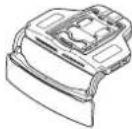
Head-updisplayunit:
Main nits
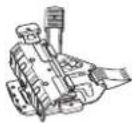
Mountingbrackce
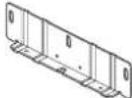
Sumovsorthicknessandismont plate:angelki
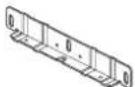
Sumsoftthickness.suitment plate@ma 1x1

Mounting software

Hexagona soanherd
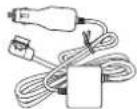
Powercable.txt
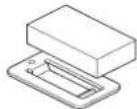
Sun sorcushionx1

Double sided tape
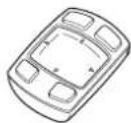
HUDremotecontrol:
Max.mxtx1
(Aithurnorbetarysprinstalled. Remove theinsulationsheerbeforeusingthounit.)

Engb
Beforeconnection
Precautionsforconnection

CAUTION
- Don't take accessory power from this CAN Buslinterface etc. Besure to connect the accessory power supply of the vehicle.
Installthissupplicopartssspecified. Usepartssotherthanthesuppliedones maycausesemafunction.
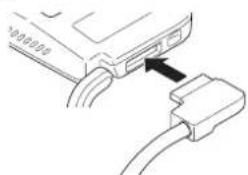
Connectingthepowercable
Firmlyconnectthepowercablebyinsorting itinthepowerconnectorontheunit.ifthe connectorcannlbaierasedsmoily,the orientationmaynotbecorrect.Checktheroi- etationoftheconnceter Donluseforce topushushin.Doingsomaycauseamalfunc tion.
Preventingnoise
-
Topreventiono,placebeto followingitemssas farfromiPhone,anAndroid device,and othercablesandcordsa暂停e. —Fimaeraandaeraicable —FWAEMAerialanotisraelicale —GPSaerialanditsaerialicale —Beaconreceiverancitaisraelicale —Powerable Placetheserialsasfarfromeachotheras possible.
-
Donnottiheaerialstogather,stackthem or crossthemoverachother. Noisereceivedbytheaeriallandaerialcable reducesreceptiononsensitivity.
Precautionsforinstallation

WARNING
Secureheunitosunvisorwithal preventooll. Failurelocosormaycauseheunitofall, causinganaccidenlndjury.
When installing the unit to vehicle equipped with hairbag, never install the unit onlhecover of anairbag or nplacewhere it willintererewiththocoplmpmentofanair bag.Doingsmaypreventthairbagfrom depoy ngormally,orthedepoyedairbag mayhit theunit,causinganaccidentand injury.
Donatworknaplacles.bjcctodirectsunlight.Doingsomaycauseaburniny. Furthermore,there sariiskofolindness causebyexposuretosunlightreflected fromhecombiner.lfthecominersexposedocdtcresunlight,closethecombiner.
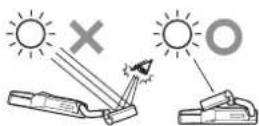
- Don't leave the unlined places subject to direct sunlight.
- Don't remove the combiner protection sheet before the installation is completed.
- The combiner may contain reagent lightpainting agent.
- Intense beam, causing smokeborne.
- Never install the unit to vehicle equipped with sunroof to convert Sunlight, maybe thereof by choosing a combination concentrated into an inintense beam.
- Donotusethesesurvivoronthestedewindow withinthisunit mountaeonit.

CAUTION
When installing the loan vehicle equipocowthairbags.askhovehiclemanufacturerforprecautionsintheinstallation work.Thereisarskifncorrectdeployment ofairbagsresultinginafatalaccodont.
AsunvisghtanotheopreciaIalaccossoresaroundthesunsorsuchasacd holderandsunvisormirromaynotbeale tobeusedafterinstallingtheunit. Check the accessories in the vehicle before hand.
- The installation of the mayleavemarks on the surface of the sunsciner.
Thsunitsnusposedtoeinstaed oncd thepassengersseat.
Parts,dust,etc.may'tallyouwhilstyou areinstallingthegunit.Topretoous,etc. fromgetting intoaneo.Tocenollookupat theunit-remdirectlyycolowwhinstanding tneunit.
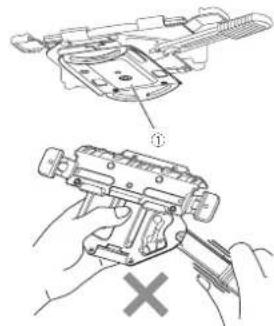
The diffuserand combinerof the unitareled cateparts.Donotouchthemwithbare handsocauseatocfllcmeintocoint withthemwhilinstallingtheunit.
Beforeinstallingand securingunit
Firstconncttheunlttemporarilytocheckthat theunitworksnormally,andtheninstallthe unit if theunitdoes notworknormally,checkif theconnectioniscorrect.
Whensecuringtheunit
-Recommendedittingtorque,eforsecuringtheunitwithreswisfrom0.36N·mlo0.59N·m.
-Beforeapplyngthedie siedatapetothe connectionboxfheecowercable.throughlywpiactanydiffontnthesuraceto whichthedoeble siedatapestebeplioe.
Connections
Connectiondiagram
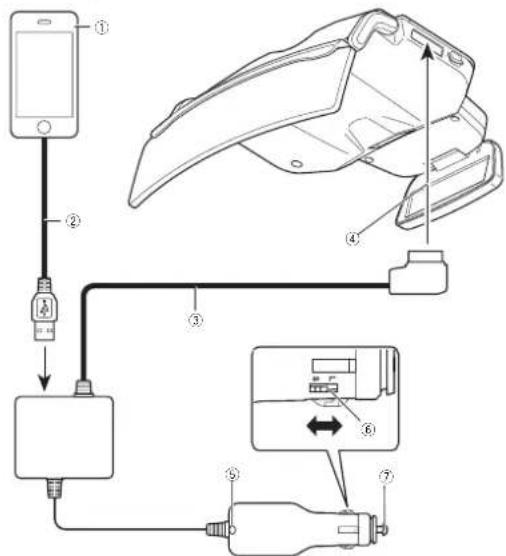
iPhoneAndroiddevice
②USB cable
3 Powercable
Tothepowerconnector
LEDindicator
6 Plugsizeswitch
Tothecigarettesocket
ForiPhoneusers
Usechecade(2)supplieowththeiPhone. Don'tleave the checable in the vehicle.The cablesupplieswiththeiPhone smtdesignedforusceina vehicle.
ForAndroiddeviceusers
LseaJSB microLSBdatacommunication cable(2)ofmorless.Achargeablecannotbeused.
Notes
The LEDind catoponthecigareteoplights when thepowerison, and turnoffwhen theunitstumedoff. iftheLEDindicatordoesnotturnoffwhen thevehicleengineisturnedoff, disconnect the power cable from the cigarette socket for the vehicle. Failure to use will drain the vehicle battery.
- Forder details connecting an手机号
Android device, referto Setting your Phone
or Android device on page 17.
Settingthesizeofthecigaretteplug
SothecigaretteLugs zoto(Largo)orS (small)acccoringlchsizeothecigarette socketthehvicle.
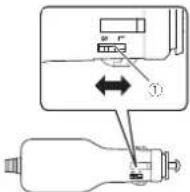
① Plugsizeswitch
Installationposition
Whenreplacingcigarette plugfuse
1Turntheplugcounterclockwisetoloosen it.
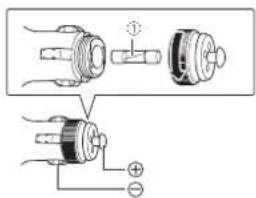
①Fuse(3A)
2Replacethefusewithanewonewith thesamecapacity.
Precautionsforinstallingunit

WARNING
- Ussthesuplicscrewsand installertun asspecified. Useofscrewso.herchan.the supplecconmaycausedamageltothe unit.
Securetheunitotnesurvisorfimlyusing thesuppliedscrews. Failureodosornay cause theunitotfallrdrivingdrivinghheadendcausingnjury.
-Readthismanuaillyandcarefully,andinsallthunicortorrectytosbioebytheosetorystandards.
Specifiedinstallationposition

CAUTION
Installtounthospocifiodinstalationposi tionloprovidehedriverwihfasefieldcivisionandesuretheunilcanperformils requirodlfunctions.Insalltingthuntnapositiontherlantnespecifieonemayno.meel thesaftystandardsforroadruckingevehicles, andthohvichicomayfallasafetyinspection,forexample,dueloamaintenenceerror.
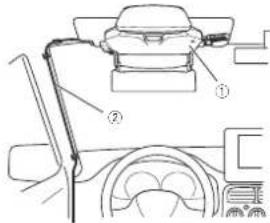
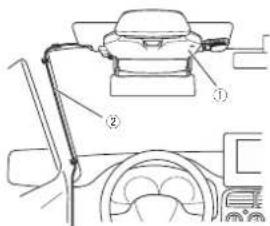
①Mainunit
②Powercable
Preparationforinstallingtheunit

CAUTION
Donginstalllinelimitedunstableeffective survice.Doingsomaycausetnunlltfall, resultinginanaccidentormalfunction.
1Checkthesunvisor.
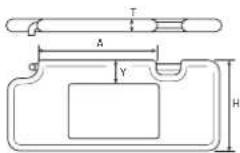
Crockthathicknessfothesunvisortoinst
Tneuncanbeinstalledtosunvisorsthat meet
trefelowingspecifications.
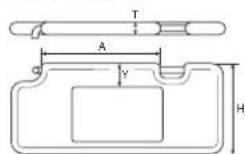
T:Thicknes15mm33mm
HHe ght140mmto240mm
A:Distance between supportpoints
185mmomore
Y:Distoctothet mirlpck.
45mmormorora(com mended)
2Checkthesunvisorthicknessadjustment platetobeused.
Thesizeofthesunvisorthicknessadjustment
platecpoemountedtothemmountingbreckedtf
terspependingthonthesunvisorthickness.
Thisunitcomswththesunvisorthicknessadj
justmentpia(medium)pmounted.
Usethesunvisorthicknessadjustmentpiated
thesizematchingthesunvisorthickness.
SunVisorThick
noss
Sunvisorthicknesssaa
justmentplate
15mmx20mm Subscript thicknessadjustmentplace(small)
20mm to 26.5mm Surveyor thicknessesquita-mentplate(medium)
26.0mm/33mm SWV/Schicknessadjustmentplace(arga)
Whenreplacingthesunvisor thicknessadjustmentplate
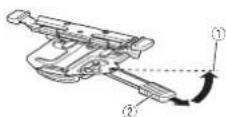
1PulltheHUDlockever,andslideittothe lock-releaseposition。
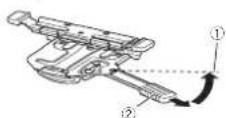
①Lock-releaseposition
2HUDlocklever
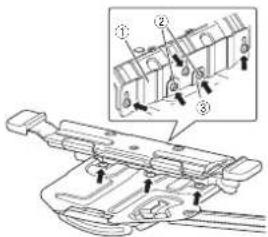
2Removetheightscrewsincludinglongitudinaldirectionadjustmentscrews(show intheillustration)onthemountingbracket, andthenremovethesunvisorthritisadjustmentplate(medium).
Ifthelongitudinaldirectionadjustmentscrews areremoved,thelongitudinaldirectionadjustmentplate are removed from the sunvisorthritisassessdustmentplate.
Preparationforinstallingtheunit
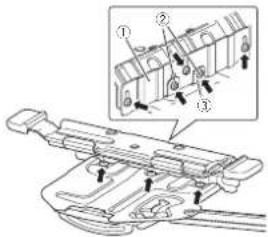
①Sunvisorthicknessadjustmentplate
长 Longitudinaldirectionadjustment screws
③Longitudinaldirectionadjustmentplate
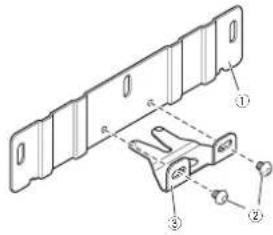
3Attachthelongitudinaldirectionadjustmentplateotosunvisorthicknessadjustmentplateotbeused.
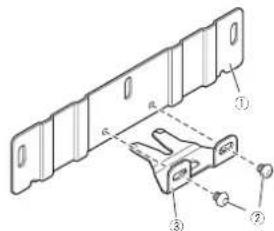
Sunvisorthicknessadjustmentplate
② Longitudinal direction adjustment screws
3 Longitudinaldirectionadjustmentplate
4Alignthescrewwholesonthesunvisor thicknessadjustmentplatewiththoseon themountingbracket,andtightenthere mainingscrewsthatwereremovedatthe originalpositions.
InstallingMainUnit
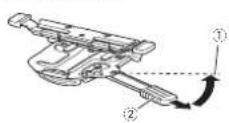
1AIlgntheHUDlockleverothelock-releaseposition.
Puttili UDClockeier,andsliceittochecklo-releaseposition.
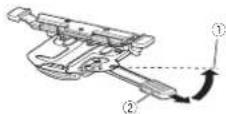
① Lock-releaseposition
② HUDlocklever
- Don't hold them moving part on the mounting bracket when opening the HUDlockever. If holding them away part of the HUDlockever cannot be moved
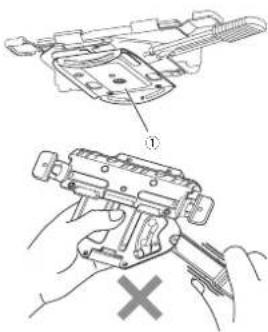
1Movingpart
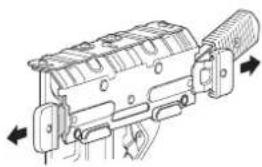
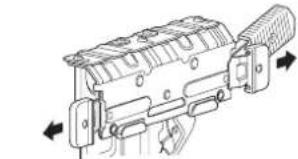
2Releasethelockplatesonthemounting bracket.
Pull hellockscenithemouningbracketo trolletandrighttolesaeecho.
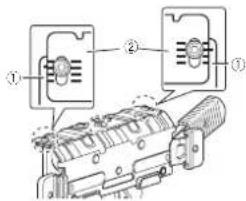
3Adjustthemountingbracket thickness. Alignnelinesonhemountingbracketole. scalemarkslocatedatthe landgrichlon the sunvisorthicknesssadijustmentplatoaccordi ng tothicknesssoftnesuisorandthontightentherescrews.
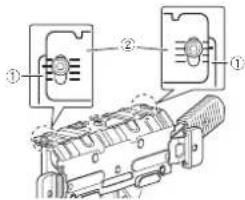
① Mountingbracket
Sunvisorthicknessadjustmentplate
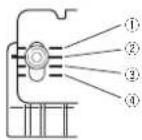
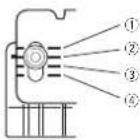
The approximatangurostrasca marks ontheusurwthirichnessadjustmentle (medium)eraesfollows(heilustration, showsthen in contomnourbracketis alignedtothesca.omarkof2mm).
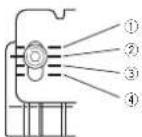
① 20mm
InstallingMainUnit
22mm
24mm
26mm
4Mountthemountingbrackettothesun visor.
Pushthesunsurposuthehorizontaiposition.Holdtheierstandnghtenosloflockatesortthe mountingbracketandmountthemountingbracketohesunsorbypushingthemountinggrackeatalthewayin
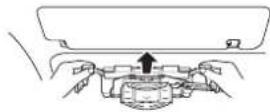
Iftherountingbracketcarnortbefully pusherin,themountingbrackett thickness needstobte increased. Removethemounting brackelfromthesurvisor returnostep3 antadusuttheaca epositionarithmen mountthemountingbracketothesurvisor again.
5Pushthesunvisordowntothevertical position.
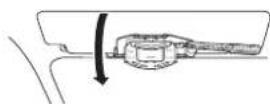
6Lockthemountingbracket.
Push in the lockpoint at front threshold and right firmly toock themounting brackets.
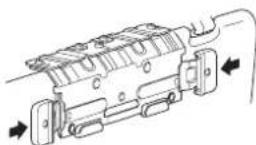
- fihelockplateascennobefulypushedir, themountbracketncknssneadebstobe increased. Removethemount ngrbacket from thessunvisor.reumossteplandust hiscaleposition,andthemountthmoutngrbackettochesunvisoragain.
7Checkthathemountingbracketismountedsecurely.
PushInresunvisorbacklohehorizontposi
Pushtemountingbracketbocanortinto makesurethathemountingbracketsin mountedsecurely.
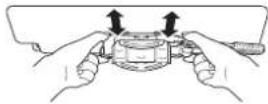
- thernountingbracketanberovemctfrom themsuryaresselythmoutngbracke; Thicknessnreestoberecreased. Renovethe mount ngbracketfromthesurvisor, return to step3andadjustthecaleposit on,and thenmourltnemountingbrackettolhesuysoragain.
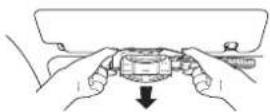
8Removethemountingbracket.
Pushlnes.mvsordwnlrchevericalposi on and pulllnockpianostelnelstandirgnttole- leaseinlock.
PushthisunsurvisuroptothehorizontaIpalosition andromovchomountingbrackethromthesunsuvisor.
InstallingMainUnit
9Checkiftheadjustedthicknesssof the mountingbracketisappropriate.
Pushthintlockpotsontremountingbracket fromthelettandrightfimtooleck.
Checkhalthemountingbracketcarnob be mountedtothesunsisoreaslywnilsthelock pratsalocked.
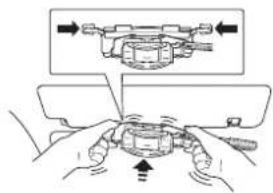
Ifthecountingbrackeetcarnotbeomnudedto tres,miswesasily,therichnessissorrect.
themountingbracketcanbemountedto theunvisoreasywhisthelockpleshare locked themountingbracket thicknessisnot appropriate.
Removalhemountingbrackefromlhesunsurvisorrettnostepandadjustthescaleposi-tion,arothemountthemountingbrackettothesunsurvisoragain.
10Mountthemountingbracketofwhich thicknesswasadjustedtothemainunit.
Check that the diffuser and comb nerothe mainnt are closed,and align the IUDlock everontnemounting bracketchelock releaseposition.
Mainunit:
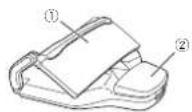
1Combiner
② Diffuser
Mountingbracket:
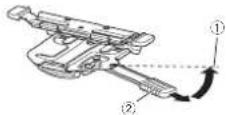
①Lock-releaseposition
②HUDlocklever
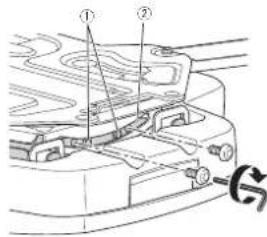
Securethemountingbracketandmainnital fourplacesatheironlandbackusingthesupclcdmountingscreenscrew.
Mainunitfront:
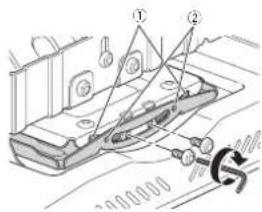
Groove
InstallingMainUnit
② Alignthebosseswiththegr groove. Mainunitback:
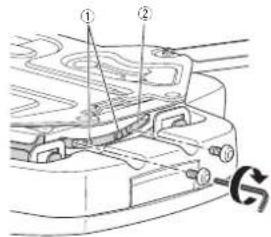
1Alignthebosseswiththegroove.
Groove
11Loosenthefourmountingscrewsthat wereshedinstep10oneturn.
12Loosenthelongitudinaldirectionadjustmentscrewsontheunitoneturn. Mainunitfront:
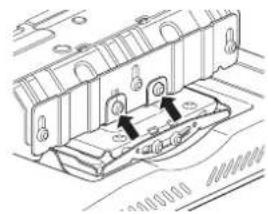
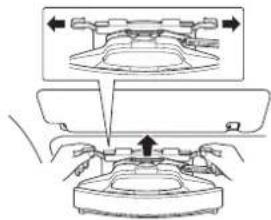
13Mounttheunittothesunvisor.
Pull the occipitescnthe mountingbracket to the left and right,as fast as possible.
Pushlthesunvisoruptothehorizontaicosition.
Holothelteftandringtendsoftlockplatesontre mountingbracket,andmountthenutinithe sunvisorbypusinghemountingbracketall treaway.
14Pushthesunvisordowntothevertical position.
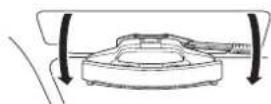
15Securetheunittosunvisorwithafall preventionbelt.
Pullnifai:preventioncellforwardfromthe backoffthosunvisorthatwaspushedaownto prevent calposition.
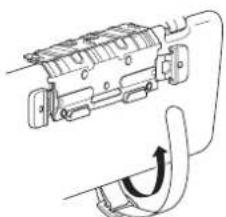
InstallingMainUnit
Passethalprsventionbeitthroughssown inheillustration.
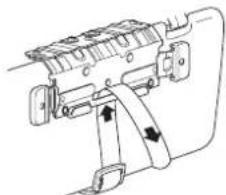
Pulthiattack onbotcdowndarundescurelasiislisledowndward.
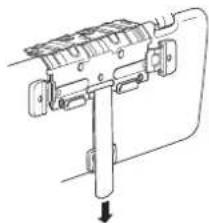
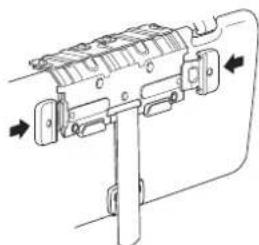
16Lockthemountingbracket. Pushinthelockplatesfromtheletendright firmlytolclockthemountingbracket.
17Pushthesunvisoruptothehorizontal position.
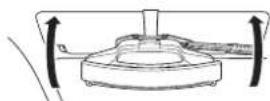
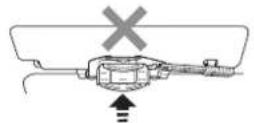
1Blockthemainunitposition. PolltnelUIDlocklever.andsiderleitothelock position.
① Lockposition
Themaun.sidesforwardandlheunilpositionisolocked.
19Adjustthetiltofthemainunit.
Adjusttheaneletoeleythemainunit.
InstallingMainUnit
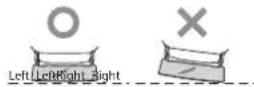
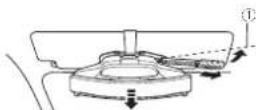
Till the sun is veilingly abscut 20 degrees and firmly lightenthewomcunting'screwsatthe backoff him main nunit that were loosened instep 11.
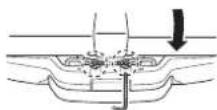
- Ilthocombinerprotectionsheet:
withheadustmentremovethe protection on a street.
Alaich thecombinerprotectionsheet against roadadjustment finished.
20Adjustthedirectionofthemainunit.
Openthedifuscrencioeherminal unit.
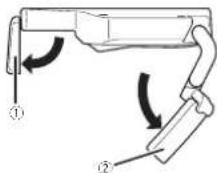
① Diffuser
② Combiner
Adjusted direction of the main/natural calignthe diffuserand combinerithetravelling direction.
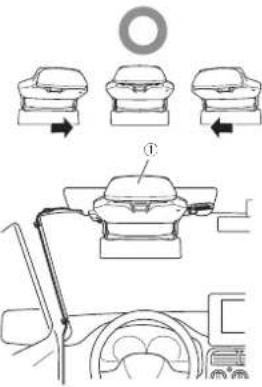
1Aligntheunitinthetravellingdirection
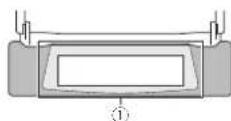
① Adjustthecombinersothathediffuser canbe displayedinthecentreofthe
combiner.
- Bosurotoadjustthemunitisbete aligned inthe traveling direction.
21Unlockthemainunitposition.
Pulthor-HUDlockever,andslicrofthtockelock releaseposition.
InstallingMainUnit
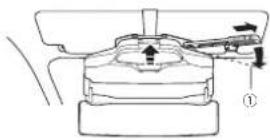
Lock-releaseposition Tremainunitslidesbackwardandtheunilposi tionsunlocked.
22Removetheunitfromthesunvisor. Closethedifuseandcomb narothemain unit,andthenpustthesunvisorcbrowntothe vertcaiposition.
Pullthockplatosontemountingbracketto
teletanigrtoreaseheltlockUlockte
faIpreventioncell.Pushlhesun.surpocthe
horizontalposition,andthenereovethamount
ingbracketfromthesuvisor.
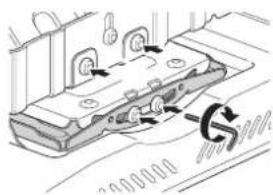
Becarefulnottocausetheunitofalout.
23Firmlytightenthemountingscrewsat thefrontofthemainunit.
Firmlyghtgnenthetwomountingscrewsetthe frontofthemainunitchwatereoosenedinstep 11anetetwoelongtudinaldirectonadjustment screwsthatwereloeosenedinstep12.
24Mounttheunittothesunvisor.
Performtheoperationfromsteps13to17to mounttheunithofesu.nvisor.
AligntheLIDlockevertothlockrelease positionbeforemountingtheuriththesun visor
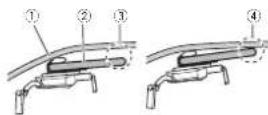
- Iftheraksagapowtwenthvehicle'scailing andunsurwisewhendresunvisinthe horizontalpositionattachesunsurwch-ontothefaiproventionbelt.
Vehicle'sceiling
Sunvisor
Gapbetweenthevehicle'sceiling and sunvisor
4 Nogapbetweenthevehicle'sceiling andsunvisor
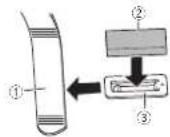
- When attaching gas reservoir cushion affixes any surflow coating clothes, surflow cushion on no car, attach if the actual prevention is not met, and then secure the safety belt.
① Fallpreventionbelt
Sunvisorcushion
Sunvisorcushionholder
InstallingMainUnit
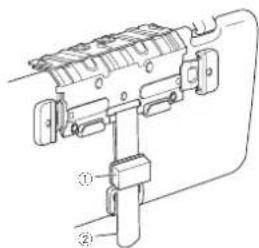
Sunvisorcushion
Fallpreventionbelt
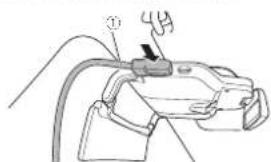
25Connectthepowercabletotheunit.
① Powercable
26Routethepowercable
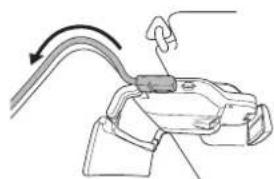
Route the power cablesthat he cable will not interfere with driving and ensure the driver has a safe floorvision.
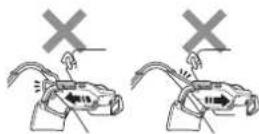
Adjust the powercablestoth atwillnotob stutchdhrider'svision.
- Roitheecablesolthiatwillnotinerfere whithnascwardandforwardmovemort of themainunitwhencoperatingtheHUDlock lever.
Rutethepowercabefixingthepoints with clampscommmerciallyavailable.
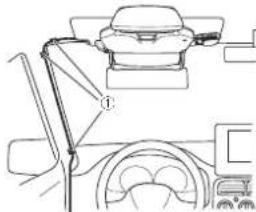
Fixthecablewithclampscommercially available.
- Donataffxomountthecabletothewin-screen.
Donotruolthepeowrcaalsthefoo1d theirdver'sse. Thereisariskthalthe poworcar agctstaopcdunorthcakoe pedandelarditererewdhvidngresulting in aseriousaccident.
27Lockthemainunitposition.
PullIneHUDocklever.and slideIttothelock position.
InstallingMainUnit
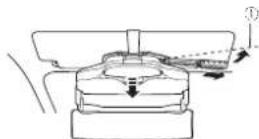
Lockposition
ThemaintinuIstSfowardndthe. unitposi tiorlocked.
28Securethepowercable.
Attacnthe double's dcctapetcheconnection boxfthepowercableandthenattacnthecon- nectionboxtoalocationwherethecablecanbe securefmiy.
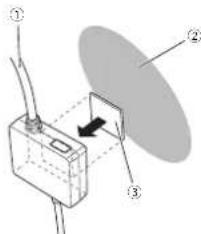
1 Powercable
2Dashboardsideetc.
Double-sidedtape
29Removethecominerprotectionsheet. Check that the power cable is connected and routed correctly, and then remove the cominer protection sheet.
Afterinstallation

CAUTION
- Checkiftheunits installedcorrectly. In the following cases, returnstopfandinsta theunits correcty.
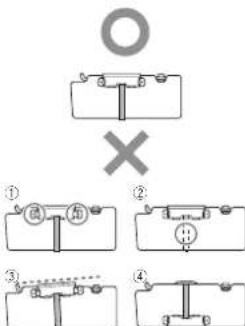
①Thelockplatesarenotfixed.
Theunitisisnotsecuredwithafallpreventionbelt.
③ Theunitisinstalledobliquely.
Positionoftheunitisinstalledreversed.
Closethediffusewhennnotusingtheunit.
- When removing theun fromthosunvisor and storingit besureto selledifuser and combner. Doncteevetheun tinalocasexocedto rectsunlight.schasonadnboardThe diffuserorcombinermayconcentratelig intoanintensebeam,causingsmokcorti
Connectingthepowercable tothecigarettesocket
Firmlyconnectthecigaretteplugothe.
powerablebyinsertingitintothecigarette
socketthonthevehicle.
TheLEDindicator-ntheegiacaretepluglights greenfinepowerstumeden.
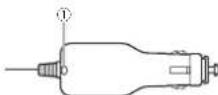
LEDindicator
Notes
- Insert the cigarette plug to the power cable into the cigarette socket on the device with the LED indicator face-up soothly driven can see it.
- Ithel E Dindicator does not turn when thevehicle engine is turned off, disconnect thowever cable from the caractersocketton thevehicle. Failure to access will drain the vehicle battery.
SettingyouriPhoneorAndroiddevice
ConnectingyouriPhoneor Androiddevicetotheunit
ForiPhoneusers
- LusethecablesupplieswiththeiPhone. Don'tleavecheacelinenvehicle.The cablesupplieswiththeiPhone isn't designedforuseinavishie.
ForAndroiddeviceusers
- UseJSB-microUSBdatacommunication cable of 1 mortless. Achargeable cannot be used.
1ConnecttheUSBcabletoyouiPhoneonAndroiddevice.
2ConnecttheotherendofUSB cable firmlytotheconnectionboxofthepower cable.
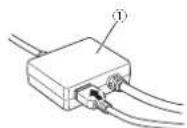
① Connectionbofothepowercable Connectionoverview:
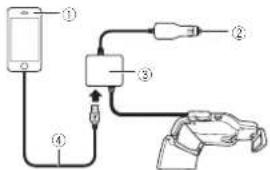
iPhoneAndroiddevice
②Tothecigarettesocket
Connectionboxofthepowercable
USBcable
Installingthenavigation application
InstallshysingpicationocctoyouriPhone orAndroid devicebeotetullisghsiutism.
You can download hemsvigilancepolisction from iTunes AppStore or GooglePlay.
Formocpartialissonnavigationapplication, rctor tofhoweverfollowsige.
http://www.criterion.eu/navgatehud
Startingthenavigation application
Whenyou usethenevigationapplicationontorthe firsttime start theappoliclon yourself.The applicationwillstartautomaticallyfromthencntext timethiPthonorAndroid device sconnected toheunil.
CAUTION
Forutilisingrenavigatiorapplicaiton,you needtopurchasetheNavGateHUDSupport firstPurchasetheNavGateHUDSupportin theapplicationofollowinginstructions onhtscreen.
The internet connection is required to purchase the NavSaleHUDSupport.
Notes
-ForiPhoneusers
Iftheapplicationdoesn'tstartautomatically whentheniPhoneisconnectetotreun, tap'Allow intheopupnthapparsonthe iPhone.
-ForAndroiddeviceusers
SettingyouriPhoneorAndroiddevice
Ifthecaplicationdoesnotstartautomatcally whentheAndroid device sconnectcdtothe unit,tapthecapplicationnthepoputapatappa- pearsontreAndroiddevice.
Iyouselecthecheckboxandthenerseet theappication inthepopup.thecopupwil notapaafromhenexttime.
Displaymodes
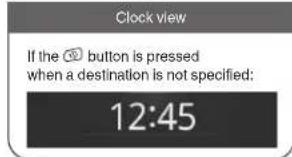
Fivetype softwareavailableforhisunit:ARulew(lowspeedmodeandhighspeedmode)listew(low speedmodeandhighspeedmode),junctcview,rouneoview andclockview
If the communication between the unit and then invitation applications established a thereto following viewsappears.
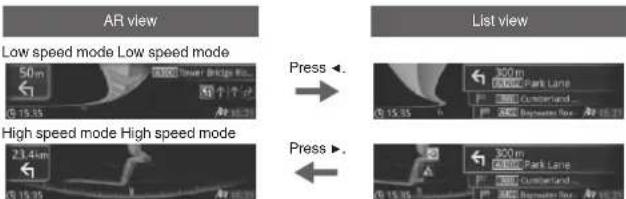
If a vehicle approaches a junction If a vehicle approaches a junction
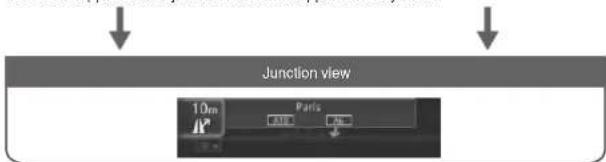
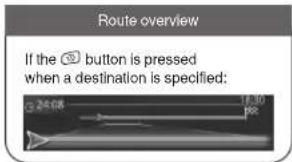
Notes
The low speed mode of the Reviewdis
playedwhenadestinationisnotspecified
Formoredetailsontheviews,refertotheep
erationmanual
Whenyoufinishwithininstallationandconnection
Adjustingthedisplaysettings
Whenyou finish with the installation and connection, turn on the unit (start the vehicle connection) and adjust the computer in some way. If you are unsure of how to use this system, please visit the nearest computer lab.
Note
The screen may not be able to see clearly, depending on the screenbrightness and surrounding conditions. Adjust the screenbrightness properly (refer toAdjusting the display brightness). Open the locationwherethe display is more clearly visible, and then go to the site.
1Pressthe
念 button.
2Pressthe buttontoselectDisplay Settings,and thenpressthe button
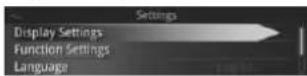
3Pressthe▼buttonselectasettingitem,andthenpresssthe▶button.
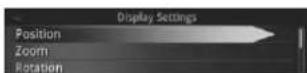
Position
Adjustrepositionofthedisplaysimage
1Pressthe buttontoselectsetting item,andthenpressthe button.
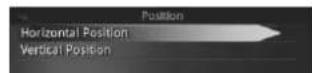
SettingItemDescription
HorizontalPosition
Select the best horizontal position oratted splayed image.
VerticalPosition
Saeetoadusthevertical positionofthe displayed image.
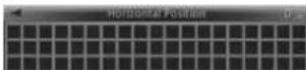
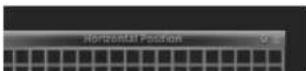
2Pressthe▲▼buttondisplaythegrid patternnitsentirety.
Ex:Whenitiscorrectlyadjusted
Ex::Whenitisnotcorrectlyadjusted
Zoom
Adjust the size of the display image
PresstheA/ buttonodisplaythegrid patterninitentirety.
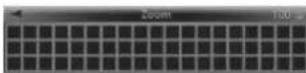
Whenyoufinishwithininstallationandconnection
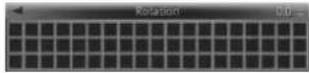
Rotation
Adjusttherolationofthe displayed image.
Pressthe / buttontolevthegrid pattern.
Ex.:Whenitiscorrectlyadjusted
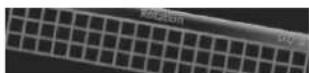
Ex:Whenitisnotcorrectlyadjusted
AspectRatio
Adjusttheasocctrationtheoisplaycdimage.
- Pressthe buttontomakethegrid patternrectangular.
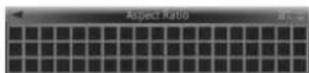
GeometricCorrection
Corrected distortion on/off displayed image.
1Pressthe buttontoselectsetting item,andthenpressthe button.
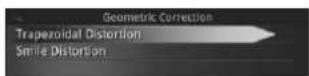
SettingItemDescription
Trapezoidal Dis- Selectocorrectthearpertortion zola distortion.
SmileDistortion Selective distortion distortion.
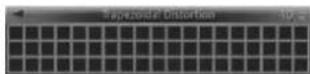
2Pressthe / buttonomakethegrid
patternrectangular
Ex.:Adjustingthetrapezoidaldistortion
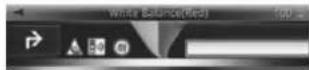
WhiteBalance
Adjustthewhitebalanceof.hedisplayed image.
1Pressthe / buttonselectasetting
Whenyoufinishwithinstallationandconnection
2PresstheA/Vbuttontoadjustthe
brightness
Ex.:Adjustingtheredcolour
Beforedriving
Configuringtheunit functionsettings
Unitfunct onsettingscanbeconfigurofrom theSettingsscreen.

CAUTION
Thisunitisabesperationoftheunitwhilst thehevichieinmotion.Parkthevenicina safeplaceandapplyahandbraksbeforeoperating thisunit.
-ffhehiceiosts movingwhilstsettingtheunitfuctions,theSettingscreenwilcloseautomatically.
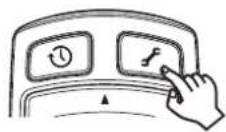
Pressthe button.
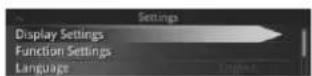
The Settingsscreenpeers.
MenuDescription
DisplaySettings
Adust:hecisplaysetnps
forprojectedimages.
FunctionSettingsSetFunctions
LanguageSettheDisplayLanguage.
About
Confimthcunitssoftware
versionandlegalnotices.
ResetAllSettingsRestorerDefaultSettings
Notes
-FunctionSettings can only besetwhen the communication with thenavation applica-t onchaseenestablished.
Presathe buttonoclosetheSettings screen.
-Fordetails referto the operation manual.
Adjustingtheangleofthecombiner
Adjust the angle of the combination to the same position.

Holding not hedging a combination when adjusting in single.
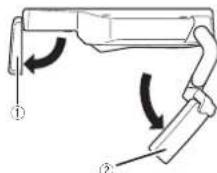
1Openthediffuserandcombiner.
① Diffuser
2Combiner
Beforedriving
2Adjustthecombinerangesothathe wholediffuserscanbereflectedondthem combiner.
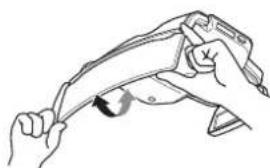
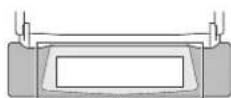
1
Adjustthecombinersothathediffuser canbedisplayinthentrefoth the combiner.
Whengettinginandoutof thevehicle
Becarefulnotabangyourheadontheun.
Correctcombinerposition
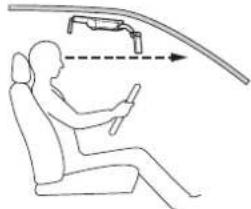
Beforeuse, besuretocheckhailtherowerend ofthocombincrisbebowvourineohsightwhen youssitthehospaetandlookstghfterward in theactualdrivingposifion.lifelcwerendof thocombincriscoovourinocctsghtdonut. Fofothecomponimontohoststorage positonensuresfieldvisiondriving.
Adjustingthedisplay brightness
Thedimmertunctionenthuisunitadjuststhe disleybrightnessautomaticallyaccordingto theamounllofambentligh.
Theclinysplaybrightnesscanbeadjuststeemanualusingthc.

Betoreseting theunfatlighttimeocinadark placesuchasimeturnlntadjustthebrightness ofthecunitpropersoyotatwifinotinterferto withdriving. FailuretocosomaycauseanaccidenL
Beforedriving
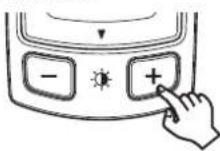
Pressthe/bution
Note
Crangngtheoriginthesmayalsocausethe
dispayhuetochange.
-

Precautions
01 Précautions
Remarques rernaneide
fonctionnement22
Acerst installation37
Baccemepolducapeled'alimentaciona
aiumepigare37
10 ReglagedevotreiPhoneou
periphériqueAndroid
RaccroemmentdevtreiPhoneou
periphoricucAndroicaiapparmil37
Insalaiionde'aplicaionde
navigation37
Précautionsderaccordement

PRECAUTION
3Régléz'épaissurdusupportd Monday, 14 March 2017
Aignezzles: gnesusupportemontageeves lerespereed'schellestudsgauchetebdroite ceplaquederogiatedepaissucuparole- enlentiorcndel paissaeuruparesoileil, pusserrezrozsivs.
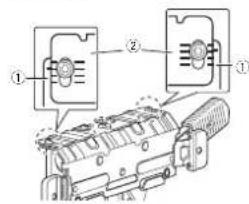
8Retirezlesupportdemontage.
Installationdel'application denavigation
Installz applicationsnavigationsurvote IPhonecuperphicneAndroidevalto/uliser celappareil.
Vouspouvoztrechargerapplicationnaviga
tiondepuisITunesAppStoreoGooglePlay.
PourensavoiroLusssur applicationnaviga
nationreportez-yousausitesuivient.
http://www.pioneer.cu/navgatchud
Demarragedel'application denavigation
Lorsdaplemcrtutilisationclplication denavigation,demarrerlanuement, lapplicatiion demarrerasulcorl quernentlrdspuonannacrondermentelIPhonecouduprihneusAndroid apparel.

PRECAUTION
Pourpucovir,tillseri applicationdenaviga lion,voussdevezglədabordschelerun supporcll affichagctetenauteNagle. Achetez-Indanai applicationansuwtles instruetonsafficheesa/ecnran.
- UnconNECTION INFORMATION: Information about the use of a Wi-Fi card, including the following information:
Remarques
Notesullschedecimemoria microSD46
Notesull Pone46
NotesudiscesivAndreic47
Copyright47
120mm
22mm
① 24mm
④ 26mm
4Fissarelastaffadimontaggioalparasole.
Spingereinaltoilparascole.inposzioneorzzon-tate
Afiere eestreimiladestraesinistradlelep
stbdbccosullastafadimontagq. qumld
installarelastafadimontagg osulparasole
sngendolafondo.
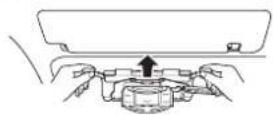
Senonopossiblespingereafondolastaficimontagg o,sara necessa cuminertarelo spessoreddalafadlaffimontaggg o.Rinunereinstafacimontfagodiparesole,ornare alassagg oseregolarelasiosuallasa,cuiocinreiniata lareasfaftamortlaggikssuliparesole.
Allineareimozziallefessure.
② Fessure
Siesidif/civerlapantalla68
Vis tenuestrositionWeb69
Datosguardacosdelcliente69
Notasscbreesaunidad69
Piezassuminist
CorrespctionGeometria81
-3aiarredeblanco81
Antesdeconducir
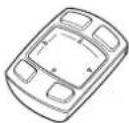
Mandoadistanciadelmonitorfrontal:
Unidirected links
(Cuentacoronabaleradellilipreinslaada, Antesutilzaraunidad,retirelalmainaaisante.)
45mmodermain(emption)
① 20mm
22mm
24mm
6.26mm
LoosvooraedgedeetandiemtWAARSCHU
120mm
22mm
24mm
126mm
OBHOBNEHn nporpamMmHoro
06ecneeyn 132
Nocertte hau caT 132
Coxpaehhhhe noIb30BaTeJIbckn
aHHbIe 132
O6 3OM yCTPOHCTBe 132
33 TpeueHb NOCTABNREMBIX B KOMNNEKTe
TeTae
Pepe nodknIOueHHeM
Mepb npedoctopoxhoctn npn
noDKNHueHN 133
NoKIOHHeH HHypa NHTAHn 133
PpeoTbaaueHne nomex 133
5 Mepbl npedocTopoxHoctn npn
yctaHOBke
Ipepe yctaHOBKOIN 3akpenneHnem
6noka 134
Pn Pkcaun ycTpoNCTBa 134
06 CoeHHeHHa
Cxema noKnoeHH 135
Bb6op pa3Mepa wTekepa
noiknIOeHnK npkypBaTeIio 135
3aMeHa nnaBko npedoxpaHnteJia
PnKpyBaTeT 135
07 Notoxehne yctahOBKn
Mepb npedocTopoKHOCTn npyctahOBKe
6noka 136
Tpe6yemoe noonKeHHne ycTaHOBKn 136
08 NpOtroTOBka K yCTaHOBke 6noka
Pn3aMeHe nlaactnHbpeRynpoBKn
TOLHnHbCONHue3aHTHO
KO3blPbKa 136
09 YCTAHOBka OCHOBHORO 6noka
Pocne yctAHOBK 142
NIOKNIPOYHe KABENI NITAHN
DnKvOuBAten 142
10 HacrpoKa iPhoneenn Android
PouknoueHne iPhoneenn Android
yCTPOYCTBY 143
YcTaHOBKa npnOKeHHa
HABNRAUIN 143
3anyck npnloxhen nn
Habraun 143
10 Pexmmbl oTo6paKeHHa
12 Nocne 3aBepueHn yCTaHOBKn n
NOAKIIOUeHn
Pervnypovka.napay
DUNDEE 144
-10npxhen 144
-VBENHNE144
-BpaueHne 145
-OPDMAT 145
B DAHOM pyKOBOCTBE OINCAH npOeCC yTaHOBKn HAcTPOKn DAHOI 5NOKa NHCPTPyKUIM No EKCNyATAUN BNOKa pReCTABNEHb BOTDeHBOM PYKOBOCTE K 6NOKy.
IIOIOO6HNO INHOPMAUHO O FyHKnJx N yr BNEHM YCTPOIcTBOM MOKHO NOIyHTb Ha HauJEe CaJIte:
http://www.pioneer.eu/navgatehud

HhopMaunn nnoIb3oBateNe no c6opy nytlnnaun 6bIwero B3KcNpyataunn 6OpydoBaHHnO tpa6oTabuNX 3JeMeHTOBnTTAHN
(0603HaHeHne dna 06OpdyObaHHa)

(O6o3aHcHmRA 3nAeMHOITOB nTaHnR)
3TN 06o3aHEnHn Ha npOdyKUnn,ynakOBke, n/HHn cnpoBntenbHbIX DoyMeHTax O3- hAahokOTu bBbuaa H 3KnPnyataun 3NeK TpOTEXHcyeKn H 3NkTPOHNHa pOdyKUnn H oTpaOtaHhble 3NeMehtBu NtAHn He DOnKhh BuBbpaBtBa BMece C obSb
YHbIM 6bITOBbIM Mycopom.
IITTO TOTOb6DaHANB6bUaBnB yN07
6bHNnPNDyQUNnO nOPt6oTahNHJe
EMENTbI NHTAHNA B6bIN COOBTeCBYIOUM
0bAp3OM o6bOpTaBH,yTN34nPOBaHbN i nepepAbTaBH,nKoxanyiCTa,nepepaTe Me
B COOTBCTBYHOUINYHKT C6Opa MCNOJb3 208AHBHIX 3NEKTKPOHHbX N3dENJIIN B COOTBCTBHM C MeCHTHbIM 3AKOHODaTeIbCTOBM.
yTIN3Mpya DAHINIE yCTPOiCBA n 3nEoHHTI. NITAHIN PABNIBHO,Bn NOMAETe COXPAHHTI CEHNHIEpecypCHNpEOITBRAH B03MOKHHIE HReTMBHIE NOCNGCTBNI Tn4NOPOBbI. INOEIN OKPYKAHOUe CpeDbl.KOTOPBE MOrYT B03NHKHyTB pEzyltaTe HECOOTBETCTBYIOeero YdANHINr OTXONJ.
IaonnoyHnOIOHInTeBHOINFOPMauHnIO npabnBbXb CNoO6BaX c60paN yTNIA3AOnOTpa6oTaBueO6OpdyOBaHnNcNOJcBOAHh bXeIeMENTOBtHAnOB6paAaTecB BCOETBCTOyMeNTHe OpArHb
CaMOyTnBaNEHnB,LeHTpbl yTNm3aUN mOTxObONI IN No MECT NOyKYNN DAnHORo NsEINJ.
AnHbHe 6o3Ha4eHMy TByBpKDeHb ToIbKO AnE BeponeKcKO CoHO3a.
IIra CtpaH,KOtOpBte H BxOaT B COCTAB EbponeNcKOrO Co0Ha3:
Ecnn BbJxnaeTe yTNIN3MPOBaT DaHnBle N3-
denn,obpaTHeB CootBTcTByIOUme MeCT-
hIe yPexDnHn INn K DInepam dnn
NOnyueHHnHfOpMaun O npAaBnBbIX cNooc-
6ax yTNIN3aun.

Daty n3rTOBnHnObOpyIOBaHHMOxHO
Bnppeenntb no cepnHOMy HOMepy,KOTOpbI
coIepJXH INHOpMaJIHIO O MecJIe I rOJIe npOnBIOCTa.
YCTAHOBKa n NOdKJIIOUeHne
PENEDYNPEXDEHNE
-Мспньштей Даннию симсгету Толбко C 12-BOLTHBIM АKKyMТYPOTOPOM N 33aEMLHEM OPINIATELHSFO NOJIOCA.
He nCnOBye DAnhB 5nOK B ATOMO6nIbX C HnAPRKeHEnM G6P08oT cetn 24B.
Cui#ctByeTOnaCHOCTb BO3rOpAHnI HnHcNpABHOCTn.
He yctaHaBnBaIte daHHbI 6nok B MeCTax,
JIe OH MOKET MeIaTb cpaBaTaBHaHIO NpUJIK 6903NaCHOTc.

Mepbl npedoctopoXHocTn
Pn yctahOBKe daHHO 6nOKa B ABOTMoHe yctAHABINBAITE DAHHB 6nOK Ha Dne,06OpBHOBHOM NoDyHKAMM Be3OanaceKefKTHB COHUEA3UHTHb KOB3ipek. HOCTn,6opATtMeCb K H4OTOBTEHNO PepeYCTAOHKOYbIDTeC bOTCYTCBHM ABTOMOHNDA NOJyEHN M HFOpMAUM DeFekTob COHUNO3AUHTHORO KO3bIPka.YcO MEPAx npDEoCTOPoHOKTHnp INPOBEe TAOHKA HA DEEFTOM HOKbIPBe MOXET HNM MOHTAHbIX paoCTCuJeCTBye ONAC PnBBCTN K NaDHINQ YCTPOICTBa,To,B HOCTb HerpAbNHOrO cpaBAtHBNAH CBOIO OepeBb,MOKeT CTb PNPHNO He NOOyJEe 63OAnCHOCTNu TO MOKe TPNBE- CTN K HeCHAcTHbIM CNYaRM Co CmepTeB-He OetTabraTae DaHHB 6nOK B MeCTax, HHM XNCODOM. NDBpeKdEHHHX BOADJCTBnH IOPMhX CON
He yctahaaHae TaHbN 6nok MeCTax, HcHbix nyeH. rde OH moKet 3atpydHbOB 6o3pO BODHTIO He ydaHtne 3aunTHNIO NCT pOeKIOHOHnpenrTCTBOBAty npABNEHIO ABTOM06n- ro DcINNe IIO 3aBBPOEHNI YCTAHOBNK. nen nn ppeCTaONaTBOn aOHocTb nnac- PpoekMOHNb DcINNe MOKET KOHCENTPAKIOBPOBAT CBET BpyOK BbCOKO INHTEOHBO CyueCTBye ONAChOTDopOXHO-TpaHC- CTN,HTO pINBeTe K o6paOBAHHIO bMaNOptHBxPiOncUeCTBmI TPABM. INN BOStOPAHNO.
-He ydaunne 3noaunu c Ka6eI nntanrna TaBaaen coctbaHn Hc03NaCHOTM 6bDahHORo 6Noka C ueBIO NOKINOHENI Pn-paTnTeCB K DnEpy dny YCTAHOBKN DaHHOR TAnH YAUPYN UyTOPOB. 6Noka, npOKNAkKn Ka6eI IN Nm IIN MMeHENI TpeBauhenne npedeBHO DOynCTMoro MeCTa YCTAHOBKn.
TOK mnn HeNCpAABHOCTN. nOnbta HEnpaBnHbAA yCTAHOBKa, npO
-He HcnoIb3yTe BoTbI N TaRn DteTaeN I KnaJa KaBeNei Nm DEMOHTaK DaHORO y3NOB,CB3AaHHbIX C oBeCeNEHMeM Be3- 6NoKa MoKeT pnpEeCTN K cepE3HbIM No-bpeXeDEHnA BAtOMoBHn. HIN,TopMO3HO CNCTeMbI N TOUINBHorO -He paBoTaIe B MeCTA JIOBdEpeHHbIX 6aka. BO3DeJCTBNIO PpMaBx COJIHeHbIX Jnyei. IVxC HcnoIb3BaHne MOpET npBecTN K OTKa- ETo MOKeT npBecTN K OXOrAM MN NOtepe 3peHN. TOpMO3OB,BO3TOPAHINO IN DOpOKHO TpaHCNPOTHMoy IpONOOCTBNIO -Peped YctAHOBKO OTcoEdNHte OTPua
He yctahaaHbIaBte daHnbl 6bnk Ha coHIn TELHyIO KNEMMy AkyMnyAITop.
ue3aunHbKo3bpeK,ΦOpMa KOtOPO He KopotKe 3ambKaHne IOXnKTeBHO n O-
NoDaeKINBaETc DaHbHM 6bONKo.
YCTAHOBKa DAHHORO 6bOKa HA COHnE3a- nopakEnHIO 3NeKTPnEeCKIM TokOM INN
UHTHbKO3bpeK,ΦOpMa KOtOPO He NpOd- TpaMBe.
DePckINBaETc DAnHbIM 6bIKOM,MOKeT -Peep YctahOBKO npOBepBe pacnoIOKe-
npNBecTm K HeCCHACTHOMy CnhyAoi INN HENBEH TPyBOPOBOB, Baka,3NOkTpnpOBIDn
npabHocTn. KN I DpyTNK COMIOHETOB.
Mepbl npedoctopoxhOCTn
Pn yctahOBKe daHHoro 6noKa nyTe CpeRpnKpneHTo daHHbI bNoK cOnHcuaaHT-
HeHnO HOMy K03bpKy c NOMoBIO pEmHr d
6byte octOpoxHb,HToB He NoPBENTb H npaoTbPAuHnnaHn.
6eK@kKT KOHTAKc T pyEonpoBDAmH Heco5OJIeHOe STOrO yka3AHn MOxET npN
6akOM,3eKTPopnpOBOKO IN dpYHMn KOBCTN K IaENHIO 6noKa,TO BcTO CBOO Oe- peB MoKc CTb, npHHoH HeCCHAcTHORo TY opaBaTaBAeMhIX TeTanei OT KoppO3MH cnayA r TpaBMh.
n nonadAA BoDbl. BbONnHtne nO3nUHn HEn3OINPOABHHx
IcnoN3yIte NOCTABNREMBIE TETANIN
06eBnHBAIte IN HADKHOE KPNENHE.
VcNOb3OBOHNE DetANEJOTINAOUXPC
OT NOCTABNREMBIX,MOKET npNBECTNI K NOB
BpEKDHNIO DpyTNX DetANEI BNOKA NIN
BOOMKOHOCTN HADKNHO TAKPENNEHIE
BNOKA.EcnI KPNENHE BNOKA OCNABET,
BNOK MOKET npENRTCBOBAT ynpABNeHIO
aTOMoBnEM IN pNBECTNI K HeCVACTHOmy
CNYAIO IN PABME.
YCTAHABINBAIte NOCTABNMEBIE DetaIN B COOTBeTcBN C yka3AHNMA. B Cnaye HennapinbHOY YCTAOHNI NOCTA BnREbIX DeTAEIN XK KpENNEHMOKeT O na6Hyb.N DETANM MORYTN aactb IN npBectN K HeCyaTHOMy cnyaIOH NnnpABHOCTN.
- McnoB3yIte NoctabnHMeBie Ka6en n Ha deNHO xo CoedHHaTe. VcnoB3yIte NoctabnHMeBie Ka6en n Coe HnAHTe IN B COOTBeTCTBm C yka3aHHaMn McNoB30aHaHEe Ka6en,OTnTHbHx OT noCTabnHMeBx.MoKet PnBECTn K Bo3rOpa-H HIO INH HENCtPABHOCh.
PnDnQkNIOHmN yCTAHOBKe DAHHORO
5NOA cIeMyte YKAA3AHMM, nPbBEHHeHHM
B HACTOHMe pYKOBODCTBe.
Heo6NIoDEHMe YKAA3AHMH HAcTOUeero pyKOBOCDBA Ipi NpOKnIOHcEHmN yCTAHOBKe
5NOA MoKET IpnBcETn K BoSTOPaHHo
HeC4aTHOMy CnyAio.
YaeT KabeBcN c NOMUJIbIO N30AUNHOHNOIeHTb INI DpyIN NOxOJauIN MATEpnaNoB. KopotKoe 3ambyakHe MOKeT pNBeCTn KHeo3aOpAHIO,POpaKaHIO 3NeKTPNHeCKIM TOKOM INI HEnCnPaBHOCTN.
PpoknlaBbAte Ka6eNtM KAp3oM, TQbIb OH He cIenTnCb 3a DeTaN Ky3oBaABOTMOBnHINbTHAtmKaeIOBnKhBiye ybn,KaK HAnpaanJIOUme CHeHNI. O6bIb HnKoKTOEa 3AmkKAHne MOKeT pNBeCTN K BoSTOPaHnIO,pONAKeHNe 3NEKTPnHECKMN TKOM HnHEnCnPaBHocN. KpoknaBbAte N zakpeniNte Ka6eNt TaKIM Opa3oM, YoBHe OH npeRnCTBOBnBAyynpaENHe ABOTMOBInEM.
Hecocpndoe HTOO yka3AHNO MOKeT PnB-BeCTN 3aynytaBAMHO KabeNeB BOKpyr pyneBoro KONEc,paNara nepeKNOHeHYe-NepeDAn,NEJaTN TOPM03A,TOB CBOO OyeM. peDb MOKeT CTb TnpNHOH HeCvACTHOcnya
Tocne 3abepeHnry yctahOBKn nipoknIckn Ka6eJeYbEaTeBcYTOIeNkTPmCKoe OobpyoBaHnne FyHKUHOHNpyr HOpMaIbHO, Ka n Do yctahOBKn 5IOKA.
VcOnIb3OBAHn DaHHOrO bIOKaKOrJa DpyRme OobpyoBaHnne He paboTaT HopMaIbHO,MOxET IINPBECTN K BOITOPAHNO,
MInIOpaJKeHnEO NtEePTPeeCKn TKOM IIO pOxoH- TpAHNCNPOTHmy PnpouCHeCTNo.
XpaHHTe MeKHe DetAnu,TakHe KAK BnHTb, B HEOCTYINOM DIET EIN MecTe. Pp npOrnTaBauHmHOmOaHNO ObaTNEc b3 MeDnUHNCKO NMOUBO.
Mepbl npedoctopoxkhoctn
Mepbl npedoctopoxhoctn
Passen


BHIMAHNE
He 6peaTe KaebIb.
EcnK K KaBeno NQkHNOOH PnAaKnOxpanHtB3aunTHN TcBpOtaTb He
6ydt,HTMOKET npBecTN K BO3ropaHm
PnnpKKnHOBHH KAB60N y6BdUTocb, YTO Ka6Bn H NcAHOCTORPOHXYACTEN KY3OBA ABTOMoBHJ. CYUeCTByOT ONaOHCTO B0AROPAHIN NIN OPAKHNJ ANKPNHECKM TOKOM.
- He npoklaabaeta Kaebcn C ncoNtbo3aHnem ynnnntnHnXu HJy08.
3TO MOKET npmbctn K nepepeby Ka6enrYO B CBOO OepeDe MoKET pmbctm TropahNO NIN NopakEHNO 3NEKTPueckM TOKOM.
-He yctahanaaane daHnnb 6nok B MeCTax, NOBepKBeHHbIX BNnHmIO DoKJr, BOJI, KOH -DHeCata, nbln n npobMmacna.
3TO MOKET npnBECTN K6pba0a0bHNO B03PapHNO NHN HcnpAbaHCTOn.
Pnp npoknade KabeH He nOyckaHTe KOHTA KaBene C MetanuueckmM DetA TnM
Kohtakk KaBene C MetaNNHeckMMn DeTa
TAMMOKET PnBeCTN K NopeXeHNO
6eBn,TO B CaOIO OepeBb MoKet
PnBeCTN K Bo3rOpAHHo,NopAkeHHO 3eK
TPmeeHHK TOMK INI HEnCnPaHOCHTM.
CbeHnO6 3tOM yCTpOHTBe

IPENDYIPEXKDEHNE
He NtB3yTBeMHO BO BPEMa DBNKeHn
TOI OTBnEaetOT 6eONACHORY npPABNEHn
ABTOMOBEN M MOKET cTb PnHHNOH
cepe3HOrO DTT.BcERda CneIDTE 3a CNTya-
mH Ha DOPRE IN NeWExoDAMn,THoSbI.
06ecNHTb 6eONACHOCb DOpOKHO DBH
KHEHn.
He CMOTPNE HA 0o6pKaKeHn BO BpMa DANKKHE
Ecnn Bbl He ByyTe cneDnB 3a DpOckHO
poCnTyAinHeTo MoKcTe CtaB, pnpHInHO
DTI.
-He perynnpYrte nnonokHee CONHuaNT
HORO KOJIbHKBa BO BPEMA DBIXEHHA3TO
MOKET CTaB pNnHHO CEpe3HOI DTPI
PInpAPKByTE ABOTMo6NINB B 6eONACHOM
MECTe N aAdENCTByTE CTORHOHNH TopMo3,
npexde Yem perynipOaBt NOJOKHE NKO-3bIpBka.
He BCTaBnTne nantbui HIN NOCTOPOHNHE, npedMeTb B CNOT dA 3rpy3M HOCTENK
3TO MOKET CTAb PnHHHO TpaBBM,napa- XHJN 3NEKTPHECKM TOKOM,BO3ROPAHIN HENCNPABHOCTN.
He nyuckaite nona da hna Jnkoctn Ha yctroacto
MTOMOKETCTaTb npnHNOH3aDbbmneHHA B03P0AHIN NIN P0APKeHHN 3NEKTPUHeCKHM TOKOM.OcOeHHBOHMMATEbHbIMn CnEyTe 5bTbCEBMMC
-Pln NOAADHIN HIXIOCTEIN NIOCTOPOHNHNPEIMETB BHPTb DAHHORO yCTPOINCTBAKEMENDNEO OTKHOHNTIE NTANAHIE C BAXRNCTeBC C DIIIEPOM INN C 6NIKKAAHMMCEPBHCHM IINYKTOM PIONEER.3aNPDETAECHCNOIISOBATy UPCTOBCHB TAKOM COCTORHNIOCKOJIky 30 TO MOKEITPNBECTKN NOXAPNY,PONAKHEHMO 3NEIKTIPVHEKTM KOKONNNTBpNNHNOHNBx HENONAIDK
He octabriae TnybIy nTn.63 npnc-MOTpa.
HnPtoTPOMOXeHHN HnNOBOPOTnybT Dy Moxet NtBAMIOHOHN NOIACbTO HnNEaJIbTOPO3a,HTO MoKET NOMEuATb Ma HeBPy nCrta BpHHoH DTIN.
He npKpennnne PnHkny HnHaKnEHN Ha 30 MoKcT 3aropOHTb O6oP nCTb npHnHOI TII.
-He hnoIb3ayte yctpoIcTB O cnyae HeHtAnHOI paOboTb HnH eNoIaIKn HApINMePnpOTcyTCTBnNIOb6paKeHN.
CUYCTBTOPTNQBO40AHAHNNNOPAKENI3EETPKHEKMKTOKOM
HeaBONRnEETAMTAYHbYCTPOIcTB BHNHINPnPMENHTK HemyCnny. 30MOKET CTATNPHHNO TpMABdΦopmaUN CanHO NHNEHCNPaBHocN。
B0PbEaRPObI He pNkacaiTeCb K yctpo CTy.
CuyctbTyt pck nopekane 3nKpIeKcKIM TKOM PN yDape MOHNH.
-He p63ipaeH He BHOCHE M3MeHENB B KOHTCPKUNO YCPOTBA.
CYUECTBYET PINK DTTN,BO3FOPAHIN INN NOPAKHENE 3NEKTPNHECKM TOKOM
- Bcerda co6noidaire npaaina doporokHO HOBINKHNIA.
YcpoTcBO codepKNT HbOpMaH O np Bnax dopXHO DmBKeHHo HO HOrda OHMyrE CoBnAaTb C HoBeHMM M CTByOuMMN npaaannAm DaKe DaKe npn NcNoIb3oBaHN KAPT n RonoCoBbN qOnckA 3OK HabHATopA BCgDa CoBnHOaTe MeCTHne pAbNAH DoPCKHO DmBXeHHn YyHTbAaTE paKTHueckHe DoPCKHbE 3HaKn BO BpEMn DmBKeHHB B IpTOINBHOM cnYae BO3MOKHO DTI INH HApUeHHe 3aKOHO TaNETCbTa.
JaHoeyCTPOCTBO ABOTAMMHECKN OTKIOAET BO3MOXHOCTBoJb308aBcBn HHTepFQeCMBO BVPBMA DBeHNKHeI.PnPnApKpyITABOMO6WbB 6E01aONCHOM MecTe N3dCTByTE CTOnOHyHb TOpM03.IpeKeYdemNo53OBATCBm MeHO 3TOr yCpTcBA.
Pn3aMeHe IpeoOxpaHHTe HcTOnb3yTe HObI ppeoXpaHHTe b yKa3aHHo HOMH Hana (AMnp).
NcnoIb3OBAHNE npedoxpaHHTEN 500ee BbICOKOTOMHomHNA MoKET CTaB pINuHOB BO3PpHn HNI HmCnPaHBOCTn.
PpOxD qm HcNbIcBAty cTPOXCTBO B HOHoe bEPMn HnB yCNOBHX NOnHKENHHO B BNIMOCM, HANHPME, B TYHNHe, OTPYER Npyrye rKoCTb, TAKHM O6paaOMHTo6bHyc TPOINCTBO HE MEeMaHO BOKENHEB.0 npOTBHOM CnyAe BO3MOHHO DTT.

BHIMAHHE
HcnoNn3yTe yctpoIeTRO TOnIbK B ABTOMO6nE
NcnoB30BaHnC HIObIMM DpyTMM CEINMR MOKET CTaB NpUHNOI 3aDlHMNEHIN, BO3OPaHHN,NopAkeHHN 3eKTKPueckmTOKOM IN TPAAbM.
-Neap Hauanom DnKHeHnO TpyEnyHyte yron ONTNOCKOR 3kpana I RApKoCTb DNcNner.a TaKke yBeDNTecB,HTO BnHTb KpeHnHn DOCTATQHO 3aIHTbYt,bTOb6 He naMeuAtb DnKHeHnO.
B npOTUBHOM cnyuae BO3MOXHO DTT.
120MCONON3OBAHIN COHNIIEA3IITHTHOK KO- 3bpyka INN KHONOK BO BPEMA DINIKHEHMIA 6byde tOOC6EHNO BHMMATENBHL.
B npTnBHOM cnuyae BO3MOXHO ITI.
PnnoCaJKe HnCAdKe nMaMHNb6yBtE
octopoknHe ydpabTebc roonBoi 06 yc-
tpoCTBO.
B npoTMBHOM cnyuae BO3MOXHa TpaMa.
CneDnTte 3a TEM,HTO6bI naIbIbe He nonanm C coHEnHeHn pIe 3AkpblIM ONTIeCKORO ekpHa HIN peYInPOBBe yIra.
B npoTHOBOM cnyuae BO3MOXHa TpaMa.
Mepb npedoctopoxhoctn npn HcnoIb30BaHnn 6aTapeek
A PEPENPPEKDEHNE
BaxKbIe CbeHnO 6e3oNaCHOCTN
BaxKbIe CbeHnO 6e3oNaCHOCTN
-KomnaHnPioneHne rapaHTnpyET coBMeCTMOCTb Bcex MOpEni iPhonec 3TMMTOCTROM.
KoMaHnHa PioneHHe Hocet OTBCTBOHHOcT ha noTePo daHbIX bpeyIbIate non30BaHnH iPhone dAHHBM yCtpoHCTBOM.
-He octabnne iPhonea npmom cohneHOM CBETB TeHHe MInTeNbHoro BpeHn.3TO MOKeT Bb3BaTb HcNpPaBHOCht Ppa6ote iPhone.
- He onyckaite boedctbna Ha iPhonebeCOKHX Temnepatyp.
Побларноун Икимрамедиоacoразе iPhonecM.B pykoBODCTBAX K iPhone.
06 yctpoiCTbax Android
- HndopmaHIO6 yctpOCTbax Android, NOpeDeknBaEmbIX DAHHBM YcTPOCTBOM, CM.HA HAHE CAIE.
-COBMECTMOCTB CO BCEMN YCPOTRCTBAMN Androidhe rapaHTpUyETCA.
OnpeJeHHeBie CIOO6bI HCIOJI3OBaHHy AndroidMOrIT bblteBaKHOHHbIMBO BPOeMA BOKDeHnRA BAOMOBINBAuBEW MECTHOCTNIOOTMY BbldoIXHbI 3HTb IN COJIIOATb IIObIE NOOOHIE OpAHHHeHH.
Ecni BHe yBepEnbI BnCnoIb3oBaHm nOpEJIeHHO HfYHKUNBBIOnJNHTne ee TOnIbKO Torda, KOrda BAa ABToMo6nbl npn napKobao.
JIIObEpyHKIMMOKHOHCNOB3OBATb, TOJIbKO 0CNM 3TO 6e3ONaCHO B YcNOBHX JXDNHNA DAHNIH MOMOHIT.
- KomnaHnA PioneBHe Hecet OTBCTBEHOCTa 3a noTePio daHHbIX B peayIbTaTe nonlaobAHnA Android daHHbIM yctpoHCTbOM.
Bnok npoeKuHHO HuaKauH:
OchOBHO 6nOKx1
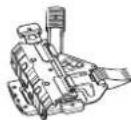
MOHTAXOHH KPOHUTeH x1
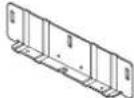
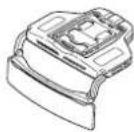
PnactHna perynnpoKoTouHJI HcN0e3aHTHOIO KO3bpyka (60bnua) x1
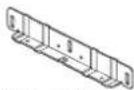
NactHnpeynpnOxMTOIJIHbCINHeaHTHOKbIbXa(MAN) X1


WeetnpaHHb k104 x1
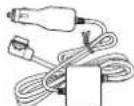
Ka6enb nmaHm x1
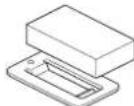

Ponuika conlndaazunthoroo kəs ybks x1
DbcyTOPOHHH HHTa x1
NytbI NCTAHNOHHOY npABNEHn 6NoKa PnpEOKOHN HINKIAKU:
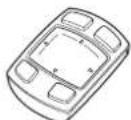
OCHOBHO 6nOKx1
(BNbIyteYCTAHOBENHNIINHOHBHAKKMYJHITOp.Ipepe nCIOB3OBAHEM61Oka ydAHTHe 0nauOHHyNO noONCKy.)
Ipeed nodkloueHHem
Mepbl npedoctopoKHOCTn npn noekluohnn
BHIMAHINE
HeNtONbEyTBe NKAeCTBE NcOYNHnA HTHAHNNHCan n.Tn. PNOxNHOATE BnK CETM TANAHN ATOMOBN
YCTABAHINBAIIE NOCTABHBMDE TAEHN B COOTBGTCTBNI C K3A3AHARMM. MCNOLTSOBAHNE DANEK OTNIHHXOT NOCTABHBMxMOKET PNIBECTN K OBTOPA HIKI INHNCPAHOCTM.
PoiKIOUeHHe UHypa nHTAHN
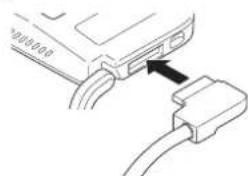
-PlnoTHO BCTABTBe WTKEp KAbEN NtAHNA B paaBem NtAHNAY yCTPOJCTBa.Ecnn WTKepe BCTAABNTCR NINOxO,803MOKHO,TPe6yETCR nepeBepHyb ero.IpoBepTe opnENTAUH WTEkePAHe BCTAANRte erocynnEM 3TO MOKeT CTaTB nPHMHH HeCNPabHoCTN.
IpeodTbpaueHne nomex
+Tb6b npedopatntb rehepaio n omeX, paMaTe neDyOuMe ycPoIcTBa KaK MoxHO daBle ot yCPOIcTBa iPhone, Android,kabenei hHypoB.
IINHIOHY ANTHENHy N Ka6bI bAHTHHbI; aHTENHbI dMANa3OHa FM/AMn Ka6bI aHTENHbI;
—GPS-aHTeHHy n Ka6eJb aHTeHHbI;
- npHMMK CnHAnOB padomarka KaBeb aHTEHbI;
Pamaiynta HteHHk KAK MOXHO danIIIE DpyOT dpyra.
He 3aekpennnnte aHTehHbIMcTe,He KnaIte Hx npy Ha npy I He CkpeuaIaIe.
Pomexnco3o3daabeMbe aHTehHO n Kaebem AHTehHbCHINKAAOT yBCBtBeNbHOCT.
A PDEYUNPEXDEHNE
-Пикрелпд Даньн 610K COINHue3aunH HOMKOJIbIpyK c NOMOuIbIO pMHN dIpypeTOBpaUeHn PAHENH. HecobkoDHe 3ToI Oyka3AHn MOKET Pn BCTN K NaDEHn 610Ka, YTO B CBOIO OHp peB MoKET CTaT bPnHHoH HeCuaCTHO CUYHAR n TPABMbl.
- PnycytaHOBOK DAnHOrO 6nOKa B ABOTOMObU,6OpoyOBAHOM NoDyUKAMi 6eONAC-HoCTnHe yctahABINBaIe 6NoK Ha KpBkyuN OdyuIKU 6eONACHOCTn NmB MeCTa,JIe OH MyetawC pca6TaBHaHNO NoDyU 6eONACHOCTn.3To MoKet npDeTbPaTntB HOPmansHoC pca6TaBHaHne NoDyUkM 6eONACHOCTn MIn K TomYHTo NoDyUkA 603-40 AnChOCTn Pn Cp6aTaBHaHm MOnKet YnapRtB 6NoK n CTbPnMHHOH HeCHAcTHn Ccnyua H TpaMbI.
He pabotatae B Mectax, nopepcknBHX
BoaedCTBNO npAbox coNHeHHx nyueh.
3o MoKcT npBeCTN KOAKRM.
BooTe TOnO cyueCTByET onaChocb notepn
3PENH BCNECTBn BOaeeCTBn coNHeHORo CBea,0tpKaekHOHor OT npoeKnIOHOHor
Dcnner.Ecn Ha npoeKnIOHb HdnCnneJ
nonadatnpnMbte CoNHeCHy Iuyu3a- kpoKeIpe npKeuONHb HdnCnneJ.
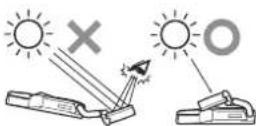
He OaBnAe TaHbB BIOK B MeCTax, NOBepKeHHbIX BO3DeEChTBNO PnRbIX HcHbIX NpyeH.
He ydanraTe 3aunHnI NCT npOoKaonHO HOr DCnneNo do 3abepeHnue YCTAHOBn. PnooKaOHnH Dnncn NoMkT KOHHTpnPOBaBcBET BnyOK BHCOKN HHTeCNBOHcCTnTO pnpBeDt K OpaObaHNIO DaMa IN BOrOpaHNHO
E yCTaHABINBAAIe DaHHbI BnK B ABOMOHN,OBOPyOBAHOM NOKOM.ConHeH-HBcET MOKET OTpKaAaTcOAT ONTMHCKORO 3KPAHAn KOHHTPPOBAtCBB BpyOK BILCOKHO HHTEHCHNBOCTM.CHNA COHNE3aUMTHOM K03bpBe YE cTaHOBHeHO DAHHoe YcTPOCTBO.HeOTbOpAHBAITe K03bpE K60KOBYC TcKNY.
BHIMAHHE
py CTAHOBKE DAHORO 6NOKA B ATOMOBNIe,06OpDyOBaHOM NODyUKAMN 6EtonACHOCHTHoOPATNTBC K I3ROTOBENTIOABTOMOBNII DnI NOYENH INHFOPMAUIN O Mepax PpeDCOTOPXHOCTN pnpoBEnH MOHTAXHHpaOT.CyUcCTByET ONACHOCTb HENPAHBNHOrO CpabTuBAHNIOJueKek 6eONACHOCTuO MoKET npneCTH K HeCACTHBIM CNYAARM CO CMePTeNBHBIM XCDOOM.
00cye TCTAHOBK BOKOA NOCDBETKY BOHNH 3aunTHOM K03bPbKe IN Dpynne DOONHITeNBbIe AKECCSYApBu HAXOJAAIECNE B03Ne CONHJIe3AHTHO R03bPbKa, HANPMpe. DEpKaeTBe IIN KAPTOHNI 3epkAlo HA CONH 3e3aHTHOM K03bPbKe,BO3MOxHo, He ydaCtncNb03BaB.TapaHee npoBepTe AKECCSYapBu B ABOTMoHSe.
OTYCTAHOBNO YCYTOPTABMOY TCTOCTbC cnDeb HA CONPHCEAUTHOM K03bIbPKc.
-DAHnBb6nOK He npEHa3HaueH nIy yTaC0N-HOBKn Ha NaccKApCKOM CwDEHN.
-Bo Bpemy yctahOBKn 6noka Ha Bac Moryr nadabte detanu, nbIn h.n. DnI npedotapauue HnoJanaHn JnHn N npynx obbKTOB B rna3a npYcTahOBKe 6noka He CmOTPHe BEePx.HaxOdcb HenoCpeDCTBeHHo NoD 6nOKOM.
-ФФФу3Hn 3KpHn nONTHeCKHn 3KpHn Tpe6yHOT cTOpOxHOrO 6bpaENHaHE KaCaiTeCb IN pykAMn H He DOnYcKaHTe,HTo6bl IN KacANCb NCHPTyMEnBt Pnpy CTAHOBKe YCTPOINCTBa.
Ipeed yctaHOBko n 3akpenneHnem 6loka
Cnahana BpemOHNO 3akpanne 6noK,HTO6b y6eBnTcB aero HopmalbHO paoTe a 3aTEM ycHAnote oKOHATenHo.Ecn H 6nok He cyHKIOHNpyoT Hopmalho,pOBepbTe npabBnHOCT NoKNIOYEHN.
Pn pKcaun yctpoictBa
PekMOHdEmbM MOMeHT 3ATARKIN pNfCK CALUM yCTPOrCTBa C NOMOULHO BHTOBOT-OT 0.36Hmdo0.59Hm
-Nepe npKHeHnHem DaCyToPOHHe
HeTbHa CoeHNHTeHyo KOp6ky C Ka6e
NtNA TAteNsHo yDAnrte nblc C noB
BeXPHOCTnHa KOtopyo 6ydt
npKHeBaTcBdByCTOpOHnHn KInKaar
NEHa.
CoeHHHeHn
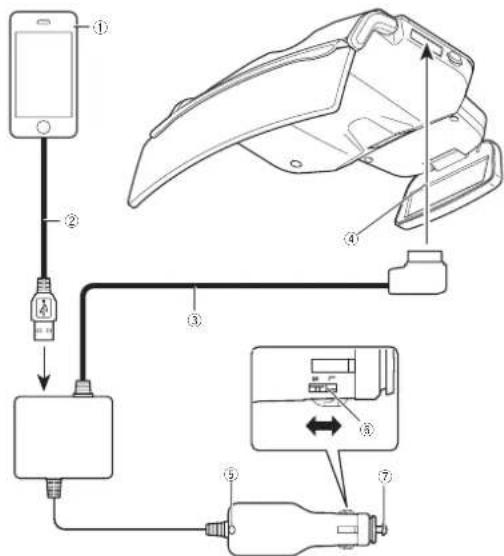
Cxema noKnlueynna
①IPhoneurn Android
Ka6enb USB
Ka6eB nHTaHn
4K pa3bemy nHTaHn
⑤CBeToaHOnHbIn INHAnKaTOp
⑥NepeknioateJb pa3Mepa wTekepa
②K npHkypnBaTeNo
nnojb3oBateJe iPhone
MCnONs3yIte Ka6Bn(7),BxOoAaB KOM
NnEeK NoCTaBn iPhone.
He OCTaBnE KAsBn B ABOTMoBnE.Ka
6BnBxOoAaB N KOMnEeK NoCTaBn
iPhone,He npDeHa3NaHcHn Dn HcNtloB30Ba
Hn B ABOTMoBnE.
Ду noьбовatele Android
MIOIbByte KaBebI (2) c8aIIS USBmicroUSBCEHmEH Me 60one 1MaKobEndap4xnnOIOB3oBaTb HENs3.
CoeHHenH
PnmeuHn
CBeToDnOdbHb HnDkAtoP Ha WtKepe
rOpy, KOJa TnTAnHe BbIOHeHO, N RaChET,
KoDA yCTPOIcTB0 BbIKNoHo.
EcN yCTPOIcTB0 He BbIKNoAeTCa, KOrD
BbIKNoHO 3axRHaHae ABOTMOHN,OTc
DNHNTe KaBb NtAnHae OT npKpyBaB
B nPoTHOM Cnyae BOxMOHO pAsp
Hne AKKMyIaTOPa ABOTMOHN.
PnOp6Hoe o nKIOUeHIM IPhoneHm Androidc.m B pasdene Hactpoika IPhone nn Androidc. ctp.143.
Bb6op pa3Mepa wTekepa dIy noKluOeHH K npKypuBaTeHIO
YcTaHOBITE JINI UTeKepa pa3MeP L(60bnuO) HIN S(ManehBKN)B 3abNCMHoCTN O pa3MePa nApXyPBnAeBnA B ATOMOBNE.
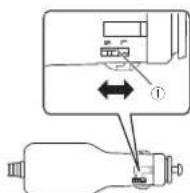
1Ipeeknoatebnpa3mepa wTekepa
3aMeHa nnabKoro npedoxpaHrTeI npHKypBaTeI
1NoBepHnTe wTeKeP npOTnb Yacobon CtpenKHyTo6bl OToBepHyb erO.
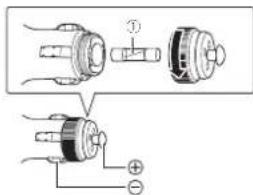
①ПлавскийnpedoxpaHntenb(3A)
23AmeHnTE pnaakn pnpOxApaHntBb HOBbIM C TAKIM Xe HOMHNAMON.
NoJoxeHne yCTaHOBKn
Mepbl npedoctopokxHoctn npn yctaHOBke 6loka
PPEYIPKEXEHNE
NIOINb3yIe NOCTABRMEBn BHTbI yCTAHABHNTB6KnB C BOOTCBTBN C yKa3A-HNIMNIOINb3OBAHNBE BVHTOB,OTNIKHyXOT NOCTABHNEBMkMOKET pMBECTN KOBPOKDAHNO KNOA.
- PpnoHO npnpanHe 6nok K conHuaaunrHOMy KObIpykC n oMOuBIO NOCTABHmBX BHTOB HAcobNoDeHne 3tOrO ykaaHHM OXeT pNBeCTn K naeHHNO 6noka BO OCHOBHO 6nok BpeM eEdu 6nok MoKet yapnB no Ka6enb NtAHHH NOE N pNBeCTn K TpaBME.
-BHMMATEBHO B NONHOM ObEOM npOHTe HACTOUEe PYKOBODCTBO N yCTAHOBITE DAHHI BOK C yETOM TpeoBAHHI CTAHJAPTOB BeonanchoCTO.
Tpe6yemoe noJoxKeHne yCTaHOBKn
BHIMMAHWE
YCTAHONHTA DAHN BNOK A Tpe6yEMOM noNo
JEHN,HTO6B He 3aTpyDHTb O630B OBDNTIOH
I rapaTHNPoBAT BO3MOXHOCTB BUNONHHE
6NOKOM FyHKUIN,DA KOTOpBH OH npEHa3HA
EH.YCTAHOB4 BIOKA B NOIOKHeIN,OTNIHOM
OT yka3AHHO,MOKET HApWATb Tpe6oBaHH
CTAHADPob 6eOanACHOCTn DINOPOXHbIX
TPaHCIOPTbIX CpeCTB,N ABTOMOUB MOKET
HE I pOITN II POBEpKY CO6IOHdEN III Tpe6oBaHH
TEXHKN 6eOAnOCHToHANHPmepBCNOJ
CTBNE OuIKN TEXHMeCKTOO O6CtYKBAHNN.
Iodrotobka K yctaHOBke 6noka

BHIMAHHE
Ye UctahabHnBaIe TaanHHbI BIOK HApIOX KpENpOHHN INH NcDcEckTHN COHNHCAaIHTH HNO3BpeK3TO MOKeT PINBECTN K naHEDN BIOK,TO T B CBOO OuepeBb MOKeT cTaB HmOH NcHcAchTHo CNYaH HmCNpaBHOCT
DnHb6nOCTaBnCTC yCTAHOBnHOH nAactHnO perynpOBKn TOnuHH CoNtue3aTHORo K03bIpbKa (cpEnHn ToUHH). NcNoB3yNTneAactHy perynpOBKn ToUHH HnHe3aHTHORo K03bIpaKCOoTBeCTBOHY TOnuHH CoNtHg3aHTHORo K03bIpbKa.
1PnpoeBpe conHue3aunHbIK K0sIpeK.
PnpoeBpTe TOnHHy CONHuaaunHoro K0-
AupkaHa KOTopb HSyed YcTaanabnBaTaC
6nok.
EoK MoXHO yCTaHARNBaTb Ha CoHuae
Hbe KOSIpbKaKCOBTcTBYOuMg YkaaAHbIM
HXKe TpeoBaHmR.
TTonuHa 15mm do 33mm
H:Bblcota ot 140MM Dp 240MM A:PacctoHHme MEXUY onopbHM He Mehee 185MM TOKAMM
YPACDCTOBHNE H MeHHBE45MM (peKO-36PQKAN M.TI. MOHGYTCR)
2PnoBepBe TnAeTnHpeyNnPoBKn TomnMbI cOnHne3aunHtO Ko3bIpKbKa,KOtopa 5dET HcNOp3oBAtbCn.
PaaMep nactHbpyrNpOaK tonUuHbCOnHuaaHTHO K03bypkaKOTOPa8yDet yctahabnBbAcb Ha MoTAtkHbK kPOHuHTe, 3ABcINOTTOUHbCOnHuaaHTHO K03bypka
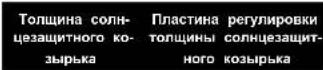
PnactHna perynnopBnK 10-OT 15MM DO 20mmolntnhb coNtueeBHTHO ro Ko3bKa (Mana)
COINHc3aunTHoro K03bipbKa
1NoTHHnTe Ha ce6e pbYar 6bOKIpOBKn IpoekmHOHHo DcNpner N cDnHbTe erO b NOJokHeMa p3bONKpOABAHn.
1NooxeHne CHTmHn Kcaun
② PbNarΦnKcauIN 5boka npoeKauHNOH INHdKaUaIN
Iodrotobka K yctaHObke 6loka
2CHMNTBEOCMBBHTOBBKIOHQA BHTbpeyHPOBKNpOIOJIbHOM HA npABNOHM (CM.PHCYHOH),Ha MONTAXHOH KPOHIeHea3aTeM CHMNTIeNtTHy peyHPOBKnTOniMHcONlncEaunHTHOKo3bIpaKa (cpednToonuHIs).
Ecn CHaTHB BHTB perynnpOBKn B npOIOHb HnpanpNEHMc PnactNbpeynpOBKn TOIINHb COHJIe3aUNTHORO Ko3bPbKa Byet CHrTa PnactHa peYnpOBKn B npOIOHb HnpanpHEHM.
1AnthaNaeypIurpoBnKOnTouHHnCHonHce3aHTHnOReKo3bUpBa
BnHbpeyHPOBKn BnpOOnbHOM npaBnHn
1. Пост国安а ретуларови в подогьом
Нарральник
2. 这个答案是正确的。
33aepenntne nactnhy perynpboBn B npodOBHM HnpanpBeHHN Ha nactnHe pepynpboKn ToUINHb CoHNHeaHTHO Ko3bIpbKa,KOtopa Byet HCNOBtBOBaTcR.
1AATAHNAEpyrMAOBKTOIaHHbONH- 1e3aHTHORO Ko3bIpaKa
BHTbIpynnpO8Kn B npOIObnHn HnpaBpeHH
3Паитина PernympoBkn B npOdoNbHOM HnaparneHHN
4C0BMECTHE OTBEPCTBN B NnactHne peRyIINPOBKN TOUINHb COHNHea3uNNTHORO KOB3IbPKK,TOTOPA ByET NOONB3OBATbC,COOTBECTBYOUIMN OTBEPCTMn HA MOHTXHOM KPOHUTeNE H 3AANTHTE BNHTb I MEcTAX,ReOn OH BnIN YCTAHOBHb.
YctaHOBka OCHOBHoro 6noka
1NpeMaemctte pBHaar 6nKpOaKn npoeKuONHORo DNCHner B NOIOKeHne CHRTNAfKCAUAn.
TnHHTa Hc68pHaNar 6nKoPbKIN npOe-TaxHom KPOHUTHe BNEBO nBpABoHTo6bl
mHOHHOrO dncnnner n cAnhTe erO b nnoXcBo6Odbt bKcatOp.
Hne p3aboknKpOBaBHn.
1IonoKeHHe ChrTHaKCaun
PbHrAphKcauHn6Nka npoeKuOHHO HmHKauiH
He JeKHTOc 3a NoDJIHKOYIO CHaTMOH TAKHO KPOHUTeHa NpipepeMeuHHb Mya FmKCAUIN PpEOEMOHORIO DnCINrN B EOM CYaue PbHar FmKCAUIN HOB0M0 HO nepeMeCTNTb.
3OterpynHyptye ToIuMHy MOHTaxhORo KPOHTeHa.
COBMcETTEIIMHAMOHTAKHOMKPOHUTHE C MACU7a6HM MNTKaM,pACNOXeHHbIc HCN CNEBA INCpABn OT NAACTHbI peryNIOBKM TONJIHBM COHNJ3AaHTHORO K03blpKa,BCOT-BETCTBM C TOIJIHHOK03blpKa,a 3aTeM 3aTHHNTe Pm BNHTA.
①NoDnBnKHa HaCTb
MOHTAXHbI KPOHHTeH
2PnaTnHa pernyIPOBKN ToTunHbHN COnHnea3auTHNORo Ko3bpHka
PnBnMnBtHbHbIe HAHyHnH MaCUTaBbHx METOK HA NpACTHHe peryNPOBIK TOIHNH COHJIe3aHTHOrO KO3bpK8 (CpeHnEO pa3- mepyKa)Yk3aHbH NHXE (Ha PnCYHKe MTKA H MoTHaxHOM KPOHtTeHO COBnaed C MacuTbAHOI METKOOOTBECTBYouien 22MM).
YctaHObKa OCHOBHoro 6noka
120mm
22MM
(3)24mm
26
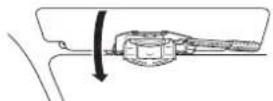
5OTkpoTe Ko3bipeK BnH3 BeptNKaIbHo.
63aikcnpyte MoTakKbI KPOHTeH. HApBtte Ha KcNpyouMe nactmHcneBa cnpaba,To6bHaPexHo 3aikcpobatb MOtAKXbKPOHTeH.
4YCTAHOBHTBE MOATXHBJKPOHUTBEN HA COJHHE38UHTBH K03jIPEK.
PdHMMTe 60nHJIe3aJIHTbH Ko3bpeK B ropn-0HTaHbHO NOXNKeHXe.
YyepKbBnTe NbeBn npabBn Topbu FkncnyoOxN PAACTHn H MaOTAKHOM KpOHHTneHn YcTaHOBn MOtAKHbn KpOHHTneHn Ha conHc3aunTHb Ko3bpeK PtEm nepemeeHnMOHTAKHOro KpOHHTeHa Do ynopa.
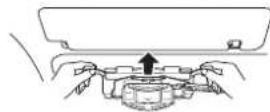
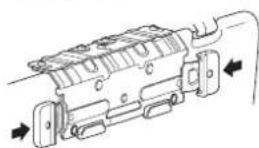
-Enn dmckmpkyuine nactnhn He ydaertc 3aBmHyb NoHCTO,TOUHNMy MOHTAKHOro KPOHUTeHa Hoo6xODIMo YBOHNHTb. CHMME MOHTAKHHK pOKHTeH C cONHue 3auTHoro Ko3bpyka.BepHTeRc K Wary 3, OETpyIpyHne NOXHXHE MaCua6a,a 3ATEN NOTOPH oYCTAHOBHe MOHTAKHH KPOHUTeH H COJIUEAANTHHe KO3bEPK
-ECmMOHTAKHnK PKOHTEIN Hc ydaETCA3aBHyTb NOHTOCTb,TONLIMHY MONTAKHO KPOHTIe HA NEOOIOIMO YBBNHTCHCMNTHE MOHTAKHb KPOHTIe C COJIH33aHTHO ROKsIbKa,BePHITcE K Wary 3OTpyrNpyRte NIOONENHE MAUCITAb a3ATcEM NOPTBOHO YCTAOHbMOHTAKHb KPOHTEIN Hc CONIe3aONTHHb KObIKpK
7Y6eJIaTeCB,HTO MOMTaKhBbI KPOHtSeH HadeKHO 3akpennHe.
BepHHTe coHHe3aauTHbKo3bpek B rOpH30- HTaHbHO NOXIOHE. IOTRHTe MOHTaXhB KPOHHTe Hpa3HbE CTOPHO,HToBSy6EduCzrTO MCHTAXhB KPOHHTe HADekHO 3akpenHnE.
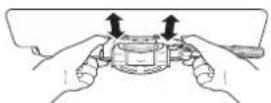
YctaHObKa OCHOBHOro 6noka
-ECNH MOHTAHKHN KPOHHTEH MOHXHO nano CHRTB C CONHUE3aHTHHO KO3bPbKa,TONUHMOHTAHKHO KPOHHTEHA HAO6XDDMOYEMHUHTBH CHMMITE MOHTAHKHN KPOHHTEH C CONHUE3aHTHHO KO3bPbKa,bepHTHECb K Wlary 3OTpyTnyPeTne NOHOXHEMe MCAUTABa,a 3ATEM NOBTOPHO YCTAHOBITE MOHTAHKHN KPOHHTEH HA CONHUE3aHTHH K03bPEK.
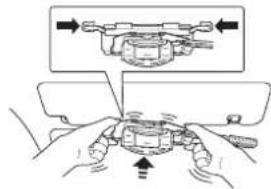
8CHMMTE MOHTaXHBK KPOHWTeH.
OnyCTHe coHue3aunTHbIKo3bipeK B BepT B KJIbHOe NIOX6HEH N NOYHTHe (mKCHpyO B U nactnHbBNEBO INBpAO,HTo5bO Oc0bOaHTb fKcCATOp.
IOnHMITE coHue3aunTHbIKo3bipeK B rOpH- 3OHANTbHOe NIOX6HEH IN CHMITE MOHTaK Hb KPOHtTeH C coHue3aunTHOrO KO3bIPbKa.
1 MONTAKHbI KPOHTBEN HEB3N YCTAHO H aONUe3aunTHbIOK3bpeK,TOJIUNHa Dana npabInbHO.
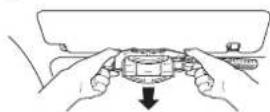
9nPobpeBte,npabHbNo IOpTpyNpOB
baHa TOnuHaMOHTaKHO KPOUHeHa.
HaDaBaTe Ha pKcKpyUOe NnactHbHa
MOCTaKoHM KPOUHeMe CNEBa IcnpaB.
YTObeHa JndexHo 3aQKnCpObaTa KPOUHeH.
Y6OaDttcb,HTo MOtAOKHbK PKOUHeH Ho
h3ra NERK YCTAHOBHb HA CONH23aunTHIb
KoBepeK,KePa DfKaMCPyRoune NtACTHb HxO
dTcRa B NOLOKHeH MfKCaUm.
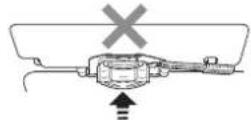
10YCTAHOBINTe MOHTAXHbI KPOHUsTeH C OTPERYNIPOBAHHOI TOUHHOH HA OCHBOHO 6bnok.
Y6eHTeCb,HTo DmDfys3nKpAHn ONTtuecknK3pAH OCHBOHO 6NOKA 3aKpBtIN INpeBeHNTE Pbayi FkCaunn PPOEkuHNOHORODMnner HA MOHTaXHom KPOOHTeHe B NONOKeHHe CHATM FkCaun.
YcTaHOBka OCHOBHoro 6noka
OchOBHoi 6nok
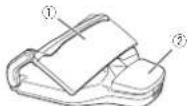
1ONTMueckm 3kpan
2DnΦΦy3HbI 3KpaH
MOHTAXHBi KPOHTeH:
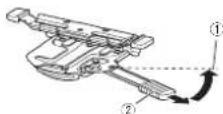
1NonoxeHne CHATN PHKcalm
PbIHarΦnKaCmH 5noka PnoKuONHOH INHAnKUAM
NPKPENATE MONTAHKBI KPOHTHEK N OCHOB HOMY 60KNY B YETBILX TOPHAX CNEPEDNI C3AIDC NOMOULBOIOCTABIMBX BHTOB. PepeHHa TaCyb OCHBHOro 6nKa:
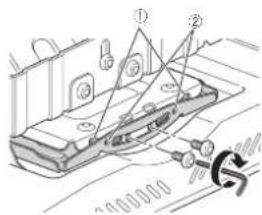
173
CoBmecHTe BblcTynbI C na3oM.
3aHra yactb oCHOBHoro 6noka:
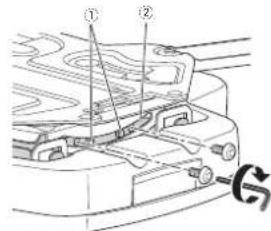
1C0BmCTHbBcTnBcP3aOM. 2Na
110TbePHTe YteIbpe KpenexHbX BnHTa, KOtOpIbe 6JIn 3aTReHyt b Ha Ware 10Ha oOHN o6oPOT.
120TBEPHNTE BBNTHIpeyHnPOBOKn BpoJIOJIbHOM HAPaBnEHN Ha OAnH o6oPOT.
Pepehna Yactb OCHOBHO 6noka:
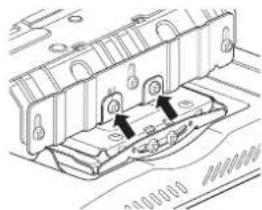
13YCTAHOBNTE 6JOK HA COHNUe3aUNTHbI KOBJHDEK
TIOHHTAe FIKKIPYUOUIE IINACTHHa MOHTXHOM KPOHHTNE BIEBO INPABBOHTOBcOBO6DHTFHKCATOP.
YctaHOBka OCHOBHoro 6noka
NoHHMHTe conHue3aunTHb K03bpeK b rpoH- OHpHKBnAte NoNOKHe.
YOpKnBaTe NoBn I npabB ToPcI pKKnCpPyOuXn PnACTnHa MoTAtxHOM KPOHUTeHNe
N yCTAOHbITE 5bok Ha cOnHua3auTHb K03b peK nyTEM nepeMeUeHn MO TAtxHOro KPOHUTeNo yOpna
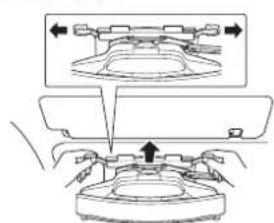
140TkpoTe K03bipeK BnH3 BeptTKaJIbHO.
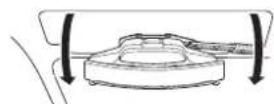
15PnKpNHTe DAHbIb NOK K cOnHuea- uHTOMy KO3bIpKy C nOmoUbEO pMHr dI npEDTBPauHEn PAuEHIN.
POTRHTHNE pEmHeN DnI PnpoTbpaUeHN na-DEHmC TbHLHO CTOPHO BcHHe3aUNTHORO K03bPbKa,01yueHHO B BepTKaJIbHoE NIOKHeH.
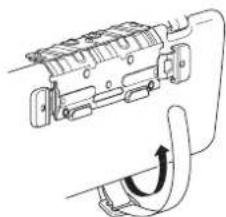
PnpocntpepeHbnnnpoTbpauenna- DnHnKAKnOKa3aHO HA HnNtOCTpaun.
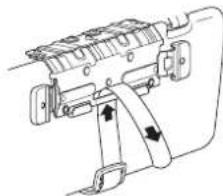
TOnHnTe PemehI dnnpOeTpaeeHHaNaeHHN BHN3 3AepHHnE, HATHHBnBnH3.
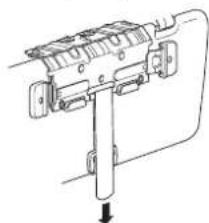

YctaHOBka OCHOBHoro 6noka
163aKcpyMoHTaKbI KpOHTeH HaaBtte Ha KcnpyUeine nactnHbr cr n cpaBA,To6b HaeKHO aKcnpoBaTb MOtAHK bKOHOHTH.
19OperynpyTe HAKNOH OCHOBHO 6noka.
OTpynpyTe yron,HTo6Bb BpOOBHTb OCHOBH 6NOK.
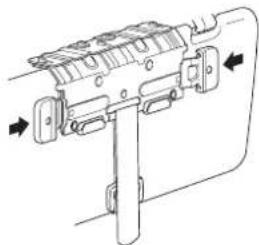
17NoHHMMte CoHnHaa3uHTHb Ko3bApK B rOpH3OHTahBHe NOJOKHeM
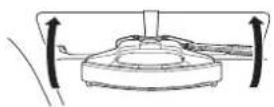
183aΦmKcHpyTe nOLOXeHNHe OCHOBHO 6noka.
TIOHnIHe Hc c6b pyar 6nOKpOBKn npoek ToBnOka. OTKPOeTe DnDpy3hbl kpaH nOnTHeckn IIOHnHO DcNpner nCDAHBte eR B NOJOKKkPAH OCHOBHO 6noka.
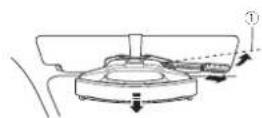
1NoKHeHnOcKaHnO OChOBHO 6nOK nepMeCTNTbCnBnpeDnIO -NOxHEHnO 6nOKa3FmKpyETc.
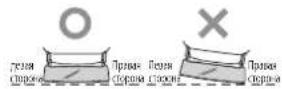
Hakohonite CoHnHe3aunHbKoBbEpeBepTKnBbNO pnpMeHO HBa 20rpaDcO B npoHO 3aTnHtE DBA KpEnekhBX BnHTA Ha 3aDHeN CTOpOHe OCHBOHO BOKA,KOTOpBE 6bHN OT-BEPHyTB Hae 11
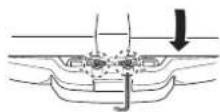
-ECNn 3aunthHINI INPPOKUNOHHHINCNNG MEUQET BUNONHTB PORYNPOKNY CHMNE ere.10ncne 3aepuHENPYRPNPOKHN YCTAHOBITE 3aunthHINI INPPOKUNOHHO CINNNNO Hr GO MCTO.
200Tpynnpyte HanaBneHme ochOBHO ro 6noka.
OTKPOIeDJIQFyH3HbIKpAHmONITNMeCKH KpAHOCBOHBOBIOKA
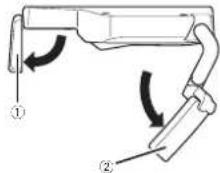
①ДиФузьн 3кран
YctaHObKa OCHOBHoro 6noka
②OnTmueckn 3kpH
Opyrnyuynte HapnabneHne OCHOBHO Horo 6noka.
6noka TAKyTObMy DmXpyAHbI kApA N ONTHIOHTRnHE Ha c6Ba lyHar 6NOKPOBKn npoeK-
ckn kApA h bYtAHOBnHO H no HapnabnOHHOR nCnNNn R n CBNHbTe eR B NOJNOKe
HHo DnKHeHn. Hne p35NoKpOBOAHn.
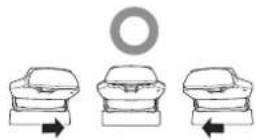
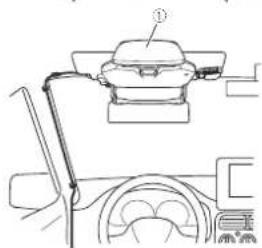
OTpyrrnyyte yctpoctao no HnpanBnHNO DnKHeHH
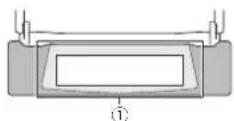
0TpeyHpye ontHuYeckKm 3kpaH TaKHM 6op3aOM,HTo6bI dHΦy3HbM 3kpaH OTo-6paxacn B ceHtpre ontHuYeckoro 3kpaHa.
-063aTeBnHO OTepyNpOyIe HApApaHHeMn B OCHaBHOrIO 6IOKa No HApPaBHeHn DBAKHe HIA.
21CHMMATE PHKCAUIO NNOKEXHNO OCHOB-HORO 6noka.
BnHHe Hc6a bHaN 6nKIOPOBn PNOK-
PnHOHnHO DnCnRn n CnHBte er B NOtOKoHne p35bONKIOBABHn.
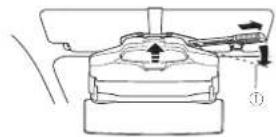
1PnOekHe CHaTHHnKCAHN OCHBOH 6IOK NepMeCTINbC H3aDnIIO- KHeH6NkA paccMKcpyETc.
22CHMMATE 6bok c onounce3aunTHORO KO-3bBka.
3aikpoTe dNcFpy3HbI 3xpan H onTnHecknn 3xpan OCHOBHO 6IOka.a 3aTeM ONyCTNE COIHue3aunHbKoBpeK B BEpTKaJIbHo No- NOXeHae.
TIOHnIe PkncpyuOme IaIacTHbHa MOH TAKHOM KpOHTeHe BBeBO H BPABo,TO6bI OcB6ObHTM KcHcTOp.OCb6OJMe pCmEh DnnpodTbpAueHnnaepHnNpDnHmTE CoTHHE3aUHTHb KObEpK B rOP3OHaTbHOe NPOXKHeA a3aTcM CHmMtMOHTaHb KPOHHTe C COTHHe3aUHTHOrO KO3bPbKa.
-BydTeOctopoxhHeIOnyCTHneNaHEnHa 6bnka.
231pOHO 3aTHHTe KPNEXKbHe BnHTbHa nepeHdE CTOpOe OCHBHoro 6noka. Tyro 3aTHHTe Daa MOHTAXHbX BnHTa Ha nepeDHE CTOpOe OCHBHoro 6noka.KOTOpbIe 6blm OTBePHyTb Ha waare 114 Da BnHTa peRynipOBkBn PnpObnHom HappanEHm,OTBePHytbx Ha waare 12.

Ru
YcTaHOBka OCHOBHoro 6noka
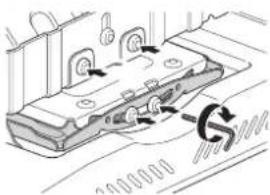
24CyTahOBITE 6NOK HA coTHHe3aUNTHbIK KObIbDEK.
Bbnonnne onepaunonncnhae B uarrax ot 13do 17,0to6y cyaTahOBHT bNOK ha coNHea aauHHN K03pOK.
-Nepey yctahOBK oYcTPOCTBa Ha coNHueaunTHb K03sIPe NKpEMeCHTHe pHar6BIOKpOxHn PNOEXOHHO FcNnner B NoJIOXENHE CHRTM qKCAIM.
-ECn MEKdy COUHNE3aHTbHM KO3bIbKOM, HAXOJIMMCH B TROP3CHTbHOM NIOXeHHN, INOTOKOM ABTOMOBNI HAEEETC 330p,yCTAHONBE NOyUkY COUHNE3aHTHFO K03bIPbKa HA PEMeHb IIN PpeDtBaepaueHN PaENHn.
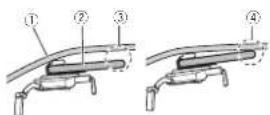
1NOTONK ABTOMOHnn
②ConHue3aunTHbI KO3bIpeK
3a3aoMepMeJyQoCNHJzEAUHTbHmKOBbYbKOMNtOKOMBANTObHNJ
3aop MeJy COHue3aHTbIM KO 3bijkOM NOTOKOM ABOMO6nO rO- cytCTBYET
PnckyboKna 3kpenrte HaepekeTne noDyukmCOnH33aHHTHO KpNpEeNtke PemHn DnnpedOTBpaueHnna naHn.
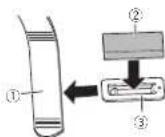
1Pemembd npedotbpaenennnnae Hnn
②Noduyka connueaunTHoro kOsbipka
12. Depektaheb noynuyns coNnue3aunHr Horo Ko3bIpaJb
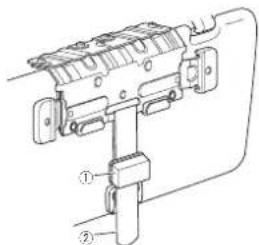
Iodya Ka conHaeauHTHO Ko3bipKa
3PemembdprnpoBpaaennnaeHH
YCTaHOBka OCHOBHoro 6noka
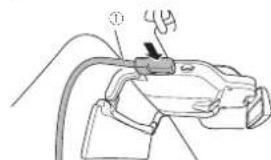
25NoKnouTe Ka6enb nTuHaN K 6nOky.
①Ka6eBnNTaHn
26PpOJoxHte Ka6eB nTuHaHn.
PINOKONITE Ka6eBn IITAHNTHaHm O6pa3OM, 0106bO Hn HE pIeRrCTBOBAL ynpabTENHO TOMoBnOm, nY6eDHTocB,HTo OH He aaropaxnBaet 063op BQNTtEno.
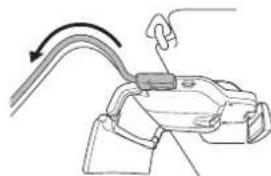
- Otperynpyre noonoxhane Kabeena nitaHnA TAHM o6paOm.Yt6b0 H He 3aopaKbnBn 6o3p ouqTeNo.
-PlpONoKHTe Ka6bEn TaKMM 06pa3oM,HTo6bH OH He MeuAn NepeMeueHnO OCHOBHO 6nKa H3a#n Bnepe npn nepeMeueHH bYhara dKcauHn 6nKa npKaunOHn Hn Dkaun.
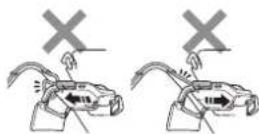
PnpOKeHte KaBEnb NtAHaHn3aKpEnIeR eBO OCHOBHX TOcKAX 3aKMAMMIMHEMOUMMNCR pnpOae.
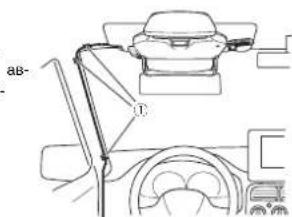
273aФИКСИРУТЕ NOLOЖЕНИ OCHOBHORO 6nOKA.
3JapKnHTe Ka6bEn HmEOUChMNcB npoDae 3a2kMaMa
- Hn pkrpenprrte H n npoknabuBaihe Ka6bno N BETOPOMY CTNkH.
He npnndnae Kaebnntanyn y ochoBnna Cndeh BODHTAeCyueCTByET ONAOCHOTNBONADHnKaEBnNTANNO DNEABT TOPMO3a,TOO BYET PNPRTCTBOHbT BEOEHNHO MOKETPINBEcT K CepBe3HbM HEC4ACTHbM CNYAAR.
TnHHTHe na c6b pbyur 6nokpOBN npoeK UMOHORO nCINPEN N CdBNHbTe ero B NOIOKe Hne 6nokpOBk.
YctaHOBka OCHOBHOrO 6noka
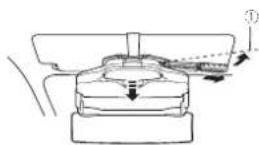
1NoKHeHn KcAunn OCHBOH 6nok nepeMeCTNTbCn BnpeDnIO -NOKHeHn 6noka 3aKnCnpyTeC.
283a#nKcnpyKe Ka6eBn TnHAnH.
PnKnneTe DByctopOnHHo NHeTy K CoeDnHnT
TeBbHO KOpOBe Ka6eBn TnTHAnA a 3aTeM
PnKpENHe CoeDnHTenBHyo KopO6y B
MeCTe,B KOTOPOM Ka6eB, Bydet HAdEckHO 3a-
KpENHe.
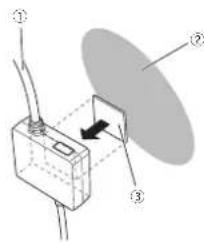
①Ka6enb nHTaHn
3Bokoban nopebXHocTb npH6OpHnaneHn Hn.
3AnyctOpOHnRA neHtA 3aKePnTe Ka6bI NmEOUmmncB nnpaxe 3aKIMMn.
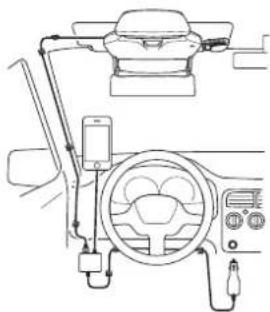
-He yctahabnbaieKa6enb nHTAHINB B MeCTe,1e ero HEn3a 3aKpENNTb H3-3a BN-6pauiy ABTOMOHn HnN No DpyHMn pnnHnHAM.
EcnI KaeBHe He ydaTeCn 8aKnepTb NocTaBnBnMoN DApCTOHOHnNEToH,NaDeKHO 3aKnPHTe ero HmHoUeB n, npAaeKe DBy-CTOPOHn NEToH nnDpyTMM anAoONyHbMM MATEpHAnM
- Hanaekho zakpeirei iPhonein Androide depaetake (npo6pbertaer otienbo).
BCTAIBIaTe Ie TKeep KabeNIMITAHIN B pHkynBaTeNb ABTOMOBnCAETODMnHM INDAtKoPOM BBePxTtOb6 OH 6bln BDOHTENIO. PnBkONHEn NITAHIN CBeTODmHn INDAtKoP HtEKepe 3aROpTc3eHbM.
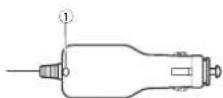
1CBeTNOHbH HnHkATOp
0one nnpo6hna HkOporMaun npnaedHa
Ha Npoknoe HkKaBn RaNTHaK npNpy
PnPaTeNoHa Ctp.142.
YctaHObKa OCHOBHOro 6noka
29CHIMMTAE3aunTHbI NmCT PPOEQUHONHO RIOHNNE.
Y6dMntb,HTo Ka6bIb, MTaHnO nOJKIOHcH npOnToH ePnBnHO,a3TeM CHMMTE 3a- uTHyNO pHeHK ONTNHECKORO kXPAH.
Pocne yctaHObKn

BHUMAHNE
-86dntecb,4to 6nok yctahoben npabnbHO.B nepuecneneHHx Hnke cnyaXe BepHntecb K Wary 1u yctahOBte 6nok npabnbHO.
-Пи ChTINB6NOKa COnHnue3auNTHOrO K3bpyKa n XpaHEHN B6NOKa 3akpBaIe IuФунгИЗКРAN IN PPOEQUONHn DnCnNoI.
He octaBnIe DAnHbI 5NoK B MeCTax, NoDBepKeHHbX Bo3dEChTBIO PnBMx COHHeHHx PyuHnAPmpeH, HnPn6OpHn NaHenn. ONTnueckn 3KpaH WnDnDfpy3- Hk EKpAH MOrYT KOHLHTPnOBaT CBET B NyOcK BbCocOHNTHcHMBHOCTNTO pINBeDet K Obp3aBOHnDbMa Hn BOrOATBOHn
IopknIOueHne Ka6eJIaNTaHH K npHKypNBateJIHO
PnnoTHO BCTABTe uTKepe Ka6en nHTaHINB nnpkynBATEB ABTOMOHNE. PInn BKNIOHEn NnTANAH CEBTOINOHD HmKATOp HA TKepee 3arOpNTCA 3eEHMH
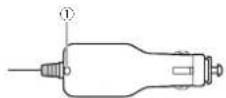
CBeToDnOHLH HNkAtoP
PnmeuHn
BCTAANIte WTEKEP KaEeN NHTAHN B npKpyPBATENB ATOMOBNN CEBTOHOHbIM HINKATOPM BBepX,HToBoI OH BbI BN BnEN BoDNIIEIO.
EeyyCPOIcBO He BbIKIOHaeTcKoJaBbIKIOHcHO 3aKHTAHHe ABTOMOHNr,OTCOeDHHTe Ka6Bn NtAHnO r OpknpyBaTeJIaBnP0tnbMOn CnyHae BO3MOKHO paapRKeHne AKKyMyITOPa ABTOMOHNr.
KHOKNAMN △/Y BbIeBPe NT HNYKBI NAPaMETn HAKMNTE KHOKNY
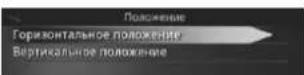
Papamet OncaHne
Topn30HTaNbHoe nnonoxen H3o6paXeHn no Topn30HTaN.
BepTmKanbHoe nolokHeMe
Bul6opnIe ndo perynpoepmnnnojoknHnKOBpokhennNo BEPNkHN.
2 HaxHMATe KhoNk △/v, 106b yBmDteB csetky zelikomK.
Pnimep:HaCToPoKa BbIOnHeHa npabInbHo
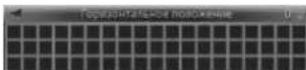
PnMpeHnAeTPOKa BInIOHHe HnPaBnBHo
yBENHNE
PerynpoBka pa3Mepa nso6paKeHn.
Iocne 3aBepweHn yCTaHOBKn n NOkKIOueHn
Hakimatae KHONK △/Y, T'06bl yBnDtBcETky eienKOM.
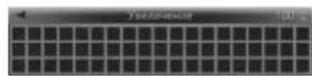
BpaueHne
Perynupobka nobopoTa n3o6paKeHnA.
HakmaMaTe HONKIA △V, TNo6bI BbOpOB-HaTb cetYk.
PIMMep:HaCTpoKa BbIOnHeHa npabInbHO
PnmeHpHaCTPOKa BbNoNHeHa HnpeBnHo
ΦopMaT
PerynipoBka cooTHouEHH CTOpOH H306paKeHH.
HaxhmaeTKehONKI / ,HTO6bIcENaTb CETky pRMOYOrBOH.
TeomeTpueckKa KoppeKun
Koppekunna nckaehenn 3o6paeknna.
1 KhoKAMN △YBb6pRte HyyKbH npaMetm HnKMMTe KhoNKy ▷
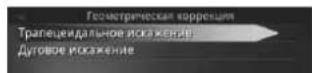
Napametp OnncanHe
TpaneUeAnb- Bb6pHte DnA Koppeknn Hoe NckkHex He HN.
IyroBoe NCKaKeBbEepHte Iane KoppekuHHne npCpeKTHBHO NCKaKeHHN.
2 Haxmharke HONK N ▼, YTObI cDenatb CETky npmaoyroHoi.Ho
PnMHeP:KppeKTHraTaneueHdJIbHO rKaKeHHe
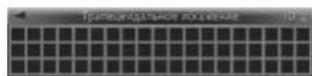
BanaHc 6enoro
Perynpobka 6anaHca 6enoro n3o6paKeHna.
1 KhoNkAMn △VbBepHte HynKhbl npAmeTp HAnKMte KNkOny
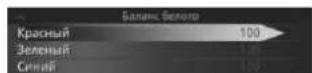
Iocne 3aBepseHn yCTaHOBKn n noKluOeHn
Papamet OnncanHe
KpaHb BBepeRr dpeyHPOkM OTTHKO KpaCHO.
3enehui Baepeirne Ie perynpoekx OTTEKHO 3aehoHoro.
Bbpepe nperpynpovx CNH NHTKOB CHHRO.
2ДИАНБТОПКУЕРКOSTNYHAKIMAJTE KHOKNK △/Y.
PpMep:perynnpoBkA OTeHkoK pachoro
Ipeed BoxxdHnem
HactpoKa npaMeTpoB cyHKm yCTpoiCTBa
PnapaMTbI yHkIKIy cTPOCTBa MoKHO HAcTPOBtC n CMObUc 3KpHaA HactPOKn

BHIMAHNE
JaHHOE yCTPOINCTBO AOTOMATUHECKN 6I0KHYEHTMHTOPCEN BO BPOEMA DIBHKNHBA MOHJI. PPOJKe HCM NNO3LbTaBcY cTPOPTOBOM INPAPKPYITE ABTOMOBHIB B 6e3oNaChOM MecTe H aaeJeCTBye TcOHOHCH TOPM3.
- Ecnim ATOBMOBbIh NauHHeAET DVBKHEHBE BO BVPMe HACTPOHn NapanaTePoB,3kpan HaCTPOHn ABTOMATHNECKn 3aikpoeTcN.
HaxMMTe KhoNky
OTKpoetc3kpan HacTpoKn.
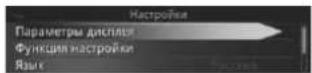
MeHko OnncaHne
NapametbHcO-OTpynnyHTe HACTPOKNI 0tobpaekhen npoeepyEmbX KOBpaekhen.
P2-Mechu n3roTOBieHn
| Mocrau | 1 | 2 | 3 | 4 | 5 | 6 | 7 | 8 | 9 | 10 | 11 | 12 |
| Cmmboi | A | B | C | D | E | F | G | H | I | J |
Ipeed BoXdHnem
JaHHoe yctpoCTBO npo3BedeHO B Krtae.
J CHMBOT
PnmueyaHne:
B cootBCTBm co 53aKaHa PocchckKΦepaunn O 3aHHTpe npab notpe6Tne H noctaHoBNHEM pncyIbctBaPocchckKΦepaunn N720 ot 16.06.97 KOMNAHIA Pioneer Europe NVOeapBaet cpaonc pck Cpykb HdEIN, OuaAanBaH NOCTABHEmh Ha Pocchckn pboHKAOBAMoHnlae 3eKnptOnHk:6 net
PpOue H3dEINa (HayuHnK, MmKpOoBOhI NT.n.): 5 net

Passen
http://www.pioneer.eu
Visit www.pioneer.co.uk (or www.pioneer.eu) to register your product. Visit www.pioneer.es (or www.pioneer.eu) para registrar su producto. Zum Registrieren Innes Produktjes besuchen Sieitte www.pioneer.de (oder www.pioneer.eu). Visitez www.pioneer.fr (ou www.pioneer.eu) pour enregistrer votre attestation. Si prega di visitare I site www.pioneer.it (to www.pioneer.eu) per registrar Il prodotto, Bezeoz www.pioneer.nl (cf www.pioneer.eu) om uw producte te registriere. Tocque www.pioneer-rus.ru (www.pioneer.eu) para archiviernpnipopoejeheBAMXkpen
2013PIONEERCORPORATION. Allighrsreserved.
2013PIONEERCORPORATION.Tousdroits dereproductionetdetraduionreservs. PIONER CORPORATION, 2013.Bce npaba aauuuehny.
PIONEERCORPORATION 1-1,Shin-ogura,Salwal-ku,Kawasaki-shi Kanagawa212-0031,Japan
Kopnpaia NaiOnHp
1-1,Cin-Orypa, CamaiBai-Ky, r. Kaacam, npedeKypa Kaharaba. 212-0031,FnoHH
MmnpTep OOO "MOHEP PYC"
125040, RopcsR. MockBa, Yn. Ppabbl, D.26
Tel.: +74951956-89-01
PIONEERELECTRONICS(USA)INC.
P.O.Box 1540,LongBeach,California90801-1540,U.S.A. TEL:(800)421-1404
PIONEEREUROPENV
Henan1087,Keetberglaan1,B-9120Melsele,Belgium/Belgique TEL:03/520.05.11
PIONEERELECTRONICSASIACENTREPRE.LTD 253AlexandraRoad#04-01.Singapore 159936 TEL:65-6472-7555
PIONEERELECTRONICSAUSTRALIAPTY.LTD. 5ArcO Lane,Heatherton,Victoria,3202Australia TEL:(03)9586-6300
PIONEERELECTRONICSOFCANADA,INC.
340FerrierStreet,Unit2,MarkhamOntarioL3R2Z5,Canada
TEL:1-877-283-5901
TEL:905-479-4411
PIONEERELECTRONICSEDMEXICO,S.A.deC.V. Blvd.ManuelAvilaCamacho13810piso Col.LomasdeChapultpecMexicoD.F.11000
TEL:55-9178-4270
先锋股份有限公司