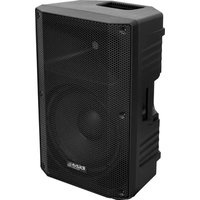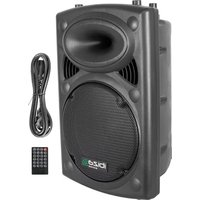
HYBRID15VHFBT - Speaker IBIZA SOUND - Free user manual and instructions
Find the device manual for free HYBRID15VHFBT IBIZA SOUND in PDF.



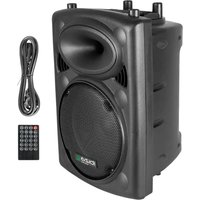
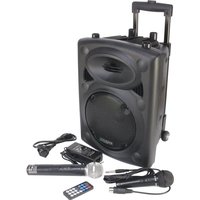
| Product type | Portable active speaker with VHF and Bluetooth microphones |
| Brand and model | Ibiza Sound HYBRID15VHFBT |
| Dimensions (W x H x D) | 480 x 440 x 740 mm |
| Weight | 20 kg |
| Mains power supply | 220-240 V~, 50/60 Hz |
| Built-in battery | 12 V / 7 Ah, rechargeable |
| Woofer | 15 inches (38 cm) |
| Tweeter | 1 inch (25 mm) |
| Impedance | 4 ohms |
| Frequency range | 40 Hz - 20 kHz |
| Maximum SPL | 92 dB |
| Bluetooth | Yes, for wireless audio streaming |
| MP3/WMA player | Yes, via USB flash drive or SD card |
| VHF microphones | 2 wireless VHF microphones with built-in receiver |
| VOX function | Yes, automatic music attenuation when using the microphone |
| Sound settings | Bass, treble, mic volume, echo, master volume |
| Audio inputs | 2 mic inputs (6.35mm jack), line input (RCA), MP3 input (USB/SD) |
| Line output | Left/Right (RCA) |
| Remote control | Yes, for MP3 player control |
| Mobility | Built-in trolley and wheels |
| Protection class | Class I (grounding required) |
| Operating temperature | +5 °C to +35 °C |
| Usage | Indoor, dry room |
| Cleaning | Disconnect before cleaning, use a dry cloth |
| Spare parts and repairability | Repair only by a specialist, fuse 250V F6AL |
Frequently Asked Questions - HYBRID15VHFBT IBIZA SOUND
User questions about HYBRID15VHFBT IBIZA SOUND
0 question about this device. Answer the ones you know or ask your own.
Ask a new question about this device
Download the instructions for your Speaker in PDF format for free! Find your manual HYBRID15VHFBT - IBIZA SOUND and take your electronic device back in hand. On this page are published all the documents necessary for the use of your device. HYBRID15VHFBT by IBIZA SOUND.
USER MANUAL HYBRID15VHFBT IBIZA SOUND
ACTIVE PORTABLE PA SYSTEM WITH BATTERY SYSTEME DE SONORISATION PORTABLE ACTIF AVEC BATTERIE NAHBESCHALLUNGSANLAGE MIT BATTERIE ACTIEF DRAAGBAAR GELUIDSYSTEEM MET BATTERIJ SISTEMA DE SONORIZATION PORTATIL ACTIVO CON BATERIA BOXA ACTIVA PORTABILA CU BATERIE
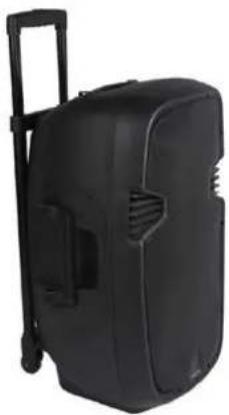
HYBRID12VHF-BT (15-6048) 12" / 30cm - 500W
HYBRID15VHF-BT (15-6049) 15" / 38cm - 700W
GB - Instruction Manual
Imported from China by
LOTRONIC SA
Avenue Zénobe Gramme 11
1480 Saintes
Belgium

Explanation of signs

The triangle containing a lightning symbol is used to indicate whenever your health is at risk (due to electrocution, for example).

An exclamation mark in a triangle indicates particular risks in handing or operating the appliance.
The hand symbol refers to useful tips and additional information on using the appliance.
Important Safety instructions and danger warnings
- Please read the manual carefully and keep it for future reference.
- All safety instructions and warnings must be adhered to. They are part of the manual and must be kept with the manual.
- Any guarantee claims are rendered invalid if damage occurs due to non-observance of these operating instructions. We assume no liability for any consequent damage.
- We assume no liability for personal injury or damage to property caused by incorrect handling or nonobservance of the safety instructions. Any guarantee claims expire in such cases.
- Unauthorized conversions and/or modifications of the appliance are not permitted for safety and licensing reasons (CE).
- The appliance is approved for operation in dry, closed rooms only. Do not operate the device nearby water, such as in bathrooms or nearby swimming pools.
- The appliance may not be exposed to extreme temperatures (< +5^ / > +35^) in operation.
- The appliance may not be subjected to strong vibrations or heavy mechanical strain.
- The appliance may not be exposed to excessive moisture (due to dripping or sprayed water, for example).
- Do not place any recipients filled with liquids, such as glasses or vases, on top of or directly next to the appliance. They could fall over, causing water to enter the appliance. Never pour out liquids above the appliance. Do not place any small objects, such as coins or paper clips, on the appliance since they could fall inside the appliance. You run a high risk of causing a fire or life-threatening electrocution! If any liquid or objects enter the appliance nevertheless, pull the mains plug out of the socket immediately and contact a specialist.
- The appliance has been constructed according to protection class I and must be connected to an earthed mains outlet.
- 220-240 Vac/50 Hz mains socket may be used as source of power for the appliance. Never try to operate the appliance with any other voltage.
- Only pull the mains plug out of the socket by the intended gripping surface. Do not pull it by the cable.
- Never plug the mains plug in or out with damp or wet hands.
- Always pull the mains plug out of the mains socket:
Before cleaning the appliance
If there is a thunderstorm
If you will not be using the appliance for a long period of time (>1 week)
- Electrical appliances must be kept out of the reach of children. Be particularly careful if children are present. Children are not aware of the hazards involved in handing electrical appliances improperly. Children could attempt to poke objects into the appliance. There is a life-threatening danger of electrocution.
- Do not leave the appliance unattended while operating it.
- Never place the appliance on an unstable or movable surface. Persons could be injured or the appliance damaged by it falling down.
- When using a rack, make sure it is in a stable position and is transported securely. Installation on uneven, slanted surfaces or stopping the rack abruptly during transport can result in the rack overturning or appliances falling from or out of the rack and injuring people.
- Live components can be exposed by opening covers or removing components (unless this can be done without tools). Contact points can also be live. If the appliance has to be opened in order to calibrate, service, repair or replace components or assemblies, all of its poles must be disconnected from all sources of voltage first. If the appliance has to be kept open and under voltage during maintenance or repairs, this work may only be carried out by a specialist who is familiar with the risks involved and the relevant regulations.
- Never connect the appliance directly after transferring it from a cold to a warm room. The condensation water that forms could destroy the appliance or result in an electric shock. Allow the device to reach room temperature before connecting it. Wait until the condensation water has evaporated. This can take some hours.
-
Do not place any naked flames such as those of burning candles on or next to the appliance.
-
Do not place the appliance on soft surfaces such as carpets or beds. Do not cover the air vents of the appliance. Do not obstruct the air circulation with objects such as magazines, table cloths or curtains. This prevents the dissipation of heat from the appliance and can result in overheating.
- Only use the appliance in a moderate climate, not in tropical environments.
- All persons involved in operating, installing and servicing the appliance and putting it into service must be trained and qualified accordingly and observe these operating instructions.
- Defective mains cables may only be replaced by specialists. Danger of shock hazard!
- Do not leave the packaging material lying around carelessly since it can become a source of danger for children playing with it.
- The accident prevention regulations and the regulations of the employers' liability insurance association should be observed at commercial institutions.
- If you are not sure about the correct connection or if questions arise which are not answered by the operating instructions, please do not hesitate to contact support or a specialist of your choice. Consult a specialist if you are in doubt the operating principle or the safety of the product.
Disconnection from the mains
Where the MAINS plug or an appliance couples is used as the disconnect device, the disconnect device shall remain readily accessible.
If a switch is used to disconnect the device, the switch and its function must be clearly identified and remain easily accessible.
Restrictions of Use
- As the product contains a transmission/reception system of VHF signals, it is exclusively meant for professional use. The user of the product is fully responsible for the use he makes of the product. The distributor cannot be held responsible for an eventual misuse by the user of the product.
The symbol "!" that appears on the wireless transmitter, the packaging, the manual and on the product means that the product is allowed for use only in some countries of the European Community (FR - BE - PT - D - NL - LU - GR - SP - RO).
FEATURES
BLUETOOTH
Built-in amp
Built-in USB MP3/WMA player
Built in 2-channel VHF microphone receiver
Remote Control
Treble & Bass control
Mic VOL & ECHO controls
Master VOL control
MIC & LINE inputs
MP3 inputs
Built-in rechargeable battery
Recttractable trolley & wheels
Power source: AC 220-240V, 50/60Hz
POWER SUPPLY: BATTERY & AC OPERATION
- Built-in rechargeable battery and AC power. Prior to using this system for the first time, please insert the AC lead into the AC socket of the player and plug the other end on a suitable wall outlet. Make sure that the "CHARGE INDICATOR" is ON 10 hours continuously.
- Please recharge once every 6 months if you don't use the system for a longer period of time.
NOTE: Please shut down the power switch after you have finished using the system.
- Switch power source to ON.
- Insert a USB stick or an SD card
- Select USB via the MODE button
- Select a title via the or buttons and press
- Insert an RCA plug into the LINE IN socket.
- Insert a wired microphone into MIC1 or MIC2 and.
- Adjust the MIC VOL, ECHO, MASTER VOL.
TO USE VOX FUNCTION
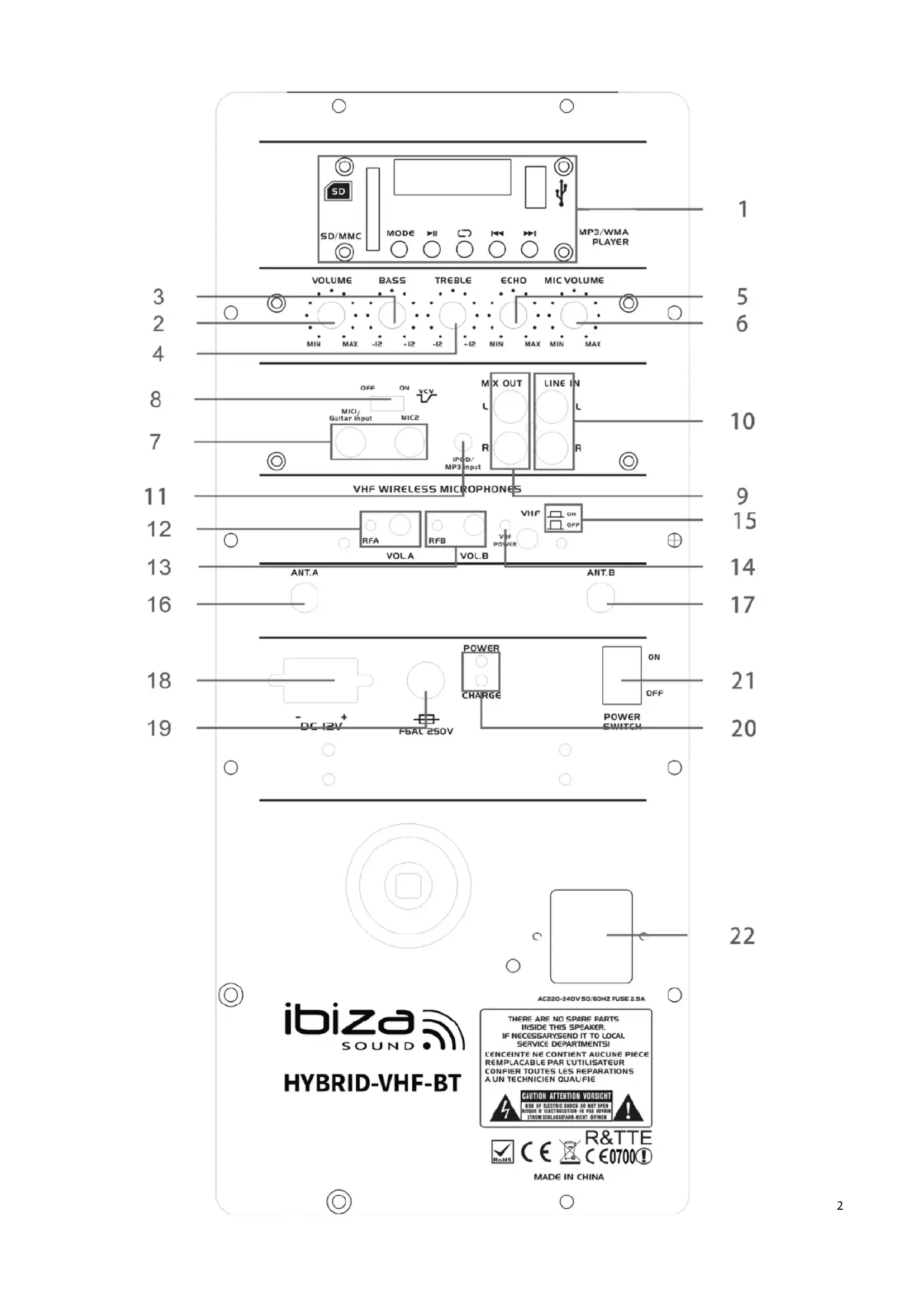
Activate the VOX function by setting switch VCV (8) to ON. When VOX function is enabled, the music level will decrease when somebody talks into one of the microphones. The music level becomes normal when the user stops talking into the microphone. If you want to disable this function, set this switch to off position
BLUETOOTH FUNCTION
- Press the MODE button until Bluetooth is displayed.
- Switch on your Bluetooth device and activate the Bluetooth connect function
- Select BLUETOOTH in the list of found devices
- You are ready to play your music
HOW TO USE THE VHF MICS
Switch on the VHF microphone via the switch on the mic body. The box will automatically select the wireless microphone.
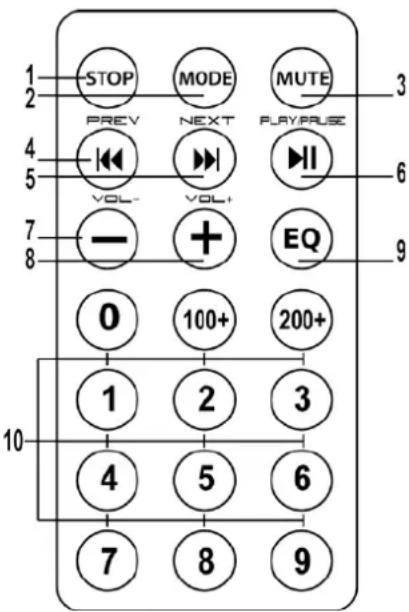
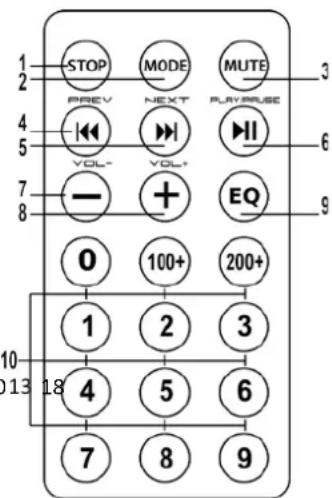
FUNCTIONS OF THE REMOTE CONTROL
- Switch the MP3 player off
- Switch between USB / LINE INPUT / BLUETOOTH
- Mute the sound of the MP3 player
- Skip to previous track
- Skip to next track
- Play/Pause MP3 player
- Decrease volume
- Increase volume
- EQ function
- Choosing music by numbers
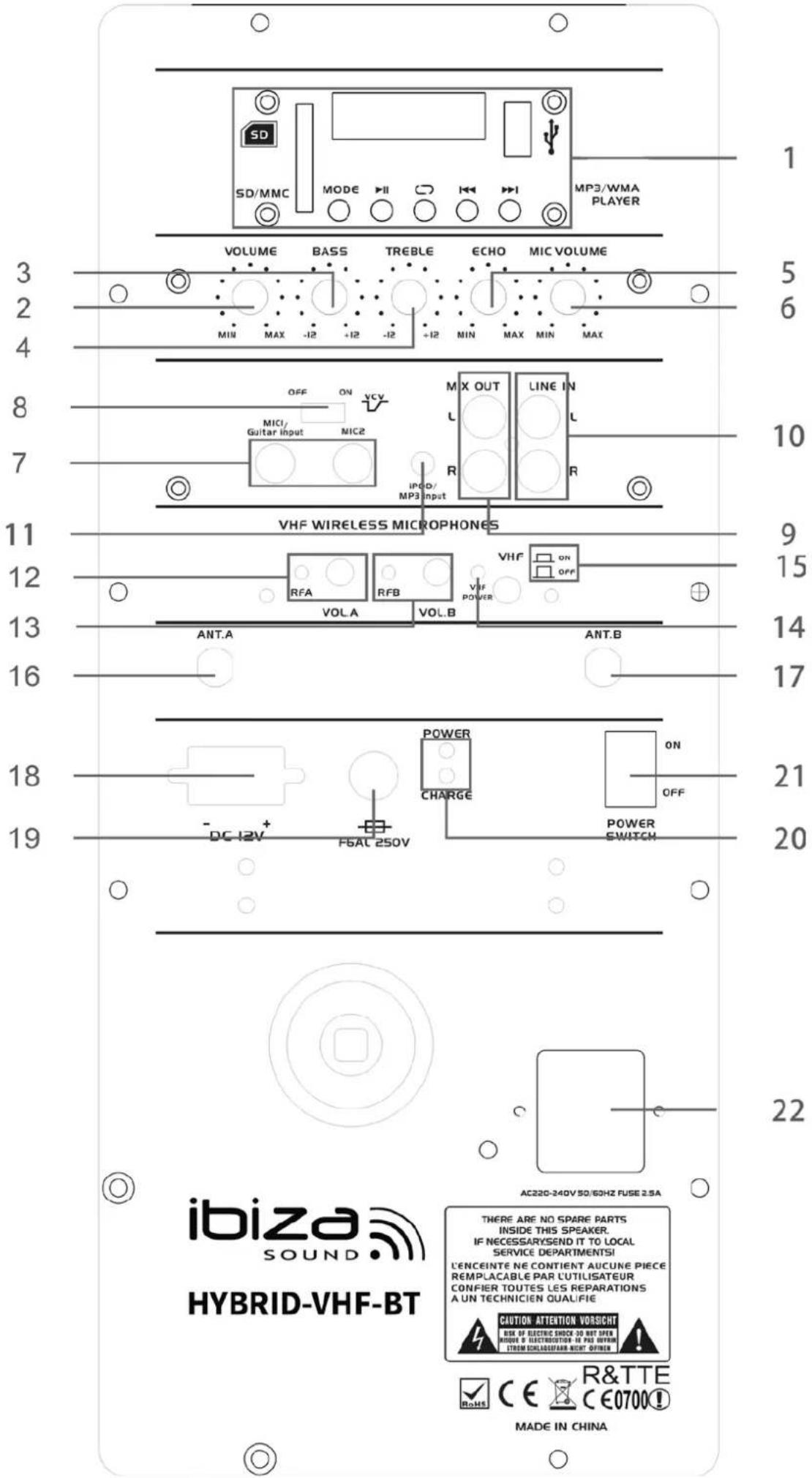
REAR PANEL
- USB Player
| MODE | Cycle through USB / LINE / BLUETOOTH |
| VOL- / | Decrease volume /Backward |
| VOL + / | Increase volume / Forward |
| ► | Play/Pause |
- VOLUME : Master volume control
- BASS : Bass volume control
- TREBLE : Treble volume control
- ECHO : Echo volume control
- MIC VOLUME: Mic volume control
- MIC 1/GUITAR/MIC2 input
- Switch to control the priority for Mic
- Left / Right Line output
- Left/Right Line input
- MP3 input
- Light indicator for wireless mic A / Volume control for wireless mic A
- Light indicator for wireless mic B / Volume control for wireless mic B
- Light indicator for VHF power
- VHF mic ON/OFF
- Antenna for wireless mic A
- Antenna for wireless mic B
- DC 12V input
- F6AL 250V fuse
-
Light indicator for battery charge
-
Power switch: It allows to switch on / off the unit
- Mains supply inlet : Connect here an IEC main power cable in order to supply the unit
| Woofer | 12"/30cm | 15"/38cm |
| Tweeter | 1"/25cm | 1"/25mm |
| Woofer magnet | 30oz | 40oz |
| Voice coil | 1.5" | 2" |
| Sensitivity | 89dB±2dB | |
| Max. SPL | 92dB | |
| Impedance | 4 Ohms | |
| Freq. range | 40-20,000Hz | |
| Built-in battery | 12V/7A | |
| Power supply | 220-240Vac / 50-60Hz | |
| Dimensions | 415 x 375 x 650mm | 480 x 440 x 740mm |
| Weight | 18kg | 20kg |
IMPORTANT NOTE: Electric products must not be put into household waste. Please bring them to a recycling centre. Ask your local authorities or your dealer about the way to proceed.
MANUEL DE L'UTILISATEUR

Copyright LOTRONIC 2013
EC Declaration of Conformity
We,
LOTRONIC SA
Avenue Zénobe Gramme, 11
1480 SAINTES
Belgique
0032.2.390.91.91
Certify and declare under our sole responsibility that the following product:
Trade name:
IBIZASOUND
Product name:
ACTIVE PORTABLE SPEAKER WITH BATTERY AND WIRELESS MICROPHONE
Type or model:
HYBRID12VHF-BT / HYBRID15VHF-BT
conforms with the essential requirements of the LVD directive 2006/95/CE and RTTE directive 1999/5/EC based on the following specifications applied:
EU harmonized standards
EN60065:2002+A1:2006+A11:2008+A2:2010+A12:2011 EN62479:2010
EU harmonized standards
EN300-328 V1.8.1:2012
EN301-489-1 V1.9.2
EN301-489-17 V2.2.1
EU harmonized standards
EN300-422-1 V1.4.2 EN300-422-2 V1.3.1
and therefore complies with the essentials requirements and provisions of the LVD and RTTE Directive.
Place and date of issue: Saintes (Belgium), on 01/08/2014
Guive Akbar
Technical Manager
C E
Responsible technique
LOTRONIC SA
Av. Zenobe Gramme 11
1480 Saintes
Belgium
Tel. +32.2.390.91 91
Fax +32.2.390.93.19
TVA BE 0887 125 178