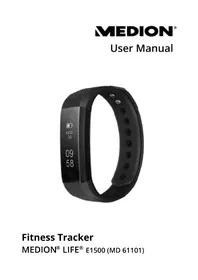
LIFE E1500 (MD 61101) - Sports Watch MEDION - Free user manual and instructions

Find the device manual for free LIFE E1500 (MD 61101) MEDION in PDF.

📄 351 pages PDF ⬇️ English EN 💬 AI Question 🖨️ Print
Notice MEDION LIFE E1500 (MD 61101) - page 68
Manual assistant
Powered by ChatGPT
Waiting for your message
Product information

Brand : MEDION

Model : LIFE E1500 (MD 61101)

Category : Sports Watch

Download the instructions for your Sports Watch in PDF format for free! Find your manual LIFE E1500 (MD 61101) - MEDION and take your electronic device back in hand. On this page are published all the documents necessary for the use of your device. LIFE E1500 (MD 61101) by MEDION.
USER MANUAL LIFE E1500 (MD 61101) MEDION

1. Information about these

6. Getting started ..............83

8. Cleaning and care ........104

9. Storing the device

1. Information about

these operating in- structions Thank you for choosing our product. We hope you en- joy using it. Read these operating instructions carefully and comply with the in- formation provided in them. This will ensure that your device works reliably and has a long service life. The operating instructions are pro- vided as a digital file. If applicable, save it on an external storage me- dium so that is always available as reference material. 61101 E1500 ML Int. Sales Content Final Rev1.indb 6761101 E1500 ML Int. Sales Content Final Rev1.indb 67 20.07.2018 11:14:3720.07.2018 11:14:3768 1.1. Explanation of symbols If a block of text is marked with one of the warning symbols listed below, the hazard described in that text must be avoided to prevent the potential consequences descri- bed there from occurring. DANGER! Warning of immediate risk of fatal injury! WARNING!

NOTICE! Please follow the guidelines to avoid property damage. Additional information on using the device! Please follow the guide- lines in the operating in- structions.

This fitness tracker is an infor- mation technology device and can be used in many different ways:

  • Distance measurement
  • Camera remote release
  • Notification when a message is received
  • MEDION® Fitness app required 61101 E1500 ML Int. Sales Content Final Rev1.indb 7161101 E1500 ML Int. Sales Content Final Rev1.indb 71 20.07.2018 11:14:3820.07.2018 11:14:3872 The device is only intended for private use and not for industri- al/commercial use. Note that no liability will be accepted if the device is not used for its intend- ed purpose: Do not modify the device without our prior consent. Only use replacement parts or accessories that we have supplied or approved. Comply with all the infor- mation in these operating instructions, especially the safety information. Any oth- er use is improper and might cause personal injury or damage to property. 61101 E1500 ML Int. Sales Content Final Rev1.indb 7261101 E1500 ML Int. Sales Content Final Rev1.indb 72 20.07.2018 11:14:3820.07.2018 11:14:38DE

2.1. Improper use The fitness tracker is designed to monitor a range of physical data (e.g. calorie consumption). It must not to be used for med- ical diagnoses or the treatment or prevention of illness.

3. Safety information

Keep the device and its ac- cessories out of the reach of children. This device can be used by children aged 8 years and above, by people with re- duced physical, sensory or mental capabilities, or peo- ple who lack experience or knowledge, if proper su- 61101 E1500 ML Int. Sales Content Final Rev1.indb 7361101 E1500 ML Int. Sales Content Final Rev1.indb 73 20.07.2018 11:14:3820.07.2018 11:14:3874 pervision is provided and if these people have been in- structed in how to use the device safely and have ful- ly understood the possible dangers. Children must not be al- lowed to play with the de- vice. Do not allow children to clean the device or perform maintenance tasks on it un- less they are aged 8 years or older and properly super- vised. Keep the device out of reach of children under the age of

3.1. General information Do not expose the device to extreme conditions. Avoid: − High humidity and wet con- ditions − Extremely high and low tem- peratures − Direct sunlight − Naked flames The device contains no us- er-maintainable parts. Never open the device casing. WARNING! Risk of explosion! Never throw the fitness tracker into the fire! Risk of explosion! Do not use the device in po- tentially explosive atmos- 61101 E1500 ML Int. Sales Content Final Rev1.indb 7561101 E1500 ML Int. Sales Content Final Rev1.indb 75 20.07.2018 11:14:3820.07.2018 11:14:3876 pheres. This includes petrol stations, fuel storage areas and areas where sol- vents are processed, for ex- ample. This device must also not be used in areas with particle-laden air (for exam- ple flour or wood dust). Never try to replace the bat- tery in the device. It is an in- tegral part and cannot be re- placed. To prevent the fitness track- er from being damaged by excessive heat during charg- ing, do not cover it. Never put anything on top of the device, and never exert any pressure on the display, 61101 E1500 ML Int. Sales Content Final Rev1.indb 7661101 E1500 ML Int. Sales Content Final Rev1.indb 76 20.07.2018 11:14:3820.07.2018 11:14:38DE

as it might break. Avoid touching the display with sharp objects. Do not use the fitness track- er if there is visible damage to its housing or the display. Do not take the fitness track- er apart or deform it. You could injure your hands or fingers, or battery fluid could get into your eyes or onto your skin. If you do come into contact with the fluid, rinse the affected area with plenty of water and contact your doctor immediately. For safety reasons, when us- ing the fitness tracker, keep it at least 20 cm away from 61101 E1500 ML Int. Sales Content Final Rev1.indb 7761101 E1500 ML Int. Sales Content Final Rev1.indb 77 20.07.2018 11:14:3820.07.2018 11:14:3878 an implanted pacemaker or defibrillators to prevent any interference. WARNING! Risk of fire! Risk of fire caused by an unin- tentional short-circuit. Stop using the fitness tracker immediately and disconnect it from the USB power sup- ply, if applicable. This applies: − if the fitness tracker produc- es unusual noises or smoke − if the fitness tracker is dam- aged by a liquid or high moisture levels − in emergency situations. 61101 E1500 ML Int. Sales Content Final Rev1.indb 7861101 E1500 ML Int. Sales Content Final Rev1.indb 78 20.07.2018 11:14:3820.07.2018 11:14:38DE

3.2. Use Prolonged contact with the skin may cause skin irritation or allergic reactions in some people. Stop wearing the fitness tracker if: − your hands or wrists hurt, − itch, − burn, − or are numb or stiff, either while wearing it or after- wards. The fitness tracker contains electrical components which may cause injury if the de- vice is used improperly. 61101 E1500 ML Int. Sales Content Final Rev1.indb 7961101 E1500 ML Int. Sales Content Final Rev1.indb 79 20.07.2018 11:14:3820.07.2018 11:14:3880

DANGER! Risk of choking and suffocation! There is a risk of suffoca- tion from breathing in or swallowing plastic film or small parts. Keep packaging away from children. Do not allow children to play with the pack- aging material. The packaging mate- rial is not a toy! 61101 E1500 ML Int. Sales Content Final Rev1.indb 8061101 E1500 ML Int. Sales Content Final Rev1.indb 80 20.07.2018 11:14:3820.07.2018 11:14:38DE

Remove the product from the packaging and remove all the packaging material. Check your purchase to ensure that all items are included. If an- ything is missing, please con- tact our Service team within 14 days of purchase. Before each use, check the fit- ness tracker for any damage. Contact our Service Centre if you find any damage. The following items are supplied with your product:

  • Fitness tracker with display unit

USB charging connection

Remove all packaging materials. Remove the protective film from the device display. DANGER! Risk of choking and suffocation! There is a risk of suffoca- tion from breathing in or swallowing plastic film or small parts. Keep packaging away from children. Do not allow children to play with the pack- aging material. The packaging mate- rial is not a toy! 61101 E1500 ML Int. Sales Content Final Rev1.indb 8361101 E1500 ML Int. Sales Content Final Rev1.indb 83 20.07.2018 11:14:3820.07.2018 11:14:3884 6.1. Charging the device Remove the display unit from the tracker, by pulling it firmly if necessary. Connect the display unit to a free USB port on your PC or lap- top. Make sure that the USB connec- tion contacts on the sensor unit match the contacts on the USB port on your PC or laptop. The device needs approximately 90 minutes to charge. 61101 E1500 ML Int. Sales Content Final Rev1.indb 8461101 E1500 ML Int. Sales Content Final Rev1.indb 84 20.07.2018 11:14:3820.07.2018 11:14:38DE

If the charging LED does not light up red, this means the display unit is not connected to the USB port and cannot be charged. Turn the display unit over and check the operating state of your PC/laptop. If necessary, use a USB exten- sion (not included) to make it easier to charge the fitness tracker. The charging LED goes out as soon as the display unit has been fully charged. Put the display unit with the display facing the outside of the fitness tracker back into the holder on the tracker, as illus- trated below. 61101 E1500 ML Int. Sales Content Final Rev1.indb 8561101 E1500 ML Int. Sales Content Final Rev1.indb 85 20.07.2018 11:14:3820.07.2018 11:14:3886 6.2. Putting on the fi tness tracker Place the fitness tracker around your wrist and fasten it. The fitness tracker should not be too tight or too loose for your wrist. 61101 E1500 ML Int. Sales Content Final Rev1.indb 8661101 E1500 ML Int. Sales Content Final Rev1.indb 86 20.07.2018 11:14:3820.07.2018 11:14:38DE

6.3. Switching the device

Press and hold the touch field for approximately 4 seconds until the display unit vibrates briefly and the display lights up. You have now switched the de- vice on. 6.4. MEDION® Fitness app Download the associated fit- ness tracker app MEDION® Fit- ness free of charge from the Apple App Store or Google Play Store. Alternatively, use the QR code be- low to download the app automat- ically. 61101 E1500 ML Int. Sales Content Final Rev1.indb 8761101 E1500 ML Int. Sales Content Final Rev1.indb 87 20.07.2018 11:14:3920.07.2018 11:14:3988 Apple App Store/ Google Play Store 6.5. Connecting the device via Bluetooth® A Bluetooth

connection is an unencrypted wireless data transfer system which is unprotected against un- authorised third parties. Start the MEDION® Fitness app. Select the required language in the app and enter your per- sonal details, such as sex, age, weight, height, etc., to ena- ble the device to calculate the data values (such as calorie con- sumption). 61101 E1500 ML Int. Sales Content Final Rev1.indb 8861101 E1500 ML Int. Sales Content Final Rev1.indb 88 20.07.2018 11:14:3920.07.2018 11:14:39DE

Enable Bluetooth on your smartphone / tablet PC. Activate the fitness tracker by briefly pressing the touch field until you see the display. Press the “Connect” control field in the app to start search- ing for devices. The app now displays a list of all the fitness tracker devices within range. Select your fitness tracker (E1500) from the app device list. The Smartcircle is now dis- played on your fitness tracker for 10 seconds. Within these 10 seconds, press and hold down the touch field for approximately 2 seconds to connect the devices to each 61101 E1500 ML Int. Sales Content Final Rev1.indb 8961101 E1500 ML Int. Sales Content Final Rev1.indb 89 20.07.2018 11:14:3920.07.2018 11:14:3990 other. If you do not confirm the connection on the fitness tracker within 10 seconds, you must repeat the con- nection process using the app. When the link has been successfully set up, your fitness tracker and your smartphone / tablet PC both display the message “The device is connected and ready to use.” Press the “Finish” control field in the app to finish setting up the link. When the Bluetooth connection is active, the symbol lights up in the display of the fitness tracker. 61101 E1500 ML Int. Sales Content Final Rev1.indb 9061101 E1500 ML Int. Sales Content Final Rev1.indb 90 20.07.2018 11:14:3920.07.2018 11:14:39DE

You only need to create the Bluetooth link when you first set up the device. 6.6. Switching the device

In the “start screen mode” on the fitness tracker, press the touch field for approximately 4 seconds, until a 3 second count- down starts. When the count- down is finished, the device au- tomatically switches to standby mode (Bluetooth is deactivat- ed). 61101 E1500 ML Int. Sales Content Final Rev1.indb 9161101 E1500 ML Int. Sales Content Final Rev1.indb 91 20.07.2018 11:14:3920.07.2018 11:14:3992 6.7. Start screen Tap the touch field with one fin- ger until the display lights up. The display starts automatically on the start screen. Information about the Bluetooth connection (a), charging state (b), date (c) and time (d) is displayed.

6.8. Starting activity recording Briefly press the touch field once until the “starting activi- ty recording” display mode ap- pears in the display: Press and hold the touch field until the display unit briefly vi- brates and the 3 second count- down has finished counting down on the display. Once the countdown is complete, the display unit vibrates again and sports activities are now recorded. flashes in the start screen while activities are being recorded. 61101 E1500 ML Int. Sales Content Final Rev1.indb 9361101 E1500 ML Int. Sales Content Final Rev1.indb 93 20.07.2018 11:14:3920.07.2018 11:14:3994 6.9. Display options during activity recording During the activity, tap the touch field repeatedly to scroll through the following display options:

  • Duration of current activity
  • Number of steps taken
  • Display of date, time, charging state and Bluetooth connection

Only the most recent val- ues are displayed on the fitness tracker, i.e. those re- lating to the current or pre- vious activity. It is not pos- sible to view previously calculated values on the fitness tracker in retro- spect. 6.10. Finishing activity recording In the “finish current activi- ty” display mode (see figure above), press and hold the touch field until the display unit briefly vibrates and the 3 sec- ond countdown has finished counting down on the display. 61101 E1500 ML Int. Sales Content Final Rev1.indb 9561101 E1500 ML Int. Sales Content Final Rev1.indb 95 20.07.2018 11:14:3920.07.2018 11:14:3996 Once the countdown is com- plete, the display unit vibrates and the recording of sports ac- tivities stops. After the activity has fin- ished, the calculated val- ues can be viewed on the fitness tracker until a new activity is started. Previous- ly calculated values are overwritten and cannot be viewed on the fitness tracker in retrospect. Use the MEDION® Fitness app to create an activity history containing all the values. 61101 E1500 ML Int. Sales Content Final Rev1.indb 9661101 E1500 ML Int. Sales Content Final Rev1.indb 96 20.07.2018 11:14:3920.07.2018 11:14:39DE

6.11. The function modes in detail You can use the fitness tracker to record your fitness and activity lev- els. Using the function modes “step counter”, “distance measurement” and “calorie consumption”, you can view how many calories you have consumed or how many metres you have walked. Fitness tracker functions: 12,000 Step counter

Calorie counter 12.01KM Distance meas- urement 61101 E1500 ML Int. Sales Content Final Rev1.indb 9761101 E1500 ML Int. Sales Content Final Rev1.indb 97 20.07.2018 11:14:3920.07.2018 11:14:3998 To ensure that the values are calculated as accurately as possible, you need to enter your personal data, such as weight, step length, etc., into the MEDION® Fitness app.

6.11.1. Step counter

Based on the step length that you have provided, the step counter counts the number of steps that you have taken during the current activity. Tap the touch field repeatedly until you reach the “step coun- ter” display mode. 12,000 61101 E1500 ML Int. Sales Content Final Rev1.indb 9861101 E1500 ML Int. Sales Content Final Rev1.indb 98 20.07.2018 11:14:3920.07.2018 11:14:39DE

Based on the data you have provid- ed about your height and weight, the fitness tracker calculates and displays the number of calories that you have burned during the current activity. Tap the touch field repeatedly until you reach the “calorie con- sumption” display mode.

Problem Possible cause Solution Distance determined does not seem right Your per- sonal step length has not been entered cor- rectly. Check the step length that was en- tered into the ME- DION® Fitness app and correct it if necessary. 61101 E1500 ML Int. Sales Content Final Rev1.indb 10361101 E1500 ML Int. Sales Content Final Rev1.indb 103 20.07.2018 11:14:3920.07.2018 11:14:39104

8. Cleaning and care

PLEASE NOTE! Risk of damage! Do not use any ag- gressive chemi- cal agents, scour- ing agents or hard sponges for cleaning. Regularly clean the external surfaces of the fitness tracker with a damp cloth.

9. Storing the device

Conformity MEDION AG hereby declares that this device complies with the fun- damental requirements and the other relevant provisions of:

  • RE Directive 2014/53/EU
  • Ecodesign Directive 2009/125/
  • RoHS Directive 2011/65/EU You can download the complete EU Declaration of Conformity at www.medion.com/conformity. 61101 E1500 ML Int. Sales Content Final Rev1.indb 10561101 E1500 ML Int. Sales Content Final Rev1.indb 105 20.07.2018 11:14:4020.07.2018 11:14:40106 10.1. Trademark information The Bluetooth® word mark and log- os are registered trademarks of Bluetooth SIG, Inc. and are used by MEDION under license. The USB™ word mark and the log- os are registered trademarks of the USB Implementers Forum, Inc. and are used by MEDION under licence. Other trademarks are the property of their respective owners. 61101 E1500 ML Int. Sales Content Final Rev1.indb 10661101 E1500 ML Int. Sales Content Final Rev1.indb 106 20.07.2018 11:14:4020.07.2018 11:14:40DE

specifi cations CPU Nordic N51802 Integrated bat- tery Li-Ion battery

Battery charg- ing time Approx. 90 min- utes Standby time Up to 7 days Charge con- nection USB Bluetooth

frequency range 2402 to 2480 MHz Max. Blue- tooth

trans- mission power

16 mm Wrist circum- ference

PACKAGING The product has been packaged to protect it from damage in transit. The pack- aging is made of materials that can be recycled in an environmentally friendly manner. DEVICE Old devices may not be disposed of with normal household rubbish. In accordance with Directive 2012/19/EU, the device must be properly disposed of at the end of its service life. This involves separating the materi- als in the device for the purpose of recycling and minimising the envi- ronmental impact. 61101 E1500 ML Int. Sales Content Final Rev1.indb 10961101 E1500 ML Int. Sales Content Final Rev1.indb 109 20.07.2018 11:14:4020.07.2018 11:14:40110 Take old devices to a collection point for electrical scrap or a recy- cling centre. Contact your local waste disposal company or your local authority for more information on this subject. The built-in battery cannot be re- moved, the entire device should be disposed of properly. At the end of its service life, do not dis- pose of the device with normal household rubbish. Instead, con- tact your local authority to find out how to dispose of the device in an environmentally friendly manner at collection points for electrical and electronic scrap. 61101 E1500 ML Int. Sales Content Final Rev1.indb 11061101 E1500 ML Int. Sales Content Final Rev1.indb 110 20.07.2018 11:14:4020.07.2018 11:14:40DE

Please contact our Customer Ser- vice team if your device ever stops working the way you want or ex- pect it to. There are several ways for you to contact us:

  • In our Service Community, you can meet other users, as well as our staff, and you can exchange your experiences and pass on your knowledge there. You will find our Service Com- munity at http://community. medion.com.
  • Alternatively, use our contact form at www.medion.com/con- tact.

Service address MEDION Electronics Ltd. 120 Faraday Park, Faraday Road, Dorcan Swindon SN3 5JF, Wiltshire United Kingdom 61101 E1500 ML Int. Sales Content Final Rev1.indb 11361101 E1500 ML Int. Sales Content Final Rev1.indb 113 20.07.2018 11:14:4020.07.2018 11:14:40114 You can download this and many other sets of operating instructions from our service por- tal at www.medion.com/gb/service/start/. You will also find drivers and other software for a wide range of devices there. You can also scan the QR code on the side of the screen, to download the operating in- structions onto your mobile device from the service portal. 61101 E1500 ML Int. Sales Content Final Rev1.indb 11461101 E1500 ML Int. Sales Content Final Rev1.indb 114 20.07.2018 11:14:4020.07.2018 11:14:40DE

Copyright © 2018 Date: 20.07.2018 All rights reserved. These operating instructions are protected by copyright. Mechanical, electronic and any other forms of reproduction are prohibited without the written per- mission of the manufacturer. Copyright is owned by the distrib- uting company: MEDION AG Am Zehnthof 77 45307 Essen Germany Please note that you cannot use 61101 E1500 ML Int. Sales Content Final Rev1.indb 11561101 E1500 ML Int. Sales Content Final Rev1.indb 115 20.07.2018 11:14:4020.07.2018 11:14:40116 the address above for returns. Please always contact our Custom- er Service team first. 61101 E1500 ML Int. Sales Content Final Rev1.indb 11661101 E1500 ML Int. Sales Content Final Rev1.indb 116 20.07.2018 11:14:4020.07.2018 11:14:40DE

www.medion.com/contact.