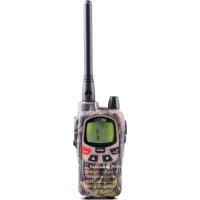
G9 Pro - Radio MIDLAND - Free user manual and instructions
Find the device manual for free G9 Pro MIDLAND in PDF.



User questions about G9 Pro MIDLAND
0 question about this device. Answer the ones you know or ask your own.
Ask a new question about this device
Download the instructions for your Radio in PDF format for free! Find your manual G9 Pro - MIDLAND and take your electronic device back in hand. On this page are published all the documents necessary for the use of your device. G9 Pro by MIDLAND.
USER MANUAL G9 Pro MIDLAND
Produced or imported by:
CTE INTERNATIONAL s.r.l.
Via. R.Sevardi 7 42124 Mancasale Reggio Emilia Italy
Imported by:
ALAN - NEVADA UK
Unit 1 Fitzherbert Spur Farlington Portsmouth Hants.
P06 1TT - United Kingdom
www.nevada.co.uk
The use of this transceiver can be subject to national restrictions. Read the instructions carefully before installation and use. If the product contains batteries: do not throw the battery into fire. To disperse after use, throw into the appropriate containers.
Importado por:
ALAN COMMUNICATIONS, SA
Batteries and battery compartment 5
Warnings 5
Features 6
Main characteristics 7
Versions 7
Description of the controls and functions 8
Display 8
Radio 10
Operations 12
Turning on/off 12
Selecting the PMR466 or LDP band 12
Channel selection 12
Displaying the channel/sub audio tone 12
Transmission and reception 13
Transmitting TOT Setting 13
VOLUME adjustment 13
"CALL" 13
"Emergency" 13
MON (Monitor) function / Squelch 14
Scanning all the channels 14
"MENU" key 14
Channel selection 15
CTCSS/DCS tone setting 15
Hi/low power selection (only in PMR446 band) 16
VOX function 17
Vibra-Call function 18
CALL feature 18
ROGER BEEP (End transmission tone) 18
Keypad Beep 18
Emergency Call function 19
Activating / Deactiving the Emergency feature 19
Changing the emergency channel 19
Manual Out of range function 20
Dual Watch 20
Automatic Out-of-Range 21
Display illumination 21
Power save 21
Battery recharge 22
Technical specifications 23
Thanks for choosing Midland! Midland G9 Plus is a portable transceiver that is free use in almost all European countries.
Combining the latest technology in radio communication along with a sturdy mechanical frame, the Midland G9 Plus makes the ideal and effective solution for the professionals who need to stay in touch with colleagues in construction sites and buildings.
Midland G9 Plus is available in two versions:
• Dual Band (PMR446/LPD)
• E version (PMR446 only)
This manual is referred to both models and you will find highlighted the differences between the two versions.
Content
N° 4 1800 mAh AA NiMH rechargeable batteries
N° 1 Belt clip
Coverage/range
The maximum range depends on terrain condition and is obtained during use in an open space.
The only limitation to maximum possible range are environmental factors such as blockage caused by trees, buildings, or other obstructions. Inside a car or a metallic constructions, the range can be reduced. Normally the coverage in the city, with buildings or other obstructions is about 1 or 2 Km. In open space but with obstructions like trees, leaves or houses the maximum possible range is about 4-6 Km. In open space, without obstructions and in sight, like for example in mountain, the coverage can be more than 12 Km.
Batteries and battery compartment
The transceiver accepts the supplied rechargeable batteries or 4 AA alkaline batteries. To open the battery compartment: with the back of the radio facing you, unhook the battery holder in the lower part of the radio and gently slide the cover. Insert the battery observing the polarity and place the cover again.
Attention: the batteries must be recharged before the first use.
Warnings
- BATTERIES - Strictly follow all the warnings on the batteries stated at chapter "Battery recharge".
- Do not open the radio for any reason! The radio's precision mechanics and electronics require experience and specialized equipment; for the same reason, the radio should under no circumstances be realigned as it has already been calibrated for maximum performance. Unauthorized opening of the transceiver will void the warranty.
- Do not use detergents, alcohol, solvents, or abrasives to clean the equipment. Just use a soft, clean cloth. If the radio is very dirty, slightly dampen the cloth with a mixture of water and a neutral soap.
Features
- New function 'Side Tone': End transmission noise muffler
- "Dual PTT" feature for high or low output power. Midland G9 Plus is equipped with a Dual PTT key. Thanks to this brand new feature, it is possible to use the high power only when it is really necessary, enabling in this way a high reduction of the battery consumption.
- "Emergency CALL" feature. Midland G9 Plus introduces an innovative and important feature: the channel dedicated to the emergencies. Radio communications usually happen between two or more users which are tuned on the same channel: it's not possible to transmit or receive to/from different channels. But thanks to the "Emergency" function, you can also keep a check on the Emergency channel: all users having a Midland G9 Plus can communicate on the tuned channel and at the same time can receive/transmit Emergency messages on the dedicated channel. Simply keep pressed the EMG button for 3 seconds and an emergency CALL will be sent to all the G9 Plus within the range: they will be automatically tuned on the "EC" channel (Emergency Channel).
- "Manual Out of range" feature: just press twice the EMG button and you will verify whether there are some radios within the range of your equipment.
- "Vox TalkBack" feature: if one radio is continuously transmitting in VOX, the Vox TB will automatically stop the transmission after 20" to allow the transmission to the other users as well.
Main characteristics
• Power: 500mW (PMR446); 10mW (LPD)
- Operating temperature: from -20^ to +55^ C
- Side Tone
• 38 CTCSS tones/104 DCS codes
- Dual PTT key: high/low output power
- Emergency CALL
- Out of range control
- VOX adjustable in 3 levels and with "TalkBack"
- VibraCALL
- Keypad lock
- Auto power save: automatic current economy circuit
- Low battery indicator
- Dual Watch
- CALL with 5 selectable melodies
- SCAN
- Monitor
- Out of Range
- Roger beep
- High/Low power
• LCD Display with backlight
- Power supply: 4 AA NiMH rechargeable batteries (or an optional 800 mAh NiMH battery pack)
- 2pin accessory plug
Versions
• G9 Plus Dual band (PMR446/LPD)
24 PMR446 channels (8+16 pre-set)/69 LPD channels
• G9E Plus (PMR446 only)
24 PMR446 channels (8+16 pre-set)
Description of the controls and functions
Display
text_image
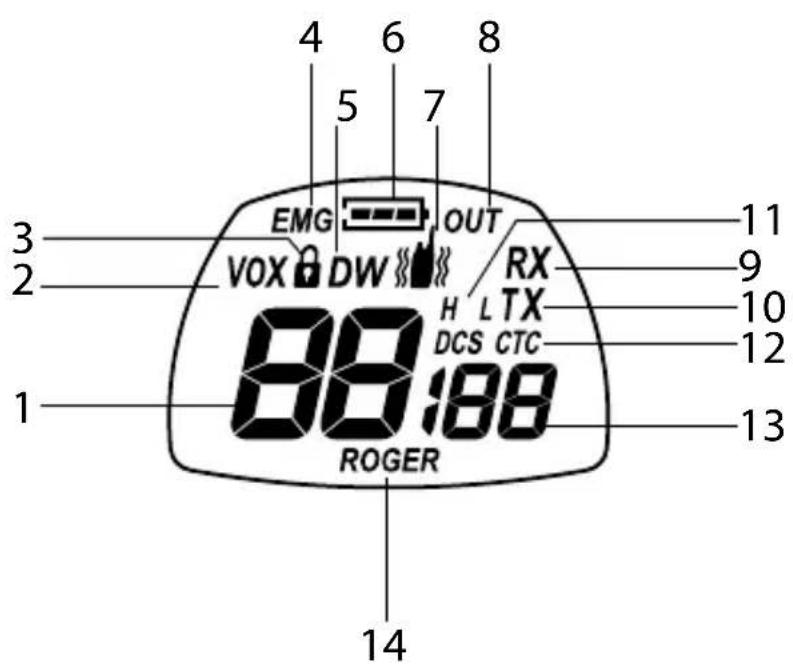
4 6 8 5 7 3 EMG OUT 2 VOX DW RX 1 88:88 DCS CTC ROGER 11 9 10 12 13 14Your Midland G9 Plus keeps you constantly updated about its operational status through a Liquid Crystal Display (LCD). The symbols and their corresponding parameters that may appear, according to the operational status of the device, are described as follows:
| 1. CHANNEL These two large digits indicate the selected channel | |
| 2. VOX VOX function activated | |
| 3. | This symbol appears when the keypad lock is activated |
| 4. EMG Emergency function activated | |
| 5. DW Dual Watch activated | |
| 6. | Indicates the battery status |
| 7. | Vibra-Call function activated |
| 8. OUT Indicates if the Automatic Out of Range functionlooses contact with the other radios | |
| 9. RX Reception mode | |
| 10. TX Indicates the transmission (PTT pressed) | |
| 11. H(High) / L(Low) High or low power selection. The output power of the big PTT depends on your selection | |
| 12. CTCSS/DCS Indicate the type of sub audio tone selected | |
| 13. CTCSS/DCS tone | These three small digits indicate the code of the CTCSS/DCS tones selected (1-38 / 1-104) |
| 14. ROGER | Roger Beep activated |
Radio
text_image
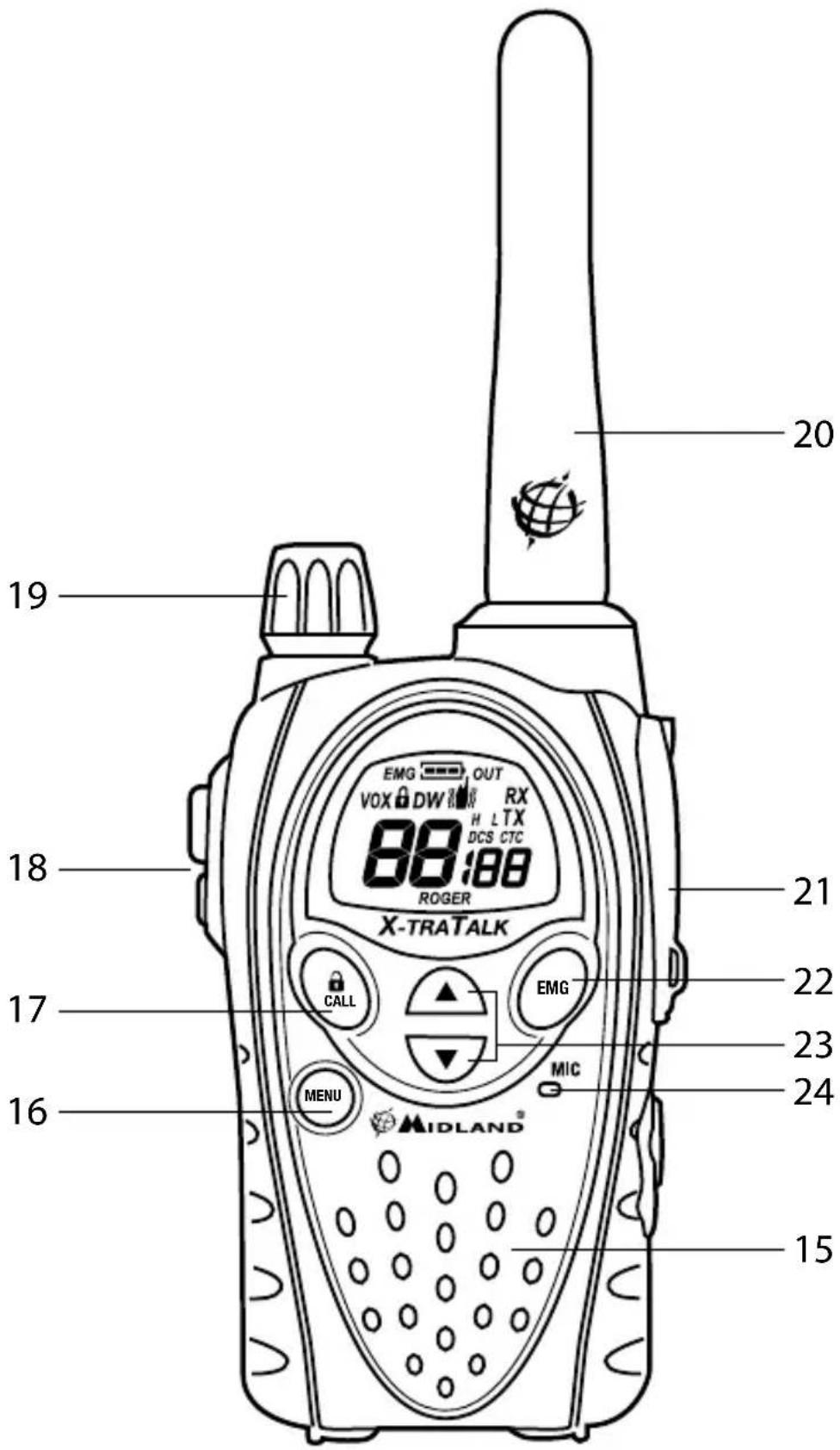
20 19 18 21 22 17 16 MENU MIDLAND EMG OUT VOX DW RX H L TX DCS CTC 88:88 ROGER X-TRATALK CALL EMG MIC 23 24 15Refer to this picture to identify the various parts of the device
- Built-in speaker Here is where the speaker is housed.
- MENU button Press this button to enter the radio's MENU.
- CALL/☐ button To send a CALL on the selected channel. If you keep it pressed for about 5 seconds, the keypad lock is activated.
- PTT (push to talk) The PTT key has a dual function, as it is composed by 2 parts: the larger and bigger side of the PTT key, allows the transceiver to send with high or low power (depending on the setting of the MENU); while the small PTT (Boost) allows the transceiver to transmit always with high power.
- VOLUME knob On/off and VOLUME adjustment.
- ANTENNA Receives and transmits radio signals.
- Accessory socket (under protective cover) To connect to external audio devices such as microphones, chargers, etc. (2pin type)
- EMG button To activate the Emergency and the Manual Out of range functions.
- ▲▼ buttons To change the setting within the MENU
- Built-in microphone Here is where sound is picked up by the micro-phone.
Operations
Turning on/off
To turn on the transceiver, turn the VOLUME knob clockwise until you hear it clicks. To turn off the transceiver, turn the knob counter-clockwise.
Selecting the PMR466 or LDP band (only for the dual band version)
Midland G9 Plus (Dual band) is pre-set at factory on the PMR446 band. To switch to the LPD band, keep pressed the MENU button until the LPD shows channel '1'.
To return to the PMR446 band, keep pressed the MENU button again, until the LCD shows 'P1'.
This procedure disables the "EMG" function; therefore if you change the frequency band, remember to activate the Emergency function again (see paragraph "Emergency function").
Channel selection
Press the MENU button. The number of the channel will start flashing on the display.
Press the scroll buttons ▲▼ till you select the desired channel.
Press the PTT button to confirm, or wait for 5 seconds.
According to the version you bought, you can choose amongst the following channels:
- Dual band version: PMR446 from P1 to P8 and from 9p to 24p (preset) / LPD from 1 to 69.
- E version (PMR446 only): from P1 to P8 and from 9p to 24p (pre-set)
Channel P8 has been set at factory for the "Emergency" function; we suggest that you do not use it for general communications!
Displaying the channel/sub audio tone
To momentarily display the PMR446 channel and the subadio tone used in the pre-set channels, go to the desired channel (from 9p to 24p) and keep pressed the ▼ for 3 seconds.
Transmission and reception
To transmit keep the PTT button firmly pressed (it is not important what part of it). Wait for a fraction of a second then speak normally in the direction of the microphone and hold the device at a distance of about 5 cm; TX will appear on the display.
When you have finished, release the PTT.
When the radio is in reception mode (PTT released) you will automatically receive any communication. RX will be displayed.
By default the output power set is "H-high", so independently on which PTT key you press (small or big) the sending will be with high power.
If you use an external microphone, the PTT on it will follow the same PTT setting of the radio.
Transmitting TOT Setting
The TOT function is used to prevent a too long transmission. This function temporarily blocks transmissions if the radio has been used beyond the maximum time permitted. Once reached the preset timer, the radio will be forced in reception mode.
VOLUME adjustment
Rotate the VOLUME knob till you reach the desired level.
"CALL"
Push the CALL button and you will send an audio signal to the users tuned on the same channel; you can choose amongst different CALL tones.
"Emergency"
When the Emergency function is enabled (EMG blinks on the display) keep pressed EMG for 3 seconds and you send an emergency CALL to the other G9 Plus within your range.
The Emergency function is activated by default.
Keypad lock
Keep pressed CALL/☐ for about 5 seconds. and ☐ will be displayed as confirmation. Only PTT, EMG and CALL/☐ remain active. To disable this function, keep pressed again CALL/☐ for 5 seconds approx.
MON (Monitor) function / Squelch
The Monitor button is for temporarily excluding (opening) the squelch, in order to listen to signals that are too weak to keep the squelch permanently opened.
To activate the monitor function, keep pressed for about 2 seconds both ▲▼ at the same time. Follow the same procedure to deactivate the function, or switch off and on the radio.
When MON is active, you will probably hear a constant background noise.
You can activate the Monitor feature only if the "Emergency" function is disabled.
Scanning all the channels
Midland G9 Plus can automatically search for signals throughout the bands by scanning the channels in rapid sequence. This function is useful to find out any active channel.
When a signal is detected, the scanning pauses on that channel for 5 seconds.
Press ▲ for 2 seconds: the scanning will start.
To stop it, push PTT: the Midland G9 Plus will go back to the channel from which the scanning originally started.
You can activate the scanning feature only if the "Emergency" function is disabled.
"MENU" key
The following features can be selected by using the "MENU" button:
Channel selection
CTCSS tone setting
DCS tone setting
High/low power selection (only in the PMR446 band)
VOX
VibraCALL function
Call melodies
Roger Beep
Keypad Beep
Emergency channel
Dual Watch function
Out of Range
Channel selection
- Press the MENU button. The number of the channel will start flashing on the display.
- Press the scroll buttons ▲▼ till you select the desired channel.
- Press the PTT button to confirm, or wait for 5 seconds.
According to the version you bought, you can choose amongst the following channels:
- Dual band version: PMR446 from P1 to P8 and from 9p to 24p (preset) / LPD from 1 to 69.
- E version (PMR446 only): from P1 to P8 and from 9p to 24p (pre-set)
Channel P8 has been set at factory for the "Emergency" function; we suggest that you do not use it for general communications!
CTCSS/DCS tone setting
CTCSS and DCS tones are similar to access codes and enable the radio to communicate only with the users that are tuned on the same channel and have set the same code. For each channel, you can set up to 38 CTCSS and 104 DCS tones.
These tones can be set on the following channels:
- Dual band version: only on the 8 main PMR446 channels (from P1 to P8) and on the 69 LPD channels.
- E version (PMR446 only): only on the 8 main PMR446 channels (from P1 to P8)
For both, the pre-set channels from 9p to 24p cannot be modified.
Activating the CTCSS tones:
- Turn on the unit.
- Select the desired channel by pushing the MENU button and the ▲▼ channels.
- Press the MENU button till the display shows CTC and the CTCSS
tone blinks on the right ("of" = no code - default condition).
- Select the desired CTCSS tone by pushing ▲▼.
- To confirm the setting, push PTT or wait for 5 seconds.
Deactivating the CTCSS tones:
If you don't want to use the CTCSS tones, follow these steps:
- Select the desired channel
- Press the MENU key till the display shows the CTCSS tone blinking on the left;
- Select "of" by means of ▲▼.
Activating the DCS codes:
- Turn on the unit.
- Select the desired channel by pressing MENU and ▲▼ keys.
- Push the MENU button again till the display shows DCS and the tone code blinks on the right ("of" = no code - default condition).
- Select the desired DCS code by pushing ▲▼.
- To confirm the setting, press the PTT or wait for 5 seconds.
Channel P8 with DCS tone 50 (P850) has been set at factory for the "Emergency" function; do not use it for general communications!!
Deactivating the DCS codes:
- Select the desired channel.
- Press the MENU key till the display shows the channel in use and the DCS code blinks on the right.
- Select "of" by pushing ▲▼.
Hi/low power selection (only in PMR446 band)
- To select the power level, press the MENU button till the display shows Pr.
- Use ▲▼ to select L (low power) or H (high power).
- To confirm your selection, push PTT or wait for 5 seconds.
When the batteries are fully charged, the high power is 500 mW (ERP), while the low is 10mW (ERP).
If your radio has to operate within a short range, you can select the low power and therefore extend the battery life.
On LPD channels (only for G9 Plus Dual band version) the output power
is always 10 mW (ERP).
- PMR446 channels: The selection of high or low power influences the use of the PTT key. If you choose "H" (high power), by pressing the PTT key, regardless of what part of it, the transceiver transmit with high power. If you choose "L" (low power), by pressing the big PTT, the transceiver will transmit with low power; while by pressing the small PTT it will transmit with high power.
- LPD channels: the high/low output power selection is not available on LPD channels; so the two PTT transmit always with high power (note for G9 Plus Dualband version).
WARNING: to optimize the battery consumption, it is necessary to set the Output power of the menu as "L-low". In this way, pressing the Boost PTT, you send with high power only when you really need. As by default the Output power is "H-high"; so it is really recommended to change this parameter to "L-low".
VOX function
Midland G9 Plus enables hands free conversations through the VOX function: just speak in the direction of the microphone and the communication will be automatically activated.
The VOX sensitivity can be adjusted in 3 different levels.
You can enable the VOX function with or without accessories.
The fourth level activated is the Vox TalkBack: if one radio is continuously transmitting in VOX, the Vox TB will automatically stop the transmission after 20 seconds to allow the transmission to the other users as well.
To activate the VOX function press the MENU button till VOX appears on the display.
Use ▲▼ to select the sensitivity levels:
- Of: Off;
• 1: High
• 2: Middle
• 3: Low
• 4: Talk Back (with high sensitivity)
To confirm your selection, press PTT or wait for 5 seconds.
To disable the VOX function, follow the procedure here above indicated and select oF.
Vibra-Call function
Midland G9 Plus is equipped with the "Vibra-Call" feature, which provides a silent alert for incoming calls.
- To activate this feature, press the MENU button until the display shows.
- Use the ▲▼ buttons to disable or enable this feature (on: enables, oF:disables).
- Push PTT [11] to confirm or wait for 5 seconds.
CALL feature
Midland G9 Plus can send 5 different CALL tones. To send this audio signal to other users, press the CALL/ 🔒 key.
To select the CALL tones:
- Press MENU, until the display shows "CA" and the active tone code.
- By pushing ▲▼ you will hear the 5 pre-set melodies.
- Confirm by pressing PTT or wait for 5 seconds.
ROGER BEEP (End transmission tone)
When the PTT button is released, the radio will beep to confirm to other users that your transmission has finished.
In the Midland G9 Plus this function is factory disabled.
To activate it:
- Press the MENU button until the display shows "rb of";
- Using the scroll buttons ▲▼ select "on" and "rb on" will be displayed;
- To confirm the roger beep activation, press PTT or wait for 5 seconds.
Keypad Beep
Everytime a button is pressed, you will hear a beep.
To disable the beeps, follow this procedure:
- Press MENU, till the display shows "bP on".
- Push ▲▼ till "bP of" is displayed.
- Confirm your selection by pushing PTT or wait for 5 seconds.
In this way, all beeps and tones are disabled.
To enable the keypad beep, repeat this procedure and select "bP on"
Emergency Call function
The Midland G9 Plus dedicates a channel to the Emergency Calls: all the G9 Plus operating within your range, even if tuned on different channels, can receive/transmit Emergency messages on that channel.
If you keep pressed the EMG button, the communications automatically switch to the emergency channel ("EC" on the display). An audio signal will be sent and all the G9 Plus operating within the range will automatically go to the Emergency channel ("EC").
If you have disabled this function, you won't receive/transmit any Emergency Call.
When the radio is operating on the Emergency channel (EC displayed), all the buttons except PTT and CALL are disabled.
The G9 Plus will return to the channel in use after one minute from the last transmission.
To return immediately, push EMG. Now you can use all the MENU functions.
Activating / Deactiving the Emergency feature
When you switch on the unit, the Emergency function is activated, but you can disable and enable it again:
- Press MENU till the display shows EC on.
- Select EC of by using ▲▼.
- Confirm your selection by pushing PTT or wait for 5 seconds.
When the Emergency function is activated (EMG blinking on the display) the following functions cannot be used: Scan, Monitor, Dual Watch, Out of Range.
Changing the emergency channel
The emergency channel originally preset is P8 DCS 50; but you can change it according to your needs.
Important: be sure that the Emergency function is active! (EMG blinking). If you decide to change the channel dedicated to the Emergency function, do not forget to make the same change to all the radios!
- Press the MENU button until the display shows EC on.
-
Push MENU again (of displayed) and select the desired channel by means of ▲▼.
-
To confirm press PTT or wait for 5 seconds.
Important: be sure that the Emergency function is active! (EMG blinking).
If you decide to change the channel dedicated to the Emergency function, do not forget to make the same change to all the radios!
To set again the original Emergency channel (P8 DCS 50)
- Press the MENU button until the display shows EC on.
- Push MENU again and select of
- To confirm press PTT or wait for 5 seconds.
If you dedicate any of the standard channels to the Emergency function, remember to use it only for this purpose, otherwise you will cause interferences.
Manual Out of range function
This function allows you to know if there are any radios within your range. By pushing EMG twice, you will send a request of acknowledge to the other G9 Plus operating within your range and tuned on the same channel. If any radio replies, it means that it's within your range and you will receive an audio tone for confirmation.
This function can be used only if the "Automatic Out of Range" feature is not active.
Dual Watch
The Dual Watch allows you to monitor constantly two channels of your choice at the same time.
Enabling - Disabling
- Press the MENU button until the display shows DW of.
- Select the second channel to monitor by pushing ▲▼.
- To confirm your selection, press PTT or wait for 5 seconds.
- The display will alternately show the channel in use and the second channel to monitor.
- To stop the function, simply press MENU.
When the transceiver detects a transmission on one of the two channels, the Dual Watch temporarily pauses, remains tuned for 5 seconds on the corresponding channel, giving the user a chance to respond to a CALL.
After this pause, the Dual Watch starts again.
This function can be activated only if the "Emergency" feature is disabled.
Automatic Out-of-Range
By setting this mode a pair of G9 Plus is transmitting every 30 seconds a data control code. As soon as the contact between both units is getting lost and one radio doesn't receive this data control code twice consecutively, the icon OUT starts flashing in the display and you will hear a beep tone.
This function can be activated only if the "Emergency" feature is disabled.
Activating – Deactivating
- Press MENU till the display shows "OUT" and "Or of", select "Or on" (activated) with the ▲▼ buttons.
- Switch off both radios.
- Turn them on at the same time.
To disable this function:
- Push MENU till "OUT" and "Or on" are displayed;
- Select "Or of" (disabled) with the ▲▼ buttons.
- Confirm your selection by pushing PTT or wait for 5 seconds.
Display illumination
If there is insufficient light to read the display, press briefly EMG and the display illumination will activate for about 5 seconds. Every time the MENU is pressed, the display will automatically light up.
Power save
The battery power saving feature enables a reduction in the consumption of up to 50%; power saving comes on automatically when the transceiver does not receive any signal for more than 7 seconds. When the batteries are discharged, the icon ➞ appears on the display: replace the batteries or recharge the battery pack.
The power save is active only if the Emergency function is disabled.
Battery recharge
Connect the socket of the wall adaptor to a mains power socket and insert the jack of the wall adaptor into the desktop charger plug. It takes 12/14 hours to fully recharge.
Place your transceiver into the cradle of the desktop charger. The red led of the charger will light up.
When charging is complete take the transceiver out of the cradle and detach the socket of the wall adaptor from the mains.
Do not overcharge the batteries! When these are fully charged the charging process does not stop automatiCALLy. Do not forget therefore, to remove the transceiver from the charger as soon as the batteries are charged, otherwise the radio and batteries may be damaged.
Do not try to charge alkaline batteries or non rechargeable batteries. Make sure that when you charge the radio, only rechargeable NI-MH batteries or the supplied battery pack should be contained in the battery compartment! Alkaline batteries are not rechargeable! Batteries which are not suitable to be recharged may leak, explode or even burn and cause damage!
Using a different battery charger other than the one specified can cause damage to your device or may even cause explosions and personal injuries.
Do not throw batteries into fire or place them near heat as this may cause explosions or personal injuries. Dispose of the batteries according to the procedures set out by local regulations.
Do not mix old and new batteries or batteries of different types or batteries which have been used in different manners.
Technical specifications
| Channels G9 PLUS 8+16 preprogrammed (PMR446) + 1~69 (LPD) | |
| G9E PLUS 8+16 preprogrammed (PMR446) | |
| Frequency range 446.00625 ÷ 446.09375MHz (PMR446) | |
| 433.075 ÷ 434.775MHz (LPD) | |
| Channel spacing 12.5 KHz (PMR446); 25 KHz (LPD) | |
| Power supply 6+/- 10% Vdc | |
| Temperature from -20° to +55°C | |
| Dimensions (w/o batteries) 58 (L)x 110 (H)x32 (D) mm | |
| Weight (w/o batteries) 114gr | |
| Duty cycle TX 5%, RX 5%, stand-by 90% | |
| Transmitter | |
| Output power 10 or 500 mW (Selectable) | |
| Modulation | FM |
| Spurious rejection | within European legal terms |
| Receiver | |
| Sensitivity @ 12dB Sinad | 0,35μV |
| Adjacent channel rejection | 70dB |
| Audio output power | 300mW @ 10% THD |
| Intermediate frequencies | 1st :21,4 MHz ; 2nd:450 KHz |
| Jack for ext.mike and recharge | stereo 2,5 mm |
| Jack for ext. speaker | mono 3.5 mm |
Specifications are subject to change without notice.
Hereby, CTE International declares that this G9 Plus is in compliance with the essential requirements and other relevant provisions of Directive 1999/5/EC.
WARNING: Direct plug-in ac/dc power supply must be used for disconnecting the transceiver from the mains; the desktop charger must be positioned close to the unit and easily accessible.
Produced or imported by:
CTE INTERNATIONAL s.r.l.
Via. R.Sevardi 7 42124 Mancasale Reggio Emilia Italy
Imported by:
ALAN - NEVADA UK
Unit 1 Fitzherbert Spur Farlington Portsmouth Hants.
P06 1TT - United Kingdom
www.nevada.co.uk
The use of this transceiver can be subject to national restrictions. Read the instructions carefully before installation and use. If the product contains batteries: do not throw the battery into fire. To disperse after use, throw into the appropriate containers.
Importado por:
ALAN COMMUNICATIONS, SA
Produced or imported by:
CTE INTERNATIONAL s.r.l.
Via. R.Sevardi 7 42124 Mancasale Reggio Emilia Italy
Imported by:
ALAN - NEVADA UK
Unit 1 Fitzherbert Spur Farlington Portsmouth Hants.
P06 1TT - United Kingdom
www.nevada.co.uk
The use of this transceiver can be subject to national restrictions. Read the instructions carefully before installation and use. If the product contains batteries: do not throw the battery into fire. To disperse after use, throw into the appropriate containers.
Importado por:
ALAN COMMUNICATIONS, SA
Automatic Out-of-Range 19
Automatic Out-of-Range
Produced or imported by:
CTE INTERNATIONAL s.r.l.
Via. R.Sevardi 7 42124 Mancasale Reggio Emilia Italy
Imported by:
ALAN - NEVADA UK
Unit 1 Fitzherbert Spur Farlington Portsmouth Hants.
P06 1TT - United Kingdom
www.nevada.co.uk
The use of this transceiver can be subject to national restrictions. Read the instructions carefully before installation and use. If the product contains batteries: do not throw the battery into fire. To disperse after use, throw into the appropriate containers.
Importado por:
ALAN COMMUNICATIONS, SA
Émission and reception 11
Anti bavard 11
Fonction "Emergency" 12
Specifications techniques 22
Émission and reception
Fonction "Emergency"
Activer – Désactiver
Specifications techniques
Produced or imported by:
CTE INTERNATIONAL s.r.l.
Via. R.Sevardi 7 42124 Mancasale Reggio Emilia Italy
Imported by:
ALAN - NEVADA UK
Unit 1 Fitzherbert Spur Farlington Portsmouth Hants.
P06 1TT - United Kingdom
www.nevada.co.uk
The use of this transceiver can be subject to national restrictions. Read the instructions carefully before installation and use. If the product contains batteries: do not throw the battery into fire. To disperse after use, throw into the appropriate containers.
Importado por:
ALAN COMMUNICATIONS, SA
Recarregar as pilhas 21
Recarregar as pilhas
Produced or imported by:
CTE INTERNATIONAL s.r.l.
Via. R.Sevardi 7 42124 Mancasale Reggio Emilia Italy
Imported by:
ALAN - NEVADA UK
Unit 1 Fitzherbert Spur Farlington Portsmouth Hants.
P06 1TT - United Kingdom
www.nevada.co.uk
The use of this transceiver can be subject to national restrictions. Read the instructions carefully before installation and use. If the product contains batteries: do not throw the battery into fire. To disperse after use, throw into the appropriate containers.
Importado por:
ALAN COMMUNICATIONS, SA
Produced or imported by:
CTE INTERNATIONAL s.r.l.
Via. R.Sevardi 7 42124 Mancasale Reggio Emilia Italy
Imported by:
ALAN - NEVADA UK
Unit 1 Fitzherbert Spur Farlington Portsmouth Hants.
P06 1TT - United Kingdom
www.nevada.co.uk
The use of this transceiver can be subject to national restrictions. Read the instructions carefully before installation and use. If the product contains batteries: do not throw the battery into fire. To disperse after use, throw into the appropriate containers.
Importado por:
ALAN COMMUNICATIONS, SA
Produced or imported by:
CTE INTERNATIONAL s.r.l.
Via. R.Sevardi 7 42124 Mancasale Reggio Emilia Italy
Imported by:
ALAN - NEVADA UK
Unit 1 Fitzherbert Spur Farlington Portsmouth Hants.
P06 1TT - United Kingdom
www.nevada.co.uk
The use of this transceiver can be subject to national restrictions. Read the instructions carefully before installation and use. If the product contains batteries: do not throw the battery into fire. To disperse after use, throw into the appropriate containers.
Importado por:
ALAN COMMUNICATIONS, SA
Produced or imported by:
CTE INTERNATIONAL s.r.l.
Via. R.Sevardi 7 42124 Mancasale Reggio Emilia Italy
Imported by:
ALAN - NEVADA UK
Unit 1 Fitzherbert Spur Farlington Portsmouth Hants.
P06 1TT - United Kingdom
www.nevada.co.uk
The use of this transceiver can be subject to national restrictions. Read the instructions carefully before installation and use. If the product contains batteries: do not throw the battery into fire. To disperse after use, throw into the appropriate containers.
Importado por:
ALAN COMMUNICATIONS, SA