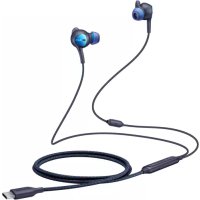
EOIC500 - Cellphone SAMSUNG - Free user manual and instructions
Find the device manual for free EOIC500 SAMSUNG in PDF.
 FR
FR
 BG
BG
 CS
CS
 DA
DA
 DE
DE
 EL
EL
 EN
EN
 ES
ES
 ET
ET
 FI
FI
 HU
HU
 IT
IT
 KK
KK
 KO
KO
 LT
LT
 LV
LV
 NL
NL
 NO
NO
 PL
PL
 PT
PT
 RO
RO
 RU
RU
 SK
SK
 SL
SL
 SV
SV
 TR
TR
 UK
UK
 ZH
ZH
| Product type | USB-C wired earphones with active noise cancellation (ANC) |
| Brand | Samsung |
| Model | EOIC500 |
| Connectivity | USB Type-C, built-in cable |
| Main functions | ANC (on/off by button), call control, music play/pause, volume adjustment |
| Power supply | Powered by the connected mobile device (USB-C) |
| Weight | Approximately 20 g (estimate) |
| Dimensions | Cable length: approximately 1.2 m (estimate) |
| Accessories included | Ear tips and wings of different sizes, quick start guide |
| Maintenance and cleaning | Clean with a dry cloth; do not use liquid or abrasive products |
| Safety | Read safety instructions before use; use only approved accessories |
| Spare parts and repairability | Ear tips and wings available as spare parts; do not attempt to repair yourself |
| Compatibility | Mobile devices with USB Type-C port |
| General information | SAMSUNG logo, protected by copyright |
Frequently Asked Questions - EOIC500 SAMSUNG
User questions about EOIC500 SAMSUNG
0 question about this device. Answer the ones you know or ask your own.
Ask a new question about this device
Download the instructions for your Cellphone in PDF format for free! Find your manual EOIC500 - SAMSUNG and take your electronic device back in hand. On this page are published all the documents necessary for the use of your device. EOIC500 by SAMSUNG.
USER MANUAL EOIC500 SAMSUNG
Please read this manual before using the device to ensure safe and proper use.
- Images may differ in appearance from the actual product. Content is subject to change without prior notice.
- Before using the device, make sure the mobile device you want to connect to is compatible with this device.
Safety information
Read all safety information before using the device to ensure safe and proper use. To view the full safety information, refer to the Samsung website.
Use manufacturer-approved batteries, chargers, accessories, and supplies.
Do not touch the device with wet hands.
Do not drop or cause an impact to the charger or the device.
The device can be used in locations with an ambient temperature of 0°C to 35°C . You can store the device at an ambient temperature of -20°C to 50°C . Using or storing the device outside of the recommended temperature ranges may damage the device or reduce the battery's lifespan.
Do not allow children or animals to chew or suck the device.
Do not disassemble, modify, or repair your device.
Do not use a headset while driving or riding. Doing so may distract your attention and cause an accident, or may be illegal depending on your region.
Do not use a headset while walking, driving, or riding. Doing so may cause an accident. Do not use in dangerous places unless you can hear the ambient sound.
To prevent possible hearing damage when using a headset, do not listen to sound at high volume for long periods.
Instructional icons

Warning: situations that could cause injury to yourself or others

Caution: situations that could cause damage to your device or other equipment

Notice: notes, usage tips, or additional information
Getting started
Package contents
Check the product box for the following items:
Device
Quick start guide

- The items supplied with the device and any available accessories may vary depending on the region or service provider.
- Appearances and specifications are subject to change without prior notice.
- You can purchase additional accessories from your local Samsung retailer. Make sure they are compatible with the device before purchase.
- Use only Samsung-approved accessories. Using unapproved accessories may cause the performance problems and malfunctions that are not covered by the warranty.
- Availability of all accessories is subject to change depending entirely on manufacturing companies. For more information about available accessories, refer to the Samsung website.
Device layout
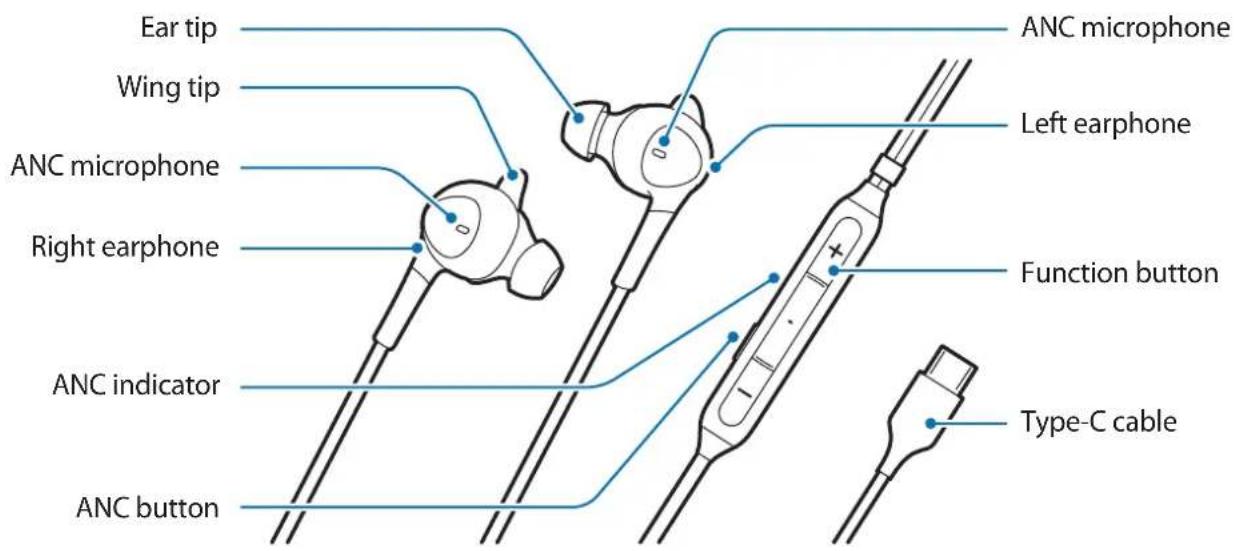

- The microphone comes with initially installed ear tips and wing tips.
- It is important to choose the right size ear tips and wing tips for optimal audio and ANC performance. You can change the ear tips and wing tips to a size that fits your ears comfortably.
Using the device
How to wear
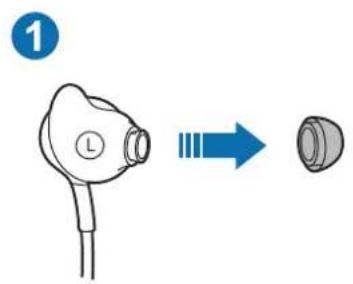
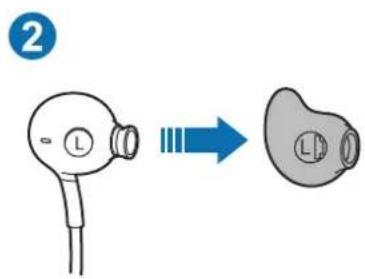
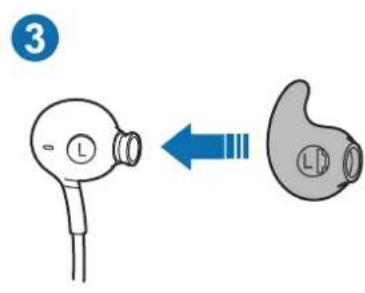
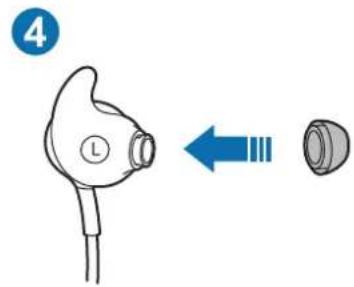
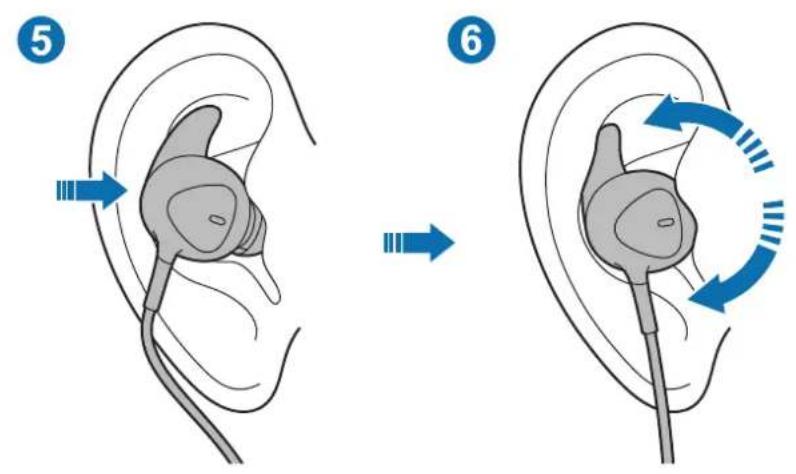
- Remove the default ear tip/wing tip: Pull out the ear tip. Then, also pull out the wing tip in the same direction. (1, 2)
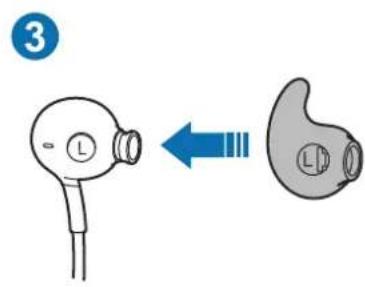
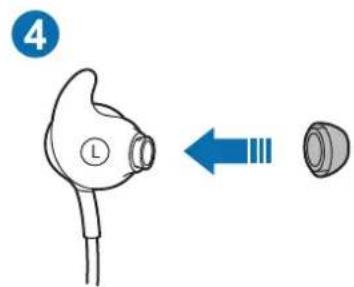
- Attach the best fitting ear tip/wing tip: Insert the wing tip into the groove. Then, insert the ear tip. (3, 4)
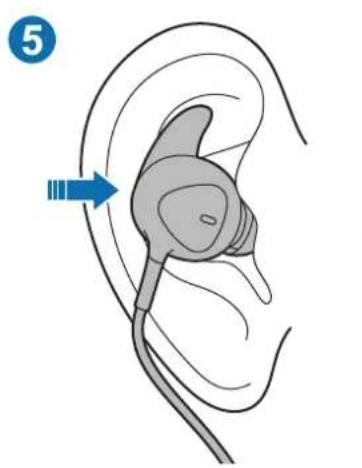
- Seat the earphone in your ear firmly: After putting the earphone in your ear, rotate slightly to keep it close to your ear. (5, 6)
Connecting to a mobile device
Plug the product's Type-C cable into the mobile device's multipurpose jack (USB Type-C).
2 When the earphone is connected to the mobile device's multipurpose jack (USB Type-C), the ANC feature is activated automatically and the ANC indicator turns on blue.

- Noise may occur occasionally when connecting an earphone to the multipurpose jack (USB Type-C).
- This product uses the power of the mobile device.
- While this product is connected to the mobile device, the battery of the mobile device may drain quickly. Remove the product when not in use.
- To download the app, search for Samsung Type-C on Google Play Store or Galaxy Store.
Turn On / Off the ANC feature
Press the ANC button to turn on or off the ANC feature.
The ANC indicator turns on blue and the ANC feature removes noise while listening to music.

- If the connected mobile device's battery is completely discharged, you cannot listen to music or use the ANC button.
- The effects of the ANC mode may be adjusted automatically depending on the environments.
- The effects of the ANC mode may not be noticeable and some noise may occur in very quiet environments.
Using the function button
You can use the features below by pressing the function button while using the product.
- Play/Pause a multimedia file
Receive/End a call - Reject a call (press and hold)
- Adjust the volume
Appendix
Troubleshooting
Before contacting a Samsung Service Centre, please attempt the following solutions. Some situations may not apply to your device.
The device does not work
Disconnect the device from the mobile device and try to connect again.
Copyright
Copyright © 2019 Samsung Electronics
This manual is protected under international copyright laws.
No part of this manual may be reproduced, distributed, translated, or transmitted in any form or by any means, electronic or mechanical, including photocopying, recording, or storing in any information storage and retrieval system.
Trademarks
- SAMSUNG and the SAMSUNG logo are registered trademarks of Samsung Electronics.
- All other trademarks and copyrights are the property of their respective owners.
Copyright © 2019 Samsung Electronics
Copyright © 2019 Samsung Electronics
Copyright © 2019 Samsung Electronics
He doKocBaIte yCTpoIcTBOTc MOKpn pbce.
He n3nyckaTe nll noIanaTe 3apdHOTO yCTPOINCTBO Ha ynap.
UcTpoIcTBOTo MoKe Da Ce I3NoJ3Ba Ha MeCTa C TempepaTypa Ha OKoJHaTa CpeDa OT 0°C Do 35°C. MoKTe Da cBxaHbAte UcTPOIcTBOTo npi TempepaTypa Ha OKoJHaTa CpeDa ot- 20°C Do 50°C. YnOtpe6aTa nn CbXpaHeHneTo Ha yCTPOIcTBOTo n3BbH npenOpbuaHnte TempepaTypn DnaNa3OHm MoKe Da NOBpeDi UcTPOIcTBOTo nn da HamaJIe EKcPiOaTaunOHn JKBOT Ha 6aTePnraTa.
He no3BOLaBaTe Deca nn JxN BoTHn Da nbBcAt nn Cmyat yCTpOietBOTO.
He pa3rno6yBaITe, He moNnHcnpaIte n He peMOHTpaIte camu yCTpOJCTBOTO cn.
He n3noJ3BaIte clyuJaK,doKaTo 0oΦnape Nn KapaTe BEnocnpe. Toba MoKe da pa3cee BHIMaHHeTO BV I Da npEiN3BnKa 3IOJOnyKa Nn MoKe da e He3aKOHHO B 3aBnCIMOcT OT perNoHa.
He n3noJ3BaIte cnyuAikn,doKaTo BbpBITE,ooΦnpaTe nnKapaTe BeNoCInpe. Toba MoKe Da npEiN3Bnka nHcndeHT. He n3noJ3BaIte Ha onacn MeCTa,OCBeH aKO He cyBaTe OKoJIHH 3ByK.
3a da ce npedotbpaTn Bb3MOxHO yBpeJdaHe Ha clyxa, KOrato n3noI3BaTe cnyuAknKa, He cnyuAaTe 3Byk npn BncoKa cnla Ha 3Byka 3a DblrnpnepnOAn OT Bpeme.
Yka3aTeJIHn IKOHn

BHHMaHHe: cHTyaUIN, KOINTo MOraT da npedn3BnKaT HapaHbAHnB bpxy Bac nnn Bbpyx npyn xopa

BnmaHne: cTyaun, KOnTO MoaT da npuHnT nobpea BbB BaWeTo yctpoiCTBO nnB dpuro o6OpudBaHe

3a6eJek: 6eJckn, npenopbKn 3a ynoTpe6a nn nOnbHnTeHa HOpMaun
Haualo
©,Samsung Electronics", 2019
© 2019 Samsung Electronics
Denne brukerhandboken er beskyttet ifolge internasjonale lover om opphavsrett.
ANC Özelligini Açma/Kapatma
Telif Hakki © 2019 Samsung Electronics
J 1 J 1 J 1 J 1 J 1 J 1 J 1 J 1 J 1 J 1 J 1 J 1 J 1 J 1 J 1 J 1 J 1 J 1
(,)
sL 1 1 1 1 1 1 1 1 1 1 1 1 1 1 1 1 1 1 1 1 1
(9)
a
C 1
ANC 1 (C E USB) oJol oLIOOgio
ANC
(CgUSB)0

He n03BOJIAIte DeTAM IN JXIBOTbIM rpb13Tb IIN O6JIa3BaTaB yCTPOIcTBO.
He nbItaItecb cAmOCToTebHo pa36npaTb,peMOHTnPoBaTb IN MOdNfNtpoBaTb yCTPOIcTBO.
He nCnoJb3yIte rapHnTypy haoJa8c 3a pyJem. IcNoJIb3OBAHne rapHnTypb BO BpeM BoXKeHn MOxKet OTBLeueb BaIe BHNMaHne I npUBeCTN K HeCuaCTHO My CnyauIO. KpMe TOrO, B 3aBNCUMoCTN OT peRHOHaBHOro 3aKOHOdaTeJIbCTBa 3TO MOxKet 6bITb paCzeHeHO KaK HApUSeHne 3aKOHa.
He nCnoJIb3yIe rapHnTypu Ha xOdy nn HaxoJaCb 3a pyJem. 3To moKet npNBecTn K aBapnn. He nCnoJIb3yIe B MeCTax, rIe Bbl He moKTe CbIaTb OkpyKaIOUne 3ByKn.
Длгпpeдотьразецны ухшени суха He pekomehdyeetc nCNoIb3OBaTb rapHnTypy npN BblCOKOM ypoBHe rPOMKOCTN B TeueHne dInTeIbHOrO BpemeHN.
06o3HaueHn, nCnoIb3yeMbIe B daHHOM pyKOBOdCTBe

IpeoctepexeHne: Cntyaun, KOtOpbIe MOryT npVBecTu K NOlyueHIO TpaBMbl Bamn nn KeMnlo 03 Okpykaoux

Ipeynpexdne: Cntyaun, KOtOpbE MoryT npBecTN K NOBpeXdeHIO BaUero yCTpoiCTBa nn npyrorO o6opudobHn

PnmeHne: npmeaHn, COBeTbI INI DOnOJIHTeBhIe CBeJeHn
Пристусяк рабOTE
KoMnJIeKT
B KOMPNEKT NOCTaBKN yCTPOINCTBA BXOJAT CLEdyUOUIne KOMNOHEHTbl:
- YCTPOINCTBO
KpaTKoe pyKOBoCTBO NOJIb3OBaTeIa

CocTab KOMnIeKTa NoCTaBKn HAnuYne akceccyapOB 3aBncIT OT BaUero perNoHa n OepaTopa Mo6nIbHoN CBa3N.
- ɪЗобрахеIGNи Ṭexнчecкne xapaКтepиCTиKи мOrут 6ыТь ṪзMeнeHы 6e3прдВарптьНoro уВeДOMЛeIGNи.
- Akceccyapbl MOxHNo npno6peCTn B MeCTbIX Maa3Inhax napTHepOB Samsung. IpoBepbTe nx COBMeCTUMOCtB C yCTpoiCTBOM nepei npno6peTeHNem.
- Пименяп Te Tolyko akceccyapbl pekomehdoBaHHbIe komnaHnei Samsung. Испльзоване He noJyUWBux OIo6peHnA akceccyapOB MoKet npuBecTu K npo6JIeMaM c npOn3BOdntelbHOCTbIO HEnCnpaBHOCTM, Ha KOTOpbIe He paCnpocTpaHReTcra rapaHTnI.
HaHnue BCex akceccyapOB MOKeT N3MeHrBcN ICKIIOHTeJIbHO B 3aBNCIMOCTN OT KOMnHn-mpoIN3BOJnteJe.ДЯ NOlyueHn 6OJee nOIpO6Hn INΦOpMaqUN O IOCTyINhIX akceccyapax, o6paTInTeCb K Be6-caITy KOMnAHn Samsung.
BHeHnBn yCTpoCTBa
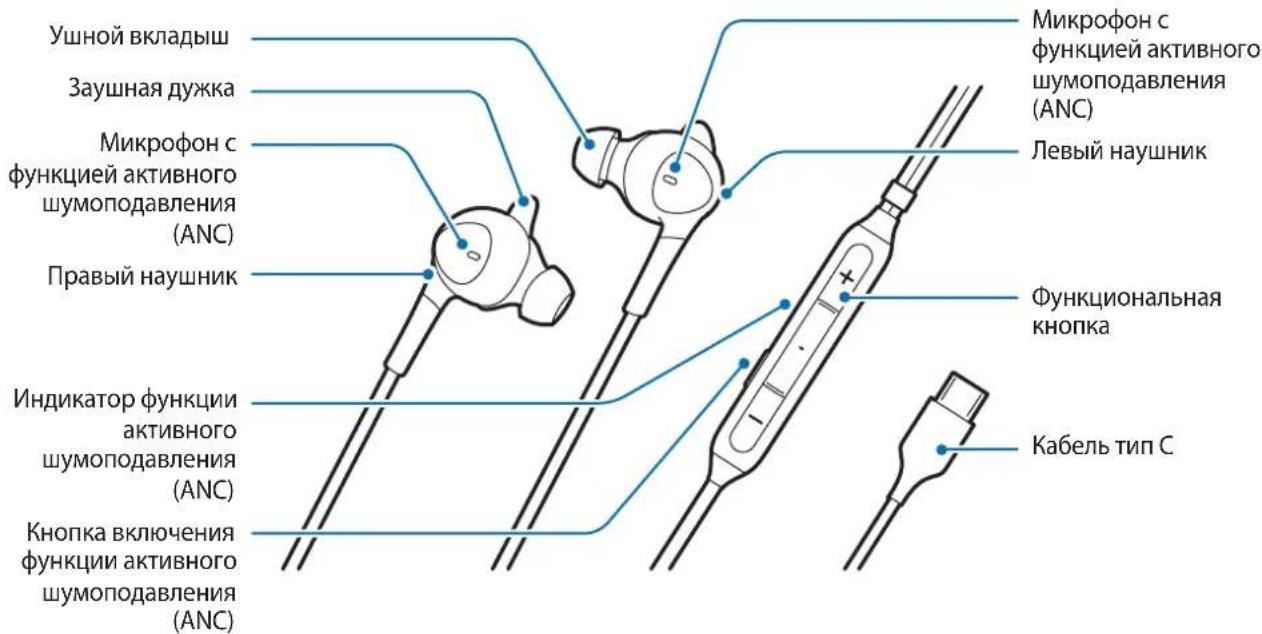

HayuHnKn noCTaBnIOTc C n3HaayalbHo yCTaHOBBeHHbIMu yHbIMN BKJaDbIaAMN 3ayuHbIMn DyKKaMn.
Дя полуеня ONТIMальбого 3Byka n npOn3BODNTeIbHOCtN ΦyHKcInn aKTHBHO rShymonoDabLeHnra (ANC) BaJxO noDo6paTb npaBnIbHbI pa3Mep yuHbIX BklaDbIwe n 3ayuHbIX dUjke. UshbIe BKlaDbIuN n 3ayuHbIe dUjKKN MoXHOb 3aMeHITb Ha pa3Mep, NOdXoJaunn noD φOpMy BaUnx yWei.
Исpenb3OBaHne yctpoiCTBa
YcTpoIcTBo He pa6oTaet
OTKIIIOUHTe yCTPOINCTBO OT MO6NlBHOrO yCTPOINCTBa n NOBTOPITe NOnbITKy NOdkIIOUHeHn.
Abtopckne npaba
Авторскп的答案 © 2019 Samsung Electronics
Данhoe рукововсBO 3aишениМждуновимЗakoHamOб abTOPСИХпраВax.
3a nppeuaetc BOCnpoN3BODntb, paCnpocTpaHrTb, nepeBOOHTb nI npedeBaTb KaKne-ln6o qactn DaHHoro pyKOBoODCTBa B IIO6o fOpMe n IIO6bIM cno6oM, 3JeKTpoHHbIM nI IN MexaHnueCKm, BKIOUaY aTOkONipOBaHne, 3a nscb n XpaHeHne B IIO6o cnCTeMe XpaHeHn y NOncKa IHΦopMaun.
TobapHbIe 3HaKn
SAMSUNG i norotin SAMSUNG 1BnIOTc3apeHCTpnpoBaHHbIMu TOBapHbIMN 3HaKaMn KOMpaHn Samsung Electronics.
- Почи abTOpCKne npaBn TOBapHbIe 3HaKn YBnIOTcR CO6CTBeHHOCTbIO COOTBeTCTByIOxN BnaIeNbIeB.
Ozhannomtece nepeid noyaTkom BnKopncTaHn
Ipeed KopncTyBaHHaM npncTroe m yBaXHo npouHTaTe uei noci6HnK KopncTyBaHa dJa 6e3neuHoro Ta HaJIexHoro BnKOpNCTaHHa.
3o6paXeHHa MoKyb BiDiPi3HraTnC B iD DiIChOro BnpO6y. Bmict MoKe 3MiHIOBaTnC8e3 3aBvachoro nonepedxehn.
- Ipeed BnKOpNCTaHHaM cIbO npNcTpoIO cnIe nepeKoHaTncA, 0o BIn cyMicHn i3 MOiNbHM npNcTPOEM,do JAKORo BN XOuTe NOro NiD'EDHaTn.
3axoДn 6e3pekn
O3naHOMTeC8 3ycima 3axoamn 6e3neKn nepeK KopncTyBaHHm npncTroem, 06 biH npaIOBab 6e3neuHO Ta HaneKHM YINOM.ДЯ O3NaHOMJIeHHa 3 NOBHOIO IHOpMaicIeIO 0do 6e3neKn BiDbidaTe Be6-caT Samsung.
BnKOpncToByTe aKymyIaTOpN, 3apAHi npncTrooi, akceCyapu Ta KOMPJIeKTyUoyi Bnpo6n, CxbaleHbPo6HnKOM.
He Topka'Teca npucTroo MOKpIMn pykAmn.
He KndaTe Ta He noKoJyIe 3apAHN npicTpi a6o npicTpi.
Ekcnnyataa npnctropo donyckaTbcB Micx 3 TempepaTpoHnBKOJIuHbOro cepeobua bD 0°C do 35°C .36epirtnpnctri moJHa npi TemepaTpyi HABKOJIuHbOro cepeobua bD-20o Cdo 50°C .BnkopnstahnHy nn 36epiraHn npictropo npi TempepaTpax, 10 BnxOJaTB 3a MeKi peKOMeHDoBaHO riaa3OHy, MoKe npN3BeCTn Do noWkoJKeHH npnctroo a6o ckopoehn TepmiHy cnjX6n akymylatopa.
He do3boJyTe dIyam a6o TBapuHaM rpu3Tu a6o CMOKtaTu npucptpi.
He po36npaIte, He moiΦiKuIe Ta He peMOHTyIe npicrtpi.
He cnid koprnstybaTnca raphitypoIO npN kepyBaHHI aBTOMo6iEm a60 i3di Ha BenocnneDi. Lc MoKe BiDBoJIKTn Bac i cnpuHHTn dOPOXHIO npriOdy. TaK camo BnKOpNCtAHNra raphityp npi KepyBaHHI TpaHCnOpTHm 3ac06om MoKe 6ytN npOTn3aKOHnM y BaWOMy perioHi.
He cnid kopnctybaTncra rapHitypoIO nID qac XoDb6n, kepyBaHHaBtOMo6iEm a6o i3n Ha BeNoCInpeI. Ie moKe npn3BeCTn Do Heuachoro BUnaKnv. He KopnctyTecra HeU B He6e3neuHnx Micx, kso Bam He CyTHO HABKOLnHix 3BykIB.
He cnid npocnyxobvbatn 3Byk 3 rapHiTypn Ha Bncoki ryuHocti npotrarom Tpnbaloro yacy. Lc Moke npn3BeCTn do npo6Iem 3i cnyxom.
No3HaQKn

PonepeJxHn: CNTyaui, 1o MOKytb npN3BeCTn Do TpaBMyBaHHaBac a6o iHux oci6

yBara: cntyaui, 0 MOxKyb cnpruHHTn noKoJKeHH npncptpo a6o iHoro oHaHaHH

3ayBaXeHHa: npimitkn, nopadn 3 KopncTyBaHHa Ta daTKoBi BiOMOCTi
Початок роботи
Kompanečaίя
IpepeBipTe HaaBHiCTb y KOMnneKti TaKnx KOMnoHeHTiB:
- Pnucpii
Kopotkn noci6nK KopncTyBaua

KOMNOHHTN, IO BXOJrB IO KOMNJIeKTu npIcTpoIO, Ta 6yDb-RAKi IocTynHi akceCyapn MoKyTB p3HNITSCaJIeXHo BID KpaIHn a6o onepaTopa MepeXI.
3OBHIHnI BnIa Ta XapaKTePncTK MoKyTb 3MiHIOBaTnC8 6e3 3aBachoro nonepedxkeHH.
-Доаткови akcesуари можна пидбати y Micebo ro npodabuz Bnpo6ib Samsung.перд купьгю akcesуapib сidпpekoHaTcra, lo BOH cymichi 3 npicntpoem.
BukopncToByTe TlIbKn akcecyapn, peKomeHdoBaHi fipmoT Samsung. BnkOpncTaHHa HeCXBaJIeHNx akcecyapiB MoKe npu3BecTu Do npo6nem i3 yHKcIOHyBaHHaM pncTpoU Ta do Ioro HeCnpaBHOcti. Ha Taki BnnaKn dIra paHTII He nounpOeTbcra.
- Доступнистб удь-якх akcesуаров може зminюватися на власудixhix komпай-Bирбнкib.Длг OTPIMaHЯ дOKладиwoi iHΦopmaцii zuo do DOCTyHHx akcesуаров BiDbIaIte Be6-caT Samsung.
Bvrgia npnctroo
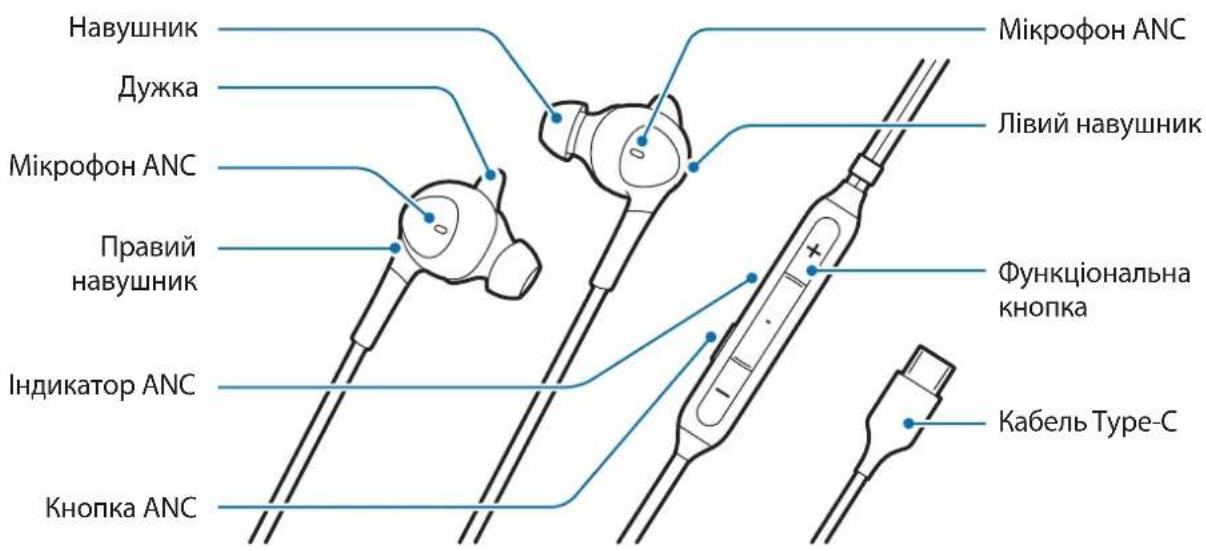

- HabyuHnKn NoCTaaytbcra 3i BCTaHOBJeHmN HaCaJKaMn Ta DyKKaMn.
Baxnbo nii6paTn Hacdkn Ta dkkn npabnlbHoro po3mipy, 06 3a6e3neHTn ONTMaIbHy kiciB BiITbOpeHnayio Ta fynkciu ymeHH (ANC). Po3mip HacdoK i djkok MoKHa BIDperyIOBaTn, 06 BOH 3pyuHO npinraHn do BaWoRo Byxa.
Викорпстанна ристою
HadjaHnHaBvHnKiB
3HimiTb cTaHdapThy hacaKy/nyKky. Cnepu 3HimiTb hacaKy. A ToDi 3HimiTb duKky, NotaHyBwI ii B TOMy X Ha npMky. (1,2
BCTaHOBIb HacaIky/nyKky,ka nIXoIITb HaIKpaIe. BCTaBTe IyKky B na3. PicnaIboro BCTaBTe HacaIky. (3, 4
HaipinHO 3aikcyiTe HabyuHK y Byci. KOnn BN BCTaBNTe HabyuHK y Byxo, 3nerka nokpyiTb Hm, 06 3arIn6ntu y Byxo. (5, 6
YbIMKHeHnBmKHeHnФyHKciI shymo3aRnyuWeHn (ANC)
Uo6 yBIMKHyTu a6o BIMKHyTu φ yHKciIO ANC,HaTncHtB KhoNky ANC.
IIndkaTop ANC 3acbiyec6naKHTHM KOJbOpom, i yHKiA ANC 3aRnyye wum niJ cac npocnyxOByBaHHaMy3nKn.

- YKsqo akymyIaTOp nID'eHaHOrO MO6IbHOrO npnCTpoIO nobHicTIO po3pIxHeH, npocnyxOByBaHHMy3NkU qn BnKOpNCtAHH KhONKn ANC hemoxJIne.
- Eфеки ржиму ANC можуть рergyловатися abTomatунно залижно вд умов habковшboro сеpeювица.
- EΦeKtN pexkmy ANC moKytb 6yTu HENOMiTHmM, i B dyXe TnxOmy cepedOBnI MOxke BnHKaTn Wym.
BukopnstaHHaYHKcioHaJIbHOI KHOpKn
HaTnCHyBmI ΦyHKcioHaJIbHy KHOJKy πiδ qac BnKOpNCTaHHa BnPo6y, MoXHa BnKOpNCTOByBaTu nepeniiuehi HxKue φ yHKcii.
BiTbOpEHn/np3yHHeHH BIDTBOpEHMyIbTMeHOro aIny
-Прииманна/3aBepseHHBAKlnKy
BixnneHH BnKInKy (HaTncHt b i yTpmynte)
- PeryniobAHnryuHocti
ДодаТOK
UcynenHHeCnpaBHOCTeI
Iepsh hix 3BepTaTnca do ceHtpy o6cnyroByBaHHa Samsung, cnpo6ynte BnKoHaTu HaCTynHi di. Dejki cnTyauciMoKyTB He CTocCyBaTnca BaWoTO npunctpoIO.
PnictpiHne npaue
Bid'edhaTe npictriBid MOibHoro npictroTO ta cnpoByTe iD'edHaTn 3HOy.
Abtopcbke npabo
Samsung Electronics, 2019
IeH nociHK 3axnueHO 3rINO 3 MIXHaPOdHMN 3aKoHaM N OODO aBTOPCbKnX npab.
3a6oponeHO BiTbOpIOBaTu, po3noBcIooKyBaTu, nepeKlaadTu a6o nepeDaBaTu B 6ydjRakii fOpmi qn 6yb-ram 3ac06amn, eJeKtpoHHm n a6o MexaHnMM, BKIOUHO 3 KcepOKoPiIOBaHHaM, 3aNcCyBaHHaM a6o 36epiraHHaM Ha 6yd-b-akomy npncTrooi dJa 36epirAHn DaHnx Chn B iHfOpMauiHo-nOswykoBi ciTeMi, 6yd-b-ky qactHy cbooro noci6nka.
Tobaphi 3HaKN
- SAMSUNG i loroTnSAMSUNG e 3apeecTpoBaHmN TOBapHmN 3HaKaMn KOMNaHii Samsung Electronics.
- Yci iHsi TOBapHi 3HaKn i ABTOpcbKi npaba HanexKaTb BiINOBiHM BJaCHnKaM.
MaHbI3dbl Kipicne
Kayinci3 xhe npbc naaHyaDbI KaMTamacbI3 ety ywiH KypblfbiHbI naaHaHydaH 6ypbIH OcbI HCKaydbIOKblHbI3.
- KeckiHep ьинbl eHIMHeH e3reWeNey 6OlybI MymKIn. Ma3MvH eCkeptyci3 e3reptinyi MymKIn.
KypbIbIbI naJaHaH6ac 6ypbIH KocblfbiHb3 KeJIreH MO6Nlbdi KypblfbIHbIHOCBI KypbIbIMeH yIleCIMdi eKeHdiIHe KO3 JeTKi3iH3.
KayincizdkaknapaTbI
Kayinci3 XaHe Dpybc NaIdaIahydbI KaMTamacbI3 eTy ywiH KypblfblHbI naIdaIahydaH 6ypbln OcbI 6apblk Kayinci3dk aknapaTBH OKblbI3. ToIbIK Kayinci3dk aknapaTBH Kepy ywiH, Samsung Be6caTbHa KpiH3.
ΘHIM XacayMbICbIMaKyIdaFah 6atapeJapdbI, 3apraTafblTAPdbI, KocbIMwa KypaIapdbIXaHE Xa6DbIKTapdbI naJaIaNbIHbI3.
KypbIfblHbCyKoJIMeH yCTaMaHb3.
3apraTaftbIHTbI Hemece KypblfbiHbI Tycipin Hecofbn aImaHbI3.
KypblfblbI KOpshaFAn opTa TeMnepaTpyacbl 0°C - 35°C apalbIfbIHda 6oJaTBH JepJIepDe
PaiDalaHyfa 6oJALbI. KypblfblbI -20°C - 50°C apalbIFbIHDAfbl KOpwaFAn opTa
TempepaTpyacblHa caKTayfa 6oJALbI. KypblfblbI yCbIHbIHFaH TempepaTypa ayKbIMApblHaH TBIC
PaiDalaHy HeMece caKTay Kypblfblfa 3aKbIM KeJItipyI HeMece 6aTapeHbIH, KbImET eTy MEP3iMH
KbICKapTybl MymKiH.
Kiukehtai 6aIalapdbIH HeMece XaHyapapdbIH KypbIrfblbI ay3bHa caLyfHa Hemece copybHa
XoJ 6epMeHiz.
KypbIbHbI 36etihi3we 6eJwekTeMeHiz, TypiH 3reptnHei3 kHe JeHHdEmeHiz.
KyaakacnantbI KeIik Kypri3y He aTneH Kpy KeiHde naJaHa6aHb13. OI KeHJIiH3di aHaH eTKi3in, aataKa anapBIn COfYbIMykIH Hemece aMaFbIHb3fa 6aJaHaHbICTb3 aHaCb13 6Olybl MymKiH.
KyaacnantbI cepyEndey, Keik kypri3y He BenoCneJ kypri3y Ke3iHde naJaHaHa6aHbI3. bnaI icTey aataKa aKeIyi MymkIn. Erep KOpwaFah opTa wYbH ecImecHe3, OHbI KayiTi Jeppe IaJaHaHa6aHbI3.
KyaacnantbnaaHcyKeiHc ectyKaibTeHH 3akbMaIybyH 6oIbIpMay yuH, Kofapbl DeHreJderi Db6bICTbY3Ak Mep3im iwiHd TbHaMaHbI3.
Hycayb6elriwelep

A6aIaHbI3: 03iH3re Hemece 6ackaJapfa JapaKaT KeItipetIH KaFdaJap

A6aIHaBbI: KypblfBIfa Hemece 6acka Ka6dbkTapfa HyKcaH KeItipetIH KaFdaIap

Xa6apIama: Ka36aJIap, naIdaIaNHy TpyaJIb KeHeCTep HeMece KocBIMsa MJIImTTeP
KymbICTbl 6actay
KopantbIn iwiHderici
ΘHIMHI Kopa6bIHda keIeci 3JIeMeHTTep 6ap eKeHIN TeKcepIH3:
Kypblfbl
- XbIДam 6aTay HcKayIbIFbl

KypbIrfBImeH 6epiIeTIn 3JIeMeHTTep XaHe Ke3 KeIreH KOJIkeTI Mdi KepeK-JapaKTap aIMaKKa Hemece Kbi3Met npoBaIdepine 6aIIaHbICTbl apTppl 6Olybl MyMKiH.
CbIPTKbl TpyJIepi MeH TexHnKaIbIK CInaTTamalapbi eckepTyci3 e3reptinyi MymKiH.
- Xepriikti Samsung catyubicbHaH KocbIMwa Kepek-JapaKTap catbIn aIyblB13fa 6oIaIb. CatbIn aImac 6ypbIH OJapdbIH KypblfBIMeH yIleCIMdi eKeHdiriHe Ke3 XeTKi3iH3.
Samsung KyntaHaKepeK-JapaKaTapbIfHa NaJaHaHbIHbI3.KyntaMaFaH KepeKJapaKaTapDbI NaJaHaHy HAtnxEcHne KeiJaIKHeh KaMTbImaHTbIH OHIMdiIK MocelJIePi MeH aKaylbkTapOpbIH aLybIMykIH.
-Барлбдakceccsyapларын KoJxetimdiiniri TolyktaeHdipywi KOMnaHnIapfa 6aJIaHbICTbl e3reWeleHyi MymKIn. KoJxetimdi KepeK-xapaKTap TypalbI KocbIMwa aKnapaTbI Samsung Be6-caTbHaH KapaHbI3.
KypblfblHbIH KypblbIMbl
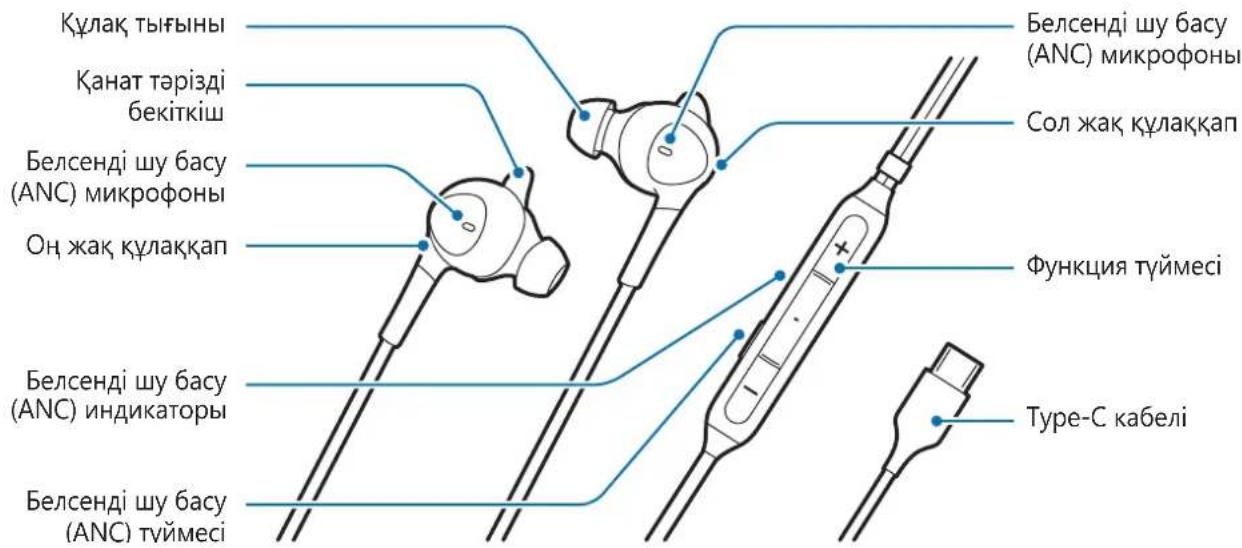

KyaKaan aIbH aHaOpHaTbIHFaH KyaKa TbIFbIHApbl MeH KaHaT TaPi3i 6ekitkiWtepImeH 6ipre Xetki3iJeDi.
OHTaJIbI dIbIbIC WbIFapy MeH 6eJIceHI dy bacy (ANC) MymKHiDiirIH eHIMdiIRi ywiH, KyaK TbIfbIHdApBI MeH KaHAT TApI3di 6ekITKiWTePdIH Aypbic OJWeMIn TaHday MaHb3dbI. Kyak TbIFbIHdApBI MeH KaHAT TApI3di 6ekITKiWTePdi KyaKaTapBbIHb3ra bIHfaiNb I6oJaTBH eJIseMderIepre aybICTbipyfa 6oJaBl.
KypbIJIbIHbI naJaIaHy
TaFy KOKbl
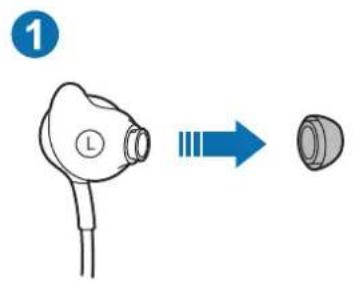
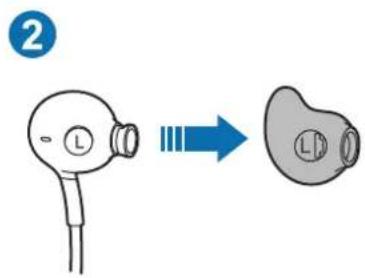
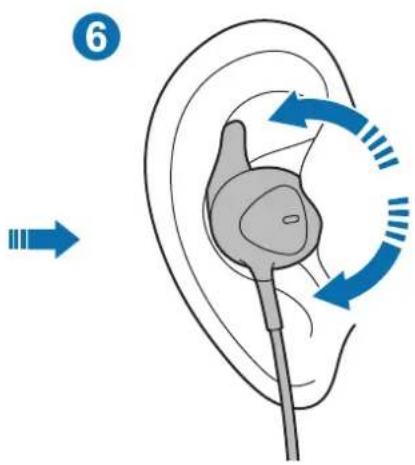
- ΘДeнкi KУлak TbIFbIHbIH/KaHaT Təpi3di 6ekITkiuTi aIbIHbI3; KUlaK TbIFbIHbIH TapTbIN ShbIFapbIHbI3. Codan KeiH KaHaT Təpi3di 6ekITkiuTi de 6ipdeN 6aftTa tapTBIn 7bIFapbIHbI3. (1,2
- Cənkec keletin Kyaik TBifbHbH/KaHaT Tapi3di 6ekitkiuTi 6ekitiH3: KaHAT TApi3di 6ekitkiuTi KyaIbIHb3dbIH iWHe caIbIH3. Codan H KeiH KyaIak TBifbHbH CaIbIH3. (3) 4
KyaKaTbI KyaftbHb3Fa MbIKTaI OPhaTbHb3: KyaKaNTbI KyaftbHb3Fa CaIfAHHaH KeiH KyaftbHb3Fa XaKbIH YCTay YwiH OHbI cAJI 6ypbHb3. (5) 6
Mo6nIbdi Kypblfblfa Kocy
1 ΘиMHin Type-C ka6eHn MO6nIbdi KypblfblHbIH KEN MaKcaTbI YcBHa (USB Type-C) KaJIfahbl3.
2 KyJaKaantbI Mo6nJIbdi KypblfHbIH KeiMaKcaTTbI YrcbHa (USB Type-C) XaJFaHaHHaKeiH, 6eIceHdi wy bacy (ANC) MymKiHdiI aBTOMaTTbI Tpyde KocblBIn, 6eIceHdi wy bacy (ANC) INHdIKaTOPbI KOK TycneH XaHaDbI.

KeiJe KyaakKaantbI KeI MaKcaTbI yra (USB Type-C) XaJIraFahn Ke3de, WY naJa 6Olybl MyMKiH.
- ByI eHIM MO6nJIbdi KypblfBhlbIH, KyaTbIH naJaIaHaDbI.
OcbI eHIM MO6nJIbdi Kypblfblfa XaJIFaHbIN TypfaH Ke3de,MO6nJIbdi KypblfblHbIH 6ataper KaTbIXbIaAM TeMeHdeyi MymKIn. NaJaIaN6aFah Ke3de eHIMdi aJIbIn TaCTaHbI3.
KoIaH6aHbI JyKTen any yuH, Google Play Store HeMece Galaxy Store 6aIapIamalap dyKeHHeH Samsung Type-C KoJaHa6acbH i3eHi3.
Белсаній ьу 6acy (ANC) мумкіндігін icedkoсу/эшіру
Bénceni 6y 6acy (ANC) mykihirin icke kocy hemece eipy yin 6eHHi 6y 6acy (ANC) Tymecin 6acbHbI3.
Bencendi wy 6acy (ANC) nHdkaTopbI Kek TycneH XaHbIn, My3bika TbHday Ke3iHde, bencendi wy 6acy (ANC) Mymkihdir wydbI JxOyDbI.

- Erep kajfahfahm Mo6nIbdi KypblfbiHbH, 6aTapey KyaTbToJbIfbImeH TaycbIca, My3bika TbIHday HeMece 6enCeHdi Wy 6acy (ANC) TyMecin naJaIaHy MymKIn BoMaIbI.
- BeIceHdi 6y 6acy (ANC) pexmimin, acepJIepiH KopwaHaH opta 6aJlaHbICTbl aTOMaTTbI Tpye petteyre 6oJaDbI.
- BeIceHdi 6y 6acy (ANC) pexminiH acepJIepi 6aikalMaybIMyMKiH xHe eTe TbIHbI KOpwaFAn opTada 6y naJa 6Olybly MymKiH.
Функцятуймecин падалану
HIMdi naJaIaHaFan Ke3De φ yHKUra TYmecin bacy apKbIbI TMeHderi MymKiHdkTepeI naJaIaHyFa 6oJadbl.
- MylbTmMeJa nHaJbH OHaTy/KiIdIpy
KoHbipaydbi Ka6blJay/ajTay
Kohbipaydbi Ka6blJamay (6acbln typbHb3)
-ДыбьсdeHreHnpeTteH3
KocbIMwa
AkaayIbIKTapdbI JKOIO
Samsung KbI3MeT KepeTy opTaIbIbHa xa6apIacnac 6ypbIH, KeIeci KaIaMdApDbI opBHaHbI3. Kei6ip KaIaIap KypbIbIbIHbI3Fa KOJaHaBImaybl MymKiH.
Kypblfbl kymbic icTeMeiDi
KypbIbHbMo6nJIbDi KypblfbaHaXbipaTbIn, KaTaNocBn KepiH3.
ABTOPJIbIK KyKbIK
ABTOPJIbIK KYKbIK © 2019 Samsung Electronics
bHcyckaylbyK xaIbIKapaIbIK aBTOpIbIK KyKbIK TypaIbI 3aHdap 6oNbIHwa KopfaiFaH.
Бул hyсaylbiktbiH eшбip 6eIirin Ke3 KeIreH Tpyde Hemece Ke3 KeIreH aIcpeH (JIeKtpoHbIK He MexaHnkaBk), cohBi iwiHne, foTOKeWipy, Ka3y Hemece Ke3 KeIreH aKnapaTbIK KoIMaJa XHe IblfapbIn any JxuieciHde caTay apKbIbI KeWipyre, TapaTyfa, aydapyFa Hemece TaCbImaJdAyfa 6OlmamdbI.
Cayda 6eIrilepi
SAMSUNG JAne SAMSUNG Iorotnni — Samsung Electronics KOpnpauncBbHt TipKeIreh cayda 6elrilepi.
- Baplbk 6aca cayda 6eirilepi MeH aBTOpbIK KYKbIKTap OlanpdbH Tnicti nelepiHmehwiri 60bln Ta6bila.
Leer primo
版權 © 2019 Samsung Electronics
本手册受國際著作權法所保護。
© Samsung Electronics, 2019.
introduction to the work of
音音音 造,
默斯社贝贝的
Copyright © 2019 金融新征程双丰收
i
通录


- SAFETY INFORMATION
- INSTRUCTIONAL ICONS
- GETTING STARTED
- PACKAGE CONTENTS
- DEVICE LAYOUT
- USING THE DEVICE
- HOW TO WEAR
- CONNECTING TO A MOBILE DEVICE
- TURN ON / OFF THE ANC FEATURE
- USING THE FUNCTION BUTTON
- APPENDIX
- TROUBLESHOOTING
- THE DEVICE DOES NOT WORK
- COPYRIGHT
- TRADEMARKS
- YKA3ATEJIHN IKOHN
- HAUALO
- ANC ÖZELLIGINI AÇMA/KAPATMA
- A
- 06O3HAUEHN, NCNOIB3YEMBIE B DAHHOM PYKOBODCTBE
- ПРИСТУСЯК РАБOTE
- KOMNJIEKT
- BHEHNBN YCTPOCTBA
- ИСPENB3OBAHNE YCTPOICTBA
- YCTPOICTBO HE PA6OTAET
- ABTOPCKNE NPABA
- TOBAPHBIE 3HAKN
- OZHANNOMTECE NEPEID NOYATKOM BNKOPNCTAHN
- 3AXOДN 6E3PEKN
- NO3HAQKN
- ПОЧАТОК РОБОТИ
- KOMPANEČAΊЯ
- BVRGIA NPNCTROO
- ВИКОРПСТАННА РИСТОЮ
- YBIMKHEHNBMKHEHNФYHKCII SHYMO3ARNYUWEHN (ANC)
- BUKOPNSTAHHAYHKCIOHAJIBHOI KHOPKN
- ДОДАТOK
- UCYNENHHECNPABHOCTEI
- PNICTPIHNE NPAUE
- ABTOPCBKE NPABO
- TOBAPHI 3HAKN
- MAHBI3DBL KIPICNE
- KAYINCIZDKAKNAPATBI
- HYCAYB6ELRIWELEP
- KYMBICTBL 6ACTAY
- KOPANTBIN IWIHDERICI
- KYPBLFBLHBIH KYPBLBIMBL
- KYPBIJIBIHBI NAJAIAHY
- TAFY KOKBL
- MO6NIBDI KYPBLFBLFA KOCY
- БЕЛСАНІЙ ЬУ 6ACY (ANC) МУМКІНДІГІН ICEDKOСУ/ЭШІРУ
- ФУНКЦЯТУЙМECИН ПАДАЛАНУ
- KOCBIMWA
- AKAAYIBIKTAPDBI JKOIO
- KYPBLFBL KYMBIC ICTEMEIDI
- ABTOPJIBIK KYKBIK
- CAYDA 6EIRILEPI
- LEER PRIMO
- INTRODUCTION TO THE WORK OF
- 通录
Brand : SAMSUNG
Model : EOIC500
Category : Cellphone