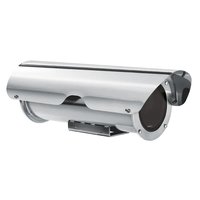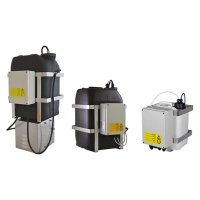
VIP6A - Windshield wiper Videotec - Free user manual and instructions
Find the device manual for free VIP6A Videotec in PDF.




User questions about VIP6A Videotec
0 question about this device. Answer the ones you know or ask your own.
Ask a new question about this device
Download the instructions for your Windshield wiper in PDF format for free! Find your manual VIP6A - Videotec and take your electronic device back in hand. On this page are published all the documents necessary for the use of your device. VIP6A by Videotec.
USER MANUAL VIP6A Videotec
natural_image
Technical line drawing of a mechanical device with no visible text or symbolsEN English - Instructions manual
Before installing and using this unit, please read this manual carefully. Be sure to keep it handy for later reference.
1.1 Typographical conventions

DANGER!
High level hazard.
Risk of electric shock. Disconnect the power supply before proceeding with any operation, unless indicated otherwise.

WARNING!
Medium level hazard.
This operation is very important for the system to function properly. Please read the procedure described very carefully and carry it out as instructed.

INFO
Description of system specifications.
We recommend reading this part carefully in order to understand the subsequent stages.
2 Notes on copyright and information on trademarks
The quoted names of products or companies are trademarks or registered trademarks.
3 Safety rules

The manufacturer declines all responsibility for any damage caused by an improper use of the appliances mentioned in this manual. Furthermore, the manufacturer reserves the right to modify its contents without any prior notice. The documentation contained in this manual has been collected with great care, the manufacturer, however, cannot take any liability for its use. The same thing can be said for any person or company involved in the creation and production of this manual.
- The device must be installed only and exclusively by qualified technical personnel.
- Before any technical work on the appliance, disconnect the power supply.
- Do not use power supply cables that seem worn or old.
- Never, under any circumstances, make any changes or connections that are not shown in this handbook: improper use of the appliance can cause serious hazards, risking the safety of personnel and of the installation.
- Use only original spare parts. Not original spare parts could cause fire, electrical discharge or other hazards.
- Before proceeding with installation check the supplied material to make sure it corresponds to the order specification by examining the identification labels ("4.2 Product markings", page 1).
4 Identification
4.1 Product description and type designation
Wiper kit which can be directly installed on the housing body. It completes the support for the pump washing injector. Available in 24Vac and 230Vac versions, 7W max. Available for HEG series housing.
4.2 Product markings
See the label attached to the outside of the package.
5 Preparing the product for use

Any change that is not expressly approved by the manufacturer will invalidate the guarantee.
5.1 Safety precautions before use

In the 230Vac powered configuration it is necessary to insert a 1 0 unipolar main switch (open contact distance d>3mm) upstream on the power line. This switch should be used to disconnect the power supply before carrying out any maintenance operation or before opening the housing.
5.2 Contents and unpacking
When the product is delivered, make sure that the package is intact and that there are no signs that it has been dropped or scratched.
If there are obvious signs of damage, contact the supplier immediately.
Keep the packaging in case you need to send the product for repairs.
Check the contents to make sure they correspond with the list of materials as below:
- Wiper kit
- Instructions manual
5.3 Safely disposing of packaging material
The packaging material can all be recycled. The installer technician will be responsible for separating the material for disposal, and in any case for compliance with the legislation in force where the device is to be used.
Bear in mind that if the material has to be returned due to a fault, using the original packaging for its transport is strongly recommended.
6 Assembling and installing

Only specialised personnel should be allowed to assemble and install the device.
6.1 Installation
6.1.1 Installing the wiper kit on the housing.
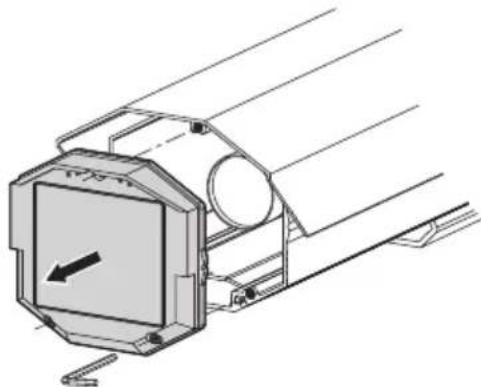
Remove the front flange on the housing by unscrewing the three front screws.
natural_image
Technical line drawing of a mechanical assembly with a central square component and cylindrical parts (no text or symbols)Fig. 01
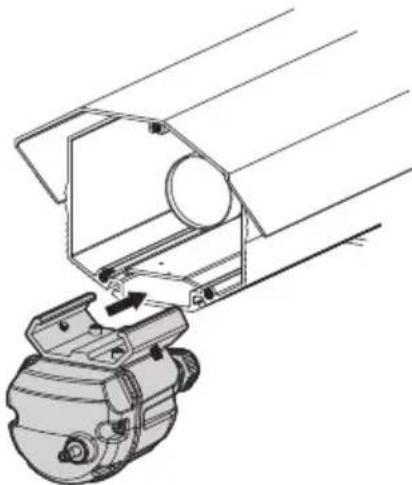
Insert the wiper body by slotting the slide onto the profile of the housing body.
natural_image
Technical line drawing of a mechanical assembly with no visible text or symbolsFig. 02
Slide the wiper body along the housing body.
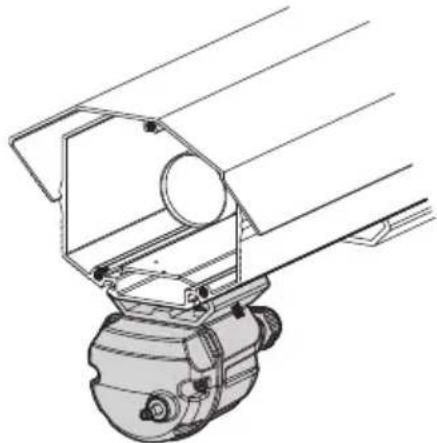
natural_image
Technical line drawing of a mechanical device with no visible text or symbolsFig. 03
Re-assemble the front flange on the housing by tightening the three front screws, making sure the sealing gasket is seated properly.
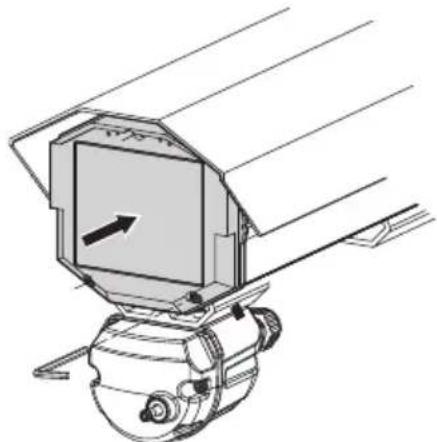
natural_image
Technical line drawing of a mechanical device with no visible text or symbolsFig. 04
Assemble the wiper blade on the output shaft, fixing it in the rest position on the left side of the glass front.
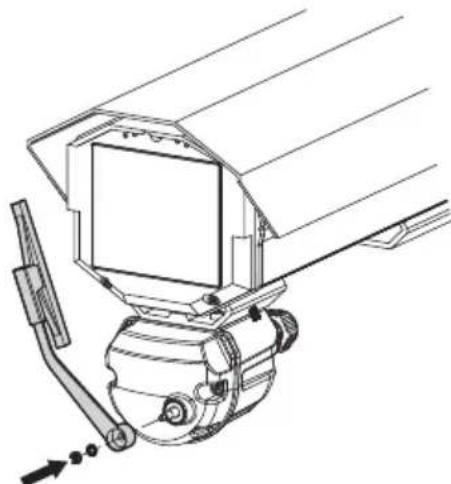
natural_image
Technical line drawing of a mechanical device with no visible text or symbolsFig. 05
Lock the wiper body by tightening up the dowels on the fixing slide so that the blade exerts the correct pressure on the housing glass.
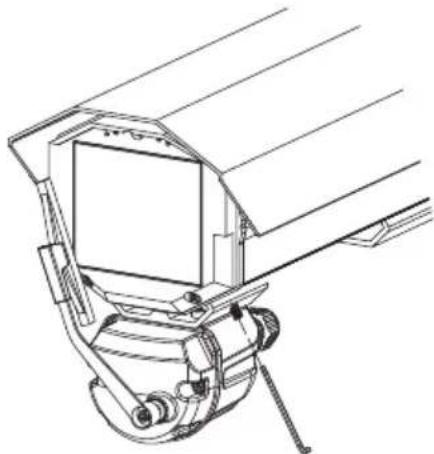
natural_image
Technical line drawing of a mechanical device with no visible text or symbolsFig. 06
6.1.2 Wiring

Make sure the power supply voltage used is the same shown on the plate on the back of the appliance.
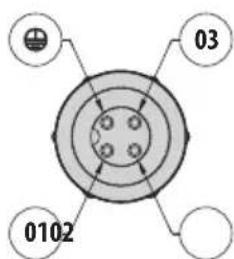
Make the electrical connections on the female 3+PE connector as shown in the electrical diagram.
text_image
03 0102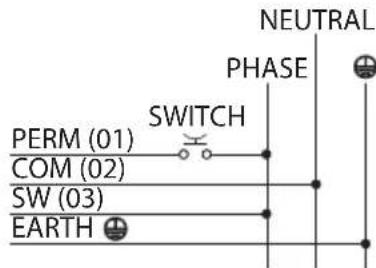
text_image
NEUTRAL PHASE PERM (01) SWITCH COM (02) SW (03) EARTHFig. 07
Power the wiper by connecting the phase to terminal 03 (SW) on the connector and neutral to terminal 02 (COM) on the connector.
Use an external button to connect the phase to terminal 01 (PERM) on the connector.
Keeping the external button pressed will cause continuous operation (permanent) of the wiper.
Releasing the button will take the wiper blade to the rest position on the left side of the housing window.
If a receiver is used, connect terminal 03 of the connector to the SW output on the receiver, 01 to PERM and 02 to COM.
7 Instructions for normal operation

Do not use the wiper when the outside temperature is below 0^ C or in case of ice.
8 Disposal of waste materials
This symbol mark and recycle system are applied only to EU countries and not applied to the countries in the other area of the world.
Your product is designed and manufactured with high quality materials and components which can be recycled and reused.
This symbol means that electrical and electronic equipment, at their end-of-life, should be disposed of separately from your household waste.
Please dispose of this equipment at your local Community waste collection or Recycling centre.
In the European Union there are separate collection systems for used electrical and electronic products.
9 Technical data
9.1 General
Enclosure from reinforced polypropylene
Wiper blade constructed from stainless steel/aluminium
RAL9002 colour
IP66
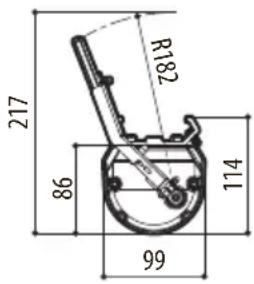
Dimensions (WxHxL): 99x114x209mm (3.8x4.4x8.2 in) (not comprehensive of blade)
Unit weight: 0.7kg / 1.5lb
Connector 3+1 PINS
IN 230Vac, consumption 7W max
IN 24Vac, consumption 7W max
Operating temperature: -20°C / +60°C (-4°F / +140°F)
Supplied with instruction manual
EAC certification
10 Technical drawings

The values are in millimeters.
text_image
R182 217 86 99 114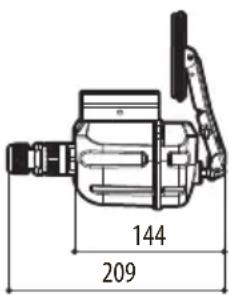
text_image
144 209Fig. 8 VIP6A
natural_image
Technical line drawing of a mechanical assembly with no visible text or symbolsFig. 01
natural_image
Technical line drawing of a mechanical assembly with no visible text or symbolsFig. 02
natural_image
Technical line drawing of a mechanical device with no visible text or symbolsFig. 03
natural_image
Technical line drawing of a mechanical device with no visible text or symbolsFig. 04
natural_image
Technical line drawing of a mechanical device with no visible text or symbolsFig. 05
natural_image
Technical line drawing of a mechanical assembly with no visible text or symbolsFig. 06
6.1.2 Cablaggio

natural_image
Technical line drawing of a mechanical component with no visible text or symbolsFig. 01
natural_image
Technical line drawing of a mechanical assembly with no visible text or symbolsFig. 02
natural_image
Technical line drawing of a mechanical device with no visible text or symbolsFig. 03
natural_image
Technical line drawing of a mechanical device with no visible text or symbolsFig. 04
natural_image
Technical line drawing of a mechanical device with no visible text or symbolsFig. 05
natural_image
Technical line drawing of a mechanical device with no visible text or symbolsFig. 06
6.1.2 Cablage

natural_image
Technical line drawing of a mechanical assembly with no visible text or symbolsFig. 01
natural_image
Technical line drawing of a mechanical assembly with no visible text or symbolsFig. 02
natural_image
Technical line drawing of a mechanical device with no visible text or symbolsFig. 03
natural_image
Technical line drawing of a mechanical device with no visible text or symbolsFig. 04
natural_image
Technical line drawing of a mechanical device with no visible text or symbolsFig. 05
natural_image
Technical line drawing of a mechanical device with no visible text or symbolsFig. 06
6.1.2 Verkabelung

natural_image
Technical line drawing of a mechanical assembly with no visible text or symbolsрис. 01
natural_image
Technical line drawing of a mechanical assembly with no visible text or symbolsрис. 02
natural_image
Technical line drawing of a mechanical device with no visible text or symbolsрис. 03
natural_image
Technical line drawing of a mechanical device with no visible text or symbolsрис. 04
natural_image
Technical line drawing of a mechanical device with no visible text or symbolsрис. 05
natural_image
Technical line drawing of a mechanical device with no visible text or symbolsрис. 06
text_image
Barcode image with black and white vertical bars, no visible text or symbols beyond the pattern
Headquarters Italy VIDEOTEC s.r.l.
Via Friuli, 6 - I-36015 Schio (VI) - Italy
Tel. +39 0445 697411 - Fax +39 0445 697414
Email: info@videotec.com
www.videotec.com