USER MANUAL Smart Goggles 2nd Generation THERABODY
- Product Overview
- Download the Therabody App
- What's in the Box
- Getting to Know the Device
- Using the Device
- Modes Overview
- Care, Cleaning, and Charging
- Troubleshooting Guide
EN 3-23
ES 24-44
FR 45-65
IT 66-86
DE 87-107
RU 108-128
FRCA 129-149
ESMX 150-170
SC 171-189
TC 190-209
KR 210-229
1. Product Overview
SmartGoggles
Relaxation meets comfort.
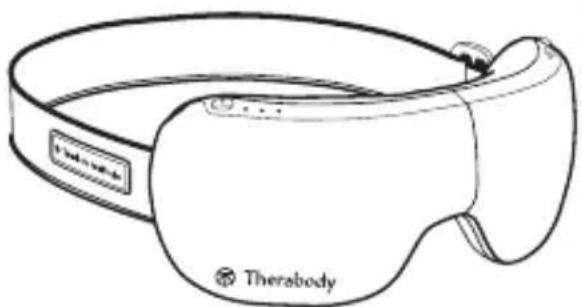
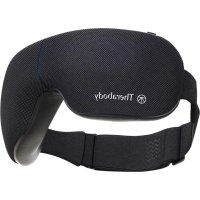
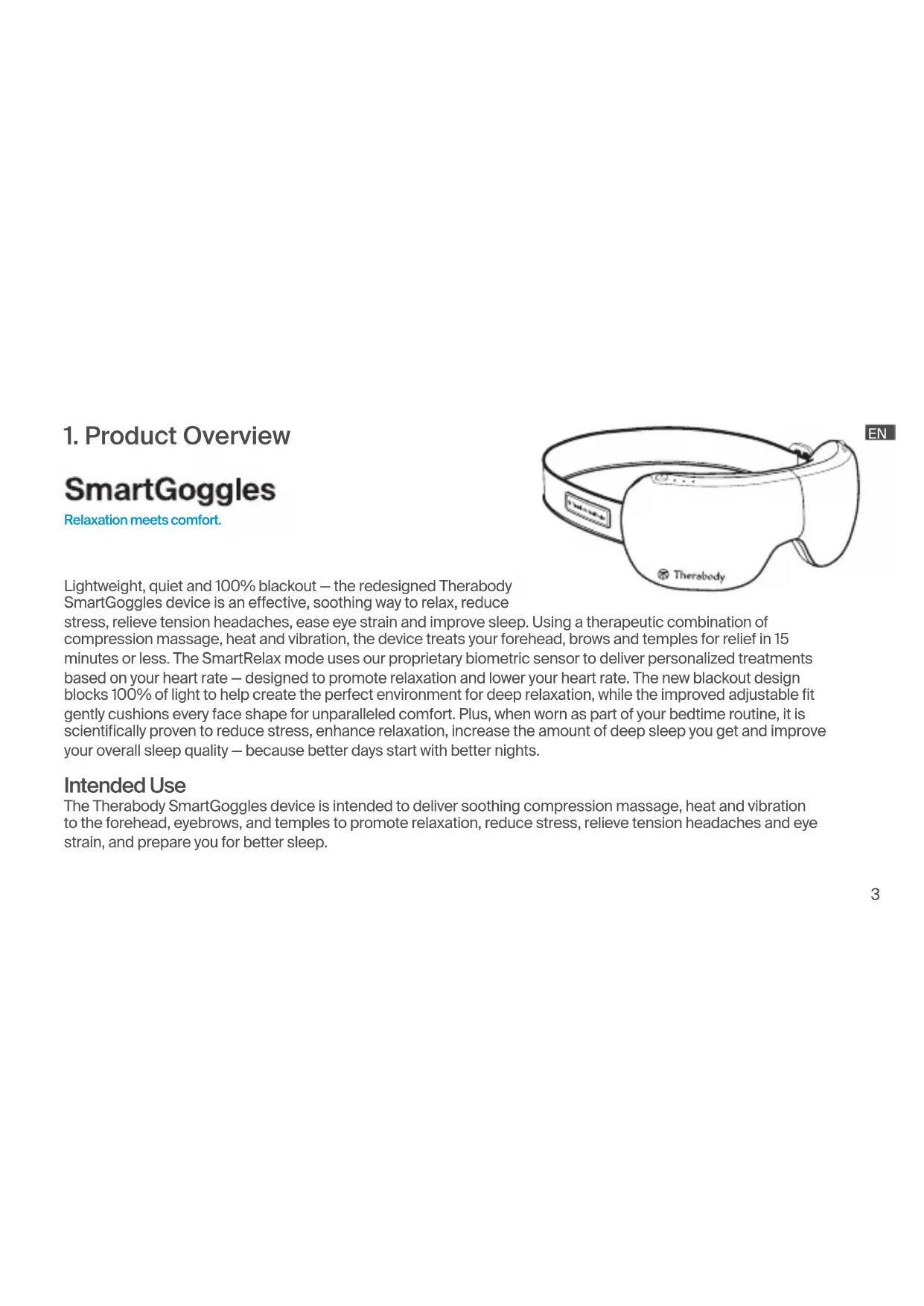
Lightweight, quiet and 100% blackout - the redesigned Therabody SmartGoggles device is an effective, soothing way to relax, reduce
stress, relieve tension headaches, ease eye strain and improve sleep. Using a therapeutic combination of compression massage, heat and vibration, the device treats your forehead, brows and temples for relief in 15 minutes or less. The SmartRelax mode uses our proprietary biometric sensor to deliver personalized treatments based on your heart rate - designed to promote relaxation and lower your heart rate. The new blackout design blocks 100% of light to help create the perfect environment for deep relaxation, while the improved adjustable fit gently cushions every face shape for unparalleled comfort. Plus, when worn as part of your bedtime routine, it is scientifically proven to reduce stress, enhance relaxation, increase the amount of deep sleep you get and improve your overall sleep quality - because better days start with better nights.
Intended Use
The Therabody SmartGoggles device is intended to deliver soothing compression massage, heat and vibration to the forehead, eyebrows, and temples to promote relaxation, reduce stress, relieve tension headaches and eye strain, and prepare you for better sleep.
EN 2. Download the Therabody App
If you currently have the Therabody app, proceed to step 4.
- Download the Therabody app from the App Store or Play Store.
- Follow the in-app instructions to create a new app account and verify your email.
- Once logged in, follow the onboarding steps to connect your device to the app. Be sure that the Bluetooth settings are enabled for your phone.
- Select "SmartGoggles (2nd Generation)" as your Therabody device when prompted.
- Press and hold the power button on your device to turn it on. The device must be powered on to locate and pair to the app.
- Select "SmartGoggles" to confirm the device and app connection.
- Once connected, you can customize the heat, vibration, and length of treatments to help you relax, ease eye strain and headaches, and prepare for sleep.
- You can also select from an expansive catalog of TheraMind sound therapy, science-backed audio to listen to during your SmartGoggles treatment for a fully immersed experience.
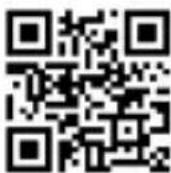

Scan the QR code to get started.
3. What's in the Box
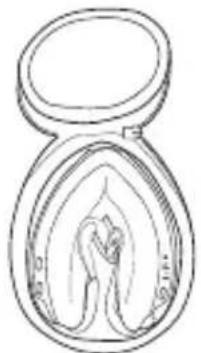
A. Therabody SmartGoggles device
B. USB-C to USB-C cable
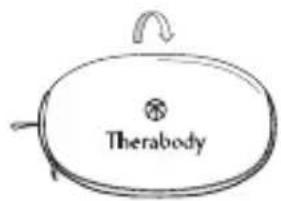
C. Soft case
D. Instruction manual
EN
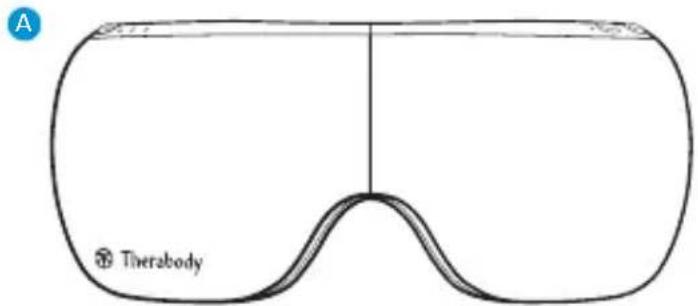
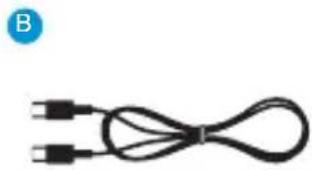
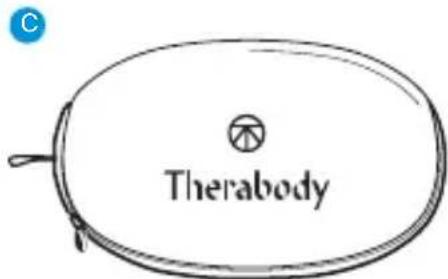
Note: A power adapter is not included with this device. For best performance, use a USB-C power adapter of at least 20W power capacity. Ensure it is from a certified manufacturer and has not suffered any structural damage.
EN 4. Getting To Know Your Device
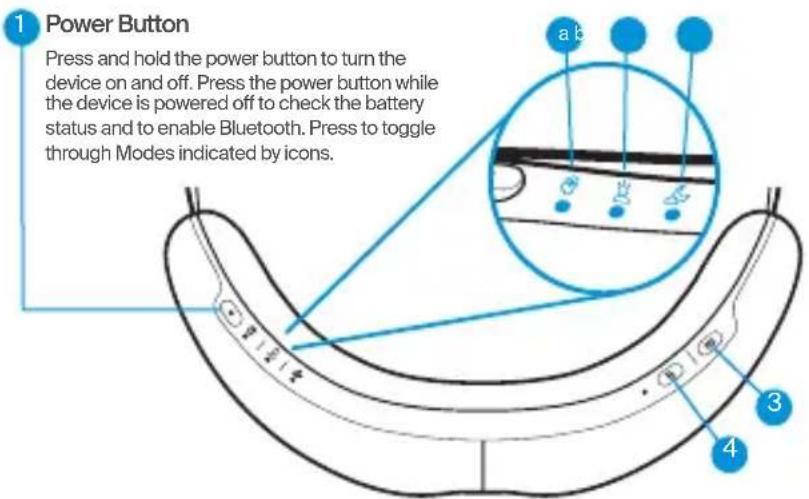
- Power Button
- Mode LED Light Indicators
a. SmartRelax
b. Headaches & Eye Strain
c. Sleep Prep
- Vibration Button
- Heat Button
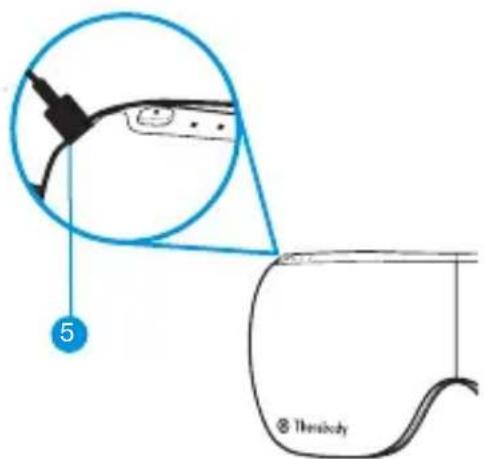
- USB-C Charging Port
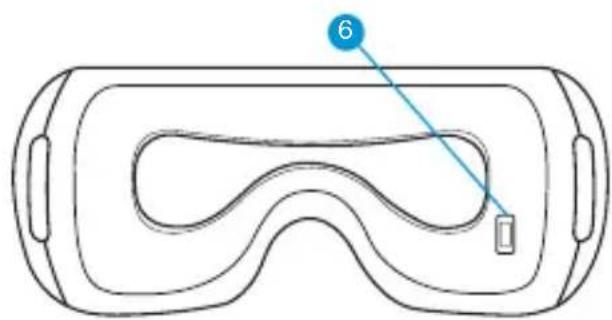
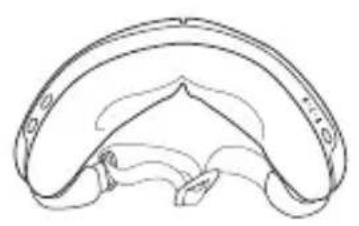
- Biometric Sensor
5. Use the Device
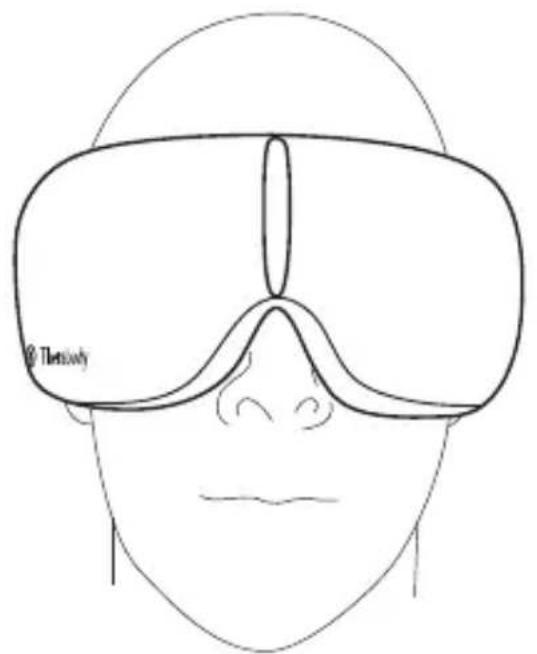
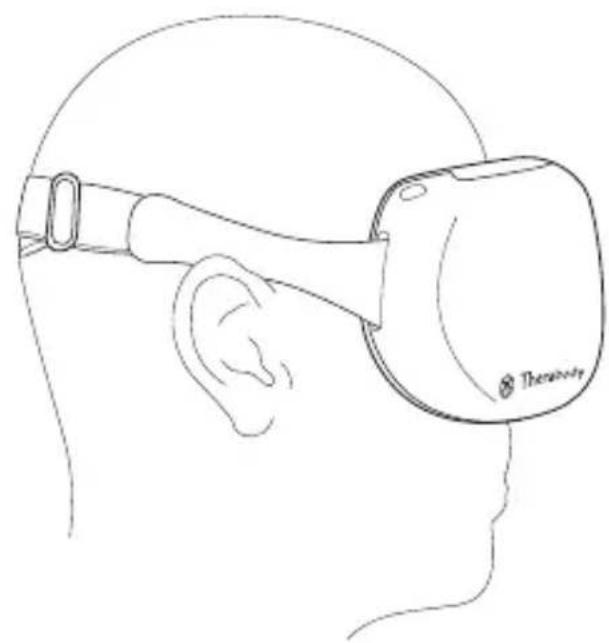
- Put on your device. Place the device on clean, dry skin. Remove makeup, eyeglasses, and contact lenses prior to use.
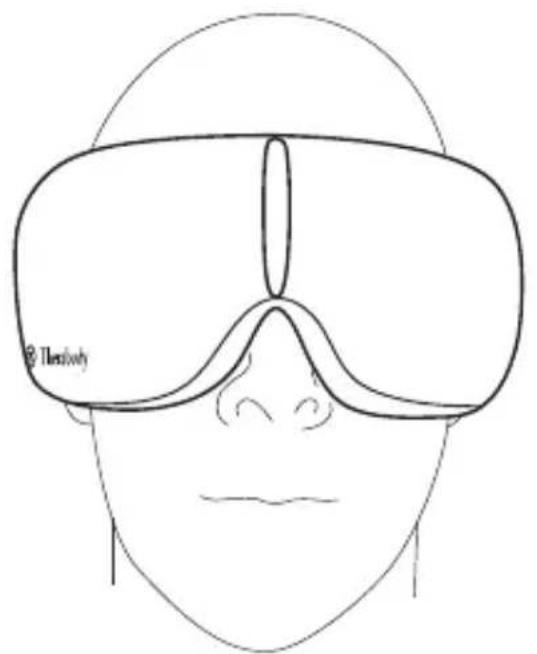
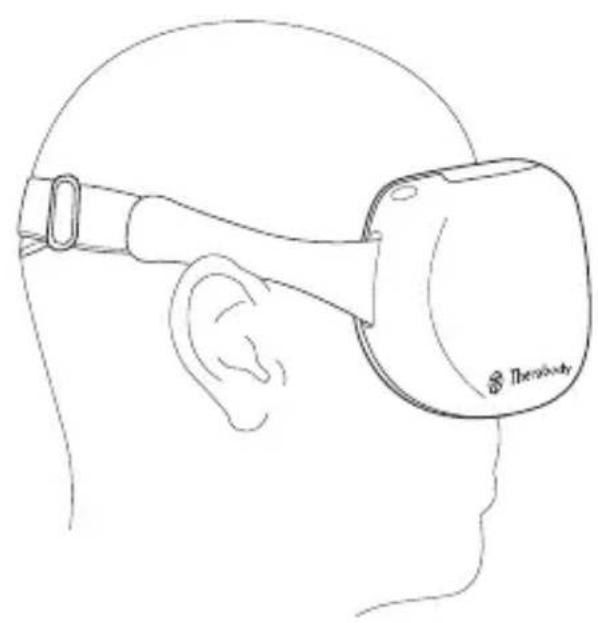
- Adjust your device. Place the device on your head and adjust the strap. The device should perfectly align with your temples and sit comfortably on your nose bridge for 100% blackout. The strap should sit just above your ears. For a full light block experience, tighten the strap by adjusting the buckle. Moving it to the right makes it tighter and to the left makes it looser. The heart rate sensor should maintain contact with your cheekbone.
- Turn on the device. Press and hold the power button to turn on the device.
- Choose a treatment. Press the power button again to toggle through the three modes: SmartRelax, Headaches & Eye Strain, and Sleep Prep.
- Adjust the vibration setting. Press the vibration button to toggle through the vibration settings available in your selected treatment. Press and hold the vibration button to turn off the vibration.
- Adjust the heat temperature. Press the heat button to add heat to your treatment and to toggle through the three heat temperature options. Press and hold the heat button to turn off the heat.
- Customize and enhance your treatment using the Therabody app. You can also select and customize your treatment preferences in the Therabody app. Save your favorite routines and settings in the Therabody app for easy access to the treatments you use most. You can also see how your heart rate is impacted by your treatment by viewing your biometrics at the end of each session in the Therabody app. Listen to specially composed TheraMind sound therapy, designed using science-backed techniques to melt away stress and help with sleep, through the Therabody app.
- Sit back and relax. Keep your eyes closed during the treatment. Avoid frequent movement during treatment as it may impact heart rate tracking.
- Turn off the device. Press and hold the power button to turn off the device. Make sure the Battery status LED is OFF. The device will automatically shut off following your treatment.
EN
EN
Using the device
6. Modes Overview
EN
The device has three strategically designed presets, SmartRelax, Headaches & Eye Strain, and Sleep Prep.
| Mode Vibration Settings Heat Settings |
| SmartRelax
15 minutes
Melt away stress with a calming combination of heat, massage and personalized vibration patterns designed to lower your heart rate and help you relax. | Default: Pulse
Press the vibration button to turn vibration off | Default: Low
Press the heat button to toggle through additional heat settings: medium, high, off |
| Headaches & Eye Strain
15 minutes
Relieve tension headaches and eye strain with a soothing combination of vibration and heat. | Default: Wave
Press the vibration button to tog- gle through additional vibration settings: low, high, off | Default: Medium
Press the heat button to toggle through additional heat settings: high, off, low |
| Sleep Prep
15 minutes
Prepare your body for restful sleep with slow wave vibration and a relaxing temple massage. | Default: Low
Press the vibration button to tog- gle through additional vibration settings: high, wave, off | Default: Off
Press the heat button to toggle through additional heat settings: low, medium, high |
EN 7. Care, Cleaning, and Charging
Device Maintenance
The following maintenance instructions are important to ensure that your device continues to work as it was designed. Failure to follow these instructions may cause your device to stop working.
Cleaning the Device
Read the following instructions carefully before cleaning the device to ensure longevity of the device and its components.
- Visually inspect the device for any obvious signs of debris build-up.
- Wipe the device with a non-abrasive, lint-free damp cloth or alcohol-free cleansing wipe.
- Dry the device with a non-abrasive, lint-free cloth.
- After cleaning, allow the device to dry thoroughly before storing or beginning another treatment. The device is NOT waterproof or machine washable. Do not allow excess liquids or water to enter the product.
- A properly cleaned device should have no visible signs of debris or moisture.
Note: Do not submerge the device in water or clean it under running water. Do not allow the device to come into contact with corrosive solutions, which can damage the device's appearance and function.
Charging the Device
- The device is USB-C enabled and comes with a charging cable. Before charging the device, ensure that it is powered off.
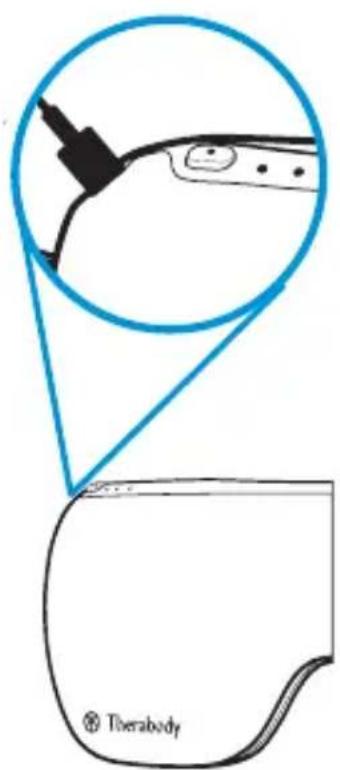
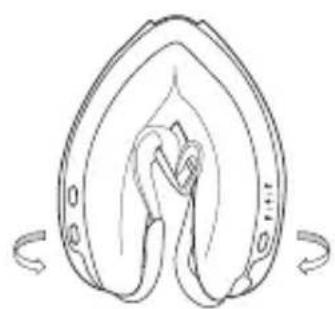
- Connect one end of the charging cable to the USB-C charging port on the device. It is located on the side of the device, behind the power button. Connect the other end of the charging cable to a power adapter.
-
The LED light, next to the USB-C port, will indicate the battery status when the device is on or charging. Turn on the device or press the power button to check the battery status.
-
Flashing Orange: Low battery
-
Flashing Blue: Half battery
-
Flashing Green: High battery
Solid Green: Full battery
-
The battery life of the device is approximately 120 minutes.
**Note: If using a charger from a third party, ensure that it is from a certified manufacturer and has not suffered any structural damage. Do not try to use the device while charging.
EN Store and Transport the Device
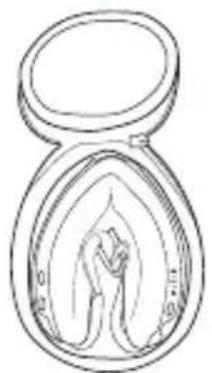
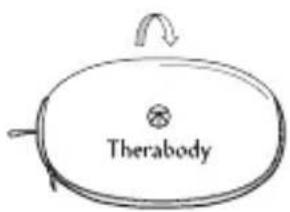
To store and transport the device, keep the device in its soft pouch, and handle it gently. Store the device in a cool and dry place (Temperature: 0ircC / 32ircF - 40ircC / 104ircF Relative humidity: 10 95% RH). Do not store the device where temperatures may exceed 40ircC / 104ircF , such as in direct sunlight or in a vehicle.
1
8. Troubleshooting Guide
EN
| SCENARIO SYMPTOM POTENTIAL CAUSES POTENTIAL SOLUTIONS |
| Device does not turn on. | Battery indicator LED doesn't turn on | Battery ran out or no battery power in the device | Connect the USB-C cable (included in box) to the device and plug in the other end to a power outlet. Verify that the device is charging by checking proper connection between the power adapter, the USB-C cable, and the USB-C port on the device. Battery LED indicator will display the level. |
| Charging USB-C cable is damaged | Ensure you are using the USB-C to USB-C cable provided, or one from a certified manufacturer. |
| Internal malfunction | If the device is not charging after verifying all the above, the power adapter or device may be damaged. Contact Therabody for further assistance. Visit https://www.therabody.com/us/en-us/support/support.html for the available contact methods. |
| Power LED can light on but the device not work | The device ran out of battery or there is no battery power in the device | Charge the device and try again |
| If the issue still persists, Contact Therabody for further assistance. Visit https://www.therabody.com/us/en-us/support/support.html for the available contact methods. |
| Slow charging | Slow charging or incompletely charging | There may be an adapter issue or the adapter power is too low | Ensure you are using the USB-C to USB-C cable provided, or one from a certified manufacturer. |
| If the issue still persists, Contact Therabody for further assistance. Visit https://www.therabody.com/us/en-us/support/support.html for the available contact methods. |
| The compression massage is not working or is not moving when turned on | Compression massage chambers do not inflate or move when turned on | False defect or software bug | Turn off the device, and then charge it, turn on and check if the device can deflate normally |
| There may be an air leakage or loss of connection with valves | Check for air flow noise. Switch to other modes to confirm if issue still persist. |
| Internal malfunction | If the issue still persists after verifying all of the above, the device may be damaged. Contact Therabody for further assistance. Visit https://www.therabody.com/us/en-us/support/support/support.html for the available contact methods. |
| Mechanical noise | There is a rattling noise when the device is turned on | Internal malfunction | Contact Therabody for further assistance. Visit https://www.therabody.com/us/en-us/support/support.html for the available contact methods. |
| Bluetooth connectivity issue | Cannot connect to the app or the device isn't working properly once connected | The firmware is not updated to the latest version | Update the device firmware and try to connect to the Bluetooth again. |
| The phone version or system cannot support the connectivity | Update your phone version. If this doesn't work, try to install the app on another phone device. |
| The vibration function is not working | The device is on but the vibration is not working | Vibration treatment is turned off Press the vibration button to turn on the treatment. |
| The vibration does not turn on even after the vibration button is pressed | Vibration button issue | If the vibration treatment does not turn on after verifying the above, the vibration connection may be damaged. Contact Therabody for further assistance. Visit https://www.therabody.com/us/en-us/support/support.html for the available contact methods. |
| Heat function is not working | The device is on and heat is not working and the heat LED is off | Heat treatment is turned off | Press the heat button to turn on the treatment. |
| Heat does not turn on even after heat button is pressed, heat LED is off | Heat button issue | If the heat treatment does not turn on after verifying the above, the heat connection may be damaged. Contact Therabody for further assistance. Visit https://www.therabody.com/us/en-us/support/support.html for the available contact methods. |
| Heat is low | Low heat level may be selected | Increase the heat intensity by pressing the heat button |
| The device feels very hot | The temperature feels very high | High heat level may be selected | Decrease the heat intensity by pressing the heat button |
| Internal heat malfunction | Contact Therabody for further assistance. Visit https://www.therabody.com/us/en-us/support/support.html for the available contact methods. |
| SCENARIO SYMPTOM POTENTIAL | CAUSES POTENTIAL SOLUTIONS |
| Biometric sensor not working | The device is on and the heart rate sensor is not working | Heart rate sensor malfunction | Keep a finger on the heart rate sensor, and see if a red light illuminates and if the Therabody app is capturing the heart rate data.
If the heart rate sensor doesn't capture the data and red light does not turn on after verifying the above, the heart rate sensor may be damaged. Contact Therabody for further assistance. Visit https://www.therabody.com/us/en-us/support/support.html for the available contact methods. |
| The device and the heart rate sensor are working, but the red light is off |
| Biometric sensor is not capturing the data or displaying it in Therabody app | Skin contact with the biometric sensor is not correct | Ensure your device perfectly aligns with your temples and it is sitting comfortably on your nose bridge. The strap should sit just above your ears.
Tighten the strap by adjusting the buckle. Moving it to the right makes it tighter and to the left makes it looser. Biometric sensor should maintain contact with your skin. |
DO NOT attempt to troubleshoot by disassembling the device as this will void the warranty and may cause injury.
EN Warnings and Guidance (Precautions and Contraindications)
Background
Therabody products are designed to unlock the body's natural ability to achieve health and well-being. Through science and technology, the Therabody portfolio of products allows people to access the therapeutic benefits of different natural phenomena to meet both their needs and preferences. There will be times when it is advisable to modify how devices are used (precautions) or times when it is not appropriate to use certain devices (contraindications). Read the following safety information for the device in its entirety prior to use.
General Device Use
This device is intended for use by people in good health. This device is contraindicated against and should not be used by or on anyone with a history of epilepsy, seizures or cardiopathy.
The device is not recommended for anyone with an electronic implanted device (such as a pacemaker), cardiac arrhythmia, tumors, or acute episodes of inflammatory diseases. The device is not recommended for those who have arteriosclerosis, thromboses, or implants in the body region being treated.
Please consult your physician prior to using the device if you are pregnant and/or nursing. Immediately stop using the device at the first sign of discomfort. If you have any medical considerations please consult your doctor before using the device.
Safety, Precautions and Contraindications
These recommendations are derived from consultation with medical experts and published research regarding precautions and contraindications as of the printing date. For up-to-date information, please visit us online at https://www.therabody.com/us/en-us/precautions-and-contraindications.html.
Precautions:
Due care is required in these circumstances and device use may need to be modified. Where appropriate, or if you have any concerns, seek the advice of a medical professional.
Recent injury or surgery
Hypertension (controlled)
Abnormal sensations (e.g., numbness)
- Sensitivity to heat or pressure
Bony prominences or regions
- Mild peripheral neuropathy
- Remove eye lenses (i.e. contact lenses) before using the device
- This device should fit tightly but should NOT restrict circulation in any way
Contraindications:
The following are circumstances where the potential risks may outweigh the benefits. Consult a medical professional before use.
- Skin rash, open wounds, blisters, local tissue inflammation, infections, bruises, or tumors
Hypertension (uncontrolled)
Vascular/arterial and circulation diseases, including blood clots, phlebitis, thromboses, and varicose veins
- Acute or severe cardiac, liver, or kidney disease
- Severe peripheral neuropathy or other causes of sensory impairment
- Bleeding disorders
Connective tissue disorders
- Medications that may thin the blood or alter sensations
- Direct pressure over surgical site or hardware
- Pacemaker or ICD
History of embolism
- Do not use in the presence of unexplained pain
Limited Warranty
For full warranty information, please visit www.therabody.com/warranty. Customers who are in need of product support should visit https://www.therabody. com/us/en-us/support/support.html for the available contact methods.
FDA-Registered
Limited Warranty Only With Authorized Retailer Purchase
© 2024 Therabody, Inc. All Rights Reserved.
Patents at www.therabody.com/patents
Manufactured and Distributed by:
Therabody, Inc.
1640 S Sepulveda, Suite 300
Los Angeles, CA 90025
In the Australian market, the Therabody SmartGoggles device warranty is 1 year. For Australian Market Only: The purchase of this device is accompanied by a limited warranty. For complete details about the rights afforded to you under this warranty, visit https://therabody.com/anz/en-au/warranty-support/.
Imported and Distributed By:
Therabody Australia Pty Ltd
Waterman Business Centre
175 Maroondah Highway
Suite 16, C307, Level 3
Ringwood Vic 3134 Australia
Importers:
Therabody International Limited
5th Floor, 40 Mespil Road,
DO4C2N4 Dublin, Ireland
Therabody UK Limited
Portsoken House 155-157
The Minorities, London,
United Kingdom, EC3N1LJ
Therabody China Limited
READ ALL INSTRUCTIONS AND CAUTIONARY MARKINGS IN THIS MANUAL, ON THE CHARGER, AND ON THE DEVICE BEFORE USING OR CHARGING THE Therabody SmartGoggles DEVICE AND ITS ACCESSORIES.
When using the device, the following precautions should always be adhered to: 1. USE ONLY AS INSTRUCTED. Use the device as described in the Therabody SmartGoggles Instruction Manual only. Use only Therabody recommended accessories and replacement parts. This device is not intended to diagnose, mitigate, or treat diseases. The device is an advanced mechanical tool with electric components. If the device and its accessories are not used or maintained properly, there is a risk of fire, electric shock, or injury. Failure to use and maintain the device and corresponding attachments in accordance with the instructions outlined in this manual will void the warranty and may result in product damage or physical injury. The device is intended for commercial and home use.
- NOT FOR CHILDREN. The device is designed to fit and be used by individuals 16 years of age and older, and should not be used by individuals under the age of 16. The device and accessories are not intended for use by individuals with reduced physical, sensory, or reasoning capabilities or lack of experience and knowledge, unless given supervision or instruction concerning use of the device by a person responsible for their safety. The device is not a toy. Advise children not to play with the device or accessories. Adult supervision should be provided for those under

18 using the device.
3.CHARGING. If your device doesn't turn on or the battery indicator displays a low battery level, please charge before first use. Charge the battery using the USB-C cable (included). When you use the charging cable (included), make sure its USB-C connector is fully inserted into a compatible power adapter before you plug the adapter into a power outlet. You can also charge the battery with third party cables that are compliant with USB-C and with applicable country regulations and international and regional safety standards. Other adapters may not meet applicable safety standards, and charging with such adapters could pose a risk of death or injury. Do not force the cable into place. Fully charge the device at least once every six months to prevent device and battery damage. Unplug the power adapter and charging cable when not in use.
4.DO NOT OVERCHARGE. Do not leave the device connected to the power adapter for more than one hour after the battery has been fully charged. The battery includes a protection system to avoid the risk of overcharging. However, overcharging may reduce its life over time.
5.CHARGING LOCATIONS. Ensure that the battery status LED is OFF before charging. Insert the USB-C cable into the port (behind the power button) to charge the device. Do not use the device while charging. Avoid skin contact when the USB-C is plugged into a power source as it may cause discomfort or injury. Do not sleep or sit on the USB-C connector. The device should be charged indoors in a well-ventilated, dry location. Do not charge the device outdoors, in a bathroom, or within 10 feet (3.1 meters) of a bathtub or pool. Do not use the device or charger on wet surfaces, and do not expose the charger to moisture, rain, or snow. Do not use the device or its compatible charger in the presence of explosive atmospheres (gaseous fumes, dust, grain, metal powders, or flammable materials). Sparks may be generated, possibly causing a fire.
6.UNPLUGGING THE CHARGER AND CARE.Pull the plug, not the cord, to reduce the risk of damage to the electrical plug and cord. Never carry the charger by its cord. Keep the cord away from heat, oil, and sharp edges. Do not stretch the charger cord or place the cord under strain. Do not handle the charger, terminals, or the device with wet hands. Always unplug this device from the electrical
outlet immediately after using and before cleaning. Store cable to ensure it is not stepped on, tripped over, or otherwise subjected to damage or stress. Do not use a power adapter or charging cable that has received a sharp blow, been dropped, run over, or damaged in any way. For long-term storage, store with a fully charged battery.
- USAGE AND SKIN SENSITIVITIES. Discontinue the use of the device if you feel any discomfort. Use the device on clean, dry skin. Some people may experience reactions to certain materials used in wearable items that are in prolonged contact with their skin. This can be due to allergies, environmental factors, extended exposure to irritants like sweat or other causes. You may be more likely to experience irritation from any wearable device if you have allergies or other sensitivities. If you have known sensitivities, take special care when using the device and accessories. If you experience redness, swelling, itchiness, or any other irritation or discomfort on your skin around, or beneath, your device, remove the device and consult your physician before resuming wear. Continued use, even after symptoms subside, may result in renewed or increased irritation. Make sure the Battery status LED is OFF when the device is not in use.
8.DO NOT OPERATE UNDER BLANKET AND PILLOW. Excessive heating can occur and cause fire, electric shock, or injury.
9.DEVICE CARE AND SERVICE. Handle the device with care. The device contains electronic components that can be damaged if dropped, burned, punctured, or crushed. Do not disassemble the device or attempt to repair the device yourself. Disassembling the device may damage it and may cause injury. If the device is damaged or if malfunctions occur, contact Therabody Customer service. The warranty will be void if the device, batteries, or charger are disassembled or if any parts have been removed. Do not use if damaged as these may cause injury. Avoid heavy exposure to dust or sand. Do not puncture or damage the device. Puncturing the device can lead to incorrect operation.
10.CLEANING INSTRUCTIONS. The device is NOT waterproof. Visually inspect the device for any obvious signs of debris build-up. Wipe your device with a damp cloth or alcohol-free cleansing wipe. After cleaning, allow the device to dry thoroughly before storing or beginning another treatment. A properly cleaned
device should have no visible signs of debris or moisture. Only clean with a damp cloth or alcohol-free cleansing wipe by wiping the device. Do not submerge the device in water or clean it under running water. Do not allow the device to come into contact with corrosive solutions, which can damage the device's appearance and function.
11.STORING THE DEVICE AND ACCESSORIES. Store in a cool, dry place. Only charge the device when the ambient temperature is between 40ircC / 104ircF and 0ircC / 32ircF . Do not store the device or charging cable where temperatures may exceed 70ircC / 158ircF , such as in direct sunlight, in a vehicle, or in a metal building during the summer.
12.DEVICE DISPOSAL. This device contains a lithium-ion battery, and care must be taken upon disposal of the device. Before disposal of this device, please review your local laws and requirements surrounding Lithium-Ion Battery disposal. The preferred method of disposal is recycling the whole device.
Reporting adverse events to FDA
MedWatch is the Food and Drug Administration's (FDA) program for reporting serious reactions, product quality problems, therapeutic inequivalence/failure, and product use errors with human medical products, including drugs, biologic products, medical devices, dietary supplements, infant formula, and cosmetics. If you think you or someone in your family has experienced a serious reaction to a medical product, you are encouraged to take the reporting form to your doctor. Your health care provider can provide clinical information based on your medical record that can help the FDA evaluate your report. However, we understand that for a variety of reasons, you may not wish to have the form filled out by your healthcare provider, or your health care provider may choose not to complete the form. Your health care provider is not required to report to the FDA. In these situations, you may complete the Online Reporting Form yourself. You will receive an acknowledgement from the FDA when your report is received. Reports are reviewed by FDA staff. You will be personally contacted only if we need additional information.
Submitting adverse event reports to FDA
Use one of the methods below to submit voluntary adverse event reports to the FDA:
1.Report Online at: www.accessdata.fda.gov/scripts/medwatch/index.cfm?action reporting.home
2.Consumer Reporting Form FDA 3500B. Follow the instructions on the form to either fax or mail it in for submission. For help filling out the form, see MedWatch-Learn. The form is available at: www.fda.gov/ downloads/aboutFDA/reportsmanualforms/forms/ucm349464.pdf
3.Call FDA at 1-800-FDA-1088 to report by telephone.
4. Reporting Form FDA 3500 commonly used by health professionals. The form is available at: www.fda.gov/downloads/aboutFDA/reportmanualforms/forms/ucm163919.pdf


Garment Care
Meaning of symbols
| Label Description Location of Label | |
| Do not dry-clean Removable Inner layer + Travel pouch | |
| Do not tumble dry Removable Inner layer + Travel pouch | |
| Do not bleach Removable Inner layer + Travel pouch | |
| Do not iron Removable Inner layer + Travel pouch | |
| IP 22 | Degree of protection against ingress of water On rating label | |
| Read instructions before use On rating label | |
| Level of protection type BF applied part On rating label | |
| Therabody, Inc.
1640 S. Sepulveda Blvd. Suite 300
Los Angeles, CA 90025 | On rating label |
| UKCA® | Unique Device Identification (UDI) | Packaging |
| X | Separate collection for waste electrical and electronic equipment.
Note: For more information about disposal of equipment, its parts and accessories, please contact your local distributor. | On rating label |
| UKCA | UKCA Mark for UK On garment label | |
| Bluetooth | Bluetooth On garment label | |
| IC | IC (Canada) On garment label | |
| RCM On garment label | |
| Date of Manufacture On garment label | |
| CE | In accordance with Directive 2014/35/EU electrical equipent designed for use within certain voltage limits, and Directive 2014/30/EU electromagnetic compatibility | On garment label |
EN
DE
1. Produktübersicht
SmartGoggles
Download on the App Store
Therabody International Limited
5th Floor, 40 Mespil Road,
DO4C2N4 Dublin, Ireland
Therabody UK Limited
Portsoken House 155-157
The Minorities, London,
United Kingdom, EC3N1LJ
WARNHINWEISE
Download on the App Store
Therabody International Limited
5th floor, 40 Mespil Road,
DO4C2N4 Dublin, Irlande
Therabody UK Limited
Portsoken House 155-157
The Minorities, London
Download on the App Store
Therabody International Limited
5irc piano, 40 Mespil Road,
DO4C2N4Dublin, Irl
Therabody UK Limited
Portsoken House 155-157
The Minorities, Londra.
Download on the App Store
Therabody International Limited
5th Floor, 40 Mespil Road,
DO4C2N4 Dublin, Irlanda
Therabody UK Limited
Portsoken House 155-157
The Minorities, Londres,
IcnoJIb3OBAHMe yCTpoIcTBA
RU
6. O63op peKIMOB
YcTpoCTBO IMeET TpN CneuJIbHO pa3pa6oTaHHbIX peKIMa: SmartRelax, TOnOBHnI rna3Ha 6OJIb I PoIroTOBka KO CHy.
IpeDynpexKdEHHN I peKOMeHdaCnN (MepblpeDocTopoXHOCTN I pOtnBONoka3aHnA
06aHnfoopmaun
IpoodykunTherabody npedha3HaHeHa IaakTbauin ecTeCTBeHbIX cnoc6hOtei opraHn3Ma K pndepkaHNIO 3dopobBry XoPoWero camOyBCTBn. TOpTphiNIO BbICOKOTEXHOJUHNOI PPOdykUnTherabody OXBtBaET camble pa3HO6pa3HbIE TINbI TepeNAEChKOrO BO3eJeCTBn - YTObI KaJDbMOR Bb6PaTb DnI CE6I ONTMAbHBn BApnaHT NO Co6CTBeHHbIM Tpe6oBaHmN INpeNoTHeHM. B HEKOTObPcLnyAaNT peKOMeHNyETcN 3MeHnITb CnoCo6 pa6OBy tCtpoCTB (CM. MpeI PpeoCTOPoXHcOT), a B HEKOTObPcX - ONpeJeHnHbIe yCtpoCTBa NcONJb3ObaTb He peKOMeHNyETcN (PpOtnBONa3aHn). PpeN cNpOB3oBaHm EpoTuTE cNeDyIoYIO NHΦopMaio IO TeXnike 6e3OnacHocTn dIra yCtpoCTBA B ToNHom o6beMe.
Baxkhara Hhopmaunno6e3onachoctn
O6uinepeKoMeHdaUINIOHCnOb3OBaHNIOyCTpoiCTBa
3To ycTroHCTBO npeHa3NaHeHO dIy IIOJe C xOpoUIM 3DopOBbEm. Pnp60p
PpOTUBONOKa3AH K NcPOJIb3OBAHINo H Ne OJIoKeH NcPOJIb3OBAbCSIIOBIMn C
3AnIIeIeCNie, cyDopOrAMn IINI KApDIOnPaTne B aHAmHe3e.
YcTroHCTBO He peKOMeHNoBAHO NIOJm C 3JIeKTOPHNBIMM
NIMPHTNOBpaOBaHBIMn YcTroHCTBaAMn (HapPIMep, KApDIOCTMUYIATOPOM),
cepDeuHO apITMne, ONTyXOLMAm INI OCTpbIM BoCpAInTEbHbIMN
3a6OJIeBAHnAIMn. YcTroHCTBO He peKOMeHNyETC IIOJm C apTeRIOCKLePozOM,
TpOMBaAMn INIMPNAHTaAMn B obpaBaTBaEMo OBlaCTNI Tela.
EcNI Bbl 6epeMeHNbI N/INI KOpMNTe rpyDbIO, Do pIpMeHENH
pPOKOHcyIbTpyTneCB bPcAOM. He3aMeDNlENo IpekPatITNE
NCIOJIb3OBAHHe npi6Oba Prn nepBbIX pnINsHakx DnCKOMΦopTa. EcNI y Bac
ecBy KaKHe-Ni6o MeDiuMHckNe POKa3AHNIA, PpOKOHcYbTIpyTneCB c BpaHom
pepeNcIOJIb3OBAHnEM ycTroHCTBA.
Be3onacHocTb, MepbippeoctopoxKHOCTn npOTBONoka3AH
3Tn peKoMeHndaunnoMpeam npedeocTOPOXHOCTN npoTNOBIOKAaHNR OCHOBaHb Ha KOHCyIbTaUHX C MeDNIuHcKIMN hKcPepTaMn I onbyLknOBaHHb Hm NCCNEOBAHNR, nAkTuaybHa H daTy neaTn. JIra noJIyHeN cAmO aKTuayho INHfOpMaUNn NoeITNe Hau caHT https://www.therabody.com/us/en-us/precautions-and-contraindications.html.
Mepbnpedoctopoxnoctn:
B 3TINX 6OCToTeNbCTBax Tpe6yETc CObIIOaTaB OCTOpOXHOCb, INMOKET NOtpe6oBaTbCBA HceCHeN 3MMeHEn B NcIOJIb3ObaHne yCTpoCTBa.EcIn IMeIOTC COMHeHn IIN PnHaIIuY BAC KaKnx-ⅡI60 IpO6IeM 6bPaTNTecb 3a KOHCyIbTaUneK BpAHy.
- HeDaBnra TpaBMa nnXnpyprueeCKoe BMeaTeIbCTBO
-ΓnepTeH3n(KoHTpOIpnyEma)
ATINHnHbIeOuUHeHHaHaPnPmep,OHeMeHHe)
- UyBCTBnTeHbOcTb K TeIy IIN DaBHeHIO
KocThbIe BbICTyblnnuYacTkn
- UmepenHna nepiΦepeuYecka HeipoNaTn
-Перед Наимов Исторьагия усторій Ства Бынгіе Из Глaitа Контайные Линь.
3ToycTPOIcTBoDOJIKNHOIIIOTHOIIPIIeIaTb,HOHEIOJNHO KaKIM-NIN60 6bpa3OM OgrpaHIVHBAbTuIpKpyIauKIO KPOBn.
POTUBONOKa3AHNA
B cneIyUxN x o6CToRteJIbCTbX nOTeHuaJIbHbIe pNCKn MOrYT nepeBeWuBaT bNoIb3y OT npIMHeHn yCTpOcTBA. Do nCNoJIb3OBaHn IpOKOHcyJIbTnpYInTEcb C BpaHOM.
KoKaHaa cblb,otKpbTbe paHbI,BOJdbipn,MeCTHOe BocpnaJIe HTKaHei, HneKuIN, CInRAKn UIN ONyXONI
-Γιπερτηκυσγ(HEKΘHTρολίργεΜα)
Cocyndtbe npapTePnabHbte 3a6oBeBaHna,3a6oBeBaHna CnCTeMbKpOBo06paueHHB, BKIOUaCryCTKN KpOBN, fneBtBu, TpOM603bI
BapNKo3Hoe paCImpeHne BeH
- Octpoe nll TjxkeNoe 3aboneBaHne cepua, neeuHn nll noueK
- BbipaxeHnag npinpeepueckag HebpotaIg npuHbcceHCOPbIX Hanyuhen
HapyuHnCBeptbBaEMoCTN KPOBNI
3a6oJIeBaHnO CoEINHITeIbHO TkaHn
- JIeKapCTBHeHbI IpeNaPaTbI dIra pa3XnXKeHn KpOBN nIyUyUHeHn 乌BCTBNTeJIbHOCTN
- PIPRMOE BO3DcEJICTBnE Ha MecTo XnpyprHcckOro BMeJaTeIbCTBa IINI YCTaHOBJENHHbIMNIIaHT
KapdnoocTmMyJrTop uHnIKD
3M60nB aHaAMHe3e
He nCnOlb3yIte npnNoBnHn Heo6bAChHMbIX 60Je
OTPAHUYEHHAIAPAHTNIA
Дя поуеня понов Инфорmaци O rapaHTIM, NOXKANCTA, NOCEITE WWW. therabody.com/warranty.
B clyuae, ecnl BAM Heo6xOIMa texHnuecka no DnpePkka n o BaueMy npodykty, nocetnte caIIT https://www.therabody.com/us/en-us/support/ support.html.
OrpaHnueHHa rapaHTn npi nokyInke TOnbKO y aBToPn3oBaHHoro po3HHoTnpOabua
© 2024 Therabody, Inc. Bce npaBa 3aunneHbI.
VHopmaunna o natehtax Ha caite www.therabody.com/patents
I3ROTOBNEHO npacnpocTpaHEKOMNAHne:
Therabody, Inc.
1640 S Sepulveda, Suite 300
Los Angeles, CA 90025
VMrnpTepb:
Therabody International Limited
5th Floor, 40 Mespil Road,
DO4C2N4Ду6ин,ИрnaHnIa
Therabody UK Limited
Portsoken House 155-157
MnHbepNTm3,LoHdoH,
Belenko6pntaHnE,EC3N1LJ
ПРЕДУПЕХДECHИЕРИ NGIOЛБ3OBAHIN YCTPOIYCTBA
IPEENICIOJIb3OBAHEMIINI3APJDKOYUCTPOICTBA.Therabody SmartGoggles INAKCECCYAPOB O3HAKOMBTEC B INHCTPYKUNIAIMIN I PEPYNPEXDEHENMIMINPIMBEENHBMINBDAHHOM PYKOBODCTBE, HA 3APJDHOM YCTPOICTBE IN HA CAMOM YCTPOICTBE.
PnHcNoJIb3OBAHHyUCTPOIcTBa CNeNyET Co6JIHOaTb CNeIyoUe MepeI npEOCTOPOXHOCHTN:
-
ICSIOJIb3yIte TOIbKO B COOTBETCTBUN C INHCTPYKUINEI. UcnoJIb3yIte ycTpoIeTO Bo TOLbKO TaK, KAK OINsCAHO B PyKOBoDCTBe nObl3OBaTeRTherabodySmartGoggles. IcNoJIb3yIte ToIbKO peKomeHIOBaHbHe TherABody akCEccyapBo HzanaChbE qAchTIy. YcTpoIeCTBO He npEdHa3NaHcENo IdNnAHOCTKNi, IeChEyNl NPiPOfNIAKTIKN 3a60NeBaHIM. YcTpoIeCTBO pIpeCTABnIeT cO6BI yCOBepueHCTBOBAHNbM EexAHEnCeKIM IHCTpymEt C 3JIeKTPuYeCEKIMN KomNOHEtAMN. Ecln yCToPoiCTBO n erO akCECCyapBo He IcNoJIb3yIOTC nII He o6ClyKNuBAIoTc DOJKNbIM o6pa3OM cyUeCTByet PnCK BO3rOpAHIN, IopAkeHIN 3JIeKTPuYeCKIM TOKOM nI IN TpAbMb.I Ecln yCToPoiCTBO nII eRO TACTN i AkCECCaYbpHe IcNoJIb3yETcR nII He o6CnyKmBAeTBC B COOTBETCTBN C peKomeHDAuZMAIn, IN3LOKeHHbIM B DaHnOM pyKOBoDTEB, 3TO pINBEeT K aHHyIInPOBAHIO rapaHTNI M oMQET pINBEcTNI K NOBPeXKeHINO pOyoKTA nII fMIInHeckOITpABMe. YcTpoIeCTBO npEdHa3NaHcENo IdN kOMMepCeCKOrO INOMaUHeRo IcNoJIb3OBAHIN.
-
HE PENDHA3HAYEHO IJL JETEY. YcTPOIcTBo IpeHa3HaeHo
IJIa NcPONb3OBAHnA IuIaMn B Bo3paTe 16 let n CTapWe H He DOnKHO
NcPONb3OBAbCra IuIaMn MnaJaWe 16 let. YcTPOIcTBo N AkCECCyapbl
He PpNDa3H3aHuEbl IJIa NcPONb3OBAHnA IuIaMn C OrpaHIneHHbIMN
fN3UHeCKmM, CeHCOPbHM IMn UyMCTBeHHbIMN CNOcoBHOCTMaIM NlC
HEIOCTaKom ONbTa IN 3HaHn, ECLN OHN He HaxoJATc NOI pINCMOTpOM
OTBeTCTBeHHORo IuIa NII INI pONHCTpyKTIpOBaHb IM. YcTPOIcTBo HE RaBJIeTCR
IrpyuKoI. PpocJeDte, YTObSI JeTN He INrpaN C yCTPOIcTBOM INI erO
AkCECCyapAm, IuIa MNaJaWe 18 let DOJKNbHb NcPONb3OBAbT b 3To yCTpoiCTBO
NoI Ha3Opom B3opCbIX.
3.3APJDA.KcIbnBaJeycTpoCTBOHeBKJIIOaHcTcNININIIKAkTop aKKyMylrTopoNOKa3bIBaETNHI3KNYUPOBEHb3apraJa,3apraJITeeropei nepEBIMnONLb3OBAHmEh.3apraJITeakKYMylrTopC NOMOUsbKa6eJIy USB-C (BXoJIT B KOMPLeKT).PiN cNpOJIb3OBAHm 3apraJITHOKdHOKabe (BXoJIT B KOMPLeKT) y6eJIntECb, YTO erO pAsbEM USB-C NlHOCTbU BCTaBnE h COBMecTtMbI aadantep NTanHAn, npExJe Yem NOJIKIOuAHTb aadantep K PO3eTke. BbI TaKae MoXeTe 3apxKahtb akkyMylrTop C NOMOUsbKO6ane USB-C CTOPOHNX POnIOBDOInTEJIe, COOTBETCTBYIOUx HOpMaM CTpaHbI, a TAKKe MEJHyApOdBHM I PERNOHaJIbHbIM CTaHApTAM 6eOIOACHOCTN. AAdantepbl HEKOTOpbIX POnIOBDOInTEJIe MOrTy HE COOTBETCTBOBaTb DeIECTBYIOUIM CTaHApTAM 6eOIOACHOCTN, n 3apRJa C NOMOUsbTO TakHX aadantepob MOXe TpNBecTN K CMErT INIIT TaBMAH. He NItaTIteCB BCTaBNTb Ka6eJIb B pa3aBcMcYNIe. POnIOCTbU 3apRAKeTbe AkkyMylrTop HepeKe ONDHO p4a3a B Wectb MeCAUEB, YTO6bI pNeD0TbPaNTb NOBPEKDeHne yCTpoCTBA n aKKyMylrTopo. OTKIOuAte aadantep NiTaHnI H 3apraHbI Ka6eJIb KOrDa OH He NcIOlb3yIOTCa.
- HE έNEP3APJXAIITE. He octabJIte YeCTPoIcTBo NOKJIIOUeHHbIM K aIaIaTepY IITAHNA 6OJIe Yem Ha OdIN Yac Nocne NOIHIOI 3apJIKn AKKMyIaTOpA. AkkMyIaTOp IMeET CNTeMy 3aUNITb, YTObI N36ExKaTb PnCKa nepe3a3rApJb. Tem He MeHee, Te TceHMeN BpeMeHN Pepe3apJka MoXeT cOKpaTHTb erO cPOK cnKy6bl.
5.MECTA 3APRKN.Ipeed 3aprkoynbTeCb,TO CBeToIOHbI
HINIKaTOp COCTOHHa AkkMyIaTOPa He rOpHT. BcTaBbTe Ka6eNb USB-C B nOpT (3a KHOKNo BVKIOUChENr/ByIKIOUChENra, YTObSb3apAITb yCTPOIcTBO. He IcNoJIb3yIte yCTPOIcTBO BO BPEmr 3apAikn. N36BaIte KOtAKTa C KOKei, Korda USB-C POKJIIOUeH K IcTOCHNky NiTaHn, TaK KaK 3To MoKet Bb3BbTb DnCKOMfOpT IINr TpaBMy. He cNITE Ha Hr He caDITcBHa pa3bEM USB-C. YCTPOIcTBO CNeDyET 3apKaTb B XOPUO pOBETpNBaEMOM, CYXOM NOMeEHm. He 3apKaIte yCTPOIcTBO Ha OTKpbITOM Bo3dyXe, B BaHHO KOMHaTe IIN BnpdeJax 3,1MeTp aOT BaHbI IN IN BacCeHn. He IcNoJIb3yIte yCTPOIcTBO IIN 3apJHOe YCTPOIcTBO HA BlAnKbIX NOBepxHOCTAx, a TAKKe He NDBePraIte 3apJHOe YCTPOIcTBO BO ZdEeCTBnIO BLnr, DoKJa IN IN ChErA. He IcNoJIb3yIte yCTPOIcTBO IIN CoMBecTMIOe C HIM 3apJHOe YCTPOIcTBO B PnCytCTBN B3pbIOONaCHbIX CpeI (ra3OO6pa3Hbe Napbl, PbIb, 3epHo, MetaIIuueckne IopoOuKn IIN NERKOBocPNaMeHryIoUeCEMaTePnaIb). MoryT o6pa30BaTbcNckPbI, YTO MOKeT PnIBEcTI K NoKApY.
6.OTKJIIOUOHEHNE 3APJIHOY UCTPOINCTBA OT CETN I YXOD 3A HIM.TaHNTe 3a BnIKy,a He 3a 3uHpy, YTOb6 cHn3NtB pNCK NOBpeXdHnE 3JIeKTPINCECKHX KONTAKTOI KAcBEL.HNKoRdHa NEpeHOCITE 3apJHOe yCTPOINCTBO 3a 3uHpy.DepKNTe 5uHpy BdaIIN O NTCHOHNKOB TepIaM CaCLn OCTbIX nPcIeMTOE.He PaTcRAINBaITe KaB6JIe 3apJHOrO yCTPOINCTBA IN HE pAMeMaIIeTe C HA7KeHHmE. He PnPKaCaIeTcB K 3apJAMOnHcyTOPTBO BY KLEMMAM IIY CHTPOINCTBO MOKpbIMn pykAMn.BceDA ONTKIOAHTE 3TO yCTPOINCTBO OT JIeKTPINCECKO PI03eTKn CpA3y NocLe NCpONb3OBAHN IN peED uCHTKO.I XpaHNTe Ka6BbI Tak, YTOb6 Ha Hero He HAcTyIaII, He CToTBaIaIb IN He NODbepraII INbIM NOBPExDHeHm INi HnArpy3kAm. He NCpONb3yIne aAdIeP rNtAHn IINI 3apJHbI Ka6Bb, KOtOpBe NpOyHInn Pe3Kn yUp, YpAln, NepeexAII INi KAcHM-N160 o6pa3OM NobpeDInn. Ppi dIInTeBHom xPaHEHn XPAHNTe yCTPOINCTBO C NOLHOCTbO 3apJeKHeHbIM AOKyMylrTOPOM. 7.INCIOJB3OBAHINE IN YVBCTBInlBHOCTB KOKXI.NpeKpaTIne INcIOB3OBAHNye 3APJHOCTBA, ECNI NOnyVCBtByete KacOJI-nLIO DnCKOMΦopt. HAnecite yCTPOINCTBO Na ChvTyo cyxHy KoKy. HeKotOpBe IIOI MOryt INCbTbIBaTbPeakUIO HoNpDeENHbIe MaTePnaJIb, INcIOB3yEmble B HOCMbIX yCTPOINCTBAX, KOtOpBE MOY HxOJDNbCB R DnITeBHOM KOHTaKTe
cKoKei.3To MoKeT 6bIb C8a3aHo c aJIpePnE, fKaTOpAMN OkpyKaOuSei CpeIbI, dIINTeNbHbIM Bo3dEInCTBnEM pa3DpaXitTeJe, TaNX KAK NOT ININ DpyTNMI pInuHaM. Ectb BepoTHOCTb NOBHeHnPa3DpaKeHnO T IIObOrHOHCMOrO yCTpOCTBa, ecNy BAc aJIpePnR NIN dpyra YBCTBInTeMbHOCTb.
EcN BAM n3BecTHO O hAluHm y Bac yBCTBnteIbHoCTn, 6yIbTe oOc6eHNO octopokhbl npi nCIOJIb3OBAHN yCTpoIcTBn aKCECCyapOB. EcN Bbl
NCbTbIbAeTe NOKpaCheHne,OTK,3yDnINIIO6oe DpyOe pa3paKeHne INI
NIDCKOMΦoPT Ha KOsE BOKpyf IINI NOD yCTPOiCTBOM,CHNIMTE yCTPOiCTBO IN
PpOKOHcYbTHpyTecb C BpaHOM,IPEXJe YEm BO3o6HOBHTb INCNOIs3OBAHNE.
PiOdoJIeKHe NcNtB3OBAHHa,JaKe NocLe NcYe3HOBeHHa CmITTOMOB,
MOKet PnIBeCTN K Bo3o6HOBJIeHHIO INI yCInIEHHIO pa3dpaKeHHa.Y6eINrTeCb,
YTO CBEToNDIOHbI INDIIkATOP COCTOHHA AKKyMylraTopa He rOpNT, KOrda
yCTPOiCTBO HE NCnOlb3yETcA.
- HE INCPOJIb3yIte IIOJ ODEJOM N IOJUkOJ. Upe3MeHbI HaPeB MoKTe IPIBecTI K BO3rOpAHIO, IopaKeHHo 3JIeKTpUHeCKIM TOKOM INI TpaBMam.
9.YXODI N OBCLYKINBAHNE YCTPOICTBA.ObpaaaiTebc c yctpoiCTBOM OCTOPOJHO. YcTPOICTBO COpejNIT 3JIeKTPoHHbIe KOMNOHeHTbl, KOToPbIE MOryT 6bItb NOBpeJEnbI npn NaJeHN, OKORE, pIOKONE IIN pa3DaBNIbaHN. He pa3bIpaTe yCTPOICTBO n HE nbITaNTeB peMOHTnpoBaTB er o CamocTOREtBHO.Pa3bOpKa yCTPOICTBA MOKET pINBEcTI K erO NOBpeJEnHO n TpaBMam NpLb3OBaTEJI. EcNl YcTPOICTBO NOBpeJDeHO IIN BO3NHKn IENcPiABHOCTH, O6paTInTE B Cnlyk6y NoDepJKN KIneHTOB Therabody. FapAHrTa 6dyet anHyuPiPoBa H cNlyae pa3bOpA yCTPOICTBA, AKKMyIaTopa, 3aRJaHOro yCTPOICTBA IIN ydaJeHn4 KaKx-1n60 qactEe. He IcNoIb3yTe NOBpeJDeHoeYCTPOICTBO -3TO MOKeT pINBeCTN K TpaBMe. IV36eRaTe 3HaHnteBHorO Bo3dEChTBn IBIN IIN neCa. He IpokaJIbAIte I He noBpeKDaIte YCTPOICTBO.IpOKoYCTPOICTBA MOKET pINBeCTN K HeKOppeKTHO pa6ote.
- IHCTPYKLIIMIIO OUYNTKE.YcTpoiCTBO HE ABnIeTcBDOHOENPOHuaembIM.BN3yaJIbHOOCMOPTte ycTpoiCTBO Ha HAIuHHeBbIXPiN3HaKOB 3aqr3HeHNI.PoTPOITeYcTpoiCTBO BNaKHO TKAhBO IM
OuHuaIOe caIFeTko, He cOepKaae CnrtTa. Iocne OUcCTKn daTe yCTPOICTBy POINHOCTbBO BILCOXHyB, IpexJe CEM KlaCTb Ha XpaHEHe NII npOIOJHKITb NCIOJI3OBaHNe. XopoIO OUYIeHHoe YCTPOCTBO He DOnKHO IMeTB BVIMbIX CLEIOB 3aPrrzHeHNI INI BIArN. IpOTpIaPeYte YCTPOICTBO ToIbKO BlAJIKHOT KTAHbIO INI OUYIaIOe CaIFeTko, He cOepKaae CnrtBa. He nOpryKaaiye TycPOIeB BO BODy H MeOJe ERO NOI pOToCHOH BOIO. He dONyCKaIte KOHTAKTa YCTPOCTBa C aRpeCCNBbIMM pAcTBOPaMM, KOtOpBle MOrYT NOBpeiNTB BHeWNI BID NФyHKUHOHaJIbHOCTb YCTPOICTBA. 11.XPAHEHNE YCTPOIeCTBA N AKCECCYAPOB. XpaHITb B cyxOM npoxJaHOM MeTe. 3apRAkaite YcTPOIeCTBO TOLkBo PrN Tempepatype OkpyKaIOe CpeDb ot 0ircC (32ircF) do 40ircC (104ircF) . He xpaHnte YcTPOIeCTBO INI 3apAHIb Ka6elb USB-C TAM, rde Tempepatypa MoKeT ppeBbIaTb 40ircC (104ircF) , HanpIMep, NoD pnpMaBI MCoIHeHbIMN LyuAMN, B ABTOMo6Ie INI B rapAxe B JeTHeE BPEM.
- yTINN3ALIINY YCTPOJCTBA. 3To yCTPOJCTBO COePJKNT IANTH-NOHHBIIAKKYMUYTATOP, NO3OTMY ERO Heo6XoDMIO pAaBILHO yTINN3IPOBaTb. IpePeY TINN3ALIIN7IOTO YCTPOJCTBA 3YNHTe MeCTHBIE 3aKOnbI N Tpe6OBaHnR, KacaOuMeCRA JNTINN3ALIIN JNTIN-NOHBHIX 6BaTaepi. PpeDnOHTeJIbHbIMMEToDMy TINN3ALIIN YABJIETCA Nepepa60TKa BCero yCTPOJCTBA.
YxoДЗаоДeжДоJ
3HaueHHe CUMBOIOB
https://www.therabody.com/us/en-us/precautions-and-contraindictions.html.
Precauciones:
Therabody China Limited
Therabody China Limited
Downs on the App Store
sikshaharreqQRkDtSkanh
3. 썽명류
DaiHs 0°C/32°F 40°C/104°F, 50°C/104°F, 60°C/104°F.
KR
| 본재pez eventually => in => => => => => => => => => => => => => => => => => => => => => => => => => => => => => => => => => => => => => => => => => => => => => => => => => => => => => => => => => => => => => => => => => => => => => => => => => => => => => => => => => => => => => => => => => => => => => => => => => => => =>>
> => => => => =>>
> => => => =>>
> => => => =>>
> => => => =>>
> => => => =>>
> => => => =>>
> => => => =>>
> => => => =>>
> => => => =>>
> => => => =>>
> => => => =>>
> => => => =>>
> => => => =>>
> => => => =>>
> => => => =>>
> =>>
> =>>
> =>>
> =>>
> =>>
> =>>
> =>>
> =>>
> =>>
> =>>
> =>>
> =>>
> =>>
> =>>
> =>>
> =>>
> =>>
> =>>
> =>>
> =>>
> =>>
> =>>
> =>>
> =>>
> =>>
>
> =>>
> =>>
> =>>
> =>>
> =>>
> =>>
> =>>
> =>>
> =>>
> =>>
> =>>
> =>>
> =>>
> =>>
> =>>
> =>>
> =>>
> =>>
> =>>
> =>>
> =>>
> =>>
> =>>
> =>>
> =>.
> =>>
> =>>
> =>>
> =>>
> =>>
> =>>
> =>>
> =>>
> =>>
> =>>
> =>>
> =>>
> =>>
> =>>
> =>>
> =>>
> =>>
> =>>
> =>>
> =>>
> =>>
> =>>
> =>>
> =>>
> =>?
> =>>
> =>>
> =>>
> =>>
> =>>
> =>>
> =>>
> =>>
> =>>
> =>>
> =>>
> =>>
> =>>
> =>>
> =>>
> =>>
> =>>
> =>>
> =>>
> =>>
> =>>
> =>>
> =>>
> =>>
> =>)
> =>>
> =>>
> =>>
> =>>
> =>>
> =>>
> =>>
> =>>
> =>>
> =>>
> =>>
> =>>
> =>>
> =>>
> =>>
> =>>
> =>>
> =>>
> =>>
> =>>
> =>>
> =>>
> =>>
> =>>
> =>;
> =>>
> =>>
> =>>
> =>>
> =>>
> =>>
> =>>
> =>>
> =>>
> =>>
> =>>
> =>>
> =>>
> =>>
> =>>
> =>>
> =>>
> =>>
> =>>
> =>>
> =>>
> =>>
> =>>
> =>>
> =>
> =>>
> =>>
> =>>
> =>>
> =>>
> =>>
> =>>
> =>>
> =>>
> =>>
> =>>
> =>>
> =>>
> =>>
> =>>
> =>>
> =>>
> =>>
> =>>
> =>>
> =>>
> =>>
> =>>
> =>>
> =>}
> =>>
> =>>
> =>>
> =>>
> =>>
> =>>
> =>>
> =>>
> =>>
> =>>
> =>>
> =>>
> =>>
> =>>
> =>>
> =>>
> =>>
> =>>
> =>>
> =>>
> =>>
> =>>
> =>>
> =>>
> =>
> =>>
> =>>
> =>>
> =>>
> =>>
> =>>
> =>>
> =>>
> =>>
> =>>
> =>>
> =>>
> =>>
> =>>
> =>>
> =>>
> =>>
> =>>
> =>>
> =>>
> =>>
> =>>
> =>>
> =>>
> => =>
> => =>
> => =>
> => =>
> => =>
> => =>
> => =>
> => =>
> => =>
> => =>
> => =>
> => =>
> => =>
> => =>
> => =>
> => =>
> => =>
> => =>
> => =>
> => =>
> => =
> => =>
> => =>
> => =>
> => =>
> => =>
> => =>
> => =>
> => =>
> => =>
> => =>
> => =>
> => =>
> => =>
> => =>
> => =>
> => =>
> => =>
> => =>
> => =>
> => =.
> => =.
> => =.
> => =.
> => =.
> => =.
> => =.
> => =.
> => =.
> => =.
> => =.
> => =.
> => =.
> => =.
> => =.
> => =.
> => =.
> => =.
> => =.
> => =.
> => =?
> => =.
> => =.
> => =.
> => =.
> => =.
> => =.
> => =.
> => =.
> => =.
> => =.
> => =.
> => =.
> => =.
> => =.
> => =.
> => =.
> => =.
> => =.
> => =.
> => =;
> => =.
> => =.
> => =.
> => =.
> => =.
> => =.
> => =.
> => =.
> => =.
> => =.
> => =.
> => =.
> => =.
> => =.
> => =.
> => =.
> => =.
> => =.
> => =.
> => =>
> => =.
> => =.
> => =.
> => =.
> => =.
> => =.
> => =.
> => =.
> => =.
> => =.
> => =.
> => =.
> => =.
> => =.
> => =.
> => =.
> => =.
> => =.
> => =?
> => =?
> => =.
> => =.
> => =.
> => =.
> => =.
> => =.
> => =.
> => =.
> => =.
> => =.
> => =.
> => =.
> => =.
> => =.
> => =.
> => =.
> => =.
> => =.
> => =?
> => =;
> => =.
> => =.
> => =.
> => =.
> => =.
> => =.
> => =.
> => =.
> => =.
> => =.
> => =.
> => =.
> => =.
> => =.
> => =.
> => =.
> => =.
> => =.
> => =?
> => =>
> => =.
> => =.
> => =.
> => =.
> => =.
> => =.
> => =.
> => =.
> => =.
> => =.
> => =.
> => =.
> => =.
> => =.
> => =.
> => =.
> => =.
> => =.
> => =;
> => =;
> => =.
> => =.
> => =.
> => =.
> => =.
> => =.
> => =.
> => =.
> => =.
> => =.
> => =.
> => =.
> => =.
> => =.
> => =.
> => =.
> => =.
> => =.
> => =;
> => =?
> => =.
> => =.
> => =.
> => =.
> => =.
> => =.
> => =.
> => =.
> => =.
> => =.
> => =.
> => =.
> => =.
> => =.
> => =.
> => =.
> => =.
> => =.
> => =;
> => =
> => =.
> => =.
> => =.
> => =.
> => =.
> => =.
> => =.
> => =.
> => =.
> => =.
> => =.
> => =.
> => =.
> => =.
> => =.
> => =.
> => =.
> => =.
> => =.
> => =
> => =.
> => =.
> => =.
> => =.
> => =.
> => =.
> => =.
> => =.
> => =.
> => =.
> => =.
> => =.
> => =.
> => =.
> => =.
> => =.
> => =.
> => =.
> => =;
> => =。
> => =.
> => =.
> => =.
> => =.
> => =.
> => =.
> => =.
> => =.
> => =.
> => =.
> => =.
> => =.
> => =.
> => =.
> => =.
> => =.
> => =.
> => =.
> => =.
> => =,
> =
> =
> =
> =
> =
> =
> =
> =
> =
> =
> =
> =
> =
> =
> =
> =
> =
> =
> =
> =
> =
> =
> =
> =
> =
> =
> =
> =
> =
> =
> =
> =
> =
> =
< img src="">.
< img src="">.
< img src="">.
< img src="">.
< img src="">.
< img src="">.
< img src="">.
< img src="">.
< img src="">.
< img src="">.
< img src="">.
< img src="">.
< img src="">.
< img src="">.
< img src="">.
< img src="">.
< img src="">.
< img nomod>.
< img nomod>.
< img nomod>.
< img nomod>.
< img nomod>.
< img nomod>.
< img nomod>.
< img nomod>.
< img nomod>.
< img nomod>.
< img nomod>.
< img nomod>.
< img nomod>.
< img nomod>.
< img nomod>.
> =
> =
> =
> =
> =
> =
> =
> =
> =
> =
> =
> =
> =
> =
> =
> =
> =
> =
> =
> =
> =
> =
> =
> =
> =
> =.
> =
> =
> =
> =
> =
> =
> =
> =
> =
> =
> =
> =
> =
> =
> =
> =
> =
> =
> =
> =
> =
> =
> =
> =
>
> =
> =
> =
> =
> =
> =
> =
> =
> =
> =
> =
> =
> =
> =
> =
> =
> =
> =
> =
> =
> =
> =
> =
> =
>=
> =
> =
> =
> =
> =
> =
> =
> =
> =
> =
> =
> =
> =
> =
> =
> =
> =
> =
> =
> =
> =
> =
> =
> =
>.
> =
> =
> =
> =
> =
> =
> =
> =
> =
> =
> =
> =
> =
> =
> =
> =
> =
> =
> =
> =
> =
> =
> =
> =
>
> =
> =
> =
> =
> =
> =
> =
> =
> =
> =
> =
> =
> =
> =
> =
> =
> =
> =
> =
> =
> =
> =
> =
> =
.
> =
> =
> =
> =
> =
> =
> =
> =
> =
> =
> =
> =
> =
> =
> =
> =
> =
> =
> =
> =
> =
> =
> =
> =
" >>"
" >>"
" >>"
" >>"
" >>"
" >>"
" >>"
" >>"
" >>"
" >>"
" >>"
" >>"
" >>"
" >>"
" >>"
" >>"
" >>"
" >>"
" >>"
" >>"
" >>”
" >>"
" >>"
" >>"
" >>"
" >>"
" >>"
" >>"
" >>"
" >>"
" >>"
" >>"
" >>"
" >>"
" >>"
" >>"
" >>"
" >>"
" >>"
" >>"
" >>."
" >>"
" >>"
" >>"
" >>"
" >>"
" >>"
" >>"
" >>"
" >>"
" >>"
" >>"
" >>"
" >>"
" >>"
" >>"
" >>"
" >>"
" >>"
" >>"
" >>'
" >>"
" >>"
" >>"
" >>"
" >>"
" >>"
" >>"
" >>"
" >>"
" >>"
" >>"
" >>"
" >>"
" >>"
" >>"
" >>"
" >>"
" >>"
" >>"
" >>")
" >>"
" >>"
" >>"
" >>"
" >>"
" >>"
" >>"
" >>"
" >>"
" >>"
" >>"
" >>"
" >>"
" >>"
" >>"
" >>"
" >>"
" >>"
" >>"
" >>)
" >>"
" >>"
" >>"
" >>"
" >>"
" >>"
" >>"
" >>"
" >>"
" >>"
" >>"
" >>"
" >>"
" >>"
" >>"
" >>"
" >>"
" >>"
" >>"
" >>]
" >>"
" >>"
" >>"
" >>"
" >>"
" >>"
" >>"
" >>"
" >>"
" >>"
" >>"
" >>"
" >>"
" >>"
" >>"
" >>"
" >>"
" >>"
" >>"
" >>
" >>"
" >>"
" >>"
" >>"
" >>"
" >>"
" >>"
" >>"
" >>"
" >>"
" >>"
" >>"
" >>"
" >>"
" >>"
" >>"
" >>"
" >>"
" >>"
" >>"
" >>”
" >>"
" >>"
" >>"
" >>"
" >>"
" >>"
" >>"
" >>"
" >>"
" >>"
" >>"
" >>"
" >>"
" >>"
" >>"
" >>"
" >>"
" >>"
" >>"
" >>)
" >>"
" >>"
" >>"
" >>"
" >>"
" >>"
" >>"
" >>"
" >>"
" >>"
" >>"
" >>"
" >>"
" >>"
" >>"
" >>"
" >>"
" >>"
" >>"
" >>."
" >>"
" >>"
" >>"
" >>"
" >>"
" >>"
" >>"
" >>"
" >>"
" >>"
" >>"
" >>"
" >>"
" >>"
" >>"
" >>"
" >>"
" >>"
" >>"
" >>")
" >>"
" >>"
" >>"
" >>"
" >>"
" >>"
" >>"
" >>"
" >>"
" >>"
" >>"
" >>"
" >>"
" >>"
" >>"
" >>"
" >>"
" >>"
" >>"
" >> "
" >>"
" >>"
" >>"
" >>"
" >>"
" >>"
" >>"
" >>"
" >>"
" >>"
" >>"
" >>"
" >>"
" >>"
" >>"
" >>"
" >>"
" >>"
" >>"
" >>'
" >>"
" >>"
" >>"
" >>"
" >>"
" >>"
" >>"
" >>"
" >>"
" >>"
" >>"
" >>"
" >>"
" >>"
" >>"
" >>"
" >>"
" >>"
" >>"
" >>
" >>"
" >>"
" >>"
" >>"
" >>"
" >>"
" >>"
" >>"
" >>"
" >>"
" >>"
" >>"
" >>"
" >>"
" >>"
" >>"
" >>"
" >>"
" >>"
" >>"
" >>"
" >>"
" >>"
" >>"
" >>"
" >>"
" >>"
" >>"
" >>"
" >>"
" >>"
" >>"
" >>"
" >>"
" >>"
" >>"
" >>"
" >>"
" >>"
" >>”
" >>"
" >>"
" >>"
" >>"
" >>"
" >>"
" >>"
" >>"
" >>"
" >>"
" >>"
" >>"
" >>"
" >>"
" >>"
" >>"
" >>"
" >>"
" >>"
" >>")
" >>"
" >>"
" >>"
" >>"
" >>"
" >>"
" >>"
" >>"
" >>"
" >>"
" >>"
" >>"
" >>"
" >>"
" >>"
" >>"
" >>"
" >>"
" >>"
" >>)
" >>"
" >>"
" >>"
" >>"
" >>"
" >>"
" >>"
" >>"
" >>"
" >>"
" >>"
" >>"
" >>"
" >>"
" >>"
" >>"
" >>"
" >>"
" >>"
" >>."
" >>"
" >>"
" >>"
" >>"
" >>"
" >>"
" >>"
" >>"
" >>"
" >>"
" >>"
" >>"
" >>"
" >>"
" >>"
" >>"
" >>"
" >>"
" >>"
" >> "
" >>"
" >>"
" >>"
" >>"
" >>"
" >>"
" >>"
" >>"
" >>"
" >>"
" >>"
" >>"
" >>"
" >>"
" >>"
" >>"
" >>"
" >>"
" >>"
" >>
" >>"
" >>"
" >>"
" >>"
" >>"
" >>"
" >>"
" >>"
" >>"
" >>"
" >>"
" >>"
" >>"
" >>"
" >>"
" >>"
" >>"
" >>"
" >>"
" >>"
" >>"
" >>"
" >>"
" >>"
" >>"
" >>"
" >>"
" >>"
" >>"
" >>"
" >>"
" >>"
" >>"
" >>"
" >>"
" >>"
" >>"
" >>"
" >>"
< img src="">.
" >>"
" >>"
" >>"
" >>"
" >>"
" >>"
" >>"
" >>"
" >>"
" >>"
" >>"
" >>"
" >>"
" >>"
" >>"
" >>"
" >>"
" >>"
" >>"
" >>.
" >>"
" >>"
" >>"
" >>"
" >>"
" >>"
" >>"
" >>"
" >>"
" >>"
" >>"
" >>"
" >>"
" >>"
" >>"
" >>"
" >>"
" >>"
" >>"
">>"
" >>"
" >>"
" >>"
" >>"
" >>"
" >>"
" >>"
" >>"
" >>"
" >>"
" >>"
" >>"
" >>"
" >>"
" >>"
" >>"
" >>"
" >>"
" >>"
">>."
" >>"
" >>"
" >>"
" >>"
" >>"
" >>"
" >>"
" >>"
" >>"
" >>"
" >>"
" >>"
" >>"
" >>"
" >>"
" >>"
" >>"
" >>"
" >>"
">>)
" >>"
" >>"
" >>"
" >>"
" >>"
" >>"
" >>"
" >>"
" >>"
" >>"
" >>"
" >>"
" >>"
" >>"
" >>"
" >>"
" >>"
" >>"
" >>"
">>.
" >>"
" >>"
" >>"
" >>"
" >>"
" >>"
" >>"
" >>"
" >>"
" >>"
" >>"
" >>"
" >>"
" >>"
" >>"
" >>"
" >>"
" >>"
" >>"
" >>>"
" >>"
" >>"
" >>"
" >>"
" >>"
" >>"
" >>"
" >>"
" >>"
" >>"
" >>"
" >>"
" >>"
" >>"
" >>"
" >>"
" >>"
" >>"
" >>"
" >>>”
" >>"
" >>"
" >>"
" >>"
" >>"
" >>"
" >>"
" >>"
" >>"
" >>"
" >>"
" >>"
" >>"
" >>"
" >>"
" >>"
" >>"
" >>"
" >>"
" >>>". |
© 2024 Therabody, Inc. All Rights Reserved.
耿海 购报:www.therabody.com/patents
制王吴
Therabody, Inc.
1640 S Sepulveda, Suite 300
Los Angeles, CA 90025
Therabody China Limited
Born in Los Angeles, CA.
Designed for everybody.


@Therabody